Category: Social Media

  • Let Your Business Be Known: 5 Tips for Improving Your LinkedIn Presence

    linkedinlogoimageLinkedIn is a great resource for business-to-business companies to increase brand awareness and build valuable connections. You may have set up a Company Page, but are you really making the most of the networking site? Use these tips to maximize the benefit of your company’s LinkedIn presence!

    Set Up Showcase Pages

    curtainsstagespotlightimageIf your company has a certain brand or product you’d like to emphasize, set up a Showcase Page. Showcase Pages are extensions of your Company Page that spotlight specific products, brands, divisions and more. This allows users to follow the aspects of your business that most interest them. Use this feature to share updates and maintain dialogue with a highly targeted audience.

    Share Your Content

    ShareFlyingPaperPlanesImageLinkedIn’s publishing platform was originally only accessible to about 500 select influencers. Now, this feature is open to all LinkedIn users. If you’re already writing blogs for your website, this is a simple way to reach and engage even more users. Additionally, sharing on LinkedIn gives you the benefit of showcasing your expertise to others in your industry. Share your content, earn followers, and expand your influence online!

    Join Groups (Or Make Your Own!)

    Groups allow you to make connections with users who share your interests or work in a similar industry. Use groups to network, stay up to date on industry news, and share content with a targeted network. There are over 1.5 million groups on LinkedIn, but if you can’t find one that’s a good fit for your business, then you can create your own!

    Engage With Your Followers

    PenguinsRunningGifImageGaining followers is important, but it’s only part of the puzzle. Remember to engage with your connections. Maintain dialogue through regular posts to your Company Page, Showcase Pages, or groups. Share relevant resources, industry news, and your valuable insights. Make sure the content is engaging and gives people a reason to share or comment on your update. Keep the conversation alive by responding to audience comments.

    Get Ideas From Others’ Successes

    idealightbulbimageFeel like you could use some more guidance? Get inspiration from successful company pages! Check out LinkedIn’s 10 Best Company Pages of 2013 to see how top companies are making the most of the network. Also, take a look at some of LinkedIn’s social media case studies to learn about businesses who have used LinkedIn to their advantage.

    LinkedIn can be a valuable resource for your business if you apply these tips. Are you using LinkedIn for your business? Do you have any additional tips? Share in the comments!

    Image Sources:

    Linkedin logo

    Showcase

    Paper Planes

    Penguins

    Idea bulb

  • #AmIDoingItRight?: Hashtagging for Businesses

    Hashtags allow you expand your business’ reach, and engage with customers in a new way. Check out these quick tips on using and creating hashtags for your business’ #socialmedia accounts.

    1. Do More KISS-ing:

    In 1960, the U.S. Navy enacted the “Keep it simple, stupid” principle. Simplicity can go a long way in the world of hashtagging, whereas complexity can get lost in the shuffle. The United States Naval Academy does a good job of keeping it simple on their Twitter page. Here are some rules of thumb:

    • Keep it short: A good hashtag is typically under 10 characters and only 1-3 words long. Good: #thatwaseasy vs. Bad*: #itainteasybeingcheesy
    • Keep it simple: Try not to use words with too many repeated letters, or words that look funky without spacing. #santaanaarts #wheatthins (Side note: Don’t be afraid to use capital letters at times. They can save your hashtag. #SantaAnaArts #WheatThins)
    • Keep it straightforward: If you want to use an acronym, you can, just don’t get wild with it. The Naval Academy uses #USNA18 to depict their incoming class of plebes. It’s easy for plebes, family, and friends to remember, and it leaves plenty of room for commentary in the tweets.

    2. Get a Second (and third) Opinion:

    SusanBoyleHashtagNightmareGifImage

    Despite the saying that “All publicity is good publicity,” the last thing you want to do is create a hashtagging nightmare. If you haven’t been invited to Su’s anal bum party (aka #susanalbumparty – aka Susan Boyle’s Album Release Party), you may want to have someone from inside, and outside your company take a second look. There are lots of ways that brands can go viral in a negative way, so it’s best to double check before becoming the butt of a joke.

    3. Make Consistency a Priority:

    HashtagClapGifImage

    No matter what hashtag you choose, be sure to keep it consistent across all of your platforms. It is frustrating to the consumer when they don’t know what to hashtag. A popular TLC show, My 600-lb. Life, incorporates live tweets into the show, but they fail to communicate what the official hashtag is. While #My600lbLife and #my600poundlife aren’t that different, half of the population is missing out. Pick one and stick to it.

    4. Commit to Your Hashtag Offline:

    HashtagsGifImage

    Once you’ve decided on a hashtag, be sure to get the word out. Many big brands push their hashtag out on all different forms of media, including packaging, print, and TV commercials. You can find ways to do this on a smaller scale, such as adding it to your email signature, including it on an event invitation, or even holding a contest (internal or external) to let your customers and employees know.

    5. Follow Through:

    Once people are using your hashtag, don’t forget to thank them! A quick follow-up with your consumer via like, share, retweet, +1, or repin can go a long way. Hashtags are great because you can see the most popular, and the most recent, posts using the hashtag. It’s also a great way to find influencers and followers in your industry. Here are a few of my personal favorites:

    Have you ever completely failed, or succeeded, with a hashtag? Let us know in the comments.

    Image Sources:

    Jimmy and Jonah Hashtag Gif

    Doctor Who Hashtags Gif

    https://flic.kr/p/c3caJY

  • Google+ Crush Saga: Your Guide To Social Media Sweetness

    Google+ is SO complicated! That’s what a lot of our clients tell us. They get frustrated and, to be honest, so do we.
    There are so many questions! It can be overwhelming.

    What kind of Google+ page should you create?

    Which Google+ page should you use for posts and updates? Which page should you connect to your YouTube channel? How many types of Google+ pages are there?

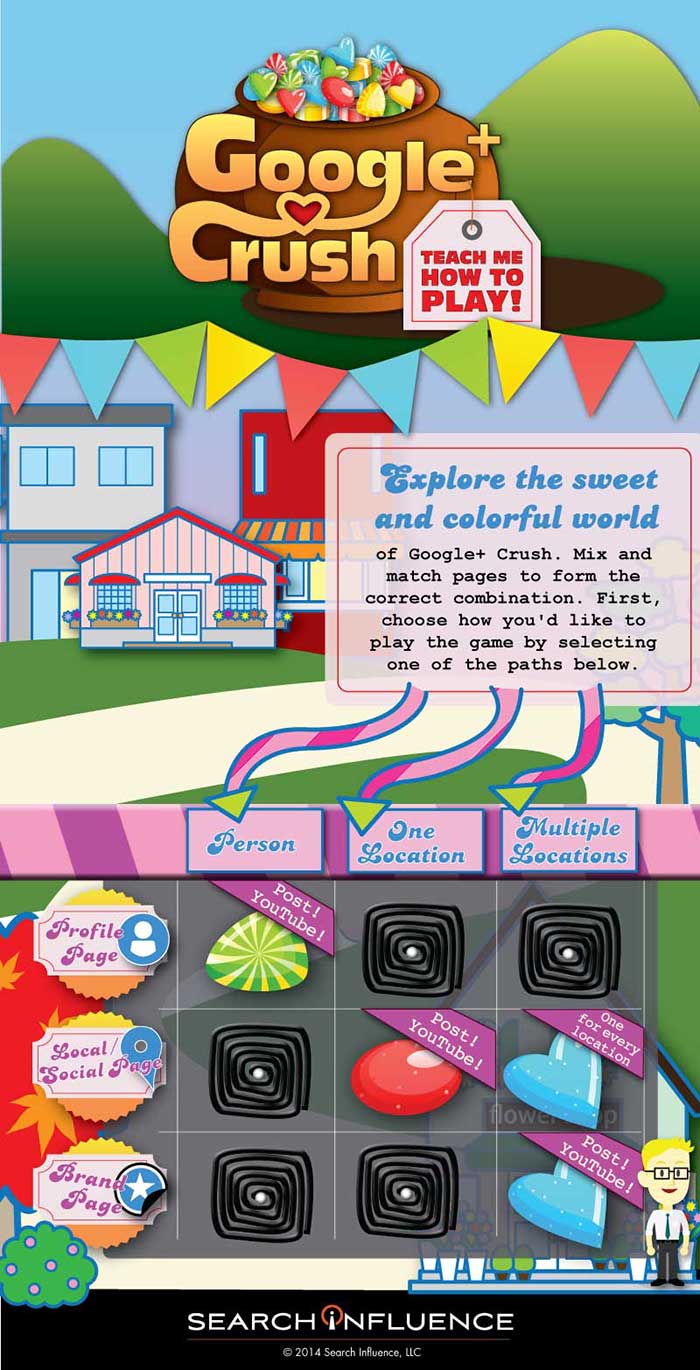
    To simplify this Google/YouTube situation, we’ve created this sweet little infographic to show:

    • Which pages you should create
    • Which page(s) you should use for regular posts and updates
    • Which page you should connect to YouTube

    As a reminder, there are three types of Google+ Pages:

    • Google+ Profile
    • Google+ Local/Social Page
    • Google+ Brand Page

    Explore the sweet and colorful world of Google+ Crush.

    Mix and match pages to form the correct combination, create the appropriate profile, and send the right social signals. First, choose how you’d like to play the game by selecting one of the paths.

    GooglePlusCrushInfographicImage

    If Google+ Crush Isn’t Your Type of Game, Just Read the Manual:

    • Are you looking to use your G+ profile for personal reasons (not associated with a business)? Start posting on your Profile Page and connect this page to your YouTube Channel.
    • Are you a business with just one location? Start posting on your Local/Social Page and connect this page to your YouTube Channel.
    • Are you a multiple location business? Create a Local/Social Page for each location. You should post to your Brand Page and connect your Brand Page to your YouTube Channel.

    Sugar crush! Remember, Google likes it when you play in their sandbox, so go ahead and start posting on Google+ and use YouTube channel to create your unique videos.

    And, above all, crush it!


  • Do Your Ads Belong on LinkedIn?

    LinkedInLogoImageLinkedIn is a great advertising platform for business-to-business (B2B) companies. It helps these businesses increase brand awareness and allows them to connect with potential clients.

    Should you be advertising on LinkedIn?

    Unfortunately, if you’re an ice cream shop advertising on LinkedIn in the hopes of increasing your sales, there is a 110% chance that your time, effort, and financial resources are better off on another platform. (Hint: Facebook). This marketing approach is best for linking to other businesses.

    LinkedIn Advertising is also extremely beneficial for companies looking to fill open positions. Users aren’t just on LinkedIn to see the latest baby pictures that their old high school friends are posting. They are mostly looking for professional development and networking opportunities.

    Are you targeting the right audience?

    So, you’ve decided that LinkedIn Advertising is a strategically advantageous move for your business. Now what? Figure out your target demographic.Do this before writing your ad copy and even before sponsoring your updates. It’s imperative that you do this before jumping onto this marketing battlefield with no precise aim.

    TargetMarketImage

    Why is this so important?

    LinkedIn offers a variety of demographic targeting options that can be combined to best fit the audience of your campaign. Strategically deciding on your audience will send your ads in the right direction for the best results.

    Who are you speaking to? Do you know what that audience likes and dislikes? You won’t be able to write enticing, effective ads that achieve your goals without this knowledge.

    When it comes to target options, the possibilities are vast! You can choose to target anything from specific locations, companies, and job titles to specific schools, groups, ages, and genders.

    Once you decide that LinkedIn is the place for your business and you figure out who your target demographic is, you’ll be ready to start running ads and sponsoring your updates.

    Image Source: https://flic.kr/p/3dTdUc

  • New Preview Will Have You Pinterested

    On Tuesday, Pinterest for Business’ Jason Costa announced the rollout of a new follow button that will give users a preview of what it will be like to follow the business.

    Tell Me How It Works

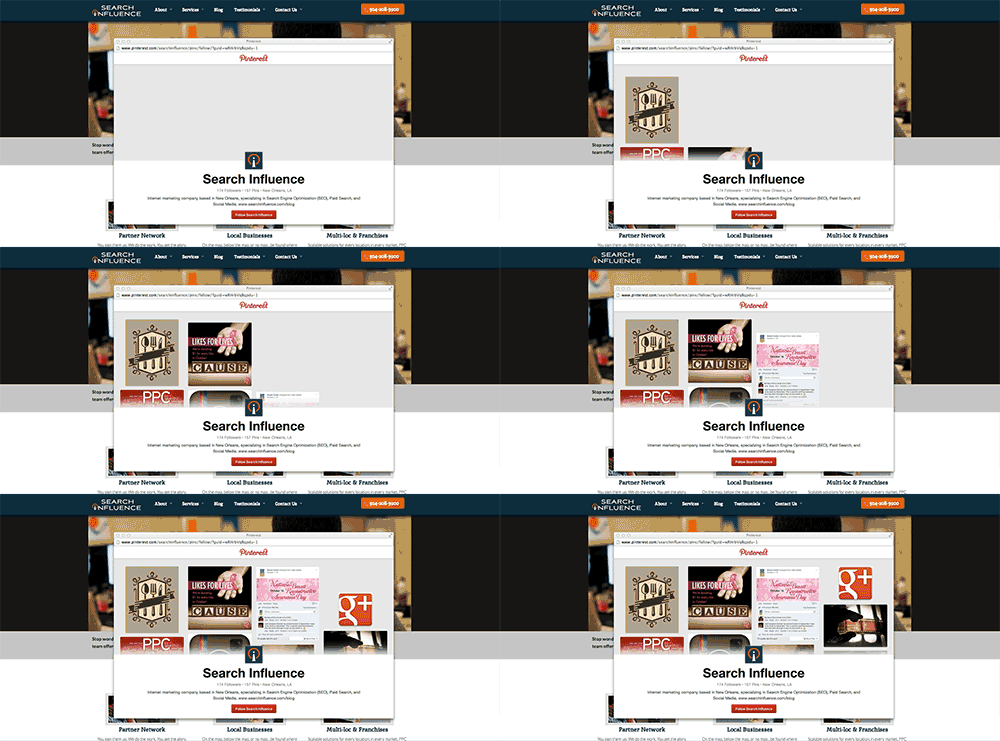
    The new button will trigger a pop up window that will include a preview of the most recent pins along with a confirmation button to follow that business. The exciting thing about the pop up window, Jason says, is that “ your visitors won’t ever have to leave your website to follow you.”

    Pinterest Follow Button Update Preview Image

    Costa says, “If you have the original Follow button in place, you won’t have to do anything to get the new version—it’ll just work!” Just like the old follow button, this button can be added to your site with just a couple of lines of code.

    Tell Me How It Will Look

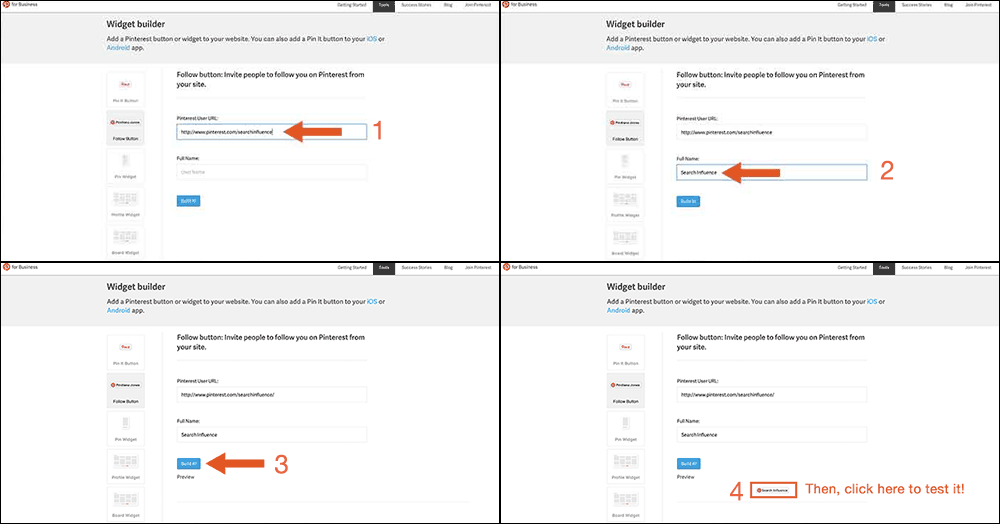
    Want to test out the new widget for your business’ Pinterest page? Lucky for you, you can! Just go to Pinterest for Business. Then click on “Tools” and “Widget Builder” in the menu. From there you can select the “Follow Button” on the left, and type in your Pinterest User URL along with your full user name and then click “Build it!” Now see for yourself how awesome this update really is.

    Test Pinterest Widget Image

    Let the Experts Weigh In

    Martin Beck from Marketing Land believes Pinterest made a smart update, “which is working to turn its popular image-based social network into a money maker.” UX experts like Sarah Horton from UX Magazine might say that this animation necessitates ”keyboard-focus management for custom controls.” However, because the image animation comes to an end on its own, I would argue that controls are not necessary for this animation. If anything, it should just get the viewers excited to see more pins!

  • #Ibelievethatwewillwin #Ole! #WorldCup

    As the world gathers in sport bars across the globe to watch the gorgeous and very talented FIFA team members, I’ve realized that the World Cup is kind of like the Super Bowl, just bigger, better, and hotter!

    Besides the commercials and the fact that the Super Bowl is only something America partakes in, one distinguishing difference between the World Cup and the Super Bowl is the branding. While the Super Bowl has consistent branding and logos every year, the World Cup continuously changes. For example, the Super Bowl uses a consistent hashtag (#SB14) that is created by the NFL and encouraged by fans to use in the days leading up to the big night. With the World Cup, there is no consistent branding.  Which is ironic since this is the one sport the world comes together to participate in and cheer on — the original football league. Which got me thinking, sports franchises should be treated just like any other business, as should the structure of their social media campaigns. The leagues should maintain a consistent brand, continue to publish content throughout the series, and encourage fans to get engaged.

    1) Consistent Branding

    It’s funny how one word can change your branding so much!

    #football vs. #soccer
    #brazil vs. #brasil

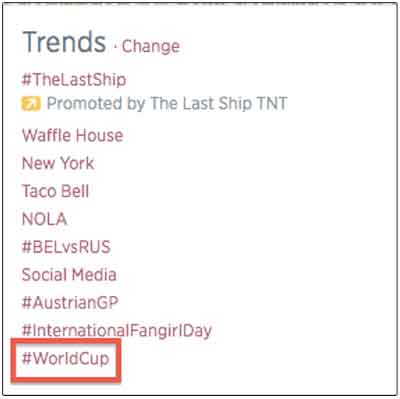
    Regardless of which country a team is from, the league should constantly present their branding on a worldwide scale. T-shirts, jersey logos, mugs, soccer balls (or footballs) and of course, hashtags.  The most commonly used hashtags for the World Cup is #worldcup with a 71.8% of tweets containing #worldcup in content published on Twitter. Other popular hashtags include:

    #brazil – 31.5%
    #fifa – 17.22%
    #football – 19.09%
    #fifta2014 – 13.29%
    #brazil2014 – 3.8%
    #soccer – 3.8%
    #brasil2014 -3.8%
    #france – 3.5%
    #fifawordcup – 3.5%
    And my favorite #Ibelievethatwewillwin

    TrendsWorldCup

    Although the league has no control over what countrymen and women are going to post or which team they are going to support, encouraging a hashtag is one way to control the branding of your business.

    2) Content is king

    The biggest social network participating in the World Cup is Twitter

    TwitterWorldCup

    With 645,750,000 people on Twitter, fans are just waiting for the latest tweet by a team member or the team. Publishing content to keep fans informed is key to a successful social media campaign. Publishing updates to the team’s status such as posting superstitions of the game results, or posting pregame photos, is what the soccer fans want. Don’t forget that your employees — or team members! — are extensions of your brand too. Encouraging employees to publish content and post pictures is also important to the overall brand image, and its success.

    TwitterESPNWorldCup

    3) Keep ‘em engaged!

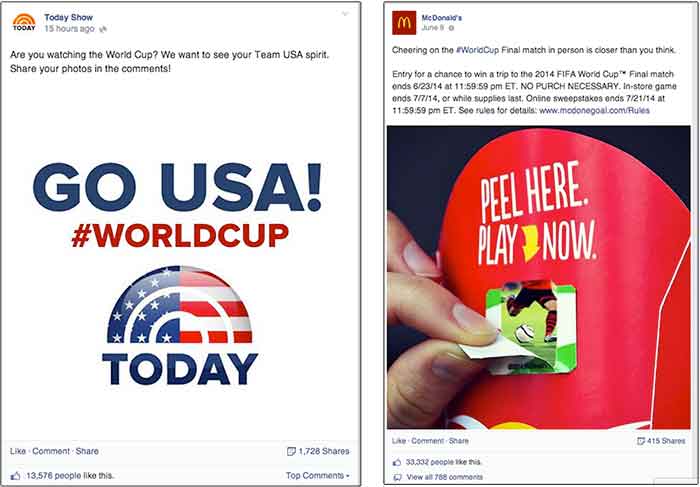
    In addition the informational content, make sure you are keeping your fans engaged with your brand. Many brands encourage engagement by asking fans to participate in poles, questions, or even contests. One of the biggest World Cup sponsor’s, McDonalds, jumped on this bandwagon in their offline “Peel, Play, Ole, Ole” campaign.

    TwitterPostsWorldCup

    For those businesses that aren’t FIFA sponsors, engaging with fans on Instagram and Foursquare are great for brand awareness. Asking fans to post pictures with your product, or check-in specials at locations are easy ways to increase a brand’s presence while engaging with fans.

    Regardless if your business is in a worldwide event that only comes around once every four years, or if it is the neighborhood corner grocery, these three tips can benefit any social media campaign.

    So y’all get ready Russia! #fifa2018 #worldcup #fifarussia #USA #USA #USA

  • #HowTo: An Overview of Using Vine for Brands and Businesses

    Facebook, Twitter, Google+, YouTube, the list goes on…

    Everyone knows keeping up with the current trends is important when it comes to marketing your business, especially on social media. It seems like each year there is a new social media craze that everyone is using, and it sometimes gets difficult deciding which platforms are the best for your business.

    Most social networks perform in a way where businesses can share written or visual content with their followers. Think of how Facebook and Twitter perform – brands share interesting text or pictures in hopes that followers will “like” “comment” or “retweet” the posts.

    However, there is nothing quite like watching an interesting, funny, or moving video. That is where Vine comes in. Created by its parent company Twitter in 2013, Vine brought a whole new way to market your business through videos.

    Well, Isn’t That What YouTube Does?

    Vine Profile
    Vine Profile

    Vine is similar to YouTube in that they are both platforms where users and brands can share video content with their followers. However, there are many differences that make Vine unique.

    • In the same way that Twitter limits users to 140 characters per tweet, Vine limits videos to a mere 6 seconds. This causes users to be really creative in getting the message across to viewers because there is such a limited time.
    • “Vines” are looping videos, meaning they will continue to play continuously as long as you are watching them.
    • Vine also has stop-motion capability, allowing users to record a portion of the video, stop recording, then start again at a different time.
    • Also similar to Twitter’s retweet, Vine has “revine” capability that allows users to share videos that they think are interesting to their followers.

    Interestingly enough, because of the creative nature of the app, many ordinary people have become “Vine Famous,” acquiring millions of fans since its inception in 2013. However, many businesses have also branched out and started using Vine to market their brand.

    How Can Vine Help Your Business?

    Vine can be beneficial for both new and loyal customers of your business.

    For new customers, you can gain awareness for your business through Vine. Millions of people view the popular pages and the trending #hashtags each day. Participating and getting your Vines exposed to more people could introduce your business to someone that didn’t know about it previously.

    For already loyal customers, Vine can offer a different way for them to see your business. For example, if you are a clothing store, making Vines of backstage action at a fashion show would be interesting to people who already have an interest in your brand.

    Tips for Getting Started

    Now that you know what Vine is and why it is important, here are a few tips to help you get started!

    • Use Hashtags: Join the conversation with other users on Vine and make videos relevant to the trending hashtags. An always popular one is #HowTo. Getting your business seen on these trending subjects increases the probability of your video getting seen, liked or even revined by other users.
    • Cross-Post Vines to Twitter: Vine is still such a new technology that not everyone is using yet. You can post your Vines to your brand’s Twitter account to get even more exposure.
    • BE CREATIVE: Vine is not the platform to just make videos just for the sake of making them. Because of the looping and stop-motion features, you can really make something unique and interesting that other people will find shareable. The best Vines are the ones that are funny or extremely visually appealing (think optical illusion or magic).

    Have A Call To Action When Applicable: Contests on Vine are popular. Have your followers create a unique video of themselves using your product, and revine the winner! This makes loyal customers feel special when their favorite business is actually acknowledging them.

    VinePost

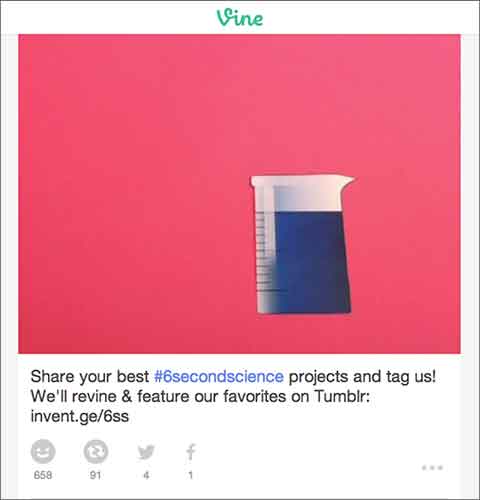
    Above you can see an example of a great Vine from GE. They encouraged their followers to be creative and make a #6SecondScience video, and in return they would revine a winner.

    Finding out how to use Vine can be difficult at first, but finding your niche and posting to this app can definitely be beneficial when it comes to keeping loyalty among customers and finding new ones. However, just like any other social media platform, it is important to keep up with the updates of the app and stay current with this ever-changing technology.

  • All The Best Ideas Are Stolen: Take Yours From Facebook’s Success Stories

    I was recently introduced to the Facebook for business page and was shown some interesting and educational aspects of this informative page.

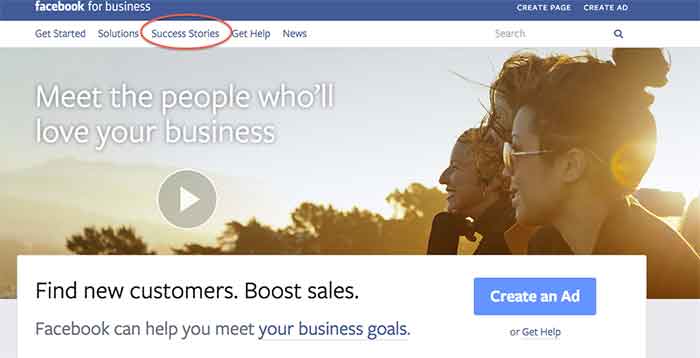
    Besides giving you an opportunity to create a Facebook Ad or create a page, it gives you the awesome option to see success stories of businesses that have used Facebook to their advantage.

    SuccessStories

    The Success Stories page gives you 5 options to choose from, depending on what you would like your search to include/show. You can search by:

    • Business size
    • Goal
    • Industry
    • Product
    • Region

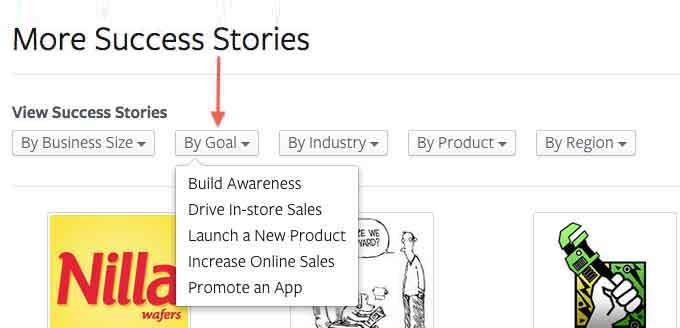
    The one that I think is the most helpful is the search by goal option. There are so many different goals that businesses want to achieve when promoting themselves on Facebook, and this option lists a variety of them to choose from.

    ViewMoreSuccessStories

    Since I LOVE to shop, I was interested in how small businesses that sell retail succeed on Facebook. When I conducted my search for a retail success story, Blake & Brady Boutique came up.

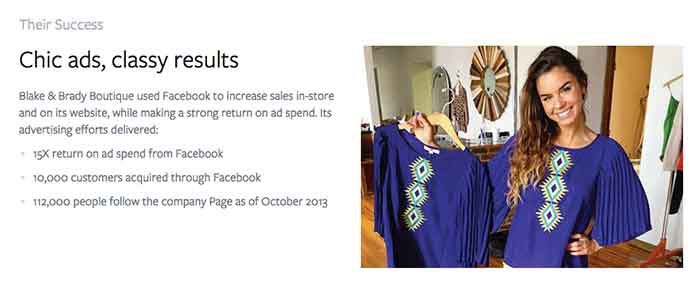
    This success story stated that the boutique, located in South Carolina, uses Facebook Ads to connect with shoppers. This in return has boosted their online and in-store sales. They have achieved a 15X return on ad spend and have gained 10,000 customers through Facebook.

    What Do They Have That You Don’t?

    After reading those amazing numbers, I had to wonder, how do they have such great success? Reading further into the story, I came across the thing that should start every success story, a GOAL!

    Their goal was to boost their in-store earnings and reach a wider audience online and offline. The first step the owner took was to use Facebook’s Start to Success Program to learn about what tools were available through Facebook.

    How’d They Do That?

    My next question was what did they use? Promoted posts were used to reach women who live close to Anderson, SC area in the News Feed. They also used ads in the right column of Facebook that target people based on their location, gender and interests to gain clicks to the business’s website to help boost online purchases. The owner measures ad results often and then re-invests in the campaigns that gain the most customers. The products they use are news feed placements, boosted posts, and custom audiences.

    TheirSuccess

    All in all, it is safe to say this small business is having an amazing experience using Facebook to promote their business. What are some of the ways you promote your business on Facebook? Let us know what works for you in the comments section below.


  • Clear Your Case Of Social Media Acne – Ugly Picture Links

    You can go far on 140 characters, but as they say, a picture is worth a thousand words. For the past year or so, Twitter has been enriching users’ experiences by allowing pictures and videos to be directly displayed on the feed, and with the introduction of the new profile design, it now allows users to visually enhance their profiles as well. As Twitter increasingly becomes a multimedia-friendly social media platform on both web and mobile, research shows that Tweets that include photos or videos receive 5 times more engagement than simple text tweets.

    SiTwitterPost

    Owly? Oh No! (The Terrifying Discovery)

    This week, while doing my routine account manager duties, I was looking over a client’s Twitter account and I noticed that our social media scheduler, Hootsuite, was still displaying images as ow.ly links.

    OhTheHorror

    One Does Not Simply Address Hootsuite (Or Does One?)

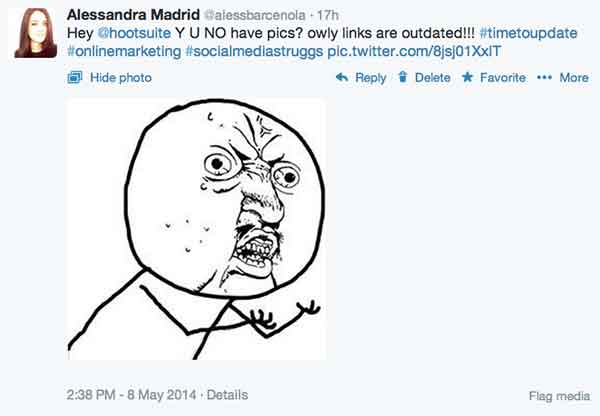
    As a social media fanatic, I did what I do best and voiced out my anguish @hootsuite.

    HeyHootsuite

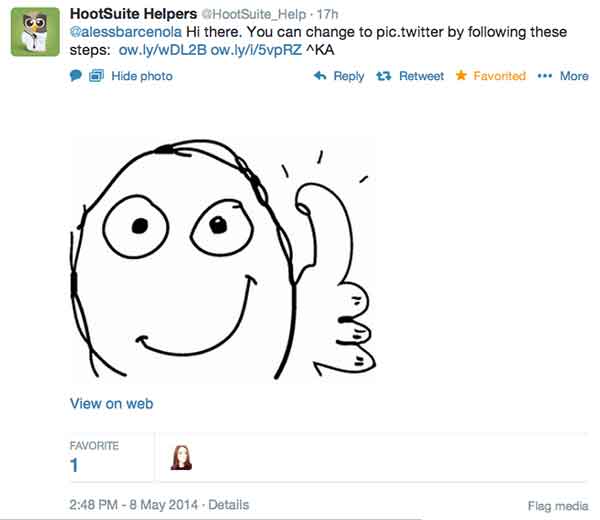
    Thankfully, Hootsuite knows the value of connecting with users via social media, and they were quick to respond with a solution.

    HootSuiteHelpers

    A Brief & Wonderful Solution To All Our Problems (& World Peace)

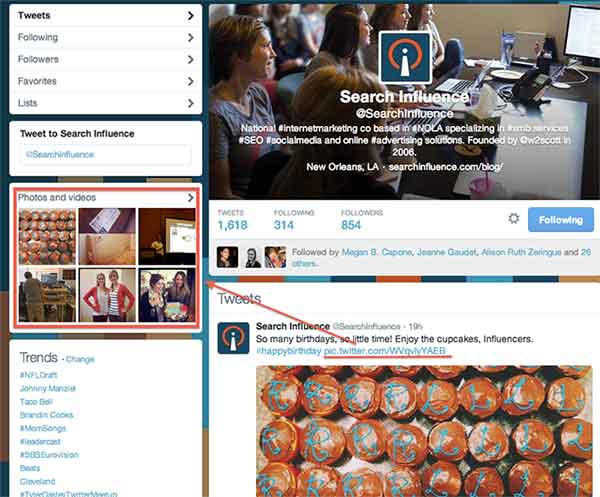
    As I did more research behind the solution Hootsuite provided, I found out that just 2 months ago, the social media scheduler rolled out the option for Pro and Enterprise users to post photographs via the native pic.twitter.com functionality. This feature will allow any photograph scheduled via Hootsuite to be automatically displayed on Twitter’s timeline, and it will also be included in a user’s photo gallery.

    TwitterPicUrl

    You Too Can Have Beautiful Picture Links

    Ready to make the switch? I know Search Influence is! The steps to change your image upload service on Twitter are quite simple, and as studies continue to show us, the rewards of doing this will be quite grand.

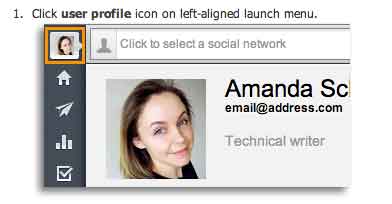
    ClickUserProfile

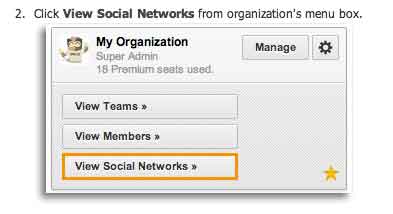
    ViewSocialMediaNetworks

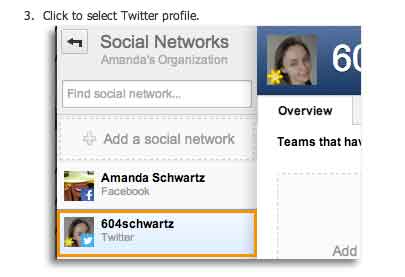
    SelectTwitterProfile

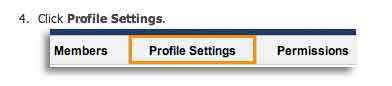
    ProfileSettings

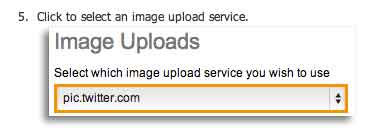
    SelectImageToUpload

    Voilá! Your scheduled Tweets will now be posted with multimedia showing up on users’ feeds.

    Voila

  • 5 for Friday – Google SSL Warnings, Twitter & Amazon Collab, and more!

    1. Twitter and Amazon Link Up, Add Items To Your Shopping Cart With A Single Tweet – Buzzfeed

    452416003

    Amazon is using Twitter to drive sales with the new #AmazonCart feature. This may be a major breakthrough for ecommerce businesses. It’s super simple:

    1. The business tweets out a link for a product.

    2. Interested consumers can then reply to that tweet with the hashtag #AmazonCart.

    3. The product will instantly appear in the consumer’s Amazon cart.

    The consumer’s Twitter has to be linked to their Amazon account in order to do this, but the new feature should drive sales for E-commerce businesses with products on Amazon. Twitter users can also search the hashtag #AmazonCart to see what other people are buying. Isn’t technology great?!

    2. Become Your Own Rumpelstiltskin: Spinnin’ Crappy Online Reviews Into a Better Business – Search Engine Journal

    This is a great article on how to approach negative reviews. There are bad reviews from people who genuinely had a bad experience and bad reviews from people who are just plain irrational.

    How do you tell the difference between these people?

    If you look through an irrational person’s profile it’s full of negative reviews and they usually make overly dramatic and sadistic statements. People that genuinely had a bad experience  usually have a mix of positive and negative reviews if you look through their profile, there are some positive comments within their negative review and they make rational statements about their experience.

    How do you deal with this?

    Respond to the irrational reviewer with a generic, but genuine message without addressing specific points of concert. If they respond back, don’t respond again. Respond to the rational reviewer by addressing their specific concerns quickly and assuring the reviewer that steps have been taken to ensure that this will not happen again.

    3. New App Reveals How Much Information You’re Giving To Facebook – Search Engine Journal

    FacebookScaryScary! A new app, called Digital Shadow, was launched as a promotional tool for the upcoming video game Watch Dogs. It uses data you’ve given to Facebook to guess your location, your income, and your passwords. They use algorithms to predict your interest, desires, and fantasies. We live in an era where we like to document everything online from how we’re feeling to what we purchased to where we are in the world. It’s an eye opener to find out that there are people in the world that can use that information against you to hack your computer or to be more influential in their sales tactics towards you.

    4. Google Pauses Webmaster Tools SSL Warnings In Order Clarify Them In Future – Search Engine Roundtable

    Google recently sent out mass SSL warnings via Google Webmaster. They decided to pause the warning after they realized they were causing mass confusion. Now, Google is working on making the warnings clearer and tweaking the criteria before restarting them.

    Google is simply providing information about the server response for HTTPS access to your URL. If it responds, but the SSL cert does not match the domain, the warning lets you know. Basically, Google wants the hosts to either serve content via HTTPS properly, or not serve content there at all. Serving content via HTTPS without a valid TLS/SSL certificate will result in users seeing browser warnings. Avoiding this makes sense, no matter how many site users actually see the warning.

    5. Announcing Schema.org Actions – Schema Blog

    LegosAction

    Schema.org introduced vocabulary that allows websites to describe the actions they enable and how these actions can be invoked. You can use action schema to play a video, review a movie, or purchase a product. The new schema adds context to a link or content. It is a way of interpreting content to cite sources and authors and the type of activity that happened between the two. From what was said in the press release, the actions schema is still a work in progress and will be enhanced as more users use action schema and provide feedback.