Category: Industry Insights

  • Marketers Like Us – How I’ve Learned to Stop Worrying and Love Having No Privacy

    Not too long ago, I was completely ignorant of any tracking on the internet. I thought, like many, that the things I did online were solely known to me and wouldn’t affect anything. I thought that “Private Browsing” really meant that, and that no one else would know or care that I played a bunch of flash games and that I worked in whatever field I did.

    Flash forward to now — I’ve had a whopping year of intensive exposure and training in Internet Marketing: found out what Facebook is really for; why Google might not even find the site I’m looking for; what Google is doing in my status bar, even if I typed in the url; how Google’s ads knew exactly what I typed; that Google’s rankings are always in a state of flux; and even how I like to see the pages I visit. In short, entering this job totally changed how I look at the web.

    And I’m happier for it. Sure, people are always trying to create some kind of “Google is Watching You” zeitgeist, whether through their use of AdBlock and Ghostery, or by bringing up the problems Google’s had with European trade officials, or how much Google’s search results have changed since the last time they noticed. People seem to be concerned that someone’s watching their online habits specifically. But I’m now the person who’s watching, and I know how and why I’m doing it.

    internet privacy
    Is this who's looking at your browsing habits?

    To be fair, everyone who’s “invading” privacy is watching online habits. It’s easy to say it’s on a “macro” level, but it’s harder to convince some people that it’s more like an ant farm than an investigation. For internet marketers, not only is it simply not profitable to look at the individual, but it’s becoming less feasible and less legal to do so.

    Firstly, targeted marketing based on internet behavior isn’t an unregulated free-for-all on your personal information. 2009 brought a proposal from the FTC for seven “Self-Regulatory Principles for Online Behavioral Advertising,” outline in this Interactive Advertising Bureau report. But for this discussion, it’s important to note that the regulations do not affect collection of data “solely for [the website’s] own uses,” or for contextual advertising like Adwords, “as it delivers advertisements based on the content of a Web page, a search query, or a user’s contemporaneous behavior” — the two main ways marketers use your data online.

    What most marketers are concerned with are those non-regulated uses. Google Analytics, found 39 times more than the “average” tracker on the web, is largely for the company’s own use. Google, still the top dog for internet searches, puts its contextual ads right next to its search results — a strong source of revenue for its advertisers.

    Analytics, despite privacy advocates’ concerns, is nothing to be afraid of. It’s only to make sites more responsive to their users. One of the greatest tools for the company owning (or managing) the site is to know how people actually use their site. Certainly, most hosting packages do this in a rudimentary way, but few have the immediate gratification of being able to see the site alongside what links are clicked.
    Internet Privacy
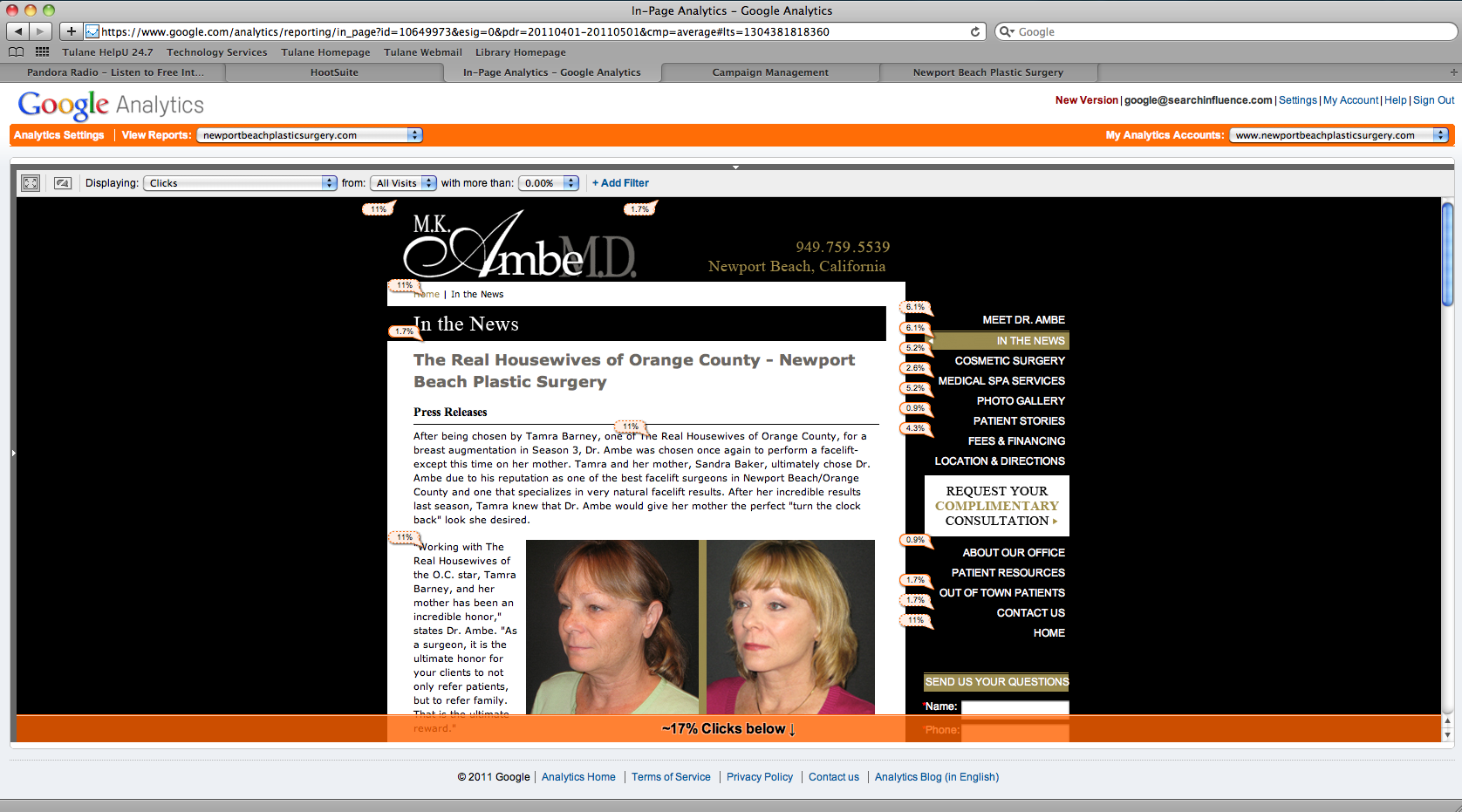
    Conversions from a Contact Page in Analytics
    Internet Privacy
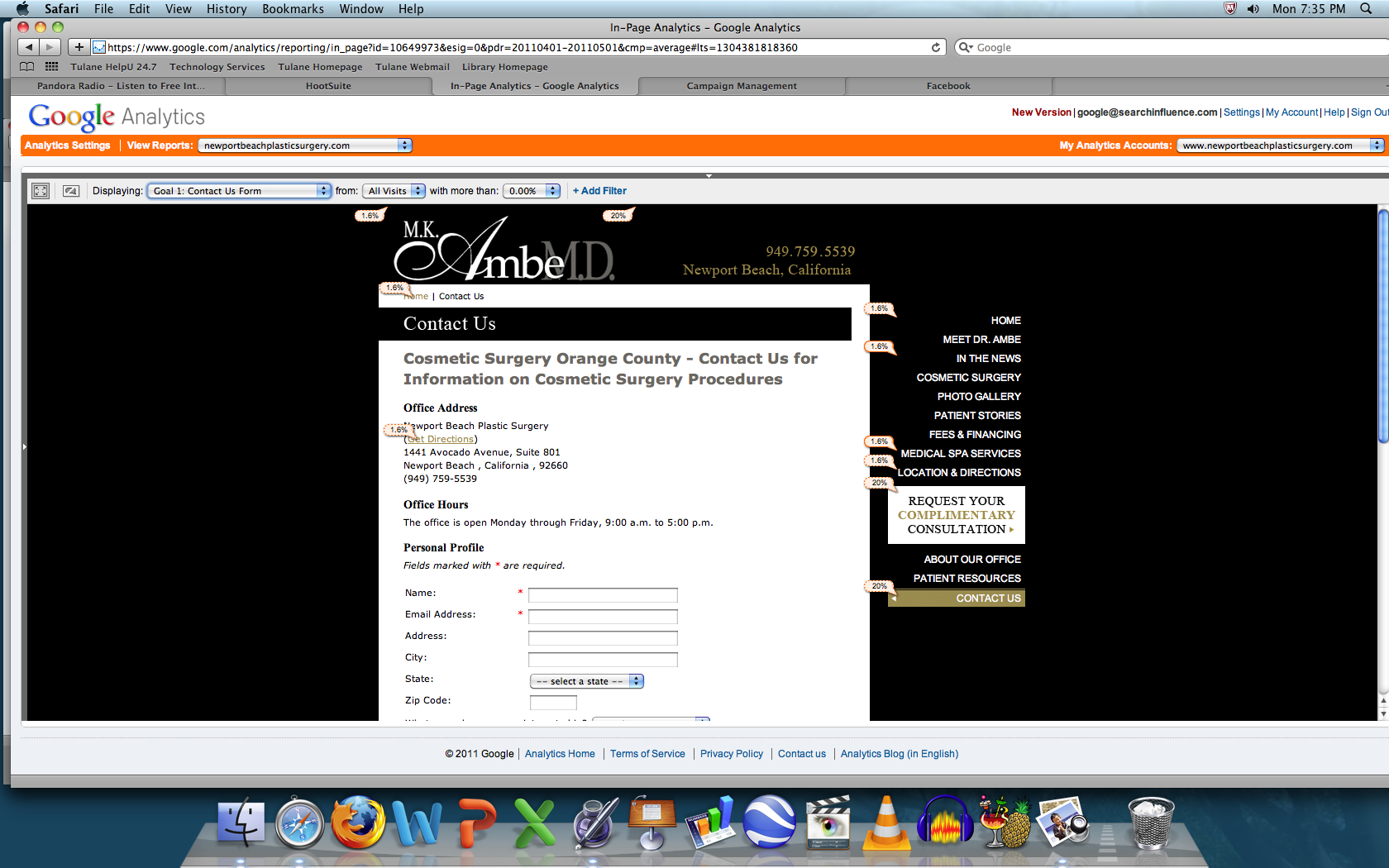
    Landing Page overlaid with In-Page Analytics

    The In-Page Analytics shows the percentage of clicks to the various pages in little pop-ups next to each link. Of course, it’s only tracking links to the page, so you have to take it with a few grains of salt if you have contextual linking on the page, but it gives site owners and especially ad campaign runners an idea of how to make their choices more relevant to browsers. The page below shows that almost 2% of visitors hit up the contact page from here, and another view shows us that a fifth of the people visiting the contact page complete a form — whether that’s good or bad is for the marketer to decide, but that information is certainly useful. Should that information not be in the hands of small businesses? The 12000 people searching for “block javascript” in Google think so.

    And what about those 12000? How can I know that? Because Google “betrays” its users privacy and gives vague estimates of how much people search for various keywords. Again, this helps small businesses without walls of supercomputers to better gather data so that they can garner a little bit of information to better serve their customers.
    Internet Privacy
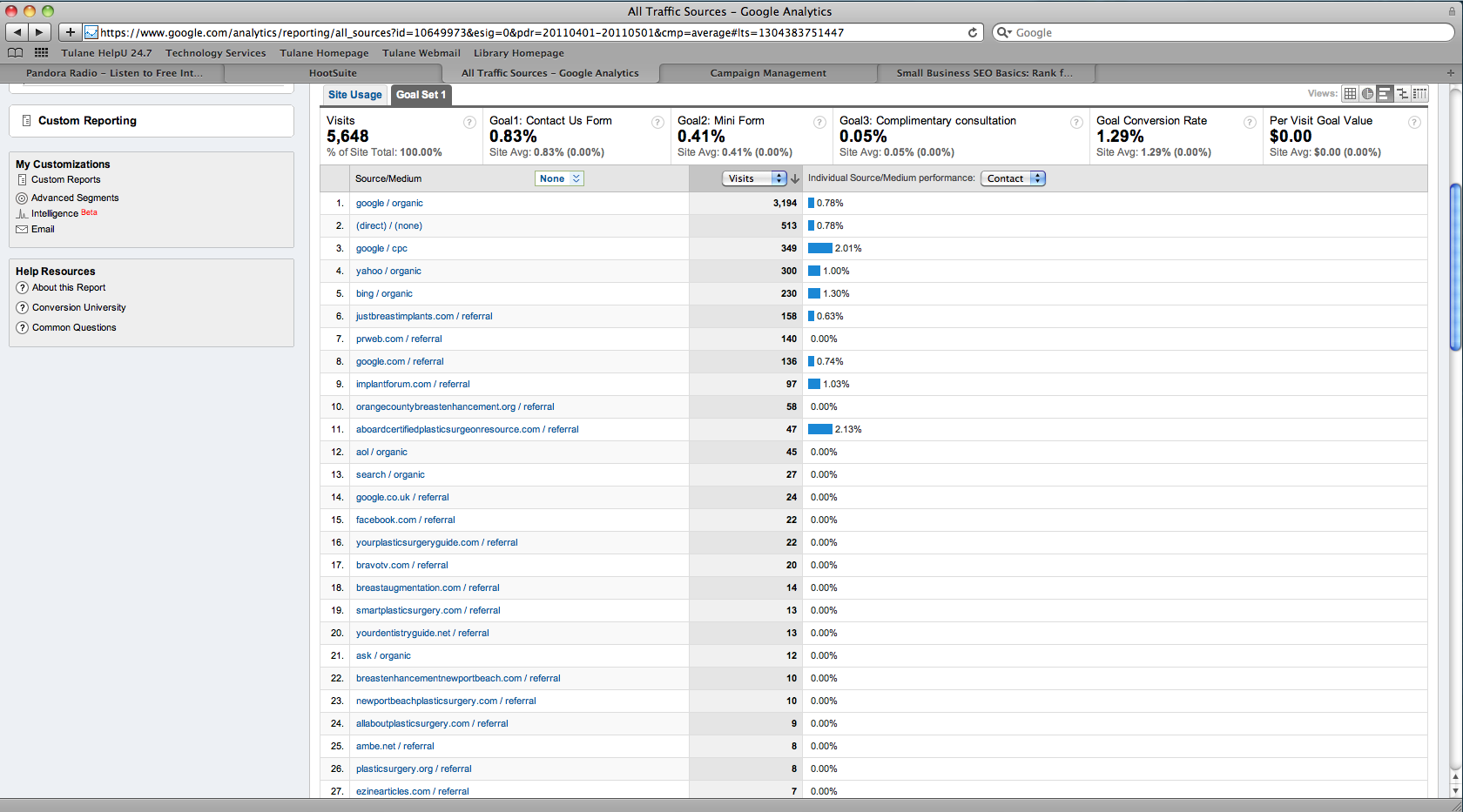
    Drilldown of Referrals from Other Sites

    Finally, what about pages you visit that aren’t part of the site you’re on? Why would a site owner want to know that? Surely, they couldn’t want to know what page you were on before this one! But the internet is the ultimate word-of-mouth; “Who referred you?” becomes “From where were you referred?” and unfortunately, people just don’t pay enough attention to notice effectively on their own.

    So instead of ineffective tools and sheer guesswork, the visitor loses a little privacy to help small business owners understand how people came to their site and make it better for those visitors by tailoring the content and design. And this is the mindset behind any loss of privacy for the visitor. Marketers like us aren’t trying to figure out who specifically visited our site and did what — if we were, we’d use other tools that can’t be so easily blocked, and would only be used for malicious visitors.

    While some might call it “drinking the Kool-Aid,” I’ve understood more deeply why losing just a little privacy and not trying to circumvent analytics and other tools are a boon for the whole Internet — making it more valuable to the visitor, so that sites give to the reader what they really want. Stop worrying, and support your small businesses on the web.

  • Reviewing the Yelp Review Filter

    Image: People Hate Us on YelpI’ve just published a longer article on the Yelp Review Filter, what it is, how to manage it and, of course, how to spam it.

    Since I wanted to make it a page rather than a post it doesn’t have comments so I’m putting up this post to collect comments.

    Are you a business who is stinging from being Yelped? Tell us about it and we’ll do a follow up blog post with the best stories.

    And even if you’re not a business owner I’d love to hear your opinion of the Yelp Review Filter in the comments.

  • Google Places And HotPot Merge Into One Streamlined Service

    When Google introduced HotPot, the Foursquaresque recommendation engine based on social results, it was hailed as a seamless integration of Yelp-style reviews and uniquely Google functionality. We’ve already discussed its simple ethos of personalized recommendations based on friends’ and peers’ reviews, furthering the “social results are relevant results” direction that the company seems to be heading in. HotPot’s paper showings were a resounding success, moving the reviews coming in from Google users from a mere 3 percent to 20 (as opposed to second-hand aggregated reviews from Yelp and its army of clones). However, the G-team has recently announced the merger of HotPot into Places. Is this a smart move on Google’s part? What kind of practical changes are we likely to see?

    The popular HotPot app, which featured “check-in” functionality, will be folded in to the extant Places app. Additionally, the Places interface (both mobile and full web versions) are reorganized, with HotPot ratings available alongside objective geographic information. (The original HotPot UI required a click-through from the review screen in order to display this data.) Other than that… well, not much. While there is something to be said for a unique socially-focused review engine, as far as Google is concerned less is more. However, the Places app has undergone a slick expansion to allow for on-the-go rating.

    Image courtesy googlemobile.blogspot.com/

    My personal gut reaction to this decision is that it is a positive move to eliminate functional redundancy. While HotPot has helped bring in first-hand reviews directly from Google users, the service itself never really took off the way that Places (or HotPot’s more cosmetically similar cousin Foursquare) has. Integrating location-based reviews and functionality directly into Places pages can only make things simpler for both businessowners and users, who already have quite enough to deal with in Google Tags, Boost, Buzz, Maps, and Latitude — just to name a few. While making business presence known online is integrally important in the contemporary marketplace. However, the layers upon layers of features Google has added, while useful for discrete and specific purposes, can undoubtedly appear overly complex and confusing to a business owner who simply wants to make themselves available online without suffering the visibility implications of not chasing after the newest in the seemingly ceaseless succession of new features rolled out in front of them. Furthermore, establishing a direct link between an online “home base” and reviews of the business is a way for users, businessowners and reviewers to seamlessly get the information they need or add to the discussion with ease.

  • Why Villifying DKI Is Pointless

    Image courtesy gamespot.com

    Dear Paid Search Advertisers,

    This {KeyWord:fallback phrase} is not your enemy.

    Many veteran PPC marketers tend to vilify dynamic keyword insertions (or DKI). They usually present examples of DKI which have been obviously done by someone who is not skilled in the nuances of paid search copy writing – this bothers me.

    It bothers me because I think there is a valid purpose for dynamic keyword insertion in paid advertising. While some uses are nefarious (let‘s be clear – I do not own a black hat) a lot of them are legitimately useful for marketing efforts.

    First let’s talk about how to use DKI because after seeing some serious DKI GONE BAD, I figured I should explain how to use it.

    When using DKI, you need to be careful of how you input the word “keyword” before the colon.
    {keyword:________} would make your inserted keyword will not be capitalized. By capitalizing the “K” in {Keyword:________} the first letter of the word is capitalized. When you type {KeyWord::________} every word will be capitalized. And when you capitalize every letter i.e. {KEYWORD:________} all of your letters will be capitalized and searchers will think you are partially deaf and/or screaming your headline at them – don’t do this.

    Now that I’ve explained how to use DKI, let’s move on to when it is appropriate to use it.

    BE WARNED! I am not advocating DKI abuse – use at your own discretion.

    Image courtesy of jeffreyhill.typepad.com

    The Good Use of Leveraging Other Brands

    This is a scary, scary topic for most advertisers because they fear legal pursuit from owners – however DKI is probably the smartest way to advertise when you are a small third-party reseller. A great example is Apple. If you are a Main St. electronic boutique who specializes in selling discounted Apple computers, how do you set up a campaign that is effective that isn’t flagged by the ad po-po? Build a focused ad group using the trademark terms as keywords and  DKI in your headline.
    EXAMPLE:

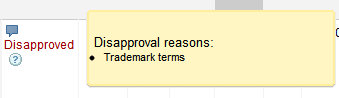
    The Eligible ad will fly through the review process unharmed because it does not directly mention Apple but the Under Review ad will result in you seeing this message time and time again:

    Doing this can really help you penetrate a very specific niche of a larger market quickly and, if set up properly (i.e. exact matching the correct terms you want to appear in the headline), cost-effectively.

    The Bad Use of Leveraging Other Brands

    Using DKI for leveraging a competitors’ brand  is great when you want to undermine their newest promotion, expose possible unsightly transgressions, or just really piss them off.

    Image courtesy of FOX TV Network

    Let’s say you are the neighborhood traditional American restaurant and you want to increase your market share after some bad press comes out about a direct competitor – use it to your advantage.

    Find all the variables and misspelling of their name, use one of those misspelling as your fallback phrase and have their actual brand name insert dynamically in the headline.

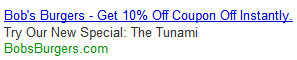
    So if your competitor’s ad is in position one for the phrase “Bob‘s Burgers“:

    Have your ad in position two with :

    This will make your competitor $#*! a brick and Google won’t do anything because you are following their guidelines. This is like saying you love praying so you are giving it up for Lent – you got them in a technicality.

    NOTE: I would never do this for a client – this is merely a suggestion for you devilish paid search marketers out there *polishes halo*

    The Good Way to Avoiding Negative Approval Status

    Another use of DKI is avoid long review process and disapprovals because of  “non-family“ or “adult” ad copy.  What are “non-family” and “adult” ads? Here’s the official definition:

    Ads are reviewed and categorized as Family Safe, Non-Family Safe, or Adult Sexual Content depending on the content of the ad and website.

    So basically anything part of the human anatomy and any word you wouldn’t say around your mother. I am frequently annoyed by this particular rule because I deal with a lot of plastic surgeons who perform cosmetic and reconstructive breast procedures. Breast – a word that is so mundane that to be considered “non-family” by the Search Overlord Googleus Maximus is ridiculous. I’m still confused that the headlines “Breast Cancer Treatment”, “Breast Implants Surgery”, and “See Big MILF Breasts Now” are all consider the same even though the context of the word is vastly different. Since this is a problem I run into on daily basis, using dynamic keyword insertion is pivotal to me getting ads up and running (without several phone calls and 5-7 business day wait time).

    Here are some examples of ads that will be marked as “Non-family” and “Approved”.

    Image courtesy of knowyourmeme.com

    The Bad Way to Avoiding Negative Approval Status

    Google hates drugs and at the top of their list seems to be medical mary jane. I’m not sure why, especially considering it is legal in California (and safer than all other drugs).

    Regardless of Google’s Stalin impersonation, if you are trying to advertise on Google for marijuana related ads and terms you are gonna have to jump through some hoops. What I’ve learned from my time running a medical marijuana campaign is you can trick Google into approving your ads and use DKI to make your ad relevant to searchers.

    EXAMPLE:

    This is an ad I tried to run for for the lulz on a $100 free Google Adwords account just to see if I could do it. As soon as I hit the submit button, the image below appeared on my screen.

    Google’s automated system was not in the mood for my shenanigans.

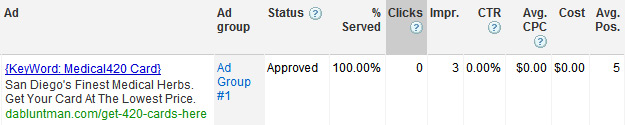
    Using DKI, I changed the headline and even made the display url more ridiculous to prove a point and in less than 30 minutes my “medical marijuana” ad was not only Approved, it was receiving impressions.

    The shocking part about this is my free Google Adword account’s medical marijuana ads were approved faster than a 6-year-old plastic surgery account that had the word “breast” in the adcopy (I swear Adwords’ review team is composed of untrained golden snub monkeys that respond negatively to the human anatomy – “DKI,” more like “DIK”.)

    Image courtesy of zoofacts.com
    They are sooooo cute but such terrible ad reviewers…

    I guess this post was to make people aware it does not make you lazy, dumb, or a noob to use dynamic keyword insertion. In fact, I think if you know how to use is properly it can be extremely beneficial to your ad campaigns. Think of DKI as something to master, like martial arts. Could you possibly kill your ad group’s performance? Of course! But if you hone this skill you could be hundred hand slapping your ad competition, Kenshiro-style.
    Image courtesy of knowyourmeme.com
  • MergeWords takes the elbow grease out of keyword research, domain checks and linkbuilding

    As Internet social media practitioners, we’re always on the lookout for ways to streamline activity in a fast-paced, data-heavy world, from apps that eliminate the check-in/out process of location tracking to integrating user reviews directly into Google Places along with basic phone book-style information. Keyword research is one of the less glamorous parts of the process; it happens at a basic level of campaign creation, essentially something of a grunt chore before the more tailored work can get underway. Most important, keyword research can be a long and tedious process that at the end yields only a small return on the investment of time — ie only a few keywords out of a large collated set will potentially have search value. Anyone who’s done keyword research will groan at the thought of the familiar ritual: copy/paste > Find/Replace, copy/paste > Find/Replace, copy/paste > Find/Replace, Find/Replace geographic modifier, rinse and repeat. This is where MergeWords — a handy-dandy web tool that can generate long-tail keyword lists from a set of disparate qualifiers in a snap — comes in.

    From this…

    MergeWords’ appeal lies in both its simplicity (a sparse interface with easy-to-discern options) and its power. While there are a few other websites that offer many of the same options, none allow for the same versatility of function. There is some sample data to be had which demonstrates the tool’s flexibility; linkbuilding, for example, can be greatly hastened by the addition of Google tags such as intitle: or inure:. The user is also allowed a choice of separators for their merged list; a simple keyword aggregate may require a space between all words in the column, but the creators have also made domain research a snap by allowing the elimination of this space or its substitution with a different character. All one has to do is add in their preferred modifiers, set the separator option to “nothing” (thus creating a truly merged, one-word product) or hyphens, and insert their preferred top-level domain appendations (.com, .net, .org, etc). Conversely, an individual looking to for pay-per-click keywords of exact specifications may choose to wrap their results in quotation marks or brackets. The end product, then, is infinitely variable and almost instantaneous in its results: the perfect solution for this kind of task that weak human grey matter finds challenging.

    …to this!

    MergeWords isn’t quite perfect– I would appreciate a fourth box to allow for the addition of a geographic modifier while still resulting in a three-qualifier long-tail keyword. However, this problem is easily remedied by creating a separate list of combined-qualifier keywords (for example, using “stiletto heels” as one keyword in one column instead of entering “stiletto” and “heels” into columns A and B respectively). While this may necessitate a little elbow grease, I’ll gladly take it in exchange for the lack of headache caused by having to keep track of huge numbers of disparate qualifiers, as well as merging them into a seamless list without duplication. Thanks, MergeWords!– and my command-C/command-V keys thank you, too.

  • Egypt Blocks Internet Access – What That Would Do To Us

    Starting last Thurday, Egypt “shut down Internet access to its 80 million citizens.” Possibly spurred by the Tunisian overthrow of President Zine al-Abidine Ben Al Ben Ali, the riots in Cairo, home to more than 16 million citizens, defied the rule of President Hosni Mubarak, head of state since 1981 and ruler for life since 2006, whose “government has for so long defied the mounting loathing felt for it by so many of its citizens.”

    Mubarak is by no means an innocent leader, having recently fired his Cabinet and delivering a Nixon-esque speech apparently appealing to the legitimacy of the rioters’ concerns while remaining official in tone. This smattering of front-page articles runs the gamut of support for the regime to nearly revolutionary reports of “the people advanc[ing] as Mubarak starts his retreat.”

    At 5:20 PM Eastern, Egypt completed the not-quite-unprecedented block on internet communications it started a few days earlier by blocking access to Facebook and Twitter. They killed the internet by forcing the Egyptian ISPs to withdraw over 3,500 Border Gateway Protocol routes — save for Noor Data Networks, the ISP for the Egyptian Stock Exchange. The Telegraph explains:

    BGP routes are one of the most vital parts of the internet. They are mostly used by ISPs so their networks can exchange information about how to best route the packets of data that make up all internet communications.

    If an ISP withdraws its BGP routes, its customers effectively disappear from the internet, unable to access websites and services, send and receive email, or use voice services such as Skype.

    What makes this action more devastating to Egypt is that it’s a clear action against the majority of people in the country. President Mubarak is targeting the youths who are at the core of the drive for regime change: the median age of the country is 24, and the majority of the country is under 35—prime ages for pandemic Internet usage. Egypt tops the Arab world for number of Facebook subscribers at 5 million, approximately 16% of the total population.

    Commentators are sighing a collective “Huh?” at the action. According to monitoring firm BGP’s “analysis, 88% of the ‘Egyptian Internet’ has fallen of the Internet.” To put this into a different perspective, let’s see what such a shutdown would do to US business.

    Facebook access from Egypt has been blocked for 5 days — in America, this would block about 22,341,785 people from accessing the site over that time, stopping approximately 25% of $6 million a day spent on PPC advertising, totaling $7.5 million of potential loss to the company. Though it is hard to parse out what that would mean for the advertising company given different spend rates and acceptable cost-per-lead, the high value top companies give to their Facebook fans shows the potential for lost business, not to mention that Aunt Irma can’t see the latest baby pics and her Farmville crops will wither—which may be a much more dire situation. For the internet at large, if we assume that 88% of e-commerce is completely blocked for four days, we’d see $1.624 billion lost just in e-commerce sales alone.

    To be clear: there is no way this would be allowed by industries if it were to happen here. ISPs are too independent to want to handle so many complaints and businesses would never forgive the financial losses come election day. It’ll never happen.

    The actions by President Mubarak, removing a vox populi in order to stymie efforts against his increasingly overt dictatorship, may end up hurting him more than he thinks it’ll help. While certainly Egypt doesn’t have the internet economy of the US, with the coming of the work week, already Egypt is feeling the pinch.

  • Google Exposed! Don’t Trust Webmaster Tools Reporting!

    "The Simpsons" © 20th Century Fox Television (Don't Sue Me!)

    In the middle of December 2011, Google rolled out some new changes to the Webmaster Tools. This update included search queries with top pages, organic CTR, and organic imprressions, as well as, intergrated graphs ala Google Analytics.

    Since this update went live, I’ve been wondering if the data that Google is providing is accurate and how does it stand up against Google Adwords Keyword Tool and actual Adwords data.

    We have a client who is position 1 for a cosmetic surgery term in a major metropolitan area. So I pulled the two sets of Google data reported and the results were mystifying.

    Adwords Keyword Tool:

    Click to Enlarge
    Click to Enlarge

    Keyword Tool reports there are an average of 2,900 local monthly searches for the phrase geo-modified cosmetic surgery.

    Google Webmaster Tools:

    Click to Enlarge
    Click to Enlarge

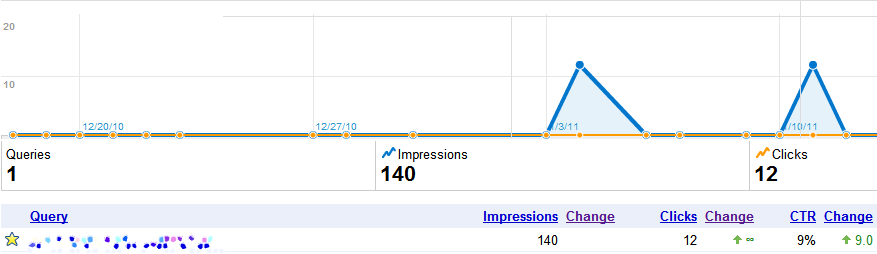
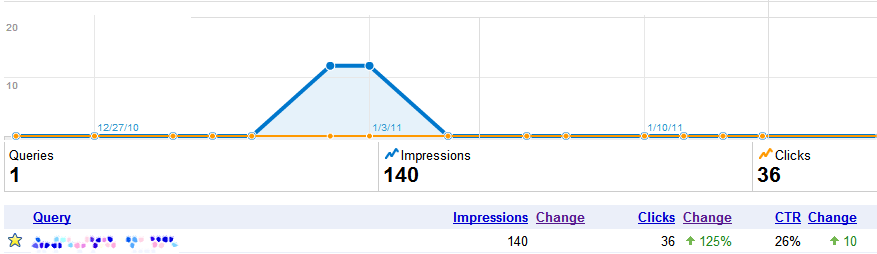
    Webmaster tool reported a mere 140 impressions! That’s a difference of 27k searches! Granted this data represents the holiday season in the US but you can not convince me that 96% of the searches stop. 10 or 15% sure, people have other things to think about during the holidays than getting bigger breast, but 96%! No %&*#ing way. Especially for a client that is in position one for the phrase.

    And yes before you say it is an “approximate 12-month average number of user queries”, that would mean two out of the remaining twelve months would have to had double the search queries of the Google Adwords Keyword Tool number (go do the math, I’ll wait…).

    Oh and to convince myself this isn’t some isolated event in Google’s data reporting, I pulled some additional information on another client who ranked in position one and was running Google Adwords ads during the same time frame that Webmaster tool reported on.

    Adwords Keyword Tool:

    Click to Enlarge
    Click to Enlarge

    Google’s Keyword Tool reports that the local monthly searches are 1,300…

    Google Webmaster Tools:

    Click to Enlarge
    Click to Enlarge

    And Webmaster Tools reported 140 impressions from Dec 22 – Jan 22. A big difference than what the Adwords Keyword Tool is reporting. But wait! The data looks even more like jelly when you compare Adwords  to Google Webmaster Tool for the same date range (oh and to clarify this client has been strong at position 1 for over a year for this term).

    Google Adwords:

    Click to Enlarge
    Click to Enlarge

    For the same exact date range and same exact keyword running simultaneously for the same location (this is a geo-modified keyword for a national level audience) the data is off by almost 50%! That’s failing (terribly) where I come from.

    Seeing this data together is actually disheartening.  If I was using Google tools to perform an  A/B test and got a 50% accuracy in the data I would throw away the test. I understand Google is giving away ( most of) the data for free but there really should be some quality assurance for the Google Adwords Keyword tool. This tool should be giving advertisers the most correct data possible in order to help them create more effective campaigns and better gauge potential market growth.

    At the end of the day, I wouldn’t trust Google Webmaster Tools as an authoritative source of search volume for your site. While it is collecting great data about indexing issues and missing pages, it is doesn’t give you accurate enough information to make a decision. I guess in a way, the three sources are like credit scores. If you just look at the one, you miss some important knowledge that could either be a boon or a bust.

  • Mayor Maker iPhone app does what the name says

    Oh, foursquare! I can’t decide whether I want to dump you or go steady by offering you my class ring to wear around your neck. With Facebook jumping on the location-based check in craze, it’s just easier to do it on the app I use constantly as opposed to the one I only use when I go to the grocery store or Super Cuts. The only problem is- and my wife can attest to this- I have an absolutely horrid memory. The pile of dishes that still tower in my sink is proof. I can only remember to use the feature sporadically.

    This is where the Mayor Maker app comes in handy. It allows you to create a list of locations that you visit often and automatically checks you in when you go there. It does this by using geo-fencing, which lets the application know when you’re within a certain distance of the location.

    There are many apps that do this, so why choose this one? What separates Mayor Maker from the rest is that it also checks you out when you leave! This is perfect for the user and their friends. No more showing up to a location only to find out your bud left already. More importantly, it benefits the business that can now keep track of how long the visitor stayed in the location. It’s like a bounce rate for your business!

    The only problem is that it can automatically check you in when you simply pass by the location, as it did for me when I drove by my favorite local pizza joint on the way to work.

    Don’t get wrong. I love pizza in the morning (did the Bagel Bites theme just pop into anyone else’s head), but it’s usually after a long Saturday night. The application gets around this by allowing the user to set a certain distance they must be within for it to post to foursquare. Problem with this is the iPhone’s often sub-par GPS function.

    Despite the minor complaint, this app is perfect for anyone who has the memory span of a goldfish, such as yours truly. A++++ app would download again!

  • Buyer Beware – How Negative Reviews Led to Positive Google Rankings

    I remembered the saying “any press is good press” as I read this amazing and cautionary article from The New York Times, A Bully Finds a Pulpit on the Web.  It’s a long article, but it’s definitely worth reading. In short, it tells the story of how one woman unfortunately found out the hard way that Google rankings do not incorporate “sentiment analysis” for how it crawls the Internet to produce its search rankings. What this equates to is that search engine results that appear in the coveted top of the search results might appear in this spot due to negative feedback, like customer complaints, posted on review sites.

    More precisely, the takeaway point of this article is summed up in this paragraph, referring to how Google ranks pages:

    “A crucial factor in Google search results, the spokesman explained, is the number of links from respected and substantial websites. The more links that a site has from big and well-regarded sites, the better its chances of turning up high in a search.”

    Wow! So this means that companies that seek out negative press, like DecorMyEyes (the company in question in the article), are just as likely to be ranked number 1 as law-abiding, hard-working and honest companies who legitimately deserve this ranking?

    What the what?

    And that is exactly what the almighty Google thought too. According to TechCrunch, in response to The New York Times article, Google has changed its algorithm to prevent any negative feedback helping a company’s search ranking.

    And all is well in the world again.

    But this brings me to my point, and please indulge me as I digress for a moment. As I read this story, I began to think of college. All through college a variety of my professors lectured to me the same golden rule: research is king.  And who says you don’t remember anything from college?

    Why would this article bring back memories of distant professors? Well, apparently they were right. Whether it was a history professor saying that there are two sides to every historical event or one of my public relations professors saying that without research you are just blindly throwing darts at the wall, the message was the same – do your research!

    Even though Google has changed the way it ranks to incorporate “sentiment analysis,” companies will always try to increase their rankings, and some might even find seemingly sordid ways to drive traffic to their site. While Google rankings can go a long way in your website visibility and client traffic, continue to do your research before opening your wallet.

  • Google HotPots – As tasty as it sounds?

    I love Vietnamese food. The word “love,” as a rule, gets thrown around with some degree of carelessness. I doubt, for example, that my International Relations grad-student roommate is romantically enamoured with Nelson Mandela despite proclaiming her undying affection for his “dreamy” social policy, but there’s just no other verb to describe my all-consuming desire for bánh mě sandwiches and bánh bao steamed buns.

    I wanna marry it…

    When I heard about Google’s new HotPots feature, I immediately (possibly because it was close to lunchtime) started envisioning a sour soup, maybe canh chua tom, redolent of tamarind, spicy shrimp, pineapple and enough bean sprouts to keep me chock-full of phytochemicals for a month. Oh baby.

    HotPots, despite its deliciously misleading name, is Google’s new location-based “recommendation engine” that spells big news for both consumers and businesses looking to optimize their location-based advertising. Much like the soup I’m now craving, it’s an amalgamation of several complementary features– user reviews combined with a less subjective star rating system, location and preference-based recommendations and a social networking aspect.

    Google had already edged in this direction in late October with its new streamlined integration of content from review websites like Yelp and Zagat, but the addition of HotPots content to Places pages may prove the most relevant factor for searchers. Users are now encouraged to directly rank and review businesses from their own Google profile, but are given the option to create a unique HotPots handle that is not linked to their general Google information.

    Social results are relevant results here– there are options to display only reviews from friends, and places will get bumped up or down users’ search rankings depending on how said friends have rated in the past. The interface is a streamlined grid without an overabundance of information, making the feature remarkably user-friendly and available to consumers of all technical proficiencies. One feature I particularly like in the initial search page is the display of neighborhood or intersection in lieu of specific addresses; when I’m trying to decide if Cafe Minh is too far away to justify a sudden envie for summer rolls and beef pho garnished with lime and bristly Thai basil, I’m far more likely to immediately pick up on “Canal & Harney St.” than a context-less street number, and obtaining details such as phone number and address is as simple as clicking through into the establishment’s Places page.

    To be honest, I initially wasn’t sure what to think about HotPots– Google has already done a great job integrating external reviews into their results pages, and I’ve never had a complaint with the location-based rankings they’ve provided me with thus far. Having poked around the application, though, I’m impressed. Google has done an admirable job adapting what could have been an unwieldy and overcomplicated tool to its potentially enormous audience, and I love the different levels of detail the user is allowed to provide– from simple smiley/frowny faces to detailed verbal reviews. There’s also potential for it to be incredibly useful to travelers, as the service by its very nature promotes businesses that make their customers happy. Quality rises to the top, and local word-of-mouth promotion has suddenly gotten a whole new venue.

    HotPots is still in its beginning stages and it remains to be seen whether Google users will start providing rankings in earnest. However, I’ve thoroughly enjoyed poking around the interface and reviewing some of my own favorite (and least favorite) joints. I’m excited to see what interesting locales Google will suggest for me in the future, and will watch the service with interest as it accumulates more user data. Now if you’ll excuse me, I’m off to see if any of my friends have suggestions for the best noodle house in town.