Category: Industry Insights

  • Top 5 Chrome Plugins for Search Marketing

    As a Search Marketing professional I’m always looking for new browser tools to help me with optimization. Over the last few months, I’ve become a huge fan of Google Chrome. It’s fast, light-weight, and  has tons of user generated extensions for SEO, PPC, and SMO. Here is a list of the top 5 Chrome plugins any Internet marketer should have.

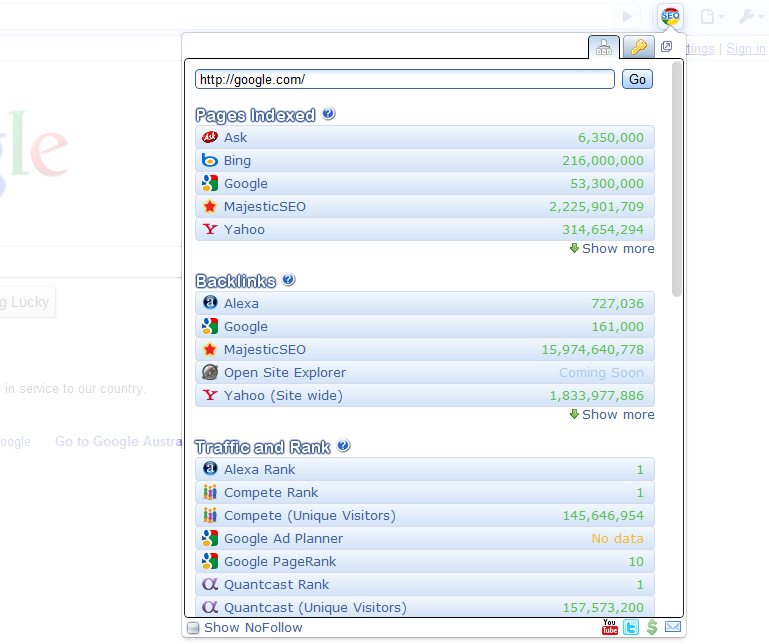
    1) Chrome SEO – Probably one of the best free SEO add-ons I’ve used. It provides backlink info, as well as, keyword research tool, domain age, and traffic and rank. It has everything. Unlike some other SEO plugins, I never find myself disabling it because it’s chugging resources or constantly crashing.

    Chrome SEO Screenshot
    Chrome SEO Screenshot

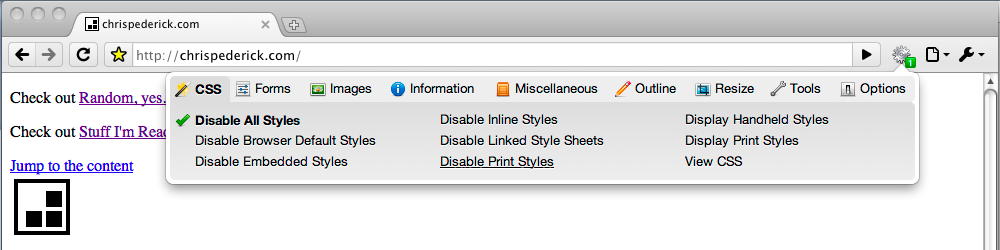
    2) Web Developer – A port of the Firefox Web Developer plugin, this extension has help me several times with identifying useless and broken CSS, as well as,  large graphics and elements on the page that were slowing it down.

    Web Developer
    Web Developer

    3) Google Analytics Opt-out Add-onNothing is more important to me than accurate site data and this plugin stops the JavaScript (ga.js) from sending information back to Google Analytics
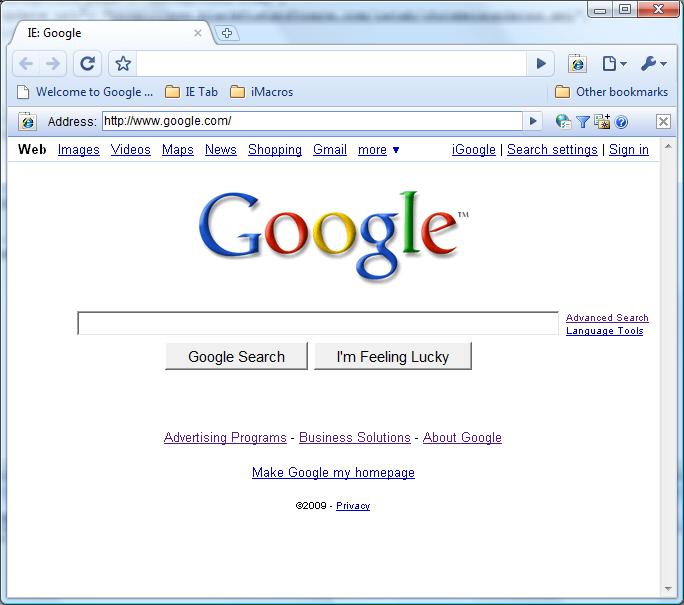
    4) IE TabWant to see what your site looks like in Internet Explorer but you don’t want to install? Download IE Tab.  This extension has helped me identify elements that work in Chrome and Firefox but do not work in IE.

    IE Tab
    IE Tab
    Google Similar Pages
    Google Similar Pages

    5) Google Similar Pages – Want to know who your competition is? Google Similar Pages provides urls and visual information on sites that are similar to the page you’re currently browsing based on keyword and traffic information.

    Honorable Mentions:
    Google Voice – I’m always losing or turning off my phone, so with Google Voice I never miss a voicemail and can easily return the call at my leisure.  Works great when you are busy and affording those pesky calls from Mom.


    Gmail Mail Checker Plus – I hate e-mail programs and constantly logging in and out of different email accounts to check my e-mail. With Gmail Mail Checker Plus I can have access to all of my email with a simple click on the toolbar.


    Panic Button – Have you ever been on sites that aren’t exactly work friendly? The Panic Button extension is for you. With one click you can hide what you were surfing and replace it with your start page.

  • Google Wave: Revolutionizing Communication or Reinventing the Wheel?

    So it’s been about nine months since Google unveiled one of their latest- and largest- endeavors: Wave. For those of you who haven’t been keeping up with Google’s global takeover, Wave is a real-time communication platform that has the potential to completely revolutionize or even replace standard email. It rolled live on September 30 of last year and I was lucky enough to stumble upon an invite, so I’ll share my findings with you here.

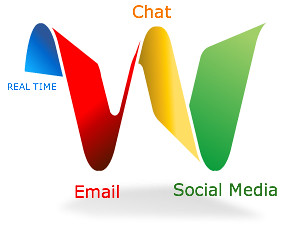
    Google Wave combines email, instant messaging, and social networking into one, easy to use interface. You can create waves with one person or your entire contact list, so conference chats and meetings with business partners or employees becomes incredibly easy. All waves can be viewed in real time and you can respond to previous entries much like a forum. This can be both a good and bad thing. I’m sure I’m not the only person who types out a response and then goes back to edit or erase it altogether before hitting “Send.” I’m not sure I want other people to view what I write in real-time. Also, the forum-like interface can lead to cluttered and convoluted waves. Some of this can be avoided with the playback button, which replays the entire history of the wave. A collapse function could also improve this shortcoming.

    Another cool feature is that anyone can edit previous entries to correct false information. This is another one of those bittersweet functions that can be considered both a pro and a con. You can also invite other people at anytime during the wave.  Don’t want them seeing the previous conversation? No problem. Anybody invited can be set to only view limited info.

    One major pro is that it makes attachments a thing of the past.  Anything you want shared can just be dragged and dropped into the conversation and it shows up in the wave for everyone to view or download.  Also, any wave can be instantly embedded onto your blog or website. These are two functions that email doesn’t have and can only be viewed as pros in my mind.

    In terms of what it can offer SEO, it’s lacking… for now. One of the best things about Wave is that it’s open source.  This leaves the door open for nearly limitless SEO possibilities.

    In summary, Google Wave is a pretty great idea. However, sometimes it seems like reinventing the wheel. Most of the features it offers can be found with email, chat, or even Google Docs. The draw is that it combines these three into one fairly easy to use interface. It can seem unnecessarily complicated at times, but you quickly get used to it. I think the largest downfall is that not enough people use it yet, but even email and instant messaging were once seen as novelties. I think with enough time and improvements, Google Wave is the only contender that could possibly replace them in the future.

    Special thanks to Lovati and Juergenfenn for the great images!

  • Looks like Google CAN admit they are wrong!

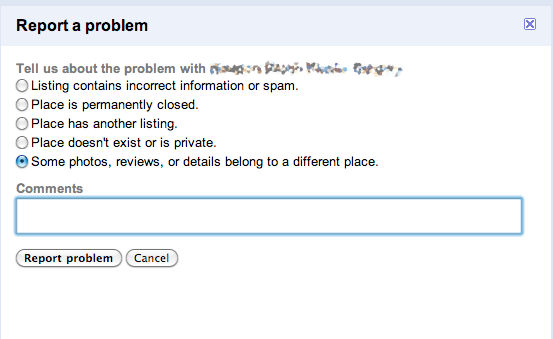
    So today while working with a particularly problematic listing within a particularly jacked up (for lack of a better word) market and cluster of listings, I noticed a new option Google is showing in the “Report a Problem” section.

    Google Listing Crossover: A new way to report it!

    We worked for months to straighten out a client’s listing and were finally feeling a bit of relief when everything seemed to be working… the address was showing up correctly, as was the URL, pictures, and details. Thank goodness, we thought!

    That is, until this morning, when I logged into Google Places to test out the tags that are now available in 29 states. This client has some great videos and we hoped to highlight them to searchers in the 3- and 7-packs that are showing up for various terms in the market. But when I clicked on the listing, alas, it was once again pulling in details from a competitor – just a different one this time. As Places gains popularity, this issue of listing crossover appears to be a growing problem – and clearly, Google recognizes that, and even admits it by giving us the option to report that “some photos, reviews, or details belong to a different place.”

    Thank you, Google, for giving us the option to report this… now, let’s see how long it takes for the reported issues to be fixed!

  • New Google Interface: My Before and After Images Disappeared from Google Images!

    The majority of plastic surgeons have a robust before and after image gallery on their respective websites.   With a strong plastic surgery client base, in addition to other industries, we pay attention to the images and their inclusion in the Google Image search.

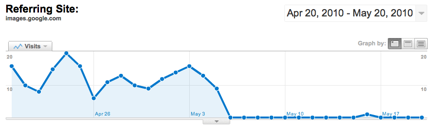
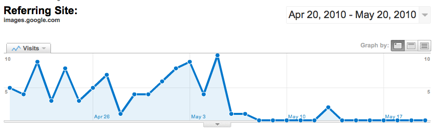
    New Google Interface: Traffic Drop

    In the last week, our SEO team has noticed a severe and dramatic drop in referrals for a few plastic surgeons from Google Image search, which historically has been a strong referrer to the before and after image galleries on the websites.

    Some reactions from our team ranged from the incredulous “Can that be right??” to the flummoxed, “That is totally weird.”

    New Google Interface

    After seeing the first plastic surgeons’ site data with a flat line, I asked a designer with whom we work frequently, Aimee Ellingsen, plastic surgery website design, “um … have you guys replaced or removed all of the images on client X’s website?”  Right.  As if she would completely replace every image in the image gallery … but this data is obviously a problem with images, so I went to the source.

    Aimee’s team looked into it and astutely suggested it was safesearch.  Safesearch is a setting on an individual users’ Google search preferences, so what are the chance that hundreds, thousands, of people have changed their settings on the same day?  That was my first reaction.  … Then it hit me …

    Oop!  The new Google Interface!  Doh!

    Google Support today says:

    “You can choose from among three SafeSearch settings:

    • Moderate filtering excludes most explicit images from Google Images results but doesn’t filter ordinary web search results. This is your default SafeSearch setting; you’ll receive moderate filtering unless you change it.
    • Strict filtering applies SafeSearch filtering to all your search results (i.e. both image search and ordinary web search).
    • No filtering, as you’ve probably figured out, turns off SafeSearch filtering completely.”

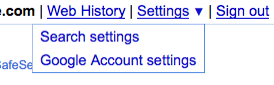
    New Google Interface: Search Settings

    I don’t know what the Google Support said before they launched the new Interface, but what we used to see and now can’t see (unless we change our settings) suggests that it’s a new default implemented with the new interface.

    New Google Interface: How to change your settings

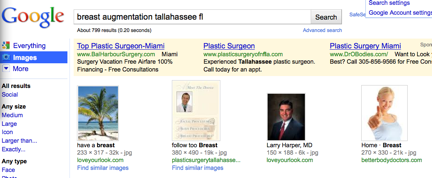
    With Moderate filtering:

    New Google Interface: Google Image Search WITH Moderate filtering

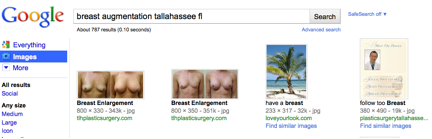
    Without Moderate filtering:

    New Google Interface: Google Image Search WITHOUT moderate filtering

    It appears that Google is slowly rolling out the new interface because not all surgeons’ data is showing this dramatic response, but when it does happen, at least we will know what is going on.

  • Facebook Advertisting – The Internet Marketing Gold Rush

    I am frequently asked what the next big thing in paid marketing is – while I tend to keep my online marketing secrets close to my chest, I always answer Facebook. With hundreds of millions active users, it is Sutter’s Mill in the pay-per-click Gold Rush. As paid search platforms are experiencing exponential growth and decay, it offers advertisers an opportunity to target potential leads at a significantly lower cost than traditional PPC.

    As the world’s largest social media site, Facebook has become the popular choice for the local and niche businesses. By allowing marketers to directly interact with people through paid ads, interest groups and applications, it adds a level of engagement lacking in traditional online marketing.

    What Not To Do On Facebook
    Grammar Fail. Picture Win?

    Facebook Paid Ads

    With the increasing cost of paid search marketing, advertisers are looking for more cost effective alternatives. As previously discussed on this blog, FB advertising yields a much higher conversion rate for a significantly lower cost. This is attributed completely to demographic targeting and graphical ads. Running an ad with ad content that appeals to your targeted demographic is key to conversion.

    Little Nugget: Paid ads are great for new and niche businesses trying to generate brand awareness locally.

    Using Facebook Groups and Fan Pages

    Active engagement with potential leads is priceless – literally. The best way to do this is through groups and fan pages. Free to set up and great for social media and SEO, groups and fan pages give businesses an opportunity to strengthen customer interest. Because of Facebook’s social nature, they also give businesses the human element that websites lack.

    Little Nugget: Groups and fan pages can be used to market to leads before they reach the business’ website.

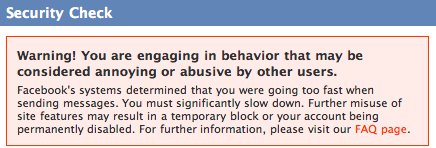
    Facebook Spam Warning
    If you get this message, you're doing it wrong.

    Facebook Applications

    While many only think of Facebook apps in the terms of Farmville and the endless number of “gifts”, there are many applications that are indispensable for brand building. Two personal favorites of mine are Extended Info and Blog RSS Feed Reader.

    Extended Info allows you to integrate custom HTML to create new and interesting fields on the page. Instead of being overly pushing with daily reminders on their timelines, you can designate areas on the page for contest and promotional offers.

    Like with Extended Info, Blog RSS Feed Reader can be used to incorporate content you are discussing on your blog with your profile without the use of status updates. Reader always allows fans a chance to share this information via other social media outlets.

    Internet marketing is no longer the Wild West. It’s becoming more interactive, sophisticated, and accessible to people of all walks of life. While there has always been a question of how to leverage social media, Facebook is making it easier to build communities and generate higher quality leads. I am positive that as it continues evolving, there will be feverish migration of online marketers looking to capitalize on its success.

    Thanks to larcher the Facebook ad image!

  • Google Maps – an equally useful tool for customers and businesses alike

    I can’t fight this feeling any longer. I need to profess my love of Google Maps. Our relationship was a tumultuous one, but she won me over in the end. Living in New Orleans, where some street signs are still missing from their respective corners, Google maps was a saving grace. They also recently started to include bike routes, which guides bikers through the least traffic-laden areas. Though this feature still needs some work, I think it’ll be a great asset to this ever-expanding program.

    Google maps doesn’t just serve to make traveling easier or killing time. It also does wonders for SEOs. Google Places, a new version of its Local Business Center, makes the discoverability of local businesses easy and reliable by having the businesses themselves be able to claim and update their own listings.  Now, they’ve extended this into street view. If you’re viewing the map in street view and see a business that catches your attention, you can now click on an icon that has information like hours, reviews, and more. Here is an example:


    With this feature, you can browse your neighborhood for local restaurants and stores. From there you can see what bars or dessert joints are down the street from where you’re dining or shopping. It’s a great way to take advantage of your city, or learn about a new one while you’re on vacation.

    For now, it will only show the top listings for the area, but they will be expanding to include more businesses and even transit locations. If you’re searching for your business and find the marker is a little off, don’t forget that you can drag it to the proper location.

    The weather looks great today, so I think I’m going to take this thing on a test drive and find a spot where I’ve never eaten before. I can’t wait to see what these guys are going to come with next!

  • Mobile Marketing No Longer Means Slapping Your Ad on a Bus

    Mobile marketing no longer means sticking your ad on a bus

    Imagine you just pulled into the mall parking lot with your three antsy children who are complaining that they are hungry, need to go to the potty and want to go to the Disney Store… Amidst all of the chaos of getting them out of the mini van and making sure you have your purse (and your sanity), you accidentally lock your keys in the car.  And, the car is still running.  This is so not what you needed!  But, fortunately, you have your smart phone in your purse!  You quickly log onto the internet and search for “locksmith.”  You come across the first listing – A company called 911 Super Ultra Emergency Locksmiths.  You get them on the phone and they are in the mall parking lot within minutes to save you!

    Or, {a less dramatic scenario}… You and a buddy are at a conference out-of-town and you have a break for lunch.  Where is the nearest place to grab some sushi?  Thank goodness you have that smart phone to look up “sushi restaurant.”  Ten minutes later, you and your buddy are pigging out on some tuna sashimi and crunchy rolls at the local sushi hot spot!
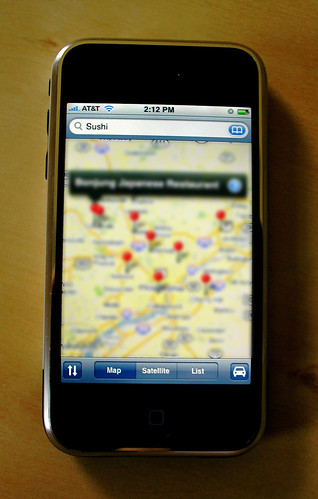
    Mobile Marketing increases in relevancy as mobile local search takes a larger share of market

    With the continuous advancements in technology today, small businesses need to stay abreast of the emerging ways to reach their target market.  One of the new ways that small businesses can connect with their customers is Mobile Marketing.  According to Google, “You can easily expand your reach to customers who are on-the-go. Audiences are increasingly stepping away from their desktop computer and searching and browsing the web from their phone.”

    In this blog post, we are going to introduce Mobile Marketing rookies to some interesting facts and ideas to consider when budgeting for your next campaign.

    In a recent study conducted by comScore that was featured in an article by Jason Kincaid on TechCrunch.com, it was discovered that “45.4 million people in the United States were using smartphones” over a period of 3 months ending in February 2010, “which is a 21% increase” over the 3 month period of time studied ending in November 2009.  In layman’s terms, that’s a whole lotta potential customers…

    Mobile Marketing: number of smart phone users up 21% in just one year

    Google – Go Mobile! recommends some strategies that small businesses can utilize to better reach their ‘local-mobile-searching’ potential customers:

    1. Create a version of your website that can be used and viewed more smoothly by a mobile device.  The ‘regular’ version of your website might not load as quickly or be as easy to view and use on a mobile device.

    2. Think local by offering information on local events in your area and maps showing locations nearby where customers can purchase your products.

    3. Engage your customers by offering a game that they can play while waiting in the doctor’s office waiting room or an application that they can download and use on their mobile device.

    4. Make them an offer they can’t refuse.  You have to know who you are competing against.  Give your small business the competitive advantage. “Including an incentive, such as a coupon, really does make the difference when searchers are looking for local businesses,” says Anthony ColemanSearch Influence’s resident Paid Search Marketing veteran.  He further explains, “It is also a good alternative, because many local businesses don’t have the resources to create games or applications.”

    5. Go viral.  Create a way for your customers to easily share your business’s information with friends via the click of a button.  As they say, the best publicity and marketing is by word of mouth (or by the click of a button 🙂

    6. Get found with mobile advertising.  Create ads that show up when a customer searches for something relevant to your business on their mobile device.  “With smart phones becoming more integrated with local search, Google Adwords is allowing advertisers to display paid ads into mobile searches – by appearing first in a local search, you increase your exposure.” explains Anthony Coleman.  “They are even offering a ‘click-to-call’ option, which allows searchers to call phone numbers listed in paid ads, making it easier for leads to connect with advertisers.”

    * A great way to think local, offer specials and get found for no cost is by participating in applications such as FourSquare.  According to FourSquare.com, “Foursquare aims to encourage people to explore their neighborhoods and then reward people for doing so… As a business owner, you can use foursquare to engage your increasingly mobile customers with foursquare “Specials,” which are  discounts and prizes you can offer your loyal customers when they check in on foursquare at your venue.”  All you have to do is “claim your venue” and get started!
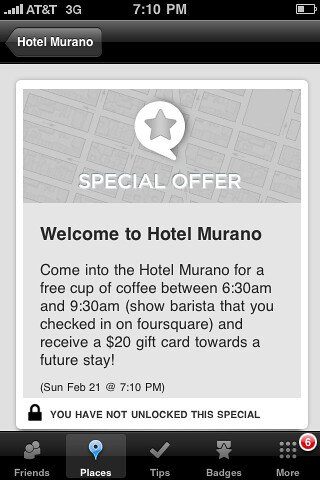
    Mobile Marketing: Foursquare makes it easy!

    You can even keep track of how many users are finding your business by searching via their mobile device, as well as where they are located, what they are searching for to find you and much more!

    In the blog post, “How Much Google Traffic Comes From Mobile Devices – A Quick Study” by Tim Coleman of A Second Opinion, Tim studied a set of local small businesses’ Google traffic from mobile devices.  He wanted to determine the importance of mobile search in relation to his clients, as well as the “percentage of traffic that came from mobile” and if “the percentage of traffic from Mobile varied in different parts of the country.”  He looked at 7 garage door companies across the nation over a span of 2 months and made some conclusions of importance:

    • “The small data set follows the general pattern that people in bigger cities (more population) are going to use mobile devices a higher percentage of the time.”
    • “Interestingly, Westchester County is the oldest population in this set. Could be that age trumps income when it comes to selecting a small business on a mobile handset.”
    • And, “For different types of businesses Mobile is going to be more or less important but overall it’s likely to be less than 5% of overall traffic. Again, this is a small study but Adwords and Google Analytics both provide easy segmentation of mobile traffic. Look in your analytics or call your PPC provider to see what percentage of your traffic is mobile.”

    So, the amount of traffic that your site gets from local search via mobile devices depends upon variables such as the age, location, income, etc of the user and, all of this can be tracked and documented via tools such as Google Analytics and Google Adwords.

    Small businesses have a lot on which to stay up-to-date, and online marketing and mobile marketing are no exception.  More and more people are buying and using smart phones and it is worth your time and money to consider marketing to your potential customers on-the-go.  There are a plethora of tips to choose from to get your website “mobile device ready.”  And, you can see where your customers are coming from and how they are locating you!  How can you not be interested?!
    Resources:

    Images:
  • Pace Yourself. Online Marketing Messages: When Less is More.

    “Everything in Moderation,” the saying goes. This can be attributed to everything and anything, almost. It’s important to acknowledge this, especially with such easy and immediate access to your audience. The only thing that comes to mind that this would not apply to in online marketing is link building and networking, if done sincerely.

    Online Marketing Messages

    Over saturation seems to be all the rage and it’s not helping anyone. Like that friend that talks too much- it starts off good, you’re interested and responsive… and then after a while, it’s just noise.  You nod, smile or frown accordingly and pray they shut up.

    A few sources that come to mind immediately are Email marketing, Facebook and Twitter. Recently I’ve received so many messages from the same sources I stopped reading them. They are no longer effective. They are annoying. On the other hand, there are so many others that I never hear a peep from. This can be a challenging balance. You need to communicate enough to be seen but not so much that you reach that point of oversaturation.

    Here are a few things to consider in the repetition of your message presented in the stylistic fashion an antiquated and overused joke:

    You might be reaching over saturation if

    1. You loose fans, subscribers and followers like your account was the origin of the plague

    2. Your fans, subscribers, and followers walk in your place of business point at their phone and sneer at you (obscenities and other gestures count too)

    3. The effectiveness of your message on a bar chart looks like a sliding board

    4. You get public responses like “I don’t care” or “Stop it”

    5. You can message something completely absurd and no one bats an eyelash

    6. You’re used as an example of oversaturation in an article by some smart alec. (If you just looked for yourself in this article you’re probable guilty.)

    7.     The folks that run the email blacklist organizations know you by name.

    8.     The United Spammers Association nominates you as next years president

    9.     Guy Kawasaki is jealous cause he can’t pump out as much as you.

    Sincerely, it is a difficult task at times to understand at what point effectiveness weans off. With proper analysis you can get a better view of how to take corrective action. You are tracking everything, right? Hopefully you haven’t lost or lost the attention of too many fans, followers and subscribers.

    Stay tuned for Part 2: How to Do it Right (title to come)

  • You Can Buy Brand Love on Twitter?

    Need Twitter Followers for Your Client’s Brand? Buy Quality Twitter Followers Now!

    This is a Twitter Post If this statement appealed to you, you want to read what I have to say. If you read this statement and wondering what’s Twitter, stop reading right now. I’m serious – Go! This post isn’t for you. This post if for the Twitter marketing elite – the Twitterati.

    This post will reveal the TRUTH about buying Twitter followers. The TRUTH is…

    (more…)

  • Yelp Review Filter Explained (How do I spam that?)

    I was looking for more contact info for Luther Lowe and noticed his tweet about a blog post explaining Yelp’s Review Filter. Luther does a good job of explaining the Yelp Review Filter and Yelp has commissioned a video which tries to explain it in a friendly way. The review filter, Yelp’s legal woes and the general state of Yelpdom have been the topics of many conversations lately.

    While in Portland last week presenting on Facebook Marketing at SEMpdx SearchFest I had a couple great dinners with some really smart people. One of those dinners included the aforementioned smart person Luther Lowe who is part of Yelp’s business outreach team.

    Luther gave a good explanation in person of the review filter and I think he’s done a good job in the blog post as well. I have to admit, after my personal experience with Luther and his colleagues I’m a lot more positive toward the organization as a whole (I may be influenced by Mat Siltala too).

    From what I could discern, that the most critical component of the review filter is one which looks at a users yelpish tendancies to see how active a yelper they are. In other words, if you just created your account, or have a very thin profile you might get filtered.

    I can see it. I understand it, but I think the position Yelp takes regarding small businesses requesting reviews is unreasonable. And, their system presumes guilt which is downright un-American.

    I’m assured by some of Luther’s colleagues with whom I spoke at SMX West that there are semantic elements too. But, it looks like the biggest factor is how “real” you look by virtue of your history on Yelp.

    But, as we learned at SMX, Yelp has 180 in Sales & Marketing as compared to 40 Engineers.

    So, I know what you’re asking: “Given all this, how do I spam Yelp”?

    It’s easy, be patient and build a quality profile. In other words, if you look real you have a higher likelihood of having your spammy review not filtered. (hint: real doesn’t mean 10 reviews of disparate places within 24 hours)

    I’m reminded of the quote with which I start most SEO presentations:

    The most important thing in business is sincerity.
    If you can FAKE that, you’ve got it made 🙂

    Seriously though, I appreciate the attempts at outreach. It’s clear that Yelp is cognizant of the PR issues (and their legal issues) and that they’re working to provide a valuable service. I hope they can get their act together on the sales front before they go up in flames.

    Amilia's Diner - SEO Invasion
    Amilia's Diner – SEO Invasion

    Amazingly, none of these reviewers were filtered (Amilia’s Diner on Yelp).

    Related Posts: