Author: Alison Zeringue

  • The Final Countdown: Secure Your Website to Align With Google’s Update to Chrome

    Is your website safe from google's not secure warning - Search Influence

    The year is almost over, October is finally upon us, and if you’re wondering what you should be checking off of your business plan “to-do list,” then you should definitely place priority on reviewing the security of your website.

    Starting this month, Google will officially be letting your visitors know if your site isn’t secure for them to navigate.

    This shouldn’t come as a surprise, since Google announced its intentions back in 2014. But nonetheless, the time to take action is now. Here’s what you should be looking for in order to avoid Google showcasing security warnings to your visitors and potential customers.

    Image of an HTTPS secure site - Search Influence

    Are You Talking to Me?

    A secure site means your site has received an SSL Certificate. SLL uses HTTPS (Hypertext Transfer Protocol Secure) servers to encrypt and store information given on the site. Here’s more detailed information from Google about HTTPS servers. Not only do they provide an assurance for your visitors by securing any information they provide through a form fill like credit card details, but Google also announced that HTTPS is a ranking factor, even if not a huge one.

    So, how can you tell if your site is secure? One the easiest ways is to open an incognito window and look at your site’s URL in the search bar. Does it read  “Secure|HTTPS”? If so, then you’re good to go. If you attempt to input any information in a field on your site and “not secure” reads at the start of your URL, then that means your site is not secure and you will need to contact your web developer, web host, or attempt the switch to a secure site yourself. Google made a handy GIF displaying what this would look like for users.
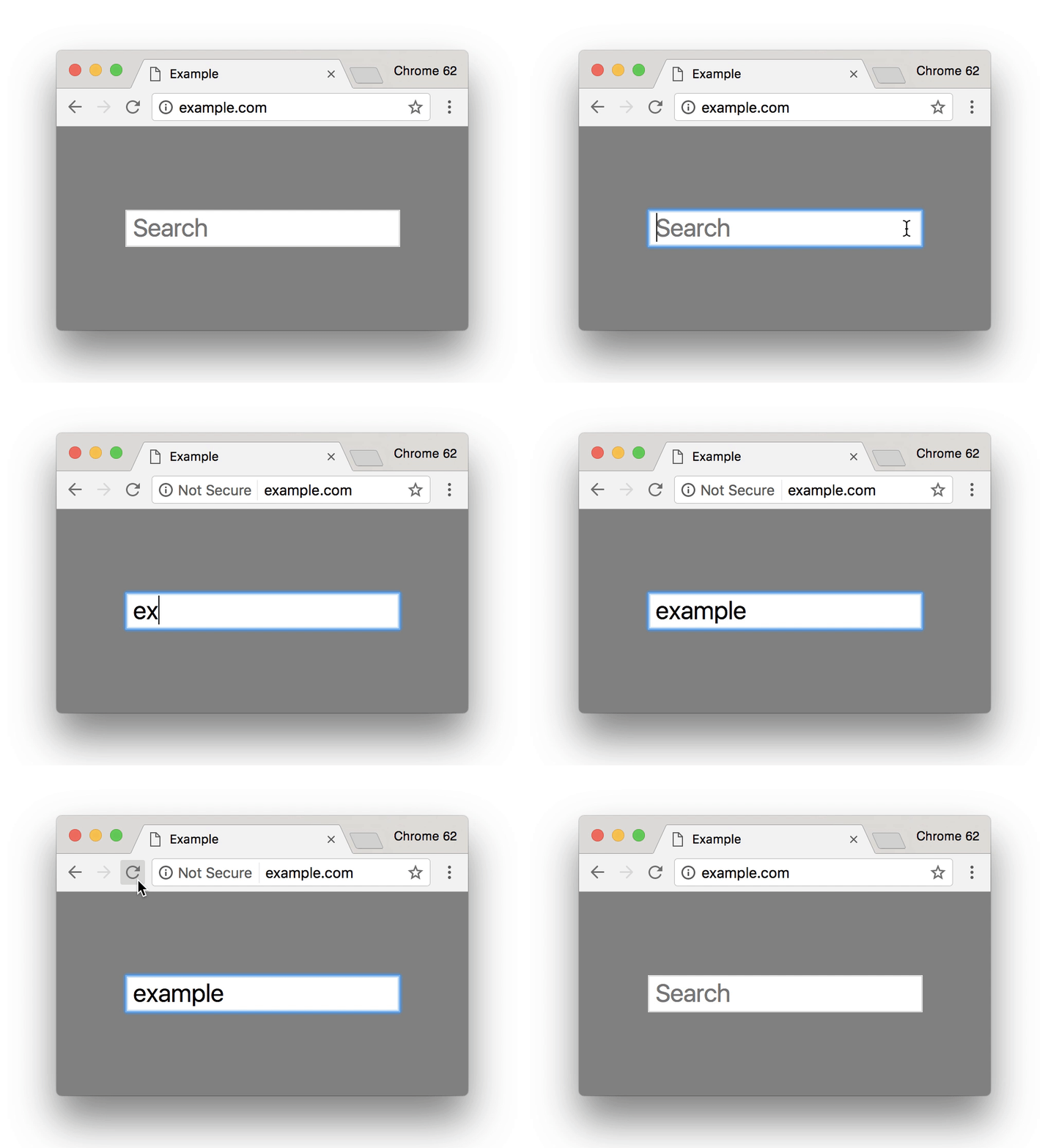
    Search bar from Google Site - Search Influence

    Is It Too Late to Secure My Site?

    Google’s update to how it displays unsecured sites in Chrome is slated for release around October 24. If you have already earned an SSL Certificate for your site, then kudos to you. But, it’s never too late to switch your site to HTTPS.

    Jared Jones, one of our technical web developers, wrote a detailed blog post about the importance of having a secure site, steps you can take to switch to HTTPS, and reasons why it may affect your site’s speed and your overall ROI. If you’re thinking of tackling the project yourself, this post is a great start.

    Google plans to announce future changes to increase site security, like displaying “not secure” for all HTTP pages, not just those in incognito mode. But, it’s safe to say that making this simple change will increase the trust of visitors to your site, leading to a higher return rate for your business. Contact our team of experts—we can help you make the switch today.

    Here are some options:

    1. Do it yourself or with your developer or website company, with caution.

    Beware, not all SSL Certificates are created equal. Be sure the provider of the SSL Certificate is Google approved. purchasing an SSL Certificate, configuration at the server level is required for set up as well as ongoing maintenance. The process must be repeated each time it expires.

    Once the SSL Certificate is purchased, it must be configured at the server level in order to complete setup. Ongoing maintenance is also required, and the process must be repeated each time it expires. When you update your URLs to HTTPS, you must also implement proper 301 redirects and all your assets must be addressed when moving.

    2. Let us take care of it for you!

    We’ve developed an easier-to-maintain alternative for our clients that fully addresses redirects and website assets, setting you up better for the long term.

    If you are a current client, we’ve already reached out to you about moving over.

    If you are not a Search Influence client, reach out to us so we can discuss helping you!


    Images:

    Google GIF

  • Search Influence Teams Up with PCA Louisiana to Prevent Child Abuse

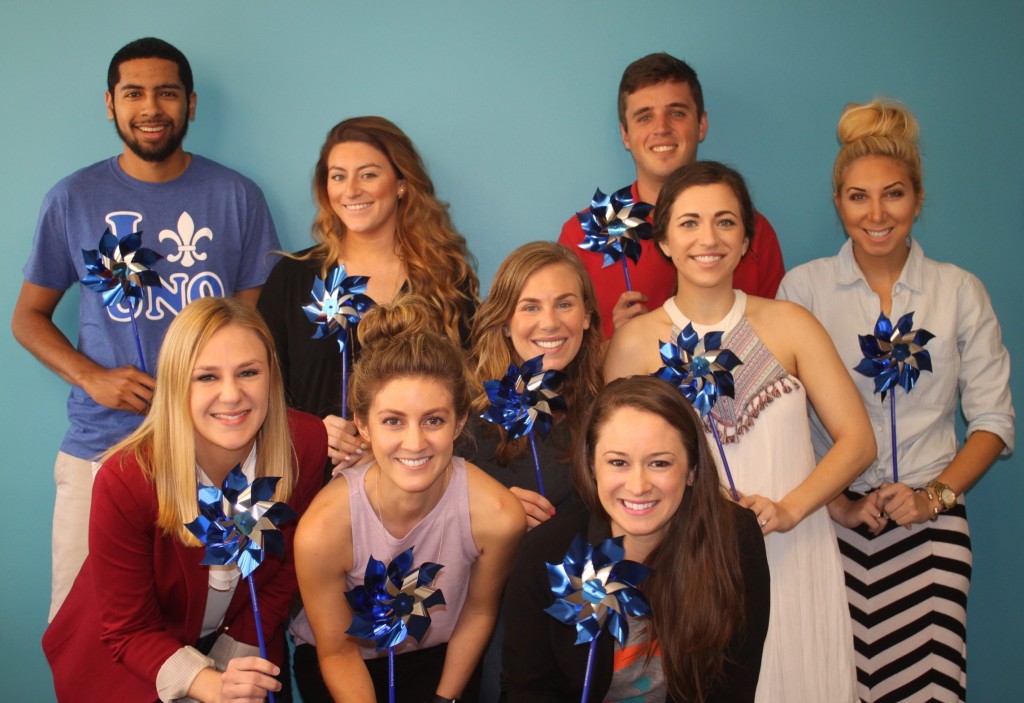
    Pinwheels

    When you hear the words “child abuse,” what is the first thing you feel? For most people, it’s a feeling of disgust and shame, but it’s also a distant feeling. You might think, “I don’t work in education or with children, so what can I do about it?” You probably don’t think that you could make any type of significant contribution to preventing child abuse in your community.

    Prevent Child Abuse Louisiana, a statewide nonprofit, spent the month of April helping Louisiana residents change the way they think about child abuse and prevention by emphasizing that we all play a part. Search Influence was proud to sponsor PCA Louisiana’s month-long Pinwheels for Prevention campaign, which just wrapped up at the close of Child Abuse Prevention Month.

    Search Influence Partners with PCAL

    The local affiliate of Prevent Child Abuse America, PCA Louisiana is the only statewide nonprofit organization dedicated to child abuse prevention. The mission of the organization is simple and clear: to prevent the abuse and neglect of Louisiana’s children. The organization supports children and parents through intensive, evidence-based programs and community-based education across the state.

    Search Influence is proud to call Louisiana home. As with any community, however, there are some startling facts about our beloved state that leave us feeling compelled to take action and make our home a better place.

    • Louisiana is estimated to spend $1.2 billion per year on the direct and indirect consequences of child abuse and neglect.
    • Louisiana ranks 47th in the nation in overall child well-being.
    • In 2013, more than 10,000 of Louisiana’s children were victims of child maltreatment.

    As a sponsor of Child Abuse Prevention month, Search Influence created, published, and helped promote an infographic to help Louisianans understand the impact prevention can have on our state’s economy, our children’s wellbeing, and how we can each contribute.

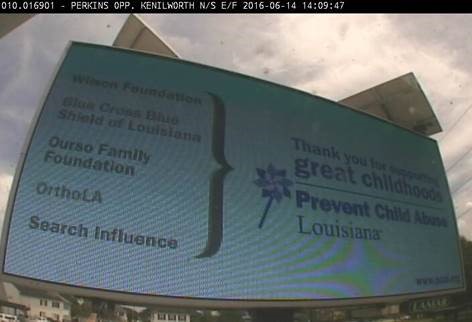
    I had the pleasure of working with the staff and PCA Louisiana and the internal staff here at Search Influence in order to create the infographic. They were kind enough to add our name to their Thank You billboards in Baton Rouge. Here is a snapshot:

    2016 CAP Month Billboard 4

    You might be wondering how YOU can play a part in child abuse prevention in your state. Visit www.pcal.org to learn more about prevention programs.

    Pinwheel Image Credit

  • Spirit of Giving: Good for Your Business, Better for Your Community

    Spirit of Giving: Good for Your Business, Better for Your Community

    When you work with great people, not only do you produce great work and have fun doing it, but together as a team you can do great things outside of the office. This year, my colleagues came through for two families in need, and I’m so proud to tell you this story.

    If you follow our blog, you may remember our employee-driven holiday charity drive last year benefitting the Covenant House of New Orleans. To shake things up this year, we chose to “adopt” two families in need through The Salvation Army of Greater New Orleans. In our two families were a total of nine “angels,” children ranging in ages from 12 months to 12 years. Without the support from The Salvation Army, these families would likely not have experienced a holiday like yours or mine. Santa may have only been able to deliver essentials like shoes, coats, and food.

    christmas christmas tree cartoon charlie brown a charlie brown christmas

    Source: giphy.com

    Once again, we focused the drive to a one-week period, which really kept the momentum going in the office. We dubbed it “Operation: Santa’s Got a Brand New Bag!” and kicked things off by setting up our office tree and setting a goal fundraising amount. My co-lead Gabrielle and I weren’t afraid to grovel a bit on behalf of our adopted kids! We stopped by each department’s morning meetings to tell the team about our families.

    Search-Influece-Donate-Gifts-Picture-02Slowly but surely throughout the week, the donations racked up. On Friday, we were close to our goal but worried we’d be short of providing the gifts and clothes we hoped to purchase for the families. Back to groveling it was. We passed our donation boxes around the office, willingly accepting loose change. Shout out to our Production team, who donated the entire contents of their “rude jar” to our cause! The “rude jar” is comparable to a swear jar, where team members have to make a contribution each time they are rude or demonstrate negativity. They’d been collecting all month and planned on using the funds for a happy hour but chose to support our adopted families instead.



    In less than an hour, by passing the donation box and collecting loose change, we raised an additional $100 and came darn near close to our overall goal.

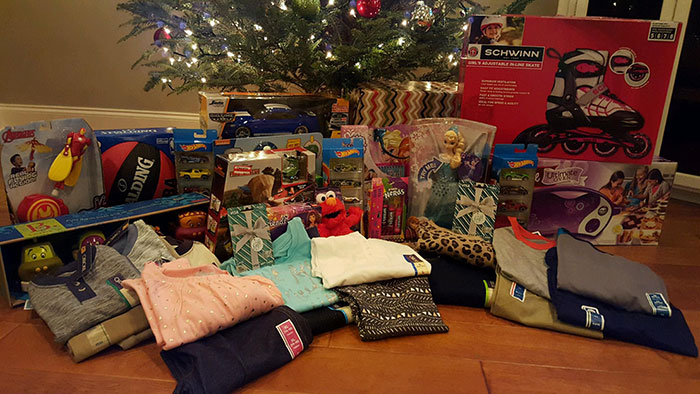
    All that was left to do was to go shopping and deliver our gifts to The Salvation Army. Three of us headed to Target, where we were able to purchase three toys and some clothing for each child, gift wrap, and a $100 Visa gift card for each family. It was so rewarding to see everything come together and to think of the joy these gifts would bring to the kids! Major thanks to Gabrielle Benedetto and Amanda Ball for helping to bargain hunt and find all the perfect gifts!

    Search-Influece-Donate-Gifts-Picture

    Why Workplace Charity Is Good for Business

    Many studies have shown workplace charitable giving and community involvement can have a tangible impact on employee morale and retention. Making sure the work and the company contribute to a greater purpose is important, especially in companies like ours that are filled with a majority of Millennial employees.

    Ensuring employees have something good to focus on (and helping make sure the focus is there) can actually relieve stress and enable employees to detach from their work at the end of a day or week.

    “What most people don’t realize is that positive experiences—even small ones—provide you with valuable resources that can be used to reduce stress, including physical symptoms such as headaches or muscle tension. They make it easier for you to detach yourself from work at the end of the day,” says Joyce E. Bono and Theresa M. Glomb for the Harvard Business Review.

    elf smiling viral

    Source: giphy.com

    If you’ve ever been challenged by low morale in your office, you know it can be damaging and difficult to keep your team engaged in the work. Charitable giving can be a great, positive thing your employees can remember in times of stress or low morale.

    Starting a Charity Drive in Your Office

    If you’re wondering how you can get your company involved this holiday season or beyond, here are a few tips for how to engage your company in a charitable giving drive. You may even see an increase in employee engagement, morale, and retention as a result!

    • Choose your cause. Find a cause that means something to your company’s mission or your employees. Consider your company mission or the time of year you want to implement your initiative.
    • Identify an organization in need. Research non-profit organizations focused on your cause of choice. Depending on the size of your organization, you may even opt to have employees nominate or vote on the organization to benefit from your company’s support.
    • Make it 100% voluntary. It’s important to make the effort voluntary and make it possible for employees to donate anonymously if they choose. You don’t want to create undue pressure or stress.
    • Set a goal and make it known. Setting a goal helps employees understand how much their contribution means in the big picture and increases motivation to participate.
    • Keep employees updated on progress. At our company, we talk about metrics and goals quite a lot. Keeping everyone aware of our collective progress toward the goal helped to increase participation. Our team stepped up in the last hour when we had some more ground to cover.
    • Drum up some friendly competition. One idea is to get the various departments in your company engaged in a friendly competition to see who can raise the most money or accumulate the most volunteer hours. One great idea I saw recently was called “penny wars” where each group had a jug to fill with loose change to donate to charity.
    • Keep it going beyond the holidays. Charitable giving doesn’t have to focus on the holiday season, although about 34% of all charitable giving is done in the last three months of the year. Some companies offer ongoing charity opportunities for employees, and the most successful make it easy for their employees to participate.

    How YOU Can Help Outside of Work

    • Support the Salvation Army red kettles and bell ringers this season. As you shop for gifts, you might encounter some bell ringers outside of popular retailers. Instead of just passing by, drop in your spare change or a few bucks. Every little bit helps.
    • Skip Secret Santa. This time of year, it’s easy to get caught up in the hustle and bustle and constant retail advertisements for stuff on stuff on stuff. Try to remember the reason for the season! Many families or groups of friends will participate in gift exchanges or “Secret Santa” games. Consider skipping it this year and collecting the money everyone would have spent on their gift to donate it. My family chose to do so this year, and as a result, we’ll be helping to fund the New Orleans Mission’s annual Christmas dinner.
    • Donate Online. Consider making it a holiday tradition to donate to an organization that supports your cause. There are so many organizations doing good, so choose one that means something to you or your community.

    To support the Salvation Army of Greater New Orleans, visit the website to find out how you can help. A donation of just $65 will support a hungry family in the area with a basket of food and gifts. Thanks for reading, and happy holidays from me to you!

  • The Christmas Influence: Coats For Kids Fundraiser Warms The Heart

    The Christmas Influence: Coats For Kids Fundraiser Warms The Heart

    CovenantHouseDonationsImageAs the holidays approached this year, I realized I was getting really caught up in gift shopping, party planning, and the usual hustle and bustle. I wanted to do something to help brighten the season for someone who may not have all those same opportunities. After brainstorming with my co-worker, Gabrielle, we thought we could try to get the whole office involved.

    Former Influencer Caroline Robinson has stayed in touch with many of us since she left SI to work for Covenant House of New Orleans. She and her fiancé, Charles, have been members of our company kickball and dodgeball teams for the past few seasons. It was Gabrielle who suggested that our office initiative could benefit Covenant House, so we did some research and gave Caroline a call.

    What we learned is that Covenant House is a shelter and safe haven for 150 at-risk, runaway, or homeless youth aged 16-22, and it’s just a few blocks away from our office. The staff provides food, shelter, clothing, resources, educational opportunities, and so much more to these young people, even helping them transition into independent living when they are ready. Caroline told us that many of them have never experienced Christmas or the holidays in a positive way before.

    The organization always accepts non-perishable food products, gently used clothes, and similar items. We wanted to know if there was anything special or different we could do for them, given the time of year. Caroline let us know that some of the residents have toddlers and babies who also stay at Covenant House, and they are in desperate need of new winter coats this year. So we made it our goal to raise enough funds to purchase all 31 kids a new winter coat and deliver it to Covenant House in time for Christmas!

    About Our Fundraiser

    • We didn’t have a lot of time, but we figured we could challenge our fellow Influencers with a one-week donation drive.
    • We asked our teammates to contribute in one or more of the following ways:
      • Monetary donations of whatever they were willing / able to contribute
      • Gently used clothing
      • Non-perishable food items
      • New personal care items such as:
        • Bar soap
        • Body wash
        • Deodorant
        • Toothpaste
        • Toothbrushes
        • Shampoo
        • Hand/body lotion
      • Bath and hand towels
      • Sheets and blankets
    • We set up a tree and some donation boxes in the office and collected donations through the end of the week.
    • On Monday, December 22nd, we delivered our gifts to Covenant House and got to experience a quick tour of the facility.

    Amount Raised: $600 in just a single week! This money was used to purchase 31 brand-new winter coats.

    SICoatDonationsImage

    Covenant House

    Caroline Robinson, former influencer and current volunteer coordinator/development associate for Covenant House in New Orleans, was able to provide info on Covenant House and its mission.

    “Covenant House is a safe haven for homeless and at-risk youth ages 16-22. We also have toddlers and babies in our program because many of our young women are mothers. We provide food, shelter, clothing, medical attention, individual and family counseling, educational assistance, vocational and job training, life skills, and so much more. Over the past three years, the number of kids in our program has grown from 45 per night to 150 per night. We would love to give each and every one of these kids a Christmas they will never forget. Most Covenant House residents have never experienced a ‘traditional’ Christmas because their families either couldn’t or wouldn’t provide for them. Our goal is to give everyone a giant gift bag full of practical and fun items they’ll enjoy throughout the year. Every kid will receive what we consider the essentials: a winter coat, socks, underwear, gloves, pajamas, and hygiene products. From there, we provide at least one item from wish lists we receive from every resident. Wishes include video games, purses, baseball hats, jewelry, and more!

    We’re always accepting donations and looking for volunteers. Only brand-new items are given out on Christmas Day, but gently used clothing is always accepted for our clothing donation room. We also accept non-perishable food. If you can’t help our kids this Christmas but want to get involved with Covenant House, you can provide a meal, do a service project to keep our grounds well maintained, or run for us in the Crescent City Classic! Covenant House is a charity beneficiary of the race this year, and we’re always looking for more runners.” – Caroline Robinson, Covenant House Volunteer Coordinator/Development Associate.

    For more information on how to get involved, email Caroline Robinson at [email protected].

  • Facebook Announces Design Changes and New Features for Pages

    Facebook Announces Design Changes and New Features for Pages

    Yesterday, Facebook For Business announced a new, more “streamlined” design for Pages, which will begin rolling out this week. In addition to the new look, a new feature called “Pages to Watch” will launch, allowing page admins to monitor and compare their page with that of other businesses.

    Ch-ch-changes!

    Overall, the layout changes to Pages are not terribly drastic, but as with any small change, there will likely come some backlash from the user base. Page administrators have a few new features to look forward to and some adjusting to do when it comes to navigating the platform, as Facebook has rearranged some key features with the design refresh.

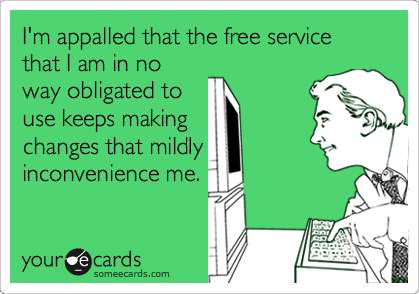
    Facebook Changes Design Ecard
    Photo credit: http://www.someecards.com

    Here are some of the notable changes to the design of Pages and how they might affect you:

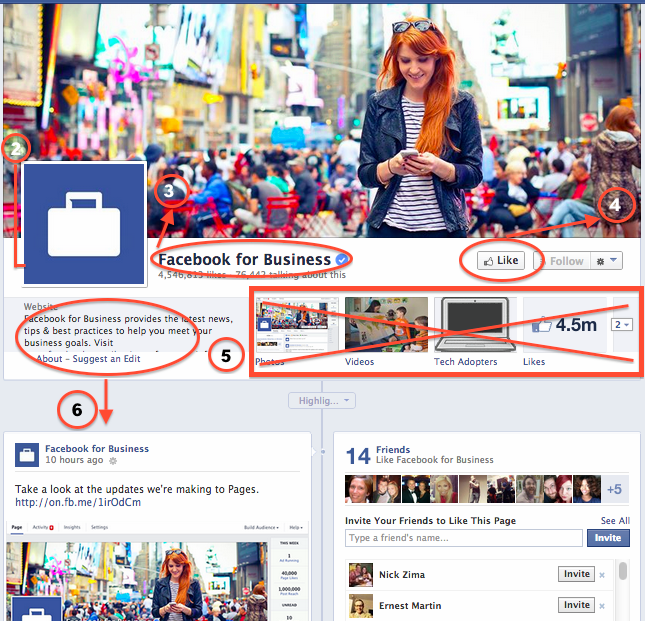
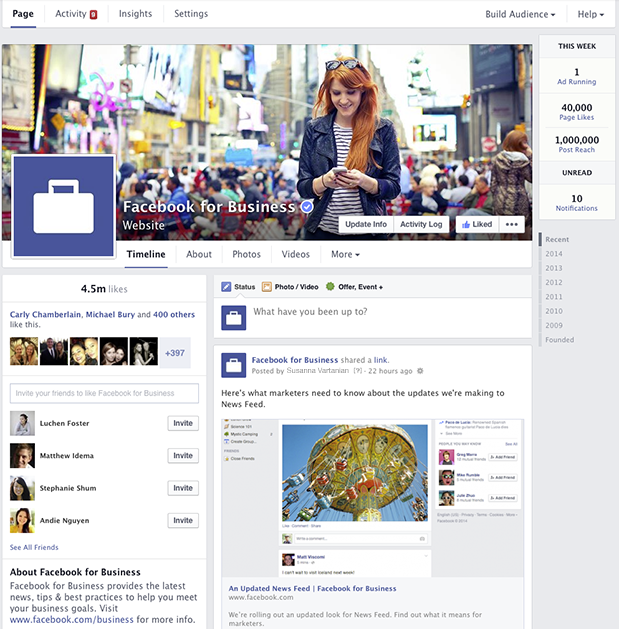
    1. The cover photo and profile square dimensions do not appear to have changed, though Facebook’s announcement does not specifically list any dimensions.
    2. The position of the profile square has changed slightly, as the cover photo overlaps farther with the profile square than before. Some design changes may need to be made to pages with a design that integrated the cover photo and profile square together.
    3. Page name and website will appear in white typeface, overlaid on the cover photo. It appears that cover photos will automatically contain a darker gradient from the bottom up to accommodate this text, similar to what is in place on Twitter header photos.
    4. The “Like” button has been overlaid with the cover photo (as opposed to the current layout, where the Like button is below the cover photo), which may result in a change to design when the goal is to draw attention to the “Like” button. Some existing Facebook pages with cover photos drawing attention to this button will need to be updated.
    5. Tabs no longer have square icons appearing below the cover photo. Because the position of these has changed, cover photos drawing attention to specific tabs will need to be updated.
    6. The “About the Business” section has been relocated farther down the Page Timeline, below the total Likes.
    7. Other changes directly affect page administrators rather than users. These include:
      • Different placement of key metrics such as ads you’re running, page likes, post reach, and notifications from “This Week”
      • Direct access to your Ads Manager account from the top of the page when an admin is viewing the Timeline
      • Simplified navigation at the top of the page for activity, insights, and settings

    The Design As We Know It

    Facebook's current Page Timeline layout before March 2014 update

    What We Can Expect

    In addition to the cover photo and general header changes, Pages will now feature a two column layout similar to the old version, but with some notable changes. Now, the right hand column features the Page’s timeline content and posts. Facebook for Business says in it’s post that this “means that all of your posts will appear consistently on your Page and in News Feed.” I’m curious about the latter half of that statement, as it’s currently unclear how the layout change will affect post visibility in the News Feed.

    Facebook's new design layout for Pages - March 2014

    The left column will now display information about your business, starting with the total number of likes. According to Facebook’s release, it will feature a map (though not visible in the images provided), business hours of operation, phone numbers, website URL, etc. This column will also feature photos and videos.

    Fancy New Features For Admins

    It seems like most of the changes will simply result in a few painful days as Page admins get used to clicking around the new layout, and finding what they need to manage their pages. A few things that will make our lives a bit easier are the relocation of Page insights and admin navigation to the top of the page. There’s now also a more prominent “Build Audience” button, allowing admins instant access to their Facebook Ads Manager account from the timeline.

    At the top right, Facebook has also added a “This Week” panel, showing you metrics about your page from the last week including the number of ads running, total page likes, post reach, unread messages, and notifications.

    Lastly, the newest and potentially most usable feature is the addition of “Pages to Watch.” This addition will enable Page administrators to keep up with the competition by monitoring Pages of businesses they care about. Other new features in Insights include the opportunity to view engaging posts from Pages you’re watching within the last week.

    Are you looking forward to the changes or dreading the adjustment period? Share your thoughts in the comments below!

  • OMG: No More PIN Verification Required to Change Address on Merged Google+ Local/Social

    Spoiler alert: Merged Google+ Local/Social pages are crazy easy to update. Read on for the details.

    Local SEO Despair Image - Search Influence
    How I normally feel every time I think about my client moving offices and the pain Google is surely to put me through. Maybe it’s time to reconsider? Image courtesy of diy.despair.com

    We’ve been talking and brainstorming on address change around here lately as we have two different local SEO clients who are moving their offices in September. Lucky for us, they are both keeping their phone numbers, which makes it a little easier. Both of these businesses have been clients of ours for several years, so you can imagine the local directory listings we’ve created and/or optimized for them over time.

    Where to begin? With a few key resources (like this), we set out to execute the ultimate plan for local directory cleanup when a business is moving locations. Of course we’re starting with the major datafeeds and the major search engines’ local/maps databases.

    One of my biggest concerns was the Google+ Local listing for my client DeLuca Plastic Surgery (forgive me for the blatant plug and branded link, this client is kind enough to let us use him as a testbed and also an example, so I think he deserves it!). A while back, when it first became a thing and before Google backpedaled on it, we successfully merged his Google+ Local and Social pages by way of the form request.

    This merge, combined with the fact that in 2012 Google (for the first time EVER) told us we couldn’t have a practice and practitioner listing since Dr. DeLuca is the sole practitioner, resulted in lackluster local maps rankings for the past year or so. (It’s OK, though, we make up for it by killing the organic rankings)

    Given the history plus the fact that re-verification was likely, and potentially troublesome since the client is still in the process of moving his practice, we were very apprehensive about changing the address on his Google+ Local/Social page. We’ve also never changed an address or phone number on a merged Local/Social page before, so we didn’t know what to expect. The unknown = scary.

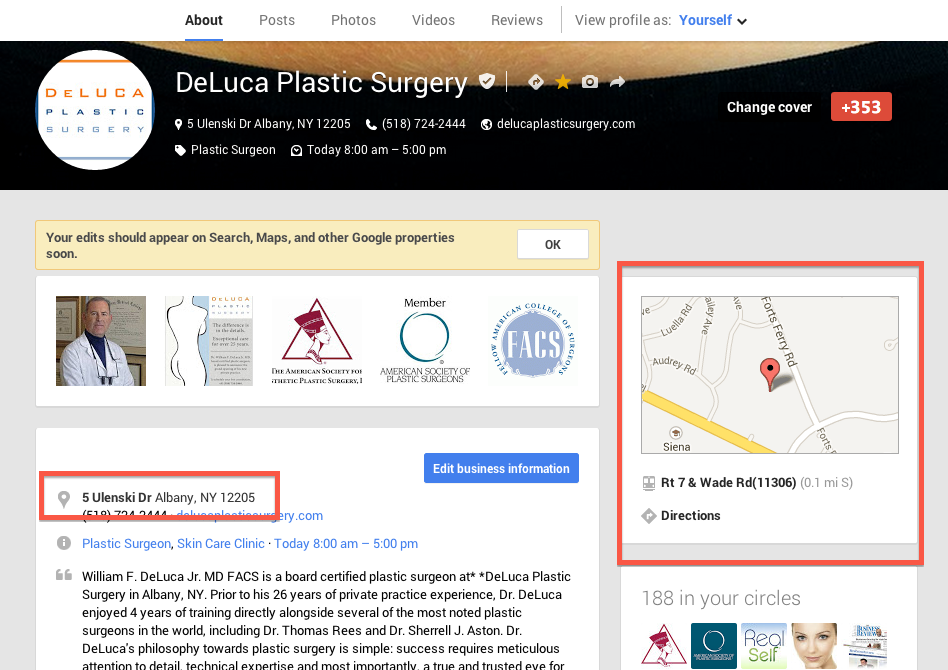
    To our surprise, the address change went live in a matter of minutes with no new PIN! I say again: NO PIN! Thankfully we were swift enough to screenshot the process so I can share it with you here:

    1. In the “Edit Business Information” screen, Google warned us at the bottom that our edits “may be reviewed for quality before being pushed live.”

    1. As suspected, after saving our edits, we got the usual “Pending” and a warning that the edits may take time but, hmmm….. no PIN or verification was triggered!

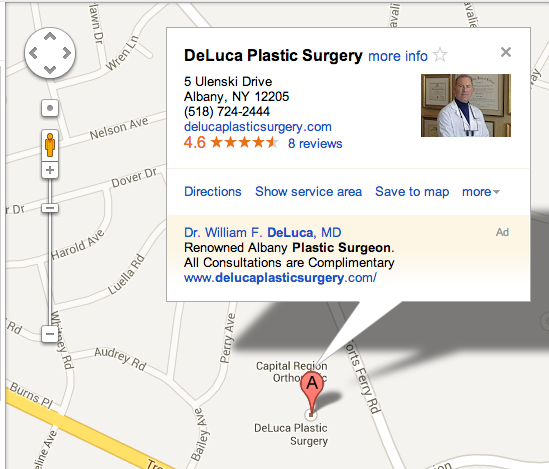
    1. Within minutes, the address change was updated and live on the page and in Maps Search. Although our pin marker had the proper placement within the Edit Business Information portal, the pin is still showing his former address, both on the listing and in Google Maps results.


    I’ve scoured the industry blogs and haven’t found anyone posting about this incredibly easy and pain-free process so far. If you ask me, I don’t think Google is intentionally allowing a change of address on Local/Social Pages without triggering verification. Google has a tendency to roll out half-baked products so I wouldn’t be surprised if verification becomes a requirement in the future.

    For now, at least, I’m rejoicing in the almost automatic update to my client’s NAP information on Google+ and Maps! If you want to freely update your business information on your Google+ listing, I suggest upgrading to a Local/Social page. The upgrade feature is currently in roll out, and will soon be available to automatically upgrade with the click of a button, IF your Local listing is in the new Places Dashboard vs. the old LBC.

    Have you ever changed an address or phone number in a Google+ Local/Social Page? If so, tell us whether you had to verify by PIN in the comments!

  • Turn Quiet Customers into Brand Ambassadors with the Right Social Media Content Strategy

    Thanks to Panda and social signals becoming more prevalent than ever in Search Engine algorithms, content both on and off-site is moving to the forefront of most SEO and online marketing strategies. Truly exceptional content not only ranks well, but is shared virally and provides a real value to the reader.

    Something I really began believing at PubCon NOLA this year is that social signals for search go beyond just whether someone likes or shares your content. The social signals Google is looking for have more to do with whether your customers are talking online about their experience with you after their purchase.

    Source: mvellandi Flickr http://bit.ly/8vqROG
    Source: mvellandi Flickr http://bit.ly/8vqROG

    The problem here is the ratio between people who want to shout it from the rooftops when they have a bad experience to those who openly share when they are excited or had a positive experience. In today’s social age, everyone is a journalist, food critic, secret shopper and referral source. The average Facebook user has 229 friends on the social network, meaning that if they so choose, they can instantly alert at least 229 friends to stay far away from the new Italian restaurant in the neighborhood after finding a hair on the pizza.

    That’s pretty powerful. There aren’t many other platforms that allow one individual to communicate with so many others so quickly, and to be so expressive while doing it.

    As a business, you’ve probably been told that you need to be marketing on social media to protect your reputation online and grow your business by generating leads or driving more customers into your store. I would challenge you to think beyond that.

    When is the last time you had a great experience at a local restaurant? Did you tell anyone about it? If so, how many people? Now think about the reverse. Chances are, you told a few more people about the negative experience than you did the positive one.

    Source: LetoLab.comIt is time to change our thinking when it comes to social messaging, beyond the traditional “lead gen” mindset. Rather than trying to push your product on someone who’s never used it or heard of it, why not look for opportunities to engage your existing happy but quiet customers and get them talking? Social media gives marketers and businesses the opportunity to turn a customer into a brand ambassador.

    Yes, we have to make sure we watch out for Panda and keep an eye on that pesky Google and their algo updates when it comes to on-site content strategy. I don’t mean for my focus on social to suggest that you should move your entire content strategy off your own website and onto social platforms. But, if we think about using our online content strategies to lift up our happy customers, get them sharing and engaging with us, just imagine the viral potential to reach their friends and family–new business you haven’t yet tapped into.

    You’re probably like, “Ok, I get your point, but how do I DO that?” Funny you should ask! Social media content strategies will vary by business and industry, but here are some tips for converting your social media following into brand ambassadors:

    1. Tone down the sales messages and pushy language. No more than about 20% of your social messaging should be self-referential or portray a sales message. Within this 20%, remember that the goal of these posts should be to provide a real value proposition to the audience. This could include specials, deals or contests.

      Content Strategy for Social Media - Provide a Value
      While this is basically a self-promotional post for Shutterfly, an online photo service, they are providing a value to their customers with a create-your-own cover photo featuring dad for Father’s Day.
    1. Reward your loyal customers and followers with exclusive information. Whether is a sneak peak into an upcoming in-store special or just a “Did You Know” fact, people love to feel like they have the inside scoop, so give it to them!

      Social Media Content - Give Fans Exclusive Info
      Online retailer HauteLook hosts designer pop-up sales for a limited time until inventory is sold. They effectively use social media to make their audience feel like they’re getting the inside scoop while also promoting the upcoming sale.
    2. Feature your fans. Everyone loves to be recognized, so give your fans a moment to shine by choosing to feature them every once in awhile. They’re more likely to share the content with their friends and family (increasing the potential reach of your future posts).
      Content Strategy - Fan Features

    3. A little subtlety goes a long way. I’m a big proponent of including a call to action in your post, but it’s best not to take it to the extreme. Providing a share-worthy piece of content to your pre-qualified audience with a slight nudge can never hurt.

      Social Media Strategy - Calls to Action Increase Engagement
      Disneyland provides a great piece of content with a direct call to action: share. And share they did! The piece resonates well with their audience and was timely for the Mother’s Day holiday.
    1. Post well and post often. At PubCon New Orleans this year, Alison Zarella (another AZ girl!) said it best: “the newsfeed is crowded.” As a business or brand, your competition on Facebook is not limited only to the business across the street that sells the same product. You’re also competing for your audience’s attention with the likes of their moms, distant cousins, besties and frenemies. If you don’t post great content and do it consistently, you’ll never be seen.

    2. Reply, reply, reply! Make sure to reply to your customers who comment or post with questions! Facebook and social networks are where people spend a lot of their time these days, so getting a quick reply and notification of that reply is what they expect.
      Social Media Content - Reply to Your Customers' Questions

    3. Be flexible and test for yourself. Above all else, try new things and test multiple approaches with your fans. There’s lots of information and data out there about what works, when to post and how to do it, but the truth is that every industry is different. You’ll never know what is the most effective for your brand until you try new things, compare results and adjust your approach.

  • 5 for Friday — Links, Stories & Posts for Your Weekend

    • Survey: 91 Percent Have Gone Into Stores Because of Online Promotion – Marketing Land

    Wanderful Media conducted a shopping survey of over 1,000 U.S. adults and released their findings yesterday. Millennials were the group most inclined to go online to check prices or other product information. The most common online research tool used while in stores were search engines (84 percent), followed by Amazon (76 percent).

    • Google “Censors” Porn in Image Search – Search Engine Journal

    We’ve all unintentionally image-searched a questionable keyword in mixed company to embarrassing and/or hilarious results. Thanks to Google’s new censorship filter of explicit content on image search, no more embarrassment! Google Images’ latest algorithm change has replaced SafeSearch with the new options of “filter explicit images,” and “report offensive images.”

    • Combating Accidental Clicks in Mobile Ads – Google Mobile Ads Blog

    As advertisers and users alike become frustrated at the high number of accidental clicks on their mobile ads, Google is looking to combat the problem by verifying with users that they really meant to click there. They’ve found the majority of accidental clicks occur when users are trying to scroll through or click on in-app content. This update will make the user experience consistent across the majority of Google mobile ads.

    • Hands On With New Google Maps For iOS: Easier On The Eyes And Faster For The Fingers – Forbes

    After a three-month hiatus, Google Maps for iOS has finally returned, entering the Apple App Store at #1. The new UI is representative of Google’s usual minimalism and strips away unnecessary information. Turn-by-turn navigation puts the user in the turn and the layering of information is quite handy!

    • Bacon, Not Kevin: Twitter Adds Negative Keyword Targeting for Promoted Tweets – Marketing Pilgrim

    Emulating the great search engines before it, Twitter is making strides towards improving the relevancy of Promoted Tweets. Adding to exact match, phrase match, and basic keyword match, Twitter announced negative keyword targeting. Advertisers now also have the ability to hook their Tweets onto trending words or hashtags with a feature called “auto-match.”

  • Pinterest For Business Has Arrived! 7 Reasons To Jump Onboard

    It’s finally here: the much anticipated Pinterest for Business.

    Chances are, for the past couple years you’ve been hearing all about Pinterest, its popularity explosion since 2009, and the fact that you, as a business owner, need to get on it… yesterday.

    Pinterest for BusinessUntil now, a business on Pinterest had to use the same profile format as yours and mine. There weren’t many tools available, and there was no way (until recently) to verify your website. The terms of service actually prohibited commercial use of the site, but that didn’t stop some of the world’s biggest brands from capitalizing on the phenomenon. From Whole Foods to the Smithsonian, big brands and smaller scale bloggers alike are making the most of Pinterest.

    The Pin It button was put to use on sites like Allrecipes.com and within 3 months, 50,000 recipes were pinned by users, resulting in a 900% increase in clicks on Allrecipes’ Pinterest-shared content.Pinterest E-Card

    With the announcement on Tuesday of the long awaited Pinterest for Business, Pinterest is not just acknowledging the thousands of business already on the site (and breaking the rules). The Silicon Valley start-up has also opened its arms to an entirely new realm of e-commerce possibilities. Pinterest is declaring itself as a champion for companies (large and small), working to make the site work for them.

    Features and opportunities now offered with Pinterest Business profiles include:

    • New business terms of use
    • The option to convert an existing profile into a business account
    • Name the account with a business or brand name rather than a first and last name
    • Website verification badges (which we heard about back in October)
    • New widgets for more seamless integration on business websites, including the Profile Widget and Board Widget. Easier to use guides for creation are also available for the Pin It Button and Follow Button.
    • The opportunity to receive updates on future products and services (which will hopefully include analytics)
    • A best practices guide containing examples and step-by-step instructions for making your account successful
    • Case Studies based on business already successfully using Pinterest to drive traffic and new business
    • Guidelines for using Pinterest logos and trademarks in your own marketing materials


    To date, Pinterest has raised $138 million, and it shows no signs of slowing down. Heck, my mom’s even on it. With more and more business likely to jump on the bandwagon, many are now posing inevitable questions such as “How long until the now free-to-use site begins to sell ad space?”

    So what is it about Pinterest that’s so appealing to businesses and users? Some of the following reasons might help you determine whether or not your business should sign up:


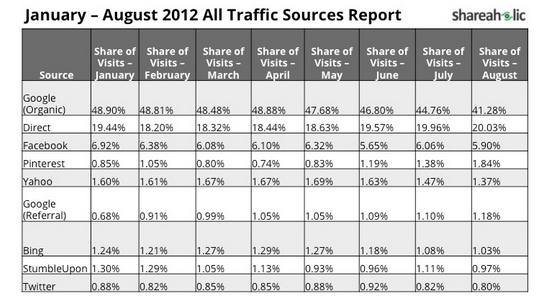
    1. Pinterest is the fourth largest traffic driver to websites in the world, surpassing Bing and Yahoo as reported by shareaholic.com.
    1. Pinterest is the third most popular social network on the web (behind only Facebook and Twitter), according to Experian’s 2012 Digital Marketer trend report.
    2. If you’ve got something to sell, chances are you want to be on Pinterest. Nearly ⅓ of Pinterest users have an annual household income of $100,000 or more. Most (68.2%) are female, and a majority of users are age 25 – 34 years.
    3. Trouble ranking organically? Pinterest pages have great authority with Google, providing an opportunity for a business to compete in rankings where they might not normally be able to outrank a competitor. Each click on a Pin from your site drives traffic right where you want it — your site!
    4. The number of active Pinterest users and unique visitors keeps on climbing. Pinterest became the fastest site ever to hit 10 million unique monthly U.S. visitors in history. The once exclusive, invite-only website is now open to anyone with an email address, Facebook, or Twitter account, opening the door to those who may have been intimidated by the exclusivity or simply lost interest during the wait period.
    5. The visual focus is addicting (to users). Pinterest users spend, on average 98 minutes per month on the site, behind only Facebook and Tumblr.
    6. Users always have access to Pinterest. The company provides a browser plug-in, mobile and iPad apps that make content on ANY site pinnable.


    Our mission at Search Influence is to help small businesses succeed online. Pinterest’s visual appeal and addictive nature make it the perfect opportunity for a small business to grow, instead of being lost in the noise of a more trafficked network like Facebook. On Pinterest, it’s not the number of followers or fans you have, but the quality of your content that makes you successful. I don’t know about you, but some of the best products I’ve seen came from small or local businesses just trying to get it out there.

    Pinterest for Business might be just the thing you need to get your product seen. Do you plan on signing up? Tell us about how it goes in the comments.

  • Search Influence named in Five Elms Capital’s Flyover 50 Fastest-Growing Companies

    Search Influence was named in the first Flyover 50, a list compiled by Five Elms Capital to highlight the 50 fastest-growing companies in the central U.S. Search Influence named in Flyover 50 Fastest Growing Companies

    Topping the list is Appcore, a company based in Des Moines, which provides cloud computing infrastructure. To be considered for the inaugural Flyover 50, companies applied or were nominated, and the top companies were determined by a percentage of growth in revenue.

    In order to qualify, a company’s revenue must have exceeded $1 million in 2011 and be based within a 20-state area in the central United States.

    The 50 honorees are invited to attend an awards ceremony at the Mid America Corporate Growth Conference in Kansas City, Mo. on Thursday.

    View the complete list of Mid-America’s fastest growing companies here.

    Search Influence is a national, full-service online marketing company based in New Orleans. The largest online marketing company on the gulf coast, Search Influence employs 35 full-time employees and 40 contract writers to support hundreds of direct and white label customers. Search Influence was co-founded by Will Scott and Angie Scott in 2006.