Author: Search Influence Alumni

  • Pinning for SEO: Pinterest Can Boost Your Rankings

    May13Pinning for SEO: Pinterest Can Boost Your Rankings

    Pinterest is a hot topic right now, and not just for people wanting inspiration for their future wedding. While blogs, websites, and the big-name social sites get all the SEO airtime, Pinterest can get overlooked, even though it has huge potential to boost your company’s rankings. With the right tactics, you can start pinning your way to greater exposure, one infograph or product at a time.

    Sneak In Keywords

    Pinterest may appear to be all about the images, but that doesn’t mean there aren’t opportunities to scatter your keywords around the site—and doing so can provide a big payoff. Your profile’s “About” section is only 200 characters long, but making those words count will give search engines something to do.

    For each board you create, incorporate one or more keywords into the title; that will make them more interesting to search engines, and more likely to be spotlighted. And when you pin, edit your image file names to include keywords, and utilize the 500-character description for each pin to scatter keywords. Remember to go back and edit previously pinned images, too, so you don’t lose those valuable SEO opportunities.

    Check and Uncheck

    There are two little features in Pinterest that can make all the difference for your SEO. Both are under “Settings.” Make sure the option to hide your boards from search engines is turned off; hiding your pins will defeat the entire point of using Pinterest.

    While you’re on your “Settings” page, click the “Verify Website” button. This step certifies that the website on your profile is, in fact, yours, and puts a check next to the domain in search results. That check translates into increased traffic and higher SEO rankings, since both consumers and search engines are more likely to find you legitimate.

    Go Outside the Platform

    Pinterest, like any social media, is most useful as a connection tool. Link to your website, blog, Facebook profile, LinkedIn profile, and any other sites connected to the company, from your Pinterest “About” section and/or your pin descriptions. Encourage users to view more of what you have to offer by directing them beyond the images on your boards.

    Additionally, pull your pictures from outside Pinterest to generate fresh content. While repinning creates connections, new pins draw attention, as they haven’t been seen before. Search engines scan pin quality as well as text, so pin high-resolution images whenever possible.

    Board Smart

    Think of your Pinterest boards as your welcome signs, drawing in users and search engines with strong titles and an enticing variety. Put your best boards up higher, since viewers often see just the top one or two rows, and edit each board to make sure it has a category. When you sort your images based on customers’ needs and desires, your Pinterest can become a well-organized storefront, even if you don’t sell products. And with the new Pinterest Web analytics, you’ll be able to see at a glance what’s working and what needs to disappear.

    Pinterest may have started as a virtual corkboard for the crafty, but it’s exploded into nearly every realm. Take on the pinning challenge and make it work for you!

    Megan Totka is the Chief Editor for ChamberofCommerce.com. She specializes on the topic of small business tips and resources. ChamberofCommerce.com helps small businesses grow their business on the web and facilitates connectivity between local businesses and more than 7,000 Chambers of Commerce worldwide.

  • Five for Friday

    Five for Friday1. How Google Now Will Impact SEO & What You Can Do to Get a Head Start – Search Engine Watch

    Google hosted their big developers conference this week, Google I/O. Although there were no big new products introductions, one service that has been getting a lot of attention is Google Now. Although this product was released over a year ago, it is now available for free download on Apple and Android phones and tablets. Guillaume Bouchard has some interesting ideas about how Google Now will affect the SEO community and what we can do to stay ahead of the curve.

    2. Google Maps Gets a Brand New Look – Search Engine Watch

    Google announced another big update this week. Google Maps is undergoing a complete makeover. The maps will be more interactive and customized for each user. Search results will be clearly labeled on the map with icons and brief descriptions. They’re also promising “smarter directions” and “tours generated from user-submitted photos.” The update is invitation-only right now.

    3. How My Mom Thinks Search Engines Work – SEO Moz

    This is a fun article and a good read for anyone working in SEO. Introducing somebody to SEO is not easy, and it’s good to take a step back from our industry jargon and realize that clients – usually small business owners – might not know what “organic search” is!

    4. Content Marketing is a Hit! [Infograhic] – Marketing Pilgrim

    We’ve been hearing for a while about the importance of content marketing. This infographic lays out the cold hard facts about how and why content marketing is essential for your business.

    5. Google Local Adds New Troubleshooter to Move Reviews When a Business Relocates – http://blumenthals.com/blog

    One more update from the all-important Google. Google has announced that they now have a process in place to submit requests for when a business relocates, changes its name, or changes ownership. This is something that has plagued Maps teams for a while and it’s great to see Google doing something proactive in order to simplify the process.

  • 5 Tips for Non-Profits to Get Social

    Due to financial limitations, many non-profits find it difficult to increase their online presence. It may be difficult for local non-profits to compete with the big brands that are creeping on their digital space. Yet there are a few ways for non-profits to interact with their target audience online for very little out of pocket expense. What is this magical tool that non-profits should be utilizing? Social media, of course.

    Social media outlets prove to be great tools to capture, engage, and inform your supporters. It works as a way to provide a face to your cause and keep your loyal audience up to date. A recent study by Craig Newmark reported that 92% of non-profits are on Facebook and 90% are on Twitter.  Non-profits are spending more and more time investing in their social media marketing. However, simply signing up for your social media account isn’t enough. How do you reach your audience? What do they want to hear? What will get them excited?

    Five quick tips for non-profits when crafting your social posts:

    • Sneak Peeks: everyone appreciates a good inside scoop! Are you about to launch a new product or event? Why not let your social media audience get the inside information first. This will create buzz around your brand!
    • Insider Photos: you most likely know that pictures are a great addition to your social posting and should be worked in whenever possible. Including behind the scenes pictures is a great way to engage your fans and highlight your supporters.  It provides a great “this is what happens when you aren’t here” anecdote. Team Gleason does a great job of including behind the scenes shots to keep their Facebook Fans engaged and sharing interesting content!

    Nonprofits Behind The Scenes Sharing

    • Keep your posts relevant: is there an upcoming organization event? Post about it! Is there local breaking news? Tweet it! The beauty of social media is that you’re able to comment on things as they’re happening. You want to stay relevant and timely.
    • Link to your site: how do you expect your social media to impact your web traffic if you don’t link to your site? When appropriate, link back to your site so fans can learn more information. Links work best when paired with an eye-catching graphic. Check out what The Museum of Modern Art did with a link to purchase tickets online.

    MOMA Nonprofit Site Link

    • But don’t always link to your site: yes, you want to drive site traffic, but you have to do it carefully. There is nothing social media users hate more than the self-obsessed page. The majority of your posts should be great and engaging content. Self-promotion should be the minority of your updates.


    And don’t worry, non-profits. The social media sites want you to succeed! Facebook even recently released a resource center for non-profits. So get to posting and watch the fans and site visits increase!

  • 5 For Friday — Links, Stories & Posts For Your Weekend

    2068779988_4422f1bf5e_b1. Dusting The Website For Spring: Optimization and SEO Cleaning — SEOmoz

    How long has it been since you spent some time cleaning up your website? I’m sure for many of us, it’s been far too long. In this post, Scott Wyden Kivowitz gives some great tips for dusting on-site and off. A cleanup might be exactly what you need to increase your web presence. A good deal of the post focuses on social media and the benefits of linking your website to your various accounts. When it comes to off-site initiatives, social media is important once again, as you want to make sure you’re active on your accounts. Overall, this article has a lot of great advice when it comes to the little things you can do to get your website out there!

    2. Facebook To Add More Support For Emoji Within Status Updates, Comments — AllFacebook

    According to AllFacebook, the “Unofficial Facebook Blog,” the social media giant is fully embracing the popularity of Emojis. I’m sure you’ve noticed the recent addition to your status bar, where Facebook now asks how you are feeling. Apparently this was only the first step. Comments are now Emoji-laden as well, and Facebook is adding new support for the animated addition. Unlike most Facebook changes, the presence of Emojis seems popular with users, who are apparently grateful for an additional way to express themselves—especially such an adorable way. I’m sure you can all expect to see many more cartoon cats on your newsfeed in the upcoming weeks.

    3. Hipstamatic Battles Instagram With Oggl iPhone App — PC Mag

    Apparently Hipstamatic is making attempting to regain lost popularity with a new product called Oggl. Could this possibly be enough to replace Instagram in our hearts? As a latecomer to the iPhone, I’ve never used Hipstamatic, as Instagram was already the go-to photo app by the time I switched from Droid. Maybe this makes me biased toward Instagram, but I don’t foresee a big shift. Apparently Oggl allows you to edit photos after you’ve already taken them. The same filters and lenses from Hipstamatic are still available, though. According to this post, it seems like the makers are marketing the new venture as a more art-focused app (Oggl is NOT for selfies!). I guess we’ll just have to wait and see if edgy marketing can overtake Instagram’s immense popularity.

    4. Instagram Now Lets Anyone Tag You [Or Brands] In Photos, Adds Them To “Photos Of You” Profile Section — TechCrunch

    In case you missed, it, last week Instagram launched photo tagging. I know what you’re thinking: “It’s about time!” There’s now even a Photos Of You section, so you can keep track of pictures you’ve been tagged in. I’m still trying to decide if I like this switch, as I kind of enjoyed Instagram’s focus on photos rather than people. In this post, TechCruch’s Josh Constantine explains how this signals a new emphasis on identity for Instagram. (He has another interesting blog post linked on this page that further examines the issue.) He also tells you exactly how to use it, in case you’re interested!

    5. Google Removes Related Searches – Blind Five Year Old

    For those who haven’t noticed, Google has removed the Related Searches feature from Search. For many of us, this was an important tool when it came to keyword research and will be sorely missed. In this post, Blind Five Year Old owner AJ Kohn, who’s pretty upset about the change, laments Google’s neglect of SEOs. It’s really interesting to hear his take on why Internet marketing matters, and how individuals working in SEO actually benefit Google. According to the post, it’s SEOs that are “demystifying search,” to help websites, which helps Google in turn. In fact, spurning SEO may end up hurting Google in the long run.


  • 5 For Friday — Links, Stories & Posts For Your Weekend

    Screen Shot 2013-05-03 at 2.46.16 PM (2)1. HTML5: An Essential Weapon for SEOs – Search Engine Journal

    The new HTML5 is set to receive a major upgrade and there are 5 key SEO innovations coming :

    1. Nofollow’s little brothers and sisters
    2. Alt-text gets some much needed support
    3. Identifying the most important links on your page
    4. No more Flash for videos
    5. AJAX gets search engine friendly


    2. Which Finds the First-Ever Website Better, Google or Bing? – Search Engine Land

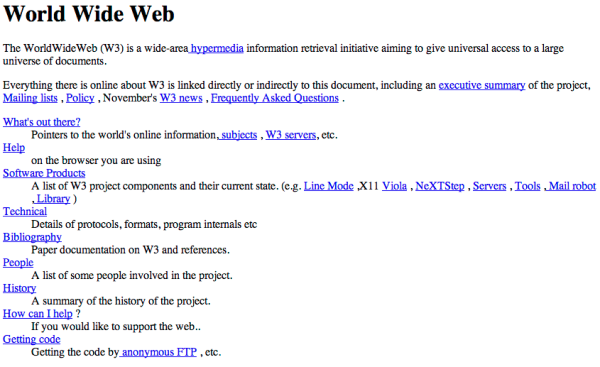
    May 1, 2013 was the 20 year anniversary of CERN making the Internet available to anyone. Using today’s technology, which search engine do you think would be able to find the site considering that neither engine existed back then?

    This is what the world's first website looked like.
    This is what the world’s first website looked like.


    3. The Complete Guide to Reconversion – SEOmoz

    Getting new customers is great for any business, but the real challenge is retaining your existing customers. This 5 chapter guide explains why it’s important to focus your energy on remarketing and reconverting.


    4. University Study Shows Happy News Leads to More Twitter Followers – Marketing Pilgrim

    Keeping your tweets positive  and informational will lead to an increase in followers. This article highlights the do’s and don’ts of tweeting


    5. Meet Vine’s Most Creative Stop-Motion Animator – Mashable

    Twitter launched Vine on January 24, 2013. On January 25th, Khoa Phan created his first vine…and the rest is history. Check out his creative and colorful stop-motion vines in this article.

  • 5 For Friday — Links, Stories & Posts For Your Weekend

    Round 1-051. Bing Places For Business replaces Bing Business Portal – Small Business Search Marketing

    Bing has made some significant changes in its local business listing management platform. Bing Places will replace the old Bing Business Portal, and along with the name change comes a simpler system that strips away much of the non-local search functionality that previously existed. Learn more about the update and decide whether you think this is a good move for Bing.

    2. 10 Inbound Discoveries That Will Disrupt Marketing Forever – HubSpot

    HubSpot’s 2013 State of Inbound Marketing Report has been released, and they’ve distilled the findings down to the 10 biggest discoveries. More than 3,000 marketing professionals from all over the world participated by sharing their thoughts on everything from strategy and organizational alignment to channel and budget management.

    3. How to Build an Online Community for Your Business – SEOmoz

    Building a better online community around your business has a number of advantages. This author urges you to focus on the hard work of attracting the right kind of customers to your community rather than chasing the latest algorithm updates.

    4. Top Google Website Optimization Resources – Search Engine Watch

    All of the best tips, guides, tutorials, and resources that Google has offered on SEO are all here in one place. You can find everything from beginners guides to some advanced programming concepts that will help you become an optimization expert.

    5. How Dynamic Search Ads Can Take Over Your AdWords Account With Devastating Effects – Search Engine Journal

    Dynamic search ads became a hot topic when they were recently added to all AdWords accounts. Advertisers expecting to increase profits simply by using DSAs on standard settings should think again. Here are some tips to make the most of your dynamic ads.

  • 5 For Friday — Links, Stories & Posts For Your Weekend

    1. Back to Basics: Meta Descriptions 101 – Search Engine Journal
    If you haven’t looked at your meta descriptions in over a year or 6 months, it may be time to refresh your meta data. Meta descriptions are the ones that will show up in search results, so they should sound coherent to humans. Read this refresher on meta tags.

    five-for-friday2. Thinking about adding 10,000 pages to your site at once? Take caution. – Search Engine Land
    If you are adding a large number of pages to your site, it is better to do so in stages according to Google’s Matt Cutts. Adding them in batches may be better. Releasing thousands of pages at once may cause Google to manually review your site for any suspicious behavior.

    3. Want to learn how to segment out your image search in Google Analytics? – Blind Five Year Old

    Google image search, universal image search, Bing image search. How do you keep them all separate? AJ Kohn from Blind Five Year Old walks you through the process of setting up filters for image searches in Google Analytics. Read and implement.

    4. Foursquare emphasizes its local search in its latest app update.  Search Engine Land

    Attempting to take on Facebook and Yelp, the social check-in company rolls out its 6.0 update for its app. With local search as the primary focus of the new update, Foursquare users will see nearby recommendations and discovery features. Check it out.

    5. Are Facebook fans really worth it?  – Mashable

    According to a Syncapse report, a Facebook fan is valued at $174. The study takes a look at Facebook fans versus non-fans and analyzes their spending behavior along with their brand loyalty and several other factors. Would you agree with their estimation?

  • Outdated SEO: A Resource Drain Without Returns

    Apr13Keeping up with SEO tactics isn’t always easy, which is why the general rule of thumb is to build a good site and network, and wait to be found. Even still, many people are attempting quick shortcuts that have long since been proven less than useful, or even damaging. If the sole reason for doing something—submitting a press release, for example—is to drive SEO, there’s a good chance it will backfire.

    SEO mistakes fall into a few distinct categories: fishing for links, diluting personality, and failing to strategize.

    Link Cheats

    Creating a network relies on links to and from other reputable sources. Search engines analyze these links and count them as endorsements, so the more connected you are to other sites, the better you’ll be viewed by the all-powerful algorithms that control search results. The extension of this idea has led to link exchanges, article submissions, and pointless press releases—all of which are outlays of time and energy that don’t recoup their investment at all.

    Instead of trying to find back ways into getting links, you’ll see the best results by actually building the connections that earn links. Link to resources your clientele and readers will find useful, and you’ll soon find others linking to you. Writing guests posts for industry bloggers will enhance their sites and earn you credibility at the same time. There are excellent tips on building links and networks out there: start with this post to understand how it works.

    Individuality Flubs

    Okay, you think, I need to write more content and be more connected. That’s an admirable goal, but there are a few pitfalls along the way that won’t help your SEO rankings. The tendency can be to write the same description, review, or promo in just slightly different wording—it’s quick, easy, and fills the spaces that search engines analyze.

    But your content can’t just exist for its own sake—in order to work for you it must be relevant, interesting, and well written. Make sure you have a quality writer who knows how to build an audience and engage readers in discourse. And be careful not to automate too much of your social interaction. Clients can tell when they’re receiving a rote reply. Instead, highlight your businesses personality through both your content and social networking, to stand out to both customers and search engines.

    Strategy Omissions

    When you’re trying to “do all the right things” for SEO, you can miss the forest for the trees. SEO won’t get you anywhere unless you have an achievable goal, with a strategy that can be measured and reevaluated. Discovering your rankings does you no good unless you adapt your marketing plan and correlate your analytics to your aims.

    There are plenty of good SEO tactics and SEO basics a site owner should know, but they all boil down to putting the effort into a well-designed, interactive, quality experience for both the users and the search engines. Don’t be trapped by outdated methods of bumping you to the top of the list; instead, focus on genuine content that reflects your brand and your goals.


    Megan Totka is the Chief Editor for ChamberofCommerce.com. She specializes on the topic of small business tips and resources. ChamberofCommerce.com helps small businesses grow their business on the web and facilitates connectivity between local businesses and more than 7,000 Chambers of Commerce worldwide.

  • Types of Facebook Ads

    Types of Facebook AdsAs Facebook has become a more robust advertising platform, a broad smattering of ad units have shown up all over the platform. Almost every kind of content can be advertised on Facebook, from a text status to a Facebook app to a web site, leading to increased interaction and ultimately stronger organic performance of the content. It’s important to keep in mind the same things that drives high organic action rates: the importance of EdgeRank, the necessity of AWESOME, and the value of truly social campaigns.

    Marketplace Ads

    The ads most people are familiar with on the social media network are Marketplace ads. These ads, usually showing in the sidebar of the News Feed, a Profile, or a Fan Page, are the constant companion to the Facebook user. Marketplace Ads compete with FBX retargeting as well as traditional advertiser-created ads. The thumbnail image can be up to 100 px by 72 px, The headline is 25 characters long, and the body copy is up to 90 characters long.

    There are five main types of content that are promoted via Marketplace Ads:

    types of facebook marketplace ads This example, displayed on the soft blue of a profile or fan page, links to a traditional landing page. These ads are among the most common, but be wary of ad blindness and the cognitive disconnect between users moving from Facebook to your website.
    types of facebook marketplace ads This ad, found on the News Feed sidebar, brings you to a different site, but uses the social proof from the Facebook fan page to entice users to trust the site. This is easily set using OpenGraph meta tags.
    types of facebook page ads The traditional Facebook ad links to a fan page. These ads can drive likes without clicks and can land on a specified tab. These ads default to reporting only on Page Likes.
    types of Facebook app ads Facebook also offers display ads for Apps. This ad lands on the app page, showing the number of monthly users as social proof.
    types of facebook event ads Facebook also has Event ads, using Event Responses as the point of conversion.

    Interestingly, Marketplace ads have begun showing in the News Feed itself as well. This should lead to higher click-through rates, especially on Mobile devices, which did not traditionally have Marketplace ads.
    types of facebook ads in news feed

    Sponsored Stories

    Sponsored Stories are posts that promote single posts showing both in the News Feed and in the sidebar. In most cases, Sponsored Stories bolster a successful organic post; however, “Dark Posts” are great ways to test content, demographics, or targeted personas without affecting other aspects of your organic Facebook marketing. Sponsored stories are traditionally to increase interaction, but strong targeting combined with a clear organic strategy can garner “real” leads as well.

    Some selected Sponsored Story ad types:

    types of facebook status ads Text posts can do well on Facebook, especially when they prompt user interaction by asking a question.
    types of facebook image ads Image posts are best when the post has a striking, square image. Links can be added to the post, but are best placed early for higher click-through to the landing page. Images can’t be over 20% text, using a 5×5 grid overlaid on the image.
    types of facebook link ads Link posts, while common, are some of the lowest-reponse posts due to the limited kinds of solicited actions users can take on the post.
    types of facebook video ads Video posts take up space like a smaller image post, but because of the high engagement needed to watch a video online, may not get as high of engagement rates.

    Like Ads

    Like ads are a subset of Sponsored Stories. Unlike most other ads, these ads are created and triggered by user interactions with your content. Like ads are an inexpensive way to target people who may be brand aware through their online friends’ activity. Created as a companion to Marketplace Ads or Sponsored Stories, these ads are much less controllable than standard Sponsored Stories, but lead to more organic interactions.

    Examples of Like Ads:

    types of facebook page ads The main type of Like ad is the Page Like Ad. This shows in the sidebar and in the News Feed. These ads let targeted friends of your existing fans see real proof that someone they know likes your page. With a quality thumbnail, you can reach single-digit click-through rates on these ads.
    types of facebook post ads Post Like Ads can extend the reach of your posts, ensuring that friends of fans can see interactions taking place on your page.
    types of facebook event ads Events, Apps, and other content is also shared, highlighting actions by a user’s friends on Facebook content such as RSVPs.

    Promoted Posts

    facebook ad typesPromoted Posts and Pages are a simple way to set up Sponsored Stories, letting even the least savvy advertiser get a piece of the Facebook ads pie. Promotions are wholly untargeted, which can be a blessing in disguise for large pages with diverse fan bases and no need for location targeting — the only way to target a Promoted post is to target the organic post itself.

    Promoted Posts and Pages are a shortcut for businesses that don’t have the time or energy to manage a full Facebook campaign.

    Modern Facebook Targeting

    What Facebook Promotions lacks is the hallmark of advertising on the social network: the targeting that allows an advertiser to hone in on specific psychographics and demographics to ensure that your ads perform significantly better than the average of 1 of every 2000 impressions leading to a click.

    Some examples of targeting methods:

    types of facebook ads targeting: location Location
    types of facebook ads targeting: language Languages: This is the language setting of the user’s Facebook account.
    types of facebook ads targeting: age and gender Age & Gender
    types of facebook ads targeting: relationship “Interested In” & Relationship Status
    types of facebook ads targeting: education Education users list, including targeting of specific colleges or majors.
    types of facebook ads targeting: workplace Workplaces users currently are listed as working at.
    types of facebook ads targeting: interests The workhorse of Facebook targeting, Interests are pulled from a user’s likes, statuses, and site interactions. #Hashed interests are broader categories which may include misspellings or a set of liked pages. Unhashed interests are largely individual Facebook pages, though with “little words” like and and the removed.
    types of facebook ads targeting: broad categories Facebook Broad Categories: These are more general groups of interests that Facebook has grouped together for easier targeting. These also include temporary demographic groups, like “Birthday in 1 Week” and “Recently Moved.”
    types of facebook ads targeting: partner categories 3rd-Party Partner Categories from companies such as Datalogix, Acxiom, and Epsilon, which use real-world actions, transactions, and accounts to categorize users.
    types of facebook ads targeting: connections Connections and Friends of Connections to Pages or Apps that you are an admin of.
    types of facebook ads targeting: custom audience Custom Audiences from advertiser-submitted email, phone number, or Facebook ID lists
    types of facebook ads targeting: lookalike audience Lookalike Audiences generated by Facebook to match custom audiences, either inclusively or attempting to closely match the audience’s interests.

    Facebook has become a robust ad platform with complex, interrelated, and mutually beneficial ad formats. For even the smallest business, the Facebook platform is a toolkit for social media interactions, driving brand awareness and ultimately real revenue.

  • Google Places For Business Dashboard Update: News Roundup

    Peugeot 207 dashboard

    Earlier this month, Google started slowly rolling out the new Google Places For Business Dashboard which includes an updated interface, deeper integration with Plus, and a promise of faster updates. The dashboard is now available to all new users in the U.S. To help better understand the new features, we have compiled a great list of resources on this much-needed updated.

    From Google:


    From Mike Blumenthal a.k.a. Professor Maps:


    From Around the Web: