Author: Search Influence Alumni

  • No really, … was there a Google update in January 2014?

    It’s curious how when you’re looking so intently at one thing, something so much bigger sneaks up behind you. Like when you’re a six-year-old kid all excited at your birthday party opening presents, your mom buzzing around taking lots of pictures demanding everyone to “smile,” and your dad sneaks in behind you rolling in a bright shiny new bicycle!

    Google January 2014 update is a nice present
    Thanks PorticoMecanica for the picture of such a big smile.
    http://www.flickr.com/photos/portocalamecanica/

    That’s how I have been feeling the last week or so. Like I just got a bright shiny bicycle with a horn and a bell and handlebar fringe!

    I have been head down, concentrating on a project with numerous Excel spreadsheets, lots of cups of coffee, data overload, and a glazed look in my eye.  When I was poking around in yet more data, I found that Google snuck up behind me with a big bright shiny present.  I gotta say, it’s a pretty exciting surprise when I see the majority of our clients have an increase in January’s organic traffic; and not just any increase, impressive increases that makes big smiles all around the office.


    So, was there a Google update when I wasn’t looking?

    Because the increases in Analytics are seen across so many clients, across so many industries, there had to be an algorithm shakeup.  Lo and behold, on January 9th, Barry Schwartz announced the chatter on it “Is Google Search Updating?

    The post’s comments express some winners and losers as expected with any update.  I had to dig to find some excitement similar to my own:

    Vibhu Gauba
    • 16 days ago
    “Tracking almost like 700-800 clients of ours and all have moved up !!!!”

    and …

    SAJID
    • 16 days ago
    “Wao… Thats gonna be a wonderful update… My traffic rose about 250% from last few day”

    Barry Schwartz’ post drove me over to Algoroo. Algoroo was developed by Dejan SEO, and they say “Algoroo tracks Google algorithm changes by observing turbulence in rankings of thousands of keywords.  When the bar is high, it’s likely that Google has made a tweak to their algorithm.”

    They posted on recent, significant algo updates which is interesting and related to the topic.  This unannounced, unacknowledged January update is the 6th most strongest update since May 2013 Penguin.

    When we look at the Algoroo chart for more recent dates, we see some definite turbulence in keyword rankings:
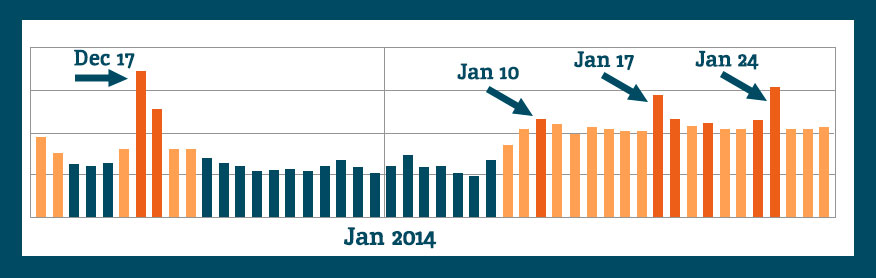
    algoroo-Google-algo-changes-Dec-2013-Jan-2014

    The chatter indicates that there was an unannounced update, and a fellow blogger commented, I’m going to enjoy it while I can.

    Crawl Rate as an Indicator?

    Some of the commenters on the webmasterworld forum had a short burst of discussion around crawl rates trying to find some commonality among websites’ changes, or at least as an indication of “something” happening.

    White Dove says, “I’ve seen an increase of crawling activity, including pages that don’t exist anymore.”

    Shai comments, “Although no major changes in rankings, I can see some strange crawling occurring on around 30 sites. Not found anything in common between any of them yet.”

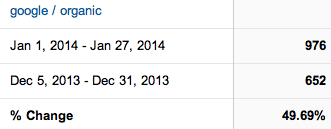
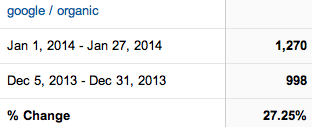
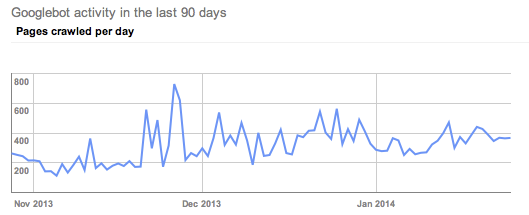
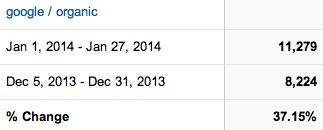
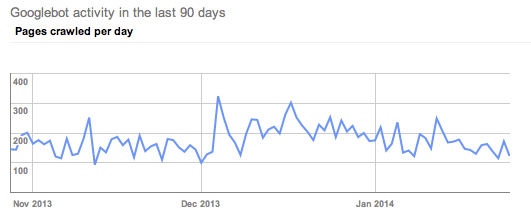
    I want to check this out, so I’m looking at clients who I know have improved organic visits in January and scoping out their crawl rates. (Screen shots are Google organic visits Jan 1, 2014-Jan 27, 2014 Compare to: Dec 5, 2013-Dec 31, 2013.  Crawl rate charts are showing last 90 days.)

    divider

    Client A has fantastic organic increases in January.  I will take 27% organic increase any time.
    client DC google organic increases january 2014

    A’s crawl rate shows a clear uptick in crawl rate, but not in January. His crawl rate started picking up in late November.
    client DC google crawl rate January 2014

    divider

    Client B had a 37% increase in Google organic traffic.
    DL google organic traffic January 2014

     His crawl rate picked up in early December.
    client DL google crawl rate January 2014

    divider

    Client C had great improvements.

    client DD google organic visits January 2014

    If anything, I would say his crawl rate slowed in January.
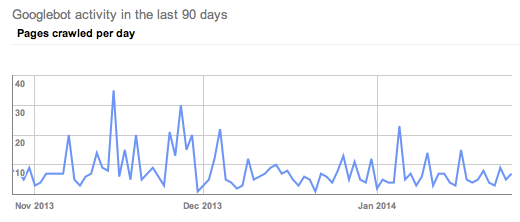
    client DD google crawl rate January 2014

    divider

    I had to dig around to find these somewhat obvious examples of the above crawl rate changes.  Most of the clients within this same industry had crawl rates like Client D.

    Client D has exciting organic visit increases in January.
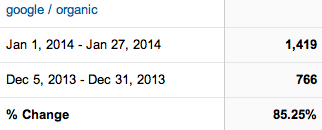
    client N increase in google organic search Jan 2014

    The crawl rate doesn’t indicate any clearly obvious trends.
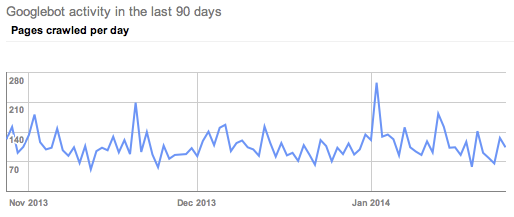
    client N pages crawled per day last 90 days

    All of the clients looked at above are in the same industry, so let’s look at another industry to see if the trends are widespread.

    divider

    Client E is enjoying a 34.32% increase in Google organic traffic in January.
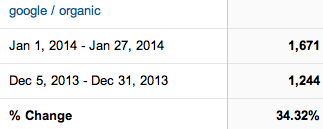
    client S January 2014 google organic

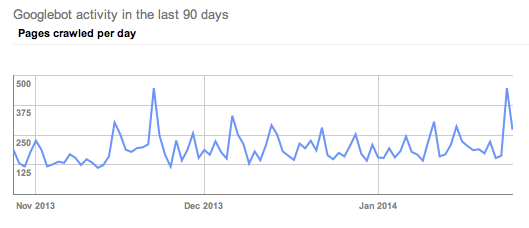
    Their crawl rate also picked up in late November.
    client S Google crawl trends January 2014

    divider

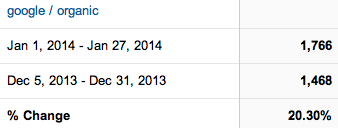
    Client F has a 20% increase in Google organic.
    client G google search in January 2014

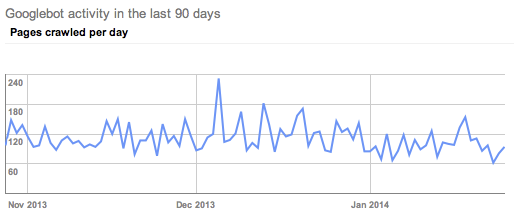
    His crawl trends seen in Google Webmaster tools show a slight decrease in crawl rate in January.
    client G WMT crawl data

    divider

    I poked around at other clients in GWT, and I’m not real sure we can pull any decided trends from the crawl rate theory.  I didn’t check every Search Influence client, nor did I create elaborate charts of crawl rates per month. I’m comfortable seconding Shai from the webmasterworld forum, “Not found anything in common between any of them yet.”

    Search Queries

    I’m not seeing any huge changes in rankings data for the keywords we are tracking.  We have some ups and downs, but nothing out of the ordinary.  We update tracking information regularly, so until the next keyword ranking report is updated, Google Webmaster Tools can tell me some great information, too.

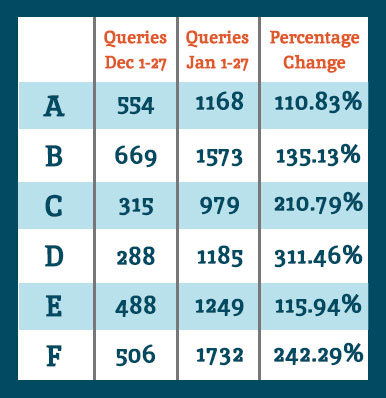
    Google Webmaster Tools Search Queries data shows a lot of keyword data that we don’t track in our keyword reports. So for the example clients noted above, I see they all had an increase in Google search results shown in GWT.
    QueriesChart

    When we look at the Queries data for the same comparisons as the organic search data at the top of this post, we see they all had an increase in showing up for searches.  Google defines Queries as: “The total number of search queries that returned pages from your site over the given period.”

    I interpret this as our websites are ranking for more varied keywords and more than we are tracking.  It’s typical for a website to rank for more than you are actually tracking. It’s unreasonable to track for all of the possibilities.

    I want to acknowledge that there is seasonality in January search for some industries.  Some of the organic increases can be attributed to seasonal search trends, but never at these levels.  Also, last week I spoke with client F telling him about the January organic goodness, and his response was January was usually dead for him, and the phones this last month have been ringing.  Yes, seasonality is often a factor for any month-to-month increases or decreases, but these data are suggesting something bigger.

    Bottom Line

    Any time there is any Google algorithm update, whether announced or perceived, there will be winners and losers.  I’m happy our client sites are on the positive side of whatever changes were implemented.  Yes, it’s good to be a winner today, but it’s not without effort.  I can repeat what everyone has been talking about for months and months:

    • Clean fresh content on a regular basis
    • Encourage client engagement on Google+
    • Cleanup any residual devalued links
    • Earn links with great content and local community participation

    These are just a few actions to take in earning trust and traffic from Google search.

    If you’ve noticed any changes in search traffic or rankings in January, we would love to hear about it in the comments below.

  • 3 Reasons Why Your Business Should be Active on G+

    Google Plus LogoSome may know Google Plus as a weak attempt by Google to compete with Facebook. However, it can be used for much more than just engaging with your target audience. Google’s social media platform can also help your SEO efforts while providing quality content and information to followers.

    Here are three reasons why your business needs to be active on G+:

    1. Google+ Posts are Crawlable

    Unlike other social media platforms, all Google+ posts are crawlable by the search engines. Your business’ Twitter or Facebook profile may show up for your brand name search, but specific posts and updates are not indexed. All Google+ posts are indexed in minutes, and some even say seconds.

    You can use your G+ posted content to target specific keywords. Each post has its own url, and the first 45-50 words in the post become the title tag. Links within Google+ posts are followed links. As you post content linking back to your website and that content is shared, the authority of your Google+ page and website are growing.

    2. Boost CTR with Google Authorship

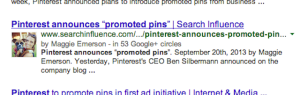
    Screen Shot 2014-02-03 at 4.05.26 PM

    According to Google, authorship has no impact on the SERPs. However, Google Authorship can help you get more traffic to your website, which is why we are all trying to rank on page 1 to begin with, right?

    By associating a G+ profile with pages on you wrote on your website, the profile photo of your G+ shows up with those pages in the search results. The image in the search results sets your site apart from the others and makes it more eye catching. Authorship increases the likelihood a searcher will click your site in the search result. And although authorship does not have a direct correlation with rankings now, we anticipate it will in the near future. And for now, using it for more traffic to your site is enough incentive to get on board.

    3. Potential Increase in Rankings

    The number of +1’s your G+ business page gets has been shown to correlate with top rankings in the SERPs. Moz did a correlation study to determine what aspects of a website show a strong connection to high Google rankings. The number of +1’s came in second only to page authority, with number of linking domains and Facebook shares, likes, and comments as the next most influential. Searchmetrics also did a similar study that found the number of +1’s to be the most highly correlated factor with top Google rankings.

    Yet, Matt Cutts is very adamant that the number of +1’s for a Google business page “has no direct impact on their web search ranking algorithm” and “correlation does not equal causation.” Although this may be true, a business can no longer ignore Google+ and its added SEO value.

    As a social platform, G+ is equally as important as Facebook. And Google+ goes far beyond social reach, it provides a great opportunity to boost your SEO efforts. So go ahead and get active on G+, the benefits are only continuing to grow!

  • 5 Management Tips (from a New Manager)

    spongebob memeI’ve been at Search Influence for just over a year and a half. However, in the last four months my role has changed from managing clients to managing people: exciting and terrifying all at once. It is one thing to be great at your job, but it is another to be great at teaching other people to excel at their jobs.



    Management decisions are not always clear, and in a managing role you will discover, at times, you need help to know the right resolution. Over the past several months I’ve taken note of what has been successful for me in my new role.

    Look Up

    Pull inspiration from the people above you. Everyone has a boss or a supervisor, use their experiences and successes to help guide you. Most likely, they have dealt with many of the problems you will face and can be a mentor for your tough decisions.

    Take note, there is no standard style of management, however, discussing difficult situations and seeking encouragement from someone you look up to will build your confidence as a manager.

    Change Your Focus

    News flash: Your role is no longer about you! Before becoming a manager, your success was measured by task completion and things like client happiness or productivity. Now, you are measured on how well the people you manage can perform.

    Making the switch from focusing on your own successes and failures to those of your team can be difficult, especially for young managers.  Your successes are now graded upon how well your team succeeds. However, once you accept this, the “ah ha!” moments from your employees, will be incredibly gratifying experiences.

    Get Help

    Find blogs, news sources, and email alerts on management styles and approaches.

    Great resources include:

    Communicate Often

    communication

    Be honest with your employees. Don’t be afraid to set expectations, give constructive criticism, or shower them in praise. When they are doing something right, acknowledge it, and acknowledge it publicly. Words of affirmation give encouragement and continue the preferred behavior. On that same note, don’t be afraid to take charge and have the more difficult conversations. Explain to your team what you expect from them. If they are not meeting your expectations, give them the resources and guidance on how to improve.

    Ask for Feedback – And Use It

    In the same vein of giving feedback, go out and ask for it! No one expects you to be perfect, but how can you get better without knowing your shortcomings and successes?

    For many people it can be intimidating and difficult to hear what you need to improve upon. However, in the long run you will appreciate being able to create the right type of management skills.

    Managing a team isn’t always easy. However, if you give yourself the right tools, you and your employees will have a better chance for success!


  • Social Media Marketing and the Super Bowl: It’s All About Preparation

    Thought Bubbles Photo

    If you’re like me and you love sports and social media, there isn’t a better day than Super Bowl Sunday. From the creative commercials to everyone constantly updating their feeds with their own thoughts on the game, it’s the ultimate setting for sports and marketing to collide. Rather than sit back and let this once-a-year event pass by, business owners should seize the opportunity to jump into the frenzy and promote their brand.

    But what do you say and when do you say it? The answers to those questions lie in preparation. Follow these simple tips so that you’ll be prepared to jump on the chance to be one of the social media accounts people are talking about the next day.

    Log In
    When something unexpected happens (like last year’s power outage at the Superdome here in New Orleans), you have to be ready. That doesn’t mean fumbling around trying to log into your Twitter, Facebook, or any other platform your business operates. By being logged in and thinking fast you can comment on a big moment right away.

    Football And Football Helmet Photo

    Know Your Audience (And Who’s Playing)
    Identify what content you want to create that relates to your brand, then follow the conversation surrounding the game and try to work it in at the appropriate times. For instance, are their certain hashtags your customers are using related to the game or big topics that have emerged? If so, try to join the conversation and interact.

    Get Creative With Promotions
    Use a promotion to drive customers to your website or place of business the week leading up to the big game. For example, offer a special that provides a discount if a certain player scores a touchdown or if the opening kickoff is returned. You can also take advantage of the many prop bets associated with the game, such as a discount on one product if the coin flip lands head and a discount on another if it lands tails.

    These are just a few things you can do leading up to kickoff. Just be sure to formulate a strategy early so that you aren’t scrambling once game day arrives. And, as always, try to keep your content tasteful, but colorful and fun at the same time.

  • Social Media And Small Businesses

    Early last year, an article was featured on StreetFight.com  that made some overzealous claims about social media marketing for small businesses. The negative stance was made loud and clear: social media marketing + very small businesses = zero return.

    I take the most issue with the article’s claim, “The type of business most likely to realize a social media return on investment are B2C businesses whose customers are younger than 50 and that focus on entertainment, retail, personal services, or tourism. B2B or home services, or businesses catering to older people, do not fare nearly as well.”

    In my experience, that just isn’t true. Every business can benefit from social media marketing. Here’s why:

    Social Media is for Everyone

    First, let’s talk about the age comment. The whole “social media is only for young people” idea is dead. Besides the fact that every family member I have over the age of 50 is actively engaged on Facebook (and some are even on Twitter), there are numerous statistics that prove age assumptions wrong. The fastest growing age group using Facebook is surprising – 45-65 years old.

    So, in all actuality, Facebook has transcended the age divide.

    Second, the article singles out B2B companies, saying that these businesses do not do well on social media. Wrong again. According to Vocus, 90% of B2B companies are currently on Facebook. Outside of Facebook, Twitter has emerged as a popular platform for B2B, with 85% of B2B marketers citing Twitter as the top social platform, followed by LinkedIn at 82%. If those stats are not enough, there is a whole list here.

    B2B Benefits

    Social media generates leads and leads make B2B. That’s a fact.  Social media allows businesses to:

    • generate brand awareness

    • increase customer engagement

    • establish a personalized/genuine relationship with customers

    • respond to customer reviews and make improvements

    • share special offers and highlight products

    The list goes on, but what I’m driving at is that social media drives site traffic. When executed well, social media marketing acts as a hook, getting customers intrigued. All social media business profiles should direct the customer back to the site. Regardless of the products sold, even if the business isn’t based in “entertainment, retail, personal services, or tourism,” social media marketing can work for small business.

    Low Cost Alternative to Traditional Marketing

    As the article points out, sites like Twitter, Facebook, LinkedIn, Pinterest, and Google+ are all free, so the only cost is time. However, the easy-to-use formats of all these sites allow for quick updates. Plus, there are numerous scheduling tools out there, like Hootsuite, that allow you to make posts into the future. The benefits behind social media marketing are well worth the time SMBs are dedicating to it. Most businesses don’t have the time to run their own social media profiles, so these customers usually contract with Search Influence and our partners to manage their social profiles for them.

    Finally, the article says “Sure, social signals are important for SEO. But as far as knowing that inputting X equals Y placement in search results, we don’t know the equation and never will.” Even if we don’t know exactly what X and Y are, we do know that there is an obvious correlation between social media traffic and site traffic.

    For instance, an increase in followers leads to more shares, and shares are a great way to spread your website content and brand name. An active social presence will also generate inbound links and improve customer satisfaction as Facebook, Twitter, and other social networks provide the optimal forum for direct customer-business feedback. In other words, social networks increase online visibility, and they don’t just provide a small window of visibility – these business profiles open a genuine link between customers and businesses.

    Putting Social Media to Work

    So, small businesses shouldn’t count out social media marketing just yet. Create profiles that promote products and engage your customers in a genuine fashion. Of course, all of this support for social media marketing would fall on deaf ears without a direct example. One of our clients, a small business of the exact strain highlighted in the Streetfight article, reached out to Search Influence two years ago. At the time, they only had 97 Facebook fans and site traffic in the low hundreds.

    Now, after a strategically designed Facebook ad campaign and other SMO tactics, the client has over 27,000 likes on their Facebook page alone and generates monthly site traffic in the thousands. Although their site traffic was not driven by Facebook alone, their Facebook ads had a click-through rate five times the average for other Facebook ads.

    Annual ad spending is increasing most rapidly on Facebook. By the end of 2014, 88% of small businesses expect to put some of their marketing dollars on Facebook, up from 43% in 2009. Recent estimates show ad spending on Facebook and other U.S. social networks increasing by 31.6% in 2013 (eMarketer, 2013).

    Even though social media marketing may still be a bit undefined, many online marketing experts predict that it will only become more prevalent. The future of links-to-like upheaval hasn’t been determined, but the power of the “like” is only growing stronger. Don’t count out social media marketing because you are afraid that you won’t generate a fan base due to age restrictions or the size of your company. Explore the social media networks out there and find the site that best works for your business.

    Top 5 Keys to B2B Social Media Success

      • Be authentic – good content is still key

      • Promote your brand – send signals that direct viewers and fans back to your website

      • Be personal – social media works best when directed towards a specific audience, which is easier than you think with the Facebook Ad Campaign tool.

      • Be engaging – post things that will be shared or liked. Find what kind of content works best for that specific social network. Don’t be afraid to use humor or to have fun! Like we did with this post!

  • How To Handle Automated Software Headaches

    To set the ‘scene,’ you’ve either recently purchased or are about to purchase a piece of software that is meant to offer improvements for your business. Whether it’s some form of automated process, or software that adds another form of datum for you to analyze and use for future success (such as SEO analytics information), there’s a great deal of caution that you should take with these programs.

    What Happens With Software

    software junk

    In short, I don’t mean that some of these programs aren’t worth their money or that they won’t do what you require of them. But you should expect a moderate amount of troubleshooting when applying this software into your business process.

    Most of the software that is developed and published for sale and use work as they should to a certain degree, but only under the right circumstances. Software testers can only do so much. The only real test comes from real-world use by people who aren’t familiar with the inner workings of the software.

    At the same time, patches and other forms of software updates are constantly in development (or at least, a good development team should always seek to make improvements) and can make drastic changes to a program that you are just getting used to, usually based on customer feedback that you might not be aware of, or agree with.

    How To Deal

    Thumbs UpIn order to avoid, or at least brace yourself for these moments of frustration, the first step is to read the manual. It’s usually large, bulky, and annoying, but within it are the instructions that you need to run the program correctly and avoid some of the smaller problems.

    The next thing to do is to make sure you always have a way to contact the original developers of the program, so that you can speak with an expert when there’s an issue that you can’t overcome on your own. Phone is always preferable in order to have instant contact, however most developers rely on e-mail.

    Finally, in order to prepare for updates and patches, make sure that you read up on the developer blogs that tend to be published on the website for the program itself. Not only is it a way for them to keep their website active, but they generally tend to suggest ways to use their program, bugs or issues to avoid, as well as patches and fixes that are currently under development. Keeping up with these blog updates, will keep you informed of future changes for the software.

    Now What?

    Enough preparation allows you to be more familiar with the good and the bad of any automated software you’re using. You can then expect some of the unexpected, and you’ll know the steps you will need to take in order to make the proper fix and continue using software to suit your business needs.

    If you’re interested in how a development team can improve your search rankings and help with your software issues, check out this blog on SEO Tips by one of our Software Developers, Shane Kretzmann!

  • Q&A on ShortStack

    For anyone that doesn’t know, ShortStack is an app that allows you to run contests and promotions from your Facebook page. It can also help boost social engagement and get more likes on your page. I recently had a client ask about using ShortStack for a Facebook contest and this overview helped explain it quickly and easily.

    First Question

    1. If I put this on facebook, will only my fans see it?  If I’m trying to get more traffic, where do I put it then? How can I get more people to see my contest?

    When you put an image or a form or text or anything in the ShortStack, you can choose the permissions who can see it underneath each addition. Visibility can be set to everyone, only fans of the page, non fans of the page, or admin only.

    We had an image that said “Like our page to find out more,” and we set it so only non fans could see it. So if someone came to the tab that didn’t like the page, that’s what they saw.  We then had another image and a form for fans only. Once someone liked the page, they saw the new image with details and the form.

    The little buttons underneath each thing tell you what is what. The thumbs up is fans only. The thumbs up with a strike through is non fans only. Little people are everyone.


    You can also check yourself and see what it will look like for different people (Fans vs Non Fans). Under “Live Preview” in the left corner just click the thumbs up. You will see what fans of the page see, and if you click on the non fan view (thumb with strike through) you will see what they see.

    Second Question

    When I install the final product through ShortStack, where does it appear on our facebook page?  Does it have to be used on a personal page or business page?

    If the login information being used is for a Facebook account that is connected to a business page, when you are ready to publish the ShortStack tab will show the pages you are a manager of and you can choose the pages you want. 

    Good luck in your next contest or promotion! I hope some of these questions/answers help.

    BIG THANKS to Maggie Emerson who helped me answer these questions for my client!

    Check Out More:

    ShortStack provides more information and tips on their own website. http://www.shortstack.com/

    They also have their own FAQ page along with video tutorials.


  • The Scoop on Sender Score

    Jan14Any business that sends regular emails to a list of subscribers has a Sender Score. Your score is a method of determining how mail servers (inbox gatekeepers, so to speak) view your reputation as a trustworthy email source.

    To keep it simple, think of it this way: if you’re not monitoring your Sender Score, the emails you send to your subscriber list may not have a positive impact on your business. Unfortunately, a poor Sender Score could land your emails in the spam folder, never to be seen by your subscribers.

    Five Things You Need to Know about Email Marketing

    Let’s start off by saying that Sender Score is important, and you should not only know what yours is, but you should constantly work to improve it. A great first step to take to acquaint (or reacquaint) yourself with email marketing protocol is to make sure you understand the CAN-SPAM Act.

    Once you know the law, you can move on to nuances like double opt-in email marketing vs. single opt-in email marketing.

    Many top email marketing firms are of the opinion that a double opt-in subscriber system is superior to a single because it ensures not only a higher level of recognition, but also of subscriber retention. In an article that defines both systems and gives advice on whether or not to use them, one email marketing expert adds,

    “…Double opt-in serves you when you already have a good amount of interactive leads, and don’t want to have any more headaches with bad email addresses.”

    Increase Your Score

    No matter what system you decide to use, the goal is the same: you want to increase your Sender Score (trust us!), and here are the top 5 ways to do just that:

    1. People who get frustrated when they have trouble unsubscribing from email lists may be inclined to mark your emails as spam (which is BAD). Make it easy to unsubscribe from your email list.
    2. Use a consistent theme to reinforce your brand when you send emails to your subscriber list. Your email subject line should accurately reflect your email message and include a reference to your brand.
    3. Analyze your reader engagement data once you’ve sent out an email to your list. Knowing how many people are opening, reading and clicking around vs. unsubscribing from your list is a very handy way to evaluate the effectiveness of your email content.
    4. Maintain your reputation by focusing on how to avoid complaints and keeping up your subscriber list hygiene. List hygiene is determined by how frequently you send emails to unknown users and spam traps.
    5. Be sure your emails are coming through authenticated. That means ‘showing’ ISPs (Internet Service Providers) you’re doing your best to follow their authentication protocols, which may include reverse DNS, Sender Policy Framework (SPF), SenderID, and/or Domain Keys Identified Mail (DKIM). Using a reliable email marketing service will prevent many authentication issues.

    How to Interpret Your Sender Score

    Once you have your Sender Score, you can begin to interpret your level as an email marketer. But how do you know what the Score means? Here’s the gist: any score over 90 is GREAT. If you score that high, give yourself a pat on the back, because you’re doing it right!

    If you score between 50 and 80, you’ll need to take a step back and spend some time figuring out what the problem is. For example, how many of your emails are accepted vs. rejected? How high is your unknown user rate? Any score under 50 indicates you’re a spammer. “But wait! I’m NOT a spammer!” you might be thinking. Unfortunately for you, the mail servers think you are. It’s up to you to rebuild your reputation.

    That’s why it’s so important to maintain your Sender Score, lest your emails wind up marked as spam or worse: your IP is blacklisted and your emails never arrive to an inbox at all!

    So pay close attention and monitor your email marketing activity and you’ll be well on your way to a great Sender Score. Good luck email marketers!

    Kelly Lucia is  the Lead Staff Writer atPostsbyGhost.com. A ghostwriting service that provides businesses with the opportunity to build their online presence and grow their companies, Posts by Ghost offers strategic blogging, content marketing and SEO assistance to businesses of all shapes and sizes. Kelly hit the ground running as a web copywriter several years ago and hasn’t stopped since. Over the last few years she’s developed a vast range of knowledge within the realm of content writing, and she prides herself on being able to write clear and unique content for an immense variety of industries, from overseas blogs about raffle tickets to small business and marketing advice on ChamberofCommerce.com.

  • Everything You Need to Know About Google Carousel

    Whether you’re looking to improve your position or simply figure out what the heck this carousel is doing in your Google search results, this blog post is for you. Let’s start out with a little background information.

    What is the Google Carousel?

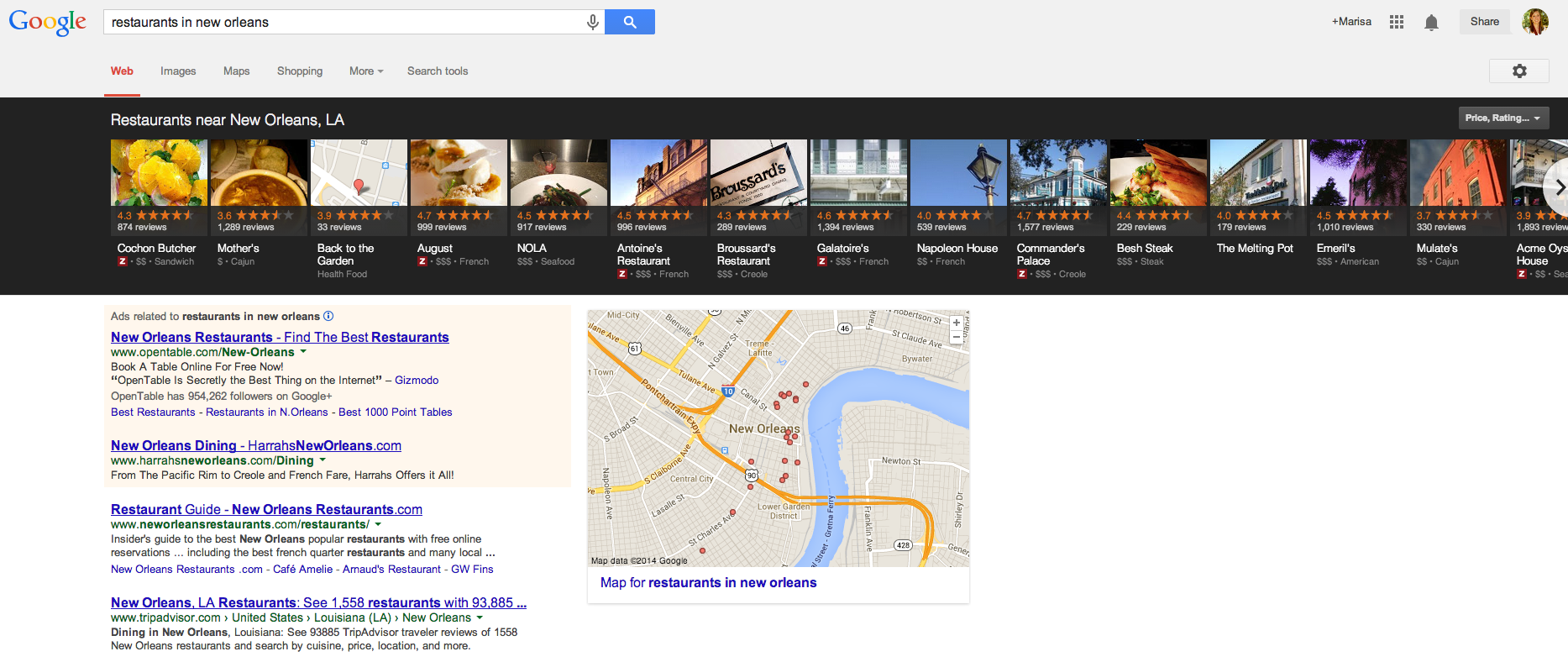
    As you have probably noticed by now, Google has incorporated a new carousel into several of its search results. If you haven’t seen it yet, the carousel is a row of about 20 listings displayed in a long black box at the top of search results. The image below shows an example of the carousel pulled for the search query “restaurants in new orleans.”

    Click the image below to enlarge

    Search Result Displaying Google Carousel

    How Does it Work?

    Google pulls the information for each carousel listing from the Google+ pages of relevant businesses. Upon clicking a result in the carousel, another search will be performed for that brand. There are pros and cons to having these carousel results display in searches related to your business. Here are just a few:

    Pros of the Google Carousel

    • Your website could potentially be displayed in 2 locations on Google search results: the carousel and regular Google organic results below the carousel. Psst – if you’re looking for some help with those organic rankings I know a guy

    • If you have great reviews and ratings on your Google+ page, your average star rating will appear as a fantastic means of comparison to your competitors (who may not have the same stellar rating as you)

    • Results are displayed ABOVE paid search results, putting you ahead of competitors who are paying to hold that prime real estate above the fold

    • If done carefully, some service area businesses can rank for local searches in the carousel where they may not have appeared in map pack results before the carousel

    Cons of the Google Carousel

    • When clicking a carousel result, another search is done for your brand rather than being taken to your website or Google+ page, which means more clicks are needed to get to your website and may result in a drop off of potential visitors

    • The carousel occupies a lot of space “above the fold” in search results, pushing down those precious organic results you worked so hard to obtain

    • Google chooses the image that is displayed in each carousel result from the images that are uploaded on your Google+ page

    There are a number of keywords and phrases that trigger the carousel. Mike Blumenthal has compiled a list of 300+ keywords and phrases that trigger these results. From a business standpoint, there are several reasons why you want to review these search terms and determine if search queries related to your industry are pulling this carousel, and whether or not your company shows up in the results.

    The Optimal Carousel Location

    A study of user engagement performed by Mike Ramsey suggests that the optimal locations in the carousel are positions 3 and 8, while Ethical SEO did a similar study and found that the 1st and 5th positions in the carousel were most popular. Although the exact prime locations differed, the main takeaways from these studies tell us the following:

    1. Searchers are clicking in the carousel

      • 30% of people in Ethical SEO’s study

      • 48% of people in Mike Ramsey’s study

    2. Reviews and ratings are important

      • Searchers cited Zagat scores and amount of reviews on a particular result as determining factors for clicking

    3. Images should be eye catching

      • In Mike Ramsey’s study, the carousel listing with the highest Zagat rating and number of reviews that contained a boring gray exterior photo of the restaurant was not clicked nearly as much as the result next to it that featured a beautifully plated entree

    Lookin’ Good in the Carousel

    Come See How Good I Look in Google Carousel ResultsIf you have little or no reviews on your Google+ page, what are you waiting for? You’ve worked hard to establish your business and provide positive customer experiences. Build up your following on Google+ and don’t be afraid to remind customers of your brand. Encourage potential and current customers to read your reviews. Highlight previous testimonials or reviews in Google+ status updates. Post pictures of your product, staff, events – anything to send your audience down memory lane and potentially inspire them to recount their experience in the form of a review.

    As mentioned previously, Google will select the image that appears in carousel results, so be mindful of the images you upload to your Google+ page. If you are a restaurant, upload images of plated dishes. If you are a jewelry store, upload images of your most popular designs. A good image will differ from industry to industry, however, across the board a good image will be:

    • Attractive

    • Eye catching

    • Clear (don’t upload stretched out or blurry images!)

    • And depict what you do

    Top Ranking Factors

    If you’ve been diligently working to improve your rankings for the map pack in blended results, many of those efforts also contribute to carousel ranking factors. Search Engine Journal’s recent study cites three top factors for ranking in the carousel: social signals, external factors, and content structure. The strongest of these appeared to be social signals, which include:

    • +1Amount of +1s on your Google+ page

    • Amount of +1s on a website’s URL that is attached to your Google+ page

    • Amount of reviews on your Google+ page

    • Rating of your Google+ page

    Next, external factors proved very important. In particular, the number of citations across the internet was cited as the most important external factor. An additional point to that is these citations should be clean and correct across the board. You may have several location citations, but it will only serve to confuse Google if the information is not consistent from one citation to the next. All this should sound familiar, as citations are nothing new to local search ranking factors and something Search Influence has preached for years.

    The last of these top ranking factors is content structure. Placing the keyword in the title, the location in the title, the keyword in the URL, and the location in the URL were all found to have a correlation to rankings. Although these factors are important, you don’t want to come off as sounding unnatural or spammy. Do exercise caution with these aspects of content structure, as you want this content to be natural.

    With any new update or change Google makes, there is always more to be found and mentioned. What are some things you’ve noticed about the Google carousel? What factors have you seen improve carousel rankings? What trends and/or benefits have you noticed since Google rolled out the carousel? Sound off in the comments!

  • Search Influence Holiday Party

    Here at Search Influence, we do things a little differently than most companies. Our office artwork is created by our employees, we play the same song every Friday at 5pm, and our holiday party is… well, a little later than most holiday parties.

    This year, our holiday party fell on January 11, 2014 and employees didn’t have to travel far to get there (it was downstairs from our office at Oak Wine Bar)! For a special holiday bonus, the party fell at the same time as the Saints vs. Seahawks playoff game, so many Who Dat fans showed up in jerseys and other black and gold attire. Much to our dismay, the Saints couldn’t pull out a win, but we still managed to have a great time despite the loss!

    Search Influence Holiday Party   Search InfluenceBefore the party, the whole office voted on the holiday drink name. Some ideas were “Will Scotch” (after CEO, Will Scott) and “The Optimizer.” The grand winner was “Under the Influence,” which was a delicious concoction of vodka, prosecco and St. Germain.

    Many influencers enjoyed the photo booth at the party. The pictures from the photo booth are some of the best, and I think we may have broken a record for the most people in a photo booth picture (sorry Boogie Booth)!

    All in all, the holiday party was a huge success. Who knows, maybe we’ll be lucky enough to have another holiday party in 2014!