Author: Search Influence Alumni

  • Google Grants: What Every Nonprofit Should Know

    1608-SI-TheInfluencer-KL-A-01LargeIf you work for a nonprofit, you probably already take advantage of many of the free tools and services available to you. From software and applications to professional services, a huge number of corporations offer donations to show their commitment to the causes nonprofits represent—but few offer tools as powerful as Google AdWords. If your nonprofit isn’t reaping the benefits of a free AdWords campaign, it’s way past time for you to jump on board!

    What Are Google Grants?

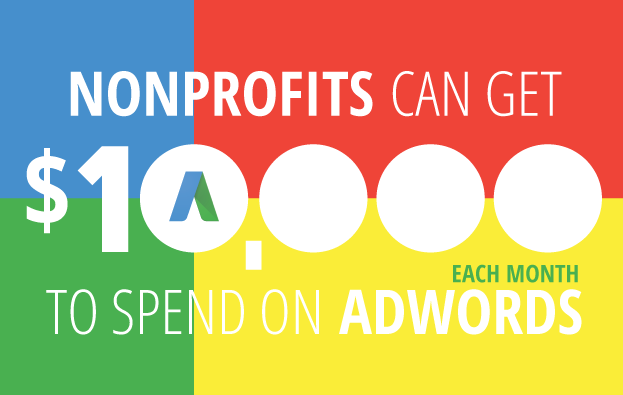
    Essentially, Google Grants offer free in-kind AdWords advertising services—$10,000 USD worth per month, to be exact—to 501(c)(3) nonprofits. This is a huge deal because the AdWords platform offers a streamlined way to get your organization’s story and message in front of any target audience you want, meaning more visibility, supporters, and donations.
    1602-SI-TheInfluencer-KL-A-03-lg

    It’s important to note that unlike with the paid version of AdWords, Google does have some restrictions on the types of ads created with Google Grants:

    • Ads must be text-based (meaning no videos or images)
    • Ads appear only on Google’s search engine results pages
    • All campaigns are keyword-targeted
    • Your max cost-per-click (CPC) is $2.00 USD

    But the most exciting part? Your Google Grant is valid forever! All you have to do is maintain eligibility.

    What’s AdWords and Why Do I Need It?

    Let’s backtrack for a minute. If you haven’t heard of Google’s AdWords platform, it’s a powerful tool that allows you to distribute ads for your organization across the web. As a supplement to SEO, paid advertising can increase traffic to your site, often much more quickly than SEO alone, while building your brand in the eyes of your target audience.

    And when it comes to advertising, there’s no question that Google knows what it’s doing. The tech giant’s ad network is the largest in the world and reaches <80% of global Internet users, which means high visibility for any ad you create. With AdWords, you can share your message with more people—and with Google's customizable tools, you can be sure your story is shared with the people most likely to engage and donate, whether they're across the street or across the world. Not an AdWords expert? No problem. AdWords' customized functionality gives you as much control as you want. Beginners can launch an effective campaign with AdWords Express, the quick and easy version of AdWords that offers automated management services, until they’re ready to optimize their ad campaigns to the fullest. More experienced users can take advantage of AdWords’ spectrum of insights to monitor keyword strength, ad performance, and other areas.

    Charity:Water Image
    Image from Charity: Water, a member of Google for Nonprofits

    How Can I Tell if I’m Eligible?

    1. Do you meet Google’s location requirements? Your headquarters must be located in one of the 50+ eligible countries. If you’re in the US, you must have current 501(c)(3) status, and if you’re headquartered somewhere else, you must meet the defined charity status of that country.
    2. Have you checked the list of prohibited organization types? Governmental health entities, hospital or health care organizations, and academic institutions cannot receive assistance through Google Grants.
    3. Do you have a live website? You need somewhere for ads to link to! Google demands “substantial content”—meaning more than just a page or two.

    Where Do I Sign Up?

    If you’ve answered “yes” to all three questions in the last section, you’re ready to get started!

    1. Sign up with a Google for Nonprofits account. If you haven’t done so already, become a member here for access to free tools and services like Google Apps and Google Analytics.
    2. Enroll in Google Ad Grants and complete the application. Sign up for either AdWords or AdWords Express, depending on how you plan to maintain your ad campaign. Google’s account creation guide makes it easy to create an account that fits your needs, though it’s important to note that the process may take between 4–6 hours to complete. You’ll be expected to provide basic information about your organization, but you should also have a basic idea of how you intend to start your ad campaign. Google will ask for things like sample keywords and ad copy as well as your goals for your ad campaign (recruiting additional volunteers, getting more donations, promoting fundraisers, etc.).
    3. Submit your account for review. The Google for Nonprofits team will take it from there by verifying your eligibility and going over your application. Be prepared to wait: the process is run by volunteers and takes between 4–6 months.

    WaterAid Image
    Image from WaterAid, a member of Google for Nonprofits.

    Should I Manage My AdWords Campaign on My Own?

    While it’s definitely possible for nonprofits to run their own ad campaigns, some beginners have found it frustratingly difficult to gain traction—even with $10,000 worth of services waiting in the wings. Getting only a handful of visitors each month can make it seem as though all of your grant money is going to waste, and it can take time to build strategies that make the most of the AdWords platform. Search Influence has run successful Google Grant campaigns for a number of nonprofits, and we’ve even helped organizations take the next step up toward Google Grantspro, which offers $40,000 worth of in-kind AdWords services per month.

    Consider letting us do the work to create high-performing ads—all you have to do is wait for the performance reports!

    Image Credits:
    Charity: Water Image
    WaterAid Image

  • The Prescription for Better Online Reviews for Your Practice

    Just last month, Forbes ran an article titled “Why Doctors Must Market Themselves in 2016.” Much as customers at a restaurant can get on Yelp to write about their experience, patients can review their physicians on Yelp and other sites as well. RateMDs.com, Healthgrades.com, and Vitals.com are just a few examples of sites that host online reviews for physicians, dentists, and hospitals. ZocDoc.com even includes an app that allows you to search for nearby physicians in your insurance network. These websites had around 6.4 million hits last year, and in 2014, more than half of patients reported that they used physician-rating websites to select a doctor. Even if your practice hasn’t decided to take a look at your online reviews, many of your patients already have.

    Part of the Broader Trend

    According to a BrightLocal survey, 88 percent of consumers trust online reviews as much as they trust a personal recommendation. Patients who scour the Internet for reviews on cars and restaurants will naturally use similar resources when looking for a dermatologist or other medical practice. Even when patients are referred by a friend or another physician, many will search for directions through Google, which will reveal reviews entered on Google+. In effect, online reviews are ubiquitous to the point of being unavoidable, and addressing online reviews has become an equally unavoidable part of healthcare marketing.

    1602-SI-TheInfluencer-KL-A-04-lg

    The Danger of Online Reviews

    Not everything on the Internet is true, but negative reviews can have a very real effect on the reputation and success of your practice. As with any business, it’s unfortunately the least satisfied patients who seem most motivated to leave reviews, and they counterbalance the handful who would take time to write about a positive experience. In the same study where 61 percent of participants used online reviews to find doctors, only about one in five took the time to write reviews themselves. A major key of online reputation management is encouraging the satisfied majority of your patients to leave reviews. Learn how here.

    Use the Feedback

    The University of Utah Madsen Health Center decided to start sharing survey data with their physicians in 2008, and the hospital jumped in patient satisfaction from the 34th percentile up to the 80th over the course of six years. What’s more, safety, mortality, and efficiency scores improved while malpractice premiums and costs went down for the hospital. While some online criticism may be groundless, trends and insights can also be useful as feedback to improve your practice and the quality of service provided.

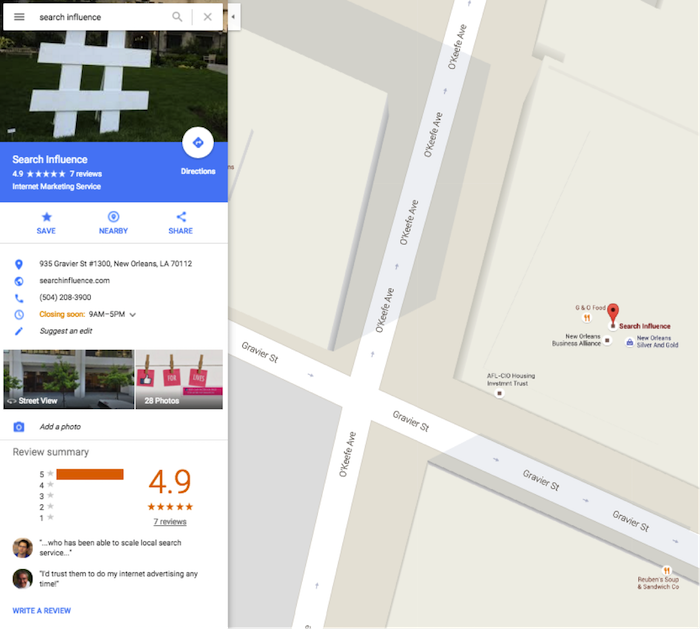
    Search Influence Google Maps Location Image

    Plan Your Strategy

    Because negative reviews have cumulative and long-term effects on your practice, a long-term outlook is needed to address the problem.

    • Claim Your Listing – Your practice may already exist on Google+ and other review sites. Claiming the listing allows you to monitor reviews and respond to negative ones.
    • Update Your Information – Entering your hours, contact information, and services makes your practice more accessible.
    • Check Out Competitors – How do your ratings compare to other practices in your area? Do you have listings on the same review sites?
    • Reply to New Negative Reviews – Do not delete negative feedback, but feel free to reply as appropriate.

    How to Handle Negative Feedback

    Reviewers who are upset sometimes make outrageous claims, but deleting the review only fuels a bigger reaction. When publicly responding to negative reviews, it is important to express sympathy for the person’s negative experience and move the conversation out of the public eye. People looking at the reviews should see that you have addressed the complaints, but they don’t need to read a long exchange that distracts from positive reviews.

    Screen Shot 2016-02-10 at 11.13.02 AM

    Screen Shot 2016-02-10 at 11.13.15 AM Consider Calling in the Professionals

    While claiming your practice on current listings does not take much time or expertise, managing the online presence across several sites can be a job that warrants a little professional help. The team at Search Influence can get results, especially when it comes to strategies that get your satisfied patients writing reviews. Ultimately, online reviews should just be one component of a comprehensive online marketing strategy. Increased visibility in the search rankings can help generate leads and reviews, which becomes a cycle for growth.

    Image Credit:

    Doctors at Work Image

  • Earn More Facebook Friends for Your Business with These 4 Tips

    According to the National Day Calendar, what we all know as February 11 is actually observed as National Make A Friend Day, not to be confused with June 8, which is National Best Friends Day (though we celebrate that here, too!). As it is described on the National Day Calendar website, new friends can broaden our horizons by guiding us to see with fresh perspectives, challenging us to try something new, and connecting us to opportunities, all of which are common features of Facebook friends.

    Friends Are for More Than Just People

    For this reason, people aren’t the only ones adding more friends to their Facebook lists. In fact, businesses, brand names, and even franchises have joined the world of Facebook. The more friends your company can make on social media sites such as Facebook, the more your audience grows, as will your SEO, and from there, the success of your business.

    Facebook itself understands this great significance of friendship, as it just recently celebrated its 12th anniversary with a new goal of having five billion of the world’s seven billion humans connected to the social network by 2030.

    But first, you have to know how to make those friends, so we’ve gathered four main ways to grow a Facebook friends list for your franchise.

    1. Post More Videos – It’s All About the Movement

    In the same way that YouTube grew to be so popular, Facebook Live is allowing people to broadcast in real time to their audiences directly from their mobile devices. The movement of the video in the News Feed catches the attention of those who are watching, and they’re more likely to share such content with their own group of friends, which will result in more views on your page, and from there, more friends.

    2. The Message – Communication Is Key

    The recently enhanced communication tools on Facebook help businesses offer real-time customer support through messages in the form of an online chat type of private messaging system. With this advanced messaging ability, your franchise can respond to conversations in private, more quickly, and with greater sensitivity than ever before.

    3. Pass It On – The Ripple Effect of Shareability

    Organic reach via Facebook is increasingly becoming a thing of the past, but there is one way around it, and it is through shared content. When you craft your Facebook status in a way that will encourage or entice your friends to pass it on to their friends, this will increase your reach, which will therefore lead to an increase in your list of friends.

    4. Advertise with a Purpose – Give Them What They Want

    When creating paid Facebook ads for your franchise, try to think with regards to what your audience wants more than what you seek. If you create an attention-grabbing, thought-provoking advertisement in a unique way, such as the carousel format available on Facebook, then you will be more likely to succeed. Along with that, create content that requires or encourages an interactive response from those who will view it. The more that people respond to what you post, the more others will see it and visit your Facebook page as a result.

    When it comes to the nature of growing a Facebook friends list for your franchise, think in the same way that you would if you were trying to make friends yourself. With that, you will personify your franchise in a way that makes it relatable to those who see your content, encouraging them to engage with you and therefore continuously add more friends to your list!

  • The Top 6 Metrics You Should Be Tracking in 2016, As Explained By Cats

    According to Facebook, 1.01 billion people log on to the social platform daily. Google sees impressive traffic as well, with 3 billion search queries per day…and that’s just the tip of the iceberg.

    Everyone is online these days. So it’s no surprise that online marketing has become increasingly more important to the modern business. But how do you know if your campaign is working? First, you might want to check out this Search Influence blog on what Google Analytics is and how to set it up for your site.

    After you’ve got your analytics set up, what exactly should you measure? And what does it mean?

    Here are the six metrics you should be measuring in 2016 as explained by cats. Note: screenshots are from analytics on my own personal site, which was set up pretty recently and has no online marketing campaigns associated with it.

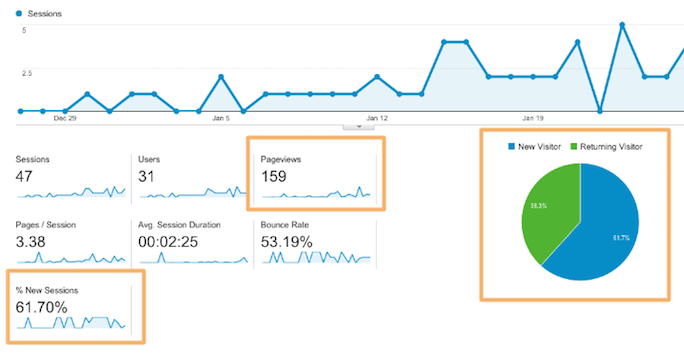
    1. How many people are actually coming to your site?

    Just because you build it doesn’t mean they will come. Measuring unique site visitors can give you big-picture insight into how well your campaign is performing.

    SI Blog Post - 2-8-2016 - Shaye Anderson

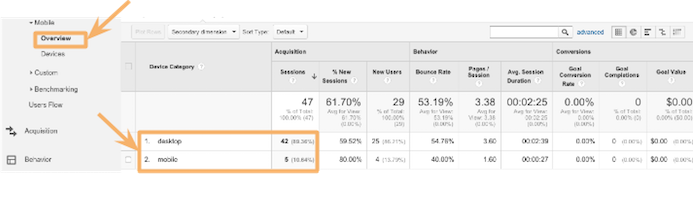
    2. What device are they using?

    Were they on a desktop computer or phone?

    Knowing which device people are using when they look at your site can direct you to present the most useful information in the most useful way. For instance, if someone is on their phone looking for contact information and hours of operation, it would be helpful to have a click-to-call phone number front and center. Or a button that says “Call!”

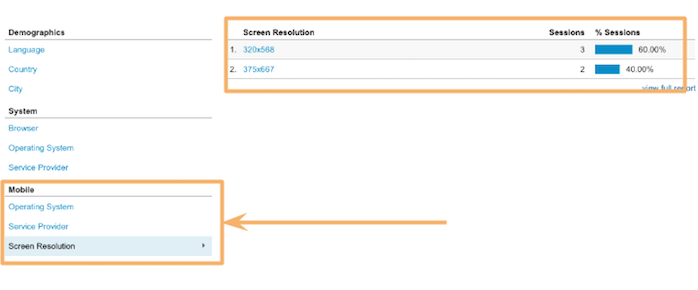
    You can also get as specific as screen resolution. This is especially helpful when dealing with any kind of graphic or visual representation on your site. Your information won’t be very helpful if people can’t even read it!

    SI Blog Post - 2-8-2016 - Shaye Anderson (1)

    SI Blog Post - 2-8-2016 - Shaye Anderson (2)

    3. Are they sticking around?

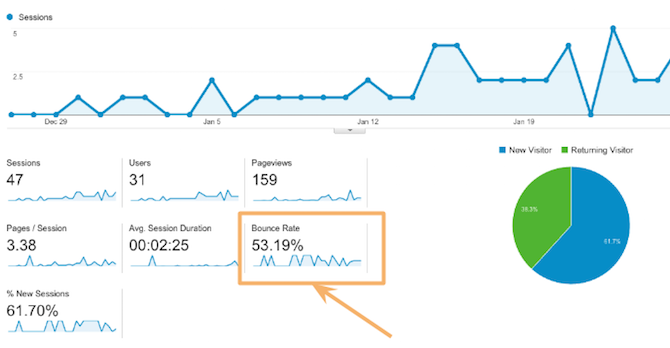
    It’s simple enough: if visitors find a page unhelpful, irrelevant, or hard to read, they’ll go elsewhere. When a visitor comes to your site and immediately leaves, that’s called “bouncing.” You should measure each page’s bounce rate to make sure you are sending out the right signals, delivering the right information, and providing clear content. So how do you know you’re in the green?

    “One thing that’s important is to be realistic about expectations with your bounce rate. High bounce rates are expected for certain pages (especially conversion capture points, such as checkout pages following a purchase) or on information-heavy landing pages. In these instances, high bounce rates can be taken to mean that the visitor came to your site, got what they wanted, and left. For average pages, an “average” bounce rate is much more preferable. It’s also important to be wary of very low bounce rates approaching or at 0%. This could be indicative of incorrectly installed Google Analytics and represents muddying of your data.” – Leigh Aucoin, Lead Web Developer at Search Influence

    SI Blog Post - 2-8-2016 - Shaye Anderson (3)

    4. How long are they staying?

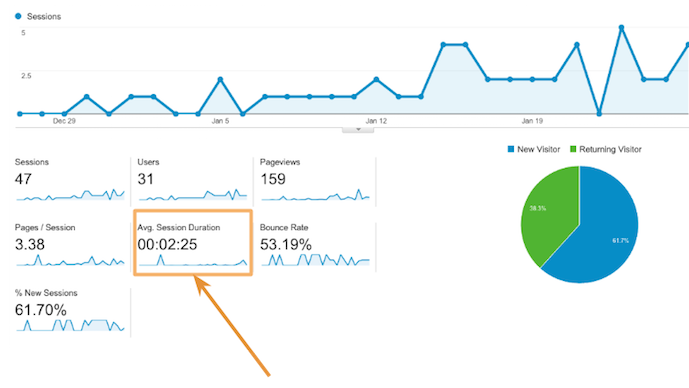
    Building off of #3, you obviously don’t want people to bounce; you want them to look around your site and convert (more on that in #5). So how long are they actually sticking around on your site? Short or long time-on-site can be good or bad, depending on the purpose of your site, what people are looking for, and how extensive the information is on your site.

    For instance, it’s reasonable that someone researching plastic surgery would spend a long time reading information about the procedure they are interested in. Also, it might make sense for an online visitor to spend a long time on an ecommerce site; they might buy more! But if someone is just looking for quick information—a phone number or hours of operation—it’s bad news if they need to spend a long time to find it!

    SI Blog Post - 2-8-2016 - Shaye Anderson (4)

    5. Are they converting?

    “Conversions” can mean many things, it really depends on your unique campaign and the specific page. A conversion could mean that a visitor fills out a form, makes a purchase, or calls a number.

    “Be aware of your business and what matters to you as a business, and how it’s made present on your site. If you sell items online, of course you’d like to track what led users to a purchase (a conversion in a more general sense). However, if you don’t sell items directly on your website, a form contact can be the next best measurement of a conversion. This means that you’ve been placed into contact with a potential customer. Ultimately, Google Analytics is a tool by which you can track any actions that a visitor to your site takes on your site and what leads them to do what they do.” – Leigh Aucoin, Lead Web Developer at Search Influence

    Search Influence has our own service called LeadSendr where we track conversions through a form on your site. You can find more information about that here.

    6. Are you seeing a return on investment?

    All these metrics are great, but they don’t mean much if you’re not seeing a return on investment. You want to make sure that your online marketing campaign works in tandem with your larger marketing goals, driving more customers to your business!

    All these metrics are great, but they shouldn’t be used in a one-and-done fashion. Use Google Analytics to check the success of your campaign efforts and then adjust your approach. A marketing campaign should be ever evolving. Using the metrics, you can learn from past mistakes and continuously improve your methods.

    Not sure where to get started with your site?

    Sit back, relax, watch this calming cat GIF, and let our team of experts craft a campaign that meets your business’ unique needs. What’s more, we track all the metrics for you! This way, you can worry about what matters most: your business!

    GIF Credits:

    Cats at Work
    Shark Cat
    Slipping Cat
    Cat in Box
    Cat Breaking Glass
    Money Glasses Cat
    Dancing Cat Graphic

  • SEO 101: How to Install Google Analytics on Your Website

    Blog1

    So you want to take your business to the next level. You built this amazing website, but you have no idea if anyone is even looking at it. You’ve looked around online and found a pretty cool stat counter, but you need more information than that. That’s where Google Analytics comes in.

    What Is Google Analytics?

    Google Analytics is a robust tool used to track visitors to your site and how they arrived there—and it’s absolutely free. With Google Analytics, you can track how many visitors have viewed your website, what pages they viewed, how long they stayed on your website, and a lot more. You can even figure out where in your conversion process visitors are most likely to abandon the conversion. This kind of information is essential for truly optimizing your website to appeal to your visitors.

    Hopefully, I’ve sold you on Google Analytics, but before we can glimpse any of those sweet, sweet metrics, we have to install it on your website.

    Step 1: Sign up for an account.
    Navigate to the Google Analytics homepage and select Google Analytics from the “Log In” dropdown. Then select “Sign Up” on the following page.

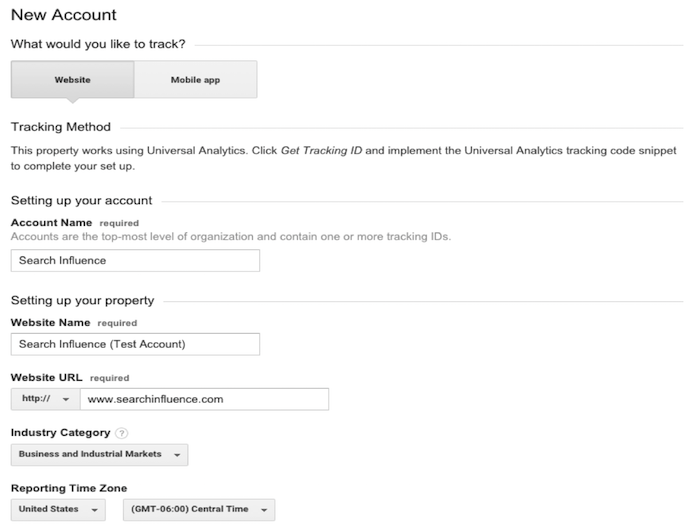
    Step 2: Fill out information about your website.
    Provide Google with basic information about your website, including its name and location. After filling out this information, accept the terms the conditions, and we’re almost there!

    New Google Analytics Account, Login Screen Image

    Step 3: Copy and paste the Google-provided JavaScript snippet onto your website.
    Make sure you implement the JavaScript snippet so it appears once per page on every page of your website. This is important to make sure we track all users on your website accurately. If you are using a templated website, it is best to insert the snippet above the closing </head> tag.

    JavaScript Snippet For Google Analytics Image

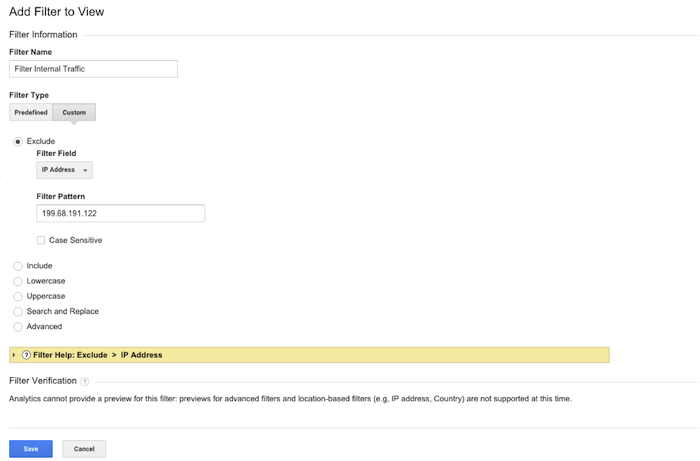
    Step 4: Filter all your internal traffic.
    You don’t want the pageviews to your website to be skewed by your own visits to your site. That’s why it is important to create a filter that removes any visits from your IP address. You can easily find out what your network’s IP address by clicking on this link. Copy your IP address and navigate to the Admin section of your Google Analytics account. In the rightmost column, select “Filters” and add a new filter titled “Filter Internal Traffic,” as in the image below. Click save, and you’re all set!

    Filter internal traffic for Google Analytics image

    Get tracking!

  • 5 Tips to Improve Your Franchise’s Online Display Ad Campaign

    Blog4

    If you are a franchise business owner, you may have already encountered the difficulties that come along with trying to create brand consistency and improved user experience across all of the online marketing for your franchise businesses. If your primary goal up to this point has been to employ a streamlined strategy to ensure your online ads are yielding the most successful results, then you’ve likely already created quality content throughout all of your websites and set up a structure for your branded sites with consistent business location information across the Internet. You may have also gone the extra step to manage reviews and testimonials. Now that you’ve optimized your sites, you’re ready to apply your focus to online display ads to generate new consumer leads. If you’re just getting started, these five tips will help you set up the most successful display ads for your franchises.

    1. Keep It Simple

    With spending on online display ads projected to increase 90 percent between 2014 and 2019, it’s crucial to get ahead of the competition and get your franchise campaign set up properly the first time around. In short, creating a successful franchise display campaign involves reaching the right people with the right message at the right place. So you’ll want to focus on one service or product per ad and keep your message tailored to the consumer you’re trying to reach by making the content of your message relevant and easy to understand. Be sure to also include a clear call to action so the consumer knows what they get by clicking on your ad.

    2. Use the Company’s Recognizable Look

    One aspect of online display ads that can easily set you apart from the competition is the distinctive look of your brand. If your company uses the same logo, colors, and fonts across all of the franchise businesses, a consumer should see your ad and be immediately drawn to its recognizable look. When designing your ads, consider placing your logo at the top center for optimal results.

    3. Use Contextual Targeting

    Employing contextual targeting allows you to design your campaign so that your ads will be placed on sites whose content relates to what you’re selling. For example, if you are a frozen yogurt franchise with multiple locations, your ad might appear on a food blog or restaurant review site.

    4. Use Remarketing Ads

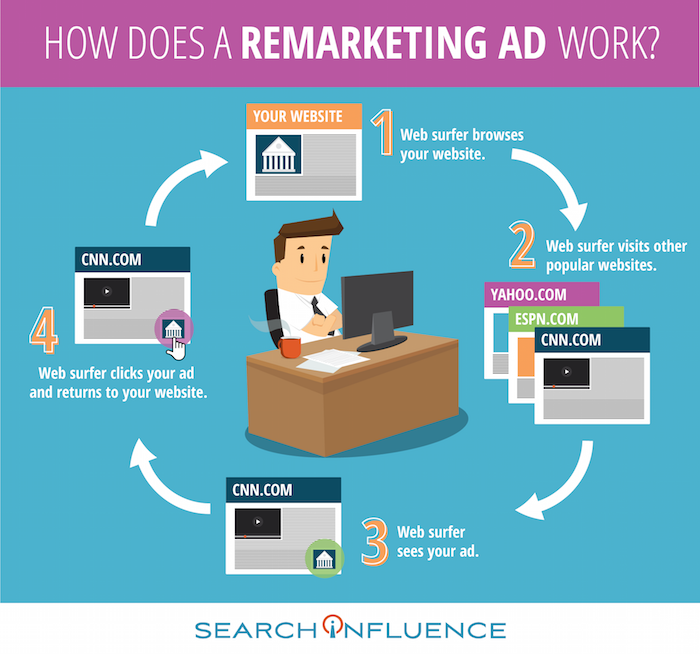
    Taking placement of online display ads to an even more sophisticated level, you may want to consider implementing a remarketing campaign. Remarketing lets you show ads to people who have visited your website or used your mobile app before. When people leave your website without buying anything, for example, remarketing helps you reconnect with them by showing relevant ads as they browse the web, use mobile apps, or search on Google.

    How Does a Remarketing Ad Work Infographic Image - Search Influence

    5. Target All Desktop and Mobile Devices

    As trends rapidly change and consumers rely more heavily on their mobile devices, it’s important to also target your ads across all desktop and mobile devices for maximum reach. Eventually, as you start measuring the clicks and leads generated from your online display ads, you’ll have a better idea as to what devices to spend more on. Make sure that you’re targeting by user and not by device for the most accurate results.

    If you follow these five tips and continually make adjustments as the campaign progresses and you get measurable results, you should see how big an impact display ads can have on all of your franchises.

  • Focus on Brand and Audience to Leverage Your LinkedIn Profile’s Referral Power

    Blog2

    LinkedIn is for lawyers. If the anecdotal evidence—such as an attorney receiving a 10x ROI from a four-hour investment—is not enough to convince you, consider the takeaway from Chester and Del Gobbo in the ABA’s 2012 Law Practice: “Now that the use of social media is… widespread, disengagement is not the answer. The issues are not insurmountable, and being a wallflower lets others gain a competitive advantage.”

    With a little forethought, LinkedIn can become a powerful referral tool.

    The Discovery Process

    Before you can present your online persona to the public, you need to set some objectives to guide your content:

    1. Know your audience. When you know your audience, you not only know which of their needs you can meet; you also know what they are not interested in. Do not invest time on subjects or past experience that are not relevant to your audience, especially on a new profile. Not sure who your audience is? We can help.

    2. Know your brand. Your brand is the value you offer others. To build a successful online presence, you want to become a thought leader, or “influencer,” on all things related to your brand. Thought leaders are not only recognized for how they think, but also for how they lead. Put another way: your audience is as motivated by trust and likability, the “leader” side, as by your perceived knowledge. To create a successful brand, you need to find the intersection of ability and likability.

    When building your profile, every content decision you make should be based on demonstrating your ability to meet your audience’s needs or promoting your brand.

    Opening Arguments

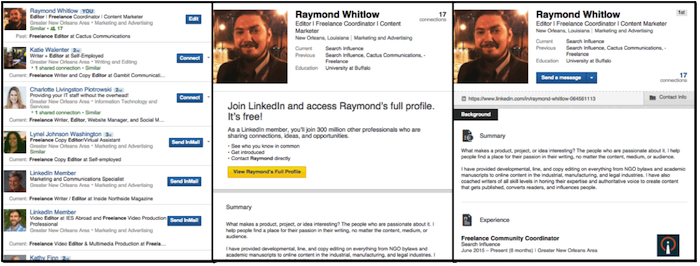
    Two types of viewers will see your profile: the public and your connections. Connections can see all of your information, but public viewers need to click and scroll before they can access everything. You have three opportunities to draw public viewers in: the photo, the professional headline, and the summary.

    LinkedIn Profile For Lawyers Image
    Only your connections (right) will see all of your information at first glance. Use a descriptive professional headline to stand out to searches (left) and public viewers (center).

    3. Use a photo. It should be professional, of course, but more importantly, it should support the brand you are promoting.

    4. The professional headline is not a job title. LinkedIn autocompletes this section with your current job title, but you need to change it immediately. Titles such as “attorney” or “partner” do not tell the public about the services you excel at, the people you can help, or the value propositions you are passionate about. In other words, your job title may not effectively support your brand or target audience. Use a professional header that includes keywords and presents a value statement.

    5. The summary is anything but. Your whole LinkedIn profile is a summary of your professional life—do not lead this section with an even more abbreviated version. Summarize your brand by looking to statements that address:

    • Who do I help?
    • Why do people trust me?
    • Why do people like working with me?
    • What have I accomplished?

    The summary may be the last thing read by a viewer who is interested in you but still on the fence. Use it to encourage the people who are intrigued by your professional headline to become interested in your accomplishments.

    The Evidence

    Now you have drawn your audience into the parts of the LinkedIn profile that address job experience, education, and skills. Use these sections to solidify the claims presented in your professional headline and summary.

    6. List accomplishments, not job descriptions. A list of responsibilities encourages your viewers to skim. Open each job description with a short (1–2 sentence) description of what you do. If you use a list, list your accomplishments, not your responsibilities. You do not need to give an exhaustive account; the purpose of these descriptions is to pique your viewers’ interest so that they contact you or look deeper for information.

    7. Focus on the quality of skills, not the quantity. This is where knowing your audience plays a huge role. Focus on the skills that matter to them. LinkedIn ranks your skills by how many people have endorsed them, which creates a visual hierarchy that emphasizes about ten skills over the rest. By only listing a dozen skills, you create the impression of focused expertise. List too many skills, though, and the ones that are most relevant to your audience may be overshadowed by less important skills.

    (Note: It is recommended you review your bar association’s guidelines on online advertising to determine if skills are considered to be claims of specialization.)

    Closing Remarks

    Very few of the people viewing your profile will read all the way to your volunteer work or organization memberships. That does not mean you should skimp on these sections; they are your opportunity to cement a connection with the people most interested in your brand.

    8. Show your passion. This is another opportunity to bolster the “leader” part of your brand. Stay focused on causes that both you and your audience care about. Show, don’t tell, by listing volunteer experiences and accomplishments, honors and awards, and professional organizations.

    9. Use publications and projects to encourage sustained engagement. Unlike most of the profile sections discussed above, projects and publications enable you to include URLs to outside sources. Direct readers to your legal blog or website to further bolster your online presence.

    10. Do not just build a profile; use it. The lawyer who saw a 10x ROI from LinkedIn spent one hour building his profile and three hours building his network, followed by 30 minutes every week maintaining it. Plan on investing at least as much time sharing your profile as building it:

    • Join and comment in LinkedIn groups.
    • Regularly share updates and engage with other people’s updates.
    • Never stop looking for contacts.

    Over time, a well-curated social media presence will grow into a second profile that shows who you are—the likable and trustworthy part of your brand. When designed with your audience and brand in mind, your LinkedIn profile becomes the cornerstone of a professional network that can drive referrals.

  • 5 Ways Your Dental Practice Can Win More Patients (and More Smiles) with SEO

    Blog3

    Today’s dental patient is becoming much more Internet-savvy.

    • 81% will do research online before booking an appointment
    • 71% will find their new dentist on the first page of a search engine result page like Google or Bing
    • 55% will choose one of the top three results

    It’s no longer good enough to simply have a website. If your site doesn’t show up on the first page of the search engine results pages (SERPs), you are losing potential patients. Maybe you already have a search engine optimization (SEO) strategy but have yet to notice the benefits of increased exposure and web traffic. Or maybe you haven’t thought much about SEO. Either way, there are a few steps worth considering to boost your client referrals. Here are five fundamental and actionable tips to help you maximize the effectiveness of your website.

    1. Local Keywords and Your Specialty

    By adding hyper-targeted and high-converting keywords to your website’s content, you can achieve a higher organic ranking in the SERPs. Instead of choosing “dentists” as your keyword, pick out an area of specialty. It is much easier and more effective to optimize “pediatric dentist” than “top dentist.” With a targeted keyword, you will be able to avoid competition from across the country and reach out to people who need you for specific dental services.

    2. Dental SEO Blogging

    A dental practice website with a blog section is leveraging Google’s algorithm in their favor. A regularly updated blog helps boost your SEO rankings in two different ways. First, you can include your keyword in the first section of the post, which can facilitate organic traffic. Blog posts also help give your website unique, non-duplicate content. When a searcher is searching for your keyword, all duplicate content is noted by the search engine, and those websites are punished for their inauthenticity. Blog posts that include your keyword will help your overall ranking.

    Between teeth whitening and root canals, the average dentist does not have a lot of time to devote to a blog. But blogging does not have to be a time-consuming task. When writing a blog post, consider using reader-friendly formatting like lists, including outbound links to resources, providing actionable tips, writing in a conversational tone, and using real-life examples. As an integral content marketing tool, your blog will help boost your SEO ranking and convey a professional, helpful image.

    3. Build Backlinks

    Backlinking is a central element of SEO, and to boost your SEO ranking, you need to generate content that others will want to link to. Having creative, informative blog posts can also help build backlinks, mostly because people will want to share your posts. Another way to build backlinks is to get featured. If you ever have the chance to write a blog post or opinion piece for a medical publication, do it! If a local new station wants your advice on a new dental implant treatment, don’t shy away! When you appear on another website, a link to your website is often included in the story. In the eyes of the search engine algorithms, this is one of the most effective ways to gain authority, boosting your SEO ranking.

    4. Don’t Be Camera Shy: Use YouTube

    You went to dental school, not film school, but if you have the resources, making a short YouTube video can really boost your SEO ranking. YouTube is the second-largest search engine on the Internet, but because videos generally have less competition, a video can rank higher in the SERPs. If you are targeting a region, you should include that area in the video’s title. Even though your video doesn’t have to have Leonardo DiCaprio in it, it also doesn’t have to win an Academy Award. Instead, it should focus on sharing general information about your practice or medical tips. You could even get patients involved and use videos as a platform for sharing patient testimonials. Whatever your approach is, video content will help tag your website as a superior one.

    Invisalign Patient Testamonial

    5. Get Social

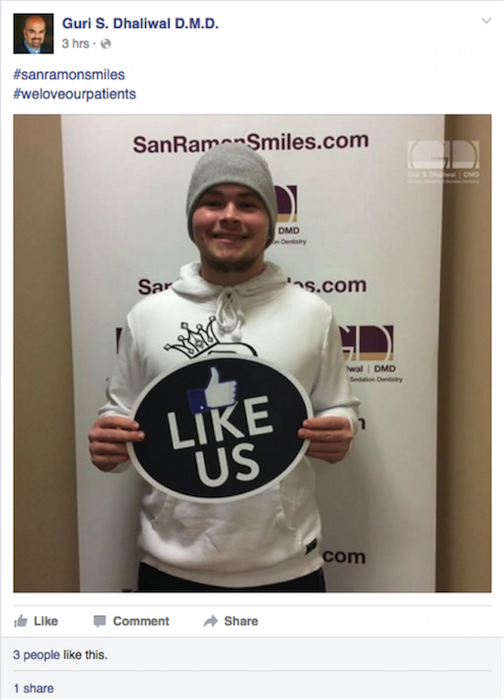
    A strong presence on social media can help the trustworthiness of your site. Because Google+ is owned by Google, your dental practice should put an extra emphasis on gaining +1s and building a network. In 2013, then-Google CEO Eric Schmidt said, “Within search results, information tied to verified online profiles will be ranked higher than content without such verification, which will result in most users naturally clicking on the top (verified) results. The true cost of remaining anonymous, then, might be irrelevance.” For optimization purposes, you cannot just have a verified account: you must also regularly post and try to gain followers. Facebook has only minor effects for healthcare SEO ranking, but it is a great tool for building a presence in your community. The number of times your office is tweeted about, as well as the number of tweets you tweet, can also slightly impact your ranking. No matter the platform you choose, make sure all of your posts are relevant and authoritative, as these posts will be most likely to gain a reaction from your audience.

    SanRamon Smiles Like Us Image

    There are many elements that impact your SEO ranking. These are five actionable tips that every dentist should be using for their SEO strategy.

    Image Credits:

    Dentists at Work Image
    YouTube Invisalign Patient Testimonial
    Guri S. Dhaliwal Facebook Page

  • 4 New Influencers Join the SI Krewe

    January 2016 New Influencer Photos

    It’s that time of year, and Search Influence is more than ready to start the Mardi Gras season—and we have four new krewe members to join in the celebrations! Get to know a little about our new Influencers:

    Candice Perkins – Junior Internet Marketing Associate

    Candice is a native of Baton Rouge, Louisiana. After receiving her MFA in fiction from the University of Southern California, Candice moved to New York City where she worked in publishing and as a freelance writer. Recently, she moved back home to Louisiana and is enjoying being closer to family. Candice has a one-year-old puppy, Mariana Rivera, who her husband insisted on naming after the famed closing pitcher for the New York Yankees. Candice also always has a sweet tooth and enjoys dance, random indie films, and hot tea.

    Johanna Duggan – Junior Internet Marketing Assistant

    Johanna is working part-time on the tech team as she finishes up her last nine credits at Loyola University! She also works part-time at GNC on Magazine Street. She is from a small town in Connecticut and is not really sure how she ended up in New Orleans. She loves lifting weights and tries to peer pressure her friends into lifting with her (Stephanie Burnison, looking at you)!

    Kiara Ray – HR Intern

    Originally from West Palm Beach, Florida, Kiara was raised in New Orleans. She is a business administration major with a concentration in human resources, and she will be graduating from UNO this spring. In addition, she is the co-owner of Port City Cafe’ of Gretna on the Westbank, and she is also a retail sales manager at Ann Taylor LOFT. She is very involved in her church, where she is in charge of the youth and young adult ministry. She enjoys spending time with family and friends, singing, and finding new mom-and-pop restaurants to eat at.

    Rachel Marsh – Junior Internet Marketing Assistant

    Originally from Baton Rouge, Louisiana, Rachel is currently finishing her senior year at Tulane University, where she is studying English, psychology, and Spanish. Some of her passions include reading everything she can get her hands on, discovering new restaurants around New Orleans, and devoting way too much time to her a cappella group, Them.

    Welcome to the team, Candice, Johanna, Kiara, and Rachel! We look forward to all of the great things you will accomplish at Search Influence.

  • 5 Ways to Improve Your Productivity at Work

    There’s a difference between going through the motions of the workday and actually getting things done. Productivity takes strategy – and constant reevaluation. Take a look at these five ways you can improve the productivity on the job and what you should probably stop doing to get there.

    1. Hire expert help

    Small business owners are especially notorious for having an “I can do it all” mentality. While it seems noble in theory, tackling every task single-handedly is actually counter-productive. As a business owner, you need to focus on the big-picture and find ways to delegate or completely outsource other tasks – especially the ones you don’t have expertise in handling. If you want to zero in on your target audience for marketing, hire a data firm to give you direction. If you want to sell more products on your website, hire a search engine optimization company to make that happen. If you simply want to have a better content, hire a content marketing firm to make your messaging stand out. Doing everything yourself isn’t productive, but asking for expert help can be.

    2. Take a break

    This may sound like the opposite of what you need to do in order to get things done but research shows that overworked employees actual accomplish less than those who are well-rested. A “break” can mean everything from walking away from your desk for five minutes every hour to eating lunch away from your computer to actually booking a week-long trip somewhere exotic. Every person knows what he or she needs to recharge – tap into that in order to heighten your productivity when you are on the clock.

    3. Close your email tab

    And go ahead and put your smartphone away too. Did you know that the average worker wastes 40 percent of the workday reading internal company emails? One in four workers admits to wasting an hour each workday on personal electronics doing menial, non-necessary tasks. The combination of constantly checking notifications on phones and through email can add up to a lot of wasted moments during the work day. Set aside scheduled times during the day to check your email and texts (and Facebook/Twitter/Instagram notifications) and respond. Then close out your email tab and put your phone away until that next scheduled time rolls around.

    4. Get physical (off the clock)

    Moderate exercise can actually boost your energy throughout the rest of the day, and lead to better sleep at night. Both things are a boon for productivity at work. The endorphins released during exercise are also part of what makes human touch so enjoyable. Lynn Brown Rosenberg, health advisor to the Sinclair Institute says, “If you were intimate the night before, the next day you’re going to feel more powerful. Energized. Balanced. We are less stressed and more able to be productive.” So squeeze in some time to hit the gym, and cozy up to that special someone, and you’ll see your productivity improve.

    5. Drop pointless tasks

    It’s easy to get caught in a cycle of monotony and what is comfortable in the workday. This usually isn’t always what is best for your productivity, though. Evaluate your tasks in a day – and what really makes a difference. The items that aren’t really very helpful should be dropped or adjusted to something that will improve effectiveness. If you work for someone else, don’t be afraid to respectfully share the aspects of your job that you think aren’t benefiting anyone and provide suggestions for change.

    Productivity takes constant adjustments and innovative ways at looking at your tasks. Remember to focus on what’s really important – and that includes your own health and well-being – and your work productivity will rise.