Tag: web development

  • Home Sweet Home: Think of Your Website Like a House to Help Your Business

    It’s the American dream: work hard, build your business up, start a family, and buy a house with a white picket fence. Most of us are cruising for the same kind of idyllic dream for our business as well, even if we have a harder time figuring out how to get there. But what if I told you that one of the biggest factors contributing to business growth was, basically, a house? One you don’t need a mortgage to buy.

    Ok, so it’s not really a house: it’s your website.

    Image Of A House Working Like A Website - Search Influence

    But a website is a lot like a house. Its construction and design both build on top of each other and work to create a structure that is your business’s online home where people come to visit you. If you need a general contractor to make sure your house isn’t going to cave in, you can request a site analysis from us. But if you’re unsure if that’s necessary, or you’re just really obsessed with House Hunters and need to see where this is going, read on.

    Building From the Ground Up

    Your realtor wants you to see a new house on the market. First things first: you have to drive to it. The road you’re on is like the internet. You can get pretty much anywhere, and each road feeds off into more roads, creating the path you take (or the black hole you find yourself in when you’re “taking a five-minute break”). To avoid following random roads and hoping you get where you want instead of the Arctic, you need to know what your destination is. For a house, that’s the address. For a website, that’s the domain, also called the web address. See, I’m not making this all up; they’re completely related. The domain name in the example URL www.exampleswag.com is “exampleswag.”

    Image Of Floating House From Disney's Up - Search Influence

    So you know how you’re getting there, and you know the address, but what are you going to? Houses don’t float in the sky, and it would be very difficult for municipalities to enforce building regulations if they did.

    Just as a house sits on a physical lot, so too does a website have a physical home—the hosting and server. The server is a physical machine that sits somewhere out in the world, storing all the files that comprise your website onto its hard drive. Your hosting administrator owns and maintains the servers. When you pay someone like GoDaddy or HostGator to host your site, you’re asking them to host your website’s files on their servers, essentially renting land from them to build your house on. Sketchy real estate practice, but totally normal and secure for websites.

    Front End and Back End

    So you roll up to the house with your realtor for the walk-through. What exactly are you looking at as you’re exploring the property? On a website, there are essentially two different halves: the front end and the back end. The front end is everything a visitor to your site can see and interact with, similar to the walls, furniture, and doorknobs in your house. The back end involves the more structural aspects of the site: the wiring, plumbing, and framing of your house. When you’re buying a house, you want it to look nice on the front end and to have all the features you need (clawfoot bathtub, anyone?), but you also need it to function well on the back end. It doesn’t matter how beautiful the granite countertops are if the roof leaks every time it rains. This is why it’s so important to ensure your website has good bones. You can request a site analysis from us to find out where yours stands.

    The Foundational Platform

    Your website is built on a platform just like your house is built on a foundation. Popular platforms include WordPress and SquareSpace, but there are others. These two, in particular, are so popular because they are CMSs (content management systems) with really user-friendly interfaces. Once you get your CMS “key,” meaning the CMS platform has been installed on your site, you get easy access to all the contents of the house and can move furniture around and paint walls to your heart’s content.

    You could, of course, build your house without a foundation, or build your website from scratch one line of code at a time instead of using a CMS. It’s a pretty big job, and it really only works best for websites with few, static pages. Best to leave the roughing it to the survivalists and Mainer moose hunters.

    Bricks and Mortar: What Is Your Site Actually Made Of?

    The first known use of lime mortar was in 4th century BC Greece and Egypt. The first publically available description of HTML was in 1991. Times are a-changing, but structural integrity never goes out of style. HTML stands for HyperText Markup Language, but essentially it’s just the basic coding language used to create a website. Its primary use is to create each page of the site. It’s the framework that holds all of your stylish branding and outstanding content. Speaking of style…

    External Stylesheets Are the New Black

    HTML can be used to add some style to your website, but it’s a bit limited to tinted plaster and popcorn ceiling—think of the oldest website you can remember visiting because it was probably all HTML. The reason it looks so basic is that HTML is also what makes the bones of the house, so it ends up being a bit like trying to use the insulation of your house to create the wall color when that’s just not the insulation’s job.

    CSS (cascading style sheet), however, exists outside of the construction of the functional aspects of the site. All the CSS code is accessed separately from the HTML, so the style is rendered on top of each page as it loads. If HTML is the framework, CSS is the paint, wallpaper, and fancy flooring of your house. You can go crazy with customization and design whatever you can envision (I’m thinking mauve, personally).

    CSS can be housed above the fold content, the chunk of code that fits within the frame you see when the page first loads, but it’s better when it’s kept on an external stylesheet. An external stylesheet is a separate file from the page file and is accessed from the server individually to render a given page. When your site keeps the styling on an external stylesheet, search engines can clearly distinguish between style and substance as they go through the page code, leading to faster and more accurate crawls.

    Bringing In Personal Style

    The house has been bought and built, it’s all spruced up with trendy finishings, and now it’s time to fill it with furniture. Website copy is your site’s furniture. Having stellar copy is important for two reasons: it gives function and form. Each room in your house is divided into different functions by the furniture. Having content on each page of your site that is focused on the topic of the page tells visitors what information they should be expecting from that page and makes it easier to navigate to the information they want. When a guest comes to your house looking for a bathroom, for example, they’ll know which room is the bathroom because they will see bathroom furniture, and they will skip over the room with a bed because they know beds don’t live in bathrooms.

    In addition to having informational and focused content, you need to have strong content. If your copy is full of typos, lacks value, or has a tone that is off-putting to your readers, they’re going to leave, no matter how well the rest of your site functions. Would a guest notice your stunning parquet floors if they’re covered in dirty rugs and chairs that probably aren’t safe to sit on?

    Putting All the Pieces Together

    In the end, each piece of your website ends up working with the others to create the site, and if one isn’t receiving top marks, the whole site isn’t meeting its potential. After all, it only takes one dealbreaker to turn a dream house into a fixer-upper. But you can make your dream house work for you and your business. Take a good hard look at how your website looks now (or use the audit you’ve cleverly gotten from us as a guide), and decide what work needs to be done. If you’re not the DIY home improvement type, don’t worry—Search Influence has master carpenters on staff, so reach out to us for help!

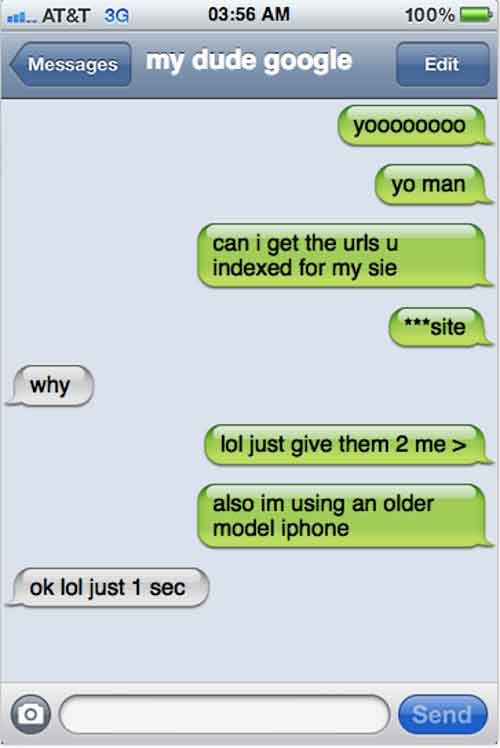
    Image Of A Beautiful House Revealed - Search Influence

  • I Wanna Index You Up: Google Exposed

    Google is a great keeper of secrets. They’re willing to share parts of demographic data captured from their users with potential advertisers. But, they keep their own personal data locked up pretty tight, or at least tight enough to keep anyone without a neurosis for data away.

    About a month ago, I was trying to get an idea of URLs that existed on a client’s website. Due to their unfortunately dated decision to integrate a Flash-based navigation on their front page, I could not use a sitemap generator — software that crawls a site and outputs all URLs — to gather up a URL list.

    Because I’m pretty lazy, or some could argue resourceful, I decided to look into what Google indexed for that site. However, you can’t exactly text Google up to request the URLs be sent over.

    MyDudeGoogleImage

    It’s Up To You, My Dude

    Although Google Webmaster Tools provides you with a lot of info about your site, including how many URLs are indexed, it does not tell you which URLs are indexed. So I did a little bit of digging, and I found this “bookmarklet” that easily captures the SERPs that appear on a given page of results, and lists them in an easy-to-import-into-Excel format.

    CoolTipImage

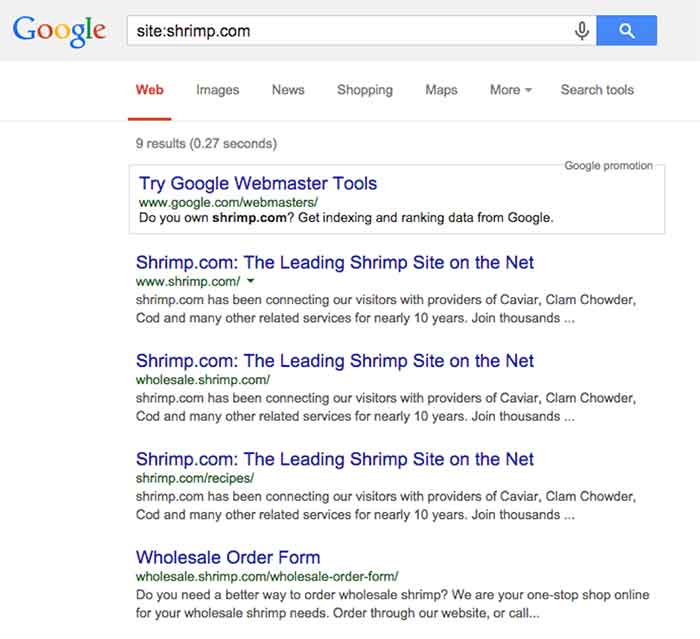
    To see a list of URLs (or at least a partial list) Google has indexed for a specific domain name, query Google for “site:sitename.com.”

    Here’s a reenactment of what I saw when searching for the indexed URLs:

    SiteShrimpComImage

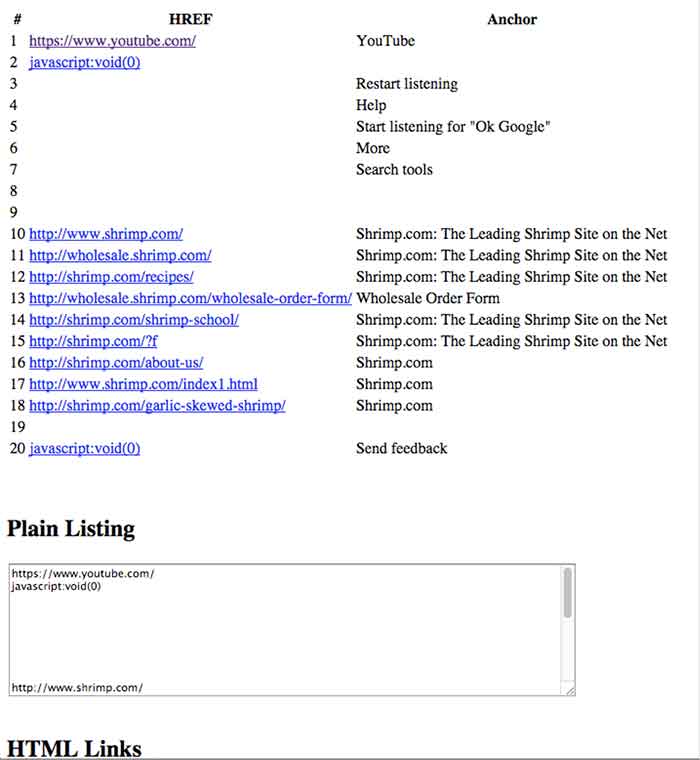
    Once you have that bookmarklet added to your bookmarks bar (just drag and drop, as the instructions say), clicking it gives results like this in a new tab:

    RankingListImage

    By visually filtering out the worthless stuff (JavaScript, a link to Youtube, and blank rows), I’m left with this tidy list of first page of results. Sadly, we find that there are only 9 pages indexed of shrimp.com, inclusive of its subdomains, within Google:

    • http://wholesale.shrimp.com/
    • http://shrimp.com/recipes/
    • http://wholesale.shrimp.com/wholesale-order-form/
    • http://shrimp.com/shrimp-school/
    • http://shrimp.com/?f
    • http://shrimp.com/about-us/
    • http://www.shrimp.com/index1.html
    • http://shrimp.com/garlic-skewed-shrimp/

    For the purpose of finding the indexed URLs for my client, I just kept clicking “Next Page” and running this until I couldn’t get any more results.

    And with that, I had a pretty good idea of URLs that were actually indexed by Google. Luckily, this was a reasonable amount of pages to parse through, but I could imagine this being particularly tedious process for larger sites.

    Although you may want to take the results of these queries with a grain of salt, given the presence of Google’s filter bubble, its accessibility to non-technical users make it a helpful tool.

    In my experience at Search Influence, we’ve had a few clients with indexing issues related to pages that are actually discoverable by search. We knew how many URLs were indexed, as well as how many we expected to be indexed, but we did not know which URLs were not part of their index. By cross-referencing a sitemap with all discoverable URLs versus the results of this manual URL scraping of Google’s index, we can have a clue into what the heck’s wrong, and start troubleshooting with more focus.

  • The Saints Fan’s Guide To Schema

    Saints season is underway as our boys in black and gold try to bring another Super Bowl win back to the Bayou. Fall season isn’t just a time to enjoy football accompanied by ice cold bevs, a few Lit’l Smokies, and a seven-layer dip, it’s also the best time to ask yourself if you’re getting the most out of schema – one of the most untapped resources in online marketing.

    QUARTER ONE – SCHEMA, BUT WHAT IS IT?

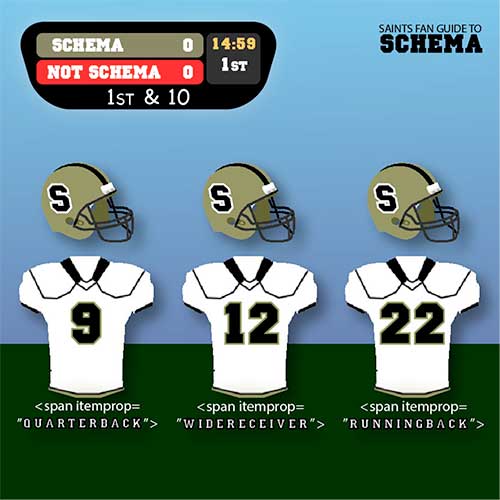
    First off, Who Dat. Secondly, schema is an HTML markup that you can add to web pages to make them more easily readable by search engines. Schema is essentially a type of label similar the numbers on a player’s jersey. Schema gives the crawler an idea of what the content on a page can be categorized as, sort of like how numbers on a jersey can tell you what position a player is (btw, go number 9!!! #breesus).

    QuarterOne

    QUARTER TWO – OKAY…SO, WAIT, WHAT?

    Trust me, schema is great. Still don’t believe me? According to a Searchmetrics case study, pages with schema.org integration on average rank four positions higher compared to pages without schema. Not to mention Google officially recognizes schema in the same way that coors light Bud Light is recognized as the official beer of the NFL.

    QuarterTwo

    HALFTIME – STAND UP & GET CRUNK!

    Also, time to dispose of a few soft pretzels and tray of N’awlins Nachos.

    QUARTER THREE – I AM PRETTY FULL, BUT WHISTLE MONSTA IS HERE, SO LET’S DO THIS.

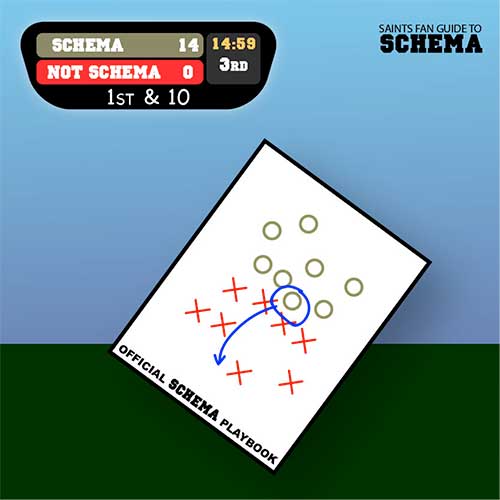
    Now that you are all in on the schema bandwagon, you need to figure out what kind of schema you should be using. This is where you need to develop your schema playbook. There is an incredible amount of schema out there – and that is an understatement. To get started, try checking out the local business schema on schema.org. If you have reviews on your page, another good starting place may be schema.org/Review.

    QuarterThree

    QUARTER FOUR – CLEAR HIERARCHY, FULL HEARTS, CAN’T LOSE

    Time to implement schema and bring home that elusive win. Schema markup is added within HTML tags on site pages. Both HTML and the schema are structured according to a clear hierarchy, which is important to remember when choosing which schema properties to use for markup.

    QuarterFour

    0:00 4TH QTR – FINAL SCORE: SAINTS WIN! SAINTS WIN!!!!

    And most importantly, you win too. Schema is often misunderstood, but if used correctly, it can be one of the most powerful tools in an online marketer’s arsenal. Thanks for reading, and GO SAINTS!

    Take a more in-depth look at schema with this blog from SI web developer, David Fransen.

  • Tiny Houses and Tiny Spaces: Making the best use out of space

    TinyCoverDesignImageThe term “Netflix” is Internet speak for “how to kill 2 hours on a rainy Saturday evening.” Well, it was one of those times, and I had stumbled upon Tiny: A Story About Living Small. This documentary shows Christopher Smith’s yearlong journey to find a home of his own. To accomplish this, Chris sets out to buy a large plot of land surrounded by wilderness. On it, he begins to build a tiny house. He ends up building his “home” on a utility trailer with 124 square feet of living space. In the film, Chris also interviews several other families that have also decided to consolidate their living situation.

    If you are like me, you have poured hours into Google searches of these tiny houses and thought, “that’s clever.” The numerous tricks and tips of people who opt for a smaller living space utilize all of the space so that they are comfortable and not cramped. It is this notion that interested me most – taking something small and making it seem bigger by utilizing only what matters and making it flow.

    When it comes to design, far too often we are faced with trying to fill in every conceivable space with more content and images. In doing this, we fail to see that what we are left with is just a pile of stuff and our original message is buried. Also, there are times when we say more than what is needed, and instead of drawing in the target viewer, they seem to just be waiting patiently for the end so that they can move onto the next thing. So to combat this, I have compiled a list of things to consider when designing for smaller spaces, whether for a sidebar web ad or a quarter page ad in a magazine.

    Take a Hard Look at the Space

    The main thing that gets lost when designing for small spaces is the actual size of what we are designing for. Computers give us the ability to enhance images and see them close up. But far too often, what can be read while zoomed in, cannot be read in its actual size. So take the time to open the web ad in a browser to see it in action, or print out the magazine ad and hold it in hand.

    Stack the Messages

    When it comes to deciding what to put in to the space, think of each element as a physical thing. Can you stack everything in your hand and still read everything? Does the logo take up too much space to where someone could fail to know what the image is? Does the novel-like copy seem like more of a pain to read and not draw in attention?

    Dual Purposes

    ToiletDualPurposeImageWhat makes tiny houses so unique and intriguing is that the purpose of everything within them is to maximize space. Like having a sink connected to upper basin of a toilet to eliminate the need for two large elements in a bathroom.


    In the design of things, we can sometimes make use of this as well. Can you use images of your brand in action? Is there a way to animate a web ad and engage the audience in the process? Can that magazine ad both sell your brand and serve as a useful tool to the viewer, like a checklist or a resource worthy of being saved?

    Space to Stretch Out

    The most common reason for people not wanting to jump on the tiny house bandwagon is the concern of not having enough room to even stand up. Many have expressed they would feel too confined and cramped. This same concern should be applied to our designs. When faced with a small real estate for any design, empty space needs to be viewed as an actual thing, as opposed to just being “empty.”

    Too often, we view space as being wide and vast. This also trickles down into the planning process for designs, and by the time it comes to implementation, there is no space for any of the elements to stand up or stretch out. It is important to take into account that space is an actual thing and needs to be represented, otherwise the design will become too confined and cramped.

    The Big Impact of Little Things

    The idea that everything needs to be big in order to be seen is something that does not hold true with designs that are small. This mindset is great for ideas, but when it comes to implementation, all that excitement and enthusiasm needs to be more focused. When it is, that small thing will be inviting and call out, like the sirens to Internet sailors, or to the casual passerby of a newsstand. These small designs should act as a ticket to something larger, something that merits investigation. Making our audience ask, “I wonder what that is all about?” is stronger and more enticing than just giving them a catalog of your products. It is that sense of curiosity and yearning to investigate that will build brand strength and forge a desire to learn more about what it is that you do.

    If you are curious about tiny houses, check out these blogs:

    http://www.tumbleweedhouses.com/

    http://thetinylife.com/

    http://www.tinyhousedesign.com/

    Image Sources:

    Tiny Book Cover

    Dual Purpose Toilet

  • A Few Things You May Or May Not Have Ever Wanted To Know About Schema, But Were Too Bored To Ask

    As Google continues to affirm its support for more detailed types of schema markup when crawling sites, it seems that there is an increased level of general interest in the concept and implementation of schema. I know that across our office, there are constant enraptured whispers about the ethereal mystery and beauty of this particular variety of microdata. At least, that’s what I imagine. In any case, I am quite certain that people across departments in the Search Influence office, and presumably others, are talking about schema more than they used to.

    If you are already thoroughly comfortable understanding and implementing schema, this is not a blog post for you. Take a long pull on your cigar, another sip of fine brandy, ease the seat back and return to your Baudelaire. As for everyone else, I’m writing this because Google’s documentation on the subject – though extremely helpful and somewhat surprisingly transparent – is probably still a bit dense for those not familiar with microdata as a concept or without some experience coding a web page. I’m hoping to help bridge this gap for anyone seeking a schema primer without the time or inclination to sign up for a night school web design course.

    So What Is Schema Anyway?

    Schema is a type of microdata that is standardized and structured in a way that can help search engines parse pertinent information from web content. The official description can be found here, but let’s keep this simple.

    Many of us went to school at a time where we had to carry around these huge, heavy things called “books” that contained all sorts of crucial knowledge within words printed on bound “paper.” In the course of trying to learn the material contained in the books, many students found it helpful to highlight really pertinent passages in obnoxious neon colors. Highlighting made it a lot easier to go back and see what passages to focus on when studying later for an exam or putting together an essay.

    Well, schema is a lot like highlighting for a search engine. We mark up certain key pieces of information that may provide a clearer concept of what is most important for a search engine to pull from a larger body of content. It’s not saying that the entirety of that content isn’t important in any way; rather, it’s streamlining the presentation of content so that Google or Bing can get a clear picture of what the page is about even before parsing the full scope of what is contained on a page. Accordingly, there is a vast array of different schema types available for different content topics or functions. Whether the topic of your page involves a bus trip or a volcanic eruption, there is probably a schema type that can help further break down your content.

    OK Cool, But Why Bother If Google Is Going To Read Everything Anyway?

    Yes, Google will find a way to establish a general concept of what is on your page for presentation in search results with or without the use of schema. But, well, the Internet is kind of huge, and search engines tend to get kind of busy dealing with that a lot of the time. I think anyone interested in schema understands that Google and Bing use extremely intricate and elaborate algorithms to assess content for use within search results. Even with all of Google’s bears, birds, and mythical beasts on the job, however, it is still possible for information to be misconstrued within Google’s results. It is less a matter of keeping a search engine from getting things wrong than it is of helping a search engine get things more accurate.

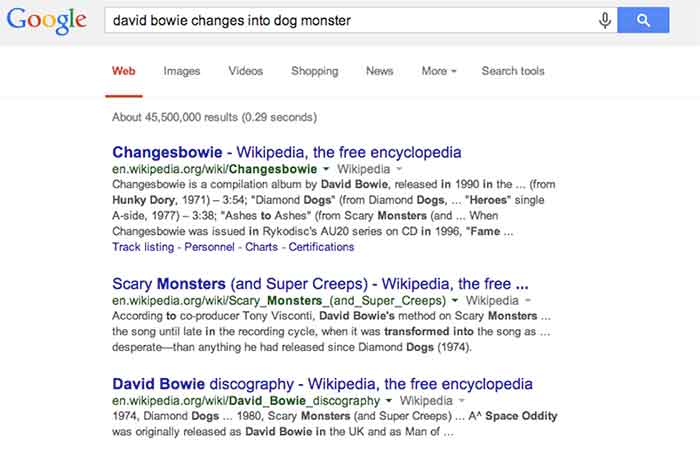
    For a hypothetical example, let’s look at this – as I do most things – in David Bowie terms. As you may or may not be aware, David Bowie actually briefly changed into an apocalyptic half-dog monster in 1974. This is a fact. Had you been unaware of this rather unusual moment in human evolution and overheard it discussed in an elevator (which is certainly where most of us first hear about otherworldly metaphysical transformations), you might be tempted to Google it. Well, if you were to Google “david bowie changes into dog monster,” you’ll eventually find some things about dog monsterdom, to be sure, but you also get an awful lot of results related to the classic 1971 song “Changes,” the compilation album “Changesbowie,” and the 1980 album “Scary Monsters.”

    ChangesBowieSchemaExampleImage

    Well, in this example, Google isn’t doing anything wrong really. It gave you perfectly logical results related to the primary subject of your search and based on the many of the keywords entered, but it still wouldn’t be quite what you were looking for. This is where schema would come into play. If an obviously extant news article on the completely 100% factual occurrence of David Bowie turning into an apocalyptic dog monster had been marked up with, say, Article schema breaking down the subject matter and providing a summary of the content, Google would likely have better understood to serve you the content that directly matched your search query. Likewise, were album and song writeups for “Changes,” “Changesbowie” and “Scary Monsters” marked up with MusicRecording schema or MusicAlbum schema, Google would be better able to differentiate these types of results from articles more pertinent to this search.

    I realize that it’s cheating to hold Google accountable for not being able to perfectly assess my intent in searching for viable news on an event that didn’t actually happen, but this example still hopefully illustrates how schema can be employed to help Google get from “logical and related” to “absolutely on point” in its serving up of search results.

    There is, of course, a less tangible, but equally (if not more) enticing motivation for using schema. Imagine you are trying to settle on your order at a restaurant, and you ask your server if there are any vegetarian options. You’re probably going to leave a bigger tip for a server who specifies and describes the vegetarian options available, versus a server who simply says, “yeah, read the menu” and walks away. In the same way, there is a mentality when using schema that making it easier for Google to see what it needs to take away from a page might result in a better ranking in search results. I will not say in any definitive terms that adding schema markup boosts a site’s search ranking, but – if used correctly and responsibly – it sure isn’t likely to hurt, is it?

    So that’s all it does? What’s all the fuss?

    Well, actually there are a number of other things we can do using schema beyond making Google’s life easier and hoping for some vague benefit in rankings. With many types of schema, we can make really cool things happen in search result snippets for specific types of pages with specific types of content.

    Review Schema

    One thing clients tend to like is having a really pretty star rating value appear in listings of their site in search snippets, which is something that can be accomplished using Review schema.

    StarRatingSchemaExampleImage

    By marking up a number of details within the content of this testimonials page, we are able to communicate enough information to Google about the ratings contained on this page that it presents the rating and review values right there in the search snippet. This is obviously pretty enticing for a user unsure of which result to click on in a long list of unfamiliar names and businesses.

    It is important to remember, though, that the reviews contained in review schema must contain actual ratings associated with said reviews in order to facilitate the addition of the pretty stars to the results. It is also good practice to include some portion of each reviewer’s name in order to establish legitimacy for the content being marked up. Also, in a case like the above example, where there are multiple reviews with multiple rating values, it is necessary for some cumulative review value totals to actually appear on the page. This is known as a review set’s aggregate rating, and it is required in order for the list of ratings to be compiled into a single rating value to be displayed as a star value.

    Video Schema

    Anyone who has used Google (so anyone reading this) has seen the potential results of video schema in action every time the inevitable Youtube video links comes up somewhere in your search results list. When YouTube links appear in search results, they are generally accompanied by a thumbnail of the video, which is also a direct link to play the video and the duration of the video being linked. See below:

    VideoSchemaExampleImage

    Effective use of video schema can lead to a similar thumbnail, play icon, and duration display within your site’s search snippets. This can be accomplished using self-hosted videos displayed with custom players or through embedded videos hosted on YouTube, Vimeo, or any other video engine. It is important to remain realistic about this though. Remember that Google owns YouTube, so it’s kind of unlikely that the page containing your embedded YouTube video is going to rank higher or be featured more prominently than the source video’s listing actually on YouTube.

    MusicRecording Schema

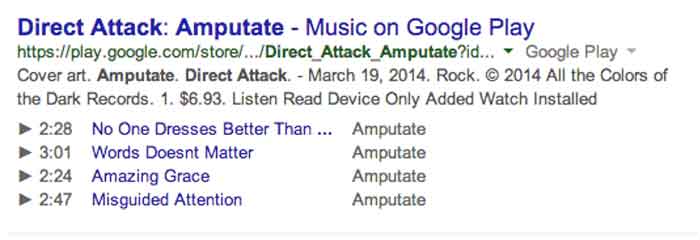
    Much like video schema, MusicRecording schema can display player icons with track, title, and duration details right there in the search snippet. This type of schema obviously only applies to a fairly niche segment of sites and/or clients, but it is another good example of how search snippets can be enhanced through schema. The example below displays a Google Play search result, which, as with fellow Google property YouTube, almost always displays the player info in the search snippet. Similar results can be accomplished in organic results with effective use of schema, however:

    MusicRecordingSchemaExampleImage

    OK, I Get It. So How Do You Do It?

    I’m not going to get into incredibly great detail here, because I promised a relatively simple primer and not a code-heavy breakdown that would scare away newcomers. Perhaps a more thorough explanation of the actual implementation of schema within HTML can be addressed in a future post. For now, I just want to explain schema implementation in terms of properly reading and understanding schema properties in the context of the schema.org item breakdowns.

    The most important thing to understand is that schema markup, like the HTML markup it is integrated into, is hierarchical in nature. This means that there are often numerous schema subproperties, within another schema subproperty, within a schema property, within the top level declared scope of a specific schema type, and so on. And once you go a next level deep in the hierarchy (or change the scope of your markup), the set of available properties is different and only applies to this new scope of the schema.

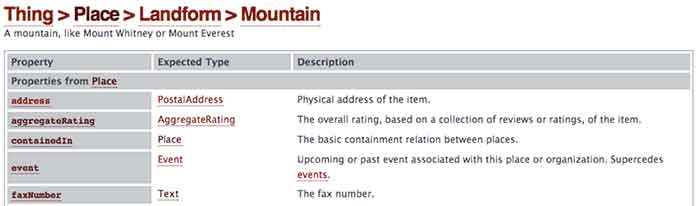
    As an example, let’s look at a section from the page for the always useful Mountain schema*:

    MoutainSchemaExampleImage

    So we’re going to start with Mountain schema as the scope of what we’re marking up in our content. As you can see, there is a list of available Properties for use within this schema on the left. With a nod back to the much earlier comparison in this post, these are all the different types of information we can “highlight” for a search engine. The Description on the right is a pretty self-explanatory explanation of what the property should reference. So far, so good.

    Now, where things get a little tricky is in the Expected Type column in the center. Take a look at the bottom most property “faxNumber,” which is obviously very important. We all know how difficult it can be to send a fax to a mountain, right? Well, you can see that the faxNumber property has an expected type “Text.” This means that whatever text content you list as the value for the faxNumber property is what will be directly communicated to a crawler or search engine as the fax number for your mountain. Simple enough.

    Well, you’ll notice that all the properties above it have more vague and mysterious extended types associated with them. In fact, these types are entirely new hierarchical scopes for the schema being added to the page. So for the “address” property, for instance, instead of just dumping your mountain’s entire street address in as the value, as you can with “faxNumber,” you’re going to have to change the scope of this schema and fill in any address information according to the next level of properties contained in the PostalAddress schema type. Once you change scopes in schema, the deeper level schema type does not know what is going on in the outer levels. So in this example, your PostalAddress does not know or see your mountain’s fax number.

    OK, This Is Getting Ugly. Just Stop.

    Good call. This is probably a good place to cut off an intro level crash course in schema, since anything much more detailed would involve some actual HTML knowledge or experience. Hopefully, this will have helped a non-web developer understand a little bit more about what schema is and how it can be employed to better communicate with search engines. There is such a vast expanse of available schema types for use marking up web content, a fundamental grasp of its structure and function can be extraordinarily useful in pointing your content more directly to the right readers.

    * This is where the Game Of Thrones meme would have gone if I weren’t such a snob.

  • 3 Tips for User-Friendly Navigation

    A few weeks ago, my future mother-in-law purchased her first iPad. While she has been the proud owner of an iPhone for a few months, there was something different, to her, about the navigation of an iPad. As we were walking through some of the different apps and functions on her new tablet, she found herself trapped in her browser window and unsure how to get back to her email.

    MaggieSmith-01

    Are you the type of person who can easily pick up on the newest technology trends? Or do you feel like you can never catch up with things changing so frequently? User-friendly navigation can take that worry away and make your experiences with technology easy and fun!

    Tip #1: Keep something familiar.

    We’ve all experienced that little moment of panic when we don’t know where to go next. For some people it happens when traveling to a new city or starting a job at a new company. We want to know that there’s a way out of any situation. For my future mother-in-law, that “way out” was the home button. After discussing the way she closes out of the Internet on her iPhone, she quickly realized she had that same “panic button” located at the bottom of her iPad.

    Tim Ash, CEO of SiteTuners and author of “Landing Page Optimization” was a keynote speaker at PubCon in New Orleans. During his keynote presentation he mentioned that as soon as we see someone walk into a room, we subconsciously decide how to kill them. He claimed it’s just a part of our natural instincts. I’m not sure if that’s the case for everyone, but I do think we at least look for an escape route.

    MaggieSmith-02

    Tip #2: Make it easy.

    Have you ever started navigating your way through site and then realized that you weren’t sure of the best way to get back without having to click the back button nine or ten times? What do you do? Do you simply close your browser window out of frustration? We crave easy navigation to avoid such frustration and make browsing simpler.

    To a certain degree we all enjoy updates to technology, but we still like to hold onto something familiar. For some social media sites, such as Facebook and Twitter, having a fixed navigation is the solution. How often do you find that you’ve logged into your social media account and then hours later, or for those with better self control, minutes later, you’ve scrolled so far down the page you’re looking at updates from days or weeks ago? Can you imagine what it would be like if you had to scroll all the way back up to the top of the page? If you were on Facebook before 2011, then you might remember.

    Tip #3: Know your audience.

    Is this something that all websites need? No, not necessarily. For many sites, scrolling is not quite as intuitive. The solution could be as simple as having “HOME” as an option in your navigation. Know your audience. Some users need an actual home button or link in the navigation, and some simply expect that your logo will link back to your homepage. If you’re unsure of the way your users interact with your page or how to make your page easier to get through, it may be best to do some testing.

    MaggieSmith-03

    Do you have any tips for easy navigation? If so, let us know in the comments! 

  • Can’t Code #2: Binary Basics

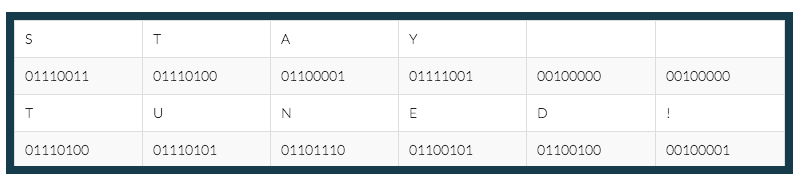
    The most basic code in the world of digital technology is binary code, which employs the binary digit, or “bit” for short. This code consists of 1’s and 0’s. The 1 means that something is; the 0 means that something isn’t. There’s no room for ambiguity when using bits. We’ll explore just how computers process binary information to create a meaningful user experience in the next installment of this blog series, but in the present post, I’d like to first discuss how binary digits operate, and what it means to count in binary.

    There’s Nothing Special About the Number 10

    The number system that we commonly use today, the one that consists of 1’s and 2’s and 8’s and 9’s, came to us from India a very long time ago. It supplanted the more cumbersome Roman Numeral system of X’s, V’s, and M’s. The most important characteristic of this “Hindu-Arabic” number system, and the feature that ensured its primacy over Roman numerals, was its most lowly number: zero.

    Zero revolutionized counting by providing a placeholder for intervals of 10. When you count past 9, the 9 becomes a 0, the integer to the left becomes a 1, and you’ve got 10. Ten 10’s become 100, ten 100’s become 1000, etc. Ten, as a numeric concept, suggests completeness; a closed circle; the beginning of a new cycle. But in order to understand binary, it’s first necessary to understand that, despite all this, there’s nothing inherently special about the number 10.

    The Counting System

    We have adopted a “base-10” or “decimal” counting system for the simple reason that our species has 10 fingers. The Hindu-Arabic system, and it’s trademark number 0, allows us to essentially count sets of fingers with ease. 10 is one set of fingers. 20 is two sets of fingers. If we had 8 fingers, the way we count would be very different. We’d be using a “base-8” or “octal,” rather than a decimal, counting system. 10, however, would still represent one set of fingers.

    To illustrate this, let’s visualize the following scenario: E.T., the titular character from the 1982 Steven Spielberg film, is trying to count 20 penguins in a row. Let’s briefly evaluate E.T.’s anatomy: he’s got tiny little legs, which leaves him very low to the ground, a long neck, long arms, and most importantly, 4 fingers on each hand, 8 fingers total. And with those 8 fingers, he begins to count 20 penguins. Let’s listen as he counts:

    1, 2, 3, 4, 5, 6, 7, 10 little penguins!

    11, 12, 13, 14, 15, 16, 17, 20 little penguins!

    21, 22, 23, 24 little penguins all in a row!

    Do you see why E.T. counted 24 penguins whereas we, with our 10 terrestrial fingers, would have counted 20 penguins? The number 10, as we have established, is a symbol used to represent one set of fingers, no matter how many fingers are in the set; and 20 is used to represent two sets of fingers, no matter how many are in the set. While we would have counted the row of penguins on just two sets of our ten terrestrial fingers, E.T. required two and a half sets of his eight alien fingers. The reason that his above counting scheme might look odd to us is that he had no use for integers “8” and “9,” and therefore his count is “missing” four numbers that would be included in our own: 8, 9, 18, and 19.

    Counting Penguins With Just Two Fingers

    Here’s how this relates to computers: computers only have two fingers. The “binary” code that serves as the language of computers is a base-2 system, and thus only utilizes two integers: 0 and 1. It doesn’t involve integers 2 through 9. By the time your computer has counted to 2, it’s reached 10; much like by the time E.T. has counted to 8, he’s reached 10. Imagine a person with two fingers counting a line of 10 penguins in the same way that E.T. used his 8 fingers to count 20 penguins. It would look like this:

    1, 10, 11, 100, 101 little penguins!

    111, 1000, 1001, 1010, 1011 little penguins all in a row!

    This hypothetical two-fingered person would never get to twenty, or thirty, or forty, because she wouldn’t even know what “2,” “3,” or “4” were. The only numbers that would exist between 0 and 100 in her mind would be 1, 10, and 11. Any other numbers would involve integers higher than 1, and therefore would not be counted.

    Using binary might be a really awkward way of counting penguins, but as it turns out, it’s a pretty effective way of transmitting information over vast distances. In the next installment of Can’t Code, we’ll take a look at how computers use these binary numbers to create useful information and media. In the meantime, here’s a decimal to binary converter to play around with in order to reinforce your understanding of the ever-lovin’ bit!

  • A Drive Down Leigh Circle

    If I know one thing about Search Influence, it’s that we would be nothing without the help of our Development Department. Starting with one member, Luke Ledet, in 2010, the department has grown quickly to 11 people in correlation with our expanding company. They work tirelessly to improve not only our client’s websites, but also our company’s website, software, and many things I could never dream of comprehending.

    (more…)

  • Welcome to “Can’t Code”

    Lessons, Musings, and Complaints about Digital Technology

    I started working at Search Influence a few months ago. Before that, I had a lot of web design experience, but all of it was very informal and self-taught. Due to budget cuts at the University of New Orleans, my graduate department asked me to volunteer as their “web guy” when they were unable to afford a real administrator. This meant that I had to do some very quick, ad-hoc studying in order to fulfill this role. Up to that point, I’d learned a lot about the most basic architectural features of the internet, like HTML and CSS, but it took a lot of research before I could make sense of the web’s more sophisticated components. At the time, PHP, Javascript, the infamous WordPress “Loop,” and other institutions of cyberspace appeared to me like confusing, mystical clouds of information.

    Image of Indonesian Students Using a Laptop

    I felt simultaneously intimidated by these topics and ashamed to inquire about them because I felt I should already know the answers. Finally, out of necessity, I set aside my ego and asked my more well-informed peers to share their skills with me, a request that was, of course, met with enthusiasm. The process of learning these skills was still challenging, but being open and honest about my ignorance was my shortest path to success (think I saw that on a poster somewhere).

    That experience made me reflect on the “digital divide.” Even as someone who was raised on computers, I struggled to understand how people operated behind the point-and-click Windows interface that I grew up on. I could only imagine how difficult this same endeavor would be for, say, my grandparents, or my childhood friends whose families were too poor to have a Nintendo, much less a laptop. Even though digital technology has permeated some of the hardest-reached socioeconomic crevices of our society, the standards of what constitutes “literacy” in a rapidly evolving economy is a moving mark. While many people are becoming comfortable with the Graphical User Interfaces (GUIs) created to help them interact with digital information, knowing a little code helps to fully participate in and understand the digital spaces of our lives.

    What Now?

    Image of binary data

    Beginning with this post, I’d like to share what I’m learning as a Junior Web Developer at Search Influence, in the hopes that others with a low to moderate level of computer literacy may learn something. Future posts will appear monthly on the Search Influence blog and cover various facets of the digital technologies that I use to complete my daily tasks. Some posts will describe what these technologies are used for, some will provide a tutorial on how to use them yourself, and others may simply give commentary on the history and social implications of these technologies.

    Next month, I plan on covering the very basics: ones and zeros. We commonly see long strings of 1’s and 0’s in the popular media that are meant to represent some form of digital information. But where does this code come from, and why is it used?

    Chart-border

    Stay tuned for the answers next month! And for any code questions you want answered, comment below.

  • How To Handle Automated Software Headaches

    To set the ‘scene,’ you’ve either recently purchased or are about to purchase a piece of software that is meant to offer improvements for your business. Whether it’s some form of automated process, or software that adds another form of datum for you to analyze and use for future success (such as SEO analytics information), there’s a great deal of caution that you should take with these programs.

    What Happens With Software

    software junk

    In short, I don’t mean that some of these programs aren’t worth their money or that they won’t do what you require of them. But you should expect a moderate amount of troubleshooting when applying this software into your business process.

    Most of the software that is developed and published for sale and use work as they should to a certain degree, but only under the right circumstances. Software testers can only do so much. The only real test comes from real-world use by people who aren’t familiar with the inner workings of the software.

    At the same time, patches and other forms of software updates are constantly in development (or at least, a good development team should always seek to make improvements) and can make drastic changes to a program that you are just getting used to, usually based on customer feedback that you might not be aware of, or agree with.

    How To Deal

    Thumbs UpIn order to avoid, or at least brace yourself for these moments of frustration, the first step is to read the manual. It’s usually large, bulky, and annoying, but within it are the instructions that you need to run the program correctly and avoid some of the smaller problems.

    The next thing to do is to make sure you always have a way to contact the original developers of the program, so that you can speak with an expert when there’s an issue that you can’t overcome on your own. Phone is always preferable in order to have instant contact, however most developers rely on e-mail.

    Finally, in order to prepare for updates and patches, make sure that you read up on the developer blogs that tend to be published on the website for the program itself. Not only is it a way for them to keep their website active, but they generally tend to suggest ways to use their program, bugs or issues to avoid, as well as patches and fixes that are currently under development. Keeping up with these blog updates, will keep you informed of future changes for the software.

    Now What?

    Enough preparation allows you to be more familiar with the good and the bad of any automated software you’re using. You can then expect some of the unexpected, and you’ll know the steps you will need to take in order to make the proper fix and continue using software to suit your business needs.

    If you’re interested in how a development team can improve your search rankings and help with your software issues, check out this blog on SEO Tips by one of our Software Developers, Shane Kretzmann!