Tag: web development

  • Yes, Your Higher Ed Marketing Agency Needs Developers

    Key Insights

    • Higher education marketers need web developers that understand marketing and can think out of the box to solve problems
    • To optimize your higher education marketing strategy, you need visibility in each step of the funnel
    • With so many disconnected systems, you need a skilled development team to track the student journey and prove your marketing ROI

    Yes your higher ed marketing agency needs developers

    Your Higher Education Marketing Agency and The Student Journey

    It’s not enough to simply create and understand your marketing funnel in today’s world of digital advertising and marketing. You need to plan, track, and earn buy-in through each phase of the prospect’s student journey and react quickly to changes in the market.

    An even bigger challenge is that the vast majority of higher ed CRM software is antiquated and lacks the ability to track prospects as they move through the funnel.

    Whether in search, display advertising, or social media it’s critical that your CRM software can connect the dots.

    With higher education CRMs so lacking, institutions have considerable gaps in their ability to effectively market degree programs to the right prospect at the right time. And it’s especially hard to react quickly to unforeseen changes to the education market.

    This is why it’s so important for you to have a development team—either internal or at your higher ed marketing agency—that understands your unique website and the prospect’s student journey. Although some universities rely on their IT staff, this is usually not enough.

    To ensure you support your prospect’s student journey, you need a skilled development team behind you that understands the technology and the higher ed marketing funnel. With the help of a higher education marketing agency and a skilled development team, you can track your prospective students through the funnel, assuring they’re getting the content they need at every phase until they’re enrolled.

    In this blog post, we will go over why it’s important to track students at every step in the recruitment journey. Your marketing team needs to understand where students get stuck. Then they can create content (case studies, blog posts, videos, and more) so you can optimize your strategy to move them through.

    Inbound Marketing Strategy and Your In-house Dev Team

    Right about now, you are probably thinking, “I’ve got that covered! We’ve got a brand strategy, we get lots of organic traffic, and at my university, I’ve got a built-in development team that manages our university website, including the pages for the program I’m responsible for.”

    And to be fair, your developers are probably amazing at maintaining the university website and keeping your degree pages online and running smoothly.

    But this is not about design and development. It’s about an effective higher education digital marketing strategy. To make your prospective student journey most effective, your development team should:

    • Understand higher education inbound marketing
    • Understand the marketing funnel
    • Know the details of your specifically defined marketing funnel
    • Have experience tracking prospects through the entire student journey
    • Have the skills to help you track the data that informs you if your online marketing efforts provide positive ROI and bring you prospects

    Search Influence is a higher education marketing agency whose development team does all the above on the daily, and it’s exciting!

    Headshot photos of the Search Influence technology and development team

    Our development team specializes in marketing, implementing, and troubleshooting tracking and analytics. We also provide the information needed to ensure you invest your budget wisely.

    We do the things you might typically associate with web development, such as content implementation, updating your website’s look, and adding functionality. As a higher ed marketing agency, we excel at thinking outside the box to get the results colleges and universities need.

    With deep knowledge in tracking and analytics, we can do this in search engines, digital ads, or even [gasp] offline.

    A Real-World Example: How Automating Your CRM Data Entry Can Help You Market Your Degree Program

    Goal & Situation

    One of our higher ed institution clients wanted to target prospects on Facebook (aka Meta), but their CRM had no integration options for social media outlets. This meant the data collected in Facebook wouldn’t seamlessly integrate with their CRM.

    Their internal team would have to do a lot of manual data entry work to track the effectiveness of the Facebook campaign and to connect the data obtained to their university CRM software.

    As you can imagine, this type of manual work is time-consuming, prone to errors, and frustrates everyone involved.

    No built-in connection existed between Facebook and the university’s CRM but we knew we could figure out a way to automate this process and give time back to the university’s marketing team.

    Search Influence’s Approach

    At this point, many development teams would simply tell their clients that it would not be possible to automate this process. They are focused on your website, keeping it looking modern, and keeping that CRM running smoothly.

    As a higher education marketing agency, Search Influence has worked on many similar projects to connect data from one source to another. With this experience in mind, we gathered the facts and knew we could solve the problem.

    First thing first, we had to determine if the CRM offered any sort of API that you could push data into. Without a way to push data in, this whole project would be dead in the water.

    In this case, we confirmed that this CRM did, in fact, accept lead information via an API endpoint. But it could only receive the information in a very strict XML format.

    Facebook provides a way to export lead data from Facebook Business Manager.
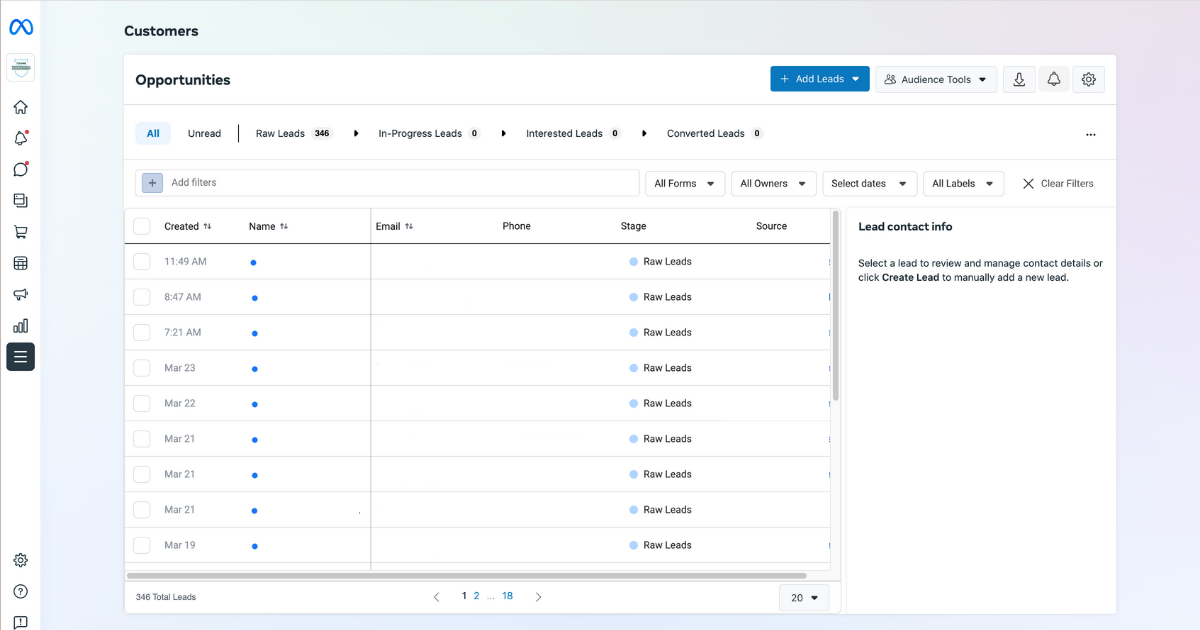
    Screenshot of Facebook lead center

    Unfortunately, it’s manual and the export is provided in CSV or XLS format. Plus, the data collected on Facebook differed from how the university CRM accepted it in their API.

    For this project, we ended up using the integration tools available at Zapier.com.

    We knew Zapier already had a connector to get data out of Ads Manager, and if you feed it a form id, it can listen for lead submissions. Once the lead is “zapped” into Zapier, we manipulated the data and remapped it to match the expected inputs the university CRM required via the XML API endpoint.

    Once everything matched the university CRMs XML rules, we automatically sent the data. The Facebook lead data became instantly available to the university CRM.

    Result

    We eliminated manual copying and pasting from Facebook to the university CRM, and now the university uses the data collected from Facebook for other efforts.

    We took advantage of their Facebook marketing efforts to set up email drip campaigns to ensure prospects coming from Facebook get the right information they need at the right point in the student journey.

    This is the real benefit of working with an experienced higher education marketing agency with equally experienced development staff. If there’s a solution, we’ll find it.

    The Higher Ed Marketing Experts at Search Influence Can Help!

    This is just one example of how out of the box thinking can help your educational institution’s marketing and communications get the data you need to be effective. If you don’t have confidence your current higher ed marketing agency has the technical chops to manage the challenging world of digital marketing, it’s time for an upgrade! Contact the Higher Education Marketing experts at Search Influence to help you meet your enrollment goals.


  • How a User Experience Audit Benefits Your Business

    Key Insights

    • Website user experience audits help businesses retain users and increase conversions.
    • If you understand the data behind user behavior, you can anticipate a user’s needs when designing and optimizing your website.
    • Examine trust factors, content considerations, and device usage when completing an audit.

    Woman typing on laptop computer and media app icons

    What Is a User Experience Audit?

    A user experience audit, or UX audit, is the process of reviewing a website for areas of usability improvement. There’s no one way to complete an audit because each one depends on the type of products or services offered and data analysis of user types and behaviors. It’s important to keep in mind a few key questions when completing a UX audit:

    • How does user experience impact conversions?
    • Are there usability issues, design issues, or both?
    • Should you consider your business initiatives when performing a UX audit?

    In this post, we’ll cover the questions above, along with the impacts of trust factors, content, and device usage in order to retain visitors and improve conversions.

    User Experience’s Impact on Conversions

    Imagine visiting a website to purchase shoes but find that you can’t add the item to your cart. You could refresh the page or revisit the site at another time, but many people will just visit other websites in search of the same shoe.

    If you’re the business of the original website, you’ve just lost out on a conversion—and likely more than one. Ensuring that your site supports users’ interactions without interruption is vital in retaining users and ensuring they convert.

    Usability Issues

    A site might seem functional, but it could lack the design necessary to increase user interaction and conversions. A ResearchGate study attributes 94% of a user’s first impressions of a site to its design. A poorly designed site could make all the difference in a user staying on the site or leaving with little to no engagement.

    Consider Business Initiatives When Performing a UX Audit

    Each business will have its own specific business initiatives that they want to achieve, such as raising awareness of their brand, increasing user engagement, or improving their ROI. Those initiatives can drive how to look for improvements to a user’s experience when completing a UX audit.

    Graphic of speech bubbles in multiple colors

    The Value of Trust

    Include trust factors on your site to establish credibility with your users. Trust factors are indicators on your site that can help users feel more assured in using your services or buying your products, such as testimonials, awards, and certifications.

    Content accuracy and quality can also impact a user’s trust. Issues such as incorrect grammar or inconsistent contact information help users to decide whether your business has credibility.

    Content Considerations

    A site with lots of pretty pictures won’t cut it. Written content plays a crucial role in determining user engagement. Site language should compel the user to stay on the site and learn more about the products or services offered.

    According to Small Business Trends, 70% of small businesses don’t use calls to action on their site. When a user visits a website, they expect some sort of direction in order to convert. If all they see are images but no clear and obvious path to purchasing a product or service, they likely won’t comb over the site to find out where to complete the purchase. Having clear and specific calls to action is imperative for driving conversions on your site.

    Why Device Type Matters

    Examining how users engage on your site helps you understand how to design for devices that best work for your users. In recent years, mobile device usage has grown over desktop usage. In the span of a single year, mobile usage went up by 10%, while desktop dropped by 6%.

    Several factors impact device usage, so it’s important to understand the data behind user visits and behavior on your site. Do more users visit your site on mobile versus desktop? If so, you should design your site in a way that lends itself to a better user experience on mobile.

    As you can see, UX audits are important for ensuring your site is designed in a way that is suitable to a user’s needs. Incorporating trust factors, understanding user behavior, and captivating content are necessary for a business’s success. By executing these concepts, you can increase visitor retention and engagement, thus increasing your conversions.

    Ready to grow your business with a UX audit today? If so, contact our team for a free consultation!

  • What You Need to Know About Website Accessibility

    Key Insights

    • Every business is required to implement certain accessibility standards on their websites, not just major corporations
    • An accessible website ensures that people with disabilities can seamlessly use it
    • Many SEO best practices are also a part of website accessibility guidelines

    Introduction

    Having a website that follows accessibility guidelines is increasingly important for businesses. It’s imperative to have a website that is functional for people with disabilities to service that demographic of consumers; it’s also the law. Every business is required to implement certain accessibility standards on their websites, not just major corporations. In 2019, there were over 2,000 lawsuits over website accessibility compliance.

    An accessible website ensures that people with disabilities can seamlessly use your website to browse and buy your goods and services. In this post, we’ll define what it means for your site to be accessible, how it impacts your business, and provide you with examples and best practices.

    Person using a screen reader to browse internet

    What Does It Mean to Have an “Accessible” Website?

    Having an accessible website means implementing usability features to support the 110 million to 190 million adults who have significant disabilities. Disabilities vary widely, and it can feel overwhelming to consider how to serve this entire audience. You can start by viewing the Americans With Disabilities Act (ADA) and Web Content Accessibility Guidelines (WCAG).

    Why Should You Have an Accessible Website?

    Making your website accessible is a win-win situation for users and businesses. Consumers can find the services they need, and you can provide them the services they want.

    Requiring website accessibility is a huge step in limiting frustration and difficulty for people with disabilities. Imagine all of the different ways that you use the Internet on a daily basis. Now imagine it again, but this time being unable to use many of the websites you want.

    Businesses of all sizes run the risk of encountering lawsuits if they do not have an accessible website. Large corporations such as Domino’s have been sued for not following accessibility standards. Common industries most impacted by web accessibility lawsuits:

    • eCommerce sites that host transactions
    • Organizations that offer services:
      • Law firms
      • Medical facilities
      • Schools

    What Are the Key Points of the Web Content Accessibility Guidelines (WCAG)?

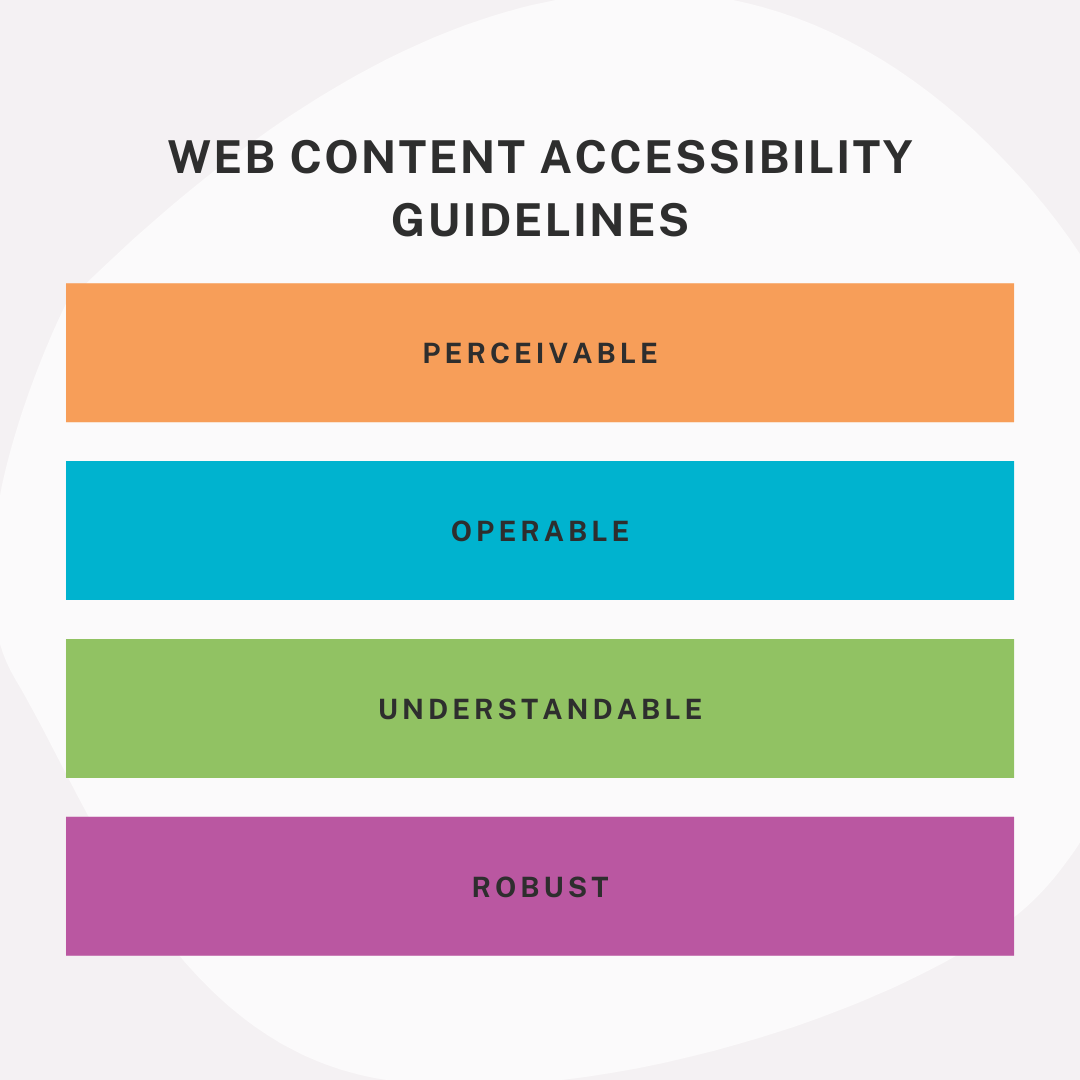
    Web content accessbility guidelines, perceivable, operable, understandable, robust

    The WCAG covers a wide range of ways to make your website accessible to individuals with disabilities. Use their checklist to start making your website accessible to all types of users who seek your services.

    Guideline categories:

    • Perceivable: Information and user interface components must able to be perceived by users
    • Operable: Users must be able to operate user components and navigate the website
    • Understandable: Information and user components must be able to be understood
    • Robust: Content must able to be interpreted by a variety of users, including assistive technologies

    Each section further outlines how you can accomplish these goals. For example, under the Perceivable category, sites are required to have alternative text for their images so that a person with a visual impairment who uses a screen reader could have the image described to them.

    What Are the Levels of “ADA Compliance”?

    The WCAG has varying levels of compliance for websites. Here’s a brief rundown:

    • A: Lowest level—Includes some accessibility features, but often doesn’t have enough to satisfy all users and situations.
    • AA: Mid-range level—Recommended because it satisfies many requirements and makes sites accessible in most situations. The goal should be to make your website AA compliant at the minimum.
    • AAA: Highest level—Requires many specific features that may not be possible to set up in some scenarios, which is why it isn’t used as the standard. Implementing the AAA features may even require a dedicated staff member to keep up with the latest guidelines and maintain AAA compliance.

    How to Make Your Website Accessible

    It’s important to start from the beginning. How complicated will it be to make your website accessible will come down to how your website was built. Things as simple as whether your website was built to support alternative text on images can be make or break. If you’re looking to upgrade your website sometime soon, make sure to use best practices for website accessibility right from the start.

    If that’s not the case, there are many things you can do to make your website accessible. Even paying close attention to your site’s SEO can make a huge difference. Alternative text, for example. Alternative text is recommended for SEO for multiple reasons one being that images show up in image search results. But, it’s also recommended for website accessibility. Many SEO best practices are also a part of website accessibility guidelines, so it’s a great place to start.

    There are lots of great tools you can use as a quick, easy solution to automate the process of making your website. However, it is important to research the tools you pick and make sure that they will make your site at least AA compliant. If not, consider what additional work you may need to do once the tool has done some of the work.

    Website accessibility should be a priority for your business because it benefits you and the users visiting your site. Your business benefits from clients who may have been lost if your website was not compliant, and it limits your exposure to accessibility lawsuits. Users with disabilities benefit because they can find and use your services more comfortably. You can start by reviewing accessibility guidelines. Here’s an introductory tool we created.

    Reach out to one of the experts here at Search Influence today to see what we can do to help you get started on your path to accessibility! Contact us today to learn more.

    Images

    Screen reader


  • How Does Having an SSL Certificate Impact Your Site’s SEO?

    Site security and user privacy have been a hot topic in the technological community lately. With big names like Google pushing for tighter security, it leaves website owners wondering what they need to do to ensure that their site is compliant with the best practices that will ultimately lead to them being favored in search results. One of the security measures that’s being pushed is ensuring that a site is secure. But what is a secure site and why does it matter? Here’s what you need to know about SSL Certificates and the role they play in your site’s SEO.

    Graphic of lock laid over an map of the world

    What Is an SSL Certificate and How Do I Get One?

    A Secure Sockets Layer Certificate is a means of creating an encrypted connection between a web browser and server. By using an SSL Certificate, an encrypted key protects sensitive information that is submitted by site visitors. If you’ve really got internet security on your mind, you can dig deeper by taking a more technical look at SSL Certificates.

    There are paid and free versions of SSL certificates, and others may be included through your hosting service. Depending on your CMS and hosting provider, there are various ways to get your virtual hands on a certificate. For example, installing a WordPress plugin or rerouting your site through CloudFlare may be an easy and convenient option. If neither of these are possible or ideal, you can usually purchase one through your hosting provider or buy one somewhere else and install it manually.

    Once you have it installed, it’s equally important to ensure that you keep your certificate up to date by auto-renewing it or making sure to renew it before the expiration date.

    What Does an SSL Certificate Mean for Your Site and Its Visitors?

    Which site would you rather make a purchase on: One with a red “Not Secure” warning clearly visible, or one boasting a green padlock ensuring that all of your information stays secure?

    Super hero sweating whether to pick secure or non secure options

    It’s a no-brainer. Secure sites are more appealing to visitors because they are provided the comfort of knowing that any of their information that is passed onto the server will be encrypted. Enhancing user experience should be a top priority for your website. A site with a “Not Secure” warning may even scare off some visitors from completing any transactions or creating an account on your site. Installing an SSL certificate and having a fully secure site means that your site and its visitors can have peace of mind.

    Do You Have to Have an SSL Certificate?

    Technically, no—at least not yet. However, browsers are now making their users more and more aware of which sites are secure and which ones are not. For example, Google’s push for secure sites includes making the “Not Secure” warning more prominent on web pages, as well as favoring secure sites in search results. Some sites that aren’t secure even direct the user to a full warning page warning them not to continue before they can click through to the site. This definitely won’t help a site’s bounce rate.

    Additionally, if your site’s connection isn’t secure, it leaves your users’ information vulnerable to people looking to get their grubby hands on it. Personally, I wouldn’t want to be the person sending the email to users letting them know their information has been compromised should the worst happen. Why not make your site secure and provide your users with the assurance they need before willingly giving you their information? Overall, having a secure site greatly enhances user experience, confidence, and the overall trust of your brand. If that wasn’t enough, whether or not you have an SSL Certificate can impact your SEO and search engine rankings.

    What Does SSL Have to Do With SEO?

    Having an SSL Certificate on your site is becoming more important than ever for SEO and search result rankings, and its significance will only increase. Search engines are rewarding sites that are secure and penalizing those that are not. According to an article by Neil Patel, data shows that sites with an SSL Certificate are getting increased traffic over those that don’t. Plus, as Google continues to place an increased emphasis on the importance of SSL, it will likely have an even bigger impact on SEO rankings as the years progress.

    Much like Google’s push to require mobile-friendly sites for healthy SEO, a secure site is going to become the standard. If your site isn’t secure, then not only are you behind the times, but you are no longer following best practices. Many platforms that outline what your site does well and what needs to be improved will start to report that your site being not secure is an issue, if they don’t already.

    Graphic of SSL certificate being displayed in browser's URL field

    Making your site secure will let you take advantage of all of the current and future benefits that come with it. Now that you understand what an SSL Certificate is, how to get one, and why it’s crucial for your site, its visitors, and your SEO, contact Search Influence to make your site secure and enhance your SEO.

    Images

    Map Lock

    Secure vs. Non Secure

    Browser

  • How to Make Sure Your Website Is Accessible for Everyone

    It’s safe to say that traffic—and gaining as much traffic flow as possible—is the major goal of anyone’s site. Unfortunately, a substantial amount of us forget about a few key demographics that depend on us to make sites, content, and social channels accessible. To put it into perspective, 360 million people have hearing disabilities and another 285 million people have visual impairments.

    Some have physical limitations that make it impossible to use a mouse, while some people are prone to photosensitive seizures.

    So how do we cater to as many people as possible and make our sites places of inclusion?
    The tips I’ve listed below are a great way to start.

    yall belong here gif

    How Can I Make My Content More Accessible?

    Most of these additions are minute things that we take for granted every day. Luckily, they’re also seamless and easy fixes that pack a huge punch of positive impact.

    Dynamic Content

    Dynamic content refers to pages, plug-ins, or other tidbits of your site that can change without forcing the page it’s on to reload. If someone is using a tool to navigate your website better, the tool may not inform the user of changes that happened on that page. This can lead to a confusing experience. Reader tools mostly scan a site as it naturally appears when it first loads, so if you use dynamic content, make sure it’s optimized.

    Audio

    Some visually-impaired users rely on transcribed blogs, articles, or web pages to digest your content through sound. Do some research on software that transcribes your blogs into audio clips to post to your website.

    Video Transcripts and Captions

    Users who are deaf or hard-of-hearing can use video captions to understand what’s going on in videos, and what dialogue is said. In this scrolling era, captions are also a best practice to get people sucked into watching your videos too! Sites like Amara offer free video captioning for small projects, so it’s a great tool to get started with.

    get the transcript obama gif

    Accessible PDFs

    To make a PDF accessible, the original document must have a solid foundation. Some other key attributes of an accessible document include searchable text and security features that allow for screen readers. Adobe goes in-depth on what you can do and how you can do it in this great resource.

    Descriptive Links and Button Text

    For users that need a screen reader to navigate a website, buttons and links that say “Click Here!” don’t give a clue as to why they’re clicking this link or button. Instead, opt for descriptive phrases such as “About The Team” or “Services Offered.” This makes for a clear understanding as to where you are taking a user.

    Color Choices

    A sizeable amount of users have photosensitivity that makes it difficult to view bright colors and may even cause seizures. The rest of us would like to err on the side of caution and preserve our eyesight for as long as possible. This is why choosing your color scheme is very important, as well as making text and backgrounds easy to view and read.

    Resizable Text

    Users with vision impairments benefit from text that can be zoomed in on to make it larger, and therefore easier to read. So make sure your mobile layout is capable of zoom!

    How Can I Make my Website More Accessible?

    Alt-Text

    Alt-Text is a screen reader’s best friend, allowing image descriptions to be read aloud to users with vision impairments. This is one reason why listing image descriptors is essential. I recently found out that you can even add these alt-texts on your Instagram and Facebook photos as well!

    Headers

    HTML headers should be clearly labeled to structure and organize the information, as well as instruct screen readers of that information. This assists not only users with vision impairments but also users with cognitive disabilities who may need well-structured information for extra clarity.

    Tables

    Tables may easily structure a page, but they also impede accessibility software from reading a page correctly. If you have information that needs to be laid out in table form, include an HTML markup that clearly defines headers and data cells so users can find the information.

    How Can I Make my Social Media More Accessible?

    Emojis and Emoticons

    A lot of programs can read emojis, but you will need to put a space in between each one for better readability. As for emoticons, they’re read the way they’re written. So a smiley face like this “:)” will be read as “semicolon parenthesis,” and shouldn’t be used too often.

    hear no evil, speak no evil, see no evil monkey gif

    #CamelCase

    It’s hashtag time! These are a pivotal part of any Instagram campaign, and should be written in what we call Camel Case for easy reading! So when you use hashtags, make sure you #UseCamelCase instead of #regularcase.

    Abbreviations

    The best practice is to refrain from abbreviating names of companies or organizations and instead spelling their name out in its entirety.

    More Resources

    W3C: World Wide Web Consortium on Accessibility
    WCAG: Web Content Accessibility Guidelines Checklist
    Section 508: Government standards on accessibility on the web
    Accessibility of State and Local Government Websites to People with Disabilities
    Color Contrast Checker
    Screen Reader Simulation
    Low Vision Simulation
    Dyslexia Simulation
    Distractibility Simulation

    Now, this is obviously not an exhaustive list of things to do, but it’s a good start in making the internet and your web content more accessible for a lot of users! There’s so much information available, and you can dig a little deeper with the list of resources above. If this is an initiative you’re looking to make a priority, reach out to one of our experts at Search Influence and we can help you make accessibility a reality.

    images:
    Y’all Belong Here Gif

    Obama Gif

    Monkey Gif

  • Is Your Website Running Slowly? Image Optimization Could Help Speed Things Up

    Image optimization is a process of manipulating an image’s size, dimensions, and format to reduce it to the smallest possible size while still ensuring the highest possible quality is delivered to the browser. It sounds like a dark art, I know, but it really isn’t, and if your business relies on being able to show your products or the results of your services, image optimization must be a regular part of your ongoing website maintenance. Every single time you upload that new photograph highlighting your most prestigious project, image optimization should be considered and acted upon. It not only helps keep your website fast for your visitors, it also helps with your SEO!

    Mobile loading gif

    So My Website Is a Little Slow, What’s the Problem?

    In today’s world of instant gratification, website speed is extremely important. If your website takes longer than 2 seconds to load, you are losing potential customers. Websites that load within 2 seconds see an average of a 9.6% bounce rate. That figure jumps to 32.3% for websites that take 7 seconds to load, and it only gets worse from there. This ultimately can hurt your brand as people come to know your website as “too slow to be worth the time.”

    As more and more website surfers are using their mobile devices instead of their desktop devices, page speed has only become more and more important. Google announced back in January of 2018 site page speed would become a ranking factor for mobile searches—and they meant it, forcing SEO experts to respond by finding ways to speed up their clients’ websites. And it worked! As Search Engine Land noted, Google’s data shows this speed enforcement resulted in a 15-20% increase in page load times amongst the slowest sites on the web.

    How do images come into play? You may have noticed that a site with a large gallery takes a long time to load. That’s because large images can add weight to your website, slowing downloading time.

    I See Site Speed Is Important, but How Do I Optimize My Images?

    To address image weight, you can use image processing software such as Photoshop, (or the free alternative GIMP) to set the height and width to be exactly what you need it to be. Set your dpi (dots per inch) to 72, considered the web standard. You can also use this software to change the file format and compress the image even further, but be careful not to compress the image so much you lose quality. Remember, the goal is to have the highest quality image with the smallest weight. The most common image formats used on the web are:

    • PNG—good for screenshots and images with graphics or text
    • JPEG—best for photographs
    • GIF—if you really need an animated element on your site

    If you use a content management system, there are likely add-ons to the CMS that can help automate this for you. For WordPress websites, I recommend the reSmush.it plugin. You can dial in your optimization level and configure it to automatically optimize the image when you upload it. The plugin is absolutely free with the only restriction being the original images must already be below 5 MB.

    Woman working at her computer with mobile device and tablet

    Image Weight Isn’t the Only Important Image Optimization

    While reducing your image weight is an important practice to keep your website running fast and avoid negative rankings from Google, there is more you must do to truly be able to say your website images are optimized and SEO friendly. You should name your images descriptively; the name should indicate what you see in the image. In addition, make full use of the ALT and TITLE tags offered in HTML to further describe in more detail the key things that are visible in the photo. Google uses the name, ALT, and TITLE tags to help them return the best results possible in their image search. You can’t go wrong if you are following the image best practices Google has laid out, and please, please, only use images that are actually relevant to your website.

    Image search can be a major source of organic traffic to your website and you should be taking full advantage of it. Keeping your images and decorative elements of your website with an optimized quality-to-weight ratio, as well as using the other best practices mentioned here, will help ensure you are using the image search results to drive organic traffic at its full potential.

    If you’ve noticed that your website runs slowly, or you’re trying to increase your SEO rankings, the experts at Search Influence can help make your site more accessible to both Google and site visitors. Contact one of our digital marketing specialists today to start taking your site to the next level.

    Images

    Loading

  • WordPress vs Google Sites: Why You Should Be Using WordPress

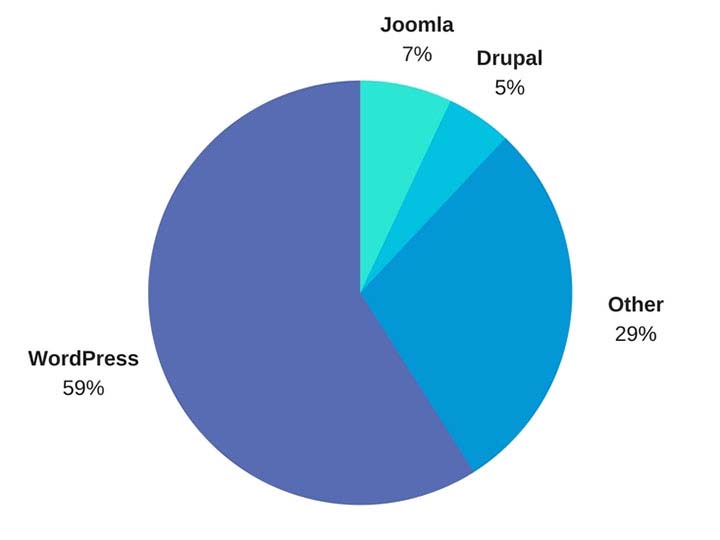
    WordPress is by far the most popular website management system in the world and shows no sign of slowing down at all. What started in 2003 as a PHP and MySQL based open source software has turned into a community of millions of users worldwide that all collaborate to make website management easier and more intuitive. What this means is that all of their site files are available for download at their website for free. Uploading the files to your web server allows you to connect a domain and start using WordPress for your own site. Just one look at this breakdown from Fresh Consulting shows the dominance of WordPress in the CMS market.

    WordPress Market Share represented in a pie graph - Search Influence

    So Why Should I Use WordPress?

    1. It’s Free

    Well, first and foremost, it’s free. As previously outlined, upload the files to a web server and you can work from there. Immediately cutting down on a business cost at the very beginning is always a bonus.

    1. Constantly Updated Options for Themes and Plug-ins

    In addition to that, it is also an insanely popular open source software, which means that millions of users are creating and updating new themes and plugins to help customize your website experience as both an administrator and for users visiting your website. Did I mention it was free?

    1. Easy to Use Editor

    The ease of use of WordPress is also another big selling point of using this platform. For the non-developers out there, WordPress offers a native “what you see is what you get” (WYSIWIG) editor that is easy to use and gives you complete control of the page.

    1. Media Storage & Access

    It also preserves the capability to all sorts of media such as videos, audio clips, and images and has a very convenient file uploader for non-developers who aren’t using an FTP GUI such as Filezilla. This is a convenient way for developers to upload small batches of files that might not necessarily require connecting directly to the server.

    1. For Developers: Open Source Customization

    For the developers, a completely open source code allows complete customization if desired, and easy access to the template files makes minor edits quick and easy. What this means is that if you do happen to have a developer or developers on your team, they won’t necessarily have to struggle and create workarounds in many situations—all of the code is available to them from the beginning. In addition to that, there is also a bustling community of users that create all sorts of templates and plugins that are all open source as well.

    1. WooCommerce for Ecommerce

    Sure, building and creating a website is one thing, but WordPress also offers the WooCommerce plugin, the world’s most popular E-Commerce platform that currently powers 30 percent of the world’s E-Commerce websites. So if your desire is more on the side of selling goods as opposed to brand awareness, then WordPress has you covered there. WooCommerce is free and comes ready to sell right out of the box with loads of free extensions, including one that provides full Google Analytics integration whether you’re using the standard or enhanced Google Analytics E-Commerce. When configured properly, this extension can show detailed data, such as drop off points in your sales funnel.

    woocommerce logo - Search Influence

    WordPress logo - Search Influence

    1. Search Engine Optimization

    Probably the most important feature of WordPress is the Search Engine Optimization (SEO) is a cinch. So easy that Matt Cutts gave them a shoutout in one of his presentations when he was the head of the Web Spam Team at Google. The easiest way to tackle this solution is by adding a free SEO plugin, such as Yoast SEO or All in One SEO, which gives you complete control over your title tags and meta descriptions. Your developer can also easily implement structured data (the code that creates the answers and fancy cards in Google search results) in JSON-LD, which is Google’s preferred format. It’s worth mentioning that some other CMSs don’t play nice with this code and will strip it from your pages. Optimizing your massive images that you may have taken of your business or product with your fancy DSLR camera is an easy task with a plugin like Smush Image Compression and Optimization to help your site maintain its speed, which is something Google definitely cares about dearly.

    How Does WordPress Compare to Other Content Management Systems?

    1. Flexibility

    The “ease of use” selling point for non-developers was originally one of the main selling points of WordPress, but a lot of other Content Management Systems (CMS) are beginning to catch up in that area. Comparatively speaking, a CMS at face value should have a high level of accessibility for people who don’t necessarily know HTML, CSS, JavaScript, PHP, or any other coding languages that are used online. CMSs such as Wix and SquareSpace have begun to gain a lot of steam in recent years, primarily due to large advertising budgets, but still have yet to catch up to the popularity of WordPress. A large part of the continued success of WordPress is the amount of flexibility it offers.

    1. Open Source Software

    As I stated before, WordPress and all of its code is open source, meaning that it is available to the general public. The platform itself is coded in PHP and MySQL, which allows developers to have a field day, creating beautiful templates and all sorts of cool effects that they want for websites. In addition to that, open source code helps create larger communities of users that can help with any sort of idea that you can think of, rather than having to simply rely on WordPress documentation. This community effort leads to a very expansive forum where WordPress users can oftentimes find the answer to any question they may have or join in and offer some unique solutions that they may have come up with.

    A lot of WordPress critics often parrot that a WordPress site isn’t much fresh out of the box, which I personally find to be very disingenuous. SquareSpace and Wix both have a strong selling point for making beautiful websites, while WordPress users see the Twenty Seventeen theme and more than likely cringe at its visage. However, anyone can navigate to the free themes that WordPress offers. After finding one that you like, implementation takes about 5 minutes and 3 clicks of your mouse. This makes it very easy to dispel the myth of all WordPress sites being ugly.

    How Can Other CMSs Be Problematic?

    Here at Search Influence, I’m on the Web Development team where, in coordination with our Account Management team, I implement our proprietary tracking system and on-site optimizations, in addition to the various other projects that may come along. Here are a few instances I’ve found in which other CMSs can present problems.

    1. No Access to Source Code

    Having access to the source code of a website is imperative for accurate implementation of anything on a website. So, it’s safe to say that I’ve come across quite a few issues with some of WordPress’ competitors, which creates abounding frustrations.

    1. Removal of Custom Coding

    One example that I see a lot involves CMSs that strip schema from their web pages, whether it’s coded in JSON-LD or in the microdata format. With Google being very mobile and local-focused, not being able to add structured data to your website means that you’re probably missing out on having your business showing up on the knowledge graph on the right-hand side of the search results. Another quick example would be CMSs that strip title tags and alt text from images. Google uses alt text to determine what an image is and then possibly add it to its image results. The title tags are used for accessibility purposes on the user end.

    Ron Swanson from Parks and Recreation throwing a computer into a dumpster - Search Influence

    1. Lack of a Community

    WordPress has a technically apt community that is generous with their knowledge. In addition to the 50,000+ plugins available, WordPress.com hosts a forum for users with 40,000+ topic threads. It’s hard to match that level of technically sophisticated users available as a resource.

    1. Faulty Built-in Integrations

    Just recently, I was setting up E-Commerce tracking on a SquareSpace site that was using the SquareSpace store. After some searching that took much longer than it would’ve taken to find the solution in the WordPress community, I found that SquareSpace has Google Analytics E-Commerce tracking integrated into their platform. Seems easy enough—drop in the tracking code and let the data flow like a river. After completing a test purchase, my data populated perfectly and I gave myself a pat on the back and wished the client a great campaign.

    Turns out, the integration was completely busted and stopped tracking. I ended up having to set everything up manually. Also, SquareSpace is a pretty poor platform to setup product data and all the other fancy bells and whistles that can be added via Google Analytics. To top that off, I found that the source of the problem is that their storefront uses the classic Google Analytics code, which was officially discontinued in 2012!

    To the contrary, with a WordPress installation, the WooCommerce plugin and the Google Analytics extension can be added to pull all sorts of fancy data, like product data, cart data, dropoff data, etc. The setup for WooCommerce is very clean, and I haven’t had any issues tracking all of the data or the data mysteriously disappearing on me. Even if you don’t have any experience with a particular plugin, the popular plugins have a slew of documentation written by the creators as well as large communities focused on making sure everything works as intended.

    So How Does One Take Advantage of This Powerful Tool?

    Self-Hosted vs. Hosted Through WordPress.com

    WordPress.com does offer its own hosting service, though I will say a business owner should spring for the “business” plan if they plan on hosting through WordPress.com. If not, I highly recommend self-hosting if there is a developer available. Self-hosting truly unlocks the full potential of WordPress, with the ability to completely customize every single aspect of your website. With server access, the possibilities are nearly limitless. Having an open source code that a developer can harness the power of, a community of millions of innovators to back it, and a level of ease that non-developers can take advantage of makes WordPress, in my opinion, the best CMS currently on the market.

    Choosing a CMS platform while either creating a site or updating your old site is very crucial to the success of the website. Getting looped into a poor CMS and linking your domain to it for a year or more may feel like you are stuck with it until your contract is over. But if it’s costing you business, it may be worth the switching cost!

    We’ve helped many businesses transition to WordPress, sometimes keeping the same general feel of their current site design. If this all seems daunting to you, reach out to us for support. We’ll work with you to figure out the best plan of action. Don’t risk missing out on valuable conversions or leads because of the limitations of a clunky CMS that doesn’t allow you to optimize the potential of your website.

    Images:

    WordPress Market Share

    WooCommerce

    WordPress

    Ron Swanson – Computer Trash

  • Rookie Website Mistakes, Part 3: Your Site Isn’t Mobile-Friendly

    Now that you have learned how to get your website found in Google searches, Part 3 of our Rookie Website Mistakes blog series will explore how to get mobile visitors to stay.

    It’s no secret that the current generation is keen on the combination of mobility and technology. We are a group who thrives off convenience and being able to get the information we need while on-the-go. It’s no wonder the level of frustration when a website we want to reach is not properly formatted for mobile use. Many of us quickly move on, searching until we find a site that is mobile-friendly and can also provide us with the information and services we need. According to Google, 58 percent of Americans use their smartphone (instead of a computer) to access a website. This means that over half of your potential audience—individuals who use the internet—are searching via cell phone. Visitors are also typically multitasking, leaving you with a limited amount of time to impress and engage them. You would be remiss to not format your website accordingly. Let’s dive a little deeper into what you lose and what you stand to gain with a website formatted for mobile visitors.

    Not Using Responsive Design

    One of the main differences between a site that’s built for mobile use and one that’s not is the responsiveness of the design. Consider the size of the interface or screen on a desktop computer or laptop versus a smartphone. Because mobile phones are smaller, websites cannot afford to have lofty navigation that hangs out in the margins—nor can they afford to have a surplus of text that hides below the fold. Often, the entire design of the website should be optimized for how visitors will need to navigate the page on a 5×3-inch device. Font size, typography, and single-column layout are also some items to consider.

    Optimizing for mobile does not mean that a business will have to create two different sites. Responsively designed websites are flexible and can detect screen size and orientation. The flow and readability of the design are crucial for a pleasant user experience that will keep visitors on your page, allowing them to receive the valuable information you are providing.

    Lack of a Touch-Friendly Interface

    Because visitors to your website are most likely accessing your page from their handheld device, it is imperative that the site can be easily navigated by touch. Visitors are frequently using touchscreens to find your business online, and once they arrive at your website, they need to be able to use their fingers to scroll, move between pages, click links and videos, and request more information.

    Man pointing his finger toward a smartphone's touchscreen - Search Influence

    Consider enlarging the font and adding more space between navigation buttons and links so that it’s easier to select items on the page. Unlike using a mouse on a desktop, fingers are less precise, so the use of buttons is vital to a friendly interface. Be sure to also have indicators on items that can be selected, such as adding a highlight or indentation marker to the button. This lets visitors know that their phone has recognized their selection. Another element is utilizing dropdown menus for navigation. They can be used on desktop screens and are ideal for mobile phones. Also, make sure the phone numbers are click-to-call and emails listed on your website are designed to open a compose window. This adds even more convenience for potential customers and visitors to your website.

    Images That Aren’t Optimized

    In previous blogs, we’ve made a case for the importance of having quality images on your page. But what happens if these images are slow to load? According to a study done by Equation Research, 60 percent of mobile users expect a site to load within 3 seconds, and 74 percent are willing to wait up to 5 seconds for it to load before abandoning the website entirely. Visuals that take too long to configure to the page also slow down the general responsiveness of your website. Scale images through code or optimize them by using new HTML markup that prevents the browser from downloading pictures that are larger than what is needed.

    Coworkers sitting at a table with different multimedia devices - Search Influence

    Content That Isn’t Mapped for Mobile

    Take inventory of each piece of content on your website and evaluate how effective it will read on a mobile phone. The size of the font and the typography style is something to consider, but the length and relevancy of the content are important, too. Trim down the fat. Use your analytics intel to determine which pieces of content your visitors are actually reading, and consider removing or optimizing content they are not. Review your website and be sure each piece of existing content is essential and can be easily digestible on all screen sizes.

    Having a mobile-friendly website is not something to be overlooked. With more and more of your potential customers using their phones to search for your business, mobile-friendly optimization is vital to the health of your business. If you have any questions or concerns about how to optimize your website and grow your business, our team is happy to help. Drop us a line!

    Stay tuned for the next blog in the series, Rookie Website Mistakes, Part 4: You have a Single Page Website.

  • Rookie Website Mistakes, Part 2: Not Allowing Google to See Your Website

    Congrats, you’ve finally created a website for your business! And in the last post in our Rookie Website Mistakes blog series, you even learned how to bring your site up to speed. Now’s the part where you pat yourself on the back and start thinking about how to work your way to the top of the first page in the search results.

    Well, hold your horses—Google’s really smart, but it’s not magic. Think of the search engine results pages (SERPs) as an insanely big library: if you’ve written a novel, the book doesn’t automatically appear in the correct place on the correct library shelf. You’d have to get someone to read it, decide what it’s about, and figure out how to catalog it somewhere in the existing shelves. In the same way, Google needs to actually “read” your website before it can make a decision about where it fits in in the SERPs.

    Main hall in Trinity College library - Search Influence

    And if you’ve accidentally prevented Google from reading your site at all, it has no way to fit it into its library. As a result, the “if you build it, they will come” mindset definitely doesn’t apply: potential customers won’t find you if your site isn’t showing up when they search for it. Failing to allow search engines to actually find your website is a very common rookie mistake when moving WordPress sites from staging to a live server, but a little knowledge of how Google works can help bring your site up to speed.

    How Does Google Find and “Read” Your Website?

    According to Verisign‘s Domain Name Industry Brief, there were approximately 330.6 million domain name registrations in the first quarter of this year alone. Google’s a huge company, but its employees don’t have time to read all of these new sites. Instead, they entrust that task to specialized bots, called “spiders,” “crawlers,” or “Googlebot,” that automatically discover your website and analyze its contents.

    These bots “crawl” websites by moving through one link to the next, bringing back information for the search engines. Google also uses these spiders to analyze updates to your site, but since you’re just starting out in the website ownership process, let’s focus on site discovery. “Indexing” is the process of discovering your site and deciding where it fits into Google’s library. A page has been indexed when Googlebot’s results have been recorded in Google’s index, or the massive database of the search engine, allowing the page to actually show up in the SERPs.

    One interesting thing to point out is that the terms “crawl” and “index” are related but not necessarily dependent on each other. In other words, just because a bot has visited a page doesn’t necessarily mean that the page has been indexed. Similarly, it’s possible for a page to be indexed without ever having been crawled (in rare cases).

    Door with bars and keep out sign - Search Influence

    What Happens When Googlebot Is Blocked?

    If Googlebot is unable to see what’s on your site, it means that no crawling and indexing is happening. This, in turn, might mean a loss of rankings in the SERPs.

    There are a few ways your site might be blocking Googlebot:

    • Firewalls – Using a firewall or DoS protection system is always best practice, but your systems might be recognizing Googlebot as a potential threat. Because Googlebot tends to make far more server requests than your average human user, the firewall on your site might flag this as threatening behavior, preventing the bots from crawling your website.
    • Intentional blocking – The webmaster of your site might intentionally block Googlebot in an attempt to control how the site is crawled and indexed.
    • DNS issues – Your DNS provider may be inadvertently blocking bots.

    Leave doormat - Search Influence

    How Do You Ensure That You Aren’t Telling Helpful Bots to “Get Lost”?

    Here are a few things to double check to be sure you’re putting out the welcome mat for your helpful crawlers.

    First things first: check for noindex meta tags, which basically tell bots “thanks, but no thanks.” It seems obvious, but removing a line of code may be all you need to do to get indexed.

    Next, check your robots.txt file. It’s not a mistake to use this file at the root of your site; when used effectively, it allows you to give bots exact direction as to which pages you want crawled and which bots you want to access your site. However, if you’re using it incorrectly, you might be blocking Googlebot from seeing your site at all. You can learn more about robots.txt here, and Google offers plenty of additional information to help you understand how to use robots.txt files effectively with Googlebot.

    You might also want to configure your URL parameters through Google Webmaster Tools to control Googlebot’s access without a loss of search ranking.

    Finally, if a firewall or any kind of bot blocking script is the culprit, you’ll need to manually remove the block. For DNS issues you can’t fix on your own, try contacting your DNS provider.

    How Long Does it Take Google to Crawl Your Site?

    Note that even after making these changes, you’ll need to give Google a few days (at least) to index your site—it won’t happen instantly. And once you’ve made sure Google is able to access your site for crawling and indexing, you can move forward by optimizing your website for spiders to make it easier to crawl. If you need help with that next step, our team would be happy to get you on the right track. Contact an expert from our team anytime.

    Stay tuned for our next entry in our blog series: Rookie Website Mistakes, Part 3: Your Site Isn’t Mobile Friendly.

    Images:

    Library

    Keep Out

    Doormat 

  • Rookie Website Mistakes, Part 1: Slow Loading Speed

    74 percent of customers will leave a website if it fails to load within 5 seconds. And the numbers don’t look too great even if your site is noticeably faster—according to Google engineers, anything slower than the blink of an eye, 400 milliseconds, can cause users to leave a page and search elsewhere. Google released their Caffeine update in 2010, placing importance on site speed for search ranking factors. With such a demand on site performance, it’s more important than ever that business owners and their partners understand not only why page speed is important but also what affects it and how to remedy a sluggish site.

    Snail crossing an asphalt road - Search Influence

    Why Is Speed Important for Search Factors?

    Overall site speed is based on a sample of different pages from the site. “Page speed” can be broken down either as “time to first byte” or “page load time.” The first of these, the time it takes for a browser to receive the first byte of information from the server, has been shown to correlate to search rankings. “Page load time” more noticeably affects the user experience, but it can also impact SEO.

    All of that hard work you’ve put into developing and designing your new site, implementing beautiful images, creating an intuitive navigation, and writing and implementing pages of content for users to scour—it can all mean nothing if your pages take longer to load than what has come to be expected. The longer someone waits for a page to load, the sooner he or she begins to look for other avenues to find a product, purchase a ticket, or make a reservation. And with the magnitude of resources available today, it’s only a matter of time until they leave your slow-loading site (bounce) and seek their information elsewhere via a new search.

    The average user doesn’t have time for your slow page to load, and rightly so. We shouldn’t be subjecting potential customers to a dull experience. We wait in traffic. We wait on elevators. We wait on our bread in the toaster. But when it comes to our web experience, we aren’t stuck in the ‘90s with pages that can’t possibly load any faster than 10 seconds. There are tools and practices at our fingerprints that can make your flashy new website lightning fast and more easily crawlable by search engines.

    Open exposure capture of cars driving on a road at night - Search Influence

    Page Performance Impacts User Experience

    Now, a slow loading page isn’t the be-all-end-all factor for search rankings. In fact, there are over 200 factors that go into search rankings. However, it can impact conversions and sales due to a poor user experience.

    When’s the last time you sat and waited for a page to load? How long until you gave up and tried a competitor that sells the same type of product or service? It’s worth repeating that users expect speed. Whether they’re searching on desktop or mobile (and most have been on mobile for close to two years), an inefficient website can frustrate users and result in lost business. So, what are some easy ways to make the user experience more friendly and eliminate high bounce rates that result from slow load times? Our developers can help diagnose more specific problems, but here are a few tips to get started:

    • Eliminate multiple pop-ups or spammy widgets used for sales on your site
    • Create smart site navigation to give users a clear path to a purchase
    • Implement direct calls to action with forms or buttons throughout your site

    There are other steps that can be made on the backend of your site that can help with load time, like limiting redirects, organizing your HTML, and compressing your images, but the above-mentioned tips are a step in right direction toward enhancing the way users will interact with your site.

    Co-workers sitting around a wooden table with electronic devices in hand - Search Influence

    Regain Potential Lost Conversions and Sales

    While load time might not be the biggest contributing factor to a poor search ranking, it can certainly contribute to a lower conversion rate. According to surveys done by Akamai and Gomez.com, 79 percent of web shoppers who have trouble with website performance say they won’t return to the site to buy again, and around 44 percent of them would tell a friend if they had a poor experience shopping online.

    In the same survey, they found that a 1-second delay in page response can result in a 7 percent reduction in conversions. To put that in a sales perspective, if an e-commerce site is making $100,000 per day, a 1-second page delay could potentially cost $2.5 million in lost sales every year. That’s a huge number for a 1-second delay. To give another example of a direct ROI, for every 1 second of speed improvement to Amazon’s website, their conversion rate went up 2 percent.

    For your landing pages to convert visitors into customers, you need to give them an enjoyable experience. The nice thing about doing technical work to decrease page load time is that it simultaneously benefits your bottom line. A faster, cleaner site means a higher likelihood that visitors will stay, peruse your content, fill out a form, and eventually convert into a customer.

    A Faster Site Helps You Serve Your Customers Better

    While there are many mistakes that rookies make when building a website, starting a marketing campaign, and attempting to grow their brand, not recognizing key SEO factors that slow down their pages’ load times is one of the more frequent culprits.

    Stay tuned for our next entry in our blog series: Rookie Mistakes, Part 2: Not Allowing Your Site to Be Found by Search Engines.

    Contact an expert from our team if page load time has been an issue for your business’s or institution’s website.

    Images:

    Snail