Tag: social media marketing

  • Social Media And Viral Content: Tips From Matt Siltala

    If you haven’t heard of Matt Siltala, get your butt to Google right now and start searching. As an online search industry leader and president of Avalaunch Media, Matt came to New Orleans this week to present at Pubcon, a social media and optimization conference and expo featuring multiple days of multiple-track sessions, leading-edge keynotes, and an all-day intensive Pubcon Masters Group training program.

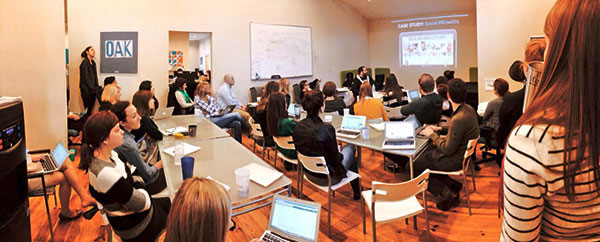
    Prior to wowing the crowds at Pubcon, Matt was kind enough to visit Search Influence and give us the skinny on social media, content, and how to make things go viral. His presentation was amazing, informative, humorous, and vastly helpful in terms of SEO. So, I’ve put together some key takeaways businesses can and should focus on in order to promote their brands and make a name for themselves online.
    MattSiltala-01

    Find Your Target Market By Talking To The Right People

    When you’re trying to reach a target market, knowing who to talk to in order to get results within that market is most important. When you talk to someone with power, authority, and a willingness to help, there is a higher probability of getting your brand noticed and increasing awareness among your target market.

    Pro Tip: If you know who you want to target, use Followerwonk to compare, analyze, track, and group users. That way, you know exactly who you’re reaching, and what to say in order to entice them.

    What Makes Good Content?

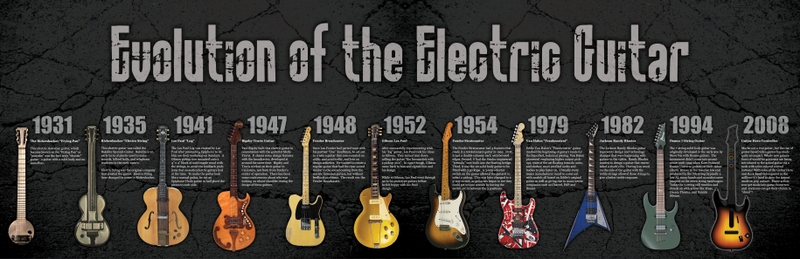
    Oddly enough, controversy increases viewers and makes for some great content. Think about it. When do people get the most involved in content? During a debate! Any topic people disagree on will get more viewers. This is a theory that withstands the test of time. For example: Republican vs. Democrat, Mac vs. PC, Coke vs. Pepsi, and Matt’s popular Evolution of the Electric Guitar infographic, which includes a Guitar Hero controller, featured below.
    music history timeline evolution infographics electric guitars 3660x1186 wallpaper_www.wall321.com_28

    Build Up Your Instagram Following With Deals

    bdb414e7b829806b2e3cdd921638042f

    With millions of users posting pictures every day, Instagram has exploded in terms of social media marketing and brand promotion. Boutiques, restaurants, and more post photos of products, specials, daily deals, and location information daily, giving viewers a reason to follow them and stay consistently engaged in the brand. By monitoring hashtags and paying attention to channels, businesses will learn whom to target and how to peak people’s interests and gain followers.

    Pro Tip: Show products in context to help viewers visualize a final product. Whether that is a meal, an outfit, or a piece of furniture, demonstrating what the product will look like in conjunction with other products peaks interest and makes things easier to relate to.

    Processes On Pinterest

    More frequently, businesses are turning to Pinterest to gain a customer base. In fact, the “Pin It” action has gained more popularity than the Facebook “Like” and Twitter’s “Retweet.” Checklists, how-tos, recipes, and detailed processes are hugely popular on Pinterest because they get people thinking and and keep their interest longer than a simple image.

    Pro Tip: In terms of repinning vs creating new pins, employ 4:1 ratio. Remember that it’s not just about repinning for content, you repin to network. And make sure you get yourself noticed by commenting regularly.

    Focus On Visuals On Facebook And Twitter

    As with all other forms of social media, building a following and growing your popularity is key to brand success on both Facebook and Twitter. So, what is the key to getting lots of retweets, likes, shares, and comments? Images! Think about it, what is the most retweeted post of all time? Ellen Degeneres’ Oscar Tweet! Only three days after the Oscars the tweet had a record 3.2 million retweets. Now that’s a powerful image.

    Pro Tip: Identify influencers relevant to your industry and interact with them as much as possible on social media to grow your online presence and brand popularity.

    I could go on and on about the wealth of knowledge Matt dispelled on the Search Influence family, but rather than rambling I’ll leave you with a few of his final tips and tricks:

    1. Pay attention to Linkedin groups. If you get in contact with the owner of a relevant group to your industry they can help you tremendously. Not only can they contact a large group of people easily via email, the group they’re contacting will be the exact target market you need for shares and online visibility.

    2. Sign up for alerts from Help A Reporter Out. You can find experts, get free publicity, and gain tons of helpful contacts.

    3. The gift category in Pinterest is wildly popular. By using a dollar sign ($) in your post description, your post will automatically show up there.

    4. Find a way to repurpose everything. Much like Matt’s wildly successful Social Meowdia Explained infographic (featured below), post, images, content, and more can be repurposed to gain popularity in a variety of forms. For example: an infographic can be turned into a blog, memes, content, etc.
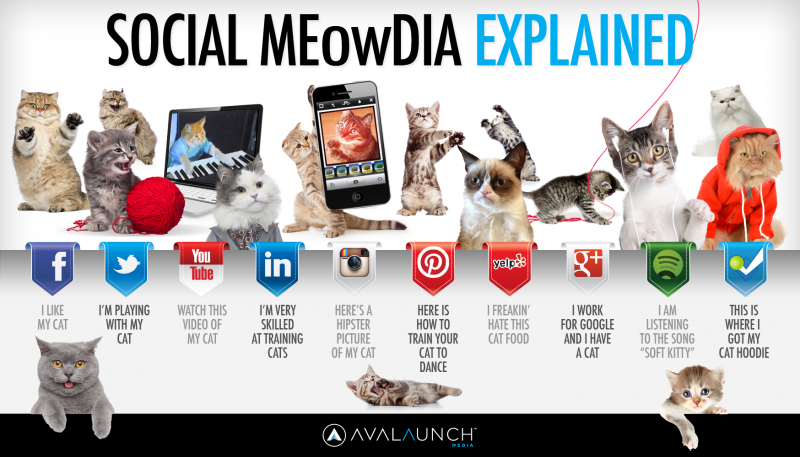
    Social_Media_Explained4-800x457

    1. Remember that everything you do contributes to authorship. Every post you write, share, retweet, favorite, etc has your brand name attached to it. Everything you do online grows your authorship, so take advantage of that and be creative in what you post.

    For more information on Matt Siltala, check him out at Pubcon or visit his website! And for any questions on the information above, feel free to ask in the comments!
  • Instagram is “Ad” it Again!

    Screen Shot 2014-03-06 at 11.46.49 AM

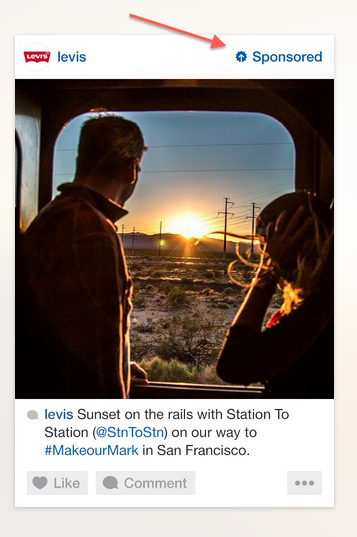
    Does it seem like, eventually, everything turns into a platform for advertising? For social media, that seems to be the trend when comparing networks over the years. Everything from Facebook, Google, Twitter, Pinterest, and Pandora have all followed the same trend. Using a great business plan (and a lot of foresight), they open their online “doors,” create a massive following, and after a few years succumb to the massive potential profit that is advertising.

    Instagram Ads

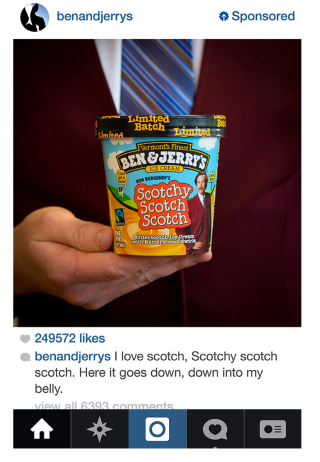
    Even though it took some time, it is clear that the mega success of our beloved Instagram has followed suit. After Facebook bought the ultra popular image sharing platform for a cool $1 billion, they didn’t waste time reaping a return on their investment. In late 2013, Instagram announced that they would start releasing “sponsored” posts that would look and feel like the other images users were already sharing. The Beta version of these sponsored posts were designed to “underwhelm” users so that they might not even know they were looking at an advertisement.

    Who Sponsors Posts?

    Screen Shot 2014-03-06 at 11.47.44 AM
    These sponsored posts were only given to a select number of brands like Ben & Jerry’s, Macy’s, Michael Kors, Lexus, and Levis, in order to test out consumer reactions. However, recent studies show that these advertisements were highly successful due to the limited number of competitors on the site, the quality of the advertisement, and the fact that it is an image instead of text. Many advertisers understand that images are far more powerful than words, which is why Instagram, along with its huge user base, is an ideal platform for marketing.

    Personalized Ads

    But how will Instagram know what brands you like or images you’re drawn to? The beauty and genius of the merger is that Facebook already knows everything about you! Between the information Facebook has already collected about you (likes, interests, hobbies, etc.) and the images that you like and follow on Instagram, advertisers are able to put more customized and targeted ads in front of you. The hope is that these ads will be so successful that companies will eventually pay more to advertise. So watch out, you might actually start seeing ads that you enjoy!

    Have you seen an ad on Instagram that grabbed your attention? Let us know in the comments!

  • Facebook Announces Design Changes and New Features for Pages

    Facebook Announces Design Changes and New Features for Pages

    Yesterday, Facebook For Business announced a new, more “streamlined” design for Pages, which will begin rolling out this week. In addition to the new look, a new feature called “Pages to Watch” will launch, allowing page admins to monitor and compare their page with that of other businesses.

    Ch-ch-changes!

    Overall, the layout changes to Pages are not terribly drastic, but as with any small change, there will likely come some backlash from the user base. Page administrators have a few new features to look forward to and some adjusting to do when it comes to navigating the platform, as Facebook has rearranged some key features with the design refresh.

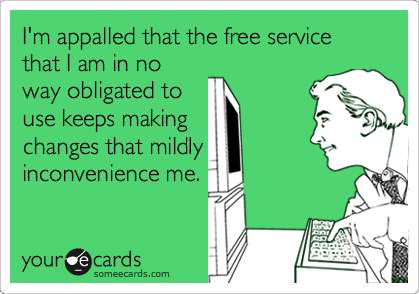
    Facebook Changes Design Ecard
    Photo credit: http://www.someecards.com

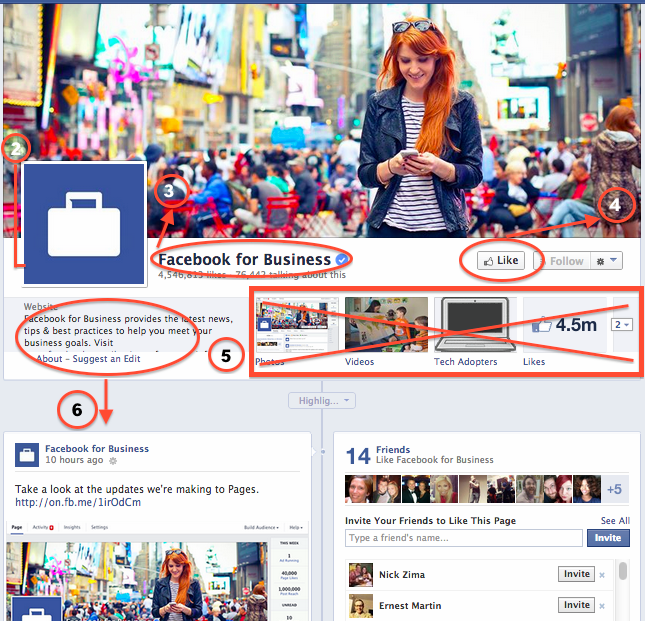
    Here are some of the notable changes to the design of Pages and how they might affect you:

    1. The cover photo and profile square dimensions do not appear to have changed, though Facebook’s announcement does not specifically list any dimensions.
    2. The position of the profile square has changed slightly, as the cover photo overlaps farther with the profile square than before. Some design changes may need to be made to pages with a design that integrated the cover photo and profile square together.
    3. Page name and website will appear in white typeface, overlaid on the cover photo. It appears that cover photos will automatically contain a darker gradient from the bottom up to accommodate this text, similar to what is in place on Twitter header photos.
    4. The “Like” button has been overlaid with the cover photo (as opposed to the current layout, where the Like button is below the cover photo), which may result in a change to design when the goal is to draw attention to the “Like” button. Some existing Facebook pages with cover photos drawing attention to this button will need to be updated.
    5. Tabs no longer have square icons appearing below the cover photo. Because the position of these has changed, cover photos drawing attention to specific tabs will need to be updated.
    6. The “About the Business” section has been relocated farther down the Page Timeline, below the total Likes.
    7. Other changes directly affect page administrators rather than users. These include:
      • Different placement of key metrics such as ads you’re running, page likes, post reach, and notifications from “This Week”
      • Direct access to your Ads Manager account from the top of the page when an admin is viewing the Timeline
      • Simplified navigation at the top of the page for activity, insights, and settings

    The Design As We Know It

    Facebook's current Page Timeline layout before March 2014 update

    What We Can Expect

    In addition to the cover photo and general header changes, Pages will now feature a two column layout similar to the old version, but with some notable changes. Now, the right hand column features the Page’s timeline content and posts. Facebook for Business says in it’s post that this “means that all of your posts will appear consistently on your Page and in News Feed.” I’m curious about the latter half of that statement, as it’s currently unclear how the layout change will affect post visibility in the News Feed.

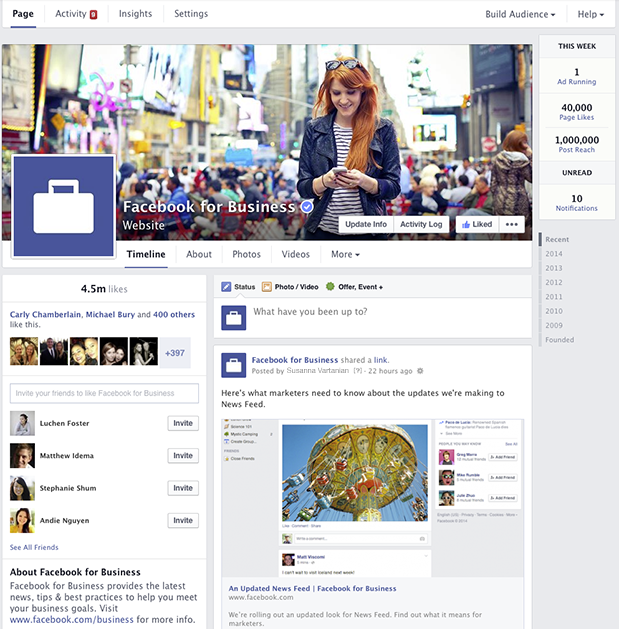
    Facebook's new design layout for Pages - March 2014

    The left column will now display information about your business, starting with the total number of likes. According to Facebook’s release, it will feature a map (though not visible in the images provided), business hours of operation, phone numbers, website URL, etc. This column will also feature photos and videos.

    Fancy New Features For Admins

    It seems like most of the changes will simply result in a few painful days as Page admins get used to clicking around the new layout, and finding what they need to manage their pages. A few things that will make our lives a bit easier are the relocation of Page insights and admin navigation to the top of the page. There’s now also a more prominent “Build Audience” button, allowing admins instant access to their Facebook Ads Manager account from the timeline.

    At the top right, Facebook has also added a “This Week” panel, showing you metrics about your page from the last week including the number of ads running, total page likes, post reach, unread messages, and notifications.

    Lastly, the newest and potentially most usable feature is the addition of “Pages to Watch.” This addition will enable Page administrators to keep up with the competition by monitoring Pages of businesses they care about. Other new features in Insights include the opportunity to view engaging posts from Pages you’re watching within the last week.

    Are you looking forward to the changes or dreading the adjustment period? Share your thoughts in the comments below!

  • New Search Influence Production Members

    Take a look at our newest Internet Marketing Associates!

    Alex Talbot

    AlexAlex is a native New Orleanian. He grew up in Gretna and went to Jesuit High school. Alex recently graduated from Loyola University with a degree in marketing and economics. Before joining us at Search Influence, he worked in sales and brand management at a cable and satellite company. In his spare time, Alex plays in a punk rock band called Pears, previously known as the Lollies.  One of Alex’s most recent performances was on Mardi Gras day at Siberia! Alex joins the technical Internet Marketing Associate side of the SI production team. His focus includes interpreting web marketing trends and search optimization plans for national SMBs in a variety of different industries. Alex also analyzes web traffic statistics to create detailed reports of link building campaigns and marketing initiatives.

    Nakia Thomas

    photoNakia grew up in Gonzales, Louisiana. She attended Louisiana State University, where she graduated with a degree in communications. Before becoming a part of the Search Influence team, Nakia was a Formal Wear Specialist (She helped pick out gowns and tuxedos!) at a wedding boutique, and did some freelance and ghost writing work.  Additionally, Nakia writes songs, and helps one of her good friends with his record label. Check out this single she helped write! NGWY (No Good Without You). Nakia adds to the growing content focused Internet Marketing Associates group of the production team here at SI. She focuses on writing and optimizing content for our client’s websites, video scripts, blog, social media, and more. Nakia also performs Internet research, website edits, quality assurance, and editorial review.
    We’re so excited to add these two multi-talented people to our growing team! If you’re interested in becoming an Internet Marketing Associate, or any part of the growing Search Influence team, check out our list of available careers!

  • Gram it up! 5 Tips to Expand Your Brand on Instagram

    Instagram LogoIf you‘re like me, Instagram is the place to be. I find myself spending a lot less time on Facebook and Twitter and a whole lot more on Instagram, or as I like to call it “Insta.”

    I tend to follow many businesses I enjoy and liking almost everything they post. I started thinking more about how businesses use Instagram to promote their brand and products. I did some digging and came across a video that Instagram for Business blog put together recently.

    What It’s All About

    The video was a short sample of pictures and short video clips. I mean duh, I should have known since that’s what Instagram is about. The video featured some of the best brands on Instagram, according to them. Nike (@nikerunning), Ben and Jerry’s (@benandjerrys), and General Electric (@generalelectric). It was a one minute and thirteen second reminder that pictures and videos can captivate anyone if displayed correctly. It also displays how the community can play a role in promoting your business by hash-tagging and tagging things related to your brand.

    Instagram has recently announced their book, The Instagram Handbook for Brands. But don’t get too excited just yet, the book is not currently out to the public. You can however expect to see some of its content on their blog soon. The book showcases eleven of the top brands on Instagram and their posts that captivate audiences, along with popular/successful hashtags.

    Even though the book isn’t available for the “human eye” just yet, they listed a few tips for brands modeled after the eleven top brands of Instagram.

    1. Be accurate to your brand

    Ensure that your imagery expresses a clearly defined personality and voice.

    2. Allocate your experience

    Offer a view into the world or lifestyle that your brand makes possible through the eyes of the people who use your products and services.

    3. Discover beauty in every nook and cranny

    Show how your company sees the world and make it meaningful to people.

    4. Encourage action

    Start a movement around your brand.

    5.  Be aware of your viewers

    Learn what people love about your brand, and explore how you can capture the imagination of new customers.

    SI instagram

    Search Influence (@searchinfluence) has recently joined the awesome world of Instagram! Follow us for a peek at what it’s like to work at this fast-paced and fun place!

    Is your business on Insta? Let us know what works for you in the comments section below.

  • 14 Social Media Mistakes to Avoid in 2014

    We’ve all seen them… misfired tweets, Facebook fails, and huge national brands that just don’t get it. Last year we recapped the 12 worst social media mistakes of 2012, but brands just keep making the same errors over and over again. For 2014 we’re going to be proactive. Here are 14 mistakes to avoid this year, so that your brand isn’t ridiculed by friends, fans, followers, or the general public:

    1) Avoid relating ANY holiday to your brand:

    Unless you are a major fireworks distributor or 1-800-Flowers, holidays are NOT about you. Don’t force it. Even if you think your message fits in flawlessly with the holiday, chances are someone will take offense. Don’t believe me? Google MLK Day Social Media for proof.

    2) Not understanding your company’s image

    Banking giant J.P. Morgan decided to host a Twitter Q&A session utilizing the hashtag #AskJPM in November. Although they received thousands of amazing questions such as, “As a young sociopath, how can I succeed in Finance? #AskJPM” and “What’s it like working with Mexican drug cartels? Do they tip? #AskJPM”, the company quickly realized that Twitter was not the appropriate medium for a company discussion.

    3) Using trending hashtags without first checking their meaning

    Utilizing hashtags is a great way to get more eyes on your tweets, but don’t hijack trending tags without first researching the message behind them. Baked goods company Entenmann’s faced backlash after utilizing a trending hashtag without realizing that #notguilty referred to the verdict in the Casey Anthony trial.

    4) Getting too political

    This one practically speaks for itself. No one wants to hear outspoken thoughts about gay marriage, political candidates, or religion from a brand. Italian pasta company Barilla came under fire last year after stating that they would not feature gay families in any ads. After thousands of people tweeted at them with the hashtag #boicottabarilla, they finally issued a semi-apology (in Italian) from their brand account. The lesson here? Don’t get your brand involved in political affairs, and respond quickly if you find your company in a similar situation. Most users prefer their pasta without a side of prejudice.

    5) Creating fake controversies

    Real time marketing is a hot buzzword, but faking a crisis is not the way to achieve success. Brands like Chipotle and JC Penney have faked problems on their own social media networks to achieve attention. Effective real time social media campaigns react to events as they happen, not create unnecessary controversy.

    6) Responding generically to complaints

    If your company does something to upset a large amount of fans, you should not reply to them all with the same generic message. Either issue a blanket public apology to all of your fans, or personalize each response.

    7) Not responding to negative feedback or customer questions

    Not responding at all to complaints is also a bad policy. A study from Maritz Research and evolve24 found that over 50% of respondents expected a reply from a company regarding public complaints on Twitter. Deleting or ignoring complaints is not the way to approach social media management. Furthermore, if you engage with an unhappy customer, you should not stop answering them after one tweet.

    8) Beginning tweets with “@” or “.@”

    It might seem like beginning tweets with an “@” is Twitter 101, but tons of brands still make this mistake all the time. If you begin a tweet with a user’s handle, only that user and their followers can see it. Some companies have taken the lazy approach to combatting this problem, by adding a period before the @ symbol. Don’t do this! It looks sloppy, and if you’re getting paid to write tweets, you should be thinking about ways to word your response differently.

    9) Using #too #many #hashtags #on #Instagram

    This one is fairly self explanatory. Hashtags can lead to natural discovery, or can be utilized to chime in on a trend or theme (such as #TBT). Using too many hashtags in one post not only looks silly, but makes it extremely difficult to read.

    10) Posting photos on Pinterest that don’t link back to your site

    Pinterest can be a great platform for both small and large businesses to get their products noticed. However, pinning products without a link back to your site is a waste of everyone’s time! You want to eliminate any hassle or additional steps in the sales funnel so that someone who finds your amazing product can buy it on the spot. Pin directly from your website and see your sales soar.

    11) Leaving the URL in your Facebook post

    Facebook’s link preview feature is a great way to show off your links in a visually appealing and enticing way that encourages customers to click through. However, once that preview generates, delete the original link! This will clarify your posts, and allow readers to easily figure out where you want them to click.

    12) Avoid using click bait to get users to read your posts

    Which websites are exploiting Upworthy-style click bait to get viewers to read and share? The answer may surprise you.

    13) Cross posting content from Facebook to Twitter (and vice versa)

    Some companies save time by cross posting their Facebook posts to Twitter. Although this is occasionally fine, many Facebook posts are simply too long for Twitter’s 140 characters. These are shortened by including a fb.com link in the post, which defeats the purpose of the tweet. Tailor your message for each specific social media channel.

    And finally…

    14) Handing the keys to your channels to someone who isn’t responsible

    This should go without saying, but the vast majority of brand social media fails are due to someone accidentally tweeting or posting from the wrong account. This is not a job for an unpaid intern. Make sure that whoever is running your brand’s accounts is trustworthy and reliable.

  • Should You be Using Google’s URL Shortener in Your Social Media Campaigns?

    The other day I was visiting my normal news sites, Mashable, Coding Horror, and news.google.com among others. While getting my information download I came across a few postings I thought had true value, and I wanted to share them with my social media friends and family. I immediately went to my handy dandy Google URL Shortener which I had added to my Chrome browser toolbar and – click – presto, I have a short url ready to paste to any social media platform, in my clipboard, cocked and loaded. And so I shared, and then shared some more.

    The nice thing about Google’s service is you can track anyone’s goo.gl URL analytics by adding .info, or simply +, to the end of it. For instance, the analytics to the URL http://goo.gl/zlzlYv, which points to townsend.bunksite.com/, can be seen at http://goo.gl/zlzlYv.info. I occasionally went back to my .info page to see which of the links I shared actually had any value (received clicks on their respective pages) to my friends, family and followers.

    google diagram

    Google gives some good basic analytics data about URL click throughs, although I’ve seen more in depth analytics from URL shortening service competitors. But I digress, it was about this time when I started wondering, with being the obvious search leader and giant, does using the Google URL shortener give an SEO advantage in search results? It might make sense for Google to use URL shortener data(like number of clicks for a shortened URL) in order determine rank worthy content. Also, it seems logical that since this is another metric to look at how users share content, they would want to encourage the use of their shortener, perhaps by giving some advantage to companies using goo.gl for their social media campaigns, much like the seo benefits of using Google Plus Maggie told us about earlier this month.

    The obvious benefits of using Google as your URL shortening service include proper redirects. You know if you are using their URL shortener you will never run into problems with shorteners that don’t properly treat the redirect conversion as a 301 redirect or don’t properly transfer PageRank or any future possible negative impact. Most popular shorteners conform to the standards set by Google, but still, it’s better to be safe.

    Another important issue for short url providers is trust. You must trust the service uptime (availability) is as close to 100% as possible. You have to trust that the redirect process will happen at a speed measured in milliseconds, not seconds.  You also need to trust the provider isn’t going to just disappear one day. With an average of 5,922,000,000 (nearly 6 trillion) Google searches every single day, I think they can handle the job of keeping up with this level of service. Besides, you are probably already trusting them to handle your site analytics, search results, pay-per-click advertising and storing documents, among other services. Why not keep all your data in one place?

    It is worth noting that Google has pulled the plug on some beloved services in the past, but they generally provide users with a lot of advanced warning before the twilight date. Also, they always provide a way to migrate user data from the shuttered service.

    So, we know the Google URL shortening service is worthy of using and helps keep our data in one place, but is there actually a positive weight given to these URLS  that translates into higher rankings on the SERPs? For that, I spoke with our Google and Local SEO expert here at Search Influence, Mary Silva.  Here is what she had to say on the subject:

    “There’s not necessarily any kind of weight given to using the Google URL shortener for linking. Also, Matt Cutts has explicitly said that “goo.gl isn’t an effort to kill anything,” and isn’t some sort of attempt to kill other “product X” URL shorteners.

    redirect-google-301
    http://moz.com/learn/seo/redirection

    In terms of SEO effects of the shortener, it’s important to recognize that there have been reports that once in a while the Google URL shortener has created broken links, so that would obviously not be beneficial in terms of back-linking and other similar efforts. Always double check that the short url actually works, regardless of the provider you use.  Another thing to note is that the Google URL shortener creates a 301 redirect which passes 90-99% of link juice to the redirected page, and is the most ideal for redirects for SEO practices, which isn’t the case for all URL shorteners.”

    So, is Google going to rank your linked content higher just because you used their URL shortener?  Nope. Content is king and there is no exception to that just because you use Google’s products. Should you use Google’s URL shortener? While no url shortening service is perfect, using this one is certainly no worse than others. Knowing that the service provider is fairly reliable may bring some peace of mind.

  • 5 Ways Technology Has Changed the Olympic Games

    Just like the rest of the world, the XXII Winter Olympics has captured my attention ever since Team USA walked out in those hideous sweaters Friday night. For 16 days the world will sit in front of the TV, eat King Cake, and watch every move, detail, and technique performed by these athletes. Six days in and I feel like a complete failure at life because I’m not an Olympian. I complained throughout the mere three weeks of training I put into the Rock-N-Roll half marathon, so how these athletes dedicate years of their lives to training is mind blowing. In addition to the support of family, friends, and coaches that help inspire and guide these athletes to Sochi, the growth of technology has also played a big part in reaching the gold.

    Here are five ways technology has changed the Olympics.

     1) Slim, Trim, and Faster Than the Speed of Light – Custom-Fit Track Suits Shave Off Seconds

    5 Ways Tech Changed the Olympics - Blot

    Far from the flowing tanks and short shorts our parents remember on seeing Bruce Jenner, Nike’s custom-fit track suit has allowed for a faster, sleeker champion. Besides the fact that it may or may not take an hour for someone to squeeze themselves into this skin tight suit, athletes are able to move faster than ever. With the help of Nike, in 2008, Team Jamaica’s Usain Bolt broke the 100 meter record with a 9.63 second run, earning the title Fastest Man on Earth.

    2) Not a Long Shot – Dual Lens Innovation for Measuring Long Jumpers

    In 2012, Summer Olympic sponsor BMW launched a dual-lens camera with 3-D imaging to measure track and field long jumpers in motion. This piece of technology immediately measures velocity and calculates the athlete’s body motion and positions. In years past, analyzing movement at this level would rely heavily on the coach’s eye and basic video. Now, this data is immediately available for review and improvement to technique.

    5 Ways Tech changed the Olympics - Phelps

    3) What a Drag – Speedo Creates Full-Body Swimsuit to Speed Up Swimmers

    In 2008, Speedo introduced us to the very toned quads of Michael Phelps as he and the rest of Team USA sported the full-body swimsuit. The compression of this bodysuit is made to improve swiftness and reduce drag in the pool. I think it’s pretty obvious that this suit helped Phelps become the most decorated Olympian of all time – leaving Mark Spitz in the bubbles.

    4) Every (One-Millionth of a) Second Counts – Finish Times Fine Tuned

    What’s worse than winning silver? Losing to Phelps by one hundredth of a second! In the 2008 Summer Olympics in Beijing, Serbia’s Milorad Cavic finished second to Phelps by one hundredth of a second, helping Phelps earn his seventh gold medal.  How did they find that time? Forget stopwatches and timers! Thanks to technological advancements in capturing finish times, athletes are measured by one-millionth of a second, making the games more competitive than ever.

    5) Beyond Fame and Gold Fortune – Athletes and Host Cities Go Viral on Social Media

    From athletes posting pictures of the atrocious living conditions in the Sochi Olympic Village, to news sources leaking pictures and interviews of athletes biting the gold, social media has taken over the Olympics. In postings, pictures, and tweets going viral, athletes invite viewers into their lives from training days in the US to the slopes in Sochi.

    For example:


    McKayla MaroneyAt the 2012 London Summer Olympics, McKayla Maroney’s look of disappointment as she received her silver medal went viral! From generating memes to photoshopping her into pictures, “
    McKayla is not impressed” blew up on social media. At this year’s Winter Olympics, it was bound to happen again when Ashley Wagner’s similar face of disappointment lit up the screen after receiving her fourth place score in a team figure skating program.

    Social media has allowed viewers back home in the States to stay updated with team members and make a personal connection with athletes. Not only does this help with support, it invites us to feel closer to Team USA than we’ve ever felt before.

    Got a favorite social media update about the Olympics? Post in the comments!


  • 3 Reasons Why Your Business Should be Active on G+

    Google Plus LogoSome may know Google Plus as a weak attempt by Google to compete with Facebook. However, it can be used for much more than just engaging with your target audience. Google’s social media platform can also help your SEO efforts while providing quality content and information to followers.

    Here are three reasons why your business needs to be active on G+:

    1. Google+ Posts are Crawlable

    Unlike other social media platforms, all Google+ posts are crawlable by the search engines. Your business’ Twitter or Facebook profile may show up for your brand name search, but specific posts and updates are not indexed. All Google+ posts are indexed in minutes, and some even say seconds.

    You can use your G+ posted content to target specific keywords. Each post has its own url, and the first 45-50 words in the post become the title tag. Links within Google+ posts are followed links. As you post content linking back to your website and that content is shared, the authority of your Google+ page and website are growing.

    2. Boost CTR with Google Authorship

    Screen Shot 2014-02-03 at 4.05.26 PM

    According to Google, authorship has no impact on the SERPs. However, Google Authorship can help you get more traffic to your website, which is why we are all trying to rank on page 1 to begin with, right?

    By associating a G+ profile with pages on you wrote on your website, the profile photo of your G+ shows up with those pages in the search results. The image in the search results sets your site apart from the others and makes it more eye catching. Authorship increases the likelihood a searcher will click your site in the search result. And although authorship does not have a direct correlation with rankings now, we anticipate it will in the near future. And for now, using it for more traffic to your site is enough incentive to get on board.

    3. Potential Increase in Rankings

    The number of +1’s your G+ business page gets has been shown to correlate with top rankings in the SERPs. Moz did a correlation study to determine what aspects of a website show a strong connection to high Google rankings. The number of +1’s came in second only to page authority, with number of linking domains and Facebook shares, likes, and comments as the next most influential. Searchmetrics also did a similar study that found the number of +1’s to be the most highly correlated factor with top Google rankings.

    Yet, Matt Cutts is very adamant that the number of +1’s for a Google business page “has no direct impact on their web search ranking algorithm” and “correlation does not equal causation.” Although this may be true, a business can no longer ignore Google+ and its added SEO value.

    As a social platform, G+ is equally as important as Facebook. And Google+ goes far beyond social reach, it provides a great opportunity to boost your SEO efforts. So go ahead and get active on G+, the benefits are only continuing to grow!

  • Social Media Marketing and the Super Bowl: It’s All About Preparation

    Thought Bubbles Photo

    If you’re like me and you love sports and social media, there isn’t a better day than Super Bowl Sunday. From the creative commercials to everyone constantly updating their feeds with their own thoughts on the game, it’s the ultimate setting for sports and marketing to collide. Rather than sit back and let this once-a-year event pass by, business owners should seize the opportunity to jump into the frenzy and promote their brand.

    But what do you say and when do you say it? The answers to those questions lie in preparation. Follow these simple tips so that you’ll be prepared to jump on the chance to be one of the social media accounts people are talking about the next day.

    Log In
    When something unexpected happens (like last year’s power outage at the Superdome here in New Orleans), you have to be ready. That doesn’t mean fumbling around trying to log into your Twitter, Facebook, or any other platform your business operates. By being logged in and thinking fast you can comment on a big moment right away.

    Football And Football Helmet Photo

    Know Your Audience (And Who’s Playing)
    Identify what content you want to create that relates to your brand, then follow the conversation surrounding the game and try to work it in at the appropriate times. For instance, are their certain hashtags your customers are using related to the game or big topics that have emerged? If so, try to join the conversation and interact.

    Get Creative With Promotions
    Use a promotion to drive customers to your website or place of business the week leading up to the big game. For example, offer a special that provides a discount if a certain player scores a touchdown or if the opening kickoff is returned. You can also take advantage of the many prop bets associated with the game, such as a discount on one product if the coin flip lands head and a discount on another if it lands tails.

    These are just a few things you can do leading up to kickoff. Just be sure to formulate a strategy early so that you aren’t scrambling once game day arrives. And, as always, try to keep your content tasteful, but colorful and fun at the same time.