Tag: social media marketing

  • 5 for Friday – Google SSL Warnings, Twitter & Amazon Collab, and more!

    1. Twitter and Amazon Link Up, Add Items To Your Shopping Cart With A Single Tweet – Buzzfeed

    452416003

    Amazon is using Twitter to drive sales with the new #AmazonCart feature. This may be a major breakthrough for ecommerce businesses. It’s super simple:

    1. The business tweets out a link for a product.

    2. Interested consumers can then reply to that tweet with the hashtag #AmazonCart.

    3. The product will instantly appear in the consumer’s Amazon cart.

    The consumer’s Twitter has to be linked to their Amazon account in order to do this, but the new feature should drive sales for E-commerce businesses with products on Amazon. Twitter users can also search the hashtag #AmazonCart to see what other people are buying. Isn’t technology great?!

    2. Become Your Own Rumpelstiltskin: Spinnin’ Crappy Online Reviews Into a Better Business – Search Engine Journal

    This is a great article on how to approach negative reviews. There are bad reviews from people who genuinely had a bad experience and bad reviews from people who are just plain irrational.

    How do you tell the difference between these people?

    If you look through an irrational person’s profile it’s full of negative reviews and they usually make overly dramatic and sadistic statements. People that genuinely had a bad experience  usually have a mix of positive and negative reviews if you look through their profile, there are some positive comments within their negative review and they make rational statements about their experience.

    How do you deal with this?

    Respond to the irrational reviewer with a generic, but genuine message without addressing specific points of concert. If they respond back, don’t respond again. Respond to the rational reviewer by addressing their specific concerns quickly and assuring the reviewer that steps have been taken to ensure that this will not happen again.

    3. New App Reveals How Much Information You’re Giving To Facebook – Search Engine Journal

    FacebookScaryScary! A new app, called Digital Shadow, was launched as a promotional tool for the upcoming video game Watch Dogs. It uses data you’ve given to Facebook to guess your location, your income, and your passwords. They use algorithms to predict your interest, desires, and fantasies. We live in an era where we like to document everything online from how we’re feeling to what we purchased to where we are in the world. It’s an eye opener to find out that there are people in the world that can use that information against you to hack your computer or to be more influential in their sales tactics towards you.

    4. Google Pauses Webmaster Tools SSL Warnings In Order Clarify Them In Future – Search Engine Roundtable

    Google recently sent out mass SSL warnings via Google Webmaster. They decided to pause the warning after they realized they were causing mass confusion. Now, Google is working on making the warnings clearer and tweaking the criteria before restarting them.

    Google is simply providing information about the server response for HTTPS access to your URL. If it responds, but the SSL cert does not match the domain, the warning lets you know. Basically, Google wants the hosts to either serve content via HTTPS properly, or not serve content there at all. Serving content via HTTPS without a valid TLS/SSL certificate will result in users seeing browser warnings. Avoiding this makes sense, no matter how many site users actually see the warning.

    5. Announcing Schema.org Actions – Schema Blog

    LegosAction

    Schema.org introduced vocabulary that allows websites to describe the actions they enable and how these actions can be invoked. You can use action schema to play a video, review a movie, or purchase a product. The new schema adds context to a link or content. It is a way of interpreting content to cite sources and authors and the type of activity that happened between the two. From what was said in the press release, the actions schema is still a work in progress and will be enhanced as more users use action schema and provide feedback.

  • Is Anti-Social Media On the Rise?

    This year will make a decade since Facebook was launched and social media usage has skyrocketed, but is social media turning us anti-social? Parents who were unhappy about their children’s texting habits in the early 2000’s would be appalled by today’s society of Instagraming, Tweeting, FourSquaring and Pinteresting fiends across all age ranges. However, the pendulum may have swung too far, and it seems that parents aren’t the only group fed up with obsessive social media behavior.

    There are many signs that we are entering an age of ANTI-social media.

    SocialMediaGuardVideo

    Many corporations and industry leaders have voiced their advocacy for more human interaction through traditional media. Coca-Cola invented the Social Media Guard in the sarcastic commercial pictured above, which blocks people from the ability to see their phones.

    Dentyne used print and commercials to encourage more “face time” by comparing human interaction with social media actions in an ad.

    DentyneAdClip

    Professionals working within the social media industry may even capitalize off of the anti-social tendencies of those who are active online. Here are a couple of examples of how.

    Cloak

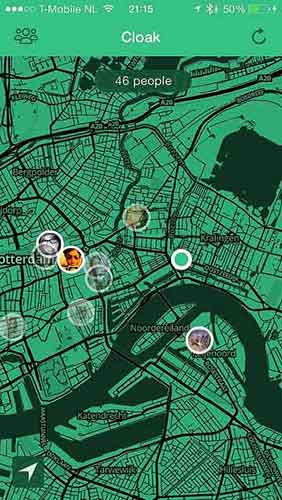
    Facebook, Twitter, Instagram and FourSquare aid this new mobile application in locating where you are. Cloak asks you to login to one of your social media accounts, which pinpoints where you are on a map, along with the locations of other friends who are also logged into Cloak.

    The app is advertised as a way to avoid people that you do not want to run into. You can set alerts that warn you when certain users come into a selected radius of you. Couldn’t this also be used as a way to stalk people? Guess that wasn’t a catchy advertising pitch…

    CloakAppScreen

    Self Control

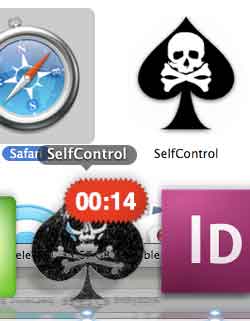
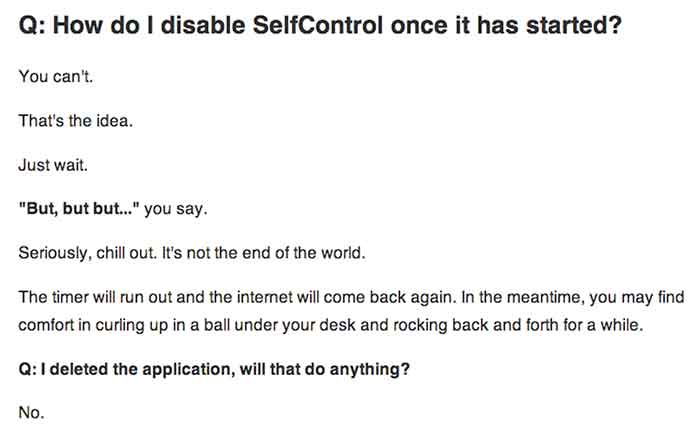
    This app allows you to choose time periods when you do not want the ability to access specified apps or programs at all. This could be used to stop yourself from checking your email, playing games, checking Facebook, etc.  A screenshot of the app is below, followed by their honest answer on how to stop the app when it is activated. The interest in this app shows that people want to be detached from their online world every once in a while but might need a little help to disconnect.

    SelfControlApp

    HowDisableSelfControl

    This discussion will continue on for years, but has social media gone too far? Check out the signs.

  • Social Media, You Don’t Have To Be A Wizard

    Your Audience

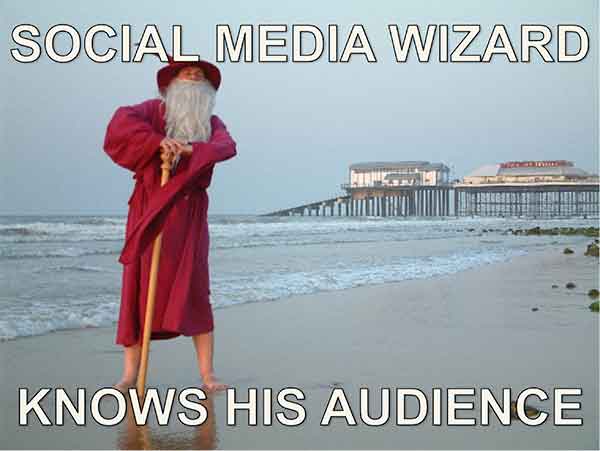
    You know your target demographic. If you don’t, social media should be the last thing on your mind. Properly addressing your demo group is essential in establishing a relationship with your followers on any social media platform.

    SocialMediaWizard

    Social Media Optimization (SMO) is used to directly target potential customers with relevant information, and eventually provide them with opportunities and incentives to become active customers. Proper SMO should also give current customers incentive to provide positive feedback so that others view your brand as trustworthy.

    SocialMediaWizard02

    Your Message

    For professional organizations, like law firms, business consultants, or industrial suppliers, news and advice are likely the fastest way to become a trusted voice amongst your demographic. Provide information your clients can use, “Tips to protect your rights,” or “Break through in industrial oven designs.” Be a voice of insight at the forefront of your field.

    If your target is the general public you need to be both friendly and local. Plus, direct social media interaction is key. If you post about an upcoming event in town, keep an eye out for responses on your Facebook feed or from your Twitter followers. Be aware of comment chains on your feed; respond to comments in an upbeat and positive way. Generally resist the urge to comment outside of your own page in regard to individuals (it can be viewed as overreaching or unprofessional).

    SocialMediaWizard03

    I know it sounds obvious but social media should be social and light hearted, so any sales efforts should be low pressure if they occur at all. A more effective strategy is to create interesting internal blogs, (then spread them through social media) so that you increase traffic to your page, which increases the chances of a conversion. You may not go viral but you can still reach your audience.

  • 5 for Friday – New YouTube Feature, Ads on Reddit and more!

    Stencil5

    1. Advertising on Reddit is easy with this guide -Moz

    For those of you unfamiliar with the site, Reddit.com is a social site composed of user submitted images, text posts, links, news stories and more. Reddit is a huge community with roughly 115 million unique visitors. This site offers low cost ads with high potential to engage users and even go viral. Advertising on Reddit requires different tactics than on other sites, though. Ads are treated like any other content, meaning “Redditors” have the ability to vote your ad up or down, affecting its visibility. Your voice and overall strategy on Reddit must be handled differently than on other sites. This handy guide gives a lot of great advice to help get your business started.

    2. Google Bulk upgraded to allow multiple administrators -Blumenthals

    Google+ is finally getting a much-needed multi-admin feature! Corporate Google accounts can now create listings for all of their locations and then authorize separate Google accounts as admins.  The bulk upload tool hasn’t been embraced in the past, but demand from SEO companies and business owners finally convinced Google to update their bulk upload backend as well. With an upgraded account, a single corporate account can manage up to 10,000 locations with full control. This is going to make social media management much easier for business with multiple locations!

    3. When is best time to make your social media post? -Hubspot

    socialmediaicons

    Scheduling your social media posts well can actually make a big difference in how many people see them. Web traffic to these sites change greatly depending on the day of the week and time of day. There is no set calendar that is best for all social media sites; people use them all differently. Facebook yields high results during weekday afternoons while Pinterest has increased traffic on the weekend. Check out this handy infographic for details on the best and worst times to reach out on Facebook, Twitter, Linkedin, Pinterest, Tumblr and Google+.

    4. Youtube allows users to add 3-second intros to their videos -Mashable

    This post is short and sweet because the subject is pretty simple. Youtube has a new feature allowing users to add a 3-second intro to all of the videos on their channel. This feature is valuable for creating a distinctly branded channel. Viewers can begin to identify your videos easily based on the consistent intro. Currently the only limitation on these intros is that they may not be used for advertising or sponsorship purposes.

    5. Foursquare moves their check-in feature to new app: Swarm -Search Engine Land

    Foursquare, in a bold move, is removing their key feature, “check-ins.”  Checking in will now be done on their new app, Swarm. Swarm will focus on the social aspects: checking into locations, finding friends, and even being able to chat to people you know nearby. Foursquare will continue to exist with a focus on discovering local businesses and serving as a competitor to Yelp. The success or failure of this division could determine the future for this company.

  • 5 Google+ Page and YouTube Tips Your Boss Wants To Know

    In the office I am often asked to help with doing things in Google that turn out to be fairly simple tasks but are often hard to figure out. For example, creating a custom YouTube channel URL is fairly simple to do, but the place you make this edit is not the most obvious to find. So, I’m going to walk you through 5 Google tasks I am most commonly asked to help with.

    1. Change the Name of a G+ page

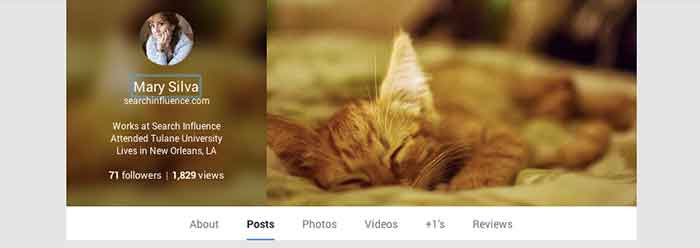
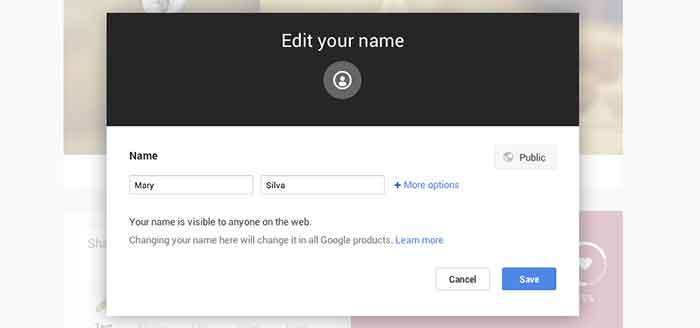
    Sometimes we’ll bounce around for several minutes looking for where the settings tab or options part of a page is just to change one tiny detail. In the case of changing the visible name of your personal G+ page or the the listed name of your business, a quick and easy way to make the edit is through the front end of your Plus Page while logged into your account. All you have to do is click your name! From there a popup will appear allowing you to edit this field. It’s important to note that you’re not allowed to do this as many times as you’d like with your personal profile page though. You can change your profile name only up to 3 times in two years.

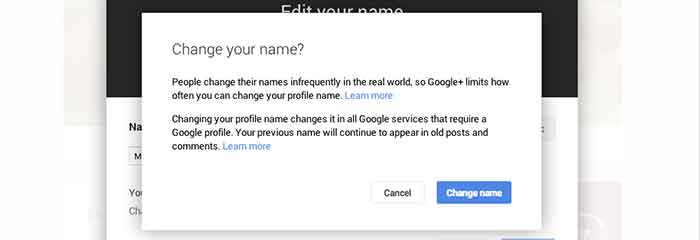
    When changing your personal profile name you’ll see this warning about frequency:
    “People change their names infrequently in the real world, so Google+ limits how often you can change your profile name.”

    GooglePlusProfilePage

    GooglePlusEditName


    GooglePlusConfirmNameChange

    2. Make Community/MapMaker Edits to G+ Local Pages

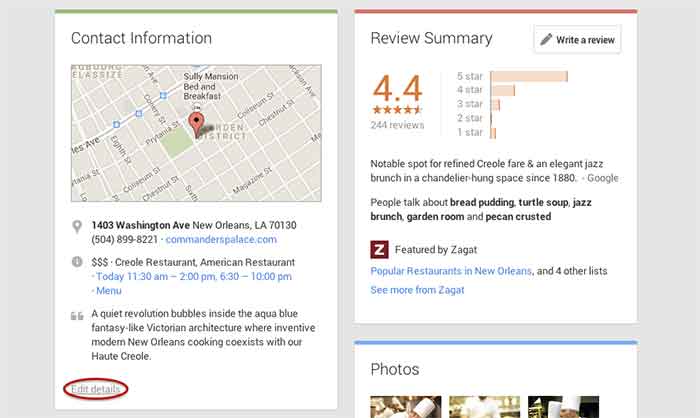
    The most common community edits we need to make to a listing happen when we’re just starting out and the listing we want to claim is owned and/or verified by someone else. The process for requesting ownership of a listing can be a lengthy one, and in the meantime you may want to update your business information from the front end. To do so, simply navigate to the Contact Information section of the businesses Plus Page under the About tab.  Then click “edit details” in the bottom left corner of the Contact Information box. The next page is the Map Maker editing screen that allows you to not only submit edits about the contents of the listing, but to also report a listing as a duplicate or closed location and report reviews that don’t belong.

    GooglePlusDuplicateListing

    3. Link/Verify A Website

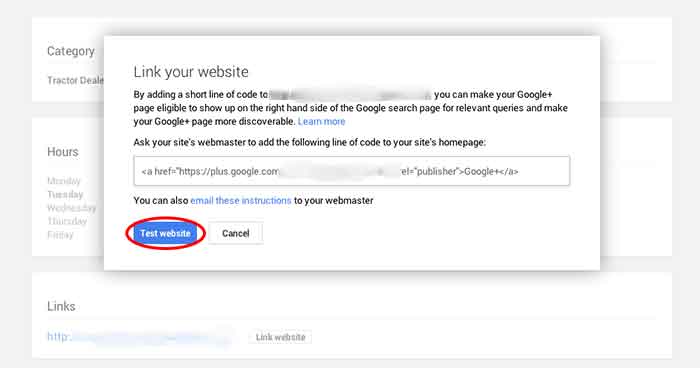
    We’ve recently discovered an issue when linking a business’s site to a Plus Page. After having the code added to a business’s website for linking to the Plus Page, you have to go back into G+ to make Google search for and verify that the code is on the site. You probably wouldn’t have encountered this had you done the entire process of adding the code to the site after getting it from Google, but often it’s a matter of getting the code and giving it to your developer to put on site. So in this case, you’d want to make sure to go back to where you got the code and click “Test website” in order to tell Google to check for the code. This can all be accessed from the front end of your Plus Page by clicking “Link website” under the Links section of the About page.

    GooglePlusLinkYourWebsite

    4. Add or Edit Managers of a G+ Page

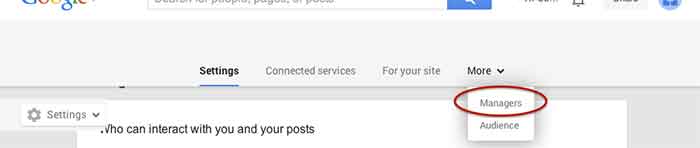
    Adding a manger to a Google Plus Page can be helpful for many situations. Businesses often want to have someone help with social media posting but don’t want to just give that person all of their login information since that is often linked to personal Gmail inboxes and the like. As with editing the name of a page, adding a manager can be done more than one way from within the account. I, however, find that the easiest and quickest way to do it is by going to settings from the home drop down in the top left corner when logged into Google Plus. Then, simply navigate to the Managers tab on the top left to access the manager permissions editing page.

    GooglePlusManager

    5. Create a Custom YouTube Channel URL

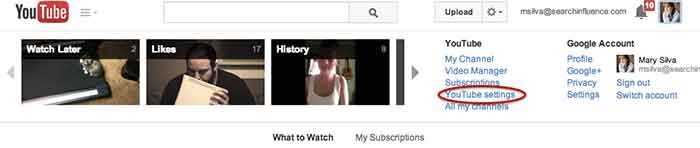
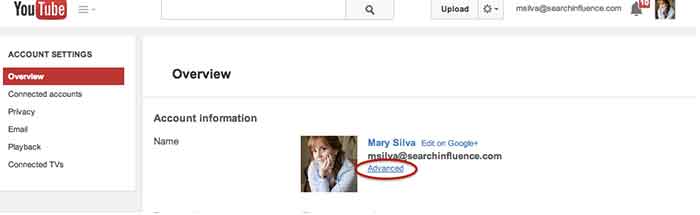
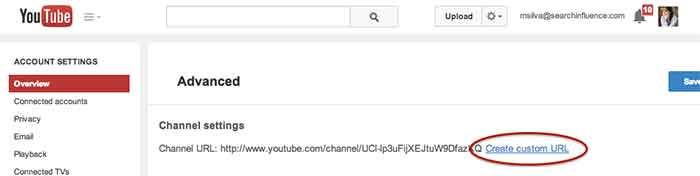
    You knew this one was coming based off of that intro, didn’t you? So, from the top right drop down menu of YouTube, click “YouTube settings,” then “Advanced,” and finally “Create custom URL.” It’s that simple but not exactly the most intuitive place to look for it, given the many other options in YouTube.

    YouTubeSettings

    YouTubeAdvanced

    YouTubeCustomURL

    I hope at least one of these steps was helpful for you, if not all of them. Let me know in the comments below what you think!

  • 5 For Friday – Twitter, Facebook, and Pinterest, Oh My!

    5RD

    1) Twitter Profile Redesign is now available to everyone!

    -Twitter

    Do you have the new Twitter layout for your profile? If not, you may be behind the times. Twitter recently updated their profiles with a new, user friendly look. This design is pretty similar to what many people are used to seeing on Google+ and Facebook. They are in the process of rolling out the profile redesign to all Twitter users.


    2) Are Your Fans Interacting with Your Brand on Social Media?

    – Mashable

    The look of your graphics and images supporting your social media updates carry a lot of weight. If they’re not appealing to your followers, they will fall flat when it comes to engagement. Mashable shares some insight on the various types of images that can boost interaction amongst your fans.


    3) Google Offers New Ways to Market Apps in Search, Display, and YouTube

    – Marketing Land

    Many app creators struggle to get their product noticed,  downloaded, and used by consumers. Google is now offering various unique ways to market them in AdWords via search, display, and YouTube. Read this article to learn details about all of the exciting new features available to app marketers.


    SocialMediaPhone

    4) Facebook Mobile is Killing it! Is your brand on Facebook Yet?

    – Bloomberg

    If your brand is not spending at least some of its marketing dollars on the social media giant, you are probably missing out on a major consumer base. This article from Bloomberg tells us that nearly half of the world’s internet population is logging into their profiles, at least, once a month. This mean almost a billion people a month are logging into the mobile app alone!

    5) Pinterest Announces the Launch of a Visual Search Engine

    – Buzzfeed

    Pinterest is launching a new “Guided Search” for its mobile users. It takes user’s broad search and prompts them to narrow it down with pictures in related sub categories. This very informative article from Buzzfeed explains, in detail, the specifics of Pinterest’s new guided search.


  • Social Media, Your Personal Red Carpet

    Coined ‘Fashion’s Latest Muse’ by the New York Times in September of 2013, it’s no secret that Instagram has been the leading source of social media in the fashion industry  for quite some time. Naturally, marketers and retailers alike have picked up on this trend, using Instagram as the latest and greatest promotional tool. But what makes the difference between a chic social media campaign and a total tragedy? Let the experts guide you with five basic rules to live by:

    What Are You Doing?

    fashion social media

    Although social media is all about promoting your products, there is something more important to promote….your brand. No one wants to follow an Instagram that solely pushes this season’s must haves. Yes, it’s all about fashion. But people want to know what makes you tick. Where do you hang out? Where do you dine? It’s no coincidence that Rag & Bone, True Religion, Hudson, J Brand, Free People, Joie, Stuart Weitzman, Jimmy Choo, Harpers Bazaar, Mercedes-Benz Fashion Week, We Wore What, and Lookbook were all at the major music festival #Coachella this weekend. And what instapost got the most attention? With 41,872 likes, Free People takes the lead with this shot of Australian fashion blogger Natascha Elisa, who by the way, isn’t sporting a look by Free People. Helping other like-designers get press to support the Free People way of life: How’s that for lifestyle branding? #Genius.

    We Can Still See the Background…

    social media marketing for the fashion industryOne question: Where are you taking your Instagram photos? Wherever it is, please remember that your audience can still see what’s going in the background of your post. Your Instagram can only look as professional as it’s location, so if you’re guilty of taking all of your pictures in a dressing room, it’s time to change your ways! Taking the extra few minutes to find a scenic location will go a long way, I promise. And it doesn’t have to be a runway – go to the street, or into a room with great decor. Fashion blogger Danielle Burnstein, known for her blog We Wore What, is a perfect example of taking great street shots. Here she is pictured on a city street, in front of a wall with only a few posters and some graffiti behind her. But with the few pops of color and great lighting, it makes for an amazing background. This is probably why she is followed by major designers like Alice + Olivia, Tibi, J Brand, Theory, Jimmy Choo, Stuart Weitzman, and Kurt Geiger.

    Social Media Marketing for the Fashion Industry

    Let Me Take a Selfie

    While the infamous ‘selfie’ is sometimes a must in order to properly display an outfit (sans the duck face), remember that the focus is on the product…not the person modeling them. There is a reason that professional models are very thin. Models are meant to be background, they are there to display the clothing or product, and not to distract from them. That being said, models are a critical element to any campaign. Clothing never looks the same on a hanger as it does on a person. The viewer needs to see the fit of the garment, as well as know how to style it. There is an entire Instagram account that puts this rule to the test called Up Close and Stylish. The stylist (and model) posts ‘selfies’ daily, however she chooses to remain entirely anonymous. She has never shown her face to the public, only her outfits. And how many followers does this mystery fashion lover have? As of right now, she has the attention of 898,000 viewers, with the majority of her posts getting well over 20,000 likes.

    Social Media Marketing in the Fashion Industry

    All Things Beautiful

    The fashion industry strives to create beauty in the form of wearable art. And as art lovers know, there is inspiration everywhere. Do you see something absolutely gorgeous that makes you smile? Share it! Whether it’s a garden in full bloom, a picturesque park, or an amazing presentation of food – we appreciate the post.Take it from the Instagram guru’s at Alice + Olivia, who are known for their unbelievably colorful and whimsical pictures. They recently posted this bouquet of flowers, which caught the attention of 5,761 viewers, so it’s safe to say the public responded.


    Social Media Marketing in the Fashion Industry

    Use Your Tools…Wisely

    There are some great tools on Instagram for fashion designers, bloggers, and retailers alike. The video tool is great for behind the scenes clips of photo shoots, or taking your favorite outfits and turning them into a montage. Of course it’s always popular to do a video recap of all of the looks you’ve put together at the end of the year…but personally, I prefer the sneak peeks. It’s also easy to credit someone within Instagram (designer, stylist, brand) whether it’s via tag or hashtag. But please – easy on the hash tags. No one likes an over enthusiast blowing up their Instagram with #unnecessary #borderlinespam #hashtags. Let the creativity of your post speak for itself. Yvan Rodic (of Face Hunter) spotted model Ash Walker making a statement on subject….

  • Takeaways From Pubcon New Orleans Day Two

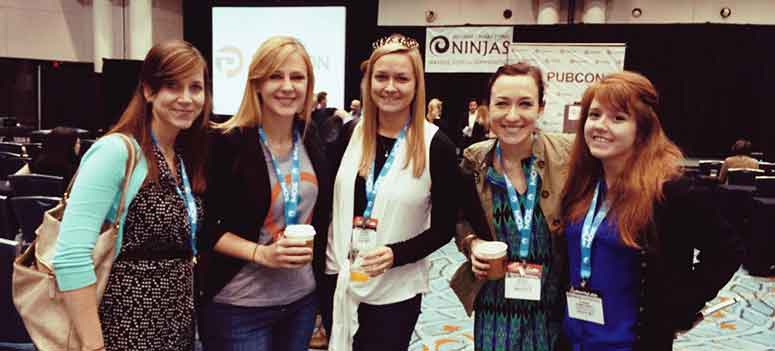
    Last week I had the amazing opportunity to attend Pubcon New Orleans for the first time. It was one of the most fruitful learning and networking experiences I’ve had the chance to be a part of. I felt like I could spend forever just absorbing everything I could from everyone I met. One of the major themes that I got from all the speakers I saw at PubCon was the importance of good content. So, now I’m here to tell you about some of the main takeaways I got from the particular sessions I attended.

    IMG_52111-1024x368-1

    Peter Shankman: Keynote

    The keynote by Peter Shankman focused primarily on the power of good customer service. His four main points were Transparency, Relevancy, Brevity, and Top of Mind. He said you don’t have to go crazy with customer service, just be “one level above crap.” On this note he mentioned the Morton’s Steakhouse story where he jokingly tweeted at them about wanting a porterhouse steak upon landing in New Orleans from a flight. They then sent someone to meet him with a steak when he got off the plane. This simple gesture(although not scalable for every brand) led to a lot of great publicity for Morton’s. It’s all about making your customer feel special.

    An audience you are more transparent and honest with that feels invested in is 78% more likely to buy. Peter also said that when(not if) you screw up, own it. People are 44% more likely to stick with you if you own it. He mentioned the stark difference between how Eliot Spitzer handled his prostitution scandal by admitting the fault and resigning versus how Anthony Weiner handled his sexting scandal by saying he got hacked and not owning up to it.

    Peter mentioned the importance of being relevant and listening to your audience as well. He mentioned a non-profit that saw a 37% increase in donations just by being engaging and active with their audience online.

    The third important facet Peter Shankman mentioned was brevity. He particularly said that brevity is the future of social media and not just in the way we think of it through Twitter now. He said jokingly that we’ve all become the dog from the movie Up, because recent studies show that we have a 2.7 second attention span. Shankman said that mobile messaging is the future and Twitter is just the pipe, so we must learn to write well and concisely.

    Finally, Peter talked about the importance of being top of mind. You want to be the first person someone thinks to go to for whatever they need. He also mentioned the idea of having “zombie loyalists,” or people who have you at the top of their mind for recommendations.

    IMG_5231-768x1024

    Will Scott: Barnacle SEO

    Next I had the opportunity to sit in on Will Scott’s talk about Barnacle SEO(a term he coined in a Local Search News post back in 2008). Barnacle SEO is all about leveraging authority for local search. Specifically, the idea is to attach oneself to a “large fixed object” and wait for customers to “float by in the current.” It’s not as simple as using someone else’s authority, because Will says the most important thing in business is sincerity. “If you can fake that, you’ve got it made,” he says.

    He also mentioned that Google’s weakness is sites they consider super authoritative like YouTube, Yelp, Pinterest, Facebook, YP.com, and such. This is making Barnacle SEO have a huge comeback. YouTube for example dominates universal search and according to a MarketingLand infographic, 8 out of 10 video results are from YouTube.

    Although using backlinks from these authoritative sites and directories like YP.com for local SEO efforts is important, it’s also super important to “keep it clean-ish” by using tools like Whitespark.

    Greg Gifford: Local SEO- It’s No Laughing Matter

    After Will Scott, Greg Gifford, Director of Search and Social at AutoRevo, took to the stage with his presentation about the complications of local search. His awesome presentation featuring punny references to 142 movies and also contained precise, actionable tips. He mentioned the changes in local search like the maps pack finally stabilizing at seven listings and how optimized vertical and local directories now rank very well. A huge opportunity for small businesses to rank well lies in simply adding city and state to title tags.

    Greg also mentioned how the goal of Google Plus Local(aka Google Places) seems to be like a drive through, a place for people to get what they need by getting in and out quickly. He also brought up the Google email about “duplicate listings” that rolled out with Google finally merging the old dashboard to the new. If you want to know more about this email, check out my blog post here.

    His optimization tips for G+ included writing long, “awesome” descriptions using formatting and links, uploading lots of photos, using as close to the max 10 categories as possible while keeping them relevant, engaging in the fairly few number of users on G+, and circling users as a business. As far as reviews on G+ go, he mentioned that you have to earn them and ask for them, you need at least five reviews to see the star average, you should shoot for 10 then diversify, one to two reviews a month is normal, and having them come in consistently rather than in bursts is important.

    IMG_5215

    Casey Markee: The “Big Easy” Guide to Google-Friendly Link Earning

    Casey Markee started his presentation with a quote from Matt Cutts saying, “The objective is not to make your links appear natural, the objective is that your links are natural.” He mentioned that the “four tenants of Google-friendly links” are those that provide clear value for the user, are niche-relevant, get clicked to send some measurable form of trackable analytics traffic, and are “earned” freely versus being given.

    He listed nine link “earning” classes that Google still loves which included:

    1. Link Bait Type Content- Sharable and Buzz-Worthy
    2. Evergreen Content- No Expiration Date
    3. Local Link Earning- Publish Local Resources
    4. Scholarship Link “Earning”- Ex: SilverCross.com Ability Achievement Scholarship
    5. Beneficial Link “Earning”- Participate in Online Forums
    6. Sponsorship/ Partner Building- Support Causes
    7. Profile Links- Social Profile Building
    8. Selective Guest Blogging- Quality not Quantity
    9. Brand Mentions- Get Regular Mentions Turned Into Live Links

    He ended with saying that link earning is a marathon not a sprint, and that quality content is key!

    Mike Stewart: Building a Future Proof Plan for Organic Local Search Rankings

    The biggest takeaway I got from Mike Stewart’s presentation was to think beyond Google search and about other places where people often search like Siri, Amazon, Facebook, and Bing. He also explained the difference between some white hat and black hat SEO tactics, and the importance of doing it right. Mike took us back to basics explaining that “SEO is about creating, editing, organizing, and delivering content and metadata to increase relevance to specific keywords on the web.”

    Finally he gave us “Seven Simple Content Ideas That Drive Shareability” which are as follows:

    1. GIVE: Offers, discounts, deals, and contests that everyone can benefit from
    2. ADVISE: Tips, especially about problems that everyone encounters; how to do something
    3. WARN: Warnings about dangers that could affect anyone
    4. AMUSE: Funny pictures and quotes, as long as they’re not offensive to any group
    5. INSPIRE: Inspirational quotes
    6. AMAZE: Amazing pictures or facts
    7. UNITE: A post that acts as a flag to carry and a way to brag to others about your membership in a group

    This is just a very small portion of the many helpful tips and tools I learned at PubCon this year! Let me know what you think about all the tactics you’ve learned here today.

  • The Balder Side of Life

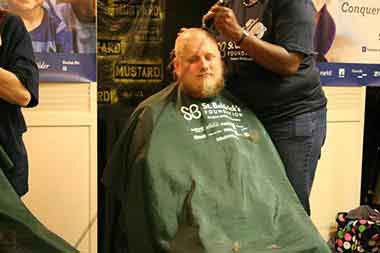
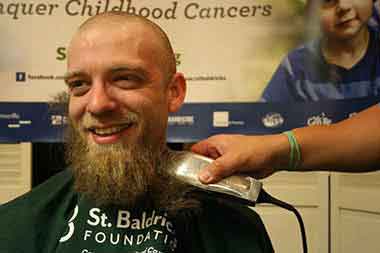
    Every year a neighborhood bar that caters to celebrating German heritage in New Orleans hosts a special event. This event is one of caring and hope. The participants all sport identical hair cuts. The floor is littered with a variety of browns, blacks, and yellows in various hues. It is in this hallowed hall that St. Baldricks takes place each March.

    599376_756312970785_1308427025_n2

    St. Baldricks is a charity organization that raises money for children’s cancer research. They have raised over $127 million for research by doing a different kind of charity work. St. Baldricks doesn’t ask its participants to walk, sell candy, or do anything physical. All they ask you to do is take a seat in a barber’s chair and allow a volunteer to shave your hair off in solidarity with all the kids that lose their hair due to cancer treatments.

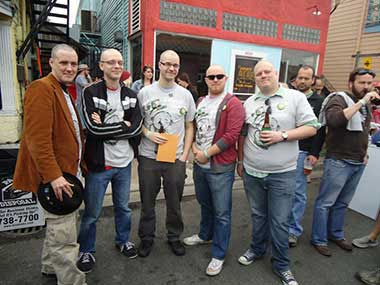
    I have participated in this event for four years and helped raise several thousand dollars with some of my closest friends, two of which have been with me each year. Geoff Gauchet was the first to tell me about this wonderful organization and invited me to participate. And although I was a bit hesitant at first, I fell victim to the age old dare of “I’ll do it if you do it,” from one of my closest friends, Jacob Mayer.

    I have asked these two friends to explain why they participate in this organization.

    What made you want to participate in St. Baldricks?

    JM: Peer pressure! OK, that’s only part of it, but I knew some friends who had been doing it for a while and some more friends who wanted to get involved. The more I learned about the organization, the more I wanted to be a part of it.

    GG: My boss at one of my past jobs did it every year, and so one year I decided to give it a shot.

    How long have you have you been participating?

    539943_10151339506891960_1601968395_n1

    GG: This will be my 7th year. I get knighted as a Knight of the Bald Table this year, which is an honor for anyone who’s given 7 years of a service to the organization.

    JM: This will be my fourth year! I think.

    Your team name is Hairy Shearers, what’s that about?

    GG: It’s a reference to The Simpsons. Harry Shearer does a large number of voices on the show, and in one episode there was a barbershop named Hairy Shearers, a pun on cutting hair and his name, obviously.

    JM: Since Shearer is a voice actor for the Simpsons, that make this joke so meta. So meta, y’all.

    How do you get the word out about your participation in this event? Do you utilize social media or do you have a specific method for raising funds?

    GG: I use social media almost primarily. I post my donation link about once per day. As it’s been 7 years, I’ve learned the key times of the day to post for maximum visibility. I also print up a flyer and post it on the fridge at work, and usually email family members.

    JM: Any way I can: Facebook, Twitter, emailing my coworkers, bugging my family, etc.

    How do your friends and family react to your shaggy appearance prior to the event?

    150179_10151339505226960_313243748_n1

    GG: My parents love the event not just for the cause, but because my hair is usually ridiculous right before the event. I wanted to keep my beard at first, but my dad donated extra money on the spot to have them shave it off, so now I do the whole thing. Friends and coworkers usually don’t recognize me for a second. It freaks me out when I catch myself in a mirror.

    JM: It’s literally the first thing my family and coworkers mention when they see me in the month or so leading up to the event. “HEY WHEN YOU GETTIN’ DAT MOP CUT OFF?” or “HEY SHAVE YOUR BEARD, YOU GROSS WEIRDO.” You know, stuff like that. But they’re all very supportive of the cause and sympathetic to my disheveled appearance.

    Please join Geoff, Jacob, and myself at the Deutsches Haus on March 29, 2014 at 6:00pm to watch us once again lose our hair for charity.

    Also, feel free to donate to St. Baldricks:
    Team Hairy Shears
    Geoff Gauchet
    Jacob Mayer
    William Monson

  • Are You Being Productive Or Just Keeping Busy?

    Over two months have passed in 2014, and like most of you, I can honestly say that I have been very busy. I would be willing to bet that 50+ business days into the year, I, like a lot of you reading this have logged 150-200 hours of meetings, and have received and answered well over a over a thousand emails. Doesn’t that sound busy? This past weekend, as I was doing my weekly review, I found myself wondering, have I been productive as well? Have I been focusing on the projects that will make Search Influence a great place to work? What about the things that will allow us to serve our customers better?  How much time have I (and the teams I support) put into developing the Internet Marketing products that will help our customers succeed online tomorrow?

    4556099850_bcd9318b5b

    If you find yourself wondering the same thing, or worse, in an honest moment, answering no to that question, here are three things that you can do to avoid being busy, yet unproductive.

    1) Review your long-term initiatives or goals on a regular basis

    9331682959_2e179c31c6

    In the book Getting Things Done, the author David Allen challenges readers to undertake a weekly ritual wherein they will review and process everything in their inbox, their to-do lists (that’s right, lists), their previous and upcoming calendars, and their projects or “larger outcomes,” I find that this review of my long-term projects and initiatives, or “larger outcomes” allows me to ask myself if I gave each of these areas the attention they deserved, and to make sure that I have some actions or meetings teed up to assure that I keep moving toward success in the upcoming week. Think about it, if you move the needle on the 4-5 of the most important things every week, in 3-6 months, you will have made a significant impact on some areas that are important to you.

    2) Be ok with saying “no” occasionally

    Remember those thousand emails that you have processed so far this year? Or the over 150 hours of meetings? Chances are, in a few of those, someone has asked you to take on a small project or task. If you have a reputation for being someone who can get things done, you might get asked for help in more than a few. I completely get the urge to tell everyone “yes.” In fact, I think that you should be looking for ways to tell people “yes” whenever you can. Sometimes, the best way to support the people who are asking you for help is to tell them “no.” Two potential benefits immediately come to mind:

    • Hopefully the initiative you chose to prioritize over helping someone will have a positive impact on all parts of the organization you are working in, including theirs.
    • By telling them “no,” you may be empowering an employee to try to complete the task or solve the problem on their own.

    There are also other ways that you can say “no,” while offering to provide some support:

    • Offer someone else in your part of the organization as a resource. Who knows, the task or assignment may even be a good developmental opportunity for someone more junior.
    • Ask if your support or action is needed right now. If not, perhaps you won’t have to tell them “no,” just “maybe later.

    3) “Unplug” To Focus

    4447008001_9867947867

    How many potential communication inputs do you have to distract you during the workday? Here are mine:

    • Email
    • Chat
    • Text
    • Phone
    • Face to Face
    • Social Media

    Those are six ways that anyone who needs me can get in touch with me at any point throughout the day. Those are also five potential distractions if I am trying to work on something that needs my undivided attention.

    When was the last time that you set three hours aside to work on something extremely important, but three hours and six interruptions later, your three hour window was shut, and you had barely made a dent in your project? Now, I will be the first to admit that as a manager, it is hard to take actions that make it seem like I am not available to support my teams.

    Availability
    Concept smartphone tablet pc and laptop in hands Isolated on white backgroundOne thing that I have come to realize is that being available to others does not necessarily mean being available every moment of the day, or even workday for that matter.

    And how available are you in these meetings you are in anyway? I have found that there are times when I need to eliminate (ok, minimize) the potential distractions by unplugging from all communication devices (except my cell phone, of course).

    If anything is important, but not urgent, it will be waiting for me when I plug back in. And if anything is urgent, I let my teams (and my family) know that in an emergency, I can be reached via my cell phone.

    Then I turn to whatever it is that needs my undivided attention and try to knock it out. Again, hopefully, whatever it is I am working on will have a significant impact on those that I have chosen to unplug from for a few hours, so in the long-run they will benefit, too.

    In short, its very easy to stay busy these days. There is always a meeting to go to, a text we could respond to, emails to deal with, and unplanned, “urgent” work to be done. And all of that has to get done. The challenge is making sure that you are handling the things that are not extremely urgent, but are critically important.

    How do you make sure that you are getting to the things that matter most to your organization and the people who depend on you?