Tag: Pinterest

  • 5 for Friday — Links, Stories, & Posts for Your Weekend

    5 days before maya

    The Holy Grail Of Internet Marketing: Owning The Whole SERP — Search Engine Land

    Search Influence’s very own Will Scott gives a brief how-to on the essential methods of owning your search engine results page. The main points he hits in the post are the importance of branded SERP ownership, branded  AdWords campaigns, branded organic results, Google+ and local optimization. But the “real win” of owning the whole SERP is obviously taking over your non-branded ranking page. One of the more surprising tidbits for PPC naysayers is “It may seem crazy to pay for clicks to your site, especially if your site shows up in the first position organically, but the data shows that having both the first and “zeroth” positions increases clicks by up to 89%.” Now, that’s a big increase!

    How to Build a Content Marketing Strategy — SEOmoz

    This informative post briefly touches on the importance of content marketing (it’s the future!) before moving on to some examples of companies that are doing it right, with “it” being what the author calls “phenomenal content.” What these examples all have in common is that they are bite-sized and easily sharable examples of content that is pinpointed to the intended audience. Probably the most useful thing in the post is the detailed step-by-step content strategy.

    How to Use Pinterest to Build Trust and Loyalty — Social Media Examiner

    We’ve already talked about why your business should be on Instagram, and these reasons also apply to Pinterest (and maybe its smaller, more bro-tastic counterparts like Gentlemint, Manteresting, and Dudepins). And now with analytics for business profiles, you can get data about how your followers are interacting with content. But how do you build trust and loyalty among those followers? This post is a great how-to. Main takeaways: tell your company’s story with humor and portray it as fun and friendly; recognize your loyal customers; make your boards a resource for your followers by including useful information; verify pins have valid, working links before sharing them.

    After You Read this Article You’ll Forget It (at least the first half) — Copyblogger

    This post telling you how to enhance your content marketing is itself great content marketing. What’s not to love? From the click-bait title down to the excerpts from his book, the author has made a great point about the usefulness of illustrations in your content and promoted his own product, making this whole post an example of how to do it.

    How to Create and Promote Successful Social Media Giveaways (and build SEO Links) — Search Engine Journal

    The title of this post really says it all. This is a fantastic step-by-step guide to setting up and executing a giveaway. Any business can benefit from the added exposure, but as the post mentions, you can also use this as an opportunity for link building. When you add the giveaway to an existing page on your site, the value of that page increases, even after the giveaway is over and you remove the code.
     

  • Pinterest Announces Analytics for Business Profiles

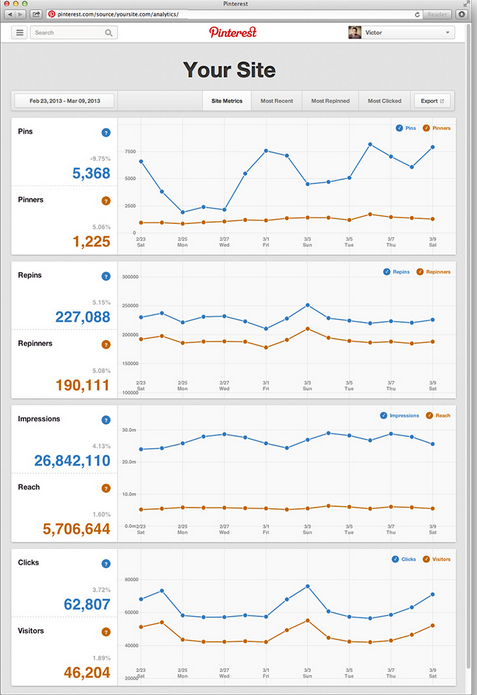
    Recently, Pinterest launched its Web Analytics, allowing for businesses with verified accounts to track how many users are pinning from their site, the number of impressions from each pin, and incoming site traffic that is being generated directly from Pinterest.

    pinterest

    Outside of SEO and social media campaigns, many may argue that there is no way to successfully tracking branding and traditional advertising efforts.  Pinterest will argue this as this data now allows businesses to successfully track how users are interacting with their pins, products, and most importantly – how they are most likely to convert.

    The launch of Pinterest for Business in late 2012 welcomed businesses to develop professional profiles and the implementation of “pin-it” widgets. Naturally this has been great for businesses across the board! Not only does having a professional Pinterest board increases brand awareness and a brand’s social presence, but also provides another avenue in generating site traffic.

    By implementing social sharing widgets on a new product page, allows for users to quickly view a product they are interested in, and repin this great finding to the world of Pinterest.

    So, yes we know how great Pinterest is, but what we really need to know is how it can make us money! As a business owner, our job is to create shareable content to promote products, and Pinterest’s job is to push it out. With this tool, we can track exactly how our marketing content is being socially pushed out! Businesses can now track how many pins are being pinned from the site, the impressions generated by each pin, and the number of repins generated by the original pin.  Tracking of clicks and social reach is also available.  Pretty cool we can now track the click through rate (CTR) for a specific product or pin!

    pinterest1

    Successfully tracking how customers pin their favorite blouse to a board where all their followings can see it (impression), allowing for new followers to visit your site (traffic), and potentially buy that same blouse (conversion), is a dream come true for e-commerce sites!

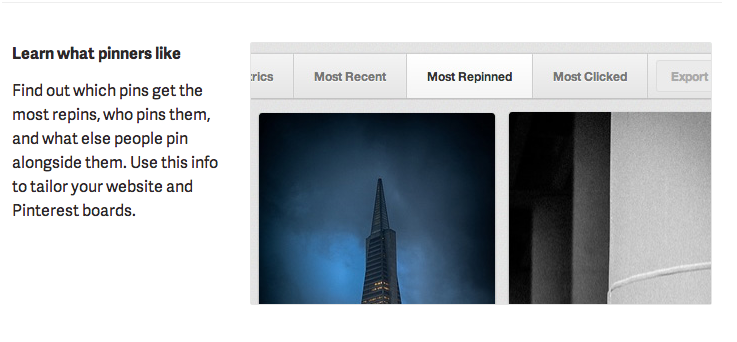
    From a business perspective this allows us to really understand what our target market is interested in.  Tracking which pin is the most successful allows us to analyze specific, engaging content that may lead to a higher conversion rate.

    With social media constantly growing and changing, and the need to market businesses on social platforms only increasing, the launch of this new tracking device may even convince other business to get on board with Pinterest.

    Now, how much longer until we see ads on Pinterest?

  • Pinterest For Business Has Arrived! 7 Reasons To Jump Onboard

    It’s finally here: the much anticipated Pinterest for Business.

    Chances are, for the past couple years you’ve been hearing all about Pinterest, its popularity explosion since 2009, and the fact that you, as a business owner, need to get on it… yesterday.

    Pinterest for BusinessUntil now, a business on Pinterest had to use the same profile format as yours and mine. There weren’t many tools available, and there was no way (until recently) to verify your website. The terms of service actually prohibited commercial use of the site, but that didn’t stop some of the world’s biggest brands from capitalizing on the phenomenon. From Whole Foods to the Smithsonian, big brands and smaller scale bloggers alike are making the most of Pinterest.

    The Pin It button was put to use on sites like Allrecipes.com and within 3 months, 50,000 recipes were pinned by users, resulting in a 900% increase in clicks on Allrecipes’ Pinterest-shared content.Pinterest E-Card

    With the announcement on Tuesday of the long awaited Pinterest for Business, Pinterest is not just acknowledging the thousands of business already on the site (and breaking the rules). The Silicon Valley start-up has also opened its arms to an entirely new realm of e-commerce possibilities. Pinterest is declaring itself as a champion for companies (large and small), working to make the site work for them.

    Features and opportunities now offered with Pinterest Business profiles include:

    • New business terms of use
    • The option to convert an existing profile into a business account
    • Name the account with a business or brand name rather than a first and last name
    • Website verification badges (which we heard about back in October)
    • New widgets for more seamless integration on business websites, including the Profile Widget and Board Widget. Easier to use guides for creation are also available for the Pin It Button and Follow Button.
    • The opportunity to receive updates on future products and services (which will hopefully include analytics)
    • A best practices guide containing examples and step-by-step instructions for making your account successful
    • Case Studies based on business already successfully using Pinterest to drive traffic and new business
    • Guidelines for using Pinterest logos and trademarks in your own marketing materials


    To date, Pinterest has raised $138 million, and it shows no signs of slowing down. Heck, my mom’s even on it. With more and more business likely to jump on the bandwagon, many are now posing inevitable questions such as “How long until the now free-to-use site begins to sell ad space?”

    So what is it about Pinterest that’s so appealing to businesses and users? Some of the following reasons might help you determine whether or not your business should sign up:


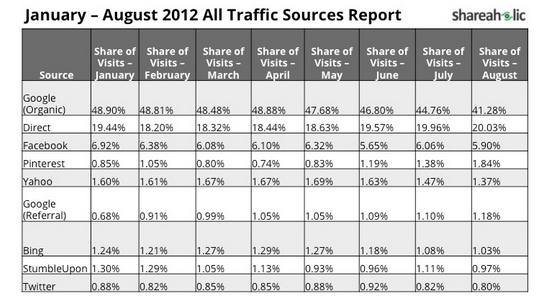
    1. Pinterest is the fourth largest traffic driver to websites in the world, surpassing Bing and Yahoo as reported by shareaholic.com.
    1. Pinterest is the third most popular social network on the web (behind only Facebook and Twitter), according to Experian’s 2012 Digital Marketer trend report.
    2. If you’ve got something to sell, chances are you want to be on Pinterest. Nearly ⅓ of Pinterest users have an annual household income of $100,000 or more. Most (68.2%) are female, and a majority of users are age 25 – 34 years.
    3. Trouble ranking organically? Pinterest pages have great authority with Google, providing an opportunity for a business to compete in rankings where they might not normally be able to outrank a competitor. Each click on a Pin from your site drives traffic right where you want it — your site!
    4. The number of active Pinterest users and unique visitors keeps on climbing. Pinterest became the fastest site ever to hit 10 million unique monthly U.S. visitors in history. The once exclusive, invite-only website is now open to anyone with an email address, Facebook, or Twitter account, opening the door to those who may have been intimidated by the exclusivity or simply lost interest during the wait period.
    5. The visual focus is addicting (to users). Pinterest users spend, on average 98 minutes per month on the site, behind only Facebook and Tumblr.
    6. Users always have access to Pinterest. The company provides a browser plug-in, mobile and iPad apps that make content on ANY site pinnable.


    Our mission at Search Influence is to help small businesses succeed online. Pinterest’s visual appeal and addictive nature make it the perfect opportunity for a small business to grow, instead of being lost in the noise of a more trafficked network like Facebook. On Pinterest, it’s not the number of followers or fans you have, but the quality of your content that makes you successful. I don’t know about you, but some of the best products I’ve seen came from small or local businesses just trying to get it out there.

    Pinterest for Business might be just the thing you need to get your product seen. Do you plan on signing up? Tell us about how it goes in the comments.

  • Pin It To Win It: Increasing Your Fan Engagement With Contests and Giveaways

    We’ve touched on how to put Pinterest to work for your brand in the past, but some businesses are now using the social media site in even more exciting ways. With the site’s unbelievable growth (it recently passed Twitter, Bing, and Stumbleupon in the rankings), if you aren’t using Pinterest to promote your business already, it’s very clear that you should be.

    But, did you know that besides pinning your products and using the images to drive traffic to your site, you can also engage your target audience with contests and giveaways? It’s a practice that’s been coined “Pin It To Win It” and it’s taking Pinterest by storm. We’ve talked about using Facebook contests to promote fan engagement, but this is the first push towards competition-based community involvement we’ve seen on Pinterest so far.

    Some contests simply require you to repin an image and include a hashtag. Others require Pinners to follow one or more of their business’ boards in exchange for a chance to win.

    http://imom.com/all-pro-dad-pin-it-to-win-it-contest#.T7pfnV5bey8.pinterest

    While this approach has been used on many a blog, it is also an effective strategy for Pinterest. Some companies, however, are getting especially creative with their fan engagement and taking it a step further. In addition to having Pinners follow them, they’re also having them create a board filled with their products.

    Take World Market’s recent Pin It To Win It Contest. They begin by having entrants follow them on Pinterest. Then, they have Pinners create their own board with at least 10 items taken either directly from their site or from the company’s own Pinterest boards. (You can see my entry here!)

    Genius.

    Not only are they gaining followers, but also they’re increasing the number of pins on the site from users and capturing countless other views in the process. I’ll say it again – genius. Anyone can fill out a contest entry form, but World Market is engaging its audience in a way that’s fun and beneficial for both the company and the Pinners, and they’re not the only ones.

    GAP recently held a similar promotion, as did Microsoft Windows. And as their popularity increases, we’re sure to be seeing more of these contests and more consumers engaging with brands on Pinterest.

    So, what about you? Would you consider running a Pinterest promotion for your business?

  • Pinterest For Men: Infiltrating The She-Ra Club With Smart Marketing

    Pintrest-banner

    A digital corkboard where people can collect links to their favorite recipes, dapper clothing, and adorable cats with their heads stuck in something, Pinterest allows its users to effortlessly share evocative photos of their hobbies and interests. Launched a little over two years ago, this image-focused sharing site has taken the Internet by storm. (Just check out this infographic!) With over 10 million likes on Facebook, Pinterest has quickly inserted itself in to the inner circle of mainstream social media sites. It isn’t exactly a man-eating no-boys-allowed club — but with women making up nearly 70% of its users and a distinctively twee and vintage look to its features, it is unarguably lady-friendly. However, while it’s easy to write its possibilities off in a haze of vintage cloches and desaturated wedding schemes, Pinterest can be used to engage a wide number of demographics. If you’re looking to target male users, then, what to do?

    Create A Goal

    The first thing we must do as a business is to create the message we are trying to convey. It does not need to be overcomplicated, but something that lets our followers know where we are coming from. This can be accomplished through a theme of our posts or certain boards that show what a particular company does, sells, or is interested in.

    Keep in mind that the average person spends about 15 minutes at any given time on the site, so our boards have to be concise and engaging. In addition, the boards have to keep the target audience in mind. Whole Foods accomplishes this with tantalizing images of recipes that add to the food-porn addiction of many male Pinterest users. This can also be accomplished by making more male-dominant boards for male clients. By doing some demographic research and creating boards about less-trafficked topics such as cars or gadgets, a business can connect better with its male clients through shared interests.

    Personify Your Company

    Social media is filled with generic company pages or profiles that really only sell their products. This in itself is not necessarily a bad thing, but these companies overlook the fact that social media is supposed to be social — it’s in the name! So it’s important to take some time when setting up a company profile on Pinterest to imagine if your company was a person. What would that company-person do with their time? What is it interested in or passionate about?

    When the Pinterest profile is humanized, audiences have an easier time identifying with the message of the company. For example, if you are a men’s clothing store, you wouldn’t want to saturate your posts with images of kittens; instead, use things relevant to your consumers, such as types of formal suits or images of vintage men’s fashion.

    Interact With Your Fans

    Pinterest is a social site. I would be lying if I didn’t pursue it at least a few times a day to look up things like delicious Old Fashioned. (Click the link. I have a fantastic one already pinned for you.) Pinterest consists of about 90% repins, which translates to a lot of people sharing what they’ve found on someone else’s board. Because of this, it is especially important to take the time to see what people are pinning about and give them incentive to share your brand. For instance, Confused.com designed a contest to have its followers pin a picture of them driving with high-heels on for a chance to win a pair of high heels. This type of competition can be easily converted to fit any target: power tools for men, toys for kids, or rubber chew toys for pets.

    With the generation of traffic to your site, it is especially important to remember to keep your boards concise and organized. This will entice viewers to take a look and repin your posts, spreading your name your name all over the site in the process. In addition, remember to try offerings something for everyone. Even if you’re trying to appeal to a non-majority demographic, there’s no need to offend the site’s main user base by being gratuitously crude or racy.

    Be Creative

    Feel free to let your creativity shine when you design your boards. After all, you are competing with numerous collections of food and wedding planning, so feel free to do something simple that will appeals your male demographic. Think Geek, a nerdcore eCommerce site, does this with boards of their products and also other boards showcasing things they love — Star Wars, Dr. Who, and all things nerdy. This further proves that Pinterest can be used to appeal to your customers’ dorky sides, no matter what gender or walk of life.

    Don’t just stop at the contents of your boards! Peugeot Panama went as far as to cleverly design their boards to puzzle piece their cars to create an engaging board covers. This is successful because not only does it creatively engages the viewer, but also it appeals to its male demographic.

    Uniqlo gave the viewer an experience of a motion graphic that encourages the viewer to scroll down and watch as their pins animate to showcase their dry fit wear. This is a great way to create a gender-neutral board that appeals to both sexes.

    So no matter what kind of business you are in, Pintrest can help you better connect with your clients, whether they are male or female. Also, there’s no better way to discover some interesting ways a shipping pallet can be converted into a coffee table

  • Review: Pinterest Users and Marketers Enjoy Redesigned Profiles and Added Features

    Maybe I’m a little late since Pinterest rolled out its redesigned profile pages two weeks ago, but being fashionably late is kind of my ‘thing.’ Users and businesses using Pinterest for marketing can now enjoy the benefit of more beautiful profile pages and an easier-to-use Recent Activity feature.

    Pinterest Profile Redesign
    The redesign of Pinterest Profiles is more social, displaying influencers and a description. The profile page and its boards are more aesthetically pleasing and image-focused.

    Before passing judgment on the latest updates, I wanted to take some time to actually use them first. While the profile page redesign was what dominated the news a couple weeks ago, I honestly think this change is of the least consequence to Pinterest users.

    For starters, it’s a rare occurrence that I find myself actually looking at someone’s Pinterest profile. By its very nature the site can keep a curious browser occupied for hours at a time, thanks to the constantly updating feeds of pins. A user can explore pins by category (Art, Humor, Photography, Food & Drink, etc), or by looking at everything pinned by those they choose to follow. Its on these feeds that it’s easy to get lost and suddenly realize you’ve been flipping through delicious-looking photos of desserts you probably shouldn’t eat for over an hour (guilty).

    But don’t get me wrong — I really like the new profile design.  Borrowing from the social networks we all know and love, Pinterest profile pages are now more informative, displaying who influences you as well as who you influence. The top portion of the profile is reminiscent of Twitter, offering a 200 character description field and the user’s designated profile image.

    Old Pinterest Profile Design
    BEFORE: Before the redesign, Pinterest profiles were blocky and uninspiring.

    The user’s boards are displayed in a much more aesthetically pleasing way, showing the most recent pin on that board with thumbnails of several others below it. Like I said, I like it, I really like it! Much improved over the former profile pages which were very square and uninspired.

    One new feature I haven’t heard much mention of is the added “Friends to Follow” feature above Recent Activity on the home screen.  Improvements to the Recent Activity feed were enough to have me jumping for joy (finally, the stories are clickable!), but the Friends feature put the icing on the cake.  While Pinterest already offered a Find Friends feature, it was not the most user-friendly. Now, I can follow friends without even leaving my homepage.

    Friends to Follow Feature Added to Pinterest Homepage
    Pinterest users can now follow others without ever leaving their homepage.

    According to Pinterest co-founder and CEO Ben Silbermann, who recently spoke at SXSW, the redesigned profile pages are just the beginning of big things in the works for the increasingly-popular social bookmarking site.

    Word is that we will finally get an iPad app, and all I can think is “it’s about time, Ben!” In addition to the upcoming app release, the API will also be made public, much to the delight of developers. In January, Pinterest drove more referral traffic than Google+ and YouTube combined, which is all the more reason marketers should not ignore it as a tool for online promotion.

    I’ll certainly be on the lookout for the iPad App and other new features to be rolled out soon. What would you change about Pinterest if you had the chance?

  • New Kid on the Social Media Block – How to Generate Brand Awareness and Valuable Links using Pinterest

    As an admittedly addicted Pinterest user, I’d like to clear up a few things about the relatively young social media site and its potential use for marketing and SEO linkbuilding.Definition of Pinterest With Pinterest quickly rising in popularity, I’m constantly hearing it referred to as a social bookmarking tool for sharing images.  Pinterest is in fact a social bookmarking tool, but it is not only about the images. The site allows users to “pin” or save links to external sites in an organized way, with few limits to what type of site or image can be pinned.  Users can save anything from a favorite blog post to products they love, from recipes to tutorials. Each and every pin not only pulls in an image, but also a do-follow link back to the source site! Can you smell the SEO potential yet? The brilliance of Pinterest is that it combines some of the most compelling features of social media in general: visually stimulating content and the opportunity to share your ideas, interests and inspiration. Upon signing up, users are provided with fully customizable “pin boards” and can easily find friends to follow using the Facebook and Twitter connected features.
    I escape to Pinterest to avoid all the drama and bad grammar on Facebook.
    As a marketing tool, Pinterest has great potential for small retail businesses that may have a hard time competing in search results. For example, a local boutique clothing store may find it incredibly difficult to outrank Macy’s and Saks in the SERPs for a keyword like “New Orleans shopping.” When users find something they like (usually pinned by someone they follow and are influenced by), chances are they will, at the very least, click the source link. Everyday I’m introduced to new brands and products on Pinterest, and more than once I’ve used what my friends are pinning as inspiration for making purchases. There are currently few brands using Pinterest, but with its popularity and the site’s high (and still growing) domain authority, all signs are pointing to increased use by brands and businesses in the near future.

    A few tips for putting Pinterest to work for your brand:Pin It Button

    • Add the “Pin It” button to your product pages or blog posts. It’s easy to do and you can add the button along with your other social media sharing buttons.
    • Create a Pinterest account for the brand itself and reach out to “visual influencers” on Pinterest for help getting your images re-pinned. Pinterest allows any user to follow any other user without requiring a follow-back. You may also tag other users in your pins, comment on pins and re-pin (the Pinterest version of a retweet) others’ content.
    • Create boards beyond your own products and brand, but relevant to your location and industry.
    • Utilize the description fields when creating Pins by adding keywords and geo-modifiers. Not only is this SEO 101, but Pinterest addicts often use the search feature to find relevant pins.
    • Keep pinning!  The search results and Pin feeds change up-to-the-minute, much like the Twitter feed and Facebook Ticker. Maintain a steady flow of Pins to ensure your products are staying top-of-mind.

    For SEO linkbuilding purposes, the benefits of Pinterest are pretty self-evident. Some basic info on Pinterest links:

    • Each and every Pin links back to the original source site or the file location (depending on where it was originally pinned from). Unless you’re purposely optimizing for image seach, a product page or site link is probably better.

      Pin Link Locations
      Standard pins provide links to the source site in two locations.
    • A Pin provides do-follow links in multiple places. The image itself acts as a link in addition to the “From:” link in the top right-hand-corner.
    • A pin comes with embed code for syndication to other sites like Facebook and Twitter, helping to develop backlinks to the Pin itself.
    • Pins are editable! You can edit your own Pins with updated URLs or reach out to Pinners who may have pinned your images from an unfavorable source site. Pins are easy to edit and the new URL you provide does not need to host the image, though I don’t recommend you use a link without the original image.
    • Because of the visual nature of Pinterest, it is a great way to promote infographics. Make sure they are Pinned to appropriate boards and contain relevant descriptions to ensure they are shared.
    • You can even add a Pin It button to your company’s blog pages by using the WordPress plug-in.

    Thanks to the intuitive nature of Pinterest’s interface, I think the best way to get going is to request an invite and just dive in. Remember, sign-up is currently via invitation-only, so ask a friend to invite you or request one from the site (it doesn’t take long). Let me know what you think about these tips in the comments, and if my screenshots piqued your interest, follow me on Pinterest!