Tag: Pinterest

  • Does Pinterest Marketing Work for Tourism?

    In short—yes.

    Put yourself in the shoes of a tourist: you are sitting at home, gazing at your “Live, Love, Laugh” wall art, overflowing with wanderlust. You are itching to get out of your same-old-same-old routine. The idea strikes you—let’s get out of town! You enlist a travel buddy and the planning begins. But where do you go? You open up Pinterest for some ~travel inspo~. Finally, you and your pal pick a place to peruse. 
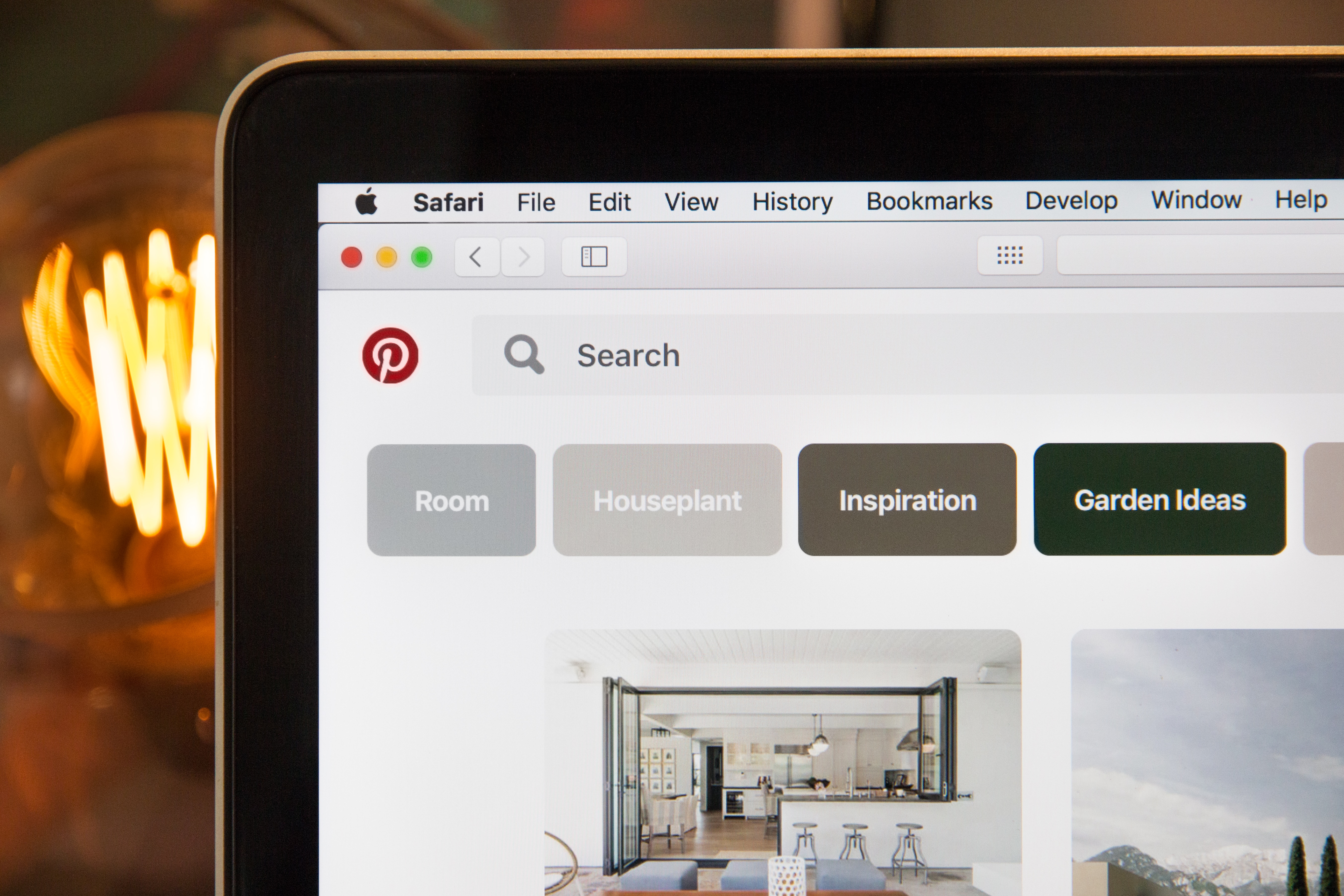
    Pinterest landing page

    You’ve always heard great things about *insert city,* but what do you actually do there? You simply must see all of the “must-sees,” but you also want the inside scoop from people who’ve actually been there—not TripAdvisor. You go back on Pinterest and start to plan your dream vacation.

    This might sound like a very specific example, but the fact of the matter is that Pinterest is growing as a platform for users to plan their travels. 25% of Pinterest activity relates to travel or tourism. With over 175 million users, this is a great space to immerse yourself in your audience’s planning process.

    Is Pinterest Effective for the Tourism Industry?

    Think about Pinterest as a mashup where search engine meets social media. Users search for specific topics, similar to how they would on Google, but the results are presented in a very visual manner. Users can then interact with those pins, as they would with the content on a different social platform, by repinning and sharing with followers. This searchable media is a highly effective format to promote something as visual as tourism. Through Pinterest, users are able to actually see (and plan) their dream vacation.

    Here are three tips to utilize Pinterest for tourism marketing:

    1. Create Timeless Pins

    Pinterest is different than other social platforms, like Facebook or Instagram, in that your content actually has a much longer lifespan. In fact, pins typically circulate for about 3 to 6 months. This means it is incredibly important to invest in content that is more “evergreen.” Make sure not to link to pages that may be temporary and try to incorporate content that is relevant year-round.  

    Does this mean you shouldn’t include seasonal pins? Not at all! Timely pins have their time and place; after all, people are planning trips year-round. However, you do not want all of your pins to be so timely that it limits their relevance. 

    2. Create Compelling Visuals

    It’s not rocket science that people are more likely to click on something that looks nice. Your pin’s photo takes up way more real estate on the results page than your pin’s title. But, a pretty picture isn’t always enough to get your pins the love they deserve. People don’t like wasting their time, and they’re less likely to click on a pin if they don’t know what it’s destination is. Overlay text on images tells the user what they can expect if they click through to your website. For instance, take this picture of New Orleans’ French Quarter. Yes—it’s pretty. But, where are you going if you click that pin? Having a title included is much more appealing because it takes out all of that guesswork. Including a defined purpose for the pin creates a better experience for the user, and can increase your click-through rate.


    Clarinet player playing live in the French QuarterSame photo of clarinet photo but spruced up with graphics for social media

    Don’t let the thought of creating a graphic scare you away from Pinterest. There are plenty of easy-to-use tools like Canva that make creating these images a breeze. And no—you don’t have to be an artist to make great pins. 

    3. Create SEO-Optimized Content

    I get it—we do SEO. This sounds like a plug. But, seriously, at the end of the day, Pinterest is a search engine, and having optimized pins that link to optimized content is important. You can create the most beautiful pin in the world, but if it isn’t optimized, it won’t get in front of the right people.  

    Start by performing Pinterest keyword research. Type in a root term or phrase that you are trying to rank in, such as “things to do in NOLA.” From there, work through the guided search to see different ways people might be looking for this information. In this example, you can see that people might be searching for “things to do in New Orleans with kids” or “free things to do in New Orleans.”
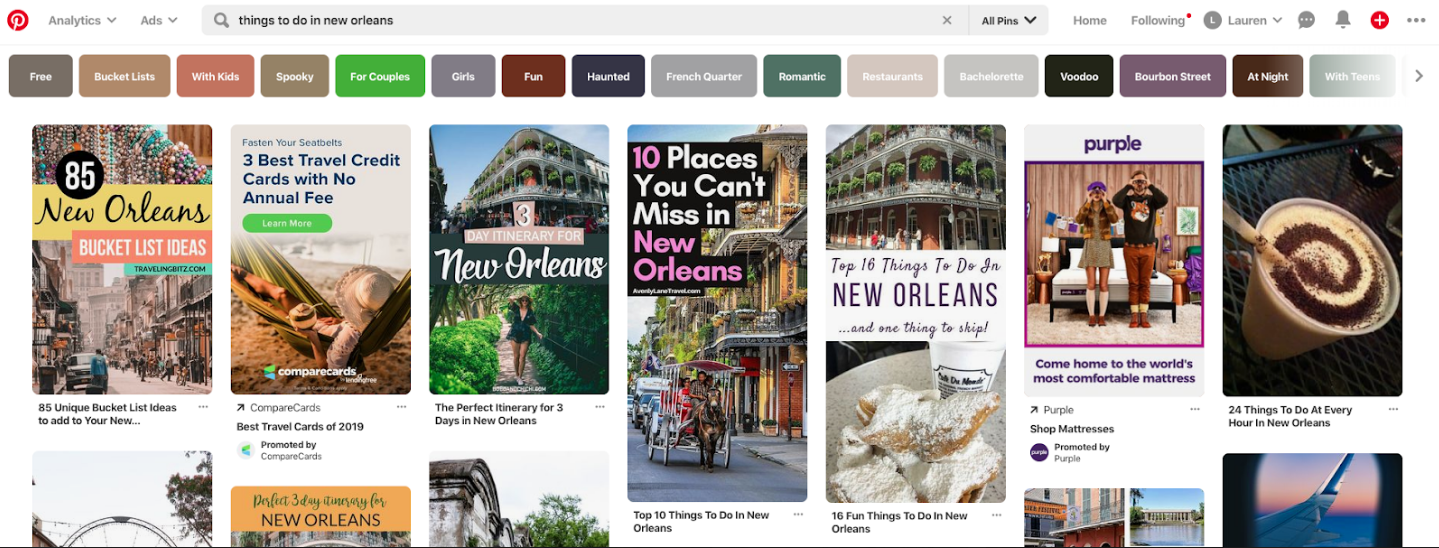
    Screenshot of things to do in New Orleans search on Pinterest

    Once you define the keywords you’re trying to rank for, build your content around that. Make sure your pin’s title, description, and landing page are all optimized. You want to make your content compelling to users by making it readable for both humans and crawlers alike.

    Pinterest is a powerful platform and an important space to promote your tourism business. Even though it might seem like a large time investment on the front end, creating a Pinterest strategy will support your marketing efforts for months to come. Not sure where to start? Contact Search Influence for help developing a plan that is right for you.

    Images

    Pinterest

    Photo by Nathan Bingle on Unsplash

     

  • Pinterest Rich Pins, a Complete Guide

    Google’s Rich Snippets changed the face of the search game for the better, and now Pinterest has done a very good impression of it—and it is pretty darn good. Pinterest’s Rich Pins are a new feature that allows Pinnable content to display better information to avid Pinners.

    Phoebe from friends stating "Oh my God, you're rich"

    What Is a Rich Pin?

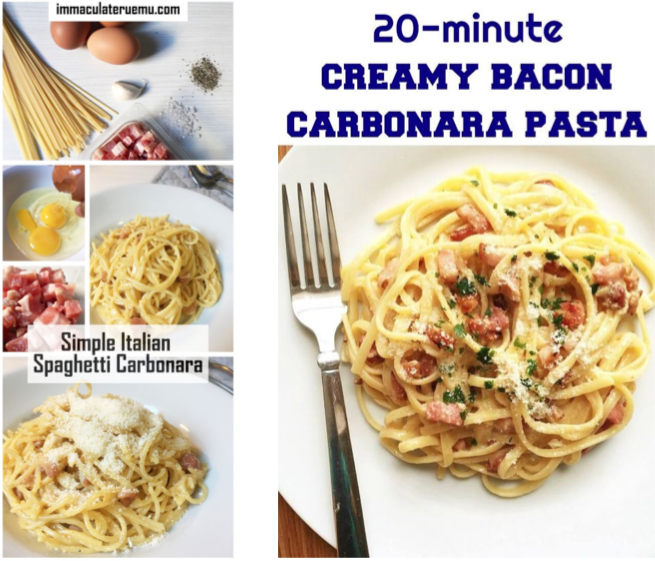
    A Rich Pin differs from normal pins by displaying additional information to users instead of only the pin title. Rich Pins use metadata in accordance with schema.org and the Open Graph Protocol to display this additional information on your pins. Open Graph may sound familiar because it’s what’s already used to display information on social media platforms such as Twitter and Facebook. Pinterest takes this principle a bit further by essentially combining the Open Graph Protocol with Article, Product, and Recipe schema types from schema.org to display detailed rich results on their websites. Below is a comparison of the Carbonara recipe from Immaculate Ruemu and My Gorgeous Recipes.

    Carbonara recipes used as rich pins on Pinterest

    As you’ll see, neither recipe uses guanciale, but I’m willing to forgive Ruemu because of the wealth of rich data that shows up in her Pinterest SERPs.

    How Do You Get a Rich Pin?

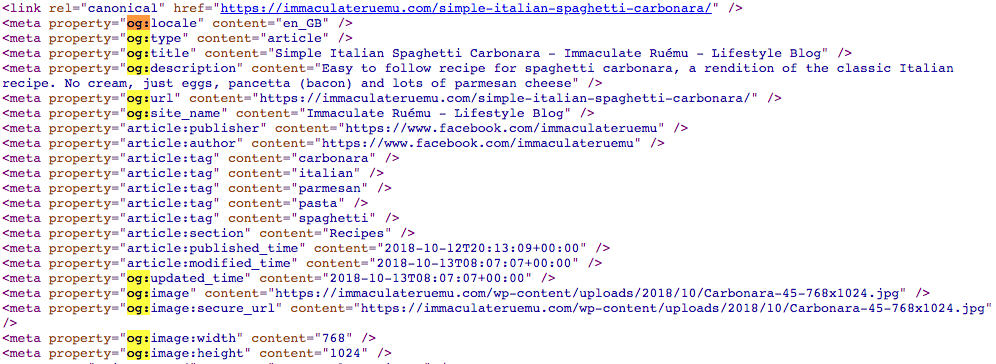
    Getting a Rich Pin is as simple as following Pinterest’s official Rich Pin Getting Started Guide, but is also as difficult as following Pinterest’s official Rich Pin Getting Started Guide. The two ways to add structured data to show up in Rich Pins is to use Open Graph Tags in the header of your web page or to use meta tags in the body of your web page. Ruemu opts to add some open graph tags to the head of her recipe pages so that she ends up with Rich Pins whenever she pins to Pinterest.

    Open graph markup example

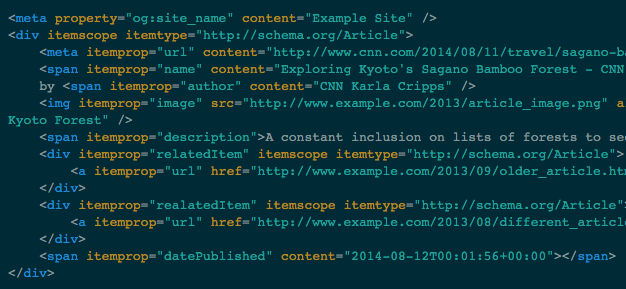
    The alternative to this method is to add meta and span tags to the portions of your content that you want to show up in Rich Pins.

    Example of span tags used for rich pins from Pinterest

    Once the tags are in place on your website, you’ll just need to apply for Rich Pins using Pinterest’s validator, then select what type of markup you used. Though Pinterest does support both methods of markup, one takeaway is that adding markup to the body of your articles, recipes, or pages, generally has to be completed manually and can be very cumbersome to constantly do every time you want to create a new post. A developer has the ability to add Open Graph Tags to the head element of your template files so that this information is served up dynamically and changes to the appropriate content, depending on what is actually being posted. If you don’t have a developer, Search Influence has a full development team capable of implementing detailed and difficult changes to existing websites.

    Another option is to use a WordPress plugin to take care of this for you (if your site uses the WordPress CMS). This does require some research, however; plugins can sometimes be a lot larger than they appear and bloat your site size or even slow it down, in some cases.

    Why Should I Markup My Site?

    Some users may be initially turned off from the idea of Rich Pins since it displays so much information from your site without the user having to visit your site, but as research has shown, Rich Results on Google have a higher CTR and lower bounce rates. While we don’t know exactly why users want to click rich results more, we can see the added authority from a visual standpoint at least. Ruemu’s Carbonara recipe lists all the ingredients, its 5 stars out of 10 review rating, and cook time, all on the Pin itself. So if you’re looking to whip up some Carbonara for dinner, her Pin gives you the high-level information before even clicking through. So when you actually click through, you know that the recipe itself is legit.

    Much like Google’s own Rich Results, Rich Pins don’t actually guarantee higher positional ranking or any of that other jazz. What it does offer is a tangible effect of some backend work on your website that you’ll be able to see on the front end of Pinterest, which has an already proven record of success with users. Keep in mind that Rich Pins are currently only available for recipes, articles, or products. If your website does feature any of these, feel free to enlist Search Influence to assist you in updating your website to efficiently use Pinterest’s Rich Pins.

    Images

    Carbonara

    Carbonaro Pt. 2

    Code 1

  • 7 Best Social Media Platforms for Your Digital Marketing Strategy in 2019

    A group of people using social media on their mobile devices at Search Influence in New Orleans, LA

    Social media is an essential element of a holistic and integrated marketing plan. Different social media platforms allow you to create and share content, reach specific audiences, and accomplish your marketing and business goals. Before you begin expanding your current social media marketing, make a plan. Here are some questions to help you get started:

    • Who are you trying to reach?
    • Where does your target audience consume content online?
    • Which message(s) do you want to send your target audience?
    • What is your end business goal?

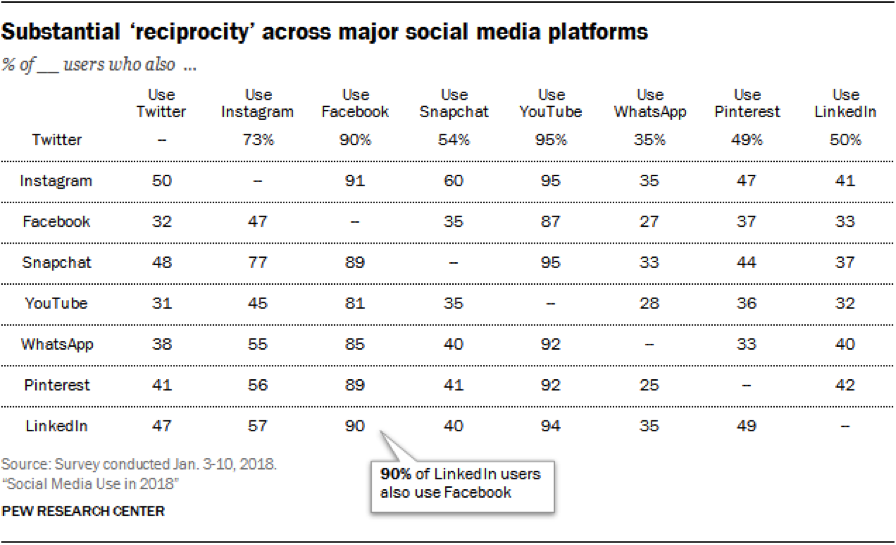
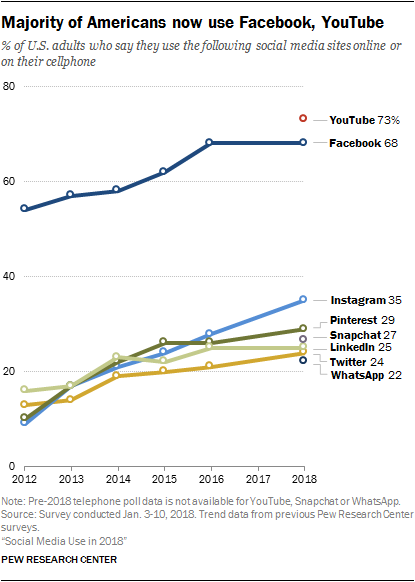
    Your answers to these questions will help you define your business goals and translate them into social media marketing goals. You will then be able to prioritize which social platform to use. If you are new to social media marketing, Facebook is where you should start. If you already have decent engagement on one platform, where should you go next? Most Americans are active on two to three social platforms, so why limit your marketing to just one?

    Screen shot of social media stats

    Which Social Media Platform Is Best for Marketing?

      1. Facebook – With more than 2.27 billion active monthly users, Facebook is definitely your number one choice. Through Facebook Ads Manager, you can target users based on their location, age, gender, level of education, relationship status, job title, interests, purchase behavior, device usage, and so much more. And it doesn’t end there! Facebook allows you to create Custom Audiences to reach current customers or patients. Custom Audiences can be created from the phone numbers or email addresses you’re already collecting, or from Facebook Pixel to target people who have visited your website. To reach new customers, use Lookalike Audiences; these are created from Facebook’s insights about Custom Audiences to target users with similar online behaviors. You may think “My target demographic isn’t on Facebook,” and you could be right, but Facebook Ads Manager takes the guesswork out of it. This platform allows you to create and serve your message to the right user on Facebook, Instagram, or (through the Audience Network) across the web. As stated by Facebook,

    “1 billion+ people see a [Facebook] Audience Network ad each month.”

      1. Instagram – Owned by Facebook, Instagram boasts more than 1 billion monthly active users and has the same advertising options as Facebook. First and foremost, it’s a visual platform, which provides you with an opportunity to showcase your business’s personality. There are a number of free tools you can use to improve your audience’s creative experience.
      2. YouTube – YouTube allows your business to post and share an unlimited amount of video content, which you can then share on social media, send via email, or embed on your website. As a product of Google, there is also an added SEO benefit of having a YouTube channel and producing video content on the platform. With more than 1.8 billion active monthly users worldwide, YouTube has essentially become the second largest search engine behind Google. When it comes to paid advertising on YouTube, it takes the lead over Facebook for video. Facebook charges your account for each 10-second view, while YouTube does not charge you until a user has consumed at least 30 seconds of an ad. According to expandedramblings.com,

    “YouTube overall reaches more 18-34 and 18-49 year-olds than any cable network in the U.S.”

    1. Google My Business – You may not consider Google My Business to be a social network per se, but this free platform offers features that Facebook, Instagram, Twitter, etc. do not. Posts are searchable via keywords, they positively affect your SEO rankings, and they provide an opportunity for backlinks. You can read more about why you should be posting on Google My Business.
    2. LinkedIn – This platform is known as the primary social networking platform for professionals. You can use LinkedIn to update customers on your business, connect with industry partners, and recruit new team members. As a professional network, it is the top choice for B2B social media marketing. According to Forbes, “LinkedIn is one of the best platforms for generating leads and now makes up 46 percent of the social media traffic generated to company websites for B2B firms.”
    3. Pinterest – Similar to Instagram, Pinterest is a visual platform. Pinterest allows your business to show off your product offerings, before-and-after images (great for home improvement, beauty, and cosmetic surgery industries), and curated pin-boards. As you are probably already aware, its audience is primarily female. Pinterest is an oasis for hobbyists, brides and grooms, and day-dreamers in general. Keep this in mind when sharing content. Travel itineraries, suggested packing lists, landscaping ideas, craft projects, and wedding inspiration are the bread and butter of this platform. But don’t think you’re limited to just engaging with your audience. According to Hootsuite, 87 percent of Pinners have made a purchase through the platform.
    4. Twitter – Twitter is a quick-paced platform that’s perfect for sharing the latest trends or your business’s take on current events. Its audience skews somewhat younger but is split pretty evenly between men and women. Your business can participate in a larger conversation by using hashtags for trending topics. These hashtags allow you to reach new potential customers in your industry. Twitter can also be used to monitor positive and negative reactions from existing customers, and you can use the platform to provide additional customer service.

    How Do You Decide Which Social Platforms to Use?

    So, now that you’re familiar with the seven best social platforms for your digital marketing strategy, you should keep these tips in mind. When trying to decide which platform(s) are best for your business, first review your goals and audience, and then make a plan. Then, meet your audience where they are engaging online. Once you have started sharing on one of these platforms, analyze your efforts and look for areas to fine-tune your targeting and content strategy before jumping to another platform. If you’d like more advice on how to use social media platforms to effectively target your ideal clients, start a conversation with our experts by calling (504) 208-3900.

    Whichever type of social media platform you decide to use in your marketing strategy, Search Influence has your back. Our social media experts can work with you to implement a strategy and track the campaign’s performance. Start a conversation with one of our strategists today to make the most of your social media.

    Images:

    Group of people using mobile devices
    Reciprocity Table
    Social Media Line Chart

  • Up Your Social Media Game With This Handy Reference Guide: The When, How, and Where of Social Posting

    Up-Your-Social-Media-Game-With-This-Handy-Reference-Guide - Search Influence
    Another year, another seemingly endless parade of social media posts gone by. If you haven’t jumped on the social marketing bandwagon yet, 2017 is the year to begin because things are continuing to go up and up. Here are some highlights.

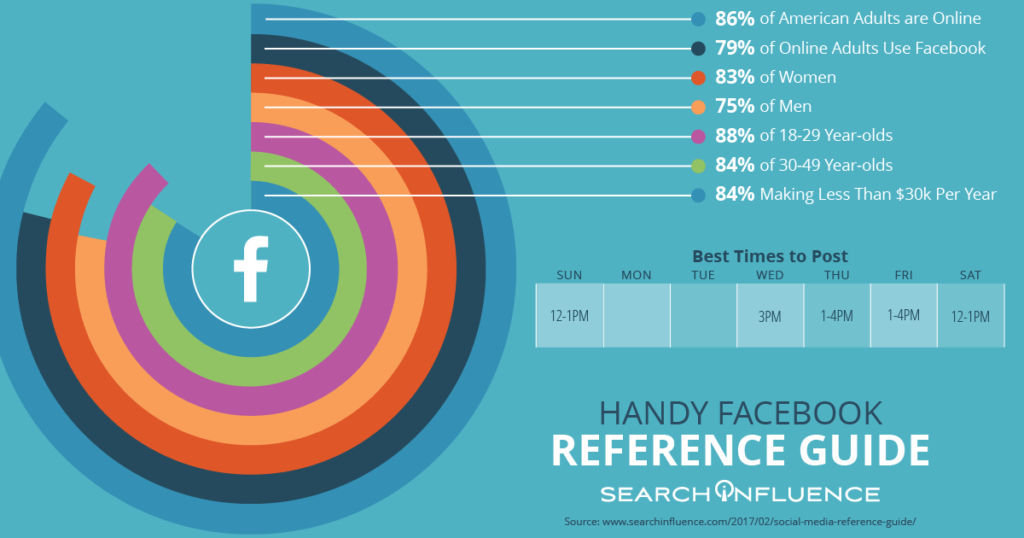
    79% of Online Adults Use Facebook

    The Pew Research Center has done a lot of work tracking the social media usage of American adults. Of all platforms, Facebook has a staggering reach among adults across demographics.

    Handy-Facebook-Reference-Guide - Search Influence

    Of these Facebook users, 76% check in every day and use Facebook as a way to learn about the news, local businesses, trending topics, and more. Facebook is truly on the way to becoming all pervasive, even among adults aged 65 and older.

    57% of Consumers Are Influenced by Online Information

    More than half of internet users surveyed said that they are influenced to think more positively of a business after reading positive reviews or comments about the business online. This means that creating a space for customers to give reviews and interacting with these reviews has tangible benefits and can convert potential customers that are lurking in the background of your social media.

    Social Media Ad Spending Has Hit $35.98 Billion – and Keeps Climbing

    Businesses are learning the advantages of using social media to market to their customers and using that knowledge to their advantage. Social media advertising is becoming the new normal, and we have abundant experience creating campaigns that convert. Contact us if you are ready to get started with paid ad campaigns for your institution or business.

    Sources:

    http://www.pewinternet.org/2016/11/11/social-media-update-2016/

    http://webbiquity.com/social-media-marketing/47-superb-social-media-marketing-stats-and-facts/

    http://www.pewinternet.org/2016/11/11/social-media-update-2016/

    http://coschedule.com/blog/best-times-to-post-on-social-media/

    https://www.emarketer.com/Article/Social-Network-Ad-Spending-Hit-2368-Billion-Worldwide-2015/1012357#sthash.eESedQLL.dpuf

    https://www.emarketer.com/Article/Facebook-Twitter-Will-Take-33-Share-of-US-Digital-Display-Market-by-2017/1012274#sthash.0WToy3rM.dpuf

  • 5 For Friday – War Of The Week’s 5 Kings: Apple, BTC, Google, Pinterest, & IG

    1. It’s Gold, It’s Gold Baby: The New iPad Air, That Is – Business Insider

    Apple is releasing a gold version of the iPad Air with the new launch. With the iPhone 6 being launched next week, the next Apple event in line will be in October. According to MacRumors, the new iPad Air 2 is suspected to include some features similar to the iPhone 5s: fingerprint recognition and an 8MP rear camera.

    Fingers crossed everyone can get gold iPads that match their gold iPhones just in time for the holidays!

    2. KnCMiner Throws A Lasso Around The Moon For Bitcoin – TechCrunch

    Since last December, KnCMiner has made some hard core ASIC systems to move BTC markets shortly after deployment. Now they’ve announced “a $14 million Series A to help build out new mining chips along with hosted mining services.” This ASIC chip upgrade is expected to come on-stream next year.

    As a company that doesn’t actively look for funding, their miners generally sell out immediately at the commence of pre-order periods. In the past, this has allowed them to fund the entire venture independently, but they plan to look for $70 million in funding for future upgrades to a Series B to grow in capacity along with the appreciation of Bitcoin’s price.

    BitcoinOnTheMoonImage

    3. Google Crushing and How to Survive Q4 With Intense Competition – Search Engine Watch

    No, this isn’t about our awesome Google+ Crush infographic (although it should be).  Mary Weinstein of Search Engine Watch posted 4 things that you can do to improve your e-commerce strategy.

    1. Improve Brand Perception using Google Special Offers, Seller Ratings, and Product Ratings.

    2. Make Feed Changes to optimize your AdWords campaigns.

    3. Optimize Big Data by using Google data for Google Shopping campaigns.

    4. Leverage Search Trends, such as the growth of the mobile e-commerce segment to do location targeting.

    4. Pinterest Becomes The Ultimate Creeper – Marketing Land

    This past week, social bookmarking network, Pinterest, sent emails to some of its users congratulating them on upcoming weddings, even some who aren’t actually planning a wedding at the moment. Talk about poor targeting.

    The nature of a site like this is that a lot of people create “dream” and “inspiration” boards without the intention of following through with their pinned desires. So naturally, there are a lot of “dream wedding” boards out there for people who aren’t even remotely close to a wedding day. Luckily, the improperly emailed users mostly found it amusing and took no offense.

    Amusingly enough, Pinterest came out with a funny statement to New York Magazine’s Daily Intelligencer saying that they email these category-specific boards to users every week. This one was meant for those simply interested in wedding content and not just those getting married. They ended the statement with, “We’re sorry we came off like an overbearing mother who is always asking when you’ll find a nice boy or girl.” In my opinion, that’s a great way to turn it around.

    5. Spring 2015 Fashion Week Is Upon Us, You NEED To Follow Some Designer Instagrams – Huffington Post

    You might not be cool enough to intern for a designer or be backstage for all of Fashion Week’s best shows, but you are totally cool enough to know where to look to find your fashion fix.

    Thanks to Huffington Post’s 60 designers to follow, there’s an easy way to keep up with the fashion world. Some of my faves from the list are @zac_posen (designer), @stellabugbee (editorial director of The Cut), and @chloenorgaard (model). One of my personal favorites who didn’t make the list is the fashion photographer Jamie Beck @annstreetstudio.

    InstagramFashionWeekImage

    Image Sources:

    Bitcoin On The Moon

    Instagram Fashion Week

  • Five for Friday – Google Launches Click & Drag for Maps, A New Twitter Record, & Pinterest Gets Even Easier!

    FireworkFiveImageMarketing Land publishes new research on tweet indexing in Google search results. Google Maps rolls out handy “click and drag” update. Why your content needs images to get the attention of engaged readers. The most talked about World Cup game breaks a Twitter record. Big brands begin testing a new way to interact with Pinterest followers.

    1. Twitter A-Listers Are More Likely To Have Their Tweets Indexed In Google Search Results
    -Marketing Land

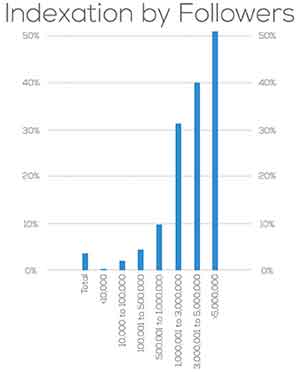
    It’s official: your tweet will never be on Google search.  A study by Stone Temple Consulting reveals that Google will likely only index your Tweets if you have over one million followers.  After analyzing 963 Twitter accounts, the study found that tweets from accounts with a million+ followers were indexed 30% of the time.  As the number of followers increased, so did the indexing percentage.  Although there were a very small percentage of tweets indexed by Google from accounts with fewer than a million followers, the amount is negligible compared to Twitter’s heavy hitters.

    On the bright side, we can all rest assured knowing the wit and wisdom of Kanye West in 40 characters or less is only a quick Google search away.

    IndexationByFollowersImage

    2. Click And Drag To Measure Distance In New Google Maps Update
    -Search Engine Journal

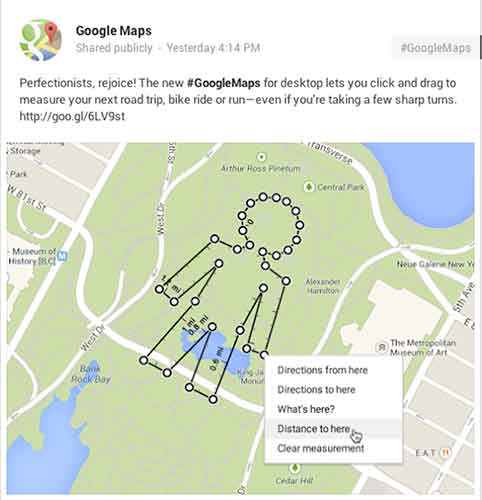
    Do you often take the road less traveled, only to be frustrated by not being able to measure just how far you’ve gone?  Relief has arrived!  Google announced a Google Maps update this week that allows users to click and drag to measure distances.

    Google might call me a perfectionist, but I’ve already thought of five practical applications for the new feature:

    1. Settle the argument whether you or your friend lives closer to your favorite hangout, and see if it’s truly in the middle (shortcuts finally included).

    2. Calculate how long it will actually take to detour from your road trip to see the world’s largest ball of twine.

    3. Get an accurate distance when Google’s driving directions fail because you know Maple Street is closed for repairs but it insists on sending you there anyway.

    4. Enjoy your next run (or bike or leisurely stroll) sans Nike app and still be able to calculate how far you went.

    5. Answer the age-old question: how far would it be if I wanted to walk in the shape of my name through this park?

    GoogleMapsMeasureDistanceImage

    3. Use Images (Not Just Words) to Turn Your Distracted Visitors into Engaged Readers
    -Copyblogger

    It’s an adage as old as time: a picture is worth 1,000 words. Pamela Wilson makes the very relatable analogy of the oversaturation of words in content marketing to an overstimulated child (if you don’t have kids, think about the one throwing a temper tantrum at the park last week).  We are visual people, so why aren’t we incorporating images while producing content online more often?

    Her tips vary from basic (remember to actually use images and not just words) to creative and insightful (doctor up a purchased stock photo to make it more unique).  Much like the sight of an image itself, lost in a sea of text, the blog is refreshing in its take on reaching your audience through content production.

    4. Germany’s Stunning World Cup Win Over Brazil Is The Most-Tweeted Sports Game Ever
    -TechCrunch

    The spirit of Brazil’s soccer team wasn’t the only thing broken after Tuesday’s World Cup match against Germany; the game was the subject of 35.6 million tweets, breaking the record for the most-discussed single sports game on Twitter. At the peak of the Twitter fury was Sami Khedira’s goal against Brazil to bring the score to 5-0 Germany, which resulted in 580,166 tweets per second.

    The record replaces this year’s Super Bowl, which garnered 24.9 million tweets.

    GermanyWorldCupImage

    5. Pinterest Makes It Easier to Follow E-commerce Brands
    -Adweek

    Pinterest has been busy working towards winning the title “Big Brand’s Best Friend.”  Following the release of its API in November, they’ve now tweaked the “follow” button to make it easier for consumers to connect with eCommerce sites.

    Currently being tested by Wayfair, Whole Foods, ModCloth, and GoPro, the new “follow” feature improves user experience by pulling in the company’s latest pins in a pop-up window instead of taking the shopper off-site.

    As a lover of Pinterest, I say bring it on!  Anything that lets me connect with my favorite brands quicker and more easily is a winner in my book.

  • New Preview Will Have You Pinterested

    On Tuesday, Pinterest for Business’ Jason Costa announced the rollout of a new follow button that will give users a preview of what it will be like to follow the business.

    Tell Me How It Works

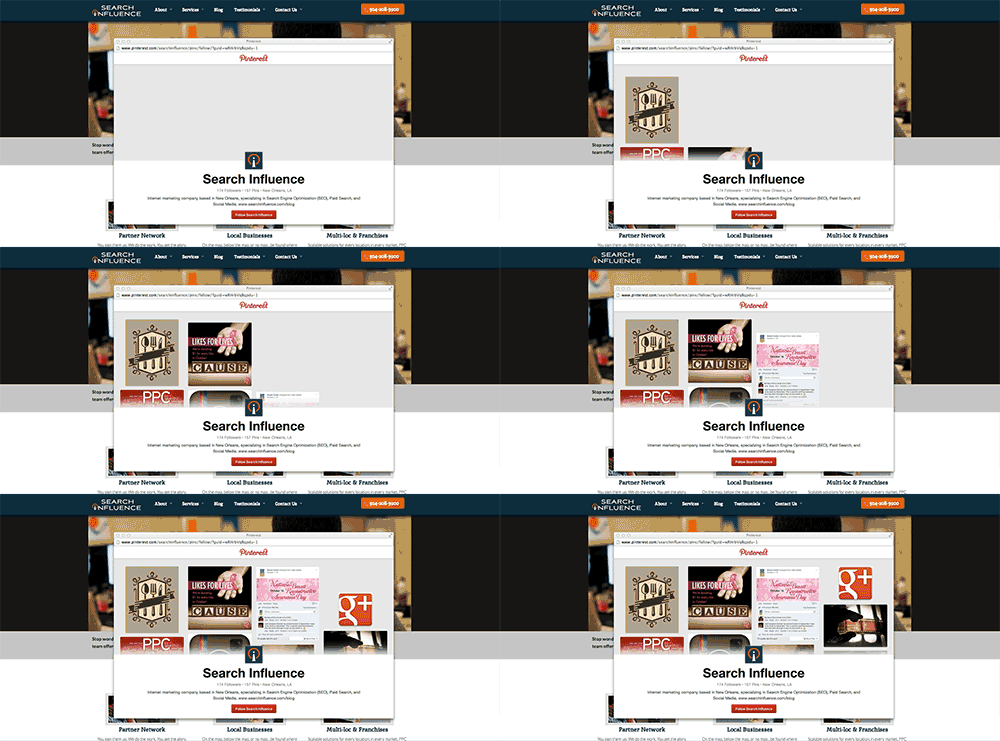
    The new button will trigger a pop up window that will include a preview of the most recent pins along with a confirmation button to follow that business. The exciting thing about the pop up window, Jason says, is that “ your visitors won’t ever have to leave your website to follow you.”

    Pinterest Follow Button Update Preview Image

    Costa says, “If you have the original Follow button in place, you won’t have to do anything to get the new version—it’ll just work!” Just like the old follow button, this button can be added to your site with just a couple of lines of code.

    Tell Me How It Will Look

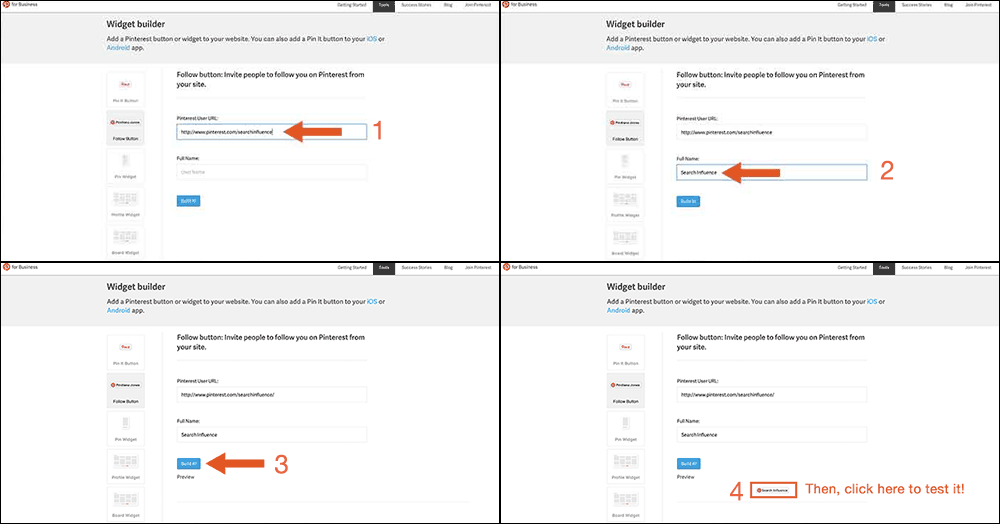
    Want to test out the new widget for your business’ Pinterest page? Lucky for you, you can! Just go to Pinterest for Business. Then click on “Tools” and “Widget Builder” in the menu. From there you can select the “Follow Button” on the left, and type in your Pinterest User URL along with your full user name and then click “Build it!” Now see for yourself how awesome this update really is.

    Test Pinterest Widget Image

    Let the Experts Weigh In

    Martin Beck from Marketing Land believes Pinterest made a smart update, “which is working to turn its popular image-based social network into a money maker.” UX experts like Sarah Horton from UX Magazine might say that this animation necessitates ”keyboard-focus management for custom controls.” However, because the image animation comes to an end on its own, I would argue that controls are not necessary for this animation. If anything, it should just get the viewers excited to see more pins!

  • Five for Friday – Google Does the World Cup, Pinterest as the Next Big Search Engine, and Facebook Playing Catch Up!

    FiveForFridayJuneGoogle revamps its algorithm, and its Doodles. Businesses are finding their audience on Pinterest more than ever before. Meanwhile, Facebook finally finds a way to mimic Snapchat, but with a catch.

    1. World Cup Google Doodles – Google

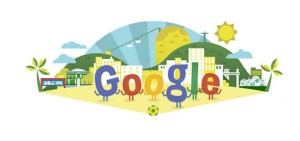
    If you haven’t noticed Google’s Doodles this week, here is a recap of the clever, funny, and sometimes interactive animations created by to promote the FIFA World Cup and the many countries trying for the title. Each Doodle changes several times during the day depending on the countries currently matched up. If you click on the Doodle you will also be taken to a live scoreboard of the current game. GO USA!

    GoogleDoodle

    2. PayDay Loan 3.0 Algorithm Update – Search Engine Land

    In other Google news, Matt Cutts has announced the rollout of another update to the ever-changing search engine algorithm that determines website rankings on the results page. This update is primarily focused on “very spammy queries,” which is an extension of the PayDay 2.0 update released couple of weeks ago. The types of queries and links that will be affected are pornography, payday loans, casinos, Viagra, and other similar topics most usually associated with “spammy” links and queries. It’s another great move by Google, an effort to clean up their search results and provide users with only the most relevant, and non-spam websites to choose from.

    3. Four Pinterest Statistic you Need to Know – Search Engine Watch

    As for any business or marketer, you should always know both where your customers or potential customers are, and how they are interacting with you online. Pinterest, one of the fastest growing and most influential sharing sites currently on the web, could give your business just the right insight about their target audiences. You should understand the following statistics before starting a Pinterest campaign:

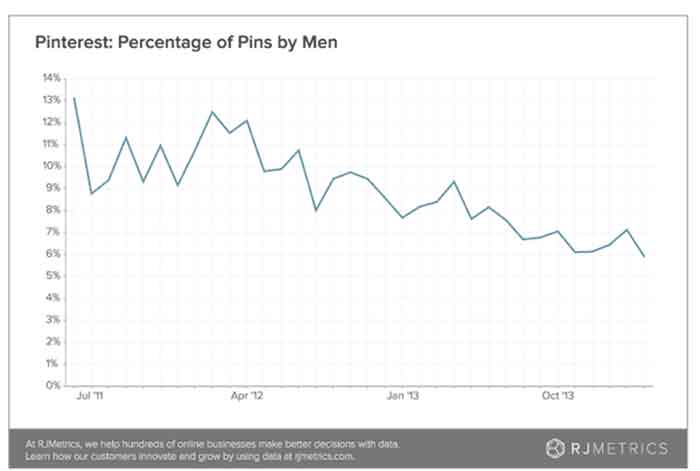
    1.  Women are the primary Pinterest users, and they out-pin men every day by far.
    2.  What are these women pinning?
      -DIY projects, home decor, weddings, recipes, beauty, fashion, travel, fitness, photography, and many other topics.
    3. Who is your competition on Pinterest?
      -Etsy, Urban Outfitters, West Elm, Brides.com., and Poketo among hundreds of other businesses.
    4. When are these women pinning?
      -Between 4p.m. and 10p.m.

    PinterestStats

    4. Bing Attempts to Predict the World Cup – Search Engine Land

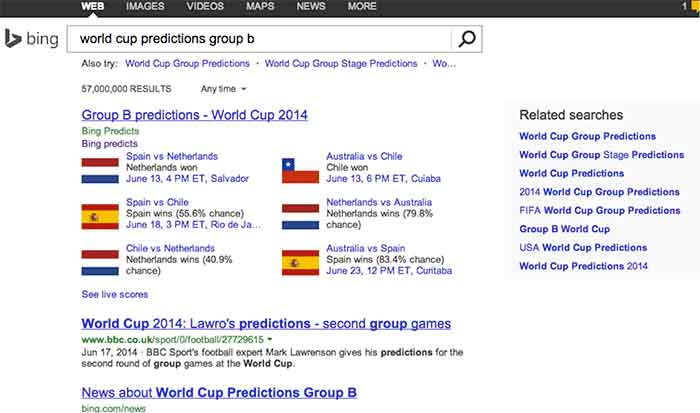
    Using their prediction technology (a combination of team stats, weather forecasts, player line up, and homefield advantage among other things) Bing is attempting to predict the FFIA World Cup! Although it is not a perfect system by any means, Bing is getting a lot of attention for their prediction technology, which certainly is the end goal. If you search for something along the lines of “world cup predictions group b” you can see for yourself how Bing thinks your favorite team will fare.

    BingWorldCupPredictions

    5. Facebook Launches Slingshot App – ABC News

    Facebook has launched the anticipated Slingshot app, which is very similar to the already widely popular SnapChat application. The biggest difference between the two image sharing apps is that there is a “pay to play” incentive to Slingshot. In order to the see the image that someone shared with you, you must first share an image back. The reason behind this feature is so that everyone becomes an active creator of content and images instead of just viewing from the sidelines. It is a clever attempt to force engagement of its users and incentivize overall creativity. As a direct challenger of SnapChat, it will be interesting to see how Slingshot fares in this highly competitive genre of apps.

    slingshot

  • Is Anti-Social Media On the Rise?

    This year will make a decade since Facebook was launched and social media usage has skyrocketed, but is social media turning us anti-social? Parents who were unhappy about their children’s texting habits in the early 2000’s would be appalled by today’s society of Instagraming, Tweeting, FourSquaring and Pinteresting fiends across all age ranges. However, the pendulum may have swung too far, and it seems that parents aren’t the only group fed up with obsessive social media behavior.

    There are many signs that we are entering an age of ANTI-social media.

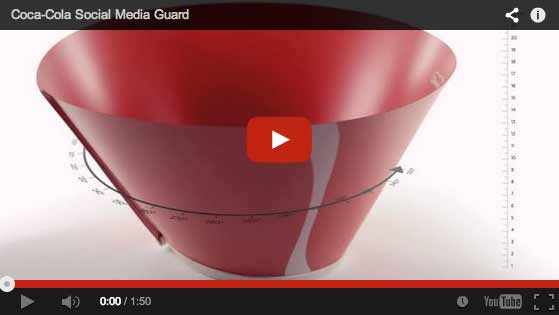
    SocialMediaGuardVideo

    Many corporations and industry leaders have voiced their advocacy for more human interaction through traditional media. Coca-Cola invented the Social Media Guard in the sarcastic commercial pictured above, which blocks people from the ability to see their phones.

    Dentyne used print and commercials to encourage more “face time” by comparing human interaction with social media actions in an ad.

    DentyneAdClip

    Professionals working within the social media industry may even capitalize off of the anti-social tendencies of those who are active online. Here are a couple of examples of how.

    Cloak

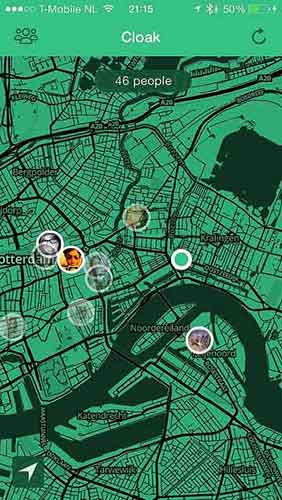
    Facebook, Twitter, Instagram and FourSquare aid this new mobile application in locating where you are. Cloak asks you to login to one of your social media accounts, which pinpoints where you are on a map, along with the locations of other friends who are also logged into Cloak.

    The app is advertised as a way to avoid people that you do not want to run into. You can set alerts that warn you when certain users come into a selected radius of you. Couldn’t this also be used as a way to stalk people? Guess that wasn’t a catchy advertising pitch…

    CloakAppScreen

    Self Control

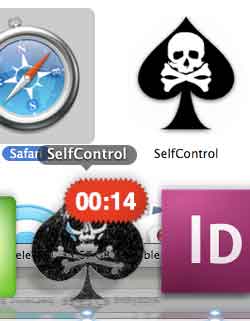
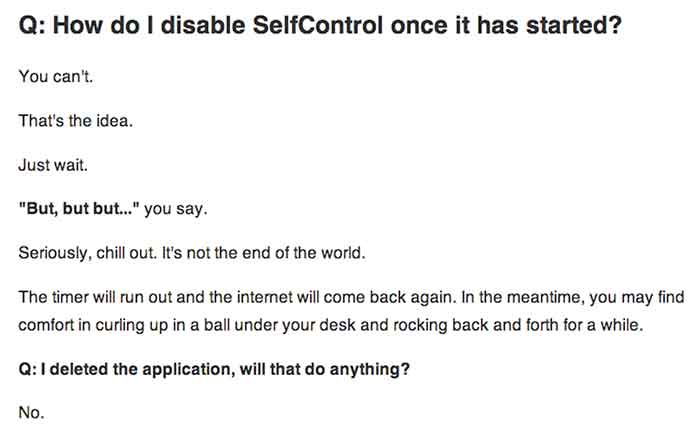
    This app allows you to choose time periods when you do not want the ability to access specified apps or programs at all. This could be used to stop yourself from checking your email, playing games, checking Facebook, etc.  A screenshot of the app is below, followed by their honest answer on how to stop the app when it is activated. The interest in this app shows that people want to be detached from their online world every once in a while but might need a little help to disconnect.

    SelfControlApp

    HowDisableSelfControl

    This discussion will continue on for years, but has social media gone too far? Check out the signs.

  • Social Media, You Don’t Have To Be A Wizard

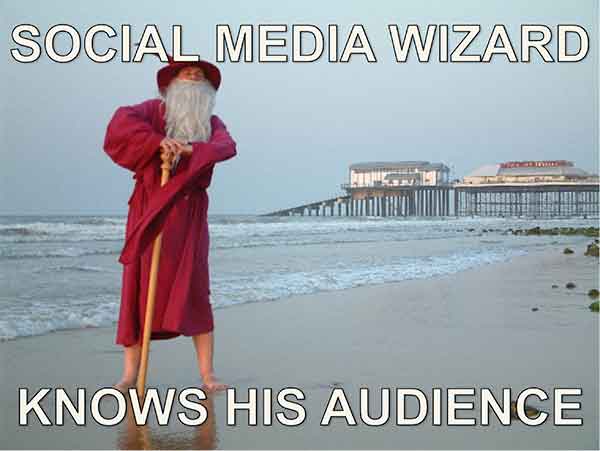
    Your Audience

    You know your target demographic. If you don’t, social media should be the last thing on your mind. Properly addressing your demo group is essential in establishing a relationship with your followers on any social media platform.

    SocialMediaWizard

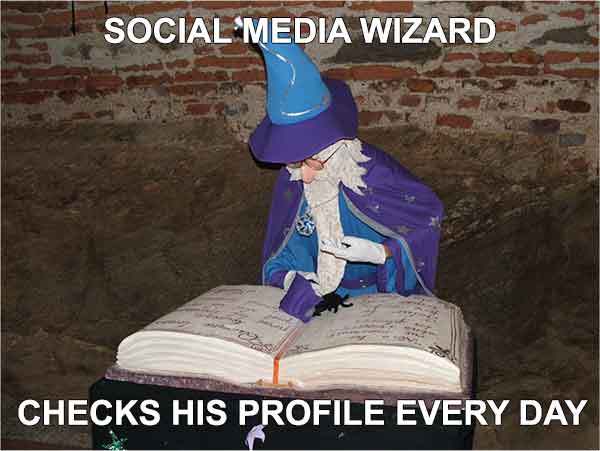
    Social Media Optimization (SMO) is used to directly target potential customers with relevant information, and eventually provide them with opportunities and incentives to become active customers. Proper SMO should also give current customers incentive to provide positive feedback so that others view your brand as trustworthy.

    SocialMediaWizard02

    Your Message

    For professional organizations, like law firms, business consultants, or industrial suppliers, news and advice are likely the fastest way to become a trusted voice amongst your demographic. Provide information your clients can use, “Tips to protect your rights,” or “Break through in industrial oven designs.” Be a voice of insight at the forefront of your field.

    If your target is the general public you need to be both friendly and local. Plus, direct social media interaction is key. If you post about an upcoming event in town, keep an eye out for responses on your Facebook feed or from your Twitter followers. Be aware of comment chains on your feed; respond to comments in an upbeat and positive way. Generally resist the urge to comment outside of your own page in regard to individuals (it can be viewed as overreaching or unprofessional).

    SocialMediaWizard03

    I know it sounds obvious but social media should be social and light hearted, so any sales efforts should be low pressure if they occur at all. A more effective strategy is to create interesting internal blogs, (then spread them through social media) so that you increase traffic to your page, which increases the chances of a conversion. You may not go viral but you can still reach your audience.