Tag: Pinterest

  • 5 For Friday – Twitter, Facebook, and Pinterest, Oh My!

    5RD

    1) Twitter Profile Redesign is now available to everyone!

    -Twitter

    Do you have the new Twitter layout for your profile? If not, you may be behind the times. Twitter recently updated their profiles with a new, user friendly look. This design is pretty similar to what many people are used to seeing on Google+ and Facebook. They are in the process of rolling out the profile redesign to all Twitter users.


    2) Are Your Fans Interacting with Your Brand on Social Media?

    – Mashable

    The look of your graphics and images supporting your social media updates carry a lot of weight. If they’re not appealing to your followers, they will fall flat when it comes to engagement. Mashable shares some insight on the various types of images that can boost interaction amongst your fans.


    3) Google Offers New Ways to Market Apps in Search, Display, and YouTube

    – Marketing Land

    Many app creators struggle to get their product noticed,  downloaded, and used by consumers. Google is now offering various unique ways to market them in AdWords via search, display, and YouTube. Read this article to learn details about all of the exciting new features available to app marketers.


    SocialMediaPhone

    4) Facebook Mobile is Killing it! Is your brand on Facebook Yet?

    – Bloomberg

    If your brand is not spending at least some of its marketing dollars on the social media giant, you are probably missing out on a major consumer base. This article from Bloomberg tells us that nearly half of the world’s internet population is logging into their profiles, at least, once a month. This mean almost a billion people a month are logging into the mobile app alone!

    5) Pinterest Announces the Launch of a Visual Search Engine

    – Buzzfeed

    Pinterest is launching a new “Guided Search” for its mobile users. It takes user’s broad search and prompts them to narrow it down with pictures in related sub categories. This very informative article from Buzzfeed explains, in detail, the specifics of Pinterest’s new guided search.


  • Social Media And Viral Content: Tips From Matt Siltala

    If you haven’t heard of Matt Siltala, get your butt to Google right now and start searching. As an online search industry leader and president of Avalaunch Media, Matt came to New Orleans this week to present at Pubcon, a social media and optimization conference and expo featuring multiple days of multiple-track sessions, leading-edge keynotes, and an all-day intensive Pubcon Masters Group training program.

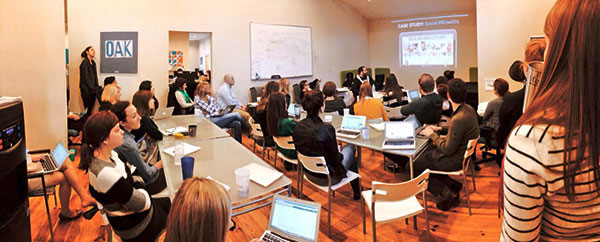
    Prior to wowing the crowds at Pubcon, Matt was kind enough to visit Search Influence and give us the skinny on social media, content, and how to make things go viral. His presentation was amazing, informative, humorous, and vastly helpful in terms of SEO. So, I’ve put together some key takeaways businesses can and should focus on in order to promote their brands and make a name for themselves online.
    MattSiltala-01

    Find Your Target Market By Talking To The Right People

    When you’re trying to reach a target market, knowing who to talk to in order to get results within that market is most important. When you talk to someone with power, authority, and a willingness to help, there is a higher probability of getting your brand noticed and increasing awareness among your target market.

    Pro Tip: If you know who you want to target, use Followerwonk to compare, analyze, track, and group users. That way, you know exactly who you’re reaching, and what to say in order to entice them.

    What Makes Good Content?

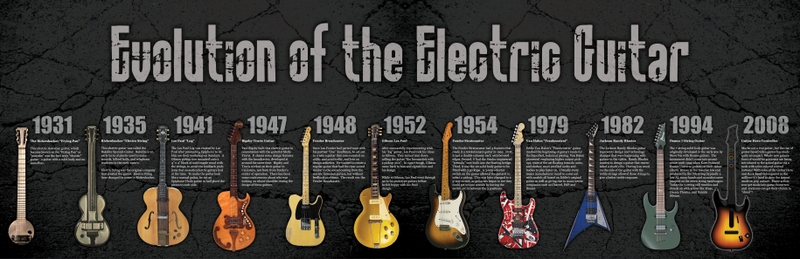
    Oddly enough, controversy increases viewers and makes for some great content. Think about it. When do people get the most involved in content? During a debate! Any topic people disagree on will get more viewers. This is a theory that withstands the test of time. For example: Republican vs. Democrat, Mac vs. PC, Coke vs. Pepsi, and Matt’s popular Evolution of the Electric Guitar infographic, which includes a Guitar Hero controller, featured below.
    music history timeline evolution infographics electric guitars 3660x1186 wallpaper_www.wall321.com_28

    Build Up Your Instagram Following With Deals

    bdb414e7b829806b2e3cdd921638042f

    With millions of users posting pictures every day, Instagram has exploded in terms of social media marketing and brand promotion. Boutiques, restaurants, and more post photos of products, specials, daily deals, and location information daily, giving viewers a reason to follow them and stay consistently engaged in the brand. By monitoring hashtags and paying attention to channels, businesses will learn whom to target and how to peak people’s interests and gain followers.

    Pro Tip: Show products in context to help viewers visualize a final product. Whether that is a meal, an outfit, or a piece of furniture, demonstrating what the product will look like in conjunction with other products peaks interest and makes things easier to relate to.

    Processes On Pinterest

    More frequently, businesses are turning to Pinterest to gain a customer base. In fact, the “Pin It” action has gained more popularity than the Facebook “Like” and Twitter’s “Retweet.” Checklists, how-tos, recipes, and detailed processes are hugely popular on Pinterest because they get people thinking and and keep their interest longer than a simple image.

    Pro Tip: In terms of repinning vs creating new pins, employ 4:1 ratio. Remember that it’s not just about repinning for content, you repin to network. And make sure you get yourself noticed by commenting regularly.

    Focus On Visuals On Facebook And Twitter

    As with all other forms of social media, building a following and growing your popularity is key to brand success on both Facebook and Twitter. So, what is the key to getting lots of retweets, likes, shares, and comments? Images! Think about it, what is the most retweeted post of all time? Ellen Degeneres’ Oscar Tweet! Only three days after the Oscars the tweet had a record 3.2 million retweets. Now that’s a powerful image.

    Pro Tip: Identify influencers relevant to your industry and interact with them as much as possible on social media to grow your online presence and brand popularity.

    I could go on and on about the wealth of knowledge Matt dispelled on the Search Influence family, but rather than rambling I’ll leave you with a few of his final tips and tricks:

    1. Pay attention to Linkedin groups. If you get in contact with the owner of a relevant group to your industry they can help you tremendously. Not only can they contact a large group of people easily via email, the group they’re contacting will be the exact target market you need for shares and online visibility.

    2. Sign up for alerts from Help A Reporter Out. You can find experts, get free publicity, and gain tons of helpful contacts.

    3. The gift category in Pinterest is wildly popular. By using a dollar sign ($) in your post description, your post will automatically show up there.

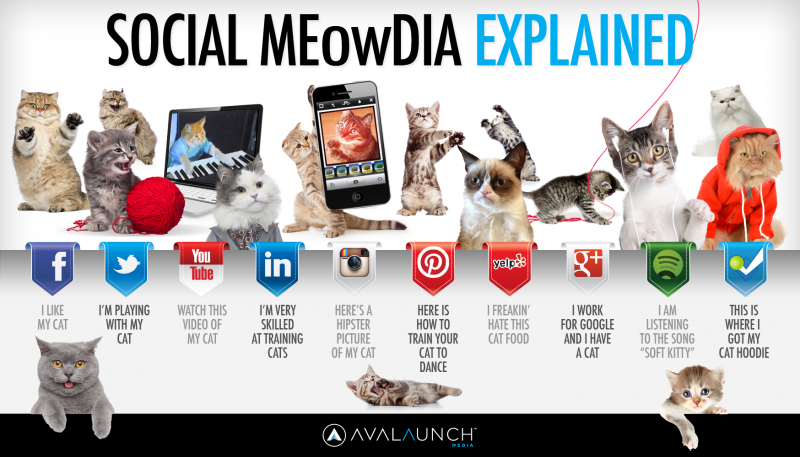
    4. Find a way to repurpose everything. Much like Matt’s wildly successful Social Meowdia Explained infographic (featured below), post, images, content, and more can be repurposed to gain popularity in a variety of forms. For example: an infographic can be turned into a blog, memes, content, etc.
    Social_Media_Explained4-800x457

    1. Remember that everything you do contributes to authorship. Every post you write, share, retweet, favorite, etc has your brand name attached to it. Everything you do online grows your authorship, so take advantage of that and be creative in what you post.

    For more information on Matt Siltala, check him out at Pubcon or visit his website! And for any questions on the information above, feel free to ask in the comments!


  • 14 Social Media Mistakes to Avoid in 2014

    We’ve all seen them… misfired tweets, Facebook fails, and huge national brands that just don’t get it. Last year we recapped the 12 worst social media mistakes of 2012, but brands just keep making the same errors over and over again. For 2014 we’re going to be proactive. Here are 14 mistakes to avoid this year, so that your brand isn’t ridiculed by friends, fans, followers, or the general public:

    1) Avoid relating ANY holiday to your brand:

    Unless you are a major fireworks distributor or 1-800-Flowers, holidays are NOT about you. Don’t force it. Even if you think your message fits in flawlessly with the holiday, chances are someone will take offense. Don’t believe me? Google MLK Day Social Media for proof.

    2) Not understanding your company’s image

    Banking giant J.P. Morgan decided to host a Twitter Q&A session utilizing the hashtag #AskJPM in November. Although they received thousands of amazing questions such as, “As a young sociopath, how can I succeed in Finance? #AskJPM” and “What’s it like working with Mexican drug cartels? Do they tip? #AskJPM”, the company quickly realized that Twitter was not the appropriate medium for a company discussion.

    3) Using trending hashtags without first checking their meaning

    Utilizing hashtags is a great way to get more eyes on your tweets, but don’t hijack trending tags without first researching the message behind them. Baked goods company Entenmann’s faced backlash after utilizing a trending hashtag without realizing that #notguilty referred to the verdict in the Casey Anthony trial.

    4) Getting too political

    This one practically speaks for itself. No one wants to hear outspoken thoughts about gay marriage, political candidates, or religion from a brand. Italian pasta company Barilla came under fire last year after stating that they would not feature gay families in any ads. After thousands of people tweeted at them with the hashtag #boicottabarilla, they finally issued a semi-apology (in Italian) from their brand account. The lesson here? Don’t get your brand involved in political affairs, and respond quickly if you find your company in a similar situation. Most users prefer their pasta without a side of prejudice.

    5) Creating fake controversies

    Real time marketing is a hot buzzword, but faking a crisis is not the way to achieve success. Brands like Chipotle and JC Penney have faked problems on their own social media networks to achieve attention. Effective real time social media campaigns react to events as they happen, not create unnecessary controversy.

    6) Responding generically to complaints

    If your company does something to upset a large amount of fans, you should not reply to them all with the same generic message. Either issue a blanket public apology to all of your fans, or personalize each response.

    7) Not responding to negative feedback or customer questions

    Not responding at all to complaints is also a bad policy. A study from Maritz Research and evolve24 found that over 50% of respondents expected a reply from a company regarding public complaints on Twitter. Deleting or ignoring complaints is not the way to approach social media management. Furthermore, if you engage with an unhappy customer, you should not stop answering them after one tweet.

    8) Beginning tweets with “@” or “.@”

    It might seem like beginning tweets with an “@” is Twitter 101, but tons of brands still make this mistake all the time. If you begin a tweet with a user’s handle, only that user and their followers can see it. Some companies have taken the lazy approach to combatting this problem, by adding a period before the @ symbol. Don’t do this! It looks sloppy, and if you’re getting paid to write tweets, you should be thinking about ways to word your response differently.

    9) Using #too #many #hashtags #on #Instagram

    This one is fairly self explanatory. Hashtags can lead to natural discovery, or can be utilized to chime in on a trend or theme (such as #TBT). Using too many hashtags in one post not only looks silly, but makes it extremely difficult to read.

    10) Posting photos on Pinterest that don’t link back to your site

    Pinterest can be a great platform for both small and large businesses to get their products noticed. However, pinning products without a link back to your site is a waste of everyone’s time! You want to eliminate any hassle or additional steps in the sales funnel so that someone who finds your amazing product can buy it on the spot. Pin directly from your website and see your sales soar.

    11) Leaving the URL in your Facebook post

    Facebook’s link preview feature is a great way to show off your links in a visually appealing and enticing way that encourages customers to click through. However, once that preview generates, delete the original link! This will clarify your posts, and allow readers to easily figure out where you want them to click.

    12) Avoid using click bait to get users to read your posts

    Which websites are exploiting Upworthy-style click bait to get viewers to read and share? The answer may surprise you.

    13) Cross posting content from Facebook to Twitter (and vice versa)

    Some companies save time by cross posting their Facebook posts to Twitter. Although this is occasionally fine, many Facebook posts are simply too long for Twitter’s 140 characters. These are shortened by including a fb.com link in the post, which defeats the purpose of the tweet. Tailor your message for each specific social media channel.

    And finally…

    14) Handing the keys to your channels to someone who isn’t responsible

    This should go without saying, but the vast majority of brand social media fails are due to someone accidentally tweeting or posting from the wrong account. This is not a job for an unpaid intern. Make sure that whoever is running your brand’s accounts is trustworthy and reliable.

  • Make Your Infographics Count

    Infographics have been around for years. We have seen them in cave paintings and hieroglyphics. William Playfair was credited with the first area chart and pie chart in his 1790 book, The Commercial and Political Atlas. Over the years, we have pushed forward the design of learning concepts with the aid of images. This work has lead us to what we refer today as infographics.

    If you haven’t been on Pinterest or read any major newspaper, you may be unfamiliar with the concept. An infographic is the process of using visual data to represent a complex idea in an easier to digest medium for the masses. You can’t get your PhD through an infographic, but they are handy at teaching you a quick synopsis of a subject.

    The strength in infographics is found by following a few basic concepts:

    Bring Multiple Ideas Together

    The magic of an infographic is its ability to take a wide amount of information and consolidate it into a story that flows and ebbs. The beauty is in the point where all these ideas join to create a new message or way of looking at all those ideas together.

    Be Understandable

    When presenting new ideas and concepts, it is important that the viewer understands what the message is. Try not to get the viewer confused or use terminology that is way above their knowledge based. It is good to use this jargon, but remember to explain it in a way that your 80-year old grand pap may comprehend.

    Less is More

    When designing or writing for an infographic, it is important to remember not to bombard the viewer with copious amounts of data and figures. The idea is to keep the content flowing in a smooth way that is easy to understand and recall. Designers do this by narrowing the focus of an infographic into one main concept or story to gently guide the viewer into learning the message.

    Be Welcoming

    It is important to never be intimidating when designing an infographic. The message should never appear overbearing or intimidating. The overall goal of infographics is to be read and spread.

    Eye Catching

    The overall design of the infographic needs to be alluring for the viewer to want to read it. There is no sense in spending all that time researching, writing, and designing only to have viewers not be interested in what you have to say. It is important to make sure there is a visual hook that will pique the interest of any viewer.

    All images in this post of the original work of Search Influence. Please give attribution if you should decide to share.


  • Tips for Optimizing Pinterest boards for Small Businesses

    pinterest logoEver since the launch of Pinterest in March 2010, marketers and small businesses are leveraging the site to drive traffic and sales. There are some old school business leaders who are still anti-social media, but they are missing out on a big opportunity if they ignore Pinterest and other platforms. The great thing about using Pinterest for your business is the potential for your posts to rank in the search results. Check out one of our previous blog posts for more details. Below are some simple tips to optimize your Pinterest boards.
    1. Be creative with your board.

    Don’t be too self-promotional. Not only do you want to showcase the goods and services you provide, you want to make sure you are showing the inspiration behind it and promoting the lifestyle of your brand. Users will be turned off if you are only trying to get them to buy your products. Pinterest and any social media are about creating a conversation with your users and getting them engaged with what you do. If you are a fashion designer, post images of fabrics, places, and objects that inspire you. You can always reach out to a fan of your product that has a lot of clout and get them to be a guest pinner. The more creative you are the more you will gain engaged followers.

    2. Check the linking of your images and provide a good description for it.

    The most frustrating thing about Pinterest is when the pins are linked to a homepage or non-existent page on a website. Nothing is worse than having a missed transaction because your customer could not directly find the product on your site. If you pin something from the site, make sure it goes directly to the page where they can buy the product. Descriptions for your pins should be informative and interesting, but not too long or too short. You could probably do a little keyword research with the free Google keyword tool to find high value phrases for your image.

    3. Utilize the location-based pins.

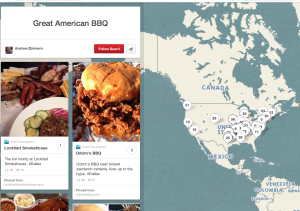
    With the recent launch of Pinterest’s location-based pins, your board can include a map of where your products are and also allow you to collaborate with other businesses. The location-based pins allow you to input your name, address, and phone number. If your product is available at several retailers, this would be a perfect opportunity to use this feature. For example, Lululemon created this Om Finder app that allows you to look for yoga studios in your area and to also get tips. This board would be perfect for location-based pins so users can physically find a specific location. Below is an example of Andrew Zimmerman’s board utilizing the place pins for best BBQ places in the US.

    location-based-pins


    Start applying these tips today to get the most out of your Pinterest page. Happy Pinning!


  • 4 Tips to Writing Attention-Grabbing Social Media Posts

    CONTENT CONTENT CONTENT

    We are bombarded by content and information everyday. The average person reads a couple thousand words and sees about 247 images each day. Something interesting from a marketing standpoint: we see anywhere from 3,000-20,000 marketing messages every day! All of these words and images are pieces of informative content that we have to internally process.

    I mean seriously think about it…

    TEXTS                                                      PHONE CALLS
    EMAILS                                                   RADIO
    WEBSITES                                             TELEVISION
    TWEETS                                                  MENUS
    FACEBOOK POSTS                          BLOGS
    SEARCH RESULTS                              STREET SIGNS
    INFOGRAPHICS                                  BOOKS
    GOOGLE+ POSTS                              MAGAZINES
    PINS ON PINTEREST                         NEWSPAPERS
    PRESENTATIONS                                FOOD LABELS
    BILLBOARDS                                         MAIL

    Whew—it’s exhausting just thinking about it! And I guarantee there is more than what I listed! Most of it probably goes in one ear and out the other, so, as marketers, we only have a split second to catch the attention of someone who is already being bombarded by information. Here’s a list of 4 types of social media posts that are guaranteed to catch the eye of your clients’ audience.

    1. Anything that drives interaction
    Any post that encourages a user to interact with a page usually works well with social media marketing. By interact I mean liking a post, sharing it, commenting, retweeting, +1, pinning on Pinterest, etc. If you can do this organically (without forcing it), then it’s even better!

    Tri County Equipment Facebook Post

    2. Anything with eye-appeal
    We are a very visual culture (why do you think the iPhone took off like it did?)! If you can integrate words into a visual image that presents the information is a well-designed way, then you’re golden! I’m talking about the infographic, people. There are good and bad infographics out there. But a good rule of thumb is don’t over load it with information, and make sure what you are presenting is relevant to your client’s industry. This example below was pinned 508 times and liked 76 times on Pinterest.

    Infographic About Zimbabwe

    3. Anything That Links the Brand to Current Events
    If you can find a way to tie the brand into something that is relevant to current events in the news and/or pop-culture world, you need to post about it! People often try too hard with this one, so please don’t force it! The brand needs to truly be relevant for this to happen organically.

    Volkswagen Google+ Post for Shark Week 2013

    4. Anything That Stirs An Emotional Connection
    We are an emotional species, and significant life events can really change our lives. If you can stir an emotional feeling in someone, they are likely to be more drawn to the brand. Note: This doesn’t always have to be the warm and fuzzy feelings! If you want to touch on the controversial subjects, there is an audience for that as well!

    Susan G Komen Facebook Post

     Now get out there and create some engaging content!

  • Easy Ways to Improve Your Pinterest Descriptions

    Pinterest 2

    By now, we should all know that Pinterest is a great tool for businesses. But, since Pinterest is so visually centered, what you may not have thought about is the importance of your written content.

    After you have your About section properly filled out and you’ve established your boards, it’s time to direct your attention to your pin descriptions. Some of the biggest mistakes that you can make are not spending enough time writing descriptions and not editing repins.

    Whatever industry you may be in, it’s never a good idea to repin content that has a description written in the first person. Since there’s no need for a stranger to be essentially speaking on behalf of you or your organization, take advantage of the description, and use it as an opportunity to appeal to the reader.

    Instead of keeping an existing description like, “Everyone in my family loved this recipe,” it would be more effective to draw your reader in with descriptive language. Your audience is more likely to click on a pin with a description like, “This unique DIY skirt is both casual and comfy. All you need is a yard of fabric, elastic, thread, and 30 minutes to spare, and you’ve got a new addition to your wardrobe!”

    You can also keep it short and sweet. If your descriptions aren’t complete sentences, pick a format and stick to it to keep your pins looking neat and uniform. If, for example, you choose to use title case, make sure that you apply that format to your other descriptions. As pin descriptions, “Sweet Southern Iced Tea” and “Quick and Easy Garlic Dinner Rolls” look better than, “Sweet southern iced tea.” and “Quick & Easy garlic dinner rolls.”

    pinterest

    In short…

    Take time to make sure that your pin descriptions are saying what you want them to say and not what someone 5 pins ago might have said.

    Use descriptive language that will make your reader want to come back to you or your organization for quality pins.

    Clean up your text so that it is aesthetically pleasing to the reader and they can quickly scan for the information that they want.

  • Company Profile: Culture Shock LLC

    One of the reasons I love New Orleans is that living local is part of everyday life. People love shopping and eating at local businesses. Thankfully, you won’t find many chains in the New Orleans zip codes (you need to go out to Metairie for that)! My friend Christine Alex recently started a jewelry business that imports handmade pieces from several countries across the world. This Q&A profiles her company, touching on why it totally fits in with the local New Orleans vibe.


    New Orleans Local Business


    How did you come up with the idea for your business?
    I came up with the idea for Culture Shock when I was traveling abroad. I thought it was cool to bring back jewelry instead of postcards to my friends and family. The jewelry became a hit and eventually more and more people began giving me money and asking me to bring items back for them.  That’s when I thought it would be really neat for people to be able to buy handmade items from all over the world without having to leave their couch. Culture Shock became an LLC in October 2012 and officially launched on January 18, 2013.

    What is the goal/vision for your business?
    When I studied abroad, I gained a deep level of respect for other cultures and as a result, appreciated my own culture so much more. My goal is to educate my customers about other cultures while selling them a piece of someone else’s culture to wear.

    What products do you offer?
    I sell jewelry that I hand picked from all over the world. The biggest countries that I receive my inventory from are Nicaragua, India, and Nigeria. Aside from offering a selection of imported items, I also began creating my own ethnic inspired items. In addition, as a way of honoring my own Creole culture, I created an apparel line under Culture Shock called Naturally Creole. This line offers a selection of Creole-themed apparel and accessories.

    Jewelry & Accessories


    Do you have an online presence? Website, Facebook, Twitter, Pinterest?
    Yes, I have a website, Facebook, Twitter, Pinterest, and Instagram. Facebook and Instagram receive the most engagement from followers. I have noticed usually the same people follow us across social media platforms.

    Why do you use Facebook? What is the benefit that it is bringing to your business?
    I use Facebook because it’s where my customers are, and I want to develop a relationship with them. Facebook allows my customers to understand the personality of my brand and learn more about my company and the products that I offer.

    On the content she posts to her platforms:
    I try to post content related to the countries that I import my items from. I post photos, videos, and open-ended questions. Pictures usually receive the most activity from our followers. On Pinterest, I pin items from our website.

    Do you run any contests on Facebook? If so, what kind?
    Yes, giveaways.

    On her customers:
    Word of mouth and social media have been important in building brand awareness and getting people to buy our great pieces. I’d love to get more interaction from our social media followers to continue to build the brand!

    Business Info:
    Culture Shock, LLC
    P.O. Box 2217 Harvey, LA 70059
    504-256-3337
    www.cultureshock101.com
    www.facebook.com/cultureshockllc
    Twitter: @cultureshockllc
    Pinterest: cultureshockllc
    Contact email: [email protected]

    About Us Page


  • #Facebook #Hashtag #Apocalypse

    I love a good hashtag, y’all. I think everybody does! They are great engaging pieces of content in social media posts that can really build engagement among your followers. They are also extensions of your post that allow you to specify your tone and point of view. Pinterest, Twitter, Google+, and several other platforms have all integrated hashtags into their interface and users love them. Personally, I’ve been using hashtags with these platforms for years, and I find that it really allows my sarcastic personality to shine through!

    Well I have BIG news for y’all. Between 11pm last night (when I last checked my facebook) and 9:30 am (when I first checked my facebook today), Facebook rolled out the use of hashtags. And I gotta say… I’m not sure how I feel about it.

    Now, we all knew this was coming. There have been rumblings of it for weeks! But, it is finally here. I feel like an apocalypse has happened in the social media world. I mean, c’mon… hashtags are just for Twitter and Pinterest right? Right?! Apparently not.

    What I’m interested in is how the hashtags will be incorporated considering Facebook’s privacy settings. I am hashtagging under the pretense that hashtags are for trending purposes. But if my settings are “Friends Only”, does that mean that my post will not be part of what is trending on Facebook? I’d love to know the answer to that one!

    Here are some shots from the trending hashtag, #hashtag, as of this morning. Some people are stoked, and some are not so stoked. How do you feel about this?

    Hashtag Haters:

    Hashtag Lovers:


  • Pinning for SEO: Pinterest Can Boost Your Rankings

    May13Pinning for SEO: Pinterest Can Boost Your Rankings

    Pinterest is a hot topic right now, and not just for people wanting inspiration for their future wedding. While blogs, websites, and the big-name social sites get all the SEO airtime, Pinterest can get overlooked, even though it has huge potential to boost your company’s rankings. With the right tactics, you can start pinning your way to greater exposure, one infograph or product at a time.

    Sneak In Keywords

    Pinterest may appear to be all about the images, but that doesn’t mean there aren’t opportunities to scatter your keywords around the site—and doing so can provide a big payoff. Your profile’s “About” section is only 200 characters long, but making those words count will give search engines something to do.

    For each board you create, incorporate one or more keywords into the title; that will make them more interesting to search engines, and more likely to be spotlighted. And when you pin, edit your image file names to include keywords, and utilize the 500-character description for each pin to scatter keywords. Remember to go back and edit previously pinned images, too, so you don’t lose those valuable SEO opportunities.

    Check and Uncheck

    There are two little features in Pinterest that can make all the difference for your SEO. Both are under “Settings.” Make sure the option to hide your boards from search engines is turned off; hiding your pins will defeat the entire point of using Pinterest.

    While you’re on your “Settings” page, click the “Verify Website” button. This step certifies that the website on your profile is, in fact, yours, and puts a check next to the domain in search results. That check translates into increased traffic and higher SEO rankings, since both consumers and search engines are more likely to find you legitimate.

    Go Outside the Platform

    Pinterest, like any social media, is most useful as a connection tool. Link to your website, blog, Facebook profile, LinkedIn profile, and any other sites connected to the company, from your Pinterest “About” section and/or your pin descriptions. Encourage users to view more of what you have to offer by directing them beyond the images on your boards.

    Additionally, pull your pictures from outside Pinterest to generate fresh content. While repinning creates connections, new pins draw attention, as they haven’t been seen before. Search engines scan pin quality as well as text, so pin high-resolution images whenever possible.

    Board Smart

    Think of your Pinterest boards as your welcome signs, drawing in users and search engines with strong titles and an enticing variety. Put your best boards up higher, since viewers often see just the top one or two rows, and edit each board to make sure it has a category. When you sort your images based on customers’ needs and desires, your Pinterest can become a well-organized storefront, even if you don’t sell products. And with the new Pinterest Web analytics, you’ll be able to see at a glance what’s working and what needs to disappear.

    Pinterest may have started as a virtual corkboard for the crafty, but it’s exploded into nearly every realm. Take on the pinning challenge and make it work for you!

    Megan Totka is the Chief Editor for ChamberofCommerce.com. She specializes on the topic of small business tips and resources. ChamberofCommerce.com helps small businesses grow their business on the web and facilitates connectivity between local businesses and more than 7,000 Chambers of Commerce worldwide.