Tag: Google

  • Five Tips for Creating Customer Advocates for your Tourist Attraction

    When your past customers talk to their friends and family about their vacation, are they likely to recommend your business? Word of mouth is critical for sustainable, long-term business growth, and social media has multiplied the number of connections between people sharing travel advice and reviews. In fact, a recent study from Nielsen found that 92 percent of consumers say they trust brand advocates, including recommendations from friends and family. Here are just a few of the ways to encourage customers to help promote your tourist attraction.

    Spongebob Sqaurepants laughing - Search Influence

    1. Attach Your Brand to a Real Person

    People naturally connect better with human beings, and it’s even better if customers interact with the same face repeatedly. Do you have a secretary or hostess who can orient new customers to your services and their options? Family-run and personality-driven businesses have an easier time identifying their brand with friendly owners and managers, but any business can make itself more relatable by avoiding shortcuts that result in impersonal service.

    Whenever possible, avoid using automated responses and impersonal emails. Over the phone, your business should be represented by a friendly voice. When electronic communication is necessary, try to use the same staff member so that customers have a chance to develop a rapport. By creating that dialogue, you’ll appeal to your audience’s emotional side, which neuroscientific research has linked directly to decision making in the brain. This genuine and friendly first impression is the first step toward creating a lasting customer who can, in turn, become an advocate for your brand among their peers.

    An excited man with a camcorder on a beach - Search Influence

    2. Create Photo-Ready Shareable Experiences

    If you know you’re creating a remarkable in-person experience for your guests, be sure you make it easy for them to translate that into photos, videos, and content online through their social channels. Tour guides and attraction managers know the best locations for group photos, and you can remind parties and couples of the optimal times to take out their cameras. Introverts may be reluctant to ask for someone else to take pictures, but waitresses and tour guides can start the conversation by suggesting a photo op. All of your customers’ friends will be curious to see where the picture was taken.

    Whether it’s a funky statue that’s perfect for a photo op or a contest through your social media platform to get guests to share their best photos in exchange for a gift certificate or branded swag, make sharing fun and interactive. You can even offer free Wi-Fi at your location and post signage with your branded hashtag or social media handles to make it as easy as possible for your guests to share right away and include you in their posts.

    3. Claim Your Online Presence & Stay in Touch Through Social Media

    Speaking of social, don’t forget to continue to foster that relationship with your guests online, even long after they’ve left. One of the most important steps of building customer advocacy is claiming your online presence. Brand your social media platforms with your company logo and beautiful photos of your attraction so that guests will know right away that you’re legitimate. Rather than just trying to promote your business on social media, be sure you also provide helpful information, fun events in the community, and posts that showcase your brand “personality.” When your fans find your posts helpful and relevant, they’re much more likely to share them with their fanbase.

    In addition to the usual social media platforms like Instagram and Facebook, you need to claim your Google My Business page. Since the Google ratings and reviews appear alongside search results, it’s important that your listing is accurate, detailed, and looks professional. This includes checking your hours of operation and adding photos of your attraction so that guests know they’re looking at the right listing.

    4. Collect Emails By Offering Promotions

    Every business is offering membership discounts and promotions these days, and an email signup is an easier alternative to the sometimes cumbersome memberships. When advertising on social media and your website, encourage customers to sign up for future promotions. Potential customers who are still planning their vacation will be interested to see whether special discounts or offers coincide with the time of their planned visit. In the meantime, your well-crafted emails will make sure your attraction isn’t forgotten as they get closer to finalizing plans.

    At the end of their visit, satisfied customers will be interested to see if you offer promotions they can share with friends. By giving email subscribers advanced notice about special events, you make them feel like they have inside information. When they feel like they have a special connection with your business, customers are more likely to advocate for your business. When their friends are visiting the same destination, they’re even more likely to recommend your business because you’ve continued to make a positive impression.

    Amy Poehler in Parks and Recreation saying Please - Search Influence

    5. Ask Nicely

    Just like Google My Business, it’s important to keep track of reviews on all social platforms. Depending on your industry, Yelp or TripAdvisor or another website may be more relevant. Many business owners forget to ask customers for reviews. Unfortunately, the customers who are self-motivated to write reviews are often the ones looking to vent about a negative experience. Happy and satisfied customers rarely feel the need to go through the necessary steps to write a review, but they’re more likely to take the time if someone at your company makes it clear how much their time would be appreciated.

    Whether you’re running a Ferris wheel or a hole-in-the-wall gourmet donut shop, you need customers to spread the word and advocate for your business. Once you’re confident in the quality of your services and products, it becomes a matter of encouraging customers to share their excitement online. The good news is that most of the things that help build advocacy also improve your connection with customers. When you leverage that connection to further improve your business, you can join in the success of tourist attractions that are winning on social media.

    Need help getting started? Learn more about our consulting services to help build a solid reputation for your attraction.

    Images:

    Spongebob

    Camcorder Dad

    Parks and Rec

  • Mobile Travelers: 4 Ways Mobile Search is Used in Vacation Planning

    Mobile Travelers: 4 Ways Mobile Search is Used in Vacation Planning

    We’ve come a long way from lugging around heavy guidebooks and drawing out routes on paper maps. In fact, we’ve even come a long way from planning vacations on desktop computers. Google shares that a growing number of travelers are planning vacations on their mobile devices, with mobile’s share of travel visits growing 48 percent in 2016, and mobile web conversions for travel sites growing 88 percent that same year. As a result, it’s increasingly important for businesses in the tourism and travel industries to optimize their websites for mobile and make researching and booking trips easy for mobile customers. Here’s how!

    Take me away - Search Influence

    “Micro-Moments”

    According to the same source from Google, the key to a successful mobile travel site is leveraging micro-moments. These are moments of intent when someone acts on a need—for example, looking for a hotel once they’ve booked a flight to that city. Google names the core four micro-moments of planning a trip as I-want-to-get-away, Time-to-make-a-plan, Let’s-book-it, and Can’t-wait-to-explore. Different businesses in the travel industry will prioritize different micro-moments—for example, an influencer on Instagram might focus on I-want-to-get-away while a local tourism bureau might concentrate on Can’t-wait-to-explore. But, catering to customers across all four micro-moments certainly can’t hurt!

    1. I-want-to-get-away

    Also called Dreaming Moments, these are the times when people start thinking about their next vacations—and Dreaming Moments happen often. Again, according to Google, 37 percent of U.S. travelers think about planning vacations once a month, and 17 percent think about it once a week or more. In 2015, 38 percent of non-branded travel searches came from mobile devices. Today, that number is only increasing. So, how can travel and tourism businesses cater to this growing audience?

    One option is using SEO services to help your website rank higher in search engine results for questions like, “What to do in [destination]?” and, “Where is [destination]?” These are two of the top travel questions people ask Google. Another great resource is YouTube. Google estimates that roughly 106 million of YouTube’s monthly unique visitors are travelers, and 64 percent of people who watched travel-related videos did so during Dreaming Moments. This means that learning to attract customers on YouTube is a must for businesses catering to I-want-to-get-away micro-moments.

    Animation of a plane flying - Search Influence

    2. Time-to-make-a-plan

    Also called Organizing Moments, these are the times when travelers have decided to take a trip but are still considering different hotels and airlines with an open mind. During these moments, travelers are figuring out the logistical details of their journey—like how long flights will take or how much hotels will cost. And, they’re figuring out these logistical details on mobile. On Google, mobile flight-related searches are up 33 percent year over year, and mobile hotel searches are up 49 percent.

    To reach customers during Time-to-make-a-plan Moments, consider online advertising campaigns, or Google services such as Hotel Ads and Google Flights. And, of course, make sure that your website is fully optimized for mobile!

    3. Let’s-book-it

    Booking Moments are incredibly important—not only because they’re the times when travelers start spending money, but also because these moments may have the most room for newcomers to make an impact. Going back to data from Google, 46 percent of travelers who do mobile travel research made their final booking decisions on mobile but did the actual booking itself on a desktop or laptop computer. This means that customers are likely not getting everything they need from mobile during Booking Moments. Businesses that improve their mobile booking have an opportunity to rise above the competition.

    Google recommends Book on Google as a way to increase conversion rates for mobile Booking Moments. But, other ways to improve customers’ mobile booking experience include streamlining the check-out process to remove any unnecessary steps and making sure your site is secure. Customers will be more likely to book on-the-go if they trust that their information is safe and secure.

    4. Can’t-wait-to-explore

    Also called Experiencing Moments, data from Google proves that these are also areas of huge potential. Travelers are increasingly planning their vacation activities while they’re on the trip, with 85 percent of 2016 leisure travelers deciding on activities after arriving at their destinations. Here again, travelers are making these plans on mobile. In fact, mobile searches from hotels increased 30 percent in 2016. Companies who aren’t catering to this growing audience are missing out on potential business.

    So, how can a travel industry business appeal to customers in Experiencing Moments? Provide travelers with information! The same source from Google found that 53 percent of leisure travelers are interested in visiting new places, compared to just 18 percent who want to return to previous destinations. This means that the majority of vacationers are somewhere they’ve never been before. Offer recommendations for restaurants or attractions, and make these recommendations location-aware—Google searches for “places to eat near me” more than doubled in 2016.

    Two planes making a heart shape in the sky - Search Influence

    Travel is increasingly becoming a mobile-centric industry, and businesses have a lot to gain by targeting customers in these core travel micro-moments. Whether it’s improving YouTube reach to grab viewers during I-want-to-get-away Moments, or making sure a site is hosted on a secure server for Let’s-book-it Moments, Search Influence is here to help. Bon Voyage!

    Images:

    Take Me Away

    Want to Get Away

    Bon Voyage

  • Your Website Is Yours—Make Sure You Own It

    Imagine you open your dream business with the perfect name, perfect location, great employees at every level, and a great building to host your perfect products. To finish off the grand opening, you hire an outside contractor to do some work for you and you give them all of your keys and tell them to hold on to them even after the work is done and you never ask for them back. This sounds like a silly mistake that is complete hyperbole that no business owner would ever commit. But sadly, this happens every single day when business owners don’t secure their credentials after outsourcing for website creation. Regardless of whether this action was malicious, careless, or just protocol, you stand to lose a lot and have a giant headache if you don’t have proper control of your website and online presence.

    6 questions to ask your website provider

    If your site has yet to launch and you’re reading this right now, you need to take proactive measures to ensure that you have complete control of your website. When a company creates a website for you, they like to use the companies and resources that they like to use. The glitz and glamor of a slick and pretty website can quickly make a business owner forget to ask for administrative access to their own property. Before signing a contract to have a website created for you, make sure you ask the right questions.

    1. Who is hosting my site?

    There are plenty of hosts across the internet, and knowing which one hosts your site is vital if you need to wrest control of your intellectual property. If you forget which one hosts your site, you can search Domaintools, a free domain lookup resource that can tell you which company hosts your domain, unless you opted to pay to have your information hidden. You should also ensure that your email has its own account and is the primary owner of the hosting service. Even if you pay the contractor to complete the necessary setup for you, there is a chance that they’ll add your site to their list of websites that they own. If your relationship fractures, you’re at their mercy. If the contractor chooses not to release your domain, you might have to find a new domain and site.

    Mark Wahlburg Smashing A Computer - Search Influence

    2. What is my server login information?

    Though this may not be relevant to you directly, if you do decide to use a different company for implementing website content, there is a 100% chance that they will at least request this information. Our web developers here at Search Influence, such as myself, utilize this information to create a staging environment for your website. That way we can add all of our changes without altering the live site or disrupting the flow of your website while we work on it. If you don’t have this information but you are the primary owner of your domain and hosting service, you can contact them to receive this information or retrieve it from the backend.

    3. What is my CMS login?

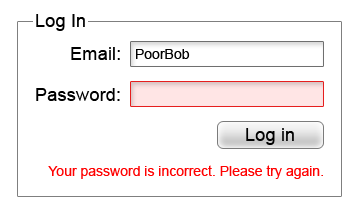
    Incorrect Password Screenshot - Search Influence

    Please—I’m actually begging, please do not sign a contract to purchase a website and not have a login created for yourself where you are the primary owner. With ownership of the CMS, you can easily give another web developer the necessary permissions they need to make any edits to your website. Some website creators may be reluctant to hand this information out or give you the highest level of access since there is the potential to completely take a site down permanently if the user changes some files that are integral for the site to run. Your CMS login may also be called your WordPress, Joomla, Drupal, or Squarespace login.

    4. Do I own my domain name?

    With easy-to-use services such as Namecheap, it is easier than ever to own your own domain even if you don’t plan on building the website yourself. The purchaser of the domain can add it to any profile they so choose. If you don’t have ownership of whatever account the new domain name is attached to, you don’t own your website.

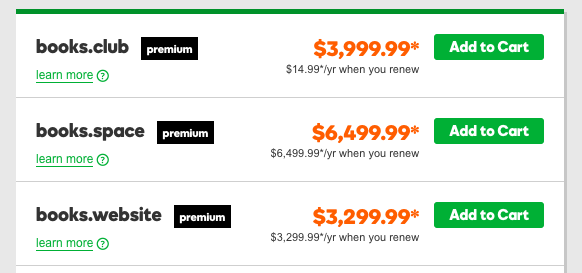
    How Much Popular Sites Go For - Search Influence

    Knowing the potential of how much popular website names can go for, someone that owns your domain can take as much of your money as you’re willing to give them to get it back. Not only that, the likelihood of legal recourse being in your favor is close to none unless you can somehow find a loophole in the contract that is probably ironclad.

    5. Do I own my social media profiles?

    While this doesn’t relate directly to your website itself, this is still in the same vein. Most social media platforms will either have a way to add users as managers on your account, or the company that will handle your online reputation management will have a third party platform that they use to add content to your favorite social media platforms. Facebook, for example, will allow you to add managers to your business account, and managers can write and schedule posts in your steed. As far as social media management platforms are concerned, your social media company will be required to log in, but once will be sufficient unless you decide to change your password. This is very important because the process of re-claiming a social media profile is a very long and drawn out process requiring many different steps of verification. Not my idea of a good time if you ask me.

    6. What about my Google Analytics account?

    Just like everything else outlined here, you will also need to have control of your Google Analytics account. In case you don’t have any tracking on your site, Google Analytics is the popular service offered by Google that allows you to track site visits and a multitude of other metrics. The first rule of Google Analytics is once your historical data is gone, it’s gone forever. If you request Google Analytics to be added to your site for the first time, create the account yourself and then add other users as administrators to take care of the rest. Lunametrics gives a great run down of different views in Google Analytics. At the very least, you should have your own view with completely untouched data, and it should be labeled as such before any marketing company tinkers around with your views.

    Even if you’re past the point of setup, all of these outlined items are necessary to maintain complete control of your website and your online branding. Without it, you could get locked out of your business’ entire online personality. It doesn’t even have to be anything malicious either. Your best friend who is a developer could go on vacation in the Appalachian Mountains and not have access to email. Your nephew who runs your Google Analytics account can get a new phone number and lose access to the Google account and have to wait however long Google decides to verify his identity before you can see the results of your latest paid search campaign.

    If this seems like a huge undertaking, our talented experts at Search Influence have everything you need to get launched properly. In addition to our web development team that is dedicated to the technical performance of your website, every client at Search Influence is assigned a dedicated Account Manager to help you strategize, and even keep your website’s credentials in order. Contact us and request a free digital marketing analysis today.


    Images:

    Mark Wahlberg Computer Smash

  • Meet & Greet : Your Buyer Personas and What You Should Know About Them

    When you ask a small business owner what kind of customers they want to attract, it’s not uncommon to get an answer like “everyone” or “anyone who can use our service.” When you’re creating marketing content, however, it’s not often possible to create something that will appeal to every single person on the planet—some people simply won’t be interested. For example, it doesn’t make a lot of sense to try and convince a college-age renter to install a new roof. It’s a more efficient use of your marketing resources to zero-in on people who are most likely going to be your customers. The best way to do this is to create buyer personas. Doing this will help you to define exactly who you are trying to reach.

    Zoolander Who Am I Image - Search Influence

    What is a buyer persona?

    A buyer persona is the Everyman of your customers. It combines all the characteristics your customers have in common and puts them into one fictionalized person who represents your average consumer. The buyer persona is based on real information about your clientele, and it defines their age range, gender, income, common pain-points, and what they’re hoping to get from your product. It also combines your demographics with psychographics to build a buying character that is pretty much human.

    Why are buyer personas important?

    Having a well put-together buyer persona helps two people: you and your potential customer. According to a survey by Rapt Media, 63% of consumers would think more positively about a brand that gave them content they found valuable, interesting, and relevant. Whether you’re reaching out via a direct mail campaign, emails, or Facebook, no one wants to be stalked by content they’re not interested in.

    Wedding Crashers Image Of Gloria Saying I'd Find You - Search Influence

    By focusing your marketing efforts on your buyer persona, you’re ensuring your message gets in front of people who are most likely interested, without alienating those who aren’t.

    At the same time, knowing your buyer persona means you can give your customers exactly what they’re looking for, ensuring they trust you when it’s time to make a decision. For example, if your buyer persona is an on-the-go business traveler who doesn’t want to waste time during the research stage, you can present them with content in an easy to digest infographic. The potential customer is now more likely to engage with your content and come back to you next time they need a problem solved.

    How can I build a persona for my business?

    Your buyer persona should be based on who your real customers actually are. You can do this by directly surveying your current or past customers. Ask them about their background and demographics, as well as more probing questions like how they heard about your product, why they bought it, how they’re using it, and what (if any) difficulties or reservations they’ve had since their purchase.

    Talking directly to your customers is the preferred method, but if you’re not getting enough information, supplement it with searches on sites like Quora and industry forums to see what kinds of information people are seeking. Content Marketing Institute recommends you ask these three questions when searching: 1) What is the first thing my customer thinks of in the morning; 2) What are their last thoughts at night; and 3) Why is this so. The first thoughts they think about will reflect their daily to-dos and frustrations.

    Image Of Titus Telling Kimmy That He Already Did Something Today - Search Influence

    By the end of the day, they’ll start considering the macro level of what they’re doing with their life. The ‘why’ gives context to the first two questions. If you end up getting a couple of different answers for some of the above questions, that’s totally okay. It just means you probably have more than one buyer persona.

    What does a great buyer persona look like?

    A strong buyer persona will read much like a character description from a play or TV show. Describe Olivia Pope from the TV show “Scandal.” What does she do for a living? How old is she? Does she live in a city, the country, or a suburb? East Coast, West Coast, the South, or Midwest? What kind of clothes does she wear and what is her favorite pastime? With her line of work and hobbies, what kind of products would she be most interested in and find to be most helpful? This is a short list, but you get the picture. Buyer personas completely flesh out your customer base, creating what may look like a complete person or personality. The more detailed, the better. The sharper your assessment of your client base, the better targeted your marketing and the more likely you will attract your most likely customer.

    Image Of Scandal's Olivia Pope Saying It's Handled - Search Influence

    Need an expert to help you build your buyer persona? We offer a variety of great services to target your customers and engage them online. For help creating a digital marketing campaign that speaks directly to your potential customers, contact our team!


    Images:

    Zoolander

    Wedding Crashers stalker

    Titus To-Do List

    Olivia Pope

  • How to Preserve Your Online Reputation as a Plastic Surgeon

    We’ve all had it happen. Your small business or practice is reaching customers, connecting with them on social media or through chat on your site, and giving them helpful answers to their questions. It’s natural and supportive, just how it should be. And then, after all that work to build your reputation, someone posts a negative or snide review of your work. This one post, while frustrating to see, could put a damper on your reputation as a skilled, trustworthy plastic surgeon. But let’s face it—there will always be vocal customers. Here’s some advice on how to handle these moments of crises.

    Doctor holding tablet PC talking to patient - Search Influence

    Be Proactive, Not Reactive

    The first step in monitoring how your practice is perceived online is by listening to social channels. An analysis of Facebook, Twitter, and LinkedIn will help you notice what patients are saying about you. This way, you can catch small concerns before they become major headaches. When patients comment on your page, engage with them in a genuine way (even when it’s positive!).

    Also, you and your partners should evaluate some of the top physician-review websites, like yelp.com, vitals.com, and healthgrades.com. While you’re at it, claim your online listings. Managing your online reputation starts by claiming your listings on key online directories and social networks. These directories and networks allow you to share information that presents your practice in the best light.

    Doctor holding out stethoscope - Search Influence

    Make Sure Your Website’s Content Doesn’t Make False Promises

    Even the slightest exaggeration about what a product can do for your patients can be a red flag for Google and a false promise for your patients. Examine your existing content on your site, keeping a keen editing eye for any hard promises for products or treatments, i.e., “Our facelift procedure will turn back years on the clock” or “you will get the results you want.” Promises like these cannot be broadly made for every patient. By being upfront with your patients about expected results, you can limit any confusion, outrage, or dissatisfaction with outcomes.

    Respond Quickly and Politely to Negative Reviews

    Nearly 70% of patients who post negative feedback tend to respond positively if their concerns get noticed and responded to. Be prompt and be professional. If you or your staff make a mistake, it’s best to own up to it and make a genuine apology instead of trying to defend your position. A sincere apology can work wonders in diffusing a delicate situation. Instead of responding with your initial emotional response, remain calm and genuine—remember, everything on the internet never truly goes away, so don’t use a canned response. By staying professional, polite, and personal, you’ll not only help that one patient, but you’ll also show your community that you’re a physician who cares. You’ll also possibly grow your practice by garnering an influx of potential patients. And, when you can, try to take the conversation offline. More often than not, your answer to their complaint won’t be so simple that it can be summed up in one or two sentences. Also, there will likely be patient-specific information that should not be shared online.

    Consider Patient Confidentiality

    If you’re going to be talking about a specific patient on your website or through your social media channels, make sure to get their permission first. This includes instances where you are just uploading their image and not using their words. Facebook posts with pictures receive 53% more likes than those without, but these could put your practice in danger if you never get permission from the client to begin with. Patients should be notified if their image will be used, details of what the image will be used for, its expiration date, and a note detailing the patient’s right to revoke consent before it is signed off by the patient.

    By practicing due diligence on the front end, you’ll save yourself from a mountain of legal trouble and paperwork down the road. For more detailed information about your online presence and patient confidentiality considerations, check out our blog here.

    Use Facebook to Tout Your Expertise and Build Trust

    According to a report done by Search Engine Watch, 33% of people use social media for healthcare information. Also, nearly 90% of respondents aged 18–24 said they would trust medical information shared by others on their social media networks. That’s putting a lot of trust into others for a very integral part of our lives—our health. By making sure you have a strong presence on social media, you add valuable, trusted medical advice in a channel where, far too often, people are given either misleading or false information about how to diagnose and treat medical symptoms.

    Ideally, by continuing to connect with and respond to your patients on platforms like Facebook, you can start to turn them into promoters of your practice, not just patients that visit once or twice a year and then go about their normal routines. You’ll be top of mind when their friends ask about a local clinic to get an injectable filler or a breast augmentation procedure.

    If you’re interested in learning more about how to manage your practice’s online reputation, reach out to Search Influence. One of our experts will be happy to help you develop and keep a healthy online presence in your local community.

  • Rookie Website Mistakes, Part 6: You Abandon Good Work When Replacing an Old Site

    So, you’re launching a new spiffy, user-friendly website? Or, maybe you’re migrating your site from an HTTP to HTTPS secure domain? To make the launch as successful as possible, there are a few important steps you (or more likely your web developer) should take on the backend to facilitate a seamless transition.

    Changing your URL requires a strategic plan. Without it, you could end up with lost links, dreaded 404 errors, and annoyed customers. If you’ve built some authority for your site, you also need to manage your page rankings during the process. No one wants to watch traffic plummet when they launch a new site.

    While it may not be as exciting as creating the design or building out new pages, here are four absolutely necessary administrative steps to take during the launch of your new site.

    Set Up 301 Redirects

    A 301 redirect will automatically transfer users from the old URL to the new page on the website that replaces it. So, when someone types in your old domain they will still end up on your beautiful, newly-designed (or newly-secure) website.

    While there are other options for redirecting links, 301 redirects are the safest and most trusted way to permanently redirect pages without diluting PageRank on Google. In fact, Moz estimates that 90–99 percent of ranking power will pass from the old page to the new one with the use of a 301 redirect. This is because Google bots recognize 301s as a permanent change, indicating that the original content from the old URL has found a new home on the redirected page.

    There is no limit to the number of 301s you can use per site, so you can (and should) redirect all of your old, viable content to new URLs for your new site in order to retain all of the rank power (also known as link juice) from your old site.

    To make this happen, extract all the URLs from your content management system or export the URLs from Google Analytics to create a list of the URLs on your existing site. Don’t forget to include landing pages from any paid search campaigns you’re running, as Google will lower your quality score for running ads with broken links.

    Once you have this list, you can proceed to the next item on our list, mapping out your new site.

    Image of Lost Duck With Map - Search Influence

    Update Site Maps

    As you learned in part four of this series, you’ll obviously want to have more than one page on your new site. An updated sitemap should be the foundation for your new site design. Start by creating a list of all the pages you know you want to include in your new site. Your old site’s URL list (see above) can provide a foundation for essential pages that you know you want to keep, especially the pages on the old site with inbound links that help improve rankings.

    Map out all planned pages that correspond to pages on your old site so you can set up redirects for all of those pages. You’ll also want to take note of key analytics on legacy pages to use for comparison once the new site is launched.

    The following are some ideas for what you should track for your benchmark:

    • Organic traffic and page visits
    • Bounce rate
    • Page loading speed
    • Conversions per page
    • Rankings for priority keywords

    From here, you’re ready to create a robots.txt file and an XML sitemap to give Google and other search engines the right information to crawl your new site. If any of the steps so far have left you scratching your head or frantically googling SEO jargon, one of our friendly tech gurus can help you out!

    Recycle Existing Content & Optimize for SEO

    Creating a new website from scratch is already a big undertaking—don’t recreate the circle. Be sure you bring over your existing title tags, meta descriptions, and page headings and ensure all new content includes these essential SEO elements. This is also the perfect time to audit your existing content to ensure that it meets the latest best practices. Are multiple pages using the same headline (h1) or meta descriptions? Do pages have broken internal or external links? Are images too big and slowing download time?

    Use what works, fix what doesn’t. Your content for each page should be unique, use keywords naturally (without stuffing), and include logical internal links.

    Don’t Forget About Google Analytics

    As you launch the new site, it will be more important than ever to track analytics and ensure that everything is functioning like it should. Migrating to a new domain is a huge, detailed undertaking, and little problems are likely to arise.

    Image of Graphs, Charts, and Analytics - Search Influence

    Make sure that the Google Analytics tracking code is properly installed on each page of the new site and collecting data. With your collected benchmark data, you can compare traffic and rankings for the new site and check and adjust as needed. Tools like Screaming Frog can also help you check for 404 errors on the new site and alert you to any issues with pages being indexed improperly via your robots.txt file.


    Images:

    Lost Duck

  • Rookie Website Mistakes, Part 5: Weak Content

    Welcome to Part 5 of our series on Rookie Website Mistakes. In Part 4, we learned about single page website design and how they often put form over function much to the detriment of your SEO and the user experience. While we all want a shiny new website with all the bows and whistles, it’s more important to focus on quality content that will give the users what they want. Having weak content can prevent search engines from exploring your site and leave visitors with more questions than answers. Avoid this mistake by following the tips below.

    Hit the Sweet Spot of Content Length

    Unfortunately, there’s no magic number for how long your content should be. Because I can’t tell you that precisely 253 words will make your page number one, I’ll instead give you the frustrating advice my high school English teacher gave me–your content should be as long as it needs to be. Obnoxious, right? But, what it comes down to is that your content should provide all of the related information on the given topic you’ve chosen for the page.

    Very broad topics, like ‘what is family law,’ are going to be longer, while very specific topics, such as ‘features of Victorian-style roofing,’ might not have as many relevant details. Generally, more technical content like a plastic surgery procedure outline will be 500–700 words, while an ‘About Us’ page will be more around 250.

    If you’re not sure how much you should write on a given topic, scope out your competitor’s pages to see how much they’ve written. If they’ve written 500 words, chances are you can build out your own content to be more competitive than theirs.

    That being said, you don’t want to over-inflate your content just to make it longer. The other half of ‘as long as it needs to be’ is that it shouldn’t be any more than necessary to make your point. At Search Influence, we’ve named this superfluous content ‘fluff”; it provides the same amount of nutrition to your content as fluffy cotton candy. Fluffy content makes you sound less authoritative on the subject and doesn’t actually provide the reader with important or new information.

    Focus on EAT Content

    Google uses the acronym EAT to describe the characteristics of high-quality content: Expertise, Authoritativeness, and Trustworthiness. The opposite of fluff is EAT content. Producing EAT content gives you a better reputation in the eyes of Google, and it can help you rank above competitors writing on the same topic who don’t meet the EAT requirements.

    Of all the EAT qualifications, expertise sounds the scariest. When you’re a marketer or a small business owner, you might not feel like an expert on everything you want to write about, and you may not have a degree or certificate that proves you’re an expert. For some topics, like medical and financial, Google expects that you have some sort of formal training to back up your knowledge on the subject. But for most industries, “everyday expertise” that you’ve acquired from working in the field or having a first-hand experience is sufficient. Google evaluates expertise by looking at how useful and detailed the content is, so the goal should be to write what you know, and your expertise will shine through.

    You can also increase your EAT levels by incorporating specific statistics, studies, and other information from reputable sources. Make sure to cite the source and explain the findings in your own words if you can. You don’t need to be overly formal about this, either; saying something like “According to the CDC, 43 percent of sudden, unexpected infant deaths are caused by SIDs” would be sufficient.

    Save Your Spam for Quick Lunches

    Keyword stuffing is an old SEO practice that involves using a keyphrase as many times as humanly possible in the content, even if it doesn’t make sense in context. Sometimes, the keyphrase would even be hidden in the page footers and the background of the page! Google has caught on to this and will penalize sites they think are providing a poor user experience by being spammy. Focus on writing clear content that is centered on a theme and answers the reader’s potential questions. Then you can go back and naturally incorporate a few keyphrases throughout the content.

    Image of SPAM on a conveyor belt - search influence

    Try to pick long-tail keywords that are more specific. For example, instead of using the broad keyphrase ‘botox,’ you could use variations of the long-tail keyphrase ‘does Botox work on crows feet.’ Google is clever enough to pick up on variations, so you can use the exact match long-tail keyword from the example above, and then use ‘Botox for crows feet,’ ‘crows feet Botox,’ ‘treating crows feet with Botox,’ and even ‘Botox around the eyes’ throughout the content to keep things natural.

    If you’re unsure what keyphrases you should be using and trying to rank for, Search Influence can build you build a keyword strategy, track your keyword rankings, and even write content for you. Call us to discuss your content goals!

    Put Some Words Behind the Scenes

    While putting keywords in all sorts of nooks and crannies of your site is considered spam, there are some parts of the backend of your website where you should optimize for keyphrases. Make sure you check out this previous blog for an explanation of what the backend of the site means if you’re unsure what I’m talking about.

    Readers can’t see the metadata of a page when they’re viewing your content, but search engines can see it. It works as a sort of behind the scenes shortcut to what your page is about. Your title tag, meta description, and image alt text should all have relevant keyphrases to solidify ‘this is what this page is about.’

    But metadata is useful for people, too. The title tag and meta description appear in the search results; they encourage the viewer to click through to the page by showing them what kind of information they should expect from your content. Alt text on images will appear in place of an image if for some reason the image won’t display. It is also used by screen readers to describe an image to visually-impaired users. Without alt text, users and search engines could be missing out on crucial information.

    Craft a Killer Call-to-Action

    The final piece of really strong content is a great call-to-action. Now that visitors have read your content, what do you want them to do? This should be a specific action and related to the content they’ve just read. If you’re a cobbler and I’ve just read your page on all the different styles of shoes you can cobble, I should have a pretty clear idea if my shoes can be cobbled. So now, I may want to learn more about the process, what it will cost, or how I can go about making an appointment to have my specific shoe assessed. The call-to-action will direct me to something I will find useful and that will still serve your business needs and entice me to eventually come in to the shop. The goal is to use the call-to-action to convert.

    Strong content will build trust with the reader, provide them with valuable information, and help drive them to buy your product or service. Putting words on the page just for the sake of it could actually drive them away. Download our whitepaper for more information, and tune in next time to learn about mistakes made when going to replace an old website.

    Image Of 6 Rookie Mistakes White Page Graphic For Search Influence - Search Influence


    Images:

    SPAM

  • The Final Countdown: Secure Your Website to Align With Google’s Update to Chrome

    Is your website safe from google's not secure warning - Search Influence

    The year is almost over, October is finally upon us, and if you’re wondering what you should be checking off of your business plan “to-do list,” then you should definitely place priority on reviewing the security of your website.

    Starting this month, Google will officially be letting your visitors know if your site isn’t secure for them to navigate.

    This shouldn’t come as a surprise, since Google announced its intentions back in 2014. But nonetheless, the time to take action is now. Here’s what you should be looking for in order to avoid Google showcasing security warnings to your visitors and potential customers.

    Image of an HTTPS secure site - Search Influence

    Are You Talking to Me?

    A secure site means your site has received an SSL Certificate. SLL uses HTTPS (Hypertext Transfer Protocol Secure) servers to encrypt and store information given on the site. Here’s more detailed information from Google about HTTPS servers. Not only do they provide an assurance for your visitors by securing any information they provide through a form fill like credit card details, but Google also announced that HTTPS is a ranking factor, even if not a huge one.

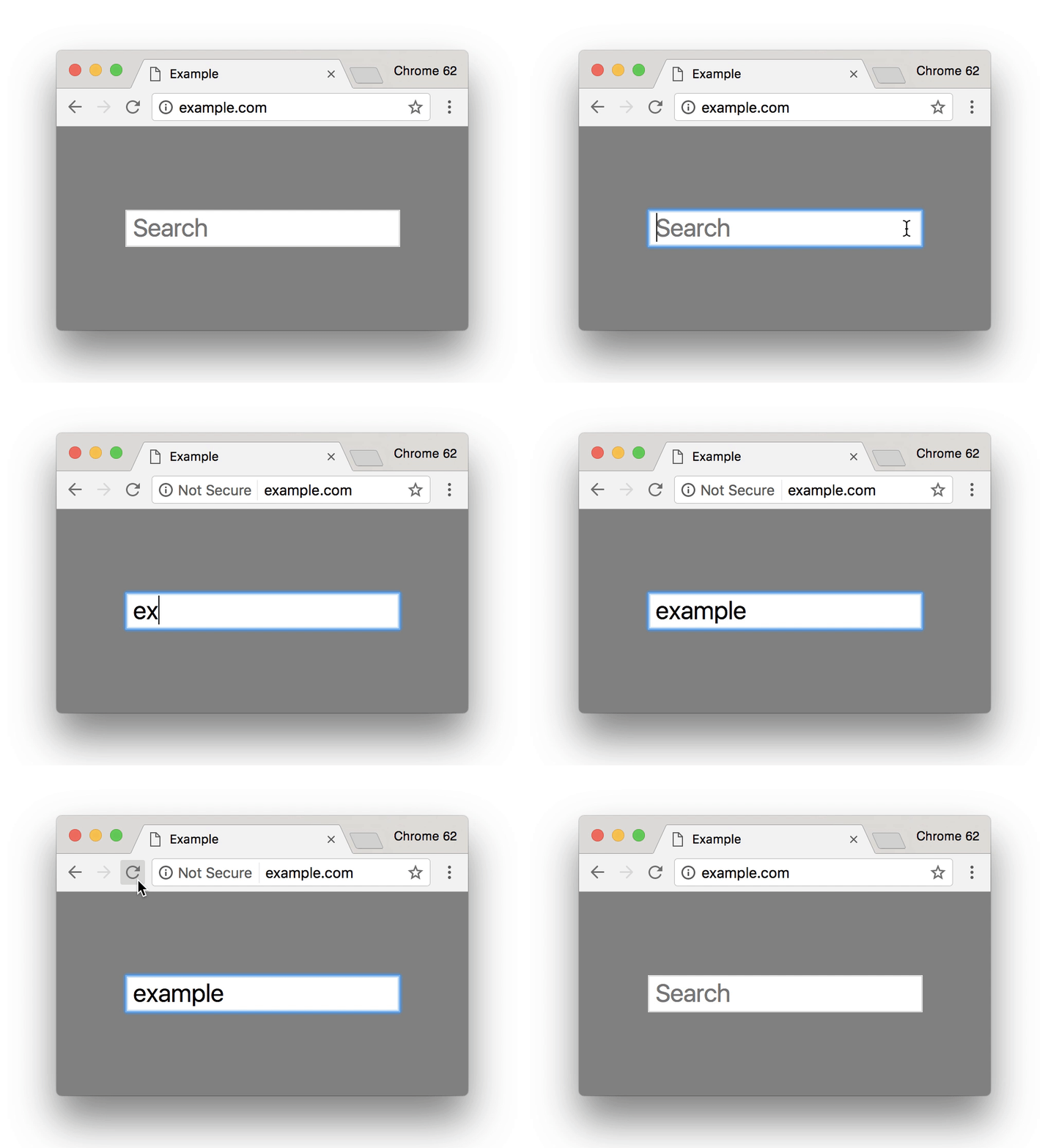
    So, how can you tell if your site is secure? One the easiest ways is to open an incognito window and look at your site’s URL in the search bar. Does it read  “Secure|HTTPS”? If so, then you’re good to go. If you attempt to input any information in a field on your site and “not secure” reads at the start of your URL, then that means your site is not secure and you will need to contact your web developer, web host, or attempt the switch to a secure site yourself. Google made a handy GIF displaying what this would look like for users.

    Search bar from Google Site - Search Influence

    Is It Too Late to Secure My Site?

    Google’s update to how it displays unsecured sites in Chrome is slated for release around October 24. If you have already earned an SSL Certificate for your site, then kudos to you. But, it’s never too late to switch your site to HTTPS.

    Jared Jones, one of our technical web developers, wrote a detailed blog post about the importance of having a secure site, steps you can take to switch to HTTPS, and reasons why it may affect your site’s speed and your overall ROI. If you’re thinking of tackling the project yourself, this post is a great start.

    Google plans to announce future changes to increase site security, like displaying “not secure” for all HTTP pages, not just those in incognito mode. But, it’s safe to say that making this simple change will increase the trust of visitors to your site, leading to a higher return rate for your business. Contact our team of experts—we can help you make the switch today.

    Here are some options:

    1. Do it yourself or with your developer or website company, with caution.

    Beware, not all SSL Certificates are created equal. Be sure the provider of the SSL Certificate is Google approved. purchasing an SSL Certificate, configuration at the server level is required for set up as well as ongoing maintenance. The process must be repeated each time it expires.

    Once the SSL Certificate is purchased, it must be configured at the server level in order to complete setup. Ongoing maintenance is also required, and the process must be repeated each time it expires. When you update your URLs to HTTPS, you must also implement proper 301 redirects and all your assets must be addressed when moving.

    2. Let us take care of it for you!

    We’ve developed an easier-to-maintain alternative for our clients that fully addresses redirects and website assets, setting you up better for the long term.

    If you are a current client, we’ve already reached out to you about moving over.

    If you are not a Search Influence client, reach out to us so we can discuss helping you!


    Images:

    Google GIF

  • How Patients Are Searching for Doctors Online: Make It Easier for Them to Find You

    The digital world has infiltrated every facet of our lives, including our health care. Yet, many physicians don’t know how to best compete in this online marketplace. The sheer amount of information on the internet has empowered patients to choose physicians with discretion and change care providers if they don’t have a good experience.

    By placing your clinic’s online presence in the same digital spaces that your potential patients occupy, you can increase the likelihood that they’ll choose you for their next appointment.

    Help Them Find Their Diagnosis

    Patients come into an appointment with a pretty robust working knowledge of all the possible rare tropical diseases they could have and a comprehensive list of all side effects of each potential treatment. How do they have all of this information? They Googled it.

    While some people still go straight to their mom, most first enter their symptoms into a search engine or medical-focused portal like WebMD. They investigate all the possible causes of the symptoms, available treatment options, and further advice on what kind of care they should seek. By creating content that answers these questions, you can position yourself as an authority on the subject and build trust with the readers.

    Claim Your Listings

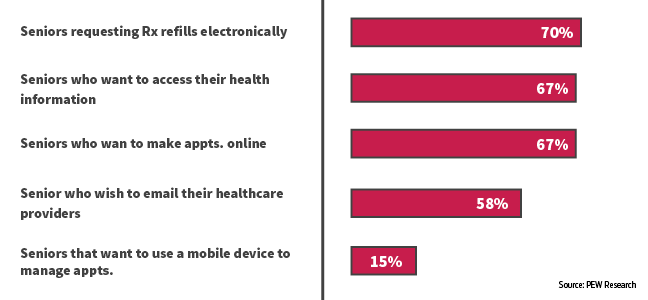
    Once people have a good idea of what could be wrong with them and what kind of medical care they need, they might not immediately make an appointment. Instead, they may return to search engines to do further research. They search facilities and doctors nearby, check to see which providers are in their insurance network, and read reviews. This chart from Gravitate shows some of the queries people are searching.

    Having information about specializations, board certifications, awards, presented papers, and other selling points on your website is useful, but often patients are looking at third-party sites like Healthgrades for reviews from other patients. You only have control over the content of your website, but if you claim your listings on some of these sites, you can update them to have an up-to-date address and phone number, a link to your website, a list of current physicians and specialties, and even responses to negative reviews.

    For help claiming your listings or other healthcare marketing services, contact Search Influence.

    Put a Face to Your Practice

    When you claim your listings, it’s a good idea to list all of your physicians and some of their basic information. You can also provide detailed bios of each doctor on your website. Yext conducted a study on how people search for physicians and found that 76.3% of patients search for individual providers, while only 29.9% research facilities.

    Patients want to feel like a partner in their own healthcare, so finding a physician who is personable, knowledgeable, a good listener, and willing to go out of their way to help the patient is important; a strong doctor-patient relationship may even be favored over a cutting-edge facility if the patient is seeing a different doctor every time or feels more like a lab rat than a person.

    By giving information about the people behind your practice, you’ll appear in front of a much wider audience and get conversions through your personality and expertise.

    Take Advantage of Social Media

    Americans, especially the younger generations, get the majority of their news and information from social media, for good or ill. But even older people use social media to share interesting articles and connect with people who share similar experiences and worldviews. By sharing important and relevant medical information, you can help educate patients and combat misinformation. 

    If you consistently share quality content, potential patients will trust you and see you as an authority within your field. While they may not run off and make an appointment immediately, you will be in their minds already the next time they get sick. Social media is also a great way to continue to engage with patients you’ve seen before by responding to comments and questions. This way, they will feel like you still care for them as a person, even after their treatment has ended. Just be sure to maintain patient privacy.

    By finding patients where they are on the internet and providing them with quality content that answers their questions, you can position yourself as a source for medical information and quality care. Contact our team for help building a digital marketing campaign suited to the unique needs of the medical industry.


    Images:

    Gravitate Graph

  • Turning Links Into Lemonade: Your Guide to Juicy Internal Linking

    You’ve likely heard of internal links. In terms of SEO jargon (which there’s a lot to sift through), they’re pretty straightforward. Internal links are just the hyperlinks on your site that point to other pages within the same domain. For example, your homepage content probably has internal links pointing readers to your primary service or product pages. While a blog post might incorporate internal links to other posts that elaborate on a similar topic—or better yet, a service page that helps users solve the problem focused on in the blog post.

    The navigation menu for your website is also a structure for internal linking to ensure that all of your pages are connected and easily crawlable by search engines. It’s important that all new pages you create are linked back to your homepage using this navigation. For the purpose of this post, however, we’re going to assume your navigation is set up and focus on the internal links you incorporate into the actual content of your pages and posts.

    Choose Internal Links for Users & Crawlers

    Internal links are easy to understand, but don’t underestimate their power—both in terms of SEO ranking and an improved user experience.

    A person's hand squeezing a lemon

    When you properly use internal links, you’re spreading ranking power (also known as “link juice”) and authority from your site to that specific page, which improves the chances that it will also rank in search results. Internal links act as road signs, telling search engines which pages to crawl next on your site. On top of that, when you use highly relevant content links that match users’ search queries you’re confirming your authority.

    Internal links also plot the course for users (humans) to navigate your website and find the most relevant content to meet their needs. This keeps them on your site longer and improves the user experience. Just imagine that a prospective customer finds your blog post about steps to take when you get a flat tire, then within the post, they find a strategically-placed link leading them to your tire company’s product page about how to find replacement tires. With the right internal linking, you’ve given that person the information they needed and even offered a solution.

    So what does it mean to properly use internal links? There’s not always a hard and fast rule for when to link, how much to link, where to link, and the like. But this guide can offer a primer for getting started.

    Choose Appropriate Anchor Text

    The anchor text for your internal link is simply the clickable words you select to turn into your hyperlink. You’ll want to think about your selection both in terms of the context of the sentence and how the anchor text reads on its own for skimmers. There’s no character count limitation for anchor text, but you should aim to keep it as concise as possible without sacrificing clarity. Your reader should know where they are headed before they click the link.

    Landing them on a confusing or off-topic page that does not align with your anchor text disrupts the user experience. While keywords or topics for the content are a great first choice for relevant anchor text, Moz recommends using a variety of words throughout the post that most naturally fit for your anchor text. That’s because Google’s algorithm will take note of pages with too many keywords in anchor text and flag them as spam.

    Instead, opt for descriptive, partial-match anchor text that contains part of the target topic within the text. For example, build a comprehensive SEO strategy with Search Influence. This link goes to our SEO services page, which you could probably guess based on the anchor text.

    When in doubt, double-check that your anchor text meets the following criteria:

    1. The anchor text fits naturally within the rest of the content on the page
    2. There is zero mystery about where the user will land when they click the link
    3. Anchor text selection is diverse across all the content on the page

     Opt for Relevancy Over Quantity

    We can’t overemphasize this enough: choose natural, relevant pages to link to within your content. Don’t force a link. Google and your users will catch on quick, end of story.

    You should also avoid linking to the homepage or contact page. Those pages already have plenty of link juice. If your reader is already on an internal page within your site, why would they want to backtrack to your homepage? Instead, do as Kissmetrics recommends and reach for a 1:1 ratio of deep internal links and main navigation links. If your page is content heavy, then you should link out to other content-rich pages that elaborate on your topic and keep your reader engaged.

    Animation of hand counting to five

    While there is no magic number for how many links you need on a page, you can aim for about 2-4 contextual, natural links that make sense and address topics that would interest your reader. Just like with writing calls-to-action, you should assess each linking opportunity from the perspective of your prospective buyer to see if the target page is a good fit.

    Audit Existing Content for Linking Best Practices

    Keeping your content fresh with new internal links is an important step because it notifies Google to crawl the page again, increasing your ranking opportunities. You can also make sure that your inventory of content remains up-to-date and relevant for readers. We recommend building a schedule for updating content on a regular basis, with priority given to posts that cover topics for which you’re most interested in ranking. If you’re a plastic surgeon, that might mean auditing all of your existing posts about breast augmentation and liposuction if those are your top two procedures.

    When you update a page, we recommend checking for necessary updates, adding fresh content in the opening paragraph, then naturally incorporating internal links to any new related content. If you recently added pages about breast augmentation FAQs and post-surgery healing, then you’ll want to ensure those pages have link juice from other breast augmentation pages and posts on your site.

    Tools like Moz’s Open Site Explorer allow you to see how many internal links are going back to each page on your site. This will give you a holistic view of your domain to see how you can move more link juice to specific pages that cover topics related to those top-priority ranking terms.

    Of course, sorting through these tools and creating a dynamic strategy for link building takes a dedicated effort. If you’re short on time but eager to improve your link profile, contact us to chat with an expert.


    Images:

    Lemon

    Counting