Tag: Google

  • How to Drive Conversions With the Right Contact Form—And What to Avoid

    Your business’ shiny new website just launched and everyone assumed a deluge of fresh new leads would follow. To everyone’s dismay, the predicted deluge turns out to be nothing more than just a trickle. What gives exactly? “Build it and they will come” may ring true with your traffic itself but that quote lacks an “and convert” at the end. In years past, traffic was the key metric for a lot of businesses since it was assumed that those users would appreciate the brand awareness. Fast forward to the present day in the “Silicon Age” where users not converting is sure to set your business behind further than the Bronze Age.

    One easy way to convert users into customers is through the usage of a handy-dandy online form, but just having a form doesn’t guarantee a conversion rate anywhere near your industry benchmark. I’m here to help bolster those forms from some boxes into lead machines!

    Positioning

    Back when there were only brick and mortar buildings, there was always a huge focus on location, location, location. That phrase may seem like it belongs in the Bronze Age, but it instead adapted to the changing times and is still just as important as it was before. The location of your form is integral to the success of any lead collection campaign. Forms should always be placed in a very obvious place and above the fold, which is the portion of a page that initially loads in the screen’s viewport, as often as possible. Having a form in a good location puts it on users’ minds as soon as they visit your website and makes it more convenient to convert. Overlaying the form over a banner image is a good start for more visibility.

    Another excellent location for your form is on the sidebar of your site. This allows casual site perusers to convert at their own leisure instead of forcing them to a contact page or trying to lead them back to whatever landing page they entered the site within. One last location for a form is on your contact page, of course. Any site user would expect a way to contact your business on the contact page. In addition to an address, phone number, or email, a contact form is a perfect way to capture visitors’ information and nurture leads to eventually becoming loyal customers of your business.

    Layout

    Now that you’ve figured out where to place your form, the next step is to create a form that users can easily understand, fill out, and convert on. One big helper that was pointed out in a Google AI test is how users’ eyes focus on form fields. Having your labels above the inside of form fields is preferable to labels next to the form fields. This allows users to better scan the information and breeze through forms quicker, which leads to lower rates of dropout and errors in fields. Speaking of fields, try not to overwhelm your users with a bunch of unnecessary fields for information that can be gathered further down the line. If you aren’t shipping something to someone, why would you require a home address? If you’re sending users a brochure via email, why would you require a phone number? Requiring an excess of information makes users go “hmm…” and abandon the website completely. This is not to say that long forms have no place on the internet, rather every bit of information should be relative to the call to action.

    Here at Search Influence, we use our own proprietary lead tracking system to create fully customizable and extremely flexible forms that can keep track of your website leads in an easy-to-read reporting system. With our forms, you’ll know where your leads come from the most and learn how to optimize your campaigns to maximize your lead generation.

    Call-to-Action

    A “Call-to-Action” (CTA) refers to the phrase that is meant to draw users into completing conversions. In the case of forms specifically, this would be the text that is on the submit button. Hubspot compiled a list of 31 Call-to-Action examples taken from many different corners of the internet and from varying industries. The main takeaway here is your CTA needs to be catchy and draw a user in. “Submit,” which may be seen fairly often around the internet, doesn’t quite cut it anymore. The end of a form should establish some sort of value to a user. Saying “Submit” simply tells the user that you’ll gladly collect their information and may or may not do anything with it.
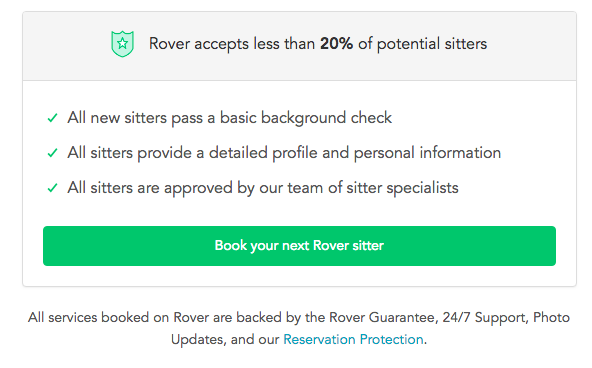
    Screen shot of a call to action from Rover - Search Influence

    Having detailed text on the CTA button encourages users that your form is something worthwhile whether they’re about to “Subscribe to our newsletter” or Rover.com‘s “Book your next Rover sitter.” Users want to know the value of giving up their precious personal data, so make sure your form is honest and straightforward with how the users’ data will be used.

    Mobile

    One factor that can’t be ignored is the impact of mobile users on your website. Considering mobile users surpassed the amount of desktop traffic almost two years ago—eons in internet time—ignoring mobile users is a recipe for failure. What’s even more surprising is that in the same year, even though there were more mobile visits to websites worldwide, mobile users converted almost 65% less than desktop users according to the 2016 Adobe Mobile Retail Report.
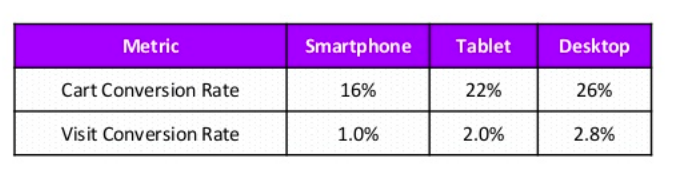
    Table of mobile conversion rates - Search Influence

    Our advantage here is that this data is like, eons old. We’ve progressed since then and have become more accustomed to serving mobile users and Google even recognizes the efforts that developers put in to make their websites mobile friendly and adjusted their search to index mobile sites first. This coupled with the rising magnitude of mobile traffic means that being able to capture leads efficiently on mobile platforms is imperative for any campaign.

    At Search Influence, we have everything you need to start a lead generating campaign, from SEO services, digital advertising, social media management, and the capability to track your campaign with pinpoint accuracy. We also practice what we preach; check out the form in the sidebar if you don’t believe us.
  • Why You Should be Posting on Google My Business

    “Just Yahoo it,” said no one ever. It just doesn’t have the same ring as “Google it,” which was officially added to the Oxford English Dictionary and the Merriam-Webster Collegiate Dictionary in 2006. That’s because Google has practically monopolized internet searching. According to NetMarketShare, Google accounted for over 79 percent of all global desktop search traffic in 2017, followed by Bing at 7.27 percent, Baidu at 6.55 percent, and Yahoo at 5.06 percent. In addition, Google receives over 63,000 searches per second on any given day. In the U.S., more Google searches take place on mobile devices than on computers, and 30 percent of mobile searches are related to a location. It’s obvious that to succeed in the SEO world, you have to play by Google’s rules.

    So, Just How Do You Play By Google’s Rules?

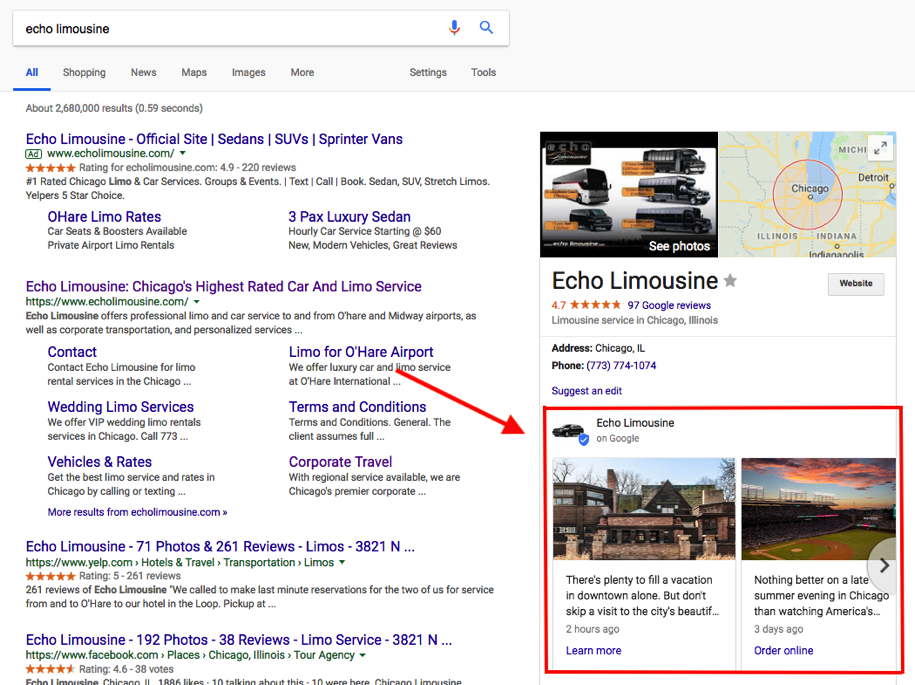
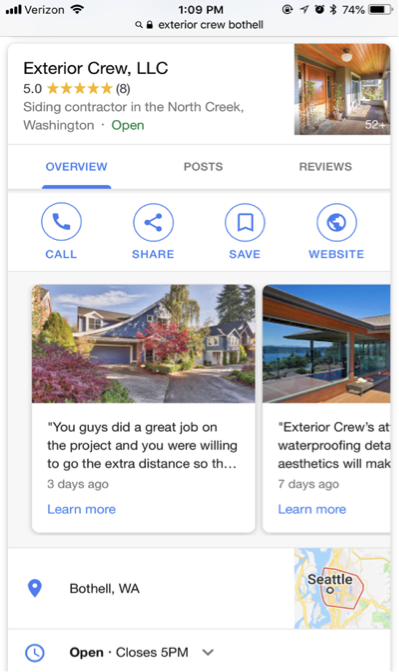
    One way to do this is by creating a Google My Business (GMB) page for your company. This page allows your businesses to manage their online presence across Google, through a physical location. Within this company page, Google has a social posting platform that allows business to provide “up-to-date posts from verified people, places or things, directly in search results.” These public posts allow businesses to share company updates to feature what’s new, respond to customer reviews, and add photos to highlight what makes your business special, and build brand awareness.

    Screenshot of a Google My Business post from Exterior Crew, LLC

    These posts are particularly captivating because, rather than appearing in the search results, they are displayed in the knowledge panel, which presents a more engaging visual aid. This is NOT to be confused with Google +, which was Google’s attempt to compete with Facebook as a social platform. And let’s be real; it was a major fail. Realizing this, Google reconstructed their platform and created GMB. Google + profiles and pages still exist, but they are now subpages of a GMB page.

    The Start of Google Posts With Candidate Cards

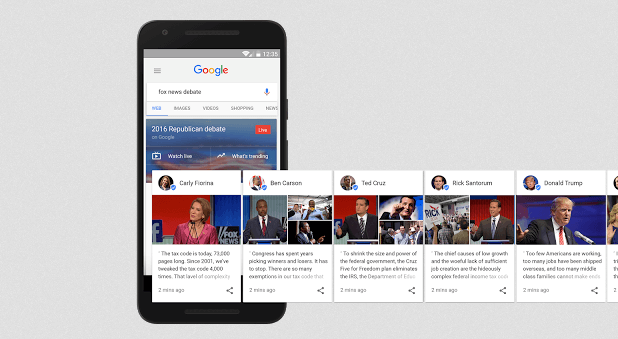
    Before July 2017, Google’s now-called “Google Posts” were only accessible to few. It all started with “Candidate Cards.” You may remember seeing these around the 2016 presidential election. Google described these as non-ad privileges, giving 2016 Republican and Democratic candidates a place in Google search.

    Image of Google's candidate cards - Search Influence

    Proving to be both appealing and informative by viewers, Google allowed the expansion of these cards for celebrities and sports teams. As of June 2017, GMB brought these now-called “Google Posts” to local businesses as an easy way to help attract new customers and build relationships with the customers you already have. These posts have proven particularly effective in promoting flash sales or promotions, emergency updates, such as school closings, and sharing job openings. In addition, these posts contain a call to action (CTA) feature, which provides an easy and direct way for customers to book appointments or reservations.

    Benefits of Google Posts Over Traditional Social Media Posts

    You may be thinking, why would I need to use Google as a social platform when I already use Facebook, Twitter, Instagram, etc.? And you have a point. These social platforms are still great ways to post updates about your business. Although similar, Google Posts offer a few advantages that the typical social media platforms do not, including the following:

    They’re more searchable

    You can literally “Google it.” When searching for a business, these posts will appear directly on Google Search and Google Maps pages. When someone searches for your business, your location address and phone number will appear in the knowledge panel on the right-hand side of your search results. Your company’s address/location is the primary piece of information searched for by local customers. In regard to mobile, local searches lead 50 percent of viewers to visit stores within one day.

    Screenshot of a GMB post by Echo Limousine - Search Influence

    You will expand your reach

    Not only does Google lead the way in search engine results, but it also surpasses Facebook search queries. According to Adweek, Google averages 3.5 billion searches per day, compared to Facebook’s 2 billion per day. In addition, 82 percent of people turn to search engines to find local information.

    Keyword Searches

    On Google, you can use keywords to target certain audiences—specifically, people that are already looking for your services. Since these people already have an idea of what they are looking for, they are likely to be further along in the decision stage, meaning they are more likely to convert into a client or customer. By contrast, Facebook is geared more toward targeting specific interests and in-depth personal information to lure in a potential customer.

    Impact on your ranking

    Google’s goal is to provide you with the most relevant information based on a search query. When you post new content directly through your GMB listing, you are sharing relevant content and information about your local business, which contributes to building your location authority. This tells Google that your business is legit. The more you legitimize your business to Google, the higher ranking you will get. The higher ranking you have, the higher you will appear on Google search and gain more traffic to your site.

    Screenshot showing how to create a Google My Business post - Search Influence

    Connect with your customers directly

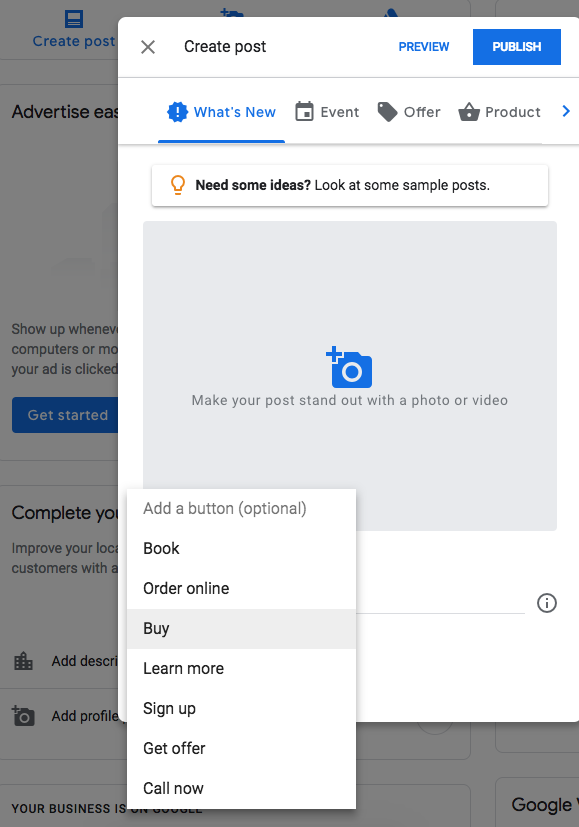
    You can include CTA buttons on all of your GMB posts. Call to action buttons have been proven priceless for converting customers. According to Everything You Need to Know About the Psychology of the Call to Action by Neil Patel, the human mind expects a call to action button. “Our minds are prepared for and are expecting an experience of being called to act and have already decided that there will be a CTA. We know that expectation affects behavior. That’s why people know to act on the CTA. They aren’t staring at the CTA button wondering what it is. They know its a button they are being asked to click.”

    Some examples of how a business can utilize these buttons include the following:

      1. Make a reservation
      2. Sign up for a newsletter
      3. Learn more about the latest offers
      4. Buy a specific product from your website
      5. Call now

    Get backlinks

    Everyone knows that backlinks have a huge effect on organic search results. By posting compelling content on your GMB posts, people are more likely to engage and reference information from your site. You can also link your site pages in a post, making it easier for researchers to find your pages.

    Start Posting!

    Although still green, GMB posting is projected to be incredibly valuable to local businesses. Facebook, Twitter, and Instagram are saturated with businesses looking to promote brand awareness. But since GMB posts are still in the early phases, it hasn’t been flooded by the masses just yet—which is why you should get in now! GMB is an excellent platform that allows your customers to stay in the know of what is going on with your businesses. Not to mention, it’s free! What do you have to lose?

    Here at Search Influence, we’re constantly staying on top of new ways in which we can help our clients be found online and thrive in their industry. If you’re interested in honing your local SEO strategy with rich, relevant Google My Business posts, then request your marketing analysis today to get started.

    Images:

    Candidate Cards

  • Your Referral-Based Business Still Needs Digital Marketing

    Most referral based businesses are pretty happy watching the dollars come in without having to invest in marketing. The business model usually looks a little something like this: company does good work → client is happy → client tells a friend they are happy with great work by company → friend works with company. Badabing.

    But wait, we missed a step! How’s the referral going to find you? Even if your name, number, address, and directions are written down, laminated, framed, and handed to a referral, they will still search online to find any business. According to Google, 97% of consumers use the web to search for local businesses.

    • 96% of people seeking legal advice use a search engine
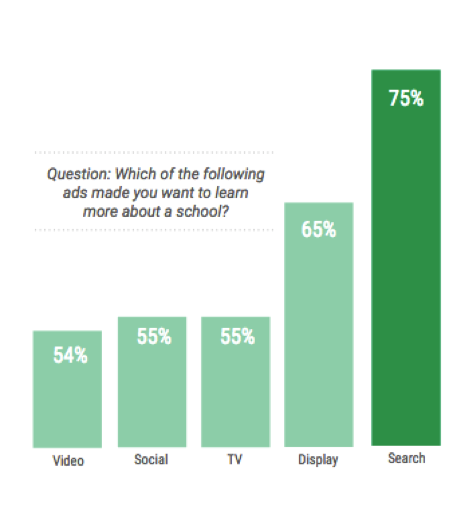
    • 56% of students turn to search when research programs/degrees
    • 78% of local-mobile searches result in offline purchases

    These stats prove search is the best opportunity to influence your audience buying decision and shape their perception of your company. If your business isn’t investing in digital marketing, which of your competitors will the referral contact once they can’t find you online?

    Who’s Representing Your Law Firm Online?

    Only 13% of people are referred to an attorney by a family or friend. If you don’t have a strong brand or search presence online when the referral or new lead is searching for you, what does this say about your reputation? Some may think, “How good can this guy be if I can’t even find him on Google!” Even if you have a compelling slogan, your law firm needs to be competitive in local search results.

    If your law firm generates cases based on client or attorney referrals, make sure to get that word-of-mouth online! Ask for and publish reviews and testimonials on your site. Don’t forget to spread the word and feature testimonials on avvo.com, lawyers.justia.com, findlaw.com, and other industry related platforms.

    72% of people searching for legal advice only contact one attorney. So let’s make sure they find and contact you first!

    Google’s Power in the Universities

    According to Fortune, Millennials spend 27 hours a week consuming media. Getting in front of and grabbing the attention of millennials is becoming more competitive for universities. With educational resources and easy access to student loans, students are no longer applying to universities simply based on legacy or location. According to a Google Ipsos Research study in 2017, 20% of students read 3rd party ratings and reviews to compare schools, but you can expect that a higher percentage of searchers are influenced by the overall online reputation of a school.

    Building Your Reputation Online

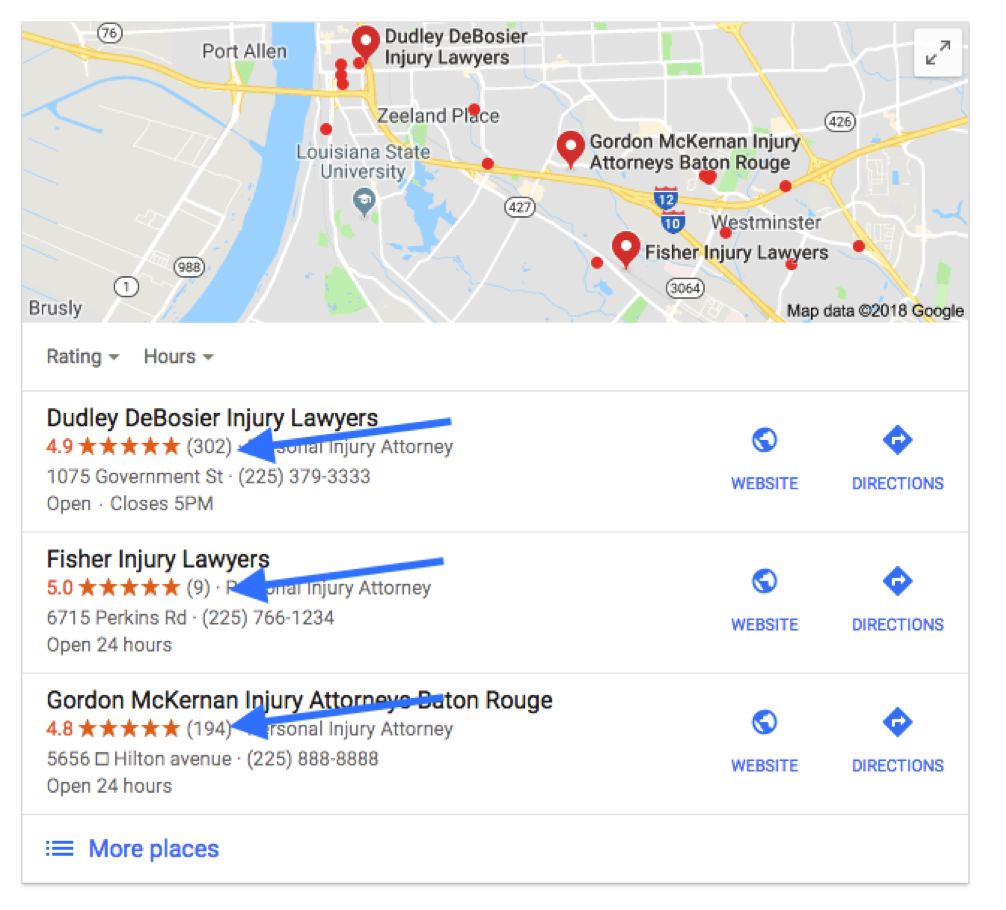
    Reviews aren’t promotional advertisements full of promises; they’re hard evidence that your company goes above and beyond for customers. Don’t just sit back and wait for reviews to appear. With 88% of people likely to trust a review from a stranger as they would a referral from a friend or family member, you need to encourage happy clients to leave reviews on your site and on 3rd party sites. Since Google reviews appear alongside search results, those reviews are particularly important for referral-based businesses.

    For 3rd party sites like Findlaw, Angie’s List, and Houzz, claim your profile and make sure all of your business information is accurate and updated. But don’t stop at conventional review sites! Video testimonials can be a great way to make online reviews more relatable. YouTube videos are easy to upload, and they can directly impact your search rankings. Before and after photos and videos for home renovations visually engage with an audience in ways content can’t. However you serve customers, look for a variety of ways to confirm that your services really set your company apart.

    The Market Is Wide Open

    Customers are searching for the products and services you provide, and they are influenced more by trusted and recognizable brands they engage with digitally. Google uses over 200 trust factors to rank websites and is constantly updating its algorithm. If you aren’t actively competing for searched products, services, and your audience’s attention, then you’re giving those undecided potential customers to the competition. So I’ll ask you again, if your business isn’t investing in digital marketing, which of your competitors will your referral contact once they can’t find you online?

    Contact the team at Search Influence for a consultation, and learn how to shift your digital marketing strategy into high gear. Find out about our company’s reputation by reading reviews from other industry leaders in SEO and digital marketing. You know your industry, and we can help make your expertise more evident online. Request a marketing analysis, and we’ll find opportunities to amplify the visibility of your referral-based business.

    Images:

    Search for Universities

  • How to Navigate the NEW Google Adwords Experience

    AdWords recently announced that they are fully switching to the new experience by the end of the year, and I’m here to tell you it’s going to be okay! The new experience has been available to all advertisers since October, but we’ve had exclusive access for a while and have been able to get acquainted with the new UI and I’m here to share our findings.

    For those of you thinking, “Google’s changing something AGAIN?” I’m right there with you! But with the following tips and resources, you’ll soon love all the new experiences it has to offer.

    So What’s so Different?

    Google updated the interface to provide, “a faster and more intuitive experience that’s focused on helping you reach your goals.” All the features you rely on are available in the new experience, and Google incorporated feedback as well, since this has been in beta for a while. They’ve also rolled out some exclusive features that are available in the new interface, so you have to switch to take advantage of them. Some of my favorite new features are below.

    A New “Overview” Page

    The overview tab provides performance insights that are generated by Google depicted as charts and graphs for you to quickly review and take action. These make reviewing data for devices and time of day much more visually appealing and easier to understand.

    Bid Adjustments for Calls

    Adjust your bids on call extensions to show call interaction ads more frequently. This allows you more flexibility and control over how often these ads appear and how customers can connect with your business. The bid adjustments range from -90% (I don’t want these to show as much) to +900% (yes, please, show these all the time!).

    Promotion Extensions

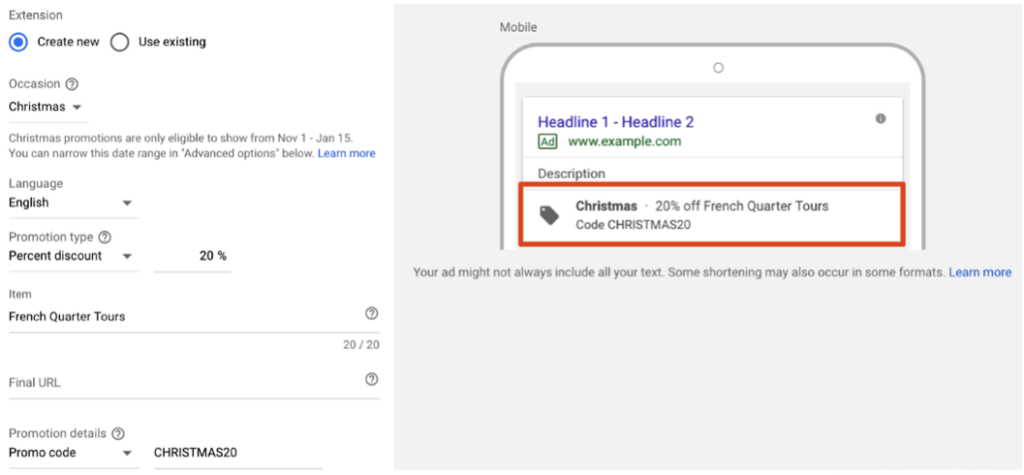
    Promotion extensions are pretty fantastic! They allow users to show and link to a special offer in their search ads and even include a tag icon to help the promotion stand out. You can highlight specific sales and offers, all while taking up more valuable real estate in the SERPs.

    Shortcuts

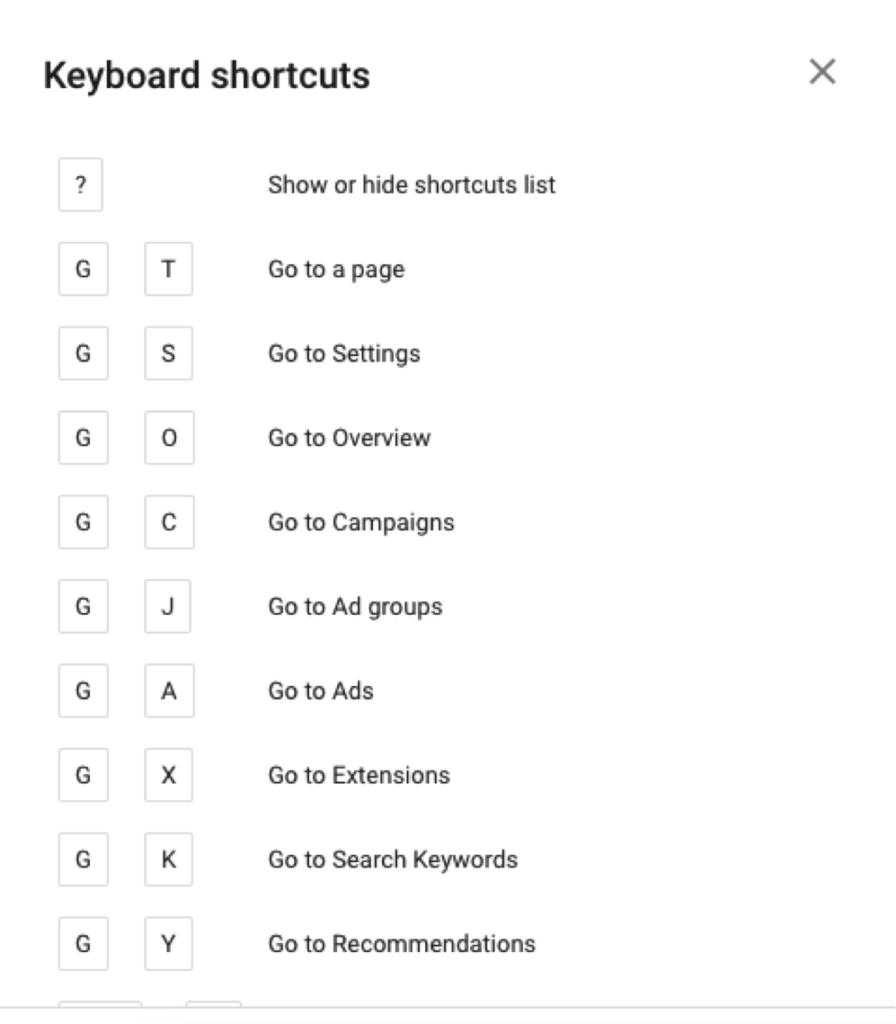
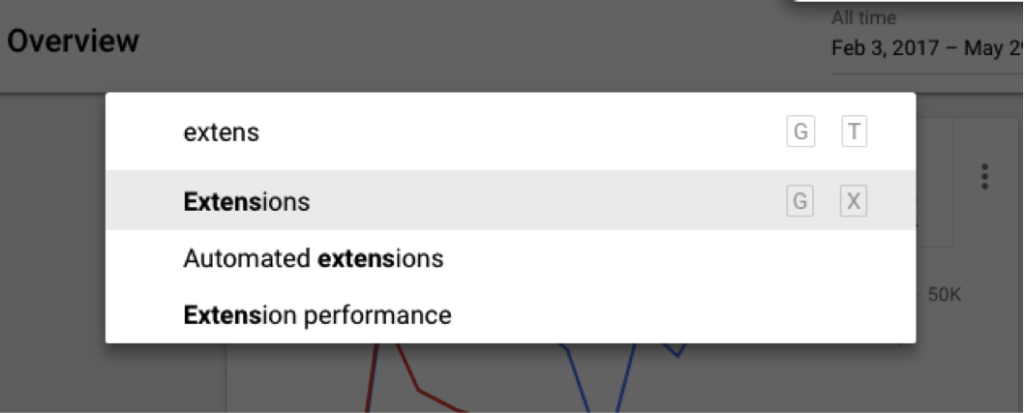
    One of my all-time favorite new features is the introduction of shortcuts. You can pretty much navigate to anywhere in the interface in a matter of seconds! Need a list of shortcuts, just hit the question mark on your keyboard. Hit G and T (GoTo) to bring up a search bar, making it super easy to find anything you need!

    Need More Help?

    I couldn’t possibly cover all of the benefits of the new AdWords experience but wanted to include a few more tips and resources to get you started.

    • The dimensions tab used to be one of my favorite places to go to pull reports to find actionable insights. I thought it was gone, but AdWords has re-named this and moved these reports to “Predefined reports,” found under the little graph icon in the upper right corner.
    • Google has a guided tour of the new interface, which is great for beginners to get familiar with the changes. They also have a Help Center, which has been updated to help you navigate all the new features (bookmark this page!).
    • Follow this page to view new information on AdWords features as they are added to the platform.
    • If learning by video is more your thing, check out the guides to the New AdWords Experience Part 1 and Part 2.
    • There are a few things that are changing and some features that are not yet available, so familiarize yourself with these in case you need to find a different solution.

    Getting on board with big changes like this can take some time, so I recommend that you start poking around now. The end of the year will come quickly and is a critical time for most advertisers, so the more experience you have with the platform the more you’ll be able to take advantage of all the new features to set your campaigns up for success. If you have any questions or need help navigating this switch, the Online Advertising team at Search Influence has experts that can help.

    All screenshots captured by Jeanne Gaudet Lobman on May 30, 2018

  • Why Are My Ads Disapproved by Google’s Misleading Content Policy?

    In its continual quest to better serve users, Google has cracked down on misleading content in advertisements as well as website content. When your advertising campaign is slammed for “misleading content,” it can come as quite a surprise. Because Google holds advertisers to a high standard, some of the violations might seem like harmless marketing strategies. Regardless of how the situation arose, it’s important to bring your website and account back in line with Google’s expectations. The sooner you resolve potential violations, the sooner you can get back to building your brand’s online reputation.

    What Is the Google AdWords Misleading Content Policy?

    “Misleading content” is an umbrella term that includes several types of violations, ranging from problematic testimonials to deceptive branding. The main objective of the misleading content policy is to provide a set of clear standards for online advertisers to follow as to not deceive users with exaggerated or false content. The central component of these standards states that:

    – Disclaimers need to be included alongside perceived claims, even if the claims are direct quotations from past customers.

    – Images that show before-and-after results also need disclaimers. More broadly, improbable assertions are likely to draw the attention of the Google AdWords team.

    We’ve all seen investment opportunities and weight loss programs that sound “too good to be true.” As you might imagine, some of the standards allow room for interpretation, and many affected advertisers find that they need to resolve multiple policy violations to resume advertising.

    At least, in theory, Google’s policy should benefit both users and advertisers. Users shouldn’t have to scroll past misleading or spammy content, and advertising slots will become more valuable as users learn that paid search results are also informative and trustworthy. When you edit your ads and website to align with the Google AdWords misleading content policy, you’ll also be improving content and sales copy that might have sounded suspicious to potential customers. The things that Google considers “misleading” may also be off-putting to your target audience.

    What Kinds of Businesses Are Most Impacted by This Crackdown?

    With shifting expectations for disclaimers and testimonials, medical businesses like plastic surgeons and dermatologists are particularly vulnerable to being caught on the wrong side of AdWords policies. Whenever possible, peer-reviewed journals and other reputable sources can be referenced to support claims. Images are useful for showing the results of weight loss programs and cosmetic procedures, but those types of images need to include disclaimers to emphasize that individual results vary.

    Investment firms, lawyers, and other businesses may run afoul of Google AdWords misleading content policy, even though they aren’t making medical claims. The misleading content policy looks for vague guarantees and other wording that implies certainty or permanence. Depending on the phrasing used to describe results, virtually any business can find itself on the wrong side of Google’s misleading content policies.

    How Does Google Review and Determine If Content Is Misleading?

    In case there was any doubt, Google doesn’t employ a review board of physicians or lawyers to determine which claims are unjustified. Instead, an editor on the Google team judges whether the wording or formatting of a page is misleading. When the editor finds one or more violations that justify disapproving the account, they may (or may not) make a note in your case file. With the number of campaigns and sites reviewed by editors, it doesn’t make sense for them to make exhaustive lists of recommendations beyond the first one or two violations.

    As a business owner, you might never interact directly with an editor at Google. When you call the account representatives on the Google helpline, they only have the information that editors chose to note in your case file. If you fix the problems that were cited as “misleading,” there may be additional problems found when your site is re-evaluated. It can be a frustrating runaround but don’t get angry at the person on the helpline. They aren’t the ones who flagged your content, and they don’t have the power to reinstate your account. Instead of focusing on the people who made the decision, it’s better to try to understand the aspects of the policy that might apply to your site and campaign.

    What Do I Need to Do to Get My Ads Approved and Running Again?

    Not everyone gets site-specific recommendations in his or her case file, and even if you’re lucky enough to get actionable advice, it’s still important to be proactive about finding additional violations. After your campaign account has been flagged, the responsibility is on your company (and your web developer) to make sure that your site and your PPC campaign meet the standards set by Google. Look through your landing pages in search of other potential violations.

    Could your seals and stamps be perceived as mimicking government seals? Site layouts and deceptive popups can also trigger penalties. Popup windows shouldn’t simulate messages or system errors, displays intended to trick users into clicking through or interacting by accident. As previously discussed, assertions about future results need to be carefully worded. Some violations are more obvious than others but use due diligence to ensure that your site complies with relevant policies.

    How Can I Avoid Getting Ads Disapproved in the Future?

    Look at the penalty “sandbox” as a learning opportunity, and try to avoid repeating the same mistakes in future campaigns. Make a point of looking beyond your PPC campaigns to your website and your company’s approach to branding online. The campaigns flagged by AdWords often have issues on the landing page, marketing strategies that may be mirrored across the rest of the website. Even if a PPC campaign can be restarted with changes to a few key pages, it’s worth adjusting other website content to align with misleading content policies. Search algorithms favor high quality, unique content, and the misleading content policy hints at indicators that could eventually affect overall search rankings.

    If you don’t have time to spend waiting on the Google helpline, consider getting professional help through digital marketing consulting. Google’s policies and expectations shift periodically, and anticipating changes can become a distraction from your day-to-day business.

    As a Google Premier Partner, Search Influence has over 25 employees certified in Google AdWords Search, Video, Mobile, Display, and Analytics. Our digital marketing agency keeps up to date with the latest trends in search engine algorithms and online advertising to best serve our clients. Contact us so we can help get your ads approved and running again.

    Image Credits:

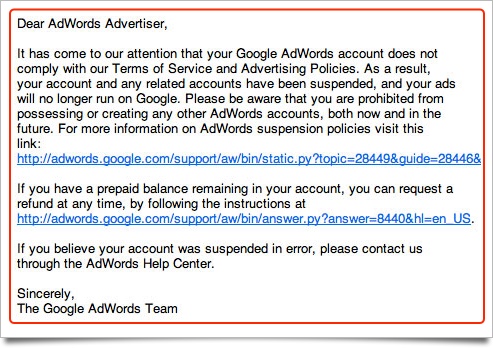
    Google Adwords Email

    Magnifying Glass

  • The Beginning of Google’s Mobile-first Index Rollout Is Underway—Are You Prepared?

    In 2016, Google announced they had begun testing a new ranking system based on indexing all mobile content first. Now, it’s official. The eagle has landed! The beginning of Google’s mobile-first indexing rollout is now well underway. As Google continues to move toward the big shift, it’s important that your company’s website is ready for the change.

    But how do you make the jump? Let’s start from the beginning.

    What Is the Mobile-first Index?

    Previously, GoogleBot would crawl your website and assign rankings based on the desktop version of your company’s website. Now that about 60 percent of search queries are made from mobile devices, Google is replacing desktop versions of sites in the index with their mobile counterparts via this mobile-first index. As a result, Google will determine rankings based on the quality of the mobile version ahead of the desktop version of the site.

    If the mobile performance, content, and user experience are up to scratch, your site receives a better ranking. If they are inferior, other sites will rank higher and you would take a hit.

    Ouch.

    How Do I Know When My Site Will Be Included in the Mobile-first Index?

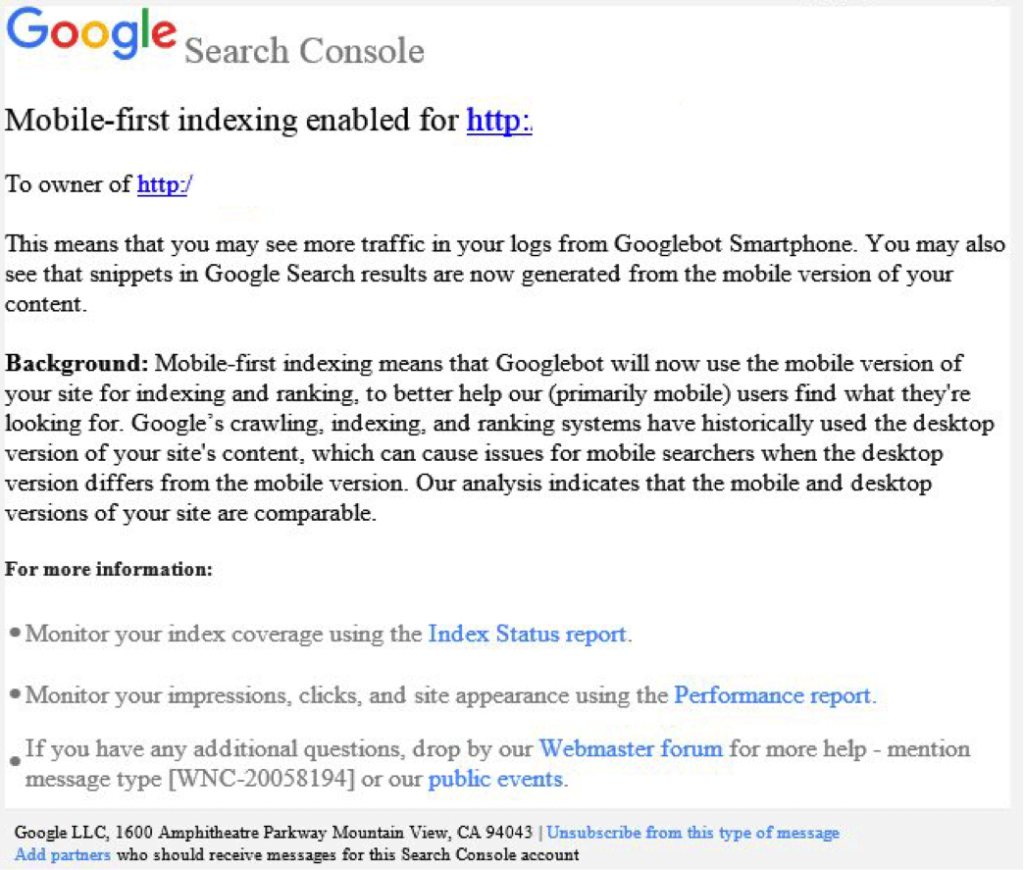
    Beginning this month, Google started notifying site owners and webmasters that their sites are migrating to mobile-first indexing through Search Console. The message looked like this:

    Screenshot of a mobile-first index notice from Google - Search Influence

    How Do I Prepare for the Mobile-first Index?

    Here are some tips to get you started.

    1. Mobile Page-speed

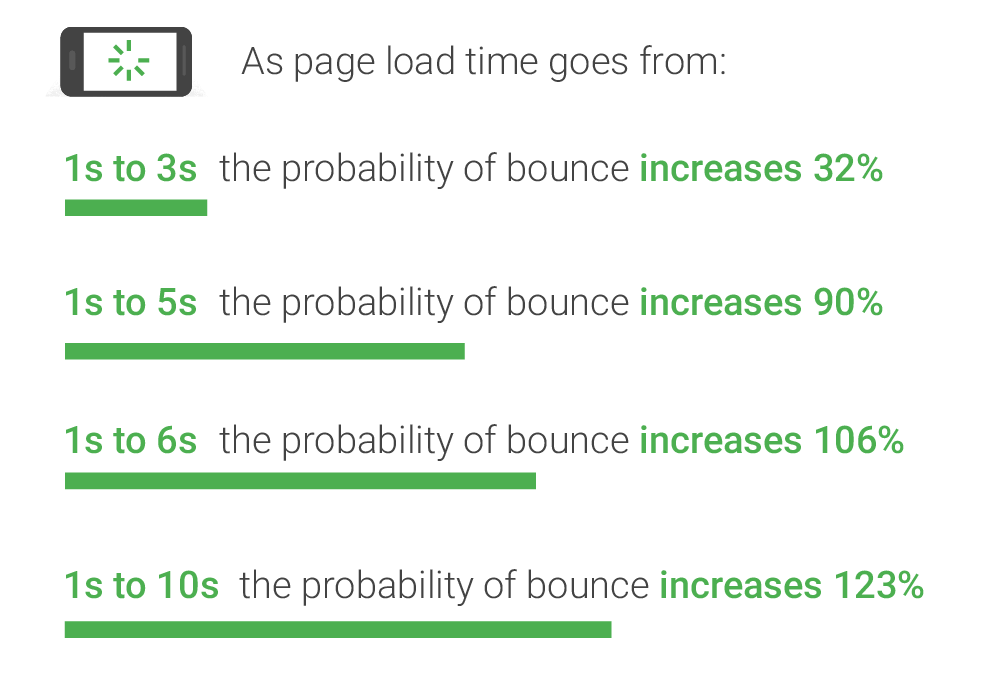
    According to Google’s mobile page speed study on Think with Google, as page load time slows down from one second to six, the bounce rate increases by 106%.

    A graphic of page load time relative to bounce rates - Search Influence

    So, make sure that your mobile website loads quickly and seamlessly. Google’s PageSpeed Insights is a handy tool for a basic test.

    2. Responsive Website

    A responsive website that is mobile-friendly works seamlessly across all devices. How do you make a website responsive?

    If your website is built on the WordPress platform, then creating a responsive design is very easy!
    Jared Jones’ post on the beauty of WordPress will make you a believer.

    3. Search Console Verification

    If you have separate mobile and desktop websites, verify the mobile version in Google’s Search Console. This proves that you own the site and directly affects how Google interprets and indexes it.

    Google’s Search Console help page provides you with all the ammo you need to get this done. More complex solutions for this preparation period includes content and image optimization, on-site directives and redirection, and schema structured data for your website.

    Talk to Us!

    At Search Influence, we are excited to start seeing the mobile-first index take form!

    To fully understand the impact of Google’s mobile-first index on your website, contact us for an audit and review of key aspects of your site’s mobile-friendliness. We’ll help you develop a roadmap to rectify potential risks to your search ranking and the content experience for your customers.

    Images:

    Parks and Rec

    Mobile-first notice Screenshot

    Page-speed Bounce Rates

  • Google to Roll Out Chrome 68 Security Update

    Google to Roll Out Chrome 68 Security Update

    Is your website safe from google's not secure warning - Search Influence

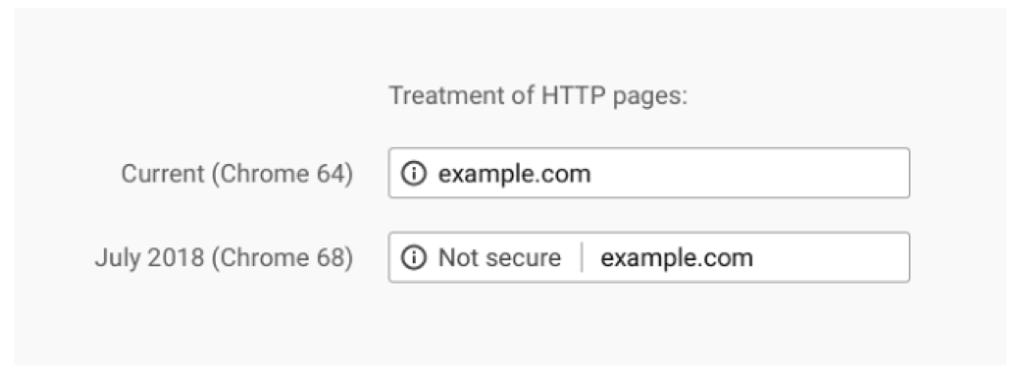
    After years and years of warning, the time is finally upon us. In July 2018, Google Chrome will release its 68th version, which will, for the first time, clearly mark sites that do not have SSL certificates as “Not Secure” in the address bar.
    Previously, a small exclamation point encased in a circle would be included with these websites, but now, the actual words will appear next to the web address to add a bit more shock value to the lack of the SSL certificate. The screenshot below from Google’s Security Blog shows the stark difference that we’ll see once Chrome updates this summer.

    Treatment of HTTP pages image - Search Influence

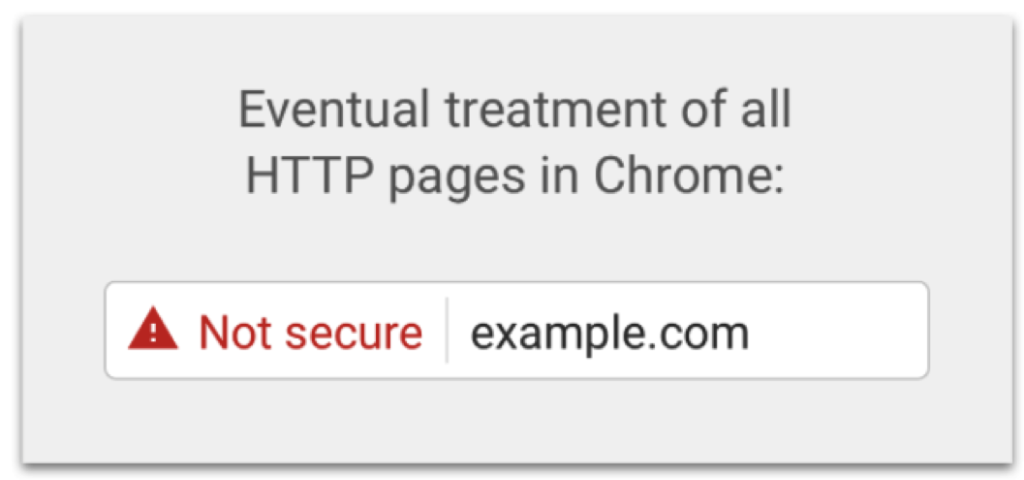
    If that isn’t enough to have you change to https, Google has also revealed an “eventual” timeline for non-https websites to have this even more threatening alert in the address bar:

    Eventual treatment of all HTTP pages in Chrome graphic - Search Influence

    Waiting until the last minute to update your site is a recipe for disaster. Updating your site to https isn’t as easy as flipping a switch, and some technical knowledge is required to help it go off without a hitch.

    To learn more about the switch from HTTP to HTTPs, check out our blog The Final Countdown: Secure Your Website to Align With Google’s Update to Chrome, or contact us for help in the transition.

  • Google Moves Toward a More Copyright Friendly Image Search

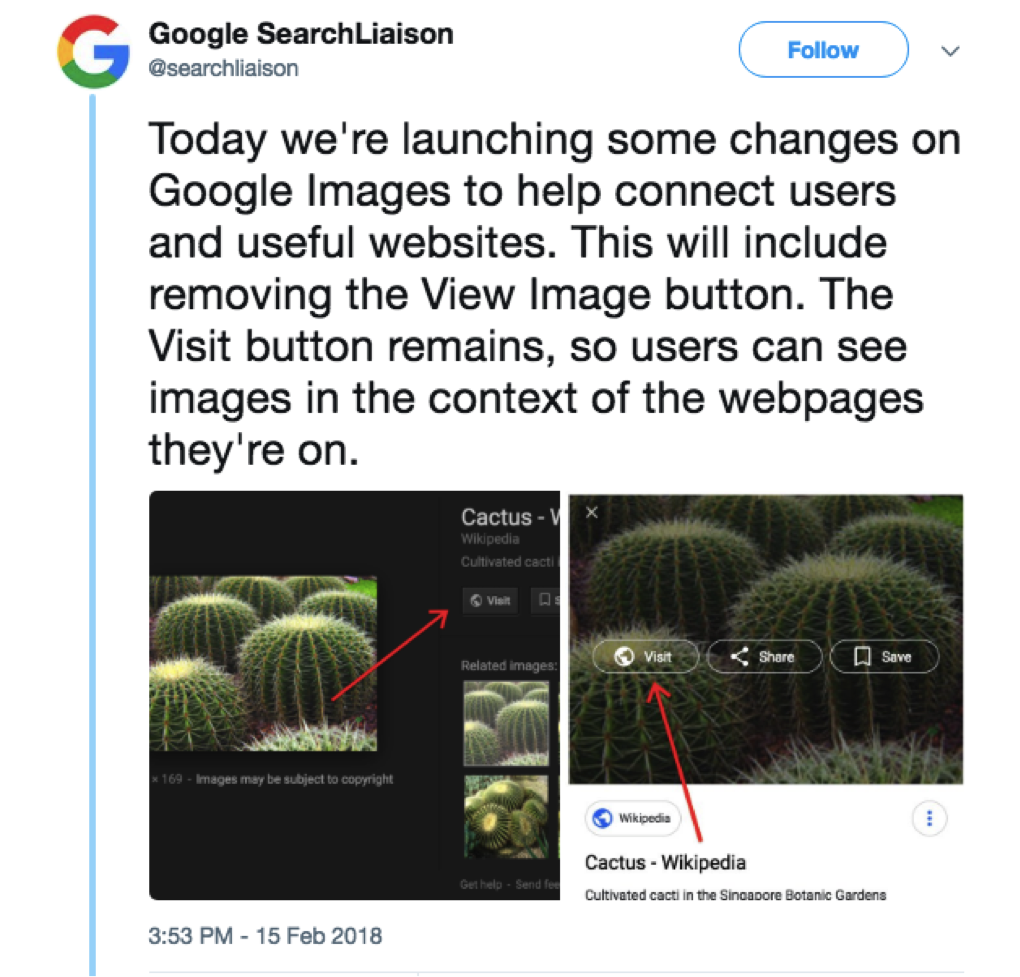
    If you’ve recently used Google’s image search engine, you may have noticed a small change to the options when viewing image results. In an effort to appease photographers, publishers, and stock photo agency Getty Images, Google has removed its ‘View Image’ feature from image search results. This update, along with more attribution visibility for images, comes as Google looks to provide more copyright protection for image owners and publishers. The change to the image search, which is already in full effect, and a plan for more image copyright visibility comes with a new partnership and some likely irritated users.

    Copyright Deal With Getty Images

    Michelle Obama, James Carden, and Missy Elliot singing a car together - Search Influence

    After a 2016 copyright dispute filed between Getty Images and Google, a multi-year deal has been reached that will now allow the search engine to use Getty images through many of their products and services. The dispute, which was eventually withdrawn, stemmed from Getty Images’ allegation that they were losing traffic and revenue to customer sites since users could easily access and download the stand-alone images. They also accused Google of biased search results, claiming the search engine altered search results to favor their own services. This is not the first accusation of the like for the search engine giant. Last year, Google was heavily fined by the European Union in an antitrust ruling that also claimed biases toward their own services. With these recent updates, however, Google looks to be working to gain back the trust and respect of copyright owners.

    Along with the removal of the ‘View Image’ feature, Google will also take a step further in providing copyright protection by making attribution information more visible to users. If you complete a Google image search today, you’ll notice that all images come with a disclaimer once the image is clicked noting that the image “may be subjected to copyright.” This change is still a work in progress and will likely include several different updates. Additionally, Google has also updated their mobile image search to contain page title tags below images. This update will most certainly prove to be a vital SEO ranking factor. Though no character limit has been announced, it’s estimated that the length is around 35 characters.

    How It Affects Users

    Screenshot of a twitter post from Google - Search Influence

    Though a minor change, this new update will likely prove to be a frustration for users, who have grown used to the option of downloading the image directly from the image results. The idea here is that users will now be prompted to view the image through the site it lives on, thus providing websites the traffic, and revenue, they deserve. Unfortunately, there still appears to be a flaw in this update. Users are still able to access the image in its own tab by right-clicking on the image and selecting the option to do so, although this may not be the obvious option for every user. It is also not yet clear what, if anything, Google will do to prevent this loophole in the future.

    Despite a few shortcomings with the recent changes, It’s a step in the right direction for a company that has drawn criticism in recent years over copyright issues. The question still remains what other steps they’ll take to protect copyright owners and how soon these changes will go into effect.

    Images:

    Carpool Copyright 

    Google Tweet

  • What Happened to My Meta Descriptions in Search Results?

    During a typical day-to-day interaction with Google’s SERP recently, I started to realize the variable nature in which meta descriptions were being pulled into search results for our site. We know that last December Google announced the expanded the character count guidelines for meta descriptions, but that did not seem to be the only input at play—it was pulling in the implemented meta description for some searches and a chunk of the content from the website for other search verticals.

    Let’s start with a service page present on our domain. Within the page’s coding, we have implemented the following meta description:

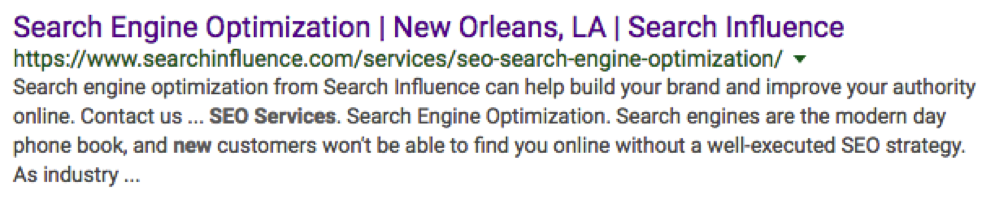
    However, a search for “seo services new orleans” generated a completely different meta description from the one implemented in the site’s coding.

    Google appears to have made the decision that our implemented meta description was either less accurate or less relevant to our search intent than the page’s content. What jumps out here is that in the SERP we see that three of our search terms are bolded in the description, including the “new” from New Orleans. Google has made the decision to extract the “new” and treat it as its own search value and not necessarily as a string with “New Orleans”.

    With this in mind, I began to test the limits of Google’s ability to crawl and pick specific parts of content to utilize in a meta description. Let’s start with our main domain’s meta description.

    In the search for “digital marketing new orleans” our implemented description pulls in perfectly.

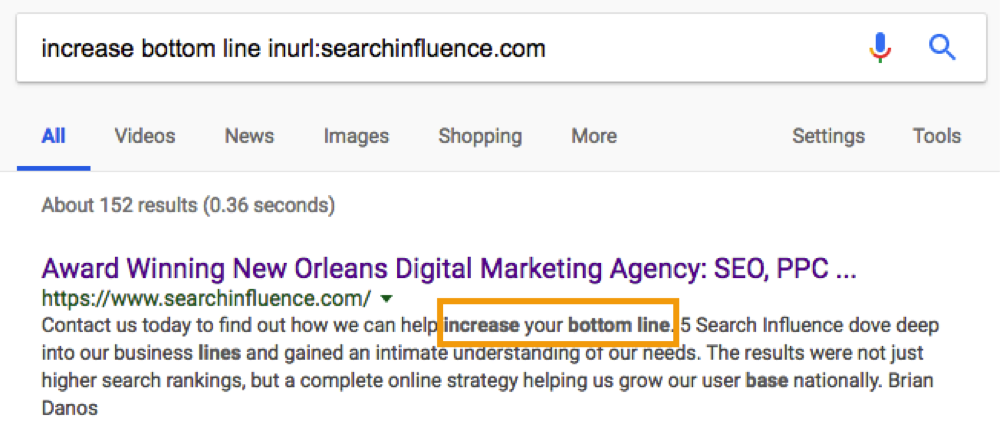
    So in this case, our intent and meta description seem to be perfectly aligned. But, what if I picked some unrelated string of words from my content? I scrolled toward the bottom of searchinfluence.com and picked out a chunk of content to see if I could get it to populate as the meta.

    Wow, that was easier than anticipated.

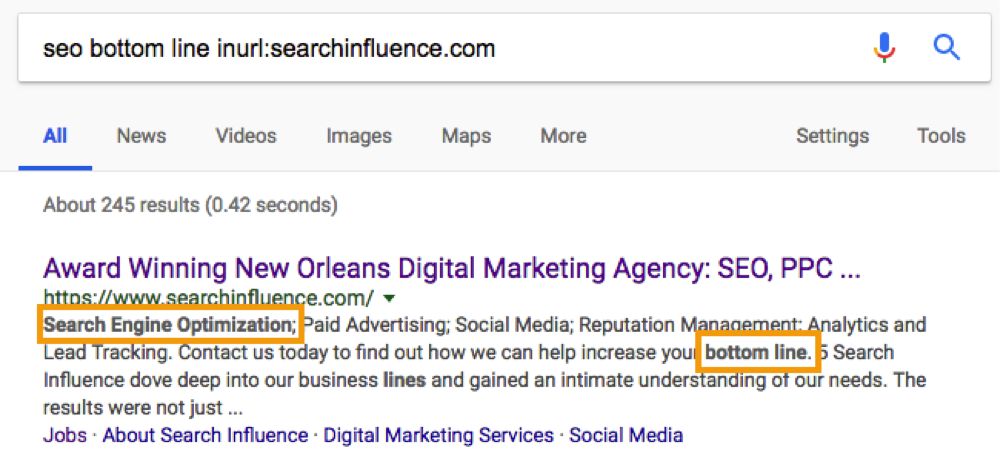
    Let’s take this a step further. What happens if we Frankenstein some sort of combination of content and our original keyword search.

    So, from this small sample, we can see that Google is actively trying to best address your search intent by extracting the most relevant information from the most relevant pages related to your search query.

    This leads to many follow-up questions: How do I optimize my meta descriptions? Does the length matter? How do I make sure I capture the searchers I want? This presents a lot of loose ends, as these types of things always face small adjustments and tweaks from Google. However, this research can help us form some conclusions about general rules.

    1. Assure your meta description addresses the main focus of the page with search volume in mind.

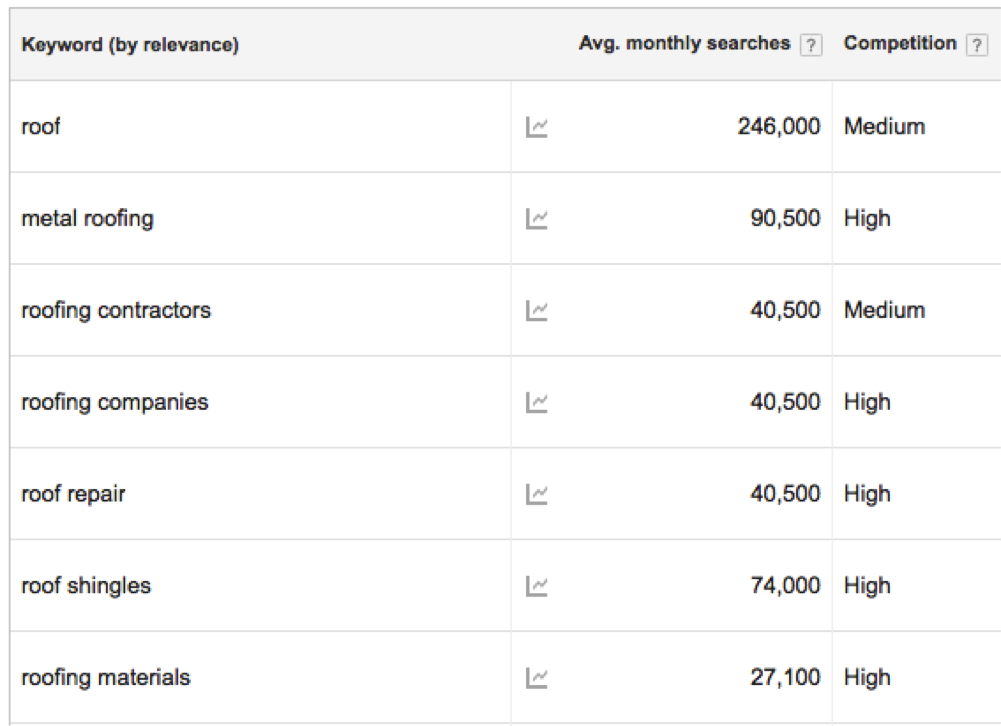
    If Google is trying to tell us that intent matters, then it makes sense to align your meta descriptions with the intent of the searcher. Let’s take a roofer for instance:

    What can I infer from these average monthly searches? For the main domain, best practice would be to address metal roofing, contractors, “company,” repair, shingles, and materials if I want my implemented meta description to pull in for all of the keywords. Keep in mind that, as tempting as it might be, if your page’s content does not address a particular topic or keyword we do not want to include it in the meta description for the sake of attracting searchers. Your keywords or topics in your meta descriptions and on-page content should always align very closely.

    Also, think about pages with a lower number of clicks and conversions. Am I missing any top-level keywords on these pages? Which keywords or topics can I implement to help searchers better understand my product or service? This may require some testing, however, it will aid the end goal of pushing the target audience to the desired product or pages.

    This might seem like a return to a “keyword focused” construction of meta descriptions, but it is more about aligning what your business provides with what a potential customer or client might be searching. If you want your meta descriptions to pull into the SERP, this must be kept in mind.

    2. Meta descriptions should reflect the page’s content.

    When writing meta descriptions, you should also consider the variance in search queries. In theory, your page can rank for a number of keywords outside of your original plan. With that in mind, the meta description should work hand-in-hand with the page’s content. This way, when Google prioritizes one over the other you are still accurately presenting your product or service.

    Additionally, in terms of marketing, find what works best for conversions and stick with it. Since we cannot create a meta description that catches every possible search term or query, you should be strategic about using terms or queries that will best position your business in front of searchers.

    3. Google is utilizing Semantic SEO for Metas.

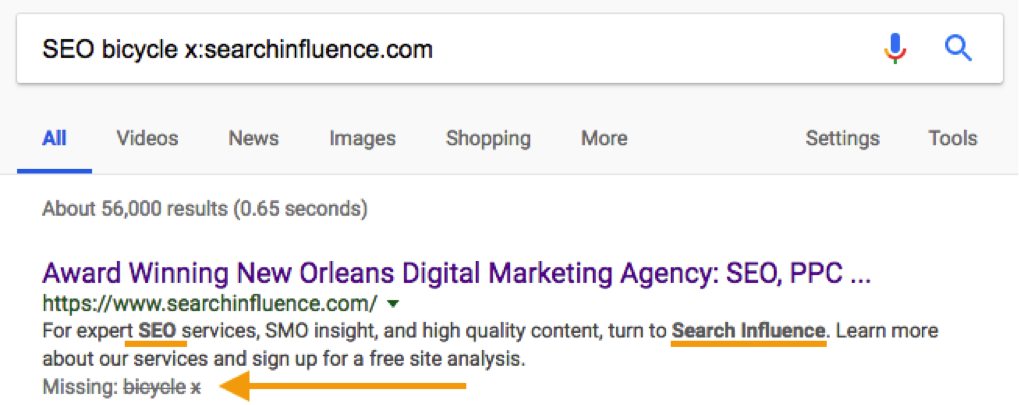
    What we see in bolded text in the SERP results, as seen in earlier sections and the image below, is that Google is continuing to think about searches semantically. In other words, Google is applying more meaning to your searches than a strict A-to-A, keyword-to-result formula. It is trying to infer certain things about your search and what type of content you seek in return. Think about your Semantic SEO strategies and how those can be integrated into your meta descriptions.

    In the above example, we see that Google hit on “SEO” and “searchinfluence” as indicated by the bolded text in the meta description. Below that, we see terms that were excluded, “bicycle” and “x”. What this shows us is how Google is thinking about your search query semantically and thinking about the context of what you are searching, excluding terms that are not semantically part of your search vocabulary.

    4. Utilize the extra space.

    Google has provided us with some extra legroom for our descriptions by expanding the character count to somewhere around 300. Testing has indicated that descriptions can go beyond 300 characters, but that is the explicit cut off provided by Google. While Google will still pull in “shorter” metas that fit the old standard, it makes logical and semantic sense to include as much information that covers as much search intent as possible.

    As with most things Google, this is continually evolving and requires continued observation and testing. However, there are clear signals about the ways meta descriptions are being rethought as they relate to the SERP. This is a great opportunity to test our new ideas and apply new SEO strategies to see what works and how it can positively impact your business.


    All screenshots were taken by Cory Agular.

    Images:

    Start

    Young Frankenstein

    Cat Reflection

    Space

  • Pubcon Florida 2018: Chatbots Are Cool, But We Gotta Keep Marketing Human

    Pubcon Florida 2018: Chatbots Are Cool, But We Gotta Keep Marketing Human

    I am sorry to say that until last week, the only Pubcon events I’d attended were in Las Vegas, and of course, when after Katrina the show came to New Orleans in 2013 (wow, seems like only yesterday).

    So, last week I went to Ft. Lauderdale for Pubcon Florida. It was a really enjoyable show.

    To give a little context, Pubcon Las Vegas is like the CES, SEMA, or ComicCon. There is way too much going on to feel like you’re seeing it all. Kind of like Las Vegas itself.

    But this show, the South Florida show, co-produced with the South Florida Internet Marketing Association (SFIMA) is much more manageable.

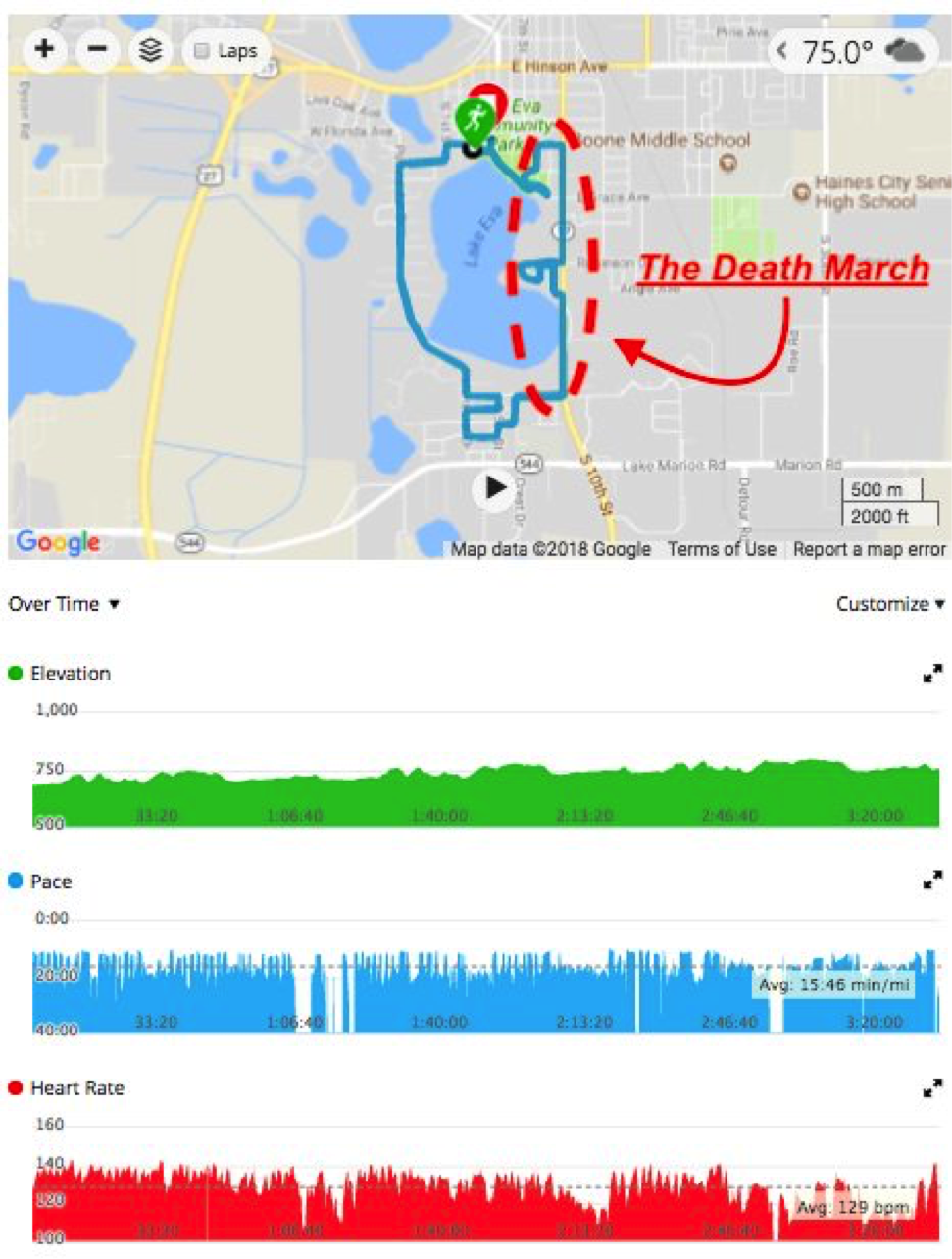
    I was able to bundle a little fun with this trip, stopping over in Haines City, FL (my hotel was in Lakeland, FL), to take part in Ironman 70.3 Florida.

    Feel free to read my account of it if you’re interested in the exploits of a mediocre, middle-aged athlete.

    We Need to Stop Chasing Google

    Every keynote speaker at Pubcon were people I would gladly watch any time. I was sad to miss the closing keynote with Purna Virji of Microsoft but glad I caught both Wil Reynolds and Lee Odden. I have seen Purna speak many times and as I tweeted at SEMPDX Engage, I could listen to her read the phone book.

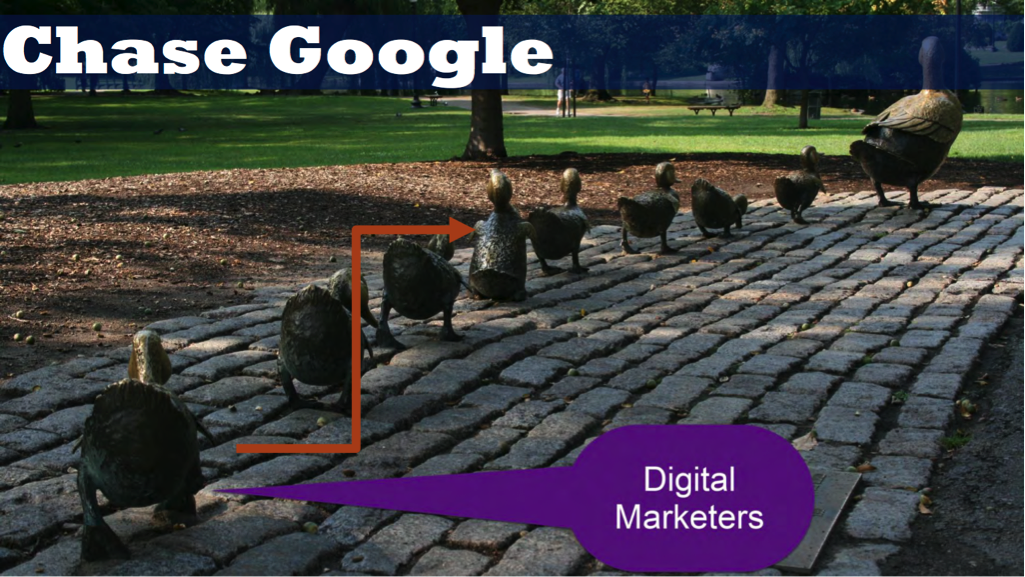
    Wil made some really excellent points about how we as marketing companies need to be thinking about our relationship with the search engines and ad platforms, including a great metaphor about the follow of chasing Google when Google is itself chasing the user (searchers, humans, whatever).

    It is really easy for us marketers, especially those like me who grew up in an SEO world, to get enamored of the technology and forget that at the end of the day it’s about humans. Or as they use to say in the Yellow Pages, putting buyers and sellers together.

    I like Wil. He’s a northeasterner who has been doing this for a while. Our cultural references are similar and clearly our penchant for a well-placed profanity.

    Lee Odden was talking about the intersection of PR and Content Marketing. Lee has been preaching the value of content since the early days—perhaps even before The Content Marketing Institute.

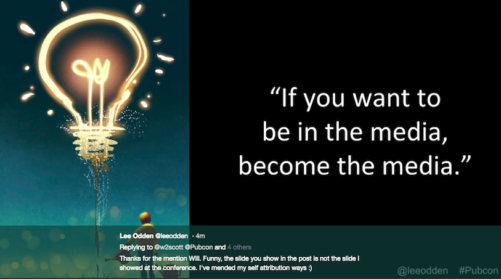
    According to Lee, “If you want to be in the media, become the media” – I always enjoy when presenters attribute themselves to quotes in their presentations.

    UPDATED: Lee Odden was nice enough to give me the right image. I included here a screenshot from Twitter so you can see his message as well.

    My interest in these two presentations is a little self-serving. Both were arguing for a more holistic view of both the user (browser, searcher, customer) than that of the typical digital marketer.

    Trust Building for Brands

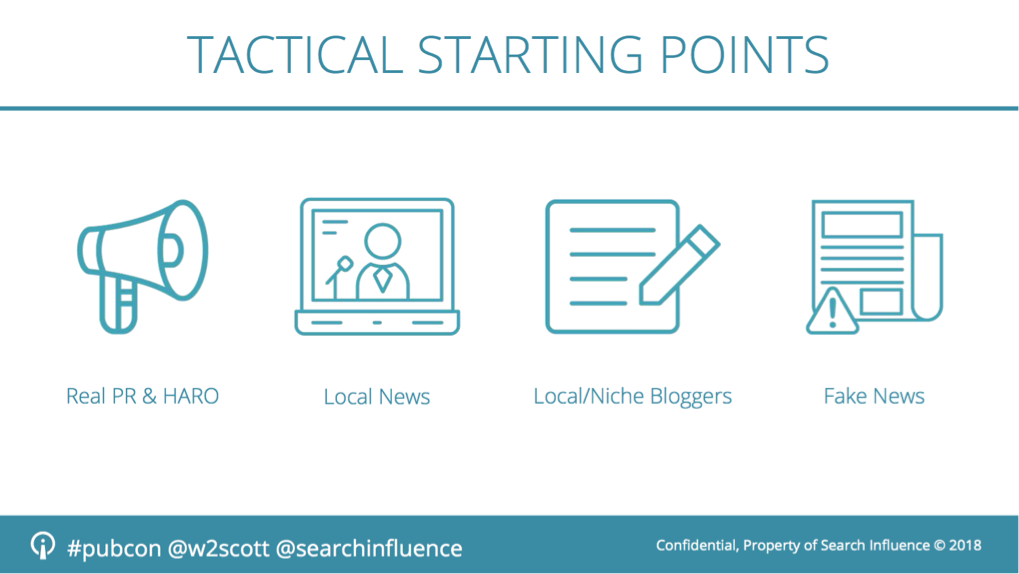
    My presentation, entitled “Brands Win Online” was a further expression of a theme that we’ve been presenting on for years.

    In essence, brands get traffic because they’re brands. Even when, in a Google search, a brand is lower down the list they’ll get the click because of brand recognition. We see this all the time at a tactical level where we are able to influence search results by doing branding focused advertising.

    The first iteration of this idea, done this way, was in a presentation to the BIA/Kelsey show called: Presence + Authority + Trust = Winning

    Paula has also banged this drum a few times with her presentations on local branding including her MozCon presentation: Fake it till you make it: Brand Building for Local Businesses

    There were, of course, other great sessions. Mat Siltala was his usual brilliant self, and I learned quite a lot from Tony Wright whose presentation I had the pleasure of moderating.

    Here’s a link to Mat’s presentation on SlideShare: Creating Content for Social Media

    Did you know, Tony studied Opera?!

    The Benefits of Going to a Growing Conference

    One of the great things about this smaller conference is that there were no must-miss presentations. I could have spent all day in sessions and felt like I was learning a ton. And, of course, there are a number of takeaways for me to bring home to the team. Including a Barnacle SEO reference by Steve Shackelford of DealerOn.

    Brett, Joe and the team put on a great show and have been doing so for the past 17 years. If you’re interested in a more manageable show than the big Las Vegas extravaganza, do check out Pubcon Florida next year.

    Maybe, this one will get on autopilot and we can hope to see Pubcon back in New Orleans someday!