Tag: google algorithm

  • Year-end Trends: What’s Been Driving Local Search in 2018?

    Annually, the brightest minds in the local search field come together to provide their input on the major changes and trends in the industry via the Local Search Ranking Factors Survey. Coordinated by Darren Shaw from Whitespark and the fine folks at Moz, the 2018 review of local ranking factors helps to coalesce the general sentiment around the most impactful inputs as they relate to local searches. This survey is a great resource for digital marketers because it not only helps us understand the changes in the last year, but also how to better focus our efforts and energy moving forward.

    Here at Search Influence, we are fortunate to be one of the contributors to this survey. With our experience in the local search realm across numerous industry verticals, we are well-equipped to help add more context to an, at times, confusing digital marketing landscape. As expected, much of what we saw in the day-to-day management of our clients’ local search campaigns was reflected in the results of this year’s survey.

    What’s the Biggest Local Search Trend for 2018?

    According to the results of the survey, the biggest local search trend is Google My Business management.

    For those of us who spend countless hours wrangling Google My Business (GMB) and/or Google Maps accounts, the attention Google has put into the product is obvious. With the addition of Google Posts, Google Q&A, website builder, services, expanded attributes, primary and secondary categories, etc., it became clear that GMB was being re-positioned as a social, activity, and information hub for potential customers, current customers, and the business, in some part to offset the loss of Google+ as a business platform.

    Understandably, digital marketers have found GMB signals increasingly important year-over-year. It is pretty straightforward, intuitively—use the new features introduced by Google to help with local search performance. However, many businesses and digital managers fail to follow up once these new features are rolled out.

    Of the eight signals measured in the results, GMB makes up 25.12 percent. As you can see in the image above, this is a large increase from the previous year’s data. Ensuring that your business has a properly optimized listing will go a long way in determining the vitality of your business in a local search context.

    31 questions to ask a marketing agency

    Reviews Are an Increasingly Relevant Local Search Ranking Factor

    Along with increased profile options, Google has started taking steps to help increase review participation on the Google My Business listings themselves. Through new mobile app features, new messaging features, and other small tweaks, Google has made it clear that they do not just want users leaving reviews for the business; they want to make sure businesses are interacting with their reviewers as well. One prevailing thought derived from the data points is that Google is making an effort to create a quasi-community around business listings, making it so users do not even feel the need to click through to a client’s website. There is ample room for discussion about the pros and cons surrounding that concept, but, as a practical matter, digital marketers and businesses should be keenly aware of this trend and know how to best leverage it to convert potential customers.

    This fact is reflected in the breakdown of the influence of review signals. As seen in the table above, the influence of reviews on listings has increased significantly year-over-year. As businesses begin to compete more and more for the “Local Pack,” reviews may be a large factor in whether or not your business becomes listed. Encouraging your customers to review you on Google, whether positive or negative, will help Google know your business is active. What’s more, if you, as a business, respond to the positive and negative reviews, you are adding a valuable signal to Google, as well as displaying good customer service.
    But, What Happened to Links and Citations?

    One important thing to consider in regards to this survey is that just because something has become less important relative to other factors does not mean that it has lost significance. A good local search strategy encompasses a holistic approach that implements strategies for all of the different factors, of which linking and citations are a significant portion.31 Questions Checklist square image

    Part of the reason these factors have seen a dip in relevance is because the other factors have become more influential—in other words, the overall results have become a bit diluted due to the increasing number of factors. To rephrase, linking and citations are still a large, integral part of a good local search campaign; however, you might want to get a wrangle on your Google My Business and review situation prior to embarking on a full-fledged link/citation-building campaign.

    So, What Are the Other Factors?

    A large portion of the review is the section-by-section breakdown, along with a helpful glossary, to help you fully understand how each factor is weighed and what digital marketers think. It is important to distinguish between organic search results and the “Local Pack,” as both have different considerations when it comes to ranking signals. In lieu of breaking that down here, I suggest reading the data supplied in the post on Moz’s blog, as well as Darren Shaw’s companion piece explaining the survey.

    Local search is a constantly evolving, dynamic field that requires actively monitoring changes to platforms and signals, and to Google’s new product rollouts. Undoubtedly, there will be some disruption in the local search field via a new product, new algorithm, or cosmetic changes, but these surveys give us the historical context to better understand why these changes might have occurred and how they might impact future usage. If you’d like help building a dynamic marketing strategy that encompasses these trends, reach out to Search Influence to request your free marketing analysis.

    Images:

    Laptop

  • What Happened to My Meta Descriptions in Search Results?

    During a typical day-to-day interaction with Google’s SERP recently, I started to realize the variable nature in which meta descriptions were being pulled into search results for our site. We know that last December Google announced the expanded the character count guidelines for meta descriptions, but that did not seem to be the only input at play—it was pulling in the implemented meta description for some searches and a chunk of the content from the website for other search verticals.

    Let’s start with a service page present on our domain. Within the page’s coding, we have implemented the following meta description:

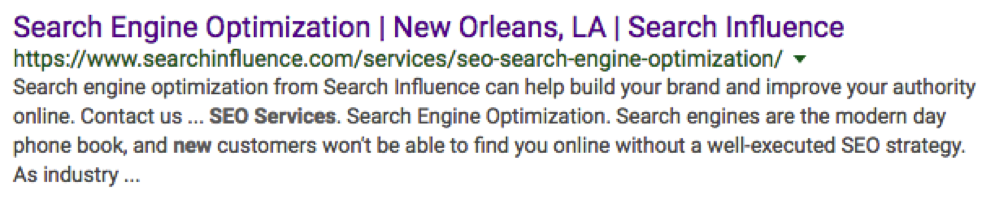
    However, a search for “seo services new orleans” generated a completely different meta description from the one implemented in the site’s coding.

    Google appears to have made the decision that our implemented meta description was either less accurate or less relevant to our search intent than the page’s content. What jumps out here is that in the SERP we see that three of our search terms are bolded in the description, including the “new” from New Orleans. Google has made the decision to extract the “new” and treat it as its own search value and not necessarily as a string with “New Orleans”.

    With this in mind, I began to test the limits of Google’s ability to crawl and pick specific parts of content to utilize in a meta description. Let’s start with our main domain’s meta description.

    In the search for “digital marketing new orleans” our implemented description pulls in perfectly.

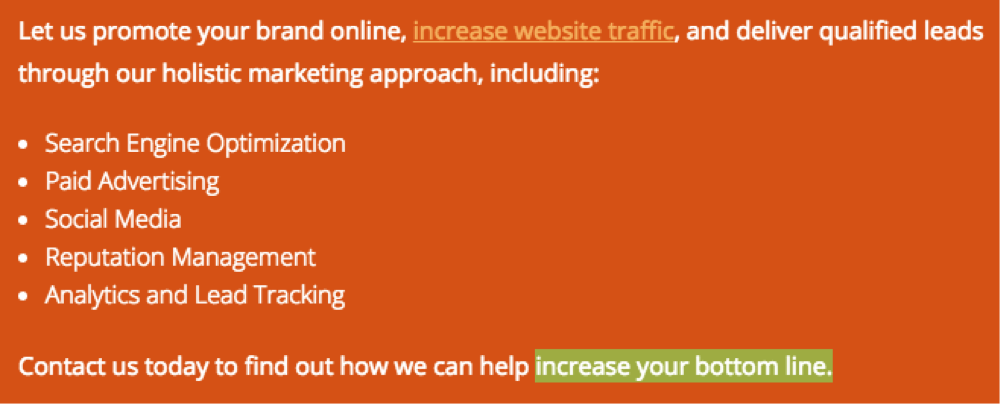
    So in this case, our intent and meta description seem to be perfectly aligned. But, what if I picked some unrelated string of words from my content? I scrolled toward the bottom of searchinfluence.com and picked out a chunk of content to see if I could get it to populate as the meta.

    Wow, that was easier than anticipated.

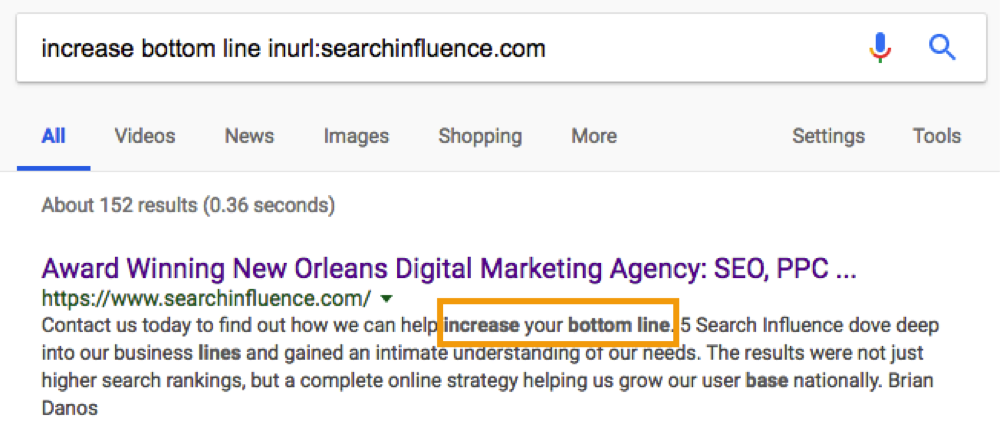
    Let’s take this a step further. What happens if we Frankenstein some sort of combination of content and our original keyword search.

    So, from this small sample, we can see that Google is actively trying to best address your search intent by extracting the most relevant information from the most relevant pages related to your search query.

    This leads to many follow-up questions: How do I optimize my meta descriptions? Does the length matter? How do I make sure I capture the searchers I want? This presents a lot of loose ends, as these types of things always face small adjustments and tweaks from Google. However, this research can help us form some conclusions about general rules.

    1. Assure your meta description addresses the main focus of the page with search volume in mind.

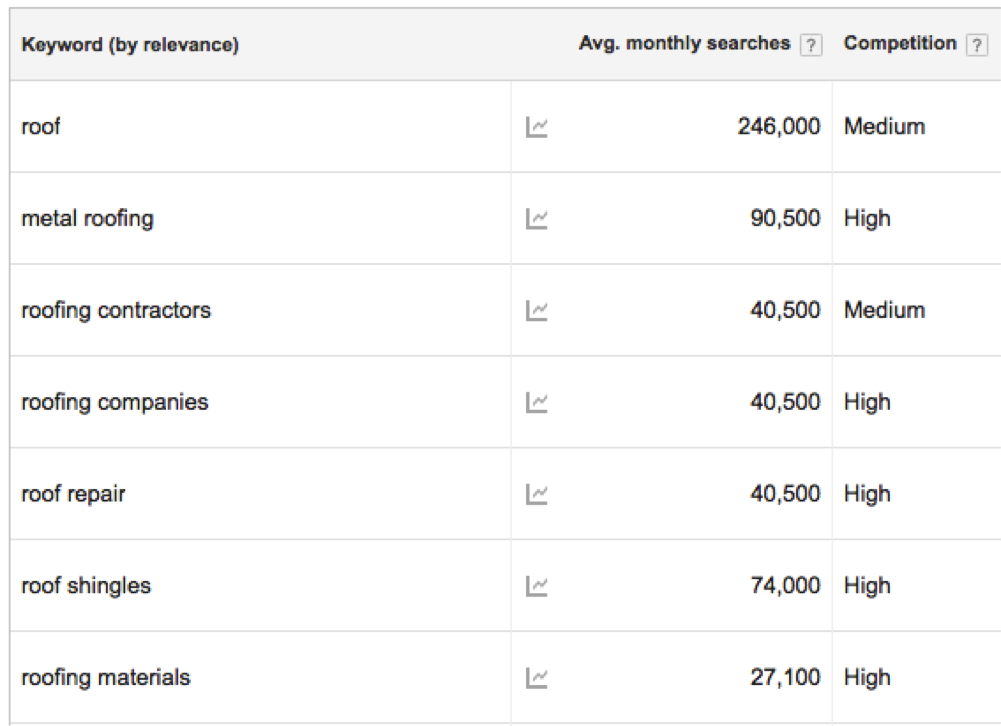
    If Google is trying to tell us that intent matters, then it makes sense to align your meta descriptions with the intent of the searcher. Let’s take a roofer for instance:

    What can I infer from these average monthly searches? For the main domain, best practice would be to address metal roofing, contractors, “company,” repair, shingles, and materials if I want my implemented meta description to pull in for all of the keywords. Keep in mind that, as tempting as it might be, if your page’s content does not address a particular topic or keyword we do not want to include it in the meta description for the sake of attracting searchers. Your keywords or topics in your meta descriptions and on-page content should always align very closely.

    Also, think about pages with a lower number of clicks and conversions. Am I missing any top-level keywords on these pages? Which keywords or topics can I implement to help searchers better understand my product or service? This may require some testing, however, it will aid the end goal of pushing the target audience to the desired product or pages.

    This might seem like a return to a “keyword focused” construction of meta descriptions, but it is more about aligning what your business provides with what a potential customer or client might be searching. If you want your meta descriptions to pull into the SERP, this must be kept in mind.

    2. Meta descriptions should reflect the page’s content.

    When writing meta descriptions, you should also consider the variance in search queries. In theory, your page can rank for a number of keywords outside of your original plan. With that in mind, the meta description should work hand-in-hand with the page’s content. This way, when Google prioritizes one over the other you are still accurately presenting your product or service.

    Additionally, in terms of marketing, find what works best for conversions and stick with it. Since we cannot create a meta description that catches every possible search term or query, you should be strategic about using terms or queries that will best position your business in front of searchers.

    3. Google is utilizing Semantic SEO for Metas.

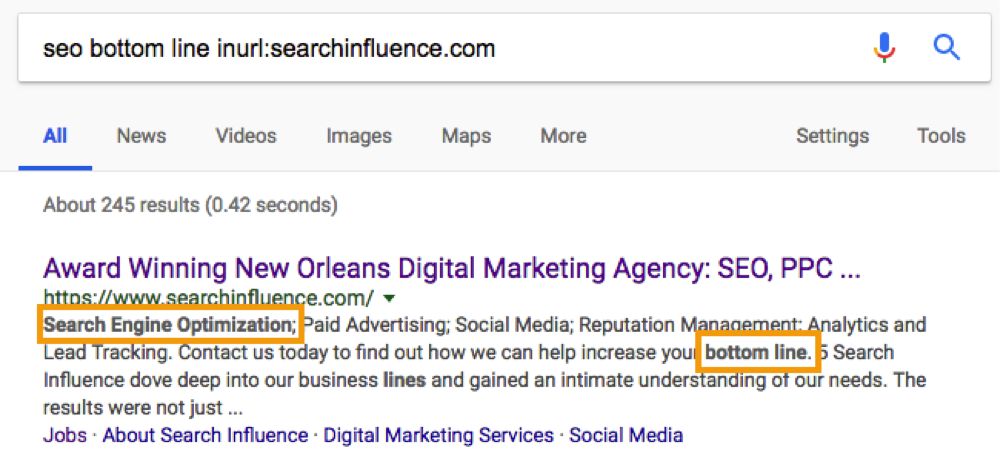
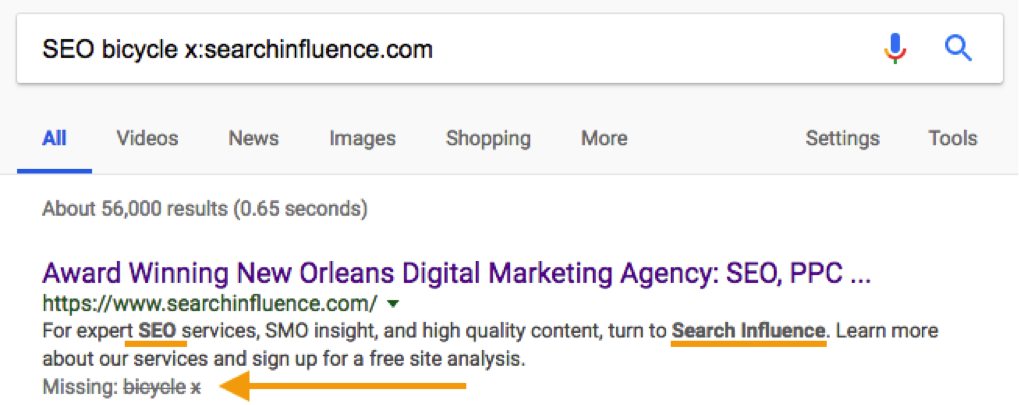
    What we see in bolded text in the SERP results, as seen in earlier sections and the image below, is that Google is continuing to think about searches semantically. In other words, Google is applying more meaning to your searches than a strict A-to-A, keyword-to-result formula. It is trying to infer certain things about your search and what type of content you seek in return. Think about your Semantic SEO strategies and how those can be integrated into your meta descriptions.

    In the above example, we see that Google hit on “SEO” and “searchinfluence” as indicated by the bolded text in the meta description. Below that, we see terms that were excluded, “bicycle” and “x”. What this shows us is how Google is thinking about your search query semantically and thinking about the context of what you are searching, excluding terms that are not semantically part of your search vocabulary.

    4. Utilize the extra space.

    Google has provided us with some extra legroom for our descriptions by expanding the character count to somewhere around 300. Testing has indicated that descriptions can go beyond 300 characters, but that is the explicit cut off provided by Google. While Google will still pull in “shorter” metas that fit the old standard, it makes logical and semantic sense to include as much information that covers as much search intent as possible.

    As with most things Google, this is continually evolving and requires continued observation and testing. However, there are clear signals about the ways meta descriptions are being rethought as they relate to the SERP. This is a great opportunity to test our new ideas and apply new SEO strategies to see what works and how it can positively impact your business.


    All screenshots were taken by Cory Agular.

    Images:

    Start

    Young Frankenstein

    Cat Reflection

    Space

  • Rookie Website Mistakes, Part 6: You Abandon Good Work When Replacing an Old Site

    So, you’re launching a new spiffy, user-friendly website? Or, maybe you’re migrating your site from an HTTP to HTTPS secure domain? To make the launch as successful as possible, there are a few important steps you (or more likely your web developer) should take on the backend to facilitate a seamless transition.

    Changing your URL requires a strategic plan. Without it, you could end up with lost links, dreaded 404 errors, and annoyed customers. If you’ve built some authority for your site, you also need to manage your page rankings during the process. No one wants to watch traffic plummet when they launch a new site.

    While it may not be as exciting as creating the design or building out new pages, here are four absolutely necessary administrative steps to take during the launch of your new site.

    Set Up 301 Redirects

    A 301 redirect will automatically transfer users from the old URL to the new page on the website that replaces it. So, when someone types in your old domain they will still end up on your beautiful, newly-designed (or newly-secure) website.

    While there are other options for redirecting links, 301 redirects are the safest and most trusted way to permanently redirect pages without diluting PageRank on Google. In fact, Moz estimates that 90–99 percent of ranking power will pass from the old page to the new one with the use of a 301 redirect. This is because Google bots recognize 301s as a permanent change, indicating that the original content from the old URL has found a new home on the redirected page.

    There is no limit to the number of 301s you can use per site, so you can (and should) redirect all of your old, viable content to new URLs for your new site in order to retain all of the rank power (also known as link juice) from your old site.

    To make this happen, extract all the URLs from your content management system or export the URLs from Google Analytics to create a list of the URLs on your existing site. Don’t forget to include landing pages from any paid search campaigns you’re running, as Google will lower your quality score for running ads with broken links.

    Once you have this list, you can proceed to the next item on our list, mapping out your new site.

    Image of Lost Duck With Map - Search Influence

    Update Site Maps

    As you learned in part four of this series, you’ll obviously want to have more than one page on your new site. An updated sitemap should be the foundation for your new site design. Start by creating a list of all the pages you know you want to include in your new site. Your old site’s URL list (see above) can provide a foundation for essential pages that you know you want to keep, especially the pages on the old site with inbound links that help improve rankings.

    Map out all planned pages that correspond to pages on your old site so you can set up redirects for all of those pages. You’ll also want to take note of key analytics on legacy pages to use for comparison once the new site is launched.

    The following are some ideas for what you should track for your benchmark:

    • Organic traffic and page visits
    • Bounce rate
    • Page loading speed
    • Conversions per page
    • Rankings for priority keywords

    From here, you’re ready to create a robots.txt file and an XML sitemap to give Google and other search engines the right information to crawl your new site. If any of the steps so far have left you scratching your head or frantically googling SEO jargon, one of our friendly tech gurus can help you out!

    Recycle Existing Content & Optimize for SEO

    Creating a new website from scratch is already a big undertaking—don’t recreate the circle. Be sure you bring over your existing title tags, meta descriptions, and page headings and ensure all new content includes these essential SEO elements. This is also the perfect time to audit your existing content to ensure that it meets the latest best practices. Are multiple pages using the same headline (h1) or meta descriptions? Do pages have broken internal or external links? Are images too big and slowing download time?

    Use what works, fix what doesn’t. Your content for each page should be unique, use keywords naturally (without stuffing), and include logical internal links.

    Don’t Forget About Google Analytics

    As you launch the new site, it will be more important than ever to track analytics and ensure that everything is functioning like it should. Migrating to a new domain is a huge, detailed undertaking, and little problems are likely to arise.

    Image of Graphs, Charts, and Analytics - Search Influence

    Make sure that the Google Analytics tracking code is properly installed on each page of the new site and collecting data. With your collected benchmark data, you can compare traffic and rankings for the new site and check and adjust as needed. Tools like Screaming Frog can also help you check for 404 errors on the new site and alert you to any issues with pages being indexed improperly via your robots.txt file.


    Images:
    Lost Duck

  • Rookie Website Mistakes, Part 5: Weak Content

    Welcome to Part 5 of our series on Rookie Website Mistakes. In Part 4, we learned about single page website design and how they often put form over function much to the detriment of your SEO and the user experience. While we all want a shiny new website with all the bows and whistles, it’s more important to focus on quality content that will give the users what they want. Having weak content can prevent search engines from exploring your site and leave visitors with more questions than answers. Avoid this mistake by following the tips below.

    Hit the Sweet Spot of Content Length

    Unfortunately, there’s no magic number for how long your content should be. Because I can’t tell you that precisely 253 words will make your page number one, I’ll instead give you the frustrating advice my high school English teacher gave me–your content should be as long as it needs to be. Obnoxious, right? But, what it comes down to is that your content should provide all of the related information on the given topic you’ve chosen for the page.

    Very broad topics, like ‘what is family law,’ are going to be longer, while very specific topics, such as ‘features of Victorian-style roofing,’ might not have as many relevant details. Generally, more technical content like a plastic surgery procedure outline will be 500–700 words, while an ‘About Us’ page will be more around 250.

    If you’re not sure how much you should write on a given topic, scope out your competitor’s pages to see how much they’ve written. If they’ve written 500 words, chances are you can build out your own content to be more competitive than theirs.

    That being said, you don’t want to over-inflate your content just to make it longer. The other half of ‘as long as it needs to be’ is that it shouldn’t be any more than necessary to make your point. At Search Influence, we’ve named this superfluous content ‘fluff”; it provides the same amount of nutrition to your content as fluffy cotton candy. Fluffy content makes you sound less authoritative on the subject and doesn’t actually provide the reader with important or new information.

    Focus on EAT Content

    Google uses the acronym EAT to describe the characteristics of high-quality content: Expertise, Authoritativeness, and Trustworthiness. The opposite of fluff is EAT content. Producing EAT content gives you a better reputation in the eyes of Google, and it can help you rank above competitors writing on the same topic who don’t meet the EAT requirements.

    Of all the EAT qualifications, expertise sounds the scariest. When you’re a marketer or a small business owner, you might not feel like an expert on everything you want to write about, and you may not have a degree or certificate that proves you’re an expert. For some topics, like medical and financial, Google expects that you have some sort of formal training to back up your knowledge on the subject. But for most industries, “everyday expertise” that you’ve acquired from working in the field or having a first-hand experience is sufficient. Google evaluates expertise by looking at how useful and detailed the content is, so the goal should be to write what you know, and your expertise will shine through.

    You can also increase your EAT levels by incorporating specific statistics, studies, and other information from reputable sources. Make sure to cite the source and explain the findings in your own words if you can. You don’t need to be overly formal about this, either; saying something like “According to the CDC, 43 percent of sudden, unexpected infant deaths are caused by SIDs” would be sufficient.

    Save Your Spam for Quick Lunches

    Keyword stuffing is an old SEO practice that involves using a keyphrase as many times as humanly possible in the content, even if it doesn’t make sense in context. Sometimes, the keyphrase would even be hidden in the page footers and the background of the page! Google has caught on to this and will penalize sites they think are providing a poor user experience by being spammy. Focus on writing clear content that is centered on a theme and answers the reader’s potential questions. Then you can go back and naturally incorporate a few keyphrases throughout the content.

    Image of SPAM on a conveyor belt - search influence

    Try to pick long-tail keywords that are more specific. For example, instead of using the broad keyphrase ‘botox,’ you could use variations of the long-tail keyphrase ‘does Botox work on crows feet.’ Google is clever enough to pick up on variations, so you can use the exact match long-tail keyword from the example above, and then use ‘Botox for crows feet,’ ‘crows feet Botox,’ ‘treating crows feet with Botox,’ and even ‘Botox around the eyes’ throughout the content to keep things natural.

    If you’re unsure what keyphrases you should be using and trying to rank for, Search Influence can build you build a keyword strategy, track your keyword rankings, and even write content for you. Call us to discuss your content goals!

    Put Some Words Behind the Scenes

    While putting keywords in all sorts of nooks and crannies of your site is considered spam, there are some parts of the backend of your website where you should optimize for keyphrases. Make sure you check out this previous blog for an explanation of what the backend of the site means if you’re unsure what I’m talking about.

    Readers can’t see the metadata of a page when they’re viewing your content, but search engines can see it. It works as a sort of behind the scenes shortcut to what your page is about. Your title tag, meta description, and image alt text should all have relevant keyphrases to solidify ‘this is what this page is about.’

    But metadata is useful for people, too. The title tag and meta description appear in the search results; they encourage the viewer to click through to the page by showing them what kind of information they should expect from your content. Alt text on images will appear in place of an image if for some reason the image won’t display. It is also used by screen readers to describe an image to visually-impaired users. Without alt text, users and search engines could be missing out on crucial information.

    Craft a Killer Call-to-Action

    The final piece of really strong content is a great call-to-action. Now that visitors have read your content, what do you want them to do? This should be a specific action and related to the content they’ve just read. If you’re a cobbler and I’ve just read your page on all the different styles of shoes you can cobble, I should have a pretty clear idea if my shoes can be cobbled. So now, I may want to learn more about the process, what it will cost, or how I can go about making an appointment to have my specific shoe assessed. The call-to-action will direct me to something I will find useful and that will still serve your business needs and entice me to eventually come in to the shop. The goal is to use the call-to-action to convert.

    Strong content will build trust with the reader, provide them with valuable information, and help drive them to buy your product or service. Putting words on the page just for the sake of it could actually drive them away. Download our whitepaper for more information, and tune in next time to learn about mistakes made when going to replace an old website.

    Image Of 6 Rookie Mistakes White Page Graphic For Search Influence - Search Influence


    Images:

    SPAM

  • Rookie Website Mistakes, Part 4: You Have a Single Page Website

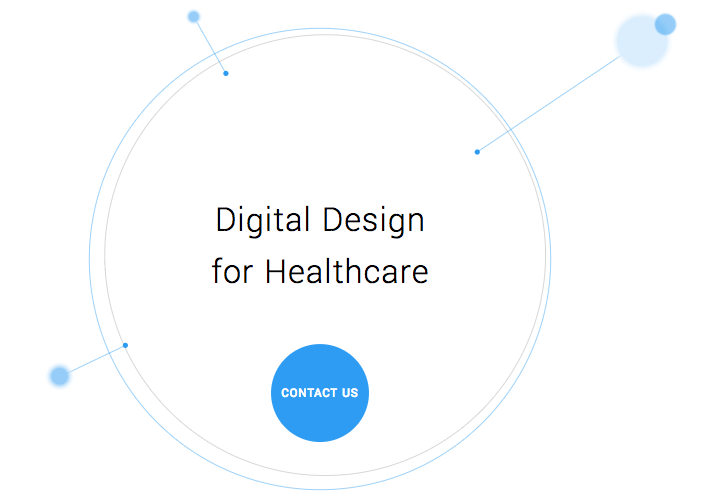
    Single page websites are very popular right now with web designers. With so many new ways to develop websites, they’ve become a unique and scroll-friendly way for users to interact with a company in a way that they’re used to (cue the token image of people scrolling through phones). And, to be fair, they can be quite beautiful. For example, take this design from 415-Agency, a San Francisco-based design firm that works with healthcare companies to make their digital products user-friendly, seamless, and as they put it, “awesomely good looking.”

    Image Of Screenshot of Digital Design for Healthcare One-Pager - Search Influence

    It’s an understatement to say that ton of work went into this site—it won them an honorable mention award from Awwwards, an organization that gives awards for the best designs, talent, and web dev agencies across the world. I’m a huge fan of exciting visual content, interactive graphics, and designs that enthrall. But, where some entrepreneurs get into trouble is when they try to manage a killer single page website while also optimizing it for SEO. They may come to discover that, for all its glitz and beauty, they’re the only ones actually finding it online.

    Photo Of Stock Of Boxes - Search Influence

    Form Must Follow Function

    Just as the customer is always the top priority, your website should follow that same line of logic. When thinking of how to design your website, think of not just how users will react to the visuals, but also how they will eventually interact with the site’s navigation. Give them clear avenues for finding more information, ordering products, or exploring your blog or testimonials. While a single-pager may seem simpler, it can often be easier to get lost and frustrated with trying to find a relevant page of content. To quote marketing guru Neil Patel, “website usefulness is more important than website beauty.”

    If a user comes to your site and thinks, “wow,” then give your web designer a bonus or yourself a pat on the back. But, the more important thing you should worry about is if their next word they is, “how?” Users should know how to interact with your site pretty easily. If they don’t know what to do or how to do it, then your site is harming you, not helping you. This can also lead to high bounce rates—users will eventually get frustrated and leave your site for one with better navigation.

    Another thing that can contribute to high bounce rates from your one-page design? Slow load times. I wrote about this in a previous blog in this series, but it’s worth mentioning here as well. Whether you’re using Flash (which, please don’t) or not, data-heavy load times due to unoptimized, large images that occupy your page’s whole screen can strangle your page load times.

    Single Page Websites Lack the Opportunity for Detail Laden Content

    Single page websites don’t have the space to allow for specific, rich content. From a user perspective, this limits the opportunity to provide a visitor with detailed, relevant content on topics they want to learn more about. Instead, they’re likely only able to view around a paragraph on specific topics. From an SEO perspective, this also gives search engines fewer opportunities to crawl your site for content that can help you move up in rankings while asserting yourself as an authority on your subject. It puts a great amount of pressure on a small amount of words. And, if you do manage to get a lot of content onto a single page, it ends up looking like it’s fighting for space.

    Image Of Post-It Notes - Search Influence

    Google likes to see that you’re updating your site with relevant content. If you have a single page site, you could make the argument that new content could be added to the bottom, creating an endless scroll of text and images. But, that method still doesn’t address the problem of not allowing search engines to crawl multiple pages of relevant content, and it also creates a headache of a user experience for visitors.

    By building out pages for your content to live, you give visitors designated, clean spaces with which they can explore your services, products, or ideas (blog posts) to their heart’s content. They don’t have to scroll for a minute or two to find your latest blog post, and search crawlers can find it easier, too.

    Forget About Performing Wide Keyword Targeting

    Since single page sites are generally designed around one main concept, the opportunity for using multiple keywords is very limited. With a multi-page site, every page has a chance to introduce a new topic or genre that can include different types of keywords that target different users and open up multiple avenues for ranking.

    With a single page site, it becomes extremely difficult to rank for varying keywords. For example, say you’re an owner of an HVAC company. You provide installations and repairs for furnaces, A/C systems, ductless A/C, water heaters, as well as air quality testing. By building separate pages for each of those services, you have an opportunity to move them each up in Google’s rankings, all while showing an increase in your authority. Putting all of your content in one page is like putting all of your keyword goals in one basket and hoping Google magically picks them up.

    Missed Opportunities for Quality Tracking

    Having multiple pages means multiple opportunities to track user behavior. You can track if someone spends 5 seconds or 5 minutes on a page about one of your services. With that valuable data, you can then focus your goals on what pages need work to bring in more visitors and convert them into customers. Obviously, this would be a difficult task for a single page site. The data showing time spent by your users will be very general, leaving you unable to tell what they love and what they dislike.

    Are There Examples of Single Page Designs That Work?

    There should and will always be design diversity on the internet. And sometimes, a single page site may work for you. For instance, take this site made by firm Gin Lane for GE that explores everything about the inside of volcanoes. Not only is the site visually satisfying, filled with video and interactive graphics, but the scroll feature of a single page makes sense because you’re literally venturing down into a volcano. Educational sites like this can have the luxury of not worrying about how SEO-friendly their content is because their main goal is to inform, not sell a product or service. Also, it doesn’t hurt that GE has the budget to build a site like this.

    Image of Screenshot of Volcanoes Single Page Website for GE - Search Influence

    Another example of a single page site working to your advantage can be when you’re utilizing it as a promotion. FBC Creative Tech Design created a site for FOX’s upcoming show, “The Gifted,” a show based on the X-men series of comics. The site, using the fictional “Sentinel Services” organization from the show, details the reasons why people should get tested for the “x-gene.” There have been numerous pre-launch sites built to create a buzz around upcoming movies or shows, and this is a fantastic way to build awareness. They’re almost like temporary landing pages. It’s worth noting again that it’s no coincidence that some of the better single-pagers are tied to large organizations—they simply have the budget to pull it off.

    Combining the Storytelling Approach of Single-Pagers Into Traditional Navigation Sites

    There’s no denying that some single page websites create curiosity. They can encourage the user to explore by simply scrolling instead of clicking, and they (ideally) tell a story about their company along the way. Businesses looking to wow users with a cool site while also being optimized for SEO should try to incorporate this same type of organic curiosity into a multiple-page, traditional navigation website. It’s completely possible. Take this blueprint of a popular WordPress design scheme from Undsgn—Uncode.
    Make each page a rewarding experience for users, where they can sit and really get comfortable with your content. If you design your multi-page site with the same goal of clean content without a lot of clutter and clear calls to action, then you’ll achieve a lot of the same aesthetic ideals of a single-pager, and with better SEO capabilities! Also, consider using visual content on your pages, like animation headers and background video. Just make sure they’re optimized so that they don’t slow down your load times.

    The ultimate decision on whether or not you choose a single page website for your business will be up to you. Every website is different; it may work for you. But, it will also be that much trickier to see your site move up in Google’s eyes and, inevitably, in rankings. If you decide that more than one page fits your business, you should learn more about SEO services which are imperative to the health of your website.

    Stay tuned for our next blog in the series, Rookie Website Mistakes, Part 5: The Content Is Weak.


    Images:
    Digital Design for Healthcare

    Volcanoes

    Blog Masonry

  • Security! This Site Isn’t Safe! What Will Google Do About It?

    Business is booming, leads are pouring in from your homepage form, and it seems that the direction of your company couldn’t be brighter. Then your leads seem to stop in the tracks and business slows down considerably. What could’ve happened? Your landing pages and main site call to action are perfect for getting users to fill in forms. Then, as you peruse your site, you notice something new, and now one of your greatest assets is your greatest foe.

    Google and The Internet

    I’m sure everyone here is familiar with the fact that Google got its start as a search engine and is now the most popular. After conquering the way people search, Google decided that it was time to innovate how people browse the internet itself. In September of 2008, Google Chrome was released in its beta format. This new web browser boasted being integrated with Google technologies and quickly put a foothold into the internet browser market. Now that Google controls a majority of the internet browser market share, their next big move is about to launch—security.

    Internet and Privacy

    The internet has come a long way since my childhood days of signing into AIM over a 14.4K dial-up modem. Now, I play League of Legends (yes I am using them as my example) with my gaming rig linked directly to my cable modem with a T1 cable that provides download speeds of at least 150mbps. With this rapid transfer of information constantly happening, one has to worry about the downsides, right? Right? Most of us don’t think about the downsides, but Google has thought of this for us. Back in January of this year, Google released its first major security update from the scope of usability.

    Image Screenshot of Google's first security update - Search Influence

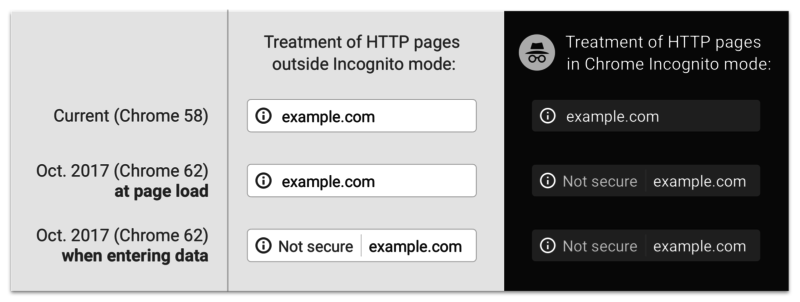
    Previously, a lowercase “i” was displayed in the address bar and could be clicked to display more information about the particular web page including the security of your connection, how many cookies the page uses, and a plethora of other tidbits of information. Now, whenever you enter a password or a credit card number on a site that isn’t secure, a handy message pops up to indicate that your connection to the website is not secure.

    So What Exactly Is a “Secure” Site?

    A website that doesn’t have an SSL Certificate installed transmits all data as plain text. Meaning, if I type my name “Jared” or my email address, or even “281-330-8004” into a field on an http website and send it to the server, it will be sent and saved on the server as plain text. What this means is that any vulnerability that is exploited in one of these sites would hold a nice, tasty database of personal information for would-be attackers to exploit. Sites with https servers work a bit differently. Your computer and the secure site initiate what is commonly referred to as the “SSL Handshake” to confirm that it is trustworthy. The https sends its SSL Certificate over to prove that it is a source that can be trusted. Any information shared over this connection is encrypted, which means that even if an attacker is able to procure a database of information that doesn’t belong to him, it will be encrypted and unable to be read.

    And This Has to Do With Google How?

    At Search Influence, it is our duty to know Google as well as we know ourselves. Through various means, we keep tabs on Google and exactly what this robot and its creators are really up to. In our findings, we’ve discovered that Google is about to shake up the internet. On October 1st, Google Chrome will receive a security update that will change how it displays sites that are not secure.

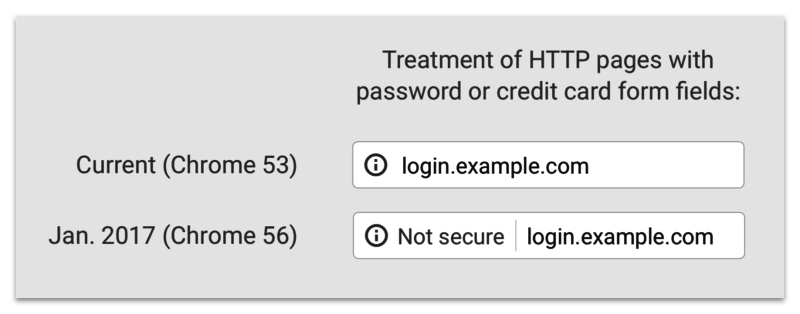
    Screenshot image of Google's past, present, and future "not secure" notifications - Search Influence

    The graphic above displays past, present, and future versions of Chrome. As you can see, the “not secure” notification in the address bar will not only display on password and credit card form fills, but on **ANY** form fill. Google is using its bots to track down any <input type=”x”> elements on your page and flagging them according to the notice that webmasters received in Google Search Console.

    That Doesn’t Seem THAT Bad

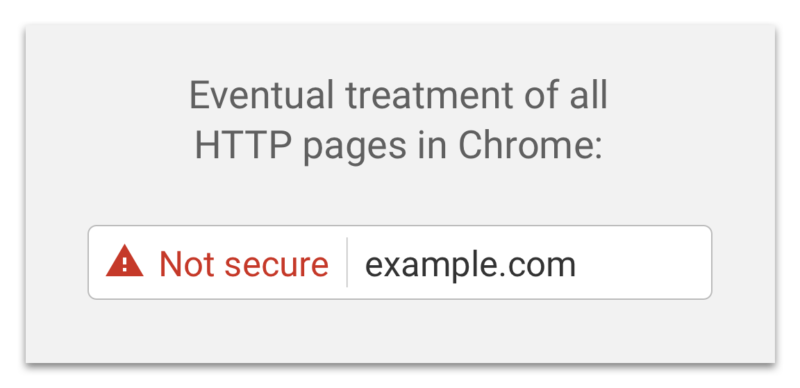
    If you feel this way, I’m personally inclined to agree with you. Most of my online purchases and passwords are already behind secure sites like Amazon and the like. If some hacker gets my email or my alternate email, why would I care? Well, if you think like me, there will be an eventual rude awakening. Google has already announced that it plans on marking all non-secure sites with a nasty red triangle and red text reading “not secure” in the address bar (see below).

    Screenshot of Google's "not secure" warning - Search Influence

    That tiny addition to the address bar may not cause a slowdown in form submissions on October 1st, but in the future, when that beautiful red triangle and glorious red text appear next to your web address, I’m sure people will think twice before submitting their personal information to your website. There’s no need to panic about this quite yet; Google hasn’t announced an official time of release for that update and, luckily, they’ve given us ample time to comply.

    Will This Slow My Site Down?

    Barely. Previously, this was an issue with https websites sometimes taking a half a second longer to load, but in this day and age, technological advances have reduced this slowdown time to a few milliseconds. If you do migrate your site to a secure server and notice significant slowdowns, it more than likely means that your site isn’t optimized for a secure server. Cloudflare has an in-depth article about bolstering your site’s configurations to improve speed after migration. The benefit of a visual that proves your site is secure is definitely worth the cost of a negligible increase in load time.

    In addition to migrating your website to a secure server, some auxiliary tasks must be completed to ensure your search rankings aren’t affected. Here at Search Influence, we know that your business is very important to you. Contact us for help ensuring your website is safe and secure for your visitors.

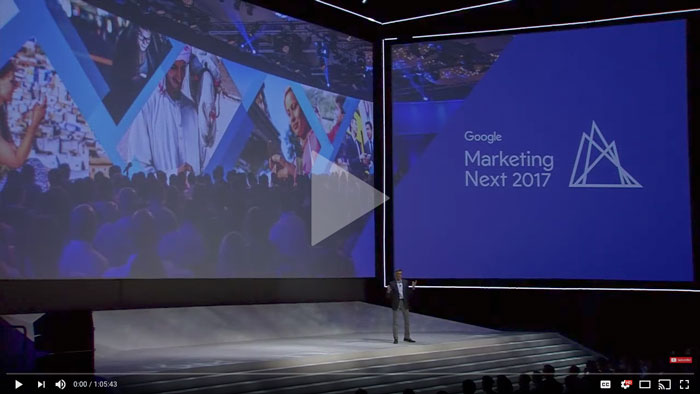
    If you want some more information about Google’s push for secure sites, check out the talk below by Emily Schechter, Google’s own Security Project Manager.

  • Google Attribution Allows Clear, Seamless Campaign Analysis for Marketers

    How do you know which of your interactions with a customer mattered the most? How do you measure an organic search that someone performed for a product on one device compared to an ad clicked right before the point of purchase on another? Well, Google set out to solve some of these and other problems that marketers face daily with their newest rollout from their Marketing Next event—Google Attribution. Now, marketers can finally begin to answer the age-old question that is typically at the forefront of their minds—is my marketing working?

    How Google Attribution Streamlines Data

    Google Attribution uses machine learning and data to help marketers measure the impact of each of their marketing touch points, across multiple channels, and across multiple devices. It uses data that’s already there from Adwords and Google Analytics; it just takes that data and shows you how each customer moved through their buyer’s journey and attributes those conversions respectively. It provides a single view of the path to purchase to help marketers learn what is actually working compared to what seems to be working.

    “The aim of Google Attribution is to simplify the complex problem of multichannel, multi-device attribution by leveraging data advertisers already have in Google Analytics, AdWords, or DoubleClick Search,” said Kishore Kanakamedela, director of product management at Google.

    To give an example of how a richer lens of an entire campaign was able to better benefit a business, Virgin Holidays utilized store sales measurement to look at store sales after users clicked on a search ad:

    “Virgin Holidays discovered that when it factors in store sales, its search campaigns generate double the profit compared to looking at online KPIs alone. A customer purchasing in-store after clicking on a search ad is also three times more profitable than an online conversion.”

    Google already rolled out a store visits measurement in 2014. They’ll be rolling out store sales measurements as yet another touch point that marketers can analyze through Google Attribution.

    And possibly the best part? Attribution is free for anyone to use. It’s in its beta version right now and will be more readily available this fall.

    A Shift Away From Last Click

    Until now, many marketers were left to use last-click attribution to measure the value of their efforts. With last click, the reward for the conversion often went to the last touch point that the user made, often with a sale after a click on an ad. This could lead to false impressions about the effectiveness of an ad campaign versus display ads, organic search, social, email affiliates, and many other interactions that a customer made with a business along the buyer’s journey. Maybe organic search is actually more important display ads or vice versa.

    With Attribution, users can see how effective each step of a campaign is instead of just pointing to the last click of an ad before purchase. There are so many micro-moments that happen on the path to purchase. Now, marketers can have a more accurate view of business, and in turn, can then update bids or move budgets between channels based on such results.

    Image Of Woman Typing On A Computer With Media App Logos Flying Around - Search Influence

    This move to a more holistic view of a campaign makes sense. Video ads, banner ads, carousel ads, emails, social campaigns, and all other types of digital materials work together to drive solid leads to become conversions, so why would it make sense for only the final ad to get all of the credit and influence a business’ campaign and budgeting decisions?

    There is already a slew of companies that have seen the benefit of implementing the data-driven results of Attribution. Check out the success stories that Google has touted so far.

    Eliminating Waste and Annoyance With Unique Reach

    Most people use multiple devices to access their multimedia channels, whether that be a phone, a tablet, a smart TV, or a computer. For example, let’s say you’re shopping for a new laptop. You may first see a search ad when searching on your phone and then find a display ad while on your tablet. Then, you’ll come across a shopping ad by the time you decide to purchase the laptop on your current computer that needs replacing. According to Bill Kee, Google’s Group Product Manager for Attribution presenting at Marketing Next, “30% of people use 5 or more devices today. If you reach each of those devices three times, you’ll reach that person 15 times.” It’s safe to say that’s a bit of an overkill.

    With Unique Reach reporting in AdWords and DoubleClick, marketers will be able to measure how many people were shown display and video ads. It will show unique users and their average impressions. This helps marketers better understand how many people they reached in their target audience and how many times they reached them. This will allow businesses to find any wasted budget in over-saturated placements and, more importantly, better please their potential customers by not wasting their time with endless ads.

    People are expecting a simple, frictionless user experience on their path to purchase. Unique Reach is, well, unique in that it puts the customer right at the heart of the journey. Unique Reach is available in AdWords now and will be available in DoubleClick in the coming months.

    Image Of Person Sitting Out By The Water At Sunset - Search Influence

    The Customer Is the New Channel

    Instead of the mindset of measuring your reports within online or offline channels, Google has highlighted the importance of recognizing the customer or user as the new channel. The line between being online and offline has disappeared.

    Consumer expectations are higher than ever. So, the best way to meet those expectations is to try our best to understand consumers’ intent. Google also shared their Surveys 360 product connected to AdWords and Google Optimize. It helps marketers deliver more relevant ads with targeted surveys that seek to understand a customer’s intent along with their buyer’s journey.

    Marketers are already working hard to develop a strategy that brings conversions for their potential and current clients; Google Attribution helps them work smarter with data. By using their machine learning to put context into the consumer journeys, this new tool should help marketers create a simple, more streamlined campaign that their users will love and respond to. To quote Sridhar Ramaswamy, Senior Vice President of Ads and Commerce at Google and opening speaker at the Marketing Next event: “To really assist people, we need to become smart in how we use data to assist them.”

    Interested in learning how we can better market your business? Reach out to us at any time.


    Image Sources:

    Google Marketing Next

    Woman Checking Her Phone At Sunset

  • Gotta Go Fast! The Impact of Page Speed on Your Rankings

    “We have so much time and so little to do. Strike that, reverse it.”

    Roald Dahl, Charlie and the Chocolate Factory

    That may be a bit dramatic, but time is extremely important. In the digital age where a lot of people barely have the time to stop and say hello unless it was explicitly planned out in their schedule, a slow site can easily get lost in the abyss that is known as the internet. Though the forever relevant Bill Gates quote “content is king” should echo through anyone with a website, there are other factors that can make or break you as well. The best content in the world means nothing if no one sees it. If a tree falls in the woods and no one is around to hear, it does not make a sound; it makes vibrations that will never be converted into sound by ears. If a website has amazing content but a Page Speed as slow as molasses, does anyone ever read it? Probably not.

    How Optimized and Fast Page Speed can Bring in More Customers

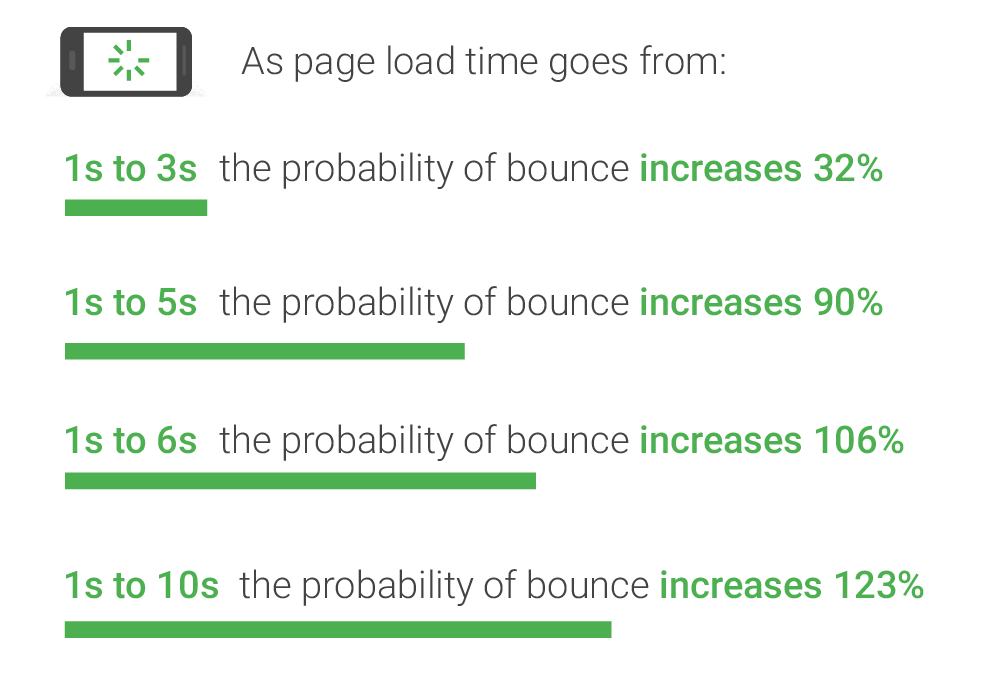
    As you may (or may not) have guessed, page speed is the amount of time it takes for your website to load. On the surface, slow page speed will turn visitors and potential conversions away from your site simply based on the fact that they can’t “use” it, per se. But surely someone would wait 7 seconds to view your homepage or interesting product, right? No. Straight from the source, Daniel An from Google provides this handy chart on the correlation of page speed and bounce rates:

    Image of bounce ratio percentages relative to page load time - Search Influence

    As you can see, if your page takes longer than one second to load, you may see a bounce, which is when a user leaves your site after viewing only one page. The bounce risk increases dramatically the longer it takes for your site to load. This stat doesn’t just apply to your home page either—these statistics will affect every single page on your website. Imagine running an online shop and having someone abandon an order because it takes their cart too long to load. Having engaging content is only half the battle; it has to be seen and digested for it to maximize its potential.

    Page Speed from the SEO Point of View

    From an SEO standpoint, Page Speed has a two-pronged effect on the ranking of your website. Back in 2010 (which is literally forever in internet time), Google spilled the beans on speed having a direct effect on the rankings of websites and encouraged everyone to analyze their page speed to ensure their pages were loading in a timely fashion. Looking at complex Content Management Systems that automatically add mountains of bloat to every single page you publish, it doesn’t seem like many people heeded the warning of Google.

    Image of a snail using a rocket to go fast - Search Influence

    From an indirect standpoint, Page Speed can have an impact on your website’s speed in relation to the crawl speed. Google’s web crawler has an allotted amount of time that it likes to spend crawling a website. Faster loading pages mean that Google’s web crawler can crawl the page faster and move on to the next one, which can lead to more of your pages being indexed. Mix that up with some spicy content and you’ve got a great stew going that can lead to increased Search Engine Rankings!

    Tips for What Website Owners Can Do to Improve

    I personally like to think of Google as the tough love parents that will always steer you in the correct direction, give you the tools to succeed, but punish you if you stray from the light. With that said, Google gives the entire internet a handy tool to test the speed of their website. My favorite online game, League of Legends, will be the topic of example for this go round. After running their URL through Google’s PageSpeed Insights tool, a score is given for both the desktop (61/100, Poor) and mobile (40/100, Poor) versions (it defaults to mobile speed, perhaps because mobile users are using the internet more than desktop users now) along with some details on how to fix the issues and exactly which files are causing the issues. An alternative to Google’s own tool (because we want to show our parents we can succeed our own way) is the Pingdom Website Speed Test. From my experience using both of these tools to compose Site Audits for our clients, Pingdom does give some more in depth information. For instance, the main reason for the League of Legends website taking so long to load is a video (listed below) that has to load twice before the website is considered to be loaded.

    Screenshot of video load time - Search Influence

    This video took over 17 seconds to load. Now for a website such as League of Legends that has the clout of millions of gamers fiending to see the details of the next character being released or an overview of the latest patch notes, these 17 seconds are no big deal. However, if your website was discovered by someone using the Google search “boutique new orleans,” that may be a different story, especially if they’re on the other end of our historic Magazine Street. They may have thought about venturing to your end of Magazine Street had they seen the flashy new “romphims” that your store was offering. Unfortunately for your shop, Magazine Street is loaded with boutiques, and potential customers may just tire themselves out on the other end instead of planning their Magazine Street romp around your boutique.

    Don’t fret, a lot of these fixes aren’t all that difficult to fix, so here are a few common fixes.

    1. Leverage Browser Caching: This fix allows some files on your site to be saved on a user’s local computer so that the next time they visit your site, they won’t have to be downloaded again. In addition to increasing Page Speed, it also lessens the stress on your server.
    2. Optimize Images: This fix involves formatting and compressing your images, which will drastically reduce their size.
    3. Minify CSS: Minifying your CSS is removing spaces, removing line breaks, and combining elements that have the exact styling to reduce the size of your CSS files (yes, even spaces increase the size of your files). You could do it yourself or use a tool such as CSS Minifier to do it for you, but make sure you test it before you completely remove your old CSS.
    4. Minify JavaScript: If you read the previous fix, you can guess what this section is about, just replace styling with functions and that’s the gist of it. JSCompress can take care of this for you.
    5. Enable compression: Using gzip to compress your resources allows them to transfer over the server quicker, which leads to faster page load speeds.

    These fixes are a great way to start pushing your Page Speed close to preferred industry benchmarks and are also among the easiest to implement. There are many more metrics that can be improved as well, but don’t fear—head to Google PageSpeed Insights and plug in your own URL to see how you fare and what you can do to improve. League of Legends has a team of web experts to make sure that even though their videos take close to 17 seconds to load, the rest of their site renders much faster. Here at Search Influence, we also have a team of web experts that are able to analyze and implement fixes to your website to improve its performance and rankings.

    The Importance of Mobile Page Speed Benchmarks

    As revealed in an article earlier in this blog, in November of 2016, the number of mobile and tablet internet users surpassed desktop internet users. This adds increased importance on your website’s mobile speed. With a society that is ever on the go, having a high level of accessibility and a mobile friendly website is considered a necessity for every business. A slow mobile site has a large chance of sending business elsewhere.

    An important addition to keep in mind is the impending rollout of Google’s “mobile-first index,” which should be rolled out soon according to Google and industry experts. This index will reportedly factor mobile content at a higher priority than desktop content. Though all details have not been made public as of yet since Google likes to release this info intermittently after the fact, mobile website speed will probably be one of the factors that are taken into account.

    With cell phones and tablets becoming more powerful and useful in everyday life, it is imperative that your website is optimized to be viewed on mobile if you want any hope of making a splash in the sea that we call the internet. No matter how powerful the receiving device is, there will always be the limiting factor of how quickly files can be transferred across the server. The simplest solution is to ensure that your website is optimized to make it as easy as possible to ford the data transfer river.

    If that sounds like a scary thought, feel free to reach out to the experts at Search Influence. We will gladly take the stress out of it and add you to the list of our many satisfied customers that continue to use our services year after year.

    Images:

    Bounce Rate Percentages

    Snail

    Screenshot

  • Grow Your Business With These 7 Digital Marketing Tactics

    Members of the Search Influence team gave their insight on tried and true digital marketing strategies. These strategies apply to every industry, from plastic surgeons to attorneys, and many can be implemented across different channels of marketing. Using a mix of or all of the 7 tactics below is a sure-fire way to optimize your business’ online potential.

    1. Mobile

    Before updating the aesthetics or adding content to your site, it’s of the utmost importance that you make sure your site is responsive and functions properly on both desktop and mobile. More than half of users say they wouldn’t recommend a business if they encountered a poorly designed mobile site.

    “To me, the biggest trend (and this is as much a wish as it is a prediction) is that small businesses begin to take mobile optimization more seriously. I’m still surprised by the number of businesses I see in my day-to-day life that haven’t reacted to the continuous uptick in mobile search by having their site optimized for mobile users.

    My main focus, in terms of a trend, is the expansion of mobile search as a primary source of information. The trend will be more companies utilizing tools like Google AMP in order to improve the mobile user experience. Currently, far too many don’t take the number of leads they can get from a mobile-optimized site.” – Cory Agular

    Later in this post, I’ll go over AMPs and some more specific mobile moves, but I really want to emphasize that mobile should be incorporated in every aspect of your online marketing campaign. Google has stated that not only are 60% of users unlikely to revisit a mobile site they had difficulty visiting, but also 40% will then go on to visit a competitor’s site. You’re not supposed to judge a book by its cover, but if you can’t open the book, you’re not even going to try reading it.

    Image Of A Cell Phone Searching - Search Influence

    2. Schema Markup

    Schema markup, coding that can be added to a page on your site, makes information more easily readable to search engines like Google. This code labels pieces of important information on the page. Search engines not only understand the information better but they can also provide richer search results to users.

    “As far as I’ve noticed, Schema’s been underutilized… however I’m seeing a lot more talk acknowledging it for its on-site SEO value and correlation with rich snippets and Google’s knowledge graph. And as we’ve seen, Google’s been working to improve its algorithm and knowledge graph to really ‘understand’ content to better predict user trends.” – Kiersten Kampschroeder

    “It’s been increasingly popular to integrate schema into your content. I think that providing meta information using schema markup not only helps SEO, but it also aids the programmer and contributes to making better semantic websites. 2017 will be the year where instead of thinking how we can ADD schema to existing sites, we instead shift toward creating websites with schema markup baked into their design and writing content with schema markup in mind. I’d compare thiscoming year with what happened with responsive design 3–4 years ago. That was the shift where everything became mobile first. 2017 will be the year schema is integrated into the general development workflow.” – Member of Web Development Team

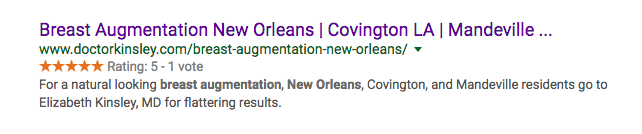
    A search for “breast augmentation new orleans” shows how review schema implemented on Dr. Kinsley’s site appears in results:

    Image Of Dr. Kinsley's Search Results - Search Influence

    3. GIFs

    While 2016 saw a rise in GIFs, an acronym for Graphics Interchange Format, they were first debuted by Steve Wilhite of Compuserve in 1987. They are the epitome of #thirtyflirtyandthriving. These dynamic, digestible pieces of content are easy to create and share and provide a more engaging user experience than a single static image.

    “GIFs are important to any brand aesthetic, be it personal or public, because they offer a truncated version of the desktop’s fluid experience (i.e. video).

    GIFs are a better option now since they’re more pervasive and different social media platforms accept them or give you a way to use them easily. Instagram, Twitter, Facebook, and Facebook Messenger are all compatible with GIFs now.

    Twitter actually integrated, similarly to Facebook, a GIF search within the post tool. [It has] allowed for a closer relationship between Facebook and Twitter, as well. You’ve always been able to link the two accounts, … [but] now, it looks like Twitter, when auto-posted to Facebook, is fully integrated into Facebook’s platform and presents the post as it would be presented on Twitter.” – Member of Graphics Team

    There are so many reasons you should incorporate GIFs into your marketing strategy this year. As mentioned, the fluidity of GIFs can make the creation of cross-platform content so much easier. They’re easy to create and even easier to share. Most of all, it’s a fun and unique way to reach your consumers!

    So, why not shake things up a bit?

    4. Social and Mobile Paid Advertising

    In 2016, we saw a rise in mobile advertising, but this year, with more than half of searches on mobile devices, it will be an essential component of an effective and well-rounded search engine marketing campaign. Expanded ads are now easily translatable between desktop and mobile, but it’s almost important to mobile users’ needs when determining the content, location, and timing of your paid ads.

    Social advertising like Facebook Paid Ads are showing increased popularity and effectiveness. The level of granularity continues to rise with Facebook audience targeting, and we have seen an increase in conversions even as CPCs remain low.

    “With the introduction of ‘new’ campaign objectives, such as lead generation and local awareness, Facebook really does seem to be a place for lots of growth. With Facebook trying to essentially phase out Fan Building campaigns, local awareness campaigns present an interesting opportunity for smaller budget clients who want to focus on a local market.” – London Fougerousse

    While Facebook ads are more cost-effective than traditional paid ads, that’s not a reason to rely on them solely. The decision to use Facebook vs. Google Adwords or a mixture of the two is truly dependent on a variety of factors, such as your location, industry, and goals. I recommend hopping on the mobile train sooner rather than later. Forecasters are predicting that by 2019, 72% of digital ad spend will be on mobile advertising!

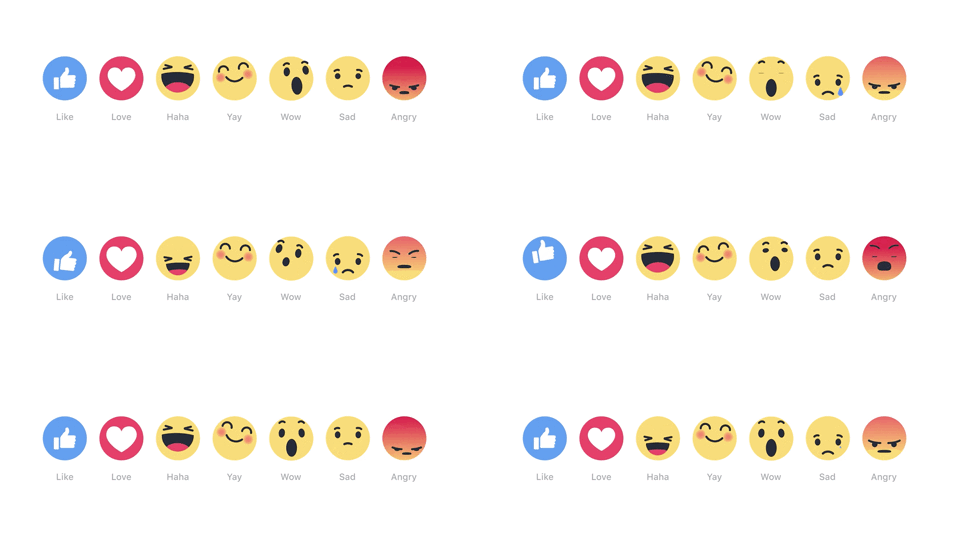
    Image Of Smiley Face Emojis - Search Influence

    5. Google’s Accelerated Mobile Pages

    As I mentioned at the beginning of this post, mobile should be a consideration for all of your online marketing efforts. Google’s Accelerated Mobile Pages (AMPs) are a way to take that focus even further. AMPs are not a ranking factor in Google (for now) but they can positively impact impressions, clicks, and user experience.

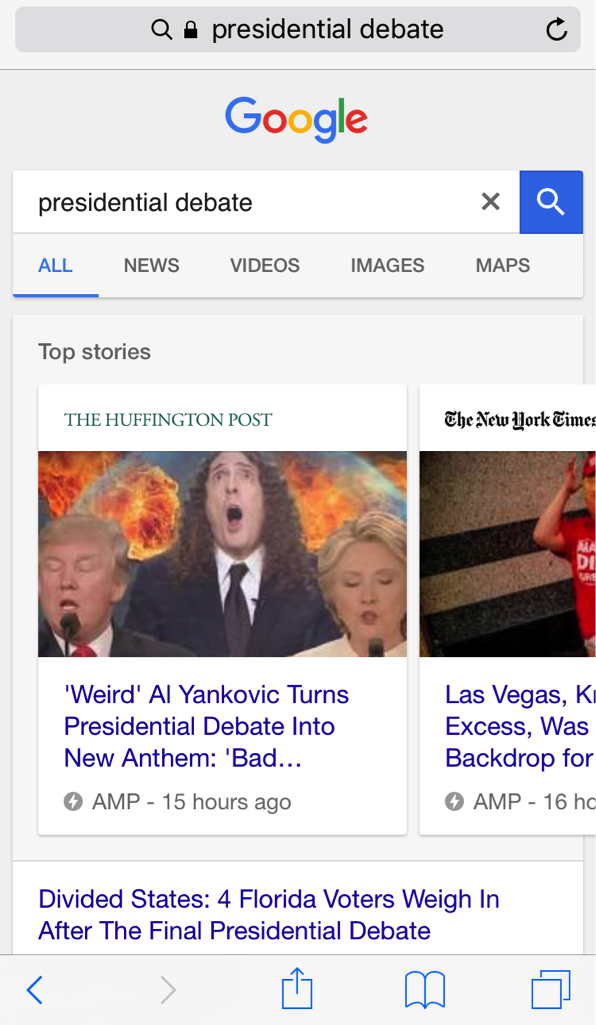
    “Since the rollout of AMPs in mobile SERPs this past spring, pages have typically only been found at the top of the results page in a carousel—which is still prime real estate—however, Google recently announced that AMPs will soon also begin showing in the organic results and supporting more content types. We’ve all heard the mobile-friendliness search stats, and adopting AMPs is another way to bring content to your consumers instantly and on the go.

    “Historically, AMPs have been utilized mainly by news publishers, but with the expansion to the organic results, I can see a future for almost every type of industry. Shopify, eBay, and Fandango recently announced their integration of AMPs, so this is a good trend for e-commerce clients especially to be conscious of. And Google also hinted that they will begin supporting more content types like live videos, galleries, etc., which can also open more doors for clients to take advantage of.” – Member of Account Management Team

    Image Of Google Search Of Presidential Debate - Search Influence

    The increased speed of Accelerated Mobile Pages leads to a better user engagement, and those (potential) customers/clients are more likely to return to your site if it was able to quickly provide them the information they were looking for. A recent study shows that with AMPs, The Washington Post saw a 23% increase in mobile search users who return in 7 days. If you’re a business receiving the majority of your site traffic from mobile devices, AMPs could be a strategic way to boost your online presence above and beyond your competitors.

    6. Video

    Video is not just for YouTube. It should be incorporated into as many of your online marketing efforts as possible: product/procedure pages on your site, email marketing, display ads, social platforms, and everything in between!

    “For online marketing rich content could include native video content and paid video ads on both YouTube and Facebook Video Display ads. Also, I think brands will begin to utilize Facebook Live more for events and branded content to engage their fans.

    “I believe these videos will be prominent cross-device! Today, people are constantly moving between devices throughout the day and advertisers need to be innovative and streamline their message to engage users across all devices.

    “For Facebook Live, I would recommend this for brands and businesses that have a strong Facebook following. Facebook Live is a tool to engage your audience, not necessarily build an audience. These videos are best for events, conferences, speaking engagements, big company announcements, etc. There are so many options to deliver creative, curated content!” – Sophie Kirk

    Rich video content is content that keeps on giving. One video can apply organic, paid, and social campaigns across devices, and can be broken down and repurposed to create a number of assets. Videos are not only attention-grabbing, but are also a great way to establish your brand’s message and have lasting effects in terms of brand recall.

    7. Links

    Links might not be the most exciting item on this list, but they’re certainly one of the most important. Link building is an essential aspect of a well-rounded SEO strategy! When the search engines crawl pages on your site, links are used to identify how it relates to other internal pages and other sites. Links connecting one site to another can indicate that a particular page/site is the authority on a given topic. But, as you should know, not all links are created equal!

    Google first launched its Penguin Update in spring of 2012 and rolled out its final update, Penguin 4.0, this past fall. Penguin is Google’s effort to catch sites that are using “black-hat SEO” techniques like spammy link acquisition to affect search rankings.

    “In 2017, ‘link’ will no longer be a dirty 4-letter word. For far too long, bad link building has been lumped in with quality link earning. Everyone got freaked out by Penguin and the industries either shied away from “linkbuilding,” or, if they were doing it, were hush-hush about it.

    “Google’s initial differentiator was to focus on links as votes, which is at the core of PageRank. Google has, in the past, described their foundational algorithm by stating: PageRank works by counting the number and quality of links to a page to determine a rough estimate of how important the website is. The underlying assumption is that more important websites are likely to receive more links from other websites.” – Paula French

    Google truly is looking for quality over quantity when it comes to link building, but that’s just part of the SEO puzzle. If your site is suffering from technical issues or lacking rich, natural content, links will not save you. Make sure your online marketing strategy includes both on and off-site efforts.

    Image Depicting Online Marketing Tactics - Search Influence

    These 7 online marketing tactics are an inexpensive way to boost awareness of your practice and bring in new, revenue-generating patients. With a little strategy and effort, you can have a comprehensive SEO campaign that brings your practice’s website up to speed!

    Image Resources:

    Cell Phone Image

    Facebook Emojis Image

    Social Network Image

  • Site Audits and Your Business: An Introduction

    Just like any portion of your business, your website requires constant maintenance to ensure that it is running as optimal as it should. It’s very well known that Google loves to constantly change their algorithm, forcing websites to adapt quite frequently or else their search engine rankings will suffer. Whenever a video game patches in a major update, they release a list of patch notes so that players can stay abreast of changes. Google, however, does not afford webmasters that same luxury. The massive changelog initially has to be discovered, and then Google (most times) will decide to give some insight on how they just changed the internet. So, what does a site audit have to do with this? A site audit doesn’t just look at one aspect of a website; it looks at the entire thing. By inspecting every nook and cranny of a website, it’s tough to miss anything.

    What is a site audit?

    In essence, a site audit is exactly what it sounds like—an audit of your website in its entirety. A slew of benchmarks are measured to determine the overall “health” of your website and suggestions are made on how to improve any issue that may arise (and they will arise). The factors covered in site audits are technical, content, and off-site. These three topics also contain an array of subcategories that are necessary to cover.

    Endless Knowledge Image Of A Man With His Brain Open - Search Influence

    It is also important to know that a comprehensive site audit is no easy or simple task. They require a few days of dedicated brain power to aggregate all of the information that is necessary to give you an in-depth view of your site. These reports generally end up over 30–40 pages long and are full of pertinent information and screenshots. If they aren’t, you may have been fleeced.

    The Technical

    Technical factors on the website are simultaneously the most important and least important impacting parts of a website. For example, every website should have a robots.txt file on the root directory of their website. If you happen to disallow search engines from crawling your site with this file for whatever reason, it will never show up in any search engine. Ever. Never ever. The flipside of this is that having a good robots file also doesn’t guarantee that your website will ever reach high search engine results, even though a bad robots file will guarantee that you won’t reach them. Server configuration is also another large part of the technical aspect of site audits. Many people use sites like Godaddy to host their website, but these often have default settings that your site will be set to until you change them.

    Image Of Dog Moving Joysticks - Search Influence

    There is far too much to go over in the course of a standard blog post, but Search Influence does offer Comprehensive SEO site audits and can go over every nook and cranny of a website to measure its health.

    The Content

    As Bill Gates oh so famously quoted, “content is king,” and that still continues to ring true. While images and videos are definitely a plus for any website, the content is the real hero of this story. To make things even more confusing, quality is better than quantity but quantity is still a necessity or your content will be determined to have low quality. But, if your quality is too high, your content will be considered low quality.

    Content on your website should be a certain length —300 words per page is the gold standard, but more definitely doesn’t hurt. Your content must also be relevant to your business and to the page itself. In addition to this, the only way Google will be able to relate your content to your topic is if you add in relevant keywords. If you add too many keywords, however, Google gets very angry and stops liking your website. This makes content writing a sort of a magic area to ensure the best message is being sent to search engines crawling your site.

    After the main content is created, the next step is to set up the metadata for each page. Metadata is coding on the backend that gets read by search engines and can also be displayed in search engine results.

    Image Of SI Title Page In Search - Search Influence

    Image Of SI Meta Description - Search Influence

    The screenshots above show the metadata for our own site. Without having this code in place, search engines that encounter your website have no idea what it’s about. When a search is performed, the search engine will produce a snippet to show in their results.

    Image Of SI SERP - Search Influence

    This screenshot is the preview snippet for our company as displayed in Google. Notice how that title tag and meta description both populate into the search engine results page. This not only helps Google recognize your website and relate it to the topics you would like to rank for, it also provides users with a preview of the web page.

    The Off-Site

    Off-Site factors are probably the toughest part about increasing how favorably search engines see your site— it is also the most important. This section is overwhelmingly dominated by websites that are linking to your website. Having plenty of websites link to you helps to add authority to your site, but if one site links to your site too much, it will appear spammy and both websites can see punishment. A good start to increasing the number of unique domains that link to you, or your backlink profile, is to start with social profiles and high-ranking local profiles such as Yelp!

    After some time of making your business presence known online (and offline), you’ll find that news sites and blogs will link to your site as well. The more this happens, the more authoritative your website becomes, and the more search engines will prefer it to others.

    If this all seems overwhelming, contact our Sales Team. They are happy to go over the logistics of this process and see if it’s a fit for your company’s budget. The SEO Experts at Search Influence are always willing to help a website in need.

    Image Sources:

    Brain of Knowledge Image

    Shiba Image