The war for Internet supremacy rages on between Google and Amazon. The increasingly competitive relationship between the two giants has grown even more strained as of late, but their tenuous relationship has survived largely because Amazon is one of Google’s largest advertisers for text ads. But that may change.
Amazon is working on a competing in-house platform, and testing could commence as early as later this year. Using the plethora of shopping data the online retailer has amassed, the program could almost instantly become a major force against the search engine’s online ad dominance.
Speaking of Internet giants, Facebook is in the news again. In a rather quiet update earlier this month, Facebook amended its advertising policy to allow marketers to show ads more frequently in users’ News Feeds.
The update allows advertisers to show the same ad twice a day, as opposed to the previous once a day restriction. The new update also allows advertisers to show users two News Feeds ads per day from a page that they did not explicitly “Like,” again up from just one.
Facebook emphasizes that you will not see more ads from various companies, just possibly more ads from the same company. A Facebook spokesperson said of the change, “This does not change ad load. We will not show more ads; rather, we are updating the spacing between ads, and relaxing some of the parameters around the insertion of ads.”
Hmmm… more ads is more ads, no matter who they are from.
We’ve all seen it – an annoying, attention-grabbing headline like “No One Would Help This Little Girl from Being Bullied. What She Did Next Will Shock and Amaze You.”
Of course, these headlines are designed only to generate clicks, but dang, am I intrigued. I mostly refuse to click them simply on principle, but even when I do succumb to the temptation, I am always disappointed.
Thankfully, Facebook is finally taking steps to eradicate this spammy click bait by looking at how long people actually read the articles they click on as well as comparing the click ratio to comments, “Likes,” and shares.
Facebook also announced that links should be posted in a “link format” instead of shared in the status update and captions of photos. Posts that have links in the captions will be given less priority in the News Feed.
And now, a word from that other social media juggernaut: Last week, Twitter gave an inside look at their super spam-killing system known as BotMaker. Since launching the system recently, spam metrics have dropped 40% overall.
BotMaker is designed to prevent spam content from being created, reduce the amount of time spam appears on Twitter, and reduce the reaction of new spam attacks. To accomplish this, Twitter uses a combination of systems that detect spam at various stages: Scarecrow (real time), Sniper (near real time), and Periodic (over extended periods of time). What makes it even more effective is its ability to adapt quickly with new models and rules to combat the ever-changing production and proliferation of spam.
To learn more about the creation of BotMaker and how it works, feel free to dig in deep over on the Twitter Engineering Blog.
Google recently announced it would be giving a boost in search rankings to encrypted websites. But in an effort to push site owners to switch to HTTPS, Google overlooked the fact that many web components, including its own Trusted Stores and AdSense, are not completely compatible with those types of sites yet.
To protect sensitive info, sites were already required to have their checkout pages encrypted, but the announced rankings boost spurred many sites to try and convert all of their “non-sensitive” pages as well.
This caused a bit of a problem with user experience. Trusted Stores is not compatible with basic encryption, meaning that the required badge cannot be displayed. Without this badge, Google will not accept HTTPS sites into the Verified Stores program.
As for AdSense, Google now acknowledges that “if you convert your HTTP site to HTTPS, ads on your HTTPS pages might earn less than those on your HTTP pages.” This is because the HTTPS ads don’t compete in auctions with HTTP ads, which lowers rates. Whoops!
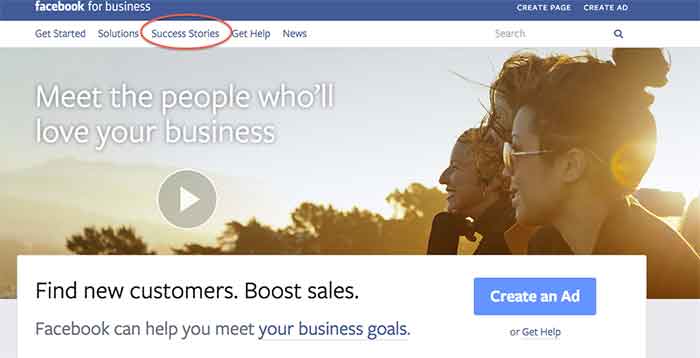
I was recently introduced to the Facebook for business page and was shown some interesting and educational aspects of this informative page.
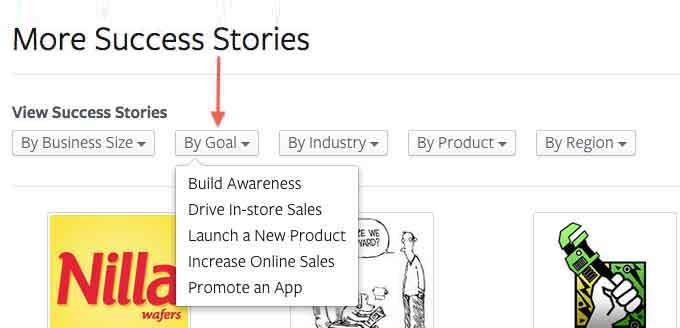
Besides giving you an opportunity to create a Facebook Ad or create a page, it gives you the awesome option to see success stories of businesses that have used Facebook to their advantage.
The Success Stories page gives you 5 options to choose from, depending on what you would like your search to include/show. You can search by:
Business size
Goal
Industry
Product
Region
The one that I think is the most helpful is the search by goal option. There are so many different goals that businesses want to achieve when promoting themselves on Facebook, and this option lists a variety of them to choose from.
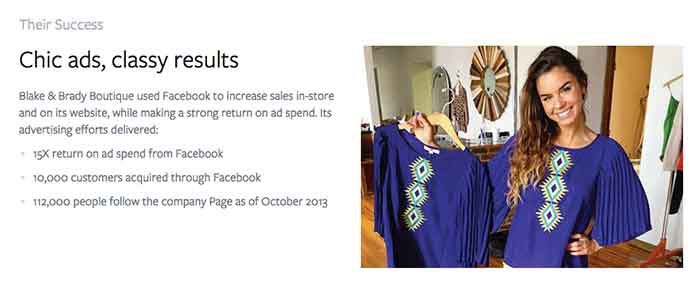
Since I LOVE to shop, I was interested in how small businesses that sell retail succeed on Facebook. When I conducted my search for a retail success story, Blake & Brady Boutique came up.
This success story stated that the boutique, located in South Carolina, uses Facebook Ads to connect with shoppers. This in return has boosted their online and in-store sales. They have achieved a 15X return on ad spend and have gained 10,000 customers through Facebook.
What Do They Have That You Don’t?
After reading those amazing numbers, I had to wonder, how do they have such great success? Reading further into the story, I came across the thing that should start every success story, a GOAL!
Their goal was to boost their in-store earnings and reach a wider audience online and offline. The first step the owner took was to use Facebook’s Start to Success Program to learn about what tools were available through Facebook.
How’d They Do That?
My next question was what did they use? Promoted posts were used to reach women who live close to Anderson, SC area in the News Feed. They also used ads in the right column of Facebook that target people based on their location, gender and interests to gain clicks to the business’s website to help boost online purchases. The owner measures ad results often and then re-invests in the campaigns that gain the most customers. The products they use are news feed placements, boosted posts, and custom audiences.
All in all, it is safe to say this small business is having an amazing experience using Facebook to promote their business. What are some of the ways you promote your business on Facebook? Let us know what works for you in the comments section below.
Amazon is using Twitter to drive sales with the new #AmazonCart feature. This may be a major breakthrough for ecommerce businesses. It’s super simple:
The business tweets out a link for a product.
Interested consumers can then reply to that tweet with the hashtag #AmazonCart.
The product will instantly appear in the consumer’s Amazon cart.
The consumer’s Twitter has to be linked to their Amazon account in order to do this, but the new feature should drive sales for E-commerce businesses with products on Amazon. Twitter users can also search the hashtag #AmazonCart to see what other people are buying. Isn’t technology great?!
This is a great article on how to approach negative reviews. There are bad reviews from people who genuinely had a bad experience and bad reviews from people who are just plain irrational.
How do you tell the difference between these people?
If you look through an irrational person’s profile it’s full of negative reviews and they usually make overly dramatic and sadistic statements. People that genuinely had a bad experience usually have a mix of positive and negative reviews if you look through their profile, there are some positive comments within their negative review and they make rational statements about their experience.
How do you deal with this?
Respond to the irrational reviewer with a generic, but genuine message without addressing specific points of concert. If they respond back, don’t respond again. Respond to the rational reviewer by addressing their specific concerns quickly and assuring the reviewer that steps have been taken to ensure that this will not happen again.
Scary! A new app, called Digital Shadow, was launched as a promotional tool for the upcoming video game Watch Dogs. It uses data you’ve given to Facebook to guess your location, your income, and your passwords. They use algorithms to predict your interest, desires, and fantasies. We live in an era where we like to document everything online from how we’re feeling to what we purchased to where we are in the world. It’s an eye opener to find out that there are people in the world that can use that information against you to hack your computer or to be more influential in their sales tactics towards you.
Google recently sent out mass SSL warnings via Google Webmaster. They decided to pause the warning after they realized they were causing mass confusion. Now, Google is working on making the warnings clearer and tweaking the criteria before restarting them.
Google is simply providing information about the server response for HTTPS access to your URL. If it responds, but the SSL cert does not match the domain, the warning lets you know. Basically, Google wants the hosts to either serve content via HTTPS properly, or not serve content there at all. Serving content via HTTPS without a valid TLS/SSL certificate will result in users seeing browser warnings. Avoiding this makes sense, no matter how many site users actually see the warning.
Schema.org introduced vocabulary that allows websites to describe the actions they enable and how these actions can be invoked. You can use action schema to play a video, review a movie, or purchase a product. The new schema adds context to a link or content. It is a way of interpreting content to cite sources and authors and the type of activity that happened between the two. From what was said in the press release, the actions schema is still a work in progress and will be enhanced as more users use action schema and provide feedback.
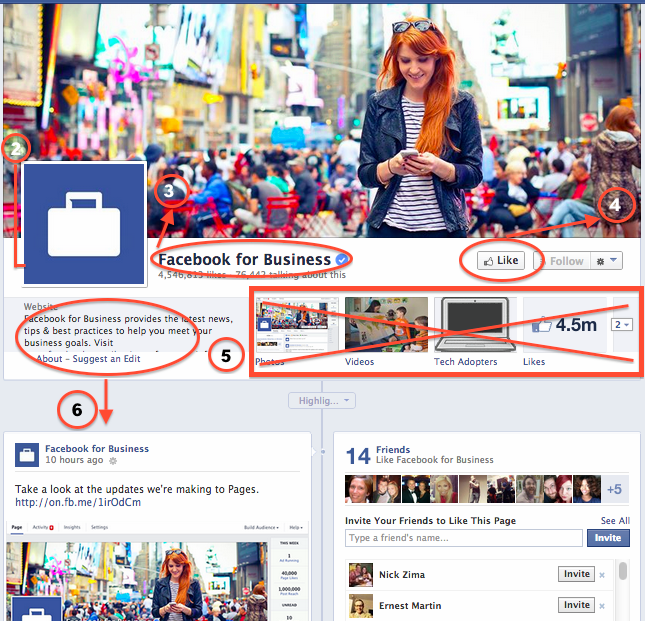
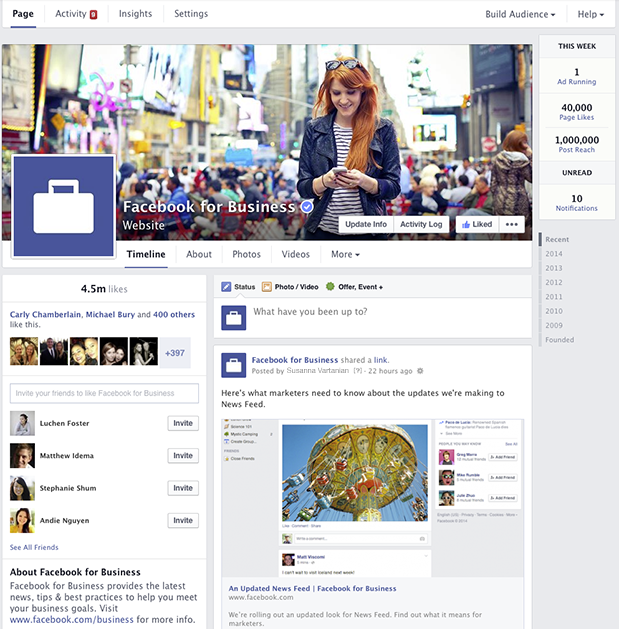
Yesterday, Facebook For Business announced a new, more “streamlined” design for Pages, which will begin rolling out this week. In addition to the new look, a new feature called “Pages to Watch” will launch, allowing page admins to monitor and compare their page with that of other businesses.
Ch-ch-changes!
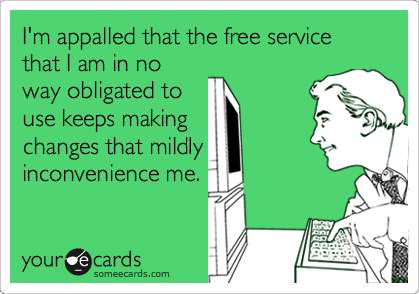
Overall, the layout changes to Pages are not terribly drastic, but as with any small change, there will likely come some backlash from the user base. Page administrators have a few new features to look forward to and some adjusting to do when it comes to navigating the platform, as Facebook has rearranged some key features with the design refresh.
Photo credit: http://www.someecards.com
Here are some of the notable changes to the design of Pages and how they might affect you:
The cover photo and profile square dimensions do not appear to have changed, though Facebook’s announcement does not specifically list any dimensions.
The position of the profile square has changed slightly, as the cover photo overlaps farther with the profile square than before. Some design changes may need to be made to pages with a design that integrated the cover photo and profile square together.
Page name and website will appear in white typeface, overlaid on the cover photo. It appears that cover photos will automatically contain a darker gradient from the bottom up to accommodate this text, similar to what is in place on Twitter header photos.
The “Like” button has been overlaid with the cover photo (as opposed to the current layout, where the Like button is below the cover photo), which may result in a change to design when the goal is to draw attention to the “Like” button. Some existing Facebook pages with cover photos drawing attention to this button will need to be updated.
Tabs no longer have square icons appearing below the cover photo. Because the position of these has changed, cover photos drawing attention to specific tabs will need to be updated.
The “About the Business” section has been relocated farther down the Page Timeline, below the total Likes.
Other changes directly affect page administrators rather than users. These include:
Different placement of key metrics such as ads you’re running, page likes, post reach, and notifications from “This Week”
Direct access to your Ads Manager account from the top of the page when an admin is viewing the Timeline
Simplified navigation at the top of the page for activity, insights, and settings
The Design As We Know It
What We Can Expect
In addition to the cover photo and general header changes, Pages will now feature a two column layout similar to the old version, but with some notable changes. Now, the right hand column features the Page’s timeline content and posts. Facebook for Business says in it’s post that this “means that all of your posts will appear consistently on your Page and in News Feed.” I’m curious about the latter half of that statement, as it’s currently unclear how the layout change will affect post visibility in the News Feed.
The left column will now display information about your business, starting with the total number of likes. According to Facebook’s release, it will feature a map (though not visible in the images provided), business hours of operation, phone numbers, website URL, etc. This column will also feature photos and videos.
Fancy New Features For Admins
It seems like most of the changes will simply result in a few painful days as Page admins get used to clicking around the new layout, and finding what they need to manage their pages. A few things that will make our lives a bit easier are the relocation of Page insights and admin navigation to the top of the page. There’s now also a more prominent “Build Audience” button, allowing admins instant access to their Facebook Ads Manager account from the timeline.
At the top right, Facebook has also added a “This Week” panel, showing you metrics about your page from the last week including the number of ads running, total page likes, post reach, unread messages, and notifications.
Lastly, the newest and potentially most usable feature is the addition of “Pages to Watch.” This addition will enable Page administrators to keep up with the competition by monitoring Pages of businesses they care about. Other new features in Insights include the opportunity to view engaging posts from Pages you’re watching within the last week.
Are you looking forward to the changes or dreading the adjustment period? Share your thoughts in the comments below!
As usual, Google is always testing new search results and the way the results display. Dr. Peter Meyers of Moz recently noticed a change in the Google search interface. The results displayed included restaurant reviews from Reason, New York Times, and the Wall Street Journal when he searched [mexican restaurants].
In a recent announcement, Facebook plans to consolidate its ad offerings down from 27 to close to half of that. Offers for online deals will disappear and they are changing way “Sponsored Stories” are laid out. Expect these changes to slowly roll out.
If you have heard of this NSA PRISM program, you should pay attention now. The Guardian uncovered a top secret document that showed that officials had direct access to systems of Google, Facebook, Apple and other internet bigwigs. The document was allegedly used to educate intelligence operatives on the program.
Jade W of Google announced that Google will now start displaying “Are you a business owner?” to direct branded search results. Although it is a minor change, it seems as though Google is attempting to engage small business owners more. Have you started seeing this change for other SMBs?
For those who still use Yahoo as their primary search engine will notice a change in the search results. Yahoo has attempted to de-clutter the SERPs and moving search results higher up on the page. Do you like the new changes? Will you start using Yahoo?
As Facebook has become a more robust advertising platform, a broad smattering of ad units have shown up all over the platform. Almost every kind of content can be advertised on Facebook, from a text status to a Facebook app to a web site, leading to increased interaction and ultimately stronger organic performance of the content. It’s important to keep in mind the same things that drives high organic action rates: the importance of EdgeRank, the necessity of AWESOME, and the value of truly social campaigns.
Marketplace Ads
The ads most people are familiar with on the social media network are Marketplace ads. These ads, usually showing in the sidebar of the News Feed, a Profile, or a Fan Page, are the constant companion to the Facebook user. Marketplace Ads compete with FBX retargeting as well as traditional advertiser-created ads. The thumbnail image can be up to 100 px by 72 px, The headline is 25 characters long, and the body copy is up to 90 characters long.
There are five main types of content that are promoted via Marketplace Ads:
This example, displayed on the soft blue of a profile or fan page, links to a traditional landing page. These ads are among the most common, but be wary of ad blindness and the cognitive disconnect between users moving from Facebook to your website.
This ad, found on the News Feed sidebar, brings you to a different site, but uses the social proof from the Facebook fan page to entice users to trust the site. This is easily set using OpenGraph meta tags.
The traditional Facebook ad links to a fan page. These ads can drive likes without clicks and can land on a specified tab. These ads default to reporting only on Page Likes.
Facebook also offers display ads for Apps. This ad lands on the app page, showing the number of monthly users as social proof.
Facebook also has Event ads, using Event Responses as the point of conversion.
Interestingly, Marketplace ads have begun showing in the News Feed itself as well. This should lead to higher click-through rates, especially on Mobile devices, which did not traditionally have Marketplace ads.
Sponsored Stories
Sponsored Stories are posts that promote single posts showing both in the News Feed and in the sidebar. In most cases, Sponsored Stories bolster a successful organic post; however, “Dark Posts” are great ways to test content, demographics, or targeted personas without affecting other aspects of your organic Facebook marketing. Sponsored stories are traditionally to increase interaction, but strong targeting combined with a clear organic strategy can garner “real” leads as well.
Some selected Sponsored Story ad types:
Text posts can do well on Facebook, especially when they prompt user interaction by asking a question.
Image posts are best when the post has a striking, square image. Links can be added to the post, but are best placed early for higher click-through to the landing page. Images can’t be over 20% text, using a 5×5 grid overlaid on the image.
Link posts, while common, are some of the lowest-reponse posts due to the limited kinds of solicited actions users can take on the post.
Video posts take up space like a smaller image post, but because of the high engagement needed to watch a video online, may not get as high of engagement rates.
Like Ads
Like ads are a subset of Sponsored Stories. Unlike most other ads, these ads are created and triggered by user interactions with your content. Like ads are an inexpensive way to target people who may be brand aware through their online friends’ activity. Created as a companion to Marketplace Ads or Sponsored Stories, these ads are much less controllable than standard Sponsored Stories, but lead to more organic interactions.
Examples of Like Ads:
The main type of Like ad is the Page Like Ad. This shows in the sidebar and in the News Feed. These ads let targeted friends of your existing fans see real proof that someone they know likes your page. With a quality thumbnail, you can reach single-digit click-through rates on these ads.
Post Like Ads can extend the reach of your posts, ensuring that friends of fans can see interactions taking place on your page.
Events, Apps, and other content is also shared, highlighting actions by a user’s friends on Facebook content such as RSVPs.
Promoted Posts
Promoted Posts and Pages are a simple way to set up Sponsored Stories, letting even the least savvy advertiser get a piece of the Facebook ads pie. Promotions are wholly untargeted, which can be a blessing in disguise for large pages with diverse fan bases and no need for location targeting — the only way to target a Promoted post is to target the organic post itself.
Promoted Posts and Pages are a shortcut for businesses that don’t have the time or energy to manage a full Facebook campaign.
Modern Facebook Targeting
What Facebook Promotions lacks is the hallmark of advertising on the social network: the targeting that allows an advertiser to hone in on specific psychographics and demographics to ensure that your ads perform significantly better than the average of 1 of every 2000 impressions leading to a click.
Some examples of targeting methods:
Location
Languages: This is the language setting of the user’s Facebook account.
Age & Gender
“Interested In” & Relationship Status
Education users list, including targeting of specific colleges or majors.
Workplaces users currently are listed as working at.
The workhorse of Facebook targeting, Interests are pulled from a user’s likes, statuses, and site interactions. #Hashed interests are broader categories which may include misspellings or a set of liked pages. Unhashed interests are largely individual Facebook pages, though with “little words” like and and the removed.
Facebook Broad Categories: These are more general groups of interests that Facebook has grouped together for easier targeting. These also include temporary demographic groups, like “Birthday in 1 Week” and “Recently Moved.”
3rd-Party Partner Categories from companies such as Datalogix, Acxiom, and Epsilon, which use real-world actions, transactions, and accounts to categorize users.
Connections and Friends of Connections to Pages or Apps that you are an admin of.
Custom Audiences from advertiser-submitted email, phone number, or Facebook ID lists
Lookalike Audiences generated by Facebook to match custom audiences, either inclusively or attempting to closely match the audience’s interests.
Facebook has become a robust ad platform with complex, interrelated, and mutually beneficial ad formats. For even the smallest business, the Facebook platform is a toolkit for social media interactions, driving brand awareness and ultimately real revenue.
Many, including big brands, are convinced that Facebook Ads are a waste of money. Under their assumptions, even high rates of fan interaction don’t correlate to new business. However, it’s clear that promoting strong organic posts beyond the natural reach of a page drives the expected post interaction and page likes, while delivering real, money-making conversions.
By focusing on the psychographics, i.e. interest groups, who might be interested in each individual post, a marketer not only saves time and energy by merging organic and paid advertising campaigns, but also leverages the better position and higher click-through rate of Sponsored Stories to expand the business’s reach among its target groups.
If a business is regularly posting good content, a marketer will have no problem finding enough material on which to base his psychographics. Every post, even one somewhat unrelated to the business, has an inherent audience. When we noticed we could do more for one of our low-spending fanbuilding clients, we moved them over to a Sponsored Story-only advertising strategy.
Marketplace Ads for Like-Building
In most cases, Facebook ad campaigns center around “Marketplace” ads, traditional display ads that link to a website or Facebook page. These ads compete with retargeted FBX. On average, 1 of every 2000 to 2500 impressions will lead to a click, where the landing page experience takes over to call the user to action. That means that for a campaign that targets 100,000 people who see the ad 4 times each, an average advertiser only has 160 to 200 chances to get a like from a user.
Despite low interaction rates, Marketplace ads are still an effective generator of Likes. For our client, one of every thousand impressions led to a click, doubling the average rate, and one of every 625 targeted users Liked the page.
Sponsored Stories for Engagement-Building
Sponsored Stories, with both their prominent placement in the sidebar and their engaging display in the news feed for both mobile and desktop users, are by comparison click magnets. Like quality content marketing, Sponsored Stories seek mostly to increase user engagement; however, with the granular interest targeting available in Facebook’s ad platform, marketers can laser-target their content to people who are nearly guaranteed to actually enjoy the content and want more of it in their feed. It’s not uncommon to see 1 of every 100 impressions lead to a click, and many Sponsored Stories can attain a 10% click-through rate from significant audiences of brand-unaware people.
Facebook Actions, the measurement for engagement on the platform, is a major factor in the EdgeRank algorithm that drives placement in the News Feed. By paying for actions at a cost of less than $20 for 1000, marketers create social views for content and boost the overall page’s quality in Facebook’s eyes.
Sponsored Stories can be 95% cheaper per click than Marketplace Ads…
Even though most Sponsored Stories use a Cost per Thousand Impressions bid, Costs per Click are usually significantly lower, likely due to a less competitive auction and stronger bid effects from EdgeRank than in the Marketplace. However, it’s important to understand what a Sponsored Story Click really measures: content views, as opposed to Page or Tab views for Marketplace ads.
Campaign Strategy: Which is Best?
Changing a campaign strategy can obviously radically alter the way users interact with whatever ads are displayed to them. In the case of pivoting from Marketplace to Sponsored Story ads, the shift from page to content views ensures the need to slightly change metrics and goals. Comparing the Reach, Actions, and Page Likes allows a marketer to understand what strategy is best.
Reach is largely unaffected by type of campaign when spends are equal.
Reach gives a marketer a basis on which to judge all other metrics – on Facebook, Reach trumps impressions because the target is users, not something like search terms. Sponsored Stories and Marketplace ads have about the same overall reach at the same spend; however, it’s important to understand that typical Sponsored Story campaigns run more ads at once, reducing the overall Frequency of each individual ad.
Sponsored Stories drastically reduce Frequency of individual ads.
This has a twofold effect: users don’t feel overwhelmed with ads from one company, while the ads can more reasonably masquerade as organic content. As we look at all metrics, remember that the same amount of people are seeing ads and the same cost constraints were in effect.
Sponsored Stories can boost Actions by over 500%!
As mentioned earlier, Sponsored Stories are Action magnets, and switching to a campaign strategy focusing on those kinds of ads will rapidly ramp up measured Actions. For Sponsored Stories showing in the news feed, this is a pretty clear metric; however, Actions includes “Photo Views,” which is simply clicking on the ad if the ad is showing at the top of the sidebar. Regardless, that this interaction is considered an Action hints that simply opening images increases the overall EdgeRank of the post, providing value from even low-engagement users.
These Actions are key to understanding the true value of Sponsored Stories. Such ads are well-equipped to introduce both brand and content to a new user. Extending ideas from eBay’s recent research on paid search, these new users are most likely the ones who will respond to an ad. If a user enjoys the sponsored post, it would follow that they would enjoy more posts in their feed and would then Like the page.
Due to the more labyrinthine path to conversion, Sponsored Stories generate less Page Likes.
Regardless of marketers’ dreams and well-formed theories, that’s not always the case. Since Sponsored Stories campaigns are largely focused around EdgeRank curation through interactions and the current implementation of Sponsored Stories requires a multi-step process for converting to a Like, Sponsored Stories do somewhat worse at creating Likes for a brand on Facebook. The new display of sponsored stories may change this, as a Like button is significantly more prominent.
Sponsored Stories for Driving Real Business
What is the value of interaction if the user won’t Like the page? It’s easy to talk about social proof, exposing your brand and content to others through their friends, and other strengths of Social Media Marketing in general that won’t directly affect anyone’s bottom line.
The real value of these interactions comes from the ability for a user to get in touch with a page in a conversational way about business transactions. Though Facebook has recently implemented conversion tracking – a godsend for Marketplace Ads – there is little way to automatically count the conversions from increased reach and conversions.
Client 1’s Leads from Facebook skyrocket after switching to Sponsored Stories.
In this graph, we counted forms and calls resulting from Facebook referrals and combined those on-site conversion metrics with business-focused Facebook messages and Wall Posts. While certainly each conversion type isn’t equally valuable, all of these interactions give businesses new leads and ultimately paying customers.
Shooting Your Lead Generation in the Foot
The chart above might make it seem that Sponsored Stories are a consistently great way to drive online conversions to a business.
In short: you have to be good at organic social media to be good at paid social media.
Until we talked about leads, we showed two clients in our graphs. Here is the graph of conversions by campaign strategy:
Comparing Clients 1 & 2 paints two radically different pictures of Lead Generation with Sponsored Stories.
Why did Client 2 fail to produce leads, when it followed Client 1 in every other metric? If you’re used to social media marketing, the answers shouldn’t surprise you.
Client 2:
Posted far too often, sometimes more than 8 times a day. This didn’t allow any organic engagement on the posts and made it less inviting to talk to the business.
Blocked users from posting on the Wall. This cut off communication from existing clients or potential customers and forced the conversation to be one-way and unsocial.
Self-promotional posts were often only of interest to current customers, instead of showing off services to people who might not know the face behind the company.
These three factors are not the only conversion-killers, and may not be an albatross in every case; however, they outline the main tenets of getting ROI on Facebook: transparency, community, and openness.
How to Win at Facebook and Alienate Competitors
Any advertising campaign should ultimately be about one thing: new customers. Sponsored Stories, which demonstrates the added value to the user that Liking the page would bring, can also demonstrate the added value of the user patronizing the business. By maintaining a strong organic presence on Facebook, you boost your paid efforts while maintaining the relationships with your existing Fans. The Actions magnet, Sponsored Stories, is now an amplifier of your Facebook presence.
The Key to Real ROI on Facebook
Combine organic and paid social media campaigns into one unified strategy.
Foster a comfortable social community where your business seems responsive to client and potential client needs.
Focus on real metrics that not only affect Facebook, but your business’s bottom line.
While some may view the right-hand side of their Facebook stalking experience as an uninteresting blob of text, Facebook was once the world’s largest display advertising network, pulling in over $2.2 billion in annual revenues. Even now, Facebook ads are an invaluable tool for any social media campaign. Industry standard click-through rates, the percentage of the time an impression leads to a user clicking on an ad, hover around .05%, but we’ve recently seen CTRs as high as 1.5% for well-targeted sponsored stories and over 7% for post like ads!
But this glowing opportunity can be hard to grasp if you work in less family-friendly fields. The reader can easily imagine business models that may be be considered prima facie inconsistent “with the overall user experience” of Facebook. For those businesses, it’s important to understand the value of “black hat” advanced Facebook PPC: bending editorial guidelines to best advertise your product.
Some folks may cringe at the term “black hat.” While hacking for links is loathsome, most spam is only annoying to the end user: the act of creatively interpreting best practice guidelines is hardly the cold-hearted evil that fits into the wide swath of questionable techniques available to an advanced marketer. In this post, we’re focusing on the last (and probably least applicable) definition of “black hat:” bending poorly-policed rules to make sure we do our best for our clients.
To boot, Facebook actively goads advanced advertisers to bend their rules. Regardless of your page’s subject matter, Facebook still beseeches marketers to “See Your Ad Here,” often showing a recent post. For a page that is already posting inappropriate content, this enticement throws down the gauntlet to get the ad to pass content review. Sometimes, it’s easier than you think.
Despite the challenge, all ads are subject to review under the guidelines, even if they’ll show in the preview. The rules themselves are reasonable, protecting users from malicious software and malicious badthink such as hate, prurience, and tobacco. These rules are not dissimilar from other networks like Google’s, but advertisers must more intimately understand the review process to best handle the occasional ad review oddity.
Skirting the Line & Errors of Commission
Facebook prohibits directly asking users about demographic information, preferring to have ads show the value to the demographic. From a marketing perspective, this makes sense: you’re targeting interests already, so why ask if you’re hitting your target? However, it’s clear that this guideline is inconsistently applied.
The approved ad (right) directly asks “Have you been Fired, Laid Off, or Quit?” There’s no guideline prohibiting asking about employment status, skirting the spirit of the rule while both the message and visuals remain striking. In contrast, the disapproved ad (left) does not “assert or imply… a user’s personal characteristics” and offers a more subtle image. In this case, Facebook’s reviewers didn’t miss a minor error, but seemed to fabricate or transfer an error.
As this is bound to happen with the scores of ads these reviewers must see, this problem is easy to fix: just resubmit the ad. If there isn’t a real underlying problem, it’ll be reviewed and approved. Two different reviewers will be unlikely to make the same mistake, but if you’re hard-pressed to find something wrong with your ad, contact support at your direct email or here — this won’t necessarily get it approved, but will likely give an answer as to what triggered the disapproval.
Errors of Omission & Retroactive Disapproval
Even with safeguards, sometimes ads get through that shouldn’t have. We serve a variety of niches that often trigger violations of image guidelines, yet are always surprised at what is allowed to be approved. Below is a collection of test ads we ran to see what did and didn’t get approved. These ads were intentionally at least borderline, skirting the edges of the ad guidelines.
Often, it’s not the image or ad copy, but the content of the Facebook page that causes ad approvers to hit the reject button. In these cases, a marketer has two options. The first is to use a white-labeled Facebook page for the landing tab, guiding users to a Like button on the tab that likes the actual page. This introduces blackhat Facebook tactics by offering a possible dark pattern by not telling what the user is actually liking. We didn’t test this to maintain the strength of the brand we advertised, but the temptation was there. Facebook again tempts the darker side of advertisers.
How to Beat the Approval Process: Don’t Connect to Facebook!
The second trick that we found much more effective is to use the full URL of the landing tab instead of “Advertising a Page” in Facebook’s ad editor. Due to the lack of an API hookup, this does not pull in the content of the Facebook page, thus letting an advertiser send traffic to a page that would otherwise be speedily disapproved. This also works with individual posts, letting an advertiser run ersatz sponsored stories to their post. Using an acceptable image and what could be questionable text, the ad would have landed users on a image post that was undoubtedly obscene. Surprisingly, the ad was approved shortly after creating it.
This approved ad linked to a pornographic picture hosted on Facebook.By simply pasting the URL, the advertiser is now heading to a landing page that only just happens to be on Facebook; thus, the content reviewers can only look at what’s on that web page, as opposed to the edges created and shared on the page. Furthermore, the rampant use of iframes and javascript on Facebook may not allow the approval team to see what’s actually on the landing page, as they may be unable to follow the labyrinth of code to the questionable content.
This might mean that much of the approval process is automated, but running at a lower level than Google spiders are. Unlike Googlebot, which is likely running a headless browser, Facebook is running something similar to older versions of Googlebot. This means quite a bit for advertisers who are used to the review process of AdWords, which often looks at landing pages. In all likelihood, medical images that may show nudity and other useful but “not family-safe” imagery will be permitted on Facebook landing tabs. This opens the door for a variety of verticals that otherwise wouldn’t be able to best show their competitive advantage.
You Can… But Should You?
Regardless of what tricks are used and what CTRs are produced, Facebook isn’t lying when it says that users prefer not to have certain subjects in their faces when they check Facebook at work to find out what their daughter is up to. Often, users will hide ads they’d rather not see, prompting a set of reasons for blocking the ad. If enough users hide your ad because of inappropriate content, Facebook will disapprove your ad retroactively.
This causes a familiar sight to seasoned Facebook advertisers: disapproved ads with qualified traffic. There are two options for a marketer, much like with accidentally disapproved ads: resubmit or leave it and create new ads.
In most cases, a resubmitted ad will have similar performance, but still eventually be disapproved; thus, it’s probably best for even experienced Facebook advertisers to bite the bullet and leave any retroactive disapprovals on the table. While frustrating, these ads are disapproved based on the feelings of your targeted group, who may not like what you’re using as copy. If your target isn’t connecting with your ad content, it might be time to change tactics, lest your brand be damaged by backlash and social media outcry.
A Game Plan for Being (Only a Little) Evil
The lesson in these examples isn’t that Facebook’s unfair and inconsistent: it’s that the rules are fluid and hard to pin down exactly. Similar to regular Facebook content, ad reviewers are only human, and inundated with split-second decisions. For a savvy fedora-sporting Facebook advertiser, there are three steps to solving a disapproval:
Simply resubmit the ad
Test different times of day for submitting ads. Some people feel certain hours take advantage of the human element and are therefore best for borderline ads.
Test the landing page
Try sending the ad to the URL of the landing tab or to your homepage. This should eliminate ad copy problems.
Make small, incremental changes to the ad content
Make sure to keep an eye on what does and doesn’t work to sneak by the reviewers next time without issue.
With these three steps, most advertisers will be able to handle even the most controversial of Facebook clients and successfully get traffic on one of the biggest display ad networks.
I came across a kind of shocking figure the other day while reading about the Facebook IPO. It appears Facebook ad sales generated $3 billion in revenue in 2011. That’s as much money as JP Morgan appears to have lost recently. Whoops.
But here’s an even more brain-wrinkling number: traditional television ads generated $68 billion in revenue last year. You know what you could buy with that extra $65 billion? Bill Gates.
But here’s the real question: how many television ads missed the mark entirely? How much bang for their $68 billion bucks did television advertisers really get in 2011? Think about it – when is the last time you saw a TV commercial, and then immediately went out to buy that product?
As we’ve discussed before, the beauty of Facebook pay per click ads lies in the ability to target your audience. If you don’t care about what grandmothers in Cincinnati think about your bicycle shop in New Orleans, you don’t have to show them your ad. But if you really want to move some spokes and pony up the big bucks to advertise on the major networks, everyone is going to see your commercial, whether they care or not. We won’t even get into DVRs. Fast forward feels like a minor miracle every time some idiot in a gaudy suit starts shouting at me about some car sale I don’t care about.
What I do like, on the other hand, is the movie Rushmore. At some point I probably sought it out on Facebook and liked it. Took me 30 seconds, and made my day a little brighter. Months or even years later, I see an ad for Wes Anderson’s new movie, Moonrise Kingdom, next to my news feed on Facebook. Up to this point, I had no idea that movie existed, but will I go see it now? Possibly.
More Hit than Miss
Now, if you look at the picture of my recent Facebook ad experience, you will see a second ad for SEO, and a third for Orleans Shoring. The picture on the SEO ad makes me want to go buy a donut, but that’s about all. I have no interest in joining some anonymous “Largest SEO Community,” but Facebook at least knows I have an active interest in SEO. Orleans Shoring, now that’s a wash. Can’t win every time.
But how many TV commercials have you fast forwarded through this week? How about this month? How many hundreds of thousands of advertising dollars were thrown your way while you were waiting impatiently for Ted’s baby announcement to load on your phone? The answer is incalculable, of course, but the point is that it’s a wash — literally and figuratively. The messages are so numerous and all-encompassing that they’re easy to tune out, while the hyper-targeted Facebook ads offer a precise and effective alternative.
So as Facebook chomps away at the massive amount of advertising dollars out there, what would you rather see? A commercial aimed at the largest possible audience, or an ad targeted at you?
The Facebook page for the group is nothing more than a simple sales pitch for businesses becoming involved on the site. It’s tips for publishing, appeals to outmoded user statistics, and overall tone is clearly directed at the first-time Facebook advertisers. Promoting Sponsored Stories seems to be the main goal, though the ability for a small business to achieve such a close relationship with the company behind the site is not clear at first glance: Nike, American Express, and a page that can get 100 answers to the question “Blue or purple?” are featured, but no one just starting out with limited brand awareness. However, as you delve deeper into the videos, a number of case studies can be heard by the part-time Internet marketer to help understand the basics of the varied services Facebook offers, explained in a way that focuses on what makes social media advertising different from traditional venues.
But July 27th brought a new arena for the first-time marketer. The Facebook for Business site offers a set of introductory slides more like what one would expect on the Facebook page. The Best Practice Guide and other tips take the unedited rambling of the taped live webinars from the Facebook page and put them into clear slideshows (though inexplicably as unsharable and minimally-graphable PDFs). Discussing Pages, Ads, Sponsored Stories, and the “Platform,” Facebook lays out its basic services in an all-too-simple way.
The site is clearly for someone who doesn’t muck with websites, as just one tab describing the Open Graph protocol for a new marketer would show a whole new world, integrating on-site tagging with a need to contact a Preferred Developer to best take advantage of the depth of information one can provide, shape, and offer to their clients.
It’s easy, at least for the somewhat experienced marketer, to come up with counterexamples, glossed-over topics that are the core of Facebook advertising such as effective demographic targeting, and the just-seething disdain for squares who just haven’t gotten how cool Social Media is. But I applaud Facebook for their efforts; the only other major social media outlet for business is Twitter, which starts its Promoted links at $5,000 per month and provides little information for its non-paid business partners. Google+ recently purged business accounts, asking creators of those accounts to “hold off,” and have been “focusing on the consumer experience” — words that are hardly music to marketers’ ears.
What the shortcomings of the Facebook for Business and Facebook Marketing Solutions pages really show off is that a business needs dedicated social media management, whether through an SEO firm or internally. The waters are murky and best handled by someone who knows not just the sales pitch for getting involved, but also the mechanics of the process and what little stuff can greatly improve the social footprint of the small business. It’s too hard to sum up everything that should and could be done to optimally advertise using social media just on a few webpages or through a few taped webinars — the best thing is to call Ghostbusters and let Peter and Ray and Egon worry about the ghosts so business owners can get back to directly helping their customers.


 Scary! A new app, called

 As Facebook has become a more robust advertising platform, a broad smattering of ad units have shown up all over the platform. Almost every kind of content can be advertised on Facebook, from a text status to a Facebook app to a web site, leading to increased interaction and ultimately stronger organic performance of the content. It’s important to keep in mind the same things that drives high organic action rates: the importance of


 Promoted Posts and Pages are a simple way to set up Sponsored Stories, letting even the least savvy advertiser get a piece of the Facebook ads pie. Promotions are wholly untargeted, which can be a blessing in disguise for large pages with diverse fan bases and no need for location targeting — the only way to target a Promoted post is to target the organic post itself.


 While some may view the right-hand side of their Facebook stalking experience as an uninteresting blob of text, Facebook was once the
 To boot, Facebook actively goads advanced advertisers to bend their rules. Regardless of your page’s subject matter, Facebook still beseeches marketers to “See Your Ad Here,” often showing a recent post. For a page that is already posting inappropriate content, this enticement throws down the gauntlet to get the ad to pass content review. Sometimes, it’s easier than you think.