Tag: facebook ads

  • Four Steps to Adapt to Apple iOS 14’s Impact on Your Facebook Ads

    This post was updated by Marissa Wehrer on August 24, 2021 to reflect updated news. It was originally published on January 20, 2021.

    Key Insights

    • Apple’s iOS 14.5 privacy update has had an industry-wide impact on businesses that use web conversion events to optimize, target, and report using Facebook’s business tools, such as the Facebook Pixel.
    • The update will allow users to opt-out of having their activity tracked across other companies’ apps and websites.
    • Take these four steps to adapt to this industry-altering change and run conversion campaigns in the future.
      1. Complete domain verification to configure pixel conversion events for Aggregated Event Measurement.
      2. Prioritize up to eight conversion events that are most important to your business.
      3. Understand how reporting changes will affect your ability to measure success and optimize your campaign.
      4. Identify new campaign strategies and best practices.

    How Does the Apple iOS 14 Update Impact My Digital Ads?

    On April 26, 2021, a significant update came to iOS 14 devices that asked users if they would like to “Allow Tracking” or “Ask Apps Not to Track” their activity across other companies’ apps and websites. The general consensus is that the majority of iOS 14 users will opt-out of tracking, thus preventing marketers from sending personalized advertising to those who opt-out.

    Apple’s new policy has an industry-wide impact on personalized advertising.

    This update will impact businesses that use web conversion events to optimize, target, and report using Facebook’s business tools, such as the Facebook Pixel. Effects include, but are not limited to, the inability to do the following:

    • Target the right audience with the right message at the right time
    • Allocate budget efficiently to produce the lowest cost per acquisition or return on ad spend
    • Get the same amount of data and granularity of reporting to inform decision-making

    Understand the scale that your campaign performance could be impacted by reviewing your ad account’s Impression Device delivery breakdown. This will help you analyze the percentage of your impressions served to Apple devices.
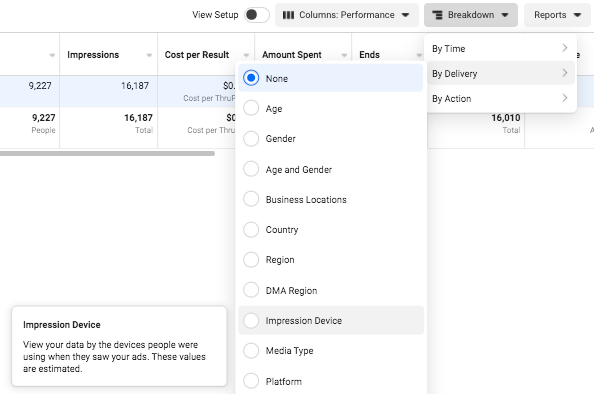
    Facebook campaign options in iOS14

    Despite these daunting changes, personalization is not at a total loss. Facebook Ads will remain an effective advertising channel if you rethink your current strategies and best practices.

    If you plan to use Facebook Advertising as a lead driver and revenue generator, the following four steps will be vital to run conversion campaigns due to Apple’s upcoming AppTrackingTransparency framework for iOS 14.5 users.

    Step 1: Complete domain verification to configure pixel conversion events for Aggregated Event Measurement.

    Aggregated Event Measurement is a new Facebook tool that “processes pixel conversion events from iOS devices” in compliance with Apple’s new policy while ensuring advertisers can still run effective campaigns. This tool can only be accessed once your domain is verified.

    As a new best practice for all businesses, you must complete domain verification. Domain verification is a way for you to claim ownership of your domain in Business Manager.

    Following Facebook’s instruction, “Domain verification needs to be done at the effective top-level domain plus one (eTLD+1). For example, for www.books.jasper.co.uk, books.jasper.co.uk, and jasper.co.uk, the eTLD+1 domain is jasper.co.uk. This can help ensure that your domain verification will encompass all variations.” (Source)
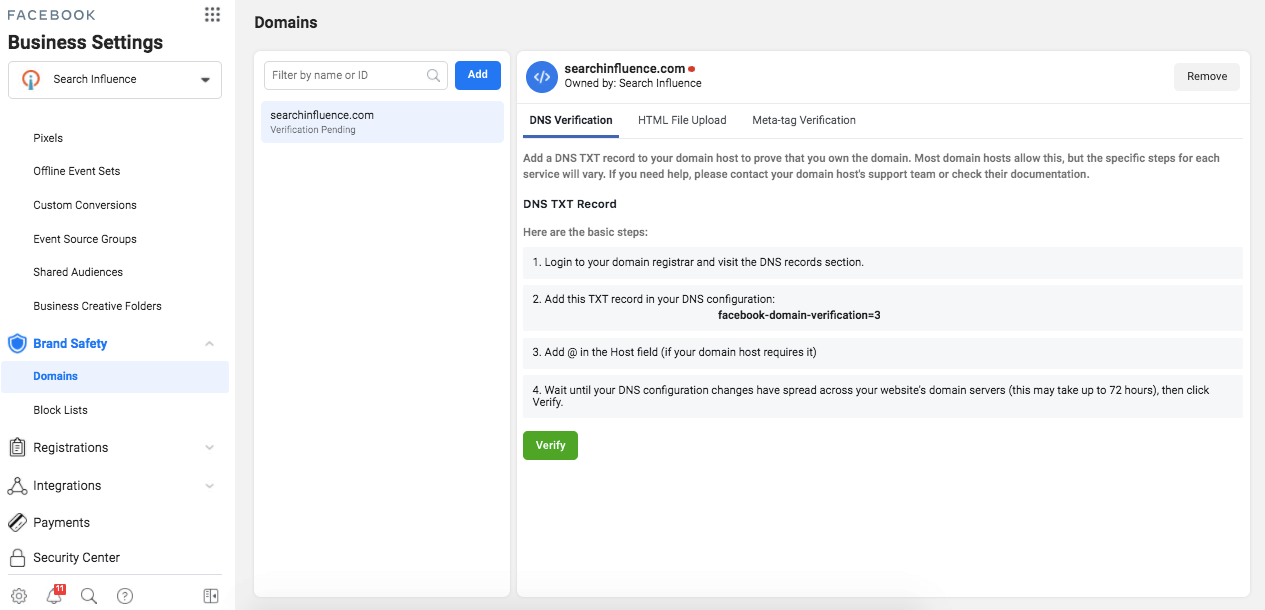
    How to verify domains on Facebook

    Step 2: Prioritize the Eight Conversion Events That Are Most Important to Your Business.

    Once domain verification is complete, you must use the Aggregated Event Measurement tool within Events Manager to set up the events that you want to track and their corresponding priorities. As a reminder, events allow Facebook’s machine learning to better target, optimize, and measure campaign performance.

    With the Aggregated Event Measurement tool, Facebook is requiring you to define up to eight conversion events, whether standard events or custom conversions, per domain (this includes subdomains) and to put them in order of priority.

    When it comes to prioritizing the events, you are going to put the most valuable action first and the least valuable action last. When a user completes multiple actions within a conversion window, only the highest priority event will be counted, and the conversions for the lower-prioritized events will not be counted.

    If your campaigns are currently optimizing for over eight events across the same domain, make it a priority to strategize and select the eight events you will optimize for moving forward. If you are currently operating under the limit of eight events, then prioritizing your events is quite simple.

    Follow Facebook’s documentation to configure Aggregated Event Measurement with your conversion events.
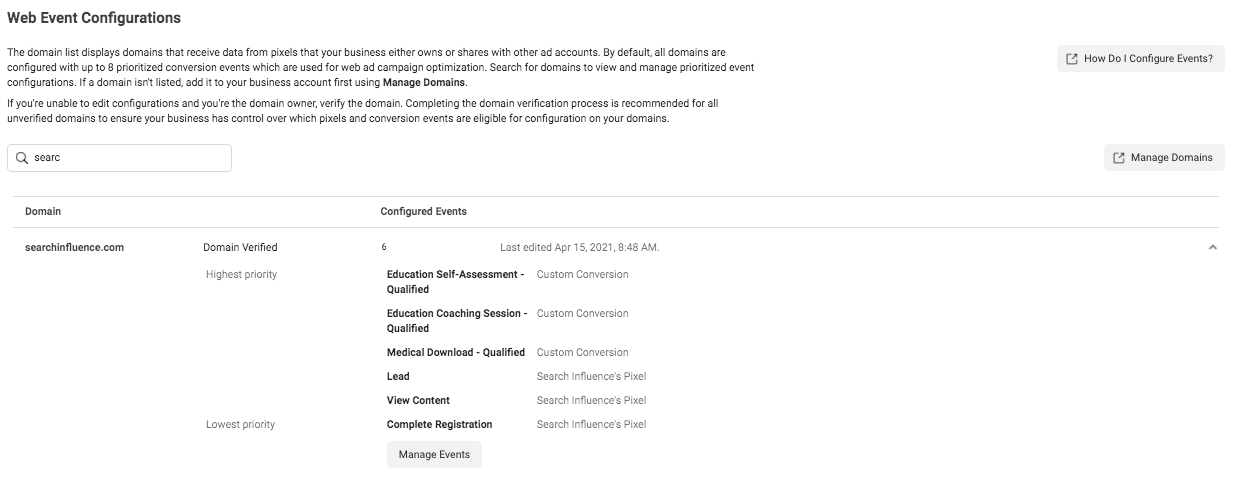
    Screenshot of web event conversions in Facebook backend

    Once you have prioritized your events, adjust your conversion campaigns’ ad set optimization events accordingly. You’ll also need to ensure your conversion ads are attached to the proper domain at the ad level in the Tracking section.

    Step 3: Understand how reporting changes will affect your ability to measure success and optimize your campaign.

    There are new reporting limitations that you should note, as they may affect how you measure campaign success and optimize campaign performance.

    Delayed reporting:

    Data may be delayed up to 3 days, which could severely impact optimizing short-run campaigns. Another key difference is that conversions will now be reported at the time the conversion actually happened, instead of getting attributed to the last ad impression or click.

    Estimated results:

    Statistical modeling may be used to account for conversions from iOS 14 users.

    No support for breakdowns:

    Delivery and action breakdowns, such as age, gender, region, and placement will not be supported. This could greatly impact how you review and optimize campaign performance.

    To test theories based on delivery and action, you will need to manually run tests, likely by creating more targeted ad sets. However, be mindful that this directly goes against Facebook’s best practice to use broad targeting to improve machine learning. (Source)

    Changes to account attribution window settings:

    First, the attribution window for all new or active ad campaigns is now set at the ad set level to ensure that the conversions measured are the same ones used to optimize ad delivery.
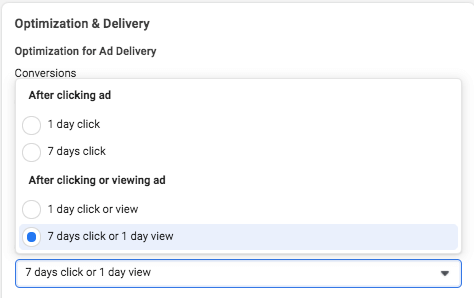
    How to do Facebook optimization and delivery

    Additionally, the new default window is a seven-day click attribution window, and 28-day attribution will not be supported for new or active campaigns. The following windows will be supported under the new attribution setting:

    • 1-day click
    • 7-day click (default after Apple’s prompt enforcement in April)
    • 1-day click and 1-day view
    • 7-day click and 1-day view

    As of January 2021, we saw a decrease in conversions due to the new attribution window settings set by Facebook.

    Step 4: Identify new campaign strategies and best practices.

    Optimizing: Test new optimization events

    By being limited to only eight events, this may force you to determine new best practices on how to optimize your campaigns. If you previously optimized your campaign with low-funnel custom conversions, you may need to test broadening your optimization events to less-granular or higher-funnel actions to encompass more website touchpoints.

    And if you haven’t switched to Campaign Budget Optimization (CBO) yet, then now may be a good time to let Facebook’s machine learning take some of the guesswork out of optimizing your campaign.

    Targeting: Test new audiences and targeting

    Our ability to target and remarket to your ideal customer with personalized ads will be severely limited. Mitigate the effects of the iOS update first by leveraging in-app products such as Facebook and Instagram Shops, lead gen forms, and using video. On-Facebook, engagement tends to be remarketable, which could replace some of the website data you’ll lose.

    Take advantage of the most available data by using customer list custom audiences to build remarketing and lookalike audiences with website audiences using the pixel.

    You may also want to consider removing the Audience Network as a placement from your ad sets because Facebook is not confident in its ability to deliver personalized ads for this placement to iOS 14 users.

    Facebook stated, “Ultimately, despite our best efforts, Apple’s updates may render Audience Network so ineffective on iOS 14 that it may not make sense to offer it on iOS 14.” (Source)

    Reporting: Test new key metrics

    If you currently report using breakdowns by delivery or action, determine how or if you will continue reporting on this granular data moving forward. Since these reporting breakdowns are no longer available for conversion data, you may need to determine new key metrics to report on.

    Navigating a New Digital Landscape

    Apple’s iOS 14.5 privacy update is transforming the digital advertising landscape. Campaign performance may see its biggest impact around Q4, which is the six- to nine-month mark from the iOS 14.5 update. This is mostly because audience sources using website tracking will shrink even more since we can’t collect the same amount of data we once did. We’ll also see more adoption of the updated iOS as people upgrade their phones.

    Stay on top of the upcoming changes and create new best practices for optimizing, targeting, and reporting to maintain control of your accounts.

    It’s okay to feel a bit confused about the effects on your Facebook Ads because no one has all of the information or answers yet. If you have questions about how you can still generate leads for your business despite these changes, one of the experts at Search Influence can help. Contact us today to learn more.

    Resources:

    Images:

    Mobile phone users

  • What Happened to Facebook’s 20% Text Grid Tool? (Updated 2020)

    Editor’s Note: This post was originally published on March 25th, 2016, and has been updated to provide you with the latest information.

    Update (October 1, 2020):

    Back in 2016, we were all so very excited to see the Facebook Grid Tool disappear. Unfortunately, it was replaced with similar restrictions of labeling ads with High, Medium, Low, or Ok amounts of text, and we found that ads were still being penalized for including large amounts of text. So is it true this time? Is it really gone?

    Facebook Grid Tool OFFICIALLY Removed

    See for yourself! The original Facebook Grid Tool (https://www.facebook.com/ads/tools/text_overlay) now redirects to the Business Help Center page on Best Practices For Image Ads on Facebook. These new guidelines strongly advise that testing is the best way to find out what works best for your audience, and we agree! Of course, Facebook still recommends that you should avoid excessive image text. Their new guidelines state “We’ve found that images with less than 20% text perform better,” so it’s clear that they still stand behind their 20% even if they are not enforcing it. As a designer, I agree that there is something to be said for that. Too much text, especially on smaller ads, can negatively impact readability. But what’s so great about the update is that you can now A/B test different types of creative and find what best meets your campaign goals without being limited by Facebook.

    Backend Warnings Removed

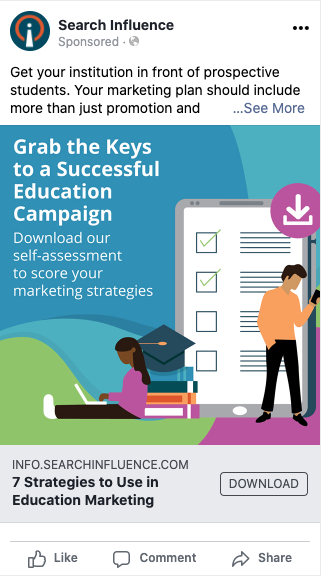
    On top of the removal of the actual grid tool itself, we also found that ads with large amounts of text, like this example below, are no longer being flagged by Facebook and campaign reach has not been affected.

    Example of effective Facebook ad with text

    What Does This Mean For You?

    As advertisers, we are thrilled to be more in control over testing creative and optimizing our campaigns. We live for it! For business owners running their own campaigns, this might be somewhat of a scary change. Optimizing campaigns for peak performance can take time and effort, which may be challenging to manage on top of other things. Let us help you! Schedule some time to meet with one of our strategists and discuss your goals as well as any questions you have.


    Wondering about the history of the 20% text grid tool? We’ve been monitoring this for years. Here’s our update from June 13, 2016:

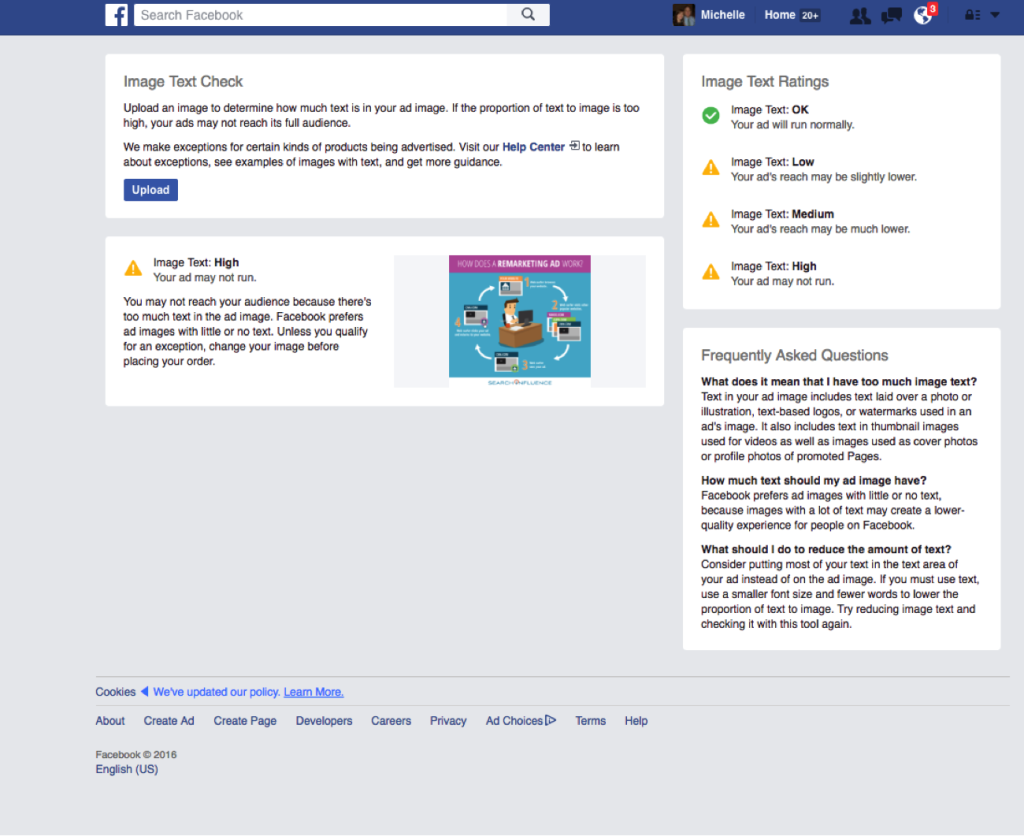
    It looks as though Facebook has officially rolled out this update to the 20% text rule! Here is the link to the new help page. When uploading your images to the new “Image Text Check” tool, you’ll automatically be notified of the likelihood of your ad reaching its intended audience (see our new screenshot below). If you’d like to better understand why your ad receiving less delivery, you can check the Ads Manager “Delivery” column.

    Facebook Screenshot

    Original Post (March 25th, 2016):

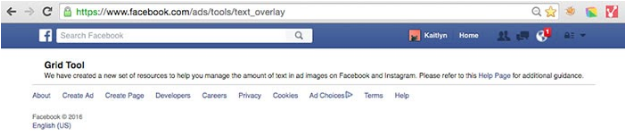
    Facebook seems to slowly be rolling up an update to their 20% text rule for Facebook Ads and Promoted Posts, which means some people are no longer able to access the Facebook Grid Tool. Our very own Kaitlyn Levy made this discovery when she was redirected to a Facebook Help Center page after trying to use the grid tool. But this new help page only seems to be accessible to a few, select users.

    So What’s Changed?

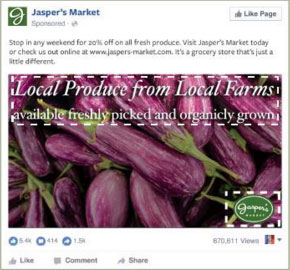
    There are four categories for the amount of text allowed on a Facebook ad. Your image text can be considered “OK”, “Low”, “Medium”, or “High.” The amount of text on your ad will determine the reach that it could potentially have. For example, an image that has the following text would be considered “Medium,” which may cause your ad to reach fewer people.

    MediumText

    What Does This Mean for You?

    While the strict 20% text rule seems to be falling by the wayside, the overall amount of text allowed on your ad can still have a huge impact on your ad’s reach. Your ad may not be rejected, but Facebook says that an ad with “High” amounts of image text may not reach your audience.

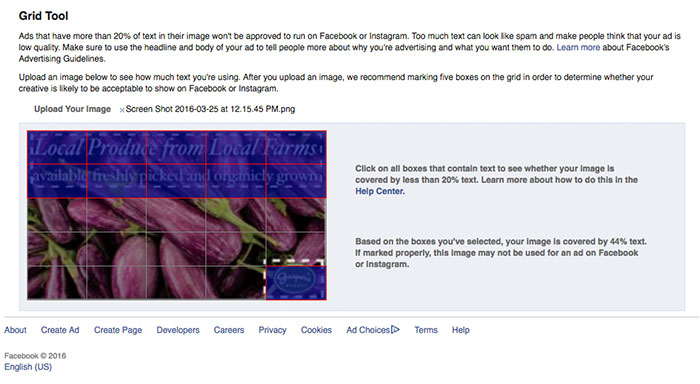
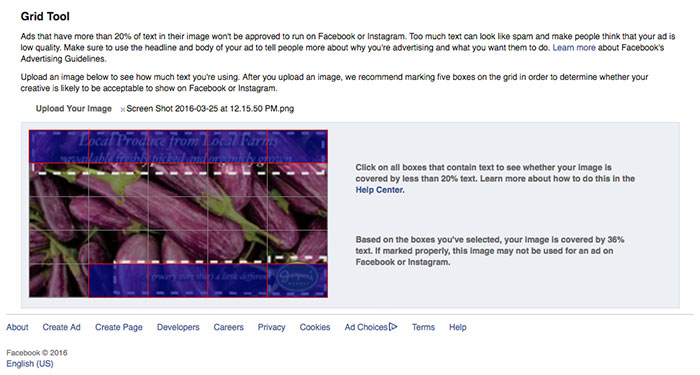
    Additionally, without a strict grid in place, you may have a bit more flexibility with the layout of your ad, but you still need to keep in mind the overall amount of copy in your message. When loading the examples provided on the help center page into the Facebook Grid Tool, you will see that the example in the “Low” category has 44% text, but the example in the “Medium” category has 36% text. The difference between the two examples is that the “Low” category, even with a larger font that takes up slightly more space on the ad, still has more copy than the “Medium” category example.

    The “Low” Category Example in the Grid Tool:

    NewTextRuleLowCategory

    The “Medium” Category Example in the Grid Tool:

    NewTextRuleMediumCategory

    Are There Any Perks to the New Guidelines?

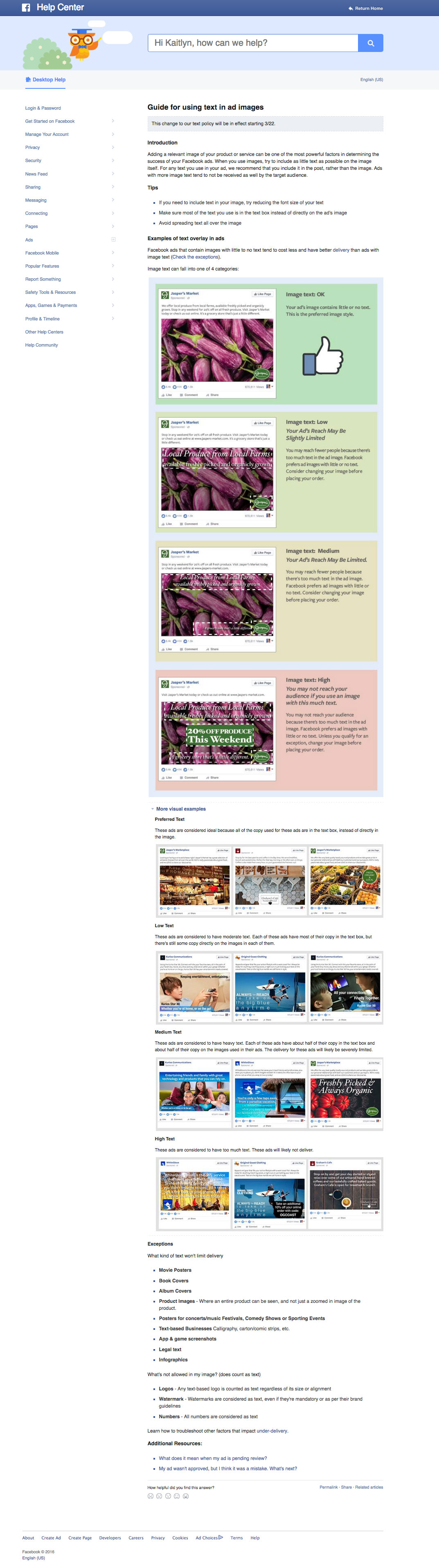
    Yes! Along with the rollout of the new guidelines, they have also included some “exceptions” to the rule. There are some types of text that won’t limit your ad’s reach. Some of these exceptions include, movie posters, book covers, product images (only where the entire product is seen), legal text, and infographics. Some of the items that will still be counted as text are logos, watermarks, and numbers.

    Do You Have Access to the New Guidelines?

    Check here to find out and let us know by leaving a comment!

    Don’t Have Access? Here’s a Peek at the New Help Center Page:

    NewFBAdTextGuidelines


  • Facebook’s Leads Center Provides a Hub for Marketers to Manage Their Leads

    Key Insights

    • Facebook announced Leads Center, a new tool that provides a space for you to organize and maintain information from their prospects.
    • Your lead management process will become more efficient because you no longer have to go outside of Facebook or through a third party to manage or view your leads.
    • Leads Center is in the beta phase, so it is not available to all users.

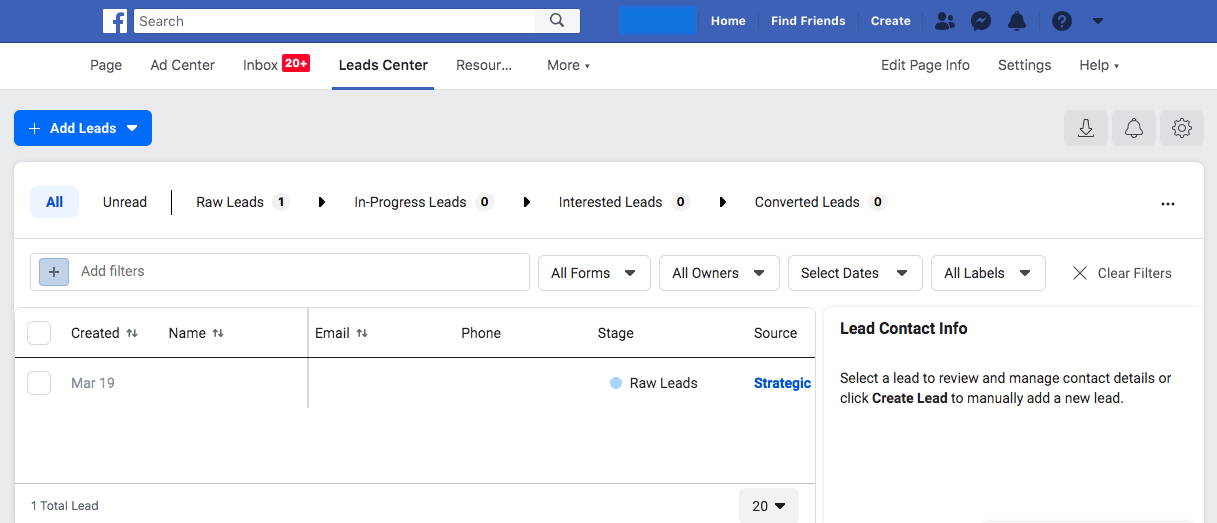
    Backend screenshot of new Facebook Leads platform

    Soon, you won’t have to save the leads you got from Facebook’s Lead Generation Ads in a spreadsheet on your desktop. Facebook is releasing a new feature called Leads Center. While this new tool is not available to everyone yet, it will provide users with the ability to organize and maintain information from their prospects. This tool will include the ability to:

    • Manage leads by setting reminders to follow up, assigning owners to leads, and adding notes to their contact information
    • Filter leads
    • CreateCustom or Lookalike audiences
    • Email leads from the Leads Center

    Now you may be asking yourself, why does this matter and how does this benefit my business? Facebook’s Lead Generation Ads produce lead forms that fit a specific purpose and provide prospective clients with efficient user experiences. Instead of filling out long, time-consuming forms, the forms are prefilled with the customer’s information. This process makes for a stress-free experience for potential clients and provides businesses with quality leads. In turn, this results in a higher conversion rate.

    Before Leads Center, you had two ways you to access your leads. The first was downloading a spreadsheet from the backend of Facebook. The second was setting up a “zap” through Zapier to get the leads into your own CRM.

    In this post, we’ll take an in-depth look into how Leads Center can benefit your business, some of its key features, and its availability.

    Will Leads Center Be Helpful for Your Business?

    Now to get to the good part—how Leads Center helps your business and make your Facebook lead management more efficient. You will no longer have to go outside of Facebook or through a third party to view or manage your leads. Search Influence has used lead forms for many years now, and this new offering is an excellent way to help business owners to manage their leads.

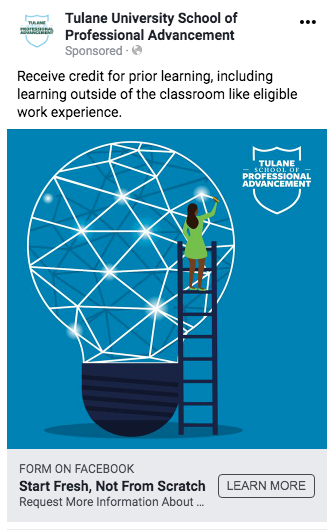
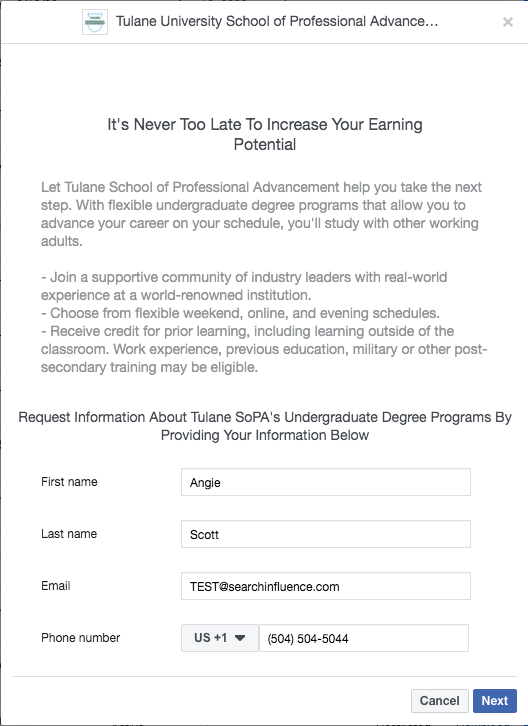
    Below are examples of a Lead Generation Ad and the form:

    Tulane School of Professional Advancement lead gen facebook post example

    Tulane Facebook conversion form example screenshot

    The Key Features of Facebook’s New Leads Center

    Leads Center has various functions that will simplify managing your leads. Let’s take a look at some of the key features:

    • Custom labels: If the lead is interested in a specific product or service, you can create a label to describe or organize your information.
    • Assigning owners: You can assign owners to specific leads so the right individuals on your team manage them.
      Mark prospects according to their lead stage: You can organize leads by where they are in the funnel to easily manage and process them.
    • Lookalike audiences: You can create lookalike audiences based on the information from your leads to optimize your ads’ audiences and obtain more qualified leads, resulting in higher conversion rates!
    • Create reminders: You can set reminders for each lead to assure none of them slip through the cracks.

    A Closer Look at Lead stages

    Facebook uses four different stages to categorize leads and represent where they are in the funnel:

    • Raw: New leads
    • Interested: Leads that have qualified for the service or product.
    • Contacted: Leads that have been contacted.
    • Converted Leads: Leads that have been converted into customers.

    Organizing these leads by their stage will help you target them more effectively because you’ll know where they are in the sales funnel.

    Facebook Leads Center Availability

    Currently, Leads Center is in the beta phase, so it is not available to all users. Leads Center is open to businesses that have previously run ads with the Lead Generation objective. Leads that are generated in Messenger are not available yet.

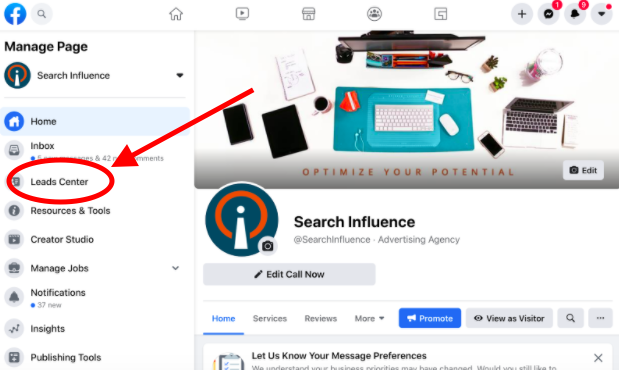
    To view the Leads Center, go to your Facebook page. Then, look below “Inbox” in the left-hand tab to see if it is available to you!

    Leads Center link shown on Facebook profile page screenshot

    Facebook’s Lead Generation ads are just one of many ways to generate quality leads that result in a higher conversion rate. Through Facebook’s Leads Center, you can view leads, assign users to them, categorize them, create lookalike audiences, and so much more, all within Facebook.

    Search Influence is dedicated to helping businesses reach their goals. If you’re looking for a reliable way to generate leads and manage them efficiently, Facebook’s Leads Center will be a beneficial tool. Contact us today to see how we can help you!

  • How to Use Facebook’s Campaign Budget Optimization to Your Advantage

    Who’s ready to spend their Facebook campaign budget more effectively?!

    Chris Pratt giddily rubbing his hands together

    If you waited until the last hour to adopt Facebook’s new mandatory update, Campaign Budget Optimization, you may be slightly panicked. This could disrupt your internal processes and current campaign structure. However, you’ll be thanking Facebook for forcing this change once you adopt it.

    What Is Campaign Budget Optimization?

    Campaign Budget Optimization (CBO) is Facebook’s latest mandatory update that makes you set your campaign budget at the campaign level, without the option to set ad set level budgets. Ideally, Facebook’s algorithm will optimize your campaign for your chosen “result” by effectively spreading your budget across each ad set.

    With CBO, you must accept that not all ad sets will spend the same, and that’s in your campaign’s best interest because the budget will spend on the best-performing ad sets.

    Do’s & Don’ts for Setting Campaign Objectives

    It’s important to use the correct campaign objective and ad set “Optimization for Ad Delivery” when setting up your campaign. Choose the proper result option that aligns with your client’s goals; this will affect who sees your ads and will help you achieve the desired outcome more effectively.

    To get a better understanding of what this means, review the do’s and don’ts below explaining common errors that occur when choosing campaign objectives and optimizations for ad delivery.

    Campaign Objective

    DO: Choose the conversion objective if you want to see an increase in conversions at a lower cost.
    DON’T: Choose a traffic objective to increase traffic to your website in hopes of also increasing conversions at a lower cost.

    DO: Choose the brand awareness objective if serving many impressions at the lowest cost meets your client’s goals.
    DON’T: Choose a conversion objective if your audience is not brand aware, since you will be paying a premium to reach users who are likely to convert online and not achieve your brand awareness goal effectively.

    Optimization for Ad Delivery

    DO: Select “Landing Page Views” if it’s important that the Facebook user loaded the landing page.
    DON’T: Select “Link Clicks” if you’re looking for high-quality clicks from interested users.

    DO: Select “Reach” if you set your campaign objective as reach so that Facebook optimizes to serve ads to the maximum amount of users within your frequency cap.
    DON’T: Select “Impressions” if your goal is to make users brand aware by serving ads to users as many times as possible. Your campaign would be better off using the brand awareness objective instead.

    Facebook always gives you the option for more control, but that doesn’t mean that there aren’t best practices that should be followed. Facebook’s algorithm will only optimize for the results you select when setting up your campaign.

    Screenshot of Facebook landing page on a browser

    Maintaining Budget Control With Ad Set Spend Limits

    Sometimes you’ll need to maintain some control of spend at the ad set level. For this reason, Facebook allows ad set spend limits to be set as a minimum or maximum daily spend.

    • Here are five examples of why you may want to use ad set spend limits:
    • If you create a new ad set to test but it won’t spend, you can force a minimum daily spend until Facebook’s algorithm collects enough data about that ad set. This should only be set temporarily for 2-3 weeks.
    • If you want to control budget based on targeting, such as locals vs. tourists, you can set daily minimums/maximums to align with your desired budget allocation. However, this should only be a temporary solution until you can separate these into their own campaigns.
    • You may want to spend more on promoting a special or limited offer but only for a short period of time (less than 2-3 weeks).
    • You may need to promote an urgent message that requires more spend for a short period of time.
    • If one ad set is spending all of the budget on low-quality results, you should consider setting a daily maximum.

    Disclaimer: Facebook notes, “Use ad set spend limits sparingly, or not at all: The more budget that’s locked into specific ad sets, the less flexibility our delivery system has to optimize your campaign budget.”

    While there are valid reasons to control spend for a short period of time, ad set spend limits should not be a permanent solution if you want to maintain a healthy ad account. At the end of the day, marketers want to produce the most high-quality results at the lowest cost for their clients. It’s best to let Facebook’s algorithm spend the campaign’s budget in the most effective way for the results you chose to optimize for.

    Take Action Now

    As you can see, this mandatory update may require changes in your processes, but Campaign Budget Optimization benefits your Facebook ad account in the long run. If making this transition has been overwhelming, reach out to Search influence for specific recommendations and consulting services. Learn more about how we can also manage your ad account directly with an online advertising package.

    Images

    Mouse

    Hand rub

    Facebook

  • Facebook’s Pared-Down Targeting is the New Deal… But Is It a Big Deal?

    If you are as enthusiastic about Facebook advertising as the nerds at Search Influence, then 2019 was an exciting year for you. Among other developments, Facebook made some major changes to their targeting options, beginning in the Spring with new requirements for Special Ad Categories like housing, financial services, and employment. These new targeting restrictions were intended to prevent advertisers from doing what I call “creative discrimination,” for example, only targeting high-income people for real estate ads. Many resources explain these new Special Ad Categories and how to create effective audiences for them.

    Spiral staircase photographed from the top down

    However, in Summer 2019, Facebook announced another round of changes to targeting, including thousands of interest, behavior, and demographic criteria. This time, there was very little information available about the upcoming changes, and advertisers were understandably agitated. Facebook announced, “As of August 19, 2019, some targeting options may no longer be available for new campaigns.” Digital advertising discussion threads from Reddit to Quora lit up with discussions and speculation about the new changes. Advertisers feared they either wouldn’t be able to target their ideal customers anymore or that it would become more expensive to target them.

    I have great news, though: you probably have nothing to worry about. Three major factors should help mitigate your fears. First, although Facebook was not specific about which targeting features they removed, advertisers found that the criteria removed were outdated, redundant, or just not that useful. Second, creative advertisers could leverage other targeting criteria to make up gaps in audience coverage. Finally, cleaning up available targeting criteria falls in line with Facebook’s push for broader targeting in advertising campaigns.

    Facebook Taketh Away… But Also Giveth

    Before the changes took hold, Facebook helpfully highlighted affected audiences in Ads Manager so advertisers could get a head start on editing their targeting. The eliminated categories were largely irrelevant to all but the most targeted campaigns. For example, here at Search Influence, we found that some removed targeting options included song titles, foods, and streets in the French Quarter.

    Facebook suggested appropriate replacements for some of these targeting options (“Louisiana Creole Cuisine” instead of “shrimp and grits,” “French Quarter” instead of “Royal Street,” etc.). Some other criteria did not have a suggested replacement, but we found them easy to discard or replace with better targeting. Other removed categories included particular job titles, interests, and behaviors whose audience sizes were very small and not very useful. The result is that although thousands of categories were removed, there are still many ways to reach the exact audience you want with your Facebook ads.

    Introducing… The Replacements!

    Even advertisers who relied heavily on precise targeting could still find their ideal audiences with clever workarounds. As I noted above, Facebook offered alternatives for removed criteria right in Ads Manager. These alternatives seemed widely relevant and showed that Facebook had put some thought into the effects of their changes. Savvy advertisers immediately researched alternative criteria to replace the ones that had been removed.

    For example, we could replace the interest “Royal Street” (a shopping mecca in New Orleans’ French Quarter) with the interests “shopping” and “French Quarter.” This alternative could not only replace the “Royal Street” interest but could also help us reach other audience members who are likely to convert on our ads.

    Broaden Your Advertising Horizons

    Speaking of reaching more audience members, advertisers realized these changes fell in line with Facebook’s advice of broader targeting from advertisers. This advice seemed counterintuitive to many advertisers, who saw targeting changes as a ploy to force Facebook advertisers into paying more. However, Search Influence has found that broadened targeting has improved performance in many of our campaigns.

    Facebook explains broad targeting as “mostly relying on our delivery system to find the best people to show your ads to.” Essentially, you are leveraging a tool that Facebook has spent millions of dollars optimizing. As Facebook points out, “This approach can lead to us finding potential customers you never would’ve known about otherwise.”

    To help advertisers transition to this unfamiliar method of casting a wider net, Facebook bolstered some Ads Manager tools to help advertisers evaluate audience performance. The Audience Insights feature now shows advertisers detailed information about their audiences, allowing for better optimizations and planning.

    Along with new analytic tools, Facebook rolled out and encouraged advertisers to use the Detailed Targeting Expansion setting with somewhat broad audiences. This feature allows Facebook to find users who are similar to your audience for detailed targeting but can provide better results for your campaign at a lower price. Many advertisers have had success with broad targeting and Detailed Targeting Expansion and now advocate for simplified campaigns as a way to let Facebook do the work for your campaign.

    Target with arrows piercing the yellow center

    Stay on Target

    If you’ve made it this far since the targeting changes without any problems, you should be good to go. Because there are still thousands of options left to help you find those high-intent audience members, you may not even have noticed that thousands of options are suddenly gone. There are lots of ways to find your audience members, even if it means some creative combinations of interest, behavior, and demographic targeting.

    Finally, embrace broad targeting. Facebook has invested millions in technology that predicts user behavior, so do yourself a favor and use it. At the very least, testing your ideas against Facebook’s algorithm is a prudent way to optimize your campaigns. If you need help setting up a Facebook campaign or running tests in your current one, contact Search Influence to collaborate with one of our digital advertising experts!

    Images

    Stairs

    Target

  • Guide to Facebook’s Lead Generation Ads: What Can They Do for Your Business?

    You’ve probably heard this a million times by now, at least a couple thousand from us—if you aren’t on Facebook, then you’re doing your digital marketing all wrong. There are more than 2 billion people around the world who actively use Facebook monthly, and on average those people spend about 35 minutes a day swiping through their feeds and engaging with content from friends, family, and brands.

    Not only is Facebook’s audience large and engaged, Facebook offers an advertising tool that makes it easy for you to create advertising campaigns at a fraction of the price of traditional ad types. Our client Audubon Nature Institute generated $10,100 in total revenue while only investing $1,080 in ad spend on a Facebook Display campaign!

    What Are Facebook Lead Ads?

    Facebook Lead Ads are a type of Facebook ad that allows advertisers to collect information from prospective customers directly from the platform. Before Lead Ads, you would have to guide users to a landing page on your website to leave their contact information.

    Facebook has made it simple for you to create ad campaigns in a few taps and for potential customers to contact you with ease. Users simply tap your ad and their information is sent directly to you.

    Why Facebook Lead Generation Ads?

    • Facebook forms are made for mobile and allow users to submit their contact information in a flash
    • Because there is no need to click through to a landing page, there is potential for more conversions and less drop offs
    • You can reach your target customer where they are with Facebook’s countless targeting options
    • The Lead Generation forms are customizable, allowing you to build a form to ask the right questions
    • It’s easy to connect your CRM to Facebook to get your leads immediately and take action sooner
    • You can use Facebook Lead Generation Ads for quote and demo requests, sign-ups for your newsletter, event registration, access to gated content, and more
    • Many businesses and brands large and small have seen significant increases in lead generation and a reduction in cost per lead
    • Facebook advertising is cheaper than traditional ad types and can build more brand awareness
    • It saves you time

    Where Will My Leads Go?

    All of the leads you collect by way of your Facebook Lead Generation campaign will be stored on Facebook and can be downloaded to a CSV file. To download your leads, visit your Facebook page and click “Publishing Tools,” and you’ll see “Forms Library” under the “Leads Ads Forms” label.

    Pro Tip! Facebook also connects to popular CRMs like HubSpot and SugarCRM, enabling you to automate the process of pushing leads directly to your sales team. If you don’t take this step, you’ll have to download a CSV file regularly to see and take action on your new leads.

    Creating Your First Lead Generation Ad

    Before you begin building your campaign, you’ll need to make sure you have a Facebook Page for your business or brand. Building your campaign starts with visiting Facebook Ads Manager via business.facebook.com or accessing the drop-down menu on the top left of your screen. If you’ve never run ads before, you will need to create a Facebook Ads Manager account. You will be asked to link your business’s Facebook and Instagram page to your Facebook Ads Manager account.

    Building a campaign is simple and can be done in a few steps.

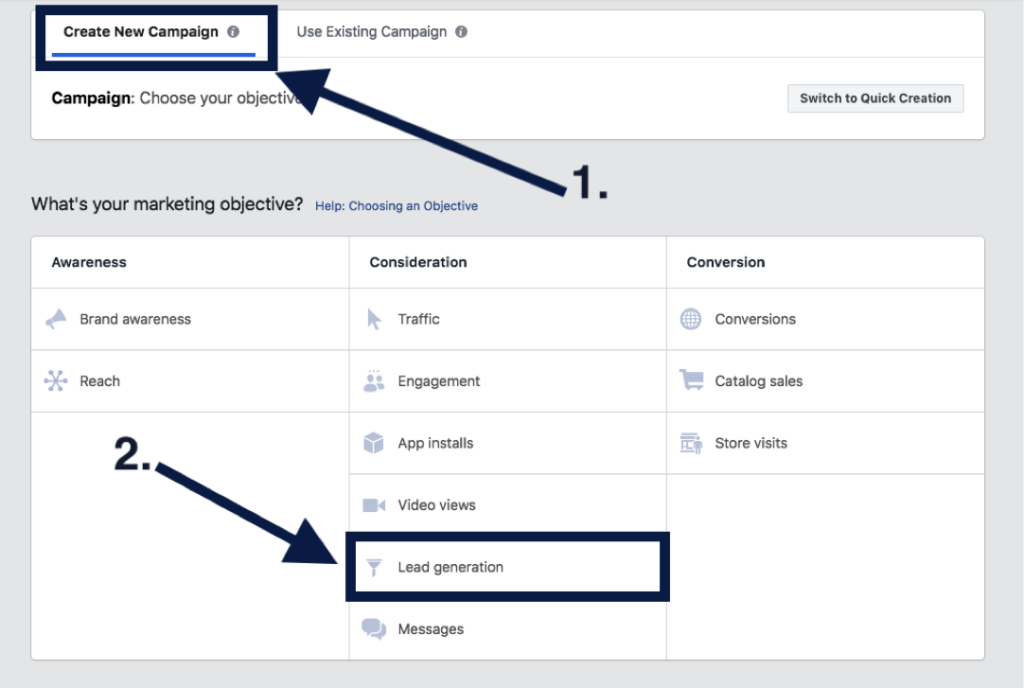
    1. Choosing Your Campaign Type

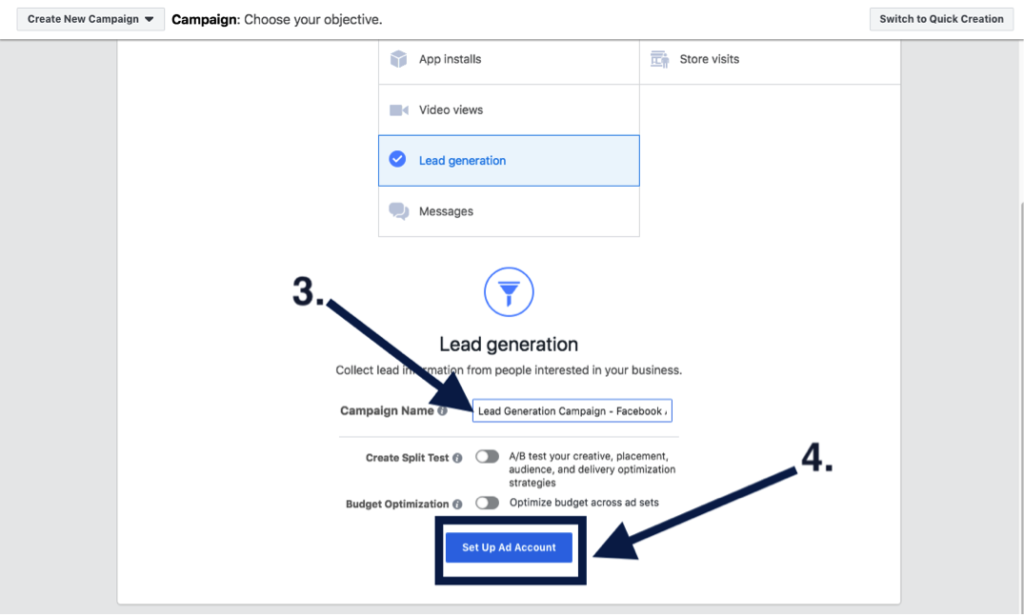
    Once you’re all set up and ready to go, you’ll want to create a new campaign and select “Lead generation” under the “Consideration” marketing objectives. You’ll want to give your campaign a relevant name and click “Continue.”

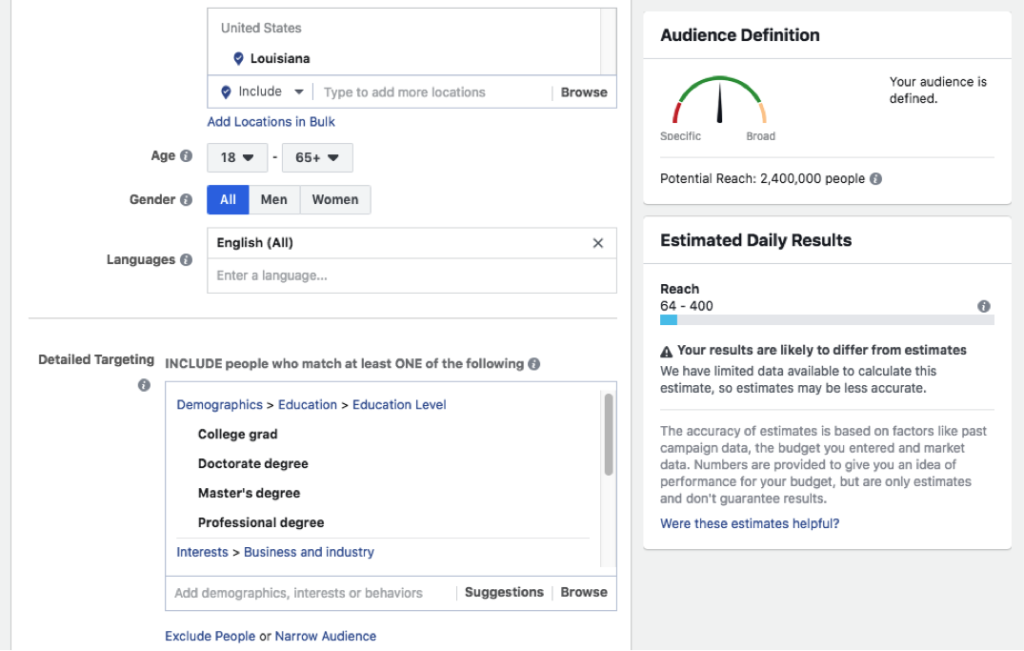
    2. Choosing Your Custom Audience & Budget

    Move forward with setting up your ad account, creating your custom audience, and setting your budgets. But don’t worry! Facebook offers optimization tools to help you adjust your budget and targeting after the campaign is launched, and they are always adjustable. Facebook offers several targeting options, including targeting by demographics like location, age, gender, and language. You can also target by other demographics, interests, and behaviors like education levels, if someone is interested in yoga, and behaviors like how they utilize Facebook. You also have the option to build an audience from a lookalike version of your current customers and website visitors.

    3. Creating Your Ad

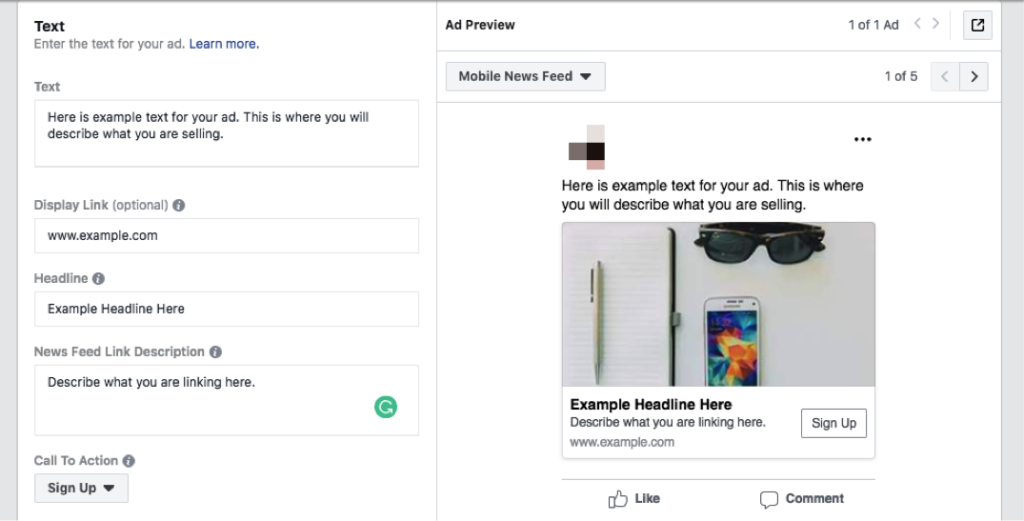
    After you have your custom audience and have set your budgets, you’re ready to create your ad. You’ll verify the pages you want your ads to be represented by and select your ad format. There are several ad formats to choose from. Carousel and video have been the most successful ad types in our experience. You’ll add in your ad text, display link, headline, news feed description, and a call to action.

    4. Creating Your Lead Generation Form

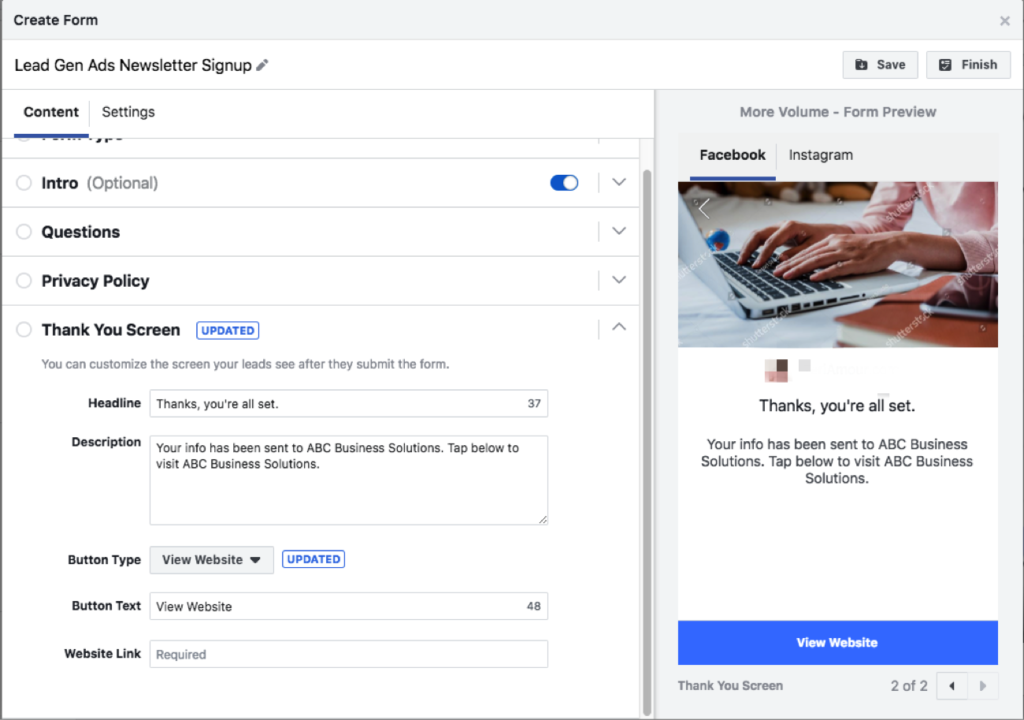
    Finally, the last step before you launch your campaign will be to create your lead generation form. Here you’ll introduce the product or service you’re promoting, add the questions you’d like to ask your audience, insert your privacy policy (it is mandatory to have one), and build your “Thank You” screen. Be sure to give your form a descriptive name so that you can identify it later when you need to download your leads.

    5. Publishing Your Campaign and Launching

    Congrats! You’ve launched your Lead Generation campaign. This is the part where you celebrate and wait for the leads to come pouring in.

    You’ll want to monitor your ad’s performance by testing and checking on it regularly! Try changing out your ad copy and graphics, or trying different targeting options—narrow your targeting if you find you’re reaching too broad of an audience and thus receiving unqualified leads. You could also update your form to ask more specific questions.

    Here at Search Influence, we’re invested in helping our clients grow their businesses through dynamic marketing strategies that drive qualified leads. If you’re interested in utilizing Facebook to bolster your lead acquisition efforts, request your marketing analysis today to get started.

  • Mobile Travelers: 4 Ways Mobile Search is Used in Vacation Planning

    Mobile Travelers: 4 Ways Mobile Search is Used in Vacation Planning

    We’ve come a long way from lugging around heavy guidebooks and drawing out routes on paper maps. In fact, we’ve even come a long way from planning vacations on desktop computers. Google shares that a growing number of travelers are planning vacations on their mobile devices, with mobile’s share of travel visits growing 48 percent in 2016, and mobile web conversions for travel sites growing 88 percent that same year. As a result, it’s increasingly important for businesses in the tourism and travel industries to optimize their websites for mobile and make researching and booking trips easy for mobile customers. Here’s how!

    Take me away - Search Influence

    “Micro-Moments”

    According to the same source from Google, the key to a successful mobile travel site is leveraging micro-moments. These are moments of intent when someone acts on a need—for example, looking for a hotel once they’ve booked a flight to that city. Google names the core four micro-moments of planning a trip as I-want-to-get-away, Time-to-make-a-plan, Let’s-book-it, and Can’t-wait-to-explore. Different businesses in the travel industry will prioritize different micro-moments—for example, an influencer on Instagram might focus on I-want-to-get-away while a local tourism bureau might concentrate on Can’t-wait-to-explore. But, catering to customers across all four micro-moments certainly can’t hurt!

    1. I-want-to-get-away

    Also called Dreaming Moments, these are the times when people start thinking about their next vacations—and Dreaming Moments happen often. Again, according to Google, 37 percent of U.S. travelers think about planning vacations once a month, and 17 percent think about it once a week or more. In 2015, 38 percent of non-branded travel searches came from mobile devices. Today, that number is only increasing. So, how can travel and tourism businesses cater to this growing audience?

    One option is using SEO services to help your website rank higher in search engine results for questions like, “What to do in [destination]?” and, “Where is [destination]?” These are two of the top travel questions people ask Google. Another great resource is YouTube. Google estimates that roughly 106 million of YouTube’s monthly unique visitors are travelers, and 64 percent of people who watched travel-related videos did so during Dreaming Moments. This means that learning to attract customers on YouTube is a must for businesses catering to I-want-to-get-away micro-moments.

    Animation of a plane flying - Search Influence

    2. Time-to-make-a-plan

    Also called Organizing Moments, these are the times when travelers have decided to take a trip but are still considering different hotels and airlines with an open mind. During these moments, travelers are figuring out the logistical details of their journey—like how long flights will take or how much hotels will cost. And, they’re figuring out these logistical details on mobile. On Google, mobile flight-related searches are up 33 percent year over year, and mobile hotel searches are up 49 percent.

    To reach customers during Time-to-make-a-plan Moments, consider online advertising campaigns, or Google services such as Hotel Ads and Google Flights. And, of course, make sure that your website is fully optimized for mobile!

    3. Let’s-book-it

    Booking Moments are incredibly important—not only because they’re the times when travelers start spending money, but also because these moments may have the most room for newcomers to make an impact. Going back to data from Google, 46 percent of travelers who do mobile travel research made their final booking decisions on mobile but did the actual booking itself on a desktop or laptop computer. This means that customers are likely not getting everything they need from mobile during Booking Moments. Businesses that improve their mobile booking have an opportunity to rise above the competition.

    Google recommends Book on Google as a way to increase conversion rates for mobile Booking Moments. But, other ways to improve customers’ mobile booking experience include streamlining the check-out process to remove any unnecessary steps and making sure your site is secure. Customers will be more likely to book on-the-go if they trust that their information is safe and secure.

    4. Can’t-wait-to-explore

    Also called Experiencing Moments, data from Google proves that these are also areas of huge potential. Travelers are increasingly planning their vacation activities while they’re on the trip, with 85 percent of 2016 leisure travelers deciding on activities after arriving at their destinations. Here again, travelers are making these plans on mobile. In fact, mobile searches from hotels increased 30 percent in 2016. Companies who aren’t catering to this growing audience are missing out on potential business.

    So, how can a travel industry business appeal to customers in Experiencing Moments? Provide travelers with information! The same source from Google found that 53 percent of leisure travelers are interested in visiting new places, compared to just 18 percent who want to return to previous destinations. This means that the majority of vacationers are somewhere they’ve never been before. Offer recommendations for restaurants or attractions, and make these recommendations location-aware—Google searches for “places to eat near me” more than doubled in 2016.

    Two planes making a heart shape in the sky - Search Influence

    Travel is increasingly becoming a mobile-centric industry, and businesses have a lot to gain by targeting customers in these core travel micro-moments. Whether it’s improving YouTube reach to grab viewers during I-want-to-get-away Moments, or making sure a site is hosted on a secure server for Let’s-book-it Moments, Search Influence is here to help. Bon Voyage!

    Images:

    Take Me Away

    Want to Get Away

    Bon Voyage

  • 5 Strategies to Get Guests Talking and Increase Event Attendance

    5 Strategies to Get Guests Talking and Increase Event Attendance

    With the right marketing strategy, your event will be the topic that everyone seems to be discussing. Potential attendees will feel compelled to join in the fun. Millennials have coined a term for this pervasive social anxiety: “FOMO,” for “fear of missing out.” This social enthusiasm is great at motivating that final step for a successful gathering: converting people who are merely aware of the event into participants who actually attend. Whether you’re still sending invitations or collecting RSVPs, every event planner needs to know how to make their big bash the talk of the town.

    Image of Ariel from little mermaid in New Orleans, LA

    Email Marketing

    You know the contact information for your most dedicated fans and colleagues. Give newsletter subscribers and loyal customers the inside scoop, and they’ll be happy to make plans in advance. Include links to any special promotions or contests leading up to the event to help encourage your fans to spread the word and invite friends through social media. And be sure to tease out the event over a few targeted emails, building excitement and revealing new surprises that your customers can’t get enough of.

    Whether it is your regular newsletter or promotional messages for the big event, less is more, especially when it comes to emails. Flooded inboxes are a familiar experience, and many people cull through their incoming mail on a smartphone, further limiting the time and screen space allowed for each message to make its case. When you’re promoting an event, don’t send out too many emails to the same recipients, or you may turn potential attendees into unsubscribers.

    Facebook Promotion

    Facebook events allow you to track RSVPs and disseminate essential information. People need clear details about the time, location, and parking. Facebook makes key logistical information easily accessible, and it also provides a platform for easy promotion. With event marketing on Facebook, you can pay for promotion to get more views and attendees. Even without paying for advertising, you can design posts that encourage engagement. Produce exciting promotional infographics, and your fans will be happy to spread the word.

    Schedule important posts for the early afternoon, preferably from Wednesday to Friday. Those times allow a larger number of active Facebook users to see your posts, and they can still share the news before the weekend. Social media also allows you to gauge enthusiasm and adjust your promotional strategy, depending on which posts get more engagement. Learn more about how social media management can help you find attendees for your big event on Facebook and other platforms.

    Remarketing

    Not everyone who clicks on your page will attend, but people who visit your website and event page have demonstrated interest. Target those undecided visitors with remarketing through Google Display or Facebook Display to remind them about the event and keep it top of mind. This is especially important if your event tickets typically sell closer to your event. As with other forms of targeted advertising, you can put your message in front of local viewers with relevant interests, and you can even filter by age groups and other demographic variables. Remarketing is special because it is tailored to potential guests who have demonstrated a very specific interest.

    Not everyone checks Facebook more than five times a day, and it’s easy to forget about upcoming events. Online advertising provides reminders for converting interested viewers into actual attendees. Even users without a social media presence will still see advertising on search engines and other web page banners.

    Influencer Marketing

    Advertisements are great reminders for upcoming occasions, but trusted online personalities can have an even more profound influence on attendance. Make your gathering popular by getting relevant influencers on board. In some ways, the internet is still a lot like high school, and influencers are the popular kids with a lot of sway over which parties and trends are “cool.”

    Reach out to the internet personalities relevant to your industry and audience, and they may be interested in helping to spread the word. Some influencers are content creators who rely on sponsorship. Others are bloggers who share reviews and news relevant to their followers. Influencers make great VIPs, and they may also be interested in giving away tickets, further spreading the word.

    Social media icons rotating in New Orleans, LA

    Snapchat and Instagram Stories

    If you’re targeting a younger audience, you need to keep up with the latest trends. Snapchat and Instagram allow you to tell a compelling visual story. The week and day of the event, be sure to have someone on staff dedicated to updating your feed with behind-the-scenes videos, live updates, and reactions from attendees. You can even get your influencer to take over your social account during the event to stir more excitement. Publishing a lot of content during the event, and encouraging your guests to do the same, is the best way to jumpstart your marketing and attendance for the following year.

    From underwater welders to teenaged musicians, a surprising range of communities are active on Instagram and Snapchat. If you aren’t sure about the best place to reach your audience, then it’s worth getting professional help. Consulting services can help you determine which outlets are most effective for your industry and target audience, while lead tracking and analytics will help you determine how best to elicit reactions from followers.

    Event marketing is about more than spreading the word. Use your established branding to show how every attendee will have a great time. With the right impression and frequent reminders, your local community will be FOMO-ing all the way to your big day. Whether you’ve booked an exclusive venue or amazing guest speaker, promotion (through advertising or social media) is just a way to spread the exciting news. Once you’ve done the hard work of planning a gathering, FOMO is the natural reaction of people who understand what a great time you have pulled together.

    Have a big event coming up but no time to promote it? Request a proposal to learn how Search Influence can help you succeed.


    Images:

    Social Media Pendulum 

  • ‘Tis the Season to Get Creative: Using Social Media for Holiday Marketing

    Many of your customers are gearing up for numerous holiday festivities that involve family, friends, and coworkers. This time of year also inspires lots of shopping. According to a study done by Deloitte, the average American will purchase 15 gifts during the holidays with the months of November and December generating 30 percent more revenue than non-holiday months. With all the gift giving and celebration, a stellar online presence, particularly on social media, is key to your business having a shining season. Keeping your customers engaged and informed of specials, events, and general happenings in the behind-the-scenes aspect of your business builds trust but also can build sales. In 2015, 75 percent of shoppers used the internet to research which gifts to purchase. So, don’t be afraid to get creative and light up your customers’ timelines with compelling copy. Need a little inspiration of your own? Here are some social media marketing tips that will get you in the holiday spirit.

    Christmas gift giving from 22 minutes - Search Influence

    Deck The Halls…With Lots Of Images

    Photos, videos, and other images are paramount to a healthy social media presence and they also present the perfect opportunity to engage potential shoppers on all levels. Create an Instagram video and show quick, behind-the-scenes clips of your store or showcase a new product or one of your lesser-known services. According to Wyzowl, 74 percent of shoppers who watched a demonstration video about a product or service subsequently bought it. So, show off your Spielberg skills and put together a product video to demonstrate how a featured item in your store is used. Remember, this doesn’t have to be a costly high-tech venture; just use a smartphone and tell a short and sweet story about how your shop is preparing for the holidays. Upload to your social media or even YouTube. If stills are more your thing, take some high-quality photos using your iPhone or a more professional camera and post images of employees who are in the holiday spirit. You can even include some shots of that huge order fulfillment you and your crew are working tirelessly on. Make the images personal and easy to share. If you are running low on your own photos, try incorporating user-generated photos from your customers.

    Tinsel Everything From Wall to Wall

    In other words, cover your bases when it comes to social media. Since your potential customers are more than likely shopping for other people, you are not necessarily trying to gain the attention of your traditional customer base. You may be trying to appeal to a mother buying a gift for her 20-year-old son, or a 30-something purchasing something for his niece. If dad is buying something for his daughter and your business has the perfect gift, let him know. Facebook has proven to be a wonderful resource that really does appeal to pretty much every demographic. With tools like Facebook ads, it’s becoming easier to target your potential shopper, so make sure the language that you’re using in your content speaks directly to your audience.

    Tinsel being placed on a tree in It's a Wonderful Life - Search Influence

    Spread the Joy of Your Business

    Today’s consumers want to know the ethics behind the companies they are shopping with. According to a 2015 Nielsen report, 66 percent of respondents were willing to pay more for products and services that came from companies who were committed to positively impacting social and environmental issues. So, tell your customers who you are and what you stand for. Are you doing any fundraising or charity events for the holidays? Share it! Are you participating in a food drive or giveaway? Tell us about it! Does your company’s mission align with the spirit of the season? Even better. These are positive events that can not only create a space for your company to give back but also encourage trust with your customers and impact sales, too.

    Give the Gift of Hashtags

    Added to the Oxford Dictionary in 2010, the hashtag is social media’s way of organizing ideas, keywords, and campaigns. Search some of the current trends and see if an existing hashtag fits your company’s voice or vision for the season. If not, jump start your own! Consider running a promotion based on your customers reposting or sharing a specific photo or post. Have them use a catchy hashtag you’ve created that is personal to your holiday messaging. To incentivize their repost or share, offer participants a small discount.

    Jimmy Fallon and Justin Timberlake using hashtags - Search Influence

    Embrace All the Holidays

    Facebook is a wonderfully diverse platform that will surely get you views from people of all walks of life, so don’t narrow your focus on just one holiday. Show love to each one of them and give them a shout out on your page. Let everyone know how inclusive you are across age groups, interests, and religious and cultural holidays alike. Take the time to wish your current and potential customers a happy holiday season and welcome them to your store.

    This time of year, after all, is about love, celebration, and gratitude. Let your customers know you care with a thoughtful social media campaign that will inspire them. If you need assistance with creating a holiday strategy and managing your social media, contact our team. We are happy to help you deck the halls with holiday content that will get your customers into the spirit of the season!

    Images:

    Gift Giver

    Tinsel

    #Hashtag

  • Meet & Greet : Your Buyer Personas and What You Should Know About Them

    When you ask a small business owner what kind of customers they want to attract, it’s not uncommon to get an answer like “everyone” or “anyone who can use our service.” When you’re creating marketing content, however, it’s not often possible to create something that will appeal to every single person on the planet—some people simply won’t be interested. For example, it doesn’t make a lot of sense to try and convince a college-age renter to install a new roof. It’s a more efficient use of your marketing resources to zero-in on people who are most likely going to be your customers. The best way to do this is to create buyer personas. Doing this will help you to define exactly who you are trying to reach.

    Zoolander Who Am I Image - Search Influence

    What is a buyer persona?

    A buyer persona is the Everyman of your customers. It combines all the characteristics your customers have in common and puts them into one fictionalized person who represents your average consumer. The buyer persona is based on real information about your clientele, and it defines their age range, gender, income, common pain-points, and what they’re hoping to get from your product. It also combines your demographics with psychographics to build a buying character that is pretty much human.

    Why are buyer personas important?

    Having a well put-together buyer persona helps two people: you and your potential customer. According to a survey by Rapt Media, 63% of consumers would think more positively about a brand that gave them content they found valuable, interesting, and relevant. Whether you’re reaching out via a direct mail campaign, emails, or Facebook, no one wants to be stalked by content they’re not interested in.

    Wedding Crashers Image Of Gloria Saying I'd Find You - Search Influence

    By focusing your marketing efforts on your buyer persona, you’re ensuring your message gets in front of people who are most likely interested, without alienating those who aren’t.

    At the same time, knowing your buyer persona means you can give your customers exactly what they’re looking for, ensuring they trust you when it’s time to make a decision. For example, if your buyer persona is an on-the-go business traveler who doesn’t want to waste time during the research stage, you can present them with content in an easy to digest infographic. The potential customer is now more likely to engage with your content and come back to you next time they need a problem solved.

    How can I build a persona for my business?

    Your buyer persona should be based on who your real customers actually are. You can do this by directly surveying your current or past customers. Ask them about their background and demographics, as well as more probing questions like how they heard about your product, why they bought it, how they’re using it, and what (if any) difficulties or reservations they’ve had since their purchase.

    Talking directly to your customers is the preferred method, but if you’re not getting enough information, supplement it with searches on sites like Quora and industry forums to see what kinds of information people are seeking. Content Marketing Institute recommends you ask these three questions when searching: 1) What is the first thing my customer thinks of in the morning; 2) What are their last thoughts at night; and 3) Why is this so. The first thoughts they think about will reflect their daily to-dos and frustrations.

    Image Of Titus Telling Kimmy That He Already Did Something Today - Search Influence

    By the end of the day, they’ll start considering the macro level of what they’re doing with their life. The ‘why’ gives context to the first two questions. If you end up getting a couple of different answers for some of the above questions, that’s totally okay. It just means you probably have more than one buyer persona.

    What does a great buyer persona look like?

    A strong buyer persona will read much like a character description from a play or TV show. Describe Olivia Pope from the TV show “Scandal.” What does she do for a living? How old is she? Does she live in a city, the country, or a suburb? East Coast, West Coast, the South, or Midwest? What kind of clothes does she wear and what is her favorite pastime? With her line of work and hobbies, what kind of products would she be most interested in and find to be most helpful? This is a short list, but you get the picture. Buyer personas completely flesh out your customer base, creating what may look like a complete person or personality. The more detailed, the better. The sharper your assessment of your client base, the better targeted your marketing and the more likely you will attract your most likely customer.

    Image Of Scandal's Olivia Pope Saying It's Handled - Search Influence

    Need an expert to help you build your buyer persona? We offer a variety of great services to target your customers and engage them online. For help creating a digital marketing campaign that speaks directly to your potential customers, contact our team!


    Images:

    Zoolander

    Wedding Crashers stalker

    Titus To-Do List

    Olivia Pope