Tag: business

  • Defibrillate Your Clinic’s Social Media Plan in Five Steps

    Over the past decade, there have been steady increases in the acceptance, usage, and number of social networks. With membership in the hundreds of millions and even billions, social media networks like Facebook, YouTube, and Twitter have become excellent platforms for businesses that want to reach and engage their audiences. Because they form part of a more niche industry, it is crucial for hospitals, healthcare practitioners, pharmaceutical companies, and others in the healthcare industry to have a detailed online strategy in place across various social media platforms. Below are five steps to designing a comprehensive social media plan that take into consideration the challenges and specific needs of the healthcare industry.

    Challenges

    Healthcare providers face a number of unique obstacles when entering the world of social media. Businesses in this industry typically have multiple stakeholders, from existing patients to future patients to other physicians. Each stakeholder has unique expectations regarding communication standards and topics, and a fully fleshed out plan that follows these steps should take these expectations into consideration.

    The healthcare industry is strongly regulated by organizations like the FDA. However, in the recent surge of social media outlets and usage, the healthcare industry has faced a unique challenge: the reigning regulatory offices have not cited clear guidelines regarding the use and management of these social media platforms. Seeing as some information on the topic has been released, it is important that you review these sources before creating a social media plan for a business in the healthcare industry.

    Creating Your Plan

    1. Define Your Personality

    As a business and as a brand, you will need to define your online social personality: how do you want your stakeholders and audience to perceive you? Thinking of your brand as an individual will allow you to adopt a more coherent voice across your chosen social media platforms. To help define your voice, ask yourself questions like the following:

    • What color would you associate with your brand?
    • If your brand was a person, what kind of clothes would they wear?
    • What type of car would this person drive?
    • How would his or her friends describe him?
    • Does this person have likes or dislikes?

    Although it may be difficult in the beginning to uncover the personality of your practice, carefully designing this aspect of your social media strategy will allow you to create a more concrete tone and voice.

    Along with defining your voice, take the time to study and understand your stakeholders. Decide which groups you would like to reach: existing patients, future patients, other healthcare professionals, insurance companies, or any combination of these. This decision will impact the tone and purpose of your social media campaign, as each of your audiences will react best to content that is specifically designed for them. By keeping your target audience in mind, you will enhance your ability to focus your social media updates, allowing you to promote audience engagement and build a stronger, more trusting relationship.

    2. Listen

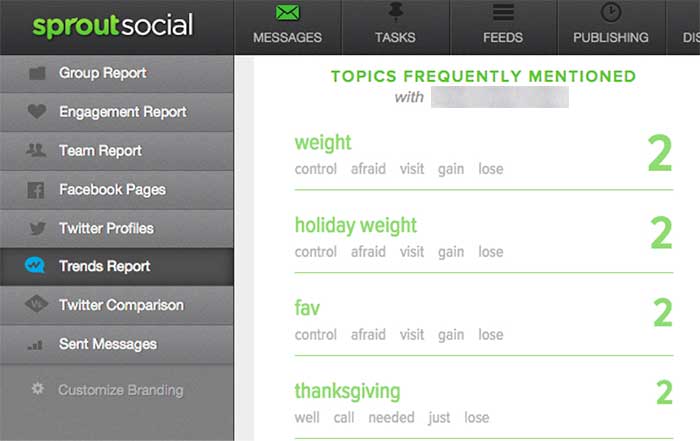
    After you have settled on the tone and audience of your social media strategy, pause to listen to the existing conversation. Determine how your audience and competitors interact within the social space, monitor conversations about your industry, and track the ways in which your brand is discussed online. Using tools like Google Alerts and hashtags, Sprout Social, monitoring forums and other online spaces to understand the existing conversations.

    Listening to the discussions that are in place across the spectrum of social media platforms will allow you to gain a sense of which healthcare topics are currently trending. It will also help you to identify the concerns, questions, and interests of your target audience, allowing you to build a strategy to address these topics during your social media campaign.
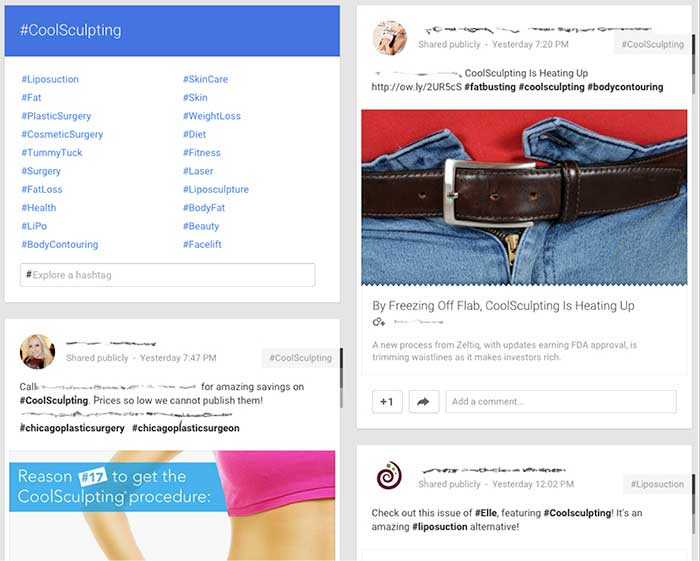
    GooglePlusIndustryHashtags

    Example using Google+ to review similar hashtags and industry competitors
    SproutSocialConsumerConversation

    Example of using Sprout Social to understand how consumers are talking about your brand.

    3. Find Your Voice

    Next, begin your own conversations! Look for areas in the industry that lack a strong voice. Use that space to make a name for your brand and to demonstrate your expertise. Also, provide topics and the secure space for conversations regarding the health industry and health issues. Help moderate conversations to keep the discussions moving and the connections building. Encourage your audience to converse with you and with each other to foster a sense of community.

    To make use of your influence on social media, you can use a number of strategies:

    • Add personal, authentic stories: Depending on your goal, these can consist of success stories, anecdotes of achievement, or triumphs over a disease or disability.
    • Facilitate conversations and actions: Give healthy-eating challenges or build a place to help raise awareness for widespread health issues.
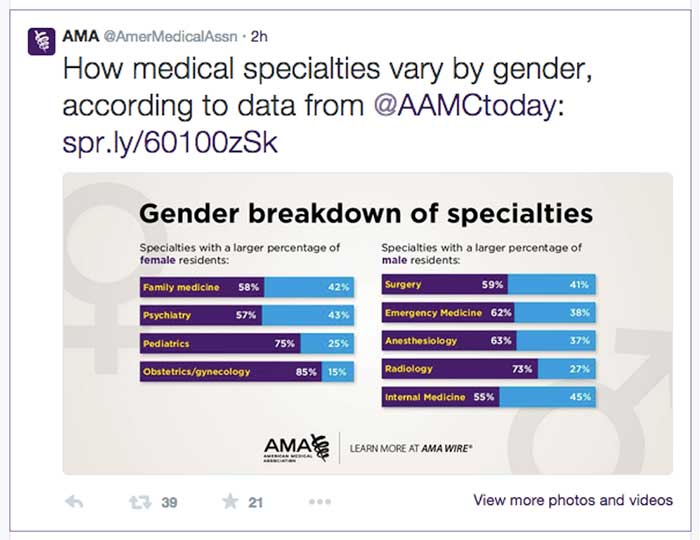
    • Wow the crowd with numbers: Build credibility by showing your audience the bigger picture. Share statistics, infographics, and other information about your industry or practice.
    AmericanMedicalAssociationExample

    Example from the American Medical Association using numbers to engage in a conversation. Only 2 hours after being tweeted this post received 39 retweets and 21 favorites.
    TwitterHealthcareDiscussion

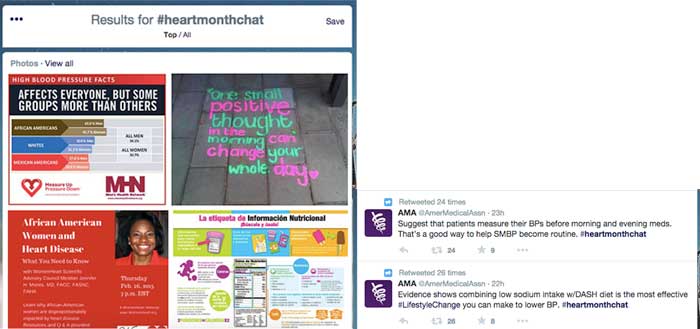
    Example of Twitter healthcare community discussing heart health online via #heartmonthchat and how the American Medical Association was able to find their voice in the conversation giving advice and statistics. Both tweets were retweeted and favorited several times.

    4. Collaborate

    Social media has become a frequent place of feedback for companies, and you can take advantage of this fact by using the social space to collaborate with your audience and with others in your industry. Do not be afraid to talk to your audience about their experiences and how to improve them in the future.

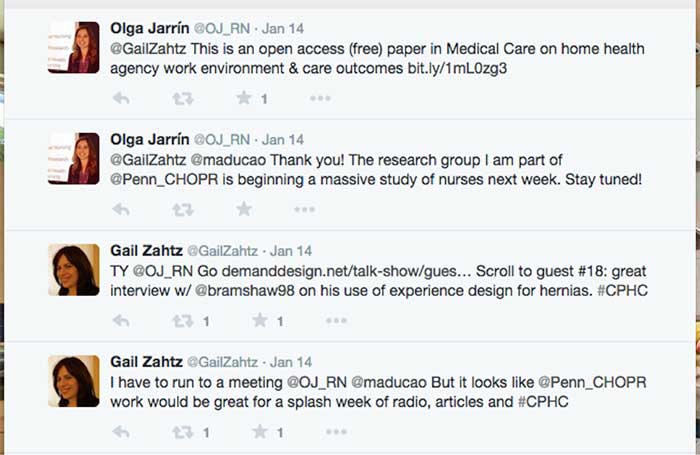
    Use social media as a place to work with other practitioners and organizations to raise awareness regarding healthcare topics. By working with others, you can increase your audience reach and further your message.
    GailZahtzHealthcareTwitterAdvice

    Example of Gail Zahtz (expert in patient-doctor relationships, offers advice to healthcare industry) collaborating with others in the healthcare industry to make information more readily available.

    5. Measure Your Success

    Although the last step in this plan is to measure your success, it is important to review your achievements on a regular basis and throughout each step of the process. Measure growth and success in the online space by an increase in followers, consistent interaction, and rising mentions across social media platforms.
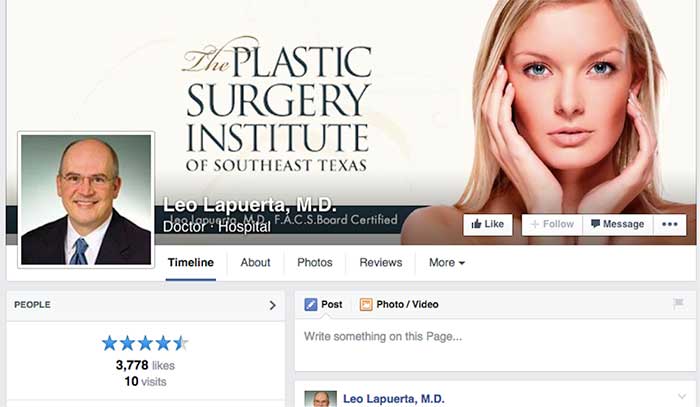
    ThePlasticSurgeryInstituteFacebookLikes

    Example of growth of likes on Facebook using these steps. Prior to this campaign beginning, The Plastic Surgery Institute of Southeast Texas ~500 page likes.

    Consider the steps above when designing your own social media strategy. For more inspiration, check out some of these healthcare companies that have successfully created an empowering online presence!

  • You Don’t Just Need Good Culture In Your Yogurt, You Need It In Your Workplace!

    You Don’t Just Need Good Culture In Your Yogurt, You Need It In Your Workplace!

    Quality Over Quantity

    Until recently, a company’s success was based on the fundamental principle that quantity outweighs quality. The better your numbers were, the better the chances that your company would outperform its competitors. However, recent studies have begun to offer insight into the importance of a company’s internal environment, which influences its success. The amount of sleep employees get and the relationship between an employer and its employees are major contributors to a company’s overall performance.

    Don’t Lose Sleep Over Your Workload

    In the past, there was a common misconception that longer work hours were key to a thriving business. Fortunately for workers nowadays, studies have shown that fewer work hours—and subsequently more sleep—have actually led to a more efficient workplace. Prominent CEOs like Arianna Huffington, founder of Huffington Post, have praised the importance of sleep and its contribution to a more productive workplace. “Ultimately, at work, the most important thing is our energy. It’s not exactly how many hours we are sitting at our desks, but how present are we when we’re there,” she explains in an interview with Business Insider.

    Open Door (and Mind) Policy

    Many corporations have implemented an open door policy between the company’s leaders and its employees. Even more important, though, is the idea behind an open mind policy. It is becoming more evident that monetary compensation isn’t the only driving force behind an employee’s happiness. The trust that a company builds with its employees—as well as a company’s ability to keep an open mind to the ideas and concerns of its employees—are invaluable tools that have made companies such as Internet giant Google stand out above the rest.

    Search Influence Gets it Right

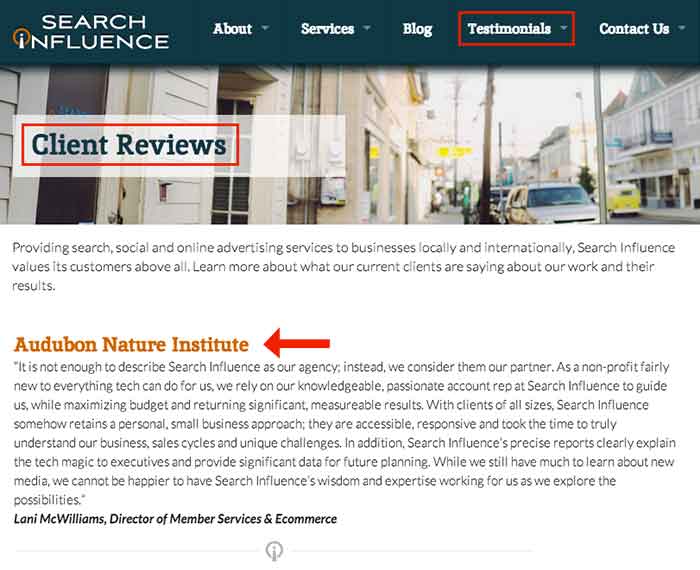
    In a day and age where merely finding a job can be a challenge all its own, I’m fortunate enough to work at a place like Search Influence, a company that doesn’t take these important elements to success lightly. Their flexible 9-to-5 work hours, quarterly team building events, and company-wide “suggestion box” are just a few factors that helped to name Search Influence one of New Orleans’ 50 Best Places to Work in 2014.


    Image Sources:

    Sleep Image


  • Don’t Be Afraid To Stop & Ask For Directions: Making Google My Maps for SABs

    As promised in my last blog about the new Google My Maps, I’m here today to teach you how to how to create My Maps for service area businesses (often referred to as SABs) that have highlighted boundaries of what counties or parishes they service.

    Before we delve into this guide, let’s start with the basics like what exactly is a KML file. KML is the file format used to show geographic data in mapping programs. It is an XML based format and stands for Keyhole Markup Language. Now that you know what this file type is, let’s see how you can use it.

    How to Use Old 2011 KML Files

    Fun Fact: The U.S. Census Bureau holds kml files for all county guidelines here!

    As you can see, they’re from December 2011, so any boundaries that have changed since then will be incorrect. In a very general sense however I’ve found these codes very useful in the past. Each file contains all county boundaries in one state, but the tricky part is that they don’t tell you what state it is in the file name. I went ahead and downloaded them all a long time ago and updated the file names to reflect the state they contain. It’s pretty closely in alphabetical order so if you just use a list of US states in alpha-order next to the list of files in numerical order it should match pretty closely.

    Once you’ve figured out which file contains the state you’re looking for, find the county or counties that you want to display in your map, and move it’s entire code for each county (should start with “Placemark” attribute and end with the closing of the “Placemark” attribute) just below the “Document” attribute. Once you’ve moved the boundaries you want to keep to the top of the KML file, remove all the excess counties and leave the closing attributes for “Document” and “kml” at the bottom.

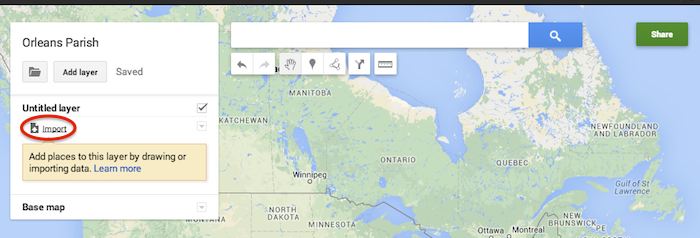
    Now that you’ve successfully prepared your KML file, in My Maps, click Import on the left and choose your KML file from your computer.

    Import A KML File To My Maps - Search Influence

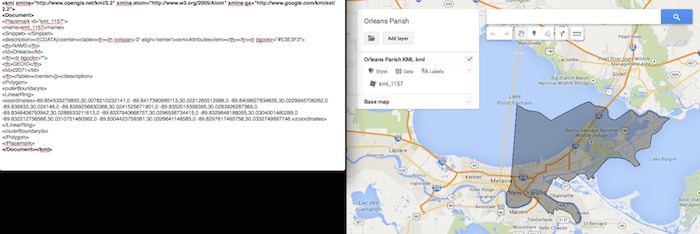
    See the screenshot below for an example of how your KML file should generally look if you’ve done it correctly. The screenshot shows the file for Orleans Parish of Louisiana in TextEdit and then what said file looks like imported into My Maps. (NOTE: In order to show a not so massive screenshot of the KML code, I removed about 3/4 of the coordinates. There are a massive amount of coordinates used to make up these detailed boundaries.)

    Preparing Viewing A KML File In Google My Maps - Search Influence

    How to Use New 2013 KMZ Files

    The U.S. Census Bureau also has the most up to date 2013 files, which are KMZ format (note the .kmz instead of .kml extension). This is essentially zipped KML files with a .kmz extension, but if you use a Mac like me, unzipping or unpacking the zipped file is not easily achieved. The 500k file contains the most detailed boundaries out of the 3 options.

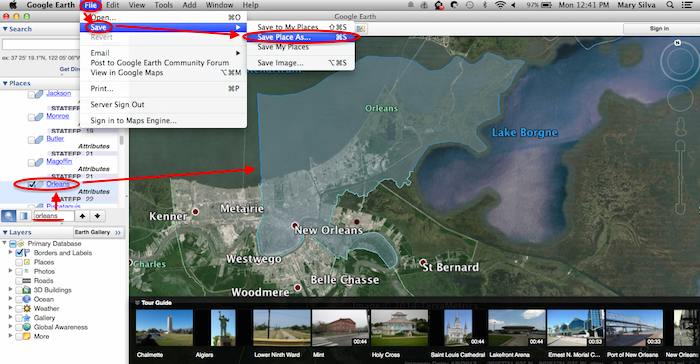
    So, the way I handle this KMZ file is to open the entire file in Google Earth and export just the KML file of the areas I want displayed. To do so you’ll use the search feature of Google Earth on the left at the bottom of the “Places” window to search for and select the areas you want displayed. Since many counties have the same name you’ll want to make sure it’s showing up in the state and location it’s supposed to. Also, note that if you’re trying to add multiple counties in the same state, the Attribute number to the right of the county will be the same for all counties within the same state. This should help you easily identify the counties you’re looking for when adding multiple.

    Once you’ve selected the geographic areas you want displayed on your map in the “Places” section, then save the file as a KML file by clicking File>Save>Save Place As….

    Saving A KML File from Google Earth for Google My Maps - Search Influence

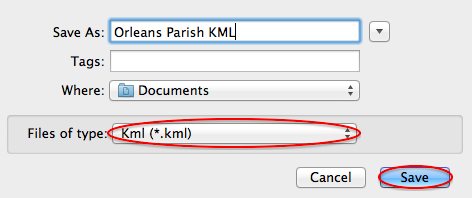
    My Maps will not accept a KMZ file, so make sure to save as a KML.

    Saving a Map in Google Earth As a KML File to Use in My Maps - Search Influence

    Once you’ve saved your file, follow the same steps mentioned above to import the KML file to My Maps. I’m not sure if the paid My Maps Pro is any different, but it appears to me that you cannot import multiple KML files to one My Map. So, in the event that you want to represent multiple service areas in one My Map, you’ll want to have all of the geographic area codes in one KML file.

    This Google Earth process can also be used instead of manually editing the older KML file codes as shown in the first instructional section in case you don’t want to delve into the coding via text edit. It’s definitely an easier route, but for me, Google Earth can sometimes run slow when trying to handle these files and I don’t mind manually editing code.

    Hopefully these steps and screenshots help out a fellow My Mapper!

  • 6 Second Marketing: Using Vine for Your Business

    Jul14

    In today’s fast-paced society, your business doesn’t have much time to grab the attention of potential customers. Can you do it in six seconds? Millions of users are racking up views and attention for their six-second masterpieces on Vine, Twitter’s ultra-short video sharing app that fits in well with the social network’s theme of keeping things brief—and businesses are using Vine to amplify their social media marketing campaigns and boost visibility.

    What is Vine? A Brief History

    Launched in January 2013 by Twitter, Vine was originally a mobile app that capitalizes on smartphone cameras, allowing users to capture and share up to six seconds of looped video. The platform gathered steam quickly, becoming the fastest growing app of 2013 with millions of users and several viral clips.

    Today, Vine has more than 67 million users. Vine videos can be posted to other social networks like Facebook and Twitter, and earlier in 2014 the platform introduced a desktop interface similar to YouTube, with searches, playlists, popular users, and trending tags.

    The Benefits of Using Vine for Business

    Some companies view the Vine platform as too short to be useful—but many said the same about Twitter. There are several benefits to using Vine as part of your marketing strategy, and they extend beyond the platform itself.

    Here are just a few of the advantages Vine can give your business:

    • Video works. Several studies have shown that video consistently performs better as a marketing tool, with higher engagement and more click-throughs. Regardless of your business type, video can help you promote it: 90 percent of online shoppers find video helpful in buying decisions, and 75 percent of executives watch work-related video.
    • Shorter is better. Online viewers are often pressed for time, or multitasking and switching between several windows. Long videos tend to see fewer views—so at six seconds a pop, viewers are far more likely to watch a Vine video.
    • Boost social sharing. Vine videos don’t have to stay on Vine. They can be posted on multiple social sites, or your business website or blog, and including hashtags in your description can help you improve discoverability and encourage sharing.

    What Can You Do with Vine?

    Just how much marketing can you pack into six seconds? With the right mindset, you can deliver a powerful message through a Vine video. For example, Lowe’s home improvement store created a series of Vine videos called “Lowe’s Fix in Six,” with each video delivering an interesting home do-it-yourself (DIY) tip. UK fashion retailer ASOS engaged their followers with an “unboxing” video of their products that invited customers to upload their own unboxing, incorporated the hashtag #ASOSUnbox, and entered participants in a drawing for a goodie box.

    To create effective short videos, consider:

    • The types of videos you want to offer—you might have helpful tips, product showcases, customer contests, or even content that’s pure entertainment
    • How you’ll communicate your message briefly and visually
    • The best way to tie your short videos to your company brand or theme

    Remember that like all social media marketing, Vine should be used to share more than just your products or services. Consider offering quick behind-the-scenes video that shows your workplace culture, your employees in action, or where your products are made. Or get your followers to participate and invite six-second testimonial videos, which you can display on your website in addition to posting on Vine and other social platforms.

    Regardless of your social marketing strategy, the Vine platform can make a powerful, visual addition to your current efforts and help increase your business visibility and reach. All you need is a smartphone or digital camera, and six seconds.

    Image courtesy of Frank Gruber

    Megan Totka is the Chief Editor for ChamberofCommerce.com. She specializes on the topic of small business tips and resources. ChamberofCommerce.com helps small businesses grow their business on the web and facilitates connectivity between local businesses and more than 7,000 Chambers of Commerce worldwide.

  • Yelp Adds Videos — But Not Necessarily For Reviews

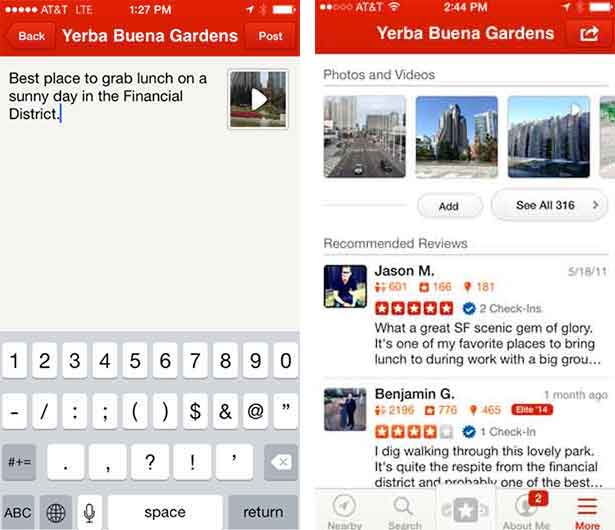
    A couple of weeks ago, Yelp leaked to Business Insider that they will soon allow users to add 3-12 second videos to their reviews. When I initially heard this, I was thrilled, because I have been waiting for this feature for some time now.

    However, when I learned that these videos are intended to simply to add more media to the reviews (in the photos section) and not actually stand as reviews themselves, my excitement waned.

    YelpReviewVideos

    Rather than video reviews, what we are getting is a way for Yelpers to capture the atmosphere of a venue or more likely, selfie videos of them stuffing their faces at their favorite eatery. Yelp’s mobile product manager Madhu Prabaker explained the purpose of adding the video as “a reward for businesses that go to great lengths to achieve a certain ambiance, whether by having a certain lighting or the music at just the right level.”

    Was anyone else as let down as I was when they heard this? I feel as if this new platform change is being wasted on the business aesthetics such as atmosphere and showcasing products, where pictures were doing just fine. The photo capability has been around for years—nothing new there.

    What I see as the future is a full video review platform where consumers can turn the camera on themselves and tell us how they feel about the businesses they interact with. There are plenty of platforms out there to help SMB’s solicit reviews such as DemandForce and Customer Lobby, but there are no pure play platforms dedicated to helping users generate video testimonials. However, this functionality could ultimately rid business owners of the demon that is the Yelp review filter. (Business owners with less than stellar Yelp reviews, you know what I am talking about.)

    What’s With The Filter Anyway?

    Yelp’s justification for not showing certain reviews has always been that they appeared to be less than trustworthy. What could legitimize a review better than a video of the person posting it?!  No more having your real user reviews taken down and your competitors’ employee-generated or otherwise fake reviews staying up. Real live video testimonials from your customers would become the gold standard for authenticity on Yelp.

    While this version of Yelp videos may help to drive new business by showing a scrumptious plate of food or even a clean car that just went through a car wash, I believe that Yelp is missing out on a huge opportunity. According to SO Media, Video has 400% higher engagement rate than static content. That means that a video testimonial will most likely bring on an action, whether that is a like, comment, or share leading to more significant actions like phone calls and getting directions.

    So, How will Adding Video Effect The Yelp Review Filter?

    One can only hope that allowing customers to add videos to their reviews will serve as positive reinforcement that their opinion of your establishment is a credible one. One can only hope…

    If Yelp factors the use of rich media (namely photos and videos) into review filtering, it hasn’t publicized this. Will they start giving these media reviews priority?

    Industry experts have consistently pointed to the importance of users having a profile picture, connections, and several reviews as the keys to success in building an optimized Yelp profile.

    I personally believe that video will soon become an important part of this conversation of what a truly optimized Yelp user profile is. While I understand that photos might not have been a large piece of the puzzle in the past, I would contend that the rich content in user videos will be of much greater influence in helping build authority and the perception of local business leadership.

    Why Are Your Reviews So Important?

    We’ve long known the importance of having a Yelp business profile. It’s so important, in fact, that according to the Boston Consulting Group in 2013, a business who even has a basic and free Yelp profile will make on average $8,000 more in annual revenue than a business without a Yelp profile. And this is where Yelp gets its leverage. It’s also a great reason to be so selective about which reviews they show.

    As the video feature rolls out only to Yelp Elite users this June, we will have to wait until it makes its way to new users to really see how it effects the review filter. The reason being, Yelp Elite user reviews always show up when posted. The filter’s most negative impact comes to those newer users, without perceived authority on Yelp.

  • The Mullet Model: Why Your Business Should Be On Thumbtack

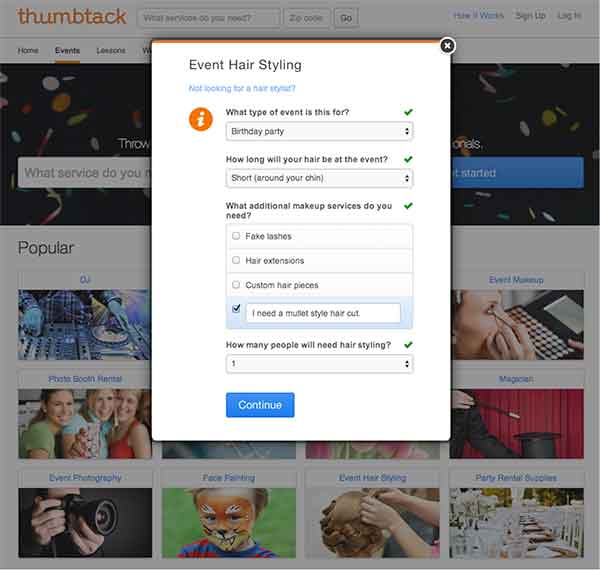
    Thumbtack is making life a whole lot easier for consumers and for businesses. Unlike Yelp and Angie’s List, Thumbtack has found a way to connect businesses and their potential customers in order for them to make a deal. With their most recent round of funding, the tech company will have $30 million to help them become a leader in localized markets. Jonathan Swanson, one of the cofounders, describes the easy to use platform as a mullet business, “it’s very simple on the front, but very complicated on the backend.”

    BusinessInTheFront

    How Thumbtack Works

    Businesses can bid on, and acquire, new customers based on the specifics of a job, and consumers are able to hire professional service providers effectively by getting an “introduction” that includes a businesses’ custom quote, customer reviews, and profile. Consumers fill out a detailed form regarding what services they need done (see the mullet form below), and then, as a business, you can “bid” and contact the potential client based on the fit. One of these “introductions” can cost anywhere between $3 and $25, based on the size and cost of the job. From there, the customer can compare other local professionals and decide on the best pro to handle the job.

    Customer Form:

    CustomerForm

    How Thumbtack Can Help Your Business

    There are hundreds of services available for hire on Thumbtack, and you can find new customers that fit well with your business. The website’s reinvention of the Yellow Pages covers all types of services, from painters and tennis instructors to web development and Swahili translation. You can proactively find and acquire customers in your area, who already have a high intent to purchase. The local services market is worth over $6 billion, and Thumbtack provides a good platform for small business to earn their share. Thumbtack has lots of momentum behind it, and it’s free to sign up, so you can start discovering new customers now.

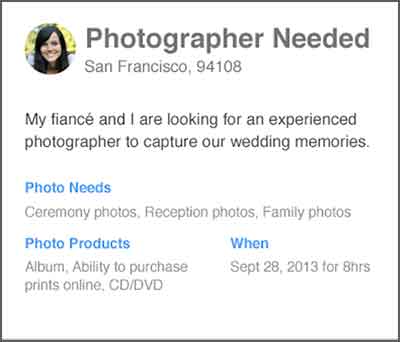
    Customer Request:

    PhotographerNeeded

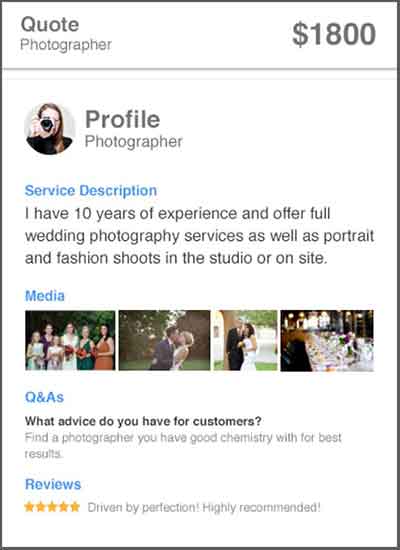
    Business Custom Quote:

    CustomQuote

  • Gmail Reveals Its Hottest Secrets (Part 2)

    I wrote a blog post about a week ago about several hidden, secret features in GMail. Most of that was about organizing your inbox. This post is more about the secrets and great features you can use as you are writing emails. Let me know if you have any additional helpful features in the comments below!

    (numbers 1-5 in part 1 of this series)

    6. Canned Responses

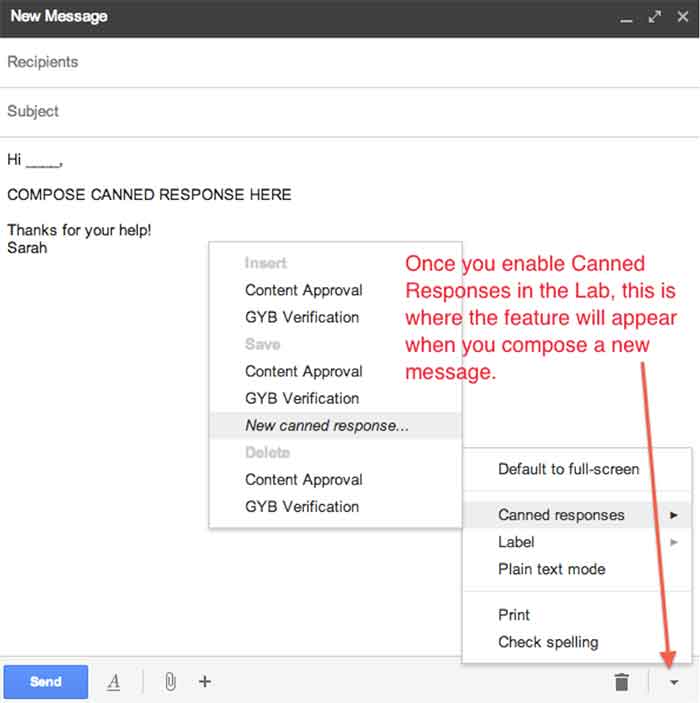
    Do you find yourself composing the same email several times a day? If so, you should enable canned responses. Canned responses are drafts or email templates that you can save in your settings when you go to compose a new message. They will not show up automatically, so you need to go to the Labs in the settings of GMail, and enable this feature. There will be an arrow at the bottom right of a new message, and that is where you will find the feature once it has been enabled. This saves so much time for me and my colleagues, so I highly recommend it.

    01-CannedResponses

    CannedResponse

    7. Reply from the same address the message was sent to

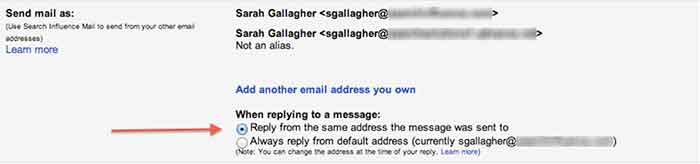
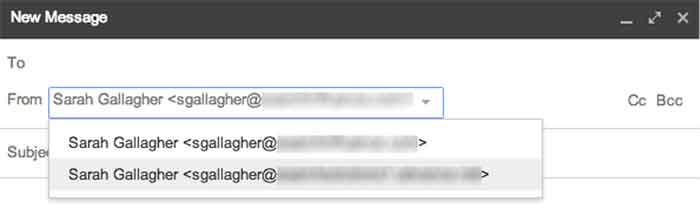
    If you have multiple email addresses you use in your workplace, it’s important to make sure that you reply with the appropriate email. When I compose an email, I have to switch the email address of who it is coming from (which also changes my email signature). However, you can automatically set it so that when you press reply on an email thread, it replies from the email address the original email was sent to.


    03-SendMailAs

    04-NewMessageFrom


    8. Undo Send

    Have you ever forgotten to include something in an email?  Attach something? Sent an email to the wrong person? Misspelled something? Addressed the wrong person? (that one’s really bad)!

    THIS SETTING IS A LIFE SAVER!!

    It can be enabled under the General settings. You can select how long you have to undo a message once you press the send button. I have selected up to 30 seconds, which is the longest time possible. Once you send an email, you’ll get a notification at the top of your email account saying you can undo send or see the message you just sent. Please note that this is the only place where you will be able to undo the send. If you archive the message, click to your inbox, or somewhere else within GMail, the undo send option will not be available.

    05-UndoSend

    06-UndoSendAlert

    9.Boomerang

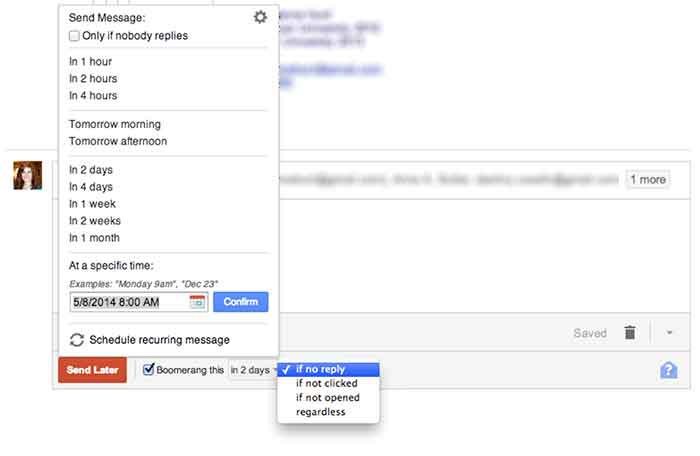
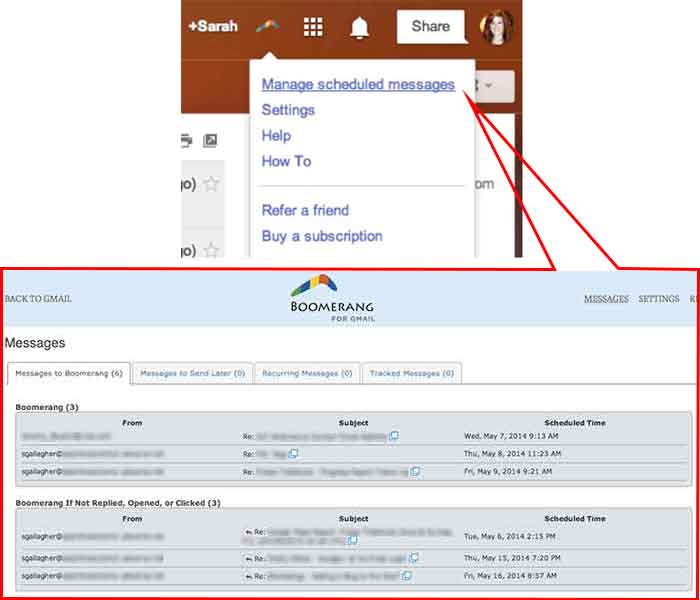
    Boomerang is a great tool to use for scheduling emails and following up with people. Often, I work late nights, but I don’t want to send emails that late mainly so the person who receives it won’t know I work until 9:00 at night. I can compose an email and schedule it to be sent anytime in the future. You can also set it to “boomerang” back into your inbox if someone does not reply or open the email you sent. You also have the ability to manage and edit any of your scheduled messages. Boomerang allows you to schedule or return up to 10 messages per month. If you find yourself needing it more than that, there is a subscription available for purchase.

    07-SpecificSendTime

    08-BoomerangSettings

    10. Rapportive

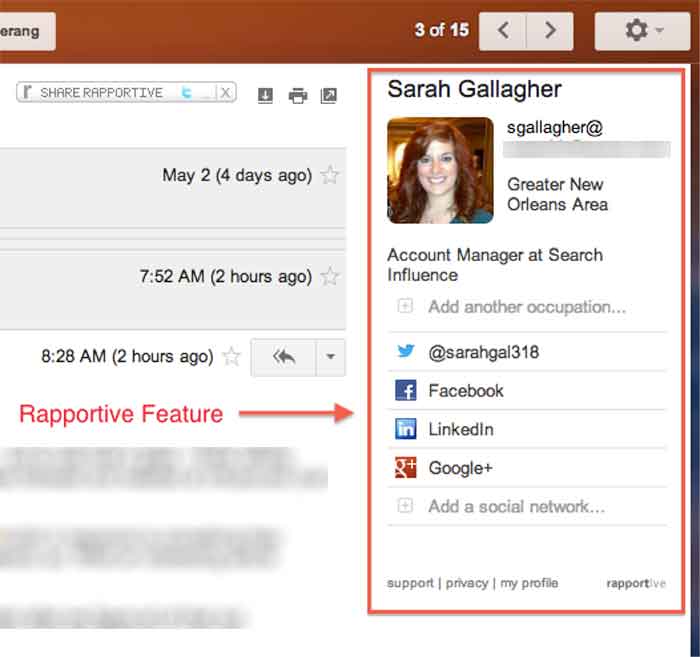
    Rapportive is a feature that shows information about your contacts right in your inbox. They “combine what you know, what your organization knows, and what the web knows,” to display this information in the right sidebar of your email. I like this because it’s an easy way to connect with those people on social media (ie: put your great stalking tendencies to work 😉

    09-Rapportive

  • Determining and Leveraging Your Brand Advocates

    At Pubcon New Orleans, Rob Fuggetta of Zuberance led a seminar on “Activating Brand Advocates.” Rob wrote a book called Brand Advocates that I encourage you to read if you’re a business owner looking to learn more about this game-changing topic.

    Reviews

    Rob talked about how brand advocates are people who recommend your products or services without being paid. They are your best salespeople because they are free and other people trust their opinion greatly. In fact, 92% of customers trust word of mouth referrals, compared to 70% trusting reviews, and 33% trusting ads. Since they are a very trustworthy recommendation, businesses should leverage them to help their business grow.

    You may be wondering how you determine if one of your customers is a brand advocate. Rob offered three ways to figure this out. The first is to ask your customers a one question survey: “How likely are you to recommend us?” On a scale of one to ten, your brand advocates are those that give you a nine or a ten. Another way to find brand advocates is to invite your customers to recommend you. This can be done by asking them why they love your company. Lastly, listening and engaging with your customers is a great way to find your advocates. If someone is talking about how much they love you on social media, you can consider them a brand advocate.

    Once you’ve determined who your brand advocates are, Rob offered three ways to leverage them to help your business. One way is to make it easy for your advocates to give you reviews. For example, ask customers to write you a review in your email correspondence, landing pages, newsletters, and on social media. Once you have several reviews, publish them wherever you can think of, including social media, your website, and email marketing.

    Testimonials

    The second way is to gather and publish stories from your customers about how they use your brand and why they love your brand. If sales increased by 50% because of your help, write a case study about it and get the customer involved with providing the statistics and quotes. Finally, ask your brand advocates for referrals! For those that are passionate about your brand, they should be excited to help others by recommending your company to their circle of influence. Think about it: if you enjoyed a restaurant or a hotel, wouldn’t you recommend it to your friends and family? Why should it be different for your business?

    Submit your comments below on how you will leverage your brand advocates!

  • 3 Keys to Your SEO Strategy for 2013 and Beyond

    Oct13If there was a formula for the best SEO strategy in today’s online market, it might look something like this:

    Content + links + social = WIN

    While there are no guarantees when it comes to search engine optimization, including these three ingredients in your strategy is sure to improve your ROI. Here are some tips and best practices to strengthen your SEO foundation and get results.

    Content: More Important Than Ever

    With recent changes to Google, like the new algorithm and the demise of the Google Keyword Tool in favor of SSL secured searches (that no longer allow marketers—or anyone else—to see specific keyword search data), great content is essential for optimizing your website.

    There are no keyword “cheats” left. In order to boost your search engine ranking, you need to include keywords and search phrases organically inside well written, engaging content that encourages not only search engines, but also your visitors to spread the word about your business.

    Aside from quality, freshness counts when it comes to content. Search engines index your website more frequently when you’re adding new content—so unless you want to continually rewrite the copy on your core pages, you need a way to keep updating your content. Starting or reviving a small business blog is a great way to do that.

    Links: Quality Over Quantity

    Link building has been an important part of SEO as long as there has been other websites to link to. Over the years, search engines have changed the way they weigh links. At first it was the more links, the better—but today, it’s all about quality.

    There are two parts to link quality: inbound versus outbound and reputation. Inbound links—those that lead to your site from other sites—are weighted higher than outbound links, because they mean someone else is impressed enough with your content to link to it. With reputation, the higher the linked site ranks in search engines, the more it matters to your own SEO.

    How can you get quality inbound links? Here are a few ways to do it:

    • Guest blogging. By writing quality content for blogs related to your business, you accomplish two things: help the hosting blog by giving them fresh, unique content, and gain inbound links. Most sites will offer guest bloggers a backlink to their own site in exchange for writing original posts.
    • Press releases. While some businesses view the press release as an antiquated tool that reached its peak while news still came mostly in print form, this type of content can still help your online marketing. There are plenty of syndicated online PR distribution sites, and sending out relevant, newsworthy press releases will spread more inbound links to your website around, even if it doesn’t get you in the newspapers.
    • Content repackaging. For maximum impact with minimal effort, spin your existing content into new pieces for redistribution. Turn newsletter articles into guest posts, blog entries into infographics, or even case studies into explainer videos. Don’t forget to include links to your website in all of your new content!

    Social Media: Yes, You Need It

    If you’re one of the few businesses that still doesn’t have a social media presence, it’s past time to get started. And if your social networks are getting dusty with neglect, it’s time to start showing them some love. Being active on social media helps you amplify your SEO strategy—building your brand and exposing your business to more potential customers.

    The whole idea of social media may be overwhelming, whether you haven’t started yet or you’re trying to keep up with accounts on 10 different networks. For most small businesses, the best social strategy is to choose one or two channels to focus your efforts on (with Facebook and/or Twitter usually the most effective) and build those networks to perfection, instead of scattering your attempts across every platform out there.

    Have you included these keys in your SEO strategy? What are you doing to keep your online marketing relevant? Let us know in the comments!

    Image courtesy of chichacha

    Megan Totka is the Chief Editor for ChamberofCommerce.com. She specializes on the topic of small business tips and resources. ChamberofCommerce.com helps small businesses grow their business on the web and facilitates connectivity between local businesses and more than 7,000 Chambers of Commerce worldwide.

  • Company Profile: Culture Shock LLC

    One of the reasons I love New Orleans is that living local is part of everyday life. People love shopping and eating at local businesses. Thankfully, you won’t find many chains in the New Orleans zip codes (you need to go out to Metairie for that)! My friend Christine Alex recently started a jewelry business that imports handmade pieces from several countries across the world. This Q&A profiles her company, touching on why it totally fits in with the local New Orleans vibe.


    New Orleans Local Business


    How did you come up with the idea for your business?
    I came up with the idea for Culture Shock when I was traveling abroad. I thought it was cool to bring back jewelry instead of postcards to my friends and family. The jewelry became a hit and eventually more and more people began giving me money and asking me to bring items back for them.  That’s when I thought it would be really neat for people to be able to buy handmade items from all over the world without having to leave their couch. Culture Shock became an LLC in October 2012 and officially launched on January 18, 2013.

    What is the goal/vision for your business?
    When I studied abroad, I gained a deep level of respect for other cultures and as a result, appreciated my own culture so much more. My goal is to educate my customers about other cultures while selling them a piece of someone else’s culture to wear.

    What products do you offer?
    I sell jewelry that I hand picked from all over the world. The biggest countries that I receive my inventory from are Nicaragua, India, and Nigeria. Aside from offering a selection of imported items, I also began creating my own ethnic inspired items. In addition, as a way of honoring my own Creole culture, I created an apparel line under Culture Shock called Naturally Creole. This line offers a selection of Creole-themed apparel and accessories.

    Jewelry & Accessories


    Do you have an online presence? Website, Facebook, Twitter, Pinterest?
    Yes, I have a website, Facebook, Twitter, Pinterest, and Instagram. Facebook and Instagram receive the most engagement from followers. I have noticed usually the same people follow us across social media platforms.

    Why do you use Facebook? What is the benefit that it is bringing to your business?
    I use Facebook because it’s where my customers are, and I want to develop a relationship with them. Facebook allows my customers to understand the personality of my brand and learn more about my company and the products that I offer.

    On the content she posts to her platforms:
    I try to post content related to the countries that I import my items from. I post photos, videos, and open-ended questions. Pictures usually receive the most activity from our followers. On Pinterest, I pin items from our website.

    Do you run any contests on Facebook? If so, what kind?
    Yes, giveaways.

    On her customers:
    Word of mouth and social media have been important in building brand awareness and getting people to buy our great pieces. I’d love to get more interaction from our social media followers to continue to build the brand!

    Business Info:
    Culture Shock, LLC
    P.O. Box 2217 Harvey, LA 70059
    504-256-3337
    www.cultureshock101.com
    www.facebook.com/cultureshockllc
    Twitter: @cultureshockllc
    Pinterest: cultureshockllc
    Contact email: [email protected]

    About Us Page