Blog

  • Google +Post Ads Offer Near Limitless Exposure to Social Messages

    Google has just announced a revolutionary social ads concept for brands dubbed “+Post ads.” +Post ads will allow marketers to re-package selected Google+ posts for promotion by way of Google’s display ad network.

    Google-Plus-Logo

    Unlike Facebook ads which live only within the walled garden, Google is taking the revolutionary step of pushing these ads OFF of Google+. In fact, Google+ will, for now, remain pristine, with no apparent ads.

    +Post ads have the potential to be more disruptive due to their “content as display” nature. It is likely the novelty will wear off in time, but in the early going brands who jump into this platform will likely see great exposure for their Google+ social content.

    For more information, see the related Google site. Our own Jeanne Gaudet has also contributed a brief writeup  (published under my account) to the LocalU.org blog.

  • Paying By Email with Google Wallet

    If you use Gmail (and let’s be real, who doesn’t?), chances are you may have noticed a new feature pop up recently.

    Google Wallet

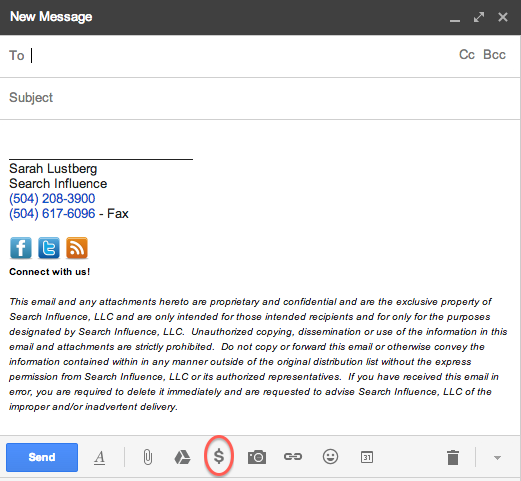
    Unfortunately, clicking the $ doesn’t mean you magically receive money.

    Similar to Venmo, the newly implemented Google Wallet allows you to quickly and securely send money within Gmail.

    When you set up your account, you’ll be prompted to verify your identity. Once that’s done, simply enter the amount you want to send, choose your source and attach. Easy as pie!

    As usual, there’s a catch. While sending money via your Google Wallet balance or linked bank account is free, using your credit/debit card is not — there’s a flat fee of 2.9% per transaction.

    If you’re like me and worried that your money could end up in the wrong hands, Google Wallet Purchase Protection covers you 100% against eligible unauthorized payments. I won’t bore you with the details — you can read more about that here.

    Weirdly enough, no one volunteered to send me money to test this out, but all you have to do to receive money is open the message with attached money and click “Claim Money.” (At this point, if you haven’t already signed up, you’ll be prompted to do so.) All funds are automatically added to your Google Wallet Balance.

    Google Wallet LogoYou can use your Google Wallet Card (which you can request on wallet.google.com or via the Google Wallet app) to make in-store and online purchases anywhere that accepts MasterCard® Debit, as well as to make cash withdrawals at ATMs and banks.

    So what does this mean for us?

    The next time you’re at dinner with a big group of friends and don’t want the hassle of trying to divvy up the check, one person can foot the bill and have their friends pay them back on the spot using Google Wallet. No cash necessary!

    Google Wallet also makes it easier for your parents to give you money. I’m just sayin’…


  • What’s New About the New Google Maps

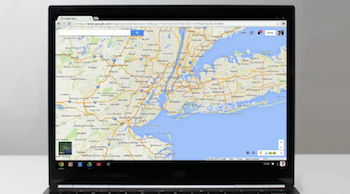
    Screen Shot 2013-12-12 at 1.35.15 PMThis week, Google rolled out a new and improved Google Maps! With this update, many are wondering what exactly is different about Maps besides the obvious physical changes.

    The new design is focused on providing smarter search results immediately and making the user experience much more effortless. In this day and age, consumer satisfaction is highly driven by ease of use, so an update like this is essential to staying on top of the trends in usability.

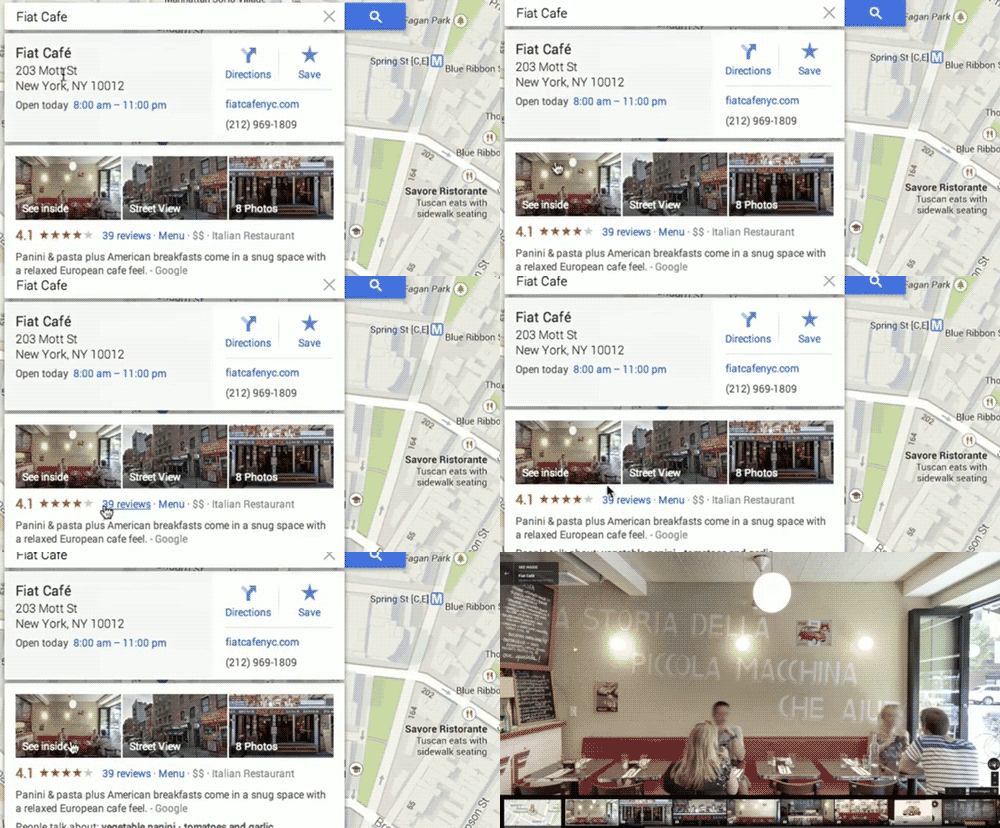
    Probably the most noticeable change is the way you search. With the new interactive features, you can hover over search results and the map will change to show you those results. This reduces the time spent by users re-searching for what they were looking for because they chose the wrong result.

    So far, I’ve found that the new interactive search results change local search opportunities for businesses to a certain degree. When I search the keyword “internet marketing service” maps displayed only three businesses in the search results but also showed a countless number of business results on the local map. On the map itself, the results were shown with two different kinds of red dots. It looks like the bigger dots are results that Google found more relevant to your search.

    A new goal of Google Maps is to “get better with use,” so as you search the map, star places, and leave reviews, the map adapts and shows you more relevant results. “…the more you use the new Google Maps, the more helpful it becomes.”

    Once you click on the desired result, the map reacts, showing you business information including the hours, location, and the option to go into Street View. They’ve made the new Maps more tailored for getting directions, taking some styles from how the Google Maps Android and Apple apps work. In the past, Street View was something you could access through buttons in the corner of the map or with Pegman, but Street View is now a readily available in your search results.

    Google-MAPS

    While we’re on the topic of Pegman, let’s talk about the new features involved with everyone’s favorite little Street View helper. Besides making him a revamped and fun—sort of—Google Maps’ mascot (Today he’s donning a Santa hat!),Screen Shot 2013-12-12 at 1.22.43 PMScreen Shot 2013-12-12 at 12.47.07 PM
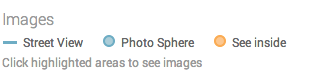
    they’ve moved the Pegman location to the bottom corner of the map. Also, when you use Pegman, you’ll see new color coded dots and lines indicating where you can enter Street View, “See Inside” some locations, and enter a “Photo Sphere”.

    Finally, the new Google Maps is allowing users to submit their own content for Street View, allowing people to share the experience of their favorite and sometimes remote locations. Users have been allowed to share their Photo Spheres since last year, but now these Photo Spheres that once stood alone will be stitched together to create a Street View experience.

    Overall, the new Google Maps has created a more pleasing and a much easier experience for Maps users while also making Maps more engaging and fun to use.

    Video source of gif and first screenshot here.

  • Found: Yelp Reviews Copied and Published as Google Reviews

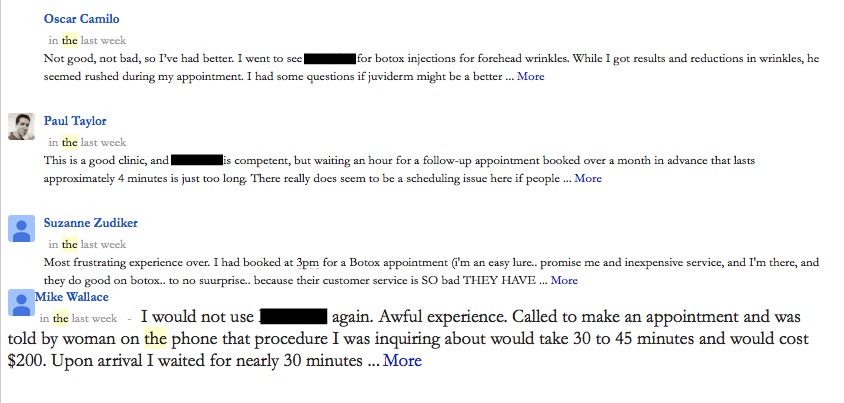
    In the last week, one very alert client saw saw some very recent reviews on his Google Plus Local listing that looked pretty suspicious.  All 4 of these reviews were published within the week:

    Google reviews are copies of Yelp reviews

    The client immediately flagged “Oscar” as a spam review on Friday, November 29th.  By Tuesday, December 3rd, we saw that the review was gone.  Removed from the client’s G+ Local.  That was super fast response by Google, which was a pleasant surprise.

    When we looked at the Google+ profiles for Paul, Suzanne, and Mike,

    • none of the 3 had information on their G+ Profiles except where they lived.  No posts.  No videos.
    • none of the 3 lived within 1,200 miles of our client.
    • 2 of the 3 had 100-200 people in their Circle, despite having no account activity.

    With the fast success of the first spam review removal, we immediately flagged the other 3 as spam reviews. Within 1 day, 2 of the 3 remaining spam reviews were removed.   The only one that’s left is “Paul.”  We’re watching Paul, and hopefully, that one will come down fast too.

    Plagiarizing Yelp Reviews

    These Google reviewers were pretty easy to mark as spam based on their Google+ profiles being so bare and their slim reviews profiles — only 1 review each — but I think the real reason they were taken down was because they are not original review text. They are all copy and pasted from Yelp reviews.

    And stating the obvious, the copied reviews are for different businesses and from different reviewers, so there is nothing legitimate about the Google reviews published on our client’s Google listing.

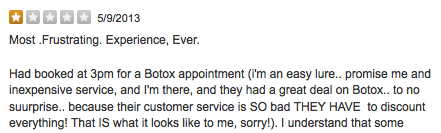
    Suzanne’s Google review…

    Yelp review copied for Google review

    appears to be a close copy of “Cecile Mighty Mouse M.” May 2013 review on Yelp.

    Plagiarized Yelp review used on Google

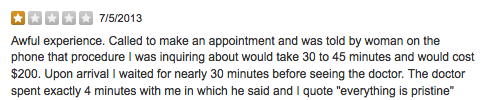
    Mike’s Google review:

    Google eview copied from Yelp review

    appears to be a close copy of “Ben S.” July 2013 review on Yelp.

    Yelp review plagiarized for use by Google reviewer

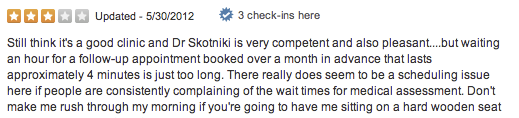
    Paul whose review is still on our client’s G+ Local as of this moment,

    Google review copied and used by Google reviewer

    is a close copy of  “Grainne sounds like Grawn-ya…not Grainy M” May 2012 review on Yelp

    plagiarized reviews on Google

    If you’re curious to see if a review is spam, try dropping a chunk of it into Google to see if a Yelp review shows up as a close copy. If so, then definitely flag as spam to Google. Has this happened to you? Share your tips and stories of spam comments below.

  • A Few Tips for Balancing School and Work

    iStock_000000748325XSmallHere at Search Influence, we have several employees who are still in school in addition to working here part-time or full-time. Some are in grad school and some are in undergrad at schools in the area like Tulane and UNO. Since I am not one of these ambitious employees, I thought we could all gain some insight from them in time management and life skills. I asked a few of my co-workers questions like “Why are you doing this?” and “How do you do it?” I got some thoughtful responses with a few common themes.

    1) Know Your Priorities
    Zachary has only been here for a month, but he already knows to be careful not to “load too many responsibilities on yourself, or you will crash and burn and fail at all of them.” If you intend to be an active member of several school clubs on top of working 20 hours a week, you will probably end up overwhelmed. Work, school, and a couple other activities will be plenty enough to fill your time.

    samantha blog

    2) Figure Out Your Interests
    Mary says that working at a place like Search Influence where what we do is meaningful has made the stress level of balancing school and work a lot more manageable. If you like what you are doing (whether that’s your class subjects, job description, or extracurricular activity), you will be more likely to thrive since you are interested in all your daily activities.

    3) Get You Some “ME” Time
    A common theme for all the employees I interviewed was that you must set aside some time each week to unwind from the chaos of balancing school and work. Figure out something that makes you feel relaxed like reading, exercising, or hanging out with friends. If you can set aside a whole day to de-stress, that’s the best case scenario, but even an afternoon should do the trick!

    Search Influence is constantly hiring for new positions, so if you think you can handle the time management challenge of school and work, be sure to check out our employment opportunities page!

  • Google Introduces Helpouts

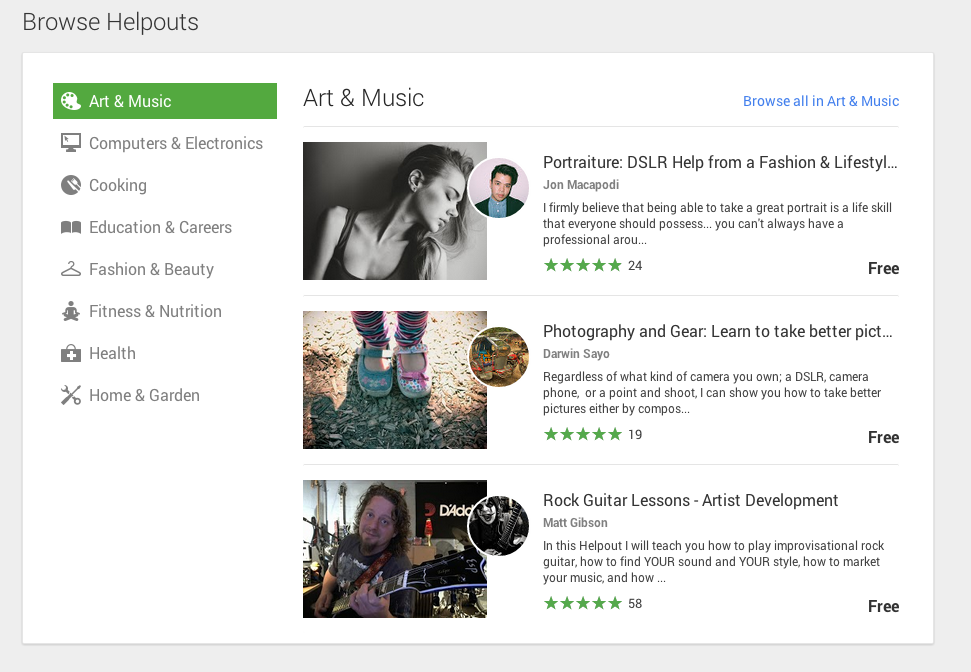
    Haven’t heard of Google Helpouts yet? Don’t worry, you’re not alone. Until recently, Google’s newest venture has been fairly hush-hush, so here’s a brief overview of the product and how to become a part of it.

    What Is Google Helpouts?

    Google Helpouts - Search Influence

    Helpouts seems to be Google’s attempt to branch out into ecommerce by directly connecting businesses to people via video chat and offering advice, information, or services. The types of information available on Helpouts range from computer diagnostics, to medical advice, to cooking tips, to yoga classes. In speaking with a Google Helpouts rep about this new product, he described it as a search engine that people can use to browse for certain professionals or knowledgeable individuals on a variety of topics and connect with them. Individuals willing to provide their expertise via this new Google product can charge by the minute, offer a flat fee, or, if they feel so generous, can simply do it for free.

    How to Join

    As of now, Google Helpouts is on an invitation-only basis for businesses or professionals looking to share their knowledge for free or for a fee. There is an option to schedule a demonstration of this product with a member of the Google Helpouts team via screen share and chat. There, the reps will give you a preview of the features and answer any of your questions. Presumably they will offer you an invitation code to join if you express interest in offering your business expertise via this platform. Google also offers a link to request an invitation code. However, if you’re just looking to get help or learn more about a topic, you are able to join now and start searching for professionals. The only requirement is that you create a public Google+ profile.

    How successful will this product be? It’s hard to tell at this point. With the increasing number of people more willing to go on Yahoo Answers than ask a friend a question, perhaps Google sees Helpouts as an alternative, providing qualified answers to those curious souls. Or perhaps those people asking ridiculous questions on Yahoo Answers will want to maintain a certain level of anonymity. However, for the sake of not wasting time, let’s hope that those questions no one should’ve ever asked remain on Yahoo Answers.


  • 5 Things You Need To Know Before Performing A Backlink Analysis

    5 Things You Need To Know Before Performing A Backlink Analysis

    imagine the internet as an interconnected set of pages all connected by a chain with links. focus on the links themselves and less on the pages.

    Getting lost in the jargon of backlinking research tools is common whether you are new to SEO or have been practicing link building for a long time. However, the number of other sites that link to yours (inbound links) has consistently been a critical factor for search engine rankings. So, naturally there are many tools that allow you to easily perform a backlink analysis on your site—or even a competitor’s site—to find new opportunities.

    Popular sites that allow you to do this are OpenSite Explorer.org, LinkResearchTools.com, Ahrefs.com, and MajesticSEO.com, to name a few. There are also search engine sites that allow you to pull backlink reports like Blekko.com and Bing Webmaster Tools (only lets you check sites you own, though). No matter which service you choose to use, you will be faced with a lot of technical jargon that you will have to understand prior to performing your analysis.

    So, here are the 5 terms that I feel are most needed to understand in order to perform this type of analysis:

    1. Backlink

    It seems like the most obvious one, but in order to understand the more complex vocabulary of SEO research you must first truly understand the basics. A backlink is any link from one website to another. Backlinks are also know as “incoming links,” “inlinks,” and “inbound links.” Sometimes the word “citation” is incorrectly used as a synonym, but a citation refers to any mention of a business on the web. This can occur with or without a link and can be the name, phone number, and/or address of the business.

    2. Page Authority

    This is a metric used by the increasingly popular Moz. Page authority describes the probability of a particular page being found on a search engine. According to Moz.com, “The best way to influence this metric is to improve your overall SEO.” It is not an easy metric to influence directly because it takes into account a varied array of factors.

    3. Domain Authority

    Also used by Moz, domain authority is a similar metric to page authority, but it measures the probable ranking strength of an entire subdomain or domain instead of a single page. Like page authority, it is hard to directly effect, so it’s best to use both page and domain authority as comparative metrics when doing backlink research.

    4. Citation Flow

    This is a metric that both MajesticSEO’s site explorer and WhiteSpark.ca’s local citation finder provide. Citation flow is a number that attempts to anticipate a site’s influence based on its link portfolio or number of inbound links. The numbers from this metric range from 0 to 100.

    5. Trust Flow

    Trust flow is a little bit for tricky to define, but it basically quantifies the quality or “trust” of the links pointing back to a site. For both citation flow and trust flow, the higher the number the better. It seems that a site must have a large quantity of high quality inlinks from pages with good authority to increase these metrics. Google, for example, has a 99 for both citation and trust flow.

    Conclusion

    a group of business people standing around a conference room with a large window lighting them from behind, two of whom are in the foreground shaking hands

    As with all SEO efforts, the practices used in backlink analyses are most effective when performed alongside other internet marketing work with the big picture of SEO in mind. Hopefully this has been a good refresher for the more experienced SEO gurus and a foundation builder for some of you newcomers out there.

  • 5 Content Marketing Myths You Need to Unlearn

    The popular SEO strategy of content marketing has always been effective. Now, with recent changes to Google with its Hummingbird update and the increasing importance of social media, good content marketing is more important than ever for boosting your online visibility and search engine ranking.

    While content marketing isn’t exactly rocket science, it’s still important to understand the strategies and methods that really work—as opposed to all the myths out there that won’t get you any further ahead. Here are the top five content marketing misconceptions you may believe, and what you need to do to adjust your approach.

    Myth #1: It’s Like Printing Your Own Money (Or: Content Marketing is About Making Sales)

    The myth: The main goal of content marketing is to generate leads and increase sales for your business. If this isn’t happening for you, then you’re wasting your time with content marketing.

    The truth: Content marketing does lead to more leads and more sales—but it’s a gradual process, and it’s hard to measure the impact on sales directly. You’re only wasting time if you’re focused on making your content sell (a point that’s explored further in the next myth).

    The true goal of content marketing is to strengthen your brand. Done effectively, your content will serve to build familiarity through increased visibility, and improve likability and trust for your business through more shares and greater authority in your industry.

    Myth #2: It’s All About Me (Or: Content Marketing Should Focus on Your Business)

    The myth: All of your content should be about your products or services. You need urgent language, lots of promotions, and prominent calls to action in every piece of content you publish.

    The truth: Brochures and billboards are not content marketing—they’re advertising. Keep in mind that your goal is to increase visibility and build your brand. If all your content does is push your products or services, you’re going to be viewed as spamming people, no matter how tastefully worded your advertisements are.

    Your content should provide consumers with value that will benefit them even if they don’t buy from you. That’s how you strengthen your authority and help your content get passed around, so you’re seen by more people.

    Myth #3: If You Write It, They Will Come (Or: Content Marketing is Easy)

    The myth: All you need to do is churn out a lot of content and post it online. The more content you have, the higher you’ll rank in search engines. It doesn’t matter what the content says—just how much there is.

    The truth: Google, the biggest search engine on the planet, has always favored quality over quantity when it comes to content. With the recent changes to their search algorithms and the way keywords and links are weighted, quality content is even more vital. Once again—you need to offer consumers something of value.

    Content marketing does take work, but the returns are worth the time and effort you’ll put in.

    Myth #4: Set It and Forget It (Or: Content Marketing Can Be Automated)

    The myth: You can cheat when it comes to content marketing. Just use some of the many automated tools that are out there to keep content coming, and it will look like you’re active—which in turn will elevate your SEO, because search engines love fresh content.

    The truth: While there is something to the idea that fresh content attracts search engines, it’s more important to satisfy your visitors, subscribers, and customers. And it’s easy to tell when your content feeds are automated.

    The biggest advantage of content marketing is the ability to give your business a “personality” through branding. If your brand is “we only care enough to have this software program talk to you,” no one will engage with your content—and your efforts, such as they are, will be wasted.

    Myth #5: No One Reads This Stuff Anyway (Or: Content Marketing is Just What’s on Your Website)

    The myth: Content marketing is useless. Posting all this stuff to the website doesn’t bring any more visitors, so we might as well concentrate on different strategies to increase traffic, like pay-per-click campaigns.

    The truth: There’s more to the world of content marketing than your website pages. Small business blogs, social media feeds, guest blogs and articles, whitepapers, even commenting on other industry blogs—all of these things are content marketing and all of them feed into your brand and your online footprint.

    What’s your content marketing strategy for 2014?

    Megan Totka is the Chief Editor for ChamberofCommerce.com. She specializes on the topic of small business tips and resources. ChamberofCommerce.com helps small businesses grow their business on the web and facilitates connectivity between local businesses and more than 7,000 Chambers of Commerce worldwide.

  • Top 3 Things to Check in AdWords “Dimensions” Tab

    The Dimensions tab in AdWords is a very useful area. You can really dig into a variety of different data sets to analyze your PPC performance. This data can give you valuable information on how best to optimize your campaign to maximize your budget, especially if you are limited by budget. There are a TON of things you can see and analyze in the Dimensions tab, but below are my three favorites.

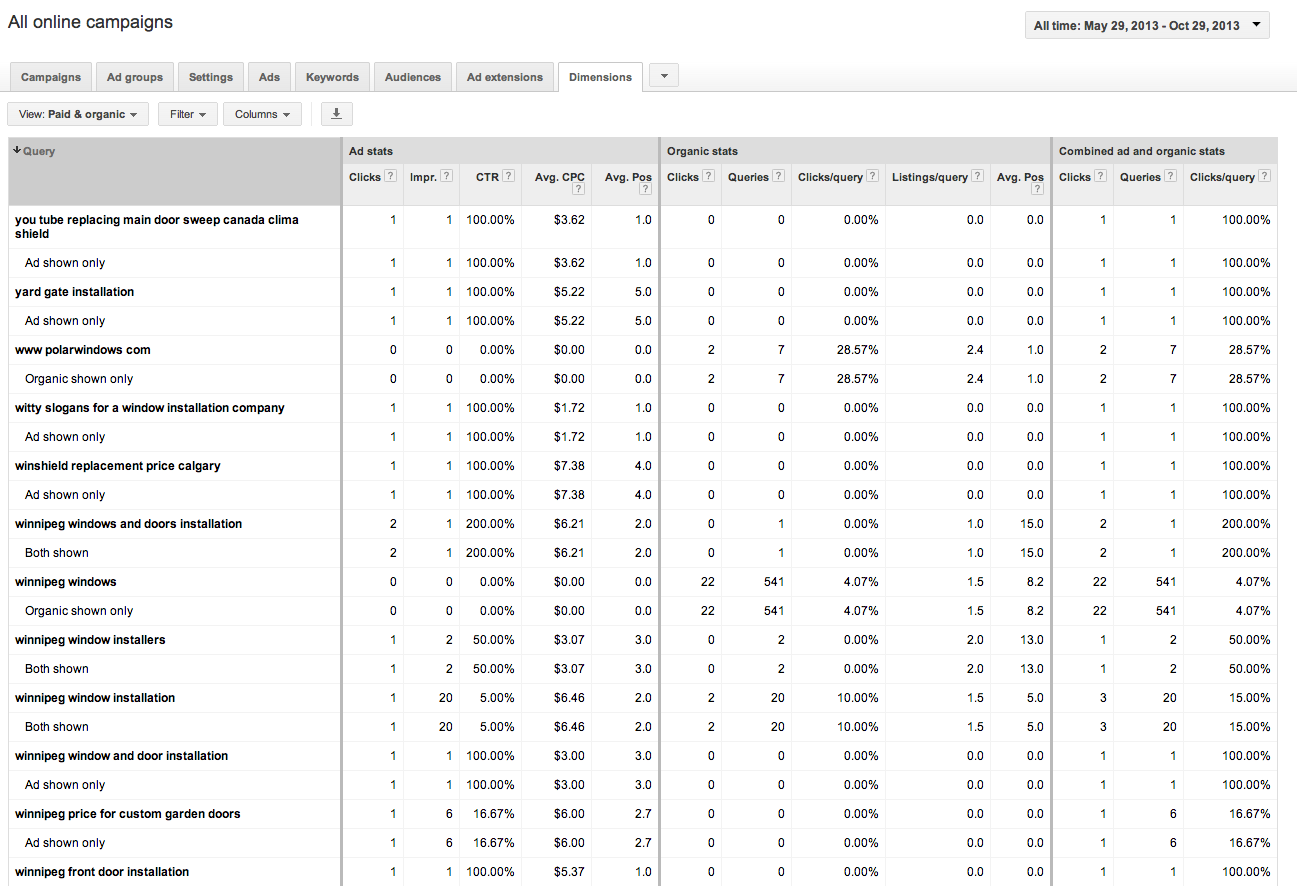
    1. Paid & Organic

    A recently added feature, this table shows how your paid and organic results performed for every search that triggered an ad or organic listing. You can view your click through rates (CTR) for both paid and organic searches individually, but also the CTR for when you have both an ad and an organic listing displaying in the SERPs. This tool can be great to convince clients the value of paid search (even if they have great organic results!). You can also use this to gather some keyword data for making decisions for your SEO campaign given that Google’s decision to make all organic searches (not provided).

    Best Use: Gather information on how your ads perform when they are shown with your organic results.

    Learn how to link your AdWords account and Webmaster Tools account to view this data.

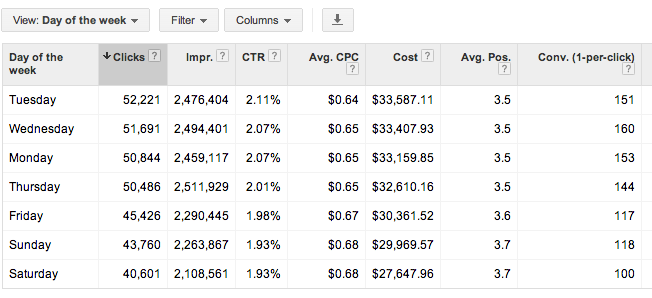
    2. Time > Day of the Week

    This report shows you all stats for each day of the week over your selected date range. You can determine which day performs the best by meeting your defined KPIs. You can then adjust your bids based on the performance you see. Are Tuesdays and Wednesdays higher converting than Saturdays? Focus on those days!

    Best Use: Determine which day of the week is highest converting, and spend budget there.

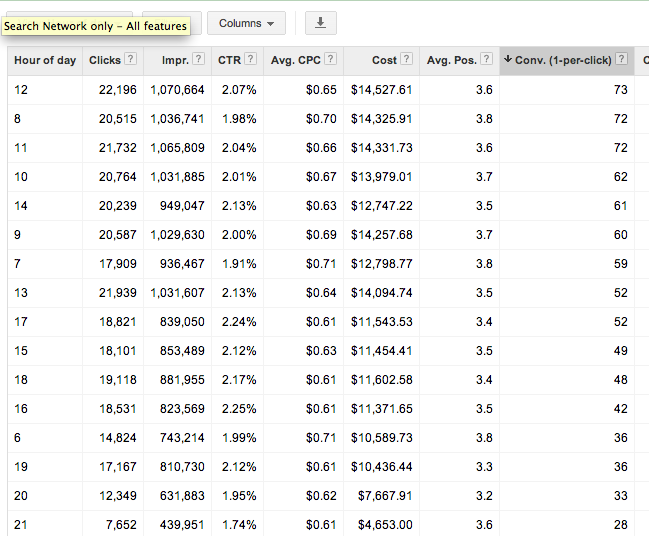
    3. Time > Hour of day

    Shows you cummulative stats for hours of the day for the selected date range. As with the above, you can determine which hours of the day best meet your goals (impressions, clicks, conversions) and adjust your bids accordingly. Be mindful that if you are limited by budget, the hours later in the day may have lower performance due to the budget constraints. You may want to test day parting for hours later in the day if you cannot adjust your daily or monthly budget to determine if those later hours are actually more successful.

    Best Use: Determine which hours of the day convert best and set up dayparting to spend more budget during these times.

    Check out the dimensions tab for yourself and get familiar with the data that is available. There are many more reports available that give you actionable information to better optimize your campaigns. Which are your favorites? Let us know in the comments!

  • What is this SEO Thing Anyway??

    SEO is not a shortened nickname for CeeLo Green. It’s not a secret government agency either. SEO, or Search Engine Optimization, is the process of improving a website’s visibility by making its function clear to Google and other search engines. Whether you realize it or not, SEO is a big part of every search you make online.

    To understand why you need SEO, you need to understand what SEO is. Search engines like Google and Bing use magical mathematical formulas—also known as algorithms—to scour the Internet and provide websites that are relevant to user searches. Each search engine considers a number of factors before deciding which website gets ranked where and who ultimately ends up on the first page of your search results:

    Not SEO

    Content

    Good content is the key to a high-performing website. Make sure your site’s content properly reflects your business and features the products and services you offer. Optimizing your content for relevant search terms will make sure you’re showing up for the right users. Think about it—you don’t want to rank on the results page  for “ponies” if you sell motorcycles (unless you are selling Iron Pony Motorcycles, that is). Plus, having good content keeps your bounce rate down and increases the amount of time users spend on your site, which are both good things in Google’s eyes. Search engines also look to see if your content is fresh and up-to-date. So if you want to stay at the top of the charts, keep fresh with the times, yo.

    Metadata

    Located somewhere in all that code that may or may not closely resemble the Matrix is metadata that tells search engines exactly what your website is there for. One important piece of metadata is the title tag. Each individual page has a title tag, and it’s one of the first tags the search engine looks at. There’s also  a meta description, which you might recognize as the sentence or two listed under a website’s name on the search engine results page. Properly optimizing this data will help search engines understand what your site is about.

    Authority

    Links are important. Having other sites link to your page proves your site is authoritative enough that other people are willing to reference it as a source. It’s kind of like in high school when you had a crush on Tim because all the girls talked about how amazing his cover of “Don’t Stop Believing” was and that song was totally your jam. But just like in high school, the trustworthy information has to come from the cool kids or else no one will believe it. In our case, “the cool kids” are the websites that Google already trusts. In other words, links aren’t worth much if they’re from sites that Google hasn’t heard of.

    And if you need a little help getting a hang of this SEO thing, you can always count on the experts to give you a hand. Give Search Influence a call today to get started.