Blog

  • 4 Must-Have Chrome Extensions

    I have a confession to make–I’m an absent fiddler. At opportune moments, I’ll fiddle with all the settings on my smartphone or rearrange my books according to different categorical flights of fancy (this time, they’re arranged by most recently read). I clean out and purge unnecessary belongings every three months. I’m “that guy.” So naturally whenever I see a new browser plugin or smartphone app that I’ll find useful, I get pretty excited. Over the course of the past year, I’ve collected a few plugins that have really helped my workflow and sate my fiddling desires, and I would like to share them with you.

    Google Analytics Debugger
    GA Debugger is a pretty nifty plugin a coworker turned me on to. It provides a fairly simple but exceedingly useful service of showing the Google Analytics Debugging code in my browser’s Javascript console.

    Ghostery Ghostery Logo
    Ghostery is a fantastic plugin that tells you all of the trackers that are on any webpage you visit. It’s very useful to aid in finding out whether I’ve implemented things correctly as well as allowing me to see what’s going on other pages I visit.

    Moz Logo Mozbar
    Mozbar is probably my most used of this crop of plugins. The plugin reveals the SEO metrics of a page in a very organized fashion. No more fishing through source code!

    Check My Links
    If you’re not using Check My Links to find out whether a page has broken links on it, then you’re silly. This has been the simplest way for me to find out on a page-by-page basis where a nasty broken link can be found. It has proven incredibly useful for me. I’ve also found it useful in sniffing out any hidden links on a page.

  • 6 AdWords CTR Boons & Bombs

    You might not need a NASA mathematician, but a keen eye can help you identify your own CTR boons & bombs.[/caption]

    Many internet marketers tend to forget that they sit on a veritable gold mine of big data. Each visit to a website is one data point. For paid advertising such as AdWords and Facebook ads, marketers end up with literally thousands of data points to test even the most minute characteristics of ads. While pulling the data, aggregating it, and analyzing it can be time-consuming, the value to your marketing plan is immeasurable. Recently, we pulled a sample of over 16,000 ads from the past 7 years of our AdWords accounts to see what aspects of ad copy increased click-through-rates, the overwhelmingly largest factor in keeping your costs per click low.

    These ads predate the full rollout of enhanced campaigns, and are not segmented for anything such as ad position, device, or industry. Furthermore, of the 16,000 ads in the study, only ones with over 1000 impressions were sampled, an arbitrary but significant amount. When compared to large-scale CTR studies, the size of the sample falls short; however, we reached a statistical significance of at least 95% using single-tailed t-scores* in all 6 of these variables. Finally, it’s important to note that these six actionable insights were gleaned from 48 interaction, linear, and binomial variables that were tested. Of course, it’s hoped that these flaws do not invalidate the study; at worst, it’s an invitation for someone to check under the hood of their own accounts.

    CTR Boons

    Three main factors were the most certain to be the cause of increases in click-through rate: “Sentence Format,” which changes the display of the ad; Calls to Action, in either line of the body copy; and DKI in the headline, which inserts the triggered keyword. In general, factors that increased relevance to keywords and uniqueness among competing ads increased CTR, which isn’t terribly far from the general status quo of ad copy literature.

    Use Periods in Both Description Lines

    Two variables checked for sentence-ending punctuation, one for each line of the body copy. Both lines lead to higher click-through rates, which is a bit of a surprise. Because we at Search Influence tend to keep our ads in the top positions, using punctuation will bring up the first body line into the headline of the ad, making the ad stand out against competitors on the page. However, the second line seems equally as influential, lifting the average CTR by .6% at a near-perfect confidence interval.
    boost adwords ctr
    Ending the second line with an ending punctuation makes the user feel like the thought is done, a natural fit for an English-speaking user. A further aspect to look into is an ongoing debate in the office: Do exclamation marks entice or drive away users?

    Call Your Users to Action in the Description

    Putting calls to action in the description has a palpable effect on conversion rate, but highlighting the value to the user entices .52% more clicks at a 99.99% confidence interval. Placing the CTA in the first line teams up with using ending punctuation, raising CTR by .6% at 99.9% confidence, but the second line performs admirably as well, raising CTR by .38% at a 99.99% confidence.

    Calls to action are treated very broadly, matching a variety of words often used in our campaigns. These words like “call,” “download,” or “contact” make your audience know that you’re expecting a certain action and can highlight unique selling propositions along the way. Interestingly, having a call to action in the headline was loosely correlated (90% confidence) to a significant drop in CTR. Users seem to subconsciously like to be guided, not bashed over the head with the sales pitch.

    Use DKI in Your Headline

    Finally, DKI remains an effective way to match user queries to ad copy. By inserting the triggering keyword into the headline, you raise your CTR by .44% at a 99.99% confidence interval, though DKI anywhere else in the ad has very little measurable effect on click-throughs. Relevance is by far the easiest way to get a users’ click, but it seems users are used to a matching keyword only in the headline, leaving the rest of the ad for setting yourself apart from the other people on the page.

    In the same vein, I checked for the existence of the ad group name in the copy, expecting the same idea to hold true in static ads. Either due to inconsistent naming from the various alternative campaign structures that exist such as personas or highlighting the wrong keyword in the ad group, such as [breast augmentation] rather than [breast implants], there was either no correlation or a negative effect between including the ad group name in the ad copy and CTR.

    CTR Bombs

    On the other hand, these three aspects of ad copy were pretty certain to have caused drops in click-through rate. Unlike the CTR Boons, the Bombs generally fly in the face of conventional advice. In fact, blogs often suggestusing copy that drops these bombs.

    Use Obscure Parts of Speech

    Previously, we had suggested that a natural language answer to a search query is best. Yet “little” words like “the,” “an,” and “on” anywhere in the ad copy lowers click-through rates by over 1% at a 99.99% interval. This was the most consistent bomb across positions and the biggest drop to CTR, showing that it’s absolutely hated by users.

    Users seem to need clear and direct writing, something along the lines of a grammatically correct Tonto. Simple, clear sentences win over verbosity every time. Furthermore, bullet-point style copy can also quickly outline main unique selling points and make the value of clicking on the ad clear to users.

    Ask Your Reader Questions

    “Try asking a question in your ad copy,” say so many copywriting guides, but our dataset shows a 1.18% drop (99.99% confidence) in CTR from asking questions in the headline and a .55% drop (98% confidence) due to questions in the body. This may tie into the previous bomb because questions often require little “helping” words to make sense. However, it could also be a question of relevance — asking a question like “Are You a Candidate?” introduces doubt into the user whether or not the page is really relevant to them, discouraging the click.

    Buy Now!

    Finally, including “Now” or “Today” in the headline seems to turn off users from clicking, to the tune of a .97% drop at a 98% confidence. At lower confidences (90%), including the word “Now” in the body copy drops CTR by .33%. It seems that too much immediacy is a bad thing for users, making them feel pushed. Most verticals have a buying cycle, and trying to artificially shorten that may gain short-term clients but won’t net the same results.

    Interestingly, at a 90% confidence interval, the word “Today” doesn’t have the same effect in the first line of body copy, boosting CTR by .4%. It seems that, again, playing to the buying cycle of the industry will ensure that your ads, and not your less pushy competitors’, will get the click.

    Next Steps

    After all this, it should be made clear that CTR isn’t the only holy grail, as being able to vet users before the click is extremely important. As with any data, more research will always be needed. The next step for this dataset is to look into collinearities that may shed further light onto the data. Finding data-based “power combos” for ad copy can jump-start any campaign and gives your copywriters real formulas for effective, large-scale advertising solutions.

    Unfortunately, we can’t share all our data, but the next-best thing is to test your own data and test your assumptions — it’s the only way to make sure you’re doing the best job for your campaigns. Do you have any data you’d like to share?


    *Disclaimer: Please excuse any oversimplifications of terms, though feel free to correct anything outright wrong with how I’m describing processes or data. (Get back to reading)

  • Team Building 101: Kickball

    As our team was beaming from a 10 to 0 victory over a clearly superior opponent, I began to think about how good this absurd adult kickball league was for the relationships in our office. If you are not familiar with adult kickball leagues, you might be doing your organization a disservice by not looking into it.

    I joined Search Influence only about a month or two before our kickball team got started, so I thought, “I can’t pass up this chance to get to know my new coworkers.” After all, no one wants to be known as “the new guy” any longer than they have to.

    kickball

    In it’s inaugural season, the Pay-Per-Kickers (that’s right–we are nerds) managed about a .500 season, but the friendships that were forged had immeasurable benefits. We would all get out to the field no earlier than we had to to have a beer before the game, and the conversations slowly shifted from office talk to congenial discussions about what we were doing that weekend.

    Our first couple games were shaky. I think everyone was trying to find their comfort level hanging out with their colleagues on a much more personal basis. In the meantime, we were all trying not to look like fools while playing a child’s game. When we did look like fools, it was just something to laugh about the next day at work.

    After the kickball games, all of the teams go to the same bar for trivia. I’ll say this, we were much better at trivia than kickball. With a slew of 1st and 2nd place trivia finishes throughout the season, we had built up an impressive bar tab by the time we lost our last playoff game.

    play nola

    PLAYNOLA’s kickball league became a topic of discussion and an event to look forward to each week. I think the word got around the office how much fun we were having, because for our second season, we had 23 people sign up!


  • How to Boost Your SEO with Google+

    A lot of people overlook Google+ when planning a content marketing strategy, because it’s still not perceived as a popular social media platform. It’s true that Google+ doesn’t command the huge user numbers of Facebook or Twitter—but the real benefits of the platform aren’t its social media aspects.

    Google+

    The important part of Google+ is Google itself. With 67 percent of the global search market share, according to the latest data from comScore, the search engine still dominates the market, hands down. And ranking high on Google is exactly what Google+ can help you do.

    Here’s how you can improve your SEO by incorporating Google+ into your online marketing plans.

    Google+ Content: Search Engine VIP Treatment

    Obviously, Google is interested in plugging its own holdings. That’s why content on Google+ is viewed more favorably than other social media content, in terms of search engine results on Google.

    Unlike tweets and Facebook posts, Google+ content is treated just like any other web page by the search engine giant. Posts on Google+ are regularly indexed by Google. They are assigned page ranks, and they appear on the search engine results page (SERP) of regular Google Searches—not just internal Google+ searches.

    The search life of a standard tweet is 14 minutes. Comparatively, Google+ content sticks around and continues to gain rank, with some content still appearing in top SERP for Google searches more than a year after it was originally posted.

    Posting regular, informative content to Google+ helps to ensure that you’re being regularly indexed on Google. To get more mileage, you can link to your Google+ page from your website, blog, LinkedIn profile, and other social media real estate.

    Google Authorship: Make Your Search Engine Results Stand Out

    You’ve probably used Google a time or two, so you know it’s hard to stand out in a sea of similarly structured search results. Google+ can help you attract more attention in standard searches with Google Authorship.

    This service—which, of course, is free to use—provides you with an enhanced search result profile that showcases your headshot, quick facts, other images, and more on the right-hand side of the Google search results page. It’s a real standout option, and it shows up whenever content you claim through Authorship is returned with a Google search.

    There are a few steps in setting up Google Authorship to make this enhanced display start working. You can claim authorship for all of your blog posts, as well as any posts or articles you write that appear on other websites and blogs.

    To claim authorship for your content, you’ll need to either add your byline and the email address listed in your Google+ profile to all the pages where it appears, or link from your content to your Google+ profile, and from your profile to your content. Then, follow the instructions provided by Google+ to claim authorship.

    Stop thinking of Google+ as yet another social media platform that you can choose to ignore—and start thinking of Google+ as the key to building authority, improving SEO, and getting your business up there in search engine rankings.

    Megan Totka is the Chief Editor for ChamberofCommerce.com. She specializes on the topic of small business tips and resources. ChamberofCommerce.com helps small businesses grow their business on the web and facilitates connectivity between local businesses and more than 7,000 Chambers of Commerce worldwide.

  • 3 Simple Techniques to Clear the Path to Landing Page Conversions

    Getting conversions should be the first thing in your mind as you write your website landing page. If you want a high percentage of your visitors to convert, you need to make the desired action prominent and clear from the beginning, and you need to provide the visitor with a clear path toward the conversion goal. No distractions.


    The conversion actions will be simple:

    • Fill out the form
    • Call for a consultation
    • Sign up (newsletters, email subscriptions, etc.)
    • Download (product info, white papers, etc.)
    • Click or Like a social account
    • Open a live chat with a support representative

    You’re going to explicitly tell them to complete one of these tasks in your call to action at the very end, but you need to accomplish a couple things before they will take that leap.

    In most cases, you’re going to have to answer three basic questions the visitor is likely to have in his or her mind:

    • Do you have what I want?
    • Why should I get it from you?
    • Can I trust you to provide me with the experience I want

    This is where creativity comes in. There are some basic, repeatable techniques you should consider using as you try to answer these questions, but how to execute and prioritize your answers is a decision you have to make.

    Techniques

    Recognizing Needs and Motivations

    “Cosmetic surgery can help change how you feel about yourself by changing how you look.”

    Someone clicking on a paid ad for cosmetic surgery clearly dislikes something about their appearance. However, changing their face, neck, breasts, or whatever, is not the end goal. They want to FEEL better about the way they look. If they can’t trust surgery to provide them with that, they will go elsewhere. This quote addresses that underlying motivation, and it should leave the reader feeling like they have come to the right place.

    Alleviating Fears

    “We understand that making a decision to undergo a nose surgery can be life-changing. Therefore, we are dedicated to obtaining beautiful, natural and elegant results catered to the needs of each individual.”

    A visitor is much more likely to fill out a form or call for a consultation if some of their basic fears have been addressed and dispelled in the landing page pitch. Obviously, surgery is a big undertaking with plenty of risks. This quote confidently says, “we agree, this is a big deal, but we have the skill to get you through it.”

    You also can calm fears and build trust by mentioning awards, years of experience, certifications, professional society memberships, media appearances, success milestones, and more.

    Screen Shot 2013-08-16 at 1.04.57 PM

    Everyone Else is Doing It…

    “Teletrac’s Fleet Director is a proven platform that is already trusted by more than 20,000 fleets of all sizes, including 200,000 vehicles across 75 countries.”

    Sending people the message that their colleagues/neighbors/friends are already using and enjoying a service or product is a powerful motivator. You won’t always get a chance to back your statement with objective numbers, but it will go a long way if you can make an effort to activate a reader’s desire to conform.

    Final Thoughts

    Don’t agonize over every sentence. Each thought, each word matters in a landing page pitch, but you don’t have to question every instinct you have. If you employ some of the techniques listed above, you can have more freedom to go with what your gut tells you as you fill in the rest of your landing page. Some sentences that previously might have read as filler material are now working in support of your effort to win trust and guide someone toward an action because you have set them up properly.

    Before you submit your work, you should take a final look at it. Use four simple tips to make sure your pitch looks good and has the maximum opportunity to convince visitors to act.

    The self-edit checklist:

    1. Break up any big chunks of text and make sure there is plenty of whitespace on the page
    2. If you don’t already have a bulleted list, make one
    3. Organize information and add subheads so visitors can easily scan and find the information that’s most relevant to them
    4. Make sure your call to action is simple and clear

    If you use the techniques above to answer your visitors’ basic questions, and you always perform the self-edit checklist before your content goes live, you can put out quality landing pages that get results. I promise this will help raise your quality score and get more conversions.

  • 10 Reasons Why Google is King of all the Internet

    And how we can’t live without it.

    1) It’s a Google world, and we’re just living in it.

    Google Doodle

    You turn to it for nearly every aspect of your life.


    2) You turn to Google for the unanswered questions about life.

    Twerking

    Inquiring minds want to know: “What is twerking?” Approximately 40,500 people search this phrase per month.


    3) You check with it before making a major purchase.

    Honey Boo Boo agrees

    Potential buyers Google (search) “car reviews” 74,000 times on average each month, but people are actually more curious about Honey Boo Boo… She more than doubles this at 1,830,000 Google searches per month!


    4) You turn to it when you want to know what a big word means.

    Teresa giudice googleing

    Knowing the meaning of words and spelling them correctly is really hard. That’s why about 13,600,000 people search for dictionary words each month. Its ok, Teresa, you aren’t alone: People Google “sociopath” 368,000 times a month!


    5) You turn to it for help when you want to check the weather.

    Weather-Seasons

    “Because just looking outside would be too much work, I will Google this on my smart phone from the the comfort of my bed,” says about 37,200,000 people a month!


    6) You look to it when searching for your soul mate.

    Jillian workaholics

    We all just want the same thing and that is love! An average 5,000,000 people are looking for love online each month!


    7) You turn to it when you aren’t feeling well.

    Gross

    If you’re not feeling well, Google’s got you covered. An average of 450,000 people are searching the word “doctor” each month.


    8) You check with it before you go out to eat.

    Jess - New Girl searches for food!

    We are all so hungry! 55,600,000 people are searching for “restaurants” every month!

    9) You use it to help find your next vacation destination.

    Vicki Gunvalson searches travel

    Vicki, we hear you! Approximately 1,500,000 people are searching for the word “travel.” That means a lot of people are looking to plan getaways.


    10) You turn to it for help when trying to learn how to communicate with others.

    Brave doesn't speak bear!

    Neither do we! But nearly 18,100 people are inquiring about “foreign languages” each month!

    You turn to it for guidance in every aspect of your life!

    Teresa praises google

    All hail Google!

    Try making it just one day without searching Google… I bet you can’t last 24 hours.


  • Introducing Team Jeanne

    IMG_0262

    Team Jeanne, JKELTS and Team Orange is the New Black are only a few of the names we like to call our work group. I am the newest member of Team Jeanne and wanted to share a little bit about the women that I have the pleasure of spending my days with and why we love our team. Coming into the workforce as a recent graduate, I didn’t know what to expect, but Team Jeanne has really embraced me with open arms. I couldn’t feel more at home.

    To introduce our team, I will start with the newly engaged, Jeanne Gaudet. Jeanne is a Senior Account Manager and leader of our team. Jeanne is super organized, which is fitting as she was high school valedictorian at our alma mater St. Mary’s Dominican High School, and she has a killer fashion sense.

    Tina Hua is an Account Manager and has been with Search Influence for about two years.  Tina is a problem solver and has the coolest dog named Harry, who she gets to visit during lunch.

    Emily Kerner is the Account Manager that manages me. Lucky Emily! Emily’s cat, Holly, “uses” Twitter (check her out @catwhotweets).

    Laura Manning is an Account Associate who is the social media wizard of the office. Laura has been to Disney World 26 times and has three paralyzed toes – believe it or not, she can still run!

    IMG_7748

    Susannah Bunch is a Junior Account Associate and also the comic relief of our office. If you’re looking for a Snapchat buddy, she is one to add (per Susannah’s request I could not provide her phone number in this post).

    I am Kendall Finn, a Junior Account Associate and the newbie to the group and the working world.

    Why do we love being apart of Team Jeanne? I believe I can speak on behalf of everyone when I say our team is filled with smart, independent women who value each other and the time we get to spend together–and the endless amounts of Snapchats don’t hurt either. I am so lucky to have had the opportunity to meet these lovely ladies and can only hope that one day you will too.

  • 5 Ways to Avoid a Cringe-Worthy Website

    Although we’ve come along way since the ubiquitous animations and word art of the 1990s (think the official Space Jam ), bad website design still exists. It may not be as obvious to the untrained eye—or as gaudy—as it was with those classic ‘90s sites, but sites that aren’t user-friendly still annoy everyone.

    We all have our pet peeves—I, for example, hold a grudge if I have to look any farther than the bottom of the page for a business’ phone number—but some are more widely accepted than others. I talked to the Search Influence Graphic Design Department about the things that drive them nuts, so if you’re looking to tweak your website, these problem areas might be the perfect place to start.

    Bad Formatting

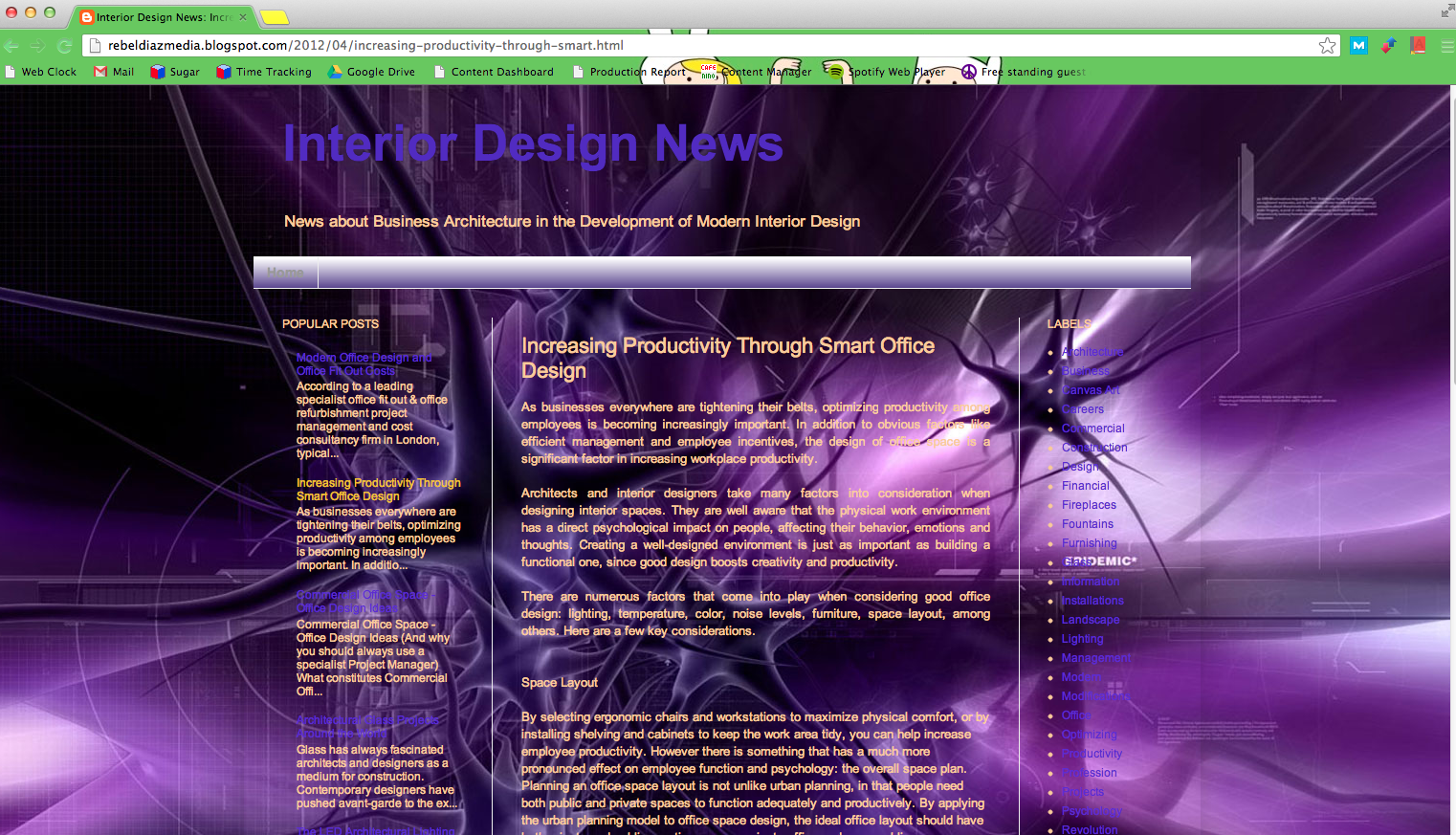
    For SI Graphic Designer Michelle Neuhoff, this means a lack of structure: “Even if your site does not follow the typical structure, it should still fit within some sort of grid and have a good sense of direction. Readers like to know what they’re supposed to look at next.” For Graphic Designer Will Monson, it means triple columns and justified text. I think everyone can agree that usability is the real goal here. More than anything else, your website should help your user move through the content quickly and without any hang-ups.

    Image via rebeldiazmedia.blogspot.com
    Image via rebeldiazmedia.blogspot.com

    Legibility Issues 

    Your user should never have to struggle to read your content. I understand that you may want eye-popping graphics for your website, but looks shouldn’t interfere with functionality. No matter how much you love the look of yellow text on a purple background, I will never be able to read it without having to rest my eyes for ten minutes afterward. Be careful with fonts, too. “Fonts can be fun, but keep it simple when you have a larger amount of text,” Michelle advises. “Save the decorative fonts for your header or for your call to action.”

    Distorted Images

    Nothing looks sloppier than incorrectly sized images. When I worked for a magazine, so many advertisers would stretch an image to the size they wanted it, completely ignoring how bad it looked. This is an amateur mistake and is definitely noticeable on your site. “And absolutely no iPhone photos,” Will insists. When it comes to photos, quality is important.

    Contact info

    Although I’m not a designer, this absolutely drives me nuts. At a previous job, a large part of my day was spent calling businesses, and the most annoying thing to me was not being able to find the contact info within a few seconds. In my opinion, at least the phone number should be at the top or bottom of the page—if not all of your contact info. Michelle recommends either including a tab in your navigation bar or having all of your contact information in the header or footer. “If you’re a business, your potential customers need to know where you’re located, what your hours are, and how to contact you,” she said. “Just make your contact information easy to find.”

    Obnoxious Design Elements

    Image via TheCuriousPug.com
    Image via TheCuriousPug.com

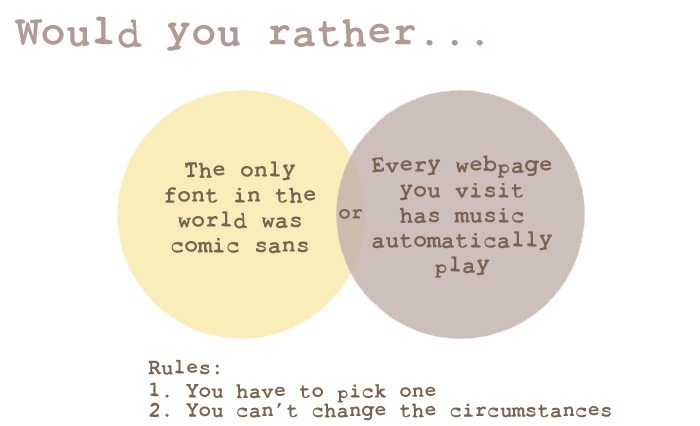
    First things first, avoid bad fonts. If you don’t know which fonts are bad, learn. “Comic Sans… just don’t use it,” Michelle said. “Papyrus does not mean ‘fancy.’ And remember, sometimes the font you downloaded for free was free for a reason.” Fonts aren’t the only place you can go wrong, however. Will dreads auto-playing music—don’t we all—and flashy transitions on banners. All of these things are annoying a detract from the your website’s content. Whether it’s color, music, or animation, too much is never good. If in doubt, keep things simple.

  • Responsive Development with Foundation

    new-leadsndrRecently I implemented a redesign of the public facing page for one of our services, LeadSNDR. Like any other from-scratch project, I started off with a CSS framework that included a grid system. My old standby was the popular 960 Grid, but within the last few months, I’ve moved on to something more up to date and responsive, the Foundation Framework.

    Foundation is one of many modern CSS frameworks that gives web developers a solid set of tools to create a responsive site. It lets you free yourself from having to agonize over the mechanical intricacies of a responsive layout by standardizing and generalizing common patterns used to create sites of this nature. If you’re already using a fixed layout CSS framework, then switching to a responsive one will take next to no effort. If you’re not using any sort of grid system or something with a similar purpose, then I can’t recommend it enough. A solid CSS grid lends itself to creating really clean and maintainable markup. As an example of the Foundation grid, take a look at the layout shell of the LeadSNDR site.

    <div class="row">
        <div class="large-10 large-centered small-centered columns">
    	<div class="row">
    	    <div class="large-5 small-12 columns"></div>
    	    <div class="large-7 small-12 columns"></div>
    	</div>
    	<div class="row">
    	    <div id="header-image" class="small-12 large-12 columns"></div>
    	</div>
    	<div class="row">
    	    <div class="large-7 small-12 columns">
    	        <div class="row">
    	            <div class="large-12 small-12 columns">
    		        <ul class="large-block-grid-3 small-block-grid-3">
    			    <li></li> ...
    			</ul>
    		    </div>
    		</div>
    	    </div>
    	    <div class="large-4 large-offset-1 small-12 columns"></div>
            </div>
        </div>
        <div class="large-12 small-12 columns">
            <footer class="large-6 large-centered small-12 small-centered columns"></footer>
        </div>
    </div>

    In addition to the grid system, Foundation also includes a variety of components to accommodate a variety of responsive patterns. For example, the various navigation bars are particularly handy components. Building out a responsive navigation isn’t trivial and takes a good bit of doing, but using Foundation makes it pretty trivial.

    The only downside to using a responsive framework like Foundation is the lack of support for older browsers. With the newest version, Foundation stopped supporting IE8 and older and the previous version didn’t support IE7 or older. It’s something to be aware of and in some cases it might be a deal breaker, but personally I’d like to see more projects outright drop support for outdated software.

    Foundation worked out great for the projects I used it on, but I’m sure it’s not perfect for everyone. Take a look at some of these alternatives if Foundation isn’t exactly to your liking. I haven’t used any of these, but they’re getting their own praises in the community and certainly worth a look.

  • Addressing Self-Referrals from Mobile Sites in Analytics Data

    Self-Referrals and Mobile Sites

    A few of our clients have been seeing referrals in their Google Analytics reports from their own sites: something unexpected, but not unheard of. There could be a few culprits in this crime against data. Digging a bit deeper into the reports, it seems that, for the instances I was looking at, most of the referrals were being seen on the clients’ mobile sites.

    Referral Traffic

    If the mobile version of a site is accessible at a subdomain different from the main site, then a light form of cross-domain tracking should be implemented to preserve Analytics data between the versions of the site.  By default, Google Analytics is set to treat different subdomains as separate entities, but by explicitly specifying a domain name for a subdomain, Analytics cookies can be shared, and the user’s same session can be tracked continuously. With subdomains, setting the domain should suffice, but the problem with the mobile sites was not that they were hosted on a subdomain, but rather how mobile users were directed to this subdomain.

    For at least one of the mobile versions of our clients’ sites (hosting and implementation provided by a third party), users were being redirected to the mobile site through a JavaScript “redirect,” which is not a proper 301 redirect! Users hit the desktop version of a site, then a document.location assignment takes place through JavaScript, and the browser is sent to a subdomain hosting the mobile site. Because the browser is not receiving a 301 response from the server, this redirect is treated as a referral on the mobile site, and the original Analytics session ends.

    Although these issues were specific to the third party mobile site providers used by our clients, issues with self-referrals may pop up even if you’re rolling your own mobile site solution and not opting for a responsive site. Below are a few solutions to tackling this referral problem.

    SOLUTION 1

    The best solution here would be to handle the redirects with server-side technology. Since a majority of our clients run Apache, the .htaccess file can be edited to redirect traffic that matches mobile user agents. If the user would like to view the full version of the site, a cookie can be set, disallowing further redirection to the mobile site.

    This Stack Overflow answer addresses this exact issue, and takes setting and reading a cookie into consideration. Other server technologies will require different approaches for redirecting, but the basic idea still applies: We will want to preserve the search data by issuing a 301 redirect to the mobile site.

    SOLUTION 2

    An alternate solution lies in server-side scripting in the site’s code itself. It’s the same basic approach as the previous solution, except this is totally built into the site itself rather than being handled in the site’s configuration file.  This may be a preferable solution since there are a number of PHP libraries for mobile detection, cutting out the legwork of trying to account for user agents on your own and freeing up what could be a massive .htaccess file. The following example will be in PHP (assumed to be placed in a header template for a site), and is including mobiledetect, but the basic idea should follow in other languages:

    <?php
    // See http://mobiledetect.net/
    include('Mobile_Detect.php');
    $detect = new Mobile_Detect();
    
    if($detect->isMobile()){
      if(!$_COOKIE['no_mobile'] && !$_GET['from_mobile']){
        header("Location: http://m.website.com" . $_SERVER['REQUEST_URI']);
      }
      elseif(!$_COOKIE['no_mobile'] && $_GET['from_mobile']){
        // Set cookie to remain in desktop version of site.
        setcookie('no_mobile', 'true');
      }
    }
    ?>

    SOLUTION 3

    Some clients may not have the “luxury” of server-side scripting on their hosts and will have to rely on a strictly JavaScript-based solution. It can work, but special precautions need to be taken to ensure correct functioning.

    Google Analytics has a method to transfer cookies through a query string so that sites with different domains, but are united in ownership, can maintain continuity in data. The _link() method is essentially “glue” for cross-domain tracking in Analytics, but here, we can leverage it for our referral issues on the subdomain.

    Normally, tracking a subdomain requires only explicitly setting the domain name in the implemented Analytics code, but since users in this case will not be sent to the subdomain with a 301 redirect or by manually following a link, Analytics will see this as a referral. If, instead, users are sent to the subdomain with a query string containing cookie data and the Analytics code is set to interpret this query string, the original search data will continue through this browsing session.

    (The following is modified from the JavaScript used to take users to one of our client’s mobile site and is only an example of implementation.)

    Modified Analytics script for both mobile and desktop versions of the site:

    <script type="text/javascript">
      var _gaq = _gaq || [];
      _gaq.push(['_setAccount', 'UA-XXXXXXX-X']);
      // Setting domain name on mobile site
      _gaq.push(['_setDomainName', 'website.com']);
      // Processes query string with Analytics cookie info
      _gaq.push(['_setAllowLinker', true]);
      _gaq.push(['_trackPageview']);
    
      (function() {
        var ga = document.createElement('script');
        ga.type = 'text/javascript';
        ga.async = true;
        ga.src = ('https:' == document.location.protocol ? 
          'https://ssl' : 'http://www') + '.google-analytics.com/ga.js';
        var s = document.getElementsByTagName('script')[0];
        s.parentNode.insertBefore(ga, s);
      })();
    </script>

    JavaScript for desktop version of site:

    <script type="text/javascript">
    setTimeout(function(){
      // Determine if user agent is mobile.
      var mobile_agent =
      (/iphone|ipod|android|blackberry|mini|silk|windows\sce|palm/i.
        test(navigator.userAgent.toLowerCase()));
      // If it's a mobile user ...
      if (mobile_agent) {
        if (
          (window.location.search.indexOf('from_mobile=true') == -1) 
          && !(document.cookie.indexOf('no_mobile') > -1)
        ) {
          try {
            // Analytics object should exist; use it to set link
            if (typeof (_gat) == 'object') {
              // Use actual Analytics ID instead of UA-XXXXXXX-X
              var pageTracker = _gat._createTracker("UA-XXXXXXXX-X");
              pageTracker._setAllowLinker(true);
              // ... and use the actual URL you are redirecting to.
              window.location = pageTracker._getLinkerUrl(
                'http://m.website.com/');
            // If the Analytics object doesn't exist, go anyway.
            } else {
              window.location = 'http://m.website.com/';
            }
          } catch (err) {
            window.location = 'http://m.website.com/';
          }
        } else if (
          window.location.search.indexOf('from_mobile=true') > -1) {
          var d = new Date();
          d.setTime(new Date().getTime() + (5 * 60 * 1000));
          document.cookie = 'no_mobile=true; expires=' + d.toUTCString() + ';'
        }
      }
    }, 500);
    </script>

    With this setup, there is a chance that the Analytics data will not be passed along. The JavaScript for redirection with the query string should execute only after the Analytics cookies are set. As seen above, the JavaScript will call the _link() method if the _gat object exists, having been created by Google’s JavaScript; otherwise, the user will be carted to the subdomain, and a new session will be created.

    (Note: The same basic treatment of cross-domain tracking should apply here with Google’s new Universal Analytics, but the JavaScript solution above will differ. Since most of our clients are sticking to Traditional Google Analytics for the time being, this solution still applies.)

    An out-of-the-box solution for mobile site creation may be a quick way to engage the growing segment of mobile visitors, but be cautious in your implementation if you’d like to maintain accurate Analytics data.