Category: Industry Insights

  • OMG: No More PIN Verification Required to Change Address on Merged Google+ Local/Social

    Spoiler alert: Merged Google+ Local/Social pages are crazy easy to update. Read on for the details.

    Local SEO Despair Image - Search Influence
    How I normally feel every time I think about my client moving offices and the pain Google is surely to put me through. Maybe it’s time to reconsider? Image courtesy of diy.despair.com

    We’ve been talking and brainstorming on address change around here lately as we have two different local SEO clients who are moving their offices in September. Lucky for us, they are both keeping their phone numbers, which makes it a little easier. Both of these businesses have been clients of ours for several years, so you can imagine the local directory listings we’ve created and/or optimized for them over time.

    Where to begin? With a few key resources (like this), we set out to execute the ultimate plan for local directory cleanup when a business is moving locations. Of course we’re starting with the major datafeeds and the major search engines’ local/maps databases.

    One of my biggest concerns was the Google+ Local listing for my client DeLuca Plastic Surgery (forgive me for the blatant plug and branded link, this client is kind enough to let us use him as a testbed and also an example, so I think he deserves it!). A while back, when it first became a thing and before Google backpedaled on it, we successfully merged his Google+ Local and Social pages by way of the form request.

    This merge, combined with the fact that in 2012 Google (for the first time EVER) told us we couldn’t have a practice and practitioner listing since Dr. DeLuca is the sole practitioner, resulted in lackluster local maps rankings for the past year or so. (It’s OK, though, we make up for it by killing the organic rankings)

    Given the history plus the fact that re-verification was likely, and potentially troublesome since the client is still in the process of moving his practice, we were very apprehensive about changing the address on his Google+ Local/Social page. We’ve also never changed an address or phone number on a merged Local/Social page before, so we didn’t know what to expect. The unknown = scary.

    To our surprise, the address change went live in a matter of minutes with no new PIN! I say again: NO PIN! Thankfully we were swift enough to screenshot the process so I can share it with you here:

    1. In the “Edit Business Information” screen, Google warned us at the bottom that our edits “may be reviewed for quality before being pushed live.”

    1. As suspected, after saving our edits, we got the usual “Pending” and a warning that the edits may take time but, hmmm….. no PIN or verification was triggered!

    1. Within minutes, the address change was updated and live on the page and in Maps Search. Although our pin marker had the proper placement within the Edit Business Information portal, the pin is still showing his former address, both on the listing and in Google Maps results.
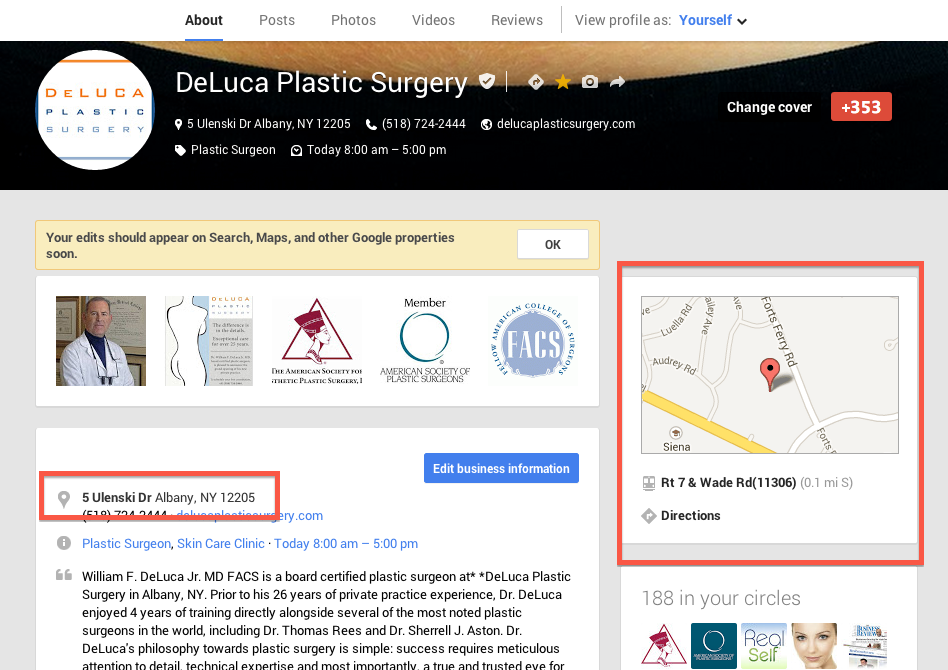
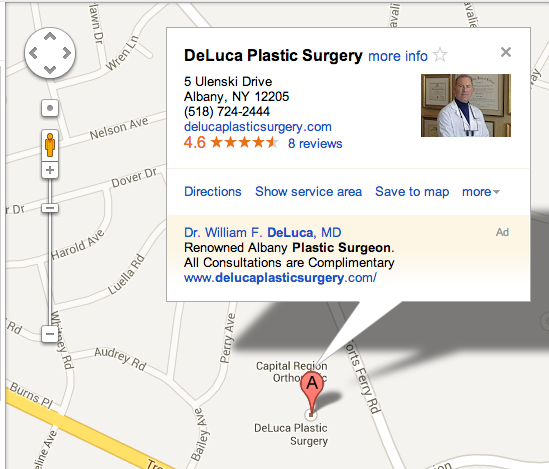
    I’ve scoured the industry blogs and haven’t found anyone posting about this incredibly easy and pain-free process so far. If you ask me, I don’t think Google is intentionally allowing a change of address on Local/Social Pages without triggering verification. Google has a tendency to roll out half-baked products so I wouldn’t be surprised if verification becomes a requirement in the future.

    For now, at least, I’m rejoicing in the almost automatic update to my client’s NAP information on Google+ and Maps! If you want to freely update your business information on your Google+ listing, I suggest upgrading to a Local/Social page. The upgrade feature is currently in roll out, and will soon be available to automatically upgrade with the click of a button, IF your Local listing is in the new Places Dashboard vs. the old LBC.

    Have you ever changed an address or phone number in a Google+ Local/Social Page? If so, tell us whether you had to verify by PIN in the comments!

  • Google Launches Manual Actions in Webmaster Tools

    On August 9th, Google rolled out the manual actions alert in Google Webmaster Tools. The full rollout wasn’t complete until August 12th.

    Back in the day, Google would only alert you via messages, but you would still not know whether or not you had a manual penalty. With the new feature, the notification is obvious under the Search Traffic section.  Even though Google does not send you an alert through messages, it should still notify the webmaster that you have an alert in your Manual Actions section. This is an important issue that needs immediate attention. Google should send a big alert if you had any manual actions since this is a huge penalty for your site.

    manual-actions-in-webmaster-tools

    If your rankings dramatically dropped, most people prior to the release of the manual actions alert would not be sure if they should submit a reconsideration request. The messages that Google previously sent would not indicate whether a manual penalty was taken against the site. The manual actions can be site wide or just a few links on your site. If you have received a message, you should consider the following actions.

    Steps to Take After a Manual Action Notification:

    1. Pull a list of “links to your site”

    In Google Webmaster Tools, you can find a list of links of sites that link to you. Go through the list and start with the domains that have the most links to you. Perform a link analysis and find sites that are not relevant and appear questionable. Take a screenshot of the current amount of links pointing to your site.

      Links-to-your-site

    2. Reach out to webmasters with unnatural linking

    Email the webmaster of the site politely requesting that they remove the link. If someone does not respond to your request, you will be compiling these links in your disavow request. Make sure you keep a record of your correspondence and who you have reached out to.


    3. Submit a Disavow Request

    You will need to compile a list of spammy domains that link to you. You can submit the file through Google Webmaster Tools. Just upload the file and wait. Google will not alert you and let you know whether or not they have made any actions. You can check your Links to Your Site section in a few days or weeks to see if any changes have been made.


    4. Submit a Reconsideration Request

    How long should you wait to submit a request? It depends on the severity of your situation. Repent for your sins when you are submitting a review. Explain in a nice way to Google what happened and what you have done to remedy the situation. This may include details about firing your previous SEO firm. You should also include screenshots of your correspondence with the webmasters you tried to reach out to and a list of your disavow file. Google says it can normally take days to process your request, but the process time can vary depending on the number of requests they receive.

    Good luck!


  • 4 Must-Have Chrome Extensions

    I have a confession to make–I’m an absent fiddler. At opportune moments, I’ll fiddle with all the settings on my smartphone or rearrange my books according to different categorical flights of fancy (this time, they’re arranged by most recently read). I clean out and purge unnecessary belongings every three months. I’m “that guy.” So naturally whenever I see a new browser plugin or smartphone app that I’ll find useful, I get pretty excited. Over the course of the past year, I’ve collected a few plugins that have really helped my workflow and sate my fiddling desires, and I would like to share them with you.

    Google Analytics Debugger
    GA Debugger is a pretty nifty plugin a coworker turned me on to. It provides a fairly simple but exceedingly useful service of showing the Google Analytics Debugging code in my browser’s Javascript console.

    Ghostery Ghostery Logo
    Ghostery is a fantastic plugin that tells you all of the trackers that are on any webpage you visit. It’s very useful to aid in finding out whether I’ve implemented things correctly as well as allowing me to see what’s going on other pages I visit.

    Moz Logo Mozbar
    Mozbar is probably my most used of this crop of plugins. The plugin reveals the SEO metrics of a page in a very organized fashion. No more fishing through source code!

    Check My Links
    If you’re not using Check My Links to find out whether a page has broken links on it, then you’re silly. This has been the simplest way for me to find out on a page-by-page basis where a nasty broken link can be found. It has proven incredibly useful for me. I’ve also found it useful in sniffing out any hidden links on a page.

  • 10 Reasons Why Google is King of all the Internet

    And how we can’t live without it.

    1) It’s a Google world, and we’re just living in it.

    Google Doodle

    You turn to it for nearly every aspect of your life.


    2) You turn to Google for the unanswered questions about life.

    Twerking

    Inquiring minds want to know: “What is twerking?” Approximately 40,500 people search this phrase per month.


    3) You check with it before making a major purchase.

    Honey Boo Boo agrees

    Potential buyers Google (search) “car reviews” 74,000 times on average each month, but people are actually more curious about Honey Boo Boo… She more than doubles this at 1,830,000 Google searches per month!


    4) You turn to it when you want to know what a big word means.

    Teresa giudice googleing

    Knowing the meaning of words and spelling them correctly is really hard. That’s why about 13,600,000 people search for dictionary words each month. Its ok, Teresa, you aren’t alone: People Google “sociopath” 368,000 times a month!


    5) You turn to it for help when you want to check the weather.

    Weather-Seasons

    “Because just looking outside would be too much work, I will Google this on my smart phone from the the comfort of my bed,” says about 37,200,000 people a month!


    6) You look to it when searching for your soul mate.

    Jillian workaholics

    We all just want the same thing and that is love! An average 5,000,000 people are looking for love online each month!


    7) You turn to it when you aren’t feeling well.

    Gross

    If you’re not feeling well, Google’s got you covered. An average of 450,000 people are searching the word “doctor” each month.


    8) You check with it before you go out to eat.

    Jess - New Girl searches for food!

    We are all so hungry! 55,600,000 people are searching for “restaurants” every month!

    9) You use it to help find your next vacation destination.

    Vicki Gunvalson searches travel

    Vicki, we hear you! Approximately 1,500,000 people are searching for the word “travel.” That means a lot of people are looking to plan getaways.


    10) You turn to it for help when trying to learn how to communicate with others.

    Brave doesn't speak bear!

    Neither do we! But nearly 18,100 people are inquiring about “foreign languages” each month!

    You turn to it for guidance in every aspect of your life!

    Teresa praises google

    All hail Google!

    Try making it just one day without searching Google… I bet you can’t last 24 hours.


  • 5 Ways to Avoid a Cringe-Worthy Website

    Although we’ve come along way since the ubiquitous animations and word art of the 1990s (think the official Space Jam ), bad website design still exists. It may not be as obvious to the untrained eye—or as gaudy—as it was with those classic ‘90s sites, but sites that aren’t user-friendly still annoy everyone.

    We all have our pet peeves—I, for example, hold a grudge if I have to look any farther than the bottom of the page for a business’ phone number—but some are more widely accepted than others. I talked to the Search Influence Graphic Design Department about the things that drive them nuts, so if you’re looking to tweak your website, these problem areas might be the perfect place to start.

    Bad Formatting

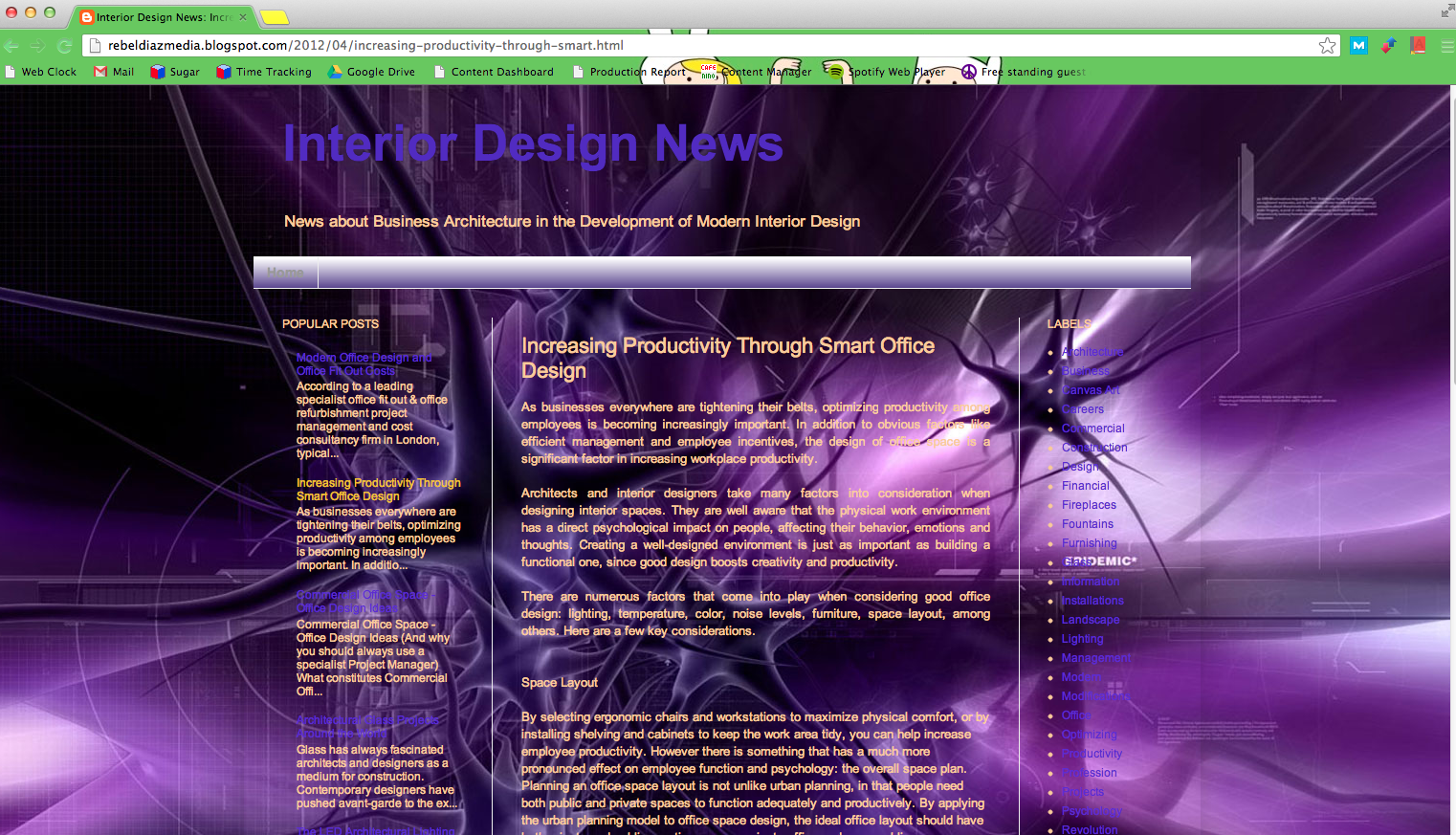
    For SI Graphic Designer Michelle Neuhoff, this means a lack of structure: “Even if your site does not follow the typical structure, it should still fit within some sort of grid and have a good sense of direction. Readers like to know what they’re supposed to look at next.” For Graphic Designer Will Monson, it means triple columns and justified text. I think everyone can agree that usability is the real goal here. More than anything else, your website should help your user move through the content quickly and without any hang-ups.

    Image via rebeldiazmedia.blogspot.com
    Image via rebeldiazmedia.blogspot.com

    Legibility Issues 

    Your user should never have to struggle to read your content. I understand that you may want eye-popping graphics for your website, but looks shouldn’t interfere with functionality. No matter how much you love the look of yellow text on a purple background, I will never be able to read it without having to rest my eyes for ten minutes afterward. Be careful with fonts, too. “Fonts can be fun, but keep it simple when you have a larger amount of text,” Michelle advises. “Save the decorative fonts for your header or for your call to action.”

    Distorted Images

    Nothing looks sloppier than incorrectly sized images. When I worked for a magazine, so many advertisers would stretch an image to the size they wanted it, completely ignoring how bad it looked. This is an amateur mistake and is definitely noticeable on your site. “And absolutely no iPhone photos,” Will insists. When it comes to photos, quality is important.

    Contact info

    Although I’m not a designer, this absolutely drives me nuts. At a previous job, a large part of my day was spent calling businesses, and the most annoying thing to me was not being able to find the contact info within a few seconds. In my opinion, at least the phone number should be at the top or bottom of the page—if not all of your contact info. Michelle recommends either including a tab in your navigation bar or having all of your contact information in the header or footer. “If you’re a business, your potential customers need to know where you’re located, what your hours are, and how to contact you,” she said. “Just make your contact information easy to find.”

    Obnoxious Design Elements

    Image via TheCuriousPug.com
    Image via TheCuriousPug.com

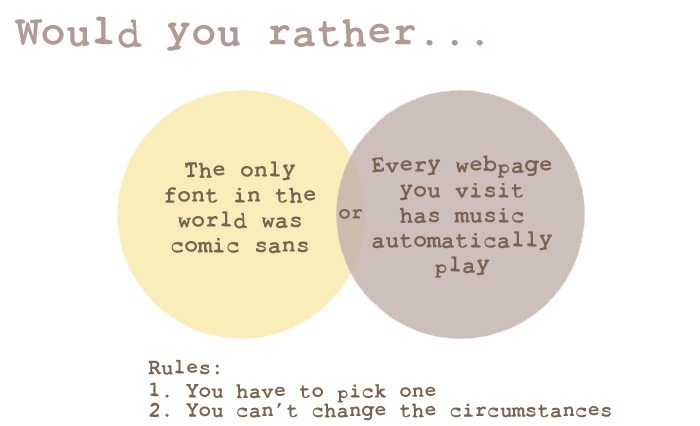
    First things first, avoid bad fonts. If you don’t know which fonts are bad, learn. “Comic Sans… just don’t use it,” Michelle said. “Papyrus does not mean ‘fancy.’ And remember, sometimes the font you downloaded for free was free for a reason.” Fonts aren’t the only place you can go wrong, however. Will dreads auto-playing music—don’t we all—and flashy transitions on banners. All of these things are annoying a detract from the your website’s content. Whether it’s color, music, or animation, too much is never good. If in doubt, keep things simple.

  • Improving EdgeRank on Facebook Pages: Chasing the Mythical 16%

    EdgeRank FormulaFacebook has been rather straightforward about the fact that Pages only reach about 16% of their fans on average organically. The social media giant recommends posting engaging content, such as videos and photos, or asking questions of your fans in order to reach a wider audience. Of course, they also heavily recommend promoting your content so that more of your fans have an opportunity to see it and interact with your page. But, what if you simply don’t have the budget to spend on social influence?

    We typically don’t sponsor posts on Search Influence’s Facebook account, so it seemed like the perfect candidate for a case study on organic reach. I started the project in March with no real goal other than figuring out if our reach could grow just by changing the type of content we were sharing on our page. I was already posting on a daily basis, but we saw very little interaction with our fan-base, and practically no interaction from fans who were not directly connected to our office (employees, spouses, my mom…).

    The Experiment (and a little trial and error):

    Viral Poll on Facebook

    I began posting much more image-heavy content and focused a lot more on interacting with our biggest brand advocates– our employees. Sharing photos increased post reach from the get go, but reach grew exponentially larger when we tagged our employees in photos of them. That simple act could take a photo from a reach of 350 to 500 or more. We also took some of our internal contests to the Facebook page, asking our fans to weigh in on the “Best April Fool’s Day Meme” and “Best Group Costume”. These questions were seen by thousands of users, because a News Feed “story” is created for each person who answers a question. We also posted photo albums of company events, which were quite successful in terms of reach.

    Screen Shot 2013-07-22 at 5.23.44 PM

    After only two weeks of focusing on sharing pictures, albums and videos on our page in addition to our daily blogs, the results were glaringly obvious. The reach difference between a link post and an image post ranged anywhere from 15-40%, which is a sizable amount when you’re looking at our total fan count. On average, the image posts were reaching 34% of our fans, with some reaching upwards of 54%. The link posts featuring our blogs? Not so much. They reached only 14% of our fans on average and often much less than that. I will happily admit to being a big data nerd, and these numbers certainly don’t lie.

    But… what does this have to do with EdgeRank?

    EdgeRank Blog

    To calculate EdgeRank, Facebook looks at three main factors for each post (or “edge”): Affinity, Weight, and Time Decay. The “Weight” factor is where post type plays in, and clearly has a huge impact on how frequently your “Edge” gets seen by your fans. By utilizing post types with a heavier Weight, you are more likely to show up on users’ News Feed, and therefore much more likely to get interaction (which increases your “Affinity” score for that fan). When you really think about the algorithm, these two elements are so intertwined that one distinctly begets another.

    By increasing the Weight of our posts, we reached a wider variety of our fans. As those fans began seeing more of our content, they interacted with it, which further increased our Page’s reach amongst our audience. After a few weeks of posting more heavily weighted content, we were seeing a larger Reach for ALL of our posts, not just those with images. We also took the knowledge we gained about post types and applied it to our blog posts– posting a blog with a photo instead of just a link improved its organic reach significantly. By slightly modifying our posting, we greatly improved our interaction level and reach. Have any other good ideas to improve Facebook Page EdgeRank or Reach? Let us know in the comments!

  • Expand Keywords for Expanded Results

    Letters

    Keywords are the key—no pun intended—to driving traffic to your site, and is part of the SEO basics a site owner needs to know. A smart business manager will put a great deal of thought into which terms to target. Even a fantastic list can always use improvement—however, four simple keyword expansions can be the trick to increasing your impressions using terms that are proven to get results.

    Keyword expansion is quick, easy, and almost guaranteed to work. It might not drive tons of traffic, but it will certainly add to your existing pool.

    1: Pluralize

    Many of the main keywords can come to mind almost automatically: if you sell dog brushes, you’ve probably already factored “buy dog brush” into your list. But even if someone only wants to buy one, they’ll often search for “buy dog brushes”. Because some engines recognize plurals as separate keywords, you are potentially losing out on all the impressions from the “dog brushes” searchers. Adding an –s or –es to your common terms becomes a no-brainer when you realize how easily it can boost your traffic.

    2: Rearrange

    People typing search queries don’t always use syntax and grammar the way they do in everyday speech. To continue the example above, someone might search “dog brush buy,” which follows a pattern of what they want (dog brush), followed by what they want to do (buy). Yes, it’s likely to be a far fewer number of people than those searching “buy dog brush,” but that fewer number is not insignificant. Mixing up your word order often elicits more results.

    3: Misspell

    Another regularly overlooked area for keywords are typos and misspellings. Some errors are certainly more common than others; a check down the search query report should show you where you might have luck. If your canine brushes are of the affordable variety, running both “cheap dog brushes” and “cheep dog brushes” could benefit you. Fewer search engine gurus are competing for misspellings, as well, meaning you’ll have a good chance at capturing more of the market.

    4: Match

    The three different match types—exact, broad, and phrase—generally work together to generate the most impressions and clicks even though many choose to limit to exact match for a quality response. If your aim is to get more traffic to your site, though, casting a wide net will bring in more fish. Broad match additions to “dog brushes” might include “dog kennels” or “hair brushes,” but people running those searches might also be pleased to stumble across you. You’ll also pick up on new keywords, through broad and phrase matches that make sense, which you can incorporate into your list.

    Keywords and keyword rankings are important to being found online. With a few additions and clicks, you’ve now expanded your keywords to draw impressions from those who pluralize, rearrange, or misspell words, as well as those running similar searches. You’ll benefit in impressions and ultimately traffic as well, without stressing over your keyword list.

    Megan Totka is the Chief Editor for ChamberofCommerce.com. She specializes on the topic of small business tips and resources. ChamberofCommerce.com helps small businesses grow their business on the web and facilitates connectivity between local businesses and more than 7,000 Chambers of Commerce worldwide.

  • 3 Easy Steps to Launch a Successful PPC Campaign

    I’ve been in online advertising for about 8 years now. In that time, I’ve launched hundreds of accounts and thousands of search campaigns. Not all of them have gone as smoothly as I would like to believe. Instead of relying on my years of knowledge, I have a blueprint that I follow to ensure there is a successful launch.

    Here’s an easy 3-step beginner guide to to launching a successful campaign that your clients (and boss) will be proud of.

    Step 1. Check You Campaigns Settings

    One of the most important parts of setting up a paid search account is checking all of your campaign settings. This is especially important when using something like the Bing Ads’ import feature or creating new campaigns in AdWords Editor.

    • Location
      • Make sure your location is targeting where you or the client have specified. While you could use geo-modified keywords for a state or region, you are likely to see a lower CTR due to poor ad relevancy and low conversion rates.
    • Language
      • Make sure the language you are targeting matches your location targeting and your ad content. If you are targeting a bilingual region such as Quebec, it is best practice to create a French and an English campaign with ad content in the appropriate language. Serve French ads to French speakers and English ads to…you get the point. 🙂
    • Ad Networks
      • This is a big mistake for a lot of new advertisers — your campaigns should never target more than one network at a time. While it is perfectly fine to advertise text ads on the display network, you do not want your low CTR from the display network negatively impacting your search text ads.
    • Device Targeting
      • On July 22nd, this setting will be non-existent, but you must be sure to check you bid adjustments for mobile devices. Not all businesses or websites lend themselves to mobile devices, and despite Google’s certainty that mobile is the future, there is no reason to overbid on a low-performing segment.

    enhanced-campaign-mobile-bidding


    Step 2. Assembled the Ad Groups

    good keyword themes

    • Keyword Themes
      • How your keywords relate to your ad content, the search query, and the landing page really matter. While it isn’t the biggest factor in quality score (CTR is still 70% of the a good QS), keyword theming it majorly important to relate your service/product/whatever to the searcher. Over- and under-simplifying themes is a common mistake that even a lot of veteran PPC advertisers make, so don’t be discourage if you aren’t sure where to start.  The best way to determine how keywords should be grouped is by figuring out what they mean to the searcher and what the searcher is expecting to see.
    • Keywords Match Types
      • Like keyword theming, this has a lot to do with anticipating what question a user is going to ask a search engine and how. I am a huge fan of exact and phrase match because if gives you the best CTR and limits the amount of negative keyword research you’ll have to do. However, for the PPC noob I would recommend using modified broad match with a hefty list of negatives to eliminate search noise. If you follow this advice your quality score and wallet will thank you.
    • Ad Content
      • One of the most important elements of a good launch is good ad content. When writing ad content, the most important things is answering the search query’s question. It is equally important to show why you answer the question better than your competition. Including value props, calls-to-action, and relevant ad extensions will help you get the click.


    Step 3. Set Up Conversion Tracking and Analytics Integration 

    • Conversion Trackers
      • This is probably the most overlooked and financially dangerous thing to forget when setting up a PPC campaign. Whether you consider a conversion a click-to-call, a form submission, or even view of keypage, you have to set up conversion tracking. With both AdWords and Bing Ads this is a simple process — you just insert a snippet of code onto your determined conversion page. This is typically the last action you want a visitor to do on your site before leaving your site.
    • Google Analytics
      • Undeniably the most powerful free analytics tool available. Google Analytics allows you to see what your PPC visitors are doing on your site. Having this knowledge will allow you make data driven decision about on-page factors such as images, content, or layout. One of my personal favorite reports is Visitor Flow. This report shows the path a visitor takes on your site and what information you should include on your landing pages.

    That’s it!

    Setting up a new PPC campaign can become daunting and confusing. Using these three steps will help you stay on track and not waste time or money. A properly set up campaign will ensure you can make better ROI decisions without backtracking and guesswork.

    Pro-Tip: If you have a hard monthly cost and want to effectively manage your spend use the shared library’s Budget feature. It will allow you to assign a set daily spend to multiple campaigns. It will alleviate the stress of manually adjusting each campaigns’ daily spend. Be sure to check your performance though. If you start seeing more opportunity in a particular account you may want to separate it from the others and assign an individual budget.

    Share Budgets for PPC Campaigns

  • 4 Ways to Build Your Local Presence

    Jun13Hometown support can keep your small business going through difficult times, and can be beneficial to your community. The people who live in your town aren’t just friends and neighbors; they’re also your customers—or they should be. If the locals in your city don’t know your business exists, it’s time to put some work into building your small business presence around town.
    Show up in Local Search Results

    When people want to find a good pizza place while driving around town, they pull out their smartphone and do a quick search for pizzerias. About a quarter of all Google searches have “local intent,” meaning they’re aimed at finding results nearby. Whether you show up in search results is not something you can afford to leave to chance. Claim your spot on Google Places for Business, Bing Places for Business, and Yelp to place in those results

    Once you sign up for those services, you can manage your business listings. Include high-quality photos when possible, and fill out all the information you can. Make sure you include your hours of operation, all means of contacting your business, and your website’s URL, if you have one. Double check to ensure your information is exactly the same in every place it’s listed. Don’t be afraid to post a sign in your business or place a link on your website asking happy customers to leave feedback on those sites, as well.

    Give Back to the Community

    Six out of ten entrepreneurs feel philanthropy has made their businesses more successful over time. Eighty-nine percent of them donate money to charities personally and through their companies. The size of your company will affect how much you can give, and in what ways. Many entrepreneurs form their own non-profits to benefit a cause close to their hearts, but you can find many smaller ways to help.

    Some potential ways to give back include: a company volunteer day; customer donation requests or a donation box; sponsoring a community team or event; offering a mentorship or internship program in collaboration with local schools; and pledging a percentage of your profits to a certain charity. If you can, come up with a way to donate that’s unique to your business.

    Join the Chamber of Commerce

    Sometimes businesses overlook their local chamber because of the membership fee, but the price to join may be well worth your investment. In addition to being listed in their materials, you can network with other members, and participate in community events. Become an active member, and your face and brand will become more recognizable to the community, leaders, and other business owners.

    Being a Chamber member can also boost your reputation. In fact, nearly a third of people believe member businesses to be reputable, and to have good business practices. Consumers are 63 percent more likely to purchase from a small business who’s a chamber of commerce member.

    Earn Trust

    Conduct your business in a trustworthy manner and you’ll earn happy, repeat customers, positive online reviews, and referrals. Earning the trust of your community requires more than just delivering on product promises. Local businesses must build more personal relationships with their customers. Learn your customers’ names, and use them. Send customers postcards with special offers for being loyal to your business.

    As a local business, you have the unique opportunity to really listen to and address the concerns of your customers. Keep communication flowing, and always follow up with your clients. These are perks big businesses can’t offer, and they’ll go a long way toward building your local reputation as a trustworthy business.

    Local presence is key for business owners who want lasting relationships with the customers in their region. The trust, availability, and value your business can bring to the table not only help ensure a solid customer base for you, but enrich the overall vibe of your city. Make sure you can be found easily online—and off—to become a vibrant part of the fabric of your community.

    Diana Doherty is a freelance writer specializing in SEO content, and is a contributor to ChamberofCommerce.com. She loves all things tech, photography, craft, military family life, and business. She earned her BA in English Writing Arts from SUNY Oswego.

  • Keyword Rankings are Important … Just Maybe Not as Important

    I have always been hesitant to use keyword ranking reports as the focus for a successful SEO campaign. They are a useful measure, but they aren’t the most important, nor are they reliable and trustworthy. Don’t get me wrong.  Ranking reports have value.  Just not as the primary reporting standard.

    The prescription for success is focusing on the website performance rather than obsessively watching over the rankings. This image shows this client hit the #1 spot in April then again in May, and within that time the #1 spot garnered them 8 visits.

    A website needs to be a dynamic living entity. Google respects business owners who take care of their website properties and make those sites engaging, interesting places to visit.  Website owners need to be mindful of which pages on the website are the strongest and most visited.  What pages have the highest and lowest Bounce rates, and why?  Which pages have the highest and lowest time spent on page – is there room for improvement?

    A positive user experience is influential to the site strength.  Quality backlinks.  Author trust.  Engagement in the industry discussions online.  These are the things that will make a site strong, and from that strength, the site will show up in the SERPs, but maybe not for the phrases you want or expect.

    Things ain’t what they used to be

    A brief blog post  in mid-May says it very succinctly:

    “Keyword ranking as a metric is diminished in importance and relevance as performance metrics are starting to replace it.”

    “Performance” encapsulates so many details. It’s a lot of what is already mentioned: the behavior of the visitor once they land on your site.

    • If they are digging around to other pages,
    • reading more information,
    • spending time on the site,
    • taking the quizzes sitting in the sidebar,
    • watching the videos embed on the page,

    – if they are doing these things, Google is rewarding that site as being trusted as a resource.

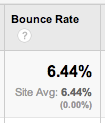
    An excellent Bounce rate, not seen very often in this client's industry.
    An excellent Bounce rate, not seen very often in this client’s industry.

    If visitors land on a page and immediately see the content is not rich enough, there is no multi-media experience, there are no big happy buttons encouraging that visitor to go read about the doctor or lawyer, baker or candle stick maker, it’s boring.  And they will leave.  When visitors Bounce,

    • you lose a potential customer,
    • and it sends signals to Google that your page has little value.

    In Wasting Time Worrying About Keywords,  the blogger asks:

    “If Not Keywords, What SHOULD you be looking at?” Well, it depends on your business and your goals, but traffic and conversions are going to be more useful than keyword rankings alone.”

    I’m not drawing a line in the sand saying that ranking reports no longer have any value.  What I am saying is for years we used rankings as the thumbnail data for reporting.  Rankings were the first thing discussed in new client kick-off calls and the first thing addressed in monthly conference calls.

    However, keyword ranking reports are flawed.  They have been since the beginning of keyword ranking reports.  But they were, and still ar,e one measurement to use; one that is becoming a little less relevant.

    Rankings are always moving around.  How many times have I said “The keyword rankings are simply a snapshot in time.  The report is not reflective of reality for all searchers all of the time.”  I have said that a LOT.

    Ranking reports tell a very specific story.  You’ve chosen keyword A, B, and C, and that’s what you will be chasing.   But what if your site ranks for X, Y, and Z?  You won’t necessarily know it because those phrases aren’t in your list.  This is bad tunnel vision.

    Google is showing us with every algo update, that what the business owner or the SEO thinks that a website should rank for is not necessarily what it will rank for.

    A ranking report can’t predict the success or failure of a business online; it can absolutely help guide decision making and improving the website property, but it is not the definitive measure telling us that we have achieved the #1 spot and can now expect to dominate.

    So What’s Important Now?

    Rankings are still important. We still use rankings as a weather vane. But we have to remember that between the increasing personalization of search results and the localization of search results, rankings data is skewed.  We have to recognize that.

    I am quoting 4 bullet points from Why You Shouldn’t Worry About SEO Ranking Reports:

    • Search results are personalized, based on website browsing history in some cases

    • Results are location based, so if you live in town A you will see something different if you move to town B

    • Previous search history is used to predict the most relevant links

    • People use different devices to search–although as people increasingly sync their smartphones, laptops, and tablets with each other, this may become less of a factor in the future

    Or in Keyword Rankings are Dead: Long Live the ROI:  “A keyword searched in New York by a logged-in Google account user showed different results than those done by a first-time user in Baltimore.  A surfer searching on Google in Montana displayed different results than one in Texas.  The more we searched, the more we realized Google has taken the rankings game one step further and personalized it based on a visitor’s search history, along with other important geographical and demographical information.”

    This is simply more background as to why ranking reports are flawed data, and more evidence why we cannot rely on these as our primary gauge of achievement.

    Search Engine Land posted 5 Reasons Why Rankings are a Poor Measure of Success, suggesting among other things:  “start measuring the things that matter.”

    Our team here has had some fairly intense discussions on improving Bounce rates on select pages and strategies around increasing conversions.  Looking at length of page visits and flow of site visits. Trying to pinpoint ways to improve the user experience and help them stick around longer on site.  These are the things we are talking about and measuring and testing.

    In Rankings are dead – long live conversion!: “With Google’s continued focus on location based rankings, we strongly believe that rankings are becoming much more dependent on their specific location. For example, one keyword could rank much higher in Scotland than it does in Brighton. Even today when our clients mention that their highest paid person in office spots that their website isn’t ranking high for a particular ‘money word’, it can be tempting to scream at nobody in particular “It’s not just about rankings!!”.”