Author: Search Influence Alumni

  • Top 5 Chrome Plugins for Search Marketing

    As a Search Marketing professional I’m always looking for new browser tools to help me with optimization. Over the last few months, I’ve become a huge fan of Google Chrome. It’s fast, light-weight, and  has tons of user generated extensions for SEO, PPC, and SMO. Here is a list of the top 5 Chrome plugins any Internet marketer should have.

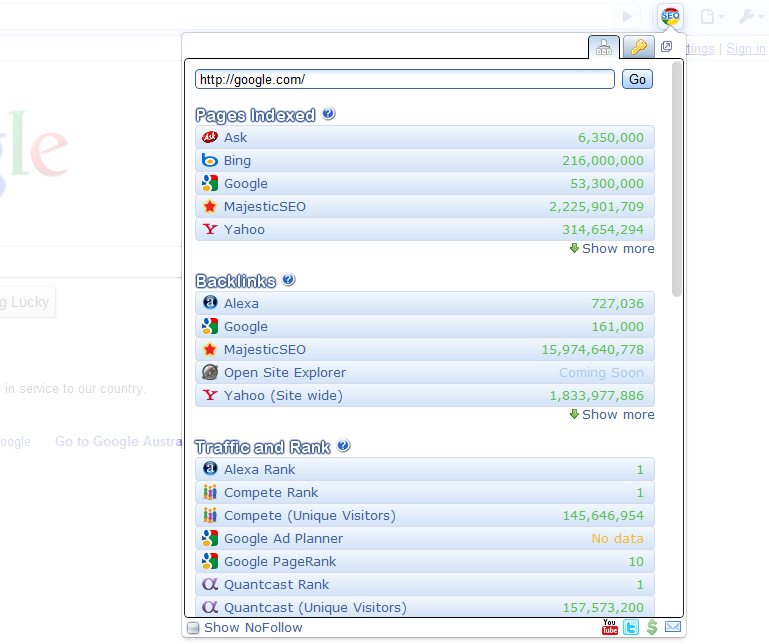
    1) Chrome SEO – Probably one of the best free SEO add-ons I’ve used. It provides backlink info, as well as, keyword research tool, domain age, and traffic and rank. It has everything. Unlike some other SEO plugins, I never find myself disabling it because it’s chugging resources or constantly crashing.
    Chrome SEO Screenshot
    Chrome SEO Screenshot

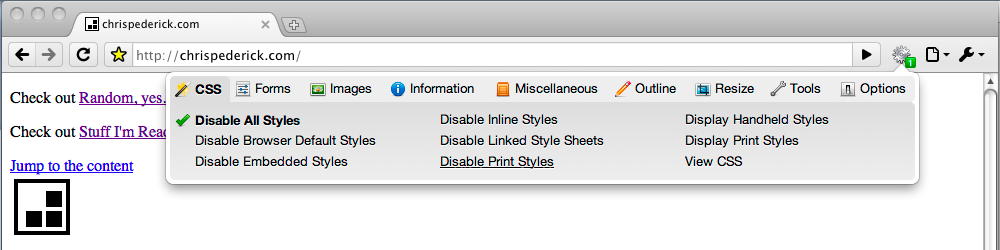
    2) Web Developer – A port of the Firefox Web Developer plugin, this extension has help me several times with identifying useless and broken CSS, as well as,  large graphics and elements on the page that were slowing it down.
    Web Developer
    Web Developer

    3) Google Analytics Opt-out Add-onNothing is more important to me than accurate site data and this plugin stops the JavaScript (ga.js) from sending information back to Google Analytics
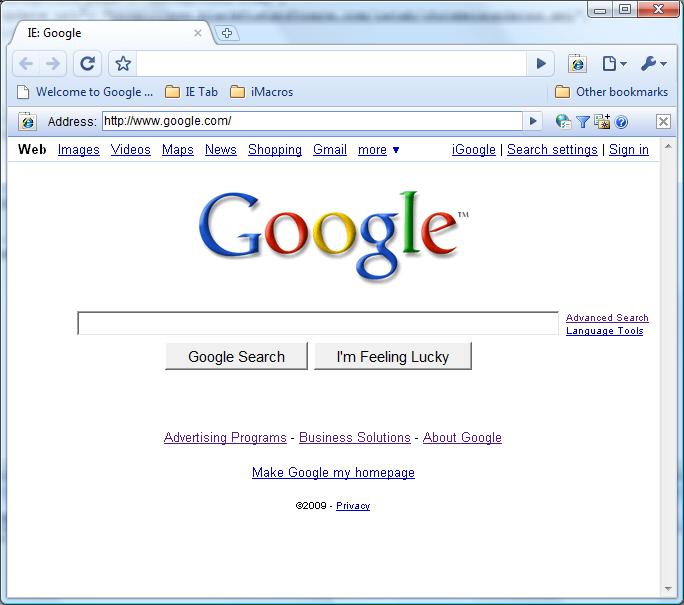
    4) IE TabWant to see what your site looks like in Internet Explorer but you don’t want to install? Download IE Tab.  This extension has helped me identify elements that work in Chrome and Firefox but do not work in IE.
    IE Tab
    IE Tab
    Google Similar Pages
    Google Similar Pages

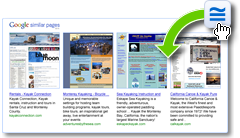
    5) Google Similar Pages – Want to know who your competition is? Google Similar Pages provides urls and visual information on sites that are similar to the page you’re currently browsing based on keyword and traffic information.

    Honorable Mentions:
    Google Voice – I’m always losing or turning off my phone, so with Google Voice I never miss a voicemail and can easily return the call at my leisure.  Works great when you are busy and affording those pesky calls from Mom.


    Gmail Mail Checker Plus – I hate e-mail programs and constantly logging in and out of different email accounts to check my e-mail. With Gmail Mail Checker Plus I can have access to all of my email with a simple click on the toolbar.


    Panic Button – Have you ever been on sites that aren’t exactly work friendly? The Panic Button extension is for you. With one click you can hide what you were surfing and replace it with your start page.
  • Google Wave: Revolutionizing Communication or Reinventing the Wheel?

    So it’s been about nine months since Google unveiled one of their latest- and largest- endeavors: Wave. For those of you who haven’t been keeping up with Google’s global takeover, Wave is a real-time communication platform that has the potential to completely revolutionize or even replace standard email. It rolled live on September 30 of last year and I was lucky enough to stumble upon an invite, so I’ll share my findings with you here.

    Google Wave combines email, instant messaging, and social networking into one, easy to use interface. You can create waves with one person or your entire contact list, so conference chats and meetings with business partners or employees becomes incredibly easy. All waves can be viewed in real time and you can respond to previous entries much like a forum. This can be both a good and bad thing. I’m sure I’m not the only person who types out a response and then goes back to edit or erase it altogether before hitting “Send.” I’m not sure I want other people to view what I write in real-time. Also, the forum-like interface can lead to cluttered and convoluted waves. Some of this can be avoided with the playback button, which replays the entire history of the wave. A collapse function could also improve this shortcoming.

    Another cool feature is that anyone can edit previous entries to correct false information. This is another one of those bittersweet functions that can be considered both a pro and a con. You can also invite other people at anytime during the wave.  Don’t want them seeing the previous conversation? No problem. Anybody invited can be set to only view limited info.

    One major pro is that it makes attachments a thing of the past.  Anything you want shared can just be dragged and dropped into the conversation and it shows up in the wave for everyone to view or download.  Also, any wave can be instantly embedded onto your blog or website. These are two functions that email doesn’t have and can only be viewed as pros in my mind.

    In terms of what it can offer SEO, it’s lacking… for now. One of the best things about Wave is that it’s open source.  This leaves the door open for nearly limitless SEO possibilities.

    In summary, Google Wave is a pretty great idea. However, sometimes it seems like reinventing the wheel. Most of the features it offers can be found with email, chat, or even Google Docs. The draw is that it combines these three into one fairly easy to use interface. It can seem unnecessarily complicated at times, but you quickly get used to it. I think the largest downfall is that not enough people use it yet, but even email and instant messaging were once seen as novelties. I think with enough time and improvements, Google Wave is the only contender that could possibly replace them in the future.

    Special thanks to Lovati and Juergenfenn for the great images!

  • You Know What Grinds My Google Gears?

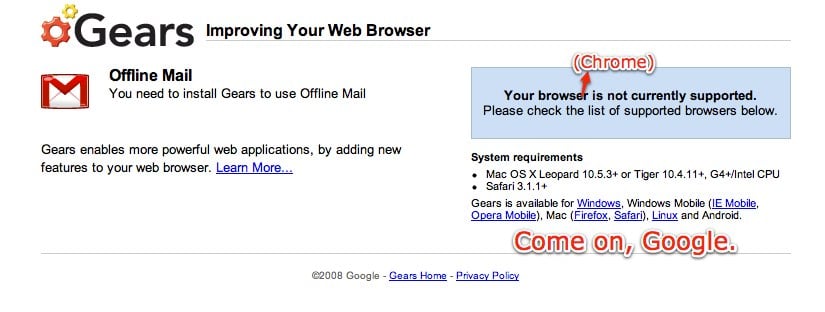
    “Google Gears – Improving Your Web Browser”

    Google Gears Does Work with Chrome? You don't say!
    Google Gears Does Work with Chrome? You don't say!

    That is Google’s tagline for their open source project that stores data locally for web applications and runs Javascripts in the background. But as anyone who has used Gears will tell you, it’s buggy, especially when being used with Google applications.

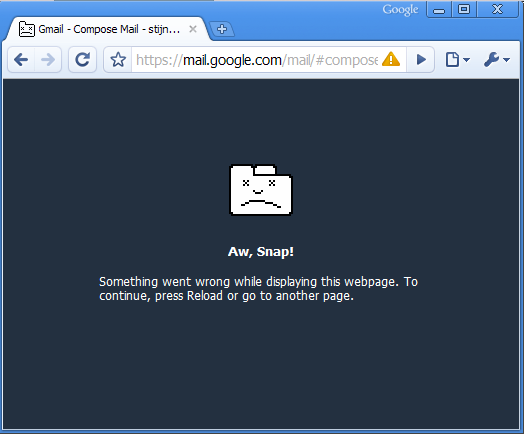
    For instance, Google Chrome comes pre-installed with Google Gears, however out of all the browsers that currently support Gears, it crashes the most. I’ve used Firefox and Internet Explorer with Gears and even though I still experience time-outs when downloading web app data and frequent Javascript slow downs, with Chrome I just get the “Aw, Snap! Something went wrong…” message practically every time I do anything Gears related.

    "Aw, Snap!"
    "Aw, Snap!"

    I find Google Gears especially painful to use with Google Adwords’ local storage feature.

    I understand why Google decided to integrate Gears with the Adwords dashboard- instead of loading data from Google’s servers several times a day and eating up their bandwidth, it allows faster use of Adwords and saves Google’s a couple of nickels (which will most likely go into yet another failed Google Labs project). The problem is Gears crashes 9 out of the 10 times I’ve tried to use it.

    I thought Google Gears would be improving my web applications, but unfortunately that has never been the case. It stalls, it freezes, and it crashes Google Chrome every chance it gets (In fact as I was in the middle of typing this very paragraph Google Gears crashed Google Chrome. Ironic?).

    I may come off as a hater, but that simply isn’t the case. I love Google. My first job out of college was as a creative writer for the first Google Adwords reseller and since that day I have faithfully (blindly?) downloaded, purchased, and used every Google product that was applicable to my life. However, as technology grows and other companies are finding ways to make their technologies more user-friendly (I’m looking at you Apple and Microsoft), Google seems to be just developing technology and hoping they work with existing Google apps. It confuses me that they waste resources on failed social media tech, like Google Wave and Google Buzz, while ignoring glaring problems with their flagships.

    I know for a business to grow it needs to make changes and take risks but if those changes are negativity effecting your loyal users, aren’t you just hurting your bottom line? #kanyeshrug

    Thanks to Sam Harrelson for the first image.

  • Top 10 for the Weekend – June 18, 2010

    And we’re back with a new edition of the “Top 10 for the Weekend,” a selection of relevant and useful links from around the web, typically with a local search and internet marketing focus.

    Top 10 for the Weekend - June 18, 2010

    Google Tags rolling out nationwide

    Google’s newest feature for local business, Tags will begin rolling live across the country. For $25/month, a yellow tag will mark your local business for anything ranging from videos and photos to personal messages for your potential clients. It won’t affect your business ranking in maps, but it will make it stand out amongst the rest. We’re going to be doing some testing with this feature, so keep checking in for updates.

    Only 10% Of Businesses Would Pay For foursquare: Survey

    A recent study organized by Search Influence found that only around 10% of non-chain businesses would be willing to pay for foursquare as a marketing tool. Some of the reasons range from not knowing whether or not it is driving traffic to their business to just not fully trusting the newborn social media as a marketing tool. Regardless of the reasons I’m sure foursquare is alarmed by this figure.

    2010 Local Search Ranking Factors

    For the third year in a row, Search Influence was asked to place in David Mihm’s study on Local Search Ranking Factors, chosen from only 34 other businesses in the same field. The consensus: it’s anxiety inducing for everyone!

    Google Exposes Your Competition

    It looks like Google has begun exposing your competition on your very own Places page! How sneaky. Our friends over at Blumenthals.com attribute this to Google wanting to make their Places page a starting point for your search as opposed to an ending.

    Why Local SEO is Harder Than SEOs Think

    Anyone who tells you that local SEO is easy is being disingenuous.  This blog gives a nice, detailed reason as to why that is. That’s not to say it is never easy. It’s just that what works for one business in a specific location may not work for the other. It’s a trial and error game akin to chutes and ladders.

    Yelp Reviews Back in Google Maps as their .COM Growth Stops

    Not since Ross and Rachael has there been an on again off again relationship as engrossing as Yelp and Google’s. Well, it looks like they’re back on for the time being! The sharp decline in Yelp’s customers seems to be the driving motivation here. Let’s see if it’ll last this time!

    Four reasons why Lady Gaga has fans and you don’t

    This blog finally makes me realize why- against my best efforts and judgments- I can’t help but like Lady Gaga! It’s because she’s not just a pop star, but an SEO star as well! It all makes so much sense now…

    9 Expert SEO Tips for Small Businesses

    Most companies don’t like to divulge their secrets to success. We here at Search Influence aren’t most companies, though. That’s why we’re sharing this blog by Anita Campbell with you. We agree when she says, “…the more you know about a subject, the better you are able to ask informed questions, hire qualified professionals, and make good decisions to enhance your Web presence.”

    Social Media Mythbusting For The C-Suite

    For the life of me, I will never understand why some people are averse to taking the plunge into social media. This blog will equip you with the armor necessary to combat anybody- including your boss- who isn’t on board this train.

    WebVisible Documents ‘The Great Divide’

    This short documentary discusses the gap between business owners and customers and how they find each other.  It offers a unique insight straight from the mouths of your potential customers and why sometimes you fail to connect with them.

  • Using Facebook Markup Language for Social Media Marketing

    When I was in elementary school I hated my school uniform. The yellow shirt, brown tweed jacket, blue slacks, and that awful little tie. I remember questioning the school taste level and being matter-of-factly told the uniforms made us focus on school rather than each other. I hate those uniforms because of their lack of personality. I initially had the same feelings towards Facebook. Despite it many features and (annoying) applications, everyone’s accounts looked the same. Sure this was FB’s way to avoid the flashing gif walls and neon colors of Myspace profiles but it took away people’s individuality. Anyone who is into social media marketing can tell you, if you want the community following you gotta stand out. Thankfully Facebook understood this and gave developers Facebook Markup Language.

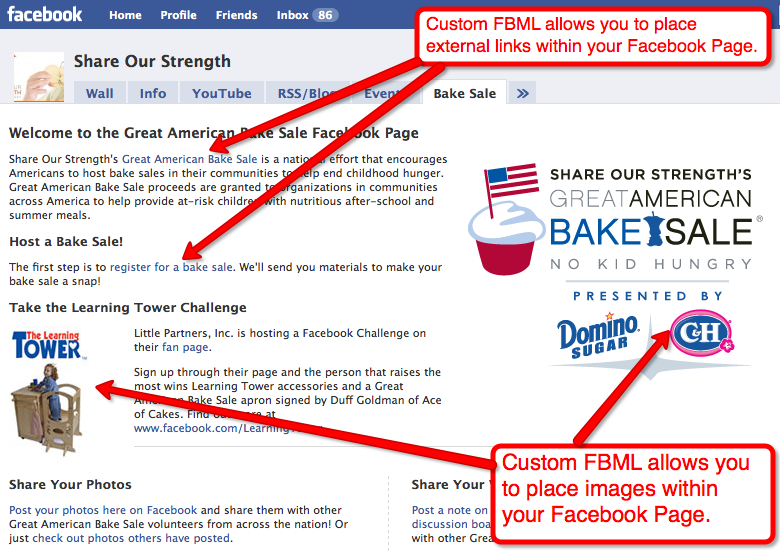
    Using Facebook Markup Language
    Facebook Markup Language at Work

    Facebook Markup Language
    Not so much of a language as a bastardization of xhtml, Facebook Markup Language (FMBL) allows users to “build full Facebook Platform applications that deeply integrate into a user’s Facebook experience” (otherwise known as not be boring). FBML is really huge for social media marketing and building a fan community. Having integrated pages with additional options not only keeps visitors on the page longer but it always encourages fans to interact with the page.

    Think about the level of engagement you would have if you put an iframe with rotating daily specials onto a Facebook page. With FMBL you can embed your Youtube, Twitter, and Flicker, Adobe Flash objects in the lifeless page.

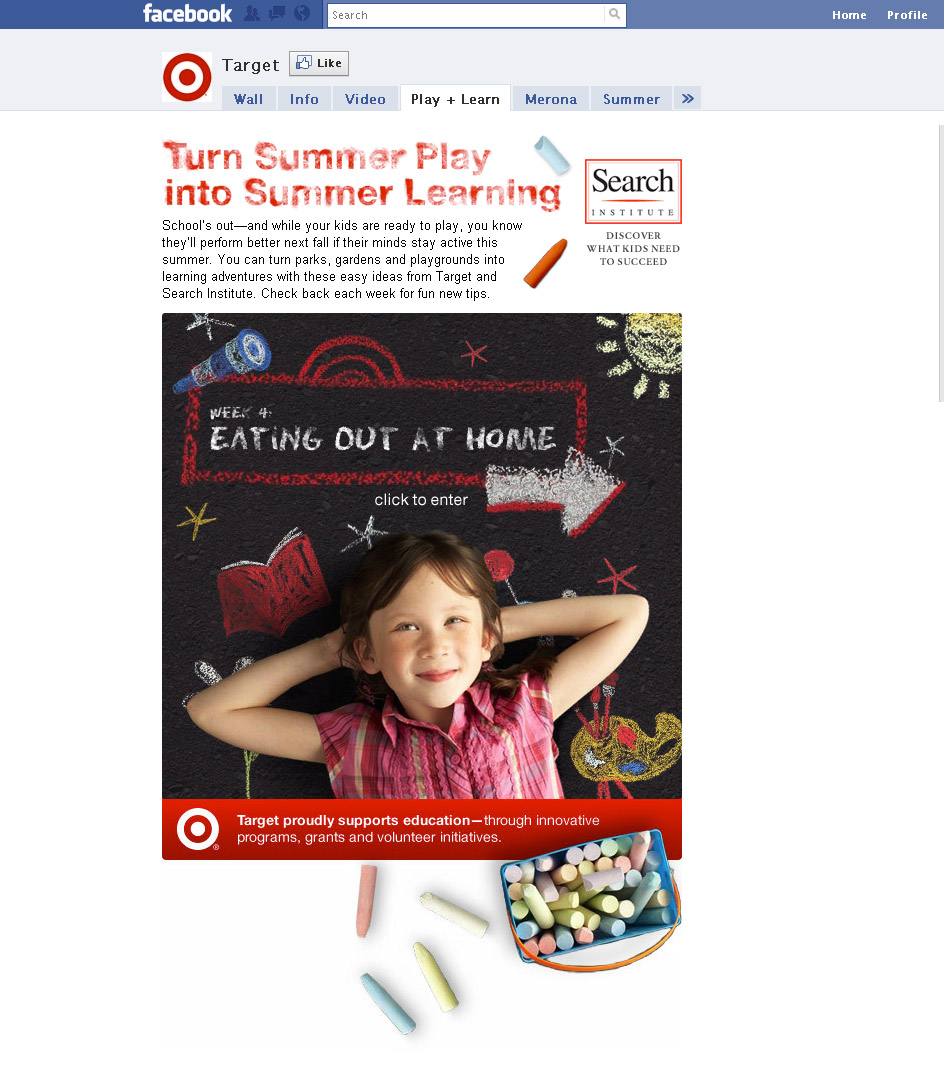
    Even though FBML has existed since late 2007, many companies with a FB presence are still not capitalizing on its power.  However, there are companies like Target who are really using FBML to promote their brand and it’s many lines of business. By having their lines of business listed on their fan page, Target can to market new products, promotions, and store locations to loyal (and highly active) customers.

    Using Facebook Markup Language
    Target Using FBML for Summer Promotion

    While Facebook Markup Language can’t completely reskin your Facebook page, it does allow a level of customization that the social media platform previous lacked. As the number of FB users continues to grow and social sites become more and more a part of everyday life, having unique content and pages not only allows you to promote products and services but set your business apart from the crowd because no one wants to wear a uniform.

    If you’d like to learn more about Facebook Markup Language, please visit Facebook Developer.

    Special thanks to johnscotthaydon for the image at the beginning of the post!

    The bottomline is Facebook Markup Language is a great tool for businesses who want create active online followings.
  • Pay Per Click for Dummies? Hire a Professional.

    When Doing It Yourself Isn’t Such a Smart Idea

    Pay Per Click Search
    Pay Per Click Search

    I come from a family of “do-it-yourselfers”.  When my mom wanted new curtains for the kitchen, she’d go to the local craft store and purchase 3 – 5 feet of fabric and hot glue to her heart’s content.  My dad was no better; I remember watching him jury rig the plumbing after the basement flooded.  While I always admired their “make it work” attitudes, these (and many other) situations always ended with a call to a professional.  So when I hear that non-search marketers are doing pay per click marketing, I have flashbacks of curtains falling apart, pipes constantly leaking, and money being wasted.

    Pay per click marketing is a tricky platform with many intricate pieces.  As a PPC professional, I find myself in the role of a copywriter, researcher, accountant, analyst, and a gambler.  It’s a daily routine juggling daily budgets, maximum bids, and demographic settings to ensure the highest possible ROI with the given budget.

    Paid Search Keywords
    One of the biggest mistakes in many paid search campaigns is choosing keywords. Instead of choosing terms that visitors are searching for, first-timers choose keywords they are familiar with or possibly even industry terms – an example of this is “abdominoplasty” versus “tummy tuck”. While abdominoplasty is the correct term, it yields significantly lower traffic because the average person would type in tummy tuck.

    Another aspect of choosing keywords for a campaign is determining niche keywords. A niche keyword is a low traffic but high CTR phrase. For instance, while most searchers will use the phrase “tummy tuck,” there is a smaller segment of the population that will type in “tummy tuck stories.” This type of searcher has already done the “tummy tuck” search and is now looking for further information regarding the procedure.  This visitor is also most likely to convert into a lead.

    PPC Ad Content

    A big part of a successful campaign is the ad’s content. Writing compelling copy that follows the search platform’s and your industry’s best practices in 75 characters can be difficult. Most novice marketers tend to overload the ad with irrelevant content or keywords.

    Google Adwords Ad Copy
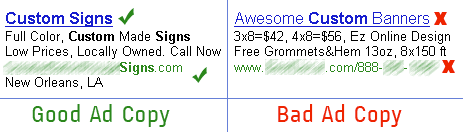
    Good Ad Copy, Bad Ad Copy

    If you look at the two examples below, you can see that the ad I deemed “good” has more bold keywords (keywords automatically bold based on the phrases the searcher used), the copy has a voice with a clear competitive advantage and call-to-action, and the location of the advertiser.  You might be wondering why I decided that the right ad is bad – well even though it gives pricing information, a phone number, and a competitive advantage (“Free Grommets&Hem”), it lacks a call-to-action, voice, location, and most importantly suggests a lack of professionalism by including “Awesome” in the title.

    Not only will the good ad be rewarded by Adwords for incorporating more keywords naturally into the ad copy, but people respond better to complete statements in ads and more likely to click through.

    Managing Your Paid Search Campaigns

    This is probably the hardest because it relies on advertisers knowing how to analyze site metrics, campaign details, and conversion rates.  Even after years of being Google Adwords certified, I still find quantifying the data difficult. Tracking cost per click at a keyword level is tedious and granular work – if you don’t know what you are looking for or even at, you could negatively impact your conversion rate.

    Another challenge for advertisers is bidding against competitors on ad placement. I always find this the most fun because of the level of difficulty.  It’s like eBay bidding on steroids.  If you are not closely managing your daily budget and cost per click, you can easily be pushed off the page – especially when in competition for placement of broad, high-traffic keywords.

    Anyone can pick up a “for Dummies” book, but there is no substitute for experience.  I don’t want to discourage those who are interested in paid search, but I want to inform do-it-yourself types that there is a lot of work that goes into a PPC campaign. You could easily spend thousands of dollars without a single lead to show for it, so please, hire a professional.

  • Effective Online Marketing Messages: How to Pace Yourself

    A couple of weeks ago I wrote a post about over-saturating the market with online business communication. While in the last post we gave you tips on how to tell if you are indeed over-saturating the market, we promised we’d do a follow up with some steps to take to help avoid it and to put out effective online marketing messages.

    Effective Online Marketing Messages

    1. Consistent and timely messages. Plan, Plan, Plan! Decide ahead of time when you’re going to be communicating with your audience. In terms of email marketing, how frequently will you message? Monthly, Bi-Monthly, or Quarterly? Tuesdays or Thursdays? While your plan doesn’t have to be as detailed as blueprints, you should still decide when you are going to send and what you’re going to talk about. There are articles and case studies with varying results on when the best times of day to deliver are. Always keep your target demographic in mind. When are they going to have the time to read? I can promise you I won’t be reading any non-personal email after noon on Friday. Who cares at that point in time? Let me at the weekend. If you’re helping me decide what do to with my weekend maybe you should get me that during my mid week hump when I’m impatiently waiting for the weekend to roll around. If you’re tweeting or posting an update don’t overdue it and post daily until the day of the sale, event or whatever you’re pimping. You still need to be timely in your delivery. Again, when is your audience going to listen, care and be able to respond? Of course, don’t forget in social forums it’s not just about you, you must interact – it’s not about one way communication.Effective Online Marketing: Blueprint

    2. Only send something you would read yourself. Don’t send something just to send something. Often, companies find that the months slip by without sending out a message and then rush to put something together at the last minute when they need it. Tactic #1 will help you be prepared and avoid these last minute throw-togethers that could get multiple users unsubscribing from your list if they feel you’ve wasted their time. When it comes to social forums sometimes you can send something to send something but make sure you would read it. If it’s not  interesting, insightful, entertaining to your target demographic don’t do it. Of course be sure it matches your overall marketing message and brand identity.

    3. Define your Goal. What is the point of the message? Do you want readers to call in and book appointments? Do you want them to fill out a form requesting more information? Do you want them to purchase an item from your site?  Are you being re-tweeted? Gaining fans or growing your network? Once you define what it is you consider a “conversion,” figure out how you will measure this goal, and move on to step 4.

    Effective Online Marketing Messages: Track

    4. Track. Track everything, and watch the numbers, read into them, and learn from them. If you see a significant portion unsubscribing from your list, or a decline in conversions, or fewer click throughs on your links perhaps conduct some testing to see if the decline was a result of the message itself or of the timing.

    Tracking and measuring are almost as important as the timing and message itself, and the former should certainly influence the latter. The best part about planning ahead is that you will have a greater chance of learning from your mistakes and you’ll have time to adjust future messages to be more relevant and effective.

  • New Google Interface: My Before and After Images Disappeared from Google Images!

    The majority of plastic surgeons have a robust before and after image gallery on their respective websites.   With a strong plastic surgery client base, in addition to other industries, we pay attention to the images and their inclusion in the Google Image search.

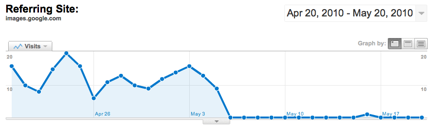
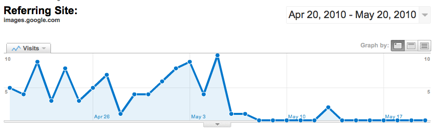
    New Google Interface: Traffic Drop

    In the last week, our SEO team has noticed a severe and dramatic drop in referrals for a few plastic surgeons from Google Image search, which historically has been a strong referrer to the before and after image galleries on the websites.

    Some reactions from our team ranged from the incredulous “Can that be right??” to the flummoxed, “That is totally weird.”

    New Google Interface

    After seeing the first plastic surgeons’ site data with a flat line, I asked a designer with whom we work frequently, Aimee Ellingsen, plastic surgery website design, “um … have you guys replaced or removed all of the images on client X’s website?”  Right.  As if she would completely replace every image in the image gallery … but this data is obviously a problem with images, so I went to the source.

    Aimee’s team looked into it and astutely suggested it was safesearch.  Safesearch is a setting on an individual users’ Google search preferences, so what are the chance that hundreds, thousands, of people have changed their settings on the same day?  That was my first reaction.  … Then it hit me …

    Oop!  The new Google Interface!  Doh!

    Google Support today says:

    “You can choose from among three SafeSearch settings:

    • Moderate filtering excludes most explicit images from Google Images results but doesn’t filter ordinary web search results. This is your default SafeSearch setting; you’ll receive moderate filtering unless you change it.
    • Strict filtering applies SafeSearch filtering to all your search results (i.e. both image search and ordinary web search).
    • No filtering, as you’ve probably figured out, turns off SafeSearch filtering completely.”

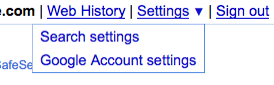
    New Google Interface: Search Settings

    I don’t know what the Google Support said before they launched the new Interface, but what we used to see and now can’t see (unless we change our settings) suggests that it’s a new default implemented with the new interface.

    New Google Interface: How to change your settings

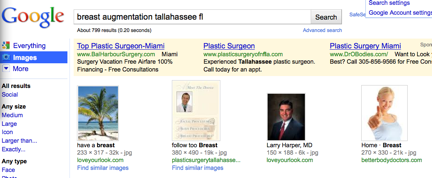
    With Moderate filtering:

    New Google Interface: Google Image Search WITH Moderate filtering

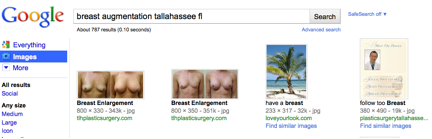
    Without Moderate filtering:

    New Google Interface: Google Image Search WITHOUT moderate filtering

    It appears that Google is slowly rolling out the new interface because not all surgeons’ data is showing this dramatic response, but when it does happen, at least we will know what is going on.

  • Facebook Advertisting – The Internet Marketing Gold Rush

    I am frequently asked what the next big thing in paid marketing is – while I tend to keep my online marketing secrets close to my chest, I always answer Facebook. With hundreds of millions active users, it is Sutter’s Mill in the pay-per-click Gold Rush. As paid search platforms are experiencing exponential growth and decay, it offers advertisers an opportunity to target potential leads at a significantly lower cost than traditional PPC.

    As the world’s largest social media site, Facebook has become the popular choice for the local and niche businesses. By allowing marketers to directly interact with people through paid ads, interest groups and applications, it adds a level of engagement lacking in traditional online marketing.

    What Not To Do On Facebook
    Grammar Fail. Picture Win?

    Facebook Paid Ads

    With the increasing cost of paid search marketing, advertisers are looking for more cost effective alternatives. As previously discussed on this blog, FB advertising yields a much higher conversion rate for a significantly lower cost. This is attributed completely to demographic targeting and graphical ads. Running an ad with ad content that appeals to your targeted demographic is key to conversion.

    Little Nugget: Paid ads are great for new and niche businesses trying to generate brand awareness locally.

    Using Facebook Groups and Fan Pages

    Active engagement with potential leads is priceless – literally. The best way to do this is through groups and fan pages. Free to set up and great for social media and SEO, groups and fan pages give businesses an opportunity to strengthen customer interest. Because of Facebook’s social nature, they also give businesses the human element that websites lack.

    Little Nugget: Groups and fan pages can be used to market to leads before they reach the business’ website.

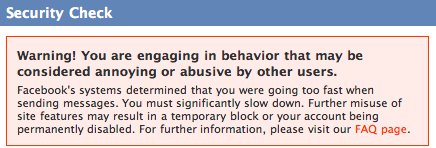
    Facebook Spam Warning
    If you get this message, you're doing it wrong.

    Facebook Applications

    While many only think of Facebook apps in the terms of Farmville and the endless number of “gifts”, there are many applications that are indispensable for brand building. Two personal favorites of mine are Extended Info and Blog RSS Feed Reader.

    Extended Info allows you to integrate custom HTML to create new and interesting fields on the page. Instead of being overly pushing with daily reminders on their timelines, you can designate areas on the page for contest and promotional offers.

    Like with Extended Info, Blog RSS Feed Reader can be used to incorporate content you are discussing on your blog with your profile without the use of status updates. Reader always allows fans a chance to share this information via other social media outlets.

    Internet marketing is no longer the Wild West. It’s becoming more interactive, sophisticated, and accessible to people of all walks of life. While there has always been a question of how to leverage social media, Facebook is making it easier to build communities and generate higher quality leads. I am positive that as it continues evolving, there will be feverish migration of online marketers looking to capitalize on its success.

    Thanks to larcher the Facebook ad image!

  • Google Maps – an equally useful tool for customers and businesses alike

    I can’t fight this feeling any longer. I need to profess my love of Google Maps. Our relationship was a tumultuous one, but she won me over in the end. Living in New Orleans, where some street signs are still missing from their respective corners, Google maps was a saving grace. They also recently started to include bike routes, which guides bikers through the least traffic-laden areas. Though this feature still needs some work, I think it’ll be a great asset to this ever-expanding program.

    Google maps doesn’t just serve to make traveling easier or killing time. It also does wonders for SEOs. Google Places, a new version of its Local Business Center, makes the discoverability of local businesses easy and reliable by having the businesses themselves be able to claim and update their own listings.  Now, they’ve extended this into street view. If you’re viewing the map in street view and see a business that catches your attention, you can now click on an icon that has information like hours, reviews, and more. Here is an example:


    With this feature, you can browse your neighborhood for local restaurants and stores. From there you can see what bars or dessert joints are down the street from where you’re dining or shopping. It’s a great way to take advantage of your city, or learn about a new one while you’re on vacation.

    For now, it will only show the top listings for the area, but they will be expanding to include more businesses and even transit locations. If you’re searching for your business and find the marker is a little off, don’t forget that you can drag it to the proper location.

    The weather looks great today, so I think I’m going to take this thing on a test drive and find a spot where I’ve never eaten before. I can’t wait to see what these guys are going to come with next!