Author: Search Influence Alumni

  • Let Your Business Be Known: 5 Tips for Improving Your LinkedIn Presence

    linkedinlogoimageLinkedIn is a great resource for business-to-business companies to increase brand awareness and build valuable connections. You may have set up a Company Page, but are you really making the most of the networking site? Use these tips to maximize the benefit of your company’s LinkedIn presence!

    Set Up Showcase Pages

    curtainsstagespotlightimageIf your company has a certain brand or product you’d like to emphasize, set up a Showcase Page. Showcase Pages are extensions of your Company Page that spotlight specific products, brands, divisions and more. This allows users to follow the aspects of your business that most interest them. Use this feature to share updates and maintain dialogue with a highly targeted audience.

    Share Your Content

    ShareFlyingPaperPlanesImageLinkedIn’s publishing platform was originally only accessible to about 500 select influencers. Now, this feature is open to all LinkedIn users. If you’re already writing blogs for your website, this is a simple way to reach and engage even more users. Additionally, sharing on LinkedIn gives you the benefit of showcasing your expertise to others in your industry. Share your content, earn followers, and expand your influence online!

    Join Groups (Or Make Your Own!)

    Groups allow you to make connections with users who share your interests or work in a similar industry. Use groups to network, stay up to date on industry news, and share content with a targeted network. There are over 1.5 million groups on LinkedIn, but if you can’t find one that’s a good fit for your business, then you can create your own!

    Engage With Your Followers

    PenguinsRunningGifImageGaining followers is important, but it’s only part of the puzzle. Remember to engage with your connections. Maintain dialogue through regular posts to your Company Page, Showcase Pages, or groups. Share relevant resources, industry news, and your valuable insights. Make sure the content is engaging and gives people a reason to share or comment on your update. Keep the conversation alive by responding to audience comments.

    Get Ideas From Others’ Successes

    idealightbulbimageFeel like you could use some more guidance? Get inspiration from successful company pages! Check out LinkedIn’s 10 Best Company Pages of 2013 to see how top companies are making the most of the network. Also, take a look at some of LinkedIn’s social media case studies to learn about businesses who have used LinkedIn to their advantage.

    LinkedIn can be a valuable resource for your business if you apply these tips. Are you using LinkedIn for your business? Do you have any additional tips? Share in the comments!

    Image Sources:

    Linkedin logo

    Showcase

    Paper Planes

    Penguins

    Idea bulb

  • A Few Things You May Or May Not Have Ever Wanted To Know About Schema, But Were Too Bored To Ask

    As Google continues to affirm its support for more detailed types of schema markup when crawling sites, it seems that there is an increased level of general interest in the concept and implementation of schema. I know that across our office, there are constant enraptured whispers about the ethereal mystery and beauty of this particular variety of microdata. At least, that’s what I imagine. In any case, I am quite certain that people across departments in the Search Influence office, and presumably others, are talking about schema more than they used to.

    If you are already thoroughly comfortable understanding and implementing schema, this is not a blog post for you. Take a long pull on your cigar, another sip of fine brandy, ease the seat back and return to your Baudelaire. As for everyone else, I’m writing this because Google’s documentation on the subject – though extremely helpful and somewhat surprisingly transparent – is probably still a bit dense for those not familiar with microdata as a concept or without some experience coding a web page. I’m hoping to help bridge this gap for anyone seeking a schema primer without the time or inclination to sign up for a night school web design course.

    So What Is Schema Anyway?

    Schema is a type of microdata that is standardized and structured in a way that can help search engines parse pertinent information from web content. The official description can be found here, but let’s keep this simple.

    Many of us went to school at a time where we had to carry around these huge, heavy things called “books” that contained all sorts of crucial knowledge within words printed on bound “paper.” In the course of trying to learn the material contained in the books, many students found it helpful to highlight really pertinent passages in obnoxious neon colors. Highlighting made it a lot easier to go back and see what passages to focus on when studying later for an exam or putting together an essay.

    Well, schema is a lot like highlighting for a search engine. We mark up certain key pieces of information that may provide a clearer concept of what is most important for a search engine to pull from a larger body of content. It’s not saying that the entirety of that content isn’t important in any way; rather, it’s streamlining the presentation of content so that Google or Bing can get a clear picture of what the page is about even before parsing the full scope of what is contained on a page. Accordingly, there is a vast array of different schema types available for different content topics or functions. Whether the topic of your page involves a bus trip or a volcanic eruption, there is probably a schema type that can help further break down your content.

    OK Cool, But Why Bother If Google Is Going To Read Everything Anyway?

    Yes, Google will find a way to establish a general concept of what is on your page for presentation in search results with or without the use of schema. But, well, the Internet is kind of huge, and search engines tend to get kind of busy dealing with that a lot of the time. I think anyone interested in schema understands that Google and Bing use extremely intricate and elaborate algorithms to assess content for use within search results. Even with all of Google’s bears, birds, and mythical beasts on the job, however, it is still possible for information to be misconstrued within Google’s results. It is less a matter of keeping a search engine from getting things wrong than it is of helping a search engine get things more accurate.

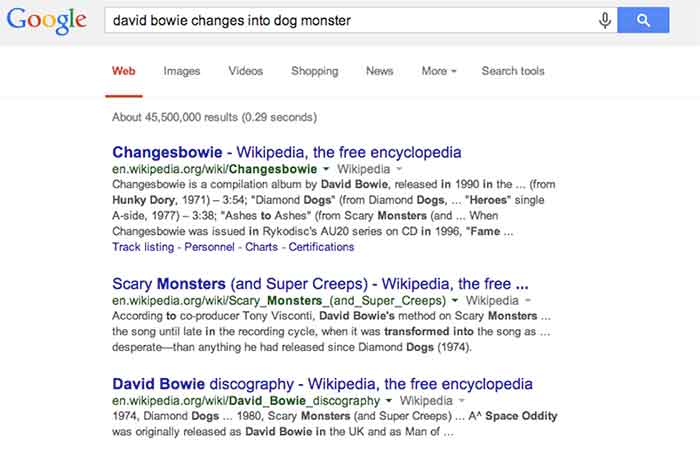
    For a hypothetical example, let’s look at this – as I do most things – in David Bowie terms. As you may or may not be aware, David Bowie actually briefly changed into an apocalyptic half-dog monster in 1974. This is a fact. Had you been unaware of this rather unusual moment in human evolution and overheard it discussed in an elevator (which is certainly where most of us first hear about otherworldly metaphysical transformations), you might be tempted to Google it. Well, if you were to Google “david bowie changes into dog monster,” you’ll eventually find some things about dog monsterdom, to be sure, but you also get an awful lot of results related to the classic 1971 song “Changes,” the compilation album “Changesbowie,” and the 1980 album “Scary Monsters.”

    ChangesBowieSchemaExampleImage

    Well, in this example, Google isn’t doing anything wrong really. It gave you perfectly logical results related to the primary subject of your search and based on the many of the keywords entered, but it still wouldn’t be quite what you were looking for. This is where schema would come into play. If an obviously extant news article on the completely 100% factual occurrence of David Bowie turning into an apocalyptic dog monster had been marked up with, say, Article schema breaking down the subject matter and providing a summary of the content, Google would likely have better understood to serve you the content that directly matched your search query. Likewise, were album and song writeups for “Changes,” “Changesbowie” and “Scary Monsters” marked up with MusicRecording schema or MusicAlbum schema, Google would be better able to differentiate these types of results from articles more pertinent to this search.

    I realize that it’s cheating to hold Google accountable for not being able to perfectly assess my intent in searching for viable news on an event that didn’t actually happen, but this example still hopefully illustrates how schema can be employed to help Google get from “logical and related” to “absolutely on point” in its serving up of search results.

    There is, of course, a less tangible, but equally (if not more) enticing motivation for using schema. Imagine you are trying to settle on your order at a restaurant, and you ask your server if there are any vegetarian options. You’re probably going to leave a bigger tip for a server who specifies and describes the vegetarian options available, versus a server who simply says, “yeah, read the menu” and walks away. In the same way, there is a mentality when using schema that making it easier for Google to see what it needs to take away from a page might result in a better ranking in search results. I will not say in any definitive terms that adding schema markup boosts a site’s search ranking, but – if used correctly and responsibly – it sure isn’t likely to hurt, is it?

    So that’s all it does? What’s all the fuss?

    Well, actually there are a number of other things we can do using schema beyond making Google’s life easier and hoping for some vague benefit in rankings. With many types of schema, we can make really cool things happen in search result snippets for specific types of pages with specific types of content.

    Review Schema

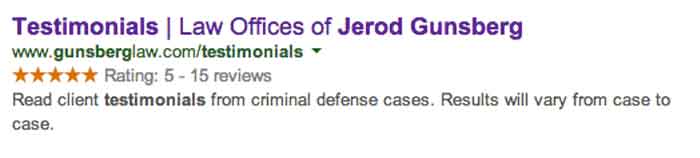
    One thing clients tend to like is having a really pretty star rating value appear in listings of their site in search snippets, which is something that can be accomplished using Review schema.

    StarRatingSchemaExampleImage

    By marking up a number of details within the content of this testimonials page, we are able to communicate enough information to Google about the ratings contained on this page that it presents the rating and review values right there in the search snippet. This is obviously pretty enticing for a user unsure of which result to click on in a long list of unfamiliar names and businesses.

    It is important to remember, though, that the reviews contained in review schema must contain actual ratings associated with said reviews in order to facilitate the addition of the pretty stars to the results. It is also good practice to include some portion of each reviewer’s name in order to establish legitimacy for the content being marked up. Also, in a case like the above example, where there are multiple reviews with multiple rating values, it is necessary for some cumulative review value totals to actually appear on the page. This is known as a review set’s aggregate rating, and it is required in order for the list of ratings to be compiled into a single rating value to be displayed as a star value.

    Video Schema

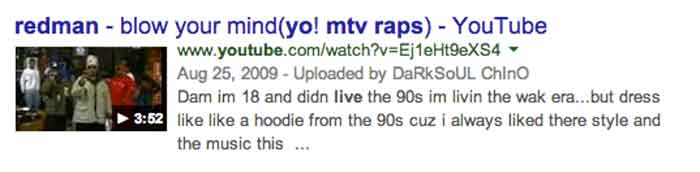
    Anyone who has used Google (so anyone reading this) has seen the potential results of video schema in action every time the inevitable Youtube video links comes up somewhere in your search results list. When YouTube links appear in search results, they are generally accompanied by a thumbnail of the video, which is also a direct link to play the video and the duration of the video being linked. See below:

    VideoSchemaExampleImage

    Effective use of video schema can lead to a similar thumbnail, play icon, and duration display within your site’s search snippets. This can be accomplished using self-hosted videos displayed with custom players or through embedded videos hosted on YouTube, Vimeo, or any other video engine. It is important to remain realistic about this though. Remember that Google owns YouTube, so it’s kind of unlikely that the page containing your embedded YouTube video is going to rank higher or be featured more prominently than the source video’s listing actually on YouTube.

    MusicRecording Schema

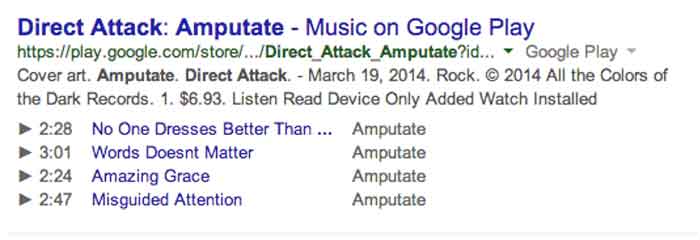
    Much like video schema, MusicRecording schema can display player icons with track, title, and duration details right there in the search snippet. This type of schema obviously only applies to a fairly niche segment of sites and/or clients, but it is another good example of how search snippets can be enhanced through schema. The example below displays a Google Play search result, which, as with fellow Google property YouTube, almost always displays the player info in the search snippet. Similar results can be accomplished in organic results with effective use of schema, however:

    MusicRecordingSchemaExampleImage

    OK, I Get It. So How Do You Do It?

    I’m not going to get into incredibly great detail here, because I promised a relatively simple primer and not a code-heavy breakdown that would scare away newcomers. Perhaps a more thorough explanation of the actual implementation of schema within HTML can be addressed in a future post. For now, I just want to explain schema implementation in terms of properly reading and understanding schema properties in the context of the schema.org item breakdowns.

    The most important thing to understand is that schema markup, like the HTML markup it is integrated into, is hierarchical in nature. This means that there are often numerous schema subproperties, within another schema subproperty, within a schema property, within the top level declared scope of a specific schema type, and so on. And once you go a next level deep in the hierarchy (or change the scope of your markup), the set of available properties is different and only applies to this new scope of the schema.

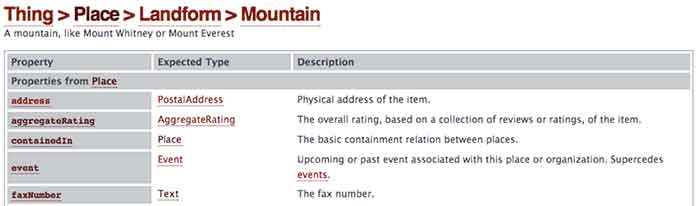
    As an example, let’s look at a section from the page for the always useful Mountain schema*:

    MoutainSchemaExampleImage

    So we’re going to start with Mountain schema as the scope of what we’re marking up in our content. As you can see, there is a list of available Properties for use within this schema on the left. With a nod back to the much earlier comparison in this post, these are all the different types of information we can “highlight” for a search engine. The Description on the right is a pretty self-explanatory explanation of what the property should reference. So far, so good.

    Now, where things get a little tricky is in the Expected Type column in the center. Take a look at the bottom most property “faxNumber,” which is obviously very important. We all know how difficult it can be to send a fax to a mountain, right? Well, you can see that the faxNumber property has an expected type “Text.” This means that whatever text content you list as the value for the faxNumber property is what will be directly communicated to a crawler or search engine as the fax number for your mountain. Simple enough.

    Well, you’ll notice that all the properties above it have more vague and mysterious extended types associated with them. In fact, these types are entirely new hierarchical scopes for the schema being added to the page. So for the “address” property, for instance, instead of just dumping your mountain’s entire street address in as the value, as you can with “faxNumber,” you’re going to have to change the scope of this schema and fill in any address information according to the next level of properties contained in the PostalAddress schema type. Once you change scopes in schema, the deeper level schema type does not know what is going on in the outer levels. So in this example, your PostalAddress does not know or see your mountain’s fax number.

    OK, This Is Getting Ugly. Just Stop.

    Good call. This is probably a good place to cut off an intro level crash course in schema, since anything much more detailed would involve some actual HTML knowledge or experience. Hopefully, this will have helped a non-web developer understand a little bit more about what schema is and how it can be employed to better communicate with search engines. There is such a vast expanse of available schema types for use marking up web content, a fundamental grasp of its structure and function can be extraordinarily useful in pointing your content more directly to the right readers.

    * This is where the Game Of Thrones meme would have gone if I weren’t such a snob.

  • De-stress and Prioritize: How to Keep Your Day-To-Day Organized

    ToDoListImage

    Everyone manages their time differently. With client meetings, calls, internal meetings, and day-to-day tasks, it sometimes gets hard to manage and prioritize what needs to get done.

    Since I’ve started working here in January, I have perfected my system of de-stressing and prioritizing my work so I can always be the efficient.

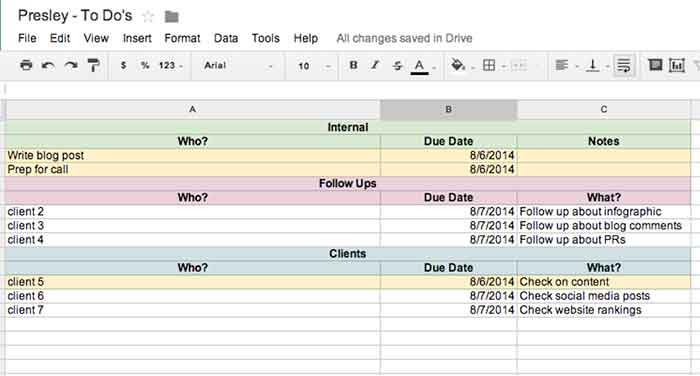
    I don’t know about you, but I work best off of lists. The to-do list that I use each day keeps me organized with internal to-dos, client to-dos, as well as follow ups that need to happen. From this one list, I keep my day-to-day organized!

    PresleysToDoListImage

    Step 1: Check Emails & Do Your Follow Ups

    The very first step of my day consists of checking all emails and replying as needed. Once you’re done with an email, file it away to keep your inbox organized. Also, doing your follow-ups at the same time is helpful because you can get everything out of the way at one time. My follow-up to-do list (see above) is where I go to see what clients I need to follow up on and what the follow up is regarding.

    Step 2: Check Your List & Prioritize

    Check your to-do lists (client and internal) to figure out what needs to get done that day. Give yourself due dates based on the priority of the project, even if the project doesn’t necessarily have a real due date. I highlight each project or follow up that needs to get done that day so it is easy for me to see.

    Step 3: Start On A Project

    Now you can actually start on a project! Pick the project that needs to get completed first based on the due dates you gave yourself. Although I like to finish projects before starting on another one, that is not always possible. Do as much as you can before you have to move on. If you must, set a time limit on each project to ensure you can get everything done that is needed.

    Step 4: Don’t Get Caught Up In Your Emails

    It can be tough seeing your inbox fill up while working on other important things that need to get done. However, don’t get caught up in your emails! Reply back to things that need immediate attention, but continue working on your priority project before starting another round of email replies. Once you’re done with what you are doing, then you can go back to your email if needed.

    Step 5: Re-Date Projects

    If you aren’t done with everything that you assigned for yourself to do that day, redate for the next day and start all over again!

    Of course everyone has their own ways of staying organized, but this system has helped me, and I hope it helps you too!

  • Five For Friday: Facebook Mobile Ad Tracking, Promoted Video Tweets, And More.

    FiveForFridayRedFiveImageFacebook rolls out new way for advertisers to track engagement with mobile ad campaigns. User suspicion on the rise as updated Messenger app gains greater access to personal information stored on mobile devices. Twitter begins testing promoted video posts for brands. Yelp and Bing join forces in the name of breaking down international language barriers. New addition to Google guidelines marks the end of guest blogging. Get the scoop with this week’s Five For Friday.

    1. Facebook introduces new ad data tool – Marketingland

    Facebook announced on Wednesday that they would begin allowing advertisers to track the click through rate of promoted posts and sponsored ads on mobile devices. According to a white paper written for Facebook by Altimeter Group titled, “Why Mobile is Essential for Brand Marketing,” users spend an average of 40 minutes per day on the Facebook mobile app. The white paper also revealed that users check their mobile phone nearly 150 times per day, and that 51% of mobile users say they prioritize checking their notifications over other messages.  Aside from confirming the fact that most people are more attached to their smartphones than their own shadows, the research reveals just how important it is for businesses to be able to reach their target audience with mobile ads.

    Conversion tracking helps businesses measure the return on investment for their Facebook Ads. The conversion reports on the actions people take after viewing and interacting with an advertisement. Marketing Land discusses the implications of the new cross-device feature, including that it enables advertisers to closely track mobile browsing behavior and allows them to better understand how customers are reacting to their campaigns. While Facebook already allowed for advertisers to target specific users, the new cross-device report amplifies an advertiser’s ability to view more detailed metrics on mobile conversions.

    What does this mean to you? Now, using this cross conversion report, businesses can track the success rate of their ad campaigns. Ads that were previously unsuccessful among PC users may be working well as a real-time mobile marketing tool. These ads can be tracked based on location as well, so get excited for better campaign analysis!

    2. Mark Zuckerberg’s Facebook Messenger spy game – Mashable

    TryingToReadMyThoughtsImage

    You’ve probably noticed a recent influx of paranoia popping up on your news feed, this time about the “permissions granted” required to download the new Facebook Messenger app. The concern is based on suspicions that the app can access your smartphone camera and microphone along with a plethora of other private information stored on your device.  Considering the PRISM program’s deal with Facebook, as revealed by Edward Snowden just one year ago, the public is beginning to feel more aware of apps having increased access to personal information. The origin of these suspicions seems to be based off a 2013 Huffington Post article. Some of the app’s new capabilities include:

    • Facebook can read your phone’s call log, including info about incoming and outgoing calls. Who have you been calling? How long did you talk to them?
    • Facebook can actively track your GPS location, approximate location, or precise location.
    • Facebook can actively record video and audio from your phone and take pictures as well as view all files stored on your phone.

    Mashable breaks it down for us in a different way, explaining that a lot of the permissions allow the app to have all of its convenient, user-friendly sharing capabilities:

    • Facebook Messenger requests permission to access your camera and microphone so the user can share images and record videos right from the app.
    • Facebook allows users to directly call people with the app. It needs permission to access your device’s call log so that it can identify who may be calling you via the Messenger app.
    • Facebook requests permission to access your GPS location so that you can check-in and share your location with friends and in posts.

    Now that we’ve walked through two perspectives on the issue, what do you think? Is this just a ploy to monitor the 250 million users on Facebook, or is it another step toward providing an optimal user-based experience?

    3. Twitter introduces promoted video sharing – Mediabistro

    TonyHawkTwitterVideoImageTwitter has introduced a new nifty feature where businesses can better communicate with their followers using promoted video sharing. According to the Twitter blog, “by using Promoted Video, it’s easy for brands to upload and distribute video on Twitter, and to measure the reach and effectiveness of this content.”

    What does this mean to you? As a business, you’ll have more options when it comes to competing for user attention and interaction. If your business is already actively using Twitter, statistics have shown that promoted videos gain more viewers than ever before. The cost-per-view ad model includes ample opportunity to see viewer analytics, including organic as well as paid posts. Overall, this means a much more engaging Twitter feed and increased opportunities for businesses to reach targeted audiences.

    4. Yelp introduces Bing translation– Marketing Land

    BeautyBeastFoodTastingImageHow nice would it be for everyone to communicate with each other as needed, especially about food? Well, that day seems to have arrived, as Yelp has now introduced a Bing translator capability, according to Marketing Land. Yelp can now translate up to 15 languages, which is sure to help travelers that can’t seem to navigate through restaurant menus, reviews, and directions that are posted in different languages. For international eateries looking to attract tourists with local customer reviews, this app update is perfect.

    5. Google updates guideline violations  – Search Engine Land

    With the ongoing battle for good content, Google+ has now updated their listed standards for determining what is considered spam. Guest blogging, a common practice used for SEO purposes, is now on the Google radar. Search Engine Land reports that guest blogging has been used as an attempt to cut-corners around Google’s algorithm, so if you are using low-quality guest blogs to increase the results of your Google page search results, then it is definitely time to stop. Certain guest blogger sites have already been removed from the Google-ranking loop, as reported by Search Engine Land back in April.

    This update is just another example of Google’s ongoing mission to deliver meaningful, authentic content to Internet users. If you haven’t already, take the time to review your business’s blog and website. The real moral of this update: Consider the ways your products and services cater to your audience’s needs by publishing content that is unique and informative!

    Image Sources:

    Red Five Image

    They’re Trying To Read My Thoughts Gif

    Tony Hawk Twitter Video Gif

    Belle Tasting Food Gif

  • #AmIDoingItRight?: Hashtagging for Businesses

    Hashtags allow you expand your business’ reach, and engage with customers in a new way. Check out these quick tips on using and creating hashtags for your business’ #socialmedia accounts.

    1. Do More KISS-ing:

    In 1960, the U.S. Navy enacted the “Keep it simple, stupid” principle. Simplicity can go a long way in the world of hashtagging, whereas complexity can get lost in the shuffle. The United States Naval Academy does a good job of keeping it simple on their Twitter page. Here are some rules of thumb:

    • Keep it short: A good hashtag is typically under 10 characters and only 1-3 words long. Good: #thatwaseasy vs. Bad*: #itainteasybeingcheesy
    • Keep it simple: Try not to use words with too many repeated letters, or words that look funky without spacing. #santaanaarts #wheatthins (Side note: Don’t be afraid to use capital letters at times. They can save your hashtag. #SantaAnaArts #WheatThins)
    • Keep it straightforward: If you want to use an acronym, you can, just don’t get wild with it. The Naval Academy uses #USNA18 to depict their incoming class of plebes. It’s easy for plebes, family, and friends to remember, and it leaves plenty of room for commentary in the tweets.

    2. Get a Second (and third) Opinion:

    SusanBoyleHashtagNightmareGifImage

    Despite the saying that “All publicity is good publicity,” the last thing you want to do is create a hashtagging nightmare. If you haven’t been invited to Su’s anal bum party (aka #susanalbumparty – aka Susan Boyle’s Album Release Party), you may want to have someone from inside, and outside your company take a second look. There are lots of ways that brands can go viral in a negative way, so it’s best to double check before becoming the butt of a joke.

    3. Make Consistency a Priority:

    HashtagClapGifImage

    No matter what hashtag you choose, be sure to keep it consistent across all of your platforms. It is frustrating to the consumer when they don’t know what to hashtag. A popular TLC show, My 600-lb. Life, incorporates live tweets into the show, but they fail to communicate what the official hashtag is. While #My600lbLife and #my600poundlife aren’t that different, half of the population is missing out. Pick one and stick to it.

    4. Commit to Your Hashtag Offline:

    HashtagsGifImage

    Once you’ve decided on a hashtag, be sure to get the word out. Many big brands push their hashtag out on all different forms of media, including packaging, print, and TV commercials. You can find ways to do this on a smaller scale, such as adding it to your email signature, including it on an event invitation, or even holding a contest (internal or external) to let your customers and employees know.

    5. Follow Through:

    Once people are using your hashtag, don’t forget to thank them! A quick follow-up with your consumer via like, share, retweet, +1, or repin can go a long way. Hashtags are great because you can see the most popular, and the most recent, posts using the hashtag. It’s also a great way to find influencers and followers in your industry. Here are a few of my personal favorites:

    Have you ever completely failed, or succeeded, with a hashtag? Let us know in the comments.

    Image Sources:

    Jimmy and Jonah Hashtag Gif

    Doctor Who Hashtags Gif

    https://flic.kr/p/c3caJY

  • HTTPS: Guardians Of The Google Galaxy

    Last week, Google published a blog post stating unequivocally that encryption will be a ranking factor for websites. They said, “We’re starting to use https as a ranking signal.” They did downplay that message slightly by adding the impact would be a small amount of rankings trust: Here is a pretty important takeaway from the Google published blog post (the emphasis is mine).

    “For now, it’s only a very lightweight signal … But over time, we may decide to strengthen it, because we’d like to encourage all website owners to switch from http to https to keep everyone safe on the web.”

    Which I interpret as “You don’t have to frantically get encryption on any of your websites today, but as you perform regular maintenance on any websites you own, you may want to consider adding SSL (Secure Sockets Layer).”

    EncryptionIsComingImageIn the Spring, Matt Cutts hinted strongly that the need for encryption was coming, and at the time we took a “wait and see” approach, knowing that it was not an urgent matter, and we could look at it again when it did become “a thing.”  Now, it is officially a thing.

    Over the years, Search Influence has had a small percentage of clients with encryption.  It has always been on websites where it makes sense: banks, credit unions, any online loan application sites, e commerce (of course) — basically, sites where you submit your personal and financial information. Historically speaking, plumbers, catering services, charter fishing, and dog walkers, would not normally need this level of security because those businesses don’t normally ask consumers for their personal info.

    As we watch the behaviors of secure vs non-secure websites, we will be better able to make informed decisions on the “ to-secure-or-not-to-secure” front.

    For now, MaAnna Stephenson says in this post, “Do it Because it’s Right For You … don’t make this change because of the ranking factor bump alone.“ I tend to agree with her at this point. Google could evolve this into a more significant factor as they suggest in the announcement, or like, other experiments, it could lose importance.

    What Does Encryption do?

    Encryption does very little to protect a website; it serves to protect any data exchange between a website visitor and the hosting server. This announcement by Google illustrates that they want a safe search experience for consumers. The ultimate goal is the consumer experience, and the consumer wants security.

    Without encryption, when you fill out a form or provide any information on a website that gets sent back to the business, this data is sent as plain text. Plain text is bad for personal information and financial information because plain text is easily taken by hackers.

    EncodingDataImage

    What encryption does — it encodes any data going through the website, and only the website owner can decode that data. The concept is the same as using codes to exchange secret messages. You can only decode the message if you have the decoding key.

    These 5 bullets are a great distillation of what happens.  I have quoted these straight from  from DigiCert:

    1.    Browser connects to a web server (website) secured with SSL (https). Browser requests that the server identify itself.

    2.    Server sends a copy of its SSL Certificate, including the server’s public key.

    3.    Browser checks the certificate root against a list of trusted CAs and that the certificate is unexpired, unrevoked, and that its common name is valid for the website that it is connecting to. If the browser trusts the certificate, it creates, encrypts, and sends back a symmetric session key using the server’s public key.

    4.    Server decrypts the symmetric session key using its private key and sends back an acknowledgement encrypted with the session key to start the encrypted session.

    5.    Server and Browser now encrypt all transmitted data with the session key.

    Considerations

    For existing websites, there are some considerations when deciding to implement encryption.  Most of these will cost the website owner money, time, and effort.

    1) Prepare to get an SSL certificate.

    Before you get an SSL certificate, there are several things you need beforehand:

    • Unique IP
    • Certified signing request
    • Accurate WHOIS record
    • Business valuation documentation

    Hopefully, you have a developer who will manage this checklist for you.

    2) Get the SSL certificate.

    The website owner has to decide what kind of SSL certificate he/she needs. Leigh Aucoin, Web Development Team Lead here at Search Influence, comments, “Most hosts or domain registrars offer SSL certificates, and there are some companies that specialize in this in particular.”

    Single Domain Cert

    Prices may vary (usually expect upwards of $70/year) for a single domain.

    If a single domain SSL cert is setup, it’s important to establish a “canonical” domain (as we tend to do) of www or non-www, and set the certificate to that one. Otherwise, you’ll need to purchase another certificate either for the www subdomain or just the raw hostname.

    Wildcard Cert

    Having a “wildcard” SSL certificate that will match all subdomains is approximately 3x the price. This may be good for certain sites, but most clients don’t have subdomains beyond www.

    Also, a website owner needs to understand that the SSL certificate, maintenance, and annual renewal will cost money and effort every year. Peter Rigney at Annunciation Interactive offers his input, “My practical experience is that, for clients who ‘just want the website to work’, keeping an SSL cert up to date can be somewhat logistically painful.  The annual renewals involve some work, charges, and client authorization processes that aren’t particularly fun for anyone. Particularly when it’s a ‘hands-off’ or over-taxed client…”

    This is work for a professional, unless you are a business owner with a lot of technical knowledge.

    MatrixImage

    3) Get it installed on your server.

    Leigh suggests that your hosting company should be able to provide you or your developer with guidance on how to do this, and it may vary per host. Per this FAQ, “Installing a certificate involves a process that’s specific to each individual web server. Certification Authorities publish instructions for generating the Certificate Signing Request (CSR) and installing the certificate.”

    4) Make sure your SEO is impacted as little as possible.

    Per Google Webmasters support, changing from http to https is considered a URL change, and as with all URL changes, it very likely could have a ranking decline after launch.

    Moving from http to https is considered a site move, all of your URLs are changing and all precaution and planning needs to be considered. Redirects, new sitemaps…  This costs a small business owner money in paying the developer to do this work. The web developer has to gather all of the site’s existing information, plan a thorough strategy, implement everything along with the SSL certificates, and monitor the results in the weeks after.

    5) Plan for accurate data.

    When you launch, you will want to make sure you see your website data accurately. In Webmaster Tools, make sure you verify all existing variations of your site (www., non-www., https, subdirectories, subdomains). Don’t forget about the settings for your preferred domains and canonical URLs.

    6) Know that site speed can be decreased.

    Your site speed could be impacted because encryption slows things down. All the data gets encrypted and then decrypted by the website visitor and then again on the hosting server. This takes a little more time than sending straight text data. The SSL also encrypts the page content, the style sheets, and all of the other features on the page such as images and videos. If your site is already old and clunky, you may want to consider an upgrade. While upgrading you should strongly consider a mobile or a responsive site to go along with your potential encryption.

    Not a Snap Decision

    CatShouldAddEncryptionImageDeciding to add encryption to a website is not a decision that can be made quickly. The certificate itself — not to mention hosting and domain renewals — costs money.  Relatively speaking, they don’t cost a lot of money, but the overhead is something that needs to be considered.

    The average small business owner would likely have to pay a developer to manage the process and installation. You also will likely have to pay the developer to maintain that security every year with renewal. Find a developer with some experience with SSL certificates. A trusted, knowledgeable developer is a valuable investment.

    There may be some opportunity costs if the site loses some ranking in the first few weeks after launch. This is a very real scenario and is especially a concern for ecommerce sites. If your developer isn’t experienced with setting up redirects and submitting sitemaps, talk to your SEO team to coordinate with the developer.

    If you are already planning a site redesign, or converting to a responsive site, or some other investment in your domain, it would make sense to go ahead and add in encryption. Just plan ahead and be thorough.

    This blog post is intended to give a small business owner some talking points when having a discussion with his developer. I’m sure there are many small considerations not included here, but if you have a valuable tip for an SMB, please comment!

    Image Sources:

    http://rebloggy.com/dancing+baby+groot/search/bestmatch/page/1

    https://imgflip.com/memegenerator

    http://giphy.com/search/hacker/3

    http://fierydragon.com/dragonsbreath/?p=1286

     

  • Interview with Brian Russell of Media Distribution Solutions; Behold the Power of Video

    MediaDistributionSolutionsLogoImageIn early 2014, we partnered with Media Distribution Solutions to deliver their best-in-class video solution to our customers. The BetterVideo platform has enabled Search Influence to scalably deploy custom, 30-60 second, high quality videos in our search engine optimization packages. Video dramatically increases the time spent on websites, improves social sharability and customer engagement. Earlier this week, our VP of Sales and Marketing, Kelly Benish, interviewed MDS COO Brian Russell on the growth of their company, the evolution of their platform and the importance of video.


    Media Distribution Solutions / BetterVideo

    BrianRussellImage
    Brian Russell

    Interviewee: Brian Russell

    Title: COO

    When were you founded?

    We founded Media Distribution Solutions in 2006, the same time we founded Metrix4Media (a Search Engine Marketing company).

    Where did M4M go?

    M4M was acquired by Hearst Corporation in 2007 for an undisclosed amount. (Sorry, Hearst is private and I cannot disclose the terms of the deal). Metrix4Media is still operated today by LocalEdge as the SEM platform.

    How did you come up with the idea for your company?

    In 2006 our CEO was approached by a technology group that had “the next big thing” in video. After spending some time working with their technology, we felt there was an opportunity to bring video to small and medium sized businesses through some of our prior partners. We had a relationship with the team at LocalEdge and knew that they are always pushing the envelope in terms of what they offer their advertisers. Up to this point, the cost of video had just been too high for SMBs to consider it, but through our technology, we were able to make it accessible and extremely scalable. These were still the very early days of video, prior to the overwhelming popularity of YouTube. Partners like LocalEdge and For Rent Media Solutions were pioneers in offering video through our BetterVideo platform. Over the years, video has evolved from our early, proprietary video codec, through Flash, and now to industry standard H.264/MP4 format. We continue to see advances in compression, which will further fuel the consumption of video on mobile devices. We are still seeing incredible growth as several other large media companies are now embracing video and leveraging the work done by the early adopters.

    What solutions do you offer?

    Video is our core, but there are many different flavors; from top of funnel awareness videos, which are a critical piece that allows the business to not only describe their offering, but also “tell their story.” This gives them an opportunity to differentiate themselves from their competition. The cost to produce high quality video content continues to fall, and business owners are realizing they can create more videos; testimonials videos, products and services videos, as well as more actionable videos for specials or seasonal offerings. The high value of video content is giving their site incredible lift in search results—the more video, the better!

    Where do you see MDS in the next 5 years? What do you predict your evolution will look like?

    Driving them to the future is video advertising. Google/YouTube rolled out TruView and Google Adwords, where an advertiser can target geographically and demographically who sees their video advertisement. This allows them to show relevant, local content to people that have shown interest.

    What have been some of the challenges in scaling out your video solution?

    BetterVideo has experienced the same challenge that other digital advertising solutions see, how to scale, yet serve the needs of the local small business owner. We have addressed this by the appropriate application of technology in key places. We still believe that an experienced video editor needs to play a role in the creation of every single video we produce, but we have automated processes to remove manual, repetitive tasks and allow or video editors to spend their time doing what they do best, creating exceptional videos that allow our advertisers tell their stories, promote their businesses, and deliver strong ROI.

    What types of videos provide the highest engagement level?

    Engagement levels come from relevancy. A person will be engaged with a video that is relevant to them—either through search results or some level of targeting. People are searching to find the answer to a question… How do I do this? How does that work? How do I fix this? Where can I get a great pizza? If they can be shown a video that shows them the answer to the question they have asked, they are very likely to be engaged. We read the studies and know how engagement drops off at certain points in a video, and we produce every one of our videos to deliver key information to overcome these “drop off points,” allowing advertisers to connect with their audience.

    What are the benefits of video for a small business?

    Small businesses get to tell their stories and showcase their specialties. They get to find a way to put themselves out there to show viewers their store, their people, what makes them different. Video offers them to opportunity to show viewers why they should do business with them. It really gives them a chance to showcase the value of their business. Video testimonials are the sweet spot for SMB’s. Reading a review is great, but seeing a review really allows the business to show what the consumer has experienced.

    What are the verticals that benefit most from Videos?

    Hotels and apartment properties love video because people really want to see where they are going to stay or live. They want to see the location, amenities, etc., so this is an extremely hot niche. A lot of service industries such as landscapers, pool builders, and general contractors see a huge benefit because video allows them to showcase their best work. Garage door repair, plumbers and HVAC companies have a list of things they’d like to you try before you call them—video offers them a great way to show you what you need to try before you call. The additional benefit from these types of videos allows these professionals to establish themselves as experts. A consumer will show loyalty to a business that saved them some money by showing them how to fix something simple on their own and will trust that business when they have something larger than they are uncomfortable handling on their own.

    Anything else I should know?

    Never underestimate the value of quality production. It’s so easy to shoot video and post it now, but video is an important part of your business and should be considered a critical component of your brand. You want to make sure you put your best foot forward. A professionally produced video allows a company to showcase their business and differentiate themselves from their competitors.

    Some Video Examples:

    Dominion Enterprises – For Rent Media Solutions:

    Hearst Media Solutions – LocalEdge: Ellis Eye and Laser Medical Center

    Concentra / Humana

    Product Video

  • Five For Friday: Tweets Within Tweets, Foursquare Gets A Facelift, And More!

    FiveForFridayImage

    1. Personal Preferences Killed The Check-In
    -Mashable

    Once upon a time, Foursquare made “checking in” at a location cool. But as of its latest update on Wednesday (8/6), the app has completely removed that feature. Now, those who want to broadcast their location to their social media spheres can do so with Swarm, Foursquare’s spin-off app that debuted in May.

    So what does that mean for Foursquare 8.0? Well, the app has a completely remodeled user experience: new colors, new logo, new layout, and new functions. Once you login, the app asks about your preferences (Are you into Pho? What about Chai Lattes?), then uses those preferences to provide recommendations just for you about places nearby. The app also provides filters to help you narrow down your findings. By using these filters and profiling users’ tastes, Foursquare has successfully become a more personalized version of databases like Yelp, and could potentially change the way people explore their cities. Pretty epic.

    2. Get Your Google Reviews On Your WordPress Blog
    -Blumenthals

    For those with WordPress blogs and websites, there is now a plugin that allows you to share your Google reviews on your page! Google Places Review lets WordPress sites embed Google reviews in two ways: The free, basic version provides a widget in the sidebar showing up to 3 of your most recent Google reviews. The pro version, which is available for $20, provides up to 5 reviews on any page using short codes. The pro version also allows you to filter by star ratings, offers optimized widget caching, and includes a customizable feature for collapsing and expanding reviews. Presumably, posting your reviews on your site can help boost consumer confidence, while providing easy exposure to your good reviews. A recent study by Dimensional Research found that 90% of consumers are influenced by positive online reviews, so get out there and show the interwebs how great you are!

    3. #Tweetception
    -MediaBistro

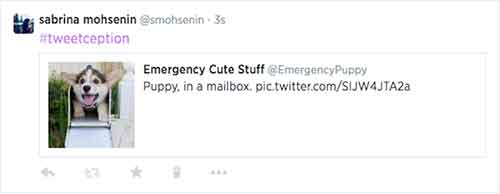
    For those who feel that retweeting simply isn’t enough, there was an interesting update from Twitter this past week: you can now embed a tweet within another tweet! All you have to do is copy and paste the URL of the tweet you want to embed, and then Twitter takes the wheel. The embedded tweet acts as a link that takes you through to the full version of that tweet (you can see my own #tweetception example below). The best part of this feature is that embedded tweets only use up the same amount of characters as any other shortened link, so you have roughly 115 free characters still left at your disposal.

    TwitterEmbedTweetImage

    If you want to get really fancy, the tweet-ception can go even further: you can embed a tweet that includes an embedded tweet into a brand new tweet (!)  – and they all link together in a chain. For now, this feature only functions on twitter.com and the official Twitter iOS and Android apps.

    4. Facebook Goes Down, So Does News Site Traffic
    -Marketing Land

    Last Friday (8/1), there was a brief Facebook outage that led to some interesting information. Chartbeat, a service that produces analytics for web publishers in real-time, announced that the overall traffic on news sites fell 3% during the downtime, which was ultimately less than an hour. What’s even more interesting is that the entrances to news sites via mobile devices dropped 8.5% during the outage, further proving just how important Facebook is to driving mobile traffic to online publishers. Another interesting factoid provided by Chartbeat shows there was also a “9% increase in homepage direct traffic,” meaning people look at homepages more when they don’t have Facebook to tell them what they should be reading. While all this information may seem fairly expected, it highlights just how powerful Facebook is as a news source.

    5.  You Can Now Delete Google Analytics Properties
    -SEO Round Table

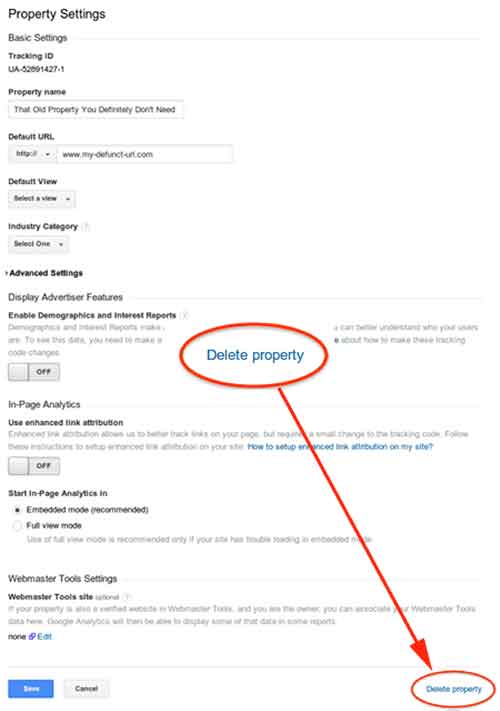
    This week (8/5), Google made a quiet announcement on its Google+ Page stating that you can now delete Google Analytics properties within your various accounts. In the announcement, Google explains that this was not previously allowed due to how the accounts, properties, and profiles were all associated with one another. According to Google, they are “excited to bring this additional flexibility and consistency to our users, which is the first in a series of improvements to managing deletions in Google Analytics.” If you want to delete a property, all you have to do is go to the property settings within admin view, then click “Delete Property” at the bottom right of the page.

    GoogleAnalyticsDeletePropertyImage

  • Google+ Crush Saga: Your Guide To Social Media Sweetness

    Google+ is SO complicated! That’s what a lot of our clients tell us. They get frustrated and, to be honest, so do we.
    There are so many questions! It can be overwhelming.

    What kind of Google+ page should you create?

    Which Google+ page should you use for posts and updates? Which page should you connect to your YouTube channel? How many types of Google+ pages are there?

    To simplify this Google/YouTube situation, we’ve created this sweet little infographic to show:

    • Which pages you should create
    • Which page(s) you should use for regular posts and updates
    • Which page you should connect to YouTube

    As a reminder, there are three types of Google+ Pages:

    • Google+ Profile
    • Google+ Local/Social Page
    • Google+ Brand Page

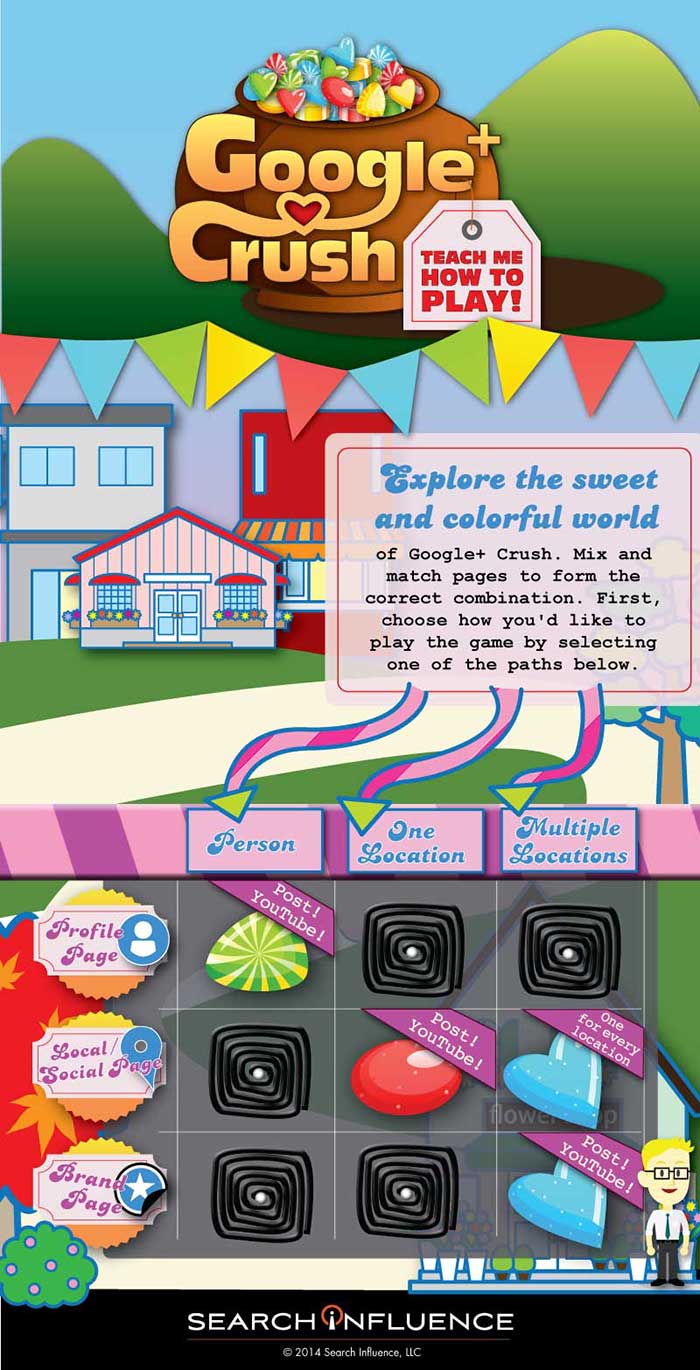
    Explore the sweet and colorful world of Google+ Crush.

    Mix and match pages to form the correct combination, create the appropriate profile, and send the right social signals. First, choose how you’d like to play the game by selecting one of the paths.

    GooglePlusCrushInfographicImage

    If Google+ Crush Isn’t Your Type of Game, Just Read the Manual:

    • Are you looking to use your G+ profile for personal reasons (not associated with a business)? Start posting on your Profile Page and connect this page to your YouTube Channel.
    • Are you a business with just one location? Start posting on your Local/Social Page and connect this page to your YouTube Channel.
    • Are you a multiple location business? Create a Local/Social Page for each location. You should post to your Brand Page and connect your Brand Page to your YouTube Channel.

    Sugar crush! Remember, Google likes it when you play in their sandbox, so go ahead and start posting on Google+ and use YouTube channel to create your unique videos.

    And, above all, crush it!


  • Are Your Keywords Sabotaging Your SEO Efforts?

    Choosing the right keywords to target is one of the most important aspects of a successful SEO campaign. The goal of SEO campaigns is to get more online visibility, more traffic to your site, and more sales and leads. Keyword selection is central to bringing these goals to life.

    MoreThanTheSumOfMyKeywordsImage

    Keyword Selection Must-Haves

    When choosing keywords, make sure they:

    1) Are RELEVANT to your business

    Keywords should answer the questions: What do I do? What products and services do I offer?

    2) Are SEARCHED often

    If the goal is to bring more users to your site, you need to make sure users are actually searching for the keywords you select. Hint: use Google’s Keyword Planner to help you decide what keywords have the greatest search value.

    3) Bring up the RIGHT SEARCH RESULTS that your business should appear in

    You always want to do a Google search of the keywords you are considering. Make sure they represent a search that you have a realistic chance of ranking for and that your direct competitors are appearing in. For example, a bedding store in Mobile, AL might think “Mobile Bed” is a good keyword. In actuality, that keyword brings up national sites that carry movable beds.

    KeywordBadExampleImage

    Your Go-To Keyword Research Tips

    With those 3 items in mind, below are a few tips to use during your keyword research process. Take it from me, comprehensive and strategic keyword research and selection can make or break your SEO efforts.

    1) Be very thorough when brainstorming keyword variations. You’d be surprised how much search value differs for small variations such as “buy gold,” “gold buyer,” and “cash for gold.” The goal is to think of every possible way people are searching for your business and then narrow them down from there!

    2) If you are a local business, be realistic when choosing what geo-modifiers to target. If you are a dentist in Metairie, LA (a suburb of New Orleans), it will be very difficult for you to rank on the first page for “dentist new orleans.” Check out the search results for that keyword, and you’ll see why! It’s best to be practical and start your focus on where you have a reasonable chance of ranking on the first page.

    3) Try and try again! Sometimes you might target a keyword for 6 months to a year and don’t see the results you want. Don’t give up; Google is constantly changing its algorithm, so revisiting your keyword strategy and making changes is perfectly normal and to be expected.

    Do you have more keyword research tips and tricks to share? Leave them in the comments below!