Tag: youtube

  • Behind the Scenes: How Social Media Is Being Used in the Local Film Industry

    Unless you have been living under a rock for the past ten years or so (and not just any rock, but one without TV or Netflix), chances are you have watched a movie that was filmed here in New Orleans. The city – and the state as a whole – has seen an explosion of film and television productions over the past several years, earning the region the title of “Hollywood South.”

    From comedies like 21 Jump Street to Oscar-winners like 12 Years a Slave, Louisiana has even surpassed film production stalwarts like Los Angeles and New York City to become the country’s production capital – all thanks to the highly lucrative tax credits introduced in 2002.

    And while the big-budget movies are driving the local industry (check out NOLA-shot blockbusters Jurassic World and Terminator: Genisys in theaters this year), this influx has also helped inject momentum into the independent film industry – more specifically, the micro-budget indie film scene. These are projects made by passionate local filmmakers looking to find a foothold in the industry at large.

    These are not films the average moviegoer is typically going to be able to see or even hear about. So how do these filmmakers get the word out? How do they raise the funds to even get it made? And how do people find out where they can see these smaller films?

    The best and easiest way is through social media, an umbrella term that can be divided into several different platforms (Facebook, Twitter, Instagram, etc.). The most effective social media strategies take a multi-faceted approach into account and are tailored to suit each medium’s strengths to maximize effectiveness.

    I talked to a few local filmmakers about the importance of social media and other Internet marketing strategies. I found that first and foremost on these filmmakers’ minds is exposure, whether for fundraising or promotional purposes.

    Fundraising and Promotion

    “Facebook is a useful platform that enabled a community to form around the project. It is very useful in promoting fundraisers and screenings,” explains Sam Bass, who has helped with the social media campaigns for two films, How to Disappear Completely and Give Light: Stories from Indigenous Midwives. “Twitter is better for engaging with people outside of your immediate community with the potential to lead to significant opportunities and connections.”

    “We began our social media campaign to draw attention to our Kickstarter,” says Hunter Burke of Construct Films, who is using social media to raise funds for and promote the film Atchafalaya. “It was the quickest and most effective way to get our message out.”

    Greg Tilton, director-producer of reddit doc, had a similar mindset, but he wanted to lay the groundwork for their project before asking for fundraising help. “Social media was key because I did not want our IndieGoGo campaign to be the first time someone had heard of the project,” he states. “It’s been successful because people who don’t know me or my immediate network are following and engaging the project.”

    Mac Alsfeld, the writer-director-star of Father-Like Son, found social media to be most effective after the film was made. “We heavily relied on Twitter to build a relationship with festivals,” he explains. “I think it is important to show festivals that you are the type of filmmaker that will market yourself and that festival to potential filmgoers.”

    Getting Help

    For these filmmakers and others, this was a very important part of the behind-the-scenes process. For the most part, they were navigating the tricky waters of social media without any substantial professional Internet marketing experience – though some had help.

    Burke turned to a friend who had social media marketing and crowdfunding experience. “I really owe a lot to him for educating me on what is standard, what has worked in the past, and also coming up with some wonderful ideas. Without him, I would have been totally lost.”

    Lucky enough to be dating someone in the tourism and marketing industry, Tilton found it helpful to have someone more experienced to bounce ideas off of. “As I experimented, talked to her, and read a lot of articles online, I slowly built up my knowledge. She was a great sounding board for ideas.”

    Thoughts on Social Media

    Even without much prior experience, these filmmakers now have some very astute thoughts about the medium overall gained from their newfound experience.

    “I do believe that it is VERY important to have a presence within the social media community,” declares Kenna J. Moore of Ghost of Elysian Films, who was awarded the Emerging Vision Award for a Louisiana Filmmaker at the 2013 New Orleans Film Festival and the Louisiana Shorts Jury Award in 2014. “It is crucial that our image and what is being put out there is closely monitored. I like to have a presence but stay away from all of the ‘look-at-me’ syndrome that one can easily fall victim to in most social media settings.”

    “The thing about social media is that it is, at its core, incredibly voyeuristic,” says Tilton. “Many people do follow the musings of their interests, so there is a large audience to be engaged and many want to be a part of something big. You can find that audience.”

    Tips for Fellow Filmmakers

    As for fellow indie filmmakers feeling overwhelmed by social media, all the filmmakers have useful tips to share:

    Bass: “Have a social media strategy. Know how to work it. And don’t panic when nothing happens for a week. The most important things are follow-through and relationship building.”

    Alsfeld: “Show people that you have passion. Use your social media to blast information. And even more importantly, have fun. Don’t be boring.”

    Burke: “We performed the best when we released media. Posting a picture, an interview with the filmmaker, or a sample of the score really got our audience interested. People really responded to something they could interact with. Make it a fun experience. Keep it simple. Leave them wanting more.”

    Moore: “I’ve learned that social media has pros and cons. Some people gain opportunity and references from it. Some social media activity allows for negativity and distraction. I would encourage people to stay focused.”

    Tilton: “If you have nothing to say, don’t say anything. So many people are retweeting and posting haphazardly. It’s just a jumble of buzzwords and hashtags. Just make sure it’s always quality and you will find that pays off bigger.”

    Additional Resources
    Here are some more tips directed specifically at indie filmmakers on making the most out of social media:

    7 Tips for Promoting Your Indie Film on Social Media via Premium Beat

    6 Tips on Using Social Media for Your Indie Film via Media-Match

    Image Sources:

    3, 2, 1 Film Image

    Social not-working Image

    The End Image

  • I’m So Trendy. You Already Know… Using Google Trends on YouTube

    The last time I wrote about Google Trends, I explained how it could be useful in your keyword research process. I am now going to explore how this tool can be used to create a strategically optimized YouTube video.

    Note: As mentioned in my previous blog, keep in mind that the numbers on the graphs presented are not absolute numbers. They are relative to each other to reflect a trend.

    Search by Keyword

    If a client already has a YouTube video featuring a general overview of their business, then we typically try to match up another one of their keywords with a YouTube topic centered around that keyword. Google Trends has a section of the site dedicated to finding trends in search results on YouTube only, so you can see if that keyword is trending and if there are related phrases to consider adding to the title and description of the video.

    Here’s how to get there:

    1. Visit http://www.google.com/trends.

    2. Change your search setting in the top right drop down box in the top navigation from “Web Search” to “YouTube Search.”

    YouTubeSearchImage

    3. Type in the root of the keyword(s) you want to use in the search box under “Compare.” You can compare up to five keywords at a time. This can be used to help you decide between keywords to use as a video topic.

    CompareChartImage

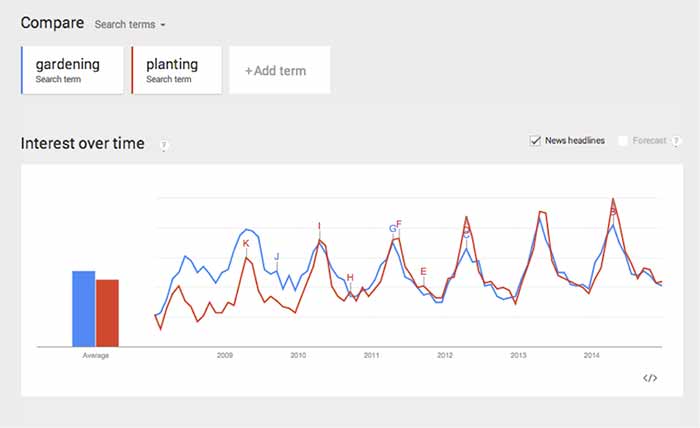
    In this case, both search terms fluctuate at the same time, so seasonality wouldn’t be a factor, but it could be in other instances. This chart tells me that “gardening” used to be a more popular search trend than “planting” on YouTube, but the gap has closed, and “planting” is actually trending more now. It’s interesting that both of the trends dropped so steeply in 2014.

    Because of this, we should look at similar phrases that could have a stronger trend. This is easy to do when you scroll down the page to “Related Searches.”

    Related Searches

    4. Scroll down the page to “Related Searches.”

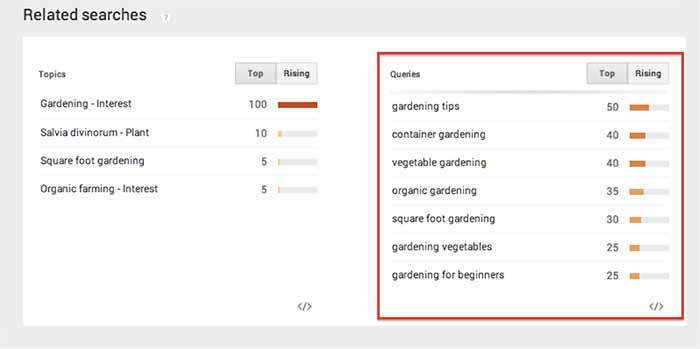
    5. Within “Related Searches” you will see a “Queries” box that shows the most consistently trending searches that are similar to your keyword(s). This is a good place to look for topics that are already popular on YouTube.

    RelatedSearchesImage

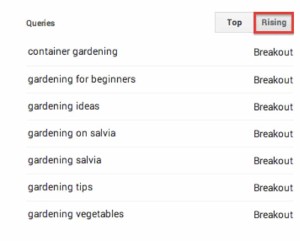
    6. Note the “Rising” column next to “Queries.” These are terms that have been searched for often recently and could become long-term trends.

    As you can see above, I searched for “gardening” and found “container gardening” and “gardening for beginners” as “Related Search” queries. If one of my keywords is “gardening livonia mi,” then I can use “container gardening livonia mi” in the title and description of the video, to optimize it for both terms.

    RisingImage

    Whether you are looking for a way to strategically choose a keyword to optimize a YouTube video or you just need an interesting video topic, Google Trends’ YouTube Search will be a handy tool to explore!

  • A Few Things You May Or May Not Have Ever Wanted To Know About Schema, But Were Too Bored To Ask

    As Google continues to affirm its support for more detailed types of schema markup when crawling sites, it seems that there is an increased level of general interest in the concept and implementation of schema. I know that across our office, there are constant enraptured whispers about the ethereal mystery and beauty of this particular variety of microdata. At least, that’s what I imagine. In any case, I am quite certain that people across departments in the Search Influence office, and presumably others, are talking about schema more than they used to.

    If you are already thoroughly comfortable understanding and implementing schema, this is not a blog post for you. Take a long pull on your cigar, another sip of fine brandy, ease the seat back and return to your Baudelaire. As for everyone else, I’m writing this because Google’s documentation on the subject – though extremely helpful and somewhat surprisingly transparent – is probably still a bit dense for those not familiar with microdata as a concept or without some experience coding a web page. I’m hoping to help bridge this gap for anyone seeking a schema primer without the time or inclination to sign up for a night school web design course.

    So What Is Schema Anyway?

    Schema is a type of microdata that is standardized and structured in a way that can help search engines parse pertinent information from web content. The official description can be found here, but let’s keep this simple.

    Many of us went to school at a time where we had to carry around these huge, heavy things called “books” that contained all sorts of crucial knowledge within words printed on bound “paper.” In the course of trying to learn the material contained in the books, many students found it helpful to highlight really pertinent passages in obnoxious neon colors. Highlighting made it a lot easier to go back and see what passages to focus on when studying later for an exam or putting together an essay.

    Well, schema is a lot like highlighting for a search engine. We mark up certain key pieces of information that may provide a clearer concept of what is most important for a search engine to pull from a larger body of content. It’s not saying that the entirety of that content isn’t important in any way; rather, it’s streamlining the presentation of content so that Google or Bing can get a clear picture of what the page is about even before parsing the full scope of what is contained on a page. Accordingly, there is a vast array of different schema types available for different content topics or functions. Whether the topic of your page involves a bus trip or a volcanic eruption, there is probably a schema type that can help further break down your content.

    OK Cool, But Why Bother If Google Is Going To Read Everything Anyway?

    Yes, Google will find a way to establish a general concept of what is on your page for presentation in search results with or without the use of schema. But, well, the Internet is kind of huge, and search engines tend to get kind of busy dealing with that a lot of the time. I think anyone interested in schema understands that Google and Bing use extremely intricate and elaborate algorithms to assess content for use within search results. Even with all of Google’s bears, birds, and mythical beasts on the job, however, it is still possible for information to be misconstrued within Google’s results. It is less a matter of keeping a search engine from getting things wrong than it is of helping a search engine get things more accurate.

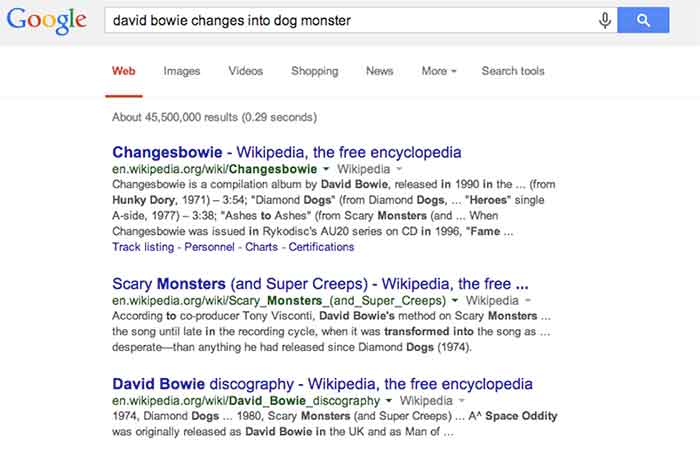
    For a hypothetical example, let’s look at this – as I do most things – in David Bowie terms. As you may or may not be aware, David Bowie actually briefly changed into an apocalyptic half-dog monster in 1974. This is a fact. Had you been unaware of this rather unusual moment in human evolution and overheard it discussed in an elevator (which is certainly where most of us first hear about otherworldly metaphysical transformations), you might be tempted to Google it. Well, if you were to Google “david bowie changes into dog monster,” you’ll eventually find some things about dog monsterdom, to be sure, but you also get an awful lot of results related to the classic 1971 song “Changes,” the compilation album “Changesbowie,” and the 1980 album “Scary Monsters.”

    ChangesBowieSchemaExampleImage

    Well, in this example, Google isn’t doing anything wrong really. It gave you perfectly logical results related to the primary subject of your search and based on the many of the keywords entered, but it still wouldn’t be quite what you were looking for. This is where schema would come into play. If an obviously extant news article on the completely 100% factual occurrence of David Bowie turning into an apocalyptic dog monster had been marked up with, say, Article schema breaking down the subject matter and providing a summary of the content, Google would likely have better understood to serve you the content that directly matched your search query. Likewise, were album and song writeups for “Changes,” “Changesbowie” and “Scary Monsters” marked up with MusicRecording schema or MusicAlbum schema, Google would be better able to differentiate these types of results from articles more pertinent to this search.

    I realize that it’s cheating to hold Google accountable for not being able to perfectly assess my intent in searching for viable news on an event that didn’t actually happen, but this example still hopefully illustrates how schema can be employed to help Google get from “logical and related” to “absolutely on point” in its serving up of search results.

    There is, of course, a less tangible, but equally (if not more) enticing motivation for using schema. Imagine you are trying to settle on your order at a restaurant, and you ask your server if there are any vegetarian options. You’re probably going to leave a bigger tip for a server who specifies and describes the vegetarian options available, versus a server who simply says, “yeah, read the menu” and walks away. In the same way, there is a mentality when using schema that making it easier for Google to see what it needs to take away from a page might result in a better ranking in search results. I will not say in any definitive terms that adding schema markup boosts a site’s search ranking, but – if used correctly and responsibly – it sure isn’t likely to hurt, is it?

    So that’s all it does? What’s all the fuss?

    Well, actually there are a number of other things we can do using schema beyond making Google’s life easier and hoping for some vague benefit in rankings. With many types of schema, we can make really cool things happen in search result snippets for specific types of pages with specific types of content.

    Review Schema

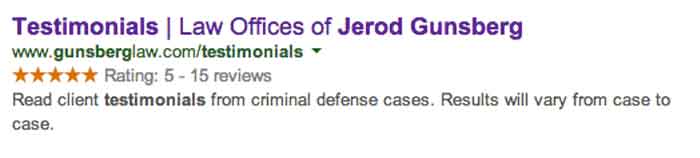
    One thing clients tend to like is having a really pretty star rating value appear in listings of their site in search snippets, which is something that can be accomplished using Review schema.

    StarRatingSchemaExampleImage

    By marking up a number of details within the content of this testimonials page, we are able to communicate enough information to Google about the ratings contained on this page that it presents the rating and review values right there in the search snippet. This is obviously pretty enticing for a user unsure of which result to click on in a long list of unfamiliar names and businesses.

    It is important to remember, though, that the reviews contained in review schema must contain actual ratings associated with said reviews in order to facilitate the addition of the pretty stars to the results. It is also good practice to include some portion of each reviewer’s name in order to establish legitimacy for the content being marked up. Also, in a case like the above example, where there are multiple reviews with multiple rating values, it is necessary for some cumulative review value totals to actually appear on the page. This is known as a review set’s aggregate rating, and it is required in order for the list of ratings to be compiled into a single rating value to be displayed as a star value.

    Video Schema

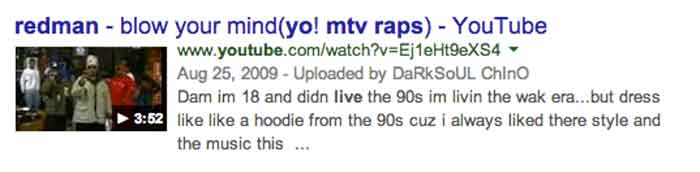
    Anyone who has used Google (so anyone reading this) has seen the potential results of video schema in action every time the inevitable Youtube video links comes up somewhere in your search results list. When YouTube links appear in search results, they are generally accompanied by a thumbnail of the video, which is also a direct link to play the video and the duration of the video being linked. See below:

    VideoSchemaExampleImage

    Effective use of video schema can lead to a similar thumbnail, play icon, and duration display within your site’s search snippets. This can be accomplished using self-hosted videos displayed with custom players or through embedded videos hosted on YouTube, Vimeo, or any other video engine. It is important to remain realistic about this though. Remember that Google owns YouTube, so it’s kind of unlikely that the page containing your embedded YouTube video is going to rank higher or be featured more prominently than the source video’s listing actually on YouTube.

    MusicRecording Schema

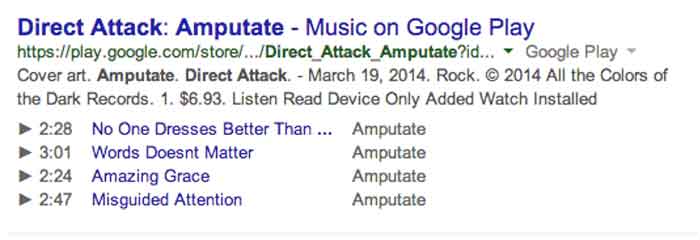
    Much like video schema, MusicRecording schema can display player icons with track, title, and duration details right there in the search snippet. This type of schema obviously only applies to a fairly niche segment of sites and/or clients, but it is another good example of how search snippets can be enhanced through schema. The example below displays a Google Play search result, which, as with fellow Google property YouTube, almost always displays the player info in the search snippet. Similar results can be accomplished in organic results with effective use of schema, however:

    MusicRecordingSchemaExampleImage

    OK, I Get It. So How Do You Do It?

    I’m not going to get into incredibly great detail here, because I promised a relatively simple primer and not a code-heavy breakdown that would scare away newcomers. Perhaps a more thorough explanation of the actual implementation of schema within HTML can be addressed in a future post. For now, I just want to explain schema implementation in terms of properly reading and understanding schema properties in the context of the schema.org item breakdowns.

    The most important thing to understand is that schema markup, like the HTML markup it is integrated into, is hierarchical in nature. This means that there are often numerous schema subproperties, within another schema subproperty, within a schema property, within the top level declared scope of a specific schema type, and so on. And once you go a next level deep in the hierarchy (or change the scope of your markup), the set of available properties is different and only applies to this new scope of the schema.

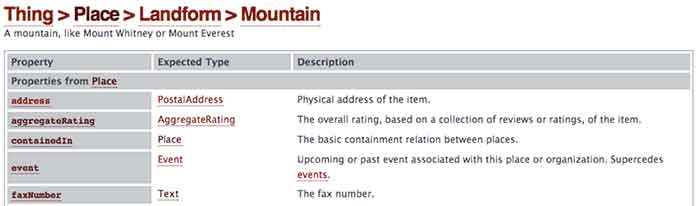
    As an example, let’s look at a section from the page for the always useful Mountain schema*:

    MoutainSchemaExampleImage

    So we’re going to start with Mountain schema as the scope of what we’re marking up in our content. As you can see, there is a list of available Properties for use within this schema on the left. With a nod back to the much earlier comparison in this post, these are all the different types of information we can “highlight” for a search engine. The Description on the right is a pretty self-explanatory explanation of what the property should reference. So far, so good.

    Now, where things get a little tricky is in the Expected Type column in the center. Take a look at the bottom most property “faxNumber,” which is obviously very important. We all know how difficult it can be to send a fax to a mountain, right? Well, you can see that the faxNumber property has an expected type “Text.” This means that whatever text content you list as the value for the faxNumber property is what will be directly communicated to a crawler or search engine as the fax number for your mountain. Simple enough.

    Well, you’ll notice that all the properties above it have more vague and mysterious extended types associated with them. In fact, these types are entirely new hierarchical scopes for the schema being added to the page. So for the “address” property, for instance, instead of just dumping your mountain’s entire street address in as the value, as you can with “faxNumber,” you’re going to have to change the scope of this schema and fill in any address information according to the next level of properties contained in the PostalAddress schema type. Once you change scopes in schema, the deeper level schema type does not know what is going on in the outer levels. So in this example, your PostalAddress does not know or see your mountain’s fax number.

    OK, This Is Getting Ugly. Just Stop.

    Good call. This is probably a good place to cut off an intro level crash course in schema, since anything much more detailed would involve some actual HTML knowledge or experience. Hopefully, this will have helped a non-web developer understand a little bit more about what schema is and how it can be employed to better communicate with search engines. There is such a vast expanse of available schema types for use marking up web content, a fundamental grasp of its structure and function can be extraordinarily useful in pointing your content more directly to the right readers.

    * This is where the Game Of Thrones meme would have gone if I weren’t such a snob.

  • Google+ Crush Saga: Your Guide To Social Media Sweetness

    Google+ is SO complicated! That’s what a lot of our clients tell us. They get frustrated and, to be honest, so do we.
    There are so many questions! It can be overwhelming.

    What kind of Google+ page should you create?

    Which Google+ page should you use for posts and updates? Which page should you connect to your YouTube channel? How many types of Google+ pages are there?

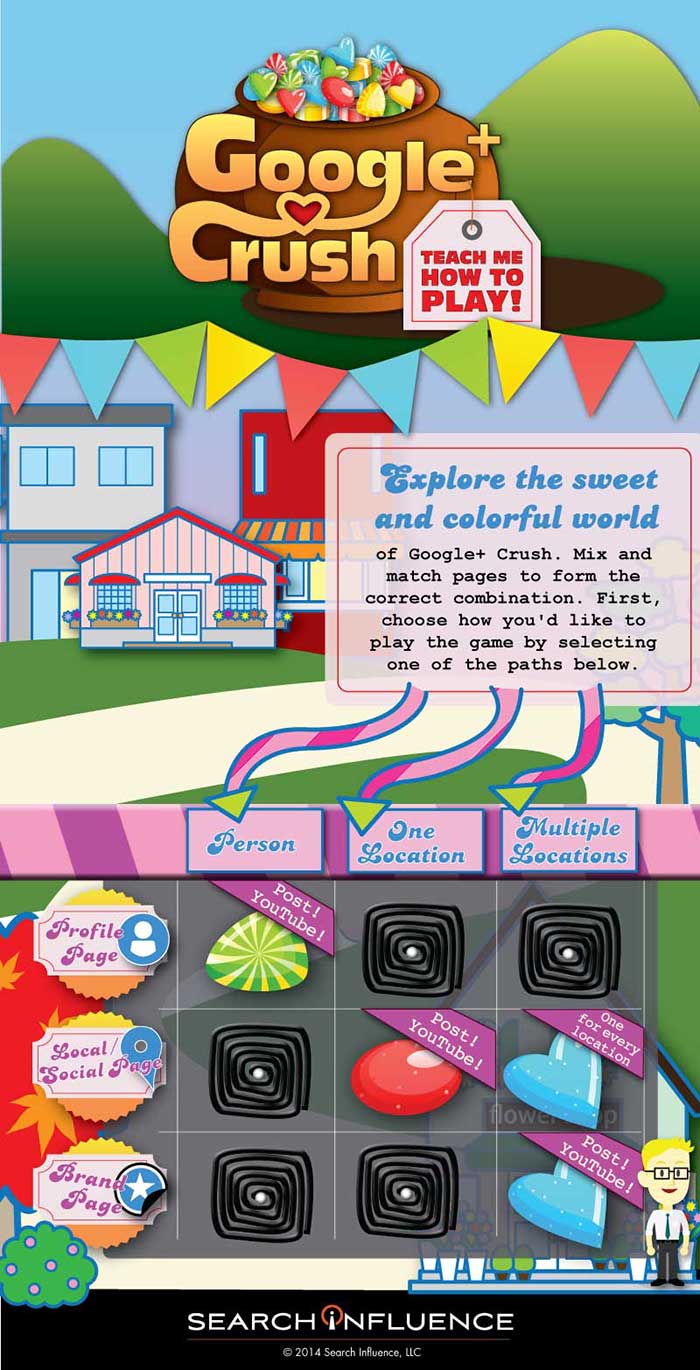
    To simplify this Google/YouTube situation, we’ve created this sweet little infographic to show:

    • Which pages you should create
    • Which page(s) you should use for regular posts and updates
    • Which page you should connect to YouTube

    As a reminder, there are three types of Google+ Pages:

    • Google+ Profile
    • Google+ Local/Social Page
    • Google+ Brand Page

    Explore the sweet and colorful world of Google+ Crush.

    Mix and match pages to form the correct combination, create the appropriate profile, and send the right social signals. First, choose how you’d like to play the game by selecting one of the paths.

    GooglePlusCrushInfographicImage

    If Google+ Crush Isn’t Your Type of Game, Just Read the Manual:

    • Are you looking to use your G+ profile for personal reasons (not associated with a business)? Start posting on your Profile Page and connect this page to your YouTube Channel.
    • Are you a business with just one location? Start posting on your Local/Social Page and connect this page to your YouTube Channel.
    • Are you a multiple location business? Create a Local/Social Page for each location. You should post to your Brand Page and connect your Brand Page to your YouTube Channel.

    Sugar crush! Remember, Google likes it when you play in their sandbox, so go ahead and start posting on Google+ and use YouTube channel to create your unique videos.

    And, above all, crush it!


  • Five for Friday – LG Hires Bros to Build Brand, Your New Favorite Robot & Google Sees the Future of Eye Care

    Comic5

    1. LG Teams Up With Bro-tastic YouTube Network for Content Marketing Campaign
    – Advertising Age

    YouTube famous stars known as Dude Perfect are getting more than just views from their unbelievable, athletic trick shots. They have already acquired advertising leads with brands such as Pringles, Nerf, and as of this week, smartphone maker LG.

    LG hopes that by standing behind these bros, they can extend their reach to younger audiences and hopefully create some competition for other dominating brands in their industry.

    Incorporating this “jaw dropping” content may boost LG’s brand recognition, but stealing market share from Apple may be a bit of a reach.

    RobotWavingHandSmallImage2. Say Hello to the Robotic Personal Assistant of Your Dreams
    – Entrepreneur

    Meet Jibo, a robotic personal assistant created by Dr. Cynthia Breazeal, a Boston-based professor and entrepreneur. Jibo is a “family robot,” designed to interact with your household, take photos and remind you of important events.

    Having had a strange personal experience with Siri, I’m a bit skeptical of personalized interaction with a computer. Jibo seems to break the mold, but will this technology continue a pattern of diminishing personal interaction in today’s culture?

    3. Novartis, Google to Develop Contact Lenses to Monitor Blood Sugar
    – Mashable

    Google is currently joining with Novartis, a Swiss pharmaceutical research and sales company, to develop smart contact lenses. These lenses, expected to make their debut as early as next year, will be equipped with blood glucose monitors and autofocus for troubled vision.

    “The promise here is the holy grail of vision care, to be able to replicate the natural functioning of the eye,” Jimenez said in the Bloomberg report.

    As if being “the holy grail” of the internet was not impressive enough, Google is taking it a few steps further and improving health care and the quality of life as well.

    ContactsEyeImage

    4. Prototype Improves Mobile Typing by Ditching the Keyboard
    – DNews

    Are you fed up with ineffective, awkward mobile and tablet typing methods? Well, a startup based in Austin, Texas is in the early stages of creating a nonexistent keyboard to solve that #FirstWorldProblem.

    Just as the name implies, the AirType project’s goal is to create a system allowing the user to type freely with no restriction but the mobile sensors around your hands and knuckles. Not only does this keyboard (or lack there of) allow you to type freely, it will also adapt to your activity and begin recognizing your habits, like voice recognition for your hands.

    5. Retargeting Is Flawed; the Future Is Pretargeting
    – Digital Next

    What if ads were designed to service needs that we don’t even know we have? Retargeting will soon be a thing of the past, the future of advertising is our future behavior.

    Most are familiar with retargeting efforts, taking products and services we already recognize and driving marketing for those brands. Marketers are beginning to refocus their goals to be more predictive and create wants and needs we may have in the future. The more information consumers divulge, the more predictive marketers become.

    Image Sources:

    Niek Beck, Moms contact


  • Getting Hands On With The New Google My Business

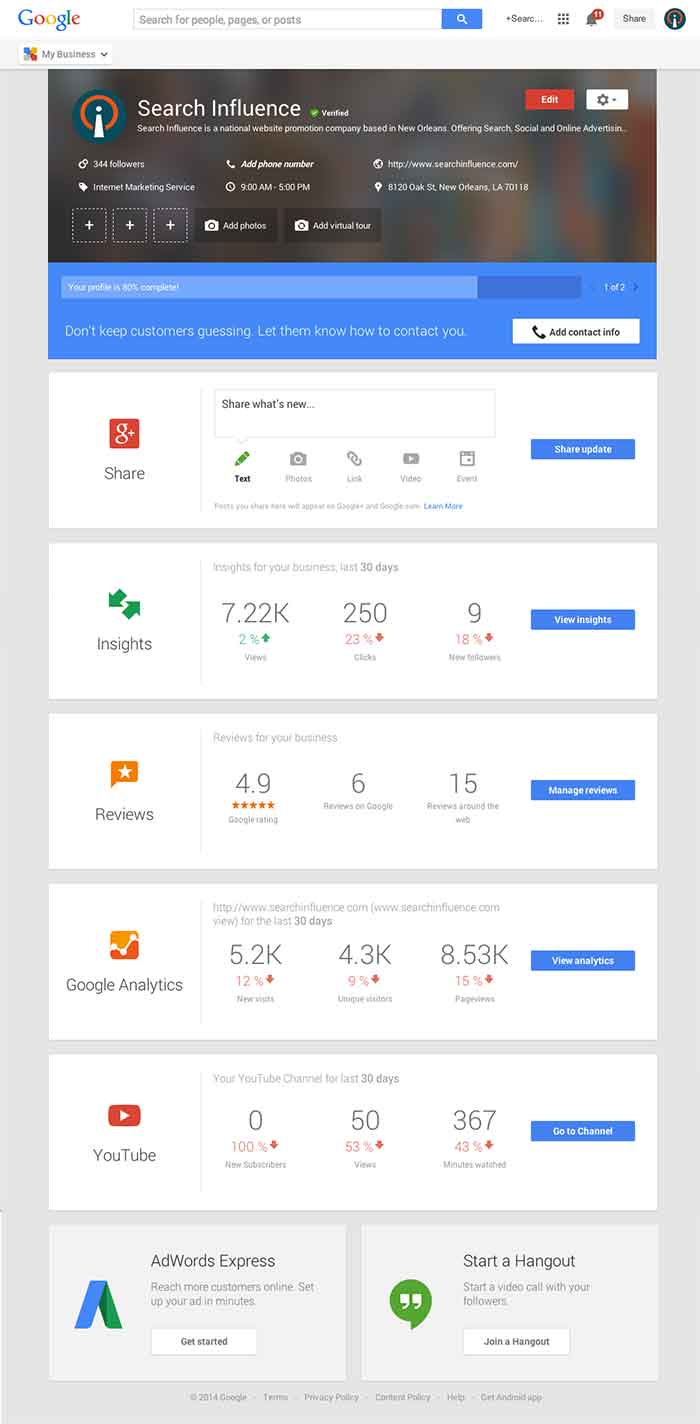
    Today, Google launched Google My Business. This new, more intuitive Google Places serves as a one stop shop for small businesses to do the normal Google Places work like updating business info, adding photos, connecting with customers through Google Plus posting, and staying on top of reviews. They also launched an Android app for managing Business Tools on the go (with the promise of an iOS app launching soon). Watch Google’s introductory video to Google My Business here.

    Changes For Users New and Old

    All new businesses to Google will start in Google My Business. As for current Google Places users, a blog post from Google earlier today said, “We’re also upgrading current users of Places for Business and the Google+ Dashboard to this new experience.” For those who just sat through and are still cleaning up the mess that was the upgrade to the new Google Places, don’t worry! You won’t have to go searching for which dashboard your listings are in or anything like that. It seems that Google My Business is a mostly superficial change that has already happened and just means a newer looking dashboard and a few extra features and controls (like easy access to Youtube, AdWords, and Analytics).

    Google My Business, Game Of Thrones Gif - Search Influence

    Quick & Easy Editing

    These new features are pretty awesome. From your dashboard, first you’ll see the area for easily managing the individual aspects of your primary business information where previously you would have navigated through an “Edit Business Details” button. Connected to the bottom of this dialogue, there will be a blue box that allows you to edit the business information needed to get your profile to 100% complete. Google My Business has succeeded in using minor dashboard edits to make major usability improvements.

    Google My Business Dashboard Image - Search Influence

    Streamlined Sharing

    The next box is a basic G+ Share box for social posting to your business page. Share texts, photos, links, videos, and events easily all from one location. Side note: I recently found out, thanks to a post from Mike Blumenthal, that there is now an easy way to connect your business’ brand page to a location. So, if you have been posting socially from a Google Plus brand page for your business, you can now easily transfer that engagement into your verified local page.

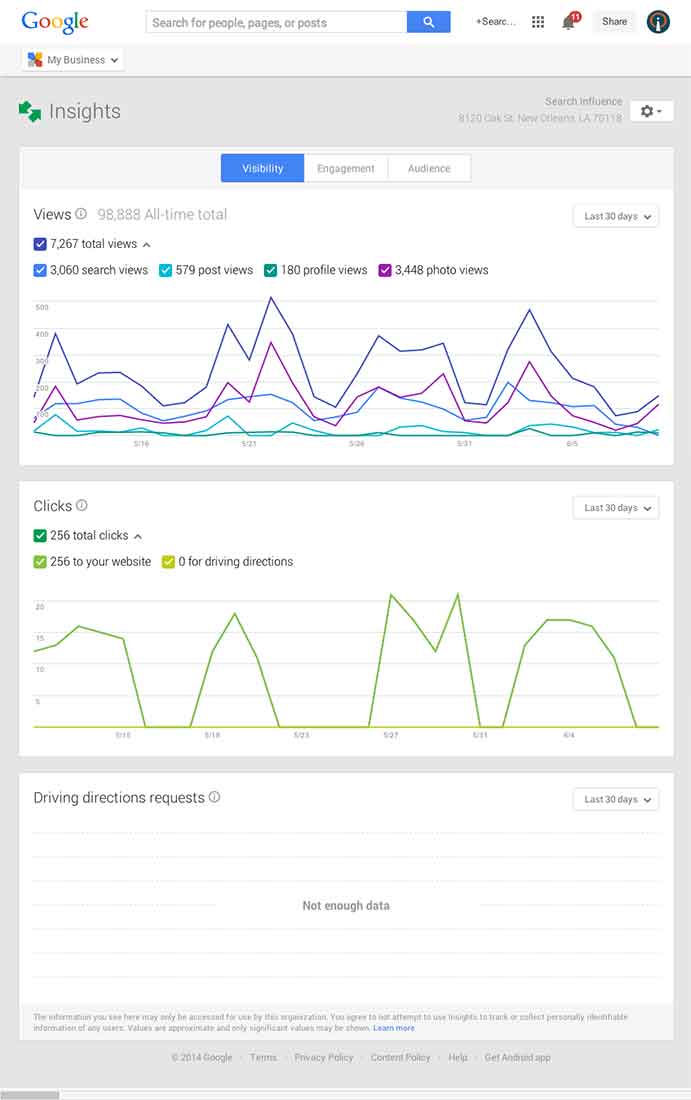
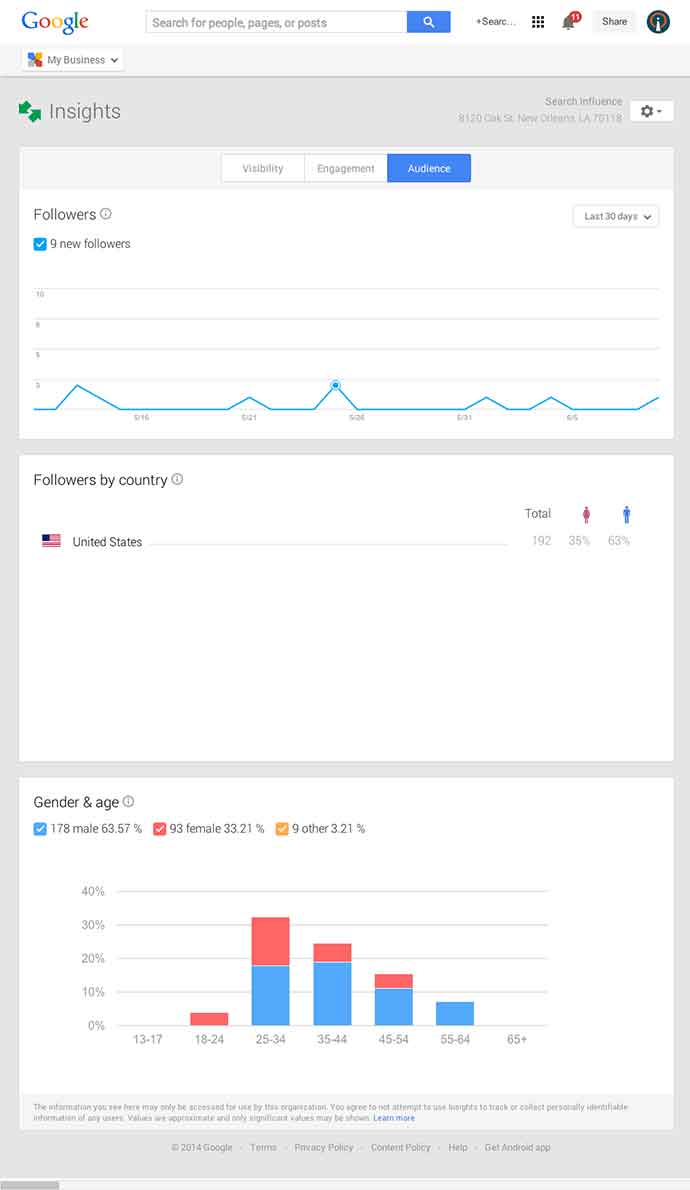
    Google My Business Insights Tool Image - Search Influence  Google My Business Insights Followers Image - Search Influence

    New Data & Graphs

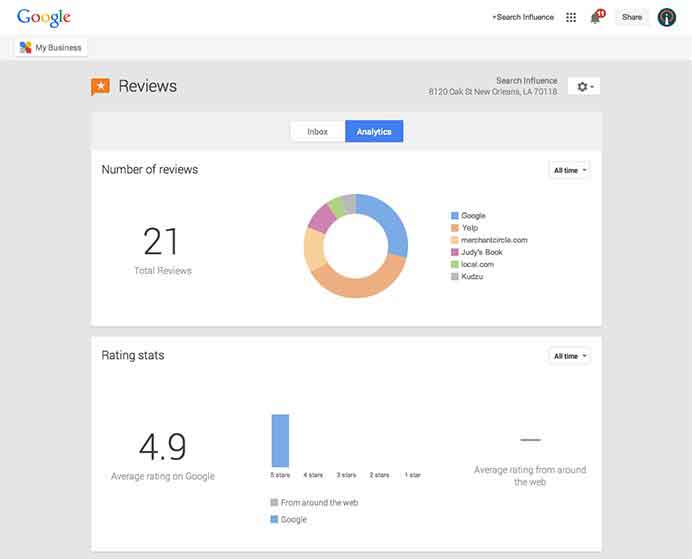
    Next, you’ll find the Insights Tool. Here, you can see how many views your G+ page has gotten over a period of time, how many clicks occurred, and where they went (either looking for Google Maps driving directions or directly to your website). The next feature (and my favorite addition to the Google My Business dashboard) is the reviews section. When you click into “Manage Reviews,” you’ll see your Google reviews as well as other business reviews from around the web. If you click “Analytics” at the top of this page, you can see a really streamlined graphical representation your review information or “Rating Stats” and where your business’ reviews come from.

    Google My Business Reviews Tool Image - Search Influence

    Additional Tools

    You will be able to see other tools like Google Analytics (if you have it installed on your site), YouTube (if you have a channel connected), and AdWords Express (again, if you use it). If you don’t use the above tools, they will still appear at the bottom of your dashboard with the option to “Get Started” if you want to use them! You’ll also see a place to “Join a Google Hangout” at the very bottom of your dashboard. All in all, the new Google My Business looks looks both beautiful and user friendly, presenting a new way to manage businesses’ online reputations through Google.

  • #HowTo: An Overview of Using Vine for Brands and Businesses

    Facebook, Twitter, Google+, YouTube, the list goes on…

    Everyone knows keeping up with the current trends is important when it comes to marketing your business, especially on social media. It seems like each year there is a new social media craze that everyone is using, and it sometimes gets difficult deciding which platforms are the best for your business.

    Most social networks perform in a way where businesses can share written or visual content with their followers. Think of how Facebook and Twitter perform – brands share interesting text or pictures in hopes that followers will “like” “comment” or “retweet” the posts.

    However, there is nothing quite like watching an interesting, funny, or moving video. That is where Vine comes in. Created by its parent company Twitter in 2013, Vine brought a whole new way to market your business through videos.

    Well, Isn’t That What YouTube Does?

    Vine Profile
    Vine Profile

    Vine is similar to YouTube in that they are both platforms where users and brands can share video content with their followers. However, there are many differences that make Vine unique.

    • In the same way that Twitter limits users to 140 characters per tweet, Vine limits videos to a mere 6 seconds. This causes users to be really creative in getting the message across to viewers because there is such a limited time.
    • “Vines” are looping videos, meaning they will continue to play continuously as long as you are watching them.
    • Vine also has stop-motion capability, allowing users to record a portion of the video, stop recording, then start again at a different time.
    • Also similar to Twitter’s retweet, Vine has “revine” capability that allows users to share videos that they think are interesting to their followers.

    Interestingly enough, because of the creative nature of the app, many ordinary people have become “Vine Famous,” acquiring millions of fans since its inception in 2013. However, many businesses have also branched out and started using Vine to market their brand.

    How Can Vine Help Your Business?

    Vine can be beneficial for both new and loyal customers of your business.

    For new customers, you can gain awareness for your business through Vine. Millions of people view the popular pages and the trending #hashtags each day. Participating and getting your Vines exposed to more people could introduce your business to someone that didn’t know about it previously.

    For already loyal customers, Vine can offer a different way for them to see your business. For example, if you are a clothing store, making Vines of backstage action at a fashion show would be interesting to people who already have an interest in your brand.

    Tips for Getting Started

    Now that you know what Vine is and why it is important, here are a few tips to help you get started!

    • Use Hashtags: Join the conversation with other users on Vine and make videos relevant to the trending hashtags. An always popular one is #HowTo. Getting your business seen on these trending subjects increases the probability of your video getting seen, liked or even revined by other users.
    • Cross-Post Vines to Twitter: Vine is still such a new technology that not everyone is using yet. You can post your Vines to your brand’s Twitter account to get even more exposure.
    • BE CREATIVE: Vine is not the platform to just make videos just for the sake of making them. Because of the looping and stop-motion features, you can really make something unique and interesting that other people will find shareable. The best Vines are the ones that are funny or extremely visually appealing (think optical illusion or magic).

    Have A Call To Action When Applicable: Contests on Vine are popular. Have your followers create a unique video of themselves using your product, and revine the winner! This makes loyal customers feel special when their favorite business is actually acknowledging them.

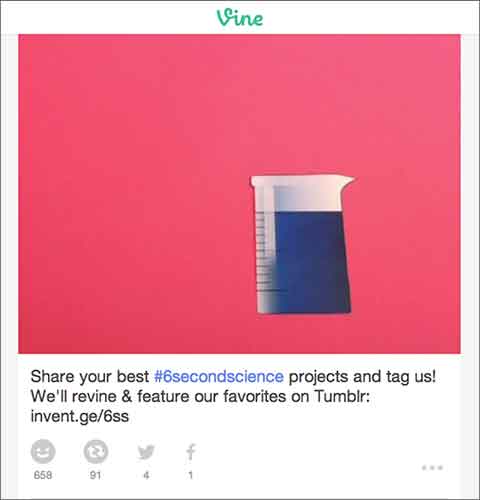
    VinePost

    Above you can see an example of a great Vine from GE. They encouraged their followers to be creative and make a #6SecondScience video, and in return they would revine a winner.

    Finding out how to use Vine can be difficult at first, but finding your niche and posting to this app can definitely be beneficial when it comes to keeping loyalty among customers and finding new ones. However, just like any other social media platform, it is important to keep up with the updates of the app and stay current with this ever-changing technology.

  • 5 for Friday – New YouTube Feature, Ads on Reddit and more!

    Stencil5

    1. Advertising on Reddit is easy with this guide -Moz

    For those of you unfamiliar with the site, Reddit.com is a social site composed of user submitted images, text posts, links, news stories and more. Reddit is a huge community with roughly 115 million unique visitors. This site offers low cost ads with high potential to engage users and even go viral. Advertising on Reddit requires different tactics than on other sites, though. Ads are treated like any other content, meaning “Redditors” have the ability to vote your ad up or down, affecting its visibility. Your voice and overall strategy on Reddit must be handled differently than on other sites. This handy guide gives a lot of great advice to help get your business started.

    2. Google Bulk upgraded to allow multiple administrators -Blumenthals

    Google+ is finally getting a much-needed multi-admin feature! Corporate Google accounts can now create listings for all of their locations and then authorize separate Google accounts as admins.  The bulk upload tool hasn’t been embraced in the past, but demand from SEO companies and business owners finally convinced Google to update their bulk upload backend as well. With an upgraded account, a single corporate account can manage up to 10,000 locations with full control. This is going to make social media management much easier for business with multiple locations!

    3. When is best time to make your social media post? -Hubspot

    socialmediaicons

    Scheduling your social media posts well can actually make a big difference in how many people see them. Web traffic to these sites change greatly depending on the day of the week and time of day. There is no set calendar that is best for all social media sites; people use them all differently. Facebook yields high results during weekday afternoons while Pinterest has increased traffic on the weekend. Check out this handy infographic for details on the best and worst times to reach out on Facebook, Twitter, Linkedin, Pinterest, Tumblr and Google+.

    4. Youtube allows users to add 3-second intros to their videos -Mashable

    This post is short and sweet because the subject is pretty simple. Youtube has a new feature allowing users to add a 3-second intro to all of the videos on their channel. This feature is valuable for creating a distinctly branded channel. Viewers can begin to identify your videos easily based on the consistent intro. Currently the only limitation on these intros is that they may not be used for advertising or sponsorship purposes.

    5. Foursquare moves their check-in feature to new app: Swarm -Search Engine Land

    Foursquare, in a bold move, is removing their key feature, “check-ins.”  Checking in will now be done on their new app, Swarm. Swarm will focus on the social aspects: checking into locations, finding friends, and even being able to chat to people you know nearby. Foursquare will continue to exist with a focus on discovering local businesses and serving as a competitor to Yelp. The success or failure of this division could determine the future for this company.

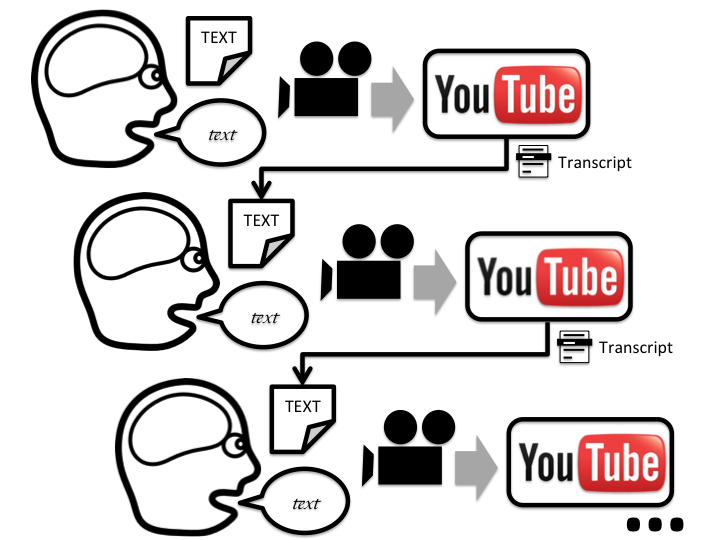
  • Optimize Your YouTube Videos With Video Transcripts

    youtube

    Using YouTube to promote your business is one of the best avenues to take when it comes to outranking your competition. YouTube is one of the largest search engines available today, which means that everyone is trying to get a piece of the action. The only problem is that most people do not know how to leverage the power of YouTube, because their video gets lost in what I like to call “The Black Hole Of Videos”. People still have not learned that YouTube is a search engine, and therefore, your videos have to be identify by the search engine as an authority. Video transcripts can play a major role in telling search engines, “Hey! Look at me! I am a good video and I have content to prove it!”

    youtube 2

    The problem with YouTube video optimization is the only thing that YouTube has to determine what the content of your video entails is the description, the title, and the tags. While these are great ways to get more viewership for your videos, if your niche is popular with a lot of competition it could be very hard to outrank. Video transcripts give YouTube something to actually read and determine what your video is about based on more than just titles, descriptions and tags. YouTube and Google read text to optimize content, so by adding a transcript you are adding extra content to crawl! Remember, content is king in search engine land. The transcripts are classified on your video as “CC” or “closed captioning”. It’s almost equivalent to putting your Youtube video on steroids. Most of your competition will not upload a video transcript and this gives you an advantage of your competition.

    If you don’t have time to transcribe your video, go to Fiverr.com. People have offers to transcribe videos for $5 dollars so you don’t have to! Transcriptions will skyrocket your YouTube videos to the next level, simply because you are giving YouTube content to actually read and crawl instead of just titles and tags.

  • 5 For Friday — Links, Stories & Posts For Your Weekend

    Number 5 Street Falmouth1. The Marketing Value of YouTube – SEO MOZ

    The author here discusses the impacts YouTube can have for your product. YouTube is a great resource if you are looking to build your brand. It is important that you put up quality videos over the quantity of videos. Check out the article for some great information if you are looking to build a presence on YouTube.

    2. Google Places Is Being Updated To Google + Local – Search Engine Journal

    This talks about the transition from Google Places to Google + Local.  The post describes how this should make the process easier to use, faster updates, and integration with Adwords (Express) and G +.

    3. SEO & Keywords: Think Conversions, Not Rankings – Search Engine Watch

    Here the author talks about how rankings should not be the ultimate goal when it comes to SEO services. The author lists 4 steps you should take to produce stronger SEO results in the long run.

    4. Indecision 2.0: Are Apps Taking Away Your Power to Decide? –  Mashable

    Are we too dependent on social media to make simple decisions we face on a daily basis? I sure hope not. This is an interesting article about different apps that can help you make decisions you are not comfortable making, or if you just want some help making a decision.

    5. Google On Developing For Google Glass – Search Engine Round Table

    This post has an informative video on how developers can develop apps for Google Glass. In this article, it lists four key developer guidelines from the video to help you better understand the process.