Tag: youtube

  • The Strategic Marketing Method to Building Your Brand on Youtube

    In true Search Influence fashion, I am going to start this blog post the same way we typically start our weekly company meetings, with a quote:

    “You cannot teach a man anything; you can only help him discover it in himself.” – Galileo

    Though Galileo provided us with this insightful quote, Frances Bacon formulated one of the most important tools to aid in this self-discovery, the scientific method.

    Now, Let’s Get Started…

    Neil DeGrasse Tyson science meme

    There is a method to the madness! What if I told you that to build your brand on YouTube, all you need to know is the scientific method that you learned in 5th grade? You may ask yourself, what exactly are the six steps of the scientific method and how the heck does this relate to digital marketing? For a little refresher, I have listed the steps to get us started:

    1. Ask a question
    2. Do background research
    3. Construct a hypothesis
    4. Test your hypothesis
    5. Analyze the data and draw a conclusion
    6. Share your results

    STEP 1: Ask a Question

    In the first step, you are going to want to think of multiple questions around the reasoning your experiment. I highly recommend taking the time to write this out, whether it’s with a pen and paper or on your computer. Like any great scientist, you should be documenting all of your brainstorming, research, strategies, and data.

    • What is your niche?
    • What is the problem you want to solve?
    • What is your area of expertise?
    • Who do you want to target?
    • Why are you choosing to focus on this niche?

    The last question is key because there is never going to be the same level of commitment if you aren’t choosing something you are truly passionate about.

    STEP 2: Do Background Research

    Now that we have sorted through all of those questions and have a clearer idea of the direction we want to take, it’s time to start our background research.

    We need to look at what our competitors are doing. Our competitors will be the brands or people that are doing something similar to what we have chosen as our niche. When analyzing them, we should ask the following questions:

    • How do they engage?
    • Which formats do they use?
    • What is their content strategy?
    • Is what they’re doing working?
    • What is your market missing?
    • What can you do differently from them?

    Once again, this last question is the key to your success! What can you do differently that will set you apart from your competitors?

    STEP 3: Construct a Hypothesis

    Now the fun part (and my personal favorite)! We need to construct a hypothesis, or, in marketing terms, create a strategy. We will want to use our research from Step 2 to construct keywords, content, and visual styles that will work with your target audience while utilizing the competitive advantage you identified in Step 2. In this step, you will also want to determine your overall strategy to remain consistent. This is going to include your posting schedule, engagement plan, and who (brands or people) you would like to collaborate with in the future.

    An important part of this step is determining the metrics that matter, what we like to call “SMART Goals.” What are the metrics you should measure to prove the success of your strategy?  This will include constructing a timeline of when you would like to check in on these SMART Goals of your strategy.

    Neil DeGrasse Tyson meme about bracing yourself for digital marketing knowledge

    STEP 4: Test Your Hypothesis

    Testing your hypothesis is when the party really gets started. It’s time to experiment. You are going to implement your strategy. You will take the creative strategies you planned out in Step 3 and put them into action.

    STEP 5: Analyze the Data and Draw a Conclusion

    Using the timeline determined in Step 3, analyze the data and draw a conclusion. Look at those metrics that matter. Ask yourself the following questions:

    • Is your strategy helping you achieve your goals?
    • Did you determine the right goals to track in Step 3?

    STEP 6: Share Your Results

    Now, unfortunately, I can’t say that this is the final step because “sharing your results” means you will now use your conclusions to decide on optimizations for your strategy. You’ll know if you’ve achieved your goals or if certain aspects need to be revisited when you analyze the data in the previous step.

    Scientists share their results to provide insightful information that can be used as research for future experiments. Experiments aren’t meant to be done once. This process should be repeated and repeated to study and improve your marketing strategy.

    Once you’ve got your results, ask yourself the following questions:

    • Should you restrategize your brand?
    • Did you choose the right market?
    • Should you restrategize your execution?
    • What parts of your plan are working?

    And the final question to ask yourself after reading this post is… are you smarter than a 5th grader?

    Luckily, the marketing experts at Search Influence got straight A’s in 5th grade. If you need help developing an effective marketing strategy for your business or building brand awareness on YouTube or any other social media platform, start a conversation with one of our strategists today.

     Images

    NDT 1

    NDT 2

  • 7 Best Social Media Platforms for Your Digital Marketing Strategy in 2019

    A group of people using social media on their mobile devices at Search Influence in New Orleans, LA

    Social media is an essential element of a holistic and integrated marketing plan. Different social media platforms allow you to create and share content, reach specific audiences, and accomplish your marketing and business goals. Before you begin expanding your current social media marketing, make a plan. Here are some questions to help you get started:

    • Who are you trying to reach?
    • Where does your target audience consume content online?
    • Which message(s) do you want to send your target audience?
    • What is your end business goal?

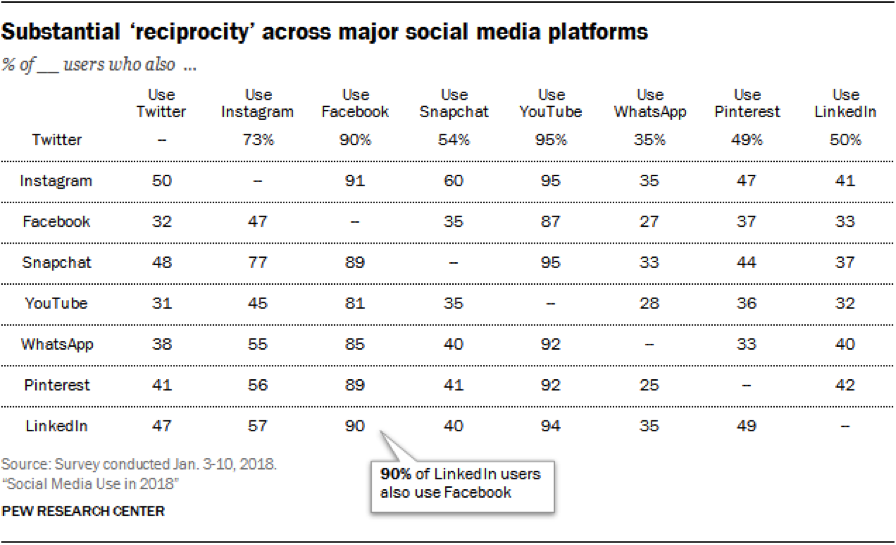
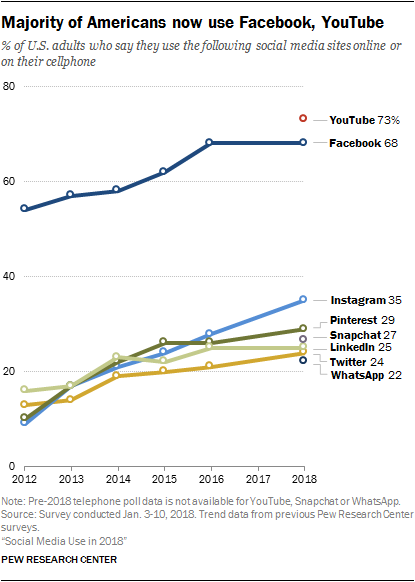
    Your answers to these questions will help you define your business goals and translate them into social media marketing goals. You will then be able to prioritize which social platform to use. If you are new to social media marketing, Facebook is where you should start. If you already have decent engagement on one platform, where should you go next? Most Americans are active on two to three social platforms, so why limit your marketing to just one?

    Screen shot of social media stats

    Which Social Media Platform Is Best for Marketing?

      1. Facebook – With more than 2.27 billion active monthly users, Facebook is definitely your number one choice. Through Facebook Ads Manager, you can target users based on their location, age, gender, level of education, relationship status, job title, interests, purchase behavior, device usage, and so much more. And it doesn’t end there! Facebook allows you to create Custom Audiences to reach current customers or patients. Custom Audiences can be created from the phone numbers or email addresses you’re already collecting, or from Facebook Pixel to target people who have visited your website. To reach new customers, use Lookalike Audiences; these are created from Facebook’s insights about Custom Audiences to target users with similar online behaviors. You may think “My target demographic isn’t on Facebook,” and you could be right, but Facebook Ads Manager takes the guesswork out of it. This platform allows you to create and serve your message to the right user on Facebook, Instagram, or (through the Audience Network) across the web. As stated by Facebook,

    “1 billion+ people see a [Facebook] Audience Network ad each month.”

      1. Instagram – Owned by Facebook, Instagram boasts more than 1 billion monthly active users and has the same advertising options as Facebook. First and foremost, it’s a visual platform, which provides you with an opportunity to showcase your business’s personality. There are a number of free tools you can use to improve your audience’s creative experience.
      2. YouTube – YouTube allows your business to post and share an unlimited amount of video content, which you can then share on social media, send via email, or embed on your website. As a product of Google, there is also an added SEO benefit of having a YouTube channel and producing video content on the platform. With more than 1.8 billion active monthly users worldwide, YouTube has essentially become the second largest search engine behind Google. When it comes to paid advertising on YouTube, it takes the lead over Facebook for video. Facebook charges your account for each 10-second view, while YouTube does not charge you until a user has consumed at least 30 seconds of an ad. According to expandedramblings.com,

    “YouTube overall reaches more 18-34 and 18-49 year-olds than any cable network in the U.S.”

    1. Google My Business – You may not consider Google My Business to be a social network per se, but this free platform offers features that Facebook, Instagram, Twitter, etc. do not. Posts are searchable via keywords, they positively affect your SEO rankings, and they provide an opportunity for backlinks. You can read more about why you should be posting on Google My Business.
    2. LinkedIn – This platform is known as the primary social networking platform for professionals. You can use LinkedIn to update customers on your business, connect with industry partners, and recruit new team members. As a professional network, it is the top choice for B2B social media marketing. According to Forbes, “LinkedIn is one of the best platforms for generating leads and now makes up 46 percent of the social media traffic generated to company websites for B2B firms.”
    3. Pinterest – Similar to Instagram, Pinterest is a visual platform. Pinterest allows your business to show off your product offerings, before-and-after images (great for home improvement, beauty, and cosmetic surgery industries), and curated pin-boards. As you are probably already aware, its audience is primarily female. Pinterest is an oasis for hobbyists, brides and grooms, and day-dreamers in general. Keep this in mind when sharing content. Travel itineraries, suggested packing lists, landscaping ideas, craft projects, and wedding inspiration are the bread and butter of this platform. But don’t think you’re limited to just engaging with your audience. According to Hootsuite, 87 percent of Pinners have made a purchase through the platform.
    4. Twitter – Twitter is a quick-paced platform that’s perfect for sharing the latest trends or your business’s take on current events. Its audience skews somewhat younger but is split pretty evenly between men and women. Your business can participate in a larger conversation by using hashtags for trending topics. These hashtags allow you to reach new potential customers in your industry. Twitter can also be used to monitor positive and negative reactions from existing customers, and you can use the platform to provide additional customer service.

    How Do You Decide Which Social Platforms to Use?

    So, now that you’re familiar with the seven best social platforms for your digital marketing strategy, you should keep these tips in mind. When trying to decide which platform(s) are best for your business, first review your goals and audience, and then make a plan. Then, meet your audience where they are engaging online. Once you have started sharing on one of these platforms, analyze your efforts and look for areas to fine-tune your targeting and content strategy before jumping to another platform. If you’d like more advice on how to use social media platforms to effectively target your ideal clients, start a conversation with our experts by calling (504) 208-3900.

    Whichever type of social media platform you decide to use in your marketing strategy, Search Influence has your back. Our social media experts can work with you to implement a strategy and track the campaign’s performance. Start a conversation with one of our strategists today to make the most of your social media.

    Images:

    Group of people using mobile devices
    Reciprocity Table
    Social Media Line Chart

  • The Small(er) Screen: How Smart Businesses Attract Customers on YouTube

    Remember those cheesy local ads that used to be on TV all the time? Here’s a New Orleans classic. It’s memorable and fun to watch, but TV ads have their shortcomings, specifically cost and targeting. TV is also starting to lose its biggest advantage: the ability to reach a wide audience. According to research compiled by The Atlantic, streaming services have eaten away at the presence of traditional TV, causing a drop of 25% in viewership among adults aged 18-49 since 2010. As a result, more and more small businesses are choosing to advertise online. However, videos are still a great way to promote your business. On average, research suggests that videos are five times more engaging than text or image ads.

    Old TV sitting in weeds - Search Influence

    Basics of YouTube Advertising

    Over the past few weeks, many of us here at Search Influence have worked toward becoming certified or recertified in Google’s wide range of advertising platforms. Google constantly updates its advertising features and search algorithms, which is why we’re always educating ourselves on the most recent best practices and information. Part of maintaining our status as a Premier Google Partner is consistently demonstrating our expertise in all of its advertising networks.

    Most recently, we have been working on certifications in Google’s Video Advertising platform. Businesses can place their video ads on YouTube and Google’s Display network. Let’s focus specifically on YouTube’s Trueview in-stream ads. These are the ads that run before a video on YouTube. Viewers can choose to skip the ad after several seconds, which allows them to indicate their interest in the ads.

    YouTube reaches more people between the ages of 18-49 on their mobile phones than any TV network, even during the prime time slot of 8-11 p.m. Advertising on YouTube is available at a fraction of the cost of a 30-second TV ad. Plus, most smartphones have cameras that make shooting professional-quality videos much easier to do on your own.

    Benefits of YouTube Ads

    As I mentioned earlier, viewers can skip an in-stream ad after five seconds. YouTube only charges for an ad if someone watches it for at least 30 seconds. This prevents advertisers from wasting money on people who aren’t interested in their services. It also provides advertisers with quick feedback on the placement of their ads. No one will engage with an ad that isn’t relevant to them.

    About 60% of people watch YouTube on their phone, but they don’t just use their phones to watch videos. 91% of Americans turn to their phones when trying to solve a problem, which presents business owners with the perfect opportunity to advertise.

    Man using cell phone - Search Influence

    To give a concrete example, picture Jim. Jim is thirty years old and lives on the third floor of his building. His sink sprang a leak last weekend, and it’s only gotten worse since then. Jim uses his phone to search “how to fix a leaky sink” and watches the first YouTube video he sees. With the right keywords and location targeting, the ad for your plumbing company can be featured right before the video, prompting Jim to call you to schedule an appointment instead of spending all day trying to fix his leaky sink. Utilizing this feature is an easy way to convert your viewers into paying customers.

    Keeping that in mind, make sure your site is mobile-friendly. This blog post can help you ensure that your website is optimized for people browsing on their smartphones.

    What Does This Mean to You?

    Advertising on YouTube can be a powerful tool for any business, but an ad campaign’s results depend on its execution. Google provides numerous study guides to help people learn how to make the most of their advertising networks; but most business owners don’t have enough time to read through hours of material about negative keywords, bidding options, and ad rotations. Fortunately, we are here to help. Reach out to one of our experts to learn more about video ads.


    Images:

    Sad TV

    Man Using Phone

  • How to Spiel Like Spielberg: Using Videos to Showcase Your Business

    How to Spiel Like Spielberg - Search Influence

    YouTube changed history when it was created in 2005, allowing businesses and individuals to upload personal videos that had the potential to impact the world. Today, video dominates with four times as many customers preferring to watch a video about a business than reading content about it. If video has that much influence, businesses should consider the impact of having customized ads on YouTube. In addition to having a greater social media presence, an investment in online advertising increases your visibility, often consistently delivering qualified leads for your business. This combination is ultimately the best of both worlds.

    Grow Your Business With Our YouTube Ads Webinar

    The Search Influence team invites you to join us for a new webinar on how to showcase your small business through YouTube ads. With such a large audience at your fingertips, it is incredibly vital for your business to have a presence on this platform.

    In the webinar, you will learn:

    • Best practices and how to use video for your business
    • How to promote your business using video content
    • How video influences purchase behavior

    Grab the Attention of Your Most Ideal Client Base

    Our experts will discuss content diversity and techniques for offering a variety of educational, thought-provoking, and engaging visuals for current and potential clients. We will also share resources and tools for creating high quality videos that fit your budget. Feel like you don’t know much about professional videography? Our webinar will discuss best practices for making your video, from concept and production to branding and messaging. We will even share information on the best places to publish your video once it is complete.

    Finding your audience is just as important as creating the video itself. We’ll dive deep into the world of YouTube ads, providing you with details on how to target your client base, determine the stage of the customer journey they are in, and analyze and track leads. These tips will help you to generate buzz around your video content and capture your ideal audience across screens and devices.

    Contact one of our experts to learn how you can enhance your current marketing strategies.

    Image:

    Mobile Video

  • Happy Working Parents Day: 10 Influencers On Lessons From Their Working Parents

    As someone who grew up with working parents, I learned a lot through my parents’ experiences.

    My dad was the “troubleshooter” at the automated and environmental control systems company he worked for. So, his ability to solve problems at work and around the house was something I learned. He always approached things with a can-do attitude and would just sit down and get what needed to be done, done. I’m definitely a problem solver at work, and I love to empower my team members to solve problems they encounter, too.

    My mom was a VP of a publishing company. While I can’t think of anything that sticks out that I learned from her growing up, other than a general hardworking attitude, she’s been an invaluable resource to me for general work best practices and how to do well in interviews in the past. I’ve also gotten a lot of management tips from her as I’ve grown in my career.

    So, in honor of Working Parents Day on September 16th, I sat down with 10 of my fellow influencers across our company to find out more about their experiences having working parents growing up. Here’s what they had to say.

    [youtube https://www.youtube.com/watch?v=NRGR-owCFm4&w=640&h=360]
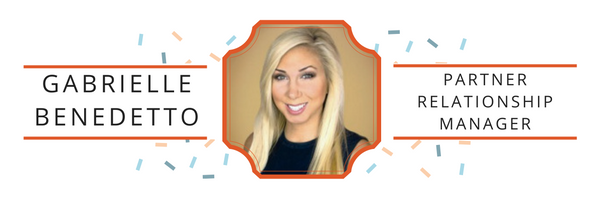
    Gabrielle Benedetto - Search Influence

    Gabrielle Benedetto, Partner Relationship Manager

    Parent(s) And Their Jobs:
    Susan Benedetto – High school English teacher and Teach For America mentor turned Librarian who is now back in the classroom teaching high school English!
    Tim Benedetto – Self-employed contractor

    A Memorable Experience Visiting Your Parent(s) On The Job:
    Visiting my dad on the job usually meant I was sick.

    Since my dad was self-employed, it was easier for him to leave work and pick us up from school when we weren’t feeling well. But, instead of going home, we would go on the job with him. He would make a little bed for us by flipping over two 5 gallon mineral spirits buckets, laying a piece of plywood on top, and covering us with a paint splattered drop cloth for a blanket.

    Depending on how bad you felt, you would be asked to pick up a piece of sandpaper or a caulk tube. The smell of fresh paint still reminds me of a sick day. I would complain, but in that moment, I was being taught work ethic.

    What Having A Working Parent Taught You:
    After being on her feet and teaching hormonal teenagers for 8 hours, Mom would come home and cook a full course meal for us. Dinner was on the table every single night at 7. We would sit and eat as a family every night and homework was never an excuse to skip. After dinner, we would clear the table and Mom would sit right back down and start grading papers and preparing for the next day’s lesson plan.

    While she did bring work home, like many working parents, I think one of her favorite parts of the day was cooking and serving dinner for her family. For just a few hours she was Mom and not “Mrs. Benedetto.” Seeing her work all day long, and then come home to transform into a different role, was pure dedication. She taught me how to balance work and family, which may be one of the hardest tasks any working parent faces, but she made it look easy—even though I know it wasn’t.

    Memorable Advice From Your Parent(s):
    “Work as if you are being filmed and speak as if you are being recorded” Meaning—don’t do or say anything you wouldn’t want anyone to see or hear. It sounds a little mafiosa… but it stuck with me!
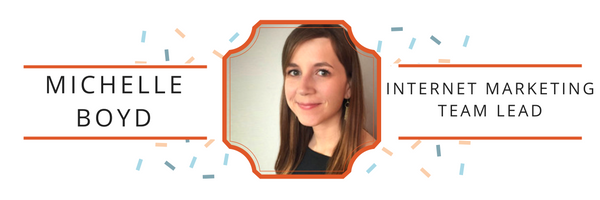
    Michelle Boyd - Search Influence

    Michelle Boyd, Internet Marketing Team Lead

    Parent(s) And Their Jobs:
    Cyndi – Store Manager for Kroger
    Carl – Worked for the state as the Director of Budget

    A Memorable Experience Visiting Your Parent(s) On The Job:
    I remember one time when the power went out from a snowstorm during the holidays. We all went as a family to check on the freezers and coolers at the store. At the time, I thought it was crazy that my mom had to worry about that kind of stuff when she wasn’t even working. Even at an early age, through her actions, my mom taught me that your individual success is directly dependent upon the success of the company you work for.

    What Having A Working Parent Taught You:
    Many people tell you not to bring your work home with you. What my parents taught me was the exact opposite. It is important to have a good work/life balance, and oftentimes, these two things will intermingle. What’s more important is to strive to do your best every day, learn from your mistakes, and celebrate your successes.

    Memorable Advice From Your Parent(s):
    My parents told me to hire people whose creativity and ingenuity exceed my own. They said I should want to work with people who will challenge me to be better and who will help the company to succeed, and therefore, help me succeed.
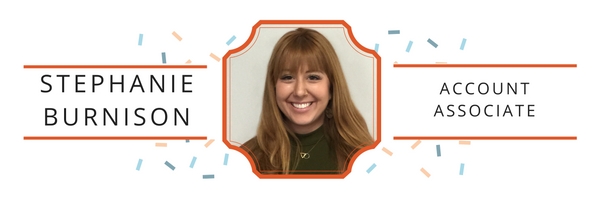
    Stephanie Burnison - Search Influence

    Stephanie Burnison, Account Associate

    Parent(s) And Their Jobs:
    Debbie Alexanian – Clinical Neuropsychologist
    Gary Burnison – CEO Korn/Ferry International

    A Memorable Experience Visiting Your Parent(s) On The Job:
    I used to visit my dad’s office a lot out in LA—it was so cool to see how everyone interacted with him, and also to see him in that light versus how I saw him every day: the swim-trunk-wearing, chill Southern California dude I knew him to be.

    What Having A Working Parent Taught You:
    It taught me to be independent, confident, determined, a hard worker, a fast learner, and to not accept failure.

    Memorable Advice From Your Parent(s):
    Attitude is Altitude.
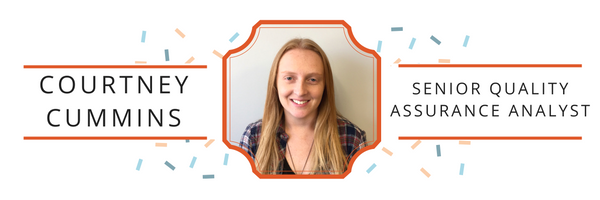
    Courtney Cummins - Search Influence

    Courtney Cummins, Senior Quality Assurance Analyst

    Parent(s) And Their Jobs:
    Jack – Distribution Manager for a grocery store and later for Revlon
    Catherine Cummins – Security Guard for a distribution store

    A Memorable Experience Visiting Your Parent(s) On The Job:
    I remember being about eight years old and going into work with my dad on a Saturday morning. I was so excited that I even picked out what I was going to wear the night before (It was a basketball jumpsuit. It wasn’t great.). He worked at a distribution warehouse and I remember him giving me some product transportation logs to highlight. It was probably just busy work, but at the time, it felt like the greatest responsibility in the world.

    What Having A Working Parent Taught You:
    One of the biggest lessons I learned growing up with working parents was the importance of having a strong work ethic. It isn’t enough just to have a job and show up for it. They stressed the importance of giving your best to everything you do in life, and how determination and perseverance can go a long way.

    Memorable Advice From Your Parent(s):
    I can’t remember an exact piece of advice my parents gave to me when I started working; there was just an understanding of “you have a job that you are physically and mentally able to perform, so make sure you do so to the best of your ability.”
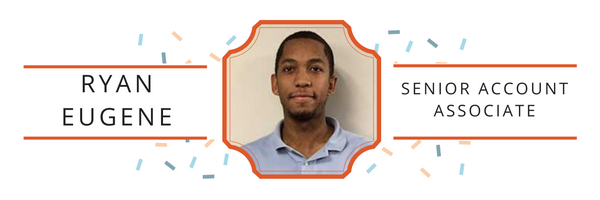
    Ryan Eugene - Search Influence

    Ryan Eugene, Senior Account Associate

    Parent(s) And Their Jobs:
    Jennifer – Specialty Sales Manager at a natural gas company
    Ronald – A contractor for Verizon

    A Memorable Experience Visiting Your Parent(s) On The Job:
    I visited my mother at work a few times, and it was great to see her with a high position in the company and see her co-workers’ respect for her.

    What Having A Working Parent Taught You:
    Work ethic and the importance of being prompt.

    Memorable Advice From Your Parent(s):
    Be prompt and don’t be afraid to ask questions.
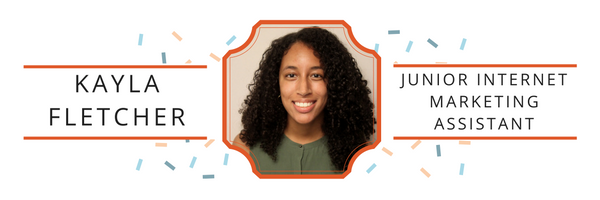
    Kayla Fletcher - Search Influence

    Kayla Fletcher, Junior Internet Marketing Assistant

    Parent(s) And Their Jobs:
    My dad owned a computer company, and my mom worked with my dad and she was a paralegal for some time. (I don’t remember her being a paralegal because I was too young because she ended up working with my dad full-time). Fun fact: my dad used to be a DJ, then technology started to take off and he became interested in that as well.

    A Memorable Experience Visiting Your Parent(s) On The Job:
    I went to their office building sometimes. I used to sit at another desk while my dad worked. I don’t remember much because that was long ago, and when I got to middle school, I didn’t go to the office much.

    What Having A Working Parent Taught You:
    My parents stressed the value of saving and investing, whether it was investing in stocks or renting out property. Even though my parents talked about saving a lot, they also think it’s best to spend money on things you really want. Whether it’s luxury items or a new home that’s more convenient for everyone. However, they don’t think it’s best to splurge a lot. They also stressed about doing something that you love. People always find it surprising when I tell them that my parents fully support me with writing. My parents never told me anything negative about it, or told me to pick another major/career because “you can’t make money being a writer.”

    Memorable Advice From Your Parent(s):
    My parents told me (and my older sister) that even though you got the job you wanted, you still have to work hard. You should set goals for yourself, always be on top of things, and never talk negatively about anyone who you are working with to another person.
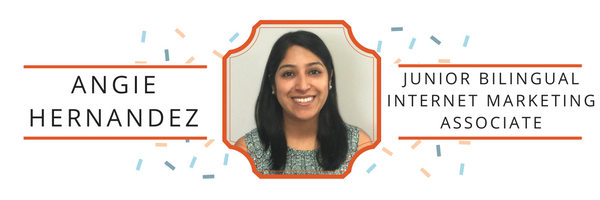
    Angie Hernandez - Search Influence

    Angie Hernandez, Junior Bilingual Internet Marketing Associate

    Parent(s) And Their Jobs:
    Martha Hernandez – Personal Banker
    Islaal Hernandez – Body Shop Mechanic

    A Memorable Experience Visiting Your Parent(s) On The Job:
    I remember one time being sick on a field trip and my mom needed to pick me up. There was no one to take care of me so she brought me to work. I laid down on my mat under her teller stand. I just remember seeing how dedicated and precise she was in handling money. Every now and then I’d gently kick her to remind her I was down there, and she’d break her concentration to give me a smile and an “I know you are still down there” face.

    What Having A Working Parent Taught You:
    I have nothing but the utmost admiration for my mom. It’s incredible to see, even to this day, how she works hard and still comes home to be a mother and wife. She is a boss. And I’ve seen my father do what it takes to work, even if that means being treated unfairly as an immigrant. My dad’s job is physically demanding, but he never gives up. He’s the “work hard, play hard” type, which I think is cool. He looks like a GQ model on the weekends; you’d never think he is a grease monkey during the week.

    Memorable Advice From Your Parent(s):
    My mom has always told me to never give up, even if everything seems hard at first. Because of her, I’ve never given up on any challenge that was placed before me.
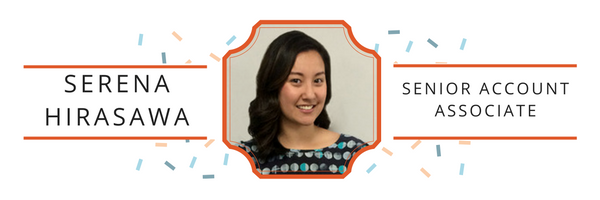
    Serena Hirasawa - Search Influence

    Serena Hirasawa, Senior Account Associate

    Parent(s) And Their Jobs:
    Mom – Special Education Teaching Assistant
    Dad – Chef

    A Memorable Experience Visiting Your Parent(s) On The Job:
    My dad worked as a sous chef at a country club until I was about 10 years old. I remember going with him and my younger sister to visit the property on many occasions, and he would show us around to all of his coworkers. We were really adorable back then, so we would always get little gifts from people. My favorite person was the groundskeeper, who would find pretty and/or shiny rocks for us and we would get so excited to see what he would bring. I also loved being able to visit where my dad worked and see the food that he got to make every day for the guests.

    What Having A Working Parent Taught You:
    It taught me about discipline, but also about balance. When my dad was a chef at the country club, he would work lots of long hours and weekends, due to the food industry. But he always managed to be available for my childhood memories—things like my softball games and school picnics. He worked really hard to provide for us, which sometimes meant making sacrifices, but he always made time for us when we needed him and he was home every night to say goodnight.

    It also taught me about being challenged. My mom worked in special education, which can be very taxing on people. Every day is something different because you are working with children who have learning disabilities and other difficulties. Her job was a challenge every day, but not in a bad way, because she was constantly learning something new about herself or her students. Sometimes, you just can’t plan how your day is going to go and you have to step up to the challenge.
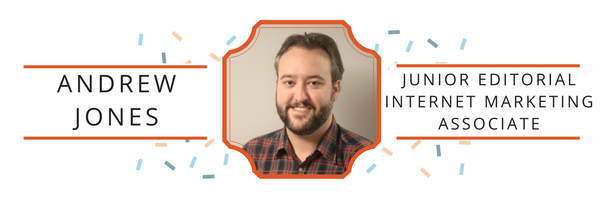
    Andrew Jones - Search Influence

    Andrew Jones, Junior Editorial Internet Marketing Associate

    Parent(s) And Their Jobs:
    My mom (Ann) worked for Delta Airlines until I was about 4 years old, then retired to take care of my two brothers and me.
    My dad (Greg) is an attorney and retired from his firm a couple of years ago. He is now a Dean of Business at Troy University in Alabama.

    A Memorable Experience Visiting Your Parent(s) On The Job:
    Since my mom worked for Delta, it meant my family got to travel a lot for free. Believe it or not, one of my earliest memories is sitting in a chair in First Class, apparently on the way to Oahu. My feet didn’t even reach the end of the chair. I’m sure that was a great flight for everyone else who got to share First Class with a clearly spoiled baby.

    What Having A Working Parent Taught You:
    Both of my parents were very successful in their careers, and enjoyed their work, but they never let their careers define them. As a kid, when my dad would get home at the end of the day, we talked about sports, history, politics—anything but work. In my opinion, they found a healthy balance between work and life.

    Memorable Advice From Your Parent(s):
    Working hard and always treating people like people are two bits of guidance that I have certainly tried to carry over into my professional life. It sounds corny, but my parents were pretty big on the Golden Rule. My dad, for example, lobbied the City of Mobile pretty hard when they tried to move a local homeless shelter out of the downtown area because it discouraged tourism and was “unsightly.” He wasn’t very popular with some of the society folks in Mobile, but he wore that as a badge of honor.
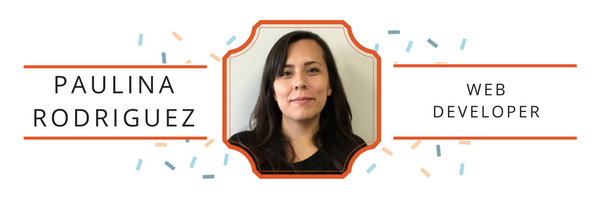
    Paulina Rodriguez - Search Influence

    Paulina Rodriguez, Web Developer

    Parent(s) And Their Jobs:
    Jesus Rodriguez and Juana Rodriguez

    What Having A Working Parent Taught You:
    Both my parents moved to California from a small town in Mexico. My father attempted many times to work in farms in California and kept getting deported. But he wanted a better life for his 6 children so he kept trying. Eventually, he got a job cleaning and cooking for a hospital in California. When he was able to save up some money, he brought my mom and my brothers and sisters to America. Alone in a new country where they didn’t know the language, both my parents enrolled my brothers and sisters in school, and my mom found a job cleaning houses. Eventually, the rest of us were born and both my mom and dad worked. The drive and bravery of my parents to go into the unknown and raise a family has always pushed me to better myself. Their honesty and hard work drive my work ethic. Their relentlessness pushes me to take on any challenge. I know that things do not come easily, but with hard work and dedication I can work towards any goal. Their sacrifice has shown me that anything is possible.

    Memorable Advice From Your Parent(s):
    My parents would always say to work hard. Be presentable and respectful. Always be early and prepared. Save your money.

    It certainly goes without saying that parents have a great influence on their children and sharing the experience of worklife and responsibility only make the impact greater. What has your family taught you about the working world?


  • Local SEO: How to Clean up Citations for Better SERP Visibility

    seo-google

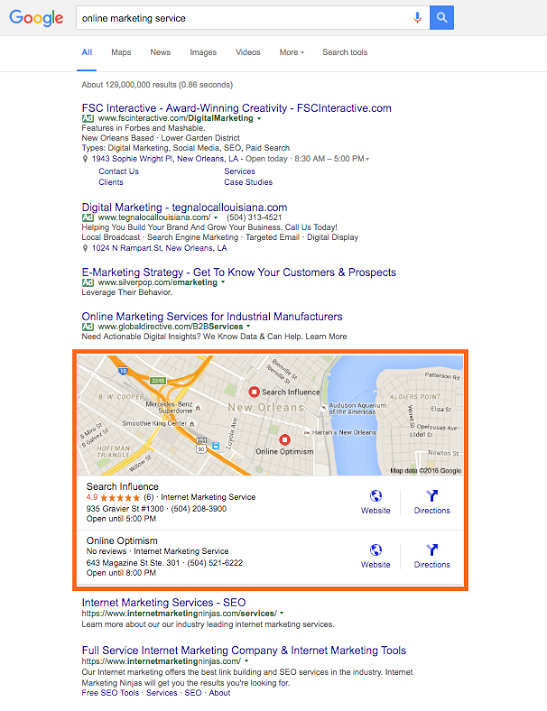
    Google, Bing, and other major search engines are constantly changing and developing their search engine results pages (SERPs). Major components of these pages include organic, paid, and local results. With the ever-increasing use of mobile, these local results are growing in importance in overall SEO strategy.

    SERP Screenshot

    So how does one account for local SEO, you may ask?
    This is where citation cleanup comes into play.

    Citations are the presence of a business’s name, address, and phone number (NAP) on any website. As search engines crawl websites and find instances of a business’s NAP, they look for consistency in that information, so the more accurate and consistent your citations are across the internet, the better your business will rank in a local search (i.e. in Google and Bing maps as well as in the maps packs on SERPs).

    Ensuring this consistency is called citation cleanup. From my experience, there are four major steps to effective citation cleanup:

    1. Ensure your address is USPS verified.
    2. Update your NAP on your website.
    3. Audit and build your citation on the major data feeds and directories.
    4. Find your remaining existing citations and make sure they are all consistent.

    Let’s break this down and go into a little more detail.

    Ensure Your Address Is USPS Verified

    This is an important place to start because, as you’ll find later on, many of the directories you end up submitting to or cleaning up have standard formatting that in most cases aligns with USPS’s own standards. So, if your format doesn’t match it will be harder and less likely to achieve consistency.

    Update the NAP on Your Website

    After the USPS verifies your address, make sure it’s reflected on your website. Include your whole NAP as a structured citation. Your website is the baseline for your NAP; this is what Google and other crawlers will compare other citations to, so it must be correct and formatted here.

    **For a little extra oomph, consider marking up your citation on your website with structured data like Schema. This will help crawlers understand it better as your NAP.

    Audit and Build Citations on Major Data Feeds and Directories

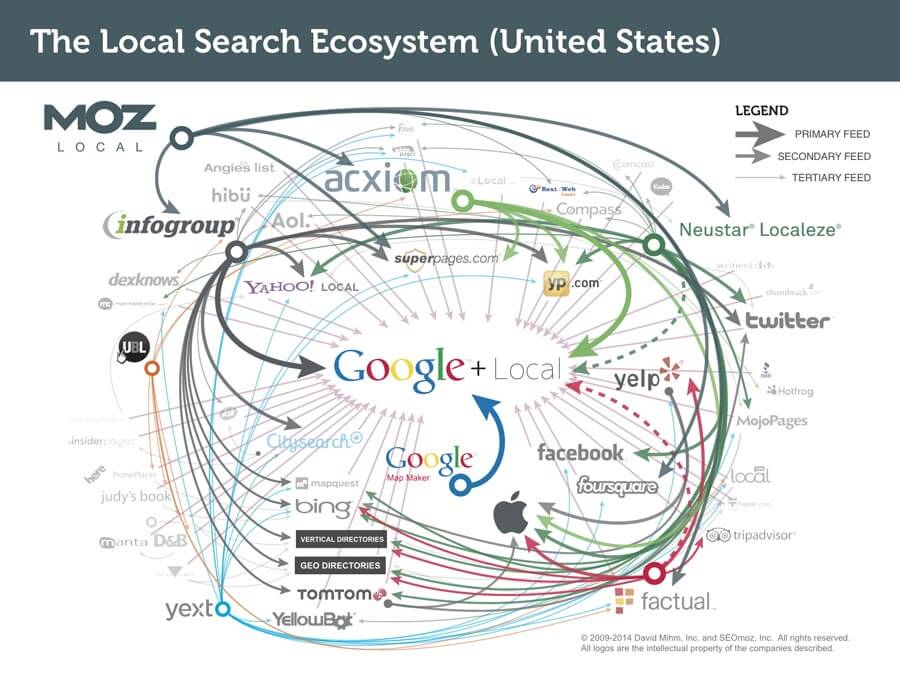
    Local_Search_Ecosystem_US

    The reason I put this before doing actual cleanup of existing citations is because citation dissemination is a hierarchical process within a large ecosystem of directories. There are a few feeds that push to other smaller directories where your citation may already exist, so updating these and the major directories first will make cleanup later on a little easier.

    There are four major feeds to check first: Infogroup, Acxiom, Localeze, and Factual. These feeds trickle down to other directories and local search engines, including Yahoo! Local, Apple Maps, SuperPages, etc. This is also where that USPS-verified address comes into play, especially. Part of the reason these four directories are so authoritative is because they have such strict guidelines on address verification.

    Along with those feeds, you also want to update the major local directories. Since many of these are directly on those search engines’ sites, this is absolutely essential to local rankings. These major directories include: Google Maps, Bing Maps, Yelp, YP, Foursquare, etc. You may also consider auditing your social media accounts to make sure your NAP is correct there as well.

    Find Remaining Existing Citations and Make Sure They Are All Consistent

    Once you’ve built your major citations, you’re ready to do some additional cleanup, if necessary. It’s useful for all businesses to be aware of their citations across the internet, but some businesses may need additional cleanup more than others.

    If you’re a business who’s recently changed their name, address, phone number, or website, you should definitely consider more extensive search and cleanup. The same goes for those who are still seeing problems with their local rankings. You may be missing a citation or set of citations that’s affecting your rankings.

    There are a number of ways to do this. You can use Google just to search for instances of your citation manually, or you can use a service to do a more in-depth search for your citation and its variations across the internet.

    Either way, you’ll find that your citation can be updated on some sites more easily than others. You may need to submit forms to have it updated, contact website administrators, or go through other channels to get it done.

    If you’re business is at this point, you may find it more cost-effective to hire an agency or service to do this kind of cleanup.

    However, once you’ve successfully cleaned up your citations, you’ll rest easier knowing that your business information is correct across the internet.

    Citation cleanup is an important factor in local and overall SEO. By ensuring NAP consistency, you’re gaining valuable traffic from local search engines! To learn more about why NAP consistency is important with your SEO, you can watch this short video.

    Image 1 Credit

  • Don’t Leave Your Website Buffering: How to Make Big SEO Gains with Video Content

    Everyone likes watching videos on the Internet—funny videos, cute animal videos, cute kid videos, and cute videos with kids AND animals.

    And while there will always be a place for these videos in our hearts and on the web (what would YouTube be without them?), video content has recently found a new, even greater purpose on the Internet. In recent years, videos have emerged as an integral part of any and every SEO campaign. Based on four main metrics, there are several ways video content can help your business and website gain more traction.

    • With YouTube rising to the lofty status of the world’s second-largest search engine (behind only Google, which just so happens to own YouTube), videos are getting more screen time than ever.
    • Videos have been proven to improve SERP rankings. Because YouTube and Google are in such close cahoots these days, videos from the popular video site are ranking higher than ever in Google searches. The more popular a video, the higher its authority, which affords a greater opportunity of appearing at the top of search pages.
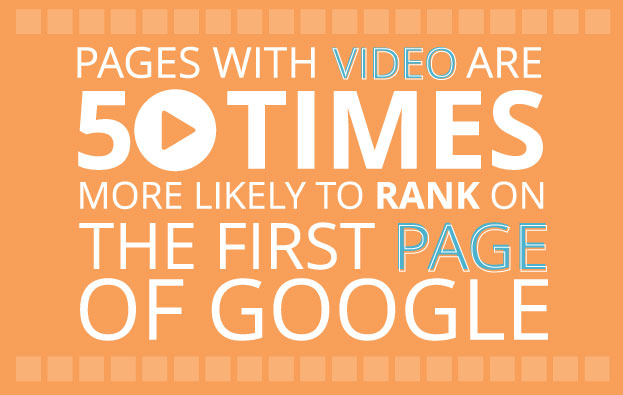
      • A study conducted by Forrester discovered that pages with video are about 50 times more likely to rank on the first page of Google search results.

    1511-SI-BlogImage-B-01

    • For that reason, among others listed below, here is Search Influence’s latest video, a brief case study about our partnership with the Audubon Nature Institute in New Orleans.

    • This is also why properly optimizing videos is so important—all video content (title, description, transcription, links, etc.) is crawled and processed by the search engines.
    • Every business should have their own YouTube channel that is accessible via their website. But to make even better use of videos, embedding YouTube videos directly onto website pages has been proven to be even more effective.
      • Embedded videos can improve click-through rate with up to a 41% higher CTR than plain text, according to study conducted by Cisco and aimClear.

    • Embedded videos can also reduce bounce rate. The longer a visitor spends on a website, the more authority it is given by Google. Unfortunately, the average online attention span is less than 10 seconds. Video content allows visitors to become engaged with something on your site for a longer period time. The average length watched of a single Internet video is over 2.5 minutes—all that extra time is crucial in the SEO world.
    • Videos communicate a lot of information quickly, which lets people sample content without committing to reading lengthy text. Videos are also much more useful in establishing trust with potential customers than written content, especially if the video features the business owner or a client testimonial.
    • Finally, video content is much more likely to generate social interaction and shares, which equals quality backlinks. Videos are easy to watch and share, therefore more appealing and likely to be watched (and allowing for more people to discover the video, and by extension, discover the business in general).
      • In a fascinating experiment, Gemma Holloway at Koozai compared two posts covering the same exact topic—one featured a short video introduction and the other had only text. The video post received between 200% to 300% more page views and shares on social media than the text-only article.

    So don’t leave your website or your business buffering. Incorporate videos into your SEO and Internet Marketing strategy and watch the benefits play out on your computer screen!

  • A Tale of Two Google+ Updates: Shutting Down G+ Pages & Disconnecting YouTube From G+

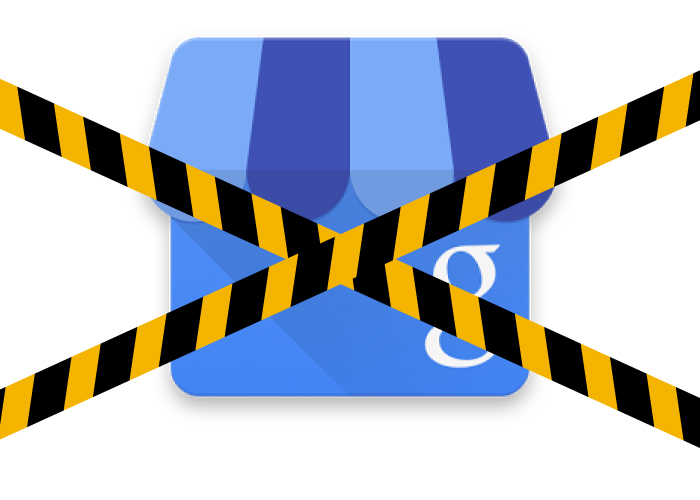
    Shuttered Google Local Pages - Search Influence

    In the past week, two new Google Plus updates have come to light. First, we found out that as of July 28, Google has plans to shut down inactive and unverified Google My Business (aka Google Plus) listings. On Monday, July 27, Google’s Bradley Horowitz posted on Google’s official blog that in the coming months, it will be removing the requirement for users to have Google+ profiles to use various Google products such as YouTube and Google Photos.

    The Update: Google My Business is Shutting Down Unclaimed, Unverified Listings & Unverifying Inactive Accounts’ Listings

    On July 23, a Local Search Forum user posted an email they received from Google as follows:

    UPDATE – Announcement from Google July 22, 2015

    Dear photographers and agencies,

    In the past few months, you may have seen some changes in the look of Google+ pages that have been associated with Google My Business (GMB) accounts. These changes, including how we treat business pages without owners, are part of Google’s ongoing effort to simplify people’s experience with our tools. We are constantly working to provide only valuable and rich content to our users.

    On July 28, Google will begin shutting down those GMB–associated Google+ pages that have not been associated with user accounts and are also not verified. You may find that some of your Business View tours also sit on such pages, but note that after this removal of unverified Google+ pages, the Business View tours will still remain available on Google Maps and Google Search.

    Here are a few recommendations for informing any business customers that may be impacted by this:

    Encourage your business customers to verify their listings if they wish to retain their Google My Business page …

    If a business owner decides later that they would like to have a Google My Business page, please advise them to create a new page and verify their listing. The Business View virtual tour can be then transferred to the new verified listing. Please log a case to our support teams to request that images for your business customer be forwarded to the new GMB page.

    Please point your business customer to their images in Google Maps.

    Best,

    The Google Maps | Business View team

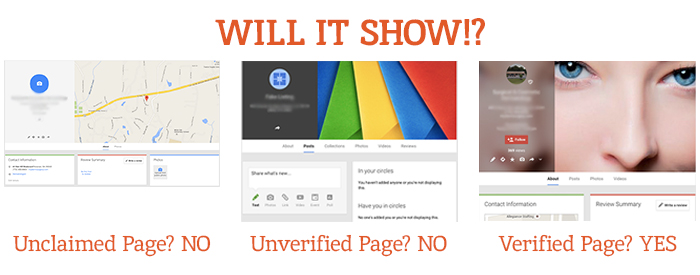
    This was specifically geared towards photographers so they would know how to handle the effect on Business View tours. What this means for all Google My Business users is that unclaimed local pages will most likely no longer be visible (as Google has always said is the case for unverified Google Plus Local pages).

    Different Google Local Pages - Search Influence

    As always, this update is accompanied by Google’s explanation that all actions are in the best interest of users and geared towards improving the user experience. Thanks, Google!

    On June 4, via the Google Business Help forums, Jade Wang (come visit us in NOLA again soon 😉 ) of the GMB Maps team also announced: “If a user is unresponsive to our attempts to contact him or her and has not logged into Google My Business for a significant length of time, then we may unverify pages in the account.” Here’s the full update from Jade:

    In some cases, we may contact Google My Business users via email to confirm that they are still actively managing a business page. If a user is unresponsive to our attempts to contact him or her and has not logged into Google My Business for a significant length of time, then we may unverify pages in the account. We’re doing this in order to continue to provide users with the best experience when they’re looking for local businesses like yours. If you find that a page in your account has been incorrectly unverified, please contact support to get assistance restoring verification.

    It’s a good idea to keep an eye on the inbox associated with your Google My Business (Locations) account. It’s also a good idea to regularly log into Google My Business (Locations) to confirm that your business information is current and accurate.

    My Take On It

    Both of these updates could mean great news for businesses that have struggled with requesting ownership of listings that were verified in the past by a person or an account they no longer have access to. To fix this issue in the past, you’d have to submit an ownership request form to Google to gain access to these listings. Then, you’d have to wait 10 business days (as per Google’s rules) and reach out to support (they could check to see if the account never responded to the request). After this 10-day period, the support representative could determine that the account that owned the listing was inactive and release the listing to you for claiming and verification.

    Basically this means inactive accounts are no longer roadblocks to getting access to business listings in Google My Business!

    While some issues may be alleviated with the update, what’s harder for search engine optimization work is that now it’ll be more difficult for us to see unverified duplicate G+ pages, old or closed G+ pages, and practitioner G+ pages that could be hurting businesses’ local rankings. Map Maker should allow us to still see the data but not the pages themselves.

    But there are signs this hasn’t rolled out completely yet. I have some unverified, fake listings in my Plus account (shhh, I know) that I use for training purposes that haven’t been touched yet. This is likely a slow rollout that started July 28. I did notice some changes to Maps navigation recently that were probably in preparation for this, though. For example, you used to be able to click “Write a review” from the Maps results to get to the G+ local page for a business, but now that just opens a review dialogue in the Google search results for that business in another window. This makes sense, since unclaimed businesses will no longer have pages.

    The Update: Google+ Is Disconnecting From Unnecessary Services

    On Monday, July 27, Bradley Horowitz posted on Google’s official blog that Google+ would be moving towards a “more focused Google+ experience,” which basically means no longer forcing users of various other Google products to have a G+ profile to use said products.

    Specifically, Google wants to foster the natural sharing environment of G+ by adding new features such as Google+ Collections. This update means that all you need to share content, communicate, and have a YouTube channel (among other things) is a Google account and not necessarily a G+ profile. Also, it will continue to keep Google accounts private and unsearchable. For those who were forced to create G+ profiles to use YouTube and other Google products in the past, Google promises that it will “offer better options for managing and removing those public profiles.”

    My Take On It

    Congrats to everyone who was pissed when they couldn’t use YouTube without a Google+ profile!

    Mad Men Cheers Joan

    At first, it seemed that G+ pages that are already connected to YouTube channels might be disconnected. But, that last comment about offering ways to get rid of unwanted G+ profiles, points to the fact that this update will not actively affect anyone in this way.

    Since this update has not yet rolled out, however, it is important for users to realize that they should not delete their G+ yet! Doing so prior to roll out will force you to delete your entire YouTube presence!

    Let me know your thoughts on all of these new Google updates! I’d love to hear what other users think of these changes.

    Image source:

    Mad Men gif

  • Return Of The YT Channel: Moving YouTube Channels Between G+ Pages In 2015

    Move YouTube Channels Between Google Plus Pages

    In the early ages of YouTube and Google Plus connections, disconnecting and reconnecting channels to the correct G+ page was not an easy feat. I once wrote a blog about this lengthy workaround for LocalU. Not long after that blog post, Google released a support form that allowed you to have a YouTube support specialist do the reconnection for you. While this support was amazing and usually reconnected channels within 24-48 hours, it required a middleman to get the work done and wasn’t immediate.

    Now, Google has released a way to reconnect your channel to another page within your account in the Advanced Settings section of YouTube! If everything is in one account, then this reconnection takes mere seconds. Often, however, we find ourselves in a situation where the channel is connected to a personal Google Plus page in one Google account, and we want it connected to a business page in another login.

    So I’m here to walk you through how to handle both of the aforementioned situations.

    Reconnecting A Channel Within One Account

    We’ll start with the simple one. You’ve got a YouTube channel connected to one page (probably a person page, maybe a random brand page), and you want it connected to your official business page on Google plus. Whatever shall you do!?

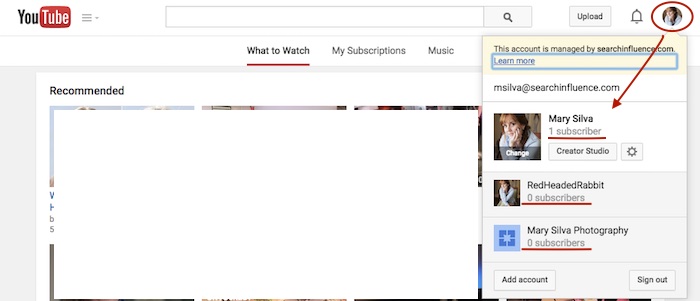
    Step 1: Go to YouTube.com and log in to your Google account. In the top-right corner of the page, click on the circle that shows your page icon to see a list of pages and their channels within this account.

    YouTube Users

    Usually, when you first log in to YouTube, you’re automatically managing or acting as your personal Google Plus page (the profile listed first in the dropdown is the one you’re currently acting as). To manage another page, which is what we’ll need to do to move channels, you’d just click the page you wish to manage from the dropdown.

    Deleting Unnecessary Channels Side Steps:

    Before we can proceed with moving channels, however, note that in the screenshot above, both of the extra pages have “subscribers” listed under their page names. This means that channels have been created for both of these pages already (otherwise we’d see “Create a Channel” below the page names). So if we want to move a channel to the page “Mary Silva Photography” in this account, then we’ll have to free it up for receiving a channel by deleting the unwanted channel that is currently connected to it.

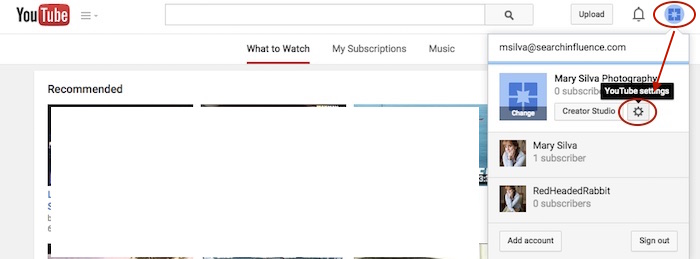
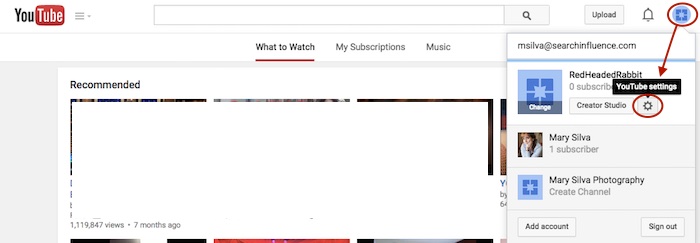
    This can be done fairly easily by clicking the “YouTube Settings” gear from that top-right dropdown while managing the page from which you want to delete the channel.

    Screenshot 2015-05-18 10.36

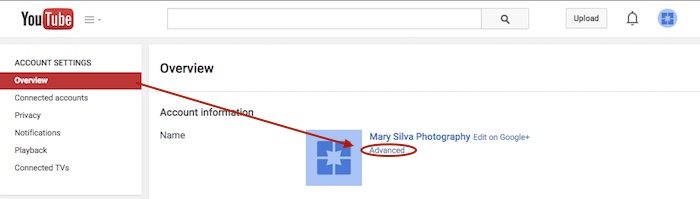
    Then click “Advanced” under the page name in the “Overview” tab.

    Screenshot 2015-05-18 10.37

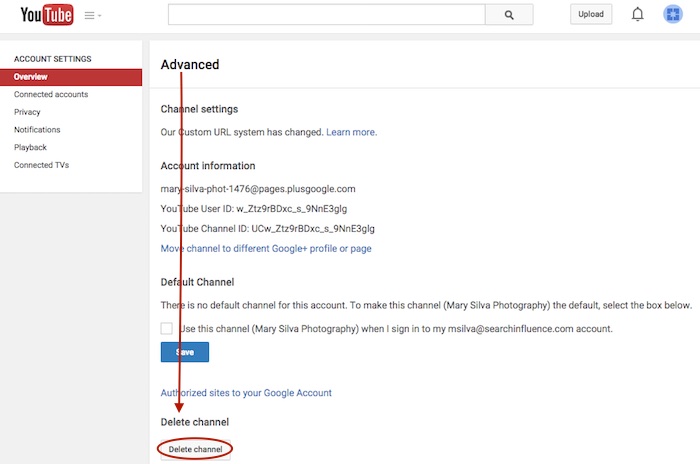
    At the very bottom of the page, you’ll see the “Delete channel” option. Once you click that, you’ll probably have to re-enter your password. Brace yourself.

    Screenshot 2015-05-18 10.38

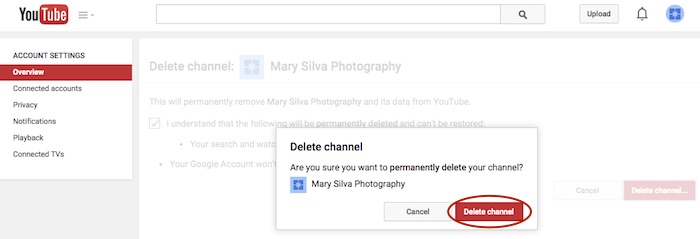
    You’ll see a verification page to confirm what you’re about to do. Check the box and click “Delete channel” to get one more verification dialogue, then click “Delete channel” one last time to complete the process.

    Screenshot 2015-05-18 10.41

    Now we can get back to moving the channel. In this example, we’ll pretend that the channel connected to “RedHeadedRabbit” needs to be moved over to “Mary Silva Photography.” As you can see in the next screenshot in Step 2, “Mary Silva Photography” now shows “Create a Channel” in the dropdown, so it’s free to take on the channel from the “RedHeadedRabbit” page.

    Step 2: Click on the page that has the channel you want to move in the top-right dropdown to manage the page (in this case, “RedHeadedRabbit”), and then the aforementioned “YouTube Settings” gear should appear for that page. Navigate back to the “Advanced” settings page from the “Overview” tab just as you would have to delete the channel.

    Screenshot 2015-05-18 10.47

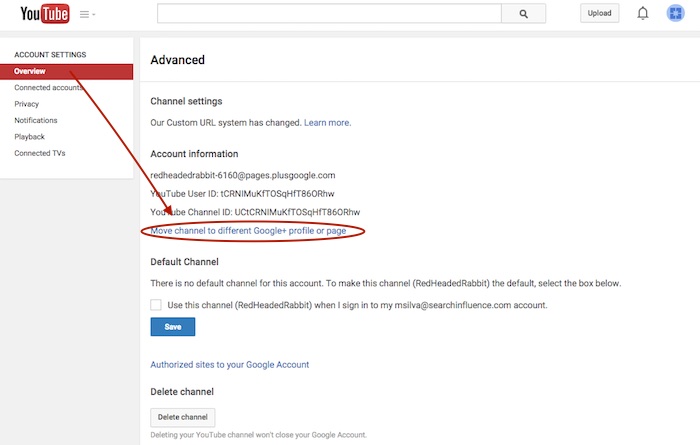
    Step 3: This time, however, you’ll want to click the “Move channel to different Google+ profile or page” option just above the “Default Channel” header. Google will probably make you enter your password again, so brace yourself.

    Screenshot 2015-05-18 10.48

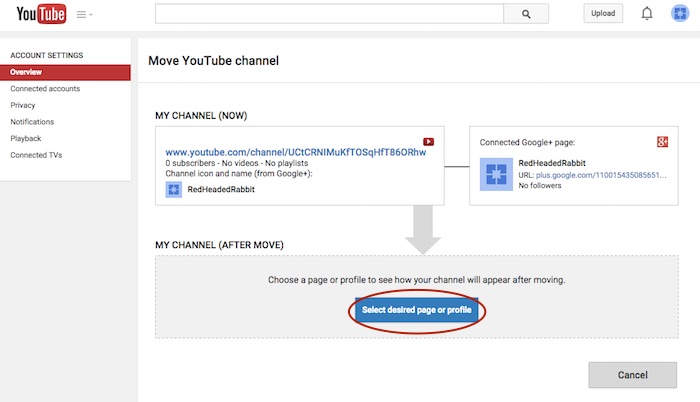
    Step 4: Now you’ll see the “Move YouTube channel” page. Under “MY CHANNEL (AFTER MOVE)” click the “Select desired page or profile” button.

    Screenshot 2015-05-18 10.49

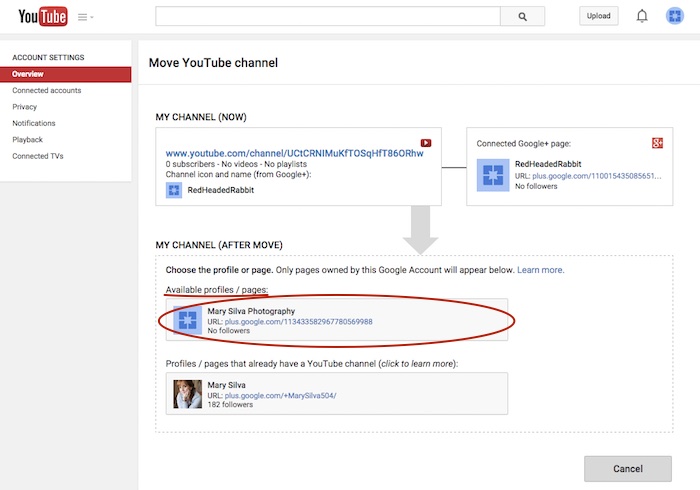
    Step 5: Choose the page you want to move the channel to from the “Available profiles / pages” section.

    Screenshot 2015-05-18 11.05

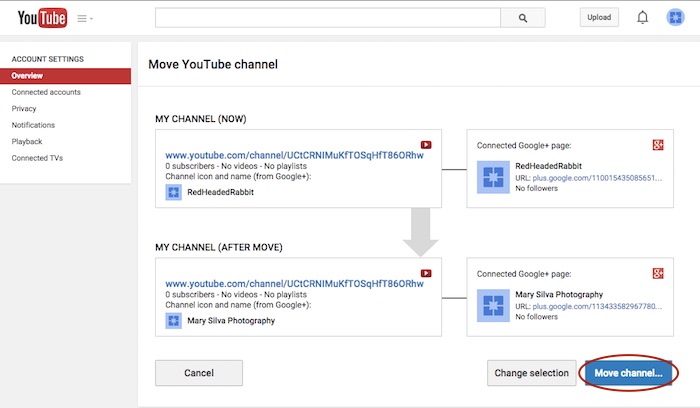
    Step 6: Confirm where you’re moving the channel (you can click links on this page to double-check that you’re moving the right channel to the right Plus pages) and click “Move channel…” to complete the transfer.

    Screenshot 2015-05-18 11.06

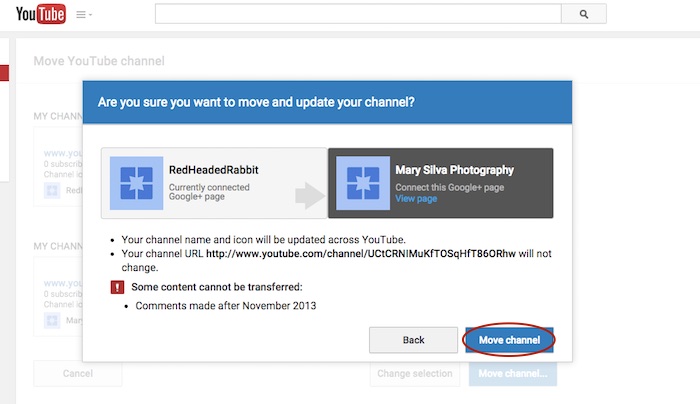
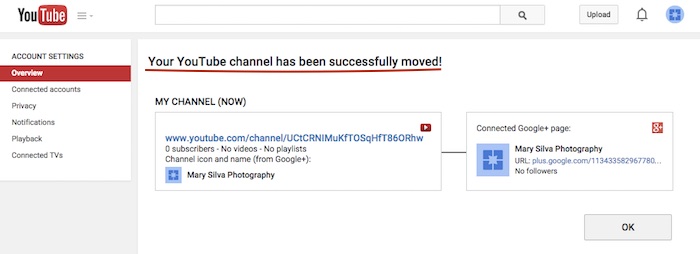
    Step 7: Click “Move channel” in one last confirmation dialogue box, and you’re done! You’ll see one last confirmation screen about the successful channel transfer.

    Screenshot 2015-05-18 11.13

    Screenshot 2015-05-18 11.09

    Reconnecting A Channel With Two Different Accounts

    As previously mentioned, we often find that we have a channel connected to a personal Google Plus page in one Google account, and we want it connected to a business page in another login. The steps for moving the channel will be the same as above, but first, we must get the pages all set up properly within one account.

    The account that has the channel has to be the OWNER of the page that we want to move the channel over to. So we need to go through adding the YouTube channel account as a manager of the business page within the other account first. Then we can go back and transfer ownership of the business page over to the channel account completely.

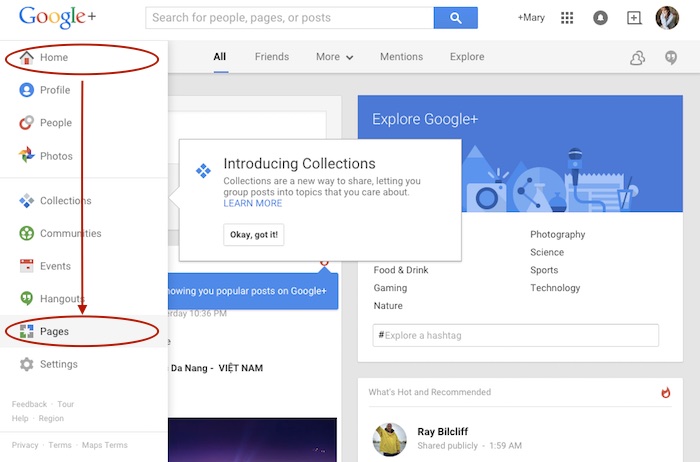
    Step 1: Log in to the account that the main business is claimed in and go into your Pages.

    Screenshot 2015-05-18 11.30

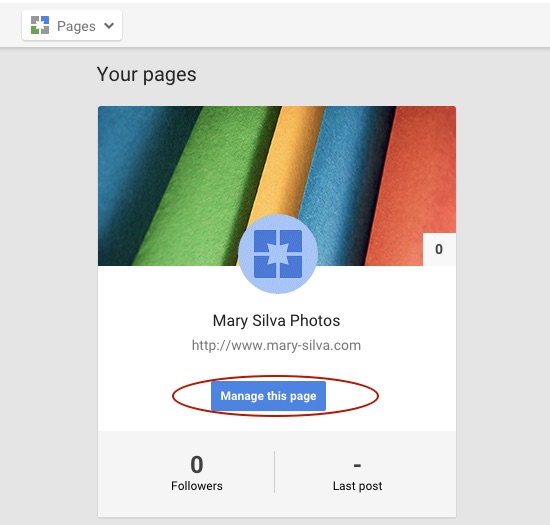
    Step 2: Choose “Manage this page” for the listing that you want to make the YouTube account a manager of.

    Screenshot 2015-05-18 11.31.30

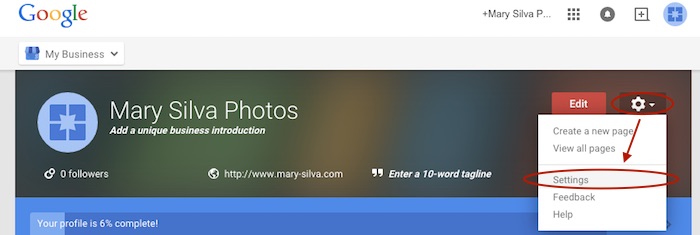
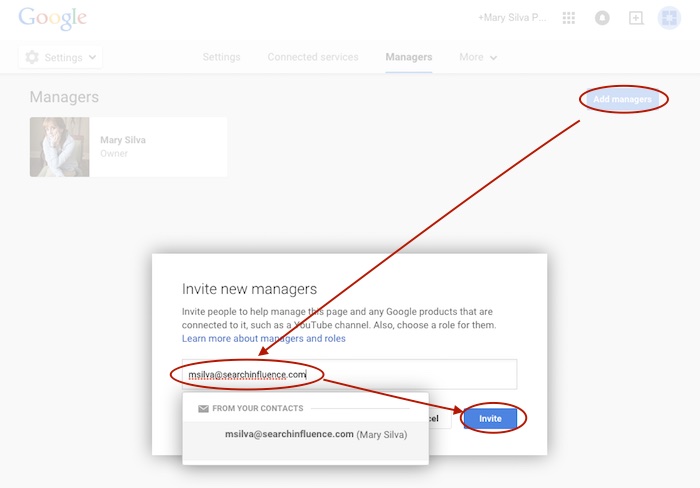
    Step 3: Go to “Settings” in the dropdown. Then, choose “Managers” under the “More” tab and add the email address for the YouTube account as a manager by clicking “Add managers.”

    Screenshot 2015-05-18 11.31.44

    Screenshot 2015-05-20 12.46.32

    Screenshot 2015-05-18 11.32

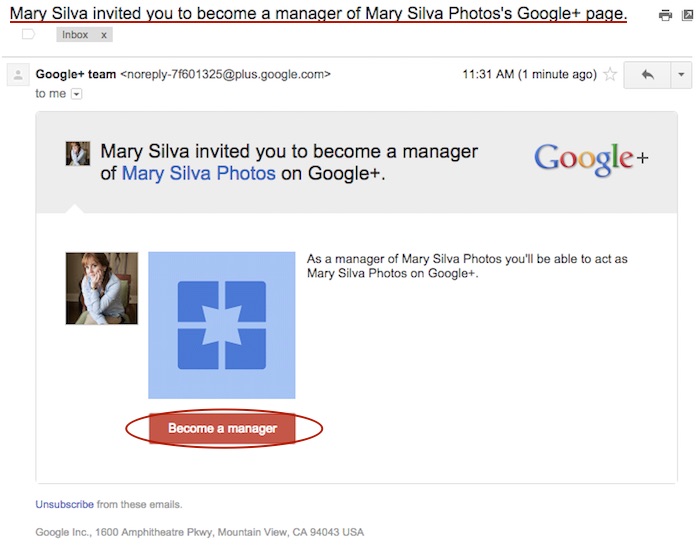
    Step 4: Log in to the email for the account with the YouTube in it. Look for the email that says “Person Name invited you to become a manager of the Business Name’s Google+ page” and click “Become a manager” within that email.

    Screenshot 2015-05-18 11.33.15

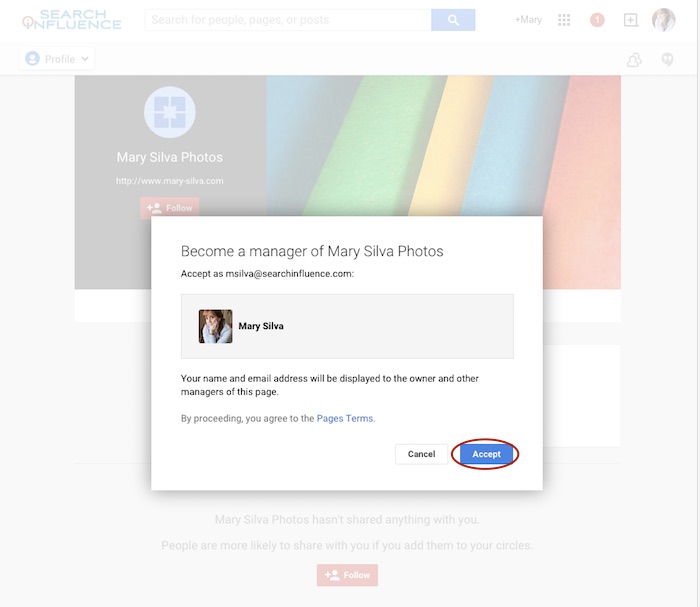
    Step 5: The link from the email will take you to the Google Plus page and automatically open a “Become a manager of Page Name” dialogue where you’ll click “Accept” to complete the managership setup.

    Screenshot 2015-05-18 11.33

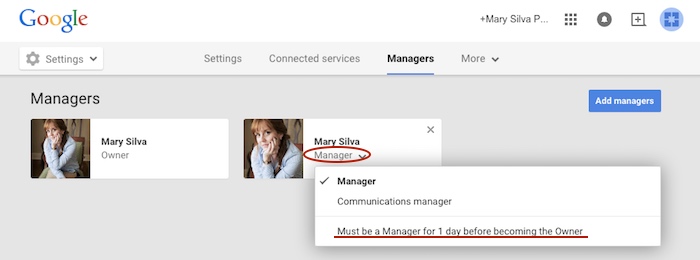
    Here’s where we wait…Unfortunately, for security reasons, Google requires an account to be a manager of a page for at least one day (as seen in screenshot below) before ownership of the page can be transferred over. So wait a day and come back to me when you’re ready to wrap this up. 😉

    Screenshot 2015-05-18 11.38.58

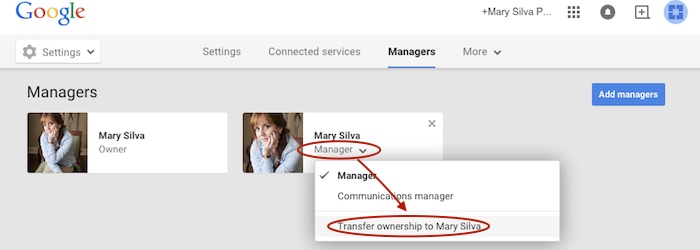
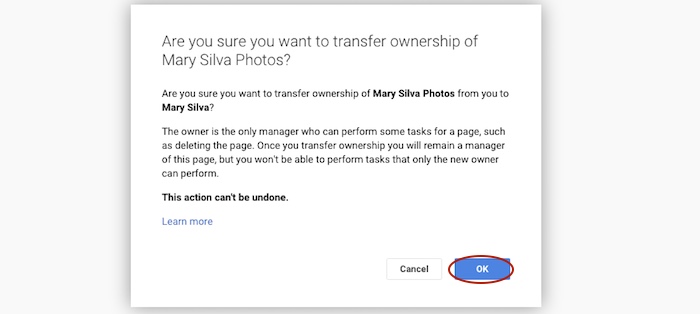
    Step 6 (One Day Later): Now log back in to the account that owns the page and follow steps 1-3 again to get back to your “Managers” settings page of your official business page. When you click “Manager” under the account name, you’ll see a dropdown with the option to “Transfer ownership to Person Name” where you previously saw “Must be a Manager for 1 day before becoming the Owner.” Once you click that, you’ll click “OK” to verify the transfer of ownership, and then the transfer is complete!

    Screenshot 2015-05-19 12.54.22

    Screenshot 2015-05-19 12.54.37

    You’ll get an email in that new owner account saying something like, “Person has made you the owner of the Page Name Google+ page.” Unlike the managership process, you don’t have to click anything in an email, so the ownership has been transferred completely, and you’re done!

    Now that you have everything set up properly, you can proceed with steps two to seven in the “Reconnecting A Channel Within One Account” section above.

    Hopefully this extensive tutorial helps you through all of your YouTube woes. To learn more about the ins and outs of Google Plus pages in Google My Business, you can read more on the blog here.

  • Five for Friday: Go Natural, Rock Your SEO, Navigate Apple Maps, and More

    1. How Your Band Can Rock SEO – Moz

    Most people don’t discover new music by Googling “indie rock bands.” Folks are more likely to discover a band through other means and then turn to the Internet to search for tour dates, song lyrics, etc. If you’re a musician, this presents a unique opportunity for optimizing your band for search engines. Learn how to reach a wider online audience with these tips for improving your band’s search engine optimization.

    2. Want to Transfer Your YouTube Account to the Proper Google+ Page? – Search Engine Roundtable

    Does this YouTube predicament ring a bell? Say you’ve been uploading industry-related videos to your YouTube account, which is connected to your personal Google+ page. You’ve finally gotten around to creating a Google My Business account for your company, and you want to transfer your industry-focused YouTube account over to your business page. Now you can! The only catch is that this move can’t be undone, so make sure it’s really what you want to do.

    3. Apple’s Maps App Gets Reviewed – Blumenthals

    Apple’s Maps app, which has heretofore only partnered with Yelp for integrated customer reviews of businesses, has now expanded to incorporate reviews from TripAdvisor and Booking.com. It’s still pending an announcement from Apple, and it’s unknown whether this change is still in its testing stage, but you will likely begin seeing reviews from a wider audience across multiple platforms.

    4. Beat the Competition with Natural Content – Marketing Land

    Google’s algorithm updates are all focused on one thing: improving online content. Search engines have gotten smarter, and so have people. If your business is just providing “common sense” information with keywords stuffed in, you are not likely to convert a lot of searchers to customers or clients. Optimize your content for intent by providing natural, factual, quality information that tells your company’s unique story!

    Act Natural Search Influence Image

    5. Facebook Dominates Ad Spending – Marketing Land

    Where have businesses been focusing their advertising efforts? The numbers are in! In 2014, social media advertising grew 41 percent, and perhaps unsurprisingly, Facebook pulled in 75 percent of total advertising spending on social networks globally, accounting for $11.4 billion of the total $15.3 billion spent.

    Image sources:

    Act natural