Tag: videos

  • Five For Friday: Vine Allows Video Imports, AdWords Launches New Bulk Editing, Snapchat Does News, And More!

    1. Vine Finally Lets You Import Videos From Your PhoneMashable

    Love making videos on Instagram? Well guess what! The popular app, Vine, is finally allowing users to upload videos from their phones.

    In addition to being able to import your own videos, Vine now also allows you to edit videos, and they have been encouraging users to upload older videos stored on their phones and share them with hashtag, #VintageVine. Check out the announcement video below!

    2. Google AdWords Launches New Bulk Editing ToolsSearch Engine Land

    Google announced early Wednesday morning that AdWords will now contain a bulk editing feature. This snazzy new tool will allow users to update their settings per campaign in a more user-friendly and efficient way. Some of the benefits include:

    • A filter for campaigns targeting specific location
    • Updating multiple campaigns with a new targeted location
    • Adjusting other settings such as language, campaign end dates, and ad rotation

    DrakeAndJohnGifImage

    3. Snapchat is Planning A Move into News, AdvertisingMarketing Land

    ghostsmilingimageThe Wall Street Journal reported Wednesday that Snapchat is expected to launch Snapchat Discovery in November. This new product will allow Snapchat users to read news articles and watch video clips the same way they do now: by holding their finger down on a phone screen. The Journal also reported that Snapchat CEO Evan Spiegel is looking to get into advertising for his popular app.

    4. Bing Maps Adds Hundreds of Streetside & 3D City Images; Plus New HD Aerial ImagesSearch Engine Land

    Bing announced a massive maps update this week. Bing Maps now has over 100 cities that support Streetside imagery across America, including Richmond, Boston, Denver and more. They also now have 3D city images and new, high resolution aerial images. 3D cities are viewable through the Bing Maps Preview app, available exclusively on Windows 8.1. Bing Maps also has new high-resolution imagery in over 150 countries on every continent in the world, covering five million square kilometers.

    5. Moz Announces Brand New Beginner’s Guide to Link BuildingMoz

    Moz released their third guide for marketers this week. As all marketers know, link building has changed over the years. One thing that has not is the importance of link building. In this updated guide, readers will learn:

    • What is link building, and why is it important in SEO?
    • What are good links and what are bad links?
    • How you can start a link building campaign
    • Link building tactics
    • Link building metrics
    • The good, the bad, and the ugly of link building
    • Advanced link building tips and tricks

    Click here to download the PDF!

    ApplauseGifImage

  • A Few Things You May Or May Not Have Ever Wanted To Know About Schema, But Were Too Bored To Ask

    As Google continues to affirm its support for more detailed types of schema markup when crawling sites, it seems that there is an increased level of general interest in the concept and implementation of schema. I know that across our office, there are constant enraptured whispers about the ethereal mystery and beauty of this particular variety of microdata. At least, that’s what I imagine. In any case, I am quite certain that people across departments in the Search Influence office, and presumably others, are talking about schema more than they used to.

    If you are already thoroughly comfortable understanding and implementing schema, this is not a blog post for you. Take a long pull on your cigar, another sip of fine brandy, ease the seat back and return to your Baudelaire. As for everyone else, I’m writing this because Google’s documentation on the subject – though extremely helpful and somewhat surprisingly transparent – is probably still a bit dense for those not familiar with microdata as a concept or without some experience coding a web page. I’m hoping to help bridge this gap for anyone seeking a schema primer without the time or inclination to sign up for a night school web design course.

    So What Is Schema Anyway?

    Schema is a type of microdata that is standardized and structured in a way that can help search engines parse pertinent information from web content. The official description can be found here, but let’s keep this simple.

    Many of us went to school at a time where we had to carry around these huge, heavy things called “books” that contained all sorts of crucial knowledge within words printed on bound “paper.” In the course of trying to learn the material contained in the books, many students found it helpful to highlight really pertinent passages in obnoxious neon colors. Highlighting made it a lot easier to go back and see what passages to focus on when studying later for an exam or putting together an essay.

    Well, schema is a lot like highlighting for a search engine. We mark up certain key pieces of information that may provide a clearer concept of what is most important for a search engine to pull from a larger body of content. It’s not saying that the entirety of that content isn’t important in any way; rather, it’s streamlining the presentation of content so that Google or Bing can get a clear picture of what the page is about even before parsing the full scope of what is contained on a page. Accordingly, there is a vast array of different schema types available for different content topics or functions. Whether the topic of your page involves a bus trip or a volcanic eruption, there is probably a schema type that can help further break down your content.

    OK Cool, But Why Bother If Google Is Going To Read Everything Anyway?

    Yes, Google will find a way to establish a general concept of what is on your page for presentation in search results with or without the use of schema. But, well, the Internet is kind of huge, and search engines tend to get kind of busy dealing with that a lot of the time. I think anyone interested in schema understands that Google and Bing use extremely intricate and elaborate algorithms to assess content for use within search results. Even with all of Google’s bears, birds, and mythical beasts on the job, however, it is still possible for information to be misconstrued within Google’s results. It is less a matter of keeping a search engine from getting things wrong than it is of helping a search engine get things more accurate.

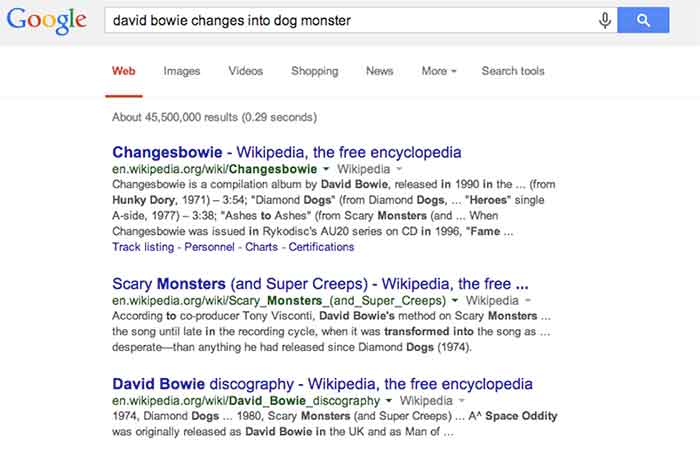
    For a hypothetical example, let’s look at this – as I do most things – in David Bowie terms. As you may or may not be aware, David Bowie actually briefly changed into an apocalyptic half-dog monster in 1974. This is a fact. Had you been unaware of this rather unusual moment in human evolution and overheard it discussed in an elevator (which is certainly where most of us first hear about otherworldly metaphysical transformations), you might be tempted to Google it. Well, if you were to Google “david bowie changes into dog monster,” you’ll eventually find some things about dog monsterdom, to be sure, but you also get an awful lot of results related to the classic 1971 song “Changes,” the compilation album “Changesbowie,” and the 1980 album “Scary Monsters.”

    ChangesBowieSchemaExampleImage

    Well, in this example, Google isn’t doing anything wrong really. It gave you perfectly logical results related to the primary subject of your search and based on the many of the keywords entered, but it still wouldn’t be quite what you were looking for. This is where schema would come into play. If an obviously extant news article on the completely 100% factual occurrence of David Bowie turning into an apocalyptic dog monster had been marked up with, say, Article schema breaking down the subject matter and providing a summary of the content, Google would likely have better understood to serve you the content that directly matched your search query. Likewise, were album and song writeups for “Changes,” “Changesbowie” and “Scary Monsters” marked up with MusicRecording schema or MusicAlbum schema, Google would be better able to differentiate these types of results from articles more pertinent to this search.

    I realize that it’s cheating to hold Google accountable for not being able to perfectly assess my intent in searching for viable news on an event that didn’t actually happen, but this example still hopefully illustrates how schema can be employed to help Google get from “logical and related” to “absolutely on point” in its serving up of search results.

    There is, of course, a less tangible, but equally (if not more) enticing motivation for using schema. Imagine you are trying to settle on your order at a restaurant, and you ask your server if there are any vegetarian options. You’re probably going to leave a bigger tip for a server who specifies and describes the vegetarian options available, versus a server who simply says, “yeah, read the menu” and walks away. In the same way, there is a mentality when using schema that making it easier for Google to see what it needs to take away from a page might result in a better ranking in search results. I will not say in any definitive terms that adding schema markup boosts a site’s search ranking, but – if used correctly and responsibly – it sure isn’t likely to hurt, is it?

    So that’s all it does? What’s all the fuss?

    Well, actually there are a number of other things we can do using schema beyond making Google’s life easier and hoping for some vague benefit in rankings. With many types of schema, we can make really cool things happen in search result snippets for specific types of pages with specific types of content.

    Review Schema

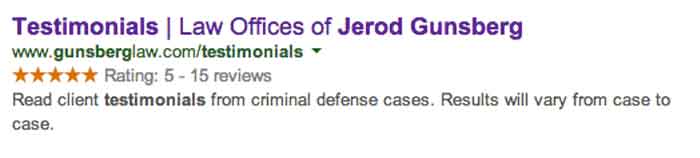
    One thing clients tend to like is having a really pretty star rating value appear in listings of their site in search snippets, which is something that can be accomplished using Review schema.

    StarRatingSchemaExampleImage

    By marking up a number of details within the content of this testimonials page, we are able to communicate enough information to Google about the ratings contained on this page that it presents the rating and review values right there in the search snippet. This is obviously pretty enticing for a user unsure of which result to click on in a long list of unfamiliar names and businesses.

    It is important to remember, though, that the reviews contained in review schema must contain actual ratings associated with said reviews in order to facilitate the addition of the pretty stars to the results. It is also good practice to include some portion of each reviewer’s name in order to establish legitimacy for the content being marked up. Also, in a case like the above example, where there are multiple reviews with multiple rating values, it is necessary for some cumulative review value totals to actually appear on the page. This is known as a review set’s aggregate rating, and it is required in order for the list of ratings to be compiled into a single rating value to be displayed as a star value.

    Video Schema

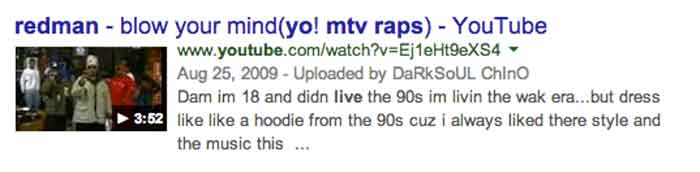
    Anyone who has used Google (so anyone reading this) has seen the potential results of video schema in action every time the inevitable Youtube video links comes up somewhere in your search results list. When YouTube links appear in search results, they are generally accompanied by a thumbnail of the video, which is also a direct link to play the video and the duration of the video being linked. See below:

    VideoSchemaExampleImage

    Effective use of video schema can lead to a similar thumbnail, play icon, and duration display within your site’s search snippets. This can be accomplished using self-hosted videos displayed with custom players or through embedded videos hosted on YouTube, Vimeo, or any other video engine. It is important to remain realistic about this though. Remember that Google owns YouTube, so it’s kind of unlikely that the page containing your embedded YouTube video is going to rank higher or be featured more prominently than the source video’s listing actually on YouTube.

    MusicRecording Schema

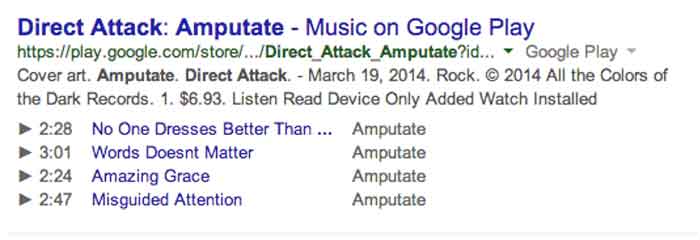
    Much like video schema, MusicRecording schema can display player icons with track, title, and duration details right there in the search snippet. This type of schema obviously only applies to a fairly niche segment of sites and/or clients, but it is another good example of how search snippets can be enhanced through schema. The example below displays a Google Play search result, which, as with fellow Google property YouTube, almost always displays the player info in the search snippet. Similar results can be accomplished in organic results with effective use of schema, however:

    MusicRecordingSchemaExampleImage

    OK, I Get It. So How Do You Do It?

    I’m not going to get into incredibly great detail here, because I promised a relatively simple primer and not a code-heavy breakdown that would scare away newcomers. Perhaps a more thorough explanation of the actual implementation of schema within HTML can be addressed in a future post. For now, I just want to explain schema implementation in terms of properly reading and understanding schema properties in the context of the schema.org item breakdowns.

    The most important thing to understand is that schema markup, like the HTML markup it is integrated into, is hierarchical in nature. This means that there are often numerous schema subproperties, within another schema subproperty, within a schema property, within the top level declared scope of a specific schema type, and so on. And once you go a next level deep in the hierarchy (or change the scope of your markup), the set of available properties is different and only applies to this new scope of the schema.

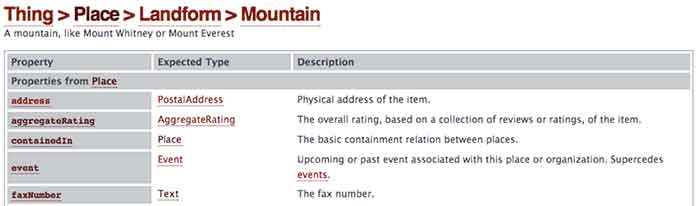
    As an example, let’s look at a section from the page for the always useful Mountain schema*:

    MoutainSchemaExampleImage

    So we’re going to start with Mountain schema as the scope of what we’re marking up in our content. As you can see, there is a list of available Properties for use within this schema on the left. With a nod back to the much earlier comparison in this post, these are all the different types of information we can “highlight” for a search engine. The Description on the right is a pretty self-explanatory explanation of what the property should reference. So far, so good.

    Now, where things get a little tricky is in the Expected Type column in the center. Take a look at the bottom most property “faxNumber,” which is obviously very important. We all know how difficult it can be to send a fax to a mountain, right? Well, you can see that the faxNumber property has an expected type “Text.” This means that whatever text content you list as the value for the faxNumber property is what will be directly communicated to a crawler or search engine as the fax number for your mountain. Simple enough.

    Well, you’ll notice that all the properties above it have more vague and mysterious extended types associated with them. In fact, these types are entirely new hierarchical scopes for the schema being added to the page. So for the “address” property, for instance, instead of just dumping your mountain’s entire street address in as the value, as you can with “faxNumber,” you’re going to have to change the scope of this schema and fill in any address information according to the next level of properties contained in the PostalAddress schema type. Once you change scopes in schema, the deeper level schema type does not know what is going on in the outer levels. So in this example, your PostalAddress does not know or see your mountain’s fax number.

    OK, This Is Getting Ugly. Just Stop.

    Good call. This is probably a good place to cut off an intro level crash course in schema, since anything much more detailed would involve some actual HTML knowledge or experience. Hopefully, this will have helped a non-web developer understand a little bit more about what schema is and how it can be employed to better communicate with search engines. There is such a vast expanse of available schema types for use marking up web content, a fundamental grasp of its structure and function can be extraordinarily useful in pointing your content more directly to the right readers.

    * This is where the Game Of Thrones meme would have gone if I weren’t such a snob.

  • Five For Friday: Facebook Mobile Ad Tracking, Promoted Video Tweets, And More.

    FiveForFridayRedFiveImageFacebook rolls out new way for advertisers to track engagement with mobile ad campaigns. User suspicion on the rise as updated Messenger app gains greater access to personal information stored on mobile devices. Twitter begins testing promoted video posts for brands. Yelp and Bing join forces in the name of breaking down international language barriers. New addition to Google guidelines marks the end of guest blogging. Get the scoop with this week’s Five For Friday.

    1. Facebook introduces new ad data tool – Marketingland

    Facebook announced on Wednesday that they would begin allowing advertisers to track the click through rate of promoted posts and sponsored ads on mobile devices. According to a white paper written for Facebook by Altimeter Group titled, “Why Mobile is Essential for Brand Marketing,” users spend an average of 40 minutes per day on the Facebook mobile app. The white paper also revealed that users check their mobile phone nearly 150 times per day, and that 51% of mobile users say they prioritize checking their notifications over other messages.  Aside from confirming the fact that most people are more attached to their smartphones than their own shadows, the research reveals just how important it is for businesses to be able to reach their target audience with mobile ads.

    Conversion tracking helps businesses measure the return on investment for their Facebook Ads. The conversion reports on the actions people take after viewing and interacting with an advertisement. Marketing Land discusses the implications of the new cross-device feature, including that it enables advertisers to closely track mobile browsing behavior and allows them to better understand how customers are reacting to their campaigns. While Facebook already allowed for advertisers to target specific users, the new cross-device report amplifies an advertiser’s ability to view more detailed metrics on mobile conversions.

    What does this mean to you? Now, using this cross conversion report, businesses can track the success rate of their ad campaigns. Ads that were previously unsuccessful among PC users may be working well as a real-time mobile marketing tool. These ads can be tracked based on location as well, so get excited for better campaign analysis!

    2. Mark Zuckerberg’s Facebook Messenger spy game – Mashable

    TryingToReadMyThoughtsImage

    You’ve probably noticed a recent influx of paranoia popping up on your news feed, this time about the “permissions granted” required to download the new Facebook Messenger app. The concern is based on suspicions that the app can access your smartphone camera and microphone along with a plethora of other private information stored on your device.  Considering the PRISM program’s deal with Facebook, as revealed by Edward Snowden just one year ago, the public is beginning to feel more aware of apps having increased access to personal information. The origin of these suspicions seems to be based off a 2013 Huffington Post article. Some of the app’s new capabilities include:

    • Facebook can read your phone’s call log, including info about incoming and outgoing calls. Who have you been calling? How long did you talk to them?
    • Facebook can actively track your GPS location, approximate location, or precise location.
    • Facebook can actively record video and audio from your phone and take pictures as well as view all files stored on your phone.

    Mashable breaks it down for us in a different way, explaining that a lot of the permissions allow the app to have all of its convenient, user-friendly sharing capabilities:

    • Facebook Messenger requests permission to access your camera and microphone so the user can share images and record videos right from the app.
    • Facebook allows users to directly call people with the app. It needs permission to access your device’s call log so that it can identify who may be calling you via the Messenger app.
    • Facebook requests permission to access your GPS location so that you can check-in and share your location with friends and in posts.

    Now that we’ve walked through two perspectives on the issue, what do you think? Is this just a ploy to monitor the 250 million users on Facebook, or is it another step toward providing an optimal user-based experience?

    3. Twitter introduces promoted video sharing – Mediabistro

    TonyHawkTwitterVideoImageTwitter has introduced a new nifty feature where businesses can better communicate with their followers using promoted video sharing. According to the Twitter blog, “by using Promoted Video, it’s easy for brands to upload and distribute video on Twitter, and to measure the reach and effectiveness of this content.”

    What does this mean to you? As a business, you’ll have more options when it comes to competing for user attention and interaction. If your business is already actively using Twitter, statistics have shown that promoted videos gain more viewers than ever before. The cost-per-view ad model includes ample opportunity to see viewer analytics, including organic as well as paid posts. Overall, this means a much more engaging Twitter feed and increased opportunities for businesses to reach targeted audiences.

    4. Yelp introduces Bing translation– Marketing Land

    BeautyBeastFoodTastingImageHow nice would it be for everyone to communicate with each other as needed, especially about food? Well, that day seems to have arrived, as Yelp has now introduced a Bing translator capability, according to Marketing Land. Yelp can now translate up to 15 languages, which is sure to help travelers that can’t seem to navigate through restaurant menus, reviews, and directions that are posted in different languages. For international eateries looking to attract tourists with local customer reviews, this app update is perfect.

    5. Google updates guideline violations  – Search Engine Land

    With the ongoing battle for good content, Google+ has now updated their listed standards for determining what is considered spam. Guest blogging, a common practice used for SEO purposes, is now on the Google radar. Search Engine Land reports that guest blogging has been used as an attempt to cut-corners around Google’s algorithm, so if you are using low-quality guest blogs to increase the results of your Google page search results, then it is definitely time to stop. Certain guest blogger sites have already been removed from the Google-ranking loop, as reported by Search Engine Land back in April.

    This update is just another example of Google’s ongoing mission to deliver meaningful, authentic content to Internet users. If you haven’t already, take the time to review your business’s blog and website. The real moral of this update: Consider the ways your products and services cater to your audience’s needs by publishing content that is unique and informative!

    Image Sources:

    Red Five Image

    They’re Trying To Read My Thoughts Gif

    Tony Hawk Twitter Video Gif

    Belle Tasting Food Gif

  • Interview with Brian Russell of Media Distribution Solutions; Behold the Power of Video

    MediaDistributionSolutionsLogoImageIn early 2014, we partnered with Media Distribution Solutions to deliver their best-in-class video solution to our customers. The BetterVideo platform has enabled Search Influence to scalably deploy custom, 30-60 second, high quality videos in our search engine optimization packages. Video dramatically increases the time spent on websites, improves social sharability and customer engagement. Earlier this week, our VP of Sales and Marketing, Kelly Benish, interviewed MDS COO Brian Russell on the growth of their company, the evolution of their platform and the importance of video.

    Media Distribution Solutions / BetterVideo

    BrianRussellImage
    Brian Russell

    Interviewee: Brian Russell

    Title: COO

    When were you founded?

    We founded Media Distribution Solutions in 2006, the same time we founded Metrix4Media (a Search Engine Marketing company).

    Where did M4M go?

    M4M was acquired by Hearst Corporation in 2007 for an undisclosed amount. (Sorry, Hearst is private and I cannot disclose the terms of the deal). Metrix4Media is still operated today by LocalEdge as the SEM platform.

    How did you come up with the idea for your company?

    In 2006 our CEO was approached by a technology group that had “the next big thing” in video. After spending some time working with their technology, we felt there was an opportunity to bring video to small and medium sized businesses through some of our prior partners. We had a relationship with the team at LocalEdge and knew that they are always pushing the envelope in terms of what they offer their advertisers. Up to this point, the cost of video had just been too high for SMBs to consider it, but through our technology, we were able to make it accessible and extremely scalable. These were still the very early days of video, prior to the overwhelming popularity of YouTube. Partners like LocalEdge and For Rent Media Solutions were pioneers in offering video through our BetterVideo platform. Over the years, video has evolved from our early, proprietary video codec, through Flash, and now to industry standard H.264/MP4 format. We continue to see advances in compression, which will further fuel the consumption of video on mobile devices. We are still seeing incredible growth as several other large media companies are now embracing video and leveraging the work done by the early adopters.

    What solutions do you offer?

    Video is our core, but there are many different flavors; from top of funnel awareness videos, which are a critical piece that allows the business to not only describe their offering, but also “tell their story.” This gives them an opportunity to differentiate themselves from their competition. The cost to produce high quality video content continues to fall, and business owners are realizing they can create more videos; testimonials videos, products and services videos, as well as more actionable videos for specials or seasonal offerings. The high value of video content is giving their site incredible lift in search results—the more video, the better!

    Where do you see MDS in the next 5 years? What do you predict your evolution will look like?

    Driving them to the future is video advertising. Google/YouTube rolled out TruView and Google Adwords, where an advertiser can target geographically and demographically who sees their video advertisement. This allows them to show relevant, local content to people that have shown interest.

    What have been some of the challenges in scaling out your video solution?

    BetterVideo has experienced the same challenge that other digital advertising solutions see, how to scale, yet serve the needs of the local small business owner. We have addressed this by the appropriate application of technology in key places. We still believe that an experienced video editor needs to play a role in the creation of every single video we produce, but we have automated processes to remove manual, repetitive tasks and allow or video editors to spend their time doing what they do best, creating exceptional videos that allow our advertisers tell their stories, promote their businesses, and deliver strong ROI.

    What types of videos provide the highest engagement level?

    Engagement levels come from relevancy. A person will be engaged with a video that is relevant to them—either through search results or some level of targeting. People are searching to find the answer to a question… How do I do this? How does that work? How do I fix this? Where can I get a great pizza? If they can be shown a video that shows them the answer to the question they have asked, they are very likely to be engaged. We read the studies and know how engagement drops off at certain points in a video, and we produce every one of our videos to deliver key information to overcome these “drop off points,” allowing advertisers to connect with their audience.

    What are the benefits of video for a small business?

    Small businesses get to tell their stories and showcase their specialties. They get to find a way to put themselves out there to show viewers their store, their people, what makes them different. Video offers them to opportunity to show viewers why they should do business with them. It really gives them a chance to showcase the value of their business. Video testimonials are the sweet spot for SMB’s. Reading a review is great, but seeing a review really allows the business to show what the consumer has experienced.

    What are the verticals that benefit most from Videos?

    Hotels and apartment properties love video because people really want to see where they are going to stay or live. They want to see the location, amenities, etc., so this is an extremely hot niche. A lot of service industries such as landscapers, pool builders, and general contractors see a huge benefit because video allows them to showcase their best work. Garage door repair, plumbers and HVAC companies have a list of things they’d like to you try before you call them—video offers them a great way to show you what you need to try before you call. The additional benefit from these types of videos allows these professionals to establish themselves as experts. A consumer will show loyalty to a business that saved them some money by showing them how to fix something simple on their own and will trust that business when they have something larger than they are uncomfortable handling on their own.

    Anything else I should know?

    Never underestimate the value of quality production. It’s so easy to shoot video and post it now, but video is an important part of your business and should be considered a critical component of your brand. You want to make sure you put your best foot forward. A professionally produced video allows a company to showcase their business and differentiate themselves from their competitors.

    Some Video Examples:

    Dominion Enterprises – For Rent Media Solutions:

    Hearst Media Solutions – LocalEdge: Ellis Eye and Laser Medical Center

    Concentra / Humana

    Product Video

  • Has Panda 4.0 Got You Down?

    Sad Panda 4.0 Image - Search Influence

    Now that we are 4 weeks post-Panda 4.0, there is a decent amount of data to sift through and determine if a website got caught in the Panda filter.

    Panda is supposed to provide consumers with search results that are helpful to their needs. This means websites that have some authority and provide a service to consumers are going to be more trusted and rank better. The better websites offer answers to consumers for what they are looking for and help them make decisions based on useful information. The content is engaging and gets people the information they need.

    Not Too Much Panda Drama
    Matt Cutts Panda 4.0 Tweet Image

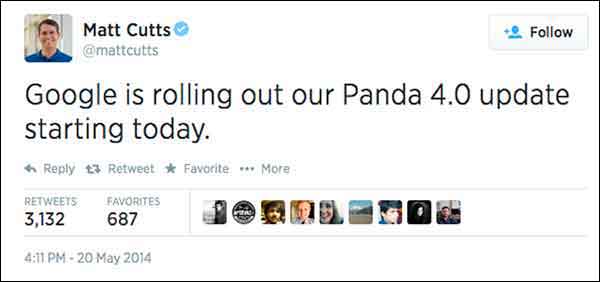
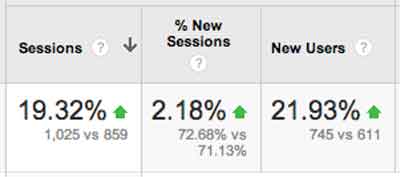
    Panda started rolling out May 19, so that’s our magic date for before and after data. When looking only at Google organic traffic and comparing May 19, 2014-Jun 15, 2014 to Apr 21, 2014-May 18, 2014, I saw a 6.71% increase for one plastic surgeon’s website. This is a respectable increase when you consider that summer is generally thought to be the start of the slow season for plastic surgery as an industry.

    For this plastic surgeon, I looked at the same date range for the last 4 years. Every year, this same date comparison resulted in a minor and expected decrease of Google organic traffic. This illustrates the typical seasonality. Given that history, we’re pretty excited to see an increase from Google organic traffic going into summer.

    I looked at another client’s website, this time for an apartment complex, which is up 15% in Google organic search. Last year showed a decrease for the same time frame comparison. Unfortunately, the client didn’t have Analytics data for 2012. I have always thought that summer would be a high season for his industry, but he says for his complex and his location, summer is not necessarily the busy season. I always like to see double-digit growth in Google organic traffic (that’s a no brainer), but I worry about the monthly Panda data refresh leveling things back out, which happens all the time. The fact that the site had an increase at least tells us that the site is trusted, and we are on the right path, so that’s the story to celebrate.

    One of our account managers has a charter-fishing website (which I think would be super fun to work on). This fishing charter client had a whopping 115% increase, but you have to consider that this is his high season. Last year the same time frame comparisons saw a 65% increase. Even with the seasonality, I think he was a winner with Panda 4.0. He has lots of great original photos and lots of engagement – it totally looks fun to go out on his boat! And that’s a major part of what makes a quality site.
    Site Traffic For Engaging Content Chart Image - Search Influence

    In the health industry, we have a drug rehabilitation clinic website, which experienced a 19% increase after Panda 4.0. So, the interesting part for this client is that their content is solid. We have been working more heavily on their citations and less on their content, so it’s possible this client is simply readjusting from the previous Panda. It’s also possible that clean local citations are helping the site’s quality and trust.

    Magic?

    I know everyone reads these posts for some super secret insight, to learn some nugget of goodness, and I will probably disappoint. The efforts of our account managers have helped our clients’ websites, some shown above, but really, as a group, we have done nothing extraordinary. If it’s an older client, we have taken the time to review all of the past years of work and get back to the basics. We fixed any technical SEO problems we found. We are also constantly refreshing content, constantly reviewing citations, and building social channels with planned content calendars. If it’s a newer client, we work on building a solid foundation of fresh content, consistent business data, and getting social.

    There is no magic here, just thoroughness.

    This Wasn’t Just Any Ol’ Panda Update

    This Panda update is largely thought to be a significant algorithm change rather than the monthly refresh. Barry Schwartz says it succinctly, “Panda 4.0 must be a major update to the actual algorithm versus just a data refresh. Meaning, Google has made changes to how Panda identifies sites and has released a new version of the algorithm today.”
    What Does This Mean Quote Panda 4.0 Update Image - Search Influence

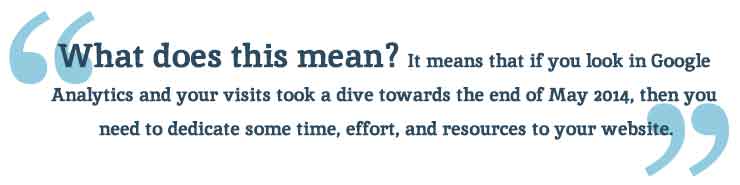
    What does this mean? It means that if you look in Google Analytics and your visits took a dive towards the end of May 2014, then you need to dedicate some time, effort, and resources to your website. When there is a Panda data refresh every month, it’s not going to get better without some serious website rehab.

    As a side note, most of the clients I looked at had a small bump up in first week of June. I don’t know if there was a Panda refresh just 2 weeks after the Panda algo update, but I definitely see it across a large number of clients.

    The Panda Checklist

    Cleaning House For Panda 4.0 Update Photo - Search Influence

    There is so much you can do to “clean your house” for Panda, but here are the first efforts I would take to tackle the Panda beast.

    #1 Crawl Before You Can Walk

    Start with a detailed crawl of your website. You can use whichever website crawler you prefer (At Search Influence, most of us use the Screaming Frog SEO Spider). You’re really just looking for a comprehensive spreadsheet where you can look at your website as a whole. The crawl will give you a list of pages, images, CSS files, and many other goodies.

    With this list, you can sort, filter, get organized, and clean up your site.

    • Review how many H1s and H2s each page has. Subheadings are wonderful. Use them.
    • Check your canonicals. Make sure they are set up properly.
    • See what is being redirected.
    • Find what is 404ing.
    • Read the meta data for each page and see how amazing or how lame it is.

    With this list, you can find multiple pages on a single topic. Often enough, we find a client has multiple pages and posts on a single topic. I looked at a client two weeks ago who had 8 pages all on the #1 service she offered. Wow! I was so overwhelmed. I can’t imagine how a casual site visitor would feel (“Where in these 8 pages is the info I need?”) or how the Google bots sort this out. Confusion within your own site is absolutely a no-no. If I am confused about which page I should read, then the Google bots sure won’t know what to say about it. If they could talk and all.

    Once you review your site crawl and have some action items to improve the tags and architecture (i.e. make it easier for the consumer to find what they need), you can laser focus on individual pages within the site.

    #2 Am I a … Plagiarizer?!

    Put your site through a content checker. There are a few out there, so try several because no single tool is the best. If you wrote your content years ago or someone wrote your content for you, it’s a good investment to check for duplication. Who knows who has scraped your content or if your writer ripped it off from some other unsuspecting website owner.

    Search Influence’s Tracy Stoller, Content Lead, asks a pointed question, “Google is looking for quality content that is useful to searchers. If the content is on 40 other sites, what makes your site the useful one?

    #3 Improve the Content

    If you’ve discovered some redundant pages, you need to merge those pieces into a single primary page for the given topic. This is tedious, but it absolutely must be done.

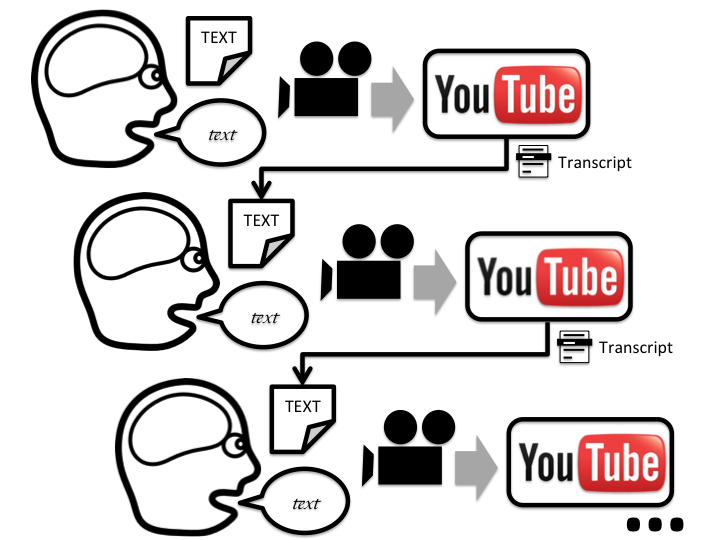
    If you happen to find some duplicate content, rewrite it. Sit down and knock out some new text. If you are the business owner, then you know the details of your product and service like no one else. I like to suggest that a business owner talk about the service—just talk—and record him/herself. Then, have a transcript service type it up from the recording. This usually generates the most natural and most detailed text, even after editing.

    How long has it been since you updated the content on your site?

    I logged into a client’s WordPress site last week and saw that the page I was on had not been updated since 2010. We have been updating their content slowly, but, clearly, we missed this one. Some topics may not have much change in four years, but we can look at how the visitors came to that page and where they went after and how long they spent on the page, and we can certainly refresh the page with this information in mind. We can rewrite with more details and offer easy links to the most often visited next page. We want to make it as easy as possible for the visitor to get the information they need.

    Remember, content does not mean just text. Content is text and videos and images and calculators and quizzes and slideshows, etc. Multifaceted media on a single page creates an extremely consumer-focused experience.

    #4 Take Some Pictures!

    You need relevant images on your page of text. Text and images should be focused on a single topic. The image should be optimized around the same topical idea as the text on the page. If you create the image, and it’s original, that’s even better. I have combed through a client’s Facebook, Flickr, and Pinterest to grab any original images they have and reuse them on the website. If they already exist, and I have access to them, it’s one less thing I have to ask the client to do. You really need to see the impact of authentic, original images.

    Really, which of these says more to the consumer?

    Engaging Photos Comparison Sailor Image - Search Influence

    #5 Blogging

    Pages and blog posts are different animals. Pages are for the topics that are evergreen and should represent a business’ core products or services. Blog posts are for

    • Commenting on current events,
    • Answering specific questions that require high levels of detail (Q&A)
    • Showing current trends in your industry
    • Real engagement with your audience!

    Paula Keller, Search Influence’s Director of Account Management, says, “We see blog posts written about specialized topics from seven years ago still driving organic search engine traffic to a website. Blogging is good for the readers who come across it today, good for the search engines as the new content publication brings them back to your site, and has long-lasting benefits on your site’s authority.“

    #6 Video

    Video is not entirely necessary to overcome Panda, but it is a great addition to your content. The best videos are created with some input from the client or are created by the business owner with a handy smartphone.

    The best videos are instructional how-to’s or tutorials: 30 seconds on unclogging a sink, installing an ice maker water line, or one minute of an attorney educating us how to behave if we get pulled over or… (Yikes!) arrested.

    When you have a video created and ready, add the video to your Google account’s YouTube channel, and embed it on the topically relevant page. Mark it up with proper schema! I would add videos at a pace that is both slow and steady – once a month, once a quarter – whatever frequency you think you can actually stick to.

    #7 Consistency is The Key

    Okay, so I know that local citations work is not the first thing we think of when we are considering Panda (typically thought of as strictly a content algorithm). Panda is really searching for the quality, authoritative websites. Way back at the very first Panda, Google said, “It will provide better rankings for high-quality sites.” And one of the key efforts in building high-quality sites is having clean consistent business data across the local ecosystem.

    David Mihm started his Local Search Ranking Factors “to help small business owners confused by Local Search, or those strapped for time, to prioritize their marketing efforts.” Many industry leaders contribute to the Factors (including Search Influence!). It was last published in August 2013, and it reveals that citation volume, NAP consistency, and other local signals account for 16% of the ranking factors.
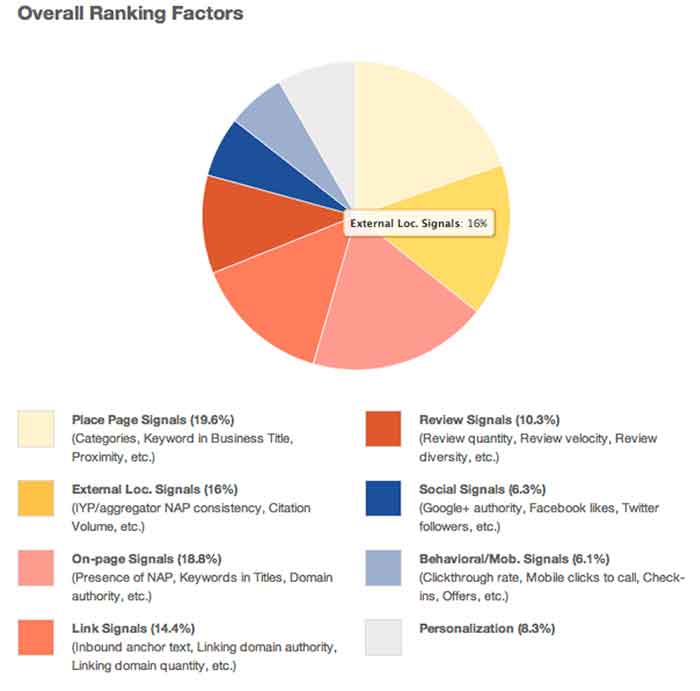
    Overall Ranking Factors Chart Image - Search Influence

    Our own Mary Silva, Senior Internet Marketing Associate, adds, “Consistent and correct business NAP (Name, Address, Phone, and often Website) is the key to getting your site to rank locally. If Google finds inconsistencies in your business information across the web, then your business and its associated site are considered less authoritative and not as trustworthy.”

    You can clean your listings yourself, but be forewarned, it’s a serious time investment. There are tools out there to help you in this endeavor. Be sure to allocate some hours every month to reviewing those tools and taking any action to edit and update listings as you go.

    Learn to Love the Panda!

    If you need help getting your site back on track from Panda, we would love to help out. Just know that Panda can be your friend. The latest update shows that it’s a simple matter of some spring cleaning, getting back to the basics, and being a good citizen. We can help you get there!


  • Yelp Adds Videos — But Not Necessarily For Reviews

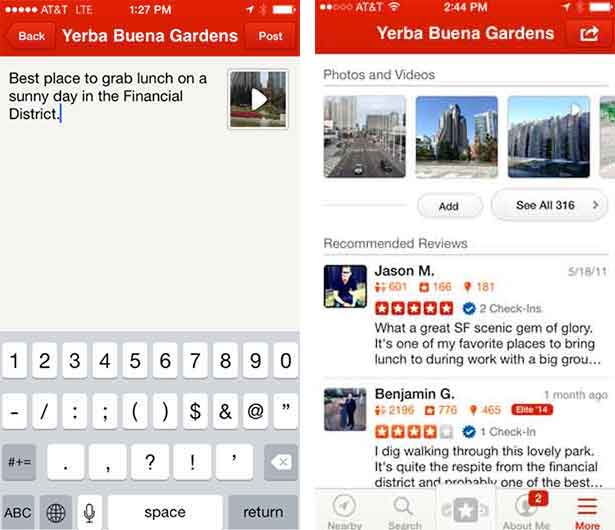
    A couple of weeks ago, Yelp leaked to Business Insider that they will soon allow users to add 3-12 second videos to their reviews. When I initially heard this, I was thrilled, because I have been waiting for this feature for some time now.

    However, when I learned that these videos are intended to simply to add more media to the reviews (in the photos section) and not actually stand as reviews themselves, my excitement waned.

    YelpReviewVideos

    Rather than video reviews, what we are getting is a way for Yelpers to capture the atmosphere of a venue or more likely, selfie videos of them stuffing their faces at their favorite eatery. Yelp’s mobile product manager Madhu Prabaker explained the purpose of adding the video as “a reward for businesses that go to great lengths to achieve a certain ambiance, whether by having a certain lighting or the music at just the right level.”

    Was anyone else as let down as I was when they heard this? I feel as if this new platform change is being wasted on the business aesthetics such as atmosphere and showcasing products, where pictures were doing just fine. The photo capability has been around for years—nothing new there.

    What I see as the future is a full video review platform where consumers can turn the camera on themselves and tell us how they feel about the businesses they interact with. There are plenty of platforms out there to help SMB’s solicit reviews such as DemandForce and Customer Lobby, but there are no pure play platforms dedicated to helping users generate video testimonials. However, this functionality could ultimately rid business owners of the demon that is the Yelp review filter. (Business owners with less than stellar Yelp reviews, you know what I am talking about.)

    What’s With The Filter Anyway?

    Yelp’s justification for not showing certain reviews has always been that they appeared to be less than trustworthy. What could legitimize a review better than a video of the person posting it?!  No more having your real user reviews taken down and your competitors’ employee-generated or otherwise fake reviews staying up. Real live video testimonials from your customers would become the gold standard for authenticity on Yelp.

    While this version of Yelp videos may help to drive new business by showing a scrumptious plate of food or even a clean car that just went through a car wash, I believe that Yelp is missing out on a huge opportunity. According to SO Media, Video has 400% higher engagement rate than static content. That means that a video testimonial will most likely bring on an action, whether that is a like, comment, or share leading to more significant actions like phone calls and getting directions.

    So, How will Adding Video Effect The Yelp Review Filter?

    One can only hope that allowing customers to add videos to their reviews will serve as positive reinforcement that their opinion of your establishment is a credible one. One can only hope…

    If Yelp factors the use of rich media (namely photos and videos) into review filtering, it hasn’t publicized this. Will they start giving these media reviews priority?

    Industry experts have consistently pointed to the importance of users having a profile picture, connections, and several reviews as the keys to success in building an optimized Yelp profile.

    I personally believe that video will soon become an important part of this conversation of what a truly optimized Yelp user profile is. While I understand that photos might not have been a large piece of the puzzle in the past, I would contend that the rich content in user videos will be of much greater influence in helping build authority and the perception of local business leadership.

    Why Are Your Reviews So Important?

    We’ve long known the importance of having a Yelp business profile. It’s so important, in fact, that according to the Boston Consulting Group in 2013, a business who even has a basic and free Yelp profile will make on average $8,000 more in annual revenue than a business without a Yelp profile. And this is where Yelp gets its leverage. It’s also a great reason to be so selective about which reviews they show.

    As the video feature rolls out only to Yelp Elite users this June, we will have to wait until it makes its way to new users to really see how it effects the review filter. The reason being, Yelp Elite user reviews always show up when posted. The filter’s most negative impact comes to those newer users, without perceived authority on Yelp.

  • 5 For Friday – Facebook Privacy, Google With Your Voice, and Yelp Videos!

    5-sand1. Facebook Defaults Posts From “Public” to “Friends” & Introduces Comprehensive Privacy Checkup
    – Marketing Land

    Facebook has finally launched a major change that may have an impact on their real-time efforts. With the privacy updates, users’ posts will now default to only be visible by friends, and all users will be encouraged to check on their privacy settings if they have not been updated recently. Greg Finn says he expects that this update may cause hashtags and real-time conversations to continue on their decline.

    2.Yelp Will Allow 12-Second Video Reviews Starting Next Month
    – Marketing Land

    Beginning in June, “Elite” users will be allowed to share their review of local businesses via a short video. These videos will first appear inline with the photos, but will eventually also appear along with the reviews like photos currently do.

    3.Google+ Introduces New Features That Automatically Generate Movies and Travelogues
    – Search Engine Journal

    Google+ launches Stories and Movies that will bring together your photos and videos to highlight your favorite moments from your travel or an event. Google’s Story will arrive within 24 hours after you return from your vacation. After you receive your story, you will be able to customize it and share it. Google+ Movies will include related photos and videos along with a soundtrack and special effects.

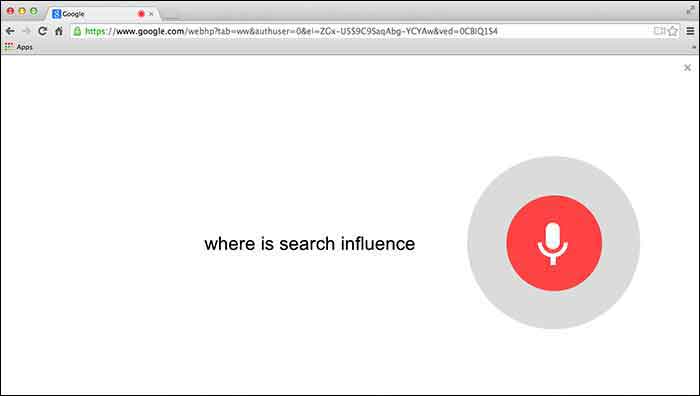
    4. Google Adds “Okay Google” Voice Search For All Chrome Users
    – Tech Crunch

    Users will first need to give Chrome permission to use the mic on their computer. Then you can simply go to Google.com and say “Okay Google” to trigger the voice search followed by your search request.

    GoogleChromeVoiceSearch

    5. Google Paid “Dealers Nearby” Appears To Have Gone Live
    – Mike Blumenthal

    Mike Blumenthal noticed that Google’s new paid ads (now appearing within the knowledge graph) are live. This seems to be only the case in the US according to the comments thread on Dr. Pete’s tweet regarding this update. Mike Blumenthal suggests that we may one day see Google selling competitors space in branded knowledge panels.

  • Optimize Your YouTube Videos With Video Transcripts

    youtube

    Using YouTube to promote your business is one of the best avenues to take when it comes to outranking your competition. YouTube is one of the largest search engines available today, which means that everyone is trying to get a piece of the action. The only problem is that most people do not know how to leverage the power of YouTube, because their video gets lost in what I like to call “The Black Hole Of Videos”. People still have not learned that YouTube is a search engine, and therefore, your videos have to be identify by the search engine as an authority. Video transcripts can play a major role in telling search engines, “Hey! Look at me! I am a good video and I have content to prove it!”

    youtube 2

    The problem with YouTube video optimization is the only thing that YouTube has to determine what the content of your video entails is the description, the title, and the tags. While these are great ways to get more viewership for your videos, if your niche is popular with a lot of competition it could be very hard to outrank. Video transcripts give YouTube something to actually read and determine what your video is about based on more than just titles, descriptions and tags. YouTube and Google read text to optimize content, so by adding a transcript you are adding extra content to crawl! Remember, content is king in search engine land. The transcripts are classified on your video as “CC” or “closed captioning”. It’s almost equivalent to putting your Youtube video on steroids. Most of your competition will not upload a video transcript and this gives you an advantage of your competition.

    If you don’t have time to transcribe your video, go to Fiverr.com. People have offers to transcribe videos for $5 dollars so you don’t have to! Transcriptions will skyrocket your YouTube videos to the next level, simply because you are giving YouTube content to actually read and crawl instead of just titles and tags.