Tag: organic search

  • 2020 Medical Search Trends: Medical Searches Met and Exceeded Pre-COVID Levels Across Specialities

    2020 Medical Search Trends: Medical Searches Met and Exceeded Pre-COVID Levels Across Specialities

    This post was updated by Paula French on March 4, 2021 to reflect refreshed statistics and analysis. It was originally published in October 2020. 

    Key Insights:

    • Monitoring search trends can make your campaigns more effective because you can adjust your strategy based on the latest information.
    • As of January 2021, several medical practice areas, including cardiology, neurology, urology, and gynecology, have seen their search volumes return to pre-COVID levels.
    • Cosmetic procedures saw a short-lived dip in search interest for liposuction, rhinoplasty, breast augmentation, and face lifts in March. By the end of May 2020, interest exceeded pre-COVID levels for 3 of the 4 procedures: liposuction, rhinoplasty, and breast augmentation. Face lift interest exceeded pre-COVID levels in late July.
    • Addiction treatment searches didn’t drastically dip as much as other medical specialties and have been slowly rising to their pre-COVID levels. The most recent data indicates they have now exceeded early 2020 interest.
    2020 Medical Search Trends

    Monitoring search trends is a critical piece of managing a productive digital marketing strategy. It can inform your need to adapt your marketing strategy, whether that is away from search to other mediums or to invest more heavily in search engine optimization and paid search.

    2020 has seen shifts in search trends unlike anything I’ve seen in my 11 years working in SEO. It’s no surprise given the “pivots” and “unprecedented” year we’ve had. In a recent conversation with a colleague in the medical industry, we discussed expectations for 2020 healthcare revenue and what we’ve seen so far in the return of patient confidence.

    I was interested to see how search trends on Google mapped with what we had seen with the practices and hospitals with which we work, so I took a look across several practice areas and assessed the data.

    How do I read the Google Trends charts below?

    Each chart that shows the change in the amount of interest in a given topic based on the number searches during a time frame. Specifically, Google calls this metric “Interest over time” and defines it as “search interest relative to the highest point on the chart for the given region and time. A value of 100 is the peak popularity for the term. A value of 50 means that the term is half as popular. A score of 0 means there was not enough data for this term.”

    For more on how Google calculates Trends, see here: FAQ about Google Trends.

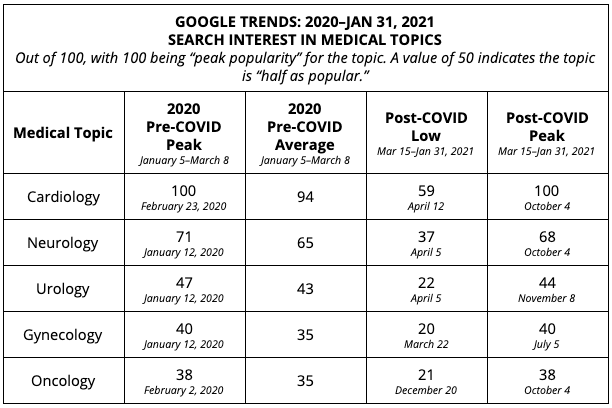
    I have included a table of my own analysis of the numerical data, looking for highs, lows, and averages both “pre-COVID” and “post-COVID.”

    In some analyses below, we look at “Topics” which looks across several ways people could be searching to gauge searchers interest level at a point in time. In others, we look at “Search terms” which is used when it makes sense to compare to similar search terms that would otherwise fall under the same topic (such as “drug rehab” & “alcohol rehab,” as they both fall under the topic of “addiction treatment”).

    Medical Specialities: Cardiology, Neurology, Urology, Gynecology, Oncology

    Summary of findings for medical speciality search trends:

    • By October 2020, searches were either at or right below pre-COVID levels, and saw a similar peak in January 2021.
    • Cardiology, neurology, urology, and gynecology all follow the same pattern: initially, searches for these specialties dipped in March 2020, but people were still searching for these terms, even in the earliest days of the shutdowns.
    • The lowest point of searches for these topics was around mid-April, which is when the public started to recognize that this stay-at-home life was going to become our new normal for much longer than we originally thought.
    • Since April 2020, searches have been on the rise, with dips during the holiday weeks of July 4, Labor Day, Thanksgiving, and Christmas.
    • Oncology saw a lower level of variation throughout the year. Interest levels dipped slightly after the shutdown and remained steady afterward, with an interest level ranging from 21-38, averaging around 30.
    2020 Google Trends for Medical Specialties

    Cosmetic Procedures: Liposuction, Breast Augmentation, Rhinoplasty, Rhytidectomy (Facelift)
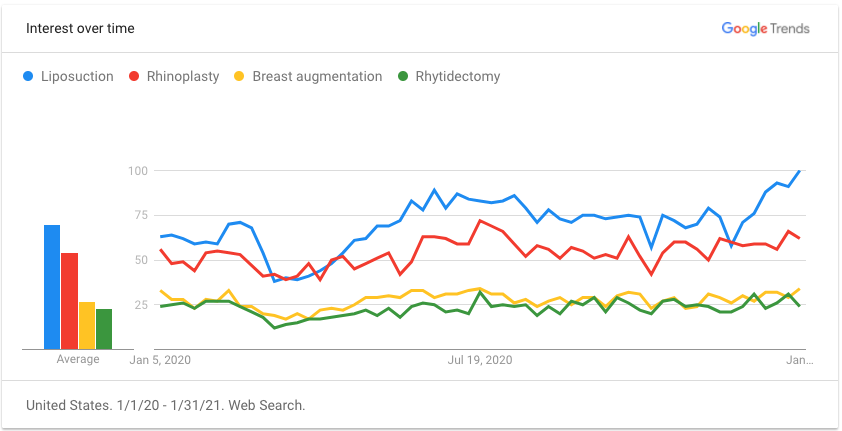
    2020 cosmetic surgery trends chart

    Summary of findings for cosmetic procedure search trends:

    • There was an initial, short-lived dip in search interest for liposuction, rhinoplasty, breast augmentation, and face lifts (rhytidectomy). This dip spanned across the end of March and into April.
    • After the dip, there was a surge in interest, with the number of searches actually exceeding pre-COVID levels at the end of January 2021 for liposuction, rhinoplasty, breast augmentation, and face lifts.
      After the dip, there was a surge in interest, with the number of searches actually exceeding pre-COVID levels at the end of January 2021 for liposuction, rhinoplasty, breast augmentation, and face lifts.
    • By late January 2021, liposuction saw peak interest (100), significantly exceeding pre-COVID interest levels, when the peak was 79.
      Rhinoplasty interest also peaked in July and remains above the pre-COVID average.
    • Breast augmentation search interest met and then exceeded pre-COVID interest in the summer of 2020, and has peaked above the pre-COVID high in January 2021.
    • Face lift interest initially peaked in July at 36, decreased a bit through the fall, and peaked again in January 2021, with an interest level of 33, which is higher than the pre-COVID peak of 31.
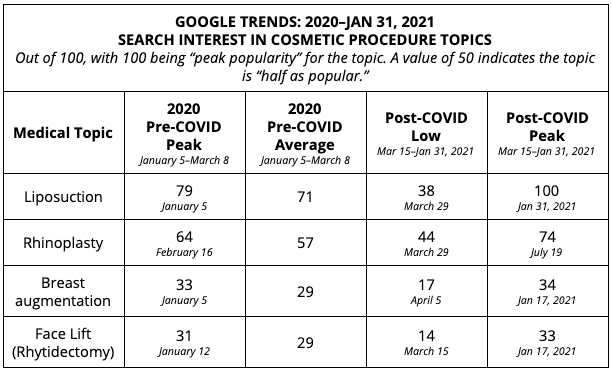
    2020 Google Trends for Cosmetic Surgery industry

    Addiction Treatment: Drug rehab, Addiction treatment, Alcohol rehab
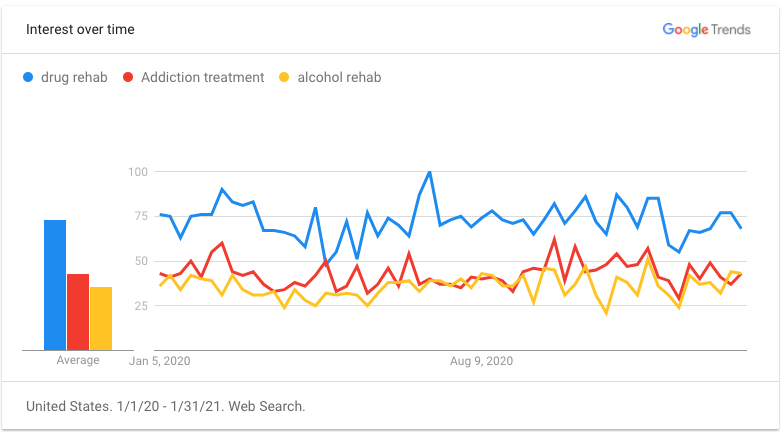
    2020 addiction treatment google trends chart

    The addiction treatment search interest analysis is based on specific “search term” interest, whereas medical and cosmetic graphs above were based on topic interest. This is a result of the availability of data for topics vs. search terms.

    Summary of findings for addiction treatment search trends:

    • There was also a significant dip in addiction treatment search terms, but interest has risen to varying degrees in comparison to pre-COVID peaks.
      The search term “Drug rehab” saw it post-COVID peak interest (89) in the week of August 16, which is only slightly less than the pre-COVID high on February 16 (100).
    • The pre-COVID 2020 average for “addiction treatment” was 60. During the heaviest shutdown period (March 15–May 10), the average interest was 44, with the lowest point being 26 on March 15. The post-COVID peak was September 27, with an interest level close to pre-COVID levels (58).
    • “Alcohol rehab” searches reached their peak (58) during the week of December 27, exceeding the pre-COVID 2020 high of 52 in late January.
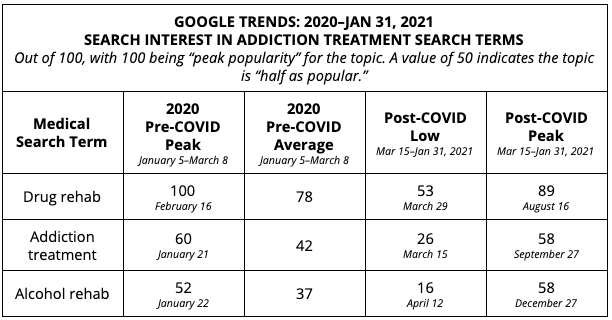
    Addiction treatment data chart

    How can search trends help us help more patients?

    I assume that by now you’ve compared this data to what you see at your practice or hospital. The goal of monitoring search trends (along with your own campaign-level data) is to inform necessary adjustments to your medical marketing strategy.

    During the early months of shutdowns, we were hyper-focused on looking for shifts in consumer behavior to adjust our strategies. In the best-case scenarios, we were able to shift budget to the channels where our clients’ audiences were spending their time and away from the channels where they weren’t as active (and produced some really awesome results). Then, we made additional changes when that activity returned.

    There are several reasons we can attribute to the overall return of searches and why in many cases, medical searches are exceeding their pre-COVID levels. Whatever the reasons, this is a critical time for businesses to analyze their marketing mix closely to assure they are both

    • carefully spending their marketing budget
    • confident they’ll understand the outcomes of their marketing investment

    If you’d like some support in analyzing where you’re currently investing in marketing, want some fresh ideas, or are interested in partnering with an agency like ours, reach out. Our dedicated team of strategists will work with you to understand your goals for 2021 and provide recommendations to help you build your patient pipeline.

    P.S. If you are looking for more insights, check out our recent post “How Hospitals and Healthcare Practices Can Adapt to Google Updates” and follow along with us on our Healthcare & Medical Marketing Blog for future industry updates.

  • Enriching Your Results on Google

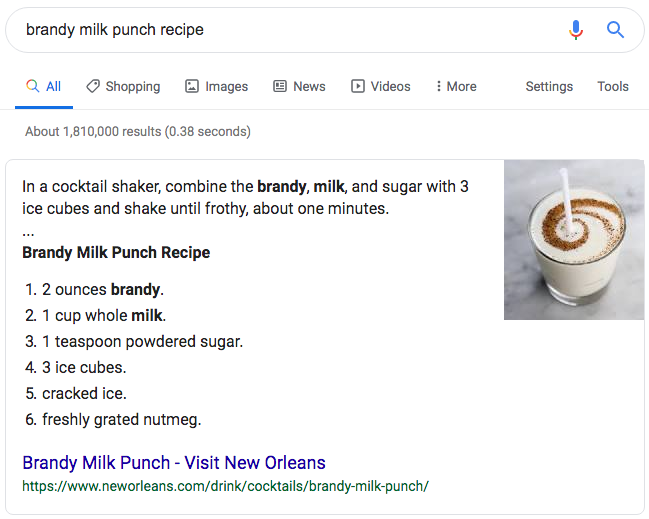
    If you’ve used Google to perform a search for a recipe, an answer to a question, to find a restaurant, or find out the time a concert starts, you’ve probably noticed that not all search results look the same. Some of the results have extra information, some appear with pictures in a “carousel” at the top of the page, and some have reviews with stars on them. These are what have been called “Rich Snippets” by Google, and more recently are being referred to as “Rich Results” in Google documentation. There are many types available, and if you have a website that you are trying to drive traffic to, then there is probably a way for you to take advantage of these features.

    What’s a Rich Snippet?

    The results returned by Google for each recommended web page that consist of a title, a description, and the URL for the page are “snippets” of information taken from the pages of websites. For example, take our LinkedIn page as it appears in the search results:

    Typical Snippet

    Rich snippet data on a SERP result for Search Influence's LinkedIn page

    The title and description are pulled from meta information stored on the pages of websites that are referenced in the results. These are typically added to the code of the site using some simple HTML that can be read in the source code but does not display for site visitors on the page.

    Rich Snippet

    Example of a rich snippet being served up in the Google SERP

    Similarly, Rich Snippets use code on the page to provide more information to Google and can result in additional information that is displayed more prominently in search results.

    How Do I Get My Site to Show as a Rich Snippet in the Search Results?

    In order for Google to display your webpage(s) as rich snippets in the search results, you need to have the information required for the Rich Snippet type in a coded format that Google can read. This is done with “Structured Data,” which, just as the name would suggest, is information specified in a particular format. Google uses the vocabulary of schema.org for most of it’s structured data, and there are several different formats that can be used. Google’s preferred format is JSON-LD (JavaScript Object Notation for Linked Data) which is a common format for communicating information in web-based applications and other domains. This code format can be a bit tricky to write, so you’d likely be better off using examples provided by Google’s documentation and replacing the values with your own information or using a tool or plugin that will generate the code for you.

    If you are familiar with HTML, there are some more easily writable ways to implement structured data on your site using Microdata and RDFa. These use additional HTML attributes to define structured data.

    If you use a popular CMS (content management system) like WordPress or Shopify, there are also a variety of plugins or add-ons that can assist you in adding structured data to your site.

    What Types of Structured Data Does Google Use for Rich Snippets?

    There are 29 different rich result displays, and Google has just announced some more upcoming display options that will be available on certain search types. I would recommend checking out Google’s documentation for a comprehensive list and all the different structured data that is required for a web page to appear with various display perks and in certain sections of the results. I’ll cover some of the primary ones that will apply to the broadest number of sites.

    Article

    Blog posts and news articles can use the article structured data to potentially be featured in Google’s top stories, carousel, and display, with extra features like headline text and a larger image than the normal thumbnails from results.

    Breadcrumb

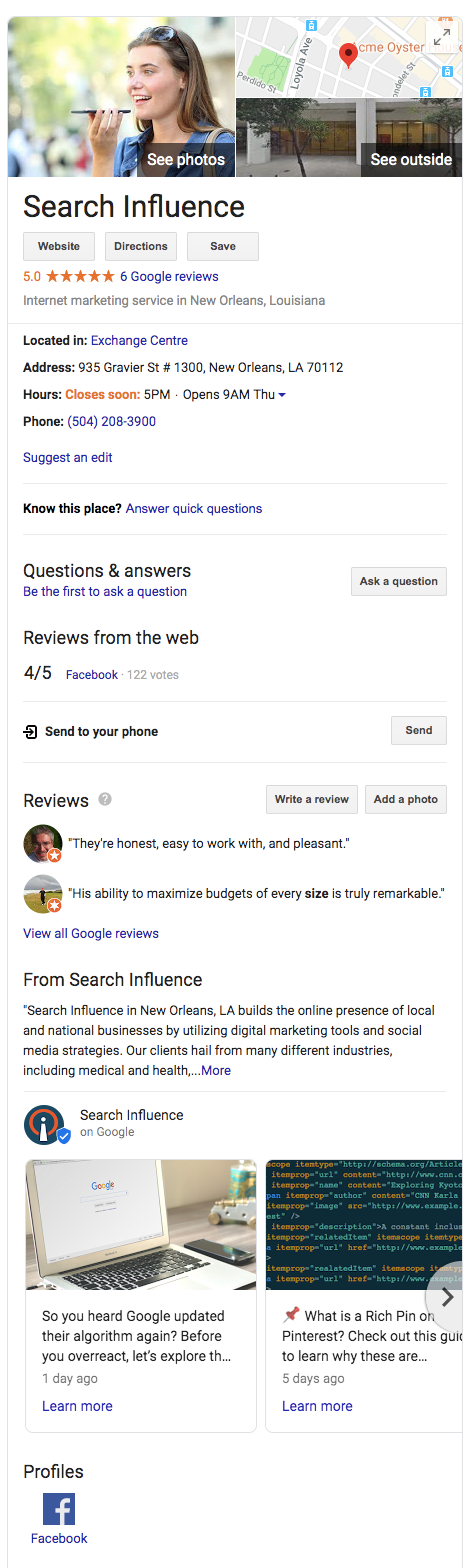
    Breadcrumb structured data can be used to display the pages in relation to the rest of the site.Example of a knowledge graph result using Search Influence as the businessFor example, a specific product page could fall under a category page, which falls under a broader category. With breadcrumbs displayed in the search results, navigation to any of these pages is just a click away.

    Carousel

    Google’s search carousel feature, a prominent interactive display with images that appear at the top of search results, can be unlocked with the carousel structured data. This usually works in conjunction with other structure data like article, recipe, or course structured data.

    Course

    For Education, schools and businesses offering courses can lay out information that will be displayed in the Google search results.

    Event

    This type is an interactive rich result that shows a list of organized events, such as concerts or art festivals, that people may attend at a particular time and place.

    FAQ Page

    A Frequently Asked Questions page structured data is for common questions posed on the page’s subject, often used by businesses to provide information about its products and services.

    How-To

    A How-To walks users through a set of steps to successfully complete a task, featuring video, images, and text.

    Local Business

    Local businesses will benefit greatly from this type of structured data. It allows your business to appear in the knowledge graph with important information like address, hours of operation, contact info, logo, and business description.

    Logo

    This allows your organization’s logo to appear in search results and the Google Knowledge Graph.

    Product

    Structured data for products includes price, availability, and reviews.

    Q&A Page

    Similar to an FAQ page, Q&A structured data can be used on pages that present information in question and answer format.

    Recipe

    This structured data type will allow recipes to potentially display in Google search results with ingredients list and instructions.

    Review Snippet

    A review snippet is a rating or short review excerpt. It can apply to products, recipes, movies, and local businesses.

    Video

    These snippets allow you to markup video content and appear in video results of Google search results.

    Where Can I Learn More?

    You can see example code, required information, and images of the resulting rich snippets that structured data types make possible in Google’s documentation here. I also recommend checking out Schema.org, where you can learn more about the structured data that Google used as a base for all their structured data conventions.

    If you need help implementing code or appearing higher on Google’s search results, the Google and SEO experts at Search Influence can help. Contact us today.

    Images

    Dollar sign

  • Running With The Pack: Competing in Local Search Just Got Harder

    Running With The Pack: Competing in Local Search Just Got Harder

    Overnight on Aug. 6, Google updated search results for mobile and desktop searches from local seven-pack to a three-pack. This is not just in the United States; it seems to be worldwide and rolled out at one time. It’s really early to start dissecting this change, but I’m not seeing much good about it.

    What Does This Mean for Organic Search?

    For organic search, it means it’s even harder for searchers to find you. It looks as if these changes from Google are driving consumers to a business’ My Business page and perhaps encouraging more ad spending.

    Organic—Looking a Little Closer

    On Mobile

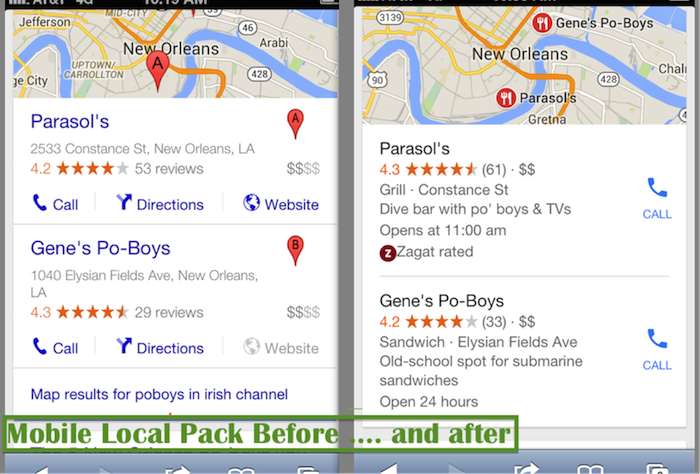
    Before Google rolled out this change, when a search on mobile gave local pack results, the user could immediately click on what they needed directly on the search results page, including:

    • Click-to-call
    • Click to get some directions
    • Click on the website

    Now, the mobile local pack only provides a click-to-call button:

    Mobile Local Pack Click Call Image

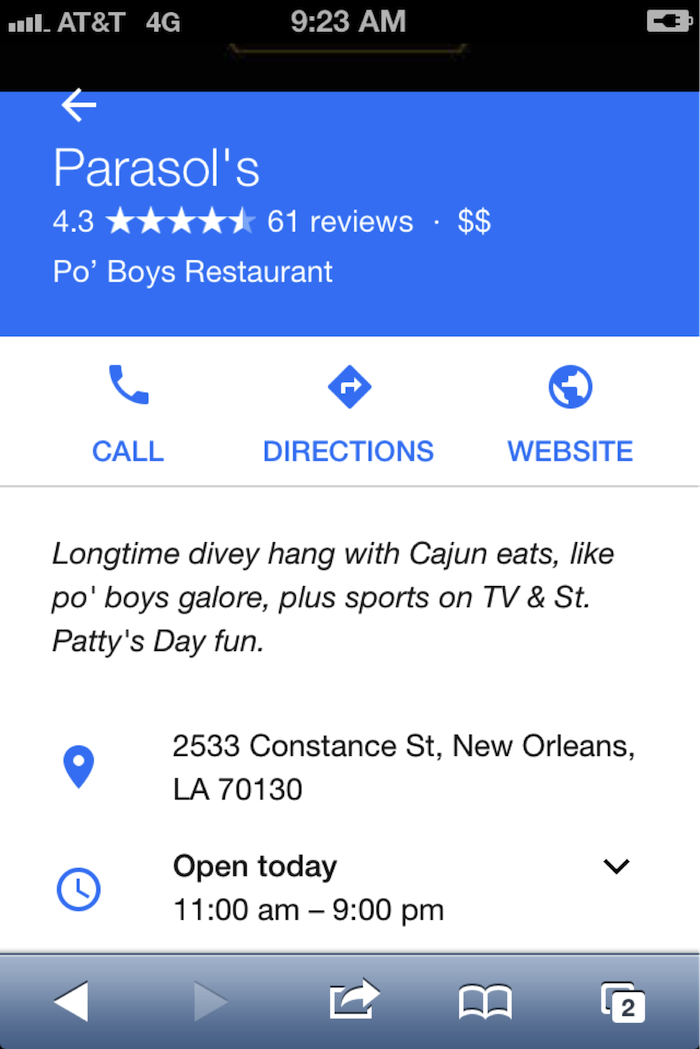
    If the searcher wants to visit the website for more info, they have another click in order to navigate to the My Business page:

    Navigate Google My Business Page Image

    On Desktop

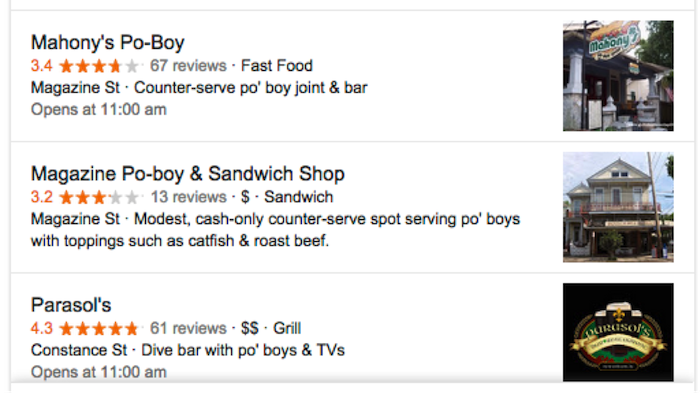
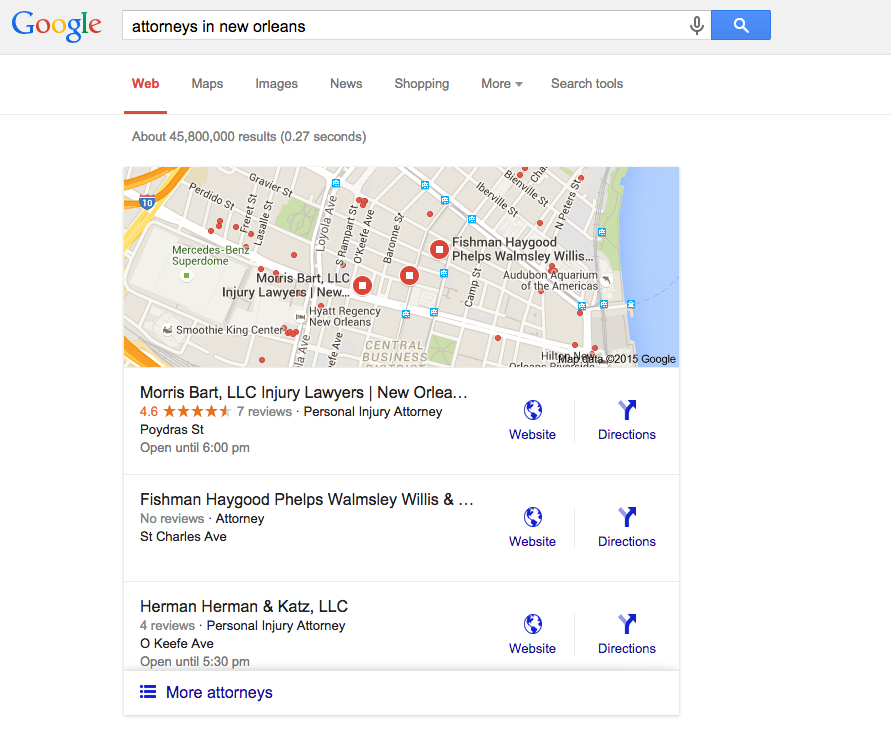
    With the new update, I get the three-pack with no immediate click opportunities:

    DesktopThree Pack Google Image - Search Influence

    Update:

    Ryan Schulze, Senior Account Associate, commented, on this published post with an interesting correction. (It takes a village.)  He shows how some searches on desktop are giving the website link in the 3-Pack.  It suggests different search categories have different clicking opportunities.  I would guess this is based on percentage of search performed on mobile vs desktop.

    attorneys in new orleans 3 pack desktop

    Back to the story …

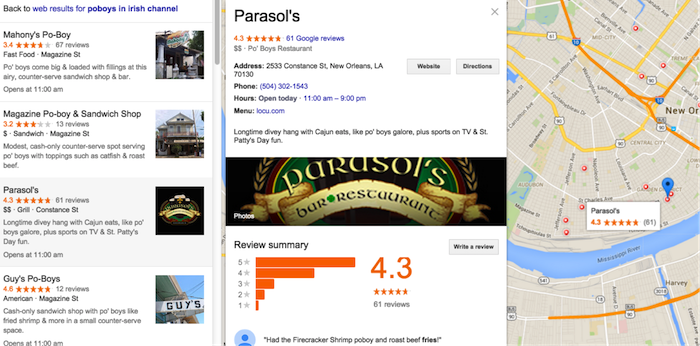
    I click on Parasol’s, thinking I will get its website or the Google My Business listing. Instead, it drives me to the local finder with ALL of the competitors right there!

    • This is not great if you’re in the three-pack because you must fight the competitors again for the searcher’s attention.
    • If you’re not in the three-pack, this levels the playing field. You have a chance to woo the searcher away from their initial choice.
    • If you are a searcher, it’s annoying because you have already indicated your preference with your first click, and Google forces you into an extra click to call the business. In addition, you are forced into viewing more choices after you made your decision.

    Desktop searches are losing ground to mobile, but desktop isn’t dead, and it still dominates search in some industries—usually those that skew to an older population.

    This does show us that it is still incredibly important to claim and optimize a Google My Business listing. Those Google My Business listings can get your business into the desktop local finder list, which is a long list of competition, so images and reviews are still important efforts to woo the searcher over to your business:

    Local Business Maps Pack Image - Search Influence

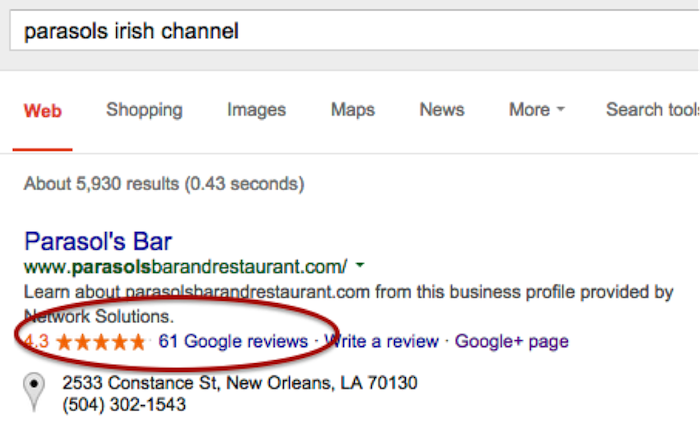
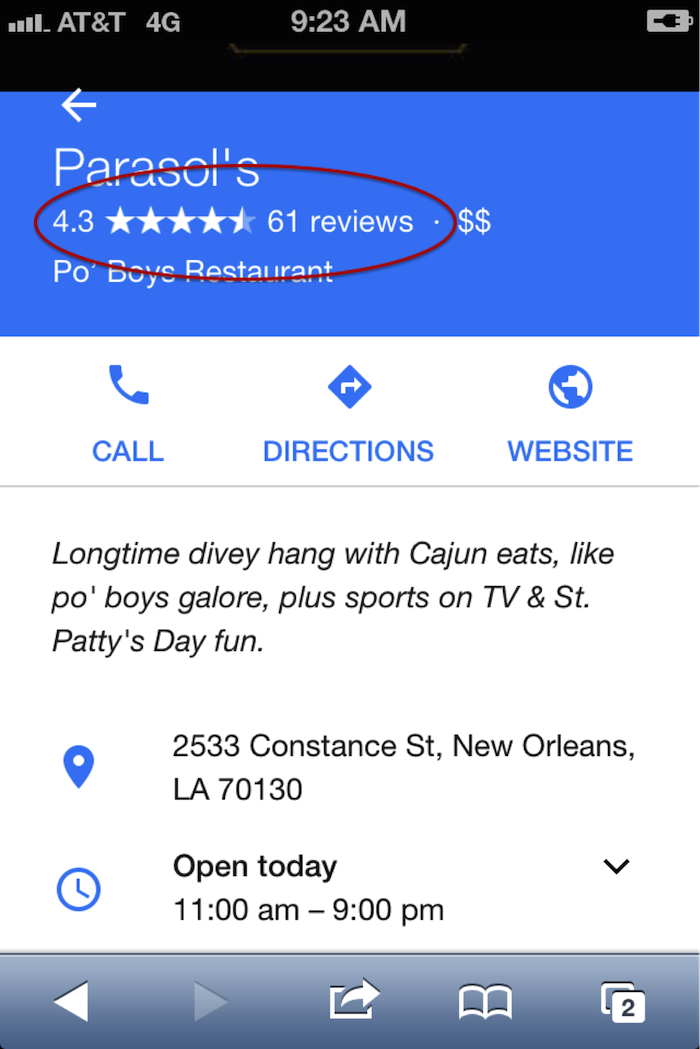
    Reviews on branded search results on desktop and mobile:

    Online Reviews Branded Search Image - Search Influence

    Online Business Reviews Mobile Image - Search Influence

    (FYI: if you’re ever in New Orleans in March, Parasol’s is a great place to be.)

    Early Data on Organic Visits

    I was chatting with Megan Lindsey, senior account manager at Search Influence, about the effect of this change for one client in particular. Lindsey sums it up nicely: “I imagine now since a searcher has to click on the business name and then once more on the ‘website’ button that people aren’t as inclined to keep clicking. I would think that most clients, even if they were in the top three maps results, are losing organic traffic because of it, but especially the ones who aren’t there anymore.”

    The early Google Analytics data supports Lindsey’s hypothesis. I found no great winners: Several clients’ Google organic was static, and several were worrisome. These clients are local businesses that are historically very strong in their markets. Over the weekend dates, there were 20 percent to 35 percent losses in organic website traffic, which seems to have rebounded Monday to Wednesday, so it appears things are still settling down.

    CLIENT A

    google / organic

    Aug. 7, 2015 – Aug. 10, 2015: 179 visits

    July 30, 2015 – Aug. 3, 2015: 285 visits

    % Change -37.19%

    Aug. 7, 2015 – Aug. 12, 2015: 319 visits

    July 31, 2015 – Aug. 5, 2015: 364 visits

    % Change -12.36%


    CLIENT B

    google / organic

    Aug. 7, 2015 – Aug. 10, 2015: 161 visits

    July 30, 2015 – Aug. 3, 2015: 210 visits

    % Change -23.33%

    Aug. 7, 2015 – Aug. 12, 2015: 161 visits

    July 31, 2015 – Aug. 5, 2015: 210 visits

    % Change -6.76%


    CLIENT C

    google / organic

    Aug. 7, 2015 – Aug. 10, 2015: 36 visits

    July 30, 2015 – Aug. 3, 2015: 54 visits

    % Change -33.33%

    Aug. 7, 2015 – Aug. 12, 2015: 58 visits

    July 31, 2015 – Aug. 5, 2015: 67 visits

    % Change -13.43%


    Have Calls Increased?

    The clients above usually do really well in the local pack and in organic website traffic, so let’s see what happened to their call volume. If you are a lucky business falling in the three-pack, consumers might be calling your business more now than visiting your website.

    When you log into the Google My Business page and go to Insights, this is the data you get:

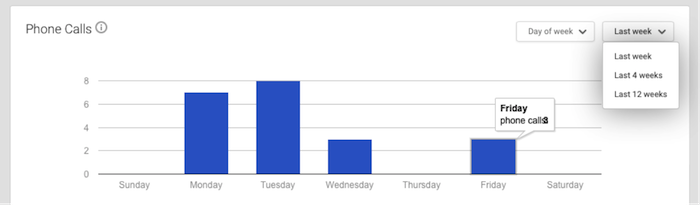
    Phone Call Data 1 Image - Search Influence

    It’s severely limited and not really insightful. The date ranges are not customizable. There is no data after Aug. 8. I have to wait until next week to get any data on effects of call volume from the three-pack rollout, and I can’t compare to the previous week. I will have to do some elementary math that surely Google could program to ensure a better user experience.

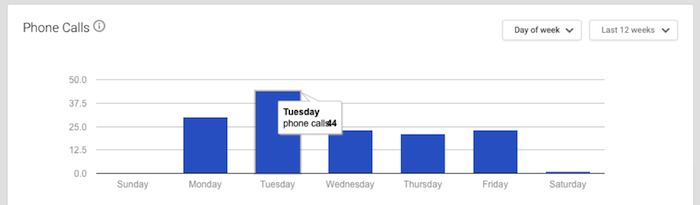
    The data is summarized to the point of being so generalized it is virtually useless. This is 12 weeks of call data. I know Google can do better.

    Phone Call Data 2 Image - Search Influence

    It warns that call volume is “approximate and only significant values may be shown.”

    Also, the call numbers could be calls from three different sources: Google Maps, search and maps for mobile. This is so frustrating for business owners. I would want to know EVERY call I received! And I would want to know where I received the calls! Google has the data, and it just isn’t sharing with business owners.

    And Paid Search?

    On the first day of the this rollout, local search expert Mike Blumenthal made these early comments: “I am not sure what will happen on clicks for AdWords, but those businesses that were lower in the old display may feel compelled to double down on their AdWords activity.”

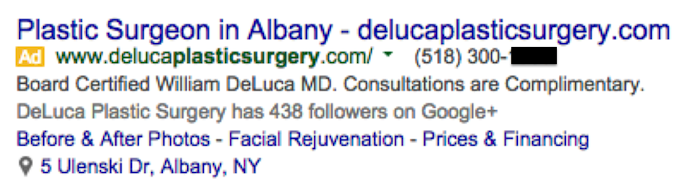
    I asked Jeanne Lobman, senior online advertising manager at Search Influence, to check it out and give us some input. “Those businesses that were previously only ranking in spots four to seven in the local pack (and nowhere organically) are now going to need to spend money on AdWords ads in order to be seen in the search engine results pages. Additionally, since Google has removed the website URL and the phone number from the local pack info, it could be beneficial to run AdWords in order to make sure searchers can easily find your phone number and call you (on desktop). This would be accomplished by using call extensions with your campaigns, which adds your phone number to your ad (as seen in the below example).

    Plastic Surgery Google Ad Phone Image - Search Influence

    On mobile, the local pack results do include the call button, but there’s no link to the website. When you click the local result on mobile, you are taken to the G+ page, which then has a link to the website. To avoid having that extra step, running an AdWords campaign on mobile ensures you can land people directly on your website with one click.”

    Lobman pulled some AdWords reports to see what impact this change may have had on click-through rate. She says it’s really too early to tell any effects, but the data so far suggests there seems to be an increase in clicks and impressions but little to no change in click-through rate, conversions and conversion rate.

    So Now What?

    We need to give it a little more time to settle in before we make any dramatic changes. When we looked at six days of organic visitor data versus four days of data, we see big improvements, so watching the data to make smart moves is the action item.

    Walk through the process that visitors might use to find your website online, and try to improve what you can control, such as adding phone numbers in your desktop AdWords ads or continuing to encourage reviews from your customers.

    Your engagement online is a reflection of how you engage with your customers in real life. Providing for the searcher with easy linking from ads, Google My Business images, reviews and informative website content is a long-term plan, and it’s a good one to win trust and authority.


  • Law & Order SEO: Finding The Culprit Behind Your Decreased Organic Traffic

    As digital marketers, we regularly analyze site traffic to ensure that our efforts are producing positive results. But what happens when you’re doing all the right things in your SEO campaign (high-quality website content, blogging, link-building, etc.) and your Google organic website traffic is consistently going down?

    1) Traffic Deep-Dive

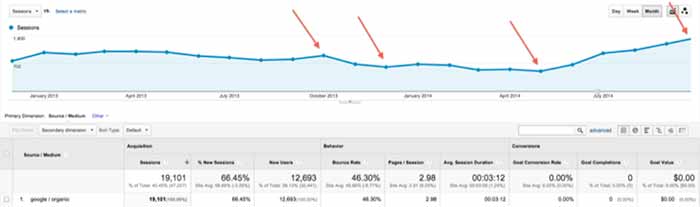
    First, log into Google Analytics and narrow your search down to Google organic traffic over the largest date range possible. Look for trends of upward or downward traffic and make annotations of known changes that might have caused traffic to change (such as a new website launch or the installation of a blog). Also, check traffic by landing page to see if only certain pages were affected.

    TrafficDeepDive

    2) Compare to Algo Timeframes

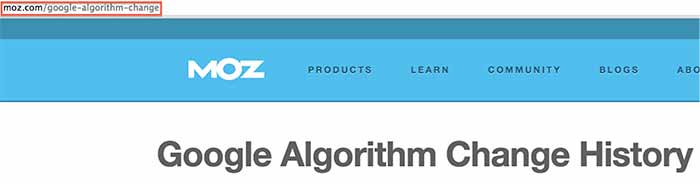
    Next, see if any of the changes correspond to one of Google’s algorithm updates using the Moz algorithm timeline. Keep in mind that the date might not be exact, because the updates often take time to roll out. If you can attribute the traffic change to an algorithm update, take the necessary action depending on the update. Hit by Panda? Focus on your content strategy. Hit by Penguin? Take a close look at your inbound links and check for a manual action.

    AlgorithmChangeIssue

    3) Investigate Other Possible Culprits

    If your traffic change didn’t correspond to a Google algo update, this is when your analysis gets a little tricky, as there are many possible reasons for the change. Here are some things to check when searching for the source of your traffic change:

    • Rollout of a new website (setting up 301 redirects is essential to this process as well as carrying over all SEO optimizations)
    • Removal or adjustment of your content
    • Relocation of your business (your citations need major focus)
    • Discontinuation of an ad campaign that was generating traffic
    • Adjustment of technical elements of your site, such as meta-tags or robots.txt
    • Change or removal of your Google Analytics tracking code (surprisingly common)
    • Change in the marketplace or seasonality (like a decreased demand for your products/services in general or during a certain part of the year)—check out Google Trends
    • Messy directory profile (check your percentage of correct citations using Moz “Check My Listing”)

    These tips will hopefully help you get to the root of the issue and take the necessary action to achieve your SEO goals. If you need a professional team to do the work for you or to assist you in your efforts, you can always call us: we’ll be happy to discuss our SEO packages with you.

    Have any additional recommendations for things to check? This list is not exhaustive, so please help add to it!

  • 5 For Friday: Local Search, News, Advice, Measuring Success, and Penguin Refresh

    Five

    1. Local Businesses: Watch Out!
    – Search Engine Watch

    Apple’s newest gadget, the Apple Watch, is likely to have a major impact on local search. The expected increase in hyper-local searches means added pressure will be placed on businesses to ensure they can be found easily online. “Users will be able to search for locations via dictation or favorites, map out the routes and receive touch feedback at each turn – including different notifications to denote right or left turns” said Apple’s Vice President of Technology Kevin Lynch.

    2. SEO Success: Ranking #1 Isn’t What it Used to Be
    -Search Engine Land

    Following “Pigeon”, Google’s latest algorithm update, it has become increasingly apparent that rankings do not equal success. Instead you should focus on the following 5 metrics to more effectively measure SEO success: organic traffic, organic landing pages, organic conversion sources, Google My Business impressions and clicks for driving directions.

    PigeonUpdateImage

    3. Awaiting the Penguin Refresh
    – Search Engine Watch

    Google’s John Mueller recently announced that a Google is working on a Penguin update that is expected to launch in the “reasonable future.” In the meantime, Muller encourages webmasters to “focus on cleaning up site issues and making sure the sites are as good as they can be in and of themselves rather than focusing on individual factors of individual algorithms.”

    4. Social Customer Service: Now More Important than Ever
    – Search Engine Watch

    The social media revolution has had countless impacts on the success and failure of businesses. Consumers have more power than ever before; therefore, it is crucial businesses are aware of their concerns. Tips for success include: taking complaints and issues offline as quickly as possible, responding in less than an hour, and creating content that helps the customer, while maintaining a positive attitude.

    5. App-sessed
    – Marketing Land

    A new study shows that users spent 21 percent more time on apps in the last year. The data revealed that users are spending the longest amount of time on music-related apps and the shortest (but also most frequent) amount of time on social networking apps.

    MobileAppImage

    Image Sources:

    Pigeon Update Image

    Social Media Apps Image


  • Is Your Website Healthy? Increase Its Organic Intake & Watch It Grow!

    Whether you’ve noticed it or not, all website owners are in the parenthood business. Our websites are our babies; despite how frustrating they can seem, how stressed they make us, and how much of our money and time they require, we love them anyway. And, of course, we want them to live long, healthy lives. So, whether your business is currently raising a newborn, keeping track of an 8-year-old, or guiding a young adult, your baby deserves undivided attention, precious care, and the healthiest food available.

    100 Percent Organic Image - Search-Influence

    Why Choose Organic?

    Just as any living and working body, your site deserves a high intake of organic food, and in this case, every visitor is a small portion of a meal. Organic traffic is traffic that comes to a website through unpaid links from search engines, directories, and more. Because organic traffic is considered natural, it’s not a quick process but rather builds over time. Its success is directly related to the content on the site and the number of backlinks it receives from trustworthy sites. Since you’re the parent of this functioning being of the virtual world, you’re responsible for its wellbeing.

    Website Healthy Eating Image - Search Influence

    The Recipe To Increasing Organic Traffic

    The organic method is not only a high-quality and reliable tactic, but it’s also free and increasable. Plus, high numbers in organic traffic will naturally inflate your search engine rankings. How do you do this? Here are a few, efficient ways to increase your site’s organic traffic:

    • Build a site with relevant, unique content that’s up to date and free of grammatical errors.
    • Add keywords as naturally as possible into your compelling content. (Don’t overuse them.)
    • Do NOT post duplicate content on your pages.
    • Start an engaging blog.
    • Only have dependable, authoritative backlinks to your site. (Strive to have content that others want to link to. Don’t use link schemes.)
    • Optimize your photos.
    • Remember to add page descriptions.

    Healthy Choices Scale Image - Search Influence

    The Final Health Check

    The question at hand is simple: Is your website healthy? Or, is it stuffed with too many keywords? Is it living on manipulative, artificial backlinks? Is its body suffering from the lack of unique content nutrients? Deceptive preservatives will decrease your traffic and discredit your right to rank high on Google, Bing, and other search engines. Fill your site’s body with authentic, creative content with striking, optimized photos and strong backlinks. Then, you can sit back and watch its organic traffic grow.

    Your website has a heart. Treat it like it does, and give it your best.

    Website Healthy Heart Image - Search Influence

  • Has Panda 4.0 Got You Down?

    Sad Panda 4.0 Image - Search Influence

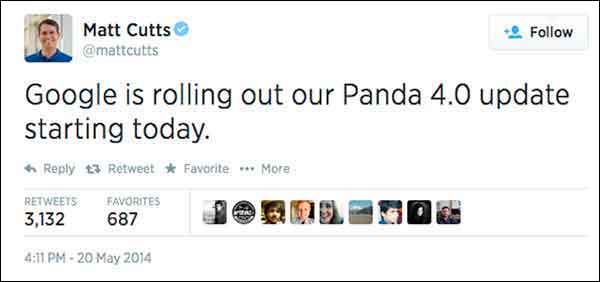
    Now that we are 4 weeks post-Panda 4.0, there is a decent amount of data to sift through and determine if a website got caught in the Panda filter.

    Panda is supposed to provide consumers with search results that are helpful to their needs. This means websites that have some authority and provide a service to consumers are going to be more trusted and rank better. The better websites offer answers to consumers for what they are looking for and help them make decisions based on useful information. The content is engaging and gets people the information they need.

    Not Too Much Panda Drama

    Matt Cutts Panda 4.0 Tweet Image

    Panda started rolling out May 19, so that’s our magic date for before and after data. When looking only at Google organic traffic and comparing May 19, 2014-Jun 15, 2014 to Apr 21, 2014-May 18, 2014, I saw a 6.71% increase for one plastic surgeon’s website. This is a respectable increase when you consider that summer is generally thought to be the start of the slow season for plastic surgery as an industry.

    For this plastic surgeon, I looked at the same date range for the last 4 years. Every year, this same date comparison resulted in a minor and expected decrease of Google organic traffic. This illustrates the typical seasonality. Given that history, we’re pretty excited to see an increase from Google organic traffic going into summer.

    I looked at another client’s website, this time for an apartment complex, which is up 15% in Google organic search. Last year showed a decrease for the same time frame comparison. Unfortunately, the client didn’t have Analytics data for 2012. I have always thought that summer would be a high season for his industry, but he says for his complex and his location, summer is not necessarily the busy season. I always like to see double-digit growth in Google organic traffic (that’s a no brainer), but I worry about the monthly Panda data refresh leveling things back out, which happens all the time. The fact that the site had an increase at least tells us that the site is trusted, and we are on the right path, so that’s the story to celebrate.

    One of our account managers has a charter-fishing website (which I think would be super fun to work on). This fishing charter client had a whopping 115% increase, but you have to consider that this is his high season. Last year the same time frame comparisons saw a 65% increase. Even with the seasonality, I think he was a winner with Panda 4.0. He has lots of great original photos and lots of engagement – it totally looks fun to go out on his boat! And that’s a major part of what makes a quality site.

    Site Traffic For Engaging Content Chart Image - Search Influence

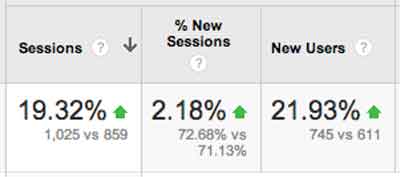
    In the health industry, we have a drug rehabilitation clinic website, which experienced a 19% increase after Panda 4.0. So, the interesting part for this client is that their content is solid. We have been working more heavily on their citations and less on their content, so it’s possible this client is simply readjusting from the previous Panda. It’s also possible that clean local citations are helping the site’s quality and trust.

    Magic?

    I know everyone reads these posts for some super secret insight, to learn some nugget of goodness, and I will probably disappoint. The efforts of our account managers have helped our clients’ websites, some shown above, but really, as a group, we have done nothing extraordinary. If it’s an older client, we have taken the time to review all of the past years of work and get back to the basics. We fixed any technical SEO problems we found. We are also constantly refreshing content, constantly reviewing citations, and building social channels with planned content calendars. If it’s a newer client, we work on building a solid foundation of fresh content, consistent business data, and getting social.

    There is no magic here, just thoroughness.

    This Wasn’t Just Any Ol’ Panda Update

    This Panda update is largely thought to be a significant algorithm change rather than the monthly refresh. Barry Schwartz says it succinctly, “Panda 4.0 must be a major update to the actual algorithm versus just a data refresh. Meaning, Google has made changes to how Panda identifies sites and has released a new version of the algorithm today.”

    What Does This Mean Quote Panda 4.0 Update Image - Search Influence

    What does this mean? It means that if you look in Google Analytics and your visits took a dive towards the end of May 2014, then you need to dedicate some time, effort, and resources to your website. When there is a Panda data refresh every month, it’s not going to get better without some serious website rehab.

    As a side note, most of the clients I looked at had a small bump up in first week of June. I don’t know if there was a Panda refresh just 2 weeks after the Panda algo update, but I definitely see it across a large number of clients.

    The Panda Checklist

    Cleaning House For Panda 4.0 Update Photo - Search Influence

    There is so much you can do to “clean your house” for Panda, but here are the first efforts I would take to tackle the Panda beast.

    #1 Crawl Before You Can Walk

    Start with a detailed crawl of your website. You can use whichever website crawler you prefer (At Search Influence, most of us use the Screaming Frog SEO Spider). You’re really just looking for a comprehensive spreadsheet where you can look at your website as a whole. The crawl will give you a list of pages, images, CSS files, and many other goodies.

    With this list, you can sort, filter, get organized, and clean up your site.

    • Review how many H1s and H2s each page has. Subheadings are wonderful. Use them.
    • Check your canonicals. Make sure they are set up properly.
    • See what is being redirected.
    • Find what is 404ing.
    • Read the meta data for each page and see how amazing or how lame it is.

    With this list, you can find multiple pages on a single topic. Often enough, we find a client has multiple pages and posts on a single topic. I looked at a client two weeks ago who had 8 pages all on the #1 service she offered. Wow! I was so overwhelmed. I can’t imagine how a casual site visitor would feel (“Where in these 8 pages is the info I need?”) or how the Google bots sort this out. Confusion within your own site is absolutely a no-no. If I am confused about which page I should read, then the Google bots sure won’t know what to say about it. If they could talk and all.

    Once you review your site crawl and have some action items to improve the tags and architecture (i.e. make it easier for the consumer to find what they need), you can laser focus on individual pages within the site.

    #2 Am I a … Plagiarizer?!

    Put your site through a content checker. There are a few out there, so try several because no single tool is the best. If you wrote your content years ago or someone wrote your content for you, it’s a good investment to check for duplication. Who knows who has scraped your content or if your writer ripped it off from some other unsuspecting website owner.

    Search Influence’s Tracy Stoller, Content Lead, asks a pointed question, “Google is looking for quality content that is useful to searchers. If the content is on 40 other sites, what makes your site the useful one?

    #3 Improve the Content

    If you’ve discovered some redundant pages, you need to merge those pieces into a single primary page for the given topic. This is tedious, but it absolutely must be done.

    If you happen to find some duplicate content, rewrite it. Sit down and knock out some new text. If you are the business owner, then you know the details of your product and service like no one else. I like to suggest that a business owner talk about the service—just talk—and record him/herself. Then, have a transcript service type it up from the recording. This usually generates the most natural and most detailed text, even after editing.

    How long has it been since you updated the content on your site?

    I logged into a client’s WordPress site last week and saw that the page I was on had not been updated since 2010. We have been updating their content slowly, but, clearly, we missed this one. Some topics may not have much change in four years, but we can look at how the visitors came to that page and where they went after and how long they spent on the page, and we can certainly refresh the page with this information in mind. We can rewrite with more details and offer easy links to the most often visited next page. We want to make it as easy as possible for the visitor to get the information they need.

    Remember, content does not mean just text. Content is text and videos and images and calculators and quizzes and slideshows, etc. Multifaceted media on a single page creates an extremely consumer-focused experience.

    #4 Take Some Pictures!

    You need relevant images on your page of text. Text and images should be focused on a single topic. The image should be optimized around the same topical idea as the text on the page. If you create the image, and it’s original, that’s even better. I have combed through a client’s Facebook, Flickr, and Pinterest to grab any original images they have and reuse them on the website. If they already exist, and I have access to them, it’s one less thing I have to ask the client to do. You really need to see the impact of authentic, original images.

    Really, which of these says more to the consumer?

    Engaging Photos Comparison Sailor Image - Search Influence

    #5 Blogging

    Pages and blog posts are different animals. Pages are for the topics that are evergreen and should represent a business’ core products or services. Blog posts are for

    • Commenting on current events,
    • Answering specific questions that require high levels of detail (Q&A)
    • Showing current trends in your industry
    • Real engagement with your audience!

    Paula Keller, Search Influence’s Director of Account Management, says, “We see blog posts written about specialized topics from seven years ago still driving organic search engine traffic to a website. Blogging is good for the readers who come across it today, good for the search engines as the new content publication brings them back to your site, and has long-lasting benefits on your site’s authority.“

    #6 Video

    Video is not entirely necessary to overcome Panda, but it is a great addition to your content. The best videos are created with some input from the client or are created by the business owner with a handy smartphone.

    The best videos are instructional how-to’s or tutorials: 30 seconds on unclogging a sink, installing an ice maker water line, or one minute of an attorney educating us how to behave if we get pulled over or… (Yikes!) arrested.

    When you have a video created and ready, add the video to your Google account’s YouTube channel, and embed it on the topically relevant page. Mark it up with proper schema! I would add videos at a pace that is both slow and steady – once a month, once a quarter – whatever frequency you think you can actually stick to.

    #7 Consistency is The Key

    Okay, so I know that local citations work is not the first thing we think of when we are considering Panda (typically thought of as strictly a content algorithm). Panda is really searching for the quality, authoritative websites. Way back at the very first Panda, Google said, “It will provide better rankings for high-quality sites.” And one of the key efforts in building high-quality sites is having clean consistent business data across the local ecosystem.

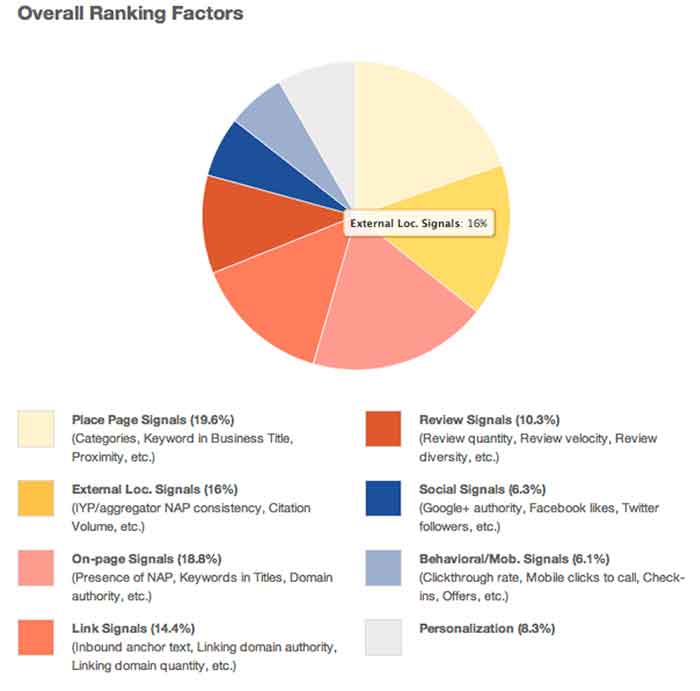
    David Mihm started his Local Search Ranking Factors “to help small business owners confused by Local Search, or those strapped for time, to prioritize their marketing efforts.” Many industry leaders contribute to the Factors (including Search Influence!). It was last published in August 2013, and it reveals that citation volume, NAP consistency, and other local signals account for 16% of the ranking factors.

    Overall Ranking Factors Chart Image - Search Influence

    Our own Mary Silva, Senior Internet Marketing Associate, adds, “Consistent and correct business NAP (Name, Address, Phone, and often Website) is the key to getting your site to rank locally. If Google finds inconsistencies in your business information across the web, then your business and its associated site are considered less authoritative and not as trustworthy.”

    You can clean your listings yourself, but be forewarned, it’s a serious time investment. There are tools out there to help you in this endeavor. Be sure to allocate some hours every month to reviewing those tools and taking any action to edit and update listings as you go.

    Learn to Love the Panda!

    If you need help getting your site back on track from Panda, we would love to help out. Just know that Panda can be your friend. The latest update shows that it’s a simple matter of some spring cleaning, getting back to the basics, and being a good citizen. We can help you get there!

  • Is Facebook No Longer Effective for Small Business?

    Image Of Facebook LogoIt’s well known that Facebook is, by far, the largest and most successful social network in the world. Here are just a few of the astonishing statistics for this social giant:


    • More than 1,310,000,000 (that’s 1.3 billion) active monthly Facebook users
    • Over 680,000,000 active mobile Facebook users
    • Number of users rose 22% from 2012 to 2013
    • 48% of Facebook users visit the site every day
    • The average number of friends per Facebook user is 130
    • 48% of 18- to 34-year-olds check Facebook when they wake up
    • 28% of 18- to 34-year-olds check Facebook before they get out of bed

    Facebook is obviously home to a massive potential audience. The problem for businesses, especially small businesses, is the same as the advantage: Facebook is massive. And it’s hard to be noticed in the crowd.

    Finding Your Facebook Audience: Then vs. Now

    For quite some time, Facebook has remained the cornerstone of social media marketing. Small business marketers discovered and fine-tuned strategies to grow their Facebook pages organically, gathering page “Likes” and fans who would spread their message willingly to their own friend networks.

    However, there have been a few changes along the way. In late 2013, Facebook acknowledged that the organic reach of posts would drop off for everyone. Advertising Age reported that a statement from Facebook read: “We expect organic distribution of an individual page’s posts to gradually decline over time as we continually work to make sure people have a meaningful experience on the site.”

    Facebook’s New Algorithm

    The driving force behind the “meaningful experience” Facebook is promoting came in the form of algorithm changes. Near the end of 2012, the social network changed its news feed algorithm—and users immediately saw a decline in organic post reach. At the time, Facebook denied the algorithm was intended to reduce news feeds.

    However, another update to the algorithm in 2013 filtered news feeds even more, and this time Facebook stated the reach reduction was deliberate. Coincidentally, the network began offering promoted posts: a program that lets companies buy the ability to push their posts into more Facebook news feeds.

    Organically, page posts will now show up in only around 1 to 5 percent of the news feeds of people who have “Liked” your page. A number of variables, such as relevance and shares, can increase the percentage of exposure within that range—but only paid, promoted posts will exceed it.

    Are Promoted Posts Worth It?

    With organic reach on Facebook in decline, and the reality that businesses must pay to have their posts pushed to enough news feeds for the chance of going viral, is it worth investing your time and resources in Facebook marketing?

    The answer likely depends on your existing circumstances. If you already have a strong Facebook network with a substantial number of followers, you’ll probably benefit by continuing to post actively and buying the occasional promoted posts. It should be noted that promoted posts can cost anywhere from $5 to $300 per post—and the per-action cost of these promotions can run high.

    For small businesses lacking the time and the budget to sink into Facebook as a primary platform, this form of social marketing may no longer be viable. It won’t hurt to maintain a presence on Facebook, but relying solely on this platform to increase your business could be a costly mistake.

    What do you think—has your Facebook reach declined recently? Have you ever tried a promoted post? Share your thoughts in the comments!

    Image courtesy of Gerd Altmann

    Megan Totka is the Chief Editor for ChamberofCommerce.com. She specializes on the topic of small business tips and resources. ChamberofCommerce.com helps small businesses grow their business on the web and facilitates connectivity between local businesses and more than 7,000 Chambers of Commerce worldwide.

  • No really, … was there a Google update in January 2014?

    It’s curious how when you’re looking so intently at one thing, something so much bigger sneaks up behind you. Like when you’re a six-year-old kid all excited at your birthday party opening presents, your mom buzzing around taking lots of pictures demanding everyone to “smile,” and your dad sneaks in behind you rolling in a bright shiny new bicycle!

    Google January 2014 update is a nice present
    Thanks PorticoMecanica for the picture of such a big smile.
    http://www.flickr.com/photos/portocalamecanica/

    That’s how I have been feeling the last week or so. Like I just got a bright shiny bicycle with a horn and a bell and handlebar fringe!

    I have been head down, concentrating on a project with numerous Excel spreadsheets, lots of cups of coffee, data overload, and a glazed look in my eye.  When I was poking around in yet more data, I found that Google snuck up behind me with a big bright shiny present.  I gotta say, it’s a pretty exciting surprise when I see the majority of our clients have an increase in January’s organic traffic; and not just any increase, impressive increases that makes big smiles all around the office.


    So, was there a Google update when I wasn’t looking?

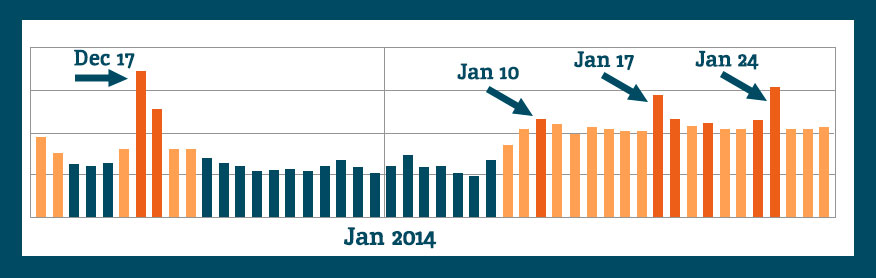
    Because the increases in Analytics are seen across so many clients, across so many industries, there had to be an algorithm shakeup.  Lo and behold, on January 9th, Barry Schwartz announced the chatter on it “Is Google Search Updating?

    The post’s comments express some winners and losers as expected with any update.  I had to dig to find some excitement similar to my own:

    Vibhu Gauba
    • 16 days ago
    “Tracking almost like 700-800 clients of ours and all have moved up !!!!”

    and …

    SAJID
    • 16 days ago
    “Wao… Thats gonna be a wonderful update… My traffic rose about 250% from last few day”

    Barry Schwartz’ post drove me over to Algoroo. Algoroo was developed by Dejan SEO, and they say “Algoroo tracks Google algorithm changes by observing turbulence in rankings of thousands of keywords.  When the bar is high, it’s likely that Google has made a tweak to their algorithm.”

    They posted on recent, significant algo updates which is interesting and related to the topic.  This unannounced, unacknowledged January update is the 6th most strongest update since May 2013 Penguin.

    When we look at the Algoroo chart for more recent dates, we see some definite turbulence in keyword rankings:

    algoroo-Google-algo-changes-Dec-2013-Jan-2014

    The chatter indicates that there was an unannounced update, and a fellow blogger commented, I’m going to enjoy it while I can.

    Crawl Rate as an Indicator?

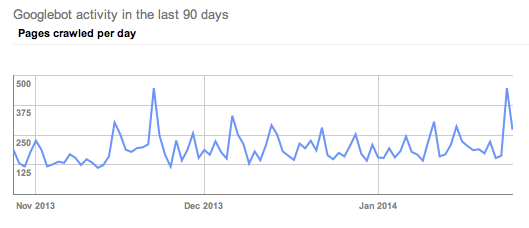
    Some of the commenters on the webmasterworld forum had a short burst of discussion around crawl rates trying to find some commonality among websites’ changes, or at least as an indication of “something” happening.

    White Dove says, “I’ve seen an increase of crawling activity, including pages that don’t exist anymore.”

    Shai comments, “Although no major changes in rankings, I can see some strange crawling occurring on around 30 sites. Not found anything in common between any of them yet.”

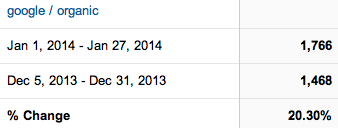
    I want to check this out, so I’m looking at clients who I know have improved organic visits in January and scoping out their crawl rates. (Screen shots are Google organic visits Jan 1, 2014-Jan 27, 2014 Compare to: Dec 5, 2013-Dec 31, 2013.  Crawl rate charts are showing last 90 days.)

    divider

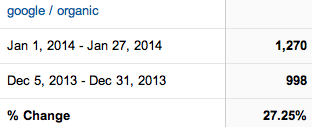
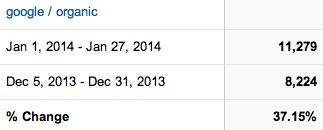
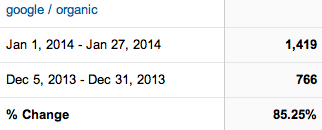
    Client A has fantastic organic increases in January.  I will take 27% organic increase any time.

    client DC google organic increases january 2014

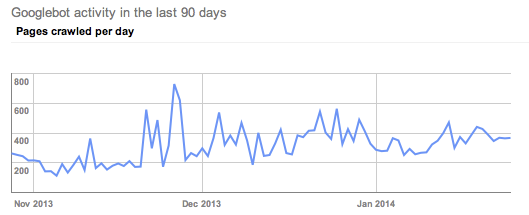
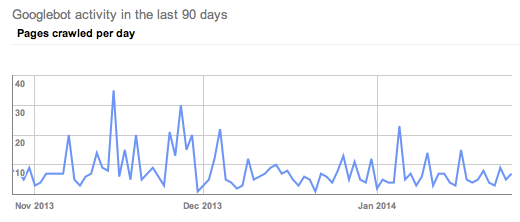
    A’s crawl rate shows a clear uptick in crawl rate, but not in January. His crawl rate started picking up in late November.

    client DC google crawl rate January 2014

    divider

    Client B had a 37% increase in Google organic traffic.

    DL google organic traffic January 2014

     His crawl rate picked up in early December.

    client DL google crawl rate January 2014

    divider

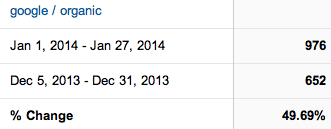
    Client C had great improvements.

    client DD google organic visits January 2014

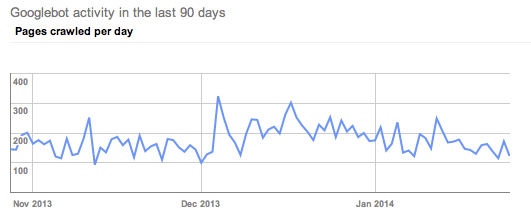
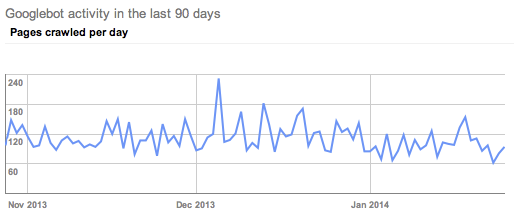
    If anything, I would say his crawl rate slowed in January.

    client DD google crawl rate January 2014

    divider

    I had to dig around to find these somewhat obvious examples of the above crawl rate changes.  Most of the clients within this same industry had crawl rates like Client D.

    Client D has exciting organic visit increases in January.

    client N increase in google organic search Jan 2014

    The crawl rate doesn’t indicate any clearly obvious trends.

    client N pages crawled per day last 90 days

    All of the clients looked at above are in the same industry, so let’s look at another industry to see if the trends are widespread.

    divider

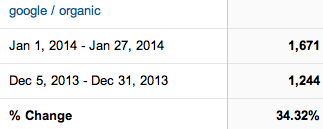
    Client E is enjoying a 34.32% increase in Google organic traffic in January.

    client S January 2014 google organic

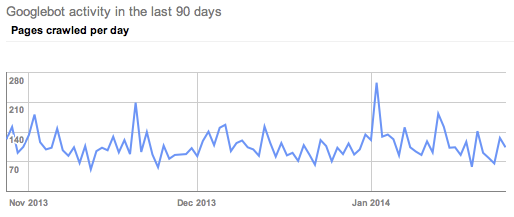
    Their crawl rate also picked up in late November.

    client S Google crawl trends January 2014

    divider

    Client F has a 20% increase in Google organic.

    client G google search in January 2014

    His crawl trends seen in Google Webmaster tools show a slight decrease in crawl rate in January.

    client G WMT crawl data

    divider

    I poked around at other clients in GWT, and I’m not real sure we can pull any decided trends from the crawl rate theory.  I didn’t check every Search Influence client, nor did I create elaborate charts of crawl rates per month. I’m comfortable seconding Shai from the webmasterworld forum, “Not found anything in common between any of them yet.”

    Search Queries

    I’m not seeing any huge changes in rankings data for the keywords we are tracking.  We have some ups and downs, but nothing out of the ordinary.  We update tracking information regularly, so until the next keyword ranking report is updated, Google Webmaster Tools can tell me some great information, too.

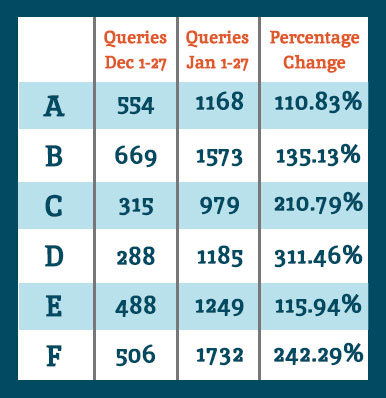
    Google Webmaster Tools Search Queries data shows a lot of keyword data that we don’t track in our keyword reports. So for the example clients noted above, I see they all had an increase in Google search results shown in GWT.

    QueriesChart

    When we look at the Queries data for the same comparisons as the organic search data at the top of this post, we see they all had an increase in showing up for searches.  Google defines Queries as: “The total number of search queries that returned pages from your site over the given period.”

    I interpret this as our websites are ranking for more varied keywords and more than we are tracking.  It’s typical for a website to rank for more than you are actually tracking. It’s unreasonable to track for all of the possibilities.

    I want to acknowledge that there is seasonality in January search for some industries.  Some of the organic increases can be attributed to seasonal search trends, but never at these levels.  Also, last week I spoke with client F telling him about the January organic goodness, and his response was January was usually dead for him, and the phones this last month have been ringing.  Yes, seasonality is often a factor for any month-to-month increases or decreases, but these data are suggesting something bigger.

    Bottom Line

    Any time there is any Google algorithm update, whether announced or perceived, there will be winners and losers.  I’m happy our client sites are on the positive side of whatever changes were implemented.  Yes, it’s good to be a winner today, but it’s not without effort.  I can repeat what everyone has been talking about for months and months:

    • Clean fresh content on a regular basis
    • Encourage client engagement on Google+
    • Cleanup any residual devalued links
    • Earn links with great content and local community participation

    These are just a few actions to take in earning trust and traffic from Google search.

    If you’ve noticed any changes in search traffic or rankings in January, we would love to hear about it in the comments below.

  • How to Link Your AdWords and Webmaster Tools Accounts

    Google recently announced a new feature in the “Dimensions Tab” of Google AdWords. Once you link your AdWords account to your Webmaster Tools account, you will be able to view the “Paid and Organic” data. This report shows you a variety of valuable information, including the organic keywords that are delivering your website as a result and the clicks on those results. This is extremely valuable information given that Google is now masking all keyword data as “(not provided).” Below are the steps for linking your AdWords and Webmaster Tools Accounts.

    First, make sure to verify your website in Google Webmaster Tools. Then follow the steps below.

    1) Go to the gear icon at the top right.
    2) Select “Account Settings” from the drop down.
    3) Select “Linked Accounts” from the left sidebar.
    4) Select “View Details” under Webmaster Tools.

    Side Note: It’s a good idea to link your Google Analytics account, but for these purposes, you only need to link your Webmaster Tools account.

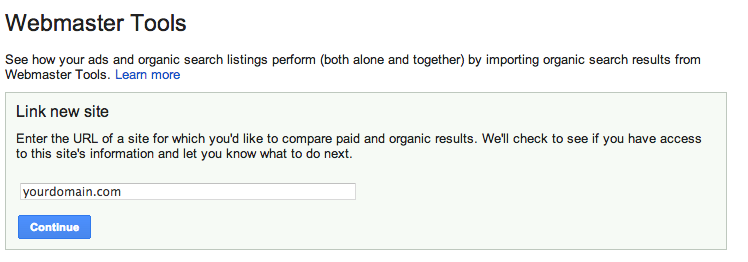
    5) Type in your domain and select “Continue.”


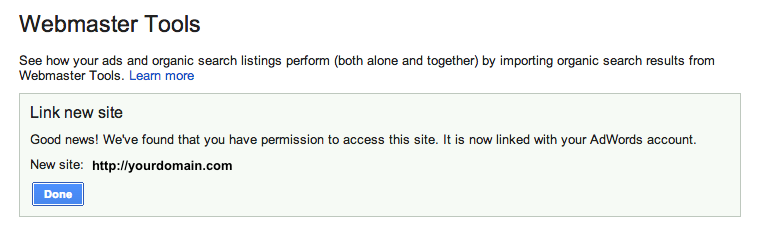
    6) If you did it correctly, you will get the following message:

    Now you can view all of the great data in the “Paid & Organic” report! You will find some interesting info here, especially how the combination of paid and organic play into each other. It will take some time for the data to accumulate, but once it does, you can gain valuable information.

    So What am I looking at?

    Query: The search query that delivered your website as a result. This will show the exact term that was searched, and whether you had an organic-only result, an ad-only result or both shown.

    Ad Stats

    Clicks: The number of times a person clicked on your ad for a given query
    Impressions: The number of times your ad was shown on the search engine results page for a given search term
    CTR: The number of clicks your ad received divided by the total number of impressions
    Avg CPC: The average amount you were charged for clicks on your ad
    Avg Pos: The average position your ad appears on the search result page

    Organic Stats

    Clicks: The number of times your organic listing was clicked on for a given query
    Queries: The total number of searches that returned your organic listings over the given period
    Clicks/query: The number of clicks your organic listing received divided by the total number of queries
    Listings/query: The average number of times a page from your site was listed in the organic results per query
    Avg. Pos: The average organic rank of your organic listing compared to other sites

    Combined ad and organic stats

    Clicks: The number of times a person clicked your ad or organic listing for a given query
    Queries: The total number of searches that returned your ad or organic listings over the given period
    Clicks/query: The number of clicks your ad or organic listing received divided by the total number of queries that returned one of your ads or organic listings

    What do you think is the most valuable thing to learn from this new data that is provided by Google (if you have an AdWords account)?