Tag: marketing

  • Behind the Scenes: How Social Media Is Being Used in the Local Film Industry

    Unless you have been living under a rock for the past ten years or so (and not just any rock, but one without TV or Netflix), chances are you have watched a movie that was filmed here in New Orleans. The city – and the state as a whole – has seen an explosion of film and television productions over the past several years, earning the region the title of “Hollywood South.”

    From comedies like 21 Jump Street to Oscar-winners like 12 Years a Slave, Louisiana has even surpassed film production stalwarts like Los Angeles and New York City to become the country’s production capital – all thanks to the highly lucrative tax credits introduced in 2002.

    And while the big-budget movies are driving the local industry (check out NOLA-shot blockbusters Jurassic World and Terminator: Genisys in theaters this year), this influx has also helped inject momentum into the independent film industry – more specifically, the micro-budget indie film scene. These are projects made by passionate local filmmakers looking to find a foothold in the industry at large.

    These are not films the average moviegoer is typically going to be able to see or even hear about. So how do these filmmakers get the word out? How do they raise the funds to even get it made? And how do people find out where they can see these smaller films?

    The best and easiest way is through social media, an umbrella term that can be divided into several different platforms (Facebook, Twitter, Instagram, etc.). The most effective social media strategies take a multi-faceted approach into account and are tailored to suit each medium’s strengths to maximize effectiveness.

    I talked to a few local filmmakers about the importance of social media and other Internet marketing strategies. I found that first and foremost on these filmmakers’ minds is exposure, whether for fundraising or promotional purposes.

    Fundraising and Promotion

    “Facebook is a useful platform that enabled a community to form around the project. It is very useful in promoting fundraisers and screenings,” explains Sam Bass, who has helped with the social media campaigns for two films, How to Disappear Completely and Give Light: Stories from Indigenous Midwives. “Twitter is better for engaging with people outside of your immediate community with the potential to lead to significant opportunities and connections.”

    “We began our social media campaign to draw attention to our Kickstarter,” says Hunter Burke of Construct Films, who is using social media to raise funds for and promote the film Atchafalaya. “It was the quickest and most effective way to get our message out.”

    Greg Tilton, director-producer of reddit doc, had a similar mindset, but he wanted to lay the groundwork for their project before asking for fundraising help. “Social media was key because I did not want our IndieGoGo campaign to be the first time someone had heard of the project,” he states. “It’s been successful because people who don’t know me or my immediate network are following and engaging the project.”

    Mac Alsfeld, the writer-director-star of Father-Like Son, found social media to be most effective after the film was made. “We heavily relied on Twitter to build a relationship with festivals,” he explains. “I think it is important to show festivals that you are the type of filmmaker that will market yourself and that festival to potential filmgoers.”

    Getting Help

    For these filmmakers and others, this was a very important part of the behind-the-scenes process. For the most part, they were navigating the tricky waters of social media without any substantial professional Internet marketing experience – though some had help.

    Burke turned to a friend who had social media marketing and crowdfunding experience. “I really owe a lot to him for educating me on what is standard, what has worked in the past, and also coming up with some wonderful ideas. Without him, I would have been totally lost.”

    Lucky enough to be dating someone in the tourism and marketing industry, Tilton found it helpful to have someone more experienced to bounce ideas off of. “As I experimented, talked to her, and read a lot of articles online, I slowly built up my knowledge. She was a great sounding board for ideas.”

    Thoughts on Social Media

    Even without much prior experience, these filmmakers now have some very astute thoughts about the medium overall gained from their newfound experience.

    “I do believe that it is VERY important to have a presence within the social media community,” declares Kenna J. Moore of Ghost of Elysian Films, who was awarded the Emerging Vision Award for a Louisiana Filmmaker at the 2013 New Orleans Film Festival and the Louisiana Shorts Jury Award in 2014. “It is crucial that our image and what is being put out there is closely monitored. I like to have a presence but stay away from all of the ‘look-at-me’ syndrome that one can easily fall victim to in most social media settings.”

    “The thing about social media is that it is, at its core, incredibly voyeuristic,” says Tilton. “Many people do follow the musings of their interests, so there is a large audience to be engaged and many want to be a part of something big. You can find that audience.”

    Tips for Fellow Filmmakers

    As for fellow indie filmmakers feeling overwhelmed by social media, all the filmmakers have useful tips to share:

    Bass: “Have a social media strategy. Know how to work it. And don’t panic when nothing happens for a week. The most important things are follow-through and relationship building.”

    Alsfeld: “Show people that you have passion. Use your social media to blast information. And even more importantly, have fun. Don’t be boring.”

    Burke: “We performed the best when we released media. Posting a picture, an interview with the filmmaker, or a sample of the score really got our audience interested. People really responded to something they could interact with. Make it a fun experience. Keep it simple. Leave them wanting more.”

    Moore: “I’ve learned that social media has pros and cons. Some people gain opportunity and references from it. Some social media activity allows for negativity and distraction. I would encourage people to stay focused.”

    Tilton: “If you have nothing to say, don’t say anything. So many people are retweeting and posting haphazardly. It’s just a jumble of buzzwords and hashtags. Just make sure it’s always quality and you will find that pays off bigger.”

    Additional Resources
    Here are some more tips directed specifically at indie filmmakers on making the most out of social media:

    7 Tips for Promoting Your Indie Film on Social Media via Premium Beat

    6 Tips on Using Social Media for Your Indie Film via Media-Match

    Image Sources:

    3, 2, 1 Film Image

    Social not-working Image

    The End Image

  • Big Results Can Come in Small (SEO) Packages

    tinygiftsimageMany small businesses fear that because they don’t have millions of marketing dollars at their disposal to build their SEO campaign, they simply won’t be able to compete with large corporations. However, there are many SEO tactics small businesses can employ to level the playing field and compete against large marketing budgets.
    If You’re Small, Focus Small

    If your small business offers many services but has a limited budget, it will be more effective to focus your SEO efforts on a small set of highly relevant keywords. For example, if you’re a hair salon and you offer haircuts, blow drying, hair coloring services, etc., it will be better for you to focus on the one service that you perform best. It’s more effective for you to try to be visible for a primary or specialty service than to try to be visible for all of your services—and not to be visible for anything in the end.

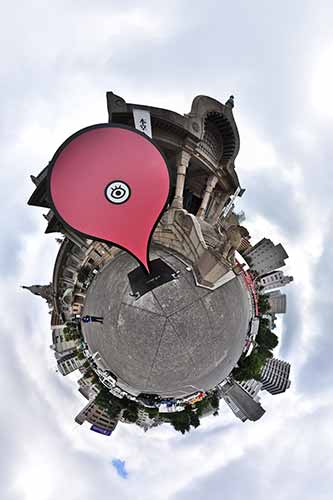
    pinonglobeimageYou’re Local, So Get Hyperlocal
    A big advantage you have as a small business is your attachment to the area. Focus your efforts on your local audience by hosting events, participating in your community, getting local reviews, and targeting your content to your locale. You can then leverage all of these hyperlocal efforts in your SEO campaign. That local event you hosted or local organization you helped can generate local content, local buzz, and website links back to your site, all of which tell search engines that you are locally relevant.

    Specific And Long Tail Is The Way To Go

    With limited funds, you need to be clever about the keywords you’re focusing your efforts on instead of going for the obvious ones. To go along with the hair salon example, instead of emphasizing keywords like “hair cut” or “hair coloring,” focus your efforts on more long tail phrases such as “tips to layer your hair” or “how to get an ombre effect.” It’s much easier to rank highly for these long tail, specific keywords than the obvious, broad keywords. While there may be less traffic, the traffic you do get will be highly relevant.

    The next time you think your SEO dollars and campaign efforts don’t stand a chance against giants in the industry, don’t forget that being small has its advantages. Leverage your nimble nature and cleverness for some easy wins!

    Thanks to Heiwa4126 for the globe image and to John Fingas for the tiny presents image.

  • Don’t Be Afraid To Stop & Ask For Directions: Making Google My Maps for SABs

    As promised in my last blog about the new Google My Maps, I’m here today to teach you how to how to create My Maps for service area businesses (often referred to as SABs) that have highlighted boundaries of what counties or parishes they service.

    Before we delve into this guide, let’s start with the basics like what exactly is a KML file. KML is the file format used to show geographic data in mapping programs. It is an XML based format and stands for Keyhole Markup Language. Now that you know what this file type is, let’s see how you can use it.

    How to Use Old 2011 KML Files

    Fun Fact: The U.S. Census Bureau holds kml files for all county guidelines here!

    As you can see, they’re from December 2011, so any boundaries that have changed since then will be incorrect. In a very general sense however I’ve found these codes very useful in the past. Each file contains all county boundaries in one state, but the tricky part is that they don’t tell you what state it is in the file name. I went ahead and downloaded them all a long time ago and updated the file names to reflect the state they contain. It’s pretty closely in alphabetical order so if you just use a list of US states in alpha-order next to the list of files in numerical order it should match pretty closely.

    Once you’ve figured out which file contains the state you’re looking for, find the county or counties that you want to display in your map, and move it’s entire code for each county (should start with “Placemark” attribute and end with the closing of the “Placemark” attribute) just below the “Document” attribute. Once you’ve moved the boundaries you want to keep to the top of the KML file, remove all the excess counties and leave the closing attributes for “Document” and “kml” at the bottom.

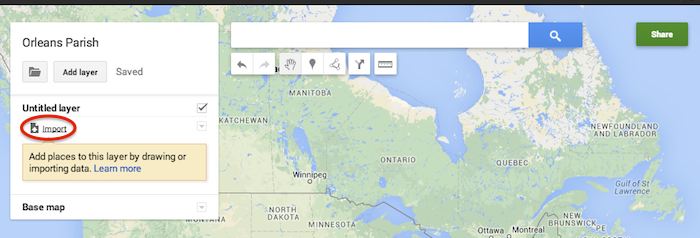
    Now that you’ve successfully prepared your KML file, in My Maps, click Import on the left and choose your KML file from your computer.

    Import A KML File To My Maps - Search Influence

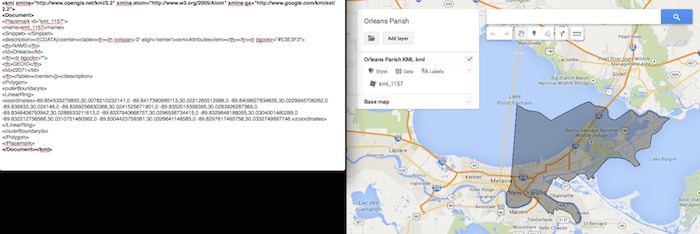
    See the screenshot below for an example of how your KML file should generally look if you’ve done it correctly. The screenshot shows the file for Orleans Parish of Louisiana in TextEdit and then what said file looks like imported into My Maps. (NOTE: In order to show a not so massive screenshot of the KML code, I removed about 3/4 of the coordinates. There are a massive amount of coordinates used to make up these detailed boundaries.)

    Preparing Viewing A KML File In Google My Maps - Search Influence

    How to Use New 2013 KMZ Files

    The U.S. Census Bureau also has the most up to date 2013 files, which are KMZ format (note the .kmz instead of .kml extension). This is essentially zipped KML files with a .kmz extension, but if you use a Mac like me, unzipping or unpacking the zipped file is not easily achieved. The 500k file contains the most detailed boundaries out of the 3 options.

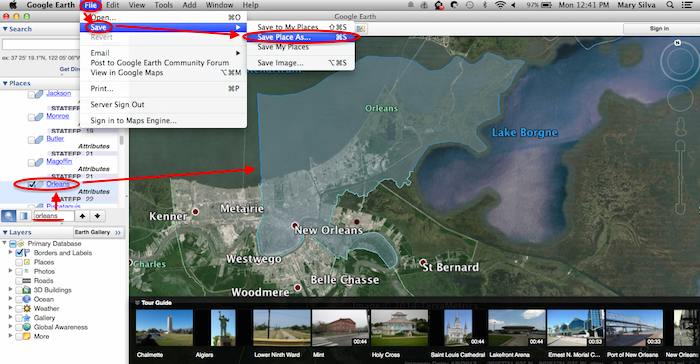
    So, the way I handle this KMZ file is to open the entire file in Google Earth and export just the KML file of the areas I want displayed. To do so you’ll use the search feature of Google Earth on the left at the bottom of the “Places” window to search for and select the areas you want displayed. Since many counties have the same name you’ll want to make sure it’s showing up in the state and location it’s supposed to. Also, note that if you’re trying to add multiple counties in the same state, the Attribute number to the right of the county will be the same for all counties within the same state. This should help you easily identify the counties you’re looking for when adding multiple.

    Once you’ve selected the geographic areas you want displayed on your map in the “Places” section, then save the file as a KML file by clicking File>Save>Save Place As….

    Saving A KML File from Google Earth for Google My Maps - Search Influence

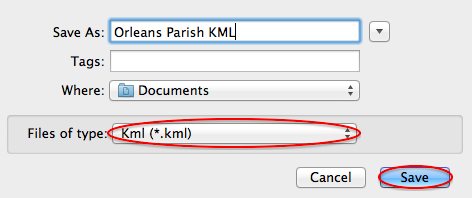
    My Maps will not accept a KMZ file, so make sure to save as a KML.

    Saving a Map in Google Earth As a KML File to Use in My Maps - Search Influence

    Once you’ve saved your file, follow the same steps mentioned above to import the KML file to My Maps. I’m not sure if the paid My Maps Pro is any different, but it appears to me that you cannot import multiple KML files to one My Map. So, in the event that you want to represent multiple service areas in one My Map, you’ll want to have all of the geographic area codes in one KML file.

    This Google Earth process can also be used instead of manually editing the older KML file codes as shown in the first instructional section in case you don’t want to delve into the coding via text edit. It’s definitely an easier route, but for me, Google Earth can sometimes run slow when trying to handle these files and I don’t mind manually editing code.

    Hopefully these steps and screenshots help out a fellow My Mapper!

  • Five For Friday: Backlinks Back, Alright! The Missing Linkjuice & More

    5PoolBallImage

    1. Blogs on Blogs
    – Moz

    Recently, Isla McKetta wrote an entry on The Moz Blog entitled “When Is a Blog the Right Form of Content Marketing?” Blogs have been championed as sure shots for improving online traffic and increasing a company’s influence. McKetta, however, argues that blogs are often overrated, and whether or not a business needs a blog depends on the type of business it is. The article provides concrete examples of when blogs are superfluous and marketing efforts would be better spent on other areas. It’s definitely worth reading.

    2. Link Trouble
    – Search Engine Land

    Julie Joyce wrote a piece on why a website might not be as “linkworthy” as it could be. It’s common knowledge within the SEO realm that having other websites link to yours is vital. There are many steps that can be taken to optimize your site’s linking potential. While some of Joyce’s examples are somewhat obvious, such as including social sharing buttons, there are some important points that could be overlooked. For example, if your site has “atrocious writing,” it’s very unlikely that anyone will link to it.

    3. Backlinks Matter
    – Search Engine Watch

    Adam Stetzer posted an article concerning why backlinks matter for small businesses. Stetzer argues that while small companies can’t afford to overlook backlinks when trying to rank higher on Google, they can’t take an easy way out either. According to Stetzer, low-cost deals offering “500 backlinks for $79” are actually dangerous for businesses because Penguin will view those links as spam and therefore suppress the business’ ranking. The article also discusses the relatively new concern of “Negative SEO” and how to avoid it.

    4. How to Verify Apple Maps Listings Faster
    – Mike Blumenthal

    It has happened to just about everyone working in Internet marketing – while trying to verify a listing on Google or Apple Maps you’re forced to spend extraneous amounts of time retrieving a verification code over the phone and enter it in online. It seems as if these directories are trying their hardest to prevent you from taking control of the listing. Arbitrary factors, such as using a specific phone number too many times, can delay this process from anywhere between 5 minutes to an hour. Luckily, Justin Moseback of blumenthals.com has a trick to curb your time (and anger) spent on getting this task done.

    5. Stuff: Where Should You Put it?
    – Matt Cutts

    TypingOnLaptopImage

    When working within SEO, copious amounts of data are used every day. Therefore, it’s important to know where and how to store it most effectively. Matt Cutts has posted an in-depth article that explores the pros and cons of various data ecosystems. Ultimately, it seems, the best option is the one that molds the best to your business’ needs. However, there are some very convincing arguments for a few of them!

    Image Sources:
    Thanks to Dricker94 for the #5 pool ball image, and to Ministerio TIC Colombia for the typing image.

  • The Hitchhiker’s Guide To The New Google My Maps: Coding 101

    So along with many other recent Google Maps enhancements, Google has finally done away with the “Classic” My Maps. On September 16, Google sent an email to many users stating that “Google My Maps [was] being upgraded.” Recently, you were able to continue using Classic, but if you wanted you could upgrade to new My Maps. At this point all of your maps once created in Classic My Maps should have transitioned to the new My Maps automatically. As of the past few days the classic My Maps version has officially phased out.

    For those of us who have become accustomed to the features of Classic My Maps, it’s easy to feel a little shell shocked by the changes.

    Before we start delving into the new My Maps, here’s three examples of the different types of maps you could/can embed on your site.

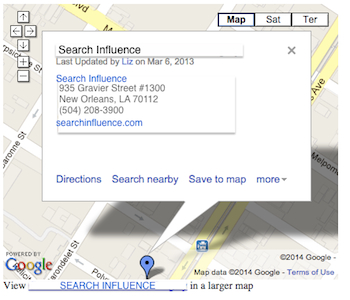
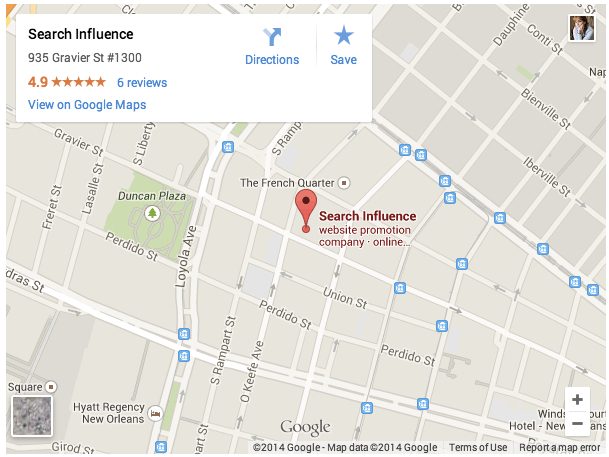
    Old/Classic My Maps (EXTINCT) vs New My Maps – Respectively:

    Classic My Maps Embed - Search Influence New My Maps Embed - Search Influence

    Simple Google Maps Embed:

    Google My Business Embed Map - Search Influence

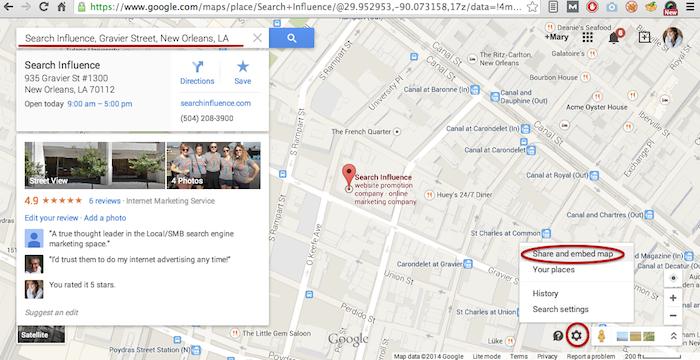
    My Maps should really only be created when you need a map with multiple business locations represented in one map or when you want to create maps with service area outlines. Otherwise, for single-location clients you should use the Google Maps embed feature as shown below:

    Google Maps Share and Embed Map - Search Influence

    In the new My Maps, making the My Map itself hasn’t changed really, the map interface is just a little prettier. You can still import KML files as well as search and add plus page pins to your map. I’m here to help you through the major changes ranging from the simple movement of where to access features to the extensive parameter codes breakdown with the loss of InfoWindows. So let’s get to it!

    New Tool, New Tricks:

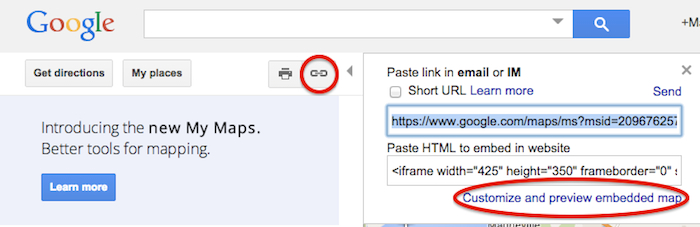
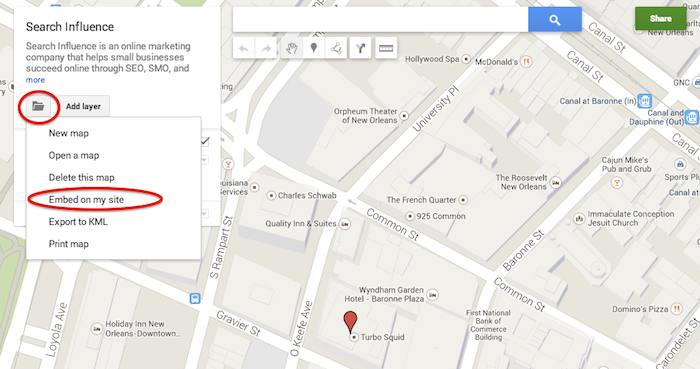
    First things first, where the heck did they move “customize and embed” button to get your embed code!? Well, as obscure and vague (to me at least) as it seems, it’s now housed in the folder icon on the left next to the “Add layer” button. It took me longer than I care to admit to sort that one out, so hopefully I save someone reading this that bit of time.

    Old Location to Grab the Embed Code:

    Old Google My Maps Embed Location - Search Influence

    NEW Location to Grab the Embed Code:

    New Google My Maps Embed Location - Search Influence

    Learn to love that new folder. It also houses the button to create a “New map” once you’re done creating your map or whenever you need to start a new map.

    IMPORTANT NOTE: You now have to share your My Map to make the map visible when you embed it, similarly to how you would share something from Google Drive. Click “Share” in the top right corner then I’d recommend to set access to “Public on the web – Anyone on the Internet can find and view.” The automatic setting when you choose “Public” is editable by the public. Unless you want to risk some strangers editing your maps, switch over to “view” only mode.

    New Product, New Parameters:

    Code Before and After:

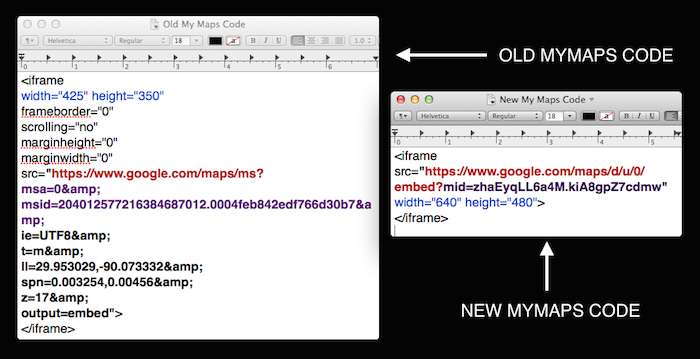
    Google My Maps Embed Code Before and After - Search Influence

    So as you can see in the image above, they’ve removed a lot of previously provided parameters, making the source attribute a lot shorter and more concise. These parameters were responsive to and generated by the now extinct InfoWindow. The InfoWindow allowed you to preview and adjust the My Map before grabbing the code. As previously mentioned, these adjustments must now be done manually.

    First, for sake of knowing what we lost, we’ll cover all the attributes and parameters that were provided in the old My Maps codes.

    Size
    For the size of the maps, the InfoWindow used to let you choose Small, Medium, Large, or Custom.

    Here’s what old My Maps defaults gave you:
    Small: width=”300″ height=”300″
    Medium: width=”425″ height=”350″
    Large: width=”640″ height=”480″ (New My Maps is large by default)
    Custom: WHATEVER YOU WANT

    The parameters that adjust the source code are now separated by just “&” instead of the “&” parameter divider. I’m assuming that this change is a result of Google’s preference to save some characters.

    My Map ID
    First, you’ll notice that the parameters msa= and msid= have been replaced by mid=. The msa= parameter was used to set whether you were showing a particular, identified map (when set to 0) or showing other things like the My Map create form (when set to 2). Then when msa= was set to 0 to indicate that you were showing a particular map, you’d identify said map using the My Map identifier parameter msid=. It looks like the new identifier parameter, mid=, encompasses all you need.

    Input Character Encoding
    In the old code, ie= was used to set the input character encoding, which is typically set to Unicode 8 (UTF8).

    Terrain
    The type of terrain shown in the base of your My Map used to be set using t=. The following inputs will give you the respective results:
    t=m: normal map (think white cities, yellow street lines, green parks)
    t=k: satellite (the photographic, Google Earth look)
    t=h: hybrid (combination of normal and satellite, street lines and photographic)
    t=p: terrain (think atlas-type with shaded mountains)

    Latitude and Longitude
    To set the center point of the map, the code ll= would be used. Must be in decimal format and have latitude before longitude separated by a comma. Alternately, using sll= instead, with the same input formatting will set the latitude and longitude of the center point of the business.

    Span
    The parameter spn= was used to set the width and height for the geocoder to determine how many degrees of latitude and longitude will be shown.

    Zoom
    One of the most important parameters for My Maps in my opinion is the zoom adjusting z= parameter. Smallest input, 1, will show you all continents of Earth and the largest possible input (most zoomed in input) is 21.

    The only one I’ve needed is the zoom parameter so far, but any of the above will work. I think the terrain parameter might be helpful as well, but that can also be done by adjusting the terrain of your map directly in My Maps under “Base map”. Below is an example of the new My Maps code adjusted with a zoom parameter in bold.

    New Google My Maps Code With Zoom Parameter - Search Influence

    What about the popup window with all the dropped marker information!?

    Sadly, there is no longer a parameter to make the information of the My Map marker already visible on your map. This marker typically contains businesses’ location information. Viewers will now have to click the marker in the My Map to view this information.

    So, for single location businesses, the easiest way to get an embed code for your site, which shows your business info with the marker, is by using the simple “Share and embed map” feature already in Google Maps (see “Google Maps embed feature” screenshot above).

    Hopefully this will save someone having trouble adjusting to the new My Maps some time from scouring forums for this info. Stay tuned for my future post on how to use KML files for service area business maps!

  • Facebook Engagement: How To Make Your Fans Say “I Do”

    Get more exposure to your business’ Facebook page. Incorporating these elements will enable your business to provide better and more shareable content!

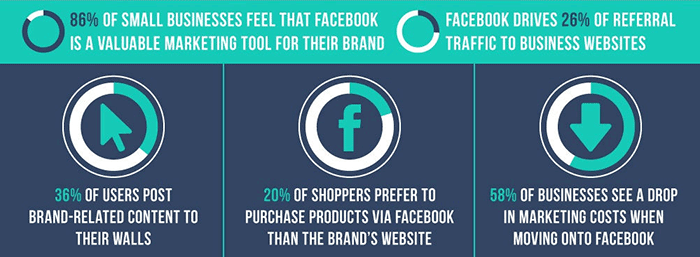
    There are 30 billion pieces of content shared via Facebook every month. That’s billion with a “B”! How is your business going to get noticed in this content sharing frenzy? One way is to write great and engaging posts people want to read! If people enjoy your posts, they will be much more likely to “like” the post, comment, or best of all, share it with their network– which has potential to reach a much larger, untapped audience.

    FacebookBusinessesStatsImage

    If you are new to social media or find yourself with writers block, see some of our suggestions to create better and more engaging posts. Below is as brief list of the many ways in which you can create great content, but remember to pick just a few ideas per post to prevent overwhelming your reader.

    1. Don’t make every post “promotional.”

    For example, only posting about your business and the products you offer may not be the most exciting update for a fan to read. Instead, post about specials, sales, or events that are happening in the near future.

    2. Use images whenever possible.

    It has been proven posts with compelling text coupled with an image will get more engagement than plain text or a link alone. Take it a step further, instead of using stock images use authentic and unique images from your business.

    3. Create a “weekly something.”

    If you are a restaurant, post a recipe of the week every Tuesday. Or, if you are a dermatologist schedule a recurring post about products you recommend. Create some consistency and give your fans something to look forward to.

    4. Share or repost other business’s updates that you find interesting.

    Sharing or reposting other business’ great articles, posts, and pictures is a great way to grow your audience and offer great content to your fans.

    5. Respond to comments that are left on your posts.

    Big or small, it is always great when a business comments back on posts. In addition, you should occasionally comment on other people’s posts as well, especially on posts created by fans of your page!

    6. Take a little extra time and create a unique meme for your business to share on your social media platforms.

    This great tool called the Meme Generator allows you to create whatever meme you like with a variety of stock images available.

    7. Lastly, share something silly every once in a while!

    Found a video of an adorable elephant sneezing, two babies talking to each other, or a great gif? Share it! This will not only get your posts more likes, but good chance it will get shared a great deal with your business’s name attached to it. People love companies that have a sense of humor. It shows real people are behind the computer screen.

    PerfectFacebookPostImage

    Image Sources:

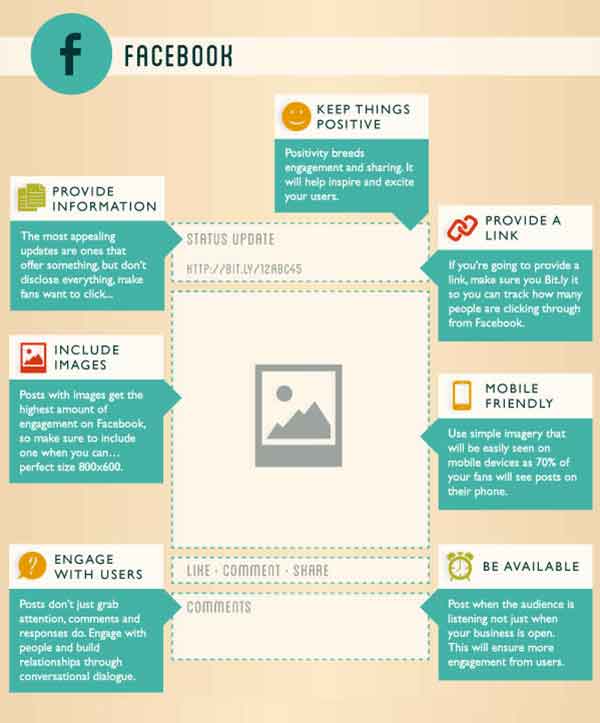
    Thanks to Pam Dyer for sharing this infographic about the “Perfect” post.

    Thanks to Steve Parker for sharing this mini graphic about Facebook for businesses.

  • Tiny Houses and Tiny Spaces: Making the best use out of space

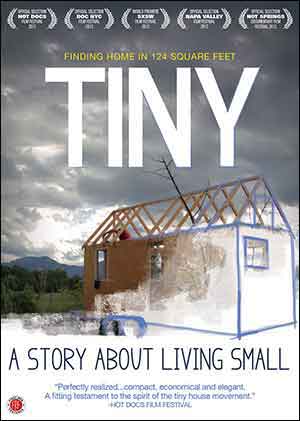
    TinyCoverDesignImageThe term “Netflix” is Internet speak for “how to kill 2 hours on a rainy Saturday evening.” Well, it was one of those times, and I had stumbled upon Tiny: A Story About Living Small. This documentary shows Christopher Smith’s yearlong journey to find a home of his own. To accomplish this, Chris sets out to buy a large plot of land surrounded by wilderness. On it, he begins to build a tiny house. He ends up building his “home” on a utility trailer with 124 square feet of living space. In the film, Chris also interviews several other families that have also decided to consolidate their living situation.
    If you are like me, you have poured hours into Google searches of these tiny houses and thought, “that’s clever.” The numerous tricks and tips of people who opt for a smaller living space utilize all of the space so that they are comfortable and not cramped. It is this notion that interested me most – taking something small and making it seem bigger by utilizing only what matters and making it flow.

    When it comes to design, far too often we are faced with trying to fill in every conceivable space with more content and images. In doing this, we fail to see that what we are left with is just a pile of stuff and our original message is buried. Also, there are times when we say more than what is needed, and instead of drawing in the target viewer, they seem to just be waiting patiently for the end so that they can move onto the next thing. So to combat this, I have compiled a list of things to consider when designing for smaller spaces, whether for a sidebar web ad or a quarter page ad in a magazine.

    Take a Hard Look at the Space

    The main thing that gets lost when designing for small spaces is the actual size of what we are designing for. Computers give us the ability to enhance images and see them close up. But far too often, what can be read while zoomed in, cannot be read in its actual size. So take the time to open the web ad in a browser to see it in action, or print out the magazine ad and hold it in hand.

    Stack the Messages

    When it comes to deciding what to put in to the space, think of each element as a physical thing. Can you stack everything in your hand and still read everything? Does the logo take up too much space to where someone could fail to know what the image is? Does the novel-like copy seem like more of a pain to read and not draw in attention?

    Dual Purposes

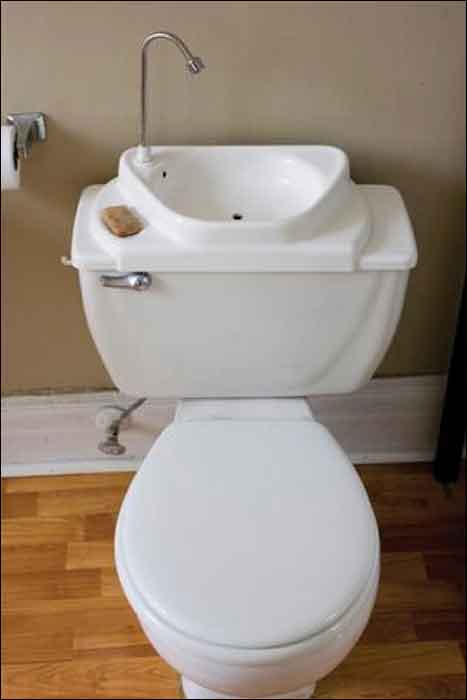
    ToiletDualPurposeImageWhat makes tiny houses so unique and intriguing is that the purpose of everything within them is to maximize space. Like having a sink connected to upper basin of a toilet to eliminate the need for two large elements in a bathroom.

    In the design of things, we can sometimes make use of this as well. Can you use images of your brand in action? Is there a way to animate a web ad and engage the audience in the process? Can that magazine ad both sell your brand and serve as a useful tool to the viewer, like a checklist or a resource worthy of being saved?

    Space to Stretch Out

    The most common reason for people not wanting to jump on the tiny house bandwagon is the concern of not having enough room to even stand up. Many have expressed they would feel too confined and cramped. This same concern should be applied to our designs. When faced with a small real estate for any design, empty space needs to be viewed as an actual thing, as opposed to just being “empty.”

    Too often, we view space as being wide and vast. This also trickles down into the planning process for designs, and by the time it comes to implementation, there is no space for any of the elements to stand up or stretch out. It is important to take into account that space is an actual thing and needs to be represented, otherwise the design will become too confined and cramped.

    The Big Impact of Little Things

    The idea that everything needs to be big in order to be seen is something that does not hold true with designs that are small. This mindset is great for ideas, but when it comes to implementation, all that excitement and enthusiasm needs to be more focused. When it is, that small thing will be inviting and call out, like the sirens to Internet sailors, or to the casual passerby of a newsstand. These small designs should act as a ticket to something larger, something that merits investigation. Making our audience ask, “I wonder what that is all about?” is stronger and more enticing than just giving them a catalog of your products. It is that sense of curiosity and yearning to investigate that will build brand strength and forge a desire to learn more about what it is that you do.

    If you are curious about tiny houses, check out these blogs:

    http://www.tumbleweedhouses.com/

    http://thetinylife.com/

    http://www.tinyhousedesign.com/

    Image Sources:

    Tiny Book Cover

    Dual Purpose Toilet

  • 6 Second Marketing: Using Vine for Your Business

    Jul14

    In today’s fast-paced society, your business doesn’t have much time to grab the attention of potential customers. Can you do it in six seconds? Millions of users are racking up views and attention for their six-second masterpieces on Vine, Twitter’s ultra-short video sharing app that fits in well with the social network’s theme of keeping things brief—and businesses are using Vine to amplify their social media marketing campaigns and boost visibility.

    What is Vine? A Brief History

    Launched in January 2013 by Twitter, Vine was originally a mobile app that capitalizes on smartphone cameras, allowing users to capture and share up to six seconds of looped video. The platform gathered steam quickly, becoming the fastest growing app of 2013 with millions of users and several viral clips.

    Today, Vine has more than 67 million users. Vine videos can be posted to other social networks like Facebook and Twitter, and earlier in 2014 the platform introduced a desktop interface similar to YouTube, with searches, playlists, popular users, and trending tags.

    The Benefits of Using Vine for Business

    Some companies view the Vine platform as too short to be useful—but many said the same about Twitter. There are several benefits to using Vine as part of your marketing strategy, and they extend beyond the platform itself.

    Here are just a few of the advantages Vine can give your business:

    • Video works. Several studies have shown that video consistently performs better as a marketing tool, with higher engagement and more click-throughs. Regardless of your business type, video can help you promote it: 90 percent of online shoppers find video helpful in buying decisions, and 75 percent of executives watch work-related video.
    • Shorter is better. Online viewers are often pressed for time, or multitasking and switching between several windows. Long videos tend to see fewer views—so at six seconds a pop, viewers are far more likely to watch a Vine video.
    • Boost social sharing. Vine videos don’t have to stay on Vine. They can be posted on multiple social sites, or your business website or blog, and including hashtags in your description can help you improve discoverability and encourage sharing.

    What Can You Do with Vine?

    Just how much marketing can you pack into six seconds? With the right mindset, you can deliver a powerful message through a Vine video. For example, Lowe’s home improvement store created a series of Vine videos called “Lowe’s Fix in Six,” with each video delivering an interesting home do-it-yourself (DIY) tip. UK fashion retailer ASOS engaged their followers with an “unboxing” video of their products that invited customers to upload their own unboxing, incorporated the hashtag #ASOSUnbox, and entered participants in a drawing for a goodie box.

    To create effective short videos, consider:

    • The types of videos you want to offer—you might have helpful tips, product showcases, customer contests, or even content that’s pure entertainment
    • How you’ll communicate your message briefly and visually
    • The best way to tie your short videos to your company brand or theme

    Remember that like all social media marketing, Vine should be used to share more than just your products or services. Consider offering quick behind-the-scenes video that shows your workplace culture, your employees in action, or where your products are made. Or get your followers to participate and invite six-second testimonial videos, which you can display on your website in addition to posting on Vine and other social platforms.

    Regardless of your social marketing strategy, the Vine platform can make a powerful, visual addition to your current efforts and help increase your business visibility and reach. All you need is a smartphone or digital camera, and six seconds.

    Image courtesy of Frank Gruber

    Megan Totka is the Chief Editor for ChamberofCommerce.com. She specializes on the topic of small business tips and resources. ChamberofCommerce.com helps small businesses grow their business on the web and facilitates connectivity between local businesses and more than 7,000 Chambers of Commerce worldwide.

  • Google Instant Verification Passes The Sentence & Swings The Sword

    On July 31st, Google rolled out an instant verification option for local businesses that have already verified their websites with Google Webmaster Tools.

    WaitInstantVerificationImage

    There is, however, very specific cases. As the Google support page linked above states, it’s important to note “that some business categories may not be eligible for instant verification.”

    OneDoesNotSimplyVerifyAListingImage

    Webmaster tools verification option won’t work for your business if:

    • You’re creating a new listing
    • The pre-existing listing is already claimed by another user and your business has to request ownership
    • You have to change the website on the pre-existing listing you want to claim
    • Webmaster Tools isn’t verified BEFORE you claim the listing
    • Webmaster Tools isn’t verified in the same account that you are claiming your business listing in
    • Your company’s “My Business” category is not one of the Google approved categories eligible for this verification.

    “My Business” pages we tested:

    Car dealership: Claimed in account with pre-existing listing in need of claiming – worked

    Heating supplies provider: Had ALL ideal criteria. Listing had correct site and was available to claim, and WMT was already verified in the account. – didn’t work (So this business must have a category problem that makes it ineligible.)

    Real Estate: Created new listing- didn’t work

    Basically, if it’s possible, Google will automatically verify your business on its own when you claim your business in Google My Business. Google skips giving you any verification options altogether and just auto-verifies the listing.

    Assuming this new Google My Business feature is a work in progress on Google’s end, maybe once we see more categories accepted, it will become more doable and the qualifications may not be so restrictive. Even then, with the stipulations currently, it would be a rare occurrence.


  • Five For Friday: Facebook Mobile Ad Tracking, Promoted Video Tweets, And More.

    FiveForFridayRedFiveImageFacebook rolls out new way for advertisers to track engagement with mobile ad campaigns. User suspicion on the rise as updated Messenger app gains greater access to personal information stored on mobile devices. Twitter begins testing promoted video posts for brands. Yelp and Bing join forces in the name of breaking down international language barriers. New addition to Google guidelines marks the end of guest blogging. Get the scoop with this week’s Five For Friday.

    1. Facebook introduces new ad data tool – Marketingland

    Facebook announced on Wednesday that they would begin allowing advertisers to track the click through rate of promoted posts and sponsored ads on mobile devices. According to a white paper written for Facebook by Altimeter Group titled, “Why Mobile is Essential for Brand Marketing,” users spend an average of 40 minutes per day on the Facebook mobile app. The white paper also revealed that users check their mobile phone nearly 150 times per day, and that 51% of mobile users say they prioritize checking their notifications over other messages.  Aside from confirming the fact that most people are more attached to their smartphones than their own shadows, the research reveals just how important it is for businesses to be able to reach their target audience with mobile ads.

    Conversion tracking helps businesses measure the return on investment for their Facebook Ads. The conversion reports on the actions people take after viewing and interacting with an advertisement. Marketing Land discusses the implications of the new cross-device feature, including that it enables advertisers to closely track mobile browsing behavior and allows them to better understand how customers are reacting to their campaigns. While Facebook already allowed for advertisers to target specific users, the new cross-device report amplifies an advertiser’s ability to view more detailed metrics on mobile conversions.

    What does this mean to you? Now, using this cross conversion report, businesses can track the success rate of their ad campaigns. Ads that were previously unsuccessful among PC users may be working well as a real-time mobile marketing tool. These ads can be tracked based on location as well, so get excited for better campaign analysis!

    2. Mark Zuckerberg’s Facebook Messenger spy game – Mashable

    TryingToReadMyThoughtsImage

    You’ve probably noticed a recent influx of paranoia popping up on your news feed, this time about the “permissions granted” required to download the new Facebook Messenger app. The concern is based on suspicions that the app can access your smartphone camera and microphone along with a plethora of other private information stored on your device.  Considering the PRISM program’s deal with Facebook, as revealed by Edward Snowden just one year ago, the public is beginning to feel more aware of apps having increased access to personal information. The origin of these suspicions seems to be based off a 2013 Huffington Post article. Some of the app’s new capabilities include:

    • Facebook can read your phone’s call log, including info about incoming and outgoing calls. Who have you been calling? How long did you talk to them?
    • Facebook can actively track your GPS location, approximate location, or precise location.
    • Facebook can actively record video and audio from your phone and take pictures as well as view all files stored on your phone.

    Mashable breaks it down for us in a different way, explaining that a lot of the permissions allow the app to have all of its convenient, user-friendly sharing capabilities:

    • Facebook Messenger requests permission to access your camera and microphone so the user can share images and record videos right from the app.
    • Facebook allows users to directly call people with the app. It needs permission to access your device’s call log so that it can identify who may be calling you via the Messenger app.
    • Facebook requests permission to access your GPS location so that you can check-in and share your location with friends and in posts.

    Now that we’ve walked through two perspectives on the issue, what do you think? Is this just a ploy to monitor the 250 million users on Facebook, or is it another step toward providing an optimal user-based experience?

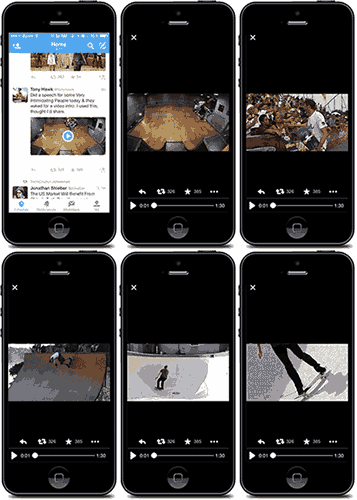
    3. Twitter introduces promoted video sharing – Mediabistro

    TonyHawkTwitterVideoImageTwitter has introduced a new nifty feature where businesses can better communicate with their followers using promoted video sharing. According to the Twitter blog, “by using Promoted Video, it’s easy for brands to upload and distribute video on Twitter, and to measure the reach and effectiveness of this content.”

    What does this mean to you? As a business, you’ll have more options when it comes to competing for user attention and interaction. If your business is already actively using Twitter, statistics have shown that promoted videos gain more viewers than ever before. The cost-per-view ad model includes ample opportunity to see viewer analytics, including organic as well as paid posts. Overall, this means a much more engaging Twitter feed and increased opportunities for businesses to reach targeted audiences.

    4. Yelp introduces Bing translation– Marketing Land

    BeautyBeastFoodTastingImageHow nice would it be for everyone to communicate with each other as needed, especially about food? Well, that day seems to have arrived, as Yelp has now introduced a Bing translator capability, according to Marketing Land. Yelp can now translate up to 15 languages, which is sure to help travelers that can’t seem to navigate through restaurant menus, reviews, and directions that are posted in different languages. For international eateries looking to attract tourists with local customer reviews, this app update is perfect.

    5. Google updates guideline violations  – Search Engine Land

    With the ongoing battle for good content, Google+ has now updated their listed standards for determining what is considered spam. Guest blogging, a common practice used for SEO purposes, is now on the Google radar. Search Engine Land reports that guest blogging has been used as an attempt to cut-corners around Google’s algorithm, so if you are using low-quality guest blogs to increase the results of your Google page search results, then it is definitely time to stop. Certain guest blogger sites have already been removed from the Google-ranking loop, as reported by Search Engine Land back in April.

    This update is just another example of Google’s ongoing mission to deliver meaningful, authentic content to Internet users. If you haven’t already, take the time to review your business’s blog and website. The real moral of this update: Consider the ways your products and services cater to your audience’s needs by publishing content that is unique and informative!

    Image Sources:

    Red Five Image

    They’re Trying To Read My Thoughts Gif

    Tony Hawk Twitter Video Gif

    Belle Tasting Food Gif