Tag: Google

  • Is Google Ignoring Your Backlinks? Webmaster Tools Can (Maybe) Help (Sometimes)

    Congratulations Dog!
    Congratulations Dat Dog, you almost rank in the Top 3 for your own name!

    Anyone who is aware of the most basic and fundamental tenets of SEO knows as long as you’re not screwing up your site too bad (using only flash, no content on home page, etc.), backlinks will be the most important factor determining how well your site performs organically. If you don’t believe me check out how much better Dat Dog performs after I gave them a link in my last Search Influence blog (it actually shot up 10 spots in a few days in spite of being new and having hardly any words on their home page). The problem is, Google may or may not be using all of your backlinks, so not all of them will have value to you.

    Before any search engine can see your backlinks, it needs to index the page containing them. Consider that search engines are constantly scanning the web for new pages to include in their index, which will be available for searching. To be considered for any search you need to be in that engine’s index. So how do you know if you’re indexed? The easiest way is to search for the actual URL in any search engine, like you see below. In this case, this Scottsdale plastic surgeon‘s Thank You page is not in Google’s index (which is fine because it has no value being there).

    When your page is not indexed, you get no results.

    So back to your backlinks. You know they are out there, you know where they are, and you know whether they have been indexed or not, but do you really ever know whether Google, or any other search engine, is reading or ignoring the links pointed towards your site? Some people think as long as the page that your link came from is indexed, Google is reading all of the backlinks and boosting your page rank, but it’s not always the case. Let’s say your backlink was added to a page that a search engine has previously indexed: it’s possible that the Google Spider has not come back to visit the page, and doesn’t see your link yet. Beyond this, we just don’t always know what search engines are really doing, it’s highly possible that some may deem a given page worthy of indexing and only feel like visiting some of its links.

    Here is the sure-fire way of knowing whether Google has even read a given link to your site: Webmaster Tools. If you haven’t registered for one of these accounts do it ASAP. Here you can submit your sitemap, get warnings about problems you’re having, and much more, including getting a list of your backlinks.

    After you sign up and submit your site, your links won’t appear instantly, but will slowly accumulate. In the Dashboard, under Links to your site, click More. Then, under Who links most go to More and you can download a spreadsheet of all the links that Google is willing to admit to knowing about!
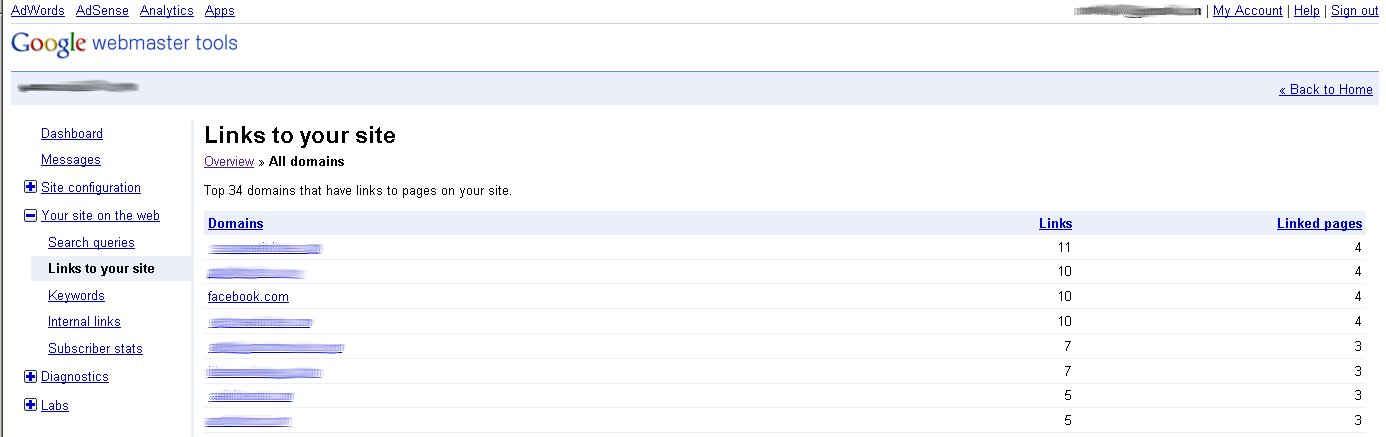
    OMG look this site has a link from facebook.

    This is far from fool-proof. As I read on Search Engine Roundtable, there have been some reporting issues with these links. The least you can do is pull your links from the dashboard and visit the sites that you’ve never heard of before and make sure you really have a link on that site. Many times content gets scraped by spam sites, which is not necessarily bad for you, depending on the reputation of the site and the content that it scraped. Another problem is this: just because the link is not mentioned in this report, doesn’t mean Google doesn’t care about it and has not viewed it, it’s just impossible to know, because the SEO dominatrix won’t tell us. The internet is gigantic and growing every day. Search engines do amazing things, but they can’t be perfect, especially with their free software. Just because you can’t find a link in this report doesn’t mean it is not there; you should be worried, however, if you know you have several different pages that link to you from a given domain, and none of them show up here after months. You might want to stop building links there.


  • Google Exposed! Don’t Trust Webmaster Tools Reporting!

    "The Simpsons" © 20th Century Fox Television (Don't Sue Me!)

    In the middle of December 2011, Google rolled out some new changes to the Webmaster Tools. This update included search queries with top pages, organic CTR, and organic imprressions, as well as, intergrated graphs ala Google Analytics.

    Since this update went live, I’ve been wondering if the data that Google is providing is accurate and how does it stand up against Google Adwords Keyword Tool and actual Adwords data.

    We have a client who is position 1 for a cosmetic surgery term in a major metropolitan area. So I pulled the two sets of Google data reported and the results were mystifying.

    Adwords Keyword Tool:

    Click to Enlarge
    Click to Enlarge

    Keyword Tool reports there are an average of 2,900 local monthly searches for the phrase geo-modified cosmetic surgery.

    Google Webmaster Tools:

    Click to Enlarge
    Click to Enlarge

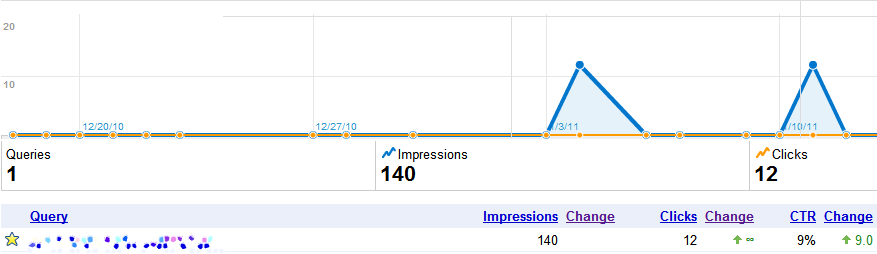
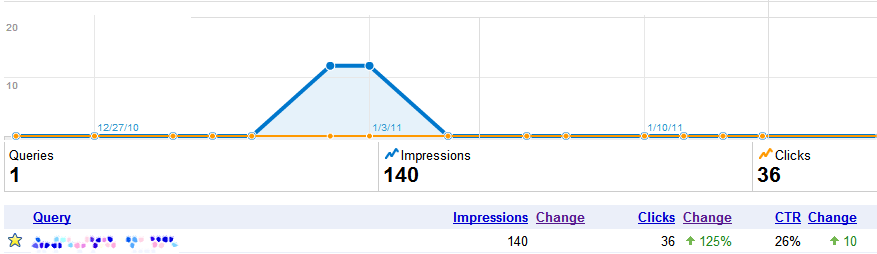
    Webmaster tool reported a mere 140 impressions! That’s a difference of 27k searches! Granted this data represents the holiday season in the US but you can not convince me that 96% of the searches stop. 10 or 15% sure, people have other things to think about during the holidays than getting bigger breast, but 96%! No %&*#ing way. Especially for a client that is in position one for the phrase.

    And yes before you say it is an “approximate 12-month average number of user queries”, that would mean two out of the remaining twelve months would have to had double the search queries of the Google Adwords Keyword Tool number (go do the math, I’ll wait…).

    Oh and to convince myself this isn’t some isolated event in Google’s data reporting, I pulled some additional information on another client who ranked in position one and was running Google Adwords ads during the same time frame that Webmaster tool reported on.

    Adwords Keyword Tool:

    Click to Enlarge
    Click to Enlarge

    Google’s Keyword Tool reports that the local monthly searches are 1,300…

    Google Webmaster Tools:

    Click to Enlarge
    Click to Enlarge

    And Webmaster Tools reported 140 impressions from Dec 22 – Jan 22. A big difference than what the Adwords Keyword Tool is reporting. But wait! The data looks even more like jelly when you compare Adwords  to Google Webmaster Tool for the same date range (oh and to clarify this client has been strong at position 1 for over a year for this term).

    Google Adwords:

    Click to Enlarge
    Click to Enlarge

    For the same exact date range and same exact keyword running simultaneously for the same location (this is a geo-modified keyword for a national level audience) the data is off by almost 50%! That’s failing (terribly) where I come from.

    Seeing this data together is actually disheartening.  If I was using Google tools to perform an  A/B test and got a 50% accuracy in the data I would throw away the test. I understand Google is giving away ( most of) the data for free but there really should be some quality assurance for the Google Adwords Keyword tool. This tool should be giving advertisers the most correct data possible in order to help them create more effective campaigns and better gauge potential market growth.

    At the end of the day, I wouldn’t trust Google Webmaster Tools as an authoritative source of search volume for your site. While it is collecting great data about indexing issues and missing pages, it is doesn’t give you accurate enough information to make a decision. I guess in a way, the three sources are like credit scores. If you just look at the one, you miss some important knowledge that could either be a boon or a bust.

  • The Effect of Google Instant on Long Tail Search Behaviors

    We have been watching some recent Google product changes over the last few months to monitor the effects on site traffic, and in November we see most websites moved along at a positive level with their organic search numbers.  Nothing startling.  Everything is on track.  But for a significant few websites, digging into the Google organic search data in November elicited responses of “Help!” or “what in the world!?!”

    With drops in Google organic traffic in the double digits, some at 13% decrease, some at 20%, and some with a 32% nose dive, something clearly is going on for these few sites. Of course, my first thoughts turn straight to the two different Google product rollouts over the last 2 months and how they must be changing search behavior and traffic percentages.

    Trying to find an answer or at minimum, a clue, I am paying attention to three specific areas of organic decreases:

    1) geo specific searches

    2) branded searches

    3) photo organic search

    For an example, Google organic search for 1 website for November dropped 17% or 57 visits, of which 27 were geo specific related phrases.  His organic rankings are super strong so that’s not the cause. He is in the SERPs in some great spots, so where is the traffic going?

    I have another website in a different industry which lost 156 Google organic searches in November – 74 of these were geo specific.

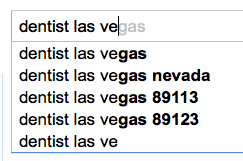
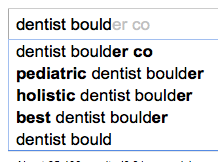
    I believe these losses are largely a consequence of Google Instant where the results differ with each letter typed in search.  I believe Instant is pulling searchers away from their intended search when these alternatives are dynamically generating as they type.  I know when Instant first rolled live, some SEO experts opined that Instant was going to be a non-event.   I can’t agree.

    As I type “dentist Las Vegas” Google Instant offers several options to divert my search.  Well, I didn’t think about searching by zip code, but maybe I live in 89113, and that alternative search might be better than the one I was going to type.

    dentist las vegas

    Instant is offering some pretty specific options that may mean a wider keyword universe for SEO.  The “best dentist?”  Well, I would like to see who is best…

    dentist boulder

    Branded search is not safe from these Google product changes either.  From my first example site, of the 57 dropped searches, 30 were branded search related (the doctor’s name).

    For the branded search drops, I wondered if people were clicking on his 1 box instead of his website with his name search.

    Or maybe searchers were finding a different results set for his name and were clicking on his profile or other directory listings, but I don’t see ANY increase in directory referrals.  Frankly, I’m a little stumped.

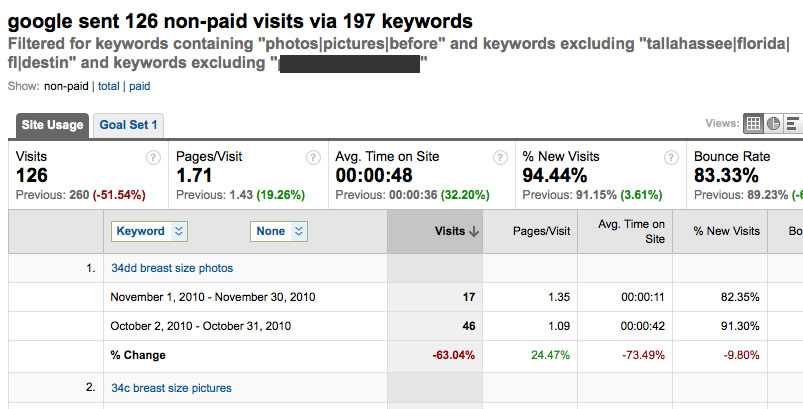
    A third trend I found his month is more specific to the plastic surgery industry.  Each month there is a lot of organic search around “photos,” “pictures,” or “before and after.”  These are not search in Google Images.  I have 1 surgeon based on the West coast, who lost 37 visits from lost “photos” searching.  And 1 practice on the East coast, which lost 134 visits – dropped in half!, and I filtered out all other factors that would affect it.

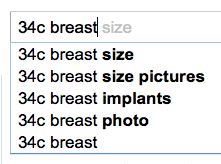
    google instant results

    I attribute these traffic losses to both Google Instant – I can see where searches can get distracted from their intent –34c breast size

    And to SERPs.  I’m pretty sure that where our docs once ranked for those non-localized phrases have been given over to directories.  Unfortunately, I don’t have historical data on where they once ranked for non-geo phrases in location based search and where they rank today.  Bummer.  That would have been cool to know.

    I haven’t figured it all out yet.  doh!Surely, I am missing something in the data even though I have been combing through Analytics, probably something right in front of my face. Someone may be kind enough to point it out to me, forcing me to say “doh!”

    Thanks to cytoon for the great nose dive image http://www.flickr.com/photos/cytoon/

    Thanks to LuChOeDu for the iconic Homer http://www.flickr.com/photos/luchoedu/

  • Place Page Reviews are Now Separated

    Cobbler making shoes, but not for his kids Tonight, I was logged into the Place Page account for my husbands’ business adding a Coupon.  I haven’t looked around his Place Page in a while, and I was trying to see what I have missed in the months since I last logged in.  (Just as the cobbler’s children go without shoes, the Place Page accounts most personal to me tend to get ignored.  And that is not my husband in the picture.  That is a cobbler.)

    Then I saw some newness .. what’s this? … The reviews are separated out.  Check it out on this Place Page …

    Denver Dentistry – Dr. Guy Grabiak, DMD, FAGD
    3190 S Wadsworth Blvd, Suite #300, Lakewood, CO 80227
    (303) 988-6118

    Place Page Reviews Separated
    Reviews cached from sources around the internet are categorized under “Reviews from around the web” while Google reviews are segregated into their own special area, “Reviews by Google users.”

    Reviews from around the web

    Reviews from Google Users

    I had to ask a few Search Influence dedicated employees still working and available on chat tonight, “have you seen this?  Is this new?”  The resounding response was a confirmation that it is indeed a new development.

    Paula Keller
    gives feedback that she saw this earlier today, so perhaps this is the first day for the evolution of this separation.

    What does this mean?  I’m not sure what it means.  But there is definitely more transparency on reviews and the sources of those.

    And it’s interesting that Google puts “Reviews from around the web” above their own.   They want browsers and searchers to read the other reviews before those that Google gathered.  Perhaps, it’s a nod to the Google reviews having a tendency for attracting inauthentic reviews?

    Digging around, I can see those businesses that have ALL of their reviews from Google and none from other sources.  Suspicious behavior.  This guy has 22 reviews, everyone of them great, and everyone of them from Google users.

    all 22 reviews from Google Users

    Oooo! And this is cool.  It very clearly indicates how many reviews are being pulled from these web sources right in the source Title.  David Mihm found the New Place Page Reviews Format earlier today andhe points out the little flavicon on the review sources:

    82 reviews from 1 source!

    This newness is curious and interesting.  Just when we’ve decided that reviews are always important but maybe not as strong a factor as they once were, Google shakes it up for us.

    Thanks to hans s for his very cool medieval cobbler image.

  • Top 10 for the Weekend- August 13

    We’re back with another thrilling installment of our bi-monthly series: Top 10 for the Weekend! Keep reading to find out tips and tricks, as well as what’s new in the world of SEO

    Great Apps to Customize Your Facebook Fan Page

    Facebook recently hit a new milestone: 500 million users! With this high volume it is a perfect platform for marketing, and people are already taking advantage of this opportunity. Here is a list of great apps that allow you to customize your fan page to its fullest potential.

    35 of the Best Facebook Fan Pages

    To go along with the above link, here is a fantastic list of fan pages that have taken full advantage of Facebook’s customizable applications. Some examples include pages from the likes of Skittles, Red Bull, and Harley Davidson.

    Forrester to Advertisers: Hold Off on Foursquare

    Forrester Research recently came out with a study that revealed 84% of people polled are not familiar with location-based applications, a la foursquare. This is useful information, but they conclude that businesses should hold off on using these FREE services because of it. This article explains why their conclusion should not follow their results.

    Foursquare Means Businesses: Have you checked-in yet?

    We’ve never been shy in our support for foursquare, and this link is a perfect follow-up to the previous one. The article just lists some more of the many advantages to utilizing this and other location-based applications.

    10 Sources For Better Conversion

    Getting people to your site is only half the battle. Once they’re there, you need to get them do whatever it is you want them to do. In the SEO world, this is known as conversion. This is a list of 10 resources that explain how to get better conversions on your site.

    Local Citation Finder: Must-Have SEO Tool

    From the article: “The tool looks at the businesses ranking for your keyphrase, grabs their phone numbers, and then does a Google.com search (or .ca or .co.uk) for those numbers, collecting and collating all of the mentions/citations that it finds.” In other words, you can get a list of citation sources your competitors use, and mimic them. Nice and easy!

    10 Great Local Search Tools That Don’t Exist Yet

    It’s pretty clear what this article is about, so I won’t bore you with an explanation. I will say that these tools would be incredibly easy to make, and some of these developers need to get on the stick!

    On-Site SEO: How to Optimize Your Blog Posts

    A blog is a great tool for SEO, but simply posting one every week or so won’t be that great of a help. This is a great guide on how to optimize your blog to maximize your exposure on the web.

    Using Bing’s New Webmaster Tools For SEO

    Bing recently released a new version of their Webmaster Tools. Upon being asked by Bing to give feedback on how to improve it, Chris Smith decided to provide this advice via blog post for the world to see.

    Google’s New Local UI Proving Conspiracy Theorists Right

    In our last installment of Top 10 for the Weekend, we discussed some changes Google made to their SERPs and Places listings. It looks like the conspiracy theorists were right. This article explains why.

  • Google Wave has reached its Crest

    In an earlier post, we discussed Google Wave and its pros and cons.  Well, less than a year after it’s launch, you can wave it goodbye. See what I did there? Despite its loyal fan base, Wave just didn’t get the following they’d hoped for. So, they decided to pull the plug.

    When it was first announced, it caused shock waves (OK, I’ll stop) through the Internet community. It was touted as an “email killer.” The hype was out of control. So much so, that I wondered if it was going to be able to live up to it. I guess I didn’t have to wait too long for my answer.

    So why did it fail? I’ve got a few theories. First, I think Google’s marketing department dropped the ball on this one.  Perhaps they think they’re above effective and creative marketing. The entire Internet is Google’s marketing department, after all. Hopefully, they’ve realized this just isn’t the case. If you’re not a total geek who spends hours browsing the web for the latest technologies (like me), chances are you haven’t even heard of Google Wave. The majority of people I’ve asked haven’t. It goes to show that no matter how great or revolutionary a product is you still need to get the word out. Google failed in that regard.

    Next, it was just little too complicated for the average user. One might argue that it wasn’t designed for the average user, but without them it’ll fail to get mass recognition. The best way to get people to use something is to have more available features but to make it as simple and easy to use as possible. There is no way my grandma would be able to use Wave, even though she can use email and even Facebook.

    eCards on the other hand…

    Another reason is that I honestly think it was too ahead of its time. I know I gave it some grief in our previous blog, but I really think it was a revolutionary and useful tool. People weren’t ready for something so advanced. They liked the simplicity and straight forwardness of email and didn’t see a need to change.

    Speaking of change, people just don’t like it. It’s the same reason my mom still uses Internet Explorer and Hotmail.

    Wave will still be available for use through the end of the year and Google will extend the technology to its other projects, so it won’t disappear completely. For those who simply can’t live without it, rejoice. There are many alternatives out there. Unfortunately some are paid, but if it is that important to your daily routine it should be worth it. If you absolutely refuse to pay, design your own, cheapskate! The code and protocols are open source, so you can continue the innovation yourself!

  • Top 10 for the Weekend- July 30

    We’re back with this week’s latest thrilling installment of Top 10 for the Weekend! What do we have in store this week?

    Google Testing New, More Integrated Local Search SERPs

    Looks like Google is busy experimenting with some new layouts to their main SERPs. Blumenthal’s shares the findings of Linda Buquet of Catalyst eMarketing, including such changes as making the Places listings bigger and more like organic results (the only difference being the inclusion of a Map pin) and having the map scroll down the page as you do. Not sure if this will be a permanent change, but what I am sure of is that this will no doubt lower traffic results to individual websites while increasing them to review sites. Not cool, Google.

    Google Takes More Real Estate For Business Name Search

    Ah, Google. Why are they doing this to us? Not only did they potentially make some pretty lame changes to their SERPs, they also started linking to the business’s Places page for these searches as opposed to the actual website. The article lists a few possible reasons they may be making this change, none of which are very appealing.

    Google brings a Facebook rival

    We’ve posted about Google’s latest social networking platform endeavor in the past, but the news was sparse. Here we get another hint at the tactics Google may be using to bring down the Goliath that is Facebook. Recently, they’ve been meeting with big name game developers for Google Me. What this means is anybody’s guess, but I hope it means less lame Farmville updates and decent games for a change!

    Is Google Watching You? New Plugin Will Let You Know!

    Boy, this Top 10 is a little Google heavy this week, eh? Don’t worry, there’s more! Here’s an article about an awesome new browser plugin that lets you see when your personal information is being sent to Google’s servers. Not only that, but it alerts you using a vuvuzela-like alarm.  How great is that?

    Why You Need to Monitor and Measure Your Brand on Social Media

    If you read these lists of ours often, you’d know we’re no strangers to the social media game. Once you make the leap, it’s imperative to keep your presence known. This article gives a couple of great tips to monitoring and measuring your brand to make sure you can use these great utilities to their utmost advantage.

    How to Get Top Search Engine Optimization and Placement Results with Google Caffeine

    In our last edition of Top 10 for the Weekend, we posted an article outlining the differences between Google’s Mayday and Caffeine. Well, here is a handy article on how to make Caffeine work for you to achieve results at the top of the ranks.

    Should I renew my yellow pages ad?

    Here is our most recent blog about whether or not remaining to advertise with Yellow Pages is beneficial to your site from an SEO standpoint. Want to know the answer? Read to find out!

    The Google Sewage Factory, In Action: The Chocomize Story

    A great article on how sites pollute Google’s news section by taking advantage of some specific editorial criteria, and their lack to police these actions. A very interesting read about Google contributing to the pollutants that make the internet a “cesspool,” according to one of their CEOs.

    Google Places Police

    We’re no strangers to the confusing and oft arbitrary guidelines Google seems to enforce on their Places accounts, and we’re not the only ones! This is a fantastic article highlighting the hair-pulling experience that Google can induce for businesses and SEO companies alike.

    8 New Link Types That Exist On The Web

    A hilarious article outlining some of the insane practices that SEO companies and many others use for link building. Check them out and see if you are guilty of any of them. I know I am!

  • Facebook Local Search: Facebook Declares War on Google’s Empire

    Is Facebook the next evolution of Local Search?

    We all knew it was a matter of time before Facebook started expanding into web search and they’ve finally done it by unveiling their own Facebook local search option: Open Graph search engine. What is Open Graph, you might ask, here’s what Facebook reps are saying, according to an allfacebook.com story:

    “all Open Graph enabled web pages will show up in search when a user likes them”

    Why is this important? Imagine a more personalized web experience where community feedback drives interaction and search position. You can search for a cosmetic surgeon or dentist and immediately be able to contact his patients for real feedback. This is huge! No longer will you type in “Atlanta dentist” and dozens of sleek websites – you’ll be able to find information on the dentist, his office location, and talk with his clients. As Facebook continues to develop this open graph search, you will see Facebook profiles and page results as well as websites being ranked by user feedback from REAL people.

    If this catches on, not only will the face of SEO change, how people think about searching will change as well. It’s like Facebook is developing Deathstars and photon rifles, while Google is reloading the Spaniard cannons.

    Do I think this is the end of Google local search? No, but I do think that Facebook is moving in the right direction. Users having control over results and ranking seems like a no-brain. My only concern is potential spammers hindering the evolution of search.

  • Top 5 Chrome Plugins for Search Marketing

    As a Search Marketing professional I’m always looking for new browser tools to help me with optimization. Over the last few months, I’ve become a huge fan of Google Chrome. It’s fast, light-weight, and  has tons of user generated extensions for SEO, PPC, and SMO. Here is a list of the top 5 Chrome plugins any Internet marketer should have.

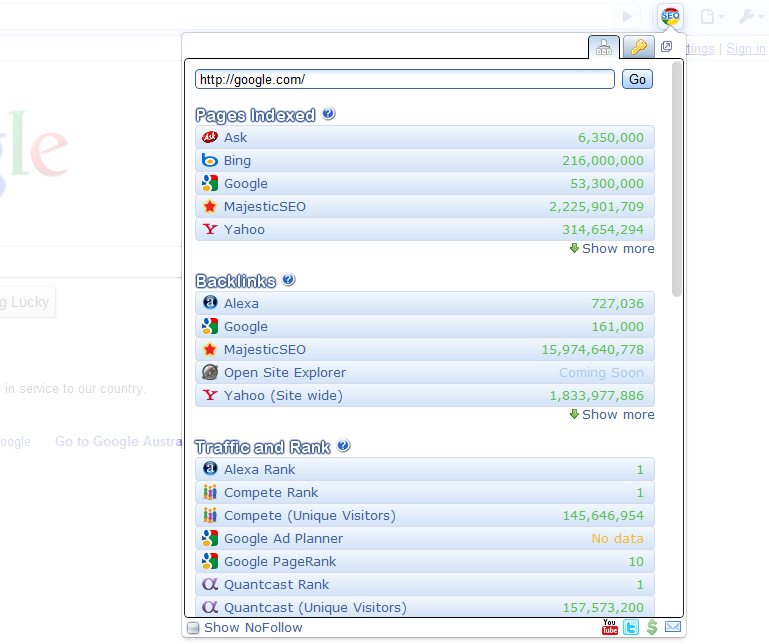
    1) Chrome SEO – Probably one of the best free SEO add-ons I’ve used. It provides backlink info, as well as, keyword research tool, domain age, and traffic and rank. It has everything. Unlike some other SEO plugins, I never find myself disabling it because it’s chugging resources or constantly crashing.

    Chrome SEO Screenshot
    Chrome SEO Screenshot

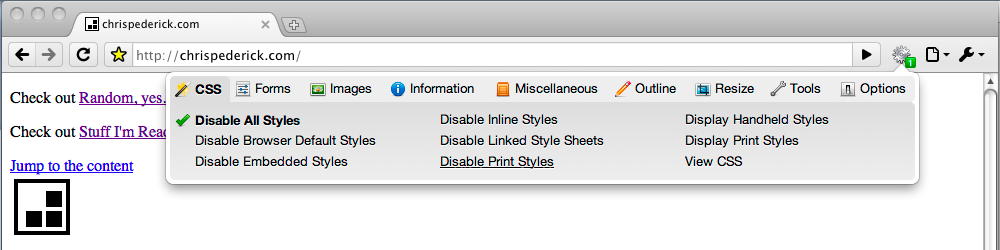
    2) Web Developer – A port of the Firefox Web Developer plugin, this extension has help me several times with identifying useless and broken CSS, as well as,  large graphics and elements on the page that were slowing it down.

    Web Developer
    Web Developer

    3) Google Analytics Opt-out Add-onNothing is more important to me than accurate site data and this plugin stops the JavaScript (ga.js) from sending information back to Google Analytics
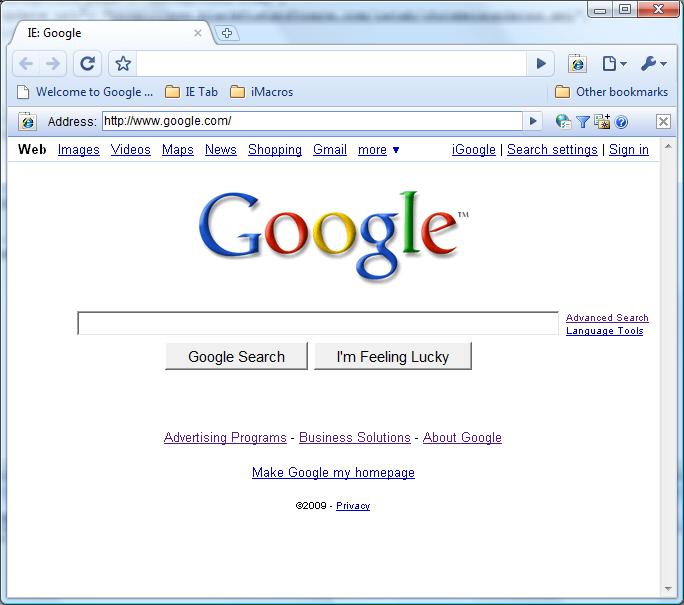
    4) IE TabWant to see what your site looks like in Internet Explorer but you don’t want to install? Download IE Tab.  This extension has helped me identify elements that work in Chrome and Firefox but do not work in IE.

    IE Tab
    IE Tab
    Google Similar Pages
    Google Similar Pages

    5) Google Similar Pages – Want to know who your competition is? Google Similar Pages provides urls and visual information on sites that are similar to the page you’re currently browsing based on keyword and traffic information.

    Honorable Mentions:
    Google Voice – I’m always losing or turning off my phone, so with Google Voice I never miss a voicemail and can easily return the call at my leisure.  Works great when you are busy and affording those pesky calls from Mom.


    Gmail Mail Checker Plus – I hate e-mail programs and constantly logging in and out of different email accounts to check my e-mail. With Gmail Mail Checker Plus I can have access to all of my email with a simple click on the toolbar.


    Panic Button – Have you ever been on sites that aren’t exactly work friendly? The Panic Button extension is for you. With one click you can hide what you were surfing and replace it with your start page.

  • You Know What Grinds My Google Gears?

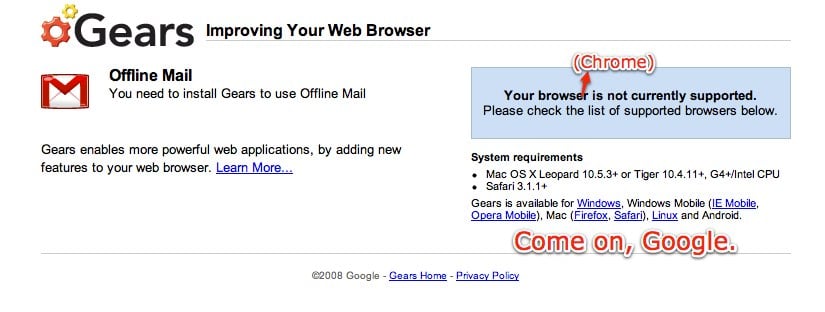
    “Google Gears – Improving Your Web Browser”

    Google Gears Does Work with Chrome? You don't say!
    Google Gears Does Work with Chrome? You don't say!

    That is Google’s tagline for their open source project that stores data locally for web applications and runs Javascripts in the background. But as anyone who has used Gears will tell you, it’s buggy, especially when being used with Google applications.

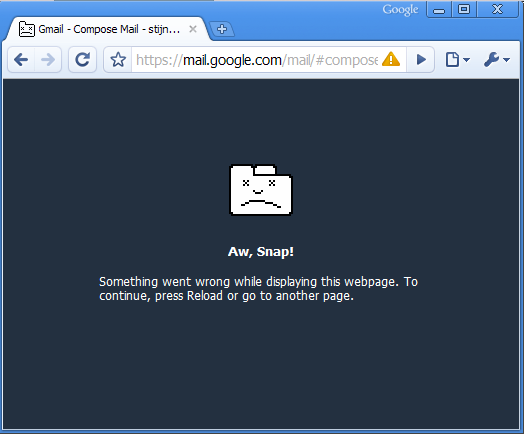
    For instance, Google Chrome comes pre-installed with Google Gears, however out of all the browsers that currently support Gears, it crashes the most. I’ve used Firefox and Internet Explorer with Gears and even though I still experience time-outs when downloading web app data and frequent Javascript slow downs, with Chrome I just get the “Aw, Snap! Something went wrong…” message practically every time I do anything Gears related.

    "Aw, Snap!"
    "Aw, Snap!"

    I find Google Gears especially painful to use with Google Adwords’ local storage feature.

    I understand why Google decided to integrate Gears with the Adwords dashboard- instead of loading data from Google’s servers several times a day and eating up their bandwidth, it allows faster use of Adwords and saves Google’s a couple of nickels (which will most likely go into yet another failed Google Labs project). The problem is Gears crashes 9 out of the 10 times I’ve tried to use it.

    I thought Google Gears would be improving my web applications, but unfortunately that has never been the case. It stalls, it freezes, and it crashes Google Chrome every chance it gets (In fact as I was in the middle of typing this very paragraph Google Gears crashed Google Chrome. Ironic?).

    I may come off as a hater, but that simply isn’t the case. I love Google. My first job out of college was as a creative writer for the first Google Adwords reseller and since that day I have faithfully (blindly?) downloaded, purchased, and used every Google product that was applicable to my life. However, as technology grows and other companies are finding ways to make their technologies more user-friendly (I’m looking at you Apple and Microsoft), Google seems to be just developing technology and hoping they work with existing Google apps. It confuses me that they waste resources on failed social media tech, like Google Wave and Google Buzz, while ignoring glaring problems with their flagships.

    I know for a business to grow it needs to make changes and take risks but if those changes are negativity effecting your loyal users, aren’t you just hurting your bottom line? #kanyeshrug

    Thanks to Sam Harrelson for the first image.