Tag: adwords

  • Getting Hands On With The New Google My Business

    Today, Google launched Google My Business. This new, more intuitive Google Places serves as a one stop shop for small businesses to do the normal Google Places work like updating business info, adding photos, connecting with customers through Google Plus posting, and staying on top of reviews. They also launched an Android app for managing Business Tools on the go (with the promise of an iOS app launching soon). Watch Google’s introductory video to Google My Business here.

    Changes For Users New and Old

    All new businesses to Google will start in Google My Business. As for current Google Places users, a blog post from Google earlier today said, “We’re also upgrading current users of Places for Business and the Google+ Dashboard to this new experience.” For those who just sat through and are still cleaning up the mess that was the upgrade to the new Google Places, don’t worry! You won’t have to go searching for which dashboard your listings are in or anything like that. It seems that Google My Business is a mostly superficial change that has already happened and just means a newer looking dashboard and a few extra features and controls (like easy access to Youtube, AdWords, and Analytics).

    Google My Business, Game Of Thrones Gif - Search Influence

    Quick & Easy Editing

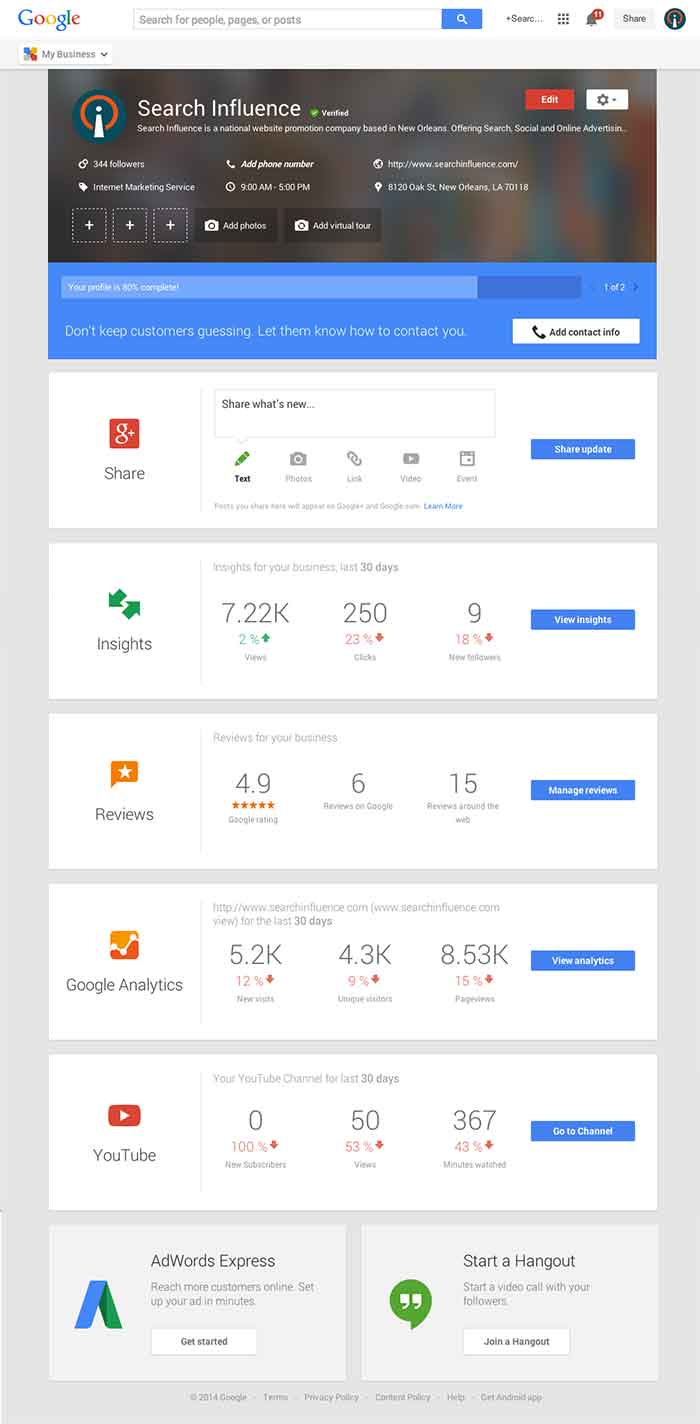
    These new features are pretty awesome. From your dashboard, first you’ll see the area for easily managing the individual aspects of your primary business information where previously you would have navigated through an “Edit Business Details” button. Connected to the bottom of this dialogue, there will be a blue box that allows you to edit the business information needed to get your profile to 100% complete. Google My Business has succeeded in using minor dashboard edits to make major usability improvements.
    Google My Business Dashboard Image - Search Influence

    Streamlined Sharing

    The next box is a basic G+ Share box for social posting to your business page. Share texts, photos, links, videos, and events easily all from one location. Side note: I recently found out, thanks to a post from Mike Blumenthal, that there is now an easy way to connect your business’ brand page to a location. So, if you have been posting socially from a Google Plus brand page for your business, you can now easily transfer that engagement into your verified local page.
    Google My Business Insights Tool Image - Search Influence  Google My Business Insights Followers Image - Search Influence

    New Data & Graphs

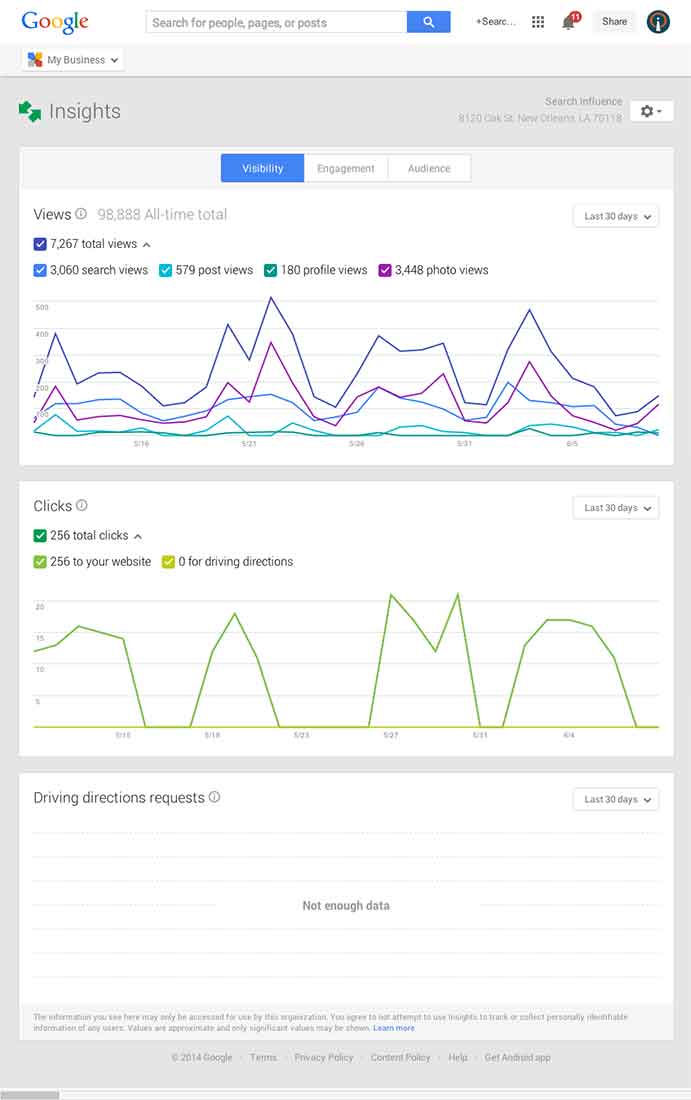
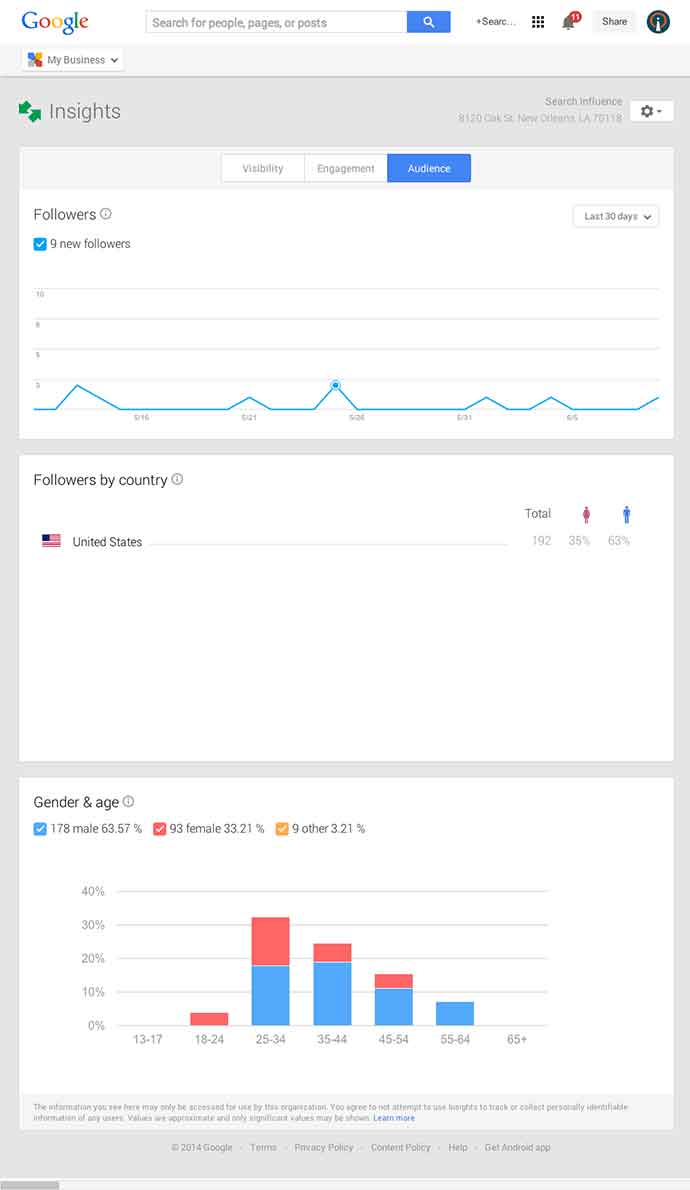
    Next, you’ll find the Insights Tool. Here, you can see how many views your G+ page has gotten over a period of time, how many clicks occurred, and where they went (either looking for Google Maps driving directions or directly to your website). The next feature (and my favorite addition to the Google My Business dashboard) is the reviews section. When you click into “Manage Reviews,” you’ll see your Google reviews as well as other business reviews from around the web. If you click “Analytics” at the top of this page, you can see a really streamlined graphical representation your review information or “Rating Stats” and where your business’ reviews come from.
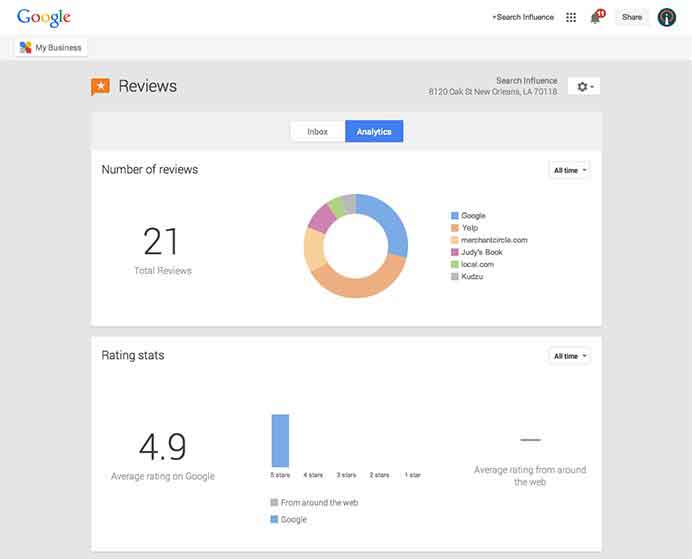
    Google My Business Reviews Tool Image - Search Influence

    Additional Tools

    You will be able to see other tools like Google Analytics (if you have it installed on your site), YouTube (if you have a channel connected), and AdWords Express (again, if you use it). If you don’t use the above tools, they will still appear at the bottom of your dashboard with the option to “Get Started” if you want to use them! You’ll also see a place to “Join a Google Hangout” at the very bottom of your dashboard. All in all, the new Google My Business looks looks both beautiful and user friendly, presenting a new way to manage businesses’ online reputations through Google.
  • Top 3 Things to Check in AdWords “Dimensions” Tab

    The Dimensions tab in AdWords is a very useful area. You can really dig into a variety of different data sets to analyze your PPC performance. This data can give you valuable information on how best to optimize your campaign to maximize your budget, especially if you are limited by budget. There are a TON of things you can see and analyze in the Dimensions tab, but below are my three favorites.

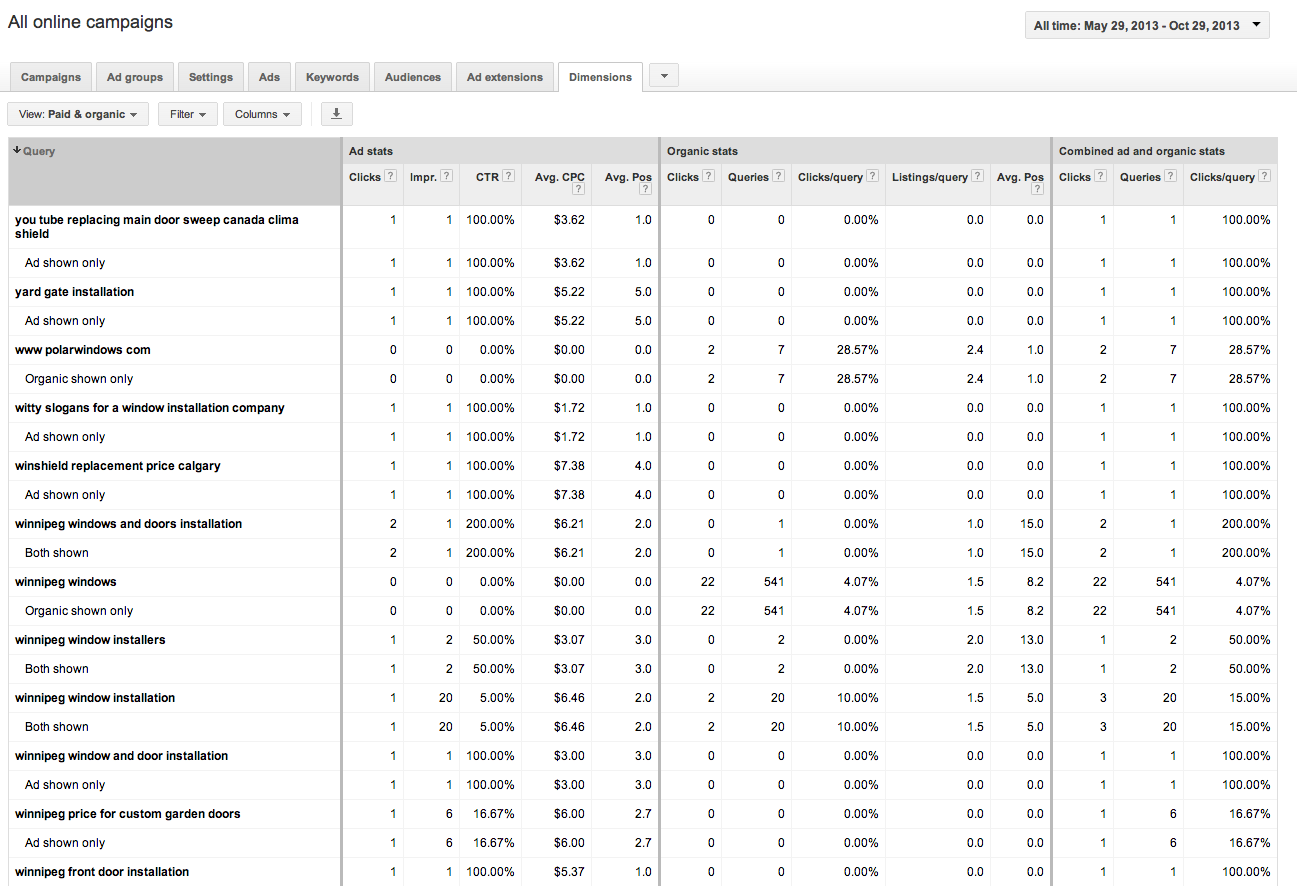
    1. Paid & Organic

    A recently added feature, this table shows how your paid and organic results performed for every search that triggered an ad or organic listing. You can view your click through rates (CTR) for both paid and organic searches individually, but also the CTR for when you have both an ad and an organic listing displaying in the SERPs. This tool can be great to convince clients the value of paid search (even if they have great organic results!). You can also use this to gather some keyword data for making decisions for your SEO campaign given that Google’s decision to make all organic searches (not provided).

    Best Use: Gather information on how your ads perform when they are shown with your organic results.

    Learn how to link your AdWords account and Webmaster Tools account to view this data.

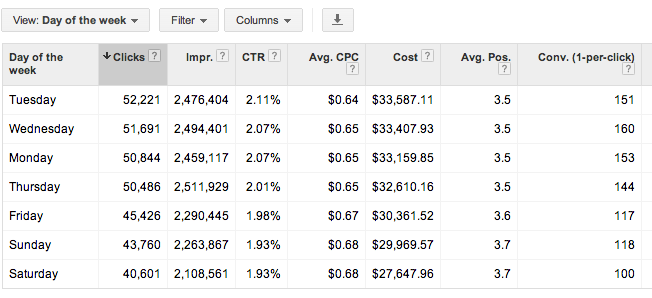
    2. Time > Day of the Week

    This report shows you all stats for each day of the week over your selected date range. You can determine which day performs the best by meeting your defined KPIs. You can then adjust your bids based on the performance you see. Are Tuesdays and Wednesdays higher converting than Saturdays? Focus on those days!

    Best Use: Determine which day of the week is highest converting, and spend budget there.

    3. Time > Hour of day

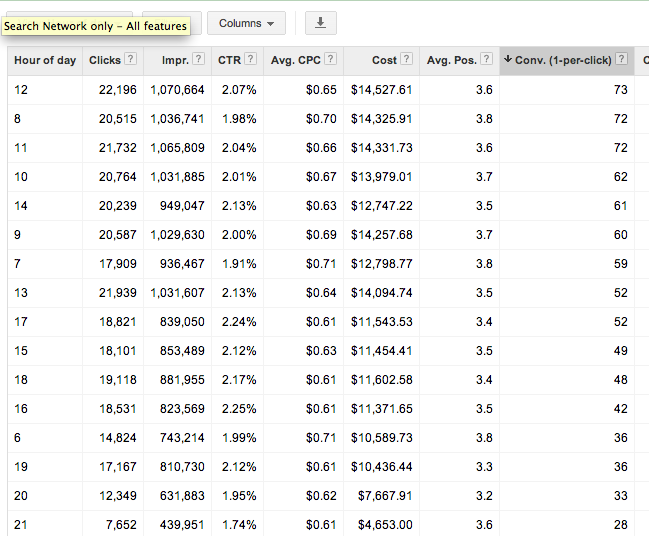
    Shows you cummulative stats for hours of the day for the selected date range. As with the above, you can determine which hours of the day best meet your goals (impressions, clicks, conversions) and adjust your bids accordingly. Be mindful that if you are limited by budget, the hours later in the day may have lower performance due to the budget constraints. You may want to test day parting for hours later in the day if you cannot adjust your daily or monthly budget to determine if those later hours are actually more successful.

    Best Use: Determine which hours of the day convert best and set up dayparting to spend more budget during these times.

    Check out the dimensions tab for yourself and get familiar with the data that is available. There are many more reports available that give you actionable information to better optimize your campaigns. Which are your favorites? Let us know in the comments!

  • 5 For Friday — Links, Stories & Posts For Your Weekend

    Round 1-051. Bing Places For Business replaces Bing Business Portal – Small Business Search Marketing

    Bing has made some significant changes in its local business listing management platform. Bing Places will replace the old Bing Business Portal, and along with the name change comes a simpler system that strips away much of the non-local search functionality that previously existed. Learn more about the update and decide whether you think this is a good move for Bing.

    2. 10 Inbound Discoveries That Will Disrupt Marketing Forever – HubSpot

    HubSpot’s 2013 State of Inbound Marketing Report has been released, and they’ve distilled the findings down to the 10 biggest discoveries. More than 3,000 marketing professionals from all over the world participated by sharing their thoughts on everything from strategy and organizational alignment to channel and budget management.

    3. How to Build an Online Community for Your Business – SEOmoz

    Building a better online community around your business has a number of advantages. This author urges you to focus on the hard work of attracting the right kind of customers to your community rather than chasing the latest algorithm updates.

    4. Top Google Website Optimization Resources – Search Engine Watch

    All of the best tips, guides, tutorials, and resources that Google has offered on SEO are all here in one place. You can find everything from beginners guides to some advanced programming concepts that will help you become an optimization expert.

    5. How Dynamic Search Ads Can Take Over Your AdWords Account With Devastating Effects – Search Engine Journal

    Dynamic search ads became a hot topic when they were recently added to all AdWords accounts. Advertisers expecting to increase profits simply by using DSAs on standard settings should think again. Here are some tips to make the most of your dynamic ads.

  • AdWords Enhanced Campaigns: Naughty or Nice for SMBs & Agencies?

    Yesterday, Google announced what might be the largest restructuring of the AdWords platform to date: Enhanced Campaigns. Building on (and some say attempting to boost) the influx of mobile advertisements on AdWords, Enhanced Campaigns are an attempt to simplify the mobile pay-per-click management process by removing barriers to ROI calculation for SMB advertisers. While many advertisers are less than enthused about the changes, Search Influence welcomes the new features, streamlined campaign creation process, and simpler campaign management and assessment that Enhanced Campaigns brings to the table.

    Nice!

    The official blog post on Inside AdWords is clear about the goals of Enhanced Campaigns: simplify mobile and multi-touch marketing for the part-time advertiser. Citing a study on the new world of multi-screen browsing, Google claims 90% of consumers “move sequentially” between several devices during the conversion funnel.

    Google highlights three refinements to existing AdWords features that will be live for everyone starting in June: (1) laser-targeted bid adjustment based on location, device, time of day, “and more” within a single campaign; (2) easy management of one campaign across multiple devices, which is in contrast to the previous recommended best practice of duplicating identical campaigns for different device targeting; and (3) more accurate click-to-call data and conversion measurement across devices. These changes allow advertisers to more easily set up mobile campaigns, a strategy Wordstream founder and CTO Larry Kim says only 4% of advertisers participated in despite lower costs-per-click and, in our experience, high conversion rates from calls.

    The new bidding system is based on a percentage of a basic bid which covers the equivalent of today’s national desktop campaigns. This bid can be multiplied by -100% to 300% depending on device targeted and -90% to 900% depending on geographic area or time targeted. This allows advertisers to avoid tedious duplication of campaigns simply for different targeting, while making it much easier on “part-timers” and campaigns with limited budgets to run on multiple devices and control who sees their ads.

    Combined with the recently-simplified Remarketing Lists in Analytics, the upcoming Universal Analytics, and the storyline offered in a post on SEER Interactive, it becomes clear that the other shoe dropping with Enhanced Campaigns is the continued march toward multi-touch lead attribution.

    AdWords is also dropping the direct fee for Google-offered click-to-call numbers in mobile search ads, tracking only calls over one minute as a conversion. This has been a point of contention for marketers who know that a click on a phone number and a call connected are very different things.

    Naughty!

    Not everyone is excited about the changes brought by Enhanced Campaigns. Many advertisers are concerned about the cost-per-click increase that will come with a variety of new advertisers not effectively managing their bids using combined campaigns. According to an Adobe study, the gap between mobile and desktop costs-per-click dropped by 15% between the 3rd and 4th quarters 2012, meaning that there’s already less of an advantage to advertising on mobile. Automatically setting advertisers to run on mobile means that despite the availability of new bidding tactics, less savvy advertisers will inflate the ad auction and lead the platform to be less profitable for everyone.

    Others are concerned that Google won’t be able to effectively manage the preferences expressed in the myriad targeting options provided by Enhanced Campaigns. Per Google’s Guide to Upgrading to Enhanced Campaigns, Quality Scores in upgraded campaigns are reported at a bird’s-eye view, making it difficult to see what targeting is driving increases or decreases of an already-opaque metric. Similarly, the inability to separate out tablets from desktop searchers makes some wary; there are some markets that would be highly affected by this, such as downloads of a desktop program. While this is concerning to some, it may also outline an overarching corporate goal of Google: to make the world fast and universally accessible — contrary to ideas like single-platform apps and solutions off the cloud.

    Misconceptions: Looks Naughty, but Is Nice!


    But some, seeing the change as a step backward for targeting, have unfairly found fault with the update. Enhanced Campaigns eliminates confusion by changing locations of settings.  Many have said that the “mobile-only campaign” has disappeared from AdWords. On the contrary, AdWords provides a checkbox to help Google figure out what device an ad should be shown. Furthermore, ads with extensions such as App Store downloads that only make sense on certain mobile carriers and operating systems will be automatically targeted to those devices.

    There’s also some worry about other platforms following suit. As BingAds has matured as a platform and international search engines have found monetization easier with cost-per-click ad auctions, it might follow that this grand experiment by Google will shape the industry. Yet BingAds has tried to forge its own path in the paid search realm; I can’t see them blindly following Google with its targeting any more than it already has — to wit, only slightly. But while the industry as a whole might not change, it is important to note the Google has over search ads, especially on mobile devices.

    How to Win with AdWords Enhanced Campaigns

    Best practices can already be parsed out from what has been released about AdWords Enhanced Campaigns, but they aren’t necessarily far divorced from current ones.

    1. Follow Google’s guide to transitioning your account to Enhanced Campaigns
    2. Be sure to take advantage of all appropriate ad extensions, which allow you to target you ads appropriately to device and location
    3. Ensure you’re using the most up-to-date version of AdWords Editor to effectively Enhance your Campaigns.
    4. Anticipate a variety of devices coming to your site by providing dynamic content and alternate conversion paths based on device
    5. Provide natural redirection to and from your mobile site if it’s required for your business to avoid issues when desktop ads show on mobile or vice versa
    6. Now more than ever, bid appropriately for your location, device, and time of day — the best strategy in a second-price auction like AdWords is to bid what that website visit is actually worth to you

    We’re looking forward to learning more as marketers start experimenting with these new tools. What do you think? Will this change the way you’re doing PPC?

  • Google Adwords Certification: The Breakdown

    Getting Google Adwords Certified can be an invaluable update to your resume. Why? With this professional SEO accreditation, you’re making sure you’re doing everything you can to increase your worth to your clients or company.

    Whether you are planning to start a paid search campaign for your business or if you’re just trying to understand what your PPC manager is always talking about, Adwords certification is an extremely beneficial feather in your cap. However, don’t think you can just roll out of bed, think “I’ll get certified today!” and pass the test with ease.

    To officially become Google Adwords Certified, you must pass both the Advertising Fundamentals exam and one advanced-level exam. Everyone on the account management team here at Search Influence has decided to take on the challenge to get individually certified.  Luckily we have two Google Adwords gurus, Anthony Coleman and Doug Thomas, to answer our never-ending questions while studying.

    To make studying easier, Google has set up a Google AdWords Certification Program Learning Center, where you can find “lesson plans” for each Google Adword exam. Reading all the chapters (from start to finish) for each exam may be a bit time-consuming, but very worth it. I highly recommend the interactive e-learning lessons that are scattered throughout the chapters. Most e-learning lessons have quizzes to test your knowledge before taking the actual exam.

    The first test is 113 questions with 1 hour and 30 minutes to complete the exam. You must get an 85% on the first test, which cost $50, and you must pass the first exam before moving on to the advanced.  After passing the exams, you are certified for two years.  Don’t worry if you don’t pass the exam the first time: you can always retake it. However, you must pay the $50 fee each time.

    VS

    You can become a qualified individual or a qualified company within the Google Professional Certification program. To qualify for an Individual Certification, you must pass both the Fundamentals exam and one of the three advanced exams.  Also, you must accept the program Terms and Conditions (which happens automatically by enrolling in the program).  Also, there is no minimum spend requirement to be Individually Qualified.

    Doug and Anthony have already qualified Search Influence for a Company Certification. To qualify for a Company Certification, a company must have managed at least a $10,000 spend over 90 days, starting the day the AdWords account is linked to the My Client Center. The company must have at least one individually qualified employee and accept the program Terms and Conditions.

    The Google Partner Search tool helps potential advertisers find a Certified AdWords Professional. People enter their estimated budget, along with the type of help they need, then Google compiles a list of certified professionals. Certified Partners receive a badge showing their qualification, while those who are Individually Qualified receive a certificate when they pass the necessary exams.

    Tips for Taking the Exam
    Study. This is easy to put off, but during the exam you’ll be asked a question that you would only know if you read the exam learning materials. Luckily, the study materials are broken out according to which exams they’re covered on.

    • Take the exam in a quiet area with no distractions. Get out of the house with no family, pets or TV shows to divert your focus from the exam.

    You cannot access any other part of your computer until you have completed the exam. Make sure you save and close everything you have open on your computer because once you start the test, it blocks you out of everything and you can’t pause the timer on the exam.

    • One beneficial feature about the exam is that you can mark questions for review and come back to them later. I loved this because if I didn’t know the answer to a question, I marked it for review and moved on to the next.

    Google is a tricky minx. I noticed when taking the first exam that some questions have multiple right answers, but Google wants you to choose the best right answer. Watch out for those questions and always go with your gut feeling.
    You can sign up here to take the exam. Good luck!