Tag: adwords

  • Sad That Google’s Retiring Average Position? Here’s How You’ll Be Better Off

    As Google has grown into an advertising powerhouse, it has created and improved ad performance metrics. After all, why would advertisers stick around without actionable data for boosting performance?

    Average Position is one metric that has been around since the launch of AdWords in 2000. You, like many other advertisers, may use this metric to track the success of your online ads.

    In late 2018, Google announced they would retire Average Position in September 2019. Let’s take a look at what this means for advertisers.

    What Does Average Position Mean?

    The Average Position metric shows the average position where ads are appearing on the search engine results page (SERP). At least, that was its original function.

    At first, Average Position helped advertisers gauge the effectiveness of their account changes. It’s easy to see why: if you know where your ads are appearing, you can work your way up to the top of the SERP with adjustments.

    Everyone wanted to be at the top because research showed that top search results get the most clicks by far. The Average Position metric was crucial for advertisers chasing the most valuable SERP space.

    What’s more, the immediate visibility of an ad at the top of the SERP made Average Position a popular, tangible metric.

    Great! We have an intuitive, valuable metric to measure our advertising performance. Why on Google Earth would they get rid of it?

    Princess Bridge gif for Search Influence blog post about Google Ads

    The Decline and Fall of the Average Position Metric

    … Because it’s no longer intuitive, and that makes it much less valuable. Let’s look at what changed over the years.

    Average Position used to be helpful when all ads appeared above the organic results. If your ad’s average position was 1, it meant the ad was at the very top of the SERP.

    Later, ads appeared at the top of the SERP and also down the right side. Google realized they could combine the ads’ spaces and create an auction for all the real estate on the page.

    Google restructured the SERP so only highly relevant ads would appear above the organic results. If no ad was relevant enough, they all appeared on the side of the SERP or below the organic results.

    Advertisers could no longer be certain where their ads were appearing. Even auction winners may never appear at the top of the page. By this point, Average Position was more of an “Average Auction Rank” metric.

    By now, Average Position data was less helpful for optimizing campaigns. There was just no good way to know where on the SERP your ads would appear. Even your best ads could be languishing at the bottom of the page in the dreaded No Click Zone.

    Average Position lost more value as Google reorganized the SERP and added features. So, what’s an advertiser to do? How can we find out how our ads are appearing to our audience? What will save our KPIs?

    New Metrics to Save the Day

    Google introduced two new position metrics ahead of the retirement of the Average Position. These new metrics are helping advertisers transition more easily. Here’s what they tell us:

    • Search Top Impression Rate is the ratio of impressions appearing anywhere above the organic results. It’s given by Impressions Above Organic / Total Impressions.
    • Search Absolute Top Impression Rate is the ratio of impressions appearing above all of the other ads that are above the organic results. It’s given by Absolute Top Impressions / Total Impressions.

    Raccoon gif for Search Influence blog about average position in Google Ads

    There are also a few helpful Impression Share (IS) metrics you can bid for to increase Impression Rates:

    • Impression Share (Top and Absolute Top) is the ratio of impressions at the top or absolute top of the SERP and the impressions you were eligible for.
    • Search Lost Impression Share Budget (Top and Absolute Top) shows how often your ad wasn’t top or absolute top because of budget limits. This metric can help with bidding and budget changes for more top-of-SERP impressions.
    • Search Lost Impression Share Rank (Top and Absolute Top) shows how often your ad wasn’t top or absolute top because of your ad rank. This metric can help identify ad copy and landing page changes for more top-of-SERP impressions.

    With these new metrics, advertisers are better able to gauge when and how often their ads appear at the top of the SERP. Moreover, with the Lost IS metrics, advertisers can dial in their optimization efforts to where they will have the most tangible impact on ad placement.

    Even though Google is retiring a much-loved metric, it’s safe to say that advertisers will wind up with even more and better information than before. Overall, this move is a boon to advertisers who crave control and incremental performance improvements.

    What This Means for Advertisers

    There’s no reason to be upset over Average Position. The first step is to familiarize yourself with the new metrics. Once you begin using them, you’ll quickly see how useful they are. Here are three ways the new metrics will benefit advertisers:

    First, advertisers will be able to create more competitive campaigns with these new metrics. For example, at Search Influence, the new metrics are working well along with the new Auction Insights tool. Using both gives us a starting point for optimization tasks. Now we have to do much less detective work to identify performance-increasing adjustments.

    Second, we can examine how our other KPIs (like CTR) are affected by our ad’s position on the SERP. This means we can zero in on the external and internal factors affecting our ad placements and we have more optimization options available.

    Finally, the new metrics will help engaged advertisers stay on top of their ad performance. Even not-so-engaged advertisers should find campaign optimization easier. Both groups should capture more valuable impressions and clicks with less testing, guesswork, and time.

    If you’d like to know more about how to boost your advertising power, get in touch with the digital advertising experts at Search Influence. We’ve got the expertise and experience to help you reach your business goals.
    Welcome! Everything is fine with Google Ads

    Images

    Princess Bride

    Raccoons

    Everything is fine. 

  • Nothing More Local Than My Pocket #pubcon 2016

    Today I’m presenting at Pubcon on Mobile PPC. We all know mobile phones are ubiquitous, but there are a bunch of great stats which show how important they’ve become to us.

    • 33% of Americans would rather give up sex for a week rather than their cell phones.
    • 70% of Americans would rather give up alcohol for a week than their cell phones.

    Clearly this poll was not in New Orleans.

    And now the presentation.

  • Google Grants: What Every Nonprofit Should Know

    1608-SI-TheInfluencer-KL-A-01LargeIf you work for a nonprofit, you probably already take advantage of many of the free tools and services available to you. From software and applications to professional services, a huge number of corporations offer donations to show their commitment to the causes nonprofits represent—but few offer tools as powerful as Google AdWords. If your nonprofit isn’t reaping the benefits of a free AdWords campaign, it’s way past time for you to jump on board!


    What Are Google Grants?

    Essentially, Google Grants offer free in-kind AdWords advertising services—$10,000 USD worth per month, to be exact—to 501(c)(3) nonprofits. This is a huge deal because the AdWords platform offers a streamlined way to get your organization’s story and message in front of any target audience you want, meaning more visibility, supporters, and donations.

    1602-SI-TheInfluencer-KL-A-03-lg

    It’s important to note that unlike with the paid version of AdWords, Google does have some restrictions on the types of ads created with Google Grants:

    • Ads must be text-based (meaning no videos or images)
    • Ads appear only on Google’s search engine results pages
    • All campaigns are keyword-targeted
    • Your max cost-per-click (CPC) is $2.00 USD

    But the most exciting part? Your Google Grant is valid forever! All you have to do is maintain eligibility.

    What’s AdWords and Why Do I Need It?

    Let’s backtrack for a minute. If you haven’t heard of Google’s AdWords platform, it’s a powerful tool that allows you to distribute ads for your organization across the web. As a supplement to SEO, paid advertising can increase traffic to your site, often much more quickly than SEO alone, while building your brand in the eyes of your target audience.

    And when it comes to advertising, there’s no question that Google knows what it’s doing. The tech giant’s ad network is the largest in the world and reaches <80% of global Internet users, which means high visibility for any ad you create. With AdWords, you can share your message with more people—and with Google's customizable tools, you can be sure your story is shared with the people most likely to engage and donate, whether they're across the street or across the world. Not an AdWords expert? No problem. AdWords' customized functionality gives you as much control as you want. Beginners can launch an effective campaign with AdWords Express, the quick and easy version of AdWords that offers automated management services, until they’re ready to optimize their ad campaigns to the fullest. More experienced users can take advantage of AdWords’ spectrum of insights to monitor keyword strength, ad performance, and other areas.

    Charity:Water Image
    Image from Charity: Water, a member of Google for Nonprofits

    How Can I Tell if I’m Eligible?

    1. Do you meet Google’s location requirements? Your headquarters must be located in one of the 50+ eligible countries. If you’re in the US, you must have current 501(c)(3) status, and if you’re headquartered somewhere else, you must meet the defined charity status of that country.
    2. Have you checked the list of prohibited organization types? Governmental health entities, hospital or health care organizations, and academic institutions cannot receive assistance through Google Grants.
    3. Do you have a live website? You need somewhere for ads to link to! Google demands “substantial content”—meaning more than just a page or two.

    Where Do I Sign Up?

    If you’ve answered “yes” to all three questions in the last section, you’re ready to get started!

    1. Sign up with a Google for Nonprofits account. If you haven’t done so already, become a member here for access to free tools and services like Google Apps and Google Analytics.
    2. Enroll in Google Ad Grants and complete the application. Sign up for either AdWords or AdWords Express, depending on how you plan to maintain your ad campaign. Google’s account creation guide makes it easy to create an account that fits your needs, though it’s important to note that the process may take between 4–6 hours to complete. You’ll be expected to provide basic information about your organization, but you should also have a basic idea of how you intend to start your ad campaign. Google will ask for things like sample keywords and ad copy as well as your goals for your ad campaign (recruiting additional volunteers, getting more donations, promoting fundraisers, etc.).
    3. Submit your account for review. The Google for Nonprofits team will take it from there by verifying your eligibility and going over your application. Be prepared to wait: the process is run by volunteers and takes between 4–6 months.
    WaterAid Image
    Image from WaterAid, a member of Google for Nonprofits.

    Should I Manage My AdWords Campaign on My Own?

    While it’s definitely possible for nonprofits to run their own ad campaigns, some beginners have found it frustratingly difficult to gain traction—even with $10,000 worth of services waiting in the wings. Getting only a handful of visitors each month can make it seem as though all of your grant money is going to waste, and it can take time to build strategies that make the most of the AdWords platform. Search Influence has run successful Google Grant campaigns for a number of nonprofits, and we’ve even helped organizations take the next step up toward Google Grantspro, which offers $40,000 worth of in-kind AdWords services per month.

    Consider letting us do the work to create high-performing ads—all you have to do is wait for the performance reports!

    Image Credits:
    Charity: Water Image
    WaterAid Image

  • A War of Words: 4 Tips to Help Lawyers Win the Cost-Per-Click Bidding Wars

    1601-SI-Newsletter-0112-Big-KG-C-01

    Whether a veteran attorney or a recent law school graduate, legal professionals have likely noticed that the world of generating leads and winning new clients has changed drastically. While tried and true marketing methods such as word of mouth and putting your picture on a billboard still have their place, effectively using online resources can have a huge impact in establishing a solid client base. In particular, paid online advertising for attorneys has become so vital that competition for keywords has skyrocketed. Although it may seem daunting and difficult to know how to begin, these critical tips can help you win the cost-per-click (CPC) bidding war.

    1. Understanding the Competition

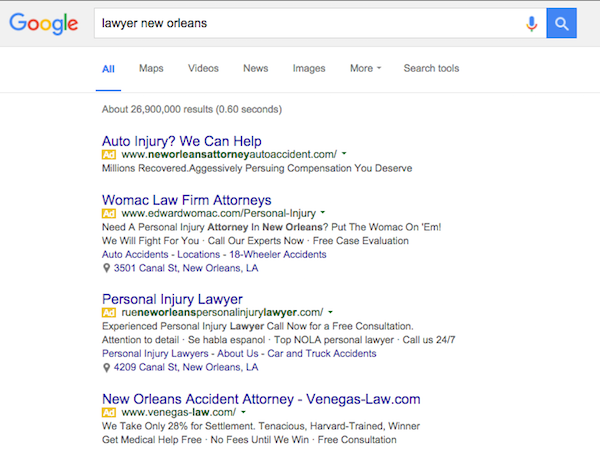
    Consumers who are searching for a lawyer often turn to the Internet to conduct their research. With that in mind, marketing online has become an integral part of building and sustaining a law practice. When it comes to paid online advertising, it’s important to first understand your competition. Legal keywords are typically among the most expensive in Google AdWords, with terms related to “attorney” and “lawyer” topping the cost charts. High levels of competition naturally follow expensive keywords, as lawyers constantly place bids on the exact same terms. Try conducting your own competitive research and search the keywords in your geographic area to see for yourself what ads are getting top placement. Simply run a search on the keywords you’re hoping to target and see which keywords your competition is already bidding on. Take a look at their ads and start crafting a plan to make yours even better.

    Screen Shot 2016-01-05 at 9.04.41 AM

    2. Target Specific Keywords

    So how do you overcome the highly competitive landscape and win the bidding war in your online ads campaign? First, you should create a list of specific and relevant three- to five-word keywords to explicitly target. This is a trial-and-error process, and it takes time to accumulate useful data. A simple way to start is to use the Google AdWords Keyword Planner, which will help you compile specific keyword ideas. This tool will also help you determine average traffic and CPC for your potential keywords, and it will make suggestions based on your site’s URL. In addition, it’s critical to focus on relevancy and make sure that your keywords, your ads, and your landing pages all match the searcher’s intent. For example, if the keyword in your ad is “DWI lawyer,” the click should take the consumer to a page with content for “DWI lawyer.”

    How Can I Fight A DWI Charge?

    3. Use Negative Keywords

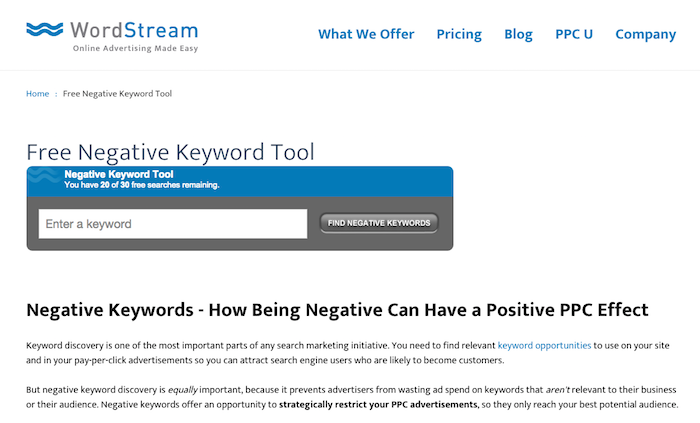
    Another crucial aspect of a successful paid online advertising campaign is the use of negative keywords. This allows you to stop your ad from appearing when you know that the consumer isn’t interested, which can help improve the click-through-rate of your ads. Using negative keywords informs Google that certain search queries are irrelevant to your practice, ensuring that you don’t pay for clicks that will not lead to conversions. You can start by using a free negative keyword tool like the one from Wordstream, which will return an extensive list of search terms that may not be related to your practice area. Using this tool is especially essential in the legal world, where you are bidding on expensive keywords that could result in unnecessary and costly clicks.

    Screen Shot 2016-01-05 at 9.25.01 AM

    4. Optimize Your Landing Pages

    Now that your paid online advertising campaign is set up with specific and relevant keywords and you’re getting clicks from consumers searching for your exact type of practice, it’s important not to derail all of your efforts with ineffective landing pages. Your landing pages should be directly on point to the ads that the consumer clicked on. They will likely need to be continuously tweaked with different types of offers to see how people respond to them. You might want to consider using videos on your landing pages with subject matter explanations directly from a lawyer, or customer testimonials from successful cases. In addition, having a chat function on legal landing pages can be particularly critical for consumers who are hoping to have immediate answers to case-specific questions.

    Keeping your paid online advertising strategy focused on these tips will help you capture leads that you would have normally missed, allowing you to conquer the competitive CPC bidding war for attorneys.

  • Go Go Google Grantspro

    Nonprofit Marketing PPC Image - SearchInfluence

    Being a Google Grants Pro:

    So you’ve heard of Google Ad Grants … in fact, you applied to be a part of the program ages ago. IN FACT, you have been a part of the Google Ad Grants program since like 2005 and you’ve been running campaigns in AdWords to promote your mission and grow your nonprofit organization like a pro (and all on Google’s dime—$10,000 worth of dimes, to be precise).

    Well, that’s cool. Congrats on being a pro with your Google Ad Grants account. But what if we told you—you’re not really a pro until you get accepted into Google Grantspro?

    That’s right. After Google Ad Grants comes Grantspro, and along with Grantspro comes $40,000 of Cold. Hard. AdWords spending limit. Get excited. Your nonprofit organization is about to expand its reach to where it has never reached before…gain visibility where it was never visible before…increase awareness where it was never aware before!

    Wait. What?

    Becoming Eligible for Google Grantspro

    Ah, the good part. Pay attention.

    To become eligible for Google Grantspro, you must:

    • Currently be a part of the Google Ad Grants program. (What’s that? Oh, boy.)
    • Have conversion tracking installed and have successfully tracked at least one conversion.
    • Hit the Google Ad Grants budget cap for at least two different months over the past six months.
    • Currently be a part of the Google Ad Grants program. (What’s Google Ad Grants? Seriously?)
    • Have maintained an average account level click-through rate of 1 percent or higher over the past 6 months.
    • Be on good terms with the Google Ad Grants program.
    • Submit an online application for Google Grantspro.
    • Currently be a part of the Google Ad Grants Program. (How do I become a part of that? Come ON!)
    • Complete biweekly maintenance of your AdWords account.
    • Complete an annual survey.
    • Agree to share your impact or conversion data.

    Sounds simple enough, right? You just have to meet all of the above requirements and you’ll be good to go! Just kidding. Space is limited, and meeting the minimum eligibility requirements does not guarantee acceptance.

    It’s OK. Don’t cry. This is why we’re here: to make sure your application stands out to the College Admissions Rep so you get into your first choice school. Erhm…

    Seriously though, think of Search Influence as your admissions coach. We’ve been through this process before, and we’re familiar with every step of the Grantspro application process. This is part of our job. Get in touch and let us help your nonprofit rise above the rest!


  • Running With The Pack: Competing in Local Search Just Got Harder

    Running With The Pack: Competing in Local Search Just Got Harder

    Overnight on Aug. 6, Google updated search results for mobile and desktop searches from local seven-pack to a three-pack. This is not just in the United States; it seems to be worldwide and rolled out at one time. It’s really early to start dissecting this change, but I’m not seeing much good about it.

    What Does This Mean for Organic Search?

    For organic search, it means it’s even harder for searchers to find you. It looks as if these changes from Google are driving consumers to a business’ My Business page and perhaps encouraging more ad spending.

    Organic—Looking a Little Closer

    On Mobile

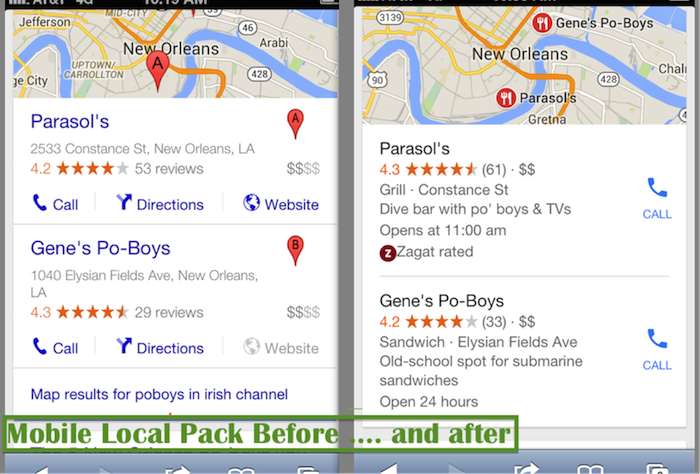
    Before Google rolled out this change, when a search on mobile gave local pack results, the user could immediately click on what they needed directly on the search results page, including:

    • Click-to-call
    • Click to get some directions
    • Click on the website

    Now, the mobile local pack only provides a click-to-call button:

    Mobile Local Pack Click Call Image

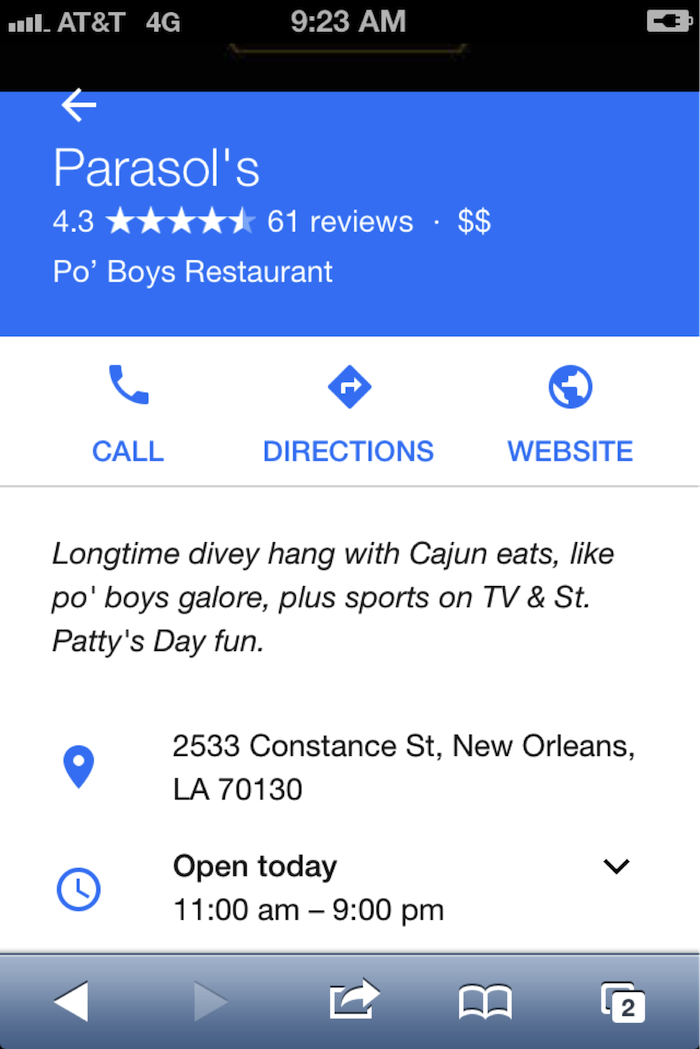
    If the searcher wants to visit the website for more info, they have another click in order to navigate to the My Business page:

    Navigate Google My Business Page Image

    On Desktop

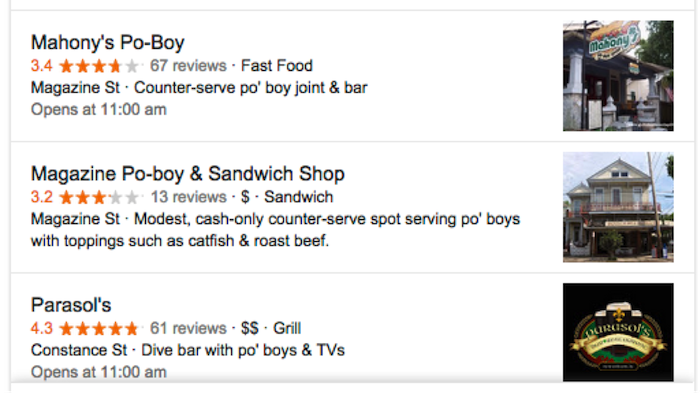
    With the new update, I get the three-pack with no immediate click opportunities:

    DesktopThree Pack Google Image - Search Influence

    Update:

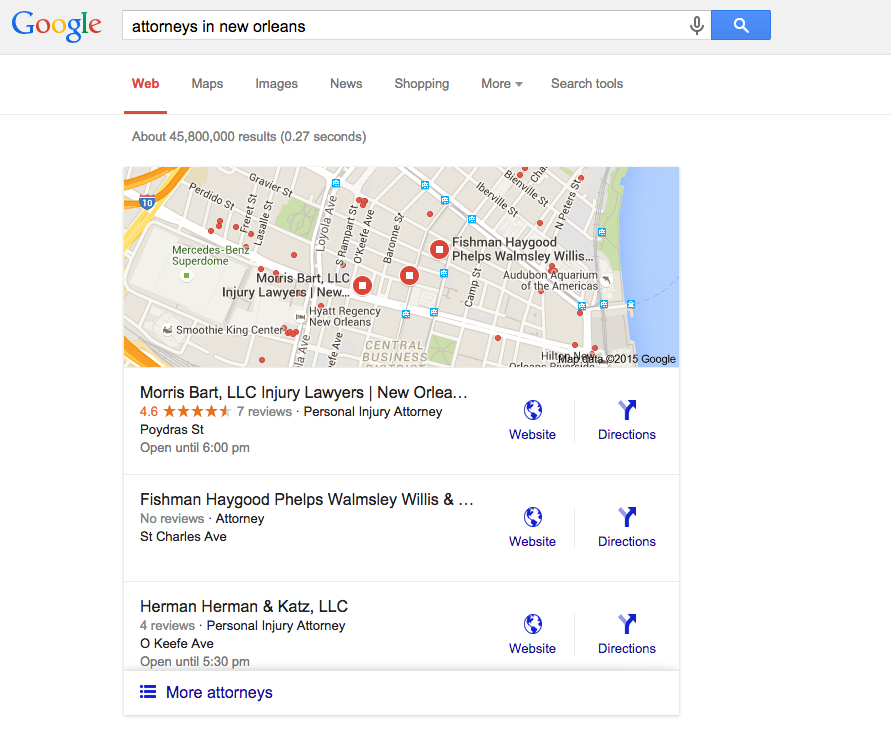
    Ryan Schulze, Senior Account Associate, commented, on this published post with an interesting correction. (It takes a village.)  He shows how some searches on desktop are giving the website link in the 3-Pack.  It suggests different search categories have different clicking opportunities.  I would guess this is based on percentage of search performed on mobile vs desktop.

    attorneys in new orleans 3 pack desktop

    Back to the story …

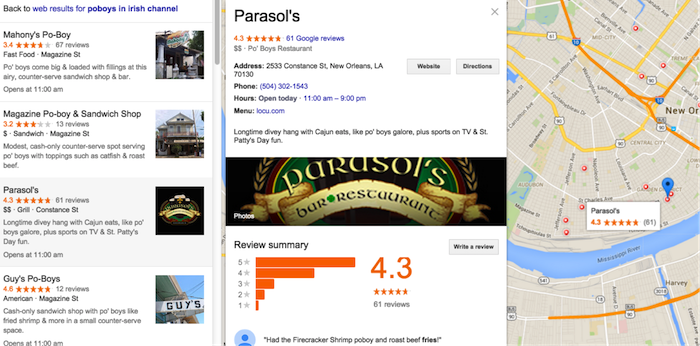
    I click on Parasol’s, thinking I will get its website or the Google My Business listing. Instead, it drives me to the local finder with ALL of the competitors right there!

    • This is not great if you’re in the three-pack because you must fight the competitors again for the searcher’s attention.
    • If you’re not in the three-pack, this levels the playing field. You have a chance to woo the searcher away from their initial choice.
    • If you are a searcher, it’s annoying because you have already indicated your preference with your first click, and Google forces you into an extra click to call the business. In addition, you are forced into viewing more choices after you made your decision.

    Desktop searches are losing ground to mobile, but desktop isn’t dead, and it still dominates search in some industries—usually those that skew to an older population.

    This does show us that it is still incredibly important to claim and optimize a Google My Business listing. Those Google My Business listings can get your business into the desktop local finder list, which is a long list of competition, so images and reviews are still important efforts to woo the searcher over to your business:

    Local Business Maps Pack Image - Search Influence

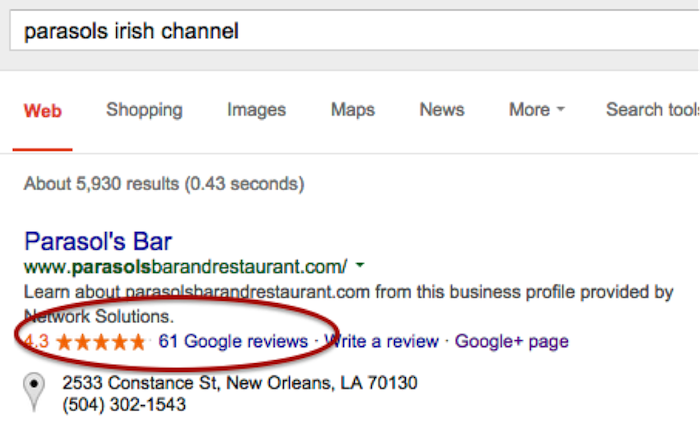
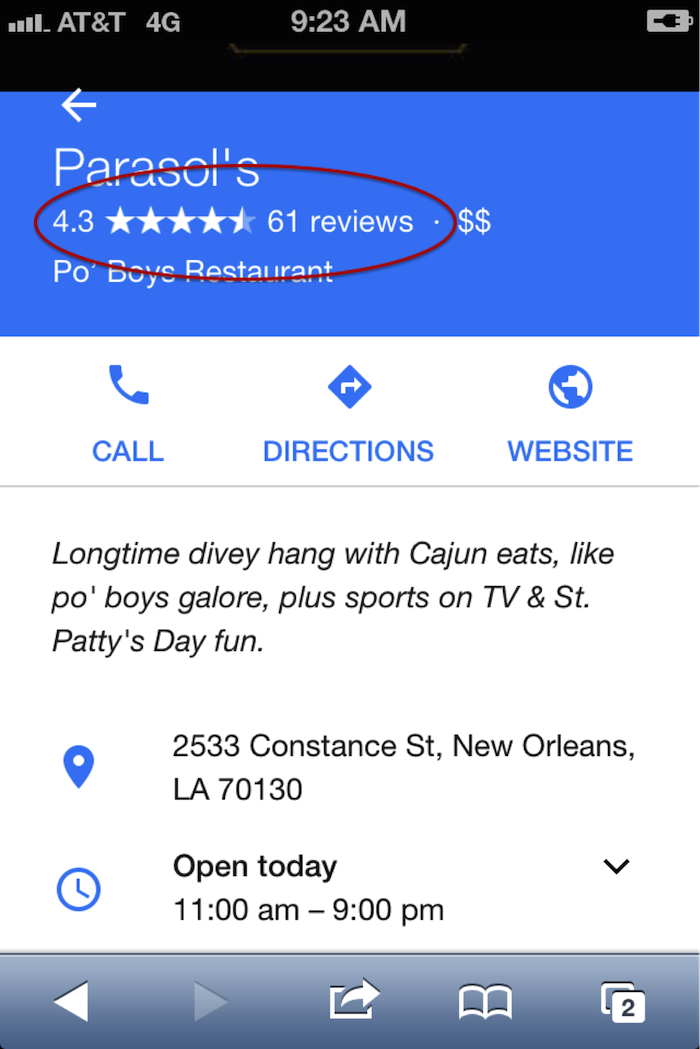
    Reviews on branded search results on desktop and mobile:

    Online Reviews Branded Search Image - Search Influence

    Online Business Reviews Mobile Image - Search Influence

    (FYI: if you’re ever in New Orleans in March, Parasol’s is a great place to be.)

    Early Data on Organic Visits

    I was chatting with Megan Lindsey, senior account manager at Search Influence, about the effect of this change for one client in particular. Lindsey sums it up nicely: “I imagine now since a searcher has to click on the business name and then once more on the ‘website’ button that people aren’t as inclined to keep clicking. I would think that most clients, even if they were in the top three maps results, are losing organic traffic because of it, but especially the ones who aren’t there anymore.”

    The early Google Analytics data supports Lindsey’s hypothesis. I found no great winners: Several clients’ Google organic was static, and several were worrisome. These clients are local businesses that are historically very strong in their markets. Over the weekend dates, there were 20 percent to 35 percent losses in organic website traffic, which seems to have rebounded Monday to Wednesday, so it appears things are still settling down.

    CLIENT A

    google / organic

    Aug. 7, 2015 – Aug. 10, 2015: 179 visits

    July 30, 2015 – Aug. 3, 2015: 285 visits

    % Change -37.19%

    Aug. 7, 2015 – Aug. 12, 2015: 319 visits

    July 31, 2015 – Aug. 5, 2015: 364 visits

    % Change -12.36%


    CLIENT B

    google / organic

    Aug. 7, 2015 – Aug. 10, 2015: 161 visits

    July 30, 2015 – Aug. 3, 2015: 210 visits

    % Change -23.33%

    Aug. 7, 2015 – Aug. 12, 2015: 161 visits

    July 31, 2015 – Aug. 5, 2015: 210 visits

    % Change -6.76%


    CLIENT C

    google / organic

    Aug. 7, 2015 – Aug. 10, 2015: 36 visits

    July 30, 2015 – Aug. 3, 2015: 54 visits

    % Change -33.33%

    Aug. 7, 2015 – Aug. 12, 2015: 58 visits

    July 31, 2015 – Aug. 5, 2015: 67 visits

    % Change -13.43%


    Have Calls Increased?

    The clients above usually do really well in the local pack and in organic website traffic, so let’s see what happened to their call volume. If you are a lucky business falling in the three-pack, consumers might be calling your business more now than visiting your website.

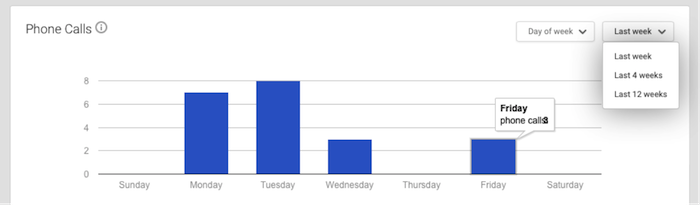
    When you log into the Google My Business page and go to Insights, this is the data you get:

    Phone Call Data 1 Image - Search Influence

    It’s severely limited and not really insightful. The date ranges are not customizable. There is no data after Aug. 8. I have to wait until next week to get any data on effects of call volume from the three-pack rollout, and I can’t compare to the previous week. I will have to do some elementary math that surely Google could program to ensure a better user experience.

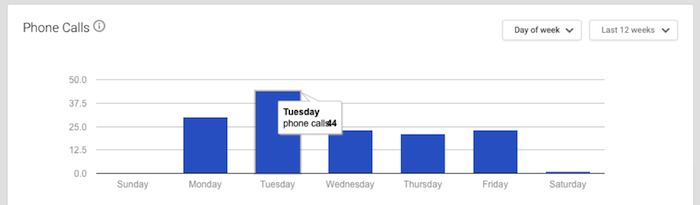
    The data is summarized to the point of being so generalized it is virtually useless. This is 12 weeks of call data. I know Google can do better.

    Phone Call Data 2 Image - Search Influence

    It warns that call volume is “approximate and only significant values may be shown.”

    Also, the call numbers could be calls from three different sources: Google Maps, search and maps for mobile. This is so frustrating for business owners. I would want to know EVERY call I received! And I would want to know where I received the calls! Google has the data, and it just isn’t sharing with business owners.

    And Paid Search?

    On the first day of the this rollout, local search expert Mike Blumenthal made these early comments: “I am not sure what will happen on clicks for AdWords, but those businesses that were lower in the old display may feel compelled to double down on their AdWords activity.”

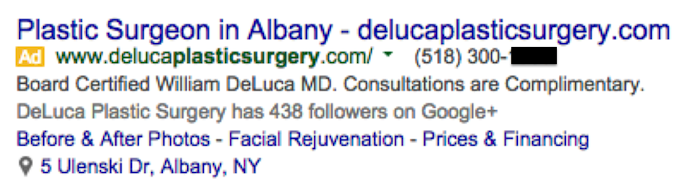
    I asked Jeanne Lobman, senior online advertising manager at Search Influence, to check it out and give us some input. “Those businesses that were previously only ranking in spots four to seven in the local pack (and nowhere organically) are now going to need to spend money on AdWords ads in order to be seen in the search engine results pages. Additionally, since Google has removed the website URL and the phone number from the local pack info, it could be beneficial to run AdWords in order to make sure searchers can easily find your phone number and call you (on desktop). This would be accomplished by using call extensions with your campaigns, which adds your phone number to your ad (as seen in the below example).

    Plastic Surgery Google Ad Phone Image - Search Influence

    On mobile, the local pack results do include the call button, but there’s no link to the website. When you click the local result on mobile, you are taken to the G+ page, which then has a link to the website. To avoid having that extra step, running an AdWords campaign on mobile ensures you can land people directly on your website with one click.”

    Lobman pulled some AdWords reports to see what impact this change may have had on click-through rate. She says it’s really too early to tell any effects, but the data so far suggests there seems to be an increase in clicks and impressions but little to no change in click-through rate, conversions and conversion rate.

    So Now What?

    We need to give it a little more time to settle in before we make any dramatic changes. When we looked at six days of organic visitor data versus four days of data, we see big improvements, so watching the data to make smart moves is the action item.

    Walk through the process that visitors might use to find your website online, and try to improve what you can control, such as adding phone numbers in your desktop AdWords ads or continuing to encourage reviews from your customers.

    Your engagement online is a reflection of how you engage with your customers in real life. Providing for the searcher with easy linking from ads, Google My Business images, reviews and informative website content is a long-term plan, and it’s a good one to win trust and authority.


  • Google AdWords Cram Session: Don’t Let Google Kick You in The Ads

    To start off this post: yes, we are a Google Partner. No, we do not do Google’s laundry or cook romantic meals for Google. And we try our best not to steal Google’s side of the bed. We are, however, certified and qualified to help you with all aspects of your online advertising campaigns by building an appropriately aggressive website marketing strategy. So what makes us certified and qualified? Well, let me bring your attention back to our lovely Partner: Google.

    The Perks of Partnership

    Being a Google Partner has lots of perks. From access to live trainings to beta testing opportunities to extra support and professional networking (the list goes on and on, but feel free to peruse here), you can bet we love being a Google Partner. However, along with the perks come some requirements, one of which is obtaining certifications in Google’s products and services.

    One of these certifications focuses on proficiency in using Google AdWords, Google’s online advertising platform. This platform allows users to market their products or services in the Google search engine and affiliated sites. Still following? Great! Now, in order to become a certified Google AdWords advertiser, you will need to pass a couple of tests. In the upcoming paragraphs, I’m going to give you (1) a quick overview of each AdWords exam, and (2) a few general test-taking tips. You’re welcome.

    Google AdWords Exams

    GoogleAdwordsLogoImage

    There are a total of four exams for AdWords certification: Advertising Fundamentals, Advanced Search, Advanced Display, and Video Advertising. Google requires you to pass the Fundamentals test along with at least one of the advanced tests in order to become certified.  However, here at SI, we like to take both advanced tests for good measure. We’re thorough like that. After getting certified in AdWords, you then have the option of taking the Video Advertising exam.

    1. Advertising Fundamentals – 2 Hours. 90 Questions.
    This is the exam that covers all the basic features of AdWords. Questions will pop up on topics like campaign and ad group management, ad formats, and budgeting and bidding options. In order to pass this exam, you’ll need to achieve an 85% or higher. The good news? If you achieve a passing score, it’s valid for two years!

    2. Advanced Search – 2 Hours. 98 Questions.
    This exam goes more into detail on best practices for managing campaigns on Google’s Search Network and Search Partners. Questions will be on topics like ad and site quality, AdWords API, understanding ad performance, and performance optimizations. In order to pass this exam, you’ll need to achieve an 80% or higher. The validity period for this exam is one year.

    3. Advanced Display – 2 hours. 88 Questions.
    This exam focuses on best practices for advertising on the Google Display Network and on YouTube. Questions on this exam test your ability to plan, design, implement, measure, and refine display and video advertising campaigns. In order to pass this exam, you’ll need a score of 70% or higher. The validity period for this exam is one year.

    4. Video Advertising – 1.5 Hours. 74 Questions.
    This exam focuses on video ad campaign creation and management on YouTube and the Display Network. In order to pass, you’ll need a score of 85% or higher. The validity period for this exam is one year.

    General Tips

    VisitorsImage

    If you’re hoping for more test-specific tips, don’t worry…more posts on AdWords certifications to come. However, to get you started on your studying, here are a couple of general test-taking tips!

    1. First and foremost: have a plan. (What is this? Standardized Testing 101?) Don’t cram all the studying into one day or even one week and then rush through the exam hoping you’ll pass. Do this instead:

    • Set a realistic test date for yourself. Might I recommend giving yourself a one-month study period?
    • Take a look at the study guides provided by Google and come up with a time frame that will allow you to go over and understand each section of the study guide thoroughly.

    Google provides you with a wealth of studying material for each exam because Google wants you to succeed. Use the materials provided. Stick to a timeline. And don’t panic!

    2. Which brings me to my second tip: don’t panic. Google is a very forgiving partner and is big on second chances! If you don’t pass on your first try, you can try again in seven days.

    3. Log into AdWords and play around on the platform a little. Not only will this help familiarize you with the many aspects of the AdWords platform, but it will also give you a point of reference when going over the Google study guides for each exam. Plus, haven’t you heard of the phrase “hands-on learning?” It very much applies here.

    On that note, I’m going to cut myself short so you can process all the information you just read. If you’re interested in becoming AdWords Certified, click here. If you’re interested in getting some professional help from an awesome team of AdWords Certified Individuals, click around. You’re in the right place. We’re a Google Partner, after all!

    Thanks to Search Engine Land for the Google AdWords Image, to Google for the cute Google cartoon, and Renee Jacques for the cute cat gif!

  • Five For Friday: Vine Allows Video Imports, AdWords Launches New Bulk Editing, Snapchat Does News, And More!

    1. Vine Finally Lets You Import Videos From Your PhoneMashable

    Love making videos on Instagram? Well guess what! The popular app, Vine, is finally allowing users to upload videos from their phones.

    In addition to being able to import your own videos, Vine now also allows you to edit videos, and they have been encouraging users to upload older videos stored on their phones and share them with hashtag, #VintageVine. Check out the announcement video below!

    2. Google AdWords Launches New Bulk Editing ToolsSearch Engine Land

    Google announced early Wednesday morning that AdWords will now contain a bulk editing feature. This snazzy new tool will allow users to update their settings per campaign in a more user-friendly and efficient way. Some of the benefits include:

    • A filter for campaigns targeting specific location
    • Updating multiple campaigns with a new targeted location
    • Adjusting other settings such as language, campaign end dates, and ad rotation

    DrakeAndJohnGifImage

    3. Snapchat is Planning A Move into News, AdvertisingMarketing Land

    ghostsmilingimageThe Wall Street Journal reported Wednesday that Snapchat is expected to launch Snapchat Discovery in November. This new product will allow Snapchat users to read news articles and watch video clips the same way they do now: by holding their finger down on a phone screen. The Journal also reported that Snapchat CEO Evan Spiegel is looking to get into advertising for his popular app.


    4. Bing Maps Adds Hundreds of Streetside & 3D City Images; Plus New HD Aerial ImagesSearch Engine Land

    Bing announced a massive maps update this week. Bing Maps now has over 100 cities that support Streetside imagery across America, including Richmond, Boston, Denver and more. They also now have 3D city images and new, high resolution aerial images. 3D cities are viewable through the Bing Maps Preview app, available exclusively on Windows 8.1. Bing Maps also has new high-resolution imagery in over 150 countries on every continent in the world, covering five million square kilometers.

    5. Moz Announces Brand New Beginner’s Guide to Link BuildingMoz

    Moz released their third guide for marketers this week. As all marketers know, link building has changed over the years. One thing that has not is the importance of link building. In this updated guide, readers will learn:

    • What is link building, and why is it important in SEO?
    • What are good links and what are bad links?
    • How you can start a link building campaign
    • Link building tactics
    • Link building metrics
    • The good, the bad, and the ugly of link building
    • Advanced link building tips and tricks

    Click here to download the PDF!

    ApplauseGifImage

  • 5 for Friday – G+ On Your Phone, Teens On Facebook, & Tips For Powerful Images

    5ForFriday

    1) CNBC: This 17-Year-Old Website Devastated By Google’s Panda Update – Search Engine Roundtable

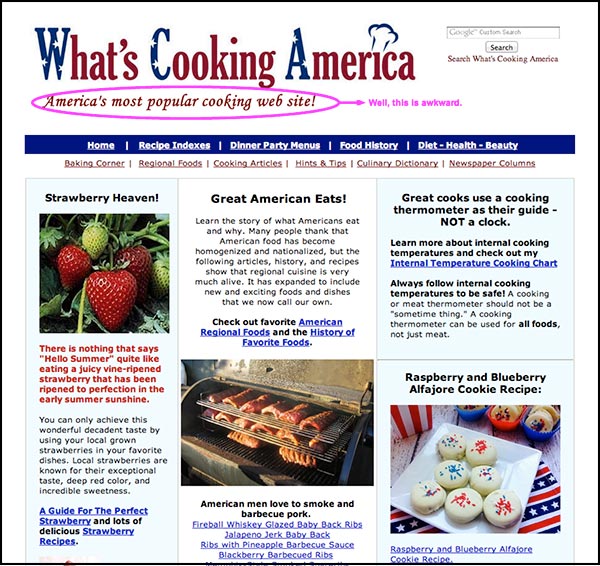
    Once upon a time, there was a woman named Linda Stadley. Her recipes brought so much joy to her and those around her that she generously decided to share them with the Internet. So she created www.whatscookingamerica.net, and for 17 years her recipes reigned supreme. She lived happily ever after until Google unleashed its mighty Panda 4.0 paw and ended her domination of the search engine results page faster than you can say Jack Robinson. Users everywhere weep for her loss of traffic.

    …that website though. The writer of this article says it all with his closing statement, “I feel bad but the site does need a facelift.” Well, yeah. This article speaks to the very nature of Google updates: even though they may not make everyone happy, the goal is to help all users find the best information first. Let’s be real here. This site lacks a lot of the features that make a website useful to users looking for recipes (like reviews, for example); therefore, more useful websites will get better rankings because they give people more of what they’re trying to find. Google would probably reply with something along the lines of “sorry we’re not sorry.”

    WhatsCookingAmerica-Website

    2) Google My Business iPhone App Now Available – Blumenthals

    Do you want Google all up in your business? You’re in luck. Google just released the My Business iOS app (as discussed by Mary Silva). The noteworthy features (for both the iOS and Android app) include the ability to edit your business listings and view local insights. Missing from this app is Google Analytics and Adwords Express. You can also access all the features of your Google Plus account. JUST WHAT WE’VE ALWAYS WANTED, said no one ever. The thought behind this was probably something along the lines of, “hey wait a minute, no one seems to be posting to their Google Plus account, maybe they would if they could do that on their phones?” We will see Google, we will see.

    3) Wait A Minute. Facebook Is Still A Big Hit Among Teens? – Marketing Land

    FacebookGraphic

    Facebook hasn’t been poisoned by moms and businesses? What?! As it turns out, Facebook is still popular with teenagers. Forrester Research released a report revealing that 75% of Facebook users ages 12 to 17 use Facebook once a month, with 28% of this age group claiming to use Facebook “all the time.” Of course, numbers don’t always give the whole story. Yeah, these kids are logging on, but are they actually using Facebook? Who’s to say these kids using Facebook everyday are not just scrolling through the newsfeed absentmindedly? Well, this may be the case, because a niche study reveals Facebook lost to Instagram for the most engaging platform.

    There’s a lot to consider here. For one, how will this trend change in the future? Have teens just been classically conditioned to check their Facebooks like a hopeless romantic checks Craigslist missed connections? Do more engaging platforms have more of an advantage in retaining and attracting new users? Time will tell.

    4) Net Neutrality Protesters Arrested At Google HQ – Techcrunch

    Well, this is a fun one. A group of activists in favor of net neutrality were arrested for protesting outside Google Headquarters. What were they doing there, you ask? The group calls for Google to “stand with us in support of an Internet that is free from censorship, discrimination, and access fees.” The group asked Google, among other demands, to change their homepage for a day to include a link to the FCC petition. You may be thinking, ‘but Google isn’t exactly the bad guy here trying to end net neutrality for all, why are they protesting there anyway?’ And you would be thinking correctly. According to this article, Google declined to comment on the arrests. I can’t blame them, as it seems these protesters might have a classic case of misdirected rage.

    5) The 8 Types of Images That Increase the Psychological Impact of Your Content – Copyblogger

    Quality images matter because they increase user experience. Yes, we know this. The advice in this article seems rather obvious, but there’s something to take away here. Specifically, what makes an image useful? This article proposes eight different types of images that provide users with the information they need. The top eight being: stock photos, screenshots, charts and graphs, personal photos, still frames from popular movies and TV shows, infographics, custom art, and comics. I would like to point out that most of these (except stock photos) could and maybe should fall under #7 “custom images.” I feel this article missed out on the opportunity to highlight the way that custom images serve more of a functional purpose for marketing than non-custom images. An infographic, comic, or screenshot that is custom and directly relevant to your business would obviously be more useful to users than one that is not.

  • 5 for Friday – Twitter and Facebook Duke it Out, Social Signals’ Effect on SEO, and the Power of Nofollow Links

    5hand

    1. Mobile Site Call Conversions Now Available in AdWords – PPC Hero

    It’s finally here! Adwords now tracks click-to-call conversions on mobile devices. This can easily be added to a specific landing page with a little bit of coding. This feature will allow you to track calls through the same venues as your other performance metrics and customize the value of the incoming call. This blog post has step-by-step instructions on how to implement this new feature on your site!

    2. Google Wallet’s 2-Click Instant Buy Checkout Comes To iOS – Tech Crunch

    This week Google Wallet released its Instant Buy API for iOS apps. This was first released for Android apps a year ago. This free service can be accessed with your Google+ login and stores your shipping and credit card information. Merchants can then use the information to complete the transaction. Google Wallet aims to eliminate the frustration of mobile device shopping and decrease shopping cart abandonment.

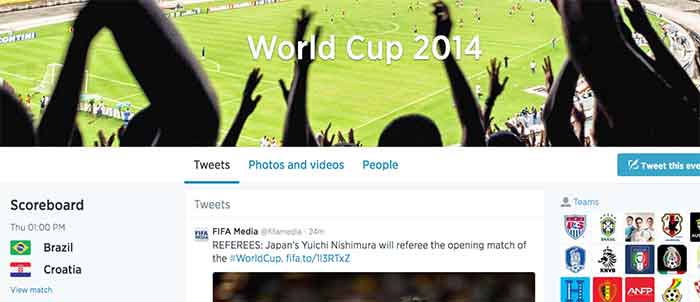
    3. Facebook and Twitter Want You to Talk About the #WorldCup on Their Field – Marketing Land

    Facebook and Twitter are engaged in a Battle Royal almost as intense as the World Cups itself. With yesterday’s commencement of the Fifa World Cup, these two social media powerhouses pull no stops to be become the No. 1 platform for Fifa fans to electronically engage.

    Facebook’s campaign provides fan with a Trending World Cup Page. Here fans can access the latest scores, view highlights and interact with a global map to pick their favorite teams

    Use #WorldCup and #WorldCup2014 to access Twitter’s World Cup landing page. Here you can create a Fifa-specific profile and choose a cover photo and profile picture to support your team. Don’t forget to include your HashFlag. Introduced during the last World Cup, these three-letter hashtags can be used by fans to unlock an image of a country’s flag.

    Which social media platform will reign supreme? Only trending numbers will tell. Let the games begin!

    WorldCup

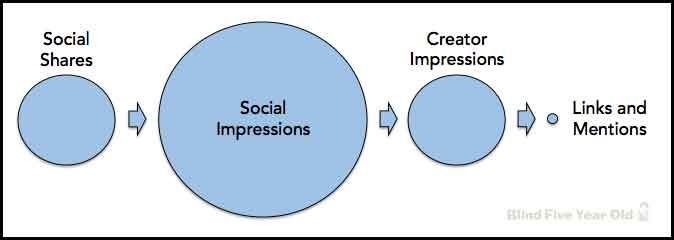
    4. Social Signals and SEO – Blind Five Year Old

    While the power of social media seems encompassing, Google is currently not using social signals, even from Google+, in its algorithm to calculate search results. You might be asking yourself why you’re putting so much effort into social now. Fear not! Maximizing the potential of a Google+ listing and other social outlets does have benefits. The Blind Five Year Old breaks down social media activity to explain that its not necessarily the activity itself, but the result of that activity that matters.

    social-seo-signals

    5. The Hidden Power of Nofollow Links – Moz Blog

    Link building is an integral part of all SEO campaigns. They can help build your company’s brand, build public awareness, increase profit and, of course, lead to more links. Links can also help build your site’s authority in the eyes of search engines. But what about nofollow links? While they seem unfathomably dreadful, this blog posts offers a silver lining and techniques to utilize those nofollow links.