Sharing client horror stories is a popular happy hour pastime in the marketing community. At SearchEngineJournal, they’ve been running a series about the types of nightmare clients we all run into. If you are new to the industry, this could be a great way to learn how to spot a potential problem before it arises and get the respect you deserve from those clients that just don’t want to accept your input.
The search overlords have been talking big in the press lately about a potentially earth-shattering update scheduled for the coming months. Can Google back up all the talk? Experts debate the actual impact that adding direct answer features or semantic search technology will have on the vast majority of web sites. Despite all the hype, marketers may not have to worry about major algorithm changes affecting their strategies.
By the end of March, all Facebook Brand Pages will be on the new timeline look. Marketers responsible for company Facebook pages know what a headache it can be keeping up with the social media giants updates and changes. Here’s a guide to making the most of the new look with examples from top brands like Coca-Cola, Starbucks and Red Bull. Learn how to reinvent your pages while playing by Facebook’s rules.
Heading into the Linklove Link Building conferences in London and Boston, the team at Distilled is in a sharing mood. In this post they list many of the link tools they use to get results for some of the largest companies in the world. Maybe your client list isn’t as impressive, but your results can be if you use the right tools and strategies.
Nothing can inspire some transparency quite like a $500 million slap on the wrist from the Justice Department. When Google was reprimanded for allowing advertisement of illegal activities like gambling they promised to pull back the curtain on their Adwords operation. A recent post on the Google blog may have appeared to offer some transparency on the surface, but it might just be a public relations stunt that is part of a behind-the-scenes battle with other search companies.
SEO largely depends upon undisclosed and constantly evolving criteria for page authority, making it inherently unpredictable. Google makes the rules; the industry responds accordingly.
Local results in the SERPs exemplify this. Whether they appear, as well as how they appear, is entirely at Google’s discretion. That being said, Google’s discretion is sufficiently discreet in most instances. Furthermore, most people pay more attention to local results in the SERPs than they do to organic ones, which vindicates their prominence. However, local can get pretty sloppy sometimes. Unrelated businesses weasel into the results here and there.
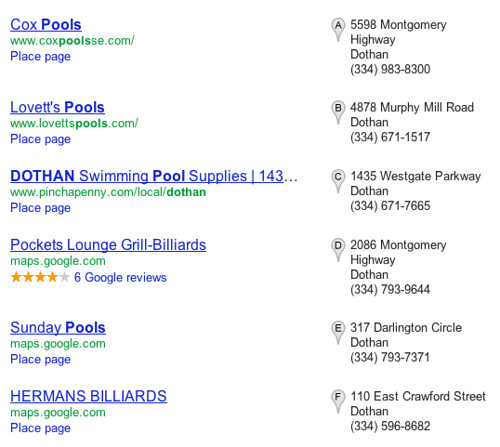
I recently saw a meaty example of this in a 7-pack for the term “pools dothan al.” By virtually all measures, that is an unremarkable keyword. I was understandably not expecting anything noteworthy.
Primarily, the businesses in the aforementioned 7-pack sell and install pools, but a couple listings are for billiards halls. Pool is a homonym, which makes it difficult for Google to distinguish which “pool” a user is looking for. Regardless, I would guess exactly 0 people in Dothan, AL are looking to play some “pools” at the local bar this weekend.
This made me realize what problems homonyms and homographs create for local search. For example, take the keyword “bank” and the location Westbank, a suburb of New Orleans. If I search for “westbank bank,” no relevant local results appear. If I then click on the Maps tab from that same results page, Google drops me onto a Wendy’s in Iowa. I’m sure there are a million other similarly dysfunctional examples; that’s just the first that came to mind. Joseph, our Maps guy, noticed a strip club twerked its way into the 7-pack for “new orleans pools”. But I digress.
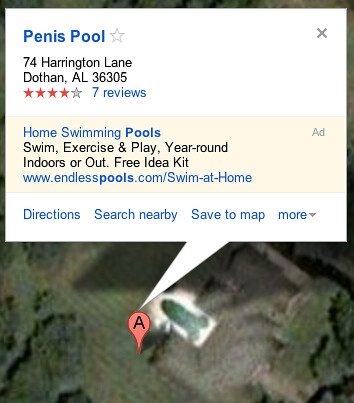
What really caught my eye in these results was a listing titled Penis Pool. Yep. Penis Pool. I’ve seen plenty of features sophomorically revised in Mapmaker before (for example, one enterprising young cartographer removed the J from a feature previously titled Janus Automation), but I’ve never seen a Place page like that.
I was very curious how Penis Pool snuck its way into the bottom of the 7-pack. I asked a few people to check it out, and Joseph quickly pointed out that the pool does in fact show up on the satellite view. Once I saw it, I couldn’t really disagree with the name or Penis Pool’s status as a landmark in Dothan.
How did this happen? Presumably, somebody spotted this on the map, added a Place page, and subsequently shared it with all of their friends. Glowing reviews ensued and the link eventually found its way to a few different blogs. Considering this cannot be an especially competitive field in a very small town, Penis Pool’s local authority grew into a veritable Leviathan, and perhaps even rudely whipped some other business out of the rankings.
Should you be worried about a Penis Pool near you? Maybe. It is safe to say the internet’s propensity for wiener jokes > your local SEO efforts. With the right mix, it’s easy to imagine similar examples popping up elsewhere. Just hope nobody starts digging a phallic-shaped pool in your city.
Over the past year, we’ve been fielding many questions related to mobile websites — and specifically mobile site SEO. Should I get a mobile site? Where do I get a mobile site? Will a mobile site bring me more business? How will a mobile site affect my SEO?
In the midst of working on some mobile site specific tasks this week, I also happened to be doing some online browsing / shopping on my mobile device (iPhone 4).
I went furniture shopping yesterday evening (you know, at a real store) and found a piece of furniture that I liked.
Later, I went on my phone, and instead of going straight to Pier 1’s site and navigating through all the other pieces of furniture, I went to Google, as most users tend to do these days out of convenience, and typed in “Pier 1 Mia Headboard” — I was thrilled to see a search result that would lead me straight to the product page.
I clicked on the result, and was let down when I was rerouted to the home page of their mobile site.
It’s no surprise they are looking to hire an SEO Specialist… too bad the job posting on LinkedIn doesn’t call for someone with mobile site experience.
On the other hand, I was also looking for Crate and Barrel bedding and did a similar search on Google.
When I clicked on the result, I was pleased to be immediately taken to the correct section on the site.
How can you be sure your mobile site is search engine friendly? There are a couple of different technical approaches to making mobile SEO happen, so stay tuned for a blog from the great Doug Thomas on how you can make it work best.
Have any examples of good or bad mobile sites that you love, or love to hate? Share with us! We just might use it in a future post on mobile website SEO!
— Google says their new privacy policy will open the door to new products and services for the public. The idea is to simplify privacy across all of Google’s properties without affecting user’s experience. Browsing and search history controls should remain unchanged, so why are there so many articles warning “Google is watching you?”
— Global neighborhoods don’t form around organizations; they form around the major issues of the day. When an online community responds to a breaking headline, they can pop up, grow, and disappear overnight, but their impact on your business could be lasting. Online reactions to the Susan G. Komen public relations debacle offer insights into how you can leverage a network to build your brand and manage your reputation.
— Local search and social media are two essential ingredients for a successful online presence. Recent surveys like the Local Search Study show that the answer to the question, “should we be spending more on search or social media?” is both. The study found that 63 percent of consumers were more likely to engage with a local business if they are available on a social network. However, the study confirmed that consumers avoid social networks when they need to search.
— Following in the footsteps of Facebook, Twitter will be allowing developers to create “experience” apps for business brand pages in 2012. Increased user engagement would mean more time on Brand Pages and a bigger share of advertising revenue for the social media giant. Is e-commerce the next step for the Twitter platform?
— There are plenty of quality keyword tools. However, there is also no shortage of metrics that claim to help you determine the value of a particular keyword. While some of these stats provide insight, you should not rely on them when making your selections for SEO and PPC. Here’s a quick three-rule test for making better choices when it comes to keywords.
Virtual offices have many uses. They are great for having a professional space to meet a client when you don’t have an office in the area. They can also be really useful if you are searching for a permanent office space and need somewhere to get business done in the meantime. However, using a virtual office address in a Google Places business listing is not something that will benefit your business. In fact, this practice technically goes against Google’s guidelines and could end up hurting your rankings in the long run.
According to Google, there is only supposed to be one business under the same address in Google Places. This isn’t an issue if each business at that address has a different suite number as they would in a traditional office complex. The issue with the majority of virtual offices is that, in order to keep the cost low, they assign all businesses the same address and suite number. This is where the problem with virtual offices truly lies: their ubiquity.
Virtual offices have become a popular way to, in essence, spam Google Places. Want to rank for Phoenix but your office is actually in Mesa? Not a problem; simply do a search for “Mesa virtual office” and with $100 and 30 minutes you can have your very own prime downtown address to use. Sound like a great deal, right? It should. In fact, some virtual office companies are using this as a selling point. However, as with many great deals, this one is just too good to be true.
Just as Google caught on to businesses buying UPS store P.O. boxes and using the store’s address as their own, it is catching on to virtual offices. When the virtual office provider is the first result to come up when searching for the virtual office address, it isn’t hard for Google to create an algorithm that can connect the dots. Not to mention there are a host of Google reviewers out there that are quick to flag a Places page that they believe to be associated with a virtual office.
Another thing to keep in mind when considering using a virtual office address for your business’s Places page is the fact that Google Places often merges different business’s listings together. This can happen to businesses that are across town from each other but might happen to have a similar name, phone number or even their profession. This common issue poses a significant problem for businesses that choose to use a virtual office address for their Places page. For instance, I’ve seen one law firm’s Places page share the same exact address and suite number with the Places pages of 17 other businesses. Some of them were other lawyers that would (or at least should) be attempting to rank locally for the same key phrases. Even the virtual office company itself had a Places page using that same exact address. This is common, especially for virtual offices with prominent addresses in large cities. It wouldn’t take much for Google to mix up information with so many businesses, some quite similar, sharing the same address.
Then again, maybe you could get away with it. Your business could end up being the exception and slip past the eyes of the spam watchdogs. Maybe your listing will beat the odds and stay free of merged information. But eventually, just as Google has done many times before, they will come out with an update targeted at the crack that your business happened to slip through.
Our CEO Will Scott has a guest post up on CPA Practice Advisor today, covering essential steps to Facebook success. Click here to see what he has to say about getting your business’s page up and operational, curating content for your market, engaging your fan community and more!
The next blockbuster young adult film is just about to explode onto the silver screen: The Hunger Games, based on Suzanne Collins’ bestselling trilogy of the same name. Aimed at the Twilight set of YA readers, it tells the story of a courageous tomboy named Katniss Everdeen who lives in a dystopian world that’s split into twelve districts and ruled over by an iron-fisted government called The Capitol. Each year, members of the community are selected to participate in The Hunger Games, where they are sent into an arena to kill one another until only one is left standing.
If it sounds familiar, you may remember a similar plot from the Japanese film Battle Royale. Collins put a new spin on the formula, people of all ages (myself included) described themselves as “unable to put the book down”, and soon enough, a Hollywood adaption was in the works. Like all majorly popular adaptions, the marketing of the translation can go a long way towards a production’s ability to succeed or fail. However, the brains behind the Hunger Games campaign are clearly using every ounce of the power that social media has to offer to promote the film, and so far, they’ve pulled it off marvelously.
Viral marketing played a major role in finding “Recruiters” to represent the twelve districts that exist in the original story, who are actually hardcore fans that were chosen as volunteers. By harnessing the power of excited fans, these Recruiters spread the word around to other fans about the film and hyped up the details in such a way that allowed them to feel they played a major role. Still, the Recruiters don’t know who “hired” them — just another interesting part of the puzzle. But they did mention something about free uniforms…
As for the official Facebook page, it’s used some tactics you’d expect from a marketing campaign, but also has popped up with some great surprises too. One really smart offer was to make your own free ID card (see, that’s mine up there!), which assigns you to a district and gives you the chance to have the ID sent to you for free. It also redirects you to a page with personalized merchandise from your district — it even has your name on it. I admit, the fan in me drooled at the idea of having a t-shirt or a bag with the logo and my name on it. It’s an angle I haven’t seen much of in the past, and I fell for it.
No viral campaign would be complete without representing the dark forces of whatever you’re promoting, and The Capitol homepage knows it. This district for the rich and powerful of course has a flair for fashion, and a retooled Tumblr represents it at Capitol Couture, which shows off all the elaborate looks the people of the Capitol flaunt to show off their money and clout. The people behind the Hunger Games PR campaign even went as far as partnering with beauty company China Glaze to produce a line of nail polishes called the Capitol Colors — one for each of the districts, of course.
Twitter is not exempt, either — there are tons of accounts, including ones for all the sites I’ve mentioned above, a official Twitter, and one for the Hunger Games 24, which allows fans to win tickets to advance screenings. Fans who have gotten their IDs and district assignments can also hashtag their tweets with it,creating twelve sets of fans who are all meeting other fans because they are united by districts.
Using the structure of the book’s world as the backbone of their campaign was a brilliant plan, and the hype around the release of the Hunger Games is huge because it capitalizes a world we already know and have grown to love. By using the heart of what makes anything a success — its fans — this campaign has been a true victory, especially when it comes to getting people genuinely excited and sharing the word with family and friends with authentic enthusiasm.
I planned to be there on opening day (March 23rd) before the campaign started, but now I’m even more excited because I might be able to meet other fans from my district thanks to Twitter and the Facebook community. And I’m sure I’m not the only one. Are you going?
Now that we’re all settled into 2012, we still find ourselves catapulting forward through the Information Age. Some have even classified our current place in time as the Personalization Era [sic]. This is a time wherein the information collected about you online can and does tailor your experience on the Internet to your interests and/or demographic.Your searches, data collected through your online presence (Facebook and other social networking sites), tweets, and other bits and pieces come together to serve as a pool of data that allows search engines and various sites to do a variety of things to assist or appeal to you. Advertising, personalized search results, product recommendations, etc. are chosen specifically for you! This era, in my experience, has found many divided into two larger groups: the Embracer and the Anon.
Embracers either know how the system functions and reap the benefits of this custom online experience, or they are completely unaware and simply enjoy their online life with great abandon. Embracers also house the Oversharers.These are the people whose Internet lives can overshadow “IRL” and they thrive on divulging minutia.
Conversely, Anons are those whose Twitter feeds are penned by pseudonyms that require follow requests to view, their Facebook profiles are well-protected, and you’re not going to find many, if any, lamentable pictures of them from their freshman year of college even if you’re “in” with them online. These are the people who comb through privacy settings, making sure they’re in full control of what is accessible and to whom. Generally, if they have the option, they also opt out of anything that shares their information or uses it for commercial purposes. Included here is also the ultra-paranoid who will usually be on the other end of emails where the subject begins with “FW:Fwd:FW:” and who legitimately believe much of the fear-mongering myths dispelled on Snopes.com.
Fwd:fwd:FWD:fwd
So who’s better off in the current era: the Embracer or the Anon?
The Embracers are certainly going to have plenty to work with for their memoirs. They’re often extremely up-to-date on Internet trends and make online friends far and wide. They often appreciate that their online experience has been tailored to them and utilize this when shopping or discovering new websites, products, or services. On the other hand, over-sharing
or being unaware of the implications of sharing certain personal data on the web, besides possibly annoying an Anon or two on their friend list, can be risky and lead to dangerous pitfalls like identity theft. Stalking people in the “Personalization Era” certainly seems easier, though! Avid Foursquare users beware: try not to make too many enemies.
The Anons can and do enjoy their chosen level of privacy. Future employers or those undesirable lurkers will have a hard time pinning any dirt on the Anons based on their online presence. They can even be fully present at and enjoy a party
without live-tweeting it. Life is getting harder for the Anon, however, thanks to changes in Google’s privacy policy and the trend of moving away from anonymity in many forums.
The case for and against Internet anonymity has been a subject of discourse more and more recently and, no matter which group you find yourself in, chances are that if you’re reading this, you’ve got an opinion on it. Whether you’re an Embracer, an Anon, or somewhere in between, knowing what you’re sharing and with who is always a good idea.
If you’re in the business of beach umbrella retail, snowblowing equipment, spring cleaning or other seasonally-related product or service, chances are you’ll be interested in this article explaining how to stay on top of the trends and perfectly time your campaigns to get the most out of the busy season.
Reaching Your Target Market Through Social Media — ProNet Advertising
Engaging your customers and building a brand online is a crucial part of competing in the contemporary business world — read this article to learn more on how to maximize the potential of every part of your social media activity.
Poor URL structure can be an enormous impediment to your site’s optimization. Don’t fall into the trap of multiple addresses for single pieces of content, keyword stuffing or overly complex directories — Michael Gray gives you the skinny on how to create concise, effective URLs for your site that are linkable and crawlable for maximum efficiency.
How to land cool speaking gigs — SuccessWorks
While you endeavor to build your business’s success online, you shouldn’t let your personal brand offline fall by the wayside either. Conference speaking is a skill crucial to succeeding in many industries — here’s a beginner’s guide to nabbing the gig you want and creating an effective and memorable presentation once you’re on stage.
Have you joined up with new image sharing platform Pinterest yet? This handy graphic from Social Times illustrates why you should be joining this quickly-expanding sharing site, along with helpful tips on adding pin buttons to your site, establishing a presence with your own board and making sure the media on your site is pinnable.
Welcome to a whole new shebang!
“Welcome to your Page Preview” is a frightening heading for any marketer, especially on a platform like Facebook that is so limited in design. But today, Facebook Page owners across the country are seeing the innovations that came to personal profiles move on up to the east side of business pages. Today, you can see your Facebook page with the Timeline Layout.
The
At the top-right of the page, a button for the Admin Panel looms. When opened, the panel contains a one-click view of a few major metrics for checking up on the page. Notifications, new likes, personal messages, and insights are all grouped together, with menus at the top to consolidate sharing, ad creation, and page and user management. This section vastly improves the page owner’s experience on the site, as it reduces the amount of places to look for useful data. At-A-Glance Notifications and Metrics
Cover, Tab Navigation, and Wall Control
Much like personal profile pages, the new timeline starts you without the main design point of the timeline: the cover photo. In addition, it starts you with a number of tabs that may not be the optimal ones for clickthrough, and your custom tabs have transferred their tiny icons to the tab window. This leaves a business or marketer a lot of work to organize and design their page. However, this work will most likely pay off with higher CTRs on the tabs, which are now prominent. Turn This….
These tabs are completely mobile except for Photos, which is always first, though through a relatively cumbersome “swap position with” interface. Each custom tab can be further customized in appearance by opening the tabs out and clicking “Edit Settings,” letting you change the tab title, which maxes out at 17 characters, and the image, which should ideally be in a 3:2 pixel ratio. This layout is a compromise, giving some flexibility while still keeping a uniform appearance, and removes any incentive to have too many tabs on the page, hopefully controlling low CTR to tabs.
Tabs have changed their URL structure as well, moving from a ?sk=app_[id] parameter format to a simpler /app_[id] URL. This helps with both SEO optimization of Facebook tabs and linking, as you can now more easily add tracking parameters for analytics tracking of your pages. It seems that the old URLs will lead to the same page without redirection or canonicalization, which seems at cross-purposes to the Tab URL simplification. …Into This! Parameter Values for ?filter=The menu marked “Highlights” adds a parameter of ?filter=, which sorts the wall posts for better management. Likely, this is the way to set the default behavior of the Facebook Page, though Highlights seems to be the ideal setting for most set-and-forget pages, as it will draw from all posts by friends about the page combined with posts by the page with high Edgerank. Furthermore, this is the only way to show both user-generated and business-created posts at the same times.
To the Window, to the Wall!
Where's the @mention?
The Timeline for Pages Wall is a fascinating glimpse into the depth of Facebook’s association technology. The first standout is taking cues from the “People are talking about” Newsfeed units. This scours Facebook for friends who are talking about, but not necessarily tagging, your brand. This opens up a Pandora’s box of marketing woes, but seems user-centric. These aren’t posted to the page, and only show your friends’ posts; if your friends have a bad experience somewhere, it won’t tarnish the brand for others, but show you that you might not have as much fun there. Seen this before?Other Wall units follow the lead of personal profiles: Milestones, which demark historical events for the business, enhanced Photos posts, and combined posts are at the core of the Wall redesign. One of the most intriguing choices by the designers is to consolidate other views of the wall into a “box”. Low EdgeRank posts are consolidated for ease of skipping
These likely low-EdgeRank posts are another compromise for a marketer. Comment spam and other undesirable posts might get combined and minimized into this box, leaving posts with higher algorithmic value to the visitor in more prominent places. The visitor may skip these posts when viewing the page; however they can be moderated from the “See All” link.
New Facebook Insights
Insights gets a minor facelift, becoming more report-like and visually appealing. The first glimpse is from the “Likes” Tab, prominent in the default tab setup. It provides an at-a-glance look at the vitality of the Facebook Page. Likes and People Talking About This are not new, but aggregating check-in statistics under “Most Visited Week” and “Largest Party” and photo tagging is a great step towards measuring the ROI of the social network. The Likes App is a killer way to get quick stats.
These quick-view statistics are derived from the traditional Insights accessible through the Admin Panel. Insights hasn’t changed, beyond following the less cluttered view introduced with Timeline for Business Pages.
Facebook Tabs
iFrame Tabs are some of the most vibrant parts of a Page, allowing a business to radically deviate from the traditional Facebook layout. Tabs are now true landing pages, stripping away much of the clutter and navigation from the page. This has allowed for more than 320 extra pixels of width in the tabs, paving the way for a richer and more interactive experience on the page. To boot, an understated tab switcher is at the top of the page. The App Tab is wider, with less clutter.
This stripping of clutter highlights a serious change in outlook for Facebook: there are no ads. While this may be a boon to users and a bone thrown towards European and American privacy legislation, advertisers are possibly losing another place to see a right-column-full of ads. As with the transition to Timeline for profiles, this has the potential to thrash the effectiveness of display ads on the social network.
What Does It Mean?
Timeline for Facebook Business Pages is the latest in a line of major and minor design tweaks that the social network has undergone. For marketers and business owners, the redesign offers deep integration with both the feel of the new Facebook and the inner workings of EdgeRank and other metrics. Timeline lets businesses tell their whole story while visitors read the posts most relevant to them about the business, taking from a wide variety of sources and methods of mentioning the brand.
These new changes, set to roll live March 30, are sure to keep all of us – marketers, business owners, and users – on our toes and creating the best social experience for our readers. Got any million-dollar ideas for the new layout?

 Heading into the Linklove Link Building conferences in London and Boston, the team at Distilled is in a sharing mood. In this post they list many of the link tools they use to get results for some of the largest companies in the world. Maybe your client list isn’t as impressive, but your results can be if you use the right tools and strategies.




 — Following in the footsteps of Facebook, Twitter will be allowing developers to create “experience” apps for business brand pages in 2012. Increased user engagement would mean more time on Brand Pages and a bigger share of advertising revenue for the social media giant. Is e-commerce the next step for the Twitter platform?
 Virtual offices have many uses. They are great for having a professional space to meet a client when you don’t have an office in the area. They can also be really useful if you are searching for a permanent office space and need somewhere to get business done in the meantime. However, using a virtual office address in a Google Places business listing is not something that will benefit your business. In fact, this practice technically goes against Google’s guidelines and could end up hurting your rankings in the long run.