Category: Higher Education Marketing

  • How Your Website’s Speed Can Impact Your Institution’s Recruitment Goal

    Key Insights

    • Site speed is a key ranking factor—even more so with Google’s Core Web Vitals rollout.
    • Data suggests lower load times leads to a drop in overall conversions.
    • You can consistently monitor site speed with free tools.

    According to previous Google data, users tend to abandon a loading site after just three seconds of waiting. This means your institution needs a fast, reliable website.

    However, beyond the user experience, inadequate site speed can negatively impact rankings. Ever since Google announced that site speed was a ranking factor, the need to consistently monitor and improve site speed has increased tremendously.

    Through continuous improvement to site speed, you may see a positive impact on rankings, thus getting your programs, degrees, and other content in front of more potential students. We recommend having all important elements on-site load under that three-second mark to help with your rankings.

    This blog post will help you understand why site speed impacts rankings and conversions and explain a site speed audit and how your institution could get started with one.

    Graphic of loading web browser

    Does Site Speed Impact Rankings?

    Google has used site speed as a ranking factor for desktops since 2010 and for mobile searches since July 2018. Users performed around 61% of searches on a mobile device in 2021, making it essential that your site is quick on mobile moving forward.

    It is hard to benchmark just how much site speed impacts rankings because it is just one of around 200 ranking factors Google may consider when indexing your site. However, it stands to reason that if your competitors offer comparable content on a faster site, Google and users may reward that site with more traffic, less bounce rate, and more time on-page.

    Overly large images often impact site speed. Just like your computer takes longer to open a large image file, your browser has to execute a similar process. By not compressing these images, you unnecessarily add a lot of load time to the site, thus adding a negative ranking factor.

    Site Speed, User Experience, and Engagement

    A negative site speed experience will directly impact your site’s ability to hold traffic and to prevent other competitors from stealing that traffic.

    There is a direct correlation between load times and bounce rates. After 10 seconds of load time, there is a 123% increase in bounce rate versus a site that loads in one second.
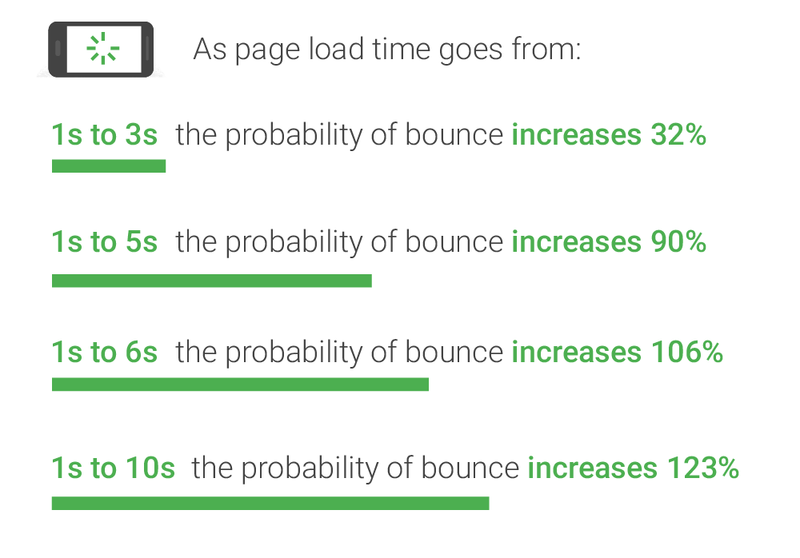
    Graph of relationship between bounce rate and website load times

    In May 2020, Google introduced Core Web Vitals, which measures what Google considers essential in a website/user experience: largest contentful paint, first input delay, and cumulative layout shift.

    Without getting too technical, these measurements essentially tell you how quickly your site is usable. The longer the load times on these components, the longer it takes for the site to be usable, contributing to higher bounce rates and less interaction on site.

    Does Site Speed Impact Conversions?

    Similar to user experience, if visitors find that the load times and site speed are inadequate, they are less likely to engage with conversion forms. Data suggests that one second in added load times leads to a 7% drop in conversions. If the goal is to drive more students to a program or degree, slow load times may have a tangible impact on the amount of form fills you receive.

    Key Factors of a Site Speed Audit

    There are so many factors that contribute to a site’s overall speed, but some are fairly common and relatively easy to address compared to more involved technical development fixes. First and foremost, you will want to evaluate your site on desktop and mobile. Nearly any site speed tool you utilize will delineate between the two versions of the site. Some of the more common issues include:

    • Unused / excessive JavaScript or CSS: Many sites have scripts, plugins, and other script-dependent items in their coding that bog down crawlers and site load times.
    • Oversized images: Frequently sites fail to minimize or compress their images, resulting in large file sizes and longer load times.
    • Poor coding: Any broken coding or missing elements can add to a browser’s difficulty in loading a site.

    Beyond these fixes, there are plenty more ways to positively impact site speed; however, it is important to note that many of them require a large amount of technical development work. As a result, some fixes are not attainable without essentially a complete redesign of the site. However, anything that will improve site speed will lead to a higher chance of a conversion.

    Free Tools for Site Speed Testing

    Several tools can help you regularly monitor your site speed and discover errors (for free!)

    Page Speed Insights: This is Google’s tool for testing page speed insights. The report contains more information on the technical items and potential fixes. This report is beneficial for evaluating the Core Web Vitals elements.

    Pingdom: With this tool, you can more easily break down individual loading elements of a site such as images, JavaScript, CSS, etc.
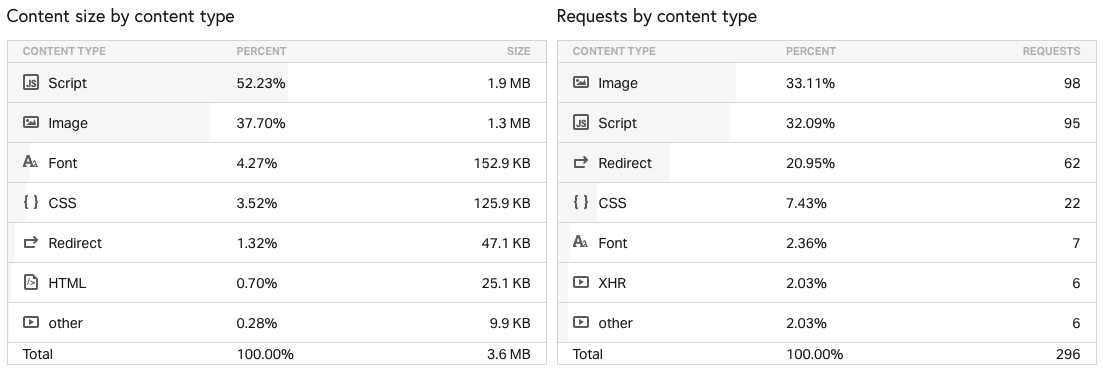
    Example of Pingdom site speed test results

    WebPageTest: Similar to Pingdom, this is a great tool for a technical breakdown of your site speed. You can also customize your location to test site speed from different locations and different browser and device types. Perhaps most helpful – you can run a Core Web Vitals test.

    Regardless of the tools you use, you should monitor site speed consistently. Google has introduced new elements to its ranking algorithms over the past few years that indicate that user experience, of which site speed is critical, will continue to be an important ranking factor. If your institution’s site speed is lagging behind competitors, there is a good chance you are losing out on potential students, or at the very least, missing more conversion opportunities.

    Concerned about your institution’s site speed? Contact Search Influence today for a consultation.

  • What is OTT and CTV? A Marketing Manager’s Guide to Advertising on Long-Form Streaming

    Key Insights

    • Consumers across all age groups have embraced streaming tv shows and movies.
    • Advertising on streaming services offers many benefits over traditional TV advertising, including robust targeting and measurement, including individual or household information.
    • By leveraging OTT, you can reach consumers with messages across multiple devices and platforms, truly running a full-funnel campaign with ads that talk to each other.
    • You can stretch your advertising dollars with OTT to reach consumers where they already watch content: their smart TVs, computers, and mobile devices.

    Even if you are old enough to remember tuning in live for the Cheers finale live or parking in front of the television for “The One Where Ross Finds Out,” chances are you now stream most of your favorite TV shows. In 2020, Hulu found that 90% of all 13–54-year-olds watch TV on a streaming platform. That’s several generations of consumers who engage with TV, movies—and brands—in a streaming environment. The COVID-19 pandemic has increased watching habits, with the average American now spending nearly two hours a day watching subscription video on demand services.

    Person using remote control on their streaming device

    Advertising on streaming television is an affordable way for businesses to fill their upper funnel while capitalizing on the creative flexibility, targeting, and measurement capabilities of digital advertising. Emerging brands can use streaming advertising to leverage the mass reach and advanced targeting capabilities of long-form streaming to help build awareness, while established businesses can use it to connect with coveted audience segments who do not engage with traditional media.

    The industry term for streaming long-form content directly to viewers via the internet through TVs or devices is called OTT. This post will further define OTT and expand on its benefits, including targeting, measurement, and branding.

    About OTT

    Defining OTT

    OTT stands for over-the-top and refers to content streamed on apps and services, such as Hulu, Discovery+, or Peacock.

    You can watch OTT content on any device connected to the internet. The term originates from the now common practice of consumers going “over the top” of a cable box, bypassing cable/satellite subscriptions or broadcast TV to stream long-form, premium video (such as scripted TV shows).

    Advertisers can also use the term OTT to distinguish streaming tv shows and movies from user-generated online video (for example, unboxing videos on YouTube made by an influencer is not OTT content.)

    What is CTV?

    CTV is a subset of OTT. CTV stands for connected television and refers to a device that delivers video by connecting to a TV.

    CTV examples:

    • HDMI sticks: Amazon Fire TV, Apple TV, Roku
    • Gaming consoles
    • Connected television sets, such as smart TVs

    It does not include tablets, computers, or other mobile devices.

    An Example of OTT and CTV

    You start binge watching the latest Hulu series of the moment through a Roku plugged into your TV.

    You streamed OTT content over CTV.

    You move to your bed and watch Hulu from the app on your phone (yes, yes, you know it’s not good for your sleep to watch TV in bed).

    You streamed OTT content.

    Benefits of OTT

    OTT combines the power of digital media with the advantages of advertising on television. Your brand receives traction from the authority consumers assign to seeing your ad on a big screen with the targeting and measurement capabilities that allow you to optimize performance to maximize your ad spend.

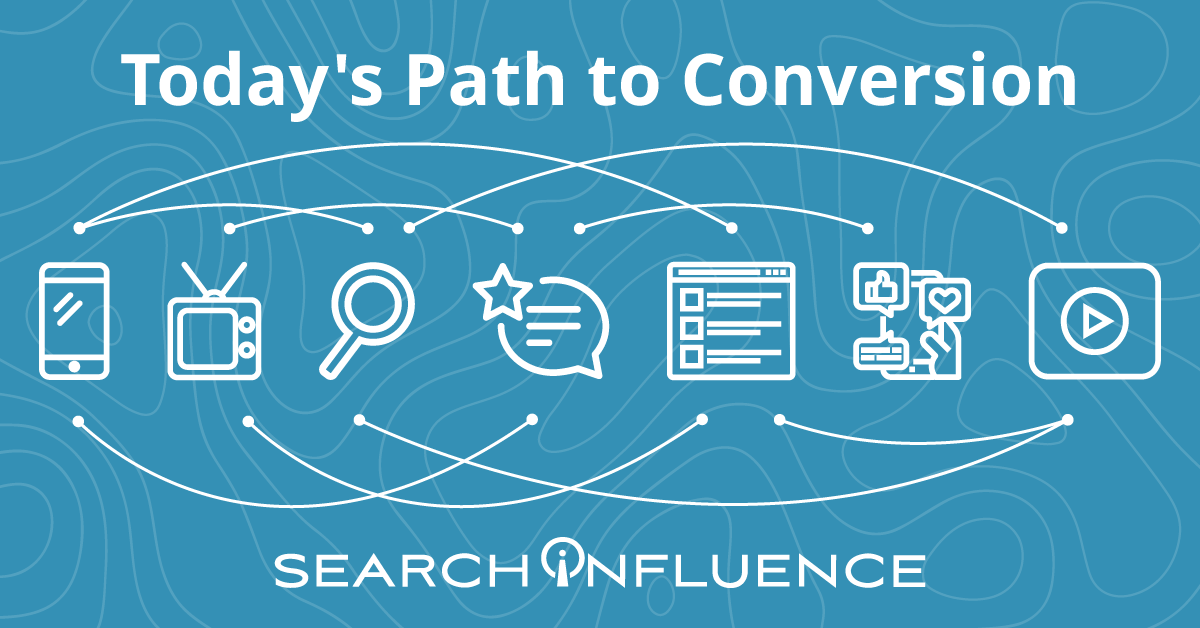
    With all of the research options at our fingertips, consumers’ path to conversion evolves each year. Product research and shopping takes consumers across many online and offline touchpoints. By leveraging OTT, you can reach consumers with messages across multiple devices and platforms, truly running a full-funnel campaign with ads that talk to each other.

    Today's path to conversion

    OTT Targeting Capabilities: First and Third-Party Sources

    OTT first and third-party sources enable businesses to build detailed segments beyond the typical options found on other digital marketing platforms.

    First-party data: The advertising platform learns about audiences through device-level viewer data, which it takes from users’ IP addresses. Targeting options vary by OTT provider. Some options include:

    • Location tracking and geofencing
    • Home page visits

    Third-party data: Third-party vendors provide consumer data and customer attributes that enable more precise targeting definitions. Some options for third-party data targeting include:

    • Purchase behaviors (online and offline)
    • Age/gender composition
    • TV viewership and media consumption

    Retargeting

    A prospect’s viewing behavior becomes part of their digital footprint. If a prospect views an ad, OTT’s retargeting capabilities lets you follow this prospect across all ad-supported streaming services and devices. You can capture brand impressions with video and then prompt an action on a device where it’s easy to convert.

    For example, a healthcare practice can target an upper-funnel ad promoting a new procedure to a household’s smart TV. Later, the practice can display a lower-funnel ad that encourages the prospect to fill out a form for a free consultation for this new procedure to a mobile device in that same household. A prospect is much more likely to fill out a form on a mobile device than if the ad appeared on a smart TV, encouraging prospects to go onto their website and fill out the form.

    OTT Targeting Capabilities: Addressable Geo-Fencing aka Household Targeting

    Through OTT, you can target multiple prospects under one roof.

    ​​When several devices are connected to the same router, they form a network and have the same external IP address. As a result, advertising platforms can identify multiple devices in the same household by looking at whether they have the same IP address.

    OTT advertising platforms can match a smart TV to a series of desktop and mobile devices, creating a “digital household,” which allows advertisers to target individuals across different devices. This extends the opportunity to customize your ad based on the user’s device.

    Examples of What You Can Do with OTT Targeting

    OTT’s multiple targeting options allow you to specify as much as your campaign needs.

    • If a prospect searches a website for events in their area, you can use keyword search retargeting to show them an ad for your event as they stream their favorite TV show.
    • A small business could target residents over 35 years old in a specific zip code.
    • If you want to target adults for your continuing education program, you can leverage information such as education level, areas of interest, and browsing history to customize ads down to which educational programs might be most attractive to a given prospect.

    Measurement and Attribution

    OTT’s sophisticated measurement and attribution capabilities give businesses the tools to evaluate the ROI of their campaigns and understand which segments, platforms, and content deserve further investment.

    The capability to match consumers to their devices means you can see which specific prospects watched your ad, how much they watched, and the outcomes of watching the ad (such as purchase, website visit, or store visit). With the flexibility to test audiences and content variations, you ensure your advertising remains relevant, so you don’t waste ad dollars on a consumer unlikely to take action.

    Branding

    OTT’s multiple platform options help establish legitimacy for your brand. With OTT, your brand ad can appear on a big-screen TV, streaming right after a national brand. This way your ad receives the afterglow of playing right after a Tide commercial on a 70” screen rather.

    Ready to put OTT into practice?

    To drive performance with target consumers, small and medium businesses should consider including OTT as a component of their cross-platform strategy. Emerging brands can use it to build awareness with new consumers, and established companies can use OTT to remain relevant.

    Unsure of where to start with OTT? Contact the experts at Search Influence to discuss how you can use these tactics as part of a full-funnel strategy to drive leads for your business.

  • Four Steps to Adapt to Apple iOS 14’s Impact on Your Facebook Ads

    This post was updated by Marissa Wehrer on August 24, 2021 to reflect updated news. It was originally published on January 20, 2021.

    Key Insights

    • Apple’s iOS 14.5 privacy update has had an industry-wide impact on businesses that use web conversion events to optimize, target, and report using Facebook’s business tools, such as the Facebook Pixel.
    • The update will allow users to opt-out of having their activity tracked across other companies’ apps and websites.
    • Take these four steps to adapt to this industry-altering change and run conversion campaigns in the future.
      1. Complete domain verification to configure pixel conversion events for Aggregated Event Measurement.
      2. Prioritize up to eight conversion events that are most important to your business.
      3. Understand how reporting changes will affect your ability to measure success and optimize your campaign.
      4. Identify new campaign strategies and best practices.

    How Does the Apple iOS 14 Update Impact My Digital Ads?

    On April 26, 2021, a significant update came to iOS 14 devices that asked users if they would like to “Allow Tracking” or “Ask Apps Not to Track” their activity across other companies’ apps and websites. The general consensus is that the majority of iOS 14 users will opt-out of tracking, thus preventing marketers from sending personalized advertising to those who opt-out.

    Apple’s new policy has an industry-wide impact on personalized advertising.

    This update will impact businesses that use web conversion events to optimize, target, and report using Facebook’s business tools, such as the Facebook Pixel. Effects include, but are not limited to, the inability to do the following:

    • Target the right audience with the right message at the right time
    • Allocate budget efficiently to produce the lowest cost per acquisition or return on ad spend
    • Get the same amount of data and granularity of reporting to inform decision-making

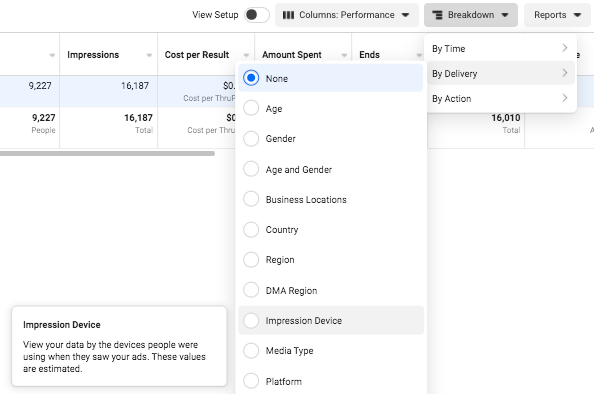
    Understand the scale that your campaign performance could be impacted by reviewing your ad account’s Impression Device delivery breakdown. This will help you analyze the percentage of your impressions served to Apple devices.

    Facebook campaign options in iOS14

    Despite these daunting changes, personalization is not at a total loss. Facebook Ads will remain an effective advertising channel if you rethink your current strategies and best practices.

    If you plan to use Facebook Advertising as a lead driver and revenue generator, the following four steps will be vital to run conversion campaigns due to Apple’s upcoming AppTrackingTransparency framework for iOS 14.5 users.

    Step 1: Complete domain verification to configure pixel conversion events for Aggregated Event Measurement.

    Aggregated Event Measurement is a new Facebook tool that “processes pixel conversion events from iOS devices” in compliance with Apple’s new policy while ensuring advertisers can still run effective campaigns. This tool can only be accessed once your domain is verified.

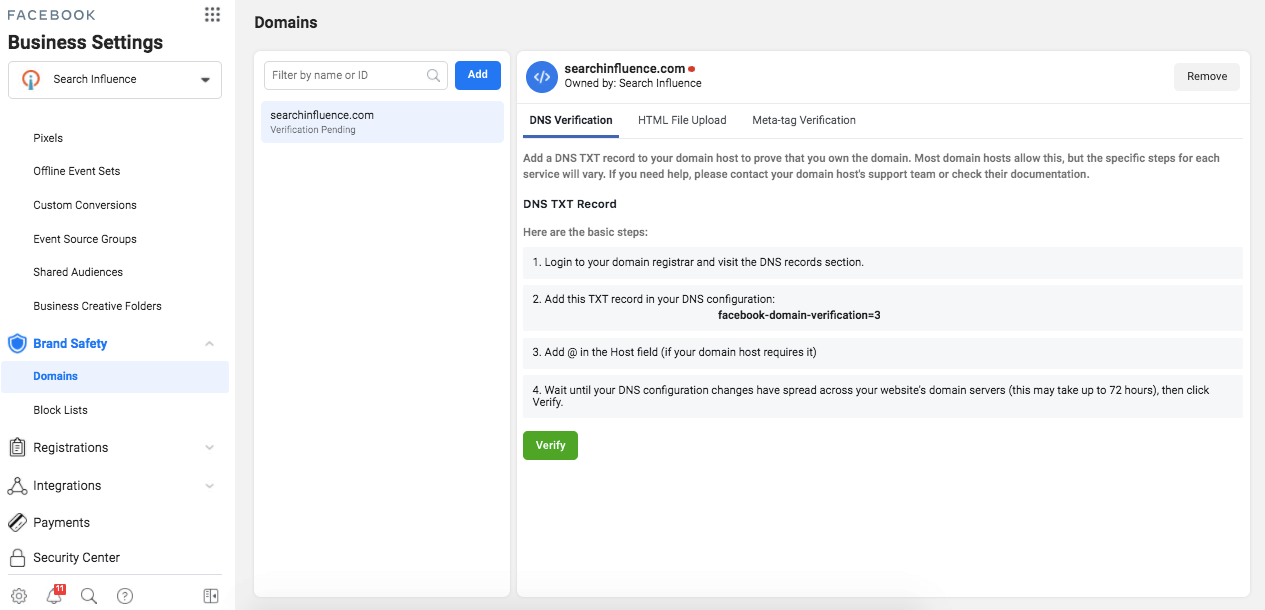
    As a new best practice for all businesses, you must complete domain verification. Domain verification is a way for you to claim ownership of your domain in Business Manager.

    Following Facebook’s instruction, “Domain verification needs to be done at the effective top-level domain plus one (eTLD+1). For example, for www.books.jasper.co.uk, books.jasper.co.uk, and jasper.co.uk, the eTLD+1 domain is jasper.co.uk. This can help ensure that your domain verification will encompass all variations.” (Source)

    How to verify domains on Facebook

    Step 2: Prioritize the Eight Conversion Events That Are Most Important to Your Business.

    Once domain verification is complete, you must use the Aggregated Event Measurement tool within Events Manager to set up the events that you want to track and their corresponding priorities. As a reminder, events allow Facebook’s machine learning to better target, optimize, and measure campaign performance.

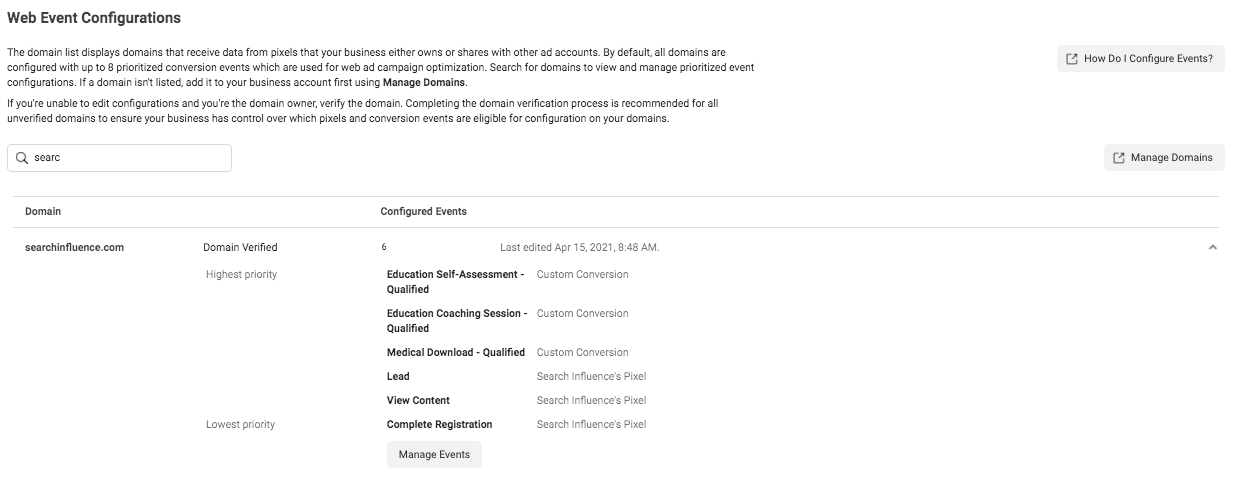
    With the Aggregated Event Measurement tool, Facebook is requiring you to define up to eight conversion events, whether standard events or custom conversions, per domain (this includes subdomains) and to put them in order of priority.

    When it comes to prioritizing the events, you are going to put the most valuable action first and the least valuable action last. When a user completes multiple actions within a conversion window, only the highest priority event will be counted, and the conversions for the lower-prioritized events will not be counted.

    If your campaigns are currently optimizing for over eight events across the same domain, make it a priority to strategize and select the eight events you will optimize for moving forward. If you are currently operating under the limit of eight events, then prioritizing your events is quite simple.

    Follow Facebook’s documentation to configure Aggregated Event Measurement with your conversion events.

    Screenshot of web event conversions in Facebook backend

    Once you have prioritized your events, adjust your conversion campaigns’ ad set optimization events accordingly. You’ll also need to ensure your conversion ads are attached to the proper domain at the ad level in the Tracking section.

    Step 3: Understand how reporting changes will affect your ability to measure success and optimize your campaign.

    There are new reporting limitations that you should note, as they may affect how you measure campaign success and optimize campaign performance.

    Delayed reporting:

    Data may be delayed up to 3 days, which could severely impact optimizing short-run campaigns. Another key difference is that conversions will now be reported at the time the conversion actually happened, instead of getting attributed to the last ad impression or click.

    Estimated results:

    Statistical modeling may be used to account for conversions from iOS 14 users.

    No support for breakdowns:

    Delivery and action breakdowns, such as age, gender, region, and placement will not be supported. This could greatly impact how you review and optimize campaign performance.

    To test theories based on delivery and action, you will need to manually run tests, likely by creating more targeted ad sets. However, be mindful that this directly goes against Facebook’s best practice to use broad targeting to improve machine learning. (Source)

    Changes to account attribution window settings:

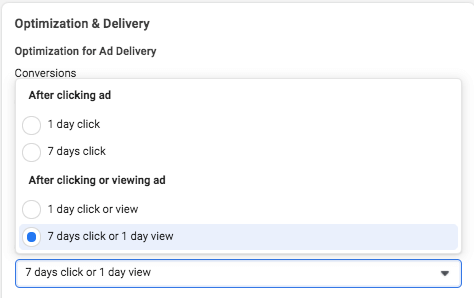
    First, the attribution window for all new or active ad campaigns is now set at the ad set level to ensure that the conversions measured are the same ones used to optimize ad delivery.

    How to do Facebook optimization and delivery

    Additionally, the new default window is a seven-day click attribution window, and 28-day attribution will not be supported for new or active campaigns. The following windows will be supported under the new attribution setting:

    • 1-day click
    • 7-day click (default after Apple’s prompt enforcement in April)
    • 1-day click and 1-day view
    • 7-day click and 1-day view

    As of January 2021, we saw a decrease in conversions due to the new attribution window settings set by Facebook.

    Step 4: Identify new campaign strategies and best practices.

    Optimizing: Test new optimization events

    By being limited to only eight events, this may force you to determine new best practices on how to optimize your campaigns. If you previously optimized your campaign with low-funnel custom conversions, you may need to test broadening your optimization events to less-granular or higher-funnel actions to encompass more website touchpoints.

    And if you haven’t switched to Campaign Budget Optimization (CBO) yet, then now may be a good time to let Facebook’s machine learning take some of the guesswork out of optimizing your campaign.

    Targeting: Test new audiences and targeting

    Our ability to target and remarket to your ideal customer with personalized ads will be severely limited. Mitigate the effects of the iOS update first by leveraging in-app products such as Facebook and Instagram Shops, lead gen forms, and using video. On-Facebook, engagement tends to be remarketable, which could replace some of the website data you’ll lose.

    Take advantage of the most available data by using customer list custom audiences to build remarketing and lookalike audiences with website audiences using the pixel.

    You may also want to consider removing the Audience Network as a placement from your ad sets because Facebook is not confident in its ability to deliver personalized ads for this placement to iOS 14 users.

    Facebook stated, “Ultimately, despite our best efforts, Apple’s updates may render Audience Network so ineffective on iOS 14 that it may not make sense to offer it on iOS 14.” (Source)

    Reporting: Test new key metrics

    If you currently report using breakdowns by delivery or action, determine how or if you will continue reporting on this granular data moving forward. Since these reporting breakdowns are no longer available for conversion data, you may need to determine new key metrics to report on.

    Navigating a New Digital Landscape

    Apple’s iOS 14.5 privacy update is transforming the digital advertising landscape. Campaign performance may see its biggest impact around Q4, which is the six- to nine-month mark from the iOS 14.5 update. This is mostly because audience sources using website tracking will shrink even more since we can’t collect the same amount of data we once did. We’ll also see more adoption of the updated iOS as people upgrade their phones.

    Stay on top of the upcoming changes and create new best practices for optimizing, targeting, and reporting to maintain control of your accounts.

    It’s okay to feel a bit confused about the effects on your Facebook Ads because no one has all of the information or answers yet. If you have questions about how you can still generate leads for your business despite these changes, one of the experts at Search Influence can help. Contact us today to learn more.

    Resources:

    Images:

    Mobile phone users

  • Skimmers, Swimmers, and Divers: Content Strategy for Higher Education Websites

    Key Insights

    • Higher education sites need to be accessible and navigable for visitors in all stages of the marketing funnel.
    • A website optimized for the ultimate user experience can positively impact SEO and search rankings.
    • Learn how to create web content that accommodates readers that are skimmers, swimmers, and divers—this can help create a positive user experience that’ll drive returning site visitors!

    Website content should accommodate a variety of visitors—you want to create the optimal user experience no matter if visitors are just skimming content and gathering a few key points, swimming around on a few pages, or diving deeply into multiple pages and reading as much information as they can. A positive user experience can increase site dwell time and help drive conversions.

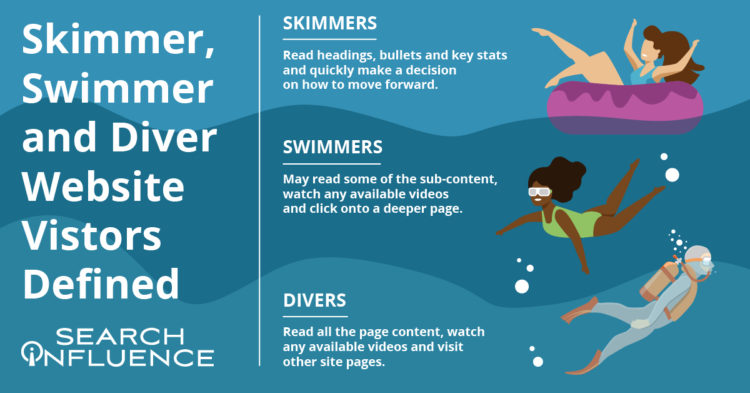
    skimmer swimmer and diver graphic

    By optimizing your site for skimmers, swimmers, and divers, you’ve established that it’s an informative, helpful resource for your prospect—no matter what stage of the marketing funnel they’re in. Increased site dwell time also sends a positive signal to search engines and can help your search engine optimization (SEO) efforts. A site developed with the user in mind can create a strong sense of trust with the university, making users more willing to convert, whether by submitting basic personal information, contacting the admissions department, or even filling out an application.

    According to a study by MeasuringU, the most common reasons for visiting a university’s site are to learn more about the school, browse its academic programs, and view course information. While those may be the top sources of traffic, we know there’s plenty of other valuable content higher education sites can leverage to delight users.

    Let’s review common content found on higher education websites and how it can be catered to each type of visitor—whether they’re a skimmer, swimmer, or diver.

    Defining Skimmer, Swimmer, and Diver Website Visitors

    While reading this blog, you’ll likely tackle the following content either as a skimmer, swimmer, or diver.

    Skimmers will read the headings, bullets, and key stats and quickly make a decision on how to move forward.

    Swimmers may read some of the sub-content, watch a video (if available), and click onto a deeper page.

    Divers will read all the content on the page, watch a video (if available), and will go to other pages on the site.

    My blog post is organized with clear headings, bullet points, and plenty of white space if you’re here to just skim the highlights or even swim a little. I also have in-depth content under each heading, clickable internal and external links, and a straightforward navigation bar if you’re ready to dive into this topic or even deeper to learn more about overall higher education marketing strategies.

    Just like a thoughtfully structured blog post that accommodates each type of reader, website content for any higher education institution should be curated to skimmers, swimmers, and divers.

    How User Experience (UX) Can Affect SEO

    Why are we even trying to accommodate different kinds of site visitors/readers? It all comes down to creating a positive and informative experience for your audience since they’re likely to spend more time on (and revisit) an accessible, easy-to-navigate site. Search Engine Journal points out that Google’s algorithm consistently takes user experience into account.

    A site optimized for UX is likely to be awarded in search engine result pages (SERPs). It makes sense that UX and SEO go hand-in-hand—the goal of both is to help readers find the information they’re looking for/complete their task with the most relevant information.

    In a previous blog post, we discussed seven actionable steps you can take to make your higher education website more engaging for prospects and students.

    Higher Education Website Content

    Because a higher education site is extensive and covers so many topics, optimizing content for skimmers, swimmers, and divers won’t look the same for every type of page. When building out content, keep your readers top-of-mind by asking what they want and what they’d like to accomplish from each page.

    Let’s focus on three categories of content. All examples and screenshots are from our higher education client, Tulane School of Professional Advancement (SoPA).

    Program and Degree Pages

    Your school’s academic program and degree pages can become quite information-heavy very quickly. These pages usually contain crucial information on in-depth topics such as:

    • Admission requirements
    • Required courses
    • Transfer credit eligibility
    • Tuition

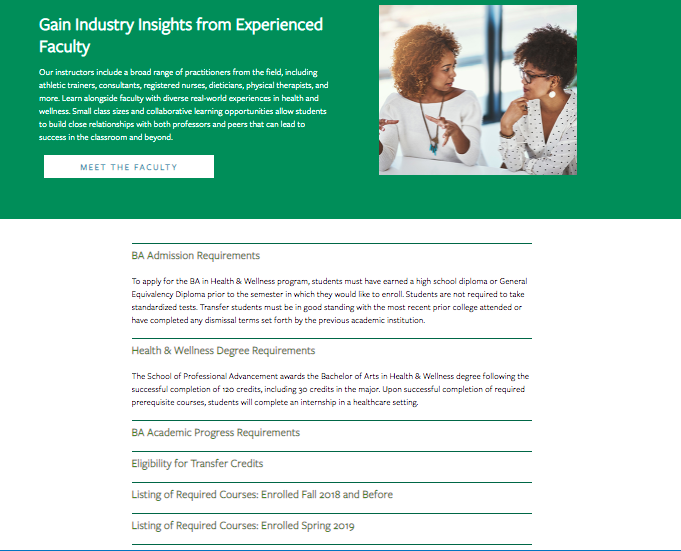
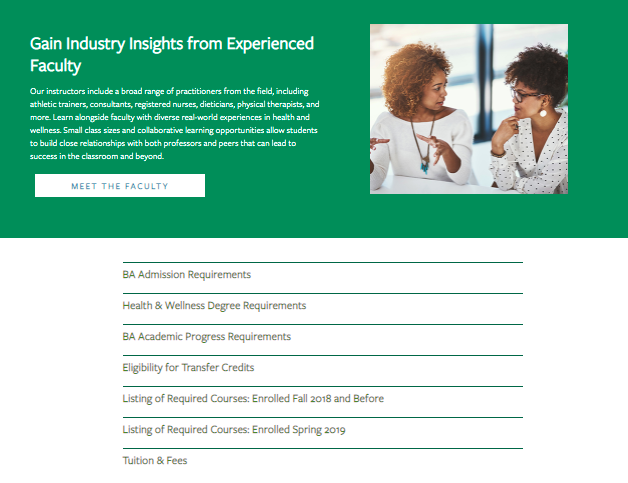
    How can you make these topics accessible without overwhelming your readers? Structure them as accordions. Accordions are structured as a vertical menu with clear headers. Users can click these headers to reveal more information about the topic.

    Formatting sections of an information-dense page as accordions not only cleans up the entire page, it also minimizes scrolling and lets your readers control how much or how little they want to read on the page.

    An example of an information-dense page as open accordions

    An example of an information-dense page as closed accordions

    When visiting the above page for Tulane School of Professional Advancement’s health and wellness degree, swimmers and skimmers may review more general information about the degree before they’re ready to dive into logistics like admission requirements and transfer credits. Less content and less scrolling can help readers not bounce off the page because they feel overwhelmed by too much information.

    Site visitors who are further down the conversion funnel or even first-timers who prefer to get as much detail as possible can click on each topic to get more in-depth information in the drop-down. Accordion menus give readers control over how much content they can consume at a time—and everyone likes to feel in charge.

    Pro tip: Make sure to use clear, concise headers for each accordion section.

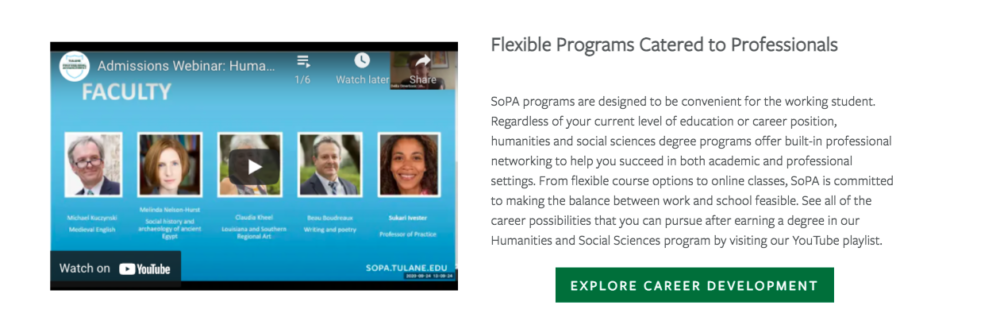
    You can also embed videos and other multimedia to enhance on-site text and give swimmers and divers other ways to explore your content during their research.

    An example of an embed videos to enhance on-site text

    Acceptance Criteria and Application Deadlines Content

    Any information pertaining to an institution’s acceptance and application deadlines should be limited to pages specific to admissions and applying. This content should only be on a few key pages within your school’s site since application and deadline info isn’t evergreen (content that is timeless and remains relevant) and needs to be updated every few months.

    When crafting evergreen content for an academic certificate or degree program page, we don’t want to mention the next application date within the content itself. Pop-ups or stick bars can be used to communicate urgency to prospective students browsing your website when deadlines are approaching.

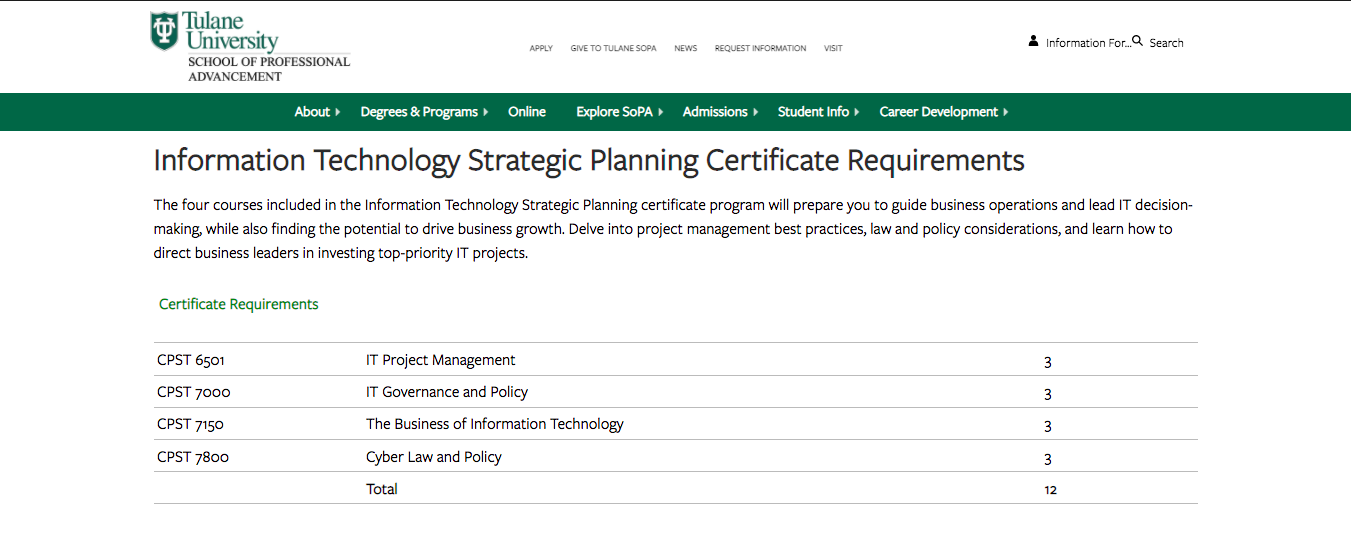
    Course Requirement Pages

    Most potential students probably won’t dive deeply into course requirement pages unless they’re transfer students.

    Having a list of the course names within a program on its dedicated pages makes sense, but having detailed descriptions of each class is more information than potential students need at the moment. Detailed course descriptions are best displayed in a separate on-site course catalog or on an internal site for current students.

    SoPA Cert Page

    Tulane SoPA lists all the course requirements needed for an IT Strategic Planning Certificate without cluttering the table with course descriptions. The course reference number is listed, so deep divers can look up the course description in the on-site course catalog if absolutely necessary.

    Higher Education Blog Content

    Following a consistent blogging schedule not only provides useful, industry-relevant content to your current and prospective students, but also keeps your site updated and signals to search engines that it’s trustworthy.

    Most of the following guidelines can be applied across your site content, not just for blog posts.

    Break Up Content

    Structure blogs with subheaders so readers will know exactly what the post covers at first glance. Subheaders—H2s and H3s—visually organize your content and help make it more accessible and scrollable for readers, whether they’re skimming, swimming, or diving headfirst into your blog.

    Other ways to break up long lists and paragraphs include:

    • Bullet points
    • See what I did there?

    Images and Graphics

    Images are a powerful tool that can make your blog posts pop and entice visitors to read your content. They can also be used to break up content, making it more skimmable for readers intimidated by a wall of text. Try using more than one image. HubSpot reports that blogs with an image every 75 to 100 words get double the shares compared to other blogs.

    Pro tip: Use diverse photos and vector graphics to reflect different genders, races, body types, and abilities in your blog images; all prospective students should see themselves represented in your creative.

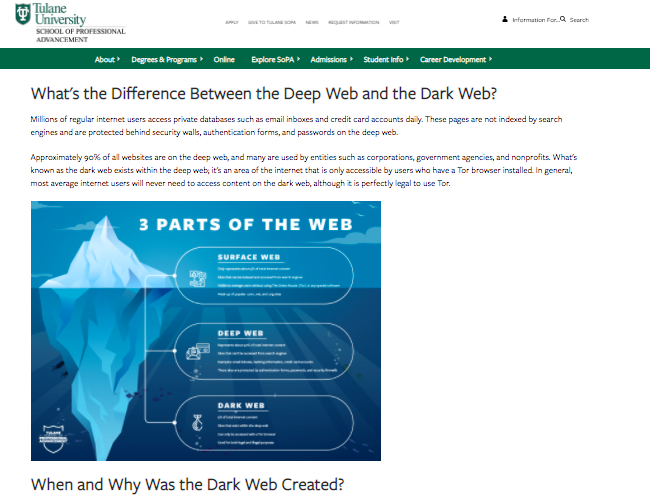
    Infographics can be repurposed as mini-infographics and featured alongside related blog content to add more visual appeal, break up the text, and to expand on information covered in the blog.

    Mini-infographic

    Mini-infographics are excellent ways to include statistics or facts in a more interesting, eye-catching manner.

    Links and Calls-to-Action

    Help your readers move along the marketing funnel with clear, specific internal links and call-to-action opportunities in all blog content. Internal links should send your readers to additional and helpful pages deeper into your site. Links unrelated to the hyperlinked text or blog content can create distrust with visitors, leading them to bounce off your page.

    When creating an internal link, always ask how the page can help your reader. If you can’t come up with a straightforward answer, then ditch that link.

    Every blog should end with a call-to-action, or, an opportunity for your reader to take the next step. Depending on where they are in their prospective student journey, this next step could be:

    • Visiting a program page to learn about a degree
    • Contacting an admissions counselor
    • Starting their application

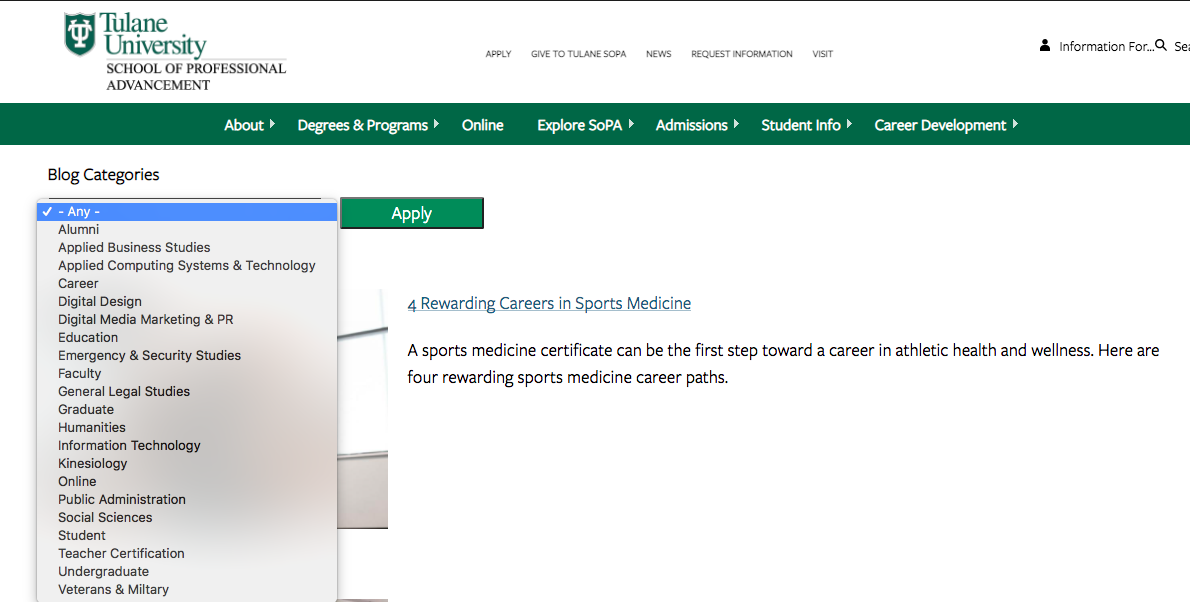
    Blog Categories

    While this isn’t exactly content-related, sorting blogs by category helps users easily search blogs catered to their interest (enhancing UX!) and can help minimize bounce rate. Even if site skimmers and swimmers don’t do a deep dive into too many blogs, they’ll be able to see the depth of topics covered.

    SoPA blog list

    Content Download for Degree Programs

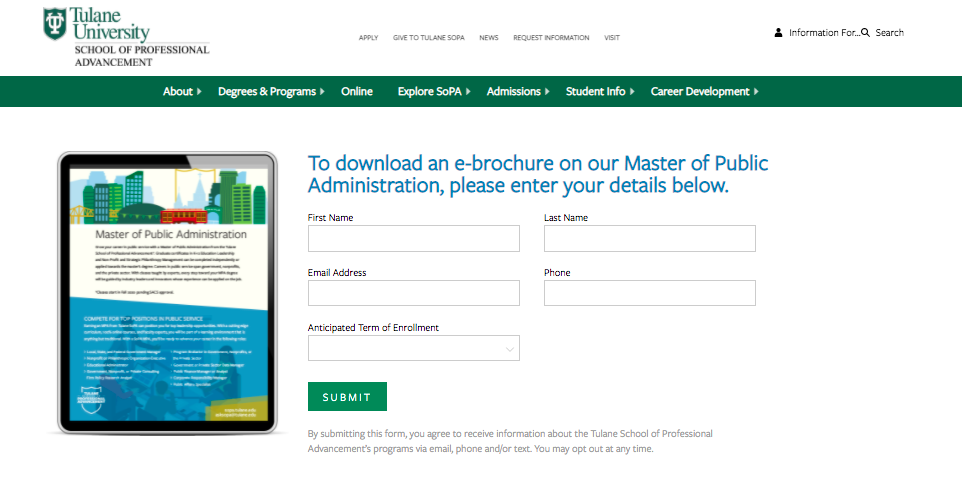
    Content downloads are one to two-page info sheets about a specific program or degree. They function as gated content (the user must provide basic info in exchange for access) to capture leads who are interested in this program or degree.

    SoPA 1-Pager Download

    Content downloads can be the ultimate deep-dive for visitors wanting to get as much information as possible. They’re also a measurable way to track site visitors that eventually turn into leads. Divers or visitors further down the marketing funnel are more likely to submit their email to download more in-depth information about a program.

    This submitted email can be used as a trigger to launch an email nurture campaign that helps guide potential students along every stage of the marketing funnel.

    Elevate Your Higher Ed Content Marketing Strategy With Search Influence

    Work with digital marketing experts who can help you lead an effective content marketing strategy that helps you move prospective students down the funnel. Contact one of our strategists today to discuss your lead nurturing tactics and digital marketing strategy.

  • Search Influence Presents Virtual Higher Education Marketing Training, “How to Gain Stakeholder Trust & Buy-in on New Marketing Strategies”

    Watch the recording of this training session here.

    Search Influence education webinar on gaining stakeholders trust

    About the Virtual Training

    As an education marketer, it’s your job to help deans, admissions, and other stakeholders understand how new marketing strategies will fuel student growth.

    Join Search Influence for a virtual training that demonstrates how to build a case for new marketing efforts, including tips on how to showcase how they’ll help you reach your audience and impact your institution.

    Learning Objectives for this Event

    • How to use and quantitative goals to plan and pitch marketing strategies
    • Tactics to demonstrate how a given strategy will help you reach a specific target audience
    • Guidance to tailor your discussion based on personality styles and role
    • Opportunities to leverage data in your decision making and discussions
  • Gen Z is the Next Non Traditional Student: Move Them Down the Funnel with These 2 Tactics

    Key Insights

    • Since Generation Z (Gen Z) is the next generation of non-traditional learners, it’s essential to provide accessible and relevant information to this new generation of life-long learners.
    • Two tactics in higher education marketing—Facebook/Instagram Lead Generation and Email Nurture campaigns—can help move prospective students through the funnel and one step closer to applying and registering.
    • Facebook/Instagram Lead Generation creates a friction-less conversion point for users at the consideration stage of the funnel.
    • Email Nurture campaigns allow you to send personalized, targeted messages to prospects in the consideration and decision phase of the funnel, addressing key decision points in their journey.

    Woman working at a laptop in front of a window

    Higher education marketing isn’t an easy A—it’s always evolving because the upcoming generation heavily influences the industry. As Gen Z is added to the typical prospective non-traditional student pool, marketing strategies must also change to appeal to prospective students in a relevant and engaging way.

    One of the most prominent characteristics of Gen Z is their tech savvy. This generation was born into the interconnected world of the internet, smartphones, tablets, and other smart devices. Digital marketers targeting Gen Z must provide easily accessible information at their fingertips and across social media platforms to compete for their attention.

    When first targeting prospective students, universities need to clearly display the attributes that make them different. Once the intended audience recognizes an institution’s brand and starts engaging with their social media and web content, it’s time to shift the strategy from brand awareness to the next phase in the marketing funnel: consideration, and ultimately through to decision (applying) and to registration.

    During the consideration phase, the prospective student is more familiar with a school. They may schedule a virtual tour or download a brochure. Students may even start imagining themselves attending—but they aren’t quite ready to commit. Prospective students are likely still researching other schools and weighing their options. During this stage, universities need to provide the information prospective students are looking for. Universities can use first-party data, like past inquiries, to directly target and speak to prospective students in this stage of the funnel.

    Facebook/Instagram Lead Generation Ads and Email Nurture campaigns can engage digitally savvy prospective students and move them through the marketing funnel to take the next desired action.

    Facebook/Instagram Lead Generation Ads

    What is a Facebook/Instagram Lead Generation Ad?

    During setup, Facebook gives marketers the option to create campaigns based on objectives (i.e., goals). All campaigns can also be converted to Instagram (73% of Gen Zers actively use Instagram, while only 40% use Facebook).

    Universities can select a Traffic campaign if the goal is to send their target audience from Facebook/Instagram to an external URL, like a blog page. This campaign would be most applicable at the top of the funnel.

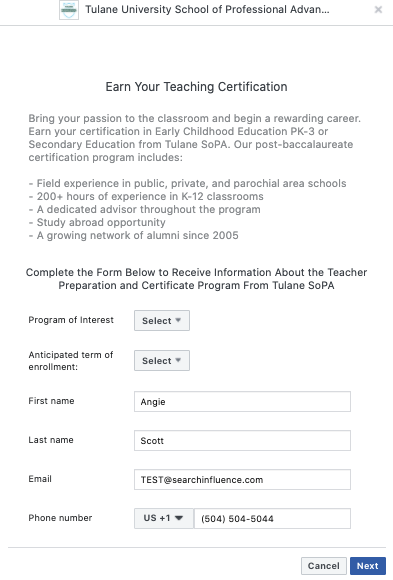
    In the consideration phase of the funnel, Lead Generation campaigns can be a convenient way to convert prospective students. Ads in Lead Generation campaigns look similar to other campaign ads, but instead of linking to a website outside of Facebook, Lead Generation ads send the user to an “Instant Form” directly in the Facebook (or Instagram) platform. Here, the user is prompted to fill out basic contact information.

    Then, in the decision stage, when it’s time to focus on driving potential students to fill out applications, marketers can show ads just to people who have completed that lead generation form. It’s best practice to run this campaign with a Conversion objective to optimize for users to take specific action on their site, such as an application.

    Why are Facebook/Instagram Lead Generation campaigns relevant?

    These campaigns are very user-friendly because the form fills are pre-populated with the user’s Facebook contact information, a feature many Gen Zers have come to expect. In a few seconds, the user can click the ad, retrieve the relevant information, and send over contact information that creates a new qualified lead. It’s that simple. (With some custom configurations, that conversion can automatically input into an enrollment management system like Slate!)

    Screenshot of Facebook ads campaign for higher education client

    Facebook/Instagram Lead Generation campaigns can also help universities gain more qualified prospects. Users don’t want to give their contact information to just anyone—if they’re submitting their contact information, they probably trust the business.

    It’s critical to target a lower-funnel audience to be most effective with this type of ad. Users who are already somewhat familiar with a university’s brand are more likely to be comfortable providing their information if they’re interested in learning more.

    How do Facebook/Instagram Lead Generation campaigns produce high-quality leads?

    When starting a new campaign, it’s common to feel like many of the prospects that come in aren’t high-quality leads. At first, it will take Facebook and Instagram’s machine learning some time to analyze and make changes to optimize a campaign to attract leads that fit neatly into a target demographic. Don’t be discouraged!

    If lead quality is still an issue after a few months, adding the “high intent” feature to forms can help. This feature adds a review screen for users to confirm before submitting a form. Adding this step helps ensure the user is consciously aware that they’re submitting their information. But note, this “high intent” feature is only available for users on mobile devices, so it will limit placements. Before turning this feature on, assess what percentage of impressions and past form submissions are coming from mobile devices.

    Email Nurture Campaigns

    The second critical tactic to move prospects further down the funnel is an Email Nurture campaign.

    What is an Email Nurture Campaign?

    In a previous blog post about engaging prospective college students, we define an Email Nurture campaign as “an intentional and strategic set of messages sent to a prospect over a period of time to guide them through the decision-making process to an ultimate desired action.”

    These email campaign strategies are built with conversion in mind and are sent to individual prospects directly, not to a bulk list at one time. The prospect’s action will trigger the type of email messaging sent to them. Each action the user takes will determine the next email they receive.

    Graphic showing higher education marketing funnel

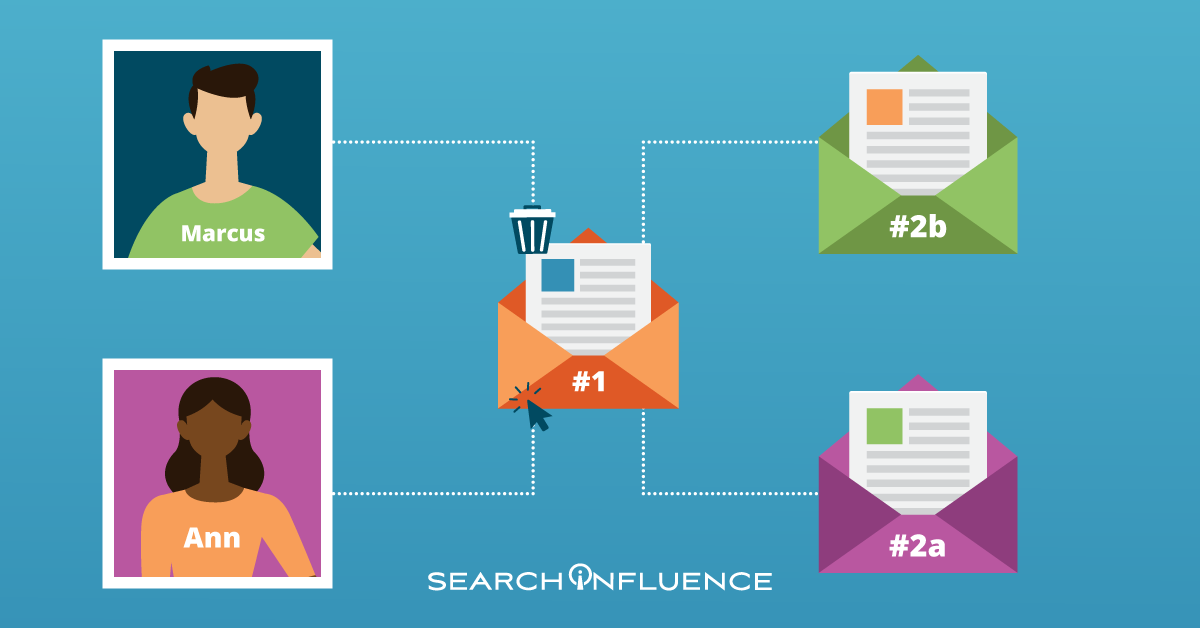
    For example, let’s say Ann (Lead A) and Marcus (Lead B) are both interested in studying urban planning and have submitted an online form on a university’s program page to receive more information.

    From that form submission, both Ann and Marcus will receive Email #1. Ann opens the email immediately and clicks through some of the included links. Based on her actions in that email, she might receive Email #2a one week later, which gives details about next steps and applying.

    Marcus, however, did not interact with Email #1 like Ann did. He deleted it after opening it. Marcus might then receive Email #2b, which contains different content focused on re-engaging him.

    Why are Email Nurture campaigns relevant?

    According to Statista, 90% of U.S. internet users used email each month in 2019.

    As a reminder, the prospective student is already aware of several universities and weighing their options at this point in the marketing journey. Targeted email allows a university to provide interested students with the answers they are looking for before they even search for them.

    In a webinar, Blackboard reported that prospective students have new concerns and questions related to the pandemic, including potential economic fallout, changes to the campus environment, and job prospects after college. Prospective students have stated they would like to hear from admissions counselors at least once a week via email.

    To address this, higher education institutions can implement an Email Nurture campaign to ensure prospective students are getting relevant information based on where they stand in their journey, in addition to personalized outreach from admissions counselors.

    Facebook/Instagram Lead Generation campaigns and Email Nurture campaigns are excellent tactics for engaging with prospective students and providing them with the information they’re looking for, pushing them one step closer to applying to your institution.

    Ready to start building a marketing campaign tailored to your ideal prospective students? Search Influence has helped local and national higher education clients create effective campaigns to target prospective students at all stages of the marketing funnel. Contact one of our experts to learn how you can enhance your current marketing strategies.

    Images

    Laptop

  • 3 Actionable Ways to Make Your Creative More Diverse

    Example of diverse photo assets for ad campaigns

    Key Insights

    • Diverse creative does not stop at just photography—companies should diversify their videos, illustrations, and voiceovers.
    • Companies who do not have the resources to create their own assets can purchase existing diverse photos and videos and edit existing illustrations to be more representative of diverse audiences.
    • The presence of POC in creative is not enough; designers and marketers must be thoughtful of how minorities and POC are portrayed across all mediums.

    In a perfect world with a bottomless budget and endless hours, companies would always be able to hire skilled photographers, illustrators, videographers, and actors to acquire custom creative assets that represent the company and their target and aspirational demographics for every marketing campaign. A lot of companies, however, must rely on existing stock assets due to varying limitations. The problem with stock photography, illustrations, videos, and audio, however, is that most of what is available depicts white men and women. Does this even matter? Maybe not as much to people who look like the subjects of these photos.

    By excluding people of different races, genders, body types, ages, and abilities, marketers are ignoring and erasing members of these communities. If that isn’t reason enough to prioritize the inclusion of diverse assets in marketing campaigns, Google and The Female Quotient conducted a survey in 2019 concluding “that people are more likely to consider, or even purchase, a product after seeing an ad they think is diverse or inclusive.” Specifically, “64% of those surveyed said they took some sort of action after seeing an ad that they consider to be diverse or inclusive. 69% of black consumers say they are more likely to purchase from a brand whose advertising positively reflects their race/ethnicity.”

    The study also states that “71% of LGBTQ consumers said they are more likely to interact with an online ad that authentically represents their sexual orientation,” and data shows that LGBTQ households spend 35% more on online purchases each year than non-LGBTQ households.

    #1 Use Diverse Stock Photography and Video Resources

    As marketers, we should strive to not only include minority groups and POC in our creative, but we should also be thoughtful about how these communities are portrayed in photos and videos. Who is leading the meeting? Who is teaching the class? Who is in handcuffs? If the answer to these questions could perpetuate any stereotypes—no matter how subtle—consider skipping those assets and continuing your search.

    The mere presence of underrepresented communities is not enough; we must make sure they are represented positively and in a way that would make members of said communities proud. Nappy.co is an excellent free resource for photos of Black and Brown people and a great jumping off point for diversifying your photo library.

    Example of diverse vector art for a marketing campaign

    #2 Adapt Vector Art

    Illustrations may seem more straightforward, but will actually require the designer to be just as, if not more, thoughtful as when selecting stock photos. Whether starting from scratch with an illustration or purchasing stock vector art, the considerations are the same. Just as with stock photography, we want to:

    • Avoid perpetuating any stereotypes, not only in subject matter, but also in more subtle ways.
    • Pay extra attention to how facial features, hair, or skin tones are depicted.

    Even in anthropomorphized objects, these considerations need to be prioritized. A design choice may be unintentional or innocuous, but they can have serious implications and reveal damaging subconscious biases. In 2017, a Kellogg’s Corn Pops box depicted a community of corn pops, and the one brown corn pop in the entire group was depicted as a janitor. Kellogg’s understandably faced serious backlash for the illustration and quickly corrected and reprinted the box.

    Luckily, illustrations (unlike photography) are adaptable. Obviously creating vector illustrations from scratch allows the designer to create any scene they want, but stock vectors are also fully customizable, too.

    • These file types usually include .ai, .eps, or .svg files that can be edited in graphics editing software like Adobe Illustrator.
    • Body types, skin tones, facial features, clothing, positioning, and so much more can be edited to represent people of all races, genders, body types, ages, and abilities in various settings.

    #3 Expand Audio Talent Search

    Marketers can’t deny the prevalence and effectiveness of video in marketing and advertising, so a company’s journey to diversifying their creative should not stop at visual assets. In recent years, there has been a push in Hollywood to cast POC voice actors to play non-white characters. While this is a move in the right direction, diversity in voice acting for marketing can be taken a step further.

    Traditionally, women were hired for voice-overs about fashion and beauty, and men were hired for voice-overs about beer and cheeseburgers. We are seeing a cultural shift in household dynamics, where men and women are making important decisions together.

    Adweek estimates that today, 85-90% of voice-overs are done by women across categories, reinforcing that women have more power over the wallet and decision making than originally thought. No matter the industry, marketers should seek out POC voice actors if their videos contain POC characters, and should keep in mind that actors of any gender can be persuasive and appropriate for their videos.

    Purchasing existing diverse creative assets can seem like a daunting task for companies on a budget, but becoming aware of what resources are out there and leveraging additional options for inclusivity is key.

    Stock assets are often thought of as cheesy, unnatural, and overwhelmingly white, but this is not always the case! Marketers must explore diverse stock photo and video options, edit purchased or custom illustrations to be more diverse, and hire diverse voice actors if they want their campaigns to be more effective and reach a wider audience.

    Every organization is different, and not everyone has a dedicated marketing team with the expertise needed to source or create diverse assets. When you work with Search Influence, you’ll leverage our team’s expertise to create diverse and inclusive content for your marketing campaign. Connect with our experts today to discuss your digital marketing goals.

    Sources

    nappy.co

  • How to Target Adult Learners and Non-Traditional Students With Digital Advertising

    Key Insights

    • Use information about current students to find new ones
    • Your platform and messaging will depend on your student personas
    • Prioritize degrees or programs that contribute to overall success
    • Follow the data and don’t be afraid to change your targeting plan

    College graduation ceremony with graduates in caps and gowns

    No one would dispute the value of a college degree in the current job market. Not all schools are created equal, though. Each institution has its own values, strengths, and community. That’s why it’s important for college marketers to display the best values of their organizations.

    Marketers can support this goal by delivering high-quality leads by targeting the right audience. This is especially important when universities target non-traditional students, also known as “adult learners.” This blog post details some great ways to target non-traditional students and create effective campaigns to reach them.

    Analyze the Profiles of Enrolled Students to Define a Target Audience

    So, how can marketers figure out which audience to target? Start by painting a picture of the student body. Student profiles, or personas, give marketers a proxy target for prospective students. Colleges often have terabytes of data from inquiries, applications, and enrolled student profiles. This data can be invaluable for determining your personas.

    Different programs and schools within the university will have their own student persona (or several personas). The student body in the engineering program will probably look different from the MBA program’s student body. Most importantly, non-traditional students won’t look like newly graduated high school seniors, so it’s critical to know the differences between each student population.

    For each program, marketers will also need a good sense of what prospective students look like at each stage of the admissions process. Ideally, marketers should know when people make inquiries, apply, accept admission, and pay tuition to start classes.

    What if you don’t have robust data? In these cases, it’s important to work with other departments to build the best profiles possible and develop a strategy.

    Find Prospective Students on the Internet

    After using data to create a profile of the target audience, the next issue is where to advertise. Marketers can reach prospective students on a variety of websites and apps based on their affinities.

    The answer depends on the relevant student persona:


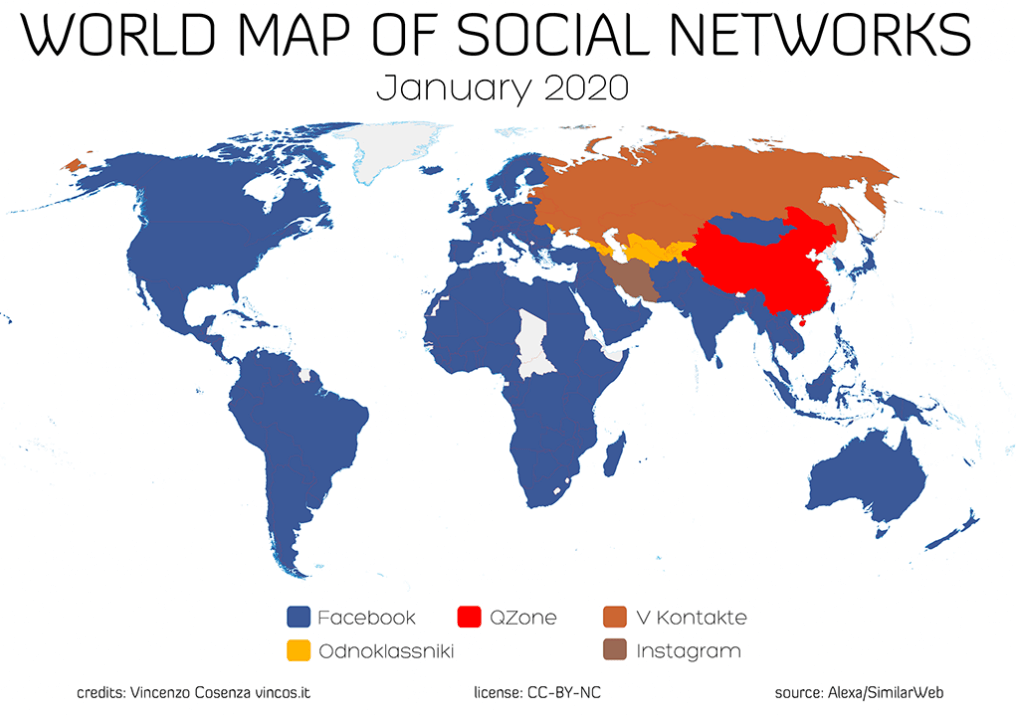
    Map of worldwide social media channel usage

    Luckily for marketers who want a simplified campaign, all of these groups have Facebook in common (considering that Instagram and Facebook are integrated). It’s not surprising that so many education marketers use Facebook. The platform has great targeting options and 2.7 billion monthly users. Facebook is great for college marketers in general because of the ability to target prospective students based on their locations, ages, and interests. There are other options that are more specific, such as occupation, education, family situation, life events, and more.

    Of course, there are always Google Ads campaigns. Placing ads on Google will help with targeting non-traditional learners who are looking for degree programs or the education requirements for making a career change. However, for increased targeting, Google Display is the way to go.

    Campaign Structure Tips

    With a well-defined audience and various platforms for targeting, the next step is translating this information into a structured campaign. Segmenting ad campaigns based on each degree is a logical first step because messaging can be so different for each program.

    For example, a culinary arts program may have two primary personas:

    • Entrepreneurs who want to open a restaurant
    • Current restaurant employees who want to move up in the industry

    Marketers can build one campaign for the entire culinary program and create different messaging and targeting to reach both of these personas.

    An effective campaign will also have separate messaging for prospective students who are in different stages of the sales funnel. For example, marketers probably won’t have much luck with a call-to-action like “APPLY NOW!” with people who have only just found out about their culinary program. On the other hand, something lower-touch like “Request more information” or “Sign up for a free admissions webinar” can help nudge prospects from Awareness to Consideration and Conversion.

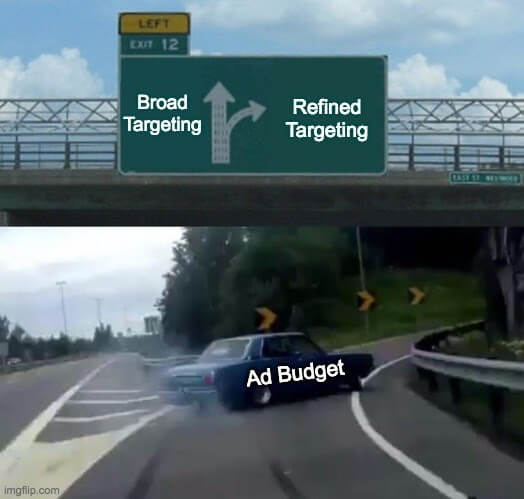
    Car veering into an exit showing broad vs refined targeting for ad budget

    When setting up targeting, marketers need to compile a list of characteristics for each persona and set up their campaigns to reach those people. Becoming more familiar with each platform’s targeting options will help reach more prospects. For Google Search ads, the most basic targeting is choosing geographic areas. For other campaign types, this usually means additional targeting options. For example, marketers could target people in the market for master’s degrees on Google Display or current community college students on Facebook.

    The last step is creating a budget. Each department will have an opinion about where the most budget should go. It may be tricky to come to an agreement everyone likes. The important thing, though, is to focus the budget where it’s most likely to help reach the school’s goals.

    Once a campaign is running smoothly, it’s time to sit back, relax, and… constantly optimize your campaigns. If you’d like to talk to a strategist about a campaign you’re planning or are already running, Search Influence has a team of experts ready to help you meet your goals. Contact a member of our team today.

    Images

    Graduation

    World Map

    Left Exit Meme

  • Graphics Checklist: High-Quality Assets You Need to Promote Your Business

    Key Insights

    • Businesses need current and high-quality location, team, event, product, and service photographs and logos to establish trust and authority on their websites and across digital and print campaigns.
    • With a well-thought-out plan of action, building out a high-quality asset library does not have to be expensive, time consuming, or intimidating.
    • You cannot use low-resolution photos across all platforms. Marketers need original, high-quality photo, video, and logo files.

    Person behind a video camera gathering assets for a business

    One of the biggest challenges businesses face when developing marketing campaigns is not having enough high-quality photography and video assets for the products, services, or events they want to promote.

    It might be tempting for a company to use whatever photos or videos they have on hand, but low-quality assets are unlikely to attract a steady stream of qualified leads. Using consistent, quality visual assets across all platforms and social channels communicates authority, trust, and professionalism to customers and prospects.

    This post will help businesses understand what visual elements are required in order to create an effective online presence, and how to use those assets effectively in a variety of campaigns. Use our checklist to audit your visual library and understand where and how to make improvements.

    What Are the Minimum Requirements for High-Quality Assets?

    Businesses should use their logos, videos, and photos throughout their websites and across all digital and print campaigns. This includes social media profiles, directories, and ads.

    As a general rule of thumb, it’s always better to have images and videos that are as large and high-resolution as possible! Assets can always be scaled down, but enlarging a photo or video that’s too small isn’t possible without pixelation or distortion. Contrary to popular procedural dramas, if a photo is low-resolution, there is no way to magically “enhance” this photo and render it usable across all platforms.

    1. For any digital campaigns, photos, and videos should be at least 1,080X1,080 px (pixel) with a 72 ppi (pixels per inch) resolution.

    • We recommend 1,080 pixels since we often run Facebook ads, and this size aligns with their minimum image size requirements.
    • Facebook ads have the largest minimum size requirements of any ad platform. By meeting these minimum requirements, businesses can cover their bases everywhere.

    2. Your website should have a hero image—a large visual element (either photography or video) that a visitor sees on your homepage. It should represent the site’s most important content.

    • The hero image can be static or dynamic, such a set of rotating images.
    • Your website’s video or photo hero image should be a minimum width of 1,600 pixels, but ideally 2,000+.

    3. For print assets, photos need to be 300 dpi (dots per inch).

    • Since images displayed on the web are 72 ppi, the only way to print them at full resolution is to print them very small.
    • A 600×300 px image from the web at 72 ppi, for example, can only be printed at 2×1 inches.

    4. Logos are an exception to the rules above.

    • The largest that a logo will appear in a campaign is 1200×1200 px, so we recommend a logo that will be easily viewed at this size without having to scale it up to avoid distortion.
    • Logos with transparent backgrounds are more versatile; plus, Google Responsive Display Ads specifically recommend logos in this format.
    • GIF, PNG, and SVG file formats support transparency.

    What Makes an Asset Relevant for Your Business?

    1. Photos should cater to a business’s target audience. Photos of products on plain backgrounds are great for an online shop, but photos and videos of people actually using the promoted products or services make for much better ads.

    2. Interior and exterior shots of the business’s physical location are ideal for search engine listings, directories, ads, and websites.

    • These photos can also help users find a storefront while using Google Maps, especially if the default street view is somehow obstructed or inaccurate.
    • 360 photos allow potential customers to interact with Google Maps listings, and they can be taken professionally or with a special camera.

    3. Having photos of the current staff as a group and individually with the same background is necessary for “About Me” pages and helps potential customers connect with your business on a more personal level.

    Keep in mind that most campaigns will need fresh images rotated over time, so depending on the goals of the campaign and what’s being promoted, more photos or videos may be needed every three to six months.

    Cartoon of person checking off giant list with a giant pencil

    Checklist

    Determine the assets needed by campaign:

    1. All campaigns need a logo file.

    • Ideal file formats are AI, EPS, SVG, PSD.
    • A PNG with transparent background is acceptable, and JPG/JPEG files are OK.
    • The minimum size should be 1,200 x 1,200 pixels.

    2. SEO campaigns require external and internal photos/videos of your location(s), as well as photos of your team.

    • The minimum size required in an SEO campaign will vary, but the bigger, the better!

    3. Facebook Display, Google Display, social media management, email, and blog campaigns require photos/videos related to the products, services, or events being promoted and photos/videos that are applicable to the audience being targeted.

    • Product photos are best when taken on a plain background at the same angle.
    • Team photos are best when taken with the same background.
    • Larger photos are always preferred, and these campaigns typically require a minimum size of 1,080 by 1,080 pixels.

    4. Print campaigns require any relevant product, location, event, service, or team photos with at least 300 dpi resolution.

    Gather existing assets:

    1. Have you worked with a photographer or videographer in the past? Make sure all of these assets are easily accessible and organized.

    2. What types of assets do you have?

    • Take inventory of your assets by organizing them into categories.

    Make arrangements to acquire additional assets if your current assets do not meet the above criteria:

    1. Logo files can usually be recreated in a more scalable or higher resolution file format, but this is harder with more complex logos.

    2. Thumbtack is a great resource for affordable professional portrait, location, 360, event, and product photography.

    3. If professional photography is still not within scope, head to free stock photography sites like Pixabay or Pexels.

    High-quality visual assets elevate not only your digital and traditional marketing campaigns, but also your overall online presence. You can easily arrange for professional photography and videography, or contact Search Influence to discuss asset creation and developing your asset library.

    Images

    Camera

  • How to Prompt Customers to Leave High-Quality Reviews That Influence SEO

    Key Insights

    • Businesses can prompt reviews and testimonials that include beneficial keywords to support ranking in the Search Engine Results Pages (SERPS).
    • Three benefits to providing review prompts:
      • Encourages high-quality, specific reviews
      • Influences more people to find you when searching for degrees, products, services, and experiences you offer
      • Themes in reviews help those who skim search results understand your value
    • Creating a list of prompts your customers can use when crafting their review helps make sure their reviews benefit both prospective customers and your search rankings!

    Customer reviews and testimonials are crucial to your business. They provide you with feedback on your products and services and help potential customers gain insights from your current ones. Additionally, reviews and testimonials that include beneficial keywords can support ranking in the Search Engine Results Pages (SERPS).

    Graphic of a hand using a tablet to read online reviews of a business

    When your business has reviews on important sites, like Google My Business (GMB), Google sees your business as authoritative and is likely to reward you for this. Greg Gifford, an experienced SEO consultant, created a video for LinkedIn with a suggestion that inspired this post: provide prompts so customers leave reviews with keywords that benefit your rankings.

    In this post, we’ll walk through the steps you should take to prompt your customers (without specifically asking them) to leave beneficial keywords in their reviews and testimonials. Not only can you prompt them to leave a review, but you can also give them some questions they can use to get started. This helps customers leave high-quality reviews with details that will benefit your rankings and also gives them a baseline to get started in writing their review.

    Benefits to Providing Review Prompts

    #1 – Encourages high-quality, specific reviews

    • When you request a review after a customer has experienced your services, it can be intimidating for them to start off with a blank screen. When you prompt your customers with questions about their experience, it helps them feel more comfortable and helps you earn more detailed reviews.

    #2 – Influences more people to find you when they search for the degrees, products, services, and experiences you offer

    • Reviews help influence rankings in the SERPs. If you use prompts that include the keywords you’re targeting, your customers are more likely to use those terms in their reviews, which makes you more likely to rank for them.

    #3 – Themes in reviews help those who skim search results understand your value

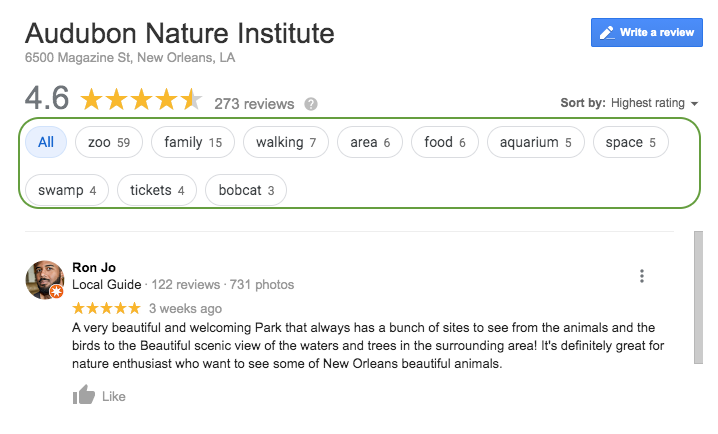
    •  Google aggregates common themes in reviews. This helps if someone searches for something in the immediate area of your business.
      • Example: Here you can see that Google has aggregated keywords and phrases throughout the reviews to make it easier for a potential customer to see reviews that include venues they may want to visit. If a consumer wanted to see all the reviews that included the keyword “zoo,” they could select it and read up on the experiences others have had.

    Screenshot of reviews from Google My Busiess for Audubon Nature Institute in New Orleans, LA

    • Also, when searchers see the themes of your reviews called out, they can more quickly understand what your business offers. In the example above, it’s helpful to know that the business has a zoo, aquarium, and swamp attraction they could visit while in town.

    Questions to Prompt Reviews

    Sample questions you can use to foster specific, high-quality reviews:

    Medical / Healthcare Questions to Prompt Detailed Customer Reviews

    • Which treatment did you receive?
    • What brought you into the practice?
    • Why did you choose our practice or a specific doctor?
    • Which location did you visit?

    Tourism & Attractions: Questions to Prompt Detailed Customer Reviews

    • Which attractions did you visit?
    • How were your interactions with the staff?
    • What were the amenities like?
    • What did you enjoy most about your experience?

    Restaurants: Questions to Prompt Detailed Customer Reviews

    • Which food and drink items did you have?
    • Which restaurant location did you visit?
    • How do we compare to other restaurants you’ve been to in the past?
    • How were your interactions with the staff?
    • How was the ambiance?

    Education: Questions to Prompt Detailed Customer Reviews

    • Which campus did you visit/attend?
    • Which degree or program are/were you interested in?
    • Do you have any tips for future prospects?
    • How did this experience prepare you for life after graduation?

    Bonus Tip for Bringing Reviews Into Other Marketing Efforts:

    • Feature the most called out benefits of your business in your website copy, imagery, and social media posts and ads

    How Can You Get Started?

    • Gather any email addresses you have of past and present customers.
    • Write an email that prompts them to leave a review for your business.
    • Within the email, include prompting questions that will get them thinking about their experience and ultimately help them produce a thoughtful review that will benefit everyone!

    Now that you’ve got a leg up on your reviews and testimonials, it’s time to start thinking about improving other aspects of your SEO. If you’re not sure where to start, ask for a digital marketing analysis of your website from our team of experts at Search Influence.

    Images

    Tablet