Author: Michelle Neuhoff Boyd

  • 12 Things You May Not Know About Online Marketing

    12 Things You May Not Know About Online Marketing

    While some aspects of online marketing may seem straightforward, some things might surprise you. Here are 12 things that surprised some of our team members when they started working at Search Influence.

    1. When listing your business location anywhere online, you should use the USPS verified address.

    “I worked at traditional ad agencies for over 10 years. It shocked me to find out that, when developing a website for a client, it is best practice to use the exact address that the USPS has on file for a business. And that same address should be used on all social media profiles, as well, to enhance a website’s search engine ranking. In my former life, we would simply use what looked or fit best.” – Melissa

    2. Gain traffic to your website through local search results with industry specific directory listings.
    2


    “I was surprised to learn how many industry specific directories exist. Also, surprised to learn how valuable those can be for businesses to gain traffic to their website through local search results.” – Mary

    (Note: Don’t have a physical location? Check out this blog about ways to improve the local search ranking for a service area business.)

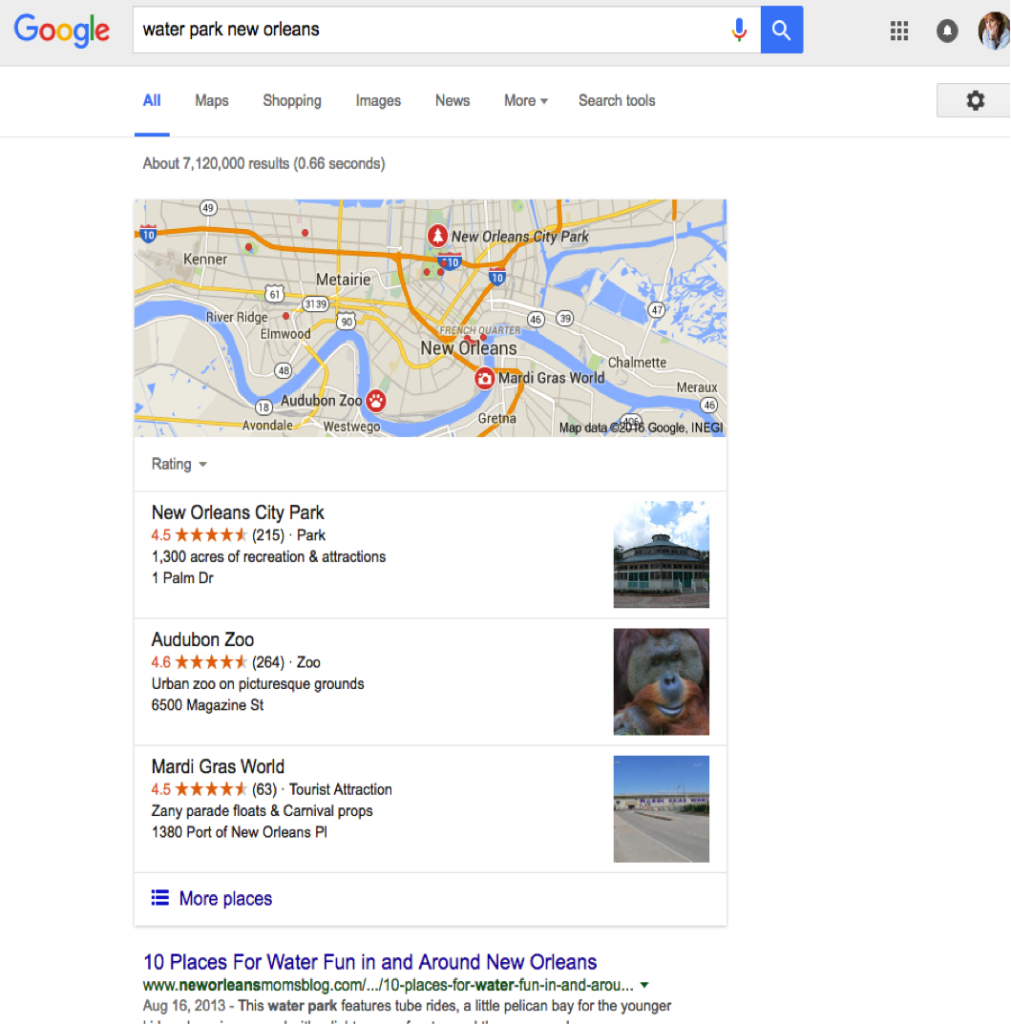
    3. Google My Business is important!
    3


    “I was really surprised to learn that Google My Business had such a large impact on website visibility. I thought, “Google Plus? No one uses that.” And that’s partially true. But having a page, verifying it, and having reviews can play a large role in ranking in the maps pack.” – Ariel

    4. Google prefers location images for profile pictures on Google Plus.

    “With my graphic design background and my love for branding, I was surprised to learn that Google prefers the use a picture of your business location (if you’re a brick and mortar shop) instead of a logo for your Google Plus profile picture.” – Michelle

    5. Content on images cannot be crawled by Google.

    “I was surprised to learn that Google could not track infographics on pages as static images, but we can help make them more Google-friendly through optimization.” – Kayla

    6. Content optimization is for humans too!

    “It may sound basic, but I was surprised to learn that SEO is geared just as much toward optimizing content for human users as it is for computers. When I first started hearing about SEO, I thought it referred only to technical, back-end fixes that would gain the attention of search engines. Working at Search Influence taught me that a huge part of SEO focuses on enhancing the overall user experience, not just making it easy for Google to find your website.” – Aubrey

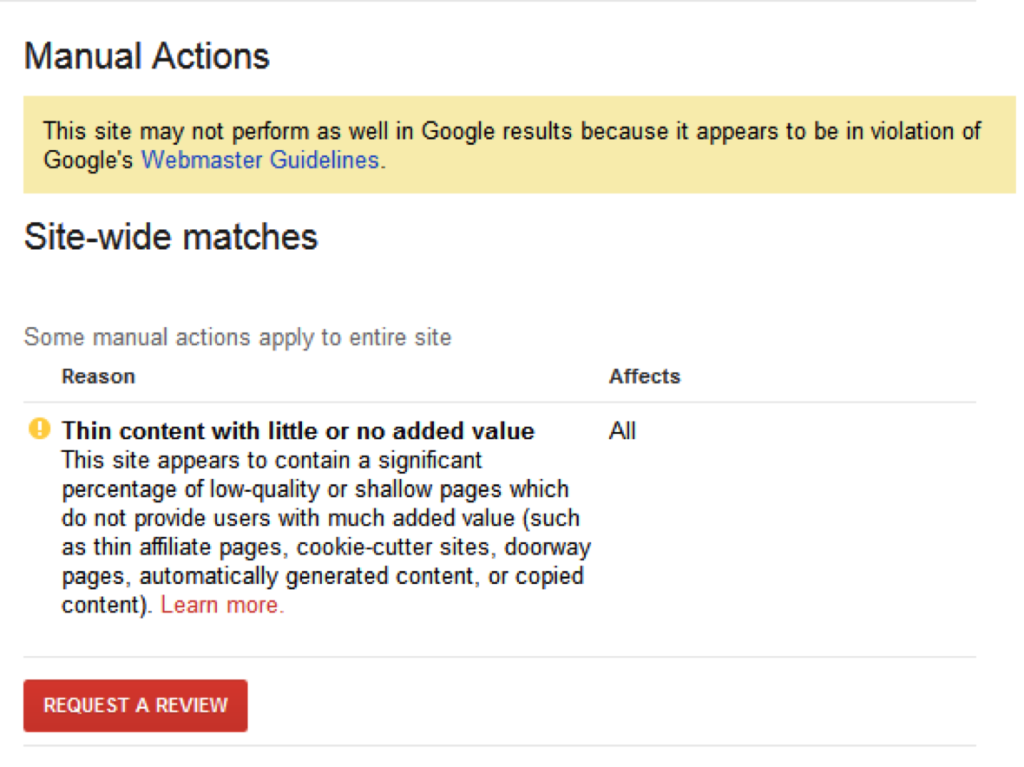
    7. Google penalizes sites from showing up in search results.
    7

    “I was surprised to learn about Manual Actions and how Google can penalize your website, removing it from search results or reducing its ranking. It totally makes sense now that I know more, but coming into the industry without much knowledge of the impact of manual actions, I was definitely surprised.” – Presley

    8. Quality content can affect rankings.

    “The importance of content! It makes so much sense once you actually understand how it affects your website’s ranking potential. I feel like it’s still the number one thing I harp on the most to our clients.” – Gussie

    9. Meta descriptions are helpful in gaining user click through from SERPs.

    9


    “It never occurred to me that meta descriptions are something that needs to be created and are a valuable part of SEO. Now they’re one of the first things I mention when I tell people about the kind of content I work on, because who knew that could be someone’s job?“ – Meaghan

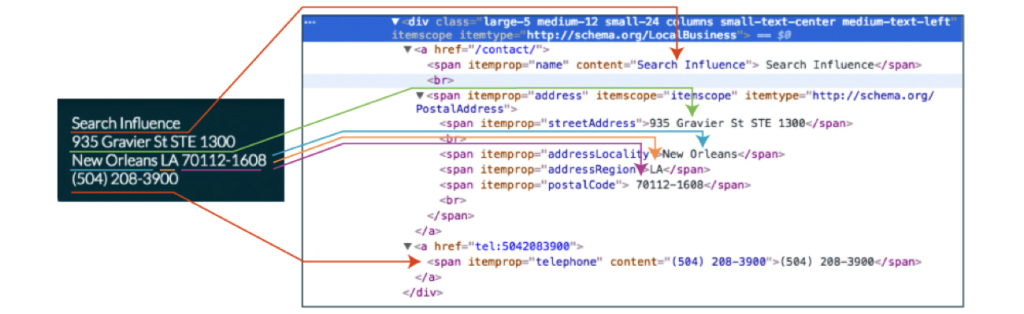
    10. Schema markup can help Google locate the important information on your site.
    10

    “I think schema markup is really cool. I like how you can insert coding to “highlight” important pieces of information on a website, especially since Google is processing lots of information across the internet.“ – Jensen

    (Note: Looking for Schema for Medical Clinics? Check out this blog about the recent Schema update.)

    11. Online marketing best practices are always changing.

    “Having worked for an online marketing company before starting at Search Influence, I was surprised to see how much the industry can change. There was about a three-month gap between my last job and Search Influence, and the environment of SEO was entirely different. Algorithm changes, social media image size changes, changes to what’s good practice and what’s not. Everything was different. Search Influence gave me the tools to navigate those changes and come out with more knowledge than I thought possible.“ – Eric

    12. Attack your online marketing campaign from multiple angles for a greater impact.

    “I wasn’t necessarily surprised by this, but what I love about what Search Influence does is that we fit all of the various components of online marketing together into such well thought out, comprehensive strategies for our clients. Offsite work to benefit organic search, social media marketing, onsite work + paid advertising efforts can complement each other so well and do such great things for small, medium, and large businesses when the work is synchronized with intent!” – Erica

    Staying on top of your online marketing campaign can be tough. We can help! Contact one of our SEO specialists to find out more information.
  • Insta-Update: Direct Messages Just Got Easier on Instagram

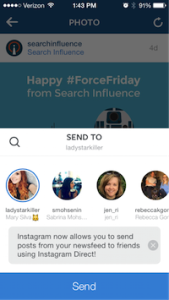
    Back in 2013, Instagram launched Instagram Direct, which gave users a way to share with one person or a smaller group of people. Last week, they announced the rollout of a couple of exciting improvements, including sending posts in your newsfeed as direct messages and threaded messages.

    Direct Messages Improved

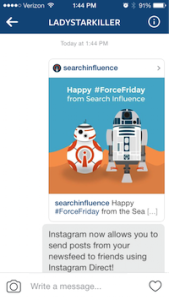
    When you come across that perfect picture in your newsfeed that you want to share with a friend, your first thought is to tag that friend in a comment, right? Now, you’ll see an arrow next to the like and comment icons. Just tap that arrow and send the post to a friend or small group using Instagram Direct! You can also tap the image in your conversation to view the original post. If you have the account set to private, then only the people who follow that account will be able to see the post in the direct message.

    Image1 Image2 Image3

    What Are Threaded Messages?

    Threaded messages let you view your full conversation you’ve had with people you talk to the most. Instead of viewing individual conversations from each photo or video you’ve sent, your thread will include the respective people in the conversation and the posts in their natural order.

    Instagram also added the ability to name groups, a camera icon so you can take new photos while you’re in a conversation, and of course, emojis!

    And What Does This Mean For My Business?

    While this new update is exciting for users, as a business owner, you will not currently be able to track the number of times your post gets shared using Instagram Direct. For now, the only real sense of engagement that you can measure is via the comments on your post. I expect that this will be something Instagram considers in their next round of updates.

  • Five For Friday: Amazon Gets Physical, Tinder Cleans Up, & G+ Asks, Am I Pretty?

    FiveForFridaysColorfulFive

    1. Google Testing New Local Interface In Web Search Results – Search Engine Roundtable

    Google is testing a new interface for showing the local web search results. Back in August, we saw that Google was showing the local carousel within the results, but this new interface is simply a list of the results and isn’t going to preview a map within the carousel.

    2. Tinder Spammers Move to SMS After Improvements To Dating App’s Security – Tech Crunch

    For awhile now, the dating app Tinder has been overwhelmed with spam bots, or accounts created to flirt with Tinder users and then direct them to adult sites. However, this summer, Tinder was called out by Symantec and therefore had to address the issue with an update. At first it appeared the update addressed the issue, but a new report is showing that the spammers have just moved to using SMS texts.

    3. Report: Amazon To Open New York Retail Store – Marketing Land

    Recept news reports say that Amazon is planning to open a Manhattan store just in time for holiday traffic. According to WSJ, the new store, opening at 7 West 34th Street, is to operate as a mini-warehouse of sorts, allowing returns and pickups. Others had reporting that this might be a place for Amazon to showcase it’s upcoming products such as new e-readers, the Fire Phone, or Fire TV. Either way, this could be a game changer for this e-commerce provider.

    4. Google Adds The Ability To Post Polls On Google+ – Marking Land

    As of October 9th, Google+ is giving users the ability create and share polls. This was a tool Facebook was offering back, but then pulled back in 2012 finding it redundant. This new feature in Google+ will on the web and Android versions within the next few days, and then eventually iOS.

    5. Google Makes Conversational Search Even More Intelligent – Search Engine Journal

    OpenTableLogoImageOn October 9th, Google announced an update to their conversation search functionality which should make it easier for planning. Overall the new features include, location-based searches, making reservations, and finding directions. These new features are now available on the Android and iOS app. What does this mean for businesses? It’s more even important to optimize your site for local search as well as to verify your Google+ local listing. If you own a restaurant, then you should ensure you are listed on OpenTable so you don’t miss out on potential customers!
  • New Preview Will Have You Pinterested

    On Tuesday, Pinterest for Business’ Jason Costa announced the rollout of a new follow button that will give users a preview of what it will be like to follow the business.

    Tell Me How It Works

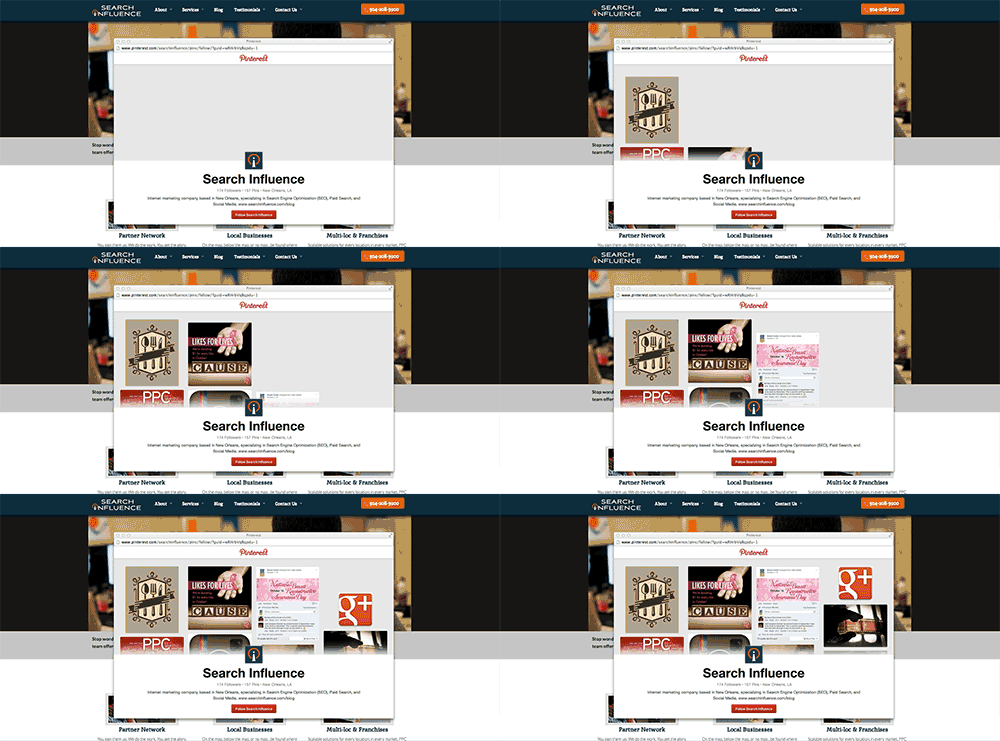
    The new button will trigger a pop up window that will include a preview of the most recent pins along with a confirmation button to follow that business. The exciting thing about the pop up window, Jason says, is that “ your visitors won’t ever have to leave your website to follow you.”

    Pinterest Follow Button Update Preview Image

    Costa says, “If you have the original Follow button in place, you won’t have to do anything to get the new version—it’ll just work!” Just like the old follow button, this button can be added to your site with just a couple of lines of code.

    Tell Me How It Will Look

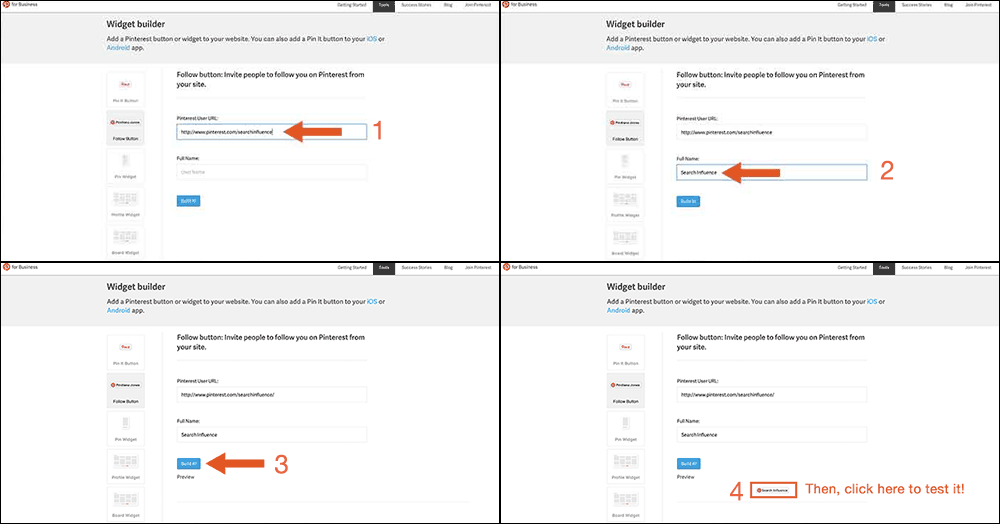
    Want to test out the new widget for your business’ Pinterest page? Lucky for you, you can! Just go to Pinterest for Business. Then click on “Tools” and “Widget Builder” in the menu. From there you can select the “Follow Button” on the left, and type in your Pinterest User URL along with your full user name and then click “Build it!” Now see for yourself how awesome this update really is.

    Test Pinterest Widget Image

    Let the Experts Weigh In

    Martin Beck from Marketing Land believes Pinterest made a smart update, “which is working to turn its popular image-based social network into a money maker.” UX experts like Sarah Horton from UX Magazine might say that this animation necessitates ”keyboard-focus management for custom controls.” However, because the image animation comes to an end on its own, I would argue that controls are not necessary for this animation. If anything, it should just get the viewers excited to see more pins!

  • 5 For Friday – Facebook Privacy, Google With Your Voice, and Yelp Videos!

    5-sand1. Facebook Defaults Posts From “Public” to “Friends” & Introduces Comprehensive Privacy Checkup
    – Marketing Land

    Facebook has finally launched a major change that may have an impact on their real-time efforts. With the privacy updates, users’ posts will now default to only be visible by friends, and all users will be encouraged to check on their privacy settings if they have not been updated recently. Greg Finn says he expects that this update may cause hashtags and real-time conversations to continue on their decline.

    2.Yelp Will Allow 12-Second Video Reviews Starting Next Month
    – Marketing Land

    Beginning in June, “Elite” users will be allowed to share their review of local businesses via a short video. These videos will first appear inline with the photos, but will eventually also appear along with the reviews like photos currently do.

    3.Google+ Introduces New Features That Automatically Generate Movies and Travelogues
    – Search Engine Journal

    Google+ launches Stories and Movies that will bring together your photos and videos to highlight your favorite moments from your travel or an event. Google’s Story will arrive within 24 hours after you return from your vacation. After you receive your story, you will be able to customize it and share it. Google+ Movies will include related photos and videos along with a soundtrack and special effects.

    4. Google Adds “Okay Google” Voice Search For All Chrome Users
    – Tech Crunch

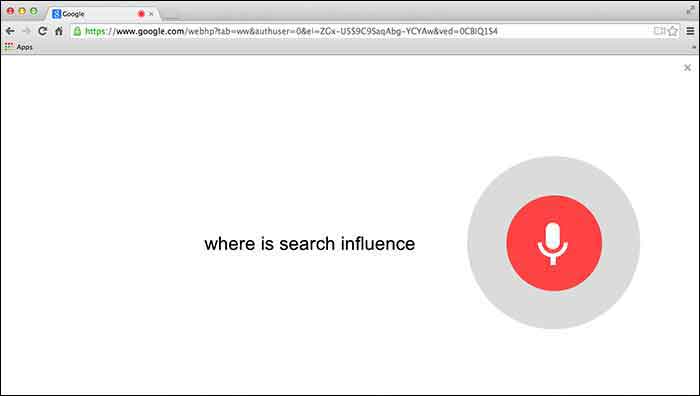
    Users will first need to give Chrome permission to use the mic on their computer. Then you can simply go to Google.com and say “Okay Google” to trigger the voice search followed by your search request.

    GoogleChromeVoiceSearch

    5. Google Paid “Dealers Nearby” Appears To Have Gone Live
    – Mike Blumenthal

    Mike Blumenthal noticed that Google’s new paid ads (now appearing within the knowledge graph) are live. This seems to be only the case in the US according to the comments thread on Dr. Pete’s tweet regarding this update. Mike Blumenthal suggests that we may one day see Google selling competitors space in branded knowledge panels.

  • 3 Tips for User-Friendly Navigation

    A few weeks ago, my future mother-in-law purchased her first iPad. While she has been the proud owner of an iPhone for a few months, there was something different, to her, about the navigation of an iPad. As we were walking through some of the different apps and functions on her new tablet, she found herself trapped in her browser window and unsure how to get back to her email.

    MaggieSmith-01

    Are you the type of person who can easily pick up on the newest technology trends? Or do you feel like you can never catch up with things changing so frequently? User-friendly navigation can take that worry away and make your experiences with technology easy and fun!

    Tip #1: Keep something familiar.

    We’ve all experienced that little moment of panic when we don’t know where to go next. For some people it happens when traveling to a new city or starting a job at a new company. We want to know that there’s a way out of any situation. For my future mother-in-law, that “way out” was the home button. After discussing the way she closes out of the Internet on her iPhone, she quickly realized she had that same “panic button” located at the bottom of her iPad.

    Tim Ash, CEO of SiteTuners and author of “Landing Page Optimization” was a keynote speaker at PubCon in New Orleans. During his keynote presentation he mentioned that as soon as we see someone walk into a room, we subconsciously decide how to kill them. He claimed it’s just a part of our natural instincts. I’m not sure if that’s the case for everyone, but I do think we at least look for an escape route.

    MaggieSmith-02

    Tip #2: Make it easy.

    Have you ever started navigating your way through site and then realized that you weren’t sure of the best way to get back without having to click the back button nine or ten times? What do you do? Do you simply close your browser window out of frustration? We crave easy navigation to avoid such frustration and make browsing simpler.

    To a certain degree we all enjoy updates to technology, but we still like to hold onto something familiar. For some social media sites, such as Facebook and Twitter, having a fixed navigation is the solution. How often do you find that you’ve logged into your social media account and then hours later, or for those with better self control, minutes later, you’ve scrolled so far down the page you’re looking at updates from days or weeks ago? Can you imagine what it would be like if you had to scroll all the way back up to the top of the page? If you were on Facebook before 2011, then you might remember.

    Tip #3: Know your audience.

    Is this something that all websites need? No, not necessarily. For many sites, scrolling is not quite as intuitive. The solution could be as simple as having “HOME” as an option in your navigation. Know your audience. Some users need an actual home button or link in the navigation, and some simply expect that your logo will link back to your homepage. If you’re unsure of the way your users interact with your page or how to make your page easier to get through, it may be best to do some testing.

    MaggieSmith-03

    Do you have any tips for easy navigation? If so, let us know in the comments! 

  • Watch the Possibilities Unfold

    For many years we’ve considered the fold, or the first 600 pixels of content on a website, to be the gateway for user interaction and hopefully the production of leads. To take advantage of this, we’ve filled this space with as many buttons, forms, and click-through opportunities as humanly possible. The result, oftentimes, was a cluttered site with so many calls to action that viewers didn’t know where to look first.

    So what’s changed?

    Tablets and smartphones have helped us by naturally encouraging users to scroll. These smart devices have not only made it easier to scroll, they’ve also made it fun! Because of this, the purpose of those 600 pixels has changed. Instead of using the space above the fold as the one and only location for possible lead generation, we can use this area to help direct the viewers’ eye down the page to discover more.

    How do we do that?

    Have you ever seen a social media contest that directs you to “like” the page and enter to win? The designs for these ads usually include a directional arrow that points up to the “like” button, to help you understand exactly where you need to go next. Often times the call to action for this type of contest will be sometime similar to ”Like & Enter” or “Like us to find out more.” The need for a clear call to action on websites such as the ones used for contests is now more important than ever.

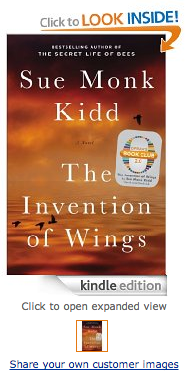
    An even better example of a great call to action is Amazon’s graphic to get customers to take a look inside of one of their books.

    Screen Shot 2014-01-22 at 3.56.49 PM

    What is it about Amazon’s call to action that makes you want to click on that book? How can you achieve a similar effect? Here are three tips for creating a successful call to action:

    1. Use a Contrasting Color

    According to The Institute for Color Research, we subconsciously make judgments about people, products and their environment within 90 seconds of seeing them. Between 62% and 90% of that initial judgment is based solely on color.

    The most important thing to consider when selecting your call to action color is to choose one that will stand out on the page. If most of your page has varying shades of blue, a bright green button will do the trick, or a golden shade of orange. As KISSmetrics highlights in their infographic on color, this can be achieved by using analogous colors for the background of the page’s main content, while using a complementary color as your call to action color.

    Take a look at the Amazon example again. Did the contrast of the blue and the orange catch your attention?

    2. Remember these 3 C’s: Clear, Compelling, and Concise

    “Read the Case Study”
    “Try it For Free”
    “Take a Tour”

    All three calls to actions are common, but effective. They tell the user what they will be doing: reading, trying, and touring. By eliminating the concerns of the user, you compel them to want to find out more. Case studies, free trials, and tours are great ways for the user to find out more information. If you can do compel the readers clearly and be concise in your wording, you will have successfully created a perfect call to action.

    Amazon’s example achieves this in two ways. The call to action, “Click to Look Inside” is to the point, but they’re actually able to abbreviate this even more by emphasizing “LOOK INSIDE.”

    3. Give Directional Cues

    Whether you’re attempting to get your customer to scroll down the page or trying to direct them to your form, you need to use directional cues to show them where they need to go next. From arrows that point to the call to action, to imagery that implies the need to scroll down to see more, people subconsciously want to be prompted towards their next step.

    The arrow for Amazon’s click to look inside serves two purposes. It implies the action of opening a book while also directing customers to click on the image of the book to see what’s inside.

    Another great example of directional cues is on the Nike Better World site. While there is not an arrow or obvious directional cue, customers will subconsciously want to scroll through the page because of the visual implication of movement. They use a very subtle, but effective approach for directing their customers to look further to see more.

    Michael Lykke Aagaard, a A/B testing guru, blogged about testing he did on the positioning of a CTA. He states that this test showed a 304% increase in conversions for the placement of the CTA under the fold. If that isn’t proof enough, try it for yourself and watch the possibilities unfold.


  • Influencer Spotlight – Mary Silva

    Mary Silva has been a part of the Search Influence team for nine months, and in that time she’s gotten a reputation for hard work and dedication. She’s become the go-to person for managing clients’ online presences when it comes to Google, Yahoo and Bing. She is also the person people run to when they need a call made to Google. Additionally, as an Internet Marketing Associate, Mary does basic editorial work for the content team and helps to create monthly reports for clients.

     Mary Arthemise Silva, not be confused with her Aunt Arthemise Mary, carries on the tradition of bearing this family name, which gets flipped with each generation. So Mary has an aunt named Arthemise Mary and a grandmother named Mary Arthemise. As a native New Orleanian, Mary tells me all locals always want to know where you went to high school. So for all you locals out there, Mary graduated from Cabrini High School.

    Outside of Search Influence, Mary works as a freelance photographer and musician. While she usually focuses on synth, guitar, and vocals, she can actually play seven different instruments. Recently, Mary had the crazy opportunity, through a co-worker, to photograph the band Fun. Mary specializes in creative portraiture photography and usually shoots senior portraits, live bands, and headshots. Every year, she photographs NOLA Fashion Week for designer Noël Martin. Fun fact: Mary also shot photos for the Search Influence website! In addition to working at Search Influence and freelancing in her spare time, Mary is also a marketing major at Tulane University and is looking forward to receiving her BSM in May 2014.

    FUN
    One of Mary’s photos from the recent Fun. concert in New Orleans.

    When I asked Mary what the best part of working at Search Influence she said, “My favorite thing about working at SI is the people. I love my coworkers and have literally never had a bad experience with anyone in the office in the nine months that I’ve been here. We also have an awesome team building committee that puts together fun quarterly events for the company. It’s a really great way to interact with fellow Influencers since we spend a lot of our time working behind a computer.”

  • 5 of the Best Long-Term Graphic Design Trends

    The key to being trendy when it comes to graphic design is finding a trend that will last. When you’re looking to create a design, be sure to choose your trend wisely and pick one that is going to last for the long-term. Here are 5 of the best long-term graphic design trends.

    graphic

     #5: Artisan Craft Inspiration

    While people gravitate towards simplicity, many also appreciate the art of handcrafted work and the value of the classics. For example, when creating a logo for a restaurant or bakery, try communicating some of the tradition behind the handcrafted nature of this business with a design inspired by an old-fashioned sign.

    #4: Patterns

    Looking for a way to keep your design clean but not too simple? Consider using a pattern within your design.  You can use a classic that already exists or you can create your own!

    #3: Hand-drawn Typography

    While some typefaces will remain timeless and beautiful, creating your own type might be the best way to make your design unique. You can hand-draw an already existing typeface or you can make your own. Either way, the imperfections of hand-drawn typography make it beautiful.

    silo

    #2: Silhouettes

    While people’s fashion trends may change, their silhouettes, relatively speaking, will not. Using silhouettes for people, animals, or objects is usually a safe choice. Vectors keep the design clean, simple, and trendy.

    And the #1 Long-Term Graphic Design Trend:

    Simplicity. Keep the focus on the message and don’t overwork or overdevelop your design. White space or negative space is a good thing.


  • New Orleans Non-profit Spotlight: The NOLA Project

    Nola Project

    One of the many wonderful things about New Orleans is the appreciation of the arts. The NOLA Project is a non-profit theatre company whose goal is to “challenge, entertain, and engage diverse New Orleans audiences through high-quality and innovative performances of relevant great works.” They also work to develop and produce new plays and to provide “educational opportunities for aspiring theatre artists.”

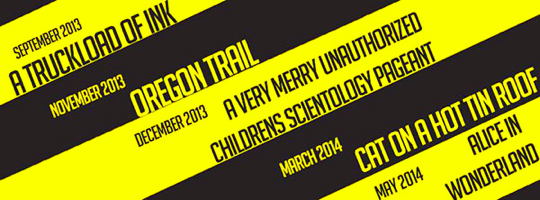
    This season The NOLA Project line-up includes:

    September 4-21, 2013: A Truckload of Ink, an original play by Jim Fitzmorris

    November 14-25, 2013: Oregon Trail, an original play by A.J. Allegra

    December 6-22, 2013: A Very Merry Unauthorized Children’s Scientology Pageant, by Kyle Jarrow

    March 2014: Cat on a Hot Tin Roof, by Tennessee Williams

    May 2014: Alice in Wonderland, an original adaptation by company member Pete McElligott

    Lineup
    The NOLA Project’s 9th Season Line-up

    Do displays of urban corruption or comical, gruesome journeys across the country interest you? How about an interpretation of a controversial religion translated into children’s musical? A poetic presentation of greed and sin or a whimsical tale of a girl falling down a rabbit hole? If any of this seems like it’s up your alley, then you should check out The NOLA Project, and their website, for more information on this season’s upcoming shows. And of course, as it gets closer to each show’s opening, you can check out their Facebook page for a glimpse at their rehearsal and production photos.

    Performance
    The NOLA Project performing Shakespeare’s Much Ado About Nothing in the NOMA Sculpture Garden, May 2013

    The NOLA Project is one of the most active non-profits I have noticed on social media platforms. They use Facebook, Twitter, Instagram, YouTube, and Tumblr to reach out to their audience. I recently had the opportunity to discuss the company’s social media marketing strategy with their Marketing Manager, Richard Pomes. He said the main focus for their social media marketing is Facebook, where their audience is most active. The content that brings the most activity to their page are their rehearsal and production photos. Their fans enjoy seeing candid photos from the shows and rehearsals, and sometimes even share them with their friends using various social media platforms. Twitter is the main platform their fans use when sharing NOLA Project updates.

    While Facebook tends to be their main social media tool for marketing, Richard says that they have over 2,000 followers on Twitter and over 200 followers on Instagram. Their fans mention The NOLA Project frequently during events on Twitter, and use specific hash tags, which help to boost their attendance at future shows.  To find out more information on The NOLA Project, or to purchase tickets to their upcoming shows, visit www.nolaproject.com.

    Members
    The Company Members of The NOLA Project