Author: Jordan Polhemus

  • Healthcare Marketing Laws: Language to Keep Your Ads Legal

    This post was updated by Jordan Polhemus on December 21, 2020 to reflect recent trends and refreshed statistics. It was originally published on November 26, 2019.

    Key Insights

    • Review your current Facebook targeting strategies to determine how the recent changes to Facebook’s targeting options will impact your campaign’s performance.
    • Review your entire messaging and targeting strategy with your legal team before launching any marketing campaigns.
    • Prepare for more health regulations within the Facebook advertising platform.

    Doctor's stethoscope on desk next to laptop

    The healthcare industry, unlike almost any other industry today, has incredibly strict advertising regulations that both individual physicians and large hospitals must follow. Violating these regulations could lead to anything from ads not being permitted on certain platforms to legal action—or even a revocation of a physician’s license.

    This post covers the do’s and don’ts for ad copy and demographic targeting to keep your ads legal in an ever-changing healthcare marketing landscape. Please note that this is not an exhaustive list of everything you should and shouldn’t do for medical marketing. It’s an overview of advertising best practices within the medical industry. Additionally, these recommendations do not include all the specifics for every state.

    Changes to Facebook Advertising Targeting

    Facebook has made several changes to their targeting options since 2019.

    The Removal of Third-Party Information

    The most impactful difference is the removal of third-party information that gave organizations the ability to target users based on personal information, such as (but not limited to):

    • Income
    • Cars owned
    • The age of user’s house
    • The age of the people in the user’s household

    Before this update, many data providers partnered with Facebook to create a more descriptive profile of their users that allowed marketers to create extremely detailed and specific targeting.

    After the Cambridge Analytica scandal, Facebook decided it didn’t want to be responsible for the data that third parties brought in, so it eliminated Partner Categories and other third-party data programs.

    The Removal of Potentially Discriminatory Targeting

    Facebook has worked to remove potentially discriminatory targeting to prevent misuse of the ad platform in the future, including:

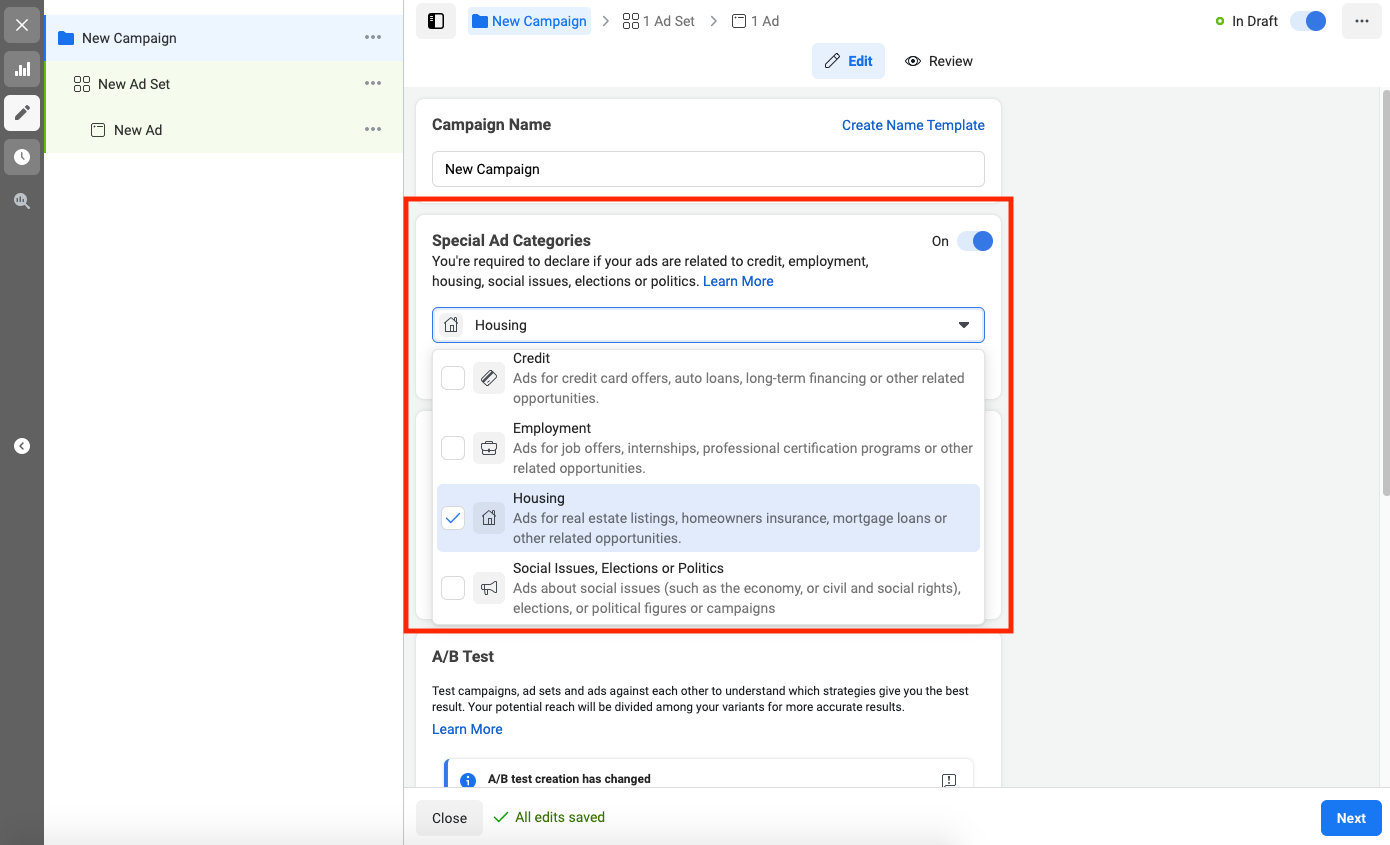
    Facebook’s “Special Ad Categories”

    In the last few years, we’ve seen a considerable tightening in what marketers can do when promoting organizations in certain industries. The types of ads impacted include:

    • Housing
    • Employment
    • Credit card
    • Political

    Screenshot showing Facebook's special ad category options

    Predictions for the Medical Industry

    Although this isn’t the case yet in the medical industry, we believe that Facebook will move in this direction soon and require all medical providers to follow additional guidelines, which will place further restrictions on their targeting and messaging. Although not currently in place, you will likely have to choose a “special ad category” to advertise in the medical industry on Facebook in the future.

    For example, if you are running ads for any political organization, such as a political candidate, PAC (political action committee), or even for small local elections, the advertiser and the ads must comply with a very strict set of rules, including:

    • Verifying the page
    • Providing special documentation proving the identity of the page manager
    • Complying with specific messaging guidelines
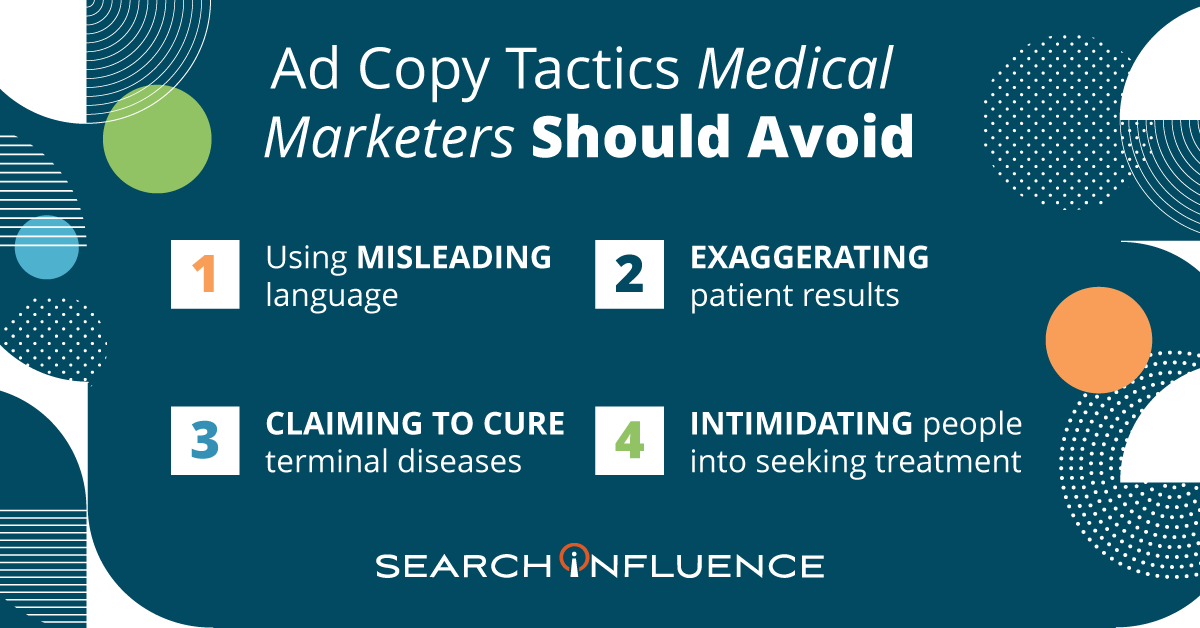
    Ad copy tactics medical marketers should avoid

    Advertising Language Do’s and Don’ts

    Advertising cannot be misleading in any way

    Misleading or deceitful language is strictly forbidden in all medical advertising. This includes implications that would cause a reasonable person to misunderstand or be deceived. Consider the impact of the words you choose in your Healthcare SEO strategy as well.

    Examples:

    • “This procedure will heal you.”
    • “You will look just like Kim Kardashian.”
    • “You will never need to see another doctor again”.

    Don’t use words like “best” or “superior”

    Unless there is objective evidence to support the claim, practices cannot claim professional superiority in any way.

    Examples:

    • “We are the best plastic surgeons in the world.”
    • “You will be under the care of the greatest ophthalmologist in your area.”
    • “Make an appointment with the most talented doctor.”

    Don’t use hyperbole when describing your techniques or results

    A potential patient’s health should be discussed factually and without embellishment, so using exaggerated statements or claims (even if they’re not meant to be taken literally) can be seen as deceptive and misleading.

    Examples:

    • “Your skin will be softer than silk.”
    • “Make an appointment for the best day of your life.”
    • “You’ll be as skinny as a toothpick.”

    Don’t assure a permanent cure for an incurable disease

    Don’t use intimidation or undue pressure for services, products, or procedures

    Examples:

    • “If you don’t get this procedure done by ____doctor, then you will die”
    • “If you don’t see Dr. X, then you are doing a disservice to your children”

    Don’t make any scientific claims unless you provide a reliable, peer-reviewed study as evidence

    Because of the amount of trust patients put in their healthcare providers, physicians are required to provide truthful information when making healthcare decisions and recommendations.

    Therefore, it would be an ethical violation for any practice to claim results or benefits that cannot be scientifically proven, whether or not that physician is talking to their own patient.

    Example:

    • “Getting X surgery will extend your life by 15 years”

    Don’t show before and after photos without the proper disclaimers

    Because before and after photos can influence a patient’s decision-making process, each practice must clearly state that results may vary and the results shown are not guaranteed. Otherwise, patients could reasonably expect to see similar outcomes.

    Practices must include disclaimers alongside perceived claims, even if the claims are direct quotations from past patients.

    Don’t reveal patient details

    Anonymizing patient information isn’t as simple as changing a name. Under HIPAA, there are more than 18 categories of personal health information (PHI) that can result in patient identification.

    It is best to either create a fictional scenario in your messaging or work with your attorney to secure a no-compensation, signed patient release before using any of their PHI in advertising.

    Don’t make any claim about the cost of a service or product that your practice cannot substantiate

    Due to differences in medical coverage based on health insurance, advertisements should never include prices—unless the practice can ensure that all patients receive that price regardless of their healthcare coverage.

    Don’t use a competitor’s name or any other trademarked name in ad copy or advertising without written permission

    If you wouldn’t say it in the elevator, don’t put it online

    Try reading the content of a post out loud and to others before posting. If it sounds like something you wouldn’t say in an elevator (where you can be overheard), then it shouldn’t be something that you put in advertising.

    Have your marketing plan, including ad copy, reviewed by an attorney to confirm that no laws are being broken in any of the states your ads will appear.

    By working with both large hospitals and small private practices, we’re well-versed in medical marketing and have years of experience running successful campaigns for our clients. Our digital marketing agency keeps up to date with the latest medical search trends, as well as updates to regulations and best practices.

    As a Google Premier Partner, the majority of Search Influence’s employees are certified in Google’s advertising platforms, including Search, Video, Mobile, and Display, just to name a few.

    For more information about how we can help promote your practice on Facebook and other social media platforms, start a conversation with us today.

    Resources

    Images

    Stethoscope

  • Business Disruption Marketing Checklist: How to Communicate When You Are Closed, Remote, or Open

    Business Disruption Marketing Checklist: How to Communicate When You Are Closed, Remote, or Open

    Some businesses must close during a time of crisis. Others may be fortunate enough to remain open, even if that means limiting customer interaction or operating remotely. For a business equipped to operate during a time of crisis, saying that you’re open can be just as important as saying that you’re closed.

    Regardless of industry, communication about your status will help mitigate disruptions and profit loss as much as possible, and when you are reopen, can help you get back on your feet more quickly. Consider taking these steps to protect your business before, during, and after a time of business disruption.

    Marketing Checklist If Business Will Be Completely Closed

    1. Pause all advertisements for short-term actions or foot traffic. (Keep advertising long-term sales cycle services.)
    2. Pause any pre-scheduled social media posts.
    3. Add a special notice or banner across the top of the website and to any “Contact” pages notifying visitors that the business will be closed.
    4. Mark business as “temporarily closed” on Google My Business. Update hours on Facebook and other listing websites that show business hours of operation.
    5. Update all email signatures that the business will be closed and staff will have limited or no access to email (depending on the business). 
    6. Set up email auto replies for all accounts that will not be checked regularly, especially general inquiry emails like [email protected], [email protected], etc. 
    7. Update all voicemail recordings.
    8. Create a post on social media (Facebook, Instagram, Twitter, LinkedIn, etc.) to notify followers of the business’s status.
    9. Collect all passwords to ensure that all accounts (email, social media, website, etc.) can be accessed remotely. 
    10. Notify customers and vendors via email that the business will be closed and provide contact information should they need to contact the business during that time. 
    11. If applicable, forward calls to a mobile phone or a line that will have service. 
    12. Collect contact information for all employees, communicate the business’s plan company-wide, and provide regular updates during and after the crisis.

    Marketing Checklist If Business Will Remain Open Or With Modified Operations

    1. Pause advertisements for services that may be limited during this time. 
    2. Add a special notice or banner across the top of the website and to any “Contact” pages notifying visitors that business is operating.  
    3. Update all email signatures that the business is operating. 
    4. Update all voicemail recordings that the business is operating. 
    5. Create a post on social media (Facebook, Instagram, Twitter, LinkedIn, etc.) to notify followers that business is open.
    6. Pause any pre-scheduled social media posts that might be insensitive to the current climate. 
      1. For example: “It’s a beautiful day to go to the beach!” 
    7. Collect all passwords to ensure that all accounts (email, social media, website, etc.) can be accessed remotely. 
    8. Notify customers and vendors via phone or email that the business will remain open. If any communication will be modified during that time, provide the appropriate contact details.
    9. If applicable, forward calls to a mobile phone or a line that will have service. 
    10. Collect contact information for all employees, communicate the business’s plan company wide, and provide regular updates during and after the crisis. 

    Marketing Checklist For After The Crisis

    1. Unpause advertisements.
    2. Remove related messaging from email signatures and voicemails.
    3. Remove call forwarding and update auto reply email settings. 
    4. Update special notice or banner on website to indicate the business is open / back to standard operations. This message can be left on the website for a few days or until things get back to “normal”.
    5. Update social media followers (Facebook, Instagram, Twitter, LinkedIn, etc.) that the business is open and share any pictures, news, or any other updates that might be meaningful to that audience.
    6. Update hours on Google My Business, Facebook, and other listing websites that show business hours of operation.
    7. Notify customers and vendors via phone or email that the business is open and will be operating as usual moving forward. If the business is not able to operate as usual, provide the appropriate details and keep customers and vendors informed until business has returned to normal.

    We truly hope you find this list helpful during any business disruption period and that it helps mitigate the negative impacts of closure or altered operations. If you have any additional tips, comment with them below!

  • A Physician’s Guide to Choosing Target Audiences on Facebook

    One of the most important assets in any physician’s marketing strategy is knowing your potential patients. In a field as diverse as medicine, this can mean the difference between success and failure. Therefore, we’ve put together a helpful guide to Facebook’s targeting tools to help build and improve your online audiences.

    Define Your Patients

    The first step in any successful strategy is defining who you want to get in front of. Imagine the type of patient you’d like to attract and jot down every characteristic about them that you can think of. For example, if you’re a plastic surgeon who would like to do more tummy tucks, then what are some general attributes of a typical tummy tuck patient? Here are some questions to help you get started:

    • Are they women or men?
    • How old are they?
    • Are they married or single?
    • What is their household income?
    • How much disposable income do they have?
    • Do they have children? If so, how many and how old are they?
    • What kind of car do they drive?
    • What do they do for a living?
    • Which schools did they attend? What level of education did they reach?
    • What are their hobbies?
    • What types of clubs or organization are they typically involved in?
    • How do they spend their free time?
    • Have they ever had plastic surgery?
    • Have their friends had plastic surgery?

    Once your ideal patient has been defined, review Facebook’s guidelines to see which targeting options are available, or you can see all of Facebook’s Ad Targeting Options in one epic infographic.

    Locate Your Patients

    After your ideal patient has been profiled, the next step is to determine where they are. One of the biggest mistakes in marketing is casting your net too wide and spending advertising dollars on people who won’t turn into patients. Physicians must check their pride at the door and determine how far patients would realistically travel for their services. For example, a patient might travel 30 miles to see a specialist or surgeon but would likely never travel farther than 15 miles for primary care. Once you’ve determined how far a patient would be willing to travel to visit your practice, use Facebook’s tools to limit your targeting to these areas.

    Refine Audience Size

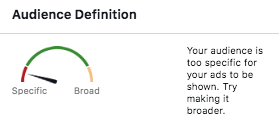
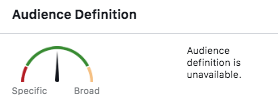
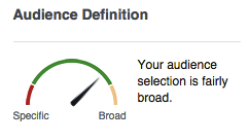
    Once your audience had been defined, take a step back to consider the size of the group. Review the  “Audience Definition” meter along with the “Potential Reach” number within Facebook’s campaign manager. The ideal audience has fairly specific targeting, but not so specific that the number of potential viewers is under 1,000. This ideal audience size is broad enough to be inclusive to anyone who shares the targeted interests but specific enough that the impressions aren’t wasted. You can tell that you’ve reached the ideal audience size once all of the necessary layers have been added and the numbers aren’t fluctuating as much.  

    Very specific Facebook audience targeting for Search Influence in New Orleans, LA

    Less specific, more general Facebook audience targeting for Search Influence in New Orleans, LA

    Very broad audience targeting for Facebook campaign done by Search Influence in New Orleans, LA

    Medical Industry Audience Limitations

    Due to ever-evolving privacy laws worldwide, specifically in the medical field, physicians must operate (pun intended) under more strict targeting regulations. This is especially true on Facebook. One of Facebook’s most useful features allows business to upload email addresses or phone numbers directly into the platform and create custom audiences from these lists. You can then create a wide variety of custom audiences based on those lists. However, businesses in the medical industry are not permitted to create such audiences through an upload or pixel users who have visited their site because it violates medical privacy laws. Therefore, medical practices must give their targeting even more thought to serve up ads to their ideal audience.

    With the tips outlined in this helpful guide to thoughtful audience creation, you, too, can be on your way to increasing engagement and building your online presence! At Search Influence, we have extensive experience working with clients in the medical industry. For more information about how we can help promote your practice on Facebook and other social media platforms, start a conversation with us today.

    Images

    Doctor

  • The Best and Worst of Super Bowl LIII Ads – Jordan Polhemus From Search Influence on WWL

    Jordan Polhemus, Account Supervisor at Search Influence, sat down with WWL to discuss this year’s best and worst Super Bowl ads from a marketing standpoint. Check out her insights on:

    • Which ads scored and which fell flat
    • Recent trends in brand messaging and inclusive marketing

    Super Bowl commercials never fail to showcase the latest marketing strategies and brand messaging tactics. At Search Influence, we strive to keep up with proven strategies and best practices to help our clients optimize their online presence. Our SEO services can help your business get found online and grow with a customized content marketing strategy. Let’s start a conversation today.

  • How to Set S.M.A.R.T. Marketing Goals

    Think Tank Around Measuring Diversity - Search Influence

    Once you’ve identified the metrics that matter most to your business (download our guide: “Marketing: What Metrics Matter?” for our 4-step process), goal setting is the next step in achieving success. Setting business goals can be a daunting undertaking for some, but it’s much simpler if the right method is followed. Don’t set goals just because you feel as though you should have them—goals are only beneficial when there is value in achieving them.

    What Are S.M.A.R.T. Goals?

    S.M.A.R.T. goal setting is a simple, trackable method that allows people to create clear and achievable business objectives, instead of vague resolutions. It is one of the most effective tools for achieving goals in the corporate world due to its scalability, ease of use, transparency, and proven success.
    New call-to-action

    What Does S.M.A.R.T. Stand For?

    S – Specific

    M – Measurable

    A – Attainable

    R – Relevant

    T – Time-bound

    6 Step Process For Establishing a S.M.A.R.T. Goal

    Step 1: Make it Specific

    Goals should be written simply and clearly define what you are setting out to do.

    Answer the Following Questions:

    • What do you want to accomplish?
    • How will you accomplish it?
    • When will it be accomplished?
    • With whom will it be done?
    • Why do you want to do this?

    Example:

    • Increase the average number of prospective student leads by deploying a Facebook Lead Generation campaign in order to ultimately enroll more students and increase revenue to the school.

    Step 2: Make It Measurable

    Having a measurable goal means that someone can see, feel, hear, or identity in some way when it has been achieved. This may sometimes mean breaking your goal into several measurable elements.

    Answer the Following Questions: Goal Setting Guide Image

    • By what metric will you know the goal has been reached?
    • What precise amounts can you include?
    • Can you use words like “increase by X %; improve by X amount”?

    Example:

    • Increase the average number of prospective student inquiries (through phone calls or website form fills) to 325 per month.

    Step 3: Make It Attainable

    Review your specific/measurable goal to make sure it seems reasonable with a little bit of stretch. Are you confident this goal is achievable and sets realistic expectations?

    Answer the Following Questions:

    • Do you have enough time to reach your goal?
    • Do the involved parties have the tools and skills they need to accomplish it?
    • What obstacles would prevent me from reaching this goal?

    Example:

    • The average number of prospective student inquiries is currently 290, so an increase of 35 leads seems achievable.

    Step 4: Make It Relevant

    Making sure your goal is relevant assures it is aligned with the broader business goals. Reaching goals is only beneficial when they contribute to the company’s success in some way.

    Answer the Following Questions:

    • Why am I setting this goal now?
    • What is the company’s overall objective?
    • How it this goal aligned with the overall objectives?

    Example:

    • The school has decreased the cost of tuition, requiring an increase in enrollment to 100 total students. If the “close rate” of prospective students remains constant, then the total number of prospective students must increase to 325 per month in order to ultimately enroll 100 students.

    Step 5: Make It Time-bound

    Goals should exist in a timeframe that creates a practical sense of urgency appropriate to the importance of achieving it. If the end date is many months down the road, set milestones throughout the period to evaluate progress.

    Answer the Following Questions:

    • When is the deadline?
    • Do I need additional milestones to keep this goal on track?
    • Do I have enough time to accomplish it in the given time frame?

    Example:

    • The deadline is January 30th, giving us 90 days to increase the average number of prospective student inquiries.

    Step 6: Finalize Your Goal By Putting Them All Together

    Review what you have written, and craft a new goal statement based on what the answers to the questions above have revealed.

    Example:

    By January 30th, increase the average monthly prospective student leads to 325 per month by deploying a Facebook Lead Generation campaign.

    Putting S.M.A.R.T. Goals Into Action

    Now that the goal is defined, create an action plan by asking:

    • What strategies will you deploy in order to achieve this goal?
    • When will you deploy them?
    • How will you keep track of its progress?
    • Who needs to be notified of its progress and how often?

    S.M.A.R.T. Goals Worksheet

    Wondering how to put this into action? Download our Marketing Goal Setting Guide, which includes a S.M.A.R.T. Goals Worksheet as well as a 4-step process to setting Metrics that Matter.

    Need some human support? Contact us today to speak with one of our strategists about how we can support you in setting marketing goals for your business at (504) 208-3900 or fill out the form to the right.

    Images:

    Chalkboard

  • Why Are My Ads Disapproved by Google’s Misleading Content Policy?

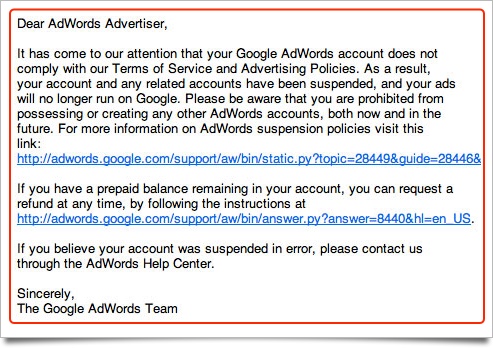
    In its continual quest to better serve users, Google has cracked down on misleading content in advertisements as well as website content. When your advertising campaign is slammed for “misleading content,” it can come as quite a surprise. Because Google holds advertisers to a high standard, some of the violations might seem like harmless marketing strategies. Regardless of how the situation arose, it’s important to bring your website and account back in line with Google’s expectations. The sooner you resolve potential violations, the sooner you can get back to building your brand’s online reputation.

    What Is the Google AdWords Misleading Content Policy?

    “Misleading content” is an umbrella term that includes several types of violations, ranging from problematic testimonials to deceptive branding. The main objective of the misleading content policy is to provide a set of clear standards for online advertisers to follow as to not deceive users with exaggerated or false content. The central component of these standards states that:

    – Disclaimers need to be included alongside perceived claims, even if the claims are direct quotations from past customers.

    – Images that show before-and-after results also need disclaimers. More broadly, improbable assertions are likely to draw the attention of the Google AdWords team.

    We’ve all seen investment opportunities and weight loss programs that sound “too good to be true.” As you might imagine, some of the standards allow room for interpretation, and many affected advertisers find that they need to resolve multiple policy violations to resume advertising.

    At least, in theory, Google’s policy should benefit both users and advertisers. Users shouldn’t have to scroll past misleading or spammy content, and advertising slots will become more valuable as users learn that paid search results are also informative and trustworthy. When you edit your ads and website to align with the Google AdWords misleading content policy, you’ll also be improving content and sales copy that might have sounded suspicious to potential customers. The things that Google considers “misleading” may also be off-putting to your target audience.

    What Kinds of Businesses Are Most Impacted by This Crackdown?

    With shifting expectations for disclaimers and testimonials, medical businesses like plastic surgeons and dermatologists are particularly vulnerable to being caught on the wrong side of AdWords policies. Whenever possible, peer-reviewed journals and other reputable sources can be referenced to support claims. Images are useful for showing the results of weight loss programs and cosmetic procedures, but those types of images need to include disclaimers to emphasize that individual results vary.

    Investment firms, lawyers, and other businesses may run afoul of Google AdWords misleading content policy, even though they aren’t making medical claims. The misleading content policy looks for vague guarantees and other wording that implies certainty or permanence. Depending on the phrasing used to describe results, virtually any business can find itself on the wrong side of Google’s misleading content policies.

    How Does Google Review and Determine If Content Is Misleading?

    In case there was any doubt, Google doesn’t employ a review board of physicians or lawyers to determine which claims are unjustified. Instead, an editor on the Google team judges whether the wording or formatting of a page is misleading. When the editor finds one or more violations that justify disapproving the account, they may (or may not) make a note in your case file. With the number of campaigns and sites reviewed by editors, it doesn’t make sense for them to make exhaustive lists of recommendations beyond the first one or two violations.

    As a business owner, you might never interact directly with an editor at Google. When you call the account representatives on the Google helpline, they only have the information that editors chose to note in your case file. If you fix the problems that were cited as “misleading,” there may be additional problems found when your site is re-evaluated. It can be a frustrating runaround but don’t get angry at the person on the helpline. They aren’t the ones who flagged your content, and they don’t have the power to reinstate your account. Instead of focusing on the people who made the decision, it’s better to try to understand the aspects of the policy that might apply to your site and campaign.

    What Do I Need to Do to Get My Ads Approved and Running Again?

    Not everyone gets site-specific recommendations in his or her case file, and even if you’re lucky enough to get actionable advice, it’s still important to be proactive about finding additional violations. After your campaign account has been flagged, the responsibility is on your company (and your web developer) to make sure that your site and your PPC campaign meet the standards set by Google. Look through your landing pages in search of other potential violations.

    Could your seals and stamps be perceived as mimicking government seals? Site layouts and deceptive popups can also trigger penalties. Popup windows shouldn’t simulate messages or system errors, displays intended to trick users into clicking through or interacting by accident. As previously discussed, assertions about future results need to be carefully worded. Some violations are more obvious than others but use due diligence to ensure that your site complies with relevant policies.

    How Can I Avoid Getting Ads Disapproved in the Future?

    Look at the penalty “sandbox” as a learning opportunity, and try to avoid repeating the same mistakes in future campaigns. Make a point of looking beyond your PPC campaigns to your website and your company’s approach to branding online. The campaigns flagged by AdWords often have issues on the landing page, marketing strategies that may be mirrored across the rest of the website. Even if a PPC campaign can be restarted with changes to a few key pages, it’s worth adjusting other website content to align with misleading content policies. Search algorithms favor high quality, unique content, and the misleading content policy hints at indicators that could eventually affect overall search rankings.

    If you don’t have time to spend waiting on the Google helpline, consider getting professional help through digital marketing consulting. Google’s policies and expectations shift periodically, and anticipating changes can become a distraction from your day-to-day business.

    As a Google Premier Partner, Search Influence has over 25 employees certified in Google AdWords Search, Video, Mobile, Display, and Analytics. Our digital marketing agency keeps up to date with the latest trends in search engine algorithms and online advertising to best serve our clients. Contact us so we can help get your ads approved and running again.

    Image Credits:

    Google Adwords Email

    Magnifying Glass

  • An Update: How to Get Rich (Answers, That Is) with Google

    Editor’s Note: This post was originally published on December 3, 2015, and then updated on July 28, 2016, to provide you with the latest information.

    2016 Rich Answers: Update

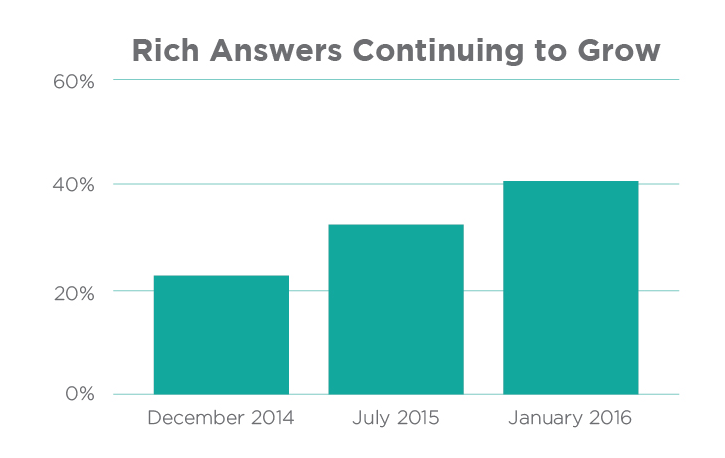
    Over the years, we’ve continued to follow and analyze Google’s perpetually evolving search engine results page (or SERP) to stay on top of Google’s algorithm and to provide deeper insight into how people use search engines. Rich Answers Continuing to GrowOver the past 12 months, we’ve witnessed a major paradigm shift in Google’s SERP, resulting in Rich Answers for 40% of queries on average as of 2016!

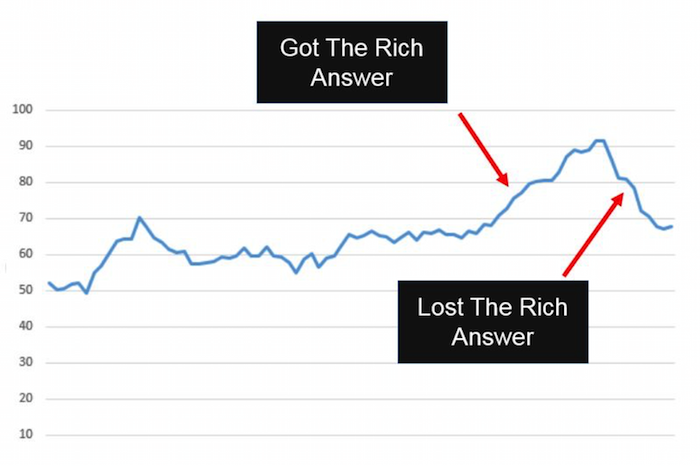
    Stone Temple Consulting Corporation’s 2016 study shows that Google provided Rich Answers (also known as Rich Snippets) for 22.6% of queries in 2014, 31.2% of queries in 2015, and 40% of queries in early 2016.

    Mostly surprisingly of all, the study shows that 55% of the available Google snippets are either brand new or have a new URL source since 2015. This is evidence of the volatility of rich snippets and how new sources (cough, your website, cough) have an enormous opportunity to obtain one!

    As Google’s SERP continues to evolve, it is now more important than ever to build a website in a way that better enables a domain to obtain these Rich Answers in the future. See the original blog post below for methods.

    What Are Rich Answers?

    “Rich Answers,” “Rich Snippets,” or “Google Knowledge Graphs” are results to search queries that have a definite or concrete answer. So definite, in fact, that Google will place them above all other searches with a linking source. Google will provide answers to questions such as “who won the Oscar for best actor in 2015,” “what is a rel=canonical,” “who is the president of Madagascar,” or even “what is the airspeed velocity of an unladen swallow.”

    Image Of Google Rich Answer Displaying Air Velocity Of An Unladen Swallow

    Rich Answers are featured snippets within the search results that allow the users to gain the information they are looking for faster and easier. These Rich Answers are provided in many ways, such as knowledge boxes, tables, images, maps, how-to graphics, and step-by-step instructions.

    The Results Are In

    Stone Temple Consulting released their findings earlier this year, stating that Google Rich Answer results have in fact grown quite significantly from approximately 22.6% in December of 2014 to 31.2% in July of 2015. This is truly a staggering amount considering the number of searches that are performed in the Google search engine every day. You might think that this would be detrimental to the health of most websites: if people are finding what they need in the SERP, they won’t continue onto a website. However, Stone Temple Consulting shows that in fact, the websites who were able to provide Rich Answers in the SERP actually get more website traffic than before. It creates a better user experience for all Google users by pushing up quality content, providing the searcher what they are looking for more quickly and creating a product that users want to come back to.

    Graph Image Of Effects Of Google Rich Answer Results

    Strategy to Getting a Rich Answer:

    Our simple strategy to getting a Rich Answer:

    1. Identify a simple question.
    2. Provide a direct answer.
    3. Offer value added info.
    4. Make it easy for users (and Google) to find.

    Use Google TrendsGoogle Correlate (which is currently in Beta), Shopping Insights, and data from your Search Console to determine if a topic is trending. This will give you a better understanding of how much effort to put forth on providing high-quality content so that other searches (and Google) will find your website as the authority on that subject.

    Utilizing Schema markup can help the search engines better understand the resources that you are providing on a given website. If Google can better understand your site, they can return more informative results for users and increase the likelihood of a Rich Answer over time.

    The format of content can also be a large contributing factor to obtaining a Rich Answer in the SERP. Step by step instructions, bulleted lists, simple tables, and charts are all simple ways businesses can format content that will allow Google and its users to more easily find the answer they are looking for.

    Summary

    We are expecting these trends to continue as Google’s users find value in these types of results. In fact, we predict that Google will not only increase these types of results in the future, but that it will also begin to provide more interactive Rich Answers by utilizing high performing website content. Once Google can directly attribute performance on the SERP within Google Analytics, it will become much more mainstream to include Rich Answers optimization in the marketing strategy of businesses.

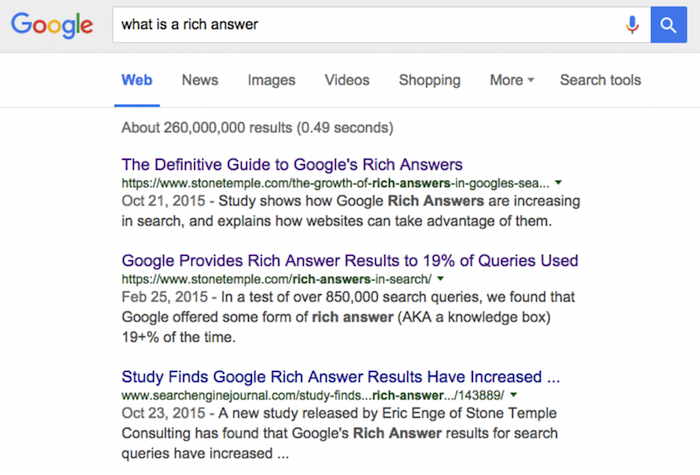
    And one last thing: if you search “what is a Rich Answer,” there is no Rich Answer for that result yet.

    Image Of Google Search Results For What Is A Rich Text Answer

    Image Credits:

    Image 1 Credit | Image 3 Credit

  • A D-Day Infographic: 15 Years at The National WWII Museum

    Seventy-one years ago on June 6, 1944, hundreds of thousands of Allied troops landed along the beaches of Normandy, France to fight Nazi Germany. The D-Day invasion marked the beginning of the end of World War II, turning the tide against the Nazis.

    A D-Day Infographic

    On the anniversary of D-Day this year, The National WWII Museum is celebrating its 15 years of preserving the story of WWII and making some history of its own. Such an homage to history and the museum’s work demands more than just words on a page. This D-Day, The National WWII Museum is making history come alive in an infographic produced by Search Influence.

    The infographic is capturing hearts and minds across the nation, proving this content marketing strategy is helping to spread the word about The National WWII Museum’s efforts to honor the courage, the sacrifices and ultimately, the victory of the American people. In just over 24 hours since launching on social media sites including Facebook, Twitter and Instagram, the infographic received 1,284 likes, 124 shares and reached a total of 25,077 people and counting.

    See the full infographic on The National WWII Museum’s website.

    D-Day-The-National-World-War-II-Museum-Infographic-Image

     Didn’t know about New Orleans’ connection to WWII? Let us know what you learned in the comments!

  • Search Tools, Edit Wars, and More: Get the Gist of Wikipedia for Businesses

    Wikipedia

    What is the Loch Ness Monster? Who is Monty Python? What is the history of Starbucks? Every time you do a Google search for practically any event, business, person, phrase, song, or obscure piece of trivia, Wikipedia seems to be right there at the top of the search results. Wikipedia, for those who are still using PalmPilots and pagers, is a free online encyclopedia. What makes Wikipedia unique is that it allows users to edit the content on all 35 million of its pages!

    A Brief History of Wikipedia

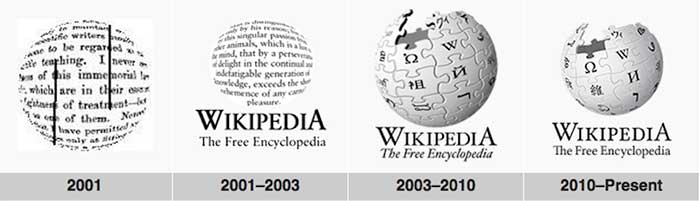
    With more than 500 million unique views each month, Wikipedia is currently the 7th most popular website on the Internet—but it didn’t start out that way. Wikipedia was launched in 2001, back in the dark ages of the Internet, and it was highly criticized for building a business plan in which no central organization would control editing and the general public would be responsible for the site’s upkeep. Because the site’s content was being created only by users, it took quite a while for the concept to gain traction in certain circles. In addition, some considered the website’s content to be untrustworthy because edits were so easy to make in the site’s early days. As you can see from the graph below, it took several years for the site to gain popularity, but within a few years, Wikipedia’s usage and traffic exploded.

    WikipediaGrowthGraph

    If you have ever visited Wikipedia, you’ve surely noticed that there are no advertisements, no fees to use the site, and no indications that the company is making a profit at all! This is partially due to the fact that they are a not-for-profit organization relying almost completely on donations from their users. A few times a year, the site hosts drives in order to cover basic costs like server space, bandwidth, software, office space, and salaries for its small staff. Of course, because all of their content is donated, there is no need to pay for updates and contributions!

    As time went on and Wikipedia increased in popularity, the company wanted to ensure that the site’s content was as trustworthy, current, and extensive as possible. Wikipedia began to create new processes that made editing content and creating pages more difficult, and it also added a review process. Only registered users can create new articles, some pages are protected from edits, and some pages are “semi-protected,” which means that only certain editors can make changes. All editors are allowed to submit modifications or updates. However, review is required for many of these edits, and all new articles must go through the review process. Depending on the page, edits can be reviewed by the public or by specific members of the Wikipedia staff, but if the edits are small enough, they might go live immediately without passing through the review process.

    What This Means for Your Business

    Because the site has such high authority and ranks so well in search results, Wikipedia offers incredible SEO opportunities for businesses. A business’s Wikipedia page can have very recent information, detailed descriptions about products and services, a history of the company, and even information about charities and community outreach programs the staff partakes in. However, because Wikipedia aims to always tell the full story from a neutral (and non-promotional) standpoint, dark spots in the company’s past are more prone to surfacing. Major lawsuits, media mentions, and other types of bad press could have a permanent place on a business’s Wikipedia page if that news is noteworthy enough. If your business is considering going down this path, always keep in mind that others will be able to write and edit all content about the business.

    Below, we have provided additional information (all from Wikipedia) on how to create a page, make edits, and more!

    Resources

    http://en.wikipedia.org/wiki/Wikipedia

    http://en.wikipedia.org/wiki/History_of_Wikipedia

    http://en.wikipedia.org/wiki/Wikipedia:Size_of_Wikipedia

    http://www.ehow.com/how-does_4809393_wikipedia-make-money.html

    http://en.wikipedia.org/wiki/Wikipedia:Your_first_article

    http://en.wikipedia.org/wiki/Wikipedia:Article_wizard


  • Facebook Engagement: How To Make Your Fans Say “I Do”

    Get more exposure to your business’ Facebook page. Incorporating these elements will enable your business to provide better and more shareable content!

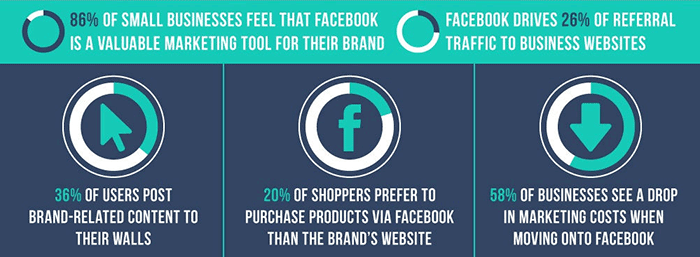
    There are 30 billion pieces of content shared via Facebook every month. That’s billion with a “B”! How is your business going to get noticed in this content sharing frenzy? One way is to write great and engaging posts people want to read! If people enjoy your posts, they will be much more likely to “like” the post, comment, or best of all, share it with their network– which has potential to reach a much larger, untapped audience.

    FacebookBusinessesStatsImage

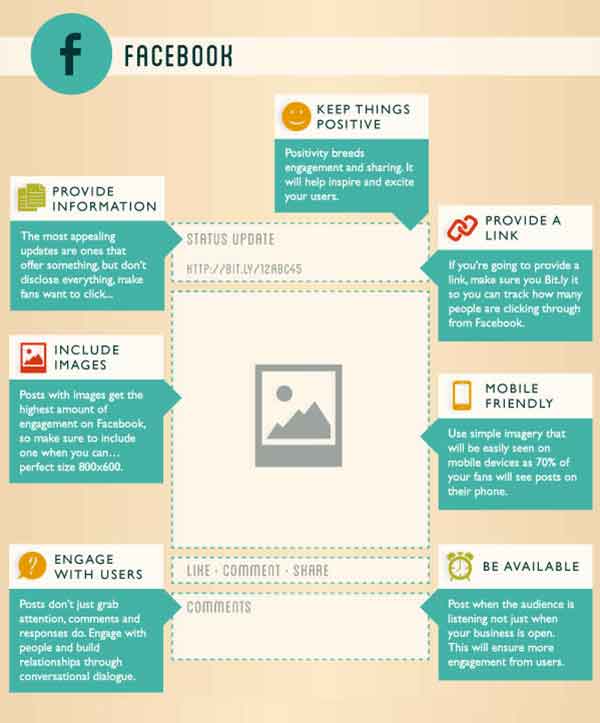
    If you are new to social media or find yourself with writers block, see some of our suggestions to create better and more engaging posts. Below is as brief list of the many ways in which you can create great content, but remember to pick just a few ideas per post to prevent overwhelming your reader.

    1. Don’t make every post “promotional.”

    For example, only posting about your business and the products you offer may not be the most exciting update for a fan to read. Instead, post about specials, sales, or events that are happening in the near future.

    2. Use images whenever possible.

    It has been proven posts with compelling text coupled with an image will get more engagement than plain text or a link alone. Take it a step further, instead of using stock images use authentic and unique images from your business.

    3. Create a “weekly something.”

    If you are a restaurant, post a recipe of the week every Tuesday. Or, if you are a dermatologist schedule a recurring post about products you recommend. Create some consistency and give your fans something to look forward to.

    4. Share or repost other business’s updates that you find interesting.

    Sharing or reposting other business’ great articles, posts, and pictures is a great way to grow your audience and offer great content to your fans.

    5. Respond to comments that are left on your posts.

    Big or small, it is always great when a business comments back on posts. In addition, you should occasionally comment on other people’s posts as well, especially on posts created by fans of your page!

    6. Take a little extra time and create a unique meme for your business to share on your social media platforms.

    This great tool called the Meme Generator allows you to create whatever meme you like with a variety of stock images available.

    7. Lastly, share something silly every once in a while!

    Found a video of an adorable elephant sneezing, two babies talking to each other, or a great gif? Share it! This will not only get your posts more likes, but good chance it will get shared a great deal with your business’s name attached to it. People love companies that have a sense of humor. It shows real people are behind the computer screen.

    PerfectFacebookPostImage

    Image Sources:

    Thanks to Pam Dyer for sharing this infographic about the “Perfect” post.

    Thanks to Steve Parker for sharing this mini graphic about Facebook for businesses.