Author: Jeanne Lobman

  • Top 3 Things to Check in AdWords “Dimensions” Tab

    The Dimensions tab in AdWords is a very useful area. You can really dig into a variety of different data sets to analyze your PPC performance. This data can give you valuable information on how best to optimize your campaign to maximize your budget, especially if you are limited by budget. There are a TON of things you can see and analyze in the Dimensions tab, but below are my three favorites.

    1. Paid & Organic

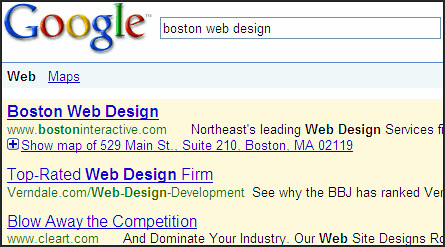
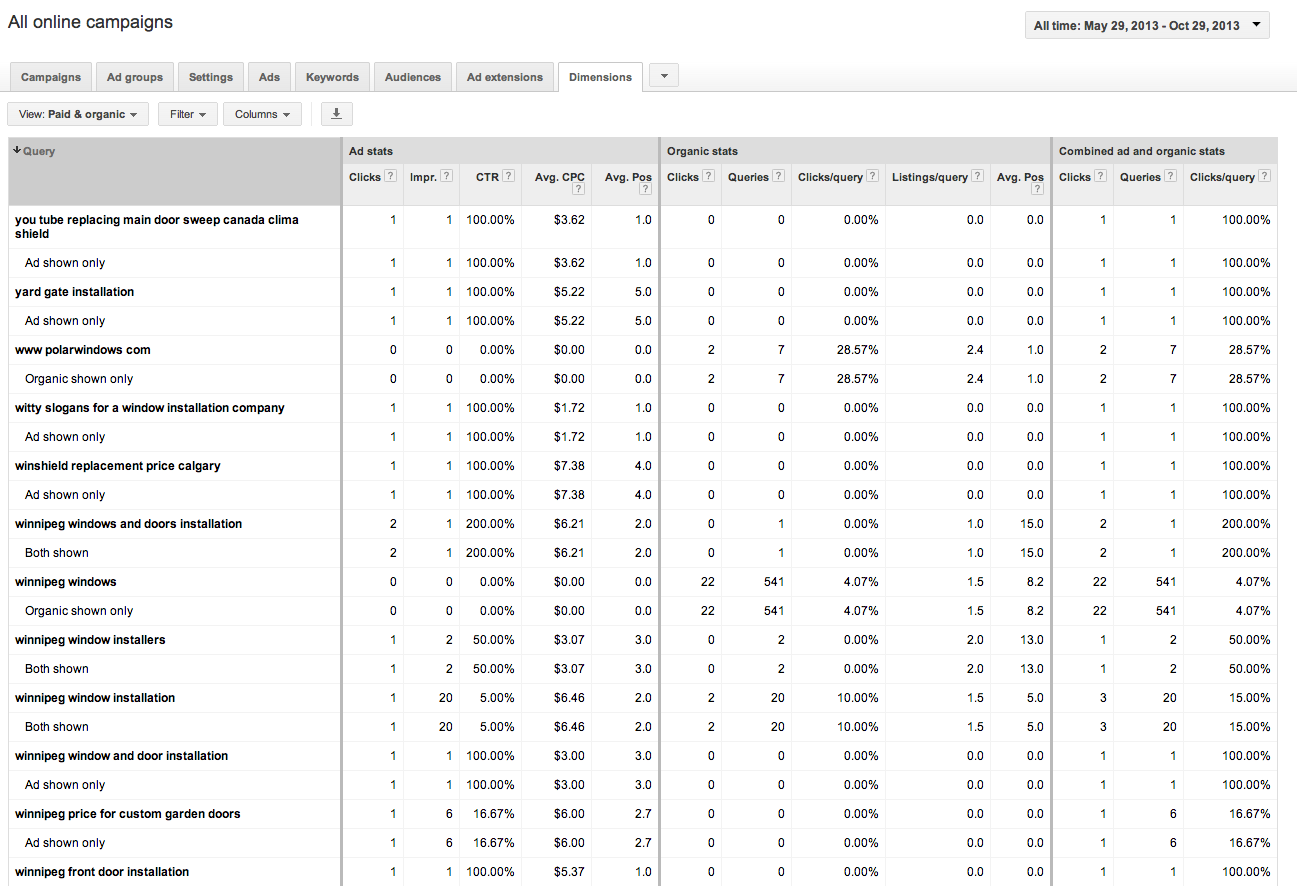
    A recently added feature, this table shows how your paid and organic results performed for every search that triggered an ad or organic listing. You can view your click through rates (CTR) for both paid and organic searches individually, but also the CTR for when you have both an ad and an organic listing displaying in the SERPs. This tool can be great to convince clients the value of paid search (even if they have great organic results!). You can also use this to gather some keyword data for making decisions for your SEO campaign given that Google’s decision to make all organic searches (not provided).

    Best Use: Gather information on how your ads perform when they are shown with your organic results.

    Learn how to link your AdWords account and Webmaster Tools account to view this data.

    2. Time > Day of the Week

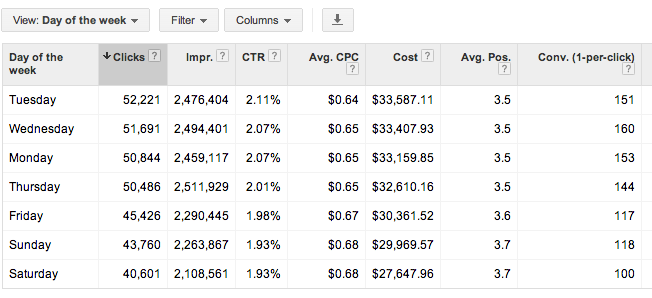
    This report shows you all stats for each day of the week over your selected date range. You can determine which day performs the best by meeting your defined KPIs. You can then adjust your bids based on the performance you see. Are Tuesdays and Wednesdays higher converting than Saturdays? Focus on those days!

    Best Use: Determine which day of the week is highest converting, and spend budget there.

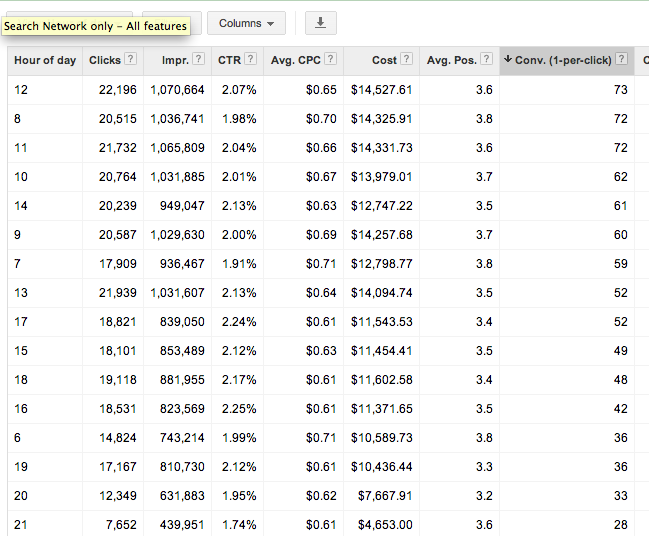
    3. Time > Hour of day

    Shows you cummulative stats for hours of the day for the selected date range. As with the above, you can determine which hours of the day best meet your goals (impressions, clicks, conversions) and adjust your bids accordingly. Be mindful that if you are limited by budget, the hours later in the day may have lower performance due to the budget constraints. You may want to test day parting for hours later in the day if you cannot adjust your daily or monthly budget to determine if those later hours are actually more successful.

    Best Use: Determine which hours of the day convert best and set up dayparting to spend more budget during these times.

    Check out the dimensions tab for yourself and get familiar with the data that is available. There are many more reports available that give you actionable information to better optimize your campaigns. Which are your favorites? Let us know in the comments!

  • How to Link Your AdWords and Webmaster Tools Accounts

    Google recently announced a new feature in the “Dimensions Tab” of Google AdWords. Once you link your AdWords account to your Webmaster Tools account, you will be able to view the “Paid and Organic” data. This report shows you a variety of valuable information, including the organic keywords that are delivering your website as a result and the clicks on those results. This is extremely valuable information given that Google is now masking all keyword data as “(not provided).” Below are the steps for linking your AdWords and Webmaster Tools Accounts.

    First, make sure to verify your website in Google Webmaster Tools. Then follow the steps below.

    1) Go to the gear icon at the top right.
    2) Select “Account Settings” from the drop down.
    3) Select “Linked Accounts” from the left sidebar.
    4) Select “View Details” under Webmaster Tools.

    Side Note: It’s a good idea to link your Google Analytics account, but for these purposes, you only need to link your Webmaster Tools account.

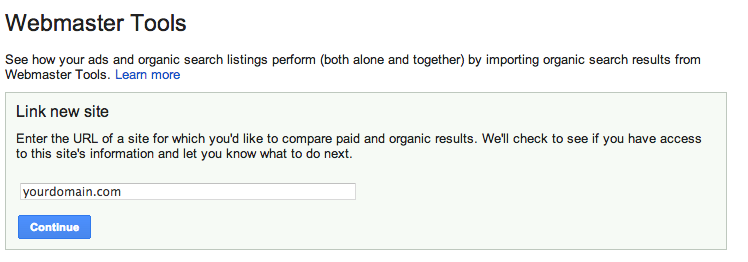
    5) Type in your domain and select “Continue.”


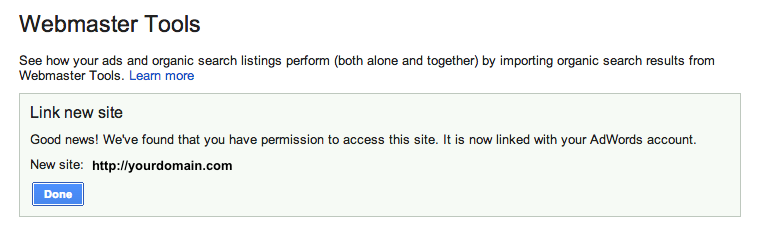
    6) If you did it correctly, you will get the following message:

    Now you can view all of the great data in the “Paid & Organic” report! You will find some interesting info here, especially how the combination of paid and organic play into each other. It will take some time for the data to accumulate, but once it does, you can gain valuable information.

    So What am I looking at?

    Query: The search query that delivered your website as a result. This will show the exact term that was searched, and whether you had an organic-only result, an ad-only result or both shown.

    Ad Stats

    Clicks: The number of times a person clicked on your ad for a given query
    Impressions: The number of times your ad was shown on the search engine results page for a given search term
    CTR: The number of clicks your ad received divided by the total number of impressions
    Avg CPC: The average amount you were charged for clicks on your ad
    Avg Pos: The average position your ad appears on the search result page

    Organic Stats

    Clicks: The number of times your organic listing was clicked on for a given query
    Queries: The total number of searches that returned your organic listings over the given period
    Clicks/query: The number of clicks your organic listing received divided by the total number of queries
    Listings/query: The average number of times a page from your site was listed in the organic results per query
    Avg. Pos: The average organic rank of your organic listing compared to other sites

    Combined ad and organic stats

    Clicks: The number of times a person clicked your ad or organic listing for a given query
    Queries: The total number of searches that returned your ad or organic listings over the given period
    Clicks/query: The number of clicks your ad or organic listing received divided by the total number of queries that returned one of your ads or organic listings

    What do you think is the most valuable thing to learn from this new data that is provided by Google (if you have an AdWords account)?

  • How To De-Personalize Your Search Results

    As Google continues to update its algorithm to deliver more local and personalized results to searchers, it becomes harder to get a true sense of where your site ranks in the search results. Below are a few different options for “de-personalizing” the search results you see.

    First things first, Sign out of Google

    Since your Gmail or Google+ account may be tied to various searches or a specific location, you should sign out of your account. If you would like to remain signed in, there are a couple of precautions to take:

    Hide Private Results:
    1) In the upper right hand corner there will be an icon for a person and a globe. Select the globe.
    Hide Private Results

    Turn Off Private Results:
    1) In the upper right hand corner select the gear > Search settings
    Update Google Search Settings for Private Browsing

    2) Scroll down to the “Private Results” Section and select “Do not use private results”
    Do Not Use Private Results in Search Settings

    3) Select Save

    De-personalizing your Results: &pws=0

    1) Go to google.com and do a search

    De-Personalize Search Results

    2) In your address bar, scroll to the end of your URL and add “&pws=0” and hit enter

    De-Personalize Search Reults with pws=0

    2) Voila! Your results have been de-personalized.

    Tip: you can also add “&num=100” to display 100 results on your search engine results page instead of just 10!

    Using Chrome? Use an Incognito Window

    If you are using Chrome, you can take an extra step and use an incognito window, which will have no history attached to it.

    1) Go to File > New Incognito Window
    TIP: The shortcut is Command-Shift-N on a Mac (on Windows it is Control-Shift-N)
    De-Personalize Search Results with Incognito Window

    2) Proceed to Google.com to perform your search (or search directly in the address bar)

    De-Personalize Search Results with Incognito Window for Chrome

    3) Finally, for extra precaution, use the &pws=0 method above

    4) Chrome also has this handy extension called Disable Google Personal Search that you can install that will automatically add &pws=0 to all of your searches. This speeds up the process quite a bit!

    Take Advantage of Private Browsing

    Safari
    If you are using Safari, you can browse the Internet using “Private Browsing.” The difference between private browsing and using an incognito window is that this setting is for the Safari Application, as opposed to just one window.

    1) Go to Safari > Private Browsing…
    Private Browsing in Safari

    2) A pop up will appear, select “OK”
    Turn on Private Browsing in Safari

    3) Proceed to Google.com to perform your search (or search directly in the address bar)
    Private Browsing in Safari Address Bar

    4) Finally, for extra precaution, use the &pws=0 method above

    Firefox
    Firefox has a similar feature. Here’s how to turn it on:

    1) Go to Tools > Start Private Browsing
    TIP: The shortcut is Command-Shift-P on a Mac (on Windows it is Control-Shift-P)
    Private Browsing in Firefox

    2) A pop up will appear, select “Start Private Browsing”
    Turn on Private Browsing in Firefox to start browsing

    3) Proceed with your search!
    Turn on Private Browsing in Firefox

    4) I came across this extension, which works in Firefox and in Chrome. It’s called Google Global, and can be used to see search results in other countries but also has a de-personalization option.
    Google Global De-Personalized Search results

    Internet Explorer
    Lastly, Internet Explorer also has a private browsing option. Follow the below steps:

    1) Go to the gear icon in the top-right corner and choose Safety > InPrivate Browsing
    TIP: The shortcut is Command-Shift-P on a Mac (on Windows it is Control-Shift-P)

    2) I haven’t personally tested it out, but there is a plugin you can use for Firefox and Internet Explorer to prevent you from seeing personalized search. Download it here.

    Clear Your Cookies

    If you want to be absolutely sure you have no personalized search,  you can clear all of your cookies. I prefer not to do this as it will also make you sign back in to any accounts that you may have previously been logged in to, but it will definitely do the trick. Here’s a great article on clearing your cookies depending on your browser and computer.

    Thinking About Your Online Results

    Looking at the de-personalized results will only give you a sense of your online presence. Google’s move toward greater personalization around location and search history makes a focus on rankings a less accurate depiction of your overall online presence. Although these are the “truer” results, because most everyone else using the Internet will have personal results, you can see how any one search result page is not 100% accurate or true for everyone.

    Your rankings are a key performance indicator for your online results, but they are by no means the definition of success. It is important to look at a variety of factors which include an increase in traffic for organic traffic, both branded and non-branded, and an increase in conversions, leads, or transactions that are completed as a result of organic searches.

  • WTF Facebook?

    On Friday, I received an email from Facebook regarding their Page Insights. My initial reactions were “Great! They’ve finally realized how horrible their reporting system is and are making changes!” Boy, was I wrong. The email in its entirety is below, but the man gist is that they have been incorrectly reporting on the number of total, organic, and paid impressions and reach as reported through their Page Insights. Supposedly, the Ad Insights and Billing Data reporting tools are not affected, not that those are great anyway.

    They promise that these issues will be fixed by today and “moving forward, your impressions and reach numbers in Page Insights will reflect these updates.”

    The real kicker however, is that these issues impacted their “logging system,” so they will not be able to provide accurate historical data for organic and paid reach and impressions (in Page Insights). I mean, come on! Not only is Facebook’s reporting platform not intuitive, but your historical data is now inaccurate or missing.

    Facebook’s reporting platforms have continued to disappoint, and this is no exception. It would be great if they spent some time gathering data about what their users want and need, and how best to display that data. I guess I have to give them some props for admitting their mistake and fixing it ASAP, although I was hoping for more.

    What data would you find interesting for Facebook to report on? Let us know!

  • Search Influence’s 7th Anniversary: A Reflection and Q&A With Founders Will & Angie Scott

    Will & Angie Scott founded Search Influence in January 2006, and we couldn’t be more excited to celebrate our seventh anniversary. This past year has been especially eventful for us, and to celebrate another successful year in the books, we had a joint holiday and anniversary party at New Orleans’ own Rock-n-Bowl. We bowled, we ate, we drank, we danced — we even hula hooped!In 2012, we began supporting and working with a local non-profit, Youth Rebuilding New Orleans. We are so honored to have the opportunity of working with YRNO and to assist in their efforts both online and off. Our team is planning a service day in 2013 to work with YRNO on rebuilding a home in the city.

    Many other Search Influence employees have also taken an interest in blogging, both here on our blog and elsewhere on the web. We are so proud that they are able to take the knowledge learned here, apply it to real life situations, add their personal twist and share with the industry.

    This year we were also lucky enough to continue our exponential growth. Lots of new faces joined our team in 2012, and we were able to find the perfect VP of Sales and Marketing in Kelly Benish.

    Other new faces include: Gabrielle Benedetto, Julie Simmons, Laura Manning, Maggie Johnson, Erika Karas, Rebekah Durel, Emily Kerner, Jennifer Stout, Patrick Sugrue, Will Monson, Allison Warmbir, David Fransen, Chelsea Bowling, Mattie Kenny, Tracy Stoller, Kasey Clark, Jason Grodsky, Melanie Bonhomme, Evan Rinehart, Caleb Albritton, Andre Eble, Justin Scott, Lauren Christy and Scott Holstein. We’ve continued that momentum into 2013 with our first new hire of the year, Joe Romito.

    The last couple of years have also brought major milestones for our company. Search Influence had humble beginnings, starting out of Will and Angie’s dining room and eventually moving into a small office on Jackson Avenue. But that wasn’t enough to hold our growing team. We expanded down the hall into a couple of other office spaces on Jackson Avenue and were lucky enough to finally move to our current location on Oak Street. This new location gave us the ability to work together as a team in a unified workspace, and provided enough room for us to continue to expand.

    In 2011, Search Influence was included on the Inc. 500 list for fastest growing companies in America, and was featured again in 2012. Although our growth is apparent to us (at least in number of employees), we were very excited to be recognized among the many other hard working and growing companies across the country.

    Of course, we wouldn’t be where we are today without the loyalty and trust of all of our amazing clients! We want to sincerely thank you for allowing us to be a part of your team and to help you grow your businesses online. We cherish each one of you: as an account manager, I can personally say that interacting with you on a daily basis keeps us on our toes, which we appreciate! You challenge us to be experts in our field and to continue to grow our ever-expanding knowledge base.

    With the anniversary drawing near, I also had the opportunity to interview Will Scott, CEO and Angie Scott, COO. Although they are very busy, they relished the opportunity to take some time and reflect on the growth and momentum this journey has produced so far, as well as what’s in store for the future.

    Thoughts on our 7th anniversary? How do you plan on celebrating?

    We had a really nice holiday party with the team on Friday the 4th. Aside from that, I think we’re going to celebrate by keeping on, keeping on. Even though we’re 7 years old, it feels like we just got started most days!

    What are you most proud of as a company? Any favorite feathers in our cap you’d like to share?

    Wow. That’s a hard one. I’m proud of so many things.

    Growth: zero to almost 50 (over 100 including contract) employees in 7 years. The great work we do: there are so many ways to measure — ranking, leads, fans and followers — that our clients have really seen the benefit to their business of our work. One of my favorites is the Audubon Institute — 50,000 Facebook likes added (over 75,000 total!) under our watch. Also: seeing team members grow. It blows me away when I hear some of things our team says. I’m like “Wow! I could have said that!”

    Where do you see the company at the 10 year mark? What is your top priority in the next few years leading up to the 10th anniversary?

    2013 is a product development year for Search Influence. We’re going to keep going on our current path, but we’re also looking at ways we can broaden our reach. So year 8 will be about building tools which will help us grow at a more rapid pace in years 9 and 10.

    What has been the most rewarding part of starting Search Influence?

    Knowing that our work helps thousands of small businesses succeed online. I used the Audubon example before, but there are many others, not as well known, who’ve seen incredible growth in revenue, reach and market share through search and social media.

    Additionally, seeing our team excel. The majority of our Account Management team are Google and Bing Ads Certified, and we have 3 Google Analytics Certified team members as well. We are among the most credentialed online marketing firms anywhere and it shows in our work.

    Beyond the credentials, our team is smart, learns fast and executes phenomenally. We are working in an area they don’t teach. On the job training, tinkering and testing is how we all learn and get better.

    What has been the most surprising thing?

    In May of 2010, we made a decision after nearly 4 years to end a relationship with a firm in India who staffed our production team. I was initially surprised at how easily we replicated those skills here. Then I was blown away by how much more efficient we were under one roof in our new Oak Street office.

    To what factors can you attribute SI’s rapid growth?

    Honestly, I wish it were more rapid most days. But, I can see how, compared to many New Orleans companies, it’s pretty darn quick.

    The #1 factor I attribute our growth to is that we built it to scale from day 1. It is one of our mantras to ask the question “How can we do this at scale”?

    What are your opinions on the booming NOLA startup scene?

    It’s great. Anything which attracts talent to New Orleans is a positive. The New Orleans startup scene is a little too focused on ideas and not enough on viable products and services, today, but I’m sure that with time it will mature.

    Our vision statement is “Search Influence helps customers successfully market online.” Do you think we’ve stayed true to this goal? Any key takeaways for the future?

    Search Influence has stayed true to its vision statement of “helping customers successfully market online” since the beginning, and will continue to do so into the future. We sell to direct customers that are competing phenomenally online, and to White Label clients whose customers are also doing very well.

    As I’ve said, it’s all about scale. The more we can focus on skills and growing our team, the more businesses we can serve.

    With countless happy clients, a top-notch team of dedicated employees, and big ambitions for what’s to come, Search Influence’s future looks bright. Our thanks to our CEO and COO Will & Angie Scott for joining us for this Q&A, and congratulations on seven exceptional years!
  • Pubcon New Orleans 2013 is Just in Time For Jazz Fest!

    New Orleans Skyline at night
    Here at Search Influence, we’re excited to hear that Pubcon is coming back to New Orleans! In September, Pubcon announced that they will be coming to New Orleans for their spring 2013 conference (they must have heard about all the exciting stuff happening at the SI offices). Dubbed “Pubcon New Orleans 2013,” the conference will be held at the New Orleans Convention Center on April 22 – 25th.

    Pubcon is one of the leading social media and search marketing conferences, famous for groundbreaking keynote speakers such as Matt Cutts and Guy Kawasaki. As a local New Orleans SEO & online marketing firm, Search Influence is thrilled at the opportunity to help bring recognition to New Orleans as a burgeoning homesite for our industry. “As the home of this season’s Super Bowl, and with so many other good signs — it is clear that New Orleans is back! The layout for Pubcon at the New Orleans convention center is the best conference setups we have ever had.” says Brett Tabke, founder and chair of Pubcon.

    Pubcon Logo

    Our CEO Will Scott says “I’ve taken part in Pubcon for the last 2 years in Las Vegas and I’m very excited they chose New Orleans for their spring show. I’ve been lobbying on twitter, and I’m glad the will of the people matched my own. I’m especially excited at the opportunity for our team to be exposed to some of the best online marketers on the planet. The learning that will come out of this will really add value to our team and our client campaigns.”

    What the planning committee for Pubcon didn’t realize (or maybe that they very smartly planned…) is that the conference will be held during one of the most exciting times in New Orleans. The first weekend of Jazz Fest will start the day after the conference ends, on April 26th. For those who haven’t had the opportunity to come to New Orleans, this is the perfect chance to visit during an exciting and informative conference followed by a weekend of great music, food, and festing.

    Jazz Fest New Orleans

    Early Bird Registration for Pubcon New Orleans is now open and will be available until December 31, so hurry up and sign up before the prices increase — you seriously won’t want to miss this week! Speaking Proposals are also open, so get your pitches ready! Expect to see Will on at least one session.

    Some interesting facts about Pubcon New Orleans:

    • The conference will be held at New Orleans Convention Center
    • This will be a “full” Pubcon conference
    • “Pre-game” full day of Pubcon Masters Group search and social media training will be held the first day on April 22
    • The official conference will be held on April 23 – 25
    • The Exhibit hall is scheduled to be open on April 24 – 25
    • Last but not least, the conference is 5 blocks from Bourbon Street! Pubcon afternoon will take place at a nearby pub on April 25.

    Jazz Fest tickets are also available and can be purchased right here. The line-up isn’t set yet — however, I can promise you that even if your favorite artist is missing from the list, you are sure to be entertained! Check back often, as we’ll update you when the final line-up is announced.

    Hope to see everyone in April!

  • Why You Should Start a PPC Campaign Today

    PPC Questions & Answers for Small Businesses

    I get a lot of questions from clients about starting or maintaining a paid search or Pay Per Click (PPC) campaign. While we at SI are undoubtedly convinced of the positive impact a paid search campaign can have on a small business, others need more information before committing. Some of the most frequently asked questions about a paid search campaign include:

    • “What are the advantages and disadvantages of a PPC campaign?”
    • “Why should I do PPC if I rank in the first position organically?” in the same sense, “Should I start a PPC campaign until I start ranking organically?”
    • “Why should I pay for people to click on my website when they are already looking for my brand?”
    • “How will this help my business, and what should I expect for an ROI?”

    So, what are the answers to these important questions facing small businesses? Here’s my take:

    What are the advantages and disadvantages of a PPC campaign?

    1. Starting a PPC campaign allows you to show up in the Google search results for search terms that you may not rank for organically.
    2. A PPC campaign allows you to set daily and monthly budgets for the keywords and areas you want to target. If you are selling a product or service that is sold out or fully booked, you can allocate your budget to a different product or service with a simple click.
    3. You also have more control over the locations where your ads show. With SEO, you are building overall site authority, and while you may be targeting specific geo-modified keywords, you could potentially rank in other locations. With paid search, you can set your preferred locations as well as the exact geo-modified keywords you want to target.
    4. One of the main benefits of a paid search campaign is that results can be instantaneous. While it typically takes 30-60 days to fully optimize a campaign to see optimal results, you can begin receiving leads or making sales the first day your ads are live.

    Will paid search marketing ads still help me if I rank in the first position organically?

    The answer to this is, of course, “YES!” — but let me tell you why.

    1. For terms that you do rank for organically, having a paid ad allows you to claim more “real estate” on the search engine results page and increases the likelihood that people will come to your site. People tend to believe your site is more authoritative because Google allows you to show up more than once on the page. According to Search Engine Watch, 34 percent of paid search clicks occur when the same website ranks organically on the page. If the paid search ad is paused, only 11 percent of the traffic generated by the ads will be replaced by the organic clicks.
    2. Having a paid search campaign gives you the ability to control your message through your ad copy and change it easily and often if necessary. You can create unique ads for specials and seasonal offerings and have them rank in top positions quickly. This allows your ads to always be relevant.
    3. PPC also gives you the ability to control the message and content of the landing page to which you send your visitors. You can optimize this landing page for conversions and sales, with less focus on keyword-related content.
    4. Finally, you have the ability to test ad content, landing pages and keywords on a larger scale. You can determine which calls to action are driving traffic and which keywords convert the best in a shorter time frame. Then, you can apply this knowledge to your SEO campaign.

    Side Note: Running a paid search campaign will NOT improve your organic rankings.

    Should I start a PPC campaign until I start ranking organically?

    You should most certainly start a PPC campaign immediately. However, see the question above for why you should continue the campaign even if you rank in the first position organically.

    Why should I pay for people to click on my website when they are looking for my brand?

    Besides the points mentioned above, there are many reasons to bid on branded keywords.

    1. Competitors may be bidding on your branded terms and you will want to ensure you are showing in the top position for your brand.
    2. Branded clicks are very inexpensive, as you are going to be the most relevant result for your brand, and Google will “reward” you for that.
    3. People searching for your brand are more likely to convert, and you want to be where they are searching.

    How will this help my business, and what should I expect for an ROI?

    Search Influence tracks all aspects of a paid search campaign, similar to how we track success for SEO. We provide call tracking numbers for campaigns and set up form tracking to attribute leads directly to paid search campaigns. Our monthly reports include a list of leads, cost per lead, clicks, click through rates, and average cost per click (among other factors). This helps our clients determine if the leads we provide are valuable and what leads are becoming actual customers. ROI will vary depending on industry, but we strive to provide a positive ROI for every client.

    So if you are wondering if you should start a paid search campaign, the answer is almost certainly “Yes!” With effective research, targeting and analysis, you can have a successful campaign that will generate leads and sales for your business.

    I’d love to hear your opinions on PPC, so leave a comment below!

  • The One Thing You Should Do Right Now to Help Your SEO

    1. Open your browser. www. vs. non-www.adclub.org

    2. Type in www.[yourdomain].com. After it loads, does the web address stay on www.[yourdomain].com?

    3. Then, type in [yourdomain].com. After it loads, does the web address “resolve” to the same address as it did when you completed step 2?

    If not, your site technically has two versions of itself, therefore leaving search engines to believe that your entire site consists of duplicate content. This problem is actually very common, but fixing it is the one thing you should do right now to help your SEO.

    In the example above, the domains www.adclubno.org AND adclubno.org both exist, meaning there are two copies of every page on the site, which could be detrimental to rankings in search engines. Luckily, there is a pretty easy fix for this problem. But first, let’s discuss why duplicate content is bad for Search Engine Optimization.

    What is Duplicate Content?

    Image courtesy of SEOMoz.com.
    Google defines duplicate content as “substantive blocks of content within or across domains that either completely match other content or are appreciably similar.” Duplicate content is often considered one of the top negative SEO ranking factors. Duplicate content to search engines is like identical triplets to a drunk frat guy: how do they know which version is the right one to choose? According to SEOMoz, three of the biggest issues with duplicate content include:

    1. Search engines don’t know which version(s) to include/exclude from their indices
    2. Search engines don’t know whether to direct the link metrics (trust, authority, anchor text, link juice, etc.) to one page, or keep it separated between multiple versions
    3. Search engines don’t know which version(s) to rank for query results

    What this means is that search engines want to show the most relevant content to their searchers, but if you have duplicate content existing across URLs, the search engines get confused. Link metrics and page authority get split between the URLs, diminishing the value of all of your SEO efforts.

    Ways to Check for Duplicate Content

    Duplicate Content ToolBesides typing your domain in your browser, Virante has a duplicate content tool that checks whether your domain has duplicate content. Just submit your domain, and the tool will do a WWW/NonWWW Header Check, Google Cache Check, Similarity Check, Default Page Check, 404 Check, and a PageRank Dispersion Check. As in the previous example, www.adclubno.org failed the WWW/NonWWW Header Check, and because of this main problem, they also failed the Google Cache Check, Similarity Check, and Default Page Check.

    How to Fix These Issues

    So now that you’ve realized that you have a problem, how do you fix if? For starters, you can log in to your Google webmaster tools account and designate your preferred domain. This lets Google know which version of your site to provide in the search engine results. Next, you (or in my case, someone else with actual programming knowledge) should set up a permanent 301 redirect in the .htaccess file to let other search engines know which domain is the preferred one.

    Once this problem is resolved, you will want to make sure that you are consistently using the preferred domain for all of your link building endeavors.

    Do you know if your domain has duplicate content? Find out now!