Author: Search Influence Alumni

  • 5 For Friday – Backlinks, Knowledge Graph, And Privacy!

    FiveForFridaysColorfulFive1. Matt Cutts: Google Won’t Devalue Links Anytime Soon

    -Search Engine Watch

    Well, you’d certainly hope this is the case with the way Google is initiating hundreds of thousands of manual actions every month…But in Matt Cutt’s recent video, he explains the value of those quality links while Google continues to better understand and define what determines quality content. As it stands, Cutts sees the value of quality links to be a relevant ranking factor for the time being. So fear not, if you are working to improve the quality of your content along with improving and diversifying that backlink profile with authoritative links, you’re certainly protecting yourself from future menacing Penguin updates.


    2. Google’s Knowledge Graph Expands into Google Maps

    -Search Engine Land

    Google’s knowledge graph is expanding from organic search results into their map results. Much like the results from regular search queries on google.com, the knowledge graph will now pull information cards with quick facts about certain places searched in Google maps results. But hey, don’t just take Search Engine Land’s and my word for it, run a maps.google.com search for New Orleans’ own St. Louis Cathedral and check it out for yourself!


    3. European Court Requires Google to Delete Personal Info

    -Search Engine Roundtable

    Hey SEOs! Reputation management just got easier! If you live in Europe that is. In a recent ruling, a bill so cleverly titled “the right to be forgotten” requires that search engines, such as Google, Yahoo, and Bing must remove links from search results for a person’s name if that person requests to have that result removed.

    GoogleLogo

    4. How to Dramatically Improve Your Google Authorship

    -KISS Metrics

    This article provides some great tips for improving your Google authorship. As with any authorship improvement tip article, though, do keep in mind that excessive guest blogging is a definite no no. Keep the list of sites you contribute to condensed and featuring only those important and authoritative sites you write for. Guest blogging, if done incorrectly, can be seen as a spammy link-building tactic. A definite highlight of the tips provided in this article was “feature your most flattering picture…you don’t have to be good looking. You just have to…’put your best face forward.’” So no worries—you don’t have to be Brad Pitt, Ryan Gosling, or Jon Hamm. You just want to ensure your thumbnail image is clear.


    5. 5 New and Improved Twitter Features Marketers Should Use

    -Search Engine Watch

    This article is a fantastic overview of those new Twitter features and how they translate into tactics marketers can utilize. A particularly interesting, stand out feature is that Twitter now allows for engaging tweets to appear larger than others. Now “all” you have to do is make sure your tweets are always relevant, engaging, and interesting to your audience.

     

  • Clear Your Case Of Social Media Acne – Ugly Picture Links

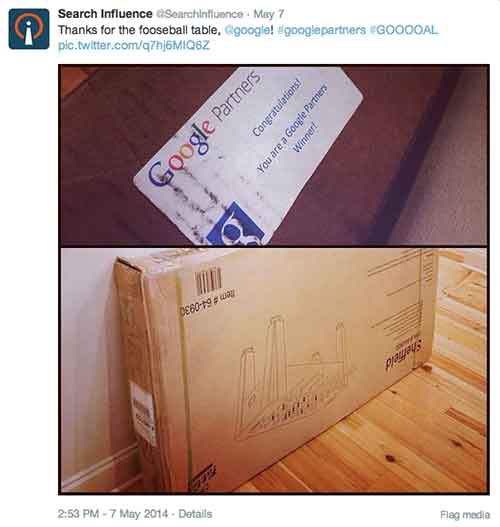
    You can go far on 140 characters, but as they say, a picture is worth a thousand words. For the past year or so, Twitter has been enriching users’ experiences by allowing pictures and videos to be directly displayed on the feed, and with the introduction of the new profile design, it now allows users to visually enhance their profiles as well. As Twitter increasingly becomes a multimedia-friendly social media platform on both web and mobile, research shows that Tweets that include photos or videos receive 5 times more engagement than simple text tweets.

    SiTwitterPost

    Owly? Oh No! (The Terrifying Discovery)

    This week, while doing my routine account manager duties, I was looking over a client’s Twitter account and I noticed that our social media scheduler, Hootsuite, was still displaying images as ow.ly links.

    OhTheHorror

    One Does Not Simply Address Hootsuite (Or Does One?)

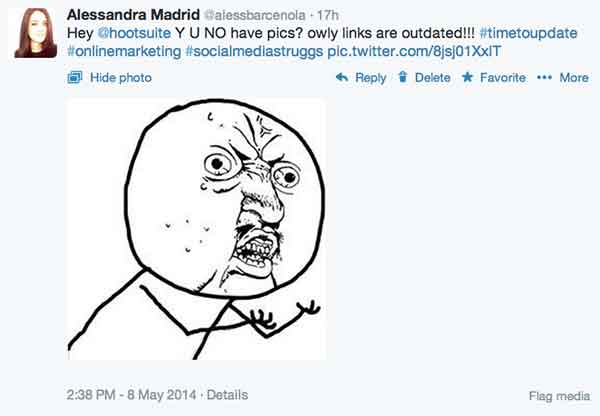
    As a social media fanatic, I did what I do best and voiced out my anguish @hootsuite.

    HeyHootsuite

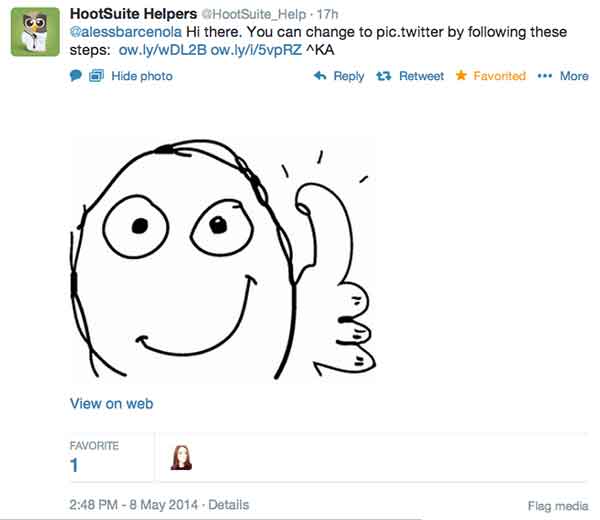
    Thankfully, Hootsuite knows the value of connecting with users via social media, and they were quick to respond with a solution.

    HootSuiteHelpers

    A Brief & Wonderful Solution To All Our Problems (& World Peace)

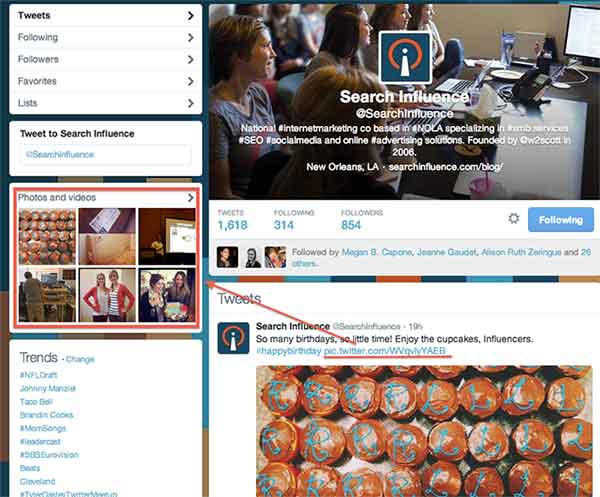
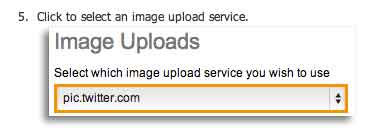
    As I did more research behind the solution Hootsuite provided, I found out that just 2 months ago, the social media scheduler rolled out the option for Pro and Enterprise users to post photographs via the native pic.twitter.com functionality. This feature will allow any photograph scheduled via Hootsuite to be automatically displayed on Twitter’s timeline, and it will also be included in a user’s photo gallery.

    TwitterPicUrl

    You Too Can Have Beautiful Picture Links

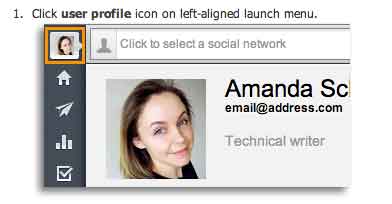
    Ready to make the switch? I know Search Influence is! The steps to change your image upload service on Twitter are quite simple, and as studies continue to show us, the rewards of doing this will be quite grand.

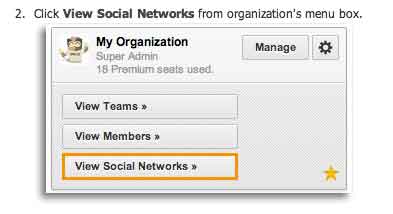
    ClickUserProfile

    ViewSocialMediaNetworks

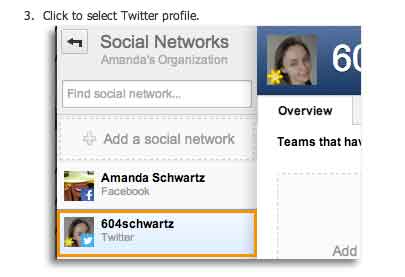
    SelectTwitterProfile

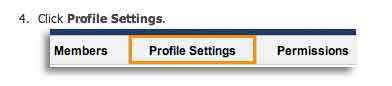
    ProfileSettings

    SelectImageToUpload

    Voilá! Your scheduled Tweets will now be posted with multimedia showing up on users’ feeds.

    Voila

  • Google Ranking: No ShortCutts to Success

    More often than not, our clients ask why their keywords aren’t as high up on Google as they should be. Is it a penalty issue? Is it an algorithm change? Or is it your content? Recently, I had a client that asked these exact questions. Here at SI, our job is to diagnose the answer.

    If you’re an online marketer, you know one name to be the Holy Grail of answers: Matt Cutts (for you non-online marketers, the head of Google’s Web Spam team).

    Recently, Cutts created a help video to answer the question we ask every day: What really determines why you’re not ranking as high as you think you should?

    The answer: It depends!

    Image of Google's There are No Simple Solutions Quote

    Make Friends With Webmaster Tools

    According to Cutts, you should first ALWAYS, ALWAYS, ALWAYS check Webmaster Tools. Here, you can see in detail what could be the issue, whether it be keyword stuffing within your content or some sort of crawl error.

    “We have seen sites that will launch a new development website that was previously no-indexed, and forget to take off the noindex tag,” Cutts said. “Or there’s 404s, or we can’t reach your site…”

    But what about the other algorithmic issues? How can you determine if it’s an algorithmic penalty or your content? According to Cutts, they don’t give much thought about algorithmic penalties because Google doesn’t really view them as penalties.

    “It’s a tough call to make,” he says, “because the web spam team is working on more general quality changes, not necessarily things specifically related to web spam…we just think of it as the holistic ranking.”

    Don’t Fear The Algorithm

    According to Cutts, in 2012 Google rolled out about 665 changes to how they rank search results, so the odds that they are rolling out some algorithmic change at any given point are pretty high. In fact, they might be rolling out a few. However, if the algorithm changes they make will impact your site in a big way, Google will notify you of those changes.

    For example, as Cutts says, Panda’s algorithm has become more integrated into indexing and has less of an impact on your rankings, whereas Penguin’s is still ever-changing and will more than likely have a bigger impact. In other words, Google will  likely send you a notification if you were affected by some change within Penguin’s algorithm.

    You’re probably wondering, what does this all mean? The reality is, it comes down to what you believe is best practice for your site. If your competitors are doing something that you think might be affecting their rankings in a great way, then use your judgement to determine if that’s something you should be doing for your site. As Cutts says, it’s difficult for Google to say that something is a penalty because it’s just a part of ranking. The good news is that it is algorithmic. As you change or modify your site based upon what you see within your competitors, you can see that these algorithms can reprocess the sites and you can and will rank again!

    Applause

  • 5 for Friday – Google SSL Warnings, Twitter & Amazon Collab, and more!

    1. Twitter and Amazon Link Up, Add Items To Your Shopping Cart With A Single Tweet – Buzzfeed

    452416003

    Amazon is using Twitter to drive sales with the new #AmazonCart feature. This may be a major breakthrough for ecommerce businesses. It’s super simple:

    1. The business tweets out a link for a product.

    2. Interested consumers can then reply to that tweet with the hashtag #AmazonCart.

    3. The product will instantly appear in the consumer’s Amazon cart.

    The consumer’s Twitter has to be linked to their Amazon account in order to do this, but the new feature should drive sales for E-commerce businesses with products on Amazon. Twitter users can also search the hashtag #AmazonCart to see what other people are buying. Isn’t technology great?!

    2. Become Your Own Rumpelstiltskin: Spinnin’ Crappy Online Reviews Into a Better Business – Search Engine Journal

    This is a great article on how to approach negative reviews. There are bad reviews from people who genuinely had a bad experience and bad reviews from people who are just plain irrational.

    How do you tell the difference between these people?

    If you look through an irrational person’s profile it’s full of negative reviews and they usually make overly dramatic and sadistic statements. People that genuinely had a bad experience  usually have a mix of positive and negative reviews if you look through their profile, there are some positive comments within their negative review and they make rational statements about their experience.

    How do you deal with this?

    Respond to the irrational reviewer with a generic, but genuine message without addressing specific points of concert. If they respond back, don’t respond again. Respond to the rational reviewer by addressing their specific concerns quickly and assuring the reviewer that steps have been taken to ensure that this will not happen again.

    3. New App Reveals How Much Information You’re Giving To Facebook – Search Engine Journal

    FacebookScaryScary! A new app, called Digital Shadow, was launched as a promotional tool for the upcoming video game Watch Dogs. It uses data you’ve given to Facebook to guess your location, your income, and your passwords. They use algorithms to predict your interest, desires, and fantasies. We live in an era where we like to document everything online from how we’re feeling to what we purchased to where we are in the world. It’s an eye opener to find out that there are people in the world that can use that information against you to hack your computer or to be more influential in their sales tactics towards you.
    4. Google Pauses Webmaster Tools SSL Warnings In Order Clarify Them In Future – Search Engine Roundtable

    Google recently sent out mass SSL warnings via Google Webmaster. They decided to pause the warning after they realized they were causing mass confusion. Now, Google is working on making the warnings clearer and tweaking the criteria before restarting them.

    Google is simply providing information about the server response for HTTPS access to your URL. If it responds, but the SSL cert does not match the domain, the warning lets you know. Basically, Google wants the hosts to either serve content via HTTPS properly, or not serve content there at all. Serving content via HTTPS without a valid TLS/SSL certificate will result in users seeing browser warnings. Avoiding this makes sense, no matter how many site users actually see the warning.

    5. Announcing Schema.org Actions – Schema Blog

    LegosAction

    Schema.org introduced vocabulary that allows websites to describe the actions they enable and how these actions can be invoked. You can use action schema to play a video, review a movie, or purchase a product. The new schema adds context to a link or content. It is a way of interpreting content to cite sources and authors and the type of activity that happened between the two. From what was said in the press release, the actions schema is still a work in progress and will be enhanced as more users use action schema and provide feedback.

  • Is Anti-Social Media On the Rise?

    This year will make a decade since Facebook was launched and social media usage has skyrocketed, but is social media turning us anti-social? Parents who were unhappy about their children’s texting habits in the early 2000’s would be appalled by today’s society of Instagraming, Tweeting, FourSquaring and Pinteresting fiends across all age ranges. However, the pendulum may have swung too far, and it seems that parents aren’t the only group fed up with obsessive social media behavior.

    There are many signs that we are entering an age of ANTI-social media.

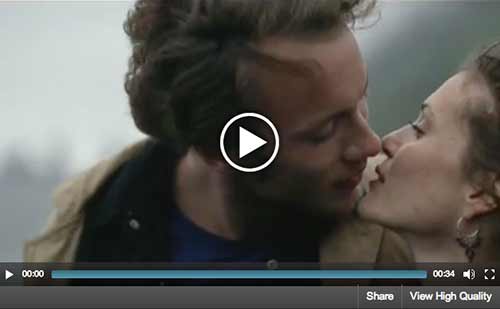
    SocialMediaGuardVideo

    Many corporations and industry leaders have voiced their advocacy for more human interaction through traditional media. Coca-Cola invented the Social Media Guard in the sarcastic commercial pictured above, which blocks people from the ability to see their phones.

    Dentyne used print and commercials to encourage more “face time” by comparing human interaction with social media actions in an ad.

    DentyneAdClip

    Professionals working within the social media industry may even capitalize off of the anti-social tendencies of those who are active online. Here are a couple of examples of how.

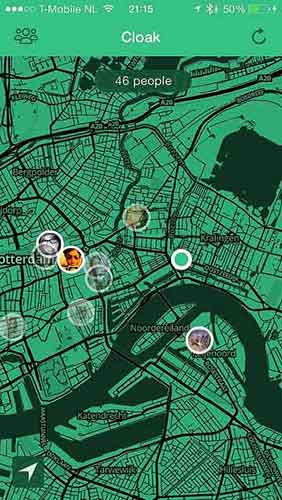
    Cloak

    Facebook, Twitter, Instagram and FourSquare aid this new mobile application in locating where you are. Cloak asks you to login to one of your social media accounts, which pinpoints where you are on a map, along with the locations of other friends who are also logged into Cloak.

    The app is advertised as a way to avoid people that you do not want to run into. You can set alerts that warn you when certain users come into a selected radius of you. Couldn’t this also be used as a way to stalk people? Guess that wasn’t a catchy advertising pitch…

    CloakAppScreen

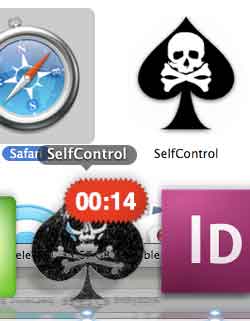
    Self Control

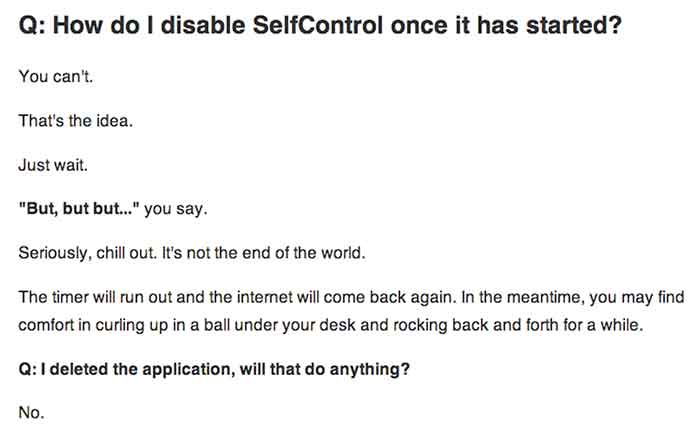
    This app allows you to choose time periods when you do not want the ability to access specified apps or programs at all. This could be used to stop yourself from checking your email, playing games, checking Facebook, etc.  A screenshot of the app is below, followed by their honest answer on how to stop the app when it is activated. The interest in this app shows that people want to be detached from their online world every once in a while but might need a little help to disconnect.

    SelfControlApp

    HowDisableSelfControl

    This discussion will continue on for years, but has social media gone too far? Check out the signs.

  • Gmail Reveals Its Hottest Secrets (Part 2)

    I wrote a blog post about a week ago about several hidden, secret features in GMail. Most of that was about organizing your inbox. This post is more about the secrets and great features you can use as you are writing emails. Let me know if you have any additional helpful features in the comments below!

    (numbers 1-5 in part 1 of this series)

    6. Canned Responses

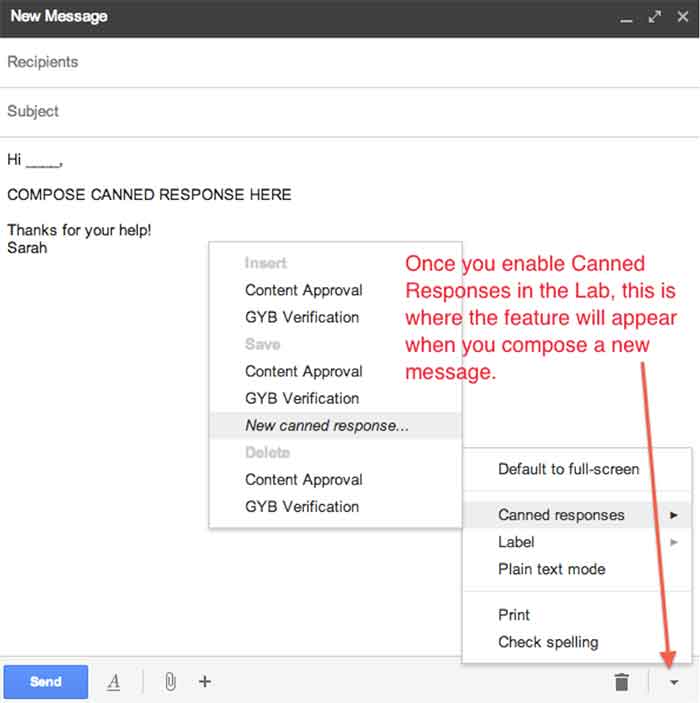
    Do you find yourself composing the same email several times a day? If so, you should enable canned responses. Canned responses are drafts or email templates that you can save in your settings when you go to compose a new message. They will not show up automatically, so you need to go to the Labs in the settings of GMail, and enable this feature. There will be an arrow at the bottom right of a new message, and that is where you will find the feature once it has been enabled. This saves so much time for me and my colleagues, so I highly recommend it.

    01-CannedResponses

    CannedResponse

    7. Reply from the same address the message was sent to

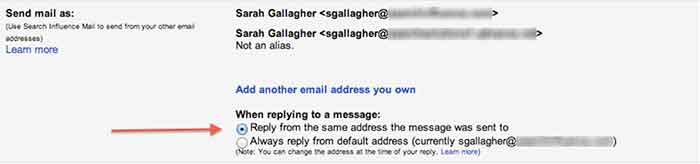
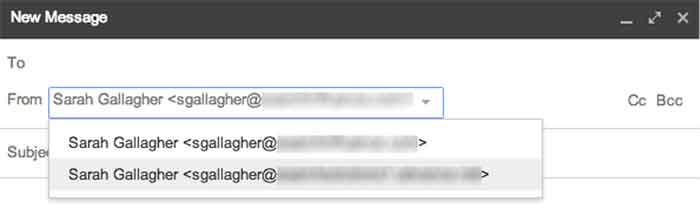
    If you have multiple email addresses you use in your workplace, it’s important to make sure that you reply with the appropriate email. When I compose an email, I have to switch the email address of who it is coming from (which also changes my email signature). However, you can automatically set it so that when you press reply on an email thread, it replies from the email address the original email was sent to.


    03-SendMailAs

    04-NewMessageFrom


    8. Undo Send

    Have you ever forgotten to include something in an email?  Attach something? Sent an email to the wrong person? Misspelled something? Addressed the wrong person? (that one’s really bad)!

    THIS SETTING IS A LIFE SAVER!!

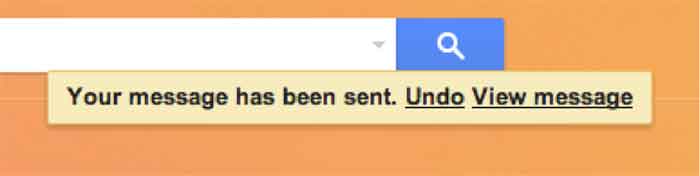
    It can be enabled under the General settings. You can select how long you have to undo a message once you press the send button. I have selected up to 30 seconds, which is the longest time possible. Once you send an email, you’ll get a notification at the top of your email account saying you can undo send or see the message you just sent. Please note that this is the only place where you will be able to undo the send. If you archive the message, click to your inbox, or somewhere else within GMail, the undo send option will not be available.

    05-UndoSend

    06-UndoSendAlert

    9.Boomerang

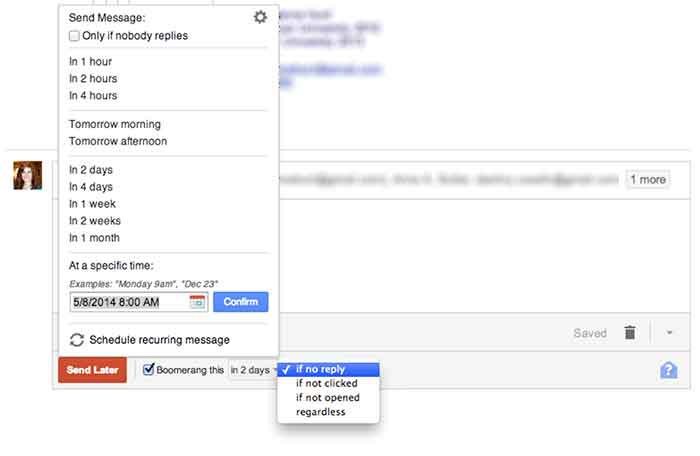
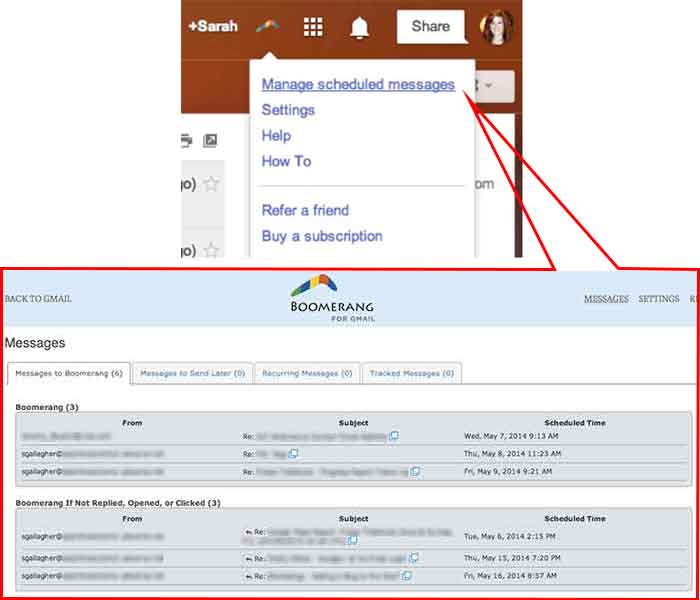
    Boomerang is a great tool to use for scheduling emails and following up with people. Often, I work late nights, but I don’t want to send emails that late mainly so the person who receives it won’t know I work until 9:00 at night. I can compose an email and schedule it to be sent anytime in the future. You can also set it to “boomerang” back into your inbox if someone does not reply or open the email you sent. You also have the ability to manage and edit any of your scheduled messages. Boomerang allows you to schedule or return up to 10 messages per month. If you find yourself needing it more than that, there is a subscription available for purchase.

    07-SpecificSendTime

    08-BoomerangSettings

    10. Rapportive

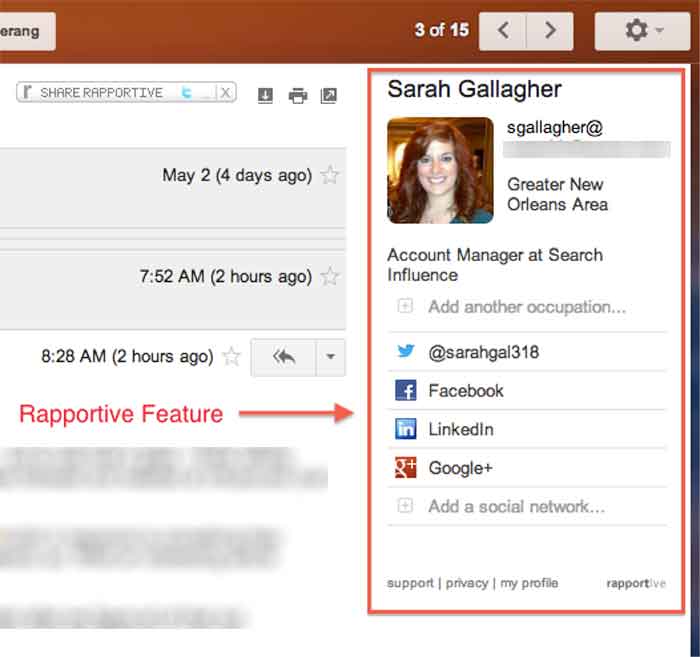
    Rapportive is a feature that shows information about your contacts right in your inbox. They “combine what you know, what your organization knows, and what the web knows,” to display this information in the right sidebar of your email. I like this because it’s an easy way to connect with those people on social media (ie: put your great stalking tendencies to work 😉

    09-Rapportive

  • Social Media, You Don’t Have To Be A Wizard

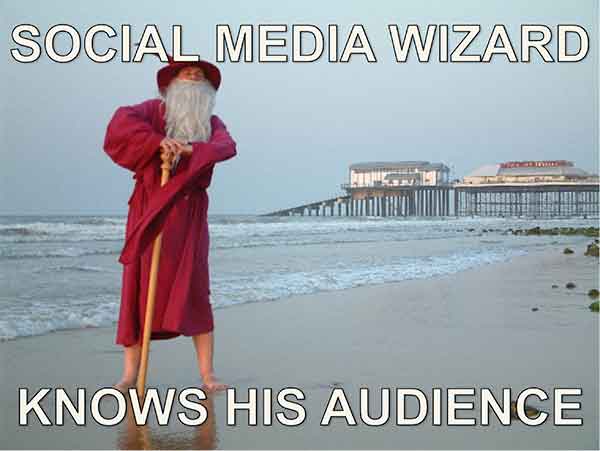
    Your Audience

    You know your target demographic. If you don’t, social media should be the last thing on your mind. Properly addressing your demo group is essential in establishing a relationship with your followers on any social media platform.

    SocialMediaWizard

    Social Media Optimization (SMO) is used to directly target potential customers with relevant information, and eventually provide them with opportunities and incentives to become active customers. Proper SMO should also give current customers incentive to provide positive feedback so that others view your brand as trustworthy.

    SocialMediaWizard02

    Your Message

    For professional organizations, like law firms, business consultants, or industrial suppliers, news and advice are likely the fastest way to become a trusted voice amongst your demographic. Provide information your clients can use, “Tips to protect your rights,” or “Break through in industrial oven designs.” Be a voice of insight at the forefront of your field.

    If your target is the general public you need to be both friendly and local. Plus, direct social media interaction is key. If you post about an upcoming event in town, keep an eye out for responses on your Facebook feed or from your Twitter followers. Be aware of comment chains on your feed; respond to comments in an upbeat and positive way. Generally resist the urge to comment outside of your own page in regard to individuals (it can be viewed as overreaching or unprofessional).

    SocialMediaWizard03

    I know it sounds obvious but social media should be social and light hearted, so any sales efforts should be low pressure if they occur at all. A more effective strategy is to create interesting internal blogs, (then spread them through social media) so that you increase traffic to your page, which increases the chances of a conversion. You may not go viral but you can still reach your audience.

  • 5 for Friday – New YouTube Feature, Ads on Reddit and more!

    Stencil5

    1. Advertising on Reddit is easy with this guide -Moz

    For those of you unfamiliar with the site, Reddit.com is a social site composed of user submitted images, text posts, links, news stories and more. Reddit is a huge community with roughly 115 million unique visitors. This site offers low cost ads with high potential to engage users and even go viral. Advertising on Reddit requires different tactics than on other sites, though. Ads are treated like any other content, meaning “Redditors” have the ability to vote your ad up or down, affecting its visibility. Your voice and overall strategy on Reddit must be handled differently than on other sites. This handy guide gives a lot of great advice to help get your business started.

    2. Google Bulk upgraded to allow multiple administrators -Blumenthals

    Google+ is finally getting a much-needed multi-admin feature! Corporate Google accounts can now create listings for all of their locations and then authorize separate Google accounts as admins.  The bulk upload tool hasn’t been embraced in the past, but demand from SEO companies and business owners finally convinced Google to update their bulk upload backend as well. With an upgraded account, a single corporate account can manage up to 10,000 locations with full control. This is going to make social media management much easier for business with multiple locations!

    3. When is best time to make your social media post? -Hubspot

    socialmediaicons

    Scheduling your social media posts well can actually make a big difference in how many people see them. Web traffic to these sites change greatly depending on the day of the week and time of day. There is no set calendar that is best for all social media sites; people use them all differently. Facebook yields high results during weekday afternoons while Pinterest has increased traffic on the weekend. Check out this handy infographic for details on the best and worst times to reach out on Facebook, Twitter, Linkedin, Pinterest, Tumblr and Google+.

    4. Youtube allows users to add 3-second intros to their videos -Mashable

    This post is short and sweet because the subject is pretty simple. Youtube has a new feature allowing users to add a 3-second intro to all of the videos on their channel. This feature is valuable for creating a distinctly branded channel. Viewers can begin to identify your videos easily based on the consistent intro. Currently the only limitation on these intros is that they may not be used for advertising or sponsorship purposes.

    5. Foursquare moves their check-in feature to new app: Swarm -Search Engine Land

    Foursquare, in a bold move, is removing their key feature, “check-ins.”  Checking in will now be done on their new app, Swarm. Swarm will focus on the social aspects: checking into locations, finding friends, and even being able to chat to people you know nearby. Foursquare will continue to exist with a focus on discovering local businesses and serving as a competitor to Yelp. The success or failure of this division could determine the future for this company.

  • The Secret Life of Gmail (Part 1)

    Part of my everyday is sorting through ~150 emails, which can be quite taxing if you don’t have a good system in place. We use GMail for our email system at SI. I know most small businesses probably have their email system already figured out, but if you don’t, I would HIGHLY RECOMMEND using GMail as it has lots and lots of great features that make emailing less painful. I have learned some great tricks offered within Gmail- far too many for just one blog post. This first post is about organizing and archiving your email account. Part two will be geared towards writing and scheduling emails. I hope you find this helpful!

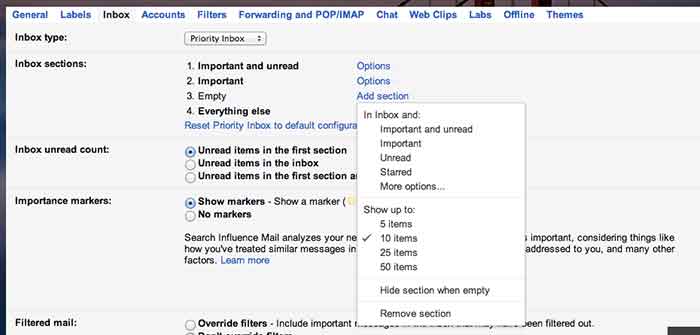
    1. Priority Inboxes

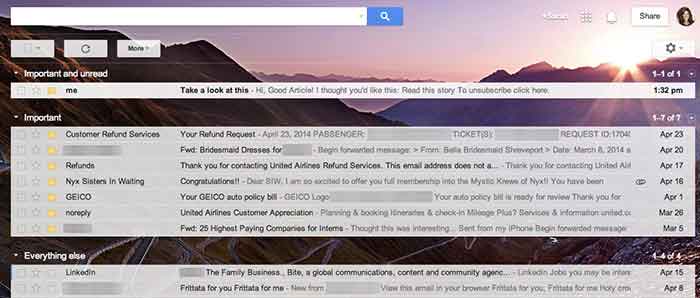
    Priority inboxes are a great way to organize your inbox if you have trouble figuring out what’s important and what is actually relevant to you. This setting is very customizable, and you can set the number of emails you wish to see or have visible per section. I have mine set up as Important and Unread, Important, and Everything Else. Important and unread is exactly what it says- all messages that are marked as important or all messages that are unread. Important is everything that I have read and marked as important, but I haven’t necessarily responded to or handled the particular issue yet. Everything else is compilation of things I just need to file away or delete (because they’re not applicable to me).

    GmailSettings

    2. Important Arrows

    These are great in combination with the Priority Inbox. If you use these, Google will start to learn what is and is not  important to you. It will learn to sort them in the priority inboxes accordingly.  When I get an email in my Important and Unread, Google knows to put it there because it has the important arrow. If I receive an email in my Important and Unread section that is actually not applicable to me, I uncheck the arrow. That way, the next time I get a similar email (with that same subject or from that same person), Google puts it in my Everything Else inbox. It works the other way too- if I see something in my Everything Else Inbox is actually important, I put the important arrow with it, and Google moves it into my Important and Unread Inbox. It learns these habits over time, so your Inbox for the most part really does become organized.

    Gmail-Inbox

    3. Filters

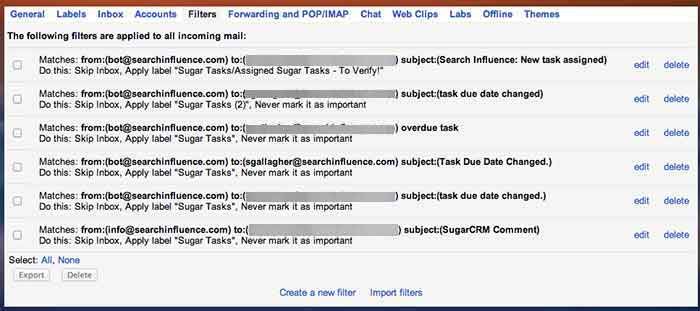
    Do you find yourself receiving emails that you don’t ever need to read or open? We get emails from our CRM system all the time, but I never look at them because, frankly, I receive way too many other emails a day that are much more important. So, I have set up a filter so the emails I receive from that recipient are automatically filed away into my “CRM” folder. They never actually show up in my inbox! To set up a filter, go to settings, filters, and then create new filter at the bottom. You can perform a search function by email recipient addressed to you with a certain subject line, etc. You can set it so GMail will either automatically apply a label or archive it into the folder you have identified. This will save a lot of filing time if you have emails similar to this coming to you everyday.

    GmailFilters

    4. Unread Messages Icon

    This is a Lab in the settings. If you’re like me and you leave your email open all day in a tab (I know I shouldn’t, but hey- we all have our vices), you can enable this feature so you can monitor your email as you are working on other tasks. My recommendation is if you get more than 10 new messages, you should probably hop back over to your email just to check and make sure nothing SUPER important needs to be tended to.

    GmailInboxTab

    5. Mute Button

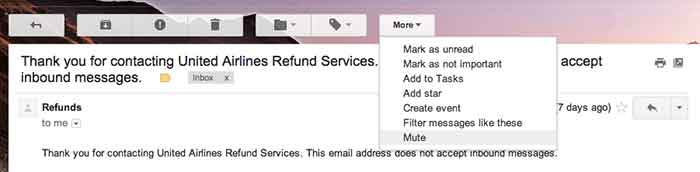
    This is a great feature that you can use to mute conversations if they keep popping up in your inbox. I get a lot of emails that are not related to me, so I often put a “Not Mine” label on them. If that same conversation pops up again in my inbox, I’ll see the “Not Mine” label on it, realize that it is not for me, and press the mute button. This will make it so if anyone else responds on this email strand, the conversation will no longer come to my inbox, but it will stay filed away in its folder. BRILLIANT STUFF HERE!

    Gmail-MuteEmail

  • 5 For Friday – Twitter, Facebook, and Pinterest, Oh My!

    5RD

    1) Twitter Profile Redesign is now available to everyone!

    -Twitter

    Do you have the new Twitter layout for your profile? If not, you may be behind the times. Twitter recently updated their profiles with a new, user friendly look. This design is pretty similar to what many people are used to seeing on Google+ and Facebook. They are in the process of rolling out the profile redesign to all Twitter users.


    2) Are Your Fans Interacting with Your Brand on Social Media?

    – Mashable

    The look of your graphics and images supporting your social media updates carry a lot of weight. If they’re not appealing to your followers, they will fall flat when it comes to engagement. Mashable shares some insight on the various types of images that can boost interaction amongst your fans.


    3) Google Offers New Ways to Market Apps in Search, Display, and YouTube

    – Marketing Land

    Many app creators struggle to get their product noticed,  downloaded, and used by consumers. Google is now offering various unique ways to market them in AdWords via search, display, and YouTube. Read this article to learn details about all of the exciting new features available to app marketers.


    SocialMediaPhone

    4) Facebook Mobile is Killing it! Is your brand on Facebook Yet?

    – Bloomberg

    If your brand is not spending at least some of its marketing dollars on the social media giant, you are probably missing out on a major consumer base. This article from Bloomberg tells us that nearly half of the world’s internet population is logging into their profiles, at least, once a month. This mean almost a billion people a month are logging into the mobile app alone!

    5) Pinterest Announces the Launch of a Visual Search Engine

    – Buzzfeed

    Pinterest is launching a new “Guided Search” for its mobile users. It takes user’s broad search and prompts them to narrow it down with pictures in related sub categories. This very informative article from Buzzfeed explains, in detail, the specifics of Pinterest’s new guided search.