Author: Amanda Ball

  • Follow Our SEO Game Plan to Drive High Quality Leads to Your Medical Website

    Key Insights

    • SEO is a marathon, not a sprint. Spending time to create an SEO game plan is crucial in identifying key items to work on to support website growth.
    • Take time to identify the signs your website needs a checkup, diagnosis the issues that be added to your SEO gameplan, and begin tackling the items on your list.
    • SEO takes time. Continuing to optimize your medical website over time will show long-term benefits to your rankings and ROI.


    Your website should represent your practice’s brand and demonstrate your expertise in the industry. Traditionally patients turn to Google for the closest and best option when looking for a new medical practitioner. With that in mind, your practice should have a website that appeals to your target audience and is properly set up on the back end to support ranking on Google.

    Having well-optimized content on procedures and services provided, before and after galleries, and reviews/testimonials all support the overall experience of a user when visiting your site. Optimizing your site will give your medical practice higher quality leads which can support growing your practice.

    Yet, a great front end doesn’t always mean the backend is optimized to its fullest potential! It can be overwhelming to begin creating an “SEO game plan.” During this process, it’s important to remember that SEO is a marathon, not a sprint. Google wants to see consistent improvement and engagement from website owners. It takes time for Google to process and give your website credit for all the improvements you’ve made (generally a couple of weeks to 1 month per change).

    In this post, we’ll provide the steps to take and consider when reviewing your medical website and optimizing it to improve your business’s visibility in search engine results page (SERPs).

    Doctor examining a patient's blood pressure

    Symptoms: Signs Your Website Needs a Checkup

    You have a visually appealing website and layout, but your medical practice isn’t crushing goals and generating leads as you’d like. Do any of these resonate with your medical practice?

    • Leads don’t come in from the website
    • Patients can’t find you on search engines
    • Patients can’t find your office(s)
    • Your website loads slowly

    If you answered yes to any of the above, you’ve come to the right place! Let’s dig into the common causes of these challenges.

    Diagnosis: Common Causes of Website and SEO-related Issues

    Duplicate content

    Having high-quality and unique content is crucial to SEO and rankings. It is especially important as a medical professional to have unique content to show authority and overall expertise in the industry.

    However, duplicate content means the content displayed on your site also is displayed somewhere else on the internet. When this happens, Google has a hard time knowing which site is more relevant to a search query. This, in turn, forces search engines to determine which site’s content is more relevant to a specific search query.

    Incorrect Directory Information

    You must have your name, address, and phone number (NAP) consistent across the internet. Since many medical offices share one main address with unique suite numbers, ensure you have your suite numbers outlined in all listings online to keep your NAP consistent.

    As medical offices move to new buildings or expand, updating directories online to display correct information is a step sometimes missed in the move. This can add to the challenge of your patients having trouble finding your practices’ office because Google will display outdated information.

    Clunky, outdated websites that don’t load quickly

    Data suggests lower load times lead to a drop in overall conversions because a patient will bounce off a slow loading site to find another provider.

    There are plenty of free tools to utilize to consistently monitor your site speed. When partnering with a Healthcare SEO team, this is something that is included within your campaign and monitored for improvements.

    User experience

    A common reason a user leaves a website is that they can’t find what they were looking for. When a user visits your medical website, is it user-friendly? Is your navigation easy to digest and navigate?

    Website Responsiveness

    Your website should be a responsive website that is mobile-friendly and works seamlessly across all devices, whether a user is visiting it on a mobile device or tablet. Having a responsive website means your layout is flexible to screen size and adjust accordingly depending on the device. This is important to have as it offers a user a good experience regardless of what device they decide to visit you on.

    Contact form is missing, buried, or lacks a call to action

    When a patient visits your website, they should have a clear call to action (CTA) along with steps to follow after the CTA is complete. It is common that a patient would hesitate to fill out an on-site form due to unclear required fields.

    Doctor writing medical records at a desk

    Treatment: Procedures Needed and Expected Outcome

    Just as each patient is different and has different priorities, so do websites. There are many ways to diagnose your website and create an “SEO Game Plan.” You should triage website issues on a case-by-case basis.

    Taking a step back and completing a full SEO needs analysis is crucial to begin your SEO journey. Our team reviews a site’s health and identifies strategic areas of opportunity for improvement in the following areas:

    • Technical on-site SEO
    • Local search visibility
    • Link health
    • Content and keyword optimization
    • Website user experience
    • Conversion rate optimization

    As mentioned, SEO is a marathon, not a sprint. Typically, executing tactics happen over time. As each medical practice has its own priorities and time budgets to support these efforts, it can take time to get everything in place to begin seeing results. This all depends on the time and effort the medical practice is willing to put in.

    Generally, the tactics below are a standard of care for a website that needs the full treatment:

    • Re-write and expand website content for priority services and procedures. As website content goes live on your site, you may see an improvement in rankings in 2-3 weeks for that given topic.
    • Improve site navigation
    • Update local directory listings
    • Creating clear call-to-actions across the site for conversions
    • Redesign website (long term play)

    It is important to recognize that all websites can utilize optimizations from a user and technical perspective. Allocating time and resources to spend on analyzing your medical site’s needs is crucial in making sure you are set up for success.

    For more information on optimizing your medical website, contact the experts at Search Influence.

    Images

    Doctor


  • How to Prompt Customers to Leave High-Quality Reviews That Influence SEO

    Key Insights

    • Businesses can prompt reviews and testimonials that include beneficial keywords to support ranking in the Search Engine Results Pages (SERPS).
    • Three benefits to providing review prompts:
      • Encourages high-quality, specific reviews
      • Influences more people to find you when searching for degrees, products, services, and experiences you offer
      • Themes in reviews help those who skim search results understand your value
    • Creating a list of prompts your customers can use when crafting their review helps make sure their reviews benefit both prospective customers and your search rankings!

    Customer reviews and testimonials are crucial to your business. They provide you with feedback on your products and services and help potential customers gain insights from your current ones. Additionally, reviews and testimonials that include beneficial keywords can support ranking in the Search Engine Results Pages (SERPS).

    Graphic of a hand using a tablet to read online reviews of a business

    When your business has reviews on important sites, like Google My Business (GMB), Google sees your business as authoritative and is likely to reward you for this. Greg Gifford, an experienced SEO consultant, created a video for LinkedIn with a suggestion that inspired this post: provide prompts so customers leave reviews with keywords that benefit your rankings.

    In this post, we’ll walk through the steps you should take to prompt your customers (without specifically asking them) to leave beneficial keywords in their reviews and testimonials. Not only can you prompt them to leave a review, but you can also give them some questions they can use to get started. This helps customers leave high-quality reviews with details that will benefit your rankings and also gives them a baseline to get started in writing their review.

    Benefits to Providing Review Prompts

    #1 – Encourages high-quality, specific reviews

    • When you request a review after a customer has experienced your services, it can be intimidating for them to start off with a blank screen. When you prompt your customers with questions about their experience, it helps them feel more comfortable and helps you earn more detailed reviews.

    #2 – Influences more people to find you when they search for the degrees, products, services, and experiences you offer

    • Reviews help influence rankings in the SERPs. If you use prompts that include the keywords you’re targeting, your customers are more likely to use those terms in their reviews, which makes you more likely to rank for them.

    #3 – Themes in reviews help those who skim search results understand your value

    •  Google aggregates common themes in reviews. This helps if someone searches for something in the immediate area of your business.
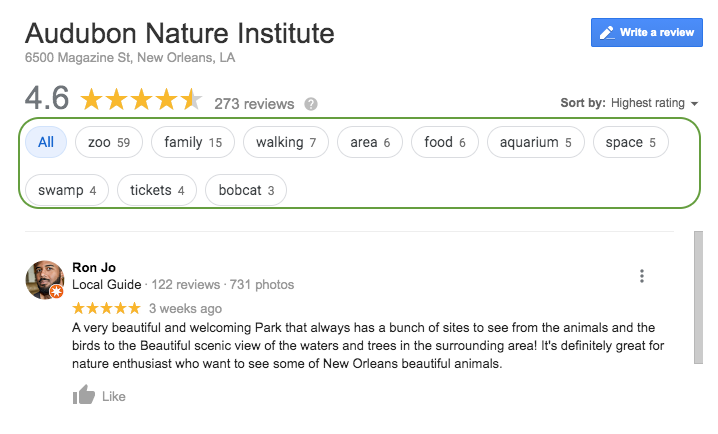
      • Example: Here you can see that Google has aggregated keywords and phrases throughout the reviews to make it easier for a potential customer to see reviews that include venues they may want to visit. If a consumer wanted to see all the reviews that included the keyword “zoo,” they could select it and read up on the experiences others have had.

    Screenshot of reviews from Google My Busiess for Audubon Nature Institute in New Orleans, LA

    • Also, when searchers see the themes of your reviews called out, they can more quickly understand what your business offers. In the example above, it’s helpful to know that the business has a zoo, aquarium, and swamp attraction they could visit while in town.

    Questions to Prompt Reviews

    Sample questions you can use to foster specific, high-quality reviews:

    Medical / Healthcare Questions to Prompt Detailed Customer Reviews

    • Which treatment did you receive?
    • What brought you into the practice?
    • Why did you choose our practice or a specific doctor?
    • Which location did you visit?

    Tourism & Attractions: Questions to Prompt Detailed Customer Reviews

    • Which attractions did you visit?
    • How were your interactions with the staff?
    • What were the amenities like?
    • What did you enjoy most about your experience?

    Restaurants: Questions to Prompt Detailed Customer Reviews

    • Which food and drink items did you have?
    • Which restaurant location did you visit?
    • How do we compare to other restaurants you’ve been to in the past?
    • How were your interactions with the staff?
    • How was the ambiance?

    Education: Questions to Prompt Detailed Customer Reviews

    • Which campus did you visit/attend?
    • Which degree or program are/were you interested in?
    • Do you have any tips for future prospects?
    • How did this experience prepare you for life after graduation?

    Bonus Tip for Bringing Reviews Into Other Marketing Efforts:

    • Feature the most called out benefits of your business in your website copy, imagery, and social media posts and ads

    How Can You Get Started?

    • Gather any email addresses you have of past and present customers.
    • Write an email that prompts them to leave a review for your business.
    • Within the email, include prompting questions that will get them thinking about their experience and ultimately help them produce a thoughtful review that will benefit everyone!

    Now that you’ve got a leg up on your reviews and testimonials, it’s time to start thinking about improving other aspects of your SEO. If you’re not sure where to start, ask for a digital marketing analysis of your website from our team of experts at Search Influence.

    Images
    Tablet

  • Client Spotlight & Campaign Success: Caluda’s King Cake

    If you are from or live around New Orleans you are VERY familiar with the delicious treat that is king cake. One of our client’s, Caluda’s King Cake, is a top king cake bakery in the New Orleans area and continues to see success year-round. Caluda’s King Cake is a local business with over 35 years of experience. We have been pleased to work with them for the last two years and love the knowledge and success our collaboration has brought.

    2018/2019 Digital Marketing Strategy and Success:

    During the 2018 Holiday and 2019 Mardi Gras season, Caluda’s King Cake saw a 2,393% return on investment (ROI) during their digital marketing campaign with Search Influence. With target advertising, smart branding, and relationship building, Caluda’s continues to bring high value to the market. Let’s take a look at some of the efforts Search Influence completed to support this ROI and success:

    Search Engine Optimization (SEO):

    When comparing 2019 to 2017 we saw a 158% increase in organic sessions. This means more than two times the amount of users were able to discover Caluda’s site from search results. When comparing 2019 to 2018 we saw a 45% increase in organic sessions. Efforts to support this were a new website build, content creation, and continual website optimizations throughout the campaign.

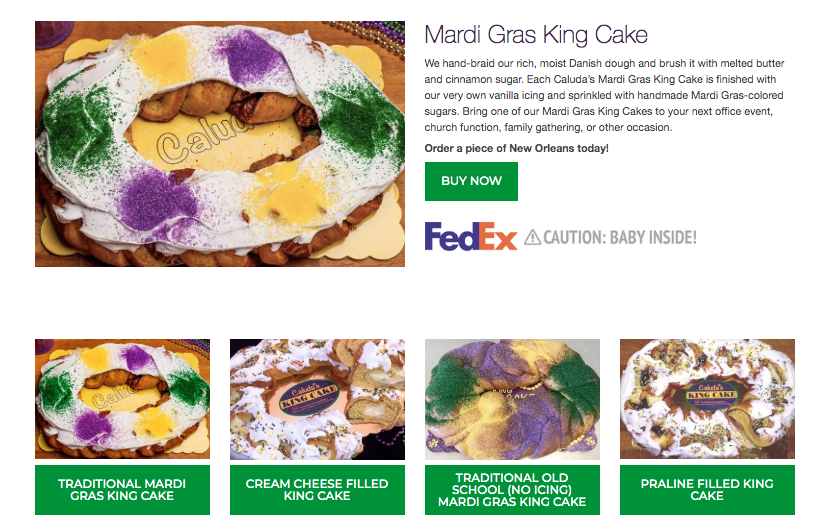
    Mardi Gras King Cake from Caluda's getting ready to be shipped via FedEx

    Social Media:

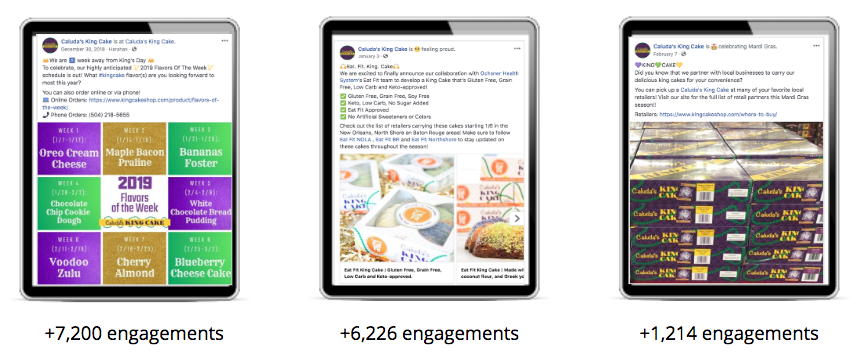
    Social following and post engagement have continued to be an important and successful strategy for Caluda’s. During their 2018/2019 social media campaign they gained over 3,000 NEW fans. They currently have over 10,400 fans on Facebook and 2,000 followers on Instagram. Their social posts continue to reach high audience engagement, ensuring that their brand is top notch with the community!

    Examples of social posts done by Search Influence for Caluda's King Cake

    Review and Testimonials:

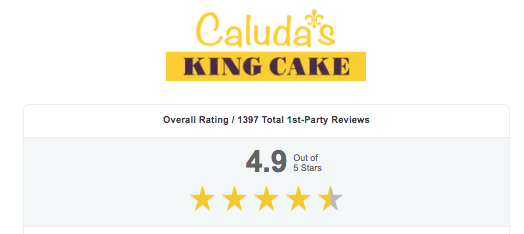
    Caluda’s King Cake gained over 580 new reviews during their campaign. They also gained over 1,000 page views on their onsite reviews page. With more than 80% of consumers admitting that they trust online reviews as much as they trust a personal recommendation, this gain in reviews is extremely beneficial to the brand!

    Accumulated reviews for Caluda's King Cake during Search Influence digital marketing campaign

    Caluda’s King Cake Unique Propositions

    Eat Fit King Cake

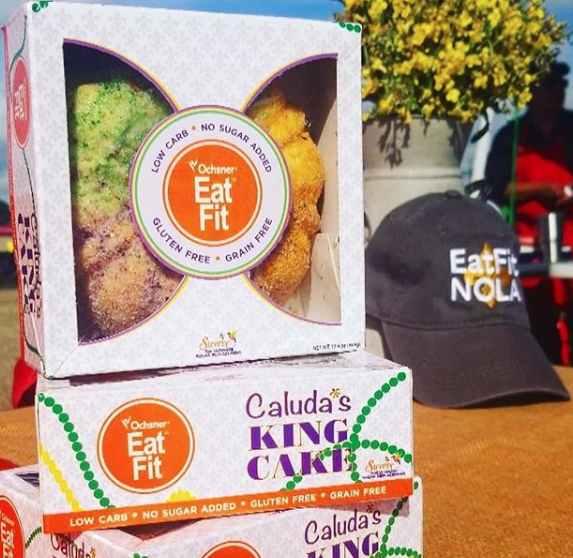
    In 2019, Caluda’s collaborated with Ochsner Health System’s Eat Fit team to develop a king cake that’s gluten-free, grain-free, low carb, and keto-friendly! Centered on an all-natural clean ingredient label, the Eat Fit King Cake is made with almond flour, coconut flour, and Greek yogurt. It’s sweetened with Swerve, a natural, plant-based sweetener based here in New Orleans, with no artificial sweeteners or food dyes. This collaboration was a HUGE success for both Caluda’s and Eat Fit. Caluda’s continuation of brand awareness and providing high-quality products continues to open doors for exciting new ventures.

    Low carb king cake from Caluda's King Cake in New Orleans

    King Cakes Year-Round

    Caluda’s King Cake offers king cakes year-round! You heard that right—you can get delicious king cakes any time! They offer specialty king cakes via online or phone orders. Whether you are a local or live in another state, Caluda’s offer you the opportunity to enjoy king cake 12 months a year. Bring a delicious treat to your next holiday event or party and be the hit of the event

    If you’re ready to grow your business like Caluda’s King Cake, start a conversation with one of Search Influence’s digital marketing experts. We’re ready for you to become one of our success stories!

  • What Can Canva Do for You?

    Need a custom graphic for your blog or social media page? Canva is a drag-and-drop tool with millions of images and hundreds of fonts. Over ten million users have created over 100 million designs with the help of Canva’s user-friendly interface. While nothing will replace the instinct and creativity of a trained graphic designer, Canva offers a tool for simple, creative designs. Fortunately, it’s easy to sign up for Canva and take their free version for a test drive.

    What Is Canva?

    Whether you want custom social media icons for your website or new business cards for your sales team, Canva has free tools to support your visual projects. You can edit photos, create graphs, and develop print media. When you need a graph for your website or an upcoming presentation, you can start with a wide range of templates to graphically represent your data. When it comes to social media management, you may know that it can be a hassle to get images in exactly the right dimensions for each social media platform. With Canva, the images practically format themselves. Whether you need an ebook cover or Instagram post, Canva can hook you up with the proper dimensions. And, when you need to adapt a graphic for something new, you can even copy images from one project to the next.

    The variety of free templates, images, and other resources is staggering, and it is the ease of use that really puts this program in a league of its own. As if that weren’t enough, you can do the work in your web browser—no need to install software or download updates. Exploring their site is the best way to understand the full range of tools and options available.

    How Do I Get Started?

    When you sign up for Canva, an introductory tour highlights the key features of the site and their editing tools. Whatever you want to accomplish, you’ll have a wide range of templates available as starting points. For quick social media posts, templates are a great way to save time. By swapping out fonts and images, you can transform a template into something fresh, customized for your brand and message. Templates exist for all types of projects, and they can be tweaked as much as needed. As you become more comfortable with the process, you may eventually create your own layouts and designs from scratch, but templates make the design process fast and easy.

    Do I Need My Own Images?

    Not necessarily. Stock images and templates are great for a wide variety of applications. Browse through extensive folders of free-to-use images, grouped by theme and subject matter. You can even use the search tool for more specific images. If you want a higher quality photo, Canva allows you to purchase professional quality images for just $1. Plus, when you do have your own images to use for a project, they are easy to upload. Whatever image you choose, you’ll find the photo editing tools helpful in getting the color and size just right.

    What If I’m Not an Artist?

    If you don’t have a background in graphic design, then you’ll benefit from Canva’s extensive educational resources. Read blogs about the principles of design and composition, and complete tutorials on layouts, image editing, and advanced features on Canva. Some design lessons are even structured as weeklong courses on subjects like branding and social media. Even accomplished artists can still learn more about online promotion and education. A wealth of resources helps you optimize visual displays for business applications and the classroom.

    How Can I Collaborate With Coworkers in Canva?

    When you start developing content for your business, be sure to keep your work private, sharing only the finished work for public use. On the other hand, if you want to collaborate with a co-worker or client, you can also share access to unfinished projects. Whether you’re collaborating with someone in the same room or a different hemisphere, both of you can make changes to the same image. By working together, you can avoid the hassle of sending drafts and repeatedly getting feedback for each proof. For effective collaboration and a bigger variety of resources, it’s worth investing in a paid version of Canva.

    What’s the Difference Between Canva Free and Paid Versions?

    The basic editing tools on Canva are free. All users enjoy a gigabyte of storage for their files and photos, and they can use over 8,000 free templates. Up to 10 free users can collaborate together as a team, but more team functionalities are available to paid members, in addition to access to hundreds of thousands of photos and illustrations. You can get a better idea of the advantages of paying for Canva by signing up for the free trial period. A higher tier of professional service and support is available for companies that would benefit from having their own account manager and teams of up to 30 users. Discounts are available for users who pay by the year instead of monthly.

    Graphics are an important piece of any content marketing strategy, and Canva has the right tools to create your own custom images. The right visuals complete your branding and make every message more digestible from the first glance. Of course, even with the best tools, digital marketing takes time and expertise. To find out how our team at Search Influence can help you create the right infographics or social media campaign for your target audience, request a proposal today.

    Images:

    Canva

    Bob Ross

  • 4 Tips to Start Your Black Friday Social Media Strategy

    With the holiday season approaching quickly, many businesses are beginning to plan out how they will boost their sales during this peak season. For some, this all starts with a Black Friday marketing strategy.

    Black-Friday shopper

    Black Friday

    Black Friday is the day after Thanksgiving, and it is considered one of the most profitable shopping holidays in the United States, as well as my favorite shopping day of the year. According to Adobe, in 2015, Black Friday generated 2.72 billion dollars in sales. Businesses are turning to social media to generate brand awareness and boost sales. They are targeting related profiles and customers that often follow the same brands as their friends.

    Utilizing Social Media for Black Friday

    social-media-marketing-image
    Source: http://danielbussius.com/wp-content/uploads/2016/10/social-media-marketing-image.png

    The majority of businesses, whether they are looking to boost online or in-store sales, will leverage social media messaging in their marketing “master plan.” The following social media tips could help your business stand out amongst other retailers when you begin your Black Friday social media strategy.

    1: Start Your Messaging Early, But Not Too Early

    Buyers have a tendency to plan out their purchases before Black Friday. Businesses that wait until Black Friday to post their messaging are not taking full advantage of making their shoppers aware of their sales in advance. However, the exact timing and positioning of your messaging will be unique to your business and industry. It is a good idea to look back in your analytics from last year to see when user engagement started to increase and decrease.

    2: Know Your Demographic Per Social Platform

    Tailor your social media content per platform based on the audience and demographics you target on each. You can promote the same discounts or promotions, but you will have the ability to reach different audiences by your messaging on several channels. Posting shareable content that audiences are engaged in is a great way to also boost your social media followers. It’s a win-win.

    3: Learn From Your Competitors

    When creating a social media strategy, it is extremely helpful to compare your past social media campaigns’ successes and misses. However, it is just as important to also analyze your competitors’ past campaigns to see what was successful and not so successful to get a good baseline for your upcoming campaign. You can learn from their past mistakes and also identify best practices for your industry.

    4: Engage Consumers That Promote Your Brand

    Many businesses can host contests or post engaging graphics on their channels that make current fans more inclined to “share.” When current fans share a post, their friends can see it. This can then boost the business’s social following and potentially engage new viewers to visit the page for more information. For example, running a Black Friday contest or promotion encouraging fans to share certain posts can boost your chance of gaining new fans during your sale. There are other great ways businesses can engage current fans to help promote Black Friday sales.

    Social media isn’t the only tool businesses can use to promote offers and discounts this Black Friday, but these are platforms consumers look to in my opinion. Businesses that take advantage of preplanning and preparing social media strategies will most likely boost sales during the shopping weekend.

    What social media strategies are you using to promote your Black Friday sales?

  • Learn How to Create a Snapchat On-Demand Geofilter to Boost Your Next Event

    Who doesn’t love a good Snapchat? Whether you are the one trying to get the best shot or viewing your friend’s stories, Snapchat has become one of the most-used social media platforms by all ages and demographics today.

    Back in February, Snapchat announced that users could create On-Demand Geofilters for any event for a fee as low as $5. This could include creating a filter for a birthday party, wedding, business event, or just for fun! Before this update, Snapchat only allowed Community Geofilters, which were used for cities, landmarks, schools, etc. The Community filters were free to submit and dependent on Snapchat’s approval to push the filter live.

    Choose Your Filter Type

    Submitting On-Demand Geofilters is broken down between two categories. You can either mark the Geofilter as a personal or business filter. The difference between the two is that the business On-Demand Geofilters is a filter a user submits on behalf of a business. This is also used if the filter includes any branding, logos, or business marks/names. Basically, if it is promoting a business or a brand, it is safe to say you are submitting a business filter. Any other filters submitted would be considered a personal On-Demand Geofilter.

    The GeoFilter Process

    After noticing a few of my Snapchat friends’ custom filters used for graduation parties they attended, I began wondering how easy it was to create a custom filter. After doing some digging online, I discovered that the process looked relatively easy. There were only 3 steps to submit an On-Demand Geofilter.

    1. Design – Snapchat does not create the graphics for Geofilters submitted for approval. They do provide a few templates that work with some image editing programs, but the submitter is free to be as creative as they want. There are a few guidelines to follow when designing the filter, but, overall, nothing too crazy in my opinion.
    2. Dates and area covered – Snapchat provides a map for you to mark off the area you would like your On-Demand Geofilter to cover. The larger the area and length of time the filter will run impacts the amount of money the filter will cost.
    3. Buy – Snapchat confirms with you the date(s) and area you would like the filter to run, along with the price and design you submitted. Enter in your payment information and agree to a few terms and conditions.

    Testing the Process

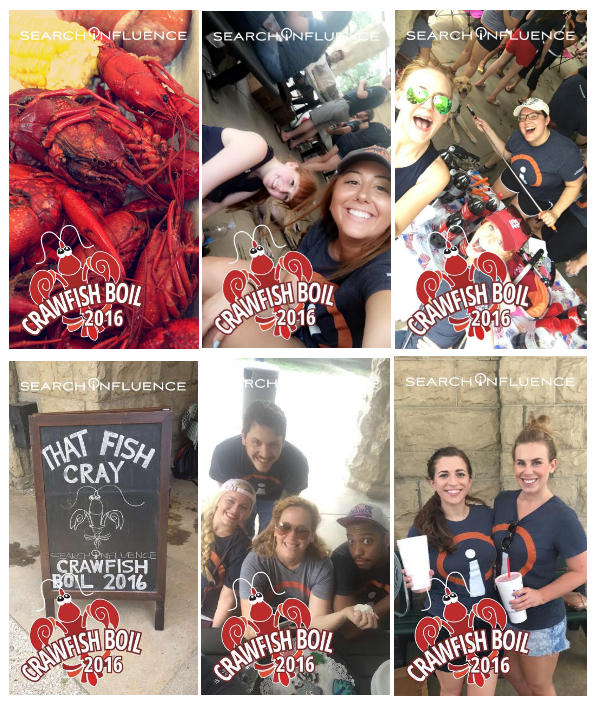
    I was recently part of a team that helped in planning Search Influence’s annual crawfish boil and thought a team building event in Audubon Park would be perfect to test the Snapchat On-Demand Geofilter submission process.

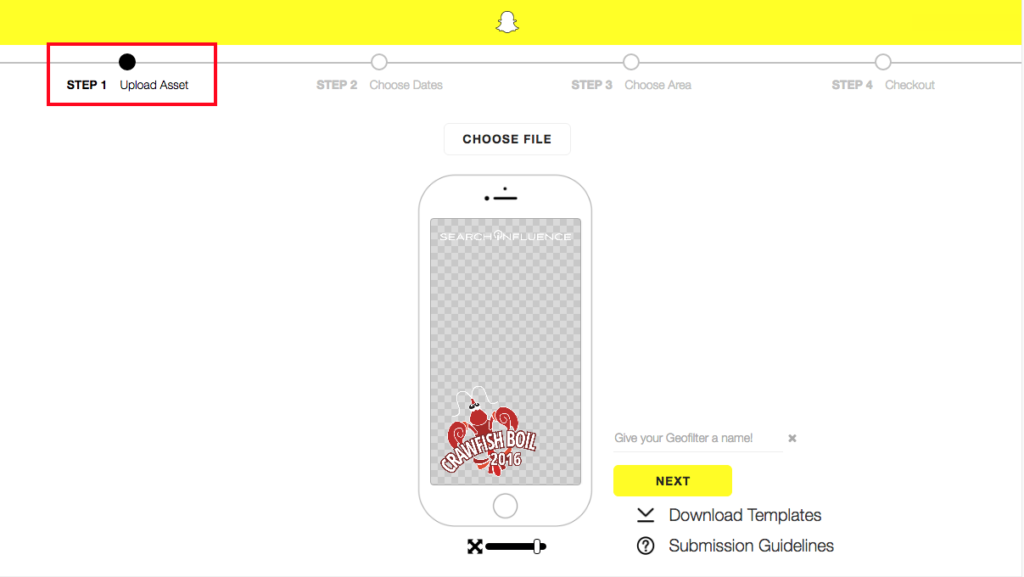
    I began with reaching out to our graphics team to create the On-Demand Geofilter that we all thought would look best for the event. Once the graphic was completed, I uploaded the file to the upload assets and followed the steps outlined below.

    Snapchat On-Demand Geofilter 1

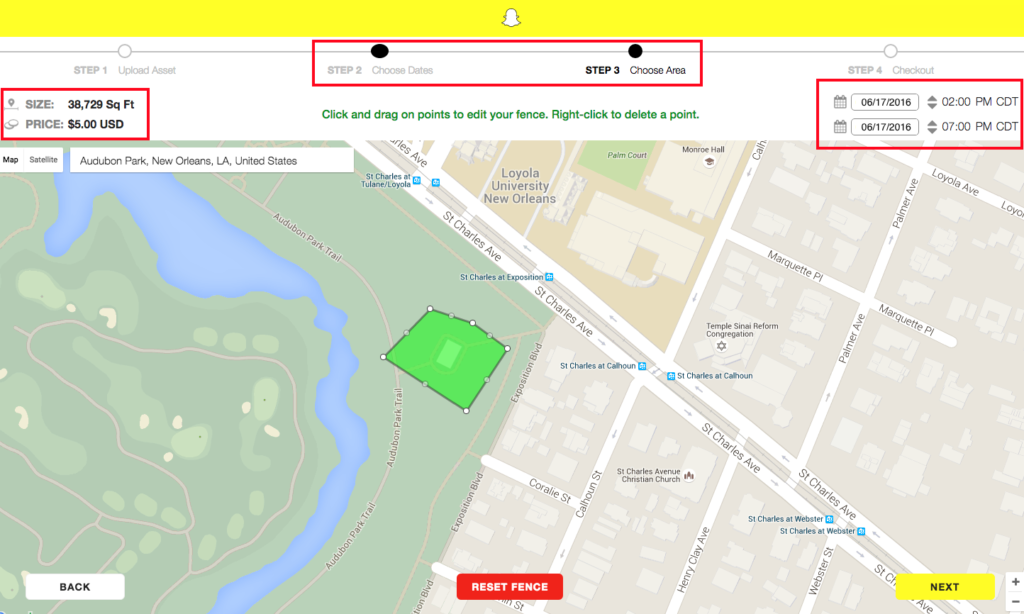
    Once the image upload was completed, I moved on to selecting the date and duration of the event along with the area of Audubon Park the crawfish boil would be held. I added a few extra hours just in case the party lasted past 5 p.m. Once the area and duration was added, the price was given immediately.

    Snapchat On-Demand Geofilter 2

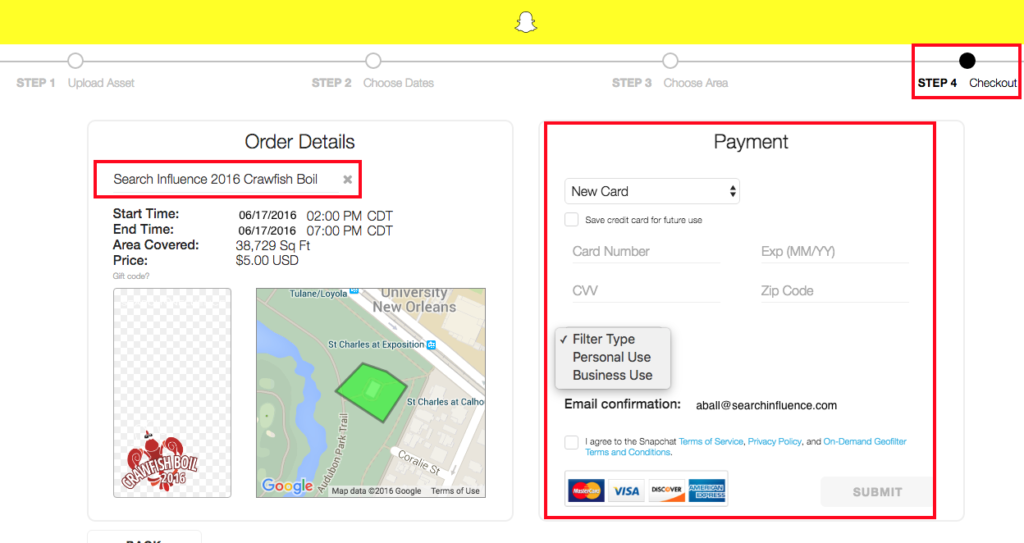
    Lastly, I was guided to the checkout screen. I was prompted to name the filter, add in payment information, select the filter type, and agree to all of the term and conditions.

    Snapchat On-Demand Geofilter 3

    Once submitted, I was emailed a confirmation that the Geofilter was waiting for approval, which can normally take up to 48 hours. I received approval within the next few days and patiently waited to see if it would generate the day of the event.

    The day of the team-building event, I received an email that the Snapchat On-Demand Geofilter had started running at the noted time I requested. From there, the team used the filter throughout the event.

    Snapchat On-Demand Geofilter 4

    Measuring Your Geofilter’s Popularity

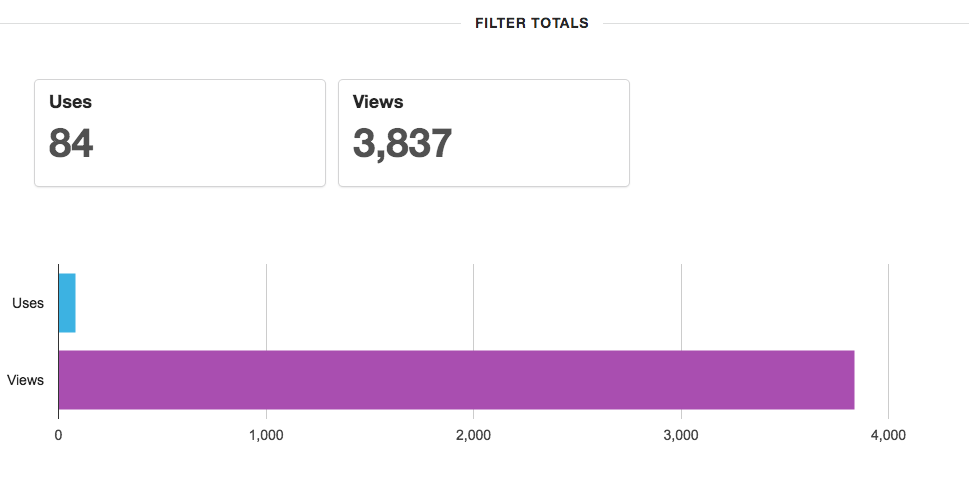
    Once the On-Demand Geofilter is finished running, you can log into your Snapchat account to see uses and views for the filter during its duration. For the few hours the filter ran, 84 Snapchat users used the filter and 3,837 Snapchat users saw the filter in their view. This includes a post in a user’s story and direct Snapchats.

    Snapchat On-Demand Geofilter 5Overall, the process was easy and seamless. I will definitely be creating another On-Demand Geofilter for the next event or party I throw or help plan.


    What event do you think you would like to create an On-Demand Geofilter for this year?

  • Only One Direction for New Twitter Hashflags: Up

    Anyone who has been on Twitter recently has seen the popular custom Twitter emojis known as Hashflags. Hashflag images appear after a #hashtag and are activated on Twitter for specific occasions or events. Artists and events use these to generate trending hashtags, and having the specific Hashflag gives an incentive to tweet it.

    Even though they have been around for some time, the first sighting for me was during the album release of One Direction’s new album, Made in the A.M. Clearly, this sparked my interest.

    One Direction Hashflags

    One Direction used these to promote their new album and pretty much took over Twitter feeds. Every fan girl (including myself) used one of the Hashflags to display their favorite member. I’m sure Harry Styles had the most #1DHarry tweets, but I may be biased.

    1511-SI-Newsletter-KG-C-02

    After a few days of the Hashflags being available, One Direction collaborated with Twitter to set up a worldwide competition to find the biggest fans in the top 10 countries. More than 140 countries battled it out in a Twitter vote to show how devoted they were by using assigned One Direction country hashtags. Sadly, the USA didn’t make the top 10, but we know our loyalty stands strong.

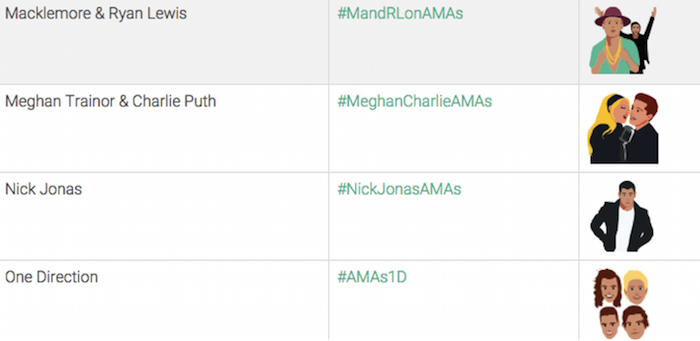
    Because Twitter has released this for events as well, the most recent American Music Awards took part in the new trend. Twenty unique Hashflags were released during the airing of the #AMAs on November 21, 2015.  Each time a performance graced our television screens, a hashtag displayed at the bottom for us to use when live tweeting. Macklemore, Meghan Trainor, Nick Jonas, and One Direction are a few of the artists that had a custom Hashflag.

    Screenshot Image Of Twitter Hashflags

    If you are curious to know what Hashflags and artists generated the most talk on Twitter during the AMAs, you can take one guess. One Direction made a clean sweep of the awards won, and they were also the most discussed artist on Twitter during the show. I’d say they are doing just fine without Zayn…SLAY!

    How to Use Hashflags

    As the rise of Hashflags continues, here is a list of things to keep in mind:

    • They are not permanent. The lifespan of a Hashflag lasts as long as the event/occasion it is associated with.
    • They don’t count as characters. YAY! 🙂
    • Hashflags’ view is currently limited to desktops and the Twitter app.
    • All active Hashflags are visible on hashfla.gs. Check it out to see a list of all the current/available Hashflags you can use in your tweets.

    What has been your favorite Hashflag on Twitter… besides #1DHarry?

  • Celebrate Good Times: The Birthday Experience at SI

    Here at Search Influence, we take our colleagues’ birthdays very seriously. With cards, delicious treats, and amazing desk decorations, you can definitely feel the love on your birthday at SI.

    BirthdayKidCelebrateGif

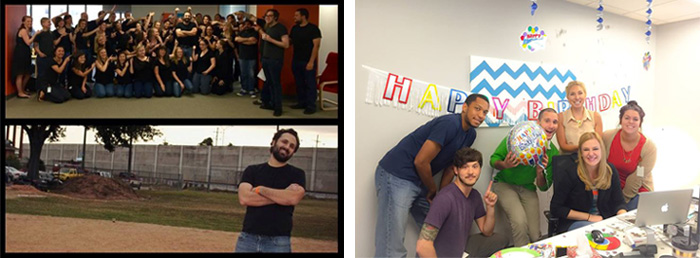
    There are many ways we have celebrated colleagues’ birthdays, but one of my favorite times was when we all dressed in black t-shirts and jeans to celebrate our lead developer’s birthday. Another favorite was when we recently decorated our partner accounts team manager’s desk with balloons, confetti, and a banner. I mean, who doesn’t LOVE confetti? Finally, my all-time favorite is when a few of my colleagues (work besties) decorated my desk with the ultimate One Direction desk decorations, treats, and pictures.

    SIBirthdays-01

    SIBirthdays-02

    Just when you think there couldn’t possibly be any more celebrating to be done…you are wrong! Every month, a member of our team begins planning a birthday brigade to celebrate all employees’ birthdays for that month. The birthday brigade has celebrated at Happy’s Irish Pub, Lucy’s Retired Surfers Bar & Restaurant, and The Rusty Nail. Employees who have birthdays in that month all decide together on where the team will branch out to party!

    SIBirthdays-03

    I can’t wait to see where the team will venture out to celebrate for September birthdays and what other birthday surprises will emerge in the office. Comment below with what special ways your office celebrates birthdays.

    17pv8iigwfv8igif

    Image Credits:

    Birthday Kid Celebrate Gif

    Excited Birthday Kid Gif

  • Google Goes InZayn: How Malik’s Different Direction Broke the Internet

    Unless you’ve been living under a rock, you probably know by now that Zayn Malik has left One Direction. This was news that affected not only fangirls like myself and some coworkers, but also the world. On March 25, 2015, the news broke, and the Internet went into a frenzy.

    According to Google’s trending searches on March 25, more than 1 million searches were made related to his departure.

    Zayne Google Trends Image - Search Influence

    Between the desperate tweets of devastated fans, tearful Tumblr reactions and tributes, dads completely trolling their daughters, and millions of Google searches, it’s clear that Zayn dominated the search engines and the Internet that day.

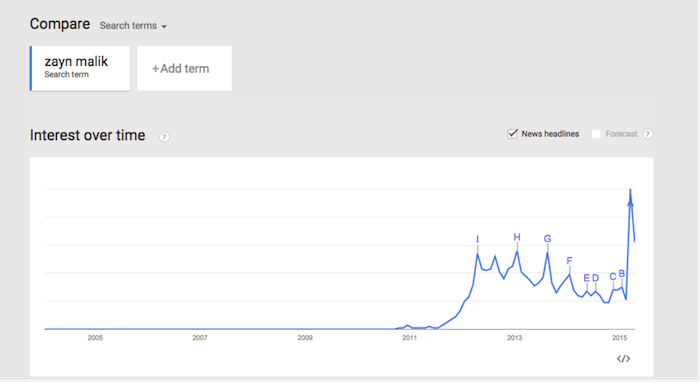
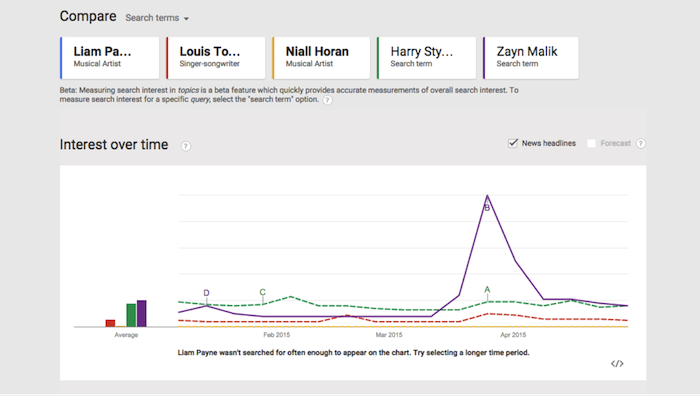
    Using Google Trends, we are able to see how his searches progressed over time throughout his 1D career:

    Google Trends Zayn Malik Chart Image - Search Influence

    Google Trends is a great tool to find out what people are searching for at a given moment in time. You don’t have to be a complete fangirl to check it out, either. Businesses and marketers alike can use this tool to research and leverage relevant search topics for ideas on content, videos, infographics, etc.

    Or, if you’re a fangirl like me, feel free to use the tool for things of utmost importance, like figuring out which One Direction member gets searched most often. Let’s be clear about one thing: Harry is steadily searched more than Zayn, minus the spike during his attempt to abandon his fellow band members and launch a solo career in March. It’s an outrage.

    One Direction Google Trends Image - Search Influence

    Please comment on how Google Trends helps your day-to-day life and/or if you were one of those who were affected by Zayn leaving One Direction.

    Image sources:

    Ahhhh gif

  • SI Scores A Home Run With Team Building, Bonding, and Kickball

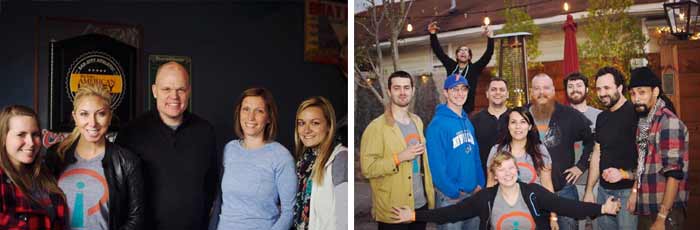
    Throughout the year, the team at Search Influence has come together multiple times for quarterly team-building events. In 2014, we had a Pelicans game outing, a crawfish boil, and a carnival. Our final team-building event was a highly anticipated celebration to end a successful year. On Friday, December 12th, all of the members of Search Influence attended the year-end event at Mid City Yacht Club.

    SITBC01

    Anyone who works at SI can tell you that these events are not only a blast, but also a great opportunity to get to know the new and old employees of our quickly growing team. At 3pm, everyone headed over to South St. Patrick Street to begin the festivities.

    SITBC02

    Members of the team brought loads of sweets and treats. The dessert table consisted of delicious pralines, meringues, a birthday cake to celebrate an employee’s birthday, and many more snacks to settle any sweet tooth cravings. After socializing for a while, some of the team gathered across the street at the local baseball field, where an intense game of kickball took place. Many team members played or cheered on the players.

    SITBC03

    All in all, this was yet another successful team-building event to end the year. All of us at Search Influence look forward to seeing what the 2015 team-building events have in store. Happy Building 🙂

    SITBC04