Tag: wordpress

  • WordPress vs Google Sites: Why You Should Be Using WordPress

    WordPress is by far the most popular website management system in the world and shows no sign of slowing down at all. What started in 2003 as a PHP and MySQL based open source software has turned into a community of millions of users worldwide that all collaborate to make website management easier and more intuitive. What this means is that all of their site files are available for download at their website for free. Uploading the files to your web server allows you to connect a domain and start using WordPress for your own site. Just one look at this breakdown from Fresh Consulting shows the dominance of WordPress in the CMS market.
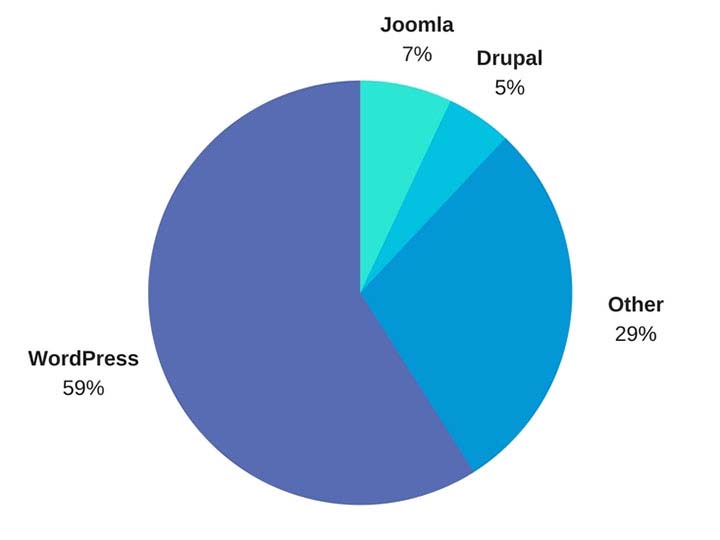
    WordPress Market Share represented in a pie graph - Search Influence

    So Why Should I Use WordPress?

    1. It’s Free

    Well, first and foremost, it’s free. As previously outlined, upload the files to a web server and you can work from there. Immediately cutting down on a business cost at the very beginning is always a bonus.

    1. Constantly Updated Options for Themes and Plug-ins

    In addition to that, it is also an insanely popular open source software, which means that millions of users are creating and updating new themes and plugins to help customize your website experience as both an administrator and for users visiting your website. Did I mention it was free?

    1. Easy to Use Editor

    The ease of use of WordPress is also another big selling point of using this platform. For the non-developers out there, WordPress offers a native “what you see is what you get” (WYSIWIG) editor that is easy to use and gives you complete control of the page.

    1. Media Storage & Access

    It also preserves the capability to all sorts of media such as videos, audio clips, and images and has a very convenient file uploader for non-developers who aren’t using an FTP GUI such as Filezilla. This is a convenient way for developers to upload small batches of files that might not necessarily require connecting directly to the server.

    1. For Developers: Open Source Customization

    For the developers, a completely open source code allows complete customization if desired, and easy access to the template files makes minor edits quick and easy. What this means is that if you do happen to have a developer or developers on your team, they won’t necessarily have to struggle and create workarounds in many situations—all of the code is available to them from the beginning. In addition to that, there is also a bustling community of users that create all sorts of templates and plugins that are all open source as well.

    1. WooCommerce for Ecommerce

    Sure, building and creating a website is one thing, but WordPress also offers the WooCommerce plugin, the world’s most popular E-Commerce platform that currently powers 30 percent of the world’s E-Commerce websites. So if your desire is more on the side of selling goods as opposed to brand awareness, then WordPress has you covered there. WooCommerce is free and comes ready to sell right out of the box with loads of free extensions, including one that provides full Google Analytics integration whether you’re using the standard or enhanced Google Analytics E-Commerce. When configured properly, this extension can show detailed data, such as drop off points in your sales funnel.


    woocommerce logo - Search Influence

    WordPress logo - Search Influence

    1. Search Engine Optimization

    Probably the most important feature of WordPress is the Search Engine Optimization (SEO) is a cinch. So easy that Matt Cutts gave them a shoutout in one of his presentations when he was the head of the Web Spam Team at Google. The easiest way to tackle this solution is by adding a free SEO plugin, such as Yoast SEO or All in One SEO, which gives you complete control over your title tags and meta descriptions. Your developer can also easily implement structured data (the code that creates the answers and fancy cards in Google search results) in JSON-LD, which is Google’s preferred format. It’s worth mentioning that some other CMSs don’t play nice with this code and will strip it from your pages. Optimizing your massive images that you may have taken of your business or product with your fancy DSLR camera is an easy task with a plugin like Smush Image Compression and Optimization to help your site maintain its speed, which is something Google definitely cares about dearly.

    How Does WordPress Compare to Other Content Management Systems?

    1. Flexibility

    The “ease of use” selling point for non-developers was originally one of the main selling points of WordPress, but a lot of other Content Management Systems (CMS) are beginning to catch up in that area. Comparatively speaking, a CMS at face value should have a high level of accessibility for people who don’t necessarily know HTML, CSS, JavaScript, PHP, or any other coding languages that are used online. CMSs such as Wix and SquareSpace have begun to gain a lot of steam in recent years, primarily due to large advertising budgets, but still have yet to catch up to the popularity of WordPress. A large part of the continued success of WordPress is the amount of flexibility it offers.

    1. Open Source Software

    As I stated before, WordPress and all of its code is open source, meaning that it is available to the general public. The platform itself is coded in PHP and MySQL, which allows developers to have a field day, creating beautiful templates and all sorts of cool effects that they want for websites. In addition to that, open source code helps create larger communities of users that can help with any sort of idea that you can think of, rather than having to simply rely on WordPress documentation. This community effort leads to a very expansive forum where WordPress users can oftentimes find the answer to any question they may have or join in and offer some unique solutions that they may have come up with.

    A lot of WordPress critics often parrot that a WordPress site isn’t much fresh out of the box, which I personally find to be very disingenuous. SquareSpace and Wix both have a strong selling point for making beautiful websites, while WordPress users see the Twenty Seventeen theme and more than likely cringe at its visage. However, anyone can navigate to the free themes that WordPress offers. After finding one that you like, implementation takes about 5 minutes and 3 clicks of your mouse. This makes it very easy to dispel the myth of all WordPress sites being ugly.

    How Can Other CMSs Be Problematic?

    Here at Search Influence, I’m on the Web Development team where, in coordination with our Account Management team, I implement our proprietary tracking system and on-site optimizations, in addition to the various other projects that may come along. Here are a few instances I’ve found in which other CMSs can present problems.

    1. No Access to Source Code

    Having access to the source code of a website is imperative for accurate implementation of anything on a website. So, it’s safe to say that I’ve come across quite a few issues with some of WordPress’ competitors, which creates abounding frustrations.

    1. Removal of Custom Coding

    One example that I see a lot involves CMSs that strip schema from their web pages, whether it’s coded in JSON-LD or in the microdata format. With Google being very mobile and local-focused, not being able to add structured data to your website means that you’re probably missing out on having your business showing up on the knowledge graph on the right-hand side of the search results. Another quick example would be CMSs that strip title tags and alt text from images. Google uses alt text to determine what an image is and then possibly add it to its image results. The title tags are used for accessibility purposes on the user end.

    Ron Swanson from Parks and Recreation throwing a computer into a dumpster - Search Influence

    1. Lack of a Community

    WordPress has a technically apt community that is generous with their knowledge. In addition to the 50,000+ plugins available, WordPress.com hosts a forum for users with 40,000+ topic threads. It’s hard to match that level of technically sophisticated users available as a resource.

    1. Faulty Built-in Integrations

    Just recently, I was setting up E-Commerce tracking on a SquareSpace site that was using the SquareSpace store. After some searching that took much longer than it would’ve taken to find the solution in the WordPress community, I found that SquareSpace has Google Analytics E-Commerce tracking integrated into their platform. Seems easy enough—drop in the tracking code and let the data flow like a river. After completing a test purchase, my data populated perfectly and I gave myself a pat on the back and wished the client a great campaign.

    Turns out, the integration was completely busted and stopped tracking. I ended up having to set everything up manually. Also, SquareSpace is a pretty poor platform to setup product data and all the other fancy bells and whistles that can be added via Google Analytics. To top that off, I found that the source of the problem is that their storefront uses the classic Google Analytics code, which was officially discontinued in 2012!

    To the contrary, with a WordPress installation, the WooCommerce plugin and the Google Analytics extension can be added to pull all sorts of fancy data, like product data, cart data, dropoff data, etc. The setup for WooCommerce is very clean, and I haven’t had any issues tracking all of the data or the data mysteriously disappearing on me. Even if you don’t have any experience with a particular plugin, the popular plugins have a slew of documentation written by the creators as well as large communities focused on making sure everything works as intended.

    So How Does One Take Advantage of This Powerful Tool?

    Self-Hosted vs. Hosted Through WordPress.com

    WordPress.com does offer its own hosting service, though I will say a business owner should spring for the “business” plan if they plan on hosting through WordPress.com. If not, I highly recommend self-hosting if there is a developer available. Self-hosting truly unlocks the full potential of WordPress, with the ability to completely customize every single aspect of your website. With server access, the possibilities are nearly limitless. Having an open source code that a developer can harness the power of, a community of millions of innovators to back it, and a level of ease that non-developers can take advantage of makes WordPress, in my opinion, the best CMS currently on the market.

    Choosing a CMS platform while either creating a site or updating your old site is very crucial to the success of the website. Getting looped into a poor CMS and linking your domain to it for a year or more may feel like you are stuck with it until your contract is over. But if it’s costing you business, it may be worth the switching cost!

    We’ve helped many businesses transition to WordPress, sometimes keeping the same general feel of their current site design. If this all seems daunting to you, reach out to us for support. We’ll work with you to figure out the best plan of action. Don’t risk missing out on valuable conversions or leads because of the limitations of a clunky CMS that doesn’t allow you to optimize the potential of your website.

    Images:

    WordPress Market Share

    WooCommerce

    WordPress

    Ron Swanson – Computer Trash

  • Has Your Site Been Hacked? Here’s How to Handle It

    April is National Stress Awareness Month. And I can tell you, working at an online marketing firm, nothing can be more stressful than when a website gets hacked. Your day will start normally, and then comes the discovery. It can happen in a variety of ways. Some of the more common instances include no longer being able to access your site, finding that your site has been redirected to a, shall we say, “not so wholesome” website, or discovering that the content on your site has been compromised. Other ways you may be alerted of a site hack include a notification from your web browser or a message in Google Search Console/Bing Webmaster Tools.

    Step 1 – Take a deep breath

    Site hacks are more common than you think. You will get through this.

    Step 2- Change your passwords

    In order to prevent further harm to your site, you will want to change your passwords right away.

    Step 3 – Call in the troops

    This step involves a two-fold approach.

    First, you will want to call your hosting company. It is not likely that this company will be able to clean up the site for you. However, they deal with these things all the time and can provide valuable insight into the situation.

    Next, after speaking with your hosting team, contact your web developer. One of the first things you will want to let them know is whether or not you have a backup of your site. If you do, great news! This means they can restore your website from an earlier pre-hacked version. If you do not have a backup of your site, all hope is not lost. This just means that they will need to go the more labor-intensive route by manually removing the hack.

    Step 4 – Plugins, plugins, plugins

    If you are using WordPress as your CMS, make sure to update all of the WordPress plugins on your site to latest versions after your website is restored. You will also want to delete any inactive plugins. Hackers can sometimes hide their “back door” within these plugins. This allows them to circumvent the standard login procedure and gain access to the server remotely.

    In addition to updating your plugins, you will also want to install Sucuri WordPress Auditing, a free plugin that scans your site for malware issues.

    Having your site hacked is a stressful and frustrating process, but it is something you can recover from with some hard work and help from your support team.

    Image Credits:

    You Have Been Hacked Image
    Send in the Troops Image

  • Five For Friday: Tweets Within Tweets, Foursquare Gets A Facelift, And More!

    FiveForFridayImage

    1. Personal Preferences Killed The Check-In
    -Mashable

    Once upon a time, Foursquare made “checking in” at a location cool. But as of its latest update on Wednesday (8/6), the app has completely removed that feature. Now, those who want to broadcast their location to their social media spheres can do so with Swarm, Foursquare’s spin-off app that debuted in May.

    So what does that mean for Foursquare 8.0? Well, the app has a completely remodeled user experience: new colors, new logo, new layout, and new functions. Once you login, the app asks about your preferences (Are you into Pho? What about Chai Lattes?), then uses those preferences to provide recommendations just for you about places nearby. The app also provides filters to help you narrow down your findings. By using these filters and profiling users’ tastes, Foursquare has successfully become a more personalized version of databases like Yelp, and could potentially change the way people explore their cities. Pretty epic.

    2. Get Your Google Reviews On Your WordPress Blog
    -Blumenthals

    For those with WordPress blogs and websites, there is now a plugin that allows you to share your Google reviews on your page! Google Places Review lets WordPress sites embed Google reviews in two ways: The free, basic version provides a widget in the sidebar showing up to 3 of your most recent Google reviews. The pro version, which is available for $20, provides up to 5 reviews on any page using short codes. The pro version also allows you to filter by star ratings, offers optimized widget caching, and includes a customizable feature for collapsing and expanding reviews. Presumably, posting your reviews on your site can help boost consumer confidence, while providing easy exposure to your good reviews. A recent study by Dimensional Research found that 90% of consumers are influenced by positive online reviews, so get out there and show the interwebs how great you are!

    3. #Tweetception
    -MediaBistro

    For those who feel that retweeting simply isn’t enough, there was an interesting update from Twitter this past week: you can now embed a tweet within another tweet! All you have to do is copy and paste the URL of the tweet you want to embed, and then Twitter takes the wheel. The embedded tweet acts as a link that takes you through to the full version of that tweet (you can see my own #tweetception example below). The best part of this feature is that embedded tweets only use up the same amount of characters as any other shortened link, so you have roughly 115 free characters still left at your disposal.

    TwitterEmbedTweetImage

    If you want to get really fancy, the tweet-ception can go even further: you can embed a tweet that includes an embedded tweet into a brand new tweet (!)  – and they all link together in a chain. For now, this feature only functions on twitter.com and the official Twitter iOS and Android apps.

    4. Facebook Goes Down, So Does News Site Traffic
    -Marketing Land

    Last Friday (8/1), there was a brief Facebook outage that led to some interesting information. Chartbeat, a service that produces analytics for web publishers in real-time, announced that the overall traffic on news sites fell 3% during the downtime, which was ultimately less than an hour. What’s even more interesting is that the entrances to news sites via mobile devices dropped 8.5% during the outage, further proving just how important Facebook is to driving mobile traffic to online publishers. Another interesting factoid provided by Chartbeat shows there was also a “9% increase in homepage direct traffic,” meaning people look at homepages more when they don’t have Facebook to tell them what they should be reading. While all this information may seem fairly expected, it highlights just how powerful Facebook is as a news source.

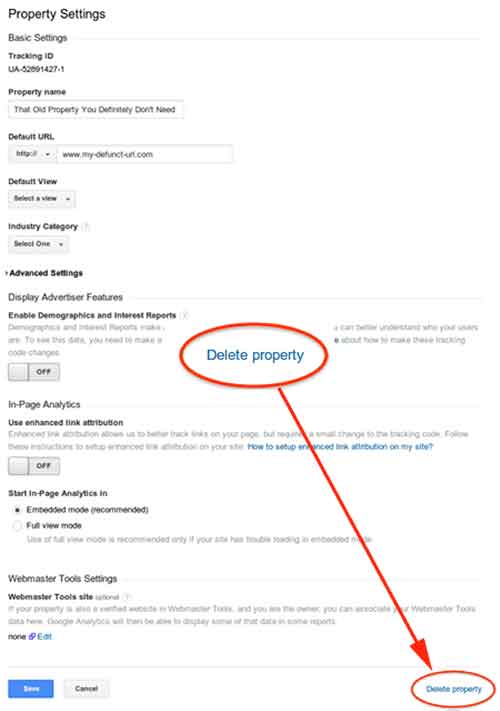
    5.  You Can Now Delete Google Analytics Properties
    -SEO Round Table

    This week (8/5), Google made a quiet announcement on its Google+ Page stating that you can now delete Google Analytics properties within your various accounts. In the announcement, Google explains that this was not previously allowed due to how the accounts, properties, and profiles were all associated with one another. According to Google, they are “excited to bring this additional flexibility and consistency to our users, which is the first in a series of improvements to managing deletions in Google Analytics.” If you want to delete a property, all you have to do is go to the property settings within admin view, then click “Delete Property” at the bottom right of the page.

    GoogleAnalyticsDeletePropertyImage

  • Mobile Optimization and WordPress Tips – Pubcon 3/20/2014

    Photo Of Influencers At PubconAlong with a number of other Influencers, I was fortunate enough to attend Pubcon New Orleans on Thursday, March 20th. Being a smarmy, cynical Developer, I was honestly a bit skeptical as to the amount of real, pertinent insights I would take away from the experience. I was even more skeptical of the quality of the seafood etouffee that would be provided at the lunch buffet. I am pleased to say that my skepticism was proven to be unfounded on both counts, and there was quite a bit of quality information shared at the Pubcon sessions I attended. And the seafood etouffee was legitimately really good, even to a New Orleans native. So great job all around!


    I thought I might in turn share some of the more significant information I took away from the speakers I heard. I’m going to start with what were actually the latter two sessions I attended (“Next Generation Catalysts: Trends Worth Watching” and “Mobile Conversion Optimization“), because these were similar thematically and a bit more “accessible” in terms of subject matter. Then I’ll cover the earlier session I attended on the nitty gritty of WordPress structure (“Optimizing the WordPress Content Machine“) for anyone whose eyes don’t glaze over upon encountering words like “server” or “database.”

    Mobile Strategy

    Photo Of Santa On A Smartphone

    In the two sessions I saw addressing mobile strategy, possibly the simplest but most surprising takeaway for me was how much actual commerce takes place on mobile devices now. As Ralph Schwoebel in the Next Generation Catalysts session enthusiastically emphasized, “mobile-friendly” optimization and responsive design are no longer just trends that are hip with the kids; they are now essential considerations for any business trying to expand its branding and customer reach on the internet. While more purchasers still use desktop devices to buy online, Schwoebel notes that mobile buyers actually spend about twice as much in their purchases. Also of significance is the fact that users of Apple devices thoroughly and decisively outnumber users of other mobile devices in terms of actual purchase rates. That’s not to say that designers and developers should just ignore Android users, but acknowledging the fact that iPhone and iPad purchases comprise a truly dominant majority of mobile purchases should help everyone prioritize a little bit.

    Key to leveraging this increased internet usage and spending among potential customers, however, is allowing our approach to design and user goals to evolve along with the technology. Poignantly, three different presenters across both sessions hammered on the same crucial point: mobile conversion goals should be approached differently than desktop conversion goals. Presenters William Leake and Chris Goward both emphasized that it is not necessarily productive to view form submissions or newsletter signups as a realistic user conversion goal, as it might be for desktop users. When optimizing a site for mobile users, they suggested making click-to-call buttons more of a focal point, since it is more realistic to expect a potential customer to call for more information versus filling out an entire form on a tiny phone keyboard. Ralf Schwoebel posited that rather than focusing on getting users to sign up for mailing lists, download apps or, again, awkwardly fill out a mobile form, efforts may be better directed toward encouraging users to bookmark a site or add it to a separate reader app or RSS feed.

    Along with adjusting goal expectations, mobile designers and developers were encouraged to adjust content-related expectations for mobile visitors. Where a site’s perceived topical authority and “SEO-friendliness” afforded by larger quantities of targeted content may benefit a business site viewed on a desktop browser, the same isn’t always true on mobile. It can be difficult to read content on smaller screens, and you don’t want to make users scroll forever to get to a conversion goal. “Trimming the fat” on mobile sites, be it content or excessive widgets, banners, etc. was a common theme throughout these presentations.

    So What’s The Point?

    In broader terms, just think like a real live mobile internet user (which most of us probably are). From a Development standpoint, I know it can be very easy to get bogged down in issues like “will this form display well in a mobile browser?” or “should all this content go above or below the form on Android devices?” and so forth. It’s essential, however, to take a step back and consider the actual user experience of someone browsing the internet on their phone while waiting in line or killing time at a coffee shop. The questions may well change to, “do we need the form or all that content in the first place?” or “what do people actually need to see in order to pique their interest enough to come back when they have more time to browse?” There are so many technical considerations when it comes to responsive site design and mobile-friendliness that it can be easy to forget its actual function for the majority of mobile users.

    Wonderful WordPress

    Moving on to the WordPress-centric session I saw earlier in the day, there were a great deal of really interesting points raised here about site security and maintenance. One over-arching point that presenters Carolyn Shelby and Brian Lafrance both emphasized is to avoid overuse of plugins in WordPress. There are numerous reasons for this, but one of the most pertinent is the ease with which a security breach in a plugin can facilitate hacks to a large quantity of disparate sites using that plugin. According to Shelby, this was exemplified during last year’s Pubcon, where it was revealed that there were major vulnerabilities in two of the most prominent WordPress caching plugins (W3 Total Cache and WP Super Cache).

    To help combat these sorts of problems, both speakers recommended compiling a master list of all plugins in use on any site you manage, with notes on when the plugins and the WordPress installation itself were last updated. This is one among many suggestions that would be more practical for developers afforded sole, proprietary management of a site and its content, of course. At Search Influence, we have many procedures in place to allow us to work on a site regularly while allowing clients and clients’ own developers to continue making updates of their own with minimal conflict. Still, tracking WordPress plugins and updates is an irrefutably sound approach.

    In essence, it should simply remain a policy to just not use plugins where plugins aren’t really necessary. There is no need to use plugins for site updates that would only require a couple lines of PHP or a quick line in the .htaccess file to accomplish on your own. Particular wrath was directed toward 301 redirect plugins, many of which have settings to automatically redirect broken URLs to places you might not want them to go, with very little customizable user control. And if a plugin is installed but not in use, it should definitely be deleted.

    Site Speed

    While the talk focused on the security aspects of WordPress, many of the principles in play also have direct impact on site speed. The fewer plugins with information being stored and sorted within the site’s database, the quicker the database can be accessed and loaded. More directly, a number of plugins function by adding extra JavaScript to a page, which can in turn make each page take longer to load in a browser. Another significant point raised by both speakers was to limit users within WordPress. More specifically, there is an option to force commenters to create an actual user account within your site in order to be able to comment. Some may see this as some form of deterring spam comments, but all it really accomplishes is to completely bloat a site’s database with user data. For anyone wishing for commenters to officially register in order to comment, Lafrance recommended using Facebook login as an alternative to avoid having to store all this information in the site’s database tables.

    All that said, it is still considered advisable to use certain plugins like anti-virus plugins, search and replace plugins and (now secure) caching plugins for site speed. Additionally, making effective use of the Custom Fields plugin for site functionality can save the need for many additional plugins, avoiding extra bloat within WordPress.

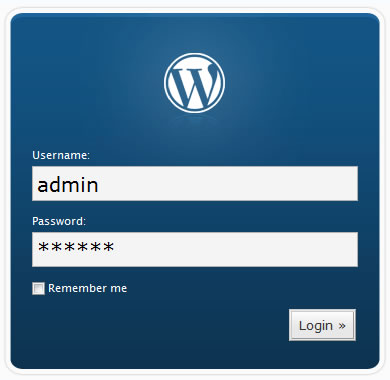
    Photo Of WordPress Login

    Logins

    I’m setting a special paragraph aside for one point that seemed almost embarrassingly obvious to the speakers and to me, but which comes up pretty much daily in our office. It’s shocking to have to say this in 2014, but PLEASE, do NOT make your WordPress user name “admin” or your password simply your business name, or worse, “temppass” or “password123.” Again, this seems like a statement that shouldn’t need to be made at this point in the evolution of internet usage, but it comes up all the time. Carolyn Shelby also pointed out that it is a really bad idea to name your WordPress database simply “wp,” which I’ve also seen on sites we’ve inherited in the past.

    Many of these points are in line with what we already practice – or at least preach, when access is limited – at Search Influence. It is always nice to be vindicated by other experts in the industry, however. Where we may not be overhauling any processes based on the points raised in the sessions I attended, I felt like I was definitely given better perspective on many issues we deal with regularly and better sense of priorities in terms of how we do our work.

  • Welcome to “Can’t Code”

    Lessons, Musings, and Complaints about Digital Technology

    I started working at Search Influence a few months ago. Before that, I had a lot of web design experience, but all of it was very informal and self-taught. Due to budget cuts at the University of New Orleans, my graduate department asked me to volunteer as their “web guy” when they were unable to afford a real administrator. This meant that I had to do some very quick, ad-hoc studying in order to fulfill this role. Up to that point, I’d learned a lot about the most basic architectural features of the internet, like HTML and CSS, but it took a lot of research before I could make sense of the web’s more sophisticated components. At the time, PHP, Javascript, the infamous WordPress “Loop,” and other institutions of cyberspace appeared to me like confusing, mystical clouds of information.

    Image of Indonesian Students Using a Laptop

    I felt simultaneously intimidated by these topics and ashamed to inquire about them because I felt I should already know the answers. Finally, out of necessity, I set aside my ego and asked my more well-informed peers to share their skills with me, a request that was, of course, met with enthusiasm. The process of learning these skills was still challenging, but being open and honest about my ignorance was my shortest path to success (think I saw that on a poster somewhere).

    That experience made me reflect on the “digital divide.” Even as someone who was raised on computers, I struggled to understand how people operated behind the point-and-click Windows interface that I grew up on. I could only imagine how difficult this same endeavor would be for, say, my grandparents, or my childhood friends whose families were too poor to have a Nintendo, much less a laptop. Even though digital technology has permeated some of the hardest-reached socioeconomic crevices of our society, the standards of what constitutes “literacy” in a rapidly evolving economy is a moving mark. While many people are becoming comfortable with the Graphical User Interfaces (GUIs) created to help them interact with digital information, knowing a little code helps to fully participate in and understand the digital spaces of our lives.

    What Now?

    Image of binary data

    Beginning with this post, I’d like to share what I’m learning as a Junior Web Developer at Search Influence, in the hopes that others with a low to moderate level of computer literacy may learn something. Future posts will appear monthly on the Search Influence blog and cover various facets of the digital technologies that I use to complete my daily tasks. Some posts will describe what these technologies are used for, some will provide a tutorial on how to use them yourself, and others may simply give commentary on the history and social implications of these technologies.

    Next month, I plan on covering the very basics: ones and zeros. We commonly see long strings of 1’s and 0’s in the popular media that are meant to represent some form of digital information. But where does this code come from, and why is it used?

    Chart-border

    Stay tuned for the answers next month! And for any code questions you want answered, comment below.