Tag: site speed

  • How Your Website’s Speed Can Impact Your Institution’s Recruitment Goal

    Key Insights

    • Site speed is a key ranking factor—even more so with Google’s Core Web Vitals rollout.
    • Data suggests lower load times leads to a drop in overall conversions.
    • You can consistently monitor site speed with free tools.

    According to previous Google data, users tend to abandon a loading site after just three seconds of waiting. This means your institution needs a fast, reliable website.

    However, beyond the user experience, inadequate site speed can negatively impact rankings. Ever since Google announced that site speed was a ranking factor, the need to consistently monitor and improve site speed has increased tremendously.

    Through continuous improvement to site speed, you may see a positive impact on rankings, thus getting your programs, degrees, and other content in front of more potential students. We recommend having all important elements on-site load under that three-second mark to help with your rankings.

    This blog post will help you understand why site speed impacts rankings and conversions and explain a site speed audit and how your institution could get started with one.

    Graphic of loading web browser

    Does Site Speed Impact Rankings?

    Google has used site speed as a ranking factor for desktops since 2010 and for mobile searches since July 2018. Users performed around 61% of searches on a mobile device in 2021, making it essential that your site is quick on mobile moving forward.

    It is hard to benchmark just how much site speed impacts rankings because it is just one of around 200 ranking factors Google may consider when indexing your site. However, it stands to reason that if your competitors offer comparable content on a faster site, Google and users may reward that site with more traffic, less bounce rate, and more time on-page.

    Overly large images often impact site speed. Just like your computer takes longer to open a large image file, your browser has to execute a similar process. By not compressing these images, you unnecessarily add a lot of load time to the site, thus adding a negative ranking factor.

    Site Speed, User Experience, and Engagement

    A negative site speed experience will directly impact your site’s ability to hold traffic and to prevent other competitors from stealing that traffic.

    There is a direct correlation between load times and bounce rates. After 10 seconds of load time, there is a 123% increase in bounce rate versus a site that loads in one second.
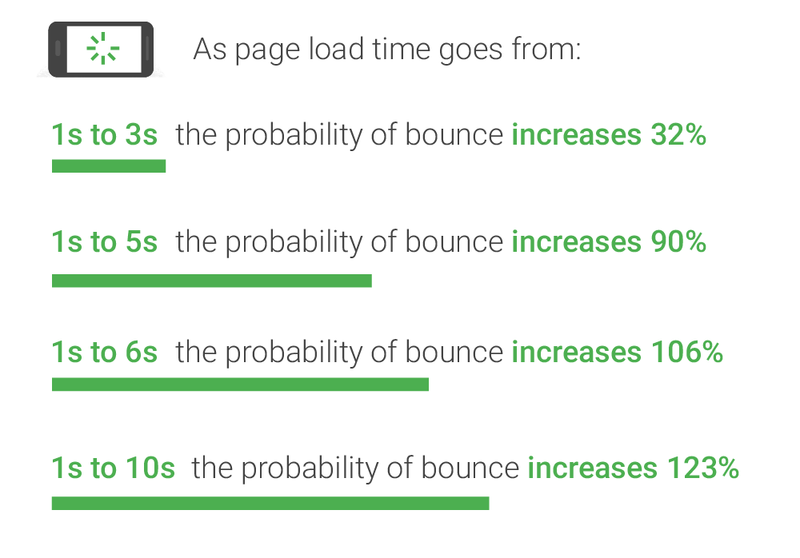
    Graph of relationship between bounce rate and website load times

    In May 2020, Google introduced Core Web Vitals, which measures what Google considers essential in a website/user experience: largest contentful paint, first input delay, and cumulative layout shift.

    Without getting too technical, these measurements essentially tell you how quickly your site is usable. The longer the load times on these components, the longer it takes for the site to be usable, contributing to higher bounce rates and less interaction on site.

    Does Site Speed Impact Conversions?

    Similar to user experience, if visitors find that the load times and site speed are inadequate, they are less likely to engage with conversion forms. Data suggests that one second in added load times leads to a 7% drop in conversions. If the goal is to drive more students to a program or degree, slow load times may have a tangible impact on the amount of form fills you receive.

    Key Factors of a Site Speed Audit

    There are so many factors that contribute to a site’s overall speed, but some are fairly common and relatively easy to address compared to more involved technical development fixes. First and foremost, you will want to evaluate your site on desktop and mobile. Nearly any site speed tool you utilize will delineate between the two versions of the site. Some of the more common issues include:

    • Unused / excessive JavaScript or CSS: Many sites have scripts, plugins, and other script-dependent items in their coding that bog down crawlers and site load times.
    • Oversized images: Frequently sites fail to minimize or compress their images, resulting in large file sizes and longer load times.
    • Poor coding: Any broken coding or missing elements can add to a browser’s difficulty in loading a site.

    Beyond these fixes, there are plenty more ways to positively impact site speed; however, it is important to note that many of them require a large amount of technical development work. As a result, some fixes are not attainable without essentially a complete redesign of the site. However, anything that will improve site speed will lead to a higher chance of a conversion.

    Free Tools for Site Speed Testing

    Several tools can help you regularly monitor your site speed and discover errors (for free!)

    Page Speed Insights: This is Google’s tool for testing page speed insights. The report contains more information on the technical items and potential fixes. This report is beneficial for evaluating the Core Web Vitals elements.

    Pingdom: With this tool, you can more easily break down individual loading elements of a site such as images, JavaScript, CSS, etc.
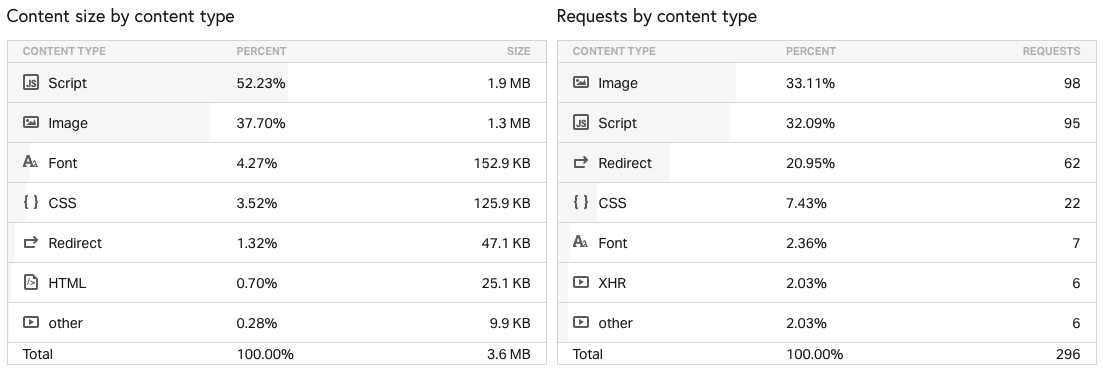
    Example of Pingdom site speed test results

    WebPageTest: Similar to Pingdom, this is a great tool for a technical breakdown of your site speed. You can also customize your location to test site speed from different locations and different browser and device types. Perhaps most helpful – you can run a Core Web Vitals test.

    Regardless of the tools you use, you should monitor site speed consistently. Google has introduced new elements to its ranking algorithms over the past few years that indicate that user experience, of which site speed is critical, will continue to be an important ranking factor. If your institution’s site speed is lagging behind competitors, there is a good chance you are losing out on potential students, or at the very least, missing more conversion opportunities.

    Concerned about your institution’s site speed? Contact Search Influence today for a consultation.

  • Is Your Website Running Slowly? Image Optimization Could Help Speed Things Up

    Image optimization is a process of manipulating an image’s size, dimensions, and format to reduce it to the smallest possible size while still ensuring the highest possible quality is delivered to the browser. It sounds like a dark art, I know, but it really isn’t, and if your business relies on being able to show your products or the results of your services, image optimization must be a regular part of your ongoing website maintenance. Every single time you upload that new photograph highlighting your most prestigious project, image optimization should be considered and acted upon. It not only helps keep your website fast for your visitors, it also helps with your SEO!

    Mobile loading gif

    So My Website Is a Little Slow, What’s the Problem?

    In today’s world of instant gratification, website speed is extremely important. If your website takes longer than 2 seconds to load, you are losing potential customers. Websites that load within 2 seconds see an average of a 9.6% bounce rate. That figure jumps to 32.3% for websites that take 7 seconds to load, and it only gets worse from there. This ultimately can hurt your brand as people come to know your website as “too slow to be worth the time.”

    As more and more website surfers are using their mobile devices instead of their desktop devices, page speed has only become more and more important. Google announced back in January of 2018 site page speed would become a ranking factor for mobile searches—and they meant it, forcing SEO experts to respond by finding ways to speed up their clients’ websites. And it worked! As Search Engine Land noted, Google’s data shows this speed enforcement resulted in a 15-20% increase in page load times amongst the slowest sites on the web.

    How do images come into play? You may have noticed that a site with a large gallery takes a long time to load. That’s because large images can add weight to your website, slowing downloading time.

    I See Site Speed Is Important, but How Do I Optimize My Images?

    To address image weight, you can use image processing software such as Photoshop, (or the free alternative GIMP) to set the height and width to be exactly what you need it to be. Set your dpi (dots per inch) to 72, considered the web standard. You can also use this software to change the file format and compress the image even further, but be careful not to compress the image so much you lose quality. Remember, the goal is to have the highest quality image with the smallest weight. The most common image formats used on the web are:

    • PNG—good for screenshots and images with graphics or text
    • JPEG—best for photographs
    • GIF—if you really need an animated element on your site

    If you use a content management system, there are likely add-ons to the CMS that can help automate this for you. For WordPress websites, I recommend the reSmush.it plugin. You can dial in your optimization level and configure it to automatically optimize the image when you upload it. The plugin is absolutely free with the only restriction being the original images must already be below 5 MB.

    Woman working at her computer with mobile device and tablet

    Image Weight Isn’t the Only Important Image Optimization

    While reducing your image weight is an important practice to keep your website running fast and avoid negative rankings from Google, there is more you must do to truly be able to say your website images are optimized and SEO friendly. You should name your images descriptively; the name should indicate what you see in the image. In addition, make full use of the ALT and TITLE tags offered in HTML to further describe in more detail the key things that are visible in the photo. Google uses the name, ALT, and TITLE tags to help them return the best results possible in their image search. You can’t go wrong if you are following the image best practices Google has laid out, and please, please, only use images that are actually relevant to your website.

    Image search can be a major source of organic traffic to your website and you should be taking full advantage of it. Keeping your images and decorative elements of your website with an optimized quality-to-weight ratio, as well as using the other best practices mentioned here, will help ensure you are using the image search results to drive organic traffic at its full potential.

    If you’ve noticed that your website runs slowly, or you’re trying to increase your SEO rankings, the experts at Search Influence can help make your site more accessible to both Google and site visitors. Contact one of our digital marketing specialists today to start taking your site to the next level.

    Images

    Loading

  • Hammer Time! Squishing Fonts Into Text With Base64

    Ah, fonts. This binary data increases page load time, file size, the number of HTTP requests. Fonts will also cause the page to jump from a basic font to the included one when the font takes longer to load than it does to display the markup. All these hindrances, coupled with having many images, will begin to deteriorate your page’s load times. However, there’s a way to transfer your page’s custom fonts as plain text to the browser and compile them into a single request. Merging the request for multiple files into one or two requests will decrease your page’s load time and efficiency. Naturally the next question is, “How can I do this?” It’s actually very simple. There is a method for converting binary data into plain text using Base64 conversion. To quote Wikipedia in how Base64 conversion works, you can use the word “Man” as an example:

    Man is TWFu. Encoded in ASCII, M, a, n are stored as the bytes 77, 97, 110, which are, in 8-bit quantities, 01001101, 01100001, 01101110 in base 2. These three bytes are joined together into a 24 bit buffer producing 010011010110000101101110. Packs of 6 bits (6 bits have a maximum of 64 different binary values) are converted into numbers (in this case, there are 4 numbers in this 24-bit string), which are then converted to their corresponding values in Base64.

    Now to a normal person (read: not a programmer) that is not very simple at all, but what it means to you is that you can use a service such as Simple64 and you will get a Base64 string in return. Now, what can you do with this seemingly random bunch of characters? You can use them to make your site load faster. For example: you would normally use @font-face src: url(); property to include a font, correct? You can do this exactly the same way using a tool such as base64fonts.com. Convert your font then include it in an @font-face like so:

    @font-face{
    font-family: "Font Name";
    src: url(data:application/x-font-tff;base64,add base64 here);
    }

    I suggest, for more than one font, using an @import with a CSS file that contains all of your fonts. By storing fonts this way, you don’t have to worry about a content “jump” — where the content is loaded, but then suddenly changes fonts when the font is finished downloading. However, problems do lie therein.

    If you have several fonts, you may appreciate this option: downloading many fonts via a CSS file will cause your content to not appear at all until all styles are downloaded, causing a significant delay in the time it takes for the browser to render the content. However, the topic of whether or not this actually brings any site speed improvements seems to be highly debated. If you have GZip enabled in Apache when the site is served, it is zipped and sent. This would easily improve font delivery, as the font CSS will be zipped along with the CSS it’s inside. However, it’s much harder to deliver a GZip font file faster. As far as I can tell, there is very little speed improvement over standard font files unless you have multiple fonts that you would rather all load at once. In this case, fonts.css file included via an @import would be more efficient.

    Thanks for reading, and go experiment on your site! No definitive benchmarks have been run — what are some of your favorite solutions?