Tag: SERP

  • Enriching Your Results on Google

    If you’ve used Google to perform a search for a recipe, an answer to a question, to find a restaurant, or find out the time a concert starts, you’ve probably noticed that not all search results look the same. Some of the results have extra information, some appear with pictures in a “carousel” at the top of the page, and some have reviews with stars on them. These are what have been called “Rich Snippets” by Google, and more recently are being referred to as “Rich Results” in Google documentation. There are many types available, and if you have a website that you are trying to drive traffic to, then there is probably a way for you to take advantage of these features.

    What’s a Rich Snippet?

    The results returned by Google for each recommended web page that consist of a title, a description, and the URL for the page are “snippets” of information taken from the pages of websites. For example, take our LinkedIn page as it appears in the search results:

    Typical Snippet

    Rich snippet data on a SERP result for Search Influence's LinkedIn page

    The title and description are pulled from meta information stored on the pages of websites that are referenced in the results. These are typically added to the code of the site using some simple HTML that can be read in the source code but does not display for site visitors on the page.

    Rich Snippet
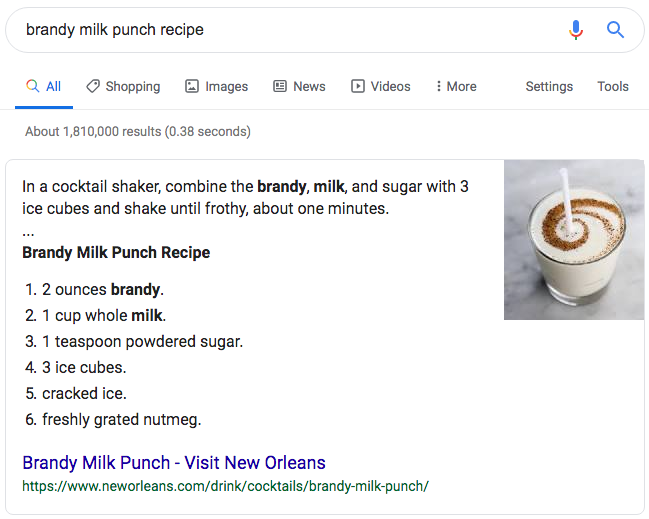
    Example of a rich snippet being served up in the Google SERP

    Similarly, Rich Snippets use code on the page to provide more information to Google and can result in additional information that is displayed more prominently in search results.

    How Do I Get My Site to Show as a Rich Snippet in the Search Results?

    In order for Google to display your webpage(s) as rich snippets in the search results, you need to have the information required for the Rich Snippet type in a coded format that Google can read. This is done with “Structured Data,” which, just as the name would suggest, is information specified in a particular format. Google uses the vocabulary of schema.org for most of it’s structured data, and there are several different formats that can be used. Google’s preferred format is JSON-LD (JavaScript Object Notation for Linked Data) which is a common format for communicating information in web-based applications and other domains. This code format can be a bit tricky to write, so you’d likely be better off using examples provided by Google’s documentation and replacing the values with your own information or using a tool or plugin that will generate the code for you.

    If you are familiar with HTML, there are some more easily writable ways to implement structured data on your site using Microdata and RDFa. These use additional HTML attributes to define structured data.

    If you use a popular CMS (content management system) like WordPress or Shopify, there are also a variety of plugins or add-ons that can assist you in adding structured data to your site.

    What Types of Structured Data Does Google Use for Rich Snippets?

    There are 29 different rich result displays, and Google has just announced some more upcoming display options that will be available on certain search types. I would recommend checking out Google’s documentation for a comprehensive list and all the different structured data that is required for a web page to appear with various display perks and in certain sections of the results. I’ll cover some of the primary ones that will apply to the broadest number of sites.

    Article

    Blog posts and news articles can use the article structured data to potentially be featured in Google’s top stories, carousel, and display, with extra features like headline text and a larger image than the normal thumbnails from results.

    Breadcrumb

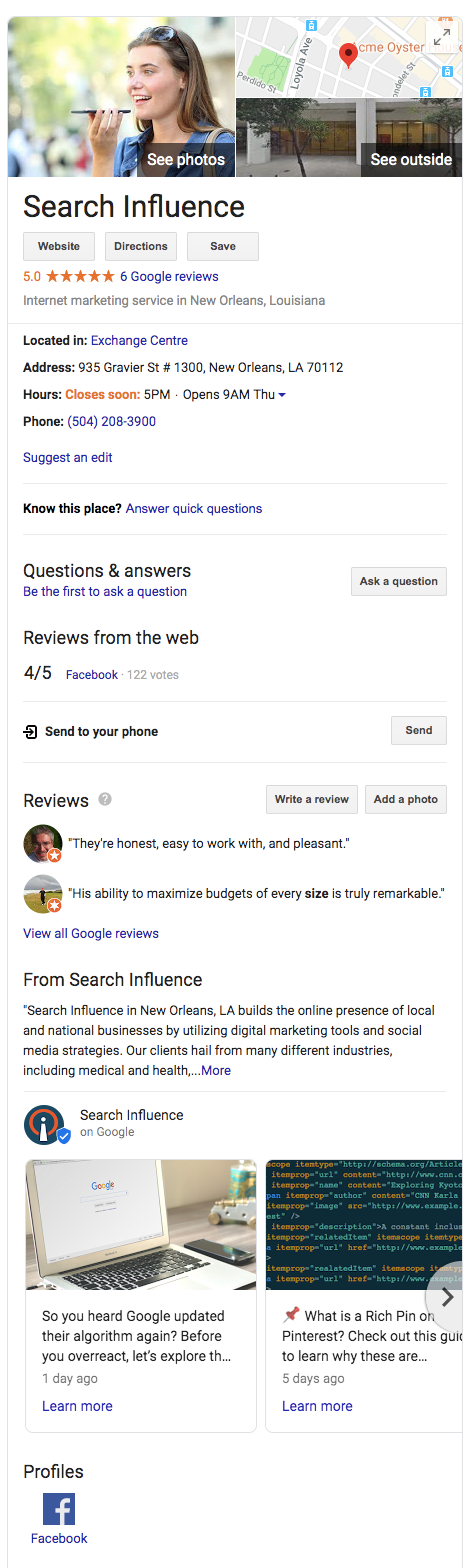
    Breadcrumb structured data can be used to display the pages in relation to the rest of the site.Example of a knowledge graph result using Search Influence as the businessFor example, a specific product page could fall under a category page, which falls under a broader category. With breadcrumbs displayed in the search results, navigation to any of these pages is just a click away.
    Carousel

    Google’s search carousel feature, a prominent interactive display with images that appear at the top of search results, can be unlocked with the carousel structured data. This usually works in conjunction with other structure data like article, recipe, or course structured data.

    Course

    For Education, schools and businesses offering courses can lay out information that will be displayed in the Google search results.

    Event

    This type is an interactive rich result that shows a list of organized events, such as concerts or art festivals, that people may attend at a particular time and place.

    FAQ Page

    A Frequently Asked Questions page structured data is for common questions posed on the page’s subject, often used by businesses to provide information about its products and services.

    How-To

    A How-To walks users through a set of steps to successfully complete a task, featuring video, images, and text.

    Local Business

    Local businesses will benefit greatly from this type of structured data. It allows your business to appear in the knowledge graph with important information like address, hours of operation, contact info, logo, and business description.

    Logo

    This allows your organization’s logo to appear in search results and the Google Knowledge Graph.

    Product

    Structured data for products includes price, availability, and reviews.

    Q&A Page

    Similar to an FAQ page, Q&A structured data can be used on pages that present information in question and answer format.

    Recipe

    This structured data type will allow recipes to potentially display in Google search results with ingredients list and instructions.

    Review Snippet

    A review snippet is a rating or short review excerpt. It can apply to products, recipes, movies, and local businesses.

    Video

    These snippets allow you to markup video content and appear in video results of Google search results.

    Where Can I Learn More?

    You can see example code, required information, and images of the resulting rich snippets that structured data types make possible in Google’s documentation here. I also recommend checking out Schema.org, where you can learn more about the structured data that Google used as a base for all their structured data conventions.

    If you need help implementing code or appearing higher on Google’s search results, the Google and SEO experts at Search Influence can help. Contact us today.

    Images
    Dollar sign

  • An Update: How to Get Rich (Answers, That Is) with Google

    Editor’s Note: This post was originally published on December 3, 2015, and then updated on July 28, 2016, to provide you with the latest information.

    2016 Rich Answers: Update

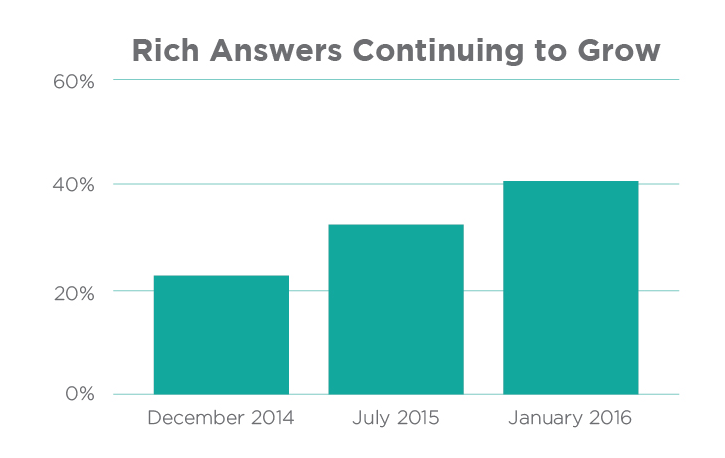
    Over the years, we’ve continued to follow and analyze Google’s perpetually evolving search engine results page (or SERP) to stay on top of Google’s algorithm and to provide deeper insight into how people use search engines. Rich Answers Continuing to GrowOver the past 12 months, we’ve witnessed a major paradigm shift in Google’s SERP, resulting in Rich Answers for 40% of queries on average as of 2016!

    Stone Temple Consulting Corporation’s 2016 study shows that Google provided Rich Answers (also known as Rich Snippets) for 22.6% of queries in 2014, 31.2% of queries in 2015, and 40% of queries in early 2016.

    Mostly surprisingly of all, the study shows that 55% of the available Google snippets are either brand new or have a new URL source since 2015. This is evidence of the volatility of rich snippets and how new sources (cough, your website, cough) have an enormous opportunity to obtain one!

    As Google’s SERP continues to evolve, it is now more important than ever to build a website in a way that better enables a domain to obtain these Rich Answers in the future. See the original blog post below for methods.

    What Are Rich Answers?

    “Rich Answers,” “Rich Snippets,” or “Google Knowledge Graphs” are results to search queries that have a definite or concrete answer. So definite, in fact, that Google will place them above all other searches with a linking source. Google will provide answers to questions such as “who won the Oscar for best actor in 2015,” “what is a rel=canonical,” “who is the president of Madagascar,” or even “what is the airspeed velocity of an unladen swallow.”

    Image Of Google Rich Answer Displaying Air Velocity Of An Unladen Swallow

    Rich Answers are featured snippets within the search results that allow the users to gain the information they are looking for faster and easier. These Rich Answers are provided in many ways, such as knowledge boxes, tables, images, maps, how-to graphics, and step-by-step instructions.

    The Results Are In

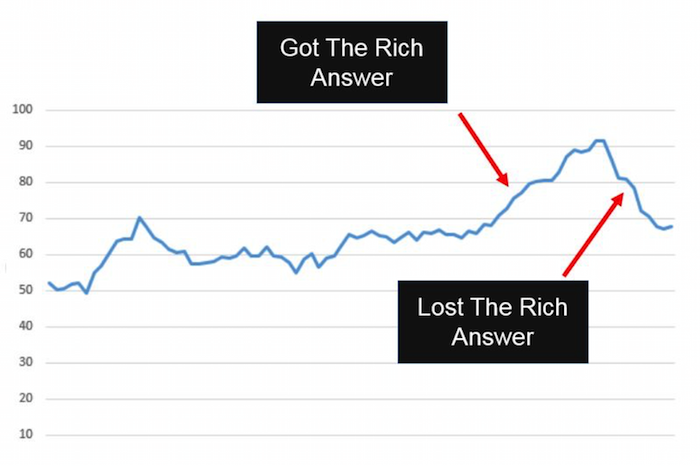
    Stone Temple Consulting released their findings earlier this year, stating that Google Rich Answer results have in fact grown quite significantly from approximately 22.6% in December of 2014 to 31.2% in July of 2015. This is truly a staggering amount considering the number of searches that are performed in the Google search engine every day. You might think that this would be detrimental to the health of most websites: if people are finding what they need in the SERP, they won’t continue onto a website. However, Stone Temple Consulting shows that in fact, the websites who were able to provide Rich Answers in the SERP actually get more website traffic than before. It creates a better user experience for all Google users by pushing up quality content, providing the searcher what they are looking for more quickly and creating a product that users want to come back to.

    Graph Image Of Effects Of Google Rich Answer Results

    Strategy to Getting a Rich Answer:

    Our simple strategy to getting a Rich Answer:

    1. Identify a simple question.
    2. Provide a direct answer.
    3. Offer value added info.
    4. Make it easy for users (and Google) to find.

    Use Google TrendsGoogle Correlate (which is currently in Beta), Shopping Insights, and data from your Search Console to determine if a topic is trending. This will give you a better understanding of how much effort to put forth on providing high-quality content so that other searches (and Google) will find your website as the authority on that subject.

    Utilizing Schema markup can help the search engines better understand the resources that you are providing on a given website. If Google can better understand your site, they can return more informative results for users and increase the likelihood of a Rich Answer over time.

    The format of content can also be a large contributing factor to obtaining a Rich Answer in the SERP. Step by step instructions, bulleted lists, simple tables, and charts are all simple ways businesses can format content that will allow Google and its users to more easily find the answer they are looking for.

    Summary

    We are expecting these trends to continue as Google’s users find value in these types of results. In fact, we predict that Google will not only increase these types of results in the future, but that it will also begin to provide more interactive Rich Answers by utilizing high performing website content. Once Google can directly attribute performance on the SERP within Google Analytics, it will become much more mainstream to include Rich Answers optimization in the marketing strategy of businesses.

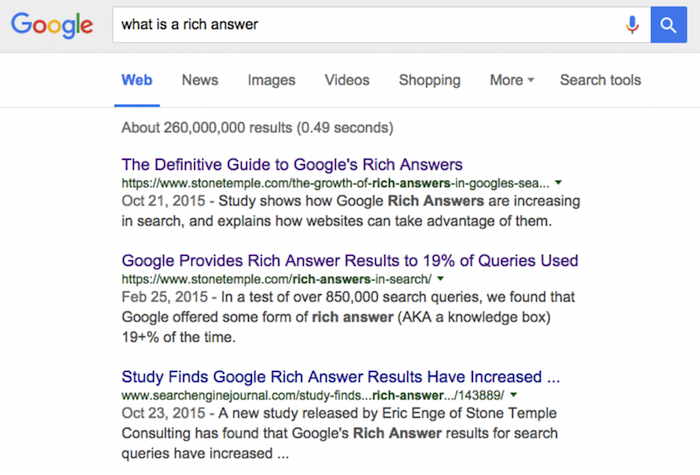
    And one last thing: if you search “what is a Rich Answer,” there is no Rich Answer for that result yet.

    Image Of Google Search Results For What Is A Rich Text Answer

    Image Credits:

    Image 1 Credit | Image 3 Credit

  • Googleplasty: How to Reshape Your Search Results (Part 1)

    As businesses grow more in touch with their online presence, it becomes more and more challenging to stand out in the search results of highly competitive markets and areas—and nowhere is this perhaps more true than in the cosmetic medicine industry.

    Search Influence - Plastic Surgeon Local Google Search Results

    First things first, let’s make sure we’re on the same page about the two major kinds of results that we see in desktop results for plastic surgeons. “Localized organic” search results and “maps pack” results typically appear together in what is referred to as “combined” search results. The factors that determine what appears in these two areas are not the same, as you can tell by the the difference in results and by the appearance of a site more than once between the two. Maps packs can come in a variety of forms and don’t show up for all search queries, which is also important to note.

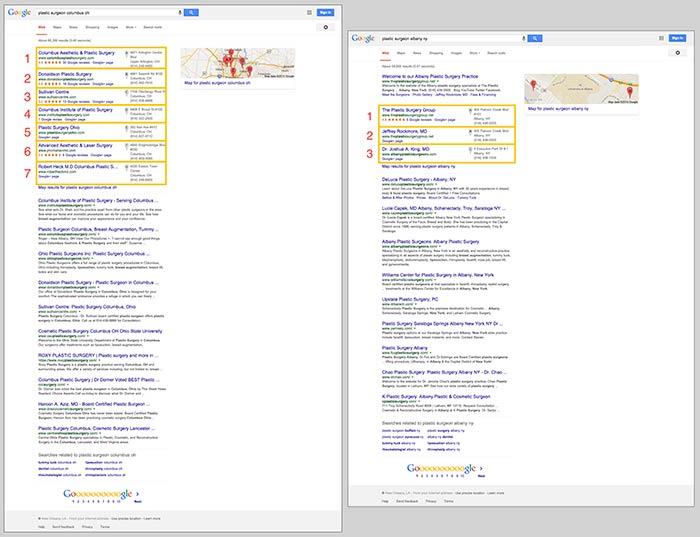
    In the screenshot below on the left for the search “plastic surgeon columbus oh,” you’ll see 10 localized organic results below a 7-count maps pack. In the screenshot on the right for “plastic surgeon albany ny,” you’ll see 10 localized organic results, but the 3-count maps pack appears below the first organic result.

    Search Influence - Google Maps Pack Plastic Surgeon

    Stand Out in the Maps Pack

    In the maps pack itself, the most striking features are the review stars and rating display. The data in the maps pack area is pulled directly from Google Plus local listings in Google Maps. So, to make your practice stand out in the maps pack, you should claim and verify your Google Plus listing via Google My Business.

    Once you’ve claimed and verified your listing, you’ll want to get reviews from your patients. It’s important to understand that one or two reviews a month over a few months is better than 15 reviews in one week. As with most online marketing strategies, natural behavior is the best behavior.

    Stand Out in Localized Organic

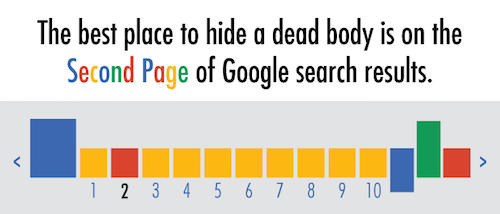
    The most obvious way to stand out in the localized organic results is to be ranking as high as possible and to AT LEAST be in the top 10 so that you’re on the first page. As the age-old SEO joke goes, “The best place to hide a dead body is on the second page of Google search results.” Hardly anyone looks past the first page, and—according to eye-tracking data—not many look past the top half of the search results page.

    Search Influence - dead body Google Search Results meme

    The Google PageRank algorithm that determines these rankings takes into account somewhere around 200 factors, so it’s not as simple as pinpointing one or two efforts to be made.

    Now that we’ve got a better understanding of what we’re looking at in search results, we can start to understand the major factors that affect ranking in each of these sections. Stay tuned for my next blog, where we’ll talk about the top five ranking factors in the maps pack, in the localized organic results, and in competitive markets!

  • Should You be Using Google’s URL Shortener in Your Social Media Campaigns?

    The other day I was visiting my normal news sites, Mashable, Coding Horror, and news.google.com among others. While getting my information download I came across a few postings I thought had true value, and I wanted to share them with my social media friends and family. I immediately went to my handy dandy Google URL Shortener which I had added to my Chrome browser toolbar and – click – presto, I have a short url ready to paste to any social media platform, in my clipboard, cocked and loaded. And so I shared, and then shared some more.

    The nice thing about Google’s service is you can track anyone’s goo.gl URL analytics by adding .info, or simply +, to the end of it. For instance, the analytics to the URL http://goo.gl/zlzlYv, which points to townsend.bunksite.com/, can be seen at http://goo.gl/zlzlYv.info. I occasionally went back to my .info page to see which of the links I shared actually had any value (received clicks on their respective pages) to my friends, family and followers.

    google diagram

    Google gives some good basic analytics data about URL click throughs, although I’ve seen more in depth analytics from URL shortening service competitors. But I digress, it was about this time when I started wondering, with being the obvious search leader and giant, does using the Google URL shortener give an SEO advantage in search results? It might make sense for Google to use URL shortener data(like number of clicks for a shortened URL) in order determine rank worthy content. Also, it seems logical that since this is another metric to look at how users share content, they would want to encourage the use of their shortener, perhaps by giving some advantage to companies using goo.gl for their social media campaigns, much like the seo benefits of using Google Plus Maggie told us about earlier this month.

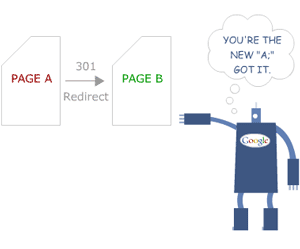
    The obvious benefits of using Google as your URL shortening service include proper redirects. You know if you are using their URL shortener you will never run into problems with shorteners that don’t properly treat the redirect conversion as a 301 redirect or don’t properly transfer PageRank or any future possible negative impact. Most popular shorteners conform to the standards set by Google, but still, it’s better to be safe.

    Another important issue for short url providers is trust. You must trust the service uptime (availability) is as close to 100% as possible. You have to trust that the redirect process will happen at a speed measured in milliseconds, not seconds.  You also need to trust the provider isn’t going to just disappear one day. With an average of 5,922,000,000 (nearly 6 trillion) Google searches every single day, I think they can handle the job of keeping up with this level of service. Besides, you are probably already trusting them to handle your site analytics, search results, pay-per-click advertising and storing documents, among other services. Why not keep all your data in one place?

    It is worth noting that Google has pulled the plug on some beloved services in the past, but they generally provide users with a lot of advanced warning before the twilight date. Also, they always provide a way to migrate user data from the shuttered service.

    So, we know the Google URL shortening service is worthy of using and helps keep our data in one place, but is there actually a positive weight given to these URLS  that translates into higher rankings on the SERPs? For that, I spoke with our Google and Local SEO expert here at Search Influence, Mary Silva.  Here is what she had to say on the subject:

    “There’s not necessarily any kind of weight given to using the Google URL shortener for linking. Also, Matt Cutts has explicitly said that “goo.gl isn’t an effort to kill anything,” and isn’t some sort of attempt to kill other “product X” URL shorteners.

    redirect-google-301
    http://moz.com/learn/seo/redirection

    In terms of SEO effects of the shortener, it’s important to recognize that there have been reports that once in a while the Google URL shortener has created broken links, so that would obviously not be beneficial in terms of back-linking and other similar efforts. Always double check that the short url actually works, regardless of the provider you use.  Another thing to note is that the Google URL shortener creates a 301 redirect which passes 90-99% of link juice to the redirected page, and is the most ideal for redirects for SEO practices, which isn’t the case for all URL shorteners.”

    So, is Google going to rank your linked content higher just because you used their URL shortener?  Nope. Content is king and there is no exception to that just because you use Google’s products. Should you use Google’s URL shortener? While no url shortening service is perfect, using this one is certainly no worse than others. Knowing that the service provider is fairly reliable may bring some peace of mind.

  • 5 for Friday — Links, Stories, & Posts for Your Weekend

    5 days before maya

    The Holy Grail Of Internet Marketing: Owning The Whole SERP — Search Engine Land

    Search Influence’s very own Will Scott gives a brief how-to on the essential methods of owning your search engine results page. The main points he hits in the post are the importance of branded SERP ownership, branded  AdWords campaigns, branded organic results, Google+ and local optimization. But the “real win” of owning the whole SERP is obviously taking over your non-branded ranking page. One of the more surprising tidbits for PPC naysayers is “It may seem crazy to pay for clicks to your site, especially if your site shows up in the first position organically, but the data shows that having both the first and “zeroth” positions increases clicks by up to 89%.” Now, that’s a big increase!

    How to Build a Content Marketing Strategy — SEOmoz

    This informative post briefly touches on the importance of content marketing (it’s the future!) before moving on to some examples of companies that are doing it right, with “it” being what the author calls “phenomenal content.” What these examples all have in common is that they are bite-sized and easily sharable examples of content that is pinpointed to the intended audience. Probably the most useful thing in the post is the detailed step-by-step content strategy.

    How to Use Pinterest to Build Trust and Loyalty — Social Media Examiner

    We’ve already talked about why your business should be on Instagram, and these reasons also apply to Pinterest (and maybe its smaller, more bro-tastic counterparts like Gentlemint, Manteresting, and Dudepins). And now with analytics for business profiles, you can get data about how your followers are interacting with content. But how do you build trust and loyalty among those followers? This post is a great how-to. Main takeaways: tell your company’s story with humor and portray it as fun and friendly; recognize your loyal customers; make your boards a resource for your followers by including useful information; verify pins have valid, working links before sharing them.

    After You Read this Article You’ll Forget It (at least the first half) — Copyblogger

    This post telling you how to enhance your content marketing is itself great content marketing. What’s not to love? From the click-bait title down to the excerpts from his book, the author has made a great point about the usefulness of illustrations in your content and promoted his own product, making this whole post an example of how to do it.

    How to Create and Promote Successful Social Media Giveaways (and build SEO Links) — Search Engine Journal

    The title of this post really says it all. This is a fantastic step-by-step guide to setting up and executing a giveaway. Any business can benefit from the added exposure, but as the post mentions, you can also use this as an opportunity for link building. When you add the giveaway to an existing page on your site, the value of that page increases, even after the giveaway is over and you remove the code.


  • 5 for Friday – Links, Stories, and Posts for Your Weekend

    Round 1-065 Ways To Pay For Twitter Exposure – Crazy Egg

    We’re all used to the ads on Google and Facebook, but paid campaigns on Twitter are still unfamiliar for many businesses thinking about a paid advertising campaign online. Here are five different methods to get your tweets seen by more people.

    Digg Banned From SERPs (Updated) – Search Engine Journal

    Here’s a doozy for you! Last week, popular social bookmarking site Digg.com disappeared from Google’s SERPs! Read for the full report from Search Engine Journal.

    Three Easy-to-Make Content Marketing Blunders – Blue Glass

    Here are three big content marketing blunders that companies may find themselves falling into. This is a good guide if you find yourself getting stuck.

    How Quick Sprout Gets 176 Comments Per Blog Post – Quick Sprout

    This is an interesting and engaging article on how and why blogger Neil Patel gets comments on his blogs. His methods are tried and true and it’s interesting to watch him prove his points in the comments below!

    Local Search Optimization, It’s All About Timing – Search Engine Journal

    Enhancing your local search presence is one of the most important things a business can do to begin to build authority in the eyes of search engines, including Google. Here’s an easy guide for anyone looking to enhance their local search presence – no SEO knowledge required!


  • Top 10 for the Weekend- July 30

    We’re back with this week’s latest thrilling installment of Top 10 for the Weekend! What do we have in store this week?

    Google Testing New, More Integrated Local Search SERPs

    Looks like Google is busy experimenting with some new layouts to their main SERPs. Blumenthal’s shares the findings of Linda Buquet of Catalyst eMarketing, including such changes as making the Places listings bigger and more like organic results (the only difference being the inclusion of a Map pin) and having the map scroll down the page as you do. Not sure if this will be a permanent change, but what I am sure of is that this will no doubt lower traffic results to individual websites while increasing them to review sites. Not cool, Google.

    Google Takes More Real Estate For Business Name Search

    Ah, Google. Why are they doing this to us? Not only did they potentially make some pretty lame changes to their SERPs, they also started linking to the business’s Places page for these searches as opposed to the actual website. The article lists a few possible reasons they may be making this change, none of which are very appealing.

    Google brings a Facebook rival

    We’ve posted about Google’s latest social networking platform endeavor in the past, but the news was sparse. Here we get another hint at the tactics Google may be using to bring down the Goliath that is Facebook. Recently, they’ve been meeting with big name game developers for Google Me. What this means is anybody’s guess, but I hope it means less lame Farmville updates and decent games for a change!

    Is Google Watching You? New Plugin Will Let You Know!

    Boy, this Top 10 is a little Google heavy this week, eh? Don’t worry, there’s more! Here’s an article about an awesome new browser plugin that lets you see when your personal information is being sent to Google’s servers. Not only that, but it alerts you using a vuvuzela-like alarm.  How great is that?

    Why You Need to Monitor and Measure Your Brand on Social Media

    If you read these lists of ours often, you’d know we’re no strangers to the social media game. Once you make the leap, it’s imperative to keep your presence known. This article gives a couple of great tips to monitoring and measuring your brand to make sure you can use these great utilities to their utmost advantage.

    How to Get Top Search Engine Optimization and Placement Results with Google Caffeine

    In our last edition of Top 10 for the Weekend, we posted an article outlining the differences between Google’s Mayday and Caffeine. Well, here is a handy article on how to make Caffeine work for you to achieve results at the top of the ranks.

    Should I renew my yellow pages ad?

    Here is our most recent blog about whether or not remaining to advertise with Yellow Pages is beneficial to your site from an SEO standpoint. Want to know the answer? Read to find out!

    The Google Sewage Factory, In Action: The Chocomize Story

    A great article on how sites pollute Google’s news section by taking advantage of some specific editorial criteria, and their lack to police these actions. A very interesting read about Google contributing to the pollutants that make the internet a “cesspool,” according to one of their CEOs.

    Google Places Police

    We’re no strangers to the confusing and oft arbitrary guidelines Google seems to enforce on their Places accounts, and we’re not the only ones! This is a fantastic article highlighting the hair-pulling experience that Google can induce for businesses and SEO companies alike.

    8 New Link Types That Exist On The Web

    A hilarious article outlining some of the insane practices that SEO companies and many others use for link building. Check them out and see if you are guilty of any of them. I know I am!