Tag: optimization

  • What Does “Optimize” Really Mean? – January Client Insider

    What Does “Optimize” Really Mean? – January Client Insider


    Trust your Marketing to a Team, Not a Machine

    Expert oversight, constant adjustments, and data-driven strategies to drive results.

    Success in advertising requires more than just automation—it takes a human touch. Ever wondered what goes into managing your campaigns?

    Your management fee is an investment in expert-driven strategies to deliver results consistently, not just a line item on an invoice. While tools like Google Ads offer advanced automation, such as automatic bidding, they require expert oversight to ensure lead quality and maximize ROI. That’s where our team comes in.


    Here’s what your management fee covers:

    1. Ongoing Campaign Optimization: This isn’t a one-and-done setup; it’s an evolving process requiring human expertise to refine ad copy, targeting, and strategy based on real-time performance.
    2. Data-Driven, Professional Management: Our certified professionals leverage their expertise to monitor and adjust your campaigns, pairing the power of automation with expert judgment for maximum ROI. They use your data—like lead quality ratings and offline sales, which automated campaign tools often can’t access—to make adjustments that will impact your bottom line.
    3. Fresh Creative Insights: The best ad campaigns creatively evolve. Our optimizations include testing multiple ad variations, identifying the most resonant messaging, and creating new ad materials and messaging to enhance results.

    Why does this matter? Machines are powerful, but they can’t replace the insight of the skilled Search Influence marketers who manage your campaigns.

    Ready to optimize your success in 2025? Reach out to your Account Manager today to discuss new digital advertising channels to expand your reach.

  • How to Optimize YouTube Videos for SEO

    Man watching optimized Youtube videos on his phone at Search Influence in New Orleans, LA

    What’s your first thought when you think of YouTube videos? Funny pet compilations or cooking tutorials? Well, if so, then it might surprise you that YouTube is more than just a resource for entertaining clips or personal vlogs (video blogs); it’s actually the second-most visited website in the world, behind Google. More than 1.5 billion users log into YouTube per month. It’s even crept into the television market, and the time that people spend watching YouTube on their TV has doubled in the past year.

    Still, only 9% of small businesses utilize YouTube. And, because YouTube is owned by Google, it pays to ensure that your videos are optimized for SEO just like your website. That might be the difference between a few views and a few thousand.

    Gif of Youtube logo

    A Beginner’s Checklist to YouTube SEO

    1. Title

    Just as your company’s web pages need metadata that contains clear and concise title tags with researched keywords, your video’s title needs to clearly list the topic while also using keywords. It’s one of the few places where you can put keywords, so it’s important to do some preliminary keyword research to see how people are searching for your product or service. A word of caution though—don’t put keywords in your video’s title just for the sake of inserting keywords. As with Google, this practice will not help your position in the YouTube search results page (YSRP). The key is to make it relevant while describing what the video is about.

    Example title of an optimized Youtube video from Search Influence in New Orleans, LA

    1. Description

    A video’s description should be just that—a description of the video. You don’t need to transcribe the entire video or write a short story about it; you just need to give a relevant but brief description. In addition to your title, descriptions are a place where you can utilize keywords. Again, don’t go throwing keywords into your description hoping that it will make your video rank highly in the YSRP. YouTube is smarter than that. Use choice, relevant keywords.

    For length, it’s best to aim for under 250 characters, or roughly 30 words. After this character limit, YouTube uses the “show more” prompt to hide the rest of your description. It’s also important to fit your keywords, a valuable resource link, and a call to action before this threshold. What’s a valuable link? Your company’s homepage can work just fine. But, you’ll get even better value if you can use a page deep in your site—think service pages, product pages, testimonials, limited offer pages, etc. Also, make sure to use “http://” or “https://” before the URL, or it won’t hyperlink in the description!

    After the “show more” fold, you can add more useful links and information, including prompts to follow you on Twitter, subscribe to your YouTube channel, or like you on Facebook.

    Example Youtube video description from Search Influence in New Orleans, LA

    1. Tags

    You’ve got your title; you’ve optimized a concise description; now it’s time to add tags. This is where you don’t want to be stingy. Add any keywords you’ve already used as well as other related keywords, as long as they make sense and are relevant to the content of your video. Also, YouTube recently starting using hashtags as another way to improve searchability.  

    Stephen Colbert saying

    1. Transcript

    This is one that not everyone may know about. YouTube will automatically create subtitles for your video, but their automated transcription process can be unreliable. By uploading a transcript (captions) of your video, you’ll know that someone who watches silently on mobile (which, if Facebook video is a point of reference, a lot of people do) will see an accurate transcription of what’s being said.

    Anna Kendrick saying

    1. Interaction on your part!

    YouTube is similar to social media in that you shouldn’t use the tactic of “set it and forget it.” Just like if someone is interacting with your business’s Facebook page or Instagram post, you should respond in a timely, professional manner. YouTube is also susceptible to, how should I put it, lively discussions in the comment thread. If there are any negative comments or reviews, respond to the ones where you feel you can actually help remedy a situation, and ignore the ones that are simply trolling.

    1. Promotion

    So you’ve uploaded your video and interacted with users in the comments. Great job! But, you’re still seeing pretty low views. Paradoxically, one of the ways to get your video higher up in YSRP is through views, but it’s hard to get views if it’s not being found. Now is the time to promote it. Share it on your blog, social media channels, email marketing campaigns, and even tell your friends, family, or network associates. This can help bring in those valuable views. You can track viewer data through YouTube Analytics. To learn more about using YouTube Analytics, Hootsuite has a detailed guide here.

    It’s Never Been Easier to Create Quality Video Content

    Since the launch of YouTube in 2005, not only has traffic within the platform drastically increased, but the quality of the content being produced has jumped leaps and bounds when compared to the very first video, a 19-second clip of YouTube co-owner Jawed Karim at the zoo talking about elephants.

    But one of the limitations that used to exist, whether or not you had a nice camera or a crew to shoot your video, doesn’t exist anymore. With the capabilities of smartphones, it’s very easy to point and shoot a tutorial, video blog, company profile, or any other type of video content you want to share with the world. By utilizing these tips, you can be on your way to adding some bingeable video content to the YouTube community. At Search Influence, our digital marketing experts can help your business build and grow your brand online. Check out some of the many clients we’ve worked with. Want to chat? Fill out the form in the sidebar today.

    Images:

    Man With iPhone on Head

    Youtube Logo 

    Stephen Colbert

    Anna Kendrick

  • Getting The Most From Your Google My Business


    Two business owners making edits to their Google My Business listing as instructed by Search Influence in New Orleans, LA

    When was the last time you went to the second page of Google search? If you find yourself having difficulty remembering the answer to that question, you are not alone. Research shows that as of November 2018, the top 10 results of Google searches that make up the first page are responsible for 75 percent of all clicks on search engine results pages (SERPS). As a business owner, you may now be asking yourself the question, “How do I get my business on the first page of Google?” Google’s ranking is determined by a multitude of factors, two of them being the accuracy of your company’s Google My Business (GMB) listing and the volume of interaction associated with it. For many people making local searches on Google, your GMB listing is the first contact that they make with your business, so you want to make sure what they see is accurate and thorough.

    Claim or Create Your GMB Listing

    The step that precedes all others for your GMB listing is claiming or creating it. The age of your business and the volume of information that has previously been supplied about it on the internet will determine which step you need to take. If Google has already collected information regarding your business, you will need to simply claim the listing. If Google has not previously collected information regarding your business, you will need to create a listing. Either way, to begin the process, start here. The first and most important step in getting the most from an already-existing GMB listing is claiming it. Until you have achieved this end, the content of your listing is at the mercy of the internet. Any Google user can suggest edits on a GMB profile, which may become live. Because some of the data in GMB listings is user-generated, it is not always entirely accurate. Once you have claimed your business, you are in complete control of the information that is live on your listing.

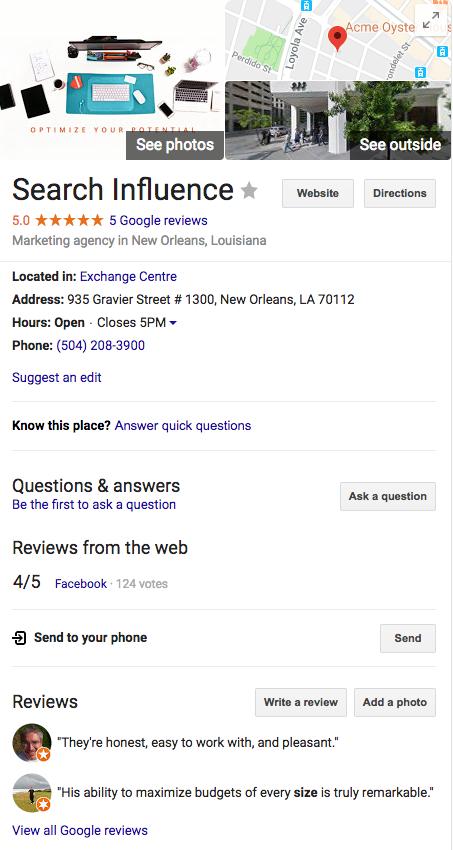
    Example of Google My Business listing from Search Influence in New Orleans, LA

    Give Your GMB Listing the Data It Deserves

    Now that you are in control of your GMB listing, it’s time to start making it as accurate and informative as possible. Initially, you will want to make sure that all of the essential information, such as your name, address, phone number, website, and hours of operation are correct across all of the other platforms that show your business’s information, such as Yelp. Selecting the correct category is also pertinent to your ranking in local searches. Don’t just choose the general category; choose as many subcategories as you find relevant and appropriate to your business. Additionally, a solid business description can help you stand out against your competitors. A good business description is one that attempts to cover all of the products or services that you offer, but that does so in a summarizing manner. You want the viewers of your listing to read the entire description, so say as much as you can in as few words as possible.  

    Review, Respond, and Post On Your GMB Listing

    At this point your GMB listing is in your control and displaying accurate and additional information; from here you will want to maintain it. Google publicly acknowledges that user interaction for business listings is a factor that affects its rankings. One way to satisfy this is by making frequent posts regarding updates affecting your business, or about products and services that your business offers. These posts are a free form of advertising that appears in local searches, and the more frequently you post, the more likely you are to get a boost in your rankings. Not everyone who uses the internet is on social media, but everyone who finds you in a local search can see your posts. So with that being said, a good rule of thumb is to make a GMB post every time you make a post on social media, or at least once a week. Additionally, these posts are a good way to increase traffic to your website by informing users of a product or service that they might not have realized your business offers.

    Another way that you should maintain your GMB listing is by responding to reviews about your business posted by other Google users. This is not only important from an SEO standpoint, but also from the viewpoint of the users who view your listing. Negative reviews should absolutely be given responses, as that is your only opportunity to defend your business to the users viewing your listing. Customers want to feel engaged, and a business that positively engages the customer is more likely to see that customer return and refer others.

    Because Google My Business is still relatively new, many people don’t understand the impact it can have on local rankings. If you’re ready to boost your local SEO with an optimized Google My Business listing and relevant posts, get in touch with one of the marketing experts at Search Influence today.


  • I’m So Trendy. You Already Know… Using Google Trends on YouTube

    The last time I wrote about Google Trends, I explained how it could be useful in your keyword research process. I am now going to explore how this tool can be used to create a strategically optimized YouTube video.

    Note: As mentioned in my previous blog, keep in mind that the numbers on the graphs presented are not absolute numbers. They are relative to each other to reflect a trend.

    Search by Keyword

    If a client already has a YouTube video featuring a general overview of their business, then we typically try to match up another one of their keywords with a YouTube topic centered around that keyword. Google Trends has a section of the site dedicated to finding trends in search results on YouTube only, so you can see if that keyword is trending and if there are related phrases to consider adding to the title and description of the video.

    Here’s how to get there:

    1. Visit http://www.google.com/trends.

    2. Change your search setting in the top right drop down box in the top navigation from “Web Search” to “YouTube Search.”

    YouTubeSearchImage

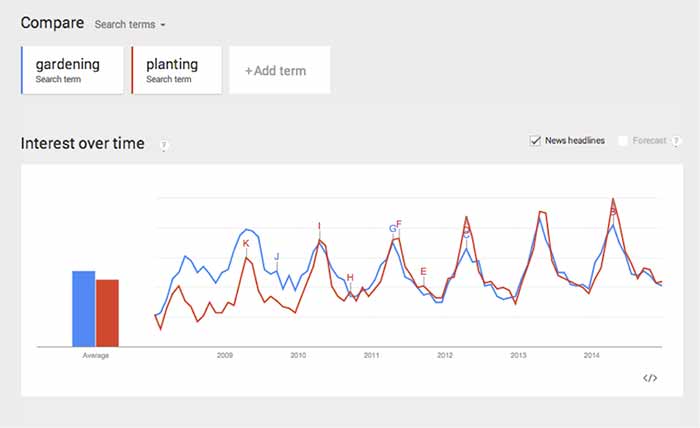
    3. Type in the root of the keyword(s) you want to use in the search box under “Compare.” You can compare up to five keywords at a time. This can be used to help you decide between keywords to use as a video topic.

    CompareChartImage

    In this case, both search terms fluctuate at the same time, so seasonality wouldn’t be a factor, but it could be in other instances. This chart tells me that “gardening” used to be a more popular search trend than “planting” on YouTube, but the gap has closed, and “planting” is actually trending more now. It’s interesting that both of the trends dropped so steeply in 2014.

    Because of this, we should look at similar phrases that could have a stronger trend. This is easy to do when you scroll down the page to “Related Searches.”

    Related Searches

    4. Scroll down the page to “Related Searches.”

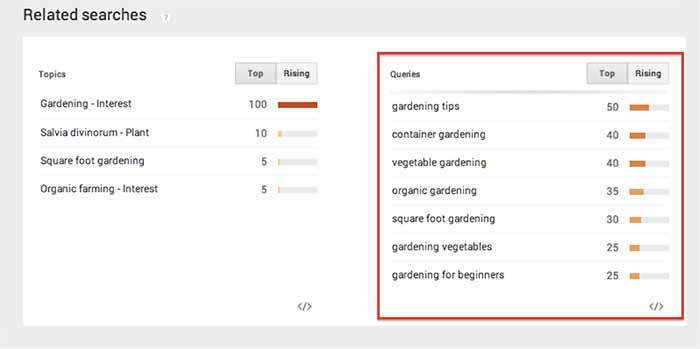
    5. Within “Related Searches” you will see a “Queries” box that shows the most consistently trending searches that are similar to your keyword(s). This is a good place to look for topics that are already popular on YouTube.

    RelatedSearchesImage

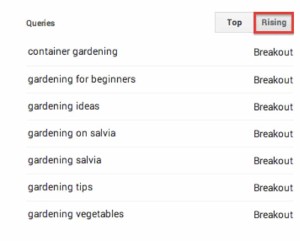
    6. Note the “Rising” column next to “Queries.” These are terms that have been searched for often recently and could become long-term trends.

    As you can see above, I searched for “gardening” and found “container gardening” and “gardening for beginners” as “Related Search” queries. If one of my keywords is “gardening livonia mi,” then I can use “container gardening livonia mi” in the title and description of the video, to optimize it for both terms.

    RisingImage

    Whether you are looking for a way to strategically choose a keyword to optimize a YouTube video or you just need an interesting video topic, Google Trends’ YouTube Search will be a handy tool to explore!

  • Is Your Website Healthy? Increase Its Organic Intake & Watch It Grow!

    Whether you’ve noticed it or not, all website owners are in the parenthood business. Our websites are our babies; despite how frustrating they can seem, how stressed they make us, and how much of our money and time they require, we love them anyway. And, of course, we want them to live long, healthy lives. So, whether your business is currently raising a newborn, keeping track of an 8-year-old, or guiding a young adult, your baby deserves undivided attention, precious care, and the healthiest food available.

    100 Percent Organic Image - Search-Influence

    Why Choose Organic?

    Just as any living and working body, your site deserves a high intake of organic food, and in this case, every visitor is a small portion of a meal. Organic traffic is traffic that comes to a website through unpaid links from search engines, directories, and more. Because organic traffic is considered natural, it’s not a quick process but rather builds over time. Its success is directly related to the content on the site and the number of backlinks it receives from trustworthy sites. Since you’re the parent of this functioning being of the virtual world, you’re responsible for its wellbeing.

    Website Healthy Eating Image - Search Influence

    The Recipe To Increasing Organic Traffic

    The organic method is not only a high-quality and reliable tactic, but it’s also free and increasable. Plus, high numbers in organic traffic will naturally inflate your search engine rankings. How do you do this? Here are a few, efficient ways to increase your site’s organic traffic:

    • Build a site with relevant, unique content that’s up to date and free of grammatical errors.
    • Add keywords as naturally as possible into your compelling content. (Don’t overuse them.)
    • Do NOT post duplicate content on your pages.
    • Start an engaging blog.
    • Only have dependable, authoritative backlinks to your site. (Strive to have content that others want to link to. Don’t use link schemes.)
    • Optimize your photos.
    • Remember to add page descriptions.

    Healthy Choices Scale Image - Search Influence

    The Final Health Check

    The question at hand is simple: Is your website healthy? Or, is it stuffed with too many keywords? Is it living on manipulative, artificial backlinks? Is its body suffering from the lack of unique content nutrients? Deceptive preservatives will decrease your traffic and discredit your right to rank high on Google, Bing, and other search engines. Fill your site’s body with authentic, creative content with striking, optimized photos and strong backlinks. Then, you can sit back and watch its organic traffic grow.

    Your website has a heart. Treat it like it does, and give it your best.

    Website Healthy Heart Image - Search Influence

  • 5 For Friday — Links, Stories & Posts For Your Weekend

    Round 1-051. Bing Places For Business replaces Bing Business Portal – Small Business Search Marketing

    Bing has made some significant changes in its local business listing management platform. Bing Places will replace the old Bing Business Portal, and along with the name change comes a simpler system that strips away much of the non-local search functionality that previously existed. Learn more about the update and decide whether you think this is a good move for Bing.

    2. 10 Inbound Discoveries That Will Disrupt Marketing Forever – HubSpot

    HubSpot’s 2013 State of Inbound Marketing Report has been released, and they’ve distilled the findings down to the 10 biggest discoveries. More than 3,000 marketing professionals from all over the world participated by sharing their thoughts on everything from strategy and organizational alignment to channel and budget management.

    3. How to Build an Online Community for Your Business – SEOmoz

    Building a better online community around your business has a number of advantages. This author urges you to focus on the hard work of attracting the right kind of customers to your community rather than chasing the latest algorithm updates.

    4. Top Google Website Optimization Resources – Search Engine Watch

    All of the best tips, guides, tutorials, and resources that Google has offered on SEO are all here in one place. You can find everything from beginners guides to some advanced programming concepts that will help you become an optimization expert.

    5. How Dynamic Search Ads Can Take Over Your AdWords Account With Devastating Effects – Search Engine Journal

    Dynamic search ads became a hot topic when they were recently added to all AdWords accounts. Advertisers expecting to increase profits simply by using DSAs on standard settings should think again. Here are some tips to make the most of your dynamic ads.

  • 5 for Friday – Links, Stories, and Posts for Your Weekend

    Round 1-065 Ways To Pay For Twitter Exposure – Crazy Egg

    We’re all used to the ads on Google and Facebook, but paid campaigns on Twitter are still unfamiliar for many businesses thinking about a paid advertising campaign online. Here are five different methods to get your tweets seen by more people.

    Digg Banned From SERPs (Updated) – Search Engine Journal

    Here’s a doozy for you! Last week, popular social bookmarking site Digg.com disappeared from Google’s SERPs! Read for the full report from Search Engine Journal.

    Three Easy-to-Make Content Marketing Blunders – Blue Glass

    Here are three big content marketing blunders that companies may find themselves falling into. This is a good guide if you find yourself getting stuck.

    How Quick Sprout Gets 176 Comments Per Blog Post – Quick Sprout

    This is an interesting and engaging article on how and why blogger Neil Patel gets comments on his blogs. His methods are tried and true and it’s interesting to watch him prove his points in the comments below!

    Local Search Optimization, It’s All About Timing – Search Engine Journal

    Enhancing your local search presence is one of the most important things a business can do to begin to build authority in the eyes of search engines, including Google. Here’s an easy guide for anyone looking to enhance their local search presence – no SEO knowledge required!