Tag: iphone

  • 5 For Friday – War Of The Week’s 5 Kings: Apple, BTC, Google, Pinterest, & IG

    1. It’s Gold, It’s Gold Baby: The New iPad Air, That Is – Business Insider

    Apple is releasing a gold version of the iPad Air with the new launch. With the iPhone 6 being launched next week, the next Apple event in line will be in October. According to MacRumors, the new iPad Air 2 is suspected to include some features similar to the iPhone 5s: fingerprint recognition and an 8MP rear camera.

    Fingers crossed everyone can get gold iPads that match their gold iPhones just in time for the holidays!

    2. KnCMiner Throws A Lasso Around The Moon For Bitcoin – TechCrunch

    Since last December, KnCMiner has made some hard core ASIC systems to move BTC markets shortly after deployment. Now they’ve announced “a $14 million Series A to help build out new mining chips along with hosted mining services.” This ASIC chip upgrade is expected to come on-stream next year.

    As a company that doesn’t actively look for funding, their miners generally sell out immediately at the commence of pre-order periods. In the past, this has allowed them to fund the entire venture independently, but they plan to look for $70 million in funding for future upgrades to a Series B to grow in capacity along with the appreciation of Bitcoin’s price.

    BitcoinOnTheMoonImage

    3. Google Crushing and How to Survive Q4 With Intense Competition – Search Engine Watch

    No, this isn’t about our awesome Google+ Crush infographic (although it should be).  Mary Weinstein of Search Engine Watch posted 4 things that you can do to improve your e-commerce strategy.

    1. Improve Brand Perception using Google Special Offers, Seller Ratings, and Product Ratings.

    2. Make Feed Changes to optimize your AdWords campaigns.

    3. Optimize Big Data by using Google data for Google Shopping campaigns.

    4. Leverage Search Trends, such as the growth of the mobile e-commerce segment to do location targeting.

    4. Pinterest Becomes The Ultimate Creeper – Marketing Land

    This past week, social bookmarking network, Pinterest, sent emails to some of its users congratulating them on upcoming weddings, even some who aren’t actually planning a wedding at the moment. Talk about poor targeting.

    The nature of a site like this is that a lot of people create “dream” and “inspiration” boards without the intention of following through with their pinned desires. So naturally, there are a lot of “dream wedding” boards out there for people who aren’t even remotely close to a wedding day. Luckily, the improperly emailed users mostly found it amusing and took no offense.

    Amusingly enough, Pinterest came out with a funny statement to New York Magazine’s Daily Intelligencer saying that they email these category-specific boards to users every week. This one was meant for those simply interested in wedding content and not just those getting married. They ended the statement with, “We’re sorry we came off like an overbearing mother who is always asking when you’ll find a nice boy or girl.” In my opinion, that’s a great way to turn it around.

    5. Spring 2015 Fashion Week Is Upon Us, You NEED To Follow Some Designer Instagrams – Huffington Post

    You might not be cool enough to intern for a designer or be backstage for all of Fashion Week’s best shows, but you are totally cool enough to know where to look to find your fashion fix.

    Thanks to Huffington Post’s 60 designers to follow, there’s an easy way to keep up with the fashion world. Some of my faves from the list are @zac_posen (designer), @stellabugbee (editorial director of The Cut), and @chloenorgaard (model). One of my personal favorites who didn’t make the list is the fashion photographer Jamie Beck @annstreetstudio.

    InstagramFashionWeekImage

    Image Sources:

    Bitcoin On The Moon

    Instagram Fashion Week

  • 3 Tips for User-Friendly Navigation

    A few weeks ago, my future mother-in-law purchased her first iPad. While she has been the proud owner of an iPhone for a few months, there was something different, to her, about the navigation of an iPad. As we were walking through some of the different apps and functions on her new tablet, she found herself trapped in her browser window and unsure how to get back to her email.

    MaggieSmith-01

    Are you the type of person who can easily pick up on the newest technology trends? Or do you feel like you can never catch up with things changing so frequently? User-friendly navigation can take that worry away and make your experiences with technology easy and fun!

    Tip #1: Keep something familiar.

    We’ve all experienced that little moment of panic when we don’t know where to go next. For some people it happens when traveling to a new city or starting a job at a new company. We want to know that there’s a way out of any situation. For my future mother-in-law, that “way out” was the home button. After discussing the way she closes out of the Internet on her iPhone, she quickly realized she had that same “panic button” located at the bottom of her iPad.

    Tim Ash, CEO of SiteTuners and author of “Landing Page Optimization” was a keynote speaker at PubCon in New Orleans. During his keynote presentation he mentioned that as soon as we see someone walk into a room, we subconsciously decide how to kill them. He claimed it’s just a part of our natural instincts. I’m not sure if that’s the case for everyone, but I do think we at least look for an escape route.

    MaggieSmith-02

    Tip #2: Make it easy.

    Have you ever started navigating your way through site and then realized that you weren’t sure of the best way to get back without having to click the back button nine or ten times? What do you do? Do you simply close your browser window out of frustration? We crave easy navigation to avoid such frustration and make browsing simpler.

    To a certain degree we all enjoy updates to technology, but we still like to hold onto something familiar. For some social media sites, such as Facebook and Twitter, having a fixed navigation is the solution. How often do you find that you’ve logged into your social media account and then hours later, or for those with better self control, minutes later, you’ve scrolled so far down the page you’re looking at updates from days or weeks ago? Can you imagine what it would be like if you had to scroll all the way back up to the top of the page? If you were on Facebook before 2011, then you might remember.

    Tip #3: Know your audience.

    Is this something that all websites need? No, not necessarily. For many sites, scrolling is not quite as intuitive. The solution could be as simple as having “HOME” as an option in your navigation. Know your audience. Some users need an actual home button or link in the navigation, and some simply expect that your logo will link back to your homepage. If you’re unsure of the way your users interact with your page or how to make your page easier to get through, it may be best to do some testing.

    MaggieSmith-03

    Do you have any tips for easy navigation? If so, let us know in the comments! 

  • 5 For Friday — Links, Stories & Posts For Your Weekend

    2068779988_4422f1bf5e_b1. Dusting The Website For Spring: Optimization and SEO Cleaning — SEOmoz

    How long has it been since you spent some time cleaning up your website? I’m sure for many of us, it’s been far too long. In this post, Scott Wyden Kivowitz gives some great tips for dusting on-site and off. A cleanup might be exactly what you need to increase your web presence. A good deal of the post focuses on social media and the benefits of linking your website to your various accounts. When it comes to off-site initiatives, social media is important once again, as you want to make sure you’re active on your accounts. Overall, this article has a lot of great advice when it comes to the little things you can do to get your website out there!

    2. Facebook To Add More Support For Emoji Within Status Updates, Comments — AllFacebook

    According to AllFacebook, the “Unofficial Facebook Blog,” the social media giant is fully embracing the popularity of Emojis. I’m sure you’ve noticed the recent addition to your status bar, where Facebook now asks how you are feeling. Apparently this was only the first step. Comments are now Emoji-laden as well, and Facebook is adding new support for the animated addition. Unlike most Facebook changes, the presence of Emojis seems popular with users, who are apparently grateful for an additional way to express themselves—especially such an adorable way. I’m sure you can all expect to see many more cartoon cats on your newsfeed in the upcoming weeks.

    3. Hipstamatic Battles Instagram With Oggl iPhone App — PC Mag

    Apparently Hipstamatic is making attempting to regain lost popularity with a new product called Oggl. Could this possibly be enough to replace Instagram in our hearts? As a latecomer to the iPhone, I’ve never used Hipstamatic, as Instagram was already the go-to photo app by the time I switched from Droid. Maybe this makes me biased toward Instagram, but I don’t foresee a big shift. Apparently Oggl allows you to edit photos after you’ve already taken them. The same filters and lenses from Hipstamatic are still available, though. According to this post, it seems like the makers are marketing the new venture as a more art-focused app (Oggl is NOT for selfies!). I guess we’ll just have to wait and see if edgy marketing can overtake Instagram’s immense popularity.

    4. Instagram Now Lets Anyone Tag You [Or Brands] In Photos, Adds Them To “Photos Of You” Profile Section — TechCrunch

    In case you missed, it, last week Instagram launched photo tagging. I know what you’re thinking: “It’s about time!” There’s now even a Photos Of You section, so you can keep track of pictures you’ve been tagged in. I’m still trying to decide if I like this switch, as I kind of enjoyed Instagram’s focus on photos rather than people. In this post, TechCruch’s Josh Constantine explains how this signals a new emphasis on identity for Instagram. (He has another interesting blog post linked on this page that further examines the issue.) He also tells you exactly how to use it, in case you’re interested!

    5. Google Removes Related Searches – Blind Five Year Old

    For those who haven’t noticed, Google has removed the Related Searches feature from Search. For many of us, this was an important tool when it came to keyword research and will be sorely missed. In this post, Blind Five Year Old owner AJ Kohn, who’s pretty upset about the change, laments Google’s neglect of SEOs. It’s really interesting to hear his take on why Internet marketing matters, and how individuals working in SEO actually benefit Google. According to the post, it’s SEOs that are “demystifying search,” to help websites, which helps Google in turn. In fact, spurning SEO may end up hurting Google in the long run.


  • SI Social: How the iPhone 5 Could Change the Social Media Landscape


    Oh, Apple. You and your sexy marketing campaigns. You know that we love all that sleekness, those stark white backgrounds. And do I need a new phone? Nope; my iPhone 4 still works just fine (albeit a little slower than it did when I bought it a year and a half ago). But now, with the launch of what we think might be the iPhone 5 right around the corner on September 12th, the internet is being flooded with videos and roundup posts about the new gadget, which is rumored to have a taller screen than its predecessor.

    Of course, we don’t even know if it’s actually going to be called the 5, although Apple sure is teasing us with that image up above. According to TechCrunch, the 5 will simply be called “The New iPhone,” if this image is to be believed (looks pretty suspicious to me). They’re also telling us that the new screen will be larger, meaning we can cram an extra row of apps in there. Supposedly, the headphone jack is on the bottom now. Really, the actual name doesn’t matter, because appearance is only a small part of why we care about these phones. Sleek is great, but our dependency on them as a part of our modern lives is all about what they allow us to do.

    What I need my phone to do, for example, is let me use it like a computer as much as possible. So instead of dying quickly because I’m running Twitter, Facebook, and Google Analytics simultaneously, I need it to last longer. Aside from that, I need it to offer me something that can allow me to further weave myself into the social media universe. What tools can it offer me? We know that no one buys the iPhone anymore because they need to make actual phone calls. As long as I could still send texts, I’d consider cutting off the actual phone service if I had the option. Yeah, it’s a little nuts, but the trend shows we all prefer data transmission in other ways (and make of that what you will).

    What else could it do to be transformative in the ways we use social media? On-the-go communication is crucial, and Apple is almost certainly keeping an eye on the multi-variegated capabilities that more and more networks demand. Increased battery life helps, but it just lets us do more of what we’re already doing. What if if offered a way to update all social networks simultaneously (and pick and choose which ones the updates go on, if we like)? In my personal opinion, I didn’t get much out of Siri; although she’s a good idea, the functionality simply doesn’t meet my needs as a blogger and certified social media addict. While Siri aimed to make our lives easier by managing these aspects, she didn’t adapt much to allow us to use social media in a new or different way — and that’s what we, both as marketers and private users, need.

    For instance, as a professional writer and blogger, one thing I feel my phone has always lacked is a way to write comfortably from my phone. Could the new iPhone’s increased keyboard space be a solution? Instagram addicts may ask for built-in photo sharing capabilities, or professional social media showrunners could drool at the thought of built-in feed automation. I’m sure every user has their own wishlist. Since people will buy the new phone regardless of whether its revolutionary or more of the same, perhaps these squabbles are minor at best. Or maybe it’s less about the phone itself and more about the apps available, although the phone has to have the power to run them in the first place. With the next generation’s increased processing speeds and functionality, an omnipresent mobile social media connection may not be too far away.

    Do you think the new iPhone going to change the way we interact? Or is it just going to be more of the same?

  • Top 5 SEO Apps for Your iPhone

    With the recent release- and my more recent acquisition- of the new iPhone 4, I decided to do a little digging and compiled a list of the best SEO apps offered by the App store. My goal here is to make your productivity folder as cramped and overflowing as mine.

    1) Domainer

    This was one of the first SEO apps offered back in 2008 and it’s incredibly simple, which isn’t necessarily a bad thing. Just enter the URL for the page you want to check and Domainer provides the PageRank on Google, as well as some basic history. Free.

    2) Poke SEO

    This app does what the previous one does, plus a bit more. Not only does it check PageRank, it also checks backlinks for Google, Bing and AOL. The best feature of this app is the ability to email the reports you dig up. It’s no longer available in the App store because they are busy working a new version, which will be released in the future. Keep an eye out!

    3) iSEO Tools

    iSEO Tools has three great functions. It contains a SERP Analyzer that lets you know what page your keyword ranks on Google. It also has an inbound links analyzer that utilizes the Yahoo Site Explorer service to see how many links are associated with your domain. Last, there is a function that shows a list of directories. This option is fantastic because it allows you to submit a link right from the app! $0.99.

    4) SEO Ranking

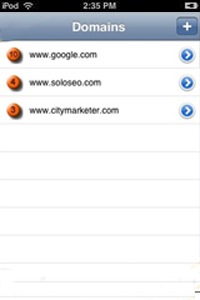
    This app allows you to monitor an unlimited number of domains and keywords, and uses a graph SERP analyzer to monitor your current and past rankings on Google. A great on the go tool. $1.99

    5) Analytics App

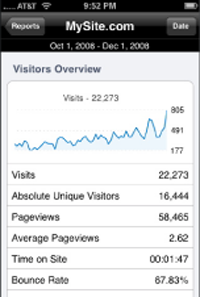
    This isn’t from Google Analytics, but it’s the closest thing you’ll find to it on the iPhone.  It allows you track all your basic stats in Analytics, including visitors, traffic and content. It allows multiple accounts and even has the ability to create event tracking and custom reports. It’s pricier than the rest, but is well worth it. $6.99