Tag: Instagram

  • Instagram SEO Playbook: How to Win Over Google and AI Search

    Instagram SEO Playbook How to Win Over Google and AI Search

    This post was updated by Rebecca Michelet on 12/15/25 to reflect current best practices. It was originally published on 11/13/25.

    Key Insights

    • Instagram is now part of the search landscape. Google’s indexing update means public Instagram content can appear alongside websites, articles, and videos, expanding what visibility means for every brand.
    • Discovery depends on relevance, not reach. Algorithms now reward clear, consistent context that helps users find relevant content faster on both Instagram’s Explore page and in Google search.
    • Social and search now shape each other. The lines between platforms are disappearing, and visibility depends on how well your strategy connects storytelling with search intent.
    • Authority is earned through clarity and consistency. Profiles, captions, and visuals that reinforce who you are (and what you’re known for) help algorithms and audiences recognize your expertise.
    • AI is redefining what it means to be found. As generative tools reference social content in answers, brands that post with intention will lead the next wave of discoverability across search and AI.

    Search engines are getting extra social lately.

    Google’s been busy expanding its reach, and it’s now pulling public Instagram posts and profiles directly into search results.

    Your feed just became part of the search universe. For brands and creators, that means every post has the potential to rank, not just resonate. The problem? Most treat Instagram strategy like an art project, not a search tactic.

    That gap decides who shows up first and who never shows up at all.

    It’s time to post with purpose. This playbook teaches you how to treat your Instagram like SEO, built to rank, not just scroll.

    What Is Instagram SEO?

    Instagram SEO is the strategy behind making your content findable, both inside the app and beyond it. It’s how you craft profiles, captions, hashtags, and visuals so that they not only attract followers but also earn visibility in search results.

    The goal is simple: help people (and algorithms) understand what your content is about and why it matters.

    Instagram SEO has entered a new era

    Traditionally, Instagram SEO focused on the platform’s own search function, optimizing for in-app discovery through relevant keywords, hashtags, and engagement. But that world just got much, much bigger.

    In July 2025, Google began indexing public profiles, posts, and Reels, giving your content a direct line to the world’s largest search engine.

    And it doesn’t stop there. AI tools like ChatGPT, Gemini, and Google’s AI Overviews are beginning to pull Instagram content into their own generated answers, referencing social posts alongside articles and web pages.

    That means your captions, keywords, and hashtags now have a dual job:

    • Engage your audience (the scroll-worthy part)
    • Signal context to search and AI systems that decide what to surface (the rank-worthy part)

    Why Search and Social Can’t Be Separate Anymore

    Every post now speaks two languages: one for people and one for algorithms. The more those messages align, the easier it is for both to recognize your brand as relevant and trustworthy.

    Search and social are no longer parallel strategies. They’re parts of the same visibility engine. What earns engagement on Instagram can reinforce authority in search, and the clarity of your SEO can help social content reach new audiences.

    Together, they create a loop of discoverability that rewards consistency, clarity, and intent.
    image of an instagram logo

    How to Optimize Instagram for Search and AI Visibility

    Now that Instagram feeds into Google and AI results, optimization isn’t optional. Every detail on your profile and in your posts shapes how algorithms understand your brand and where you show up.

    Here’s how to make your Instagram work smarter for search.

    Optimize your profile for search context

    Your profile is where discoverability starts. It’s both a visual first impression and a key data point that search engines and AI tools use to understand your brand’s relevance and authority. A strong profile bridges your social identity with your search presence, giving users and algorithms the context they need to trust what they’re seeing.

    What to do:

    • Use a keyword-rich bio that includes your brand, industry, and (if relevant) your location. Write naturally, but make sure the words you’d want to rank for appear early.
    • Keep your name, handle, and profile image consistent across Meta platforms (and anywhere else your brand appears). Consistency builds recognition and reinforces entity alignment.
    • Add a link in bio that leads to a meaningful destination. Link to key internal pages such as services, program listings, or resource hubs that reinforce what you want to be known for.
    • Complete every profile field, including your category, contact details, and business information. These small details help confirm legitimacy and topical authority for both users and search crawlers.
    • Treat your highlights and pinned posts as secondary signals. Label them clearly with relevant keywords or phrases that reflect your expertise.

    An optimized profile becomes the anchor of your Instagram SEO strategy and the foundation for everything else to build upon.

    Write captions that reflect search and AI language

    Instagram captions carry their weight and more. They tell both your audience and search engines what your content means and why it matters. The right phrasing can help your post resonate with people while signaling relevance to AI tools that decide what to surface.

    What to do:

    • Speak like your audience. Use plain, direct phrasing that mirrors how people search. A caption like “what to do during a weekend in New Orleans” performs better than one filled with stiff, bleak terminology.
    • Use long-tail keywords with intent. People search in phrases, not single words. Using specific, natural keywords helps your posts surface in both Google and AI-driven results.
    • Add clarity through structure. Algorithms read relationships the way people do (who’s doing what, and for whom). Think in patterns like subject, action, object: “Search Influence helps universities improve SEO visibility.”
    • Answer real questions. Captions that solve problems or explain value are easier for both users and algorithms to understand: (ex, “what to do after a car accident”)
    • Match your on-screen text. Keep phrasing consistent across Reels, carousels, and captions so both people and machines connect the dots.
    • Lean on proven formats that teach or explain. AI tools favor content that answers questions directly, and people tend to share it more, too. Think FAQ or Q&A Reels, “how-to” carousels, and tip-based lists.

    Captions written with intention earn visibility in both the feed and search results, helping your audience find you faster and engage for longer.

    Use hashtags, alt text, and structure to reinforce meaning

    Relevant hashtags and alt text help algorithms understand the context behind your visuals. They give search engines, AI tools, and even screen readers clearer cues about what your content represents, which improves both accessibility and visibility.

    What to do:

    • Focus on relevance. Use up to three highly relevant hashtags that accurately describe your content and the community you want to reach.
    • Avoid hashtag stuffing. The practice of adding long lists of tags for reach is no longer effective. Instagram’s new hashtag limit signals the end of that trend. Hashtags will still help categorize content, but they won’t meaningfully drive reach. Precision and clarity now matter more than volume.
    • Prioritize a solid keyword strategy. Strengthen discovery by using clear, descriptive keywords in your captions, on-screen text, audio, and bio.
    • Write natural alt text that describes what’s on screen while subtly reinforcing your topic or entities. Think of it as another way to teach search engines what your post is about.
    • Keep a logical post structure. Use line breaks, spacing, and clear formatting so both users and algorithms can quickly identify key ideas. Clean captions signal clarity, which AI-powered search engines reward.

    Each of these small details adds up to stronger discoverability. When your visual, written, and structural cues all point in the same direction, search engines and AI tools know exactly how to classify your content and who should see it.

    Strengthen interlinking between platforms

    Search engines and AI tools use connections between your website and social profiles to verify identity and relevance. When your Instagram activity points back to your site (and your site points back to Instagram), it helps algorithms confirm that both belong to the same trusted entity. Those links also give users clear paths to learn, engage, and convert.

    What to do:

    • Link with purpose. Use bio links, Stories, and post CTAs to direct users to pages that expand on your content, such as articles, services, or case studies.
    • Embed with intent. Add Reels or posts to your website where they strengthen context, such as testimonials or event highlights.
    • Stay consistent. Keep the same handle, URLs, and naming conventions across platforms to help algorithms and users connect the dots.
    • Reference across channels. Mention your website in captions or Stories when relevant, and link to Instagram posts from your site when they add visual context.

    When those signals align, both users and search engines can follow a clear trail of relevance, one that reinforces authority across every platform.

    Monitor and test your visibility across search and AI tools

    Visibility is always shifting. Regular testing helps you see where your Instagram content appears across Explore pages, Google search results, and AI tools — plus, how those systems interpret it.

    What to do:

    • Search for yourself. Each month, test branded and topic-based prompts in Google. Note when your posts or profile appear.
    • Watch for mentions and citations. Check if AI summaries reference your brand, posts, or captions. These signals show your content is being recognized as a trusted source.
    • Identify what works. Look for patterns in visibility to see which formats, keywords, or topics consistently surface.
    • Refine and repeat. Use your findings to adjust your captions and hashtags.

    Treat this step as ongoing maintenance. The more you measure, the faster you can fine-tune what helps your content rank and resonate.

    Advanced Instagram SEO Strategies

    Once your Instagram profile and posts are optimized, the next phase is strengthening how your brand connects across the web. These advanced Instagram SEO tips focus on off-page and contextual signals, which act as the cues that help Google and AI systems verify your identity, recognize your authority, and include your content in richer search experiences.

    Use schema and structured data to strengthen Instagram visibility

    Schema markup doesn’t live inside Instagram, but it works behind the scenes to connect your social presence to your website’s authority. By adding structured data to your site, you’re giving Google and AI platforms the proof they need to confirm your Instagram account belongs to the same verified brand.

    What to do:

    Start with foundational schema types like Organization, Person, and Event to define who you are and what you do. Within that markup, use the sameAs property to list your verified social URLs, like Instagram, Facebook, LinkedIn, and others.

    Example:

    "sameAs": [
    
      "https://www.instagram.com/searchinfluence",
    
      "https://www.facebook.com/searchinfluence",
    
      "https://www.linkedin.com/company/search-influence/"
    
    ]
    

    This creates a direct line between your website and your social profiles, reinforcing brand trust and helping algorithms understand how your content fits into larger entity networks. It also supports accurate attribution in AI-generated search results, where structured data helps your content surface and be cited correctly.

    Build authority through mentions and tagging

    Mentions and tags strengthen your network of credibility. Every time you connect with another verified account, you’re giving algorithms extra context about your brand’s relevance and relationships.

    What to do:

    • Tag collaborators, partners, and organizations in posts, Reels, and Stories to build visible connections that reinforce trust and expertise.
    • Encourage reciprocal mentions through joint campaigns, shared content, or reposts to show consistent engagement between verified entities.
    • Focus on relevant tagging. Partner with accounts that reflect your niche, values, or audience to expand visibility in meaningful ways.

    These authentic connections give search engines and AI tools clearer signals of authority, helping your brand appear alongside other trusted names in search.

    Align content calendars with search trends

    Search and social trends shift fast. Aligning your Instagram schedule with real-time search demand helps your content stay visible when audiences are actively exploring related topics.

    What to do:

    • Study what’s trending. Use tools like Google Trends and TikTok Creative Center (TikTok and Instagram trends often go hand-in-hand) to identify keywords, questions, and topics gaining traction in your space.
    • Spot crossover moments. When a topic starts spiking in Google or TikTok, create a Reel or carousel that adds your brand’s take. This timing boosts your chance of appearing in both social feeds and search results.
    • Plan for peaks. Build posts around predictable cycles (seasonal interest, product launches, or industry events) to meet audience curiosity right as it grows.
    • Revisit quarterly. Review analytics and search trends every few months to refine your calendar and ensure content reflects current interest signals.

    By syncing your posts with how people search and engage, your Instagram feed becomes part of the larger discovery landscape, showing up where curiosity, relevance, and visibility meet.

    Applying Instagram SEO in Higher Education

    The same strategies that help brands stand out now shape how universities are discovered online. As Google and AI tools begin indexing Instagram content, higher education marketers have a new opportunity to influence visibility across both search and social.

    Findings from AI Search in Higher Education: How Prospects Search in 2025 by UPCEA and Search Influence show how search behavior is evolving:

    • Social media plays an expanding role in program discovery.
    • Nearly 7 in 10 respondents said regular social recommendations influence what they explore/purchase.
    • Among learners using social media to research continuing education, 35% said they would use Instagram.

    For colleges and universities, that means Instagram content now supports both storytelling and search visibility. Optimized posts can appear in Google results and AI-generated summaries, helping prospective students encounter your institution at the moment curiosity begins.

    Higher education applications

    To turn visibility into value, higher education marketers need to bring SEO precision to Instagram strategy. Applying search principles to social content helps universities connect what they share to how prospects search.

    Here’s how to put that strategy into action:

    • Showcase programs through Reels. Use short-form video to highlight classroom experiences, alumni achievements, and student life moments that illustrate your institution’s impact.
    • Tag with purpose. Include degree names, job titles, and institutional accounts to help search engines and AI tools recognize relationships between people, programs, and career paths.
    • Share faculty insights. Turn research, thought leadership, or current-event commentary into accessible posts written with context that supports search visibility.
    • Guide discovery with links. Direct users to program details, faculty bios, or admissions pages to capture intent and move prospective students toward the next step.

    Institutional benefits

    When used strategically, Instagram becomes part of the enrollment pipeline. Optimized content strengthens visibility at the awareness stage and builds the kind of credibility that influences applications and conversions.

    The impact shows up in three key ways:

    • Wider reach. Optimized Instagram content can surface in Google results and AI-generated summaries, expanding where prospective students encounter your institution.
    • Greater credibility. Consistent tagging, structured profiles, and cross-platform links help search engines recognize your university as a trusted source.
    • Quality engagement. Posts written with SEO awareness attract prospects already interested in your programs and lead them toward inquiry and enrollment.

    Common Mistakes to Avoid

    You’ve mastered the do’s. Time for the don’ts.

    Even small missteps can make your Instagram content harder to find. These are the habits that quietly weaken your visibility on and off the platform:

    • Keyword and hashtag overload. Overstuffing captions signals spam and makes it harder for algorithms to identify what matters. Keep hashtags intentional and tied to context.
    • Unclear or incomplete bios. Leaving out details like your industry, location (if relevant), or brand focus prevents search engines from understanding who you are.
    • Vague or missing alt text. Alt text helps algorithms interpret your visuals. Use it to describe what’s on screen in clear, specific language.
    • Trend chasing without strategy. Jumping on every viral sound or topic dilutes your relevance and confuses your audience.
    • No visibility tracking. Skipping regular tests in Instagram search bars, Google, and AI tools means missing out on what’s actually helping you rank.

    Attention to detail beats post volume every time. Keep your structure clean, your context strong, and your brand voice consistent across every update.

    someone using the instagram app on their phone

    FAQs About Instagram SEO

    Does Google index all Instagram posts?

    No, Google only indexes public Instagram profiles, posts, and Reels. Private accounts and Stories remain inaccessible to search engines. Indexing is determined by visibility settings and engagement signals, so consistent public activity increases your chances of appearing in search results.

    How long does it take for Instagram content to appear in Google results?

    Indexing can take anywhere from a few days to several weeks. Timing depends on how often Google crawls your account and the authority of your connected website or entity. Keeping your profile active, public, and properly linked through structured data can speed up discovery.

    What’s the difference between Instagram SEO and social media marketing?

    Instagram SEO sits at the intersection of social media marketing and search engine optimization. It focuses on improving visibility and discoverability within both the Instagram app and external search engines. In contrast, social media marketing encompasses broader goals like engagement, audience growth, and storytelling across social channels.

    How can I tell if my Instagram content appears in AI Overviews or ChatGPT responses?

    Search your brand or topic-related prompts directly in Google, ChatGPT, and Gemini. If your Instagram content or handle appears in summaries, citations, or linked examples, it’s being referenced. Regularly track visibility to identify which posts or keywords are driving the most inclusion.

    Can Search Influence assist with social media marketing?

    Yes. Search Influence advises on strategies to help you apply SEO principles to your social media presence. Our team provides recommendations that enhance visibility and connect what you post to how your target audience searches.

    Let’s Talk Your Instagram SEO Strategy

    Visibility is shifting fast. As Google indexes Instagram content, every post influences what people see, when, and where.

    Search Influence helps you stay ahead of the social search shift. Our experienced team advises on strategies that position your brand to capitalize on trends and lead in search, not lag behind it.

    Now’s the time to align your social strategy with search. Let’s chat about what proper Instagram SEO can do for you.
    Images:
    Unsplash
    Unsplash

  • The Top Five Ways to Optimize Instagram Accounts for SEO

    Nowadays, it isn’t enough to simply have great content, because to be honest… a ton of people have great content. Businesses have to be smarter and more competitive to get their content in front of the right people. With the ever-growing popularity of social media, accomplishing this has become easier but harder.

    On one hand, businesses have more platforms to share their content and reach potential buyers. Gone are the days where a website is stuffed with all of a company’s information and events. On the other hand, businesses have more platforms to manage and keep optimized. Your website has to be in tip top shape for search engines, but so do your social profiles.

    Take Instagram for example. According to research done by Hootsuite, one billion people use Instagram every single month, with 500 million people on Instagram every day. More importantly, “200 million Instagram users visit at least one business profile daily.”

    That’s 200 million reasons you can’t slack on Instagram.

    There is a silver lining though. Optimizing an Instagram account for search engines is very similar to optimizing a website for search engines. Here are five ways to get your bangin’ IG optimized for SEO.

    Have Your Top Keyword in Your Handle

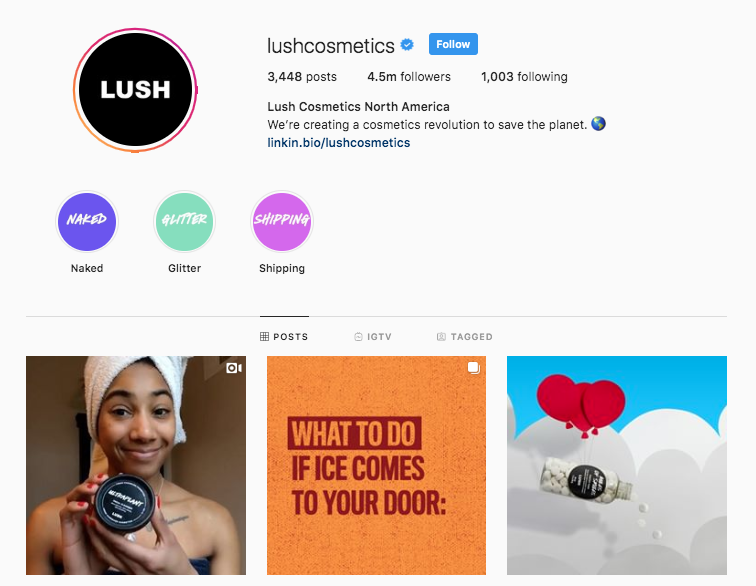
    You may not be able to change your domain name or business name at this point, but your Instagram handle is just itching to be optimized. If your username doesn’t include your main keyword, you should reevaluate it.

    Take Lush, a cosmetic company headquartered in the United Kingdom, for example. While the company’s name is simply Lush, it’s Instagram handle includes a very important keyword.

    Screenshot of Lush Cosmetics Instagram landing page

    “Cosmetics” is sitting pretty in their Instagram handle. Also notice that their business name isn’t the only part of their profile that has a keyword shining bright… which brings us to tip number two.

    Load Your Bio With Keywords… Naturally

    Why should your Instagram handle get all the keyword love? Well, it shouldn’t. Your business name and bio are great opportunities to get some more keywords on your profile. However, don’t be sloppy about it.

    Loading your bio with keywords should be done in a natural and clever way. After all, your potential buyers are watching.

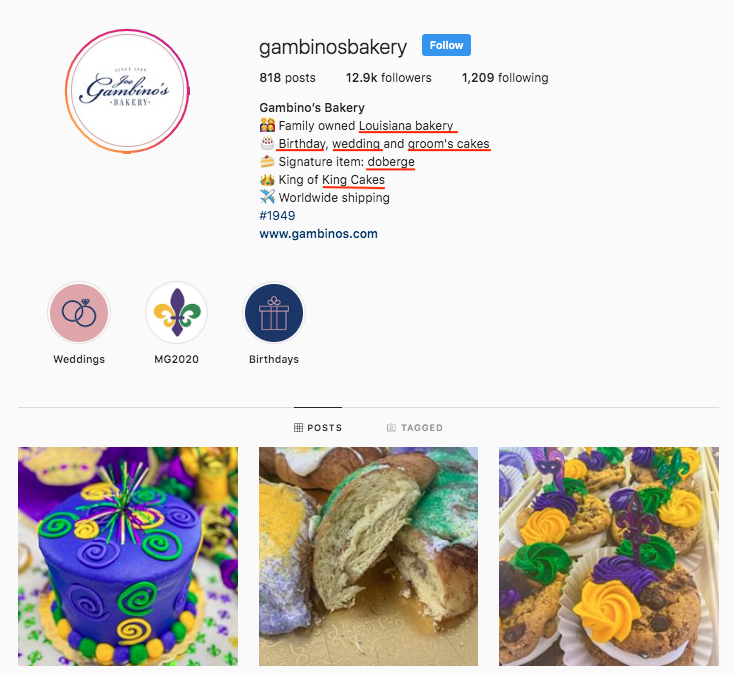
    Gambino’s Bakery does an excellent job of sneaking rich, top tier keywords into their bio.

    Screenshot of Gambino's Instagram landing page

    Utilize Instagram’s ALT Text Feature

    In late 2018, Instagram rolled out the ability to add ALT text to images in an effort to make the platform more enjoyable for visually impaired users. Don’t say Instagram has never done anything for companies, because this feature made business profiles accessible to more potential buyers and created another space to include keywords.

    When gearing up to share some great content on Instagram, keep your eyes peeled for the advanced settings option. The Advanced Settings are on the same screen as the caption, tagging, and location options way at the bottom in small print. After you press that, the accessibility section will be at the bottom.

    Load Your Captions and Hashtags With Keywords

    If it seems like optimizing your Instagram for search engines is all about keywords… then you’ve been paying attention. Congrats!

    Other perfect opportunities to get some nice, juicy, top-tier keywords on your profile are in the captions and hashtags. But again… this should be done naturally. Potential buyers don’t love several keywords thrown together.

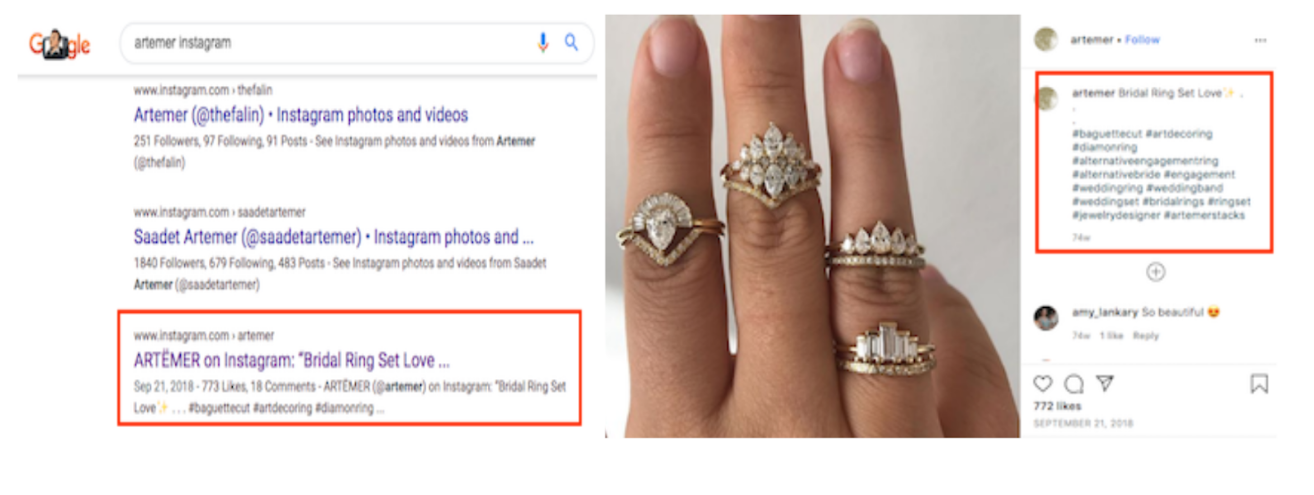
    Example of an ARTËMER Instagram post using keywords

    ARTËMER, a nine-year-old jewelry brand, does a great job of integrating keywords with a natural caption. Sitting in this post are two keywords in the caption and a slew of keywords in the hashtags. If writing the perfect caption gives you anxiety, think about them as title tags because they act the exact same way.

    Example of an ARTËMER Instagram post ranking

    Add Your Instagram to Your Google My Business Profile

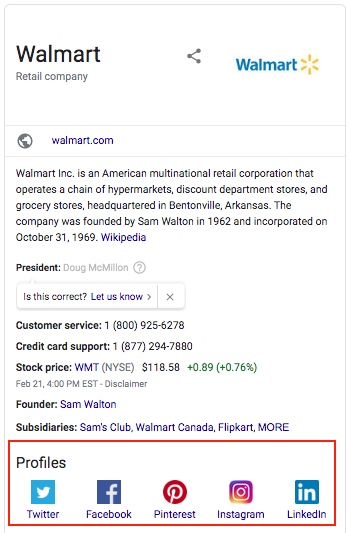
    This optimization tactic has nothing to do with keywords, but it is highly important. Having your Instagram profile linked on your Google My Business page will allow it to pop up on Google along with other pivotal need-to-knows, like your business address and phone number.

    Screenshot of Wal-Mart's Google knowledge panel

    While you cannot physically log in to GMB, link the profiles and watch them magically appear, Google will “automatically discover social profiles to include in Google knowledge panels.” To hurry the process along, Google recommends that the change is suggested by a verified representative.

    The last and final tip is sometimes easier said than done, but it is the most important: create great content. SEO will drive potential buyers to your social profiles, but great content will make the right buyers stay. If you need help, don’t sweat it! Our team is experienced in all things SEO. Contact us today!

    Images

    Instagram logo

    Phone on desk

  • Drive Conversions With Instagram Shopping Product Tagging

    Ever have one of those “OMG I need it” moments when scrolling Instagram? What if I told you your customers can go from “Oh my God” to “It’s mine” in just a few taps? Instagram is making it even easier for you to give potential customers seamless shopping experiences with Instagram Shopping’s product tags. As all digital marketers know, it’s easier to convert shoppers if there are fewer steps between “I want it” and “It’s mine.”

    Product tagging makes it easier for users to view your products, and it also helps them get to your site without having to put ad spend behind the post to get that “Shop Now” CTA button or using the dreaded “Link in bio.” In fact, product tagging cannot be used on ads, so this can really help beef up your organic posts.

    See It, Like It, Want It, Tap It

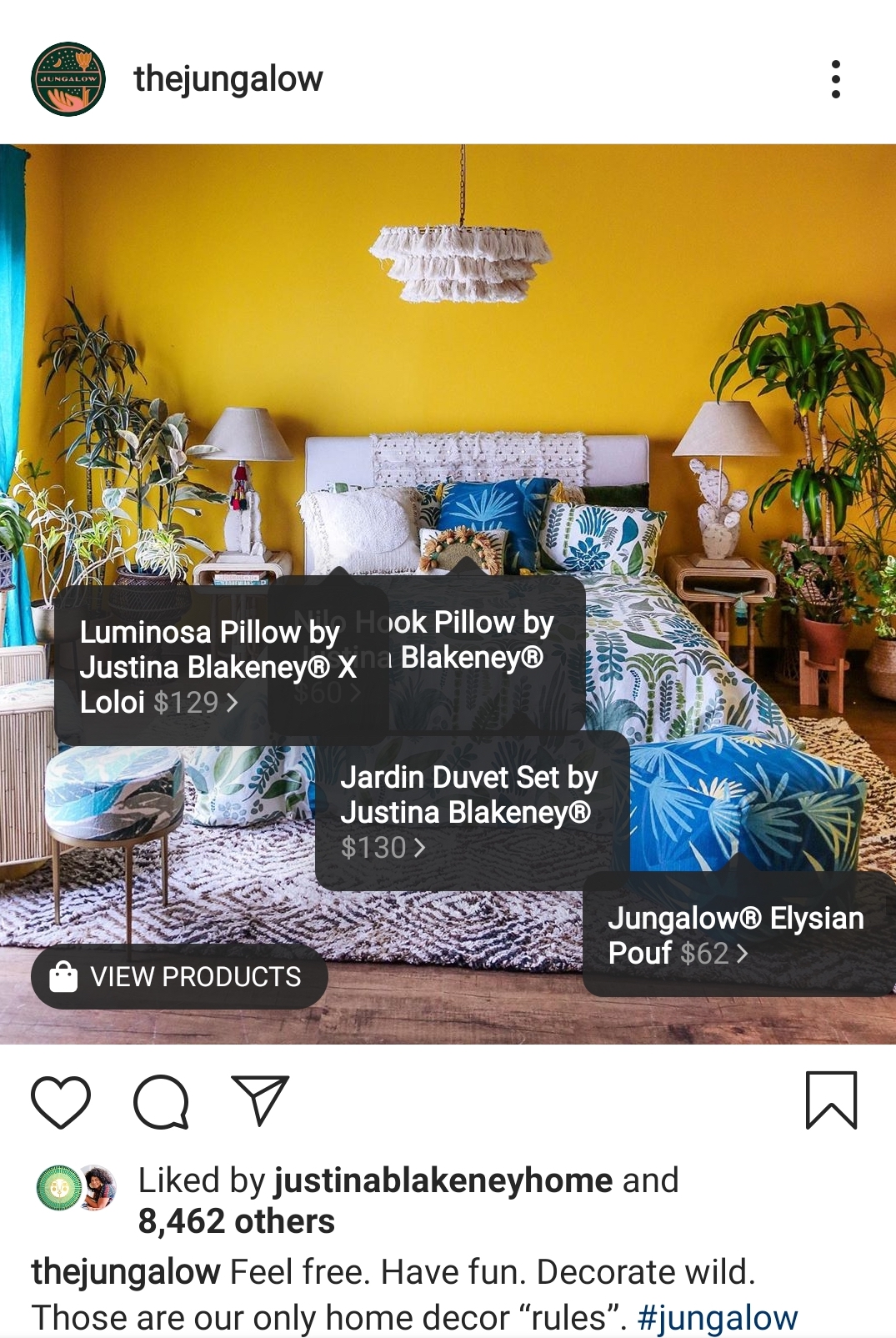
    After setting up your mobile storefront, any post can become shoppable.

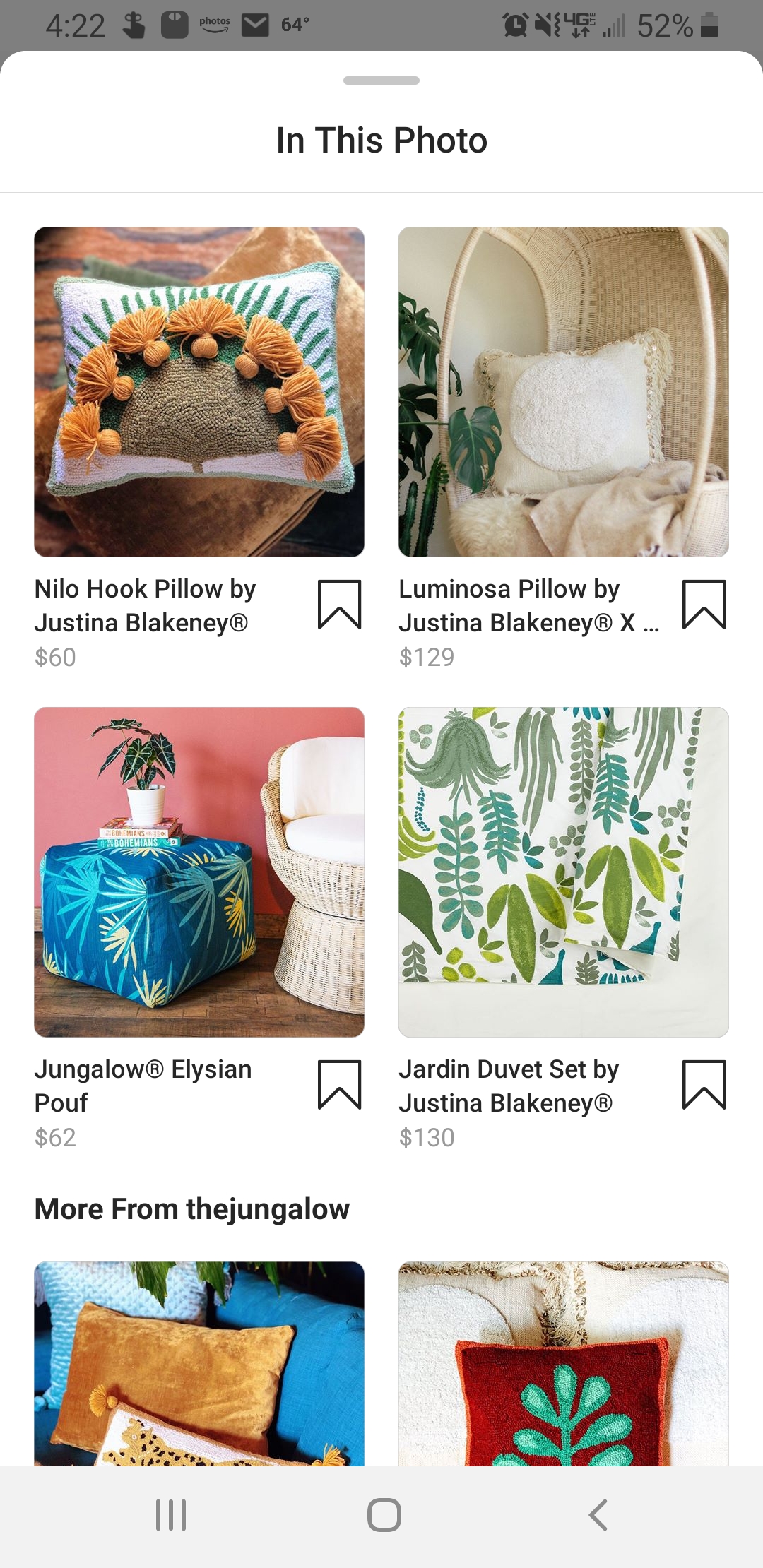
    The Jungalow example Instagram post showing tagging features

    Once a user taps to see your products, they’ll get a product image, a description, and even related items in your store.

    The Jungalow products show in the Instagram shopping platform

    Users can even save items to their Wish List—which is a private collection of saved products—so they can come back later to make a purchase.

    And though it’s still in beta and only available to select brands, Instagram Checkout will one day allow users to go from discovery to purchase without leaving the app.

    Drive Discovery

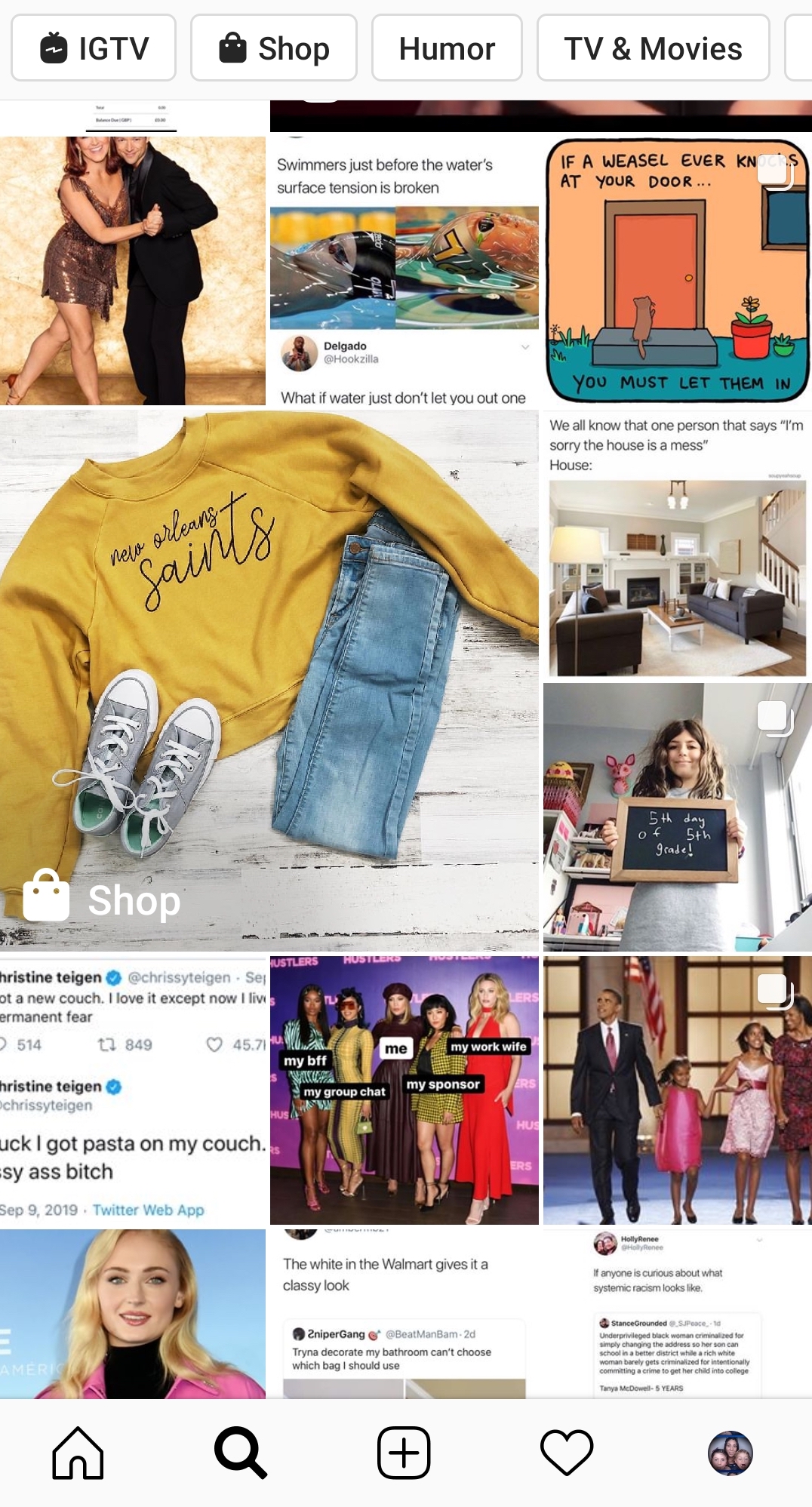
    One of the greatest benefits to using product tagging is that your posts can show up in the Discovery feed for users who like pages, businesses, or content that is similar to yours.

    Example of the Instagram discovery feed for products

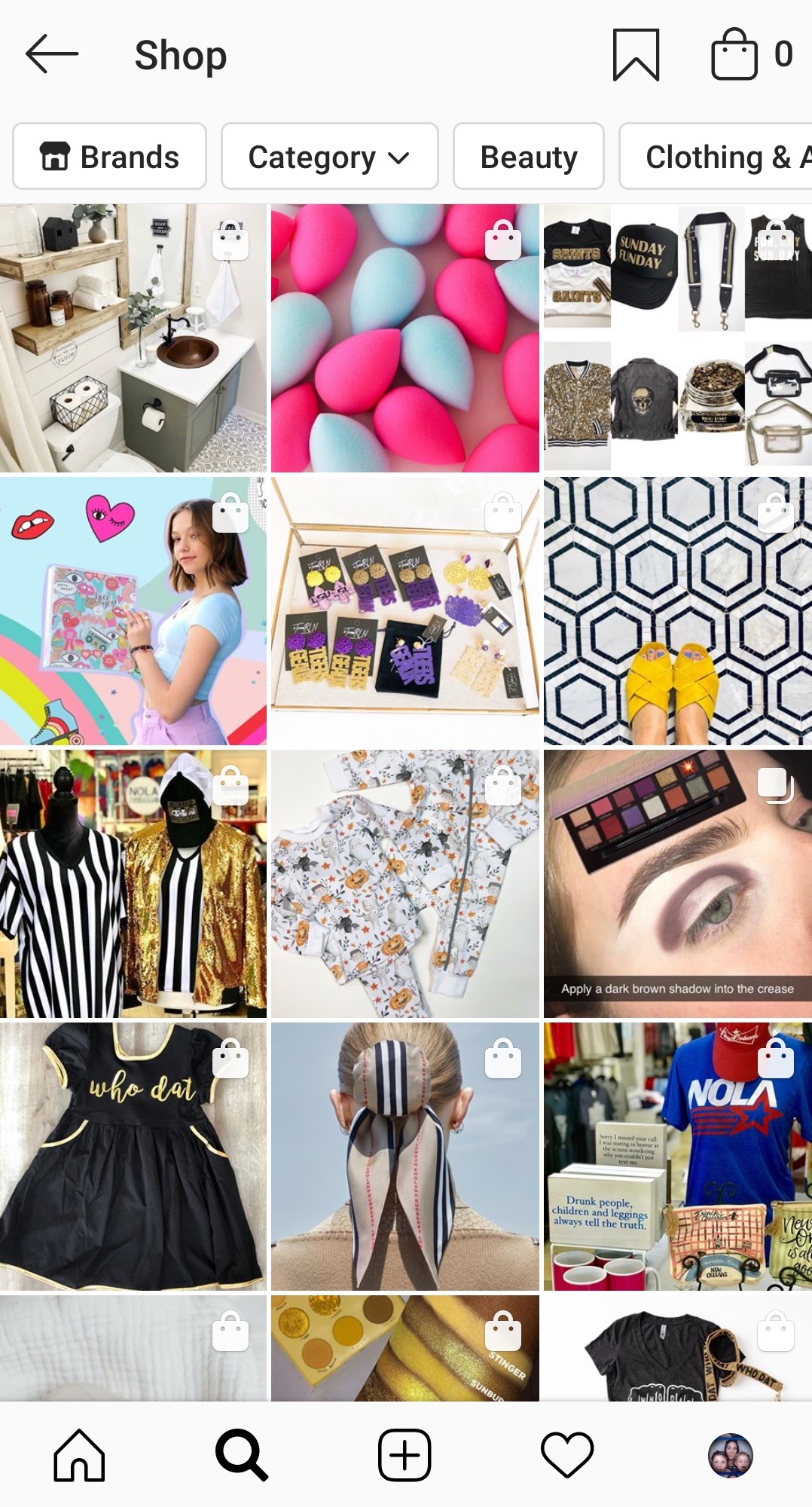
    Users can also filter shopping results by category or by brand. This means that you could be reaching people who are actively looking for the type of product you offer.

    Instagram shopping page found from the discover feed

    But even when users aren’t necessarily looking to shop, these shopping posts blend seamlessly with the rest of the feed, giving you a chance to showcase your products “in the wild.” This is huge in the fight against ad fatigue and ad blindness. As most Instagram users (actually most Internet users) know, we end up tuning out those ads after a while and just keep on scrolling.

    How To Set Up A Mobile Storefront

    You might be asking, “How do I tag my products on Instagram?” Unfortunately, you can’t just set up a profile and go. There are a few steps you need to take before you can start using Instagram Shopping. First, you need to make sure you are eligible.

    1. You Have to Be in a Supported Market

    See the complete list of available markets here. There are several eligible countries.

    2. You Need to Sell Physical Goods

    Services, downloads, and subscriptions to digital services are not supported at this time.

    3. You Can’t Sell Prohibited Items

    Tobacco, supplements, weapons, animals, alcohol, and “adult products,” to name a few, are prohibited. If you think your product might be in a gray area, check the full list here.

    4. You Need an Instagram Business Account and Facebook Business Page

    Your Instagram Business Account must be connected to a Facebook Business Page.

    5. Connect to a Facebook Catalog

    This is going to need to be created and managed either on Facebook using Business Manager or Catalog Manager. You can also manage your catalog through BigCommerce or Shopify platforms.

    Once you have all the pieces in place and make sure you comply with the policies, you’ll have to submit your account for review. In your profile, go to Settings > Business > Shopping on Instagram. Follow all the steps, and in a few days, you should be good to go and ready to tag.

    Tips For Your Shopping Posts

    Now you’re ready to get to tagging. This is the easy part. Any image or video you would normally post to your Instagram Feed or Stories can now be tagged.

    • Get creative: This is your chance to move beyond boring still images of products against a white backdrop. Show us your fashions on real people out in the world. Let us get a peek behind the curtain to your factory floor or your drawing board. How is your product made? How is it used? The sky’s the limit.
    • Stay true to your brand: You want your posts to represent the overall image of your company.
    • Be visually compelling: Not only do you need to stand out in the Feed or on Stories, but you also want to stand out on the Discover Feed. Use bold colors and patterns; beautiful scenery or backdrops; and interesting angles or crops. You need to stop those thumbs from zooming by.
    • Showcase your whole collection: You can tag up to 5 products in a single image or video and up to 20 products in a post with multiple images.
    • Plan your tagged posts: Just because you can turn all posts shoppable doesn’t mean you should. Users might feel bombarded if suddenly you’re posting all your products at once. Use a scheduler to plan out your creative.
    • Feature your customers: When users tag you in images featuring their products, repost them with tags!

    If managing your company’s presence on social media is taking up too much of your time, Search Influence can help. We have years of experience using social media campaigns to drive more customers to businesses. Learn more about how we can help grow your business by contacting one of our digital marketing strategists at (504) 208-3900.

    Images

    Insta-prism

  • Up Your Instagram Game With Effective (and Free) Hashtag Research Strategies

    #Winning. #Selfie. #Hashtag. While hashtags have crept into our vocabulary (whether sarcastically or not) and may seem like an afterthought, they’re actually effective marketing tools that need to be taken seriously when it comes to your Instagram strategy.

    I want you to walk away from this post with a newfound appreciation of hashtags and the confidence to perform hashtag research—trust me, it’s not as complicated as it sounds. And if you already have an Instagram account, you’ve got your most important tool!

    Let’s cover the basics before we get into the research steps.

    Why Are Hashtags Relevant to Instagram Posts?

    Remember, hashtags aren’t just for decoration—especially for business accounts looking to grow followers and create awareness about their brand and services. While you may have a little more fun with hashtags on your personal Instagram (#DoItForTheGram, anyone?), hashtags can help brands get in front of a wider audience and connect with potential customers.

    Animated photo of a hashtag and a heart in comment shapes

    So, how do these little hashtags work their magic?

    Even with the perfect combination of good lighting and an engaging caption, a large chunk of Instagram posts goes unseen. 70% of posts, to be exact. Let that sink in.

    There’s a big sea of content on Instagram; it’s easy to get lost—but using hashtags can boost your chances of engagement. Adding just one hashtag to a post can increase engagement by 12.6% (but don’t just slap on a hashtag to your post and call it a day)!

    Conduct Effective Hashtag Research On Your Own—No Tools Required!

    Hashtag research can be a little more fluid than other digital marketing research. Yes, there are steps to follow, but I enjoy this research because there’s room for creativity.

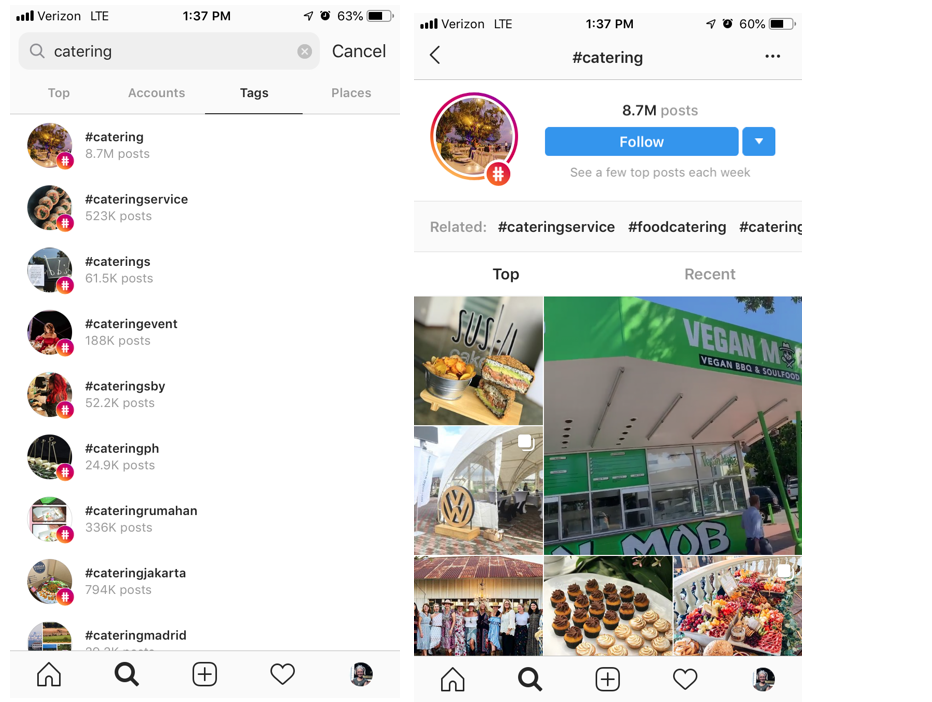
    As we walk through hashtag research basics, let’s pretend I’m a small, local catering company looking to expand my business and showcase my delicious work on Instagram. How would I begin my hashtag research?

    Go to the search bar, press “Tags,” and type in a keyword related to your industry.

    Example of Instagram tag search and landing page from tag search

    “Catering” is a pretty general hashtag and probably won’t get my little catering company found in a sea of 8.5 million posts. But we’re not stopping there. To find more varied, interesting hashtags related to catering, I’m going to check out some of the top and recent posts that were pulled up in this search. Then I can dig deeper into their hashtags and engagement patterns.

    I can also click “Follow” if I want to keep up with the top posts using #Catering—they’ll appear in my Instagram feed.

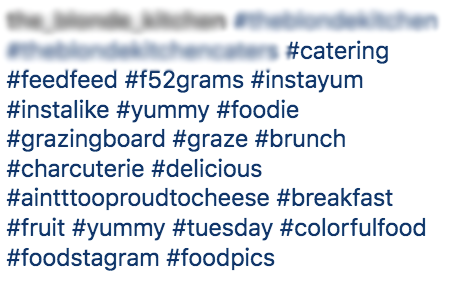
    Let’s dig into this post I found using #Catering and pull out some popular and not-so-popular hashtags that I can use in the future. Because when it comes to hashtag strategy, you want a mix of both!

    screenshot of hashtags relating to food

    High- and Low-Density Hashtags

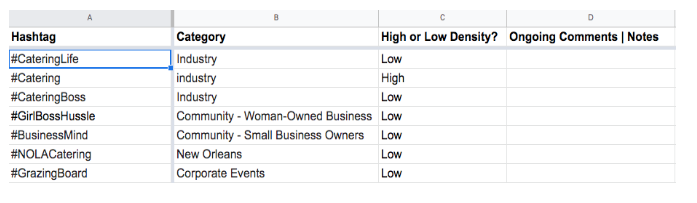
    Some of the hashtags in this post are general and widely used on Instagram, such as #Foodie, #Catering, or #Yummy. These are known as “high-density hashtags,” meaning there are more than 500,000 posts on Instagram using that hashtag. While it’s good to use some high-density hashtags to gain new likes and follows, you want to mix them with more specific, targeted hashtags, known as low-density hashtags (used in less than 500,000 posts). There’s less competition for ranking in the top posts with low-density hashtags, helping your brand become more discoverable. Some examples of low-density hashtags in the above posts are #AintTooProudToCheese #GrazingBoard #ColorfulFood.

    Always use a mix of high- and low-density hashtags in your post to cast a wide net. To find out the number of posts that have used any given hashtag, simply click on the hashtag, and it’ll take you to a page like the #Catering example. You can also search hashtags if you want a quick number without going to the page.

    When compiling your list of hashtags during your research, don’t forget to indicate if it’s high-density or low-density. Your future self will thank you when it’s time to organize them!

    Here’s where the fun comes in.

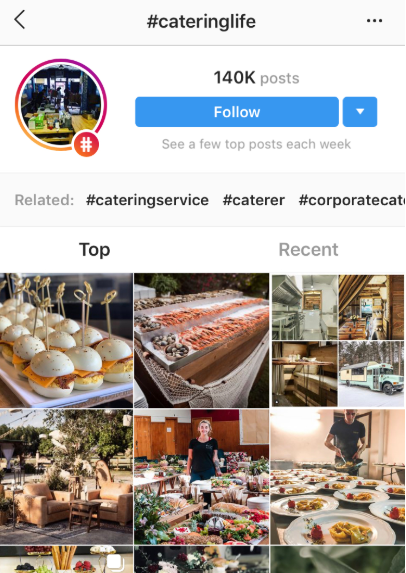
    Once you find a few posts from your own initial search, click on hashtags that stand out and see who else is using them. Add those hashtags to your list, and keep going down the rabbit hole!

    Screenshot of #cateringlife hashtag results page

    Here’s a post I found searching through #CateringLife:

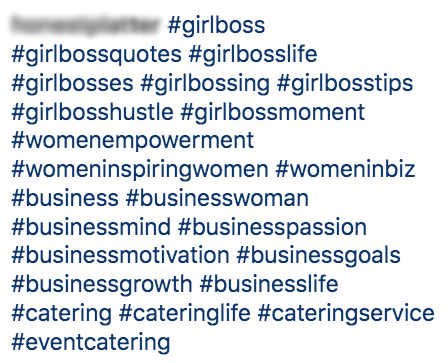
    Screenshot of #girlboss related hashtags

    Community Hashtags

    Notice the mix of hashtags here. We have some catering-related ones (#CateringLife, #EventCatering, #CateringService), and we also have low-density hashtags that speak to a more specific (smaller) audience or community: #GirlBossHustle and #BusinessMind. These are community hashtags that can be used to engage with specific users within a similar business or active community.

    It may take some time to find the right community hashtags for your business. Follow a few low-density themed hashtags and observe the other users and business accounts using them—do they align with your brand and goals? Are the accounts engaging with users or one another? Note the hashtags that seem like the best fit for your business. Once you begin experimenting with different community hashtags and engage with other accounts within that community, you may find your tribe and gain more visibility.

    Location Hashtags

    Location hashtags can help you target a very specific local audience and get in front of Instagram users already following that hashtag. Find location-specific hashtags that combine your targeted area, audience type, and industry. Try different variations of your location (e.g., “NOLAEats,” “NOLACatering,” “NewOrleansFoodie”).

    Follow a similar research process as outlined before; don’t be afraid to go down the rabbit hole of accounts by jumping from one hashtag to the next. You never know when hashtag gold will strike!

    As you research high-density, low-density, community, and location hashtags, observe (and record!) the number of hashtags, placement, and level of engagement in each post.

    Take the time to analyze the posts and accounts your hashtags are coming from:

    • Number of hashtags used?
    • Number of likes?
    • Engaging comments? Responses from the account? No comments?
    • Number of followers?
    • Hashtags in the comments or caption?

    The more you document hashtag use and patterns during your research, the more informed your strategy will be.

    Hashtag Categories

    I’ve pointed out different types of hashtags throughout the research process—low and high density, location, and community hashtags. While there are more out there, we’re just going to focus on these.

    By searching a variety of hashtags types, you can create subcategories for your hashtags.

    Now, back to my catering business.

    After my research, let’s say I organize my hashtags into four main groups: “Woman-Owned/Small Business,” “Weddings/Corporate Events,” “New Orleans,” and “Industry.” When I plan future posts, I’ll have my hashtags organized and ready to be used according to my post topic.

    Remember: you can use multiple categories of hashtags for each post. Focus on hashtags relevant to your industry and post topic—the more relevant hashtags, the more likely your target audience will like, comment, or follow.

    Organize Your Research & Create an Ongoing Strategy

    No need to purchase special software to organize your research—a simple spreadsheet will do.

    An example speed sheet of hashtags and categories

    Make sure it’s thorough and organizes hashtags in a way that anyone using it will understand. This is especially helpful if more than one person is working on your Instagram posts and overall strategy.

    Even if you’re the only one using the spreadsheet, having it clean and organized will be handy when sharing research with others and helping them understand there’s a method to your Instagram-posting madness.

    Experiment With, Change Up, and Monitor Your Hashtags!

    So, you have your hashtags neatly organized in a spreadsheet. The hard part is over—now it’s time to copy and paste a few of them into your posts and call it a day, right? WRONG! Your hashtag strategy is not a one-and-done ordeal; it’s a strategy, after all.

    Strategies need to be ongoing. You need to experiment, observe, and readjust when using hashtags on Instagram. What do I mean by that?

    Experiment

    • Don’t use the same 5-10 hashtags in every post. I repeat: do not use the same 5-10 hashtags in every post.
    • Switch out your hashtags in each post to reach new audience members. You have the chance to cast a net that has the potential to get wider and wider with every post.

    Observe

    • Consider using an Instagram business account to help monitor post performance. You’ll be able to gain engagement insights for each post, including the number of impressions you received from hashtags alone!
    • Even with an Instagram business profile, record notes about your hashtag performance in your spreadsheet since Instagram limits how far back into your insights you can see.

    Readjust

    • Which hashtags seem to be attracting new followers and encouraging engagement? Any hashtags not performing well (or at all)? Readjust your hashtag use according to your observations.
    • Try pairing different hashtags together to see if that improves post performance.
    • Think of this step as more informed experimentation. You’re still trying out different hashtag groups and categories, but now you have some observations and notes to back it up.

    Repeat

    • Surprise! The process doesn’t ever truly end (unless you want less than impressive results). Hashtag use is ongoing for a reason.
    • Keep repeating this process with each post. Before you know it, you’ll have an arsenal of hashtags and hefty notes and insights to inform your hashtag strategy.

    Ready to Build Your Social Strategy?

    While hashtag research can be an easy DIY project, don’t try to balance social media management for your business on top of content creation and marketing. Focus on your business, and Search Influence can do the rest! To learn more about our digital marketing services, speak with a strategist today.

    Images:
    Hashtag and Heart

  • Nine Reasons Facebook & Instagram Ads Are a Powerful Combo

    If you asked someone to name a social media network five years ago, their answer would probably have been “Facebook.” But in 2019, there’s an entire social media ecosystem with distinct content, styles, and user groups. Facebook continues to dominate, but with such a dynamic social media landscape, who knows how long that will last. For marketers, the uncertainty can be unnerving.

    The good news is that digital marketing spend is growing steadily. The great news is that just two of the major social media networks will give you incredible advertising coverage. As a bonus, you can create ads and manage campaigns on both networks with one ad platform. Of course, I’m talking about Facebook and Instagram. Let’s look at some statistics to see how powerful this combination can be.

    Map of the world

    Facebook: Older and More Experienced

    Facebook has been the world’s leading social media network since January 2009. The company announced that it had reached 500 million users in July 2010. As of March 2019, Facebook had 1.56 billion active users each day and 2.38 billion active users each month. Facebook has more daily users than the entire population of India.

    According to Statista, 214 million American adults used Facebook by the end of 2018. The most well-represented age range was 25 to 34, with 58.3 million users. Even though the bulk of its users are over 35, Facebook has 46 million American users under 25.

    By early 2019, about 69% of adults in the U.S. used Facebook. YouTube is the only major social media platform in the same range, with 73%. Facebook remains popular with all demographics but attracts certain groups at higher levels. About 75% of U.S. women use Facebook, compared to 63% of men. Users also differ by education level. Around 74% of adults with a college degree use Facebook, compared to 61% of those with a high school diploma or less.

    Facebook, like MySpace before it, was once considered a platform for younger users. About 79% of people aged 18 to 29 use Facebook, while only 46% of users are 65 and older. But users over 65 have more than doubled since 2012. This reflects Facebook’s diversification from mostly features for socializing to ones that include marketing, shopping, event management, news, and other aspects of business.

    Though Facebook has reached new global user records, its U.S. market share has been declining for a few years. Facebook once enjoyed 70% of the American market, but this has slipped to 36.6%. Data from 2019 revealed that about 15 million fewer Americans use Facebook compared to 2017. The losses have mainly been in the teen and millennial groups. Other networks like Instagram, Snapchat, Pinterest, Reddit, and WhatsApp have picked up the slack.

    Walking during a Pride Parade

    Instagram: Younger and Faster

    Instagram has become insanely popular since its 2010 launch. The photo-sharing app has bloomed into a news source, marketing tool, social influence platform, and meme-sharing community. About 500 million people use Instagram every day, and over 1 billion use it every month.

    Instagram’s largest market is the United States, with over 120 million active users. In February of 2019, about 67% of U.S. adults from 18 to 29 used the platform. Around 72% of U.S. teens and 35% of U.S. adults use Instagram.

    Unlike Facebook, Instagram has not become as popular with older age groups (yet). Facebook attracts about 79% of U.S. adults from 30 to 49, while Instagram attracts only 47% of the same group. People over 65 rarely use Instagram and only make up about 8% of its users.

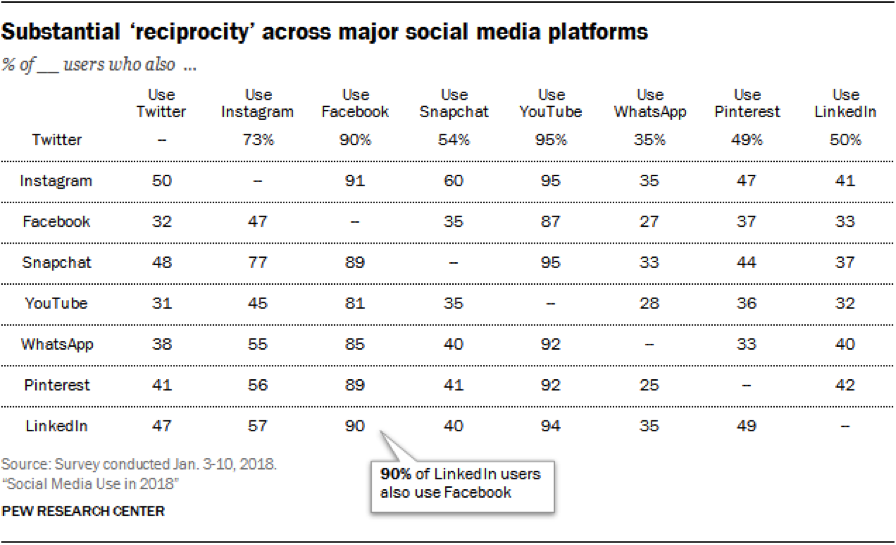
    Although Instagram has a smaller user base than Facebook, Instagram users tend to use the app heavily. Over 76% of Instagram users 18 to 29 use the app daily, while 60% use it multiple times per day. Instagram users are also prone to use multiple social media networks: 95% of Instagram users also use YouTube, 91% use Facebook, and 60% use Snapchat.

    When Your Powers Combine…

    So, to recap: Facebook has been losing market share and its user base is getting older. Teens and millennials are moving towards Instagram and other networks. These factors make a compelling case for shifting your advertising focus to Instagram.

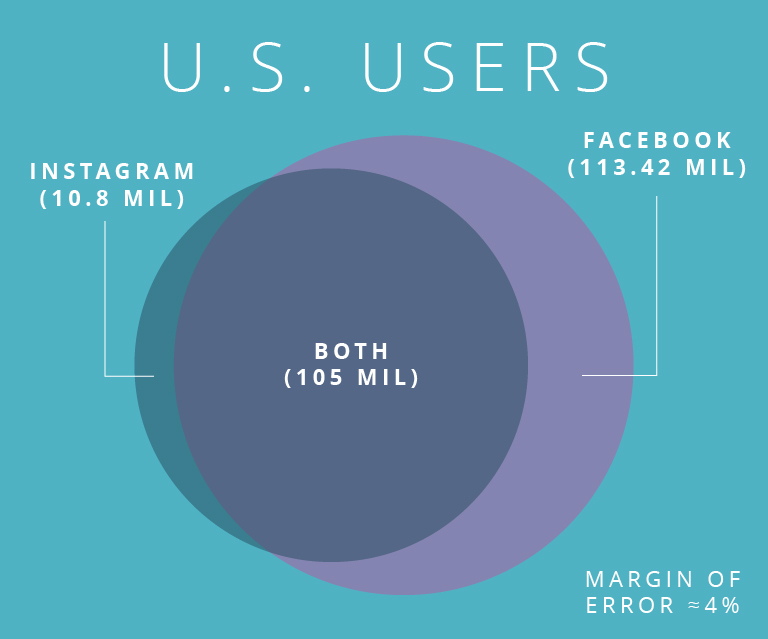
    Luckily, you don’t have to make that decision. Since Facebook has integrated advertising through Ads Manager, you can reach Instagram and Facebook users on one platform. Even better, about 91% of Instagram users use Facebook, so you can potentially reach 323 million Americans with only Facebook ads.

    However, with just a few tweaks of our ads, we can optimize them for both Facebook and Instagram. This is a level of direct access for marketers that hasn’t been available since the expensive days of mass mailing. Now, with a few clicks, you can deliver your message to millions of potential customers.

    Here are nine reasons marketers should be advertising on both Facebook and Instagram in 2019:

    • The combined U.S. audience of Facebook and Instagram is about 230 million users, who are all reachable with one ad platform.
    • 2 million brands are using Instagram Stories to tell their brand’s story.
    • 60% of Instagram users discover new products on the platform.
    • 78% of Facebook users discover new products on the platform.
    • 50% of Instagram users follow brands, the most of any social media network.
    • Instagram users are 70% more likely to buy on their mobile devices.
    • The average Facebook user clicks on 8 ads per month.
    • Facebook’s e-commerce click-through rates tripled between 2017 to 2019.
    • TV advertising costs 10x more than Facebook videos, for the same size audience.

    As you can see, there is huge potential for marketing on Facebook and Instagram, despite Facebook’s supposed “saturation” and Instagram’s less serious reputation. Facebook and Instagram have millions of users in the U.S. This audience includes 72% of teens, about 80% of millennials, and 46% of the elusive 65+ crowd.

    Facebook and Instagram’s large market shares, combined with the targeting features in Ads Manager, means marketers can find and reach potential customers more easily than on other platforms. The browsing behaviors of users on both platforms means that marketers have a higher likelihood of making a sale. All of this means a higher return on investment and happier marketing directors. If you’d like more information on leveraging social media to generate more business for your agency, contact our team at Search Influence for a digital marketing analysis.

    Images
    B & R
    Map
    Parade

  • Planning Your Vacation Destination Using Instagram – Ariel Tusa on WWL

    Ariel Tusa, Account Supervisor at Search Influence, joined Great Day Louisiana to share how you can use Instagram to plan your vacation like a local. Learn how to build your next trip itinerary using:

    • Hashtags
    • Geotags
    • Creating and organizing Instagram “Collections”
    • Travel bloggers and travel magazines

    Instagram is a dynamic tool that can be used for more than just scrolling. At Search Influence, we know how to leverage Instagram for our clients, and we’re always up-to-date with social media best practices. Learn more about our digital marketing services and how we can help your business get found online. Reach out to a strategist today to get started.

  • Seven Tactics to Maximize Your Restaurant’s Organic Reach On Instagram

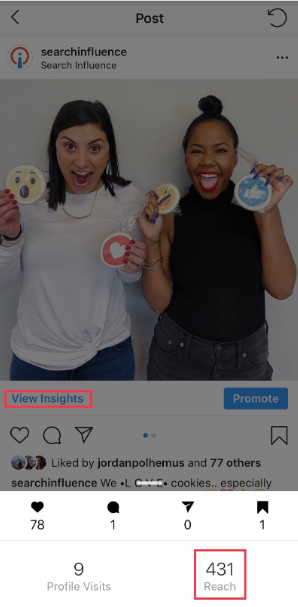
    In the world of pay-to-play, restaurants are seeing their organic reach diminish across social media. Organic reach is the number of unique people who have seen your unpromoted post. When posting organically, you rely on the social platform’s algorithm to distribute your content to whoever it chooses to show your post to.

    In order to see your reach on Instagram, you need a business Instagram account. Click on the post you want to analyze and then click “View Insights” under the photo.

    Fortunately, Instagram still has best practices for maximizing reach organically. We’ll start with Instagram basics to lay some marketing groundwork and work our way to reach-increasing tactics. You’ll need a solid organic strategy in place in order to receive engagement and consistently grow your reach. Use these seven tactics to get started.

    1. Know Your Branding

    Checking a restaurant’s Instagram before deciding where to eat is becoming second nature to Millennials. They’ll probably already know what they’re ordering before they get to the restaurant too.

    To impress these Millennials, you’ll need a good Instagram aesthetic, or “theme.” This involves consistent branding, style, and voice—whether it’s an in-feed post, Story, caption, or comment.

    There are a few ways you can nail this, but the most important part is understanding your own brand. If you understand your restaurant’s branding, it will reflect in your posts.

    Tactic #4 will go into detail about how to create a cohesive Instagram theme.

    Dropping phone into food while trying to snap photo for Instagram

    2. Post Consistently

    Be consistent in time and frequency of posting. Your followers will start to expect your posts and even look out for them! It’s best to post daily if you can. One way restaurants can achieve this is by posting daily specials.

    Also, find the optimal time to post, then be consistent. Start by thinking about when your customers are getting hungry. This may be an hour before your restaurant’s typical peak times.

    If needed, you can test different posting times to find which will bring the most reach. You can click “View Insights” under your photo to find the photo’s reach and then compare your results for different times.

    3. Engage Back With Those Who Engage With Your Restaurant on Instagram

    According to the Maru/Matchbox Retail Vision Study, 69% of Millennials take a photo of their food before they’re about to eat. It’s no secret that many of those photos will wind up on Instagram.

    That said, if someone posts a photo at your restaurant and tags your restaurant’s Instagram, be sure to engage with that post. You could even ask to repost it on your account if it fits into your feed’s theme. The same goes for Instagram Stories since you can now share Stories that you’re mentioned in.

    Engaging with customer photos is another great touchpoint beyond table service. Once customers notice that you’re engaging back or even reposting their content, they’ll be more motivated to share food photos and tag your restaurant. #foodie

    4. Get Creative With Your Instagram Theme

    Don’t limit yourself to professional photos of your food. Those will get stale (no pun intended). Instead, fill your feed with drool-worthy food photos, social events, employees, and more.

    To start, choose three to five categories of posts to rotate through. For example, a trendy restaurant with a cocktail bar may rotate photos of appetizer close-ups, cocktails, social events, and interior photos. Knowing this will help you plan which content you need to capture in advance.

    Next, pick your Instagram feed’s aesthetic or tone. Will it be dark and moody? Bright and colorful? Monochromatic? Once you’ve decided this, stick with it and keep that in mind when taking or curating photos.

    Pro Tip: Don’t post blindly. Use any free Instagram planner like UNUM to plan out your feed. Rotate through your photo categories to ensure no two are next to each other. This will keep your content fresh and varied but still consistent.

    You can read more about getting the best photos for social media here.

    5. Reach Out to Local Food Bloggers

    The increased exposure from influencer marketing can make a big impact on your business. Once you have an understanding of who you want to reach, find local food bloggers with a similar following.

    Many food bloggers with a smaller following (under 15k) will be willing to exchange an Instagram post and Story for a meal on the house. For food bloggers with a large following, try offering them a high-value gift card in exchange for their time and discuss the possibility of a giveaway.

    Giveaways are often beneficial for both the influencer and restaurant in terms of brand awareness and follower growth. Make sure not to skimp out on the giveaway prize, and always keep giveaways fresh and unique.

    For example, giving away a gift card every time will get boring and won’t garner much excitement over time. Try giving away a romantic dinner for two in February and free cocktails for a group of friends in March. You’ll reach different audiences this way.

    6. Use Instagram’s Video Features

    According to Hubspot’s study on content trends globally, video content from brands is preferred by consumers. Instagram has three options for sharing video: Stories, IGTV, and an in-feed video post.

    First, use Stories to share videos that are on-the-whim and unedited. Make sure to tag locations, use hashtags, and tag accounts for maximum reach. When you tag other accounts, they have the ability to “mention” your Story in their Story. Essentially, it’s an earned repost.

    In addition to Stories, try IGTV for edited videos. You can share 15-second to 10-minute vertical videos, which are currently the preferred format on social. There are two features you should be using with IGTV:

    1. Show an IGTV preview in your Instagram feed by selecting this option when uploading.
    2. Link the IGTV in your Story so users can swipe up to watch the video.

    Last, you can share videos in your feed like you would share any other image post!

    7. Ensure Maximum Reach With Each Post

    Finally, all your effort comes full circle in this step, where you want to ensure you’re getting maximum organic reach. The key to high reach on Instagram is using most of Instagram’s available features. The more reach you get, the higher the chance you’ll capture the right user’s attention at the right time.

    There are two significant ways to maximize your post’s reach organically, including users who do not follow you: location tagging and hashtags.

    Always tag a location to your photos so that your photo will show in the “Places”’ feed. For example, if you type in “New Orleans” in the Places search bar, you’ll see the top and recent photos that have tagged a location within New Orleans.

    In addition to tagging locations, use all 30 hashtags allowed for each post. If you’re a locally owned restaurant, you should use around 20 local hashtags and the rest as branded hashtags or common food hashtags on Instagram.

    A good hashtag strategy requires you to check and adjust every few months to make sure your photos are appearing in the hashtag feeds. Keep the hashtags that for which you’re appearing at the top, and replace the others with new hashtags. The goal is to appear somewhere in the top of the feed for all 30 hashtags; however, since this is always changing, you’ll always be checking and adjusting.

    Bonus Step: Promote Your Posts

    This is a bonus step because this is not an organic tactic. However, organic strategy pairs very well with paid strategy. If there’s a specific promotional post you want everyone to see, you should pay to promote it. This is a great way to get the word out about weekly specials, and we’ve seen it work well for our own clients.

    To reiterate the importance of an organic strategy, you’ll stay top-of-mind for old customers and certainly reach new ones this way. Start building your organic strategy today! If you need assistance to make it happen, contact the team at Search Influence and utilize our social media expertise.

    Images

    Phone drop

    Wine glasses

    Dining outside

  • 7 Best Social Media Platforms for Your Digital Marketing Strategy in 2019

    A group of people using social media on their mobile devices at Search Influence in New Orleans, LA

    Social media is an essential element of a holistic and integrated marketing plan. Different social media platforms allow you to create and share content, reach specific audiences, and accomplish your marketing and business goals. Before you begin expanding your current social media marketing, make a plan. Here are some questions to help you get started:

    • Who are you trying to reach?
    • Where does your target audience consume content online?
    • Which message(s) do you want to send your target audience?
    • What is your end business goal?

    Your answers to these questions will help you define your business goals and translate them into social media marketing goals. You will then be able to prioritize which social platform to use. If you are new to social media marketing, Facebook is where you should start. If you already have decent engagement on one platform, where should you go next? Most Americans are active on two to three social platforms, so why limit your marketing to just one?

    Screen shot of social media stats

    Which Social Media Platform Is Best for Marketing?

      1. Facebook – With more than 2.27 billion active monthly users, Facebook is definitely your number one choice. Through Facebook Ads Manager, you can target users based on their location, age, gender, level of education, relationship status, job title, interests, purchase behavior, device usage, and so much more. And it doesn’t end there! Facebook allows you to create Custom Audiences to reach current customers or patients. Custom Audiences can be created from the phone numbers or email addresses you’re already collecting, or from Facebook Pixel to target people who have visited your website. To reach new customers, use Lookalike Audiences; these are created from Facebook’s insights about Custom Audiences to target users with similar online behaviors. You may think “My target demographic isn’t on Facebook,” and you could be right, but Facebook Ads Manager takes the guesswork out of it. This platform allows you to create and serve your message to the right user on Facebook, Instagram, or (through the Audience Network) across the web. As stated by Facebook,

    “1 billion+ people see a [Facebook] Audience Network ad each month.”

      1. Instagram – Owned by Facebook, Instagram boasts more than 1 billion monthly active users and has the same advertising options as Facebook. First and foremost, it’s a visual platform, which provides you with an opportunity to showcase your business’s personality. There are a number of free tools you can use to improve your audience’s creative experience.
      2. YouTube – YouTube allows your business to post and share an unlimited amount of video content, which you can then share on social media, send via email, or embed on your website. As a product of Google, there is also an added SEO benefit of having a YouTube channel and producing video content on the platform. With more than 1.8 billion active monthly users worldwide, YouTube has essentially become the second largest search engine behind Google. When it comes to paid advertising on YouTube, it takes the lead over Facebook for video. Facebook charges your account for each 10-second view, while YouTube does not charge you until a user has consumed at least 30 seconds of an ad. According to expandedramblings.com,

    “YouTube overall reaches more 18-34 and 18-49 year-olds than any cable network in the U.S.”

    1. Google My Business – You may not consider Google My Business to be a social network per se, but this free platform offers features that Facebook, Instagram, Twitter, etc. do not. Posts are searchable via keywords, they positively affect your SEO rankings, and they provide an opportunity for backlinks. You can read more about why you should be posting on Google My Business.
    2. LinkedIn – This platform is known as the primary social networking platform for professionals. You can use LinkedIn to update customers on your business, connect with industry partners, and recruit new team members. As a professional network, it is the top choice for B2B social media marketing. According to Forbes, “LinkedIn is one of the best platforms for generating leads and now makes up 46 percent of the social media traffic generated to company websites for B2B firms.”
    3. Pinterest – Similar to Instagram, Pinterest is a visual platform. Pinterest allows your business to show off your product offerings, before-and-after images (great for home improvement, beauty, and cosmetic surgery industries), and curated pin-boards. As you are probably already aware, its audience is primarily female. Pinterest is an oasis for hobbyists, brides and grooms, and day-dreamers in general. Keep this in mind when sharing content. Travel itineraries, suggested packing lists, landscaping ideas, craft projects, and wedding inspiration are the bread and butter of this platform. But don’t think you’re limited to just engaging with your audience. According to Hootsuite, 87 percent of Pinners have made a purchase through the platform.
    4. Twitter – Twitter is a quick-paced platform that’s perfect for sharing the latest trends or your business’s take on current events. Its audience skews somewhat younger but is split pretty evenly between men and women. Your business can participate in a larger conversation by using hashtags for trending topics. These hashtags allow you to reach new potential customers in your industry. Twitter can also be used to monitor positive and negative reactions from existing customers, and you can use the platform to provide additional customer service.

    How Do You Decide Which Social Platforms to Use?

    So, now that you’re familiar with the seven best social platforms for your digital marketing strategy, you should keep these tips in mind. When trying to decide which platform(s) are best for your business, first review your goals and audience, and then make a plan. Then, meet your audience where they are engaging online. Once you have started sharing on one of these platforms, analyze your efforts and look for areas to fine-tune your targeting and content strategy before jumping to another platform. If you’d like more advice on how to use social media platforms to effectively target your ideal clients, start a conversation with our experts by calling (504) 208-3900.

    Whichever type of social media platform you decide to use in your marketing strategy, Search Influence has your back. Our social media experts can work with you to implement a strategy and track the campaign’s performance. Start a conversation with one of our strategists today to make the most of your social media.

    Images:

    Group of people using mobile devices
    Reciprocity Table
    Social Media Line Chart

  • Harness the Power of Video on Social Media

    To succeed in today’s competitive environment, companies have to convince us to choose their products and services in an instant.

    What better way to do that than with videos?

    Let’s face it, people love videos!

    Sight, sound, and motion can be a powerfully positive combination. We’ve all felt it.

    Two hands together making a heart with sun in background

    Videos are a very effective marketing tool, and businesses should make the most of them on different media platforms, including YouTube, Google Ads, and social media. According to Cisco’s Visual Networking Index on Forecasts and Trends, by 2019, global consumer internet video traffic will account for 80 percent of all consumer internet traffic. And this doesn’t even include the videos we send directly to each other.

    People really love videos!

    We also love to share them. According to Sprout Social, videos generated 12 times more shares on social media than images and text combined.

    Chris Pratt being mind blown

    This Is Where You Want to Be and Be Seen

    To really stand out today, business owners need to find ways to stay relevant in real time. That’s where posting videos on key social media channels comes in.

    Iphone on facebook app and scrabble words spelling out social media

    Facebook

    When asked why his company was making enormous investments in video on a 2017 earnings call with investors, Facebook CEO Mark Zuckerberg replied, “I see video as a megatrend.”

    Mark was spot on.

    Today, over 8 billion video views take place on Facebook every day.

    We encourage you to upload videos directly to Facebook, rather than sharing videos from other sites like YouTube, to boost your ability to reach potential clients organically.

    Instagram

    Last summer, Instagram reached 1 billion monthly active users, up from 800 million in September 2017.

    Instagram and video marketing are a match made in social media heaven.

    Videos on this platform can be highly effective at telling your brand’s story in 60 seconds or less. And storytelling is a sure-fire way to market your brand and create engaging content.

    Hashtags are everywhere these days, from casual conversations to TV commercials, and hashtags on Instagram are a game changer. They help Instagram users discover new content and can help optimize your campaign.

    Twitter

    According to Twitter: “Research shows that people who view videos on Twitter are 50 percent more likely to be aware of an advertiser’s brand, and that videos on Twitter are 2x as memorable as those on other premium platforms.”

    On Twitter, the length of your video is a significant consideration. Several studies have shown that a 15-second video on the platform is just as effective as a 30-second video, in terms of recall and impact. Since Twitter users are used to quick updates, it’s best to keep your video content brief.

    We Are Here for You

    Whether your business needs help with social media or video creation, Search Influence can handle all of your digital marketing needs. Start a conversation with one of our experts today.  

    Images:

    Heart Hands
    Mind Blown
    Social Media

  • Everything You Need to Know About Social Media Images

    Social media users are 10x more likely to engage with a post that includes a photograph or other visual. And, on platforms like Instagram, without a photo, you can’t post at all. So, no matter what industry you’re in—or even for your personal profiles—if you want to reach the 2.34 billion social media users worldwide, knowing the dos and don’ts of quality images is essential. Luckily, the social media experts at Search Influence are here to help.

    Use Professional Photos

    It’s the number one rule of social media—professional quality photos only. Nothing blurry or out of focus, no limbs cut out of the frame. And if no one on your team has top-notch photography skills, it’s worth hiring a professional or reaching out to your design agency, if you use one. As far as the content of these photos, always use positive imagery to keep viewers feeling happy and eager to return to your profile in the future. This might seem obvious, but it can be surprisingly easy to slide into negative territory. Many dentists, for example, feature before and after pictures on their social media—but viewers don’t want to see images of ugly teeth! Avoid the negativity and only showcase the after photos to keep things upbeat. Photos of people are also a good choice. These tend to perform better across social media channels because people relate to other people. Quite simply, if you’re taking social media photos in-house, keep it professional, keep it happy, and feature people whenever possible.

    Make It Personal

    Unique images will always get more traction than generic ones. So, whenever possible, make your social media photos specific to your corporate or personal brand. One great way for businesses to do this is sharing photos of team members or happy customers—taking those high-performing photos of people to the next level. When you post about team members, whether to welcome a new employee or profile a well-established manager, it helps viewers connect with your company on a personal level. Rather than a faceless corporation, you’ll seem like a group of individuals—a much more approachable and engaging online persona. When you post about happy customers, it not only reinforces positive messages about good customer service and high customer satisfaction, but it’s also a great opportunity to expand your presence online. Tag the featured customers whenever possible so their personal networks will see your post. And remember, social media is first and foremost a platform to build relationships.

    Choose Stock Images Wisely

    While it’s always better to take your own professional photos, unfortunately, it’s sometimes impossible to do so. For example, a new apartment complex should start advertising before it’s completed, but mid-construction photos won’t provide viewers with a good idea of the finished product. That’s where stock photos come in. They’ve developed a bit of a bad reputation for being cheesy, over-posed, and filled with women who are way too happy about salad or teams of coworkers that love giving the thumbs up. But, with a discerning eye, it’s possible to pick good stock photos to fill the gaps in your personal photos. Once again, go for photos that feature real people, and choose ones that look as candid as possible. Absolutely no clichéd photos of business people shaking hands!

    Bad stock images:

    Good stock images:

    Also, pay attention to the color palette and make sure it fits with your existing photos and branding. Upcity.com features a list of both free and paid websites for finding stock images. But remember, don’t go with the first photo you find. Hunting through pages of images might seem tedious, but the increased quality and social media engagement will be worth it in the end.

    Don’t Forget Your Audience

    Every social media platform has a different user demographic, and to maximize engagement, you should tailor your image choices to each audience. On Facebook, for example, users are looking for helpful information about your business and an authentic inside look at your company culture. Photos for this platform can be a bit more casual and candid and should especially focus on featuring team members and customers, as discussed earlier.

    Surfers on a beach - Search Influence

    Instagram, on the other hand, requires strong, visually appealing images geared toward a younger audience. In addition to informing image choices, your target audience should also determine how much you advertise on each platform. For example, if you run a community for active seniors, you should primarily advertise on Facebook rather than Instagram, since that’s the platform your target age demographic is more likely to use. If you do advertise on Instagram, your posts should be targeting your customers’ children. Whichever platform you choose, try to put yourself in your audience’s mindset.

    With these dos and don’ts of social media images in your knowledge bank, get ready to see your engagement rates soar. But, if you’re still not getting the results you want, it never hurts to contact the professionals. With services ranging from customized consulting to online advertising, the experts at Search Influence are always happy to help.

    Images:

    Happy Salad Woman

    Fresh Salad

    Surfers