Tag: image optimization

  • Nix the Wix SEO Challenge: Tips & Tricks

    Wix Timeline Image - Search Influence
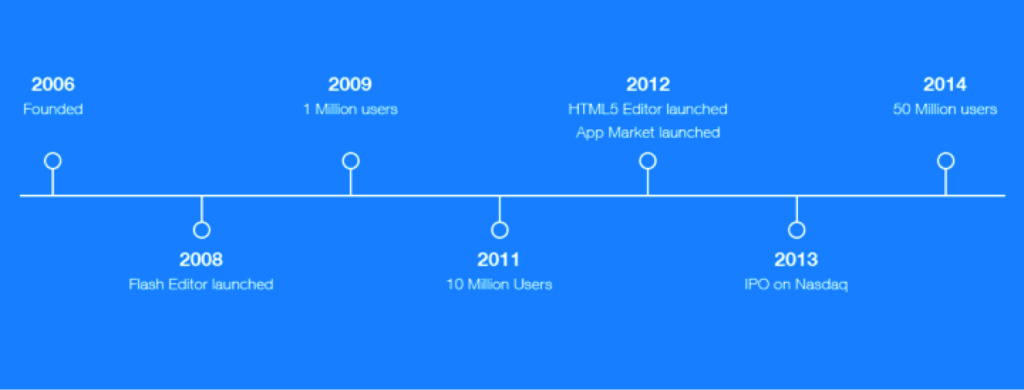
    Wix Company Timeline

    Although Wix sites have been rising in prominence over the past few years, many question whether websites created through the cloud-based Web development platform are ideal for search engine optimization. Wix uses an HTML5 drag n’ drop website-building platform to provide users a simplistic website-building experience. Although Wix prides itself on providing a code-free interface, it assures us that it is SEO-friendly, even providing its very own SEO settings for users. Let’s take a look at how you can get the most SEO usage out of your Wix website.

    Update Meta Tags

    Give some attention to how your site is found online. Meta tags are your best opportunity, as they are the way viewers learn what your page has to offer them and the first interaction they will have with you. The title tag will be what a user sees in Google, Bing, or Yahoo when they search for a particular phrase. The search engine result also includes a small description, usually from the meta description in the HTML of your site. This will require targeted keyword research and attention to copywriting to make sure you are integrating the best SEO practices.

    Wix Desktop Editor Image Search Influence

    To add meta titles to your Wix site, access your Wix Editor. The Wix Editor gives you options to edit in either the desktop or mobile version of your site. You will have to use the desktop view in order to make changes. Select the page icon, and when you see the page you wish to add titles to, click the settings icon next to it and then proceed to click the SEO Page Settings. Here, you will be able to update the page title, page descriptions, and page keywords. (See image below for details.)
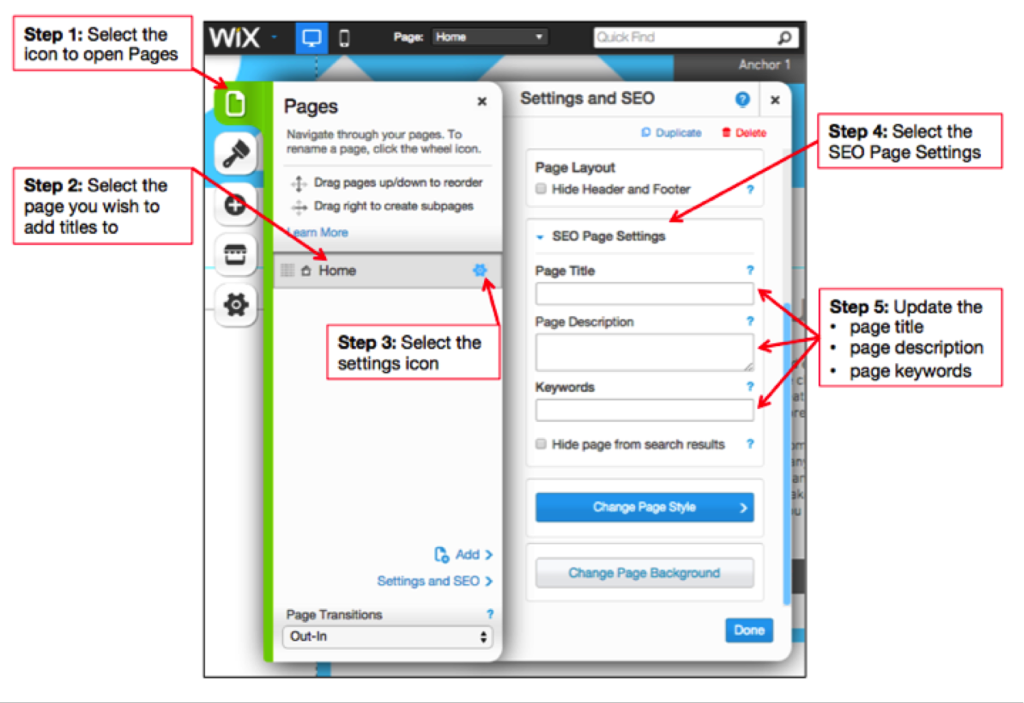
    Wix Meta Tags Image - Search Influence

    Note: Both desktop and mobile versions of the site contain the same pages, so the title and meta description will translate to your mobile site.

    Add Alt Text to Images

    You might already know that viewers love to be brought in by useful, explanatory images. You might not know that search engines can read these images if they are optimized properly, allowing them to be found in image searches. As such, you can get to work optimizing pictures on your site to enhance your SEO efforts.

    In order to add alt text to your images, click an image inside the Editor you wish to optimize. From there, select Settings from the pop-up menu. In Image Settings, fill in a title and alt text. Here is a detailed image of how to do this:
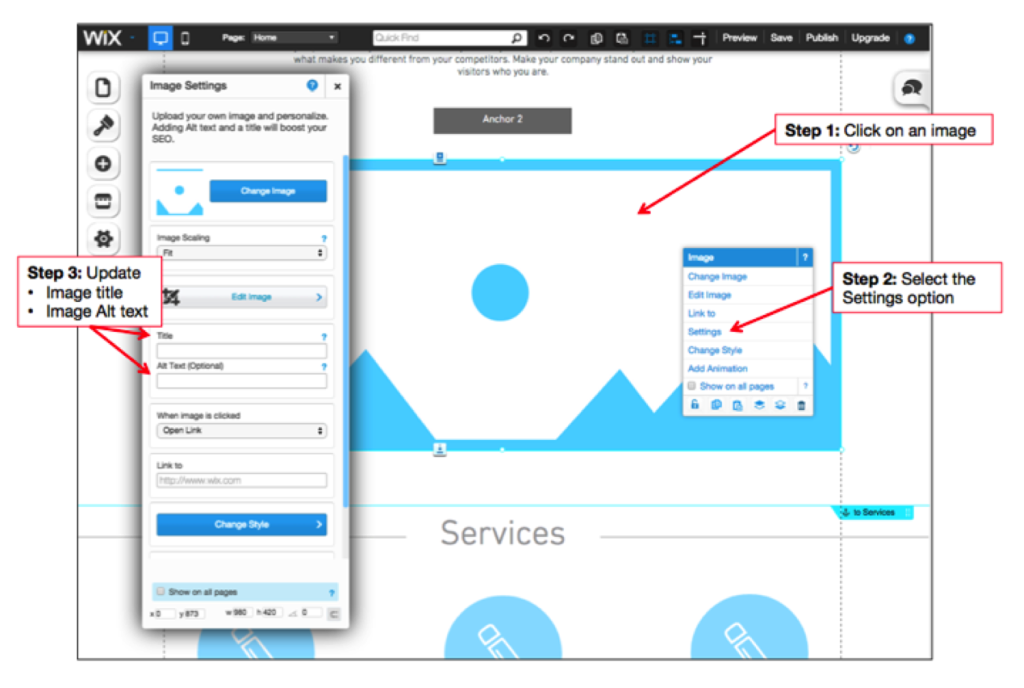
    Wix Image Alt Text - Search Influence

    Get Social

    You’ve invested so much hard work into your site, so isn’t it time to share it? Another great way to bring in more traffic is to effectively disseminate your message across social media sites. While you should be regularly posting informative content across your channels with relevant links back to your site, you should also make it possible for viewers to share straight from your site. In order to make this simple for your viewers, enable buttons and easy clicks on your site.

    To add social icons to your site, click the plus sign to open Add in your Editor. From there, click Social. You will have a selection of different networking sites, so select the one you wish to add. Here is a detailed image of how to do this:
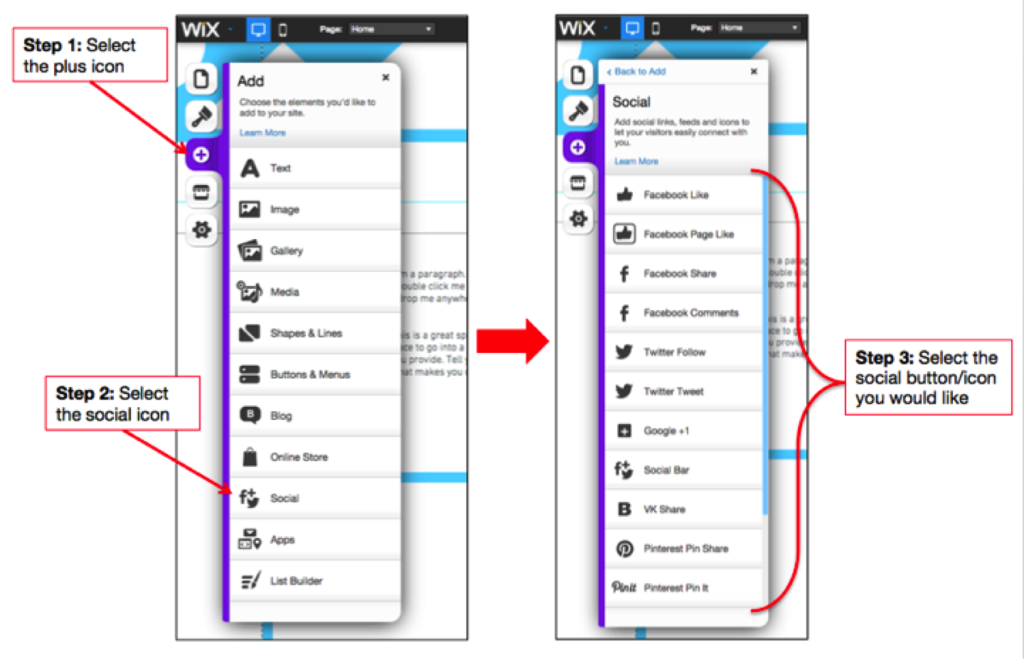
    Wix Get Social 1 Image

    Once you select the type of button, be sure to include the appropriate URL (your social link for follow buttons). Here is an example using the Social Bar:
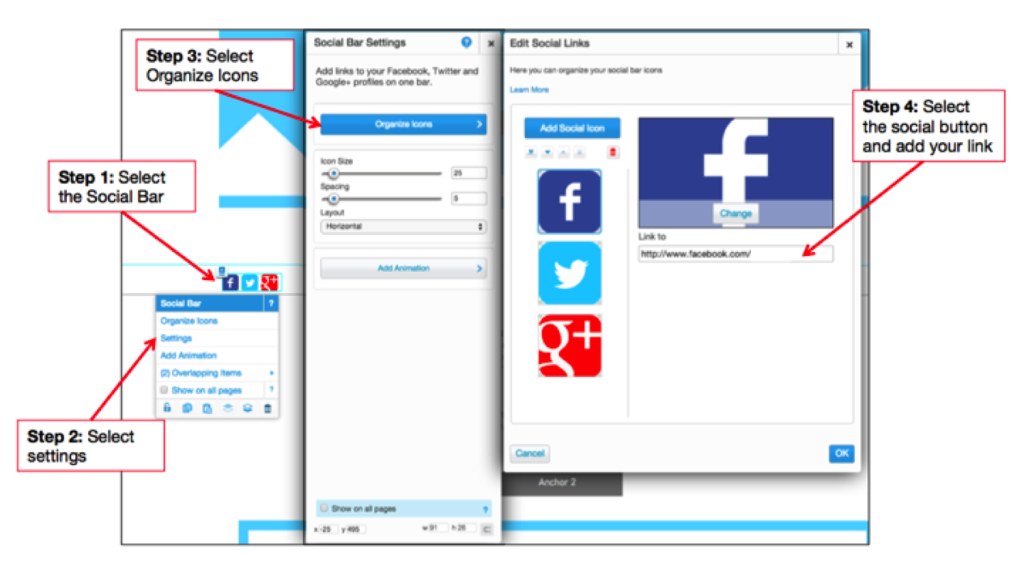
    Wix Get Social 2 Image

    Make Your Site Visible

    If you’ve just set up your site, you’ll need to give search engines a little time to find and index your site. The best way to get started is to make sure you’ve selected “Allow Search Engines to find my site” in your site’s SEO settings. Without updating this setting, you will never be found. Don’t risk losing all of your hard work. If you already have a published site, be sure to verify that this is selected.
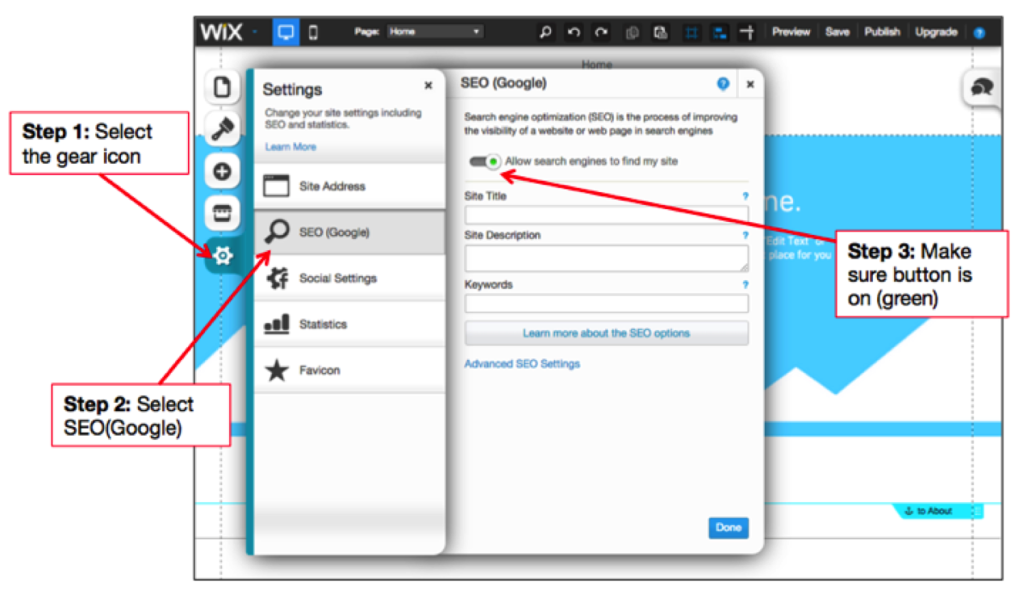
    Wix Visible Site Image

    Once you’re sure the search engines can see your site, you’ll want to help them find it. Add your web address to your Chamber of Commerce listings, note any industry associations you have, and make sure you get listed in local online directories.

    Also, be sure to submit your sitemap to Webmaster Tools to help Google better crawl and categorize your website. Wix automatically generates a sitemap.xml file, and you can view it by adding sitemap.xml to the end of your domain name. (Note: If you want to use Google Analytics, you will have to upgrade your account to a premium plan.)

    Optimizing on Wix doesn’t seem so bad, does it? Take heed and explore its options for yourself!

  • How A Little Nip And Tuck Can Improve Your SEO

    Makeovers aren’t just for mommies looking to restore and improve their post-pregnancy appearance through multiple, personalized plastic surgery procedures. Makeovers can also work wonders for websites in the cosmetic medicine industry. If your website isn’t bringing you a consistent stream of new patients, it may be time to give your site a much-needed SEO facelift. Learn how adding graphics to your website can help you get results!

    DoctorImageQuick—what do professional skin care, breast augmentations, and braces all have in common?
    Give up? Well, first of all, if you want any of these things, you’ll need to seek the help of an accredited medical professional—a dermatologist, cosmetic surgeon, or orthodontist, respectively. More importantly, however (at least for the sake of this blog post), is the fact that you can actually see the end results of these types of medicine. So how can medical professionals incorporate these visible results into their SEO strategy?

    If your medical specialty provides some sort of aesthetic benefit, there is a good chance you could (and should) be doing more to improve your rankings in organic search results. “More” in this context doesn’t mean “more keyword-rich text” or “more high-quality links to your site.” Instead, it means taking advantage of industry-specific SEO opportunities. Optimizing and adding images, educational infographics, or patient testimonial videos can have a significant impact on your site’s search visibility.

    Optimize Existing Images

    Optimizing image file names, alt text, and title text will give search engines information about the image and the content on your site. Any images can be optimized with keywords, but before and after images of your patients are an excellent industry-specific opportunity to naturally incorporate relevant keywords into your site’s content.

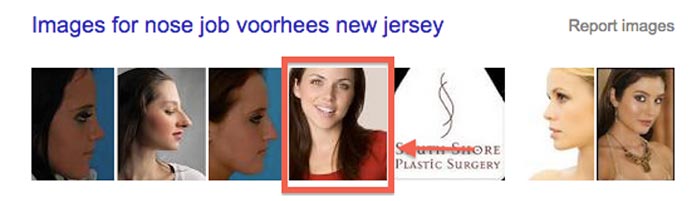
    One of our clients, a plastic surgeon, has a before and after image gallery on his site. We optimized each of the images in the gallery and saw some interesting results. Links to the gallery outperform the corresponding page on his site for the majority of his targeted keywords. The same client even has images that rank in organic search results!

    NoseJobSearchImageResults

    Add Relevant Images

    It’s important to note that Google can’t read or understand images without alt text or title text. But a page with relevant images that have no alt text or title text will most likely still rank better than a page without images! Why? The answer is simple—the ranking algorithm also pays attention to user behavior. If your site’s visitors are happy with what they see, search engines will recognize a pattern and reward your website for providing quality content.

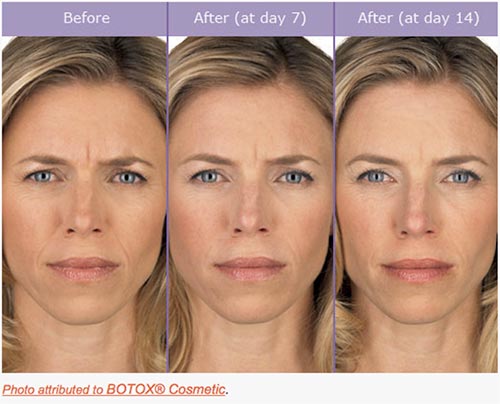
    Another one of our clients, a plastic surgeon in New York, didn’t have a before and after image on his BOTOX® page. As an authorized physician, our client was allowed to use some images provided by Allergan, the manufacturer of BOTOX® Cosmetic. We chose this relevant image and placed it on his site:

    BotoxBeforeAndAfterImage

    In the 30 days after we implemented this image, the average visitor spent 13% more time on the page compared to the previous 30 days. When visitors landed on the page from organic search, the bounce rate improved by 24%. Both of these stats demonstrate to Google that users are not only finding the information that they’re looking for on this page, but that it’s also engaging enough to keep them on the site.

    Create Custom Graphics

    Another behavioral signal that has become increasingly more important is social behavior. Adding custom graphics to your site is a great way to promote social media sharing and demonstrate positive social signals to search engines. And, like other images, custom graphics also give you the opportunity to create keyword-rich file names, alt text, and title text.

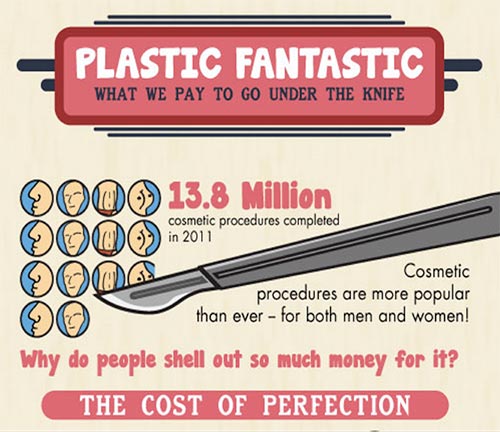
    PlasticFantasticInfographicImage

    The infographic above was shared more than 2,000 times on Facebook. The month it was published, the site saw a 25% increase in referral traffic compared to the previous year. It’s relevant, informative, and interesting for viewers. In other words, it’s exactly the kind of content that helps with SEO.

    Upload Testimonial Videos

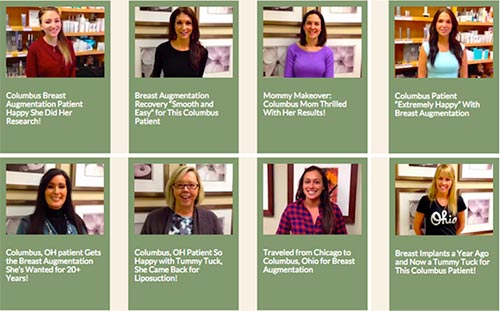
    There are other options if you don’t want to use before and after images or infographics. Another one of our clients in the field of plastic surgery uploads patient testimonial videos to his site. Generating nearly 9,000 page views in 2014, these testimonials have certainly had a positive impact on his site’s search rankings. The fact that these patients were so happy with their results has also helped to bring in new business.

    TestimonialVideoGalleryImage

    *Note the keywords in the video titles.

    Get Results

    In the end, people considering a cosmetic procedure want to know that they’ll be satisfied with the results. Search engines want to see that your site is providing quality results for the people who are searching. Using images, graphics, and videos can help kill both of these birds with one stone. You’ll be rewarded with better organic rankings, website traffic — and, ultimately, more business.

  • Facebook Engagement: How To Make Your Fans Say “I Do”

    Get more exposure to your business’ Facebook page. Incorporating these elements will enable your business to provide better and more shareable content!

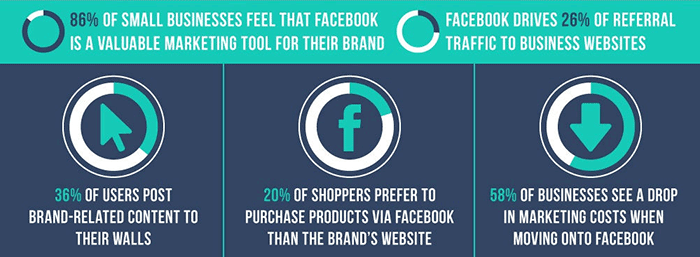
    There are 30 billion pieces of content shared via Facebook every month. That’s billion with a “B”! How is your business going to get noticed in this content sharing frenzy? One way is to write great and engaging posts people want to read! If people enjoy your posts, they will be much more likely to “like” the post, comment, or best of all, share it with their network– which has potential to reach a much larger, untapped audience.

    FacebookBusinessesStatsImage

    If you are new to social media or find yourself with writers block, see some of our suggestions to create better and more engaging posts. Below is as brief list of the many ways in which you can create great content, but remember to pick just a few ideas per post to prevent overwhelming your reader.

    1. Don’t make every post “promotional.”

    For example, only posting about your business and the products you offer may not be the most exciting update for a fan to read. Instead, post about specials, sales, or events that are happening in the near future.

    2. Use images whenever possible.

    It has been proven posts with compelling text coupled with an image will get more engagement than plain text or a link alone. Take it a step further, instead of using stock images use authentic and unique images from your business.

    3. Create a “weekly something.”

    If you are a restaurant, post a recipe of the week every Tuesday. Or, if you are a dermatologist schedule a recurring post about products you recommend. Create some consistency and give your fans something to look forward to.

    4. Share or repost other business’s updates that you find interesting.

    Sharing or reposting other business’ great articles, posts, and pictures is a great way to grow your audience and offer great content to your fans.

    5. Respond to comments that are left on your posts.

    Big or small, it is always great when a business comments back on posts. In addition, you should occasionally comment on other people’s posts as well, especially on posts created by fans of your page!

    6. Take a little extra time and create a unique meme for your business to share on your social media platforms.

    This great tool called the Meme Generator allows you to create whatever meme you like with a variety of stock images available.

    7. Lastly, share something silly every once in a while!

    Found a video of an adorable elephant sneezing, two babies talking to each other, or a great gif? Share it! This will not only get your posts more likes, but good chance it will get shared a great deal with your business’s name attached to it. People love companies that have a sense of humor. It shows real people are behind the computer screen.

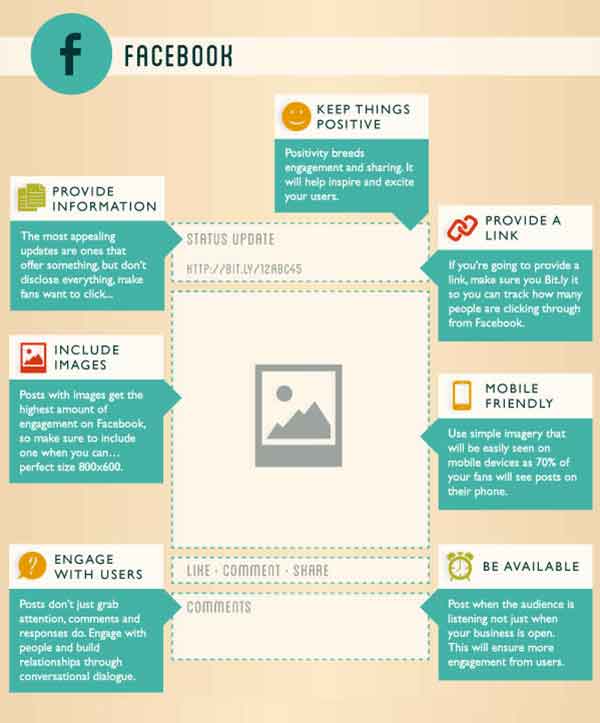
    PerfectFacebookPostImage

    Image Sources:

    Thanks to Pam Dyer for sharing this infographic about the “Perfect” post.

    Thanks to Steve Parker for sharing this mini graphic about Facebook for businesses.

  • Tiny Houses and Tiny Spaces: Making the best use out of space

    TinyCoverDesignImageThe term “Netflix” is Internet speak for “how to kill 2 hours on a rainy Saturday evening.” Well, it was one of those times, and I had stumbled upon Tiny: A Story About Living Small. This documentary shows Christopher Smith’s yearlong journey to find a home of his own. To accomplish this, Chris sets out to buy a large plot of land surrounded by wilderness. On it, he begins to build a tiny house. He ends up building his “home” on a utility trailer with 124 square feet of living space. In the film, Chris also interviews several other families that have also decided to consolidate their living situation.

    If you are like me, you have poured hours into Google searches of these tiny houses and thought, “that’s clever.” The numerous tricks and tips of people who opt for a smaller living space utilize all of the space so that they are comfortable and not cramped. It is this notion that interested me most – taking something small and making it seem bigger by utilizing only what matters and making it flow.

    When it comes to design, far too often we are faced with trying to fill in every conceivable space with more content and images. In doing this, we fail to see that what we are left with is just a pile of stuff and our original message is buried. Also, there are times when we say more than what is needed, and instead of drawing in the target viewer, they seem to just be waiting patiently for the end so that they can move onto the next thing. So to combat this, I have compiled a list of things to consider when designing for smaller spaces, whether for a sidebar web ad or a quarter page ad in a magazine.

    Take a Hard Look at the Space

    The main thing that gets lost when designing for small spaces is the actual size of what we are designing for. Computers give us the ability to enhance images and see them close up. But far too often, what can be read while zoomed in, cannot be read in its actual size. So take the time to open the web ad in a browser to see it in action, or print out the magazine ad and hold it in hand.

    Stack the Messages

    When it comes to deciding what to put in to the space, think of each element as a physical thing. Can you stack everything in your hand and still read everything? Does the logo take up too much space to where someone could fail to know what the image is? Does the novel-like copy seem like more of a pain to read and not draw in attention?

    Dual Purposes

    ToiletDualPurposeImageWhat makes tiny houses so unique and intriguing is that the purpose of everything within them is to maximize space. Like having a sink connected to upper basin of a toilet to eliminate the need for two large elements in a bathroom.


    In the design of things, we can sometimes make use of this as well. Can you use images of your brand in action? Is there a way to animate a web ad and engage the audience in the process? Can that magazine ad both sell your brand and serve as a useful tool to the viewer, like a checklist or a resource worthy of being saved?

    Space to Stretch Out

    The most common reason for people not wanting to jump on the tiny house bandwagon is the concern of not having enough room to even stand up. Many have expressed they would feel too confined and cramped. This same concern should be applied to our designs. When faced with a small real estate for any design, empty space needs to be viewed as an actual thing, as opposed to just being “empty.”

    Too often, we view space as being wide and vast. This also trickles down into the planning process for designs, and by the time it comes to implementation, there is no space for any of the elements to stand up or stretch out. It is important to take into account that space is an actual thing and needs to be represented, otherwise the design will become too confined and cramped.

    The Big Impact of Little Things

    The idea that everything needs to be big in order to be seen is something that does not hold true with designs that are small. This mindset is great for ideas, but when it comes to implementation, all that excitement and enthusiasm needs to be more focused. When it is, that small thing will be inviting and call out, like the sirens to Internet sailors, or to the casual passerby of a newsstand. These small designs should act as a ticket to something larger, something that merits investigation. Making our audience ask, “I wonder what that is all about?” is stronger and more enticing than just giving them a catalog of your products. It is that sense of curiosity and yearning to investigate that will build brand strength and forge a desire to learn more about what it is that you do.

    If you are curious about tiny houses, check out these blogs:

    http://www.tumbleweedhouses.com/

    http://thetinylife.com/

    http://www.tinyhousedesign.com/

    Image Sources:

    Tiny Book Cover

    Dual Purpose Toilet

  • 5 for Friday – G+ On Your Phone, Teens On Facebook, & Tips For Powerful Images

    5ForFriday

    1) CNBC: This 17-Year-Old Website Devastated By Google’s Panda Update – Search Engine Roundtable

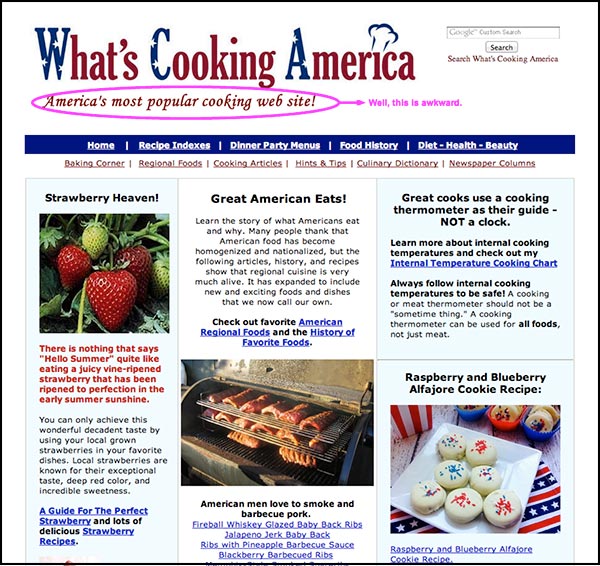
    Once upon a time, there was a woman named Linda Stadley. Her recipes brought so much joy to her and those around her that she generously decided to share them with the Internet. So she created www.whatscookingamerica.net, and for 17 years her recipes reigned supreme. She lived happily ever after until Google unleashed its mighty Panda 4.0 paw and ended her domination of the search engine results page faster than you can say Jack Robinson. Users everywhere weep for her loss of traffic.

    …that website though. The writer of this article says it all with his closing statement, “I feel bad but the site does need a facelift.” Well, yeah. This article speaks to the very nature of Google updates: even though they may not make everyone happy, the goal is to help all users find the best information first. Let’s be real here. This site lacks a lot of the features that make a website useful to users looking for recipes (like reviews, for example); therefore, more useful websites will get better rankings because they give people more of what they’re trying to find. Google would probably reply with something along the lines of “sorry we’re not sorry.”

    WhatsCookingAmerica-Website

    2) Google My Business iPhone App Now Available – Blumenthals

    Do you want Google all up in your business? You’re in luck. Google just released the My Business iOS app (as discussed by Mary Silva). The noteworthy features (for both the iOS and Android app) include the ability to edit your business listings and view local insights. Missing from this app is Google Analytics and Adwords Express. You can also access all the features of your Google Plus account. JUST WHAT WE’VE ALWAYS WANTED, said no one ever. The thought behind this was probably something along the lines of, “hey wait a minute, no one seems to be posting to their Google Plus account, maybe they would if they could do that on their phones?” We will see Google, we will see.

    3) Wait A Minute. Facebook Is Still A Big Hit Among Teens? – Marketing Land

    FacebookGraphic

    Facebook hasn’t been poisoned by moms and businesses? What?! As it turns out, Facebook is still popular with teenagers. Forrester Research released a report revealing that 75% of Facebook users ages 12 to 17 use Facebook once a month, with 28% of this age group claiming to use Facebook “all the time.” Of course, numbers don’t always give the whole story. Yeah, these kids are logging on, but are they actually using Facebook? Who’s to say these kids using Facebook everyday are not just scrolling through the newsfeed absentmindedly? Well, this may be the case, because a niche study reveals Facebook lost to Instagram for the most engaging platform.

    There’s a lot to consider here. For one, how will this trend change in the future? Have teens just been classically conditioned to check their Facebooks like a hopeless romantic checks Craigslist missed connections? Do more engaging platforms have more of an advantage in retaining and attracting new users? Time will tell.

    4) Net Neutrality Protesters Arrested At Google HQ – Techcrunch

    Well, this is a fun one. A group of activists in favor of net neutrality were arrested for protesting outside Google Headquarters. What were they doing there, you ask? The group calls for Google to “stand with us in support of an Internet that is free from censorship, discrimination, and access fees.” The group asked Google, among other demands, to change their homepage for a day to include a link to the FCC petition. You may be thinking, ‘but Google isn’t exactly the bad guy here trying to end net neutrality for all, why are they protesting there anyway?’ And you would be thinking correctly. According to this article, Google declined to comment on the arrests. I can’t blame them, as it seems these protesters might have a classic case of misdirected rage.

    5) The 8 Types of Images That Increase the Psychological Impact of Your Content – Copyblogger

    Quality images matter because they increase user experience. Yes, we know this. The advice in this article seems rather obvious, but there’s something to take away here. Specifically, what makes an image useful? This article proposes eight different types of images that provide users with the information they need. The top eight being: stock photos, screenshots, charts and graphs, personal photos, still frames from popular movies and TV shows, infographics, custom art, and comics. I would like to point out that most of these (except stock photos) could and maybe should fall under #7 “custom images.” I feel this article missed out on the opportunity to highlight the way that custom images serve more of a functional purpose for marketing than non-custom images. An infographic, comic, or screenshot that is custom and directly relevant to your business would obviously be more useful to users than one that is not.