Tag: how to

  • Don’t Be Afraid To Stop & Ask For Directions: Making Google My Maps for SABs

    As promised in my last blog about the new Google My Maps, I’m here today to teach you how to how to create My Maps for service area businesses (often referred to as SABs) that have highlighted boundaries of what counties or parishes they service.

    Before we delve into this guide, let’s start with the basics like what exactly is a KML file. KML is the file format used to show geographic data in mapping programs. It is an XML based format and stands for Keyhole Markup Language. Now that you know what this file type is, let’s see how you can use it.

    How to Use Old 2011 KML Files

    Fun Fact: The U.S. Census Bureau holds kml files for all county guidelines here!

    As you can see, they’re from December 2011, so any boundaries that have changed since then will be incorrect. In a very general sense however I’ve found these codes very useful in the past. Each file contains all county boundaries in one state, but the tricky part is that they don’t tell you what state it is in the file name. I went ahead and downloaded them all a long time ago and updated the file names to reflect the state they contain. It’s pretty closely in alphabetical order so if you just use a list of US states in alpha-order next to the list of files in numerical order it should match pretty closely.

    Once you’ve figured out which file contains the state you’re looking for, find the county or counties that you want to display in your map, and move it’s entire code for each county (should start with “Placemark” attribute and end with the closing of the “Placemark” attribute) just below the “Document” attribute. Once you’ve moved the boundaries you want to keep to the top of the KML file, remove all the excess counties and leave the closing attributes for “Document” and “kml” at the bottom.

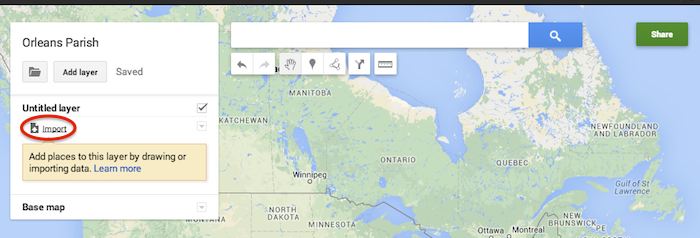
    Now that you’ve successfully prepared your KML file, in My Maps, click Import on the left and choose your KML file from your computer.

    Import A KML File To My Maps - Search Influence

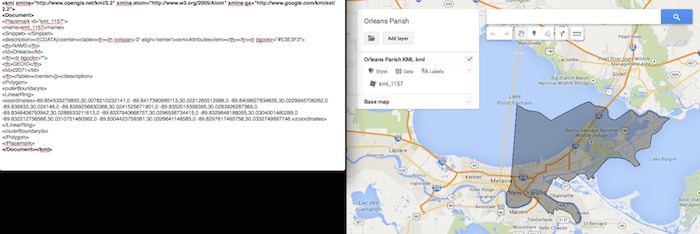
    See the screenshot below for an example of how your KML file should generally look if you’ve done it correctly. The screenshot shows the file for Orleans Parish of Louisiana in TextEdit and then what said file looks like imported into My Maps. (NOTE: In order to show a not so massive screenshot of the KML code, I removed about 3/4 of the coordinates. There are a massive amount of coordinates used to make up these detailed boundaries.)

    Preparing Viewing A KML File In Google My Maps - Search Influence

    How to Use New 2013 KMZ Files

    The U.S. Census Bureau also has the most up to date 2013 files, which are KMZ format (note the .kmz instead of .kml extension). This is essentially zipped KML files with a .kmz extension, but if you use a Mac like me, unzipping or unpacking the zipped file is not easily achieved. The 500k file contains the most detailed boundaries out of the 3 options.

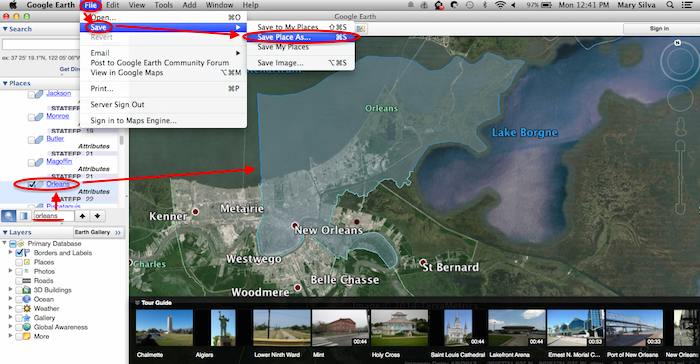
    So, the way I handle this KMZ file is to open the entire file in Google Earth and export just the KML file of the areas I want displayed. To do so you’ll use the search feature of Google Earth on the left at the bottom of the “Places” window to search for and select the areas you want displayed. Since many counties have the same name you’ll want to make sure it’s showing up in the state and location it’s supposed to. Also, note that if you’re trying to add multiple counties in the same state, the Attribute number to the right of the county will be the same for all counties within the same state. This should help you easily identify the counties you’re looking for when adding multiple.

    Once you’ve selected the geographic areas you want displayed on your map in the “Places” section, then save the file as a KML file by clicking File>Save>Save Place As….

    Saving A KML File from Google Earth for Google My Maps - Search Influence

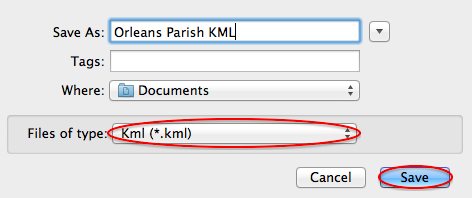
    My Maps will not accept a KMZ file, so make sure to save as a KML.

    Saving a Map in Google Earth As a KML File to Use in My Maps - Search Influence

    Once you’ve saved your file, follow the same steps mentioned above to import the KML file to My Maps. I’m not sure if the paid My Maps Pro is any different, but it appears to me that you cannot import multiple KML files to one My Map. So, in the event that you want to represent multiple service areas in one My Map, you’ll want to have all of the geographic area codes in one KML file.

    This Google Earth process can also be used instead of manually editing the older KML file codes as shown in the first instructional section in case you don’t want to delve into the coding via text edit. It’s definitely an easier route, but for me, Google Earth can sometimes run slow when trying to handle these files and I don’t mind manually editing code.

    Hopefully these steps and screenshots help out a fellow My Mapper!

  • 5 Google+ Page and YouTube Tips Your Boss Wants To Know

    In the office I am often asked to help with doing things in Google that turn out to be fairly simple tasks but are often hard to figure out. For example, creating a custom YouTube channel URL is fairly simple to do, but the place you make this edit is not the most obvious to find. So, I’m going to walk you through 5 Google tasks I am most commonly asked to help with.

    1. Change the Name of a G+ page

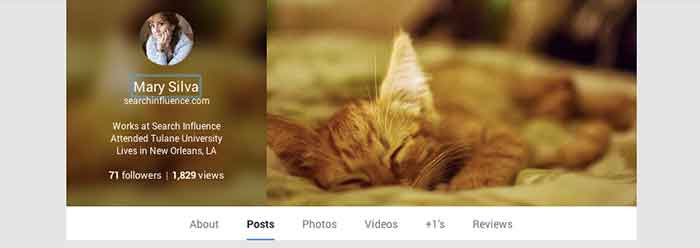
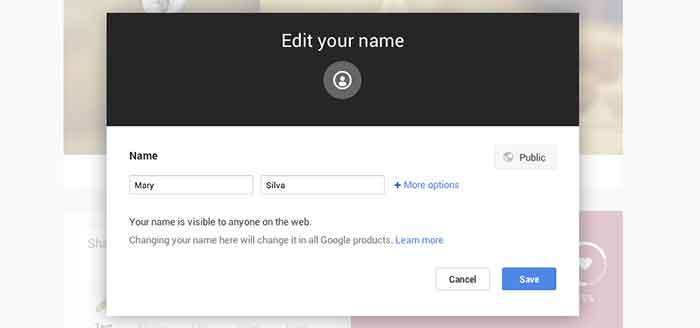
    Sometimes we’ll bounce around for several minutes looking for where the settings tab or options part of a page is just to change one tiny detail. In the case of changing the visible name of your personal G+ page or the the listed name of your business, a quick and easy way to make the edit is through the front end of your Plus Page while logged into your account. All you have to do is click your name! From there a popup will appear allowing you to edit this field. It’s important to note that you’re not allowed to do this as many times as you’d like with your personal profile page though. You can change your profile name only up to 3 times in two years.

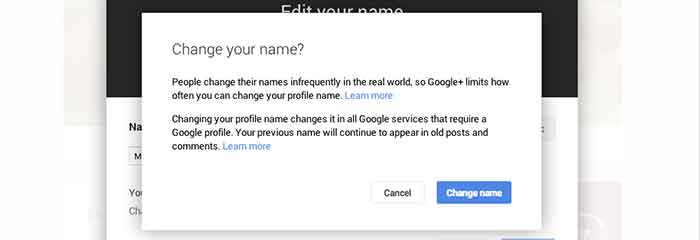
    When changing your personal profile name you’ll see this warning about frequency:
    “People change their names infrequently in the real world, so Google+ limits how often you can change your profile name.”

    GooglePlusProfilePage

    GooglePlusEditName


    GooglePlusConfirmNameChange

    2. Make Community/MapMaker Edits to G+ Local Pages

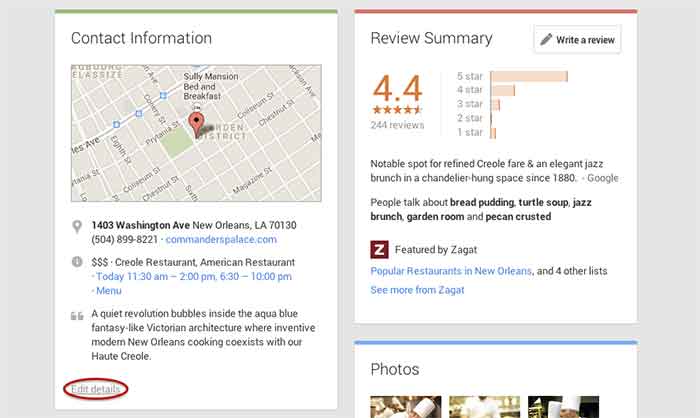
    The most common community edits we need to make to a listing happen when we’re just starting out and the listing we want to claim is owned and/or verified by someone else. The process for requesting ownership of a listing can be a lengthy one, and in the meantime you may want to update your business information from the front end. To do so, simply navigate to the Contact Information section of the businesses Plus Page under the About tab.  Then click “edit details” in the bottom left corner of the Contact Information box. The next page is the Map Maker editing screen that allows you to not only submit edits about the contents of the listing, but to also report a listing as a duplicate or closed location and report reviews that don’t belong.

    GooglePlusDuplicateListing

    3. Link/Verify A Website

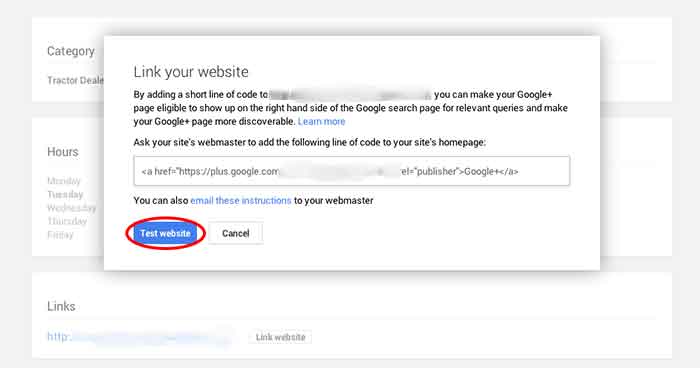
    We’ve recently discovered an issue when linking a business’s site to a Plus Page. After having the code added to a business’s website for linking to the Plus Page, you have to go back into G+ to make Google search for and verify that the code is on the site. You probably wouldn’t have encountered this had you done the entire process of adding the code to the site after getting it from Google, but often it’s a matter of getting the code and giving it to your developer to put on site. So in this case, you’d want to make sure to go back to where you got the code and click “Test website” in order to tell Google to check for the code. This can all be accessed from the front end of your Plus Page by clicking “Link website” under the Links section of the About page.

    GooglePlusLinkYourWebsite

    4. Add or Edit Managers of a G+ Page

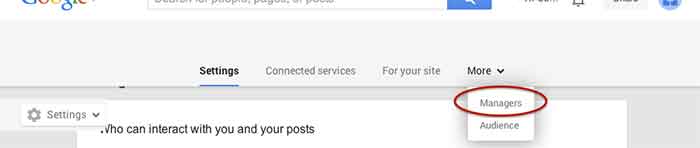
    Adding a manger to a Google Plus Page can be helpful for many situations. Businesses often want to have someone help with social media posting but don’t want to just give that person all of their login information since that is often linked to personal Gmail inboxes and the like. As with editing the name of a page, adding a manager can be done more than one way from within the account. I, however, find that the easiest and quickest way to do it is by going to settings from the home drop down in the top left corner when logged into Google Plus. Then, simply navigate to the Managers tab on the top left to access the manager permissions editing page.

    GooglePlusManager

    5. Create a Custom YouTube Channel URL

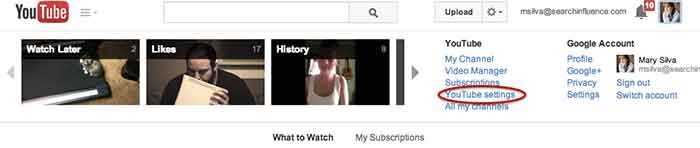
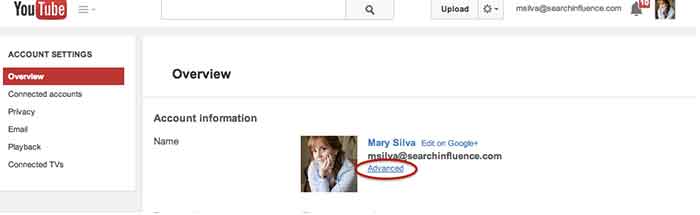
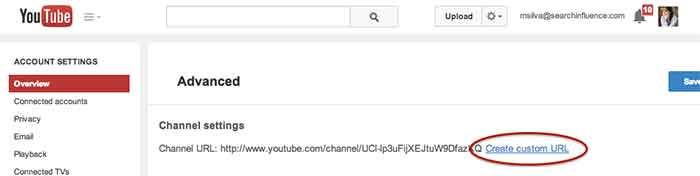
    You knew this one was coming based off of that intro, didn’t you? So, from the top right drop down menu of YouTube, click “YouTube settings,” then “Advanced,” and finally “Create custom URL.” It’s that simple but not exactly the most intuitive place to look for it, given the many other options in YouTube.

    YouTubeSettings

    YouTubeAdvanced

    YouTubeCustomURL

    I hope at least one of these steps was helpful for you, if not all of them. Let me know in the comments below what you think!

  • Turn Quiet Customers into Brand Ambassadors with the Right Social Media Content Strategy

    Thanks to Panda and social signals becoming more prevalent than ever in Search Engine algorithms, content both on and off-site is moving to the forefront of most SEO and online marketing strategies. Truly exceptional content not only ranks well, but is shared virally and provides a real value to the reader.

    Something I really began believing at PubCon NOLA this year is that social signals for search go beyond just whether someone likes or shares your content. The social signals Google is looking for have more to do with whether your customers are talking online about their experience with you after their purchase.

    Source: mvellandi Flickr http://bit.ly/8vqROG
    Source: mvellandi Flickr http://bit.ly/8vqROG

    The problem here is the ratio between people who want to shout it from the rooftops when they have a bad experience to those who openly share when they are excited or had a positive experience. In today’s social age, everyone is a journalist, food critic, secret shopper and referral source. The average Facebook user has 229 friends on the social network, meaning that if they so choose, they can instantly alert at least 229 friends to stay far away from the new Italian restaurant in the neighborhood after finding a hair on the pizza.

    That’s pretty powerful. There aren’t many other platforms that allow one individual to communicate with so many others so quickly, and to be so expressive while doing it.

    As a business, you’ve probably been told that you need to be marketing on social media to protect your reputation online and grow your business by generating leads or driving more customers into your store. I would challenge you to think beyond that.

    When is the last time you had a great experience at a local restaurant? Did you tell anyone about it? If so, how many people? Now think about the reverse. Chances are, you told a few more people about the negative experience than you did the positive one.

    Source: LetoLab.comIt is time to change our thinking when it comes to social messaging, beyond the traditional “lead gen” mindset. Rather than trying to push your product on someone who’s never used it or heard of it, why not look for opportunities to engage your existing happy but quiet customers and get them talking? Social media gives marketers and businesses the opportunity to turn a customer into a brand ambassador.

    Yes, we have to make sure we watch out for Panda and keep an eye on that pesky Google and their algo updates when it comes to on-site content strategy. I don’t mean for my focus on social to suggest that you should move your entire content strategy off your own website and onto social platforms. But, if we think about using our online content strategies to lift up our happy customers, get them sharing and engaging with us, just imagine the viral potential to reach their friends and family–new business you haven’t yet tapped into.

    You’re probably like, “Ok, I get your point, but how do I DO that?” Funny you should ask! Social media content strategies will vary by business and industry, but here are some tips for converting your social media following into brand ambassadors:

    1. Tone down the sales messages and pushy language. No more than about 20% of your social messaging should be self-referential or portray a sales message. Within this 20%, remember that the goal of these posts should be to provide a real value proposition to the audience. This could include specials, deals or contests.

      Content Strategy for Social Media - Provide a Value
      While this is basically a self-promotional post for Shutterfly, an online photo service, they are providing a value to their customers with a create-your-own cover photo featuring dad for Father’s Day.
    1. Reward your loyal customers and followers with exclusive information. Whether is a sneak peak into an upcoming in-store special or just a “Did You Know” fact, people love to feel like they have the inside scoop, so give it to them!

      Social Media Content - Give Fans Exclusive Info
      Online retailer HauteLook hosts designer pop-up sales for a limited time until inventory is sold. They effectively use social media to make their audience feel like they’re getting the inside scoop while also promoting the upcoming sale.
    2. Feature your fans. Everyone loves to be recognized, so give your fans a moment to shine by choosing to feature them every once in awhile. They’re more likely to share the content with their friends and family (increasing the potential reach of your future posts).
      Content Strategy - Fan Features

    3. A little subtlety goes a long way. I’m a big proponent of including a call to action in your post, but it’s best not to take it to the extreme. Providing a share-worthy piece of content to your pre-qualified audience with a slight nudge can never hurt.

      Social Media Strategy - Calls to Action Increase Engagement
      Disneyland provides a great piece of content with a direct call to action: share. And share they did! The piece resonates well with their audience and was timely for the Mother’s Day holiday.
    1. Post well and post often. At PubCon New Orleans this year, Alison Zarella (another AZ girl!) said it best: “the newsfeed is crowded.” As a business or brand, your competition on Facebook is not limited only to the business across the street that sells the same product. You’re also competing for your audience’s attention with the likes of their moms, distant cousins, besties and frenemies. If you don’t post great content and do it consistently, you’ll never be seen.

    2. Reply, reply, reply! Make sure to reply to your customers who comment or post with questions! Facebook and social networks are where people spend a lot of their time these days, so getting a quick reply and notification of that reply is what they expect.
      Social Media Content - Reply to Your Customers' Questions

    3. Be flexible and test for yourself. Above all else, try new things and test multiple approaches with your fans. There’s lots of information and data out there about what works, when to post and how to do it, but the truth is that every industry is different. You’ll never know what is the most effective for your brand until you try new things, compare results and adjust your approach.

  • Be Semantic: How to Install Microdata

    Search engines are designed to do one thing — make sense of the various documents found on the Web. Originally using just on-page factors like content and meta information contained in specialized tags, search engines moved to analysis of links in the late 90’s with the advent of the PageRank algorithm. This new method treated links as “votes” for websites, using anchor text and website clout to determine what is relevant to a search query. Recently, though still relying on links as the main source for determining a page’s worth, search engines and other Internet spiders are returning to on-page factors to find information that’s meaningful to users.
    “New” On-Page Meta

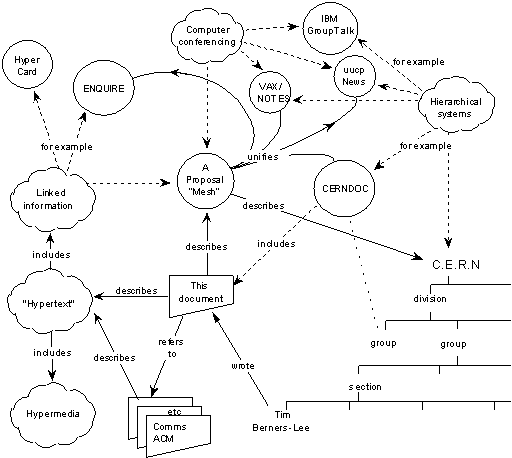
    These “new” on-page factors are the culmination of work dating back to the beginning of the modern Internet. The original diagram showing the basics of how the Web would work devotes much of its space to showing the connections between pages, but one corner lays the foundation for what is now known as the semantic web. This image shows a few of the basic properties in the semantic web: rel=author and other relationship markups, Schema’s breadcrumbs and on-page descriptions, and the hCard microformat.

    Each of these more recent formats are designed to expand on what’s called POSH — “plain old semantic html” — that is, using <p> tags for paragraphs, <ul> or <ol> tags for lists, and <table> tags for tables of data instead of as layout and design elements. The two most common microdata formats, Schema and Microformats, are each based on pure HTML, codifying the use of HTML5’s itemscope and HTML4’s class and ID attributes respectively. In this way, microformats seek to make standard web coding easier for computers to find and use the various data visible on the page.

    Implementing Microdata

    The four most common formats of microdata: XFN, OpenGraph, Microformats, and Schema, make an alphabet soup unwelcoming to newcomers. Part of microdata’s charm is its ease of installation. But while some ways to tell search engines and other scrapers how to index a page are somewhat more arcane, microdata sits on top of the code, easily being added to existing pages.

    Microformats and XFN require relatively little extra knowledge, while Schema and Open Graph assume a little bit of forward-thinking HTML5.

    Microformats & hReview

    hReview, like many compound Microformats, is based around hCard, which was designed to mimic the electronic business card format vCard. With hReview, you can easily mark up reviews to show in Google’s SERPs using standardized classes and IDs.

    In order to do this, there are two steps to the markup. The first is the hReview-Aggregate markup which gives the data shown in the SERP: number of reviews and overall ranking. The second are the actual reviews. Both use hCard to describe about or by whom the review is written.

    Here’s the hReview-Aggregate code from that page:

    <div>
    <h1>Patient Reviews for Columbus, Ohio Plastic Surgeon<br>
    <span id="donaldson-plastic-surgery">
    <span>Donaldson Plastic Surgery – Dr. Jeffrey Donaldson</span>
    <span>
    <span><span title="4661 Sawmill Rd #100"></span></span>
    <span><span title="Columbus"></span></span>
    <span><span title="OH"></span></span>
    <span><span title="43220"></span></span>
    </span>
    </span></h1>
    <p>
    <span>
    <span><span title="4.8"></span></span>
    <span><span title="5"></span></span>
    <span><span title="20"></span></span>
    </span>
    </p></div>

    Much of this example code won’t show, which is against Google’s rich snippets documentation; however, as you can see, the snippet shows in the SERPs. The class=”value-title” syntax follows the microformat specs from their site. But should invisible content be used? Or is it spam? More on that later.

    For the single hReview, the code is clear and most sections are visible. Again, use the value-title syntax to hide any data that’s not meaningful to the user.

    <div>
    <span><span><span title="Donaldson Plastic Surgery - Dr. Jeffrey Donaldson"></span></span><br>
    <span><span title="Tummy Tuck, Columbus, OH"></span><br>
    <span>
    <p>DESCRIPTION</p>
    <p><em>- <span>DM</span> / Columbus, OH </em></p>
    <p><span><span title="4.8"></span></span></p></span></span></span></div>

    XFN & rel=author

    Like microformats, there are other microdata formats that use HTML 4 entities, which keeps the code accessible to most levels of website owners. XFN establishes personal relationships between pages on the Internet and is one of the easiest microformats to install. Prepackaged in many basic WordPress installations, XFN has one major use: establishing your identity using rel=author.

    Using the XFN markup rel=”me”, which relates web pages about someone with social media and other profiles, and the microformat rel=”author”, which associates posts with other web pages about the author, you can let Google and other spiders know who wrote the post. While Google requires further steps and whitelisting to show up in the SERPs,

    For an example, take a look at our authorship markup.
    <a title="Posts by Julia Ramsey" href="http://www.searchinfluence.com/author/jramsey/" rel="author">Julia Ramsey</a>

    This links to Julia’s author archive page, which in turn has a link to her Google+ profile.
    <a href="https://plus.google.com/u/1/104804485354016147497?rel=author" rel="me"><img src="https://townsend.bunksite.com/wp-content/themes/si-dec10/images/g-plus-icon-32x32.png" alt="Find Julia Ramsey on Google+" width="30" /></a>

    There’s some other magic going on, but overall the rel=”me” XFN markup shows who wrote the page and connects it to a social network to grab more information.

    Open Graph

    Moving from connecting with to interacting with social networks, Open Graph is meta information for Facebook. While much of the Semantic Web is about marking up body content, Facebook’s meta information is in the header as tags.

    Using our site as an example:

    <meta property='og:title' content='SOPA Dope &#8211; Today&#8217;s &#8220;Blackout&#8221;, Tomorrow&#8217;s SEO Audit' />
    <meta property='og:site_name' content='Website Promotion Company: Search Influence -  Economical SEO New Orleans, LA SEO / Internet Marketing' />
    <meta property='og:url' content='http://www.searchinfluence.com/2012/01/sopa-dope-todays-blackout/' />
    <meta property='og:type' content='article' />
    <meta property='fb:app_id' content='197784673584291'>
    <meta property="og:image" content="http://graphics.nytimes.com/images/promos/politics/blog/23thompson-nbc.jpg" />
    <meta property="og:locale" content="en_US" />

    There are 7 required tags, mostly named logically. Two that are confusing are og:type and og:locale. The first should be “article” for most pieces of content. The “article” type is for anything that’s a single written post. Necessary, and not always included in Open Graph plugins, is og:locale, which refers to the language and location of the site.

    Schema for Music

    Finally, we come to Schema, the search engines’ attempt to standardize semantic microdata. Schema is deeper and more customizable than any of the other formats, however at the expense of clarity. It uses the itemprop, itemscope, and itemtype attributes from HTML5.

    Of all places to find a modern web example, MySpace’s band profiles use schema for music. Check out the music player on this band’s page.

    The code’s a little less clear because of the flexibility of Schema, but you’ll see by looking at the itemprop attribute that there is a wide variety of meta information categorized and sectioned in that small block of text. In the SERPs, it outputs as a rich snippet, linking to the individual song pages. Needless to say, while extremely niche, this power is invaluable for musicians and bands. All of Schema is this niche, but the benefits are massive, as seen here:

    Is it Spam?

    There comes a point where a marketer could easily see the potential for abuse. Hidden data, which we touched on before, is only one aspect. Certainly, there can be hidden data that is misleading, however it’s clear that some data doesn’t need to be for the end-user. Google’s guidelines say to not hide any data that is a rich snippet, but for things like a strict star rating for a text post and repeating the subject of the review, there’s good reasons to hide structured content.

    However, that hidden data quandary bleeds over to reviews in particular. No website owner is going to be happy about his own site showing his products and services to be low-quality. There is a clear directive for a business owner to cull bad reviews from his own site, and therefore the reviews may be less than perfectly accurate to their customers’ feelings. One way to avoid this would be to take advantage of user-generated content, with safeguards for malicious spam and abuse. Another would be to show accurate ratings based on a rubric, though that could easily become difficult for the website owner to get through.

    For social meta data, often a marketer will use different descriptions and titles to target better on a given social network. This can be used for a sly bait-and-switch, similar to some ads that use a voluptuous beauty to make you click on a much less interesting post.

    However, in most cases a high-powered sniff test and tummy check are all that are necessary to determine if something is spam. Certainly the tools would not be recognized by major search engines if semantic data were considered with the same level of scorn as some marketers have for pure meta keywords. If the reviews selected are glowing, why not give them all 5 stars? If the page is enhanced and not weakened by different social and search meta data, who would mind that?

    The Internet is best served by a semantic, rich web. A vibrant search page, a web that’s easily crawlable for information, and a social experience enhanced by relationships and attribution are all at the core of microdata: make the most of your site today with these techniques.