Tag: graphic design

  • How to Best Utilize Facebook’s 3D Photos for Your Brand

    Facebook introduced 3D photos in October 2018, and users have been posting these fun “window views” that give viewers a new perspective on once-flat photos in their newsfeed. Originally only available to those with an iPhone with Portrait Mode, 3D photos can now be uploaded by anyone with a dual-camera smartphone or by anyone who had manually created a depth map.

    This new format saw some traction right after its launch, but has slowly plateaued in popularity over the year. This could be due to it only being available to certain iPhone users at first, or maybe just a general lack of awareness of the feature, but, either way, this means brands that do utilize it will stand out in newsfeeds even more.

    Why Use 3D Images in the First Place?

    Any new feature that Facebook introduces is inherently attention-grabbing, and 3D images have the best of both the video and flat image worlds. The eye-catching movement is automatic as the user scrolls through their feed, but taking in a 3D image doesn’t take as long as watching a video. This immersive experience offers a self-guided glimpse into a “window.”

    The feature was released for users, not pages or brands, to share photos. However, users have found that if they can post 3D images from their personal accounts, they can post them from business accounts too. With this workaround, business pages are able to blend in more with their audiences’ newsfeeds, behaving and looking more like their friends and family.

    As older smartphones are phased out, 3D images will likely become even more common on newsfeeds. A brand that gets ahead of the trend before it really takes off will prove itself more innovative than its competitors and establish more authority with its followers.

    How to Use 3D Images

    More casual images will look the most natural when using this feature. Your audience will be scrolling through their newsfeeds expecting the 3D image to be posted by someone they actually know, so keeping this in mind will help your brand seamlessly blend. The post below, for example, was posted by the official Bud Light Ritas Facebook Page and looks like it could have been posted by anyone celebrating the weekend or watching some football.
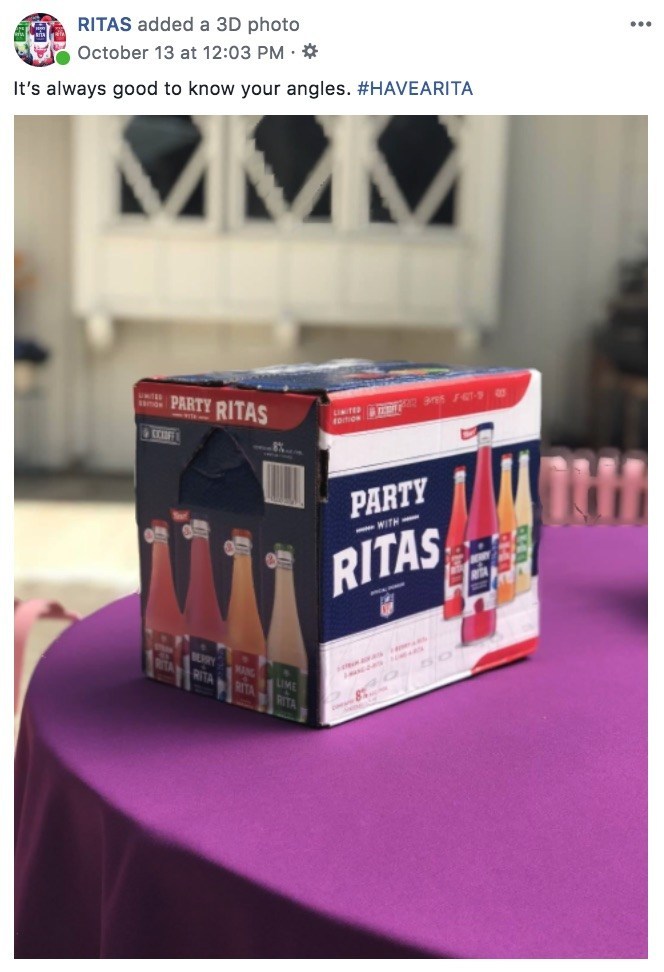
    Facebook example for a brand using 3D images in advertising

    If you have creative that was created NOT using portrait mode on a smartphone, you can still manually create a depth map, too. This is a bit more challenging and time-consuming, but it’s completely possible to make a 3D photo in Adobe Photoshop or with other online tools. Get creative with your creative!

    Tips for Taking Great Portrait Mode Photos

    • Put a few feet in between the camera, the subject, and the background. To highlight the depth in the photo, there needs to actually be depth.
    • Make sure the subject of your photo contrasts with the background. Don’t have a woman wearing a green sweater against a green wall.
    • Transparent or shiny objects, like glass or windows, can confuse the depth sensors and might turn out distorted. This may also happen with hair. Combining these two, like a person standing in front of a wall of glass, may totally warp the photo.

    Making the most of recently released features is a great tactic for drawing users in on social media. At Search Influence, we’re always looking for new ways to make our clients’ marketing campaigns more effective. To learn more about using advertising to grow your business, start a conversation with our marketing strategists.


  • Here Are Our Top 5 Blogs You May Have Missed Last Month

    Woah! Did June fly by for you, too? If you are on the beach this week and doing some summertime reading, here are our most popular five blogs from last month that you will want to check out.

    Knowledge is power gif

    What Happened to Facebook’s 20% Text Grid Tool?

    Michelle’s blog is coming in hot as Search Influence’s most-read blog of 2016! If you’re advertising on Facebook, you need to understand the rules and limitations of the images you include. Facebook’s allowance for text within ads has changed slightly over the past few months, so be sure to read up about the latest updates and what they mean for online advertisers.

    5 Medical Practices Effectively Using Instagram

    Calling all doctors: Is your social media strategy healthy? Are your social media channels helping you generate more traffic to your site and more qualified leads? Read how these five medical practices have been utilizing Instagram to further establish their brand, increase their online presence, and stimulate user engagement.

    Instagram gif

    These 10 Expert Tips Will Drive Traffic to Your Business’s Website

    Feel like you’re doing everything to strengthen your online presence but still not seeing the traffic numbers you’d like to see within Analytics? From schema markup to shareable content to video syndication, we provide ten valuable tips from industry experts to help you increase your site traffic with ease.

    Getting Hands On With the New Google My Business

    Though originally written in 2014, this June blog is still hyper-relevant to the industry. Quite a lot has changed within the Google landscape since 2014, but it can be JUST as confusing to navigate through business pages and local profiles. Let Mary guide you through what’s changed in the world of Google business and what these changes mean for your bottom line. Additionally, if you need help claiming your Google My Business page, check out this recently-completed Search Influence video to painlessly walk through the steps!

    5 Rookie Mistakes That Will Ruin Your New Website’s SEO

    Just launched a new site? Don’t let all of your efforts go to waste; make sure your site is optimized properly so search engines deem it “worthy!” Read on to learn about five big new-site mistakes, and ensure that your site is strong and ready to rank.

    Gif 1 Credit  |  Gif 2 Credit

  • 3 Tips for User-Friendly Navigation

    A few weeks ago, my future mother-in-law purchased her first iPad. While she has been the proud owner of an iPhone for a few months, there was something different, to her, about the navigation of an iPad. As we were walking through some of the different apps and functions on her new tablet, she found herself trapped in her browser window and unsure how to get back to her email.

    MaggieSmith-01

    Are you the type of person who can easily pick up on the newest technology trends? Or do you feel like you can never catch up with things changing so frequently? User-friendly navigation can take that worry away and make your experiences with technology easy and fun!

    Tip #1: Keep something familiar.

    We’ve all experienced that little moment of panic when we don’t know where to go next. For some people it happens when traveling to a new city or starting a job at a new company. We want to know that there’s a way out of any situation. For my future mother-in-law, that “way out” was the home button. After discussing the way she closes out of the Internet on her iPhone, she quickly realized she had that same “panic button” located at the bottom of her iPad.

    Tim Ash, CEO of SiteTuners and author of “Landing Page Optimization” was a keynote speaker at PubCon in New Orleans. During his keynote presentation he mentioned that as soon as we see someone walk into a room, we subconsciously decide how to kill them. He claimed it’s just a part of our natural instincts. I’m not sure if that’s the case for everyone, but I do think we at least look for an escape route.

    MaggieSmith-02

    Tip #2: Make it easy.

    Have you ever started navigating your way through site and then realized that you weren’t sure of the best way to get back without having to click the back button nine or ten times? What do you do? Do you simply close your browser window out of frustration? We crave easy navigation to avoid such frustration and make browsing simpler.

    To a certain degree we all enjoy updates to technology, but we still like to hold onto something familiar. For some social media sites, such as Facebook and Twitter, having a fixed navigation is the solution. How often do you find that you’ve logged into your social media account and then hours later, or for those with better self control, minutes later, you’ve scrolled so far down the page you’re looking at updates from days or weeks ago? Can you imagine what it would be like if you had to scroll all the way back up to the top of the page? If you were on Facebook before 2011, then you might remember.

    Tip #3: Know your audience.

    Is this something that all websites need? No, not necessarily. For many sites, scrolling is not quite as intuitive. The solution could be as simple as having “HOME” as an option in your navigation. Know your audience. Some users need an actual home button or link in the navigation, and some simply expect that your logo will link back to your homepage. If you’re unsure of the way your users interact with your page or how to make your page easier to get through, it may be best to do some testing.

    MaggieSmith-03

    Do you have any tips for easy navigation? If so, let us know in the comments! 

  • 5 of the Best Long-Term Graphic Design Trends

    The key to being trendy when it comes to graphic design is finding a trend that will last. When you’re looking to create a design, be sure to choose your trend wisely and pick one that is going to last for the long-term. Here are 5 of the best long-term graphic design trends.

    graphic

     #5: Artisan Craft Inspiration

    While people gravitate towards simplicity, many also appreciate the art of handcrafted work and the value of the classics. For example, when creating a logo for a restaurant or bakery, try communicating some of the tradition behind the handcrafted nature of this business with a design inspired by an old-fashioned sign.

    #4: Patterns

    Looking for a way to keep your design clean but not too simple? Consider using a pattern within your design.  You can use a classic that already exists or you can create your own!

    #3: Hand-drawn Typography

    While some typefaces will remain timeless and beautiful, creating your own type might be the best way to make your design unique. You can hand-draw an already existing typeface or you can make your own. Either way, the imperfections of hand-drawn typography make it beautiful.

    silo

    #2: Silhouettes

    While people’s fashion trends may change, their silhouettes, relatively speaking, will not. Using silhouettes for people, animals, or objects is usually a safe choice. Vectors keep the design clean, simple, and trendy.

    And the #1 Long-Term Graphic Design Trend:

    Simplicity. Keep the focus on the message and don’t overwork or overdevelop your design. White space or negative space is a good thing.