Tag: google reviews

  • How to Prompt Customers to Leave High-Quality Reviews That Influence SEO

    Key Insights

    • Businesses can prompt reviews and testimonials that include beneficial keywords to support ranking in the Search Engine Results Pages (SERPS).
    • Three benefits to providing review prompts:
      • Encourages high-quality, specific reviews
      • Influences more people to find you when searching for degrees, products, services, and experiences you offer
      • Themes in reviews help those who skim search results understand your value
    • Creating a list of prompts your customers can use when crafting their review helps make sure their reviews benefit both prospective customers and your search rankings!

    Customer reviews and testimonials are crucial to your business. They provide you with feedback on your products and services and help potential customers gain insights from your current ones. Additionally, reviews and testimonials that include beneficial keywords can support ranking in the Search Engine Results Pages (SERPS).

    Graphic of a hand using a tablet to read online reviews of a business

    When your business has reviews on important sites, like Google My Business (GMB), Google sees your business as authoritative and is likely to reward you for this. Greg Gifford, an experienced SEO consultant, created a video for LinkedIn with a suggestion that inspired this post: provide prompts so customers leave reviews with keywords that benefit your rankings.

    In this post, we’ll walk through the steps you should take to prompt your customers (without specifically asking them) to leave beneficial keywords in their reviews and testimonials. Not only can you prompt them to leave a review, but you can also give them some questions they can use to get started. This helps customers leave high-quality reviews with details that will benefit your rankings and also gives them a baseline to get started in writing their review.

    Benefits to Providing Review Prompts

    #1 – Encourages high-quality, specific reviews

    • When you request a review after a customer has experienced your services, it can be intimidating for them to start off with a blank screen. When you prompt your customers with questions about their experience, it helps them feel more comfortable and helps you earn more detailed reviews.

    #2 – Influences more people to find you when they search for the degrees, products, services, and experiences you offer

    • Reviews help influence rankings in the SERPs. If you use prompts that include the keywords you’re targeting, your customers are more likely to use those terms in their reviews, which makes you more likely to rank for them.

    #3 – Themes in reviews help those who skim search results understand your value

    •  Google aggregates common themes in reviews. This helps if someone searches for something in the immediate area of your business.
      • Example: Here you can see that Google has aggregated keywords and phrases throughout the reviews to make it easier for a potential customer to see reviews that include venues they may want to visit. If a consumer wanted to see all the reviews that included the keyword “zoo,” they could select it and read up on the experiences others have had.
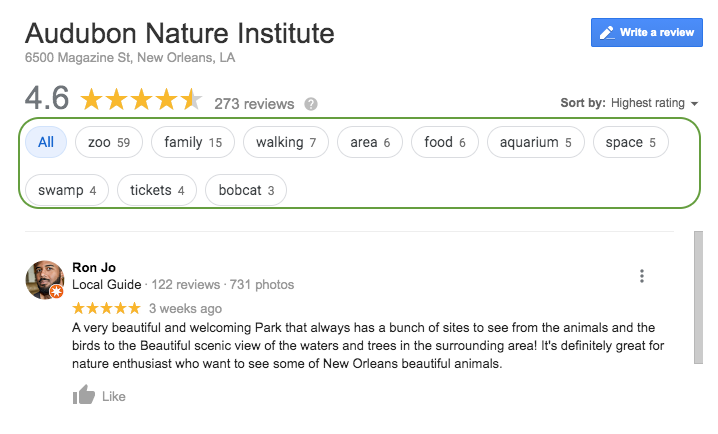
    Screenshot of reviews from Google My Busiess for Audubon Nature Institute in New Orleans, LA

    • Also, when searchers see the themes of your reviews called out, they can more quickly understand what your business offers. In the example above, it’s helpful to know that the business has a zoo, aquarium, and swamp attraction they could visit while in town.

    Questions to Prompt Reviews

    Sample questions you can use to foster specific, high-quality reviews:

    Medical / Healthcare Questions to Prompt Detailed Customer Reviews

    • Which treatment did you receive?
    • What brought you into the practice?
    • Why did you choose our practice or a specific doctor?
    • Which location did you visit?

    Tourism & Attractions: Questions to Prompt Detailed Customer Reviews

    • Which attractions did you visit?
    • How were your interactions with the staff?
    • What were the amenities like?
    • What did you enjoy most about your experience?

    Restaurants: Questions to Prompt Detailed Customer Reviews

    • Which food and drink items did you have?
    • Which restaurant location did you visit?
    • How do we compare to other restaurants you’ve been to in the past?
    • How were your interactions with the staff?
    • How was the ambiance?

    Education: Questions to Prompt Detailed Customer Reviews

    • Which campus did you visit/attend?
    • Which degree or program are/were you interested in?
    • Do you have any tips for future prospects?
    • How did this experience prepare you for life after graduation?

    Bonus Tip for Bringing Reviews Into Other Marketing Efforts:

    • Feature the most called out benefits of your business in your website copy, imagery, and social media posts and ads

    How Can You Get Started?

    • Gather any email addresses you have of past and present customers.
    • Write an email that prompts them to leave a review for your business.
    • Within the email, include prompting questions that will get them thinking about their experience and ultimately help them produce a thoughtful review that will benefit everyone!

    Now that you’ve got a leg up on your reviews and testimonials, it’s time to start thinking about improving other aspects of your SEO. If you’re not sure where to start, ask for a digital marketing analysis of your website from our team of experts at Search Influence.

    Images

    Tablet

  • 6 Methods For Healthcare Providers To Turn Great Service Into Great Reviews

    As society continues to evolve into a highly mobile culture, we see how heavily online reviews influence the selection of a practice or practitioner. In fact, among patients who look for online reviews of doctors, an estimated one-third reported choosing a physician based on good ratings, according to a national survey published in the Journal of the American Medical Association. Most people trust an online review just as much as they trust a personal referral from a close friend or family member. Maintaining a positive online reputation is essential, because while your healthcare practice cannot control what patients write, you can control your response to their reviews.

    People Hate Us On Yelp Image - Search Influence

    The medical industry is highly competitive, so the more positive reviews your business obtains, the more likely it is that your business will be found online. The success of your business heavily weighs on online reviews, so you’ll need to learn how to effectively ask for reviews from your customers. Here are six methods to encourage your customers to leave reviews.

    Make Writing Reviews Simple For Everyone

    Most people, unless they have a negative experience to share, will not make the extra effort to leave your practice a review. You need to make it as easy as possible for your patients to leave a review for your company, and you can do this by adding links to your review profiles in multiple places, such as in a follow-up email, on a thank-you page, etc.

    Get Listed On The Top Business Review Sites

    Everyone has their preferred review sites, so it is necessary to have a strong online presence across the most popular ones. All profiles and listings need to be consistent and include as much current information about the practice as you can squeeze in (photos, certifications, awards, degrees, etc.).

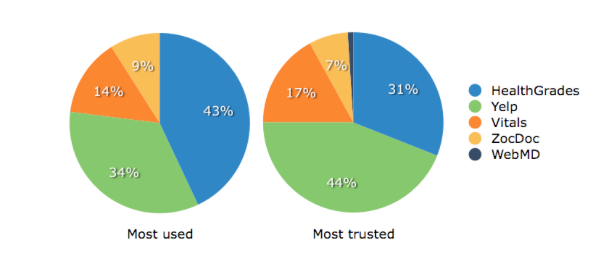
    Business Review Sites For Health Industry Pie Charts Image - Search Influence

    Healthcare providers should have a listing on the following directories:

    1. Yelp
    2. Healthgrades
    3. Google+ Local
    4. Vitals
    5. RealSelf
    6. RateMDs
    7. Facebook
    8. Twitter
    9. LinkedIn

    Ask customers to leave a review on their favorite site—never pressure them to write reviews on multiple sites.

    Be Genuine While Asking For Reviews

    Let your customers know that you would appreciate it if they could take a few moments of their time to share their experience on one of your company’s review sites, as their opinion matters not only to the company, but also to other customers. You can do this by saying something as simple as, “Do you read online reviews? We do, and so do other customers. That’s why we’d love it if you would take a few moments to review your experience.” Just be honest; the worst answer you will get is a “no.”

    Never Pressure A Patient For Reviews

    You should always request that patients rate their experiences, but never make them feel pressured to leave a review. Even if a customer is extremely satisfied with your services, writing an online review may be the last thing on their mind. However, if a client had a great experience with your business, they will probably be happy to share their thoughts when prompted. The best approach is to simply ask your most satisfied customers to add their positive feedback to one of your business review sites.

    Consider Your Customers

    If your customers are millennials, consider yourself lucky! Most millennials are already comfortable with sites that allow users to share experiences online, and they will likely be happy to share their thoughts on your business without much prompting. Bombarding customers under the age of 25 with requests to post a review will probably push them away. However, if you have older or less social media-savvy customers, they may require direct prompting.

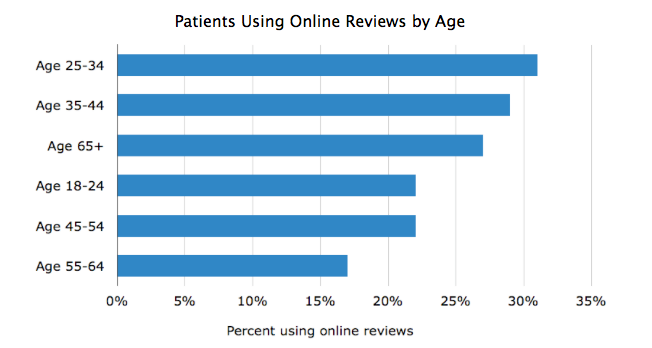
    Software Advice, a company that reviews practice management software, conducted a study to better understand online reviews and the processes of researching and writing these reviews. This study found that the largest age group of patients using online reviews ranges from ages 25–34, with males being 25% more likely to leave a review than females.

    Alt Text - Percent Of Patients Using Online Reviews By Age Bar Graph Image - Search Influence

    Don’t Ignore Negative Reviews

    While your overall goal is to gather good reviews, unsatisfied reviewers will inevitably make their way online to air their bad experiences. Bad reviews aren’t necessarily a business-killer; it’s how you handle the negative review or situation that defines the impact it will have on your business.

    Take note of negative reviews and respond to the criticism in a non-defensive manner. This can be done with a standard, generic reply that thanks the reviewer for the comment. Always ask the complaining patient to contact you directly so that you can further resolve his or her dissatisfaction offline.

    Take a negative review as an opportunity to better your customer service and your facility. Many negative patient reviews involve simple issues that can easily be resolved: long waiting times, issues with billing practices, lack of parking spaces, etc. If your complaints are targeting things that can easily be fixed, take advantage of this useful feedback to better your practice.

    Provide And Deliver Top-Quality Customer Service

    At the end of the day, the best path to having great reviews is to offer a great product and customer experience. If you’re doing everything you can to create a remarkable experience for your customers, there’s no harm in reminding them about the importance of sharing reviews.

    Image Sources:

    Most Used and Most Trusted Reviews Chart and Patients Using Online Reviews By Age Graph

    People Hate Us on Yelp


  • Five For Friday: Tweets Within Tweets, Foursquare Gets A Facelift, And More!

    FiveForFridayImage

    1. Personal Preferences Killed The Check-In
    -Mashable

    Once upon a time, Foursquare made “checking in” at a location cool. But as of its latest update on Wednesday (8/6), the app has completely removed that feature. Now, those who want to broadcast their location to their social media spheres can do so with Swarm, Foursquare’s spin-off app that debuted in May.

    So what does that mean for Foursquare 8.0? Well, the app has a completely remodeled user experience: new colors, new logo, new layout, and new functions. Once you login, the app asks about your preferences (Are you into Pho? What about Chai Lattes?), then uses those preferences to provide recommendations just for you about places nearby. The app also provides filters to help you narrow down your findings. By using these filters and profiling users’ tastes, Foursquare has successfully become a more personalized version of databases like Yelp, and could potentially change the way people explore their cities. Pretty epic.

    2. Get Your Google Reviews On Your WordPress Blog
    -Blumenthals

    For those with WordPress blogs and websites, there is now a plugin that allows you to share your Google reviews on your page! Google Places Review lets WordPress sites embed Google reviews in two ways: The free, basic version provides a widget in the sidebar showing up to 3 of your most recent Google reviews. The pro version, which is available for $20, provides up to 5 reviews on any page using short codes. The pro version also allows you to filter by star ratings, offers optimized widget caching, and includes a customizable feature for collapsing and expanding reviews. Presumably, posting your reviews on your site can help boost consumer confidence, while providing easy exposure to your good reviews. A recent study by Dimensional Research found that 90% of consumers are influenced by positive online reviews, so get out there and show the interwebs how great you are!

    3. #Tweetception
    -MediaBistro

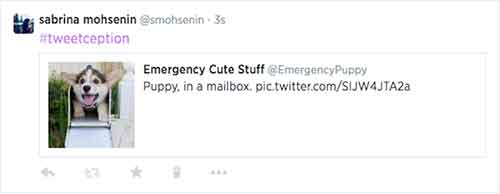
    For those who feel that retweeting simply isn’t enough, there was an interesting update from Twitter this past week: you can now embed a tweet within another tweet! All you have to do is copy and paste the URL of the tweet you want to embed, and then Twitter takes the wheel. The embedded tweet acts as a link that takes you through to the full version of that tweet (you can see my own #tweetception example below). The best part of this feature is that embedded tweets only use up the same amount of characters as any other shortened link, so you have roughly 115 free characters still left at your disposal.

    TwitterEmbedTweetImage

    If you want to get really fancy, the tweet-ception can go even further: you can embed a tweet that includes an embedded tweet into a brand new tweet (!)  – and they all link together in a chain. For now, this feature only functions on twitter.com and the official Twitter iOS and Android apps.

    4. Facebook Goes Down, So Does News Site Traffic
    -Marketing Land

    Last Friday (8/1), there was a brief Facebook outage that led to some interesting information. Chartbeat, a service that produces analytics for web publishers in real-time, announced that the overall traffic on news sites fell 3% during the downtime, which was ultimately less than an hour. What’s even more interesting is that the entrances to news sites via mobile devices dropped 8.5% during the outage, further proving just how important Facebook is to driving mobile traffic to online publishers. Another interesting factoid provided by Chartbeat shows there was also a “9% increase in homepage direct traffic,” meaning people look at homepages more when they don’t have Facebook to tell them what they should be reading. While all this information may seem fairly expected, it highlights just how powerful Facebook is as a news source.

    5.  You Can Now Delete Google Analytics Properties
    -SEO Round Table

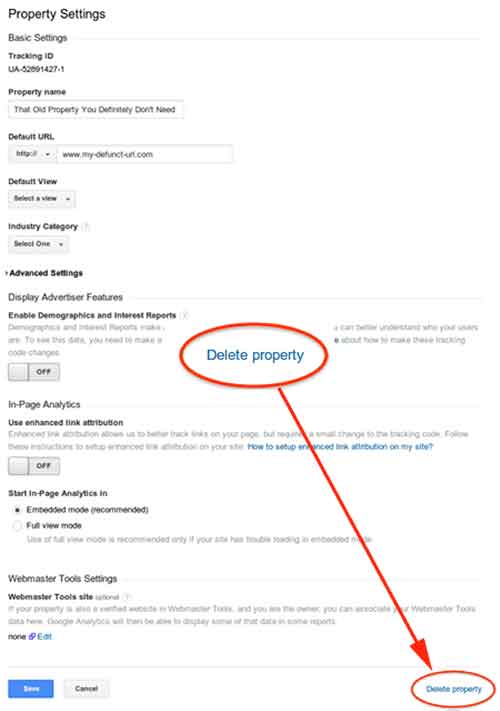
    This week (8/5), Google made a quiet announcement on its Google+ Page stating that you can now delete Google Analytics properties within your various accounts. In the announcement, Google explains that this was not previously allowed due to how the accounts, properties, and profiles were all associated with one another. According to Google, they are “excited to bring this additional flexibility and consistency to our users, which is the first in a series of improvements to managing deletions in Google Analytics.” If you want to delete a property, all you have to do is go to the property settings within admin view, then click “Delete Property” at the bottom right of the page.

    GoogleAnalyticsDeletePropertyImage

  • Getting Hands On With The New Google My Business

    Today, Google launched Google My Business. This new, more intuitive Google Places serves as a one stop shop for small businesses to do the normal Google Places work like updating business info, adding photos, connecting with customers through Google Plus posting, and staying on top of reviews. They also launched an Android app for managing Business Tools on the go (with the promise of an iOS app launching soon). Watch Google’s introductory video to Google My Business here.

    Changes For Users New and Old

    All new businesses to Google will start in Google My Business. As for current Google Places users, a blog post from Google earlier today said, “We’re also upgrading current users of Places for Business and the Google+ Dashboard to this new experience.” For those who just sat through and are still cleaning up the mess that was the upgrade to the new Google Places, don’t worry! You won’t have to go searching for which dashboard your listings are in or anything like that. It seems that Google My Business is a mostly superficial change that has already happened and just means a newer looking dashboard and a few extra features and controls (like easy access to Youtube, AdWords, and Analytics).

    Google My Business, Game Of Thrones Gif - Search Influence

    Quick & Easy Editing

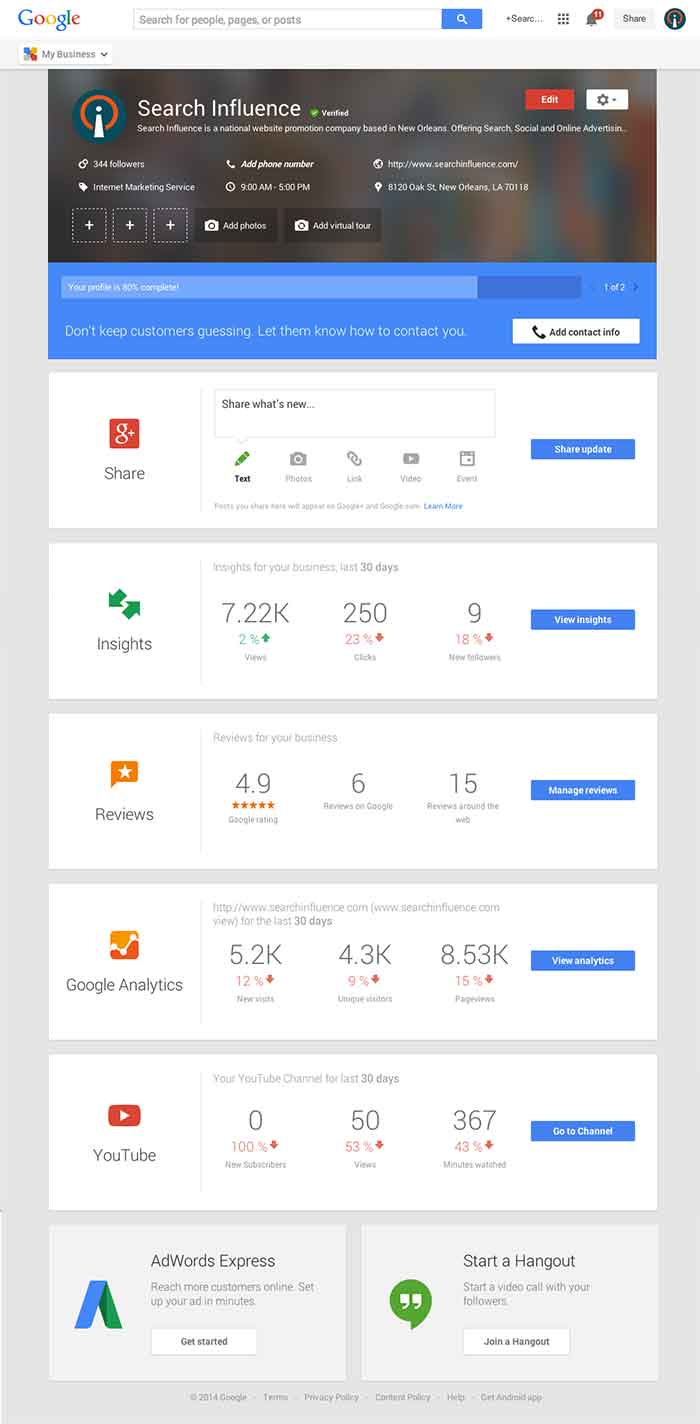
    These new features are pretty awesome. From your dashboard, first you’ll see the area for easily managing the individual aspects of your primary business information where previously you would have navigated through an “Edit Business Details” button. Connected to the bottom of this dialogue, there will be a blue box that allows you to edit the business information needed to get your profile to 100% complete. Google My Business has succeeded in using minor dashboard edits to make major usability improvements.

    Google My Business Dashboard Image - Search Influence

    Streamlined Sharing

    The next box is a basic G+ Share box for social posting to your business page. Share texts, photos, links, videos, and events easily all from one location. Side note: I recently found out, thanks to a post from Mike Blumenthal, that there is now an easy way to connect your business’ brand page to a location. So, if you have been posting socially from a Google Plus brand page for your business, you can now easily transfer that engagement into your verified local page.

    Google My Business Insights Tool Image - Search Influence  Google My Business Insights Followers Image - Search Influence

    New Data & Graphs

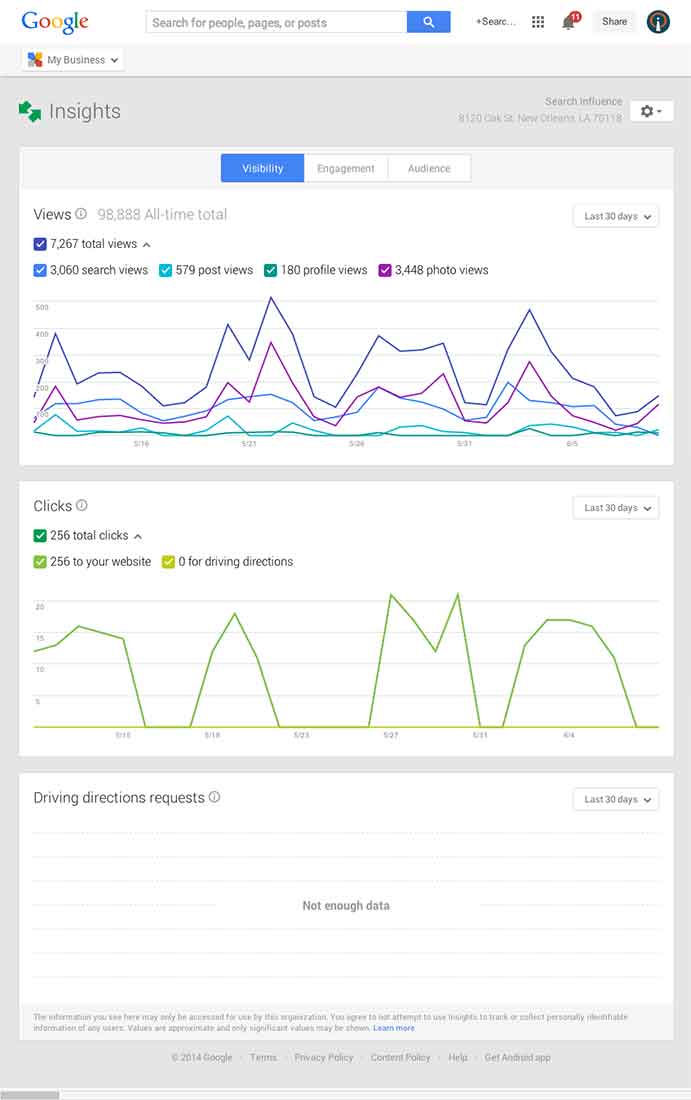
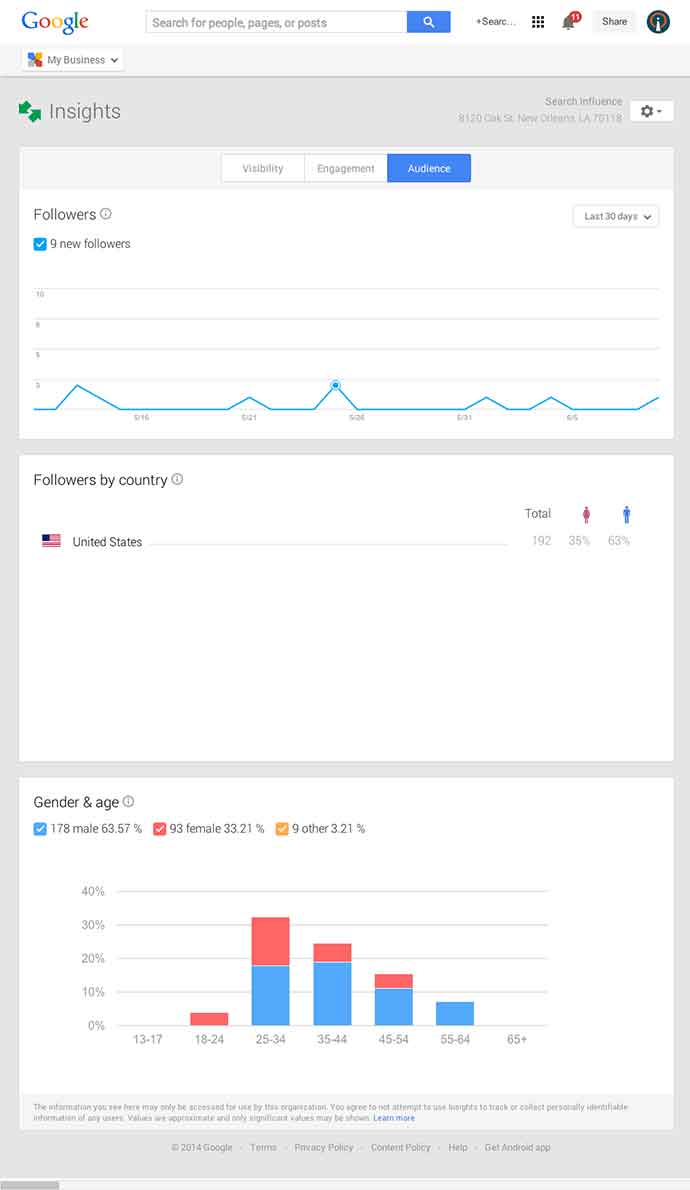
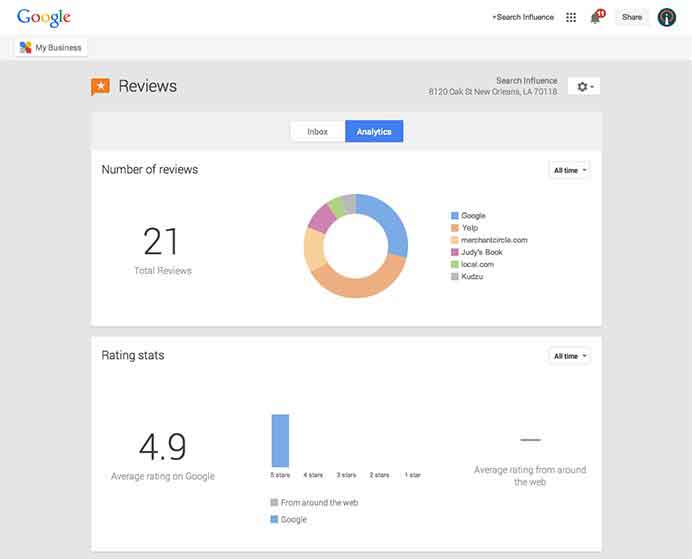
    Next, you’ll find the Insights Tool. Here, you can see how many views your G+ page has gotten over a period of time, how many clicks occurred, and where they went (either looking for Google Maps driving directions or directly to your website). The next feature (and my favorite addition to the Google My Business dashboard) is the reviews section. When you click into “Manage Reviews,” you’ll see your Google reviews as well as other business reviews from around the web. If you click “Analytics” at the top of this page, you can see a really streamlined graphical representation your review information or “Rating Stats” and where your business’ reviews come from.

    Google My Business Reviews Tool Image - Search Influence

    Additional Tools

    You will be able to see other tools like Google Analytics (if you have it installed on your site), YouTube (if you have a channel connected), and AdWords Express (again, if you use it). If you don’t use the above tools, they will still appear at the bottom of your dashboard with the option to “Get Started” if you want to use them! You’ll also see a place to “Join a Google Hangout” at the very bottom of your dashboard. All in all, the new Google My Business looks looks both beautiful and user friendly, presenting a new way to manage businesses’ online reputations through Google.